What's inside
- Where to buy
- Key Takeaways
- Quick Picks
- How did we judge the best routers for large homes and heavy users?
- Why do heavy households outgrow ordinary routers?
- How should a heavy household actually build its wired backbone?
- How do you count your household’s real device load?
- How should you plan node positions in a house that keeps defeating routers?
- When does a big home stop being a home network at all?
- How do you stress-test a big-house network before the return window closes?
- How do these six options stack up for a big, busy house?
- What mistakes do large-home buyers repeat most?
- Final Recommendation
- Frequently Asked Questions
- Related Guides
As an Amazon Associate I earn from qualifying purchases. This post may contain affiliate links at no extra cost to you.
gizmoverdict.com is reader-supported. When you buy through links on our site, we may earn an affiliate commission.
Where to buy
Hardware at this level is not an impulse purchase, so shop the six best routers for large homes and heavy users below the way you would shop a boiler: by specification first and badge second, through the linked listing on each name, where the pack size, the port list and the exact model code can be checked before money moves. Large-home gear also appears in warehouse clubs and electronics chains, occasionally in bundles with an extra satellite, and those bundles can be genuinely good value — but only when the model code matches the one reviewed here, because every maker in this guide sells a smaller sibling with a similar name and half the ports. If you are wiring a house around one of these systems, buy from a seller whose returns window covers your installation weekend. And measure your rooms before you fall for any reach figure: a tape measure now is cheaper than a satellite later, and it converts marketing into a plan.
The best routers for large homes and heavy users are not simply faster routers. A heavy household is a different species of network: two people working from home on video calls, a teenager gaming in a converted garage, cameras uploading around the clock, a media server feeding televisions, and a small crowd of phones, tablets and smart devices holding connections in every room. Meanwhile the house itself is the enemy — long floor plans, multiple storeys, brick and block walls, a modem stranded in the corner where the line enters. Equipment for this life is judged on three things that headline speed hides: how the coverage is built, node by node; what the wired side can carry, port by port; and how many clients the system can juggle before it starts dropping the quiet ones. This guide ranks six ways to build that network, from flagship quad-band mesh down to an honest budget floor, and it will tell you plainly where each one stops being enough.
One discipline runs through everything below. The coverage figures quoted are the makers’ own laboratory numbers — open spaces, favourable walls, no neighbours — and real houses tax them hard. A claim of 10,000 square feet might describe a genuine advantage over a claim of 5,500, but neither describes your hallway. Count nodes, count storeys, count the solid walls between the modem and the rooms that suffer, and treat every square-foot figure in this guide as a ranking hint rather than a measurement — the floor plan you draw yourself will out-predict every laboratory on earth. The heavy user’s real currency is ports, backhaul and client headroom, and those are the numbers we lean on. Read the port lists in this guide the way you would read the fuse box before buying a house: unglamorous, decisive, and expensive to discover late.
Key Takeaways
- The Orbi 970 is the ceiling of this category: quad-band WiFi 7, three units, a 10 gig port and a maker-rated 200-device capacity for houses that behave like small offices.
- TP-Link’s Deco 7 Pro BE14000 matches the flagship brief with tri-band WiFi 7 and the wired provision heavy users actually exploit, at a three-pack scale.
- A single powerful router — the BE6500 or the Archer AX73 — still wins in the right geometry: one central spot, heavy devices wired, no far wing to feed.
- The Orbi 770 two-pack is the measured middle: tri-band WiFi 7 relaying for big homes that do not need the 970’s fourth band or its price logic.
- The Deco S4 is the floor, and we say so without varnish: AC-class radios and gigabit ports will cover a large house cheaply and will not satisfy a heavy one.
- For heavy users, wired backhaul and multi-gig ports matter more than any aggregate speed printed on a box.
Quick Picks
| Pick | Badge | Why it earns its place |
|---|---|---|
| NETGEAR Orbi 970 | Flagship for the Biggest Homes | Quad-band WiFi 7 across three units with a 10 gig port, built for estates, annexes and houses full of people who all work from home. |
| TP-Link Deco 7 Pro BE14000 | Best Wired-First Mesh | Tri-band BE14000 mesh with 10-gigabit-class internet support and deep WAN/LAN provision for a house that runs cable everywhere it can. |
| TP-Link BE6500 WiFi 7 Router | Best Single Router, Modern | A dual 2.5G-port WiFi 7 standalone for heavy users whose layout lets one strong box, properly placed and wired, do the whole job. |
| TP-Link Archer AX73 | Best Single Router, Value | AX5400 WiFi 6 with long-range intent, for big-but-simple floor plans where the heavy lifting is done by Ethernet, not radios. |
| TP-Link Deco S4 | The Honest Budget Floor | AC1900 mesh that spreads basic coverage across a large house for very little, with limits this review states in daylight. |
| NETGEAR Orbi 770 2-Pack | Best Two-Node WiFi 7 | The 770 platform trimmed to a router and one satellite for large homes arranged around two good node positions. |
How did we judge the best routers for large homes and heavy users?
We defined “heavy” before we ranked anything, because the word does real work in this keyword. A heavy user is not someone with a fast plan; it is someone whose network is loaded in several directions at once — upstream as well as down, thanks to calls, cameras and cloud backups; wired as well as wireless, thanks to offices and media gear; and all day rather than in an evening spike. So the judging weighted the wired side first: how many ports, of what speed, on which units, and whether satellites can be wired back to the base so the radios stop relaying and start serving. A system that forces a big house to relay everything wirelessly is spending its best asset on plumbing.
Client capacity came second, and we treated the makers’ device counts as ceilings to compare rather than promises to repeat. A household with two hundred connected things is not exotic any more — it is a family with cameras, bulbs, plugs, speakers, appliances and four people’s worth of personal devices — and systems differ in how gracefully they hold that crowd. Third came the front door: a heavy household on a multi-gig plan needs a WAN port that can accept it, and the 10 gig and 2.5 gig ports in this guide mark the systems ready for that life. Coverage claims were recorded, attributed and then largely set aside, because node count and architecture predict a big house’s experience better than any laboratory acreage.
Finally, we kept two single routers in a mesh-heavy list on purpose. Some large homes are large in a simple way — one long floor, an open core, an office wired back to a central cupboard — and in that geometry a strong standalone router plus existing Ethernet beats a relay chain. The reviews below argue each case on its geometry, and the budget floor is included because pretending every large home needs flagship money would be a disservice: some need coverage more than muscle, and the S4’s review says exactly how far that bargain stretches.
We also read the listings the way a sceptical owner would. Where a maker quotes a reach, a crowd size or an aggregate speed, this guide repeats it as the maker’s figure and builds its argument on the parts of the specification that cannot be flattered: the number of units in the box, the bands each unit carries, the speed of the ports on its back, and whether a satellite can be wired. Those four facts, applied to your floor plan, predict a heavy household’s experience more reliably than any laboratory number printed in a larger font.
Why do heavy households outgrow ordinary routers?
An ordinary router fails a heavy household in stages, and the stages are diagnostic. First the far rooms go, because one radio cannot be in two wings at once. Then the busy hour goes: the router’s processor and airtime are shared, and when uploads from cameras collide with a video call and a game download, the least urgent traffic does not politely wait — everything stutters in turn. Then the wired side goes, quietly: a gigabit port that was fine for one PC becomes the ceiling for a whole office, and a NAS that should fly crawls at the speed of the slowest link in its path. By the time a household is shopping this guide, it has usually met all three stages and misdiagnosed at least one as an internet-provider problem.
The fixes map to the failures. Distribution — nodes near the people — answers the far rooms. A dedicated or wired backhaul answers the busy hour, by taking relay traffic off the client bands. Multi-gig ports answer the wired ceiling, and a processor and design rated for hundreds of clients answers the crowd. No single specification on a box captures any of this, which is why this guide reads port lists aloud and treats aggregate speed figures as the least interesting number in each listing.

NETGEAR Orbi 970 — Flagship for the Biggest Homes
The Orbi 970 series, listed here in its 2026-release three-pack form, is NETGEAR’s answer to the house that has stopped behaving like a house. The listing describes a quad-band WiFi 7 system rated by its maker for up to 10,000 square feet, up to 27 Gbps of aggregate throughput, and up to 200 devices, with a 10 gig port at the front. Take the square footage with the usual laboratory salt; the structural facts are the story. Four bands means the relay between units gets its own high-capacity lane while three bands serve clients, and a 10 gig port means the front door stops being the ceiling for multi-gig internet plans and for a wired backbone feeding switches in an office or media room.
Who is this actually for? The property with a main house and a converted barn on the same network. The five-bedroom home where three adults work remotely and the doorbell, cameras and heating all report in. The household that tried a mid-range mesh, watched the far satellite sag every evening, and is done compromising. In those lives, the 970’s proposition is that coverage and capacity stop being topics of conversation. Its satellites carry the same flagship radios as the base, so the far end of the house is not a lesser tier of the network, and the device ceiling is high enough that adding smart gear stops requiring arithmetic.
The cautions are proportionate to the ambition. This is the most expensive architecture in the guide, and its advantages concentrate exactly where smaller homes cannot use them: a flat or a compact house will never tax a fourth band, and a gigabit internet plan will never trouble a 10 gig port. NETGEAR’s fuller security and parental-control suites remain subscription offerings, so the running cost of the complete feature list extends beyond the hardware. And the physical units are substantial pieces of furniture-grade hardware that want open shelf space, not a cupboard. Buy it as infrastructure for a genuinely large, genuinely heavy household and it is the strongest system here; buy it for a three-bed semi and it is a monument.
- Class: quad-band WiFi 7 mesh, three units (router plus two satellites)
- Maker’s figures: 10,000 sq ft reach, 27 Gbps aggregate, 200 devices
- Front door: 10 gig port
- Position: the top of NETGEAR’s Orbi range in this guide
Strengths
- A dedicated high-capacity relay band keeps distant satellites fed under real household load.
- Multi-gig readiness end to end, from the 10 gig WAN side to fast wired hand-offs.
- Client headroom that absorbs a camera-and-automation habit without bookkeeping.
Trade-offs
- Flagship cost, with the fuller software suites adding subscriptions on top.
- Its reach and capacity are wasted on modest floor plans and single-gigabit plans.
- Large units need open placement in several rooms, which not every household will welcome.
Best for: very large, multi-storey or annexe properties with multi-gig service and a crowd of simultaneous heavy users.
Not suited for: ordinary family homes, where the Orbi 770 two-pack or a Deco three-pack covers the same life for far less commitment.

TP-Link Deco 7 Pro BE14000 — Best Wired-First Mesh
Where the Orbi 970 leads with a fourth band, this Deco leads with the wired side. The listing describes a tri-band BE14000 WiFi 7 system in a three-pack, with 10-gigabit-class internet support, eight streams, 320MHz channels, AI-driven roaming, a maker-rated reach of 8,100 square feet and capacity for 200 devices, and a notably deep provision of WAN/LAN ports. That port provision is the personality of the product. TP-Link is building for the house that runs cable: satellites wired back to the base, offices and media stacks plugged into nodes, a network that treats wireless as the last few metres rather than the whole journey.
Run that way, a tri-band system wired at every node behaves like a set of coordinated access points on a fast backbone, and the evening sag that plagues wireless relays largely evaporates. The 320MHz channels and eight streams serve the newest WiFi 7 devices at full enthusiasm near each node, while the AI-roaming behaviour tries to keep phones attached to the right unit as their owners move through the house. The 200-device ceiling, again a maker’s figure, places it in the same crowd class as the Orbi flagship, and the three-pack layout suits the long or tall house better than a two-pack at this tier.
Set against the 970, the argument is taste in architecture: a fourth band for wireless relaying versus deeper wired provision for houses that can cable. If your home has Ethernet in the walls or you are renovating and can add it, this Deco is the more exploitable machine. If the house must relay wirelessly across distance, the quad-band rival has the structural edge. TP-Link’s HomeShield tiers apply here as elsewhere in the Deco range — check which protections the listing includes and which sit in the paid tier — and the usual rule about maker coverage figures applies to the 8,100 square feet: a ranking hint, not a survey.
- Class: tri-band WiFi 7 mesh, BE14000, eight streams, three-pack
- Maker’s figures: 8,100 sq ft reach, 200 devices, 320MHz channels
- Wired side: 10-gigabit-class internet support, deep WAN/LAN provision per the listing
- Software named on the listing: AI-Roaming
Strengths
- Built to be wired: backhaul and desk gear can ride cable at every node.
- WiFi 7 throughput features, including wide 320MHz channels, across all three units.
- Flagship-class device capacity without the quad-band price logic.
Trade-offs
- Wireless-only installs lean on three bands where the Orbi 970 fields four.
- Getting its best requires cable runs some houses cannot easily add.
- Some Deco service features sit in paid tiers beyond the hardware.
Best for: large homes with Ethernet in place or planned, and heavy users who wire everything that sits still.
Not suited for: houses that must relay purely wirelessly over long distances, or buyers who want the network to need no thought at all.

TP-Link BE6500 WiFi 7 Router — Best Single Router, Modern
Not every large home is a mesh problem. This standalone WiFi 7 router — TP-Link’s BE400, in the BE6500 class — is the pick for the heavy user whose house is big in area but kind in shape: an open-plan core, a router cupboard near the middle, and heavy devices that can be wired. The listing gives it dual 2.5G ports, a USB 3.0 port, a quad-core processor, a maker-rated reach of up to 2,400 square feet and capacity for 90 devices, with HomeShield and a private IoT network among its named features. Two 2.5G ports on a single router is a meaningful spec: one takes a multi-gig internet feed, the other feeds a switch, a NAS or a wired office at matching speed, so the wired core of the house stops bottling at gigabit.
The private IoT network deserves a sentence of its own, because heavy households accumulate exactly the devices it exists for. Cameras, plugs and appliances of uncertain pedigree can live on their own segregated network, away from the laptops that hold your work, without the owner becoming a part-time network engineer. Ninety devices is an honest ceiling for a single unit — enough for a gadget-rich family, short of the mesh flagships’ crowds — and 2,400 square feet of maker-rated reach describes a strong single point of coverage, not a multi-node blanket. Place this router centrally, wire what sits still, and a great many large homes will never miss the satellites they did not buy.
The limits are geometric and absolute. One box cannot serve a far wing through three brick walls, and no setting changes that; if your suffering room is a converted garage or a top-floor study at the end of the house, this router will reach it weakly or not at all, and mesh is the honest answer. It also concentrates risk: when a single router is the whole network, its reboot is everyone’s reboot. Judged inside its geometry, though, it is the modern, multi-gig-ready way to run a heavy household without a relay chain, and its USB port gives the house a simple shared-storage or peripheral option that mesh nodes rarely match.
- Class: standalone dual-band WiFi 7 router, BE6500 (BE400)
- Ports: dual 2.5G, plus USB 3.0, per the listing
- Maker’s figures: 2,400 sq ft reach, 90 devices, quad-core processor
- Features named on the listing: HomeShield, private IoT network
Strengths
- Dual multi-gig ports let both the internet feed and the wired core run past gigabit.
- A segregated IoT network suits gadget-heavy homes with mixed-trust devices.
- One box to place, update and understand — no roaming behaviour to tune.
Trade-offs
- A single point of coverage; distant or heavily walled rooms are beyond its physics.
- Device ceiling sits well below the mesh flagships’ crowd capacity.
- No satellite path if the house later grows an annexe or a garden office.
Best for: heavy users in open or centrally served large homes who wire their serious devices.
Not suited for: long, tall or thick-walled houses where the far rooms are the whole problem.

TP-Link Archer AX73 — Best Single Router, Value
The Archer AX73 has been the sensible big-house router for years, and its recipe has not changed: AX5400-class WiFi 6, dual-band, gigabit ports, and a design brief that emphasises long-range coverage and streaming duty. In a guide full of WiFi 7 flagships it plays a specific role — the value standalone for the large home whose heaviness is wired. Picture the house with a central hall, an office and a media stack on Ethernet, and WiFi asked to serve phones, tablets and a couple of televisions. The AX73 covers that life comfortably, and its mature platform means its behaviour, its app and its quirks are thoroughly known quantities.
Its case rests on the arithmetic of enough. WiFi 6 with OFDMA-era efficiency handles a family’s wireless crowd without drama; gigabit ports match a gigabit plan and a gigabit wired core exactly; and the money saved against the WiFi 7 tier buys the cable runs, the switch or the extra year of internet service that a heavy household will feel more than a newer radio badge. For the streaming-led household — several televisions, no multi-gig ambitions, no annexe — the AX73 is not a compromise pick. It is the correctly sized one.
Its ceiling is equally clear, and heavy users should read it before buying. The ports are gigabit, so a faster plan or a multi-gig NAS link has nowhere to go. There is no mesh satellite story of its own in this listing’s terms, no 6GHz band, and a single unit still obeys single-unit geometry: the far wing problem remains the far wing problem. Households expecting to grow into multi-gig service or a sprawl of new WiFi 7 devices should buy the BE6500 above or step into mesh. Households whose shape and wiring suit it today will find the AX73 the calmest purchase in this guide.
- Class: standalone dual-band WiFi 6 router, AX5400
- Wired side: gigabit ports throughout
- Emphasis in the listing: streaming duty and long-range coverage
- Role: the value single-router option for wired-heavy homes
Strengths
- A proven, mature platform whose behaviour holds no surprises.
- Strong single-point WiFi 6 coverage for open, centrally served layouts.
- Frees budget for the wiring and switching that heavy homes feel most.
Trade-offs
- Gigabit ports cap both the internet feed and the wired core at that speed.
- No mesh expansion path within this pick, and no 6GHz or WiFi 7 headroom.
- Single-box geometry still loses to long, thick-walled floor plans.
Best for: large but simple layouts with wired offices and media gear, on gigabit-class plans.
Not suited for: multi-gig subscribers, annexe coverage, or households planning a WiFi 7 device fleet.
TP-Link Deco S4 — The Honest Budget Floor
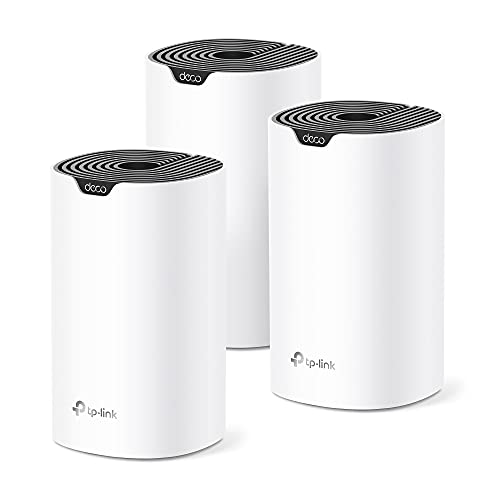
Every guide like this needs a floor, and the S4 is this one’s — included so that the cheapest way to cover a large house is described honestly rather than left to worse products. The listing describes an AC1900 mesh system in a three-pack, rated by TP-Link for up to 5,500 square feet, with gigabit ports and Alexa compatibility, replacing router and extenders in one managed system. What that buys a large home is real: three cooperating nodes, one network name, roaming instead of extender chaos, and coverage in rooms a single budget router would never reach. For the big, light-use house — browsing, messaging, a television or two, a relative’s emails — that is a complete answer at a fraction of flagship money.
Now the varnish comes off, as this guide promised. AC1900 is WiFi 5-era technology: no WiFi 6 efficiency tricks, so in a crowded house its airtime manners are noticeably older, and its dual-band relay shares spectrum between your devices and the node-to-node traffic, so far-node speeds sag exactly when the house gets busy. Gigabit ports are fine for the plans it suits, but the system has no multi-gig future. A heavy household — simultaneous calls, gaming, cameras uploading, a NAS working — will outgrow the S4 in a season, and its three nodes will not save it, because the limit is the radios and the relay, not the coverage.
So the S4’s verdict is a fork. If your large home is heavy on rooms and light on demand, buy it with confidence and spend the savings elsewhere. If your household matches this article’s title — heavy users — treat the S4 as the price of admission you will pay twice: once now, and again when you replace it with the system you needed. The floor exists to be stood on knowingly, not to be mistaken for the ceiling.
- Class: dual-band AC1900 (WiFi 5-era) mesh, three-pack
- Reach on TP-Link’s figures: 5,500 sq ft
- Wired side: gigabit ports; works with Alexa per the listing
- Role: the lowest-cost route to whole-home coverage in this guide
Strengths
- Three real mesh nodes for very little money, with one network name throughout.
- Simple management that suits a house that just needs coverage everywhere.
- Gigabit ports let a node wire a television or a desk in a pinch.
Trade-offs
- WiFi 5-era radios lack the airtime efficiency a busy household leans on.
- Shared-band relaying means the far node slows first at the busy hour.
- No upgrade path within the system for multi-gig plans or WiFi 6/7 devices.
Best for: large homes with light demand — coverage problems, not capacity problems.
Not suited for: heavy users as this guide defines them; simultaneous calls, gaming, cameras and servers will expose it quickly.

NETGEAR Orbi 770 2-Pack — Best Two-Node WiFi 7
The Orbi 770 platform appeared in our mesh roundup as a three-pack; this two-pack configuration — router plus one satellite — is the same tri-band WiFi 7 system trimmed for the large home that arranges itself around two good positions. NETGEAR rates this configuration for up to 5,500 square feet, up to 11 Gbps aggregate and up to 100 devices, with a 2.5 gig port. The architecture is the point: a dedicated relay band between the two units, WiFi 7 radios at both ends, and a device ceiling that suits a connected family house with room to spare.
Two-node systems live or die on placement, and this one rewards the house with a natural midpoint — the landing, the hall, the kitchen doorway — where the satellite can sit within strong earshot of the base while covering the far bedrooms. In that geometry the 770 pair behaves like a flagship: the far node is fed by its own band, new devices get WiFi 7 in both halves of the house, and the wired port on the satellite gives a desk or a console a proper connection. Where the layout is longer or taller, the honest move is the three-pack version or the 970 above, because a second satellite is a coverage decision, not a luxury.
Against the Deco BE14000, the contest is two nodes of NETGEAR polish versus three nodes of TP-Link wired depth; against its own three-pack sibling, this configuration simply trades reach for a lower commitment. The standing Orbi cautions apply: the fuller security and parental suites are subscriptions, and the 5,500 square feet is a laboratory figure to be discounted by your walls. For the large-but-not-vast heavy household — two floors, one clear midpoint, a multi-gig-ready front door on the roadmap — this is the balanced buy in the guide.
- Class: tri-band WiFi 7 mesh, two units (router plus one satellite)
- NETGEAR’s figures for this pack: 5,500 sq ft reach, 11 Gbps aggregate, 100 devices
- Front door: 2.5 gig port
- Architecture: dedicated relay band between the two units
Strengths
- Tri-band relaying keeps the single satellite fast where dual-band pairs fade.
- WiFi 7 at both ends of the house, not just beside the modem.
- A 100-device ceiling that fits a camera-and-gadget household honestly.
Trade-offs
- One satellite is one placement bet; awkward houses may need the three-pack instead.
- Subscription suites sit behind the hardware price for the full feature list.
- Coverage claims are the maker’s laboratory best case, as with every system here.
Best for: large two-storey homes with a natural midpoint for the satellite and a houseful of active users.
Not suited for: sprawling single-storey or three-storey layouts, where a second satellite is the correct spend.
How should a heavy household actually build its wired backbone?
Start at the modem and work outward, because the backbone is a chain and every link votes. The router or main mesh unit takes the internet feed on its fastest port. From there, one good cable to a switch in the office or media cupboard is worth more than any radio upgrade: switches are cheap, silent and honest, and they turn one fast port into a wired neighbourhood for the PC, the NAS, the console and the television. If your chosen system has multi-gig ports, match the switch to them; a gigabit switch behind a 2.5G port quietly reimposes the old ceiling on everything downstream.
Mesh satellites join the backbone wherever a cable can reach them — a run through the loft, a lead along the skirting, a professionally fitted point in the study. Each wired satellite stops relaying and starts serving, and the effect compounds: the remaining wireless satellite, if any, gets cleaner air because its wired siblings are no longer shouting relays across the house. Devices that sit still should be wired as a point of doctrine. A television, a desktop, a games console and a printer gain nothing from being wireless, and every one you cable is airtime returned to the phones and laptops that have no choice.
Finish by labelling and documenting like a person who will forget. Tag both ends of every run, note which port feeds which room, and keep the note with the router. Heavy households evolve — a room becomes an office, a garage becomes a studio — and the network that can be understood in five minutes is the one that gets extended gracefully instead of replaced in frustration.
How do you count your household’s real device load?
Do the audit before you shop, because heavy households routinely underestimate themselves by half. Walk the house with a notebook and count connections, not people. Start with the obvious: every phone, tablet, laptop, computer, television, streaming stick, console and e-reader. Then the infrastructure: cameras, doorbell, thermostat, smart speakers in each room, the printer, the NAS, any bridges for lighting or heating. Then the long tail that surprises everyone: bulbs and plugs counted individually, the washing machine and the oven if they report to an app, the car charger, the robot vacuum, watches, the fridge someone connected once and forgot. A four-person family home with a modest smart habit lands between sixty and a hundred and twenty without trying hard.
Now mark which of those devices are merely present and which are active at the busy hour, because the two numbers stress a network differently. Presence is a capacity question — the system must hold the association, keep the address list, and not drop the quiet bulb when the crowd logs on. Activity is an airtime question — the cameras uploading, the calls running, the television streaming, the console downloading, all at once at seven in the evening. Systems in this guide quote device ceilings in the presence sense, which is why a 90-device standalone can be the right buy for a house with 90 things but only a dozen active, while a 200-device mesh earns its ceiling in a house where forty things are awake and talking. Judge your own house on both numbers and the shortlist sorts itself with unusual honesty.
One more column in the notebook pays for itself: which devices could be wired and are not. Every camera on a powered Ethernet run, every television and console and desktop moved to cable, subtracts an active wireless talker and adds a silent wired one. Heavy households that do this audit usually discover their problem was never coverage alone — it was thirty chatty devices sharing two bands while a perfectly good switch sat with empty ports.
How should you plan node positions in a house that keeps defeating routers?
Draw the floor plan, even badly, and mark three things: where the internet enters, where the people actually sit with devices, and what stands between them. The materials matter more than the distances. Drywall and timber are mild taxes; brick and block are serious ones; concrete with steel reinforcement, foil-backed insulation, tiled bathrooms and large mirrors are close to walls in the radio sense. A node plan that works on the sketch is a chain where each link crosses at most one serious obstacle, and where no node is asked to hear the base through two of them.
Place for the chain, not for the rooms. The instinct is to put a satellite in the room that suffers; the craft is to put it at the last position where the signal from the previous node is still strong, which is usually a room earlier — a landing, a hall table, the top of a bookcase near the door. Height helps more than households expect: a node at head height on a shelf routinely outperforms the same node on the floor behind furniture, because it clears the clutter of bodies, sofas and appliances that fill the lower metre of every room. Keep nodes away from large metal objects, aquariums and the microwave’s wall, and give flagship units the open air their radios and processors both want.
Then verify like an engineer rather than a hopeful owner. With the system settled for a day, run the same speed test at the same five chairs at the busy hour, and also run one wired test from each satellite’s port: that wired number exposes the backhaul quality at that node with no wireless excuses. A satellite whose wired test is strong but whose room is slow has a local placement problem; a satellite whose wired test is weak has a chain problem, and the fix is moving it closer to its parent or cabling it. Write the results on the floor-plan sketch and keep it. When the house changes — and heavy households always change — that sketch is the difference between an adjustment and a fresh mystery.
When does a big home stop being a home network at all?
Some households cross a line where consumer mesh, however flagship, is the wrong tool, and recognising the line saves money. The signs are specific: wired access points already mounted on ceilings; a rack or a cupboard full of switching; a home business that must keep a guest network, a staff network and a family network genuinely separate; a dependence on the network such that an outage is a work incident rather than an annoyance. Past that line, the honest architecture is a wired router, managed switches and ceiling access points — equipment sold to small businesses, configured once by someone who enjoys it, and left alone for years.
None of the six picks here pretends to be that, and the guide’s flagships should be understood as the top of the consumer ladder rather than a substitute for the next one. The Orbi 970 and the Deco BE14000 will run a demanding house superbly; they will not give you the per-room wired access points, the managed VLANs or the ceiling-mounted discretion of a planned installation. Households near the line should also weigh who maintains the network. A consumer mesh can be reconfigured by any adult with the app; a small-business setup quietly appoints its installer as permanent staff. For most large homes — even heavy ones — that trade argues for staying consumer, buying the flagship tier, and wiring it properly.
The middle path deserves naming, because many heavy households end up on it: a flagship mesh system, wired at every node, with a decent switch at the core and the still devices cabled. That arrangement borrows the backbone discipline of the business setup while keeping consumer software and consumer forgiveness. It is, in practice, what the Deco BE14000 and Orbi 970 sections above are steering you toward, and for a house short of the rack-and-ceiling line, it is the destination rather than a compromise.
How do you stress-test a big-house network before the return window closes?
Give the new system one deliberate worst evening while you can still send it back. Schedule it: two video calls in different rooms, a 4K stream on the main television, a second stream or a large game download on another machine, the cameras doing whatever they do at dusk, and someone in the far room trying to work. This is not cruelty to the equipment; it is the ordinary Tuesday of a heavy household, compressed. Walk the house during it with a phone, run a speed test in the rooms that matter, and make one call from the far bedroom. Note what degrades, in what order. A system that holds the calls and the streams while the download slows is behaving correctly — bulk traffic should yield. A system where the call breaks up while a download feasts has its priorities wrong, and no firmware promise should talk you out of the evidence.
Change one variable at a time in response. If the far room failed, move its node a room closer or wire it, then repeat the same evening’s test rather than a gentler one. If the wired office felt slow while wireless rooms were fine, suspect the chain: the port, the switch, the cable — swap the cable before blaming the router, because cables fail silently and often. If everything sagged at once including a laptop wired to the main unit, run the provider test: that same laptop, that same hour, measuring the line itself. Heavy households misdiagnose provider congestion as router failure with impressive regularity, and the return window is too short to spend it exchanging innocent hardware.
Finish the trial by testing recovery, the quality nobody demos. Pull the power on a satellite and watch how the house behaves; restart the main unit and time how long the household is dark; check that the smart devices you care about rejoin without being nursed. A network for a heavy home is infrastructure, and infrastructure is judged on its worst ten minutes as much as its best. The system that passes your worst evening and recovers from a restart without a family conference is the one to keep, whatever its badge.
How do these six options stack up for a big, busy house?
| Pick | Form | Wired ceiling | Crowd and reach, per maker |
|---|---|---|---|
| NETGEAR Orbi 970 | Quad-band WiFi 7 mesh, three units | 10 gig port | 200 devices; 10,000 sq ft claim |
| TP-Link Deco 7 Pro BE14000 | Tri-band WiFi 7 mesh, three units | 10-gigabit-class support, deep port provision | 200 devices; 8,100 sq ft claim |
| TP-Link BE6500 (BE400) | Standalone WiFi 7 router | Dual 2.5G ports | 90 devices; 2,400 sq ft claim |
| TP-Link Archer AX73 | Standalone WiFi 6 router | Gigabit ports | Family-scale crowd; long-range single point |
| TP-Link Deco S4 | AC1900 mesh, three units | Gigabit ports | Light crowds; 5,500 sq ft claim |
| NETGEAR Orbi 770 2-Pack | Tri-band WiFi 7 mesh, two units | 2.5 gig port | 100 devices; 5,500 sq ft claim |
The wired-ceiling column is the one heavy users should read twice. It decides whether a multi-gig plan, a fast NAS or a wired office ever reaches its speed, and unlike the reach column it is not a laboratory estimate — a port either carries 2.5 or 10 gigabits or it does not. Match that column to your plan and your wiring first, then let the form column settle the geometry: nodes for sprawl, a single box for a kind layout.
What mistakes do large-home buyers repeat most?
Sizing by square footage leads the list, because the boxes invite it. A maker tests in an open plan; your house has a chimney breast, a foil-lined extension and a bathroom tiled like a Faraday cage. Two houses of identical area can need one node or four. Buy by nodes and walls, and keep the receipt until the far rooms have survived a busy week. The second mistake is the stranded modem: the line enters in a corner cupboard, the main unit goes in the cupboard, and the household pays flagship money to broadcast from the worst seat in the house. A longer cable to a central position is the cheapest upgrade in networking.
Third is the unwired satellite beside a wired television. Heavy households routinely leave a satellite relaying wirelessly while the TV next to it streams over WiFi too, when one cable would have fixed both. Fourth is buying the flagship for the plan you might get: a 10 gig port earns nothing on a 300-megabit service, and the money would have served better as a second satellite or a switch. Fifth is forgetting the crowd count — not the people, the devices. Count the house honestly, cameras and bulbs included, and if the total embarrasses you, choose the system whose ceiling you will not meet this year.
Final Recommendation
For the largest and busiest households, the Orbi 970 is the system that ends the conversation: quad-band relaying, a 10 gig front door and flagship capacity at every node. Households that can wire their satellites — the ones who will get the most from any system here — should look just as hard at the Deco 7 Pro BE14000, whose wired provision turns three nodes into a proper backbone with radios attached. Simpler geometries have cheaper correct answers: the BE6500 for the modern wired core, the Archer AX73 for the same job on a value ticket, and the Orbi 770 two-pack for the two-storey house with one good midpoint. The Deco S4 remains the floor for large homes whose demand is light, bought knowingly or not at all. Whatever you choose, spend the first weekend on placement and cable before you spend another penny on radios — in a big house, the network you wire is the network you keep.
A note on sequencing for households mid-renovation: if walls are open or floors are up, run cable first and choose the router second. A pair of Ethernet points in the right rooms is worth more than the gap between any two systems in this guide, it outlives all of them, and it converts the mesh question from a relay problem into a placement pleasure. Houses that wire during renovation routinely end up delighted with mid-tier hardware; houses that refuse cable routinely end up disappointed with flagships. The order of operations is the whole secret.
Frequently Asked Questions
How many mesh nodes does a large home really need?
One per floor is the starting rule, plus one for any long wing, annexe or known dead zone. Three-pack systems suit most large family homes; two-packs suit tall, compact houses arranged around a midpoint. Judge by a busy week, not by the first evening, and add a node only for a room that still fails after placement has been given a fair chance — nodes packed too closely can hinder roaming rather than help it.
Is a 10 gig port pointless on a gigabit internet plan?
For the internet feed itself, mostly — the plan is the ceiling. But the port also serves the house: a 10 gig or 2.5 gig link to a switch or a NAS moves local traffic, backups and media at speeds the plan never touches. Heavy households with local servers get real value from fast ports even on modest plans. Households without local gear can safely let the port be future-proofing rather than a reason to buy.
Can I mix a standalone router with mesh satellites later?
Only within a maker’s own ecosystem, and only where that ecosystem allows it — some router lines accept the same brand’s mesh units as satellites, many do not. If you think the house will grow, buy into the family whose expansion path you have actually checked, model by model. A standalone router bought today can usually retire to access-point duty in a lesser room, but it will not join a rival brand’s mesh, ever.
Why does my far room still crawl after installing mesh?
Three causes cover nearly every case. The satellite sits in the dead zone instead of at the edge of the good one, so it relays a weak signal faithfully. The backhaul is wireless and shared, and the busy hour exposes it — wire that satellite or move it closer. Or the bottleneck was never the WiFi: a wired test at the main unit will show whether the line itself, the modem or a gigabit link in the chain is the real ceiling.
Do heavy households need a separate network for smart devices?
It is good hygiene rather than a necessity, and one pick here — the BE6500 — builds a private IoT network in as a named feature. Segregating cameras, plugs and appliances keeps bargain gadgets away from the laptops that hold your work, and it costs nothing but a few minutes of setup. Mesh systems generally offer guest networks that serve a similar purpose for visitors’ devices.
How long should a system at this level last?
Plan on five years or more, which is exactly why the port speeds and device ceilings in this guide matter: they are the specifications a household outgrows, while radio badges age more gracefully. Keep firmware updates automatic, note the purchase date, and review the setup when your internet plan changes speed — a faster plan is the moment a gigabit front door quietly becomes the wrong one.
Should the main unit live where the internet line enters?
Only if that spot is also central and open, which it rarely is. A longer Ethernet lead from the modem to a better position — the hall, the landing cupboard with the door ajar, the middle of the house — is the cheapest coverage upgrade available to a large home, and it improves every satellite downstream of it. Where the modem cannot be bridged or moved at all, a main unit in the corner can still anchor a good system, but expect to spend one extra node compensating for the geometry, and budget for it from the start rather than discovering it in week two.
Related Guides
If your shortlist is narrowing toward whole-home systems in general, best mesh routers compares the current generations tier by tier. Households whose real pain is the evening streaming pile-up will find the concurrency maths in best routers for streaming and multiple devices, and those on fibre service should read best fiber optic modems and routers before assuming a new box can change what the line delivers.


