What's inside
- Key Takeaways
- Quick Picks: M.2 SATA Drives at a Glance
- How Did We Assemble a Shortlist in a Shrinking Class?
- How Can You Tell Whether Your Slot Wants SATA or NVMe?
- How Should You Buy in a Class That Is Quietly Disappearing?
- Comparison Table: The M.2 SATA Field, Such As It Is
- Which Machines Still Genuinely Need This Class?
- What Does the SATA Ceiling Actually Feel Like in Daily Use?
- How Do You Install an M.2 SATA Drive and Clone the Old Disk?
- Which Mistakes Send M.2 SATA Buyers to the Returns Desk?
- How Long a Second Life Should You Plan For?
- Final Recommendation
- Frequently Asked Questions
- Related Guides
As an Amazon Associate I earn from qualifying purchases. This post may contain affiliate links at no extra cost to you.
gizmoverdict.com is reader-supported. When you buy through links on our site, we may earn an affiliate commission.
Where to buy: the drives below link to their Amazon listings, and on this class of hardware the listing page matters more than usual — confirm the interface wording, the keying and the exact capacity before ordering, then check price on Amazon at the same visit, because older stock like this moves in small batches and listings change hands.
This guide begins with the sentence most buying guides would bury: the best m2 sata ssds are a legacy class in 2026, and if your machine can take an NVMe drive, you should buy an NVMe drive instead. M.2 SATA survives for one honourable reason — a large population of laptops, mini PCs, industrial boards and older desktops whose M.2 slot speaks only SATA. Those machines cannot use the faster protocol no matter what the connector looks like, and for their owners a good M.2 SATA drive is not a compromise but the difference between a machine that crawls on a dying hard drive and one that feels alive again.
The trap this class sets is physical. An M.2 SATA stick and an M.2 NVMe stick share a silhouette and nearly share a connector, yet they are not interchangeable: plug the wrong one into a slot and the machine will simply not see it. The notches in the connector edge — the keys — carry the clue, and the sections below teach you to read them. Stock in this class is also thin and ageing: the field is led by two established lines from Samsung and Western Digital that date from the class’s prime, joined by value brands keeping the form factor supplied, and one discontinued Crucial model we discuss honestly as prose rather than pretend you can still buy it everywhere.
One more framing note before the names, because it decides how to read everything that follows: this guide will not pretend these drives compete with modern NVMe hardware, and it will not apologise for them either. A legacy class judged honestly — against the machines it serves, the work those machines do and the years they have left — produces recommendations that age well. A legacy class dressed in flagship language produces returns, disappointment and forum threads. We have chosen the first kind of guide, and the picks below are ordered by the trust they have earned rather than by any number the interface renders meaningless.
Speed expectations should be set by physics, not hope. SATA’s ceiling sits around 560 MB/s, and the listings here cluster exactly there — up to 560 MB/s on the WD Blue 3D NAND, up to 555 MB/s on the SA510, up to 550 MB/s on the OSCOO. Against a hard drive that is a transformation; against NVMe it is a different sport. Buy these drives to resurrect a specific machine, and they will delight you. Buy one by accident for an NVMe slot, and nothing in this guide can save the afternoon.
Key Takeaways
- M.2 SATA and M.2 NVMe are different protocols sharing a shape; a slot that speaks only one will ignore the other completely.
- The notch pattern is the visible clue: SATA M.2 drives are commonly B+M keyed, while NVMe drives are typically M keyed — but the manual, not the notch, is the final authority.
- Every drive here is capped by SATA itself near 560 MB/s, so choose on capacity, maker support and availability rather than rated pace.
- This class exists to serve SATA-only slots in older laptops, mini PCs and industrial machines; NVMe-capable machines should shop elsewhere.
- Stock is thin and the famous lines are ageing, so buying from a listing you have verified carefully matters more than usual, ideally from a seller whose returns process you have read before you need it.
- The discontinued Crucial MX500 M.2 gets an honest prose mention; its 2.5-inch sibling carries the same idea in a different shape.
Quick Picks: M.2 SATA Drives at a Glance
| Pick | Badge | Why it made the cut |
|---|---|---|
| Samsung 860 EVO M.2 SATA 500GB | The class benchmark | Samsung’s V-NAND line defined this category, and the 500GB size is the one most surviving machines actually need. |
| WD Blue 3D NAND M.2 SATA 500GB | The mainstream alternative | Western Digital’s 3D NAND drive with a printed 560 MB/s ceiling and the support depth of a major maker. |
| WD Blue SA510 M.2 SATA 250GB | The later WD line | The SA510 generation at a boot-drive size, rated up to 555 MB/s for machines that need revival more than room. |
| OSCOO 512GB M.2 SATA | Value supply line | A B+M key value drive that names its mini-PC and industrial habitats and warns plainly that it is not NVMe. |
| ORICO 512GB M.2 SATA | Low-power value route | ORICO’s B+M key entry, sold on low power consumption and equally blunt about NVMe incompatibility. |
| Samsung 860 EVO M.2 SATA 250GB | Small-size benchmark | The same Samsung line at 250GB, for boot-duty revivals where capacity is genuinely secondary. |
How Did We Assemble a Shortlist in a Shrinking Class?
Honestly, and from a smaller shelf than any other guide in this batch. The first filter was protocol purity: only drives whose listings unambiguously describe M.2 SATA — SATA III 6 Gb/s over the M.2 connector — qualified, because this class’s entire hazard is ambiguity. The second filter was provenance: established lines with real support histories first, then value brands whose listings describe their own product accurately, including the incompatibility warnings we came to value as a honesty signal.
Capacities cluster at 250GB to 512GB because that is what the class’s surviving machines ask for: boot drives and revivals, not libraries. We included two sizes of the Samsung line deliberately, since it is the class benchmark and buyers meet it at both sizes. One famous name appears without a link at all. The Crucial MX500’s M.2 version has been discontinued, and a guide that quietly linked a ghost would betray the honesty this article is built on; it is covered in prose below, with its still-living 2.5-inch sibling named as the practical alternative.
Every speed figure is the SATA-era figure from the listing, and all of them bow to the same interface ceiling. When every drive in a class runs at the bus limit, the buying questions change: whose firmware is trustworthy, whose stock is real, and whose listing tells the truth about what the drive is not.
How Can You Tell Whether Your Slot Wants SATA or NVMe?
Start with the manual, because it is the only witness that never lies. Your laptop or motherboard documentation lists each M.2 slot’s supported protocols in its specifications table; the words to find are “SATA”, “PCIe” or “NVMe”, and many slots from the transition era support both, which is the happiest outcome — a dual-protocol slot takes either drive, though it will run a SATA drive at SATA pace. If the manual is lost, the maker’s support page for your exact model carries the same table, and five minutes there outperforms any amount of squinting at connectors.
The keying offers a clue when documentation fails. M.2 sticks carry notches that prevent some wrong insertions: NVMe drives are typically M keyed, with a single notch near one end, while SATA drives are commonly B+M keyed, notched at both positions so they can fit either slot style. A B+M keyed stick in your hand is therefore a strong hint you are holding a SATA drive — but treat it as a hint, because keying describes the connector’s shape, not a guarantee about the slot’s wiring, and the era produced exceptions.
A fourth witness lives inside the machine’s current configuration. If the M.2 slot already holds a drive, its label states the protocol outright, and matching a replacement to a working predecessor is the safest shopping in this entire class. If the slot is empty, a close look at the connector’s keying — photographed and compared against your manual’s diagram — can corroborate what the documentation says, though it should never be the only evidence you act on.
The machine’s age offers the third clue. Laptops and boards from the middle of the last decade, when M.2 was new, very often shipped SATA-only slots even in premium models, because NVMe support arrived unevenly across chipsets. Mini PCs and industrial boards kept SATA-only designs longer still, for cost and compatibility reasons. If your machine predates the NVMe era’s maturity, assume SATA until the manual proves otherwise — the drives in this guide exist because that assumption is right so often.
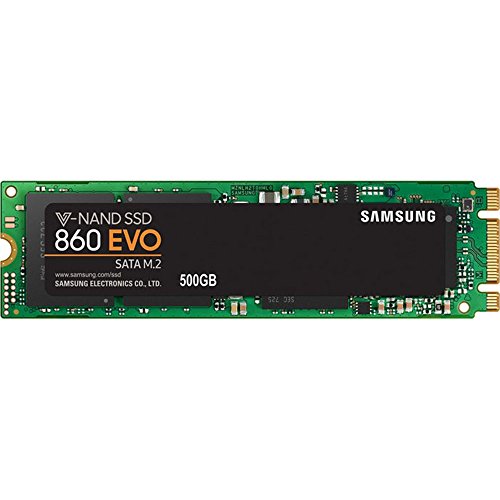
Samsung 860 EVO M.2 SATA 500GB — The class benchmark
If this class has a reference drive, it is this one. The 860 EVO line carried Samsung’s V-NAND technology — named right on the listing — into the M.2 SATA form, and it became the default answer for a generation of laptop upgrades. The 500GB capacity is the size that suits the class’s real work: a Windows installation, a working set of applications, and a documents-and-photos life, in a machine whose owner wants it to feel new again rather than become a media vault.
What Samsung brought to SATA, beyond competent hardware, was the ownership wrapper: Magician software for health and firmware, a cloning tool that made the hard-drive-to-SSD migration a guided process, and firmware that behaved predictably in machines from every major maker. In a class where the interface caps everyone’s speed, that wrapper is not garnish — it is most of the product, and it is why this ageing line still anchors the guide.
The honest cautions are about the calendar. This is an older product line in a shrinking class, so listings may represent remaining stock rather than fresh production, and buyers should verify the seller and the exact model code — MZ-N6E500BW, as printed on the listing — before ordering. None of that diminishes what the drive does in the machine it was born for; it simply asks for the careful purchasing this whole class demands.
In service, expect the classic SATA revival: boot times that fall from minutes to seconds, applications that open when clicked, and an old laptop that stops feeling like an apology. That transformation, not any benchmark, is the product being sold here, and the 860 EVO delivers the most polished version of it this class offers.
One ownership habit suits this drive particularly: because so many of its host machines are laptops entering a second life, set the machine’s backup routine at the same time as the upgrade. A revived laptop full of fresh confidence tends to accumulate the family’s only copies of things, and the EVO’s reliability is a reason to trust it daily — never a reason to let it be the sole home of anything irreplaceable.
- Interface: M.2 SATA (SATA III), M.2 2280
- Technology named on the listing: Samsung V-NAND
- Model code: MZ-N6E500BW
- Capacity in this guide: 500GB
- Software: Samsung Magician and migration tooling
Strengths
- The most polished ownership experience in the M.2 SATA class.
- Proven compatibility across the era’s laptops and boards.
- 500GB is the right size for the revival work this class does.
Trade-offs
- Ageing line; verify the seller and model code carefully before ordering.
- SATA ceiling applies to it exactly as to every rival here.
- Positioning reflects its benchmark status rather than value leadership.
Best for: owners reviving a SATA-only laptop or board who want the class’s reference drive. Not suited for: any machine with an NVMe-capable slot, which should never buy SATA on purpose.

WD Blue 3D NAND M.2 SATA 500GB — The mainstream alternative
Western Digital’s answer to the 860 EVO was the WD Blue line built on 3D NAND, and this M.2 2280 version prints the class’s defining number on its listing: SATA III 6 Gb/s, up to 560 MB/s, model WDS500G2B0B. That 560 figure is the SATA interface clearing its throat — no drive in this guide meaningfully exceeds it — and WD’s honesty in printing it as a ceiling rather than a promise is the right way to read every specification in this article.
The Blue line’s character is mainstream dependability. It was sold in enormous volumes into exactly the laptops and desktops this class now serves, which means its behaviour in old machines is a thoroughly explored subject: firmware quirks documented, compatibility known, support channels real. For an owner whose technical ambition begins and ends with “make the old machine fast again,” that explored-ness is worth as much as any specification.
Against the Samsung it trades a little software polish for Western Digital’s own support ecosystem and, depending on the day’s listings, friendlier positioning. Against the value brands below it offers the reassurance of a maker whose warranty process is a known road rather than an adventure. In a shrinking class, that reassurance has genuine scarcity value.
Fitting is the standard M.2 ritual — one screw, a shallow angle, no force — with the class-wide warning repeated: confirm your slot speaks SATA before this or any drive here is ordered for it. In the right slot, the WD Blue performs the revival with the minimum of drama, which is the mainstream brief executed exactly.
There is a fleet angle worth naming for this drive: offices and schools holding dozens of same-era laptops often standardise on a single drive model for spares and imaging, and the Blue’s enormous installed base made it the default choice for that unglamorous, sensible purpose. A home buyer inherits the benefit — a drive whose behaviour in their exact machine has likely already been documented by someone’s IT department.
- Interface: SATA III 6 Gb/s, M.2 2280
- Maker-rated speed: up to 560 MB/s (from the listing)
- Model code: WDS500G2B0B
- Capacity in this guide: 500GB
- Line: WD Blue 3D NAND generation
Strengths
- Major-maker support and a thoroughly documented compatibility history.
- Printed ceiling matches the interface’s real limit — honest specifications.
- A calm, drama-free revival drive for mainstream machines.
Trade-offs
- Software ecosystem a step behind Samsung’s polish.
- Same SATA ceiling as everything else here, by definition.
- Ageing line; buy from a listing you have read carefully.
Best for: mainstream revivals where a known maker matters more than the last word in software. Not suited for: buyers whose slot turns out to be NVMe-only — check before ordering anything in this guide.

WD Blue SA510 M.2 SATA 250GB — The later WD line
The SA510 is Western Digital’s later SATA generation, and its listing tells a tidy story: 250GB, SATA III 6 Gb/s, M.2 2280, up to 555 MB/s, model WDS250G3B0B. Two things distinguish it from the older Blue above. It is the newer line, which can matter for stock freshness in a shrinking class, and it is the smaller size, which frames it honestly as a boot-and-basics drive rather than a home for a media collection.
Who is a 250GB drive actually for, in a world of enormous everything? More people than the capacity race admits: the office laptop that lives in documents and browsers, the elderly desktop whose owner streams rather than stores, the point-of-sale or kiosk machine whose entire digital life is one application and an operating system. For those machines, capacity beyond a quarter terabyte is not headroom but waste, and a newer-generation drive at the right size is the rational purchase.
The discipline this size imposes should be named plainly. Windows plus a working set of applications will occupy a real share of 250GB, and the owner must keep the drive’s free space healthy — the same fifth-of-the-drive headroom every SSD appreciates — rather than treating it as a dumping ground. Owners who know their habits are expansive should step up to the 500GB picks instead of hoping discipline will arrive with the drive.
Within its brief, the SA510 is easy to recommend: current-generation WD SATA engineering, an honestly printed ceiling, and a size matched to the machines that genuinely need reviving rather than enlarging. It is the class’s common sense in product form.
Point-of-sale and kiosk builders should note the SA510’s particular fit: those machines are imaged once, locked down, and expected to boot identically for years, and a current-generation drive from a major maker — bought in matched small batches while the line is alive — is exactly how professionals provision them. The home buyer at the same size is simply borrowing the professionals’ logic.
- Interface: SATA III 6 Gb/s, M.2 2280
- Maker-rated speed: up to 555 MB/s (from the listing)
- Model code: WDS250G3B0B
- Capacity in this guide: 250GB
- Line: WD Blue SA510, the later SATA generation
Strengths
- Newer-generation line in a class where stock freshness matters.
- Right-sized for boot-and-basics machines that dominate this class.
- Major-maker support behind a modest purchase.
Trade-offs
- 250GB demands honest habits about free space.
- Media collectors will outgrow it quickly.
- Rated ceiling a hair below the older Blue’s printed figure.
Best for: office, kiosk and light-duty machines needing a modern boot drive. Not suited for: anyone whose photo or game library must live on the same drive.

OSCOO 512GB M.2 SATA — Value supply line
When the famous lines thin out, value brands keep a class alive, and OSCOO’s 512GB entry is written the way this guide wishes every value listing were written. It states its shape plainly — M.2 2280 SATA, B+M key, SATA III 6Gbps, up to 550MB/s — names its intended habitats, which include mini PCs, the major laptop makers’ machines, all-in-ones and industrial and point-of-sale systems, and then prints the warning the whole class needs in plain sight: not for NVMe PCIe slots. A maker that tells you who should not buy its product is a maker whose other claims deserve a hearing.
The B+M keying deserves its paragraph, because it is this drive’s quiet virtue. A stick notched for both key positions fits the widest range of M.2 slots mechanically, which matters in the mixed, ageing fleet this class serves, where slot styles vary by maker and year. Mechanical fit is not protocol permission — the slot must still speak SATA — but in machines where both conditions hold, the dual-key design removes one whole category of ordering mistake.
Expectations should be set at the class’s honest level. The rated ceiling sits a fraction below the big brands’ printed figures, the support ecosystem is a value brand’s rather than a giant’s, and the buyer is trading wrapper for availability and positioning. For an industrial board, a mini PC revival or a second machine, that trade is frequently the correct one — the alternative is often no drive at all, as the established lines’ stock comes and goes.
Buy it the way you should buy everything in this class: read the listing’s own compatibility language twice, match the keying and protocol to your manual, and keep the packaging until the machine has booted happily for a week.
The industrial naming on its listing is worth a second thought from home buyers too. A drive marketed to point-of-sale and embedded buyers is a drive whose maker expects it to be installed and ignored for years in machines nobody benchmarks — an unfashionable virtue that maps surprisingly well onto the family mini PC and the relative’s laptop you support by telephone.
- Interface: M.2 2280 SATA III 6Gbps, B+M key
- Maker-rated speed: up to 550 MB/s (from the listing)
- Capacity in this guide: 512GB
- Habitats named on the listing: mini PCs, major-brand laptops, all-in-ones, industrial and POS systems
- Warning printed on the listing: not for NVMe PCIe slots
Strengths
- B+M keying maximises mechanical fit across the ageing fleet.
- Listing language is admirably blunt about what the drive is not.
- Keeps the class supplied where the famous lines have thinned.
Trade-offs
- Support ecosystem is a value brand’s, not a giant’s.
- Rated ceiling sits slightly below the major makers’ figures.
- Long-term firmware attention is less certain than Samsung’s or WD’s.
Best for: mini PCs, industrial boards and revivals where the big lines are out of stock. Not suited for: buyers who want a major maker’s warranty road and software suite.

ORICO 512GB M.2 SATA — Low-power value route
ORICO is better known for enclosures and docks than for the drives that go in them, and its Y20M entry into this class leans on a virtue the famous lines rarely advertise: low power consumption, printed on the listing as a headline trait. The rest of the specification is class-standard and stated without embroidery — M.2 2280 SATA, 512GB, B+M key, SATA III 6Gbps — followed by the same honesty marker we praised above, this time in parentheses: PCIe NVMe incompatible.
Low power is not a trivial virtue in this class’s habitats. The machines M.2 SATA serves include fanless mini PCs, industrial systems in warm enclosures and laptops whose batteries have already lived a life; in those homes, a drive that sips rather than gulps runs cooler, stresses nothing, and asks nothing of cooling that may not exist. It will never headline a benchmark chart, and it was never meant to.
The trade-offs mirror the other value entry, with a different accent. ORICO’s name carries weight in accessories, less in NAND products, so the buyer is trusting the listing’s plainness and the platform’s returns process more than a storage pedigree. For a primary machine holding irreplaceable data, this guide steers you to Samsung or WD above; for the second machine, the media box, the industrial revival, the Y20M’s proposition is coherent and its price of admission is the class’s friendliest territory.
One practical note applies to both value picks: capacities printed as 512GB in this corner of the market are genuine and slightly roomier than the 500GB majors, a small dividend of the value brands’ sizing conventions that boot-drive buyers will appreciate across years of Windows updates.
ORICO’s enclosure heritage cuts both ways in an interesting direction: the company understands the external-drive afterlife that awaits many of these sticks, and owners who later upgrade again will find the Y20M an easy resident for a SATA-protocol USB enclosure. A drive with a planned second career is a better purchase than one headed for a drawer, and this one’s path is unusually well signposted.
- Interface: M.2 2280 SATA III 6Gbps, B+M key
- Model: Y20M, as printed on the listing
- Headline trait on the listing: low power consumption
- Capacity in this guide: 512GB
- Warning printed on the listing: PCIe NVMe incompatible
Strengths
- Low-power design suits fanless and thermally tight machines.
- 512GB sizing gives a small but real capacity dividend.
- Plain listing language, including the incompatibility warning.
Trade-offs
- Maker’s pedigree is in accessories rather than storage.
- Support and firmware ecosystem are value-tier.
- Not the choice for a primary machine holding irreplaceable data.
Best for: fanless mini PCs, secondary machines and gentle revivals on a budget. Not suited for: your one and only computer, where the majors’ support depth earns its premium.

Samsung 860 EVO M.2 SATA 250GB — Small-size benchmark
The second Samsung in this guide is the same 860 EVO line at half the capacity — 250GB, model MZ-N6E250BW — and it earns its separate place because the small-size decision is a real one in this class. A substantial share of M.2 SATA revivals are boot-drive operations: the machine has a hard drive bay or a second storage path for bulk files, and the M.2 slot’s job is purely to hold the operating system and applications at a size where speed, not room, is the entire point.
For that job, the small EVO offers the full Samsung wrapper — V-NAND as named on the listing, Magician support, the guided migration path — in the class’s most trusted package, sized to the task. An old laptop with a SATA M.2 slot for the system and a 2.5-inch bay for a bulk drive is the canonical build, and it remains one of the most satisfying upgrades in all of personal computing: a machine written off as finished, returned to daily service for the cost of a modest drive.
The discipline warning from the SA510 applies here in Samsung colours: a quarter terabyte fills faster than optimism predicts, and Windows’ own growth across years of updates is the main tenant. Keep bulk media elsewhere, keep a healthy slice free, and the small EVO will behave like its big sibling indefinitely.
Choose between the two EVOs by answering one question honestly: will anything beyond the system and its applications live on this drive? If yes, the 500GB version above is your pick and this one is a false economy. If genuinely no, the 250GB drive delivers the identical revival for less, and the saving belongs in the machine’s RAM or battery.
A final scenario crowns this small drive’s usefulness: the hand-me-down machine. A laptop passing to a student or a parent needs reliability more than room, a clean system on a trustworthy drive, and nothing about its previous life carried over. The small EVO, freshly installed rather than cloned, is the thoughtful heart of exactly that gift.
- Interface: M.2 SATA (SATA III), M.2 2280
- Technology named on the listing: Samsung V-NAND
- Model code: MZ-N6E250BW
- Capacity in this guide: 250GB
- Software: Samsung Magician and migration tooling
Strengths
- The class benchmark’s full wrapper at a boot-drive size and tier.
- Perfect partner for dual-drive revivals with a bulk bay.
- Samsung’s firmware and support depth behind a small purchase.
Trade-offs
- Capacity discipline is mandatory, not optional.
- False economy if your files must live on the same drive.
- Same ageing-line stock cautions as its 500GB sibling.
Best for: dual-drive revivals and pure boot-drive duties in SATA-only machines. Not suited for: single-drive machines with growing libraries, which need the 500GB class.
Crucial MX500 M.2 — The one that got away (prose-only)
This pick is discussed without a purchase link, because the drive it describes is no longer something we can honestly send you to buy: the M.2 SATA version of Crucial’s MX500 has been discontinued, and any listing you encounter should be verified with unusual care before money moves. It belongs in this guide because for years it was the value benchmark of the entire class — the drive reviewers reached for when a reader asked for M.2 SATA done right at a fair tier — and owners shopping to replace or match an existing MX500 deserve a straight account of its status rather than silence.
The practical path the MX500 leaves behind is its sibling: the 2.5-inch MX500 carries the same drive idea in the older bay-shaped form, and for machines that offer both an M.2 slot and a 2.5-inch bay, it remains a legitimate route to the same revival. Where only the M.2 slot exists, the Samsung and WD lines above are the MX500’s rightful heirs. Consider this entry the guide’s small act of respect for a discontinued drive — and a reminder to check that any famous name in this class is still actually being made.
Owners of an existing MX500 M.2 should hear the reassuring half plainly: discontinuation is a commercial event, not a defect. A healthy MX500 in service today will go on serving for years, its firmware is final rather than abandoned in any meaningful sense, and there is no reason to replace one pre-emptively. The prose-only treatment here governs new purchases, where a buyer deserves a living supply chain — it is not a verdict on the drives already out in the world doing their quiet work.
- Status: M.2 version discontinued — covered in prose only, no link offered
- Practical alternative named by the pool: the 2.5-inch MX500, where a bay exists
- Before ordering either form: verify the live listing carefully
Best for: existing MX500 owners seeking a match or a replacement path. Not suited for: new purchases in M.2 form, where the linked drives above are the honest options.
How Should You Buy in a Class That Is Quietly Disappearing?
With a little more deliberation than a mainstream purchase, and a little less nostalgia than the class invites. Deliberation first: verify the protocol from documentation, match the model code on the listing character for character, prefer sellers whose listing language is as precise as the two value picks managed here, and treat any listing that blurs SATA and NVMe vocabulary as disqualified, however attractive its positioning. In a healthy class, sloppy listings are a nuisance; in a shrinking one, they are the main hazard.
Timing deserves a thought as well. A legacy class does not reward waiting for a better generation, because there is no better generation coming — the lines that exist are the lines that will ever exist, and their stock thins on its own schedule. If a machine in your care needs one of these drives, the correct time to buy the right one is when you have identified it, not after a season of hoping the famous names return to full production. They will not, and the machine’s hard drive is not getting younger either.
Nostalgia, finally, should be rationed. It is pleasant to restore an old machine to its best self, and this guide exists to help; but a revival is a means to more years of use, not a museum project, and the moment a machine’s other components — its battery, its screen hinges, its unsupported operating system — begin failing around the new drive, the economics change. Spend on the drive with clear eyes about the machine around it, and this modest class will give you the most satisfying upgrade in computing: the one that makes an old friend fast again.
Comparison Table: The M.2 SATA Field, Such As It Is
| Drive | Capacity | Maker-rated ceiling | Keying / note | Character in one line |
|---|---|---|---|---|
| Samsung 860 EVO | 500GB | SATA-class ceiling | V-NAND line | The benchmark, with the best software wrapper. |
| WD Blue 3D NAND | 500GB | Up to 560 MB/s | Mainstream line | The known-quantity alternative from WD. |
| WD Blue SA510 | 250GB | Up to 555 MB/s | Later WD generation | Newer stock at a boot-drive size. |
| OSCOO | 512GB | Up to 550 MB/s | B+M key | Value supply with blunt, honest labelling. |
| ORICO Y20M | 512GB | SATA-class ceiling | B+M key, low power | The gentle drive for fanless and tight machines. |
| Samsung 860 EVO | 250GB | SATA-class ceiling | V-NAND line | The benchmark shrunk to boot duty. |
Six rows, one ceiling, and not a disappointing one among them for the machines they were built to serve. When a table looks like that, the lesson is the class itself: the interface is the performance, and everything else — maker, wrapper, keying, stock — is the purchase.
The absent seventh row teaches its own lesson. A few years ago the MX500 would have occupied a row of its own, probably near the top for value, and its absence from the linked table is the shrinking class made visible. Buyers returning to this category after a long absence should recalibrate accordingly: the field is smaller, the survivors are known quantities, and the discipline of verifying protocol and model code matters more than any remaining difference between the drives themselves.
It is also worth noticing what the table does not contain: a single NVMe interloper, a single suspiciously cheap giant capacity, a single listing that could not state its own protocol plainly. In this class, a boring table is a trustworthy table, and the boredom is earned by the filters described at the top of this guide.
Which Machines Still Genuinely Need This Class?
Walk the habitats one by one, because each asks something slightly different of the drive. The ageing ultrabook is the emblematic case: a premium machine from the transition years, still quick in its processor and lovely in its screen, strangled by a spinning drive or a tiny early SSD in a SATA-only slot. For that machine the 860 EVO or WD Blue at 500GB is not an upgrade but a pardon — three or four more years of service from hardware that was never the problem.
The mini PC is the second habitat, and it splits into two tribes. The home tribe — media boxes, kitchen computers, the little machine behind the television — wants capacity enough for its library and manners quiet enough for a living room, which suits the 500GB majors or the 512GB value drives equally. The industrial tribe — signage players, point-of-sale terminals, kiosk controllers — wants a drive that exists, fits a B+M slot and sips power in a warm cabinet, which is precisely the brief the OSCOO and ORICO listings were written to answer.
The older desktop with an early M.2 slot is the third habitat, and the trickiest, because desktop boards from the transition era are where dual-protocol slots and confusing sharing rules concentrate. That owner’s first job is the manual, and their second is deciding whether the M.2 slot should hold the system at all, when a 2.5-inch SATA drive in a bay delivers identical pace with zero protocol risk. Sometimes the honest answer in this habitat is the bay — and a guide that cannot say so is selling, not advising.
The fourth habitat is the specialist board: embedded systems, network appliances and single-purpose machines whose designers chose SATA M.2 for cost, compatibility or power reasons long after NVMe was available. Those machines will be in service for years, indifferent to fashion, and they are the reason this class will never quite reach zero. When one of them needs a drive, it needs exactly the drives in this guide, bought with the model-code care the mistakes section preaches.
What Does the SATA Ceiling Actually Feel Like in Daily Use?
Numbers first, translated. A ceiling near 560 MB/s means a machine that boots in seconds rather than minutes, applications that open on the click rather than after a negotiation, and file copies that proceed at a pace roughly five times a healthy hard drive’s best. The felt experience, against any spinning disk, is not an improvement but a category change — the difference between a machine you plan around and a machine you simply use.
Against NVMe the comparison inverts, and honesty requires the sentence: a Gen4 drive moves large files an order of magnitude faster, and a user who copies video libraries daily will feel that gap every day. But notice how much of computing is not large-file copying. The office day, the browsing evening, the document-and-photos life — these live in small, scattered operations where SATA’s ceiling is rarely the binding constraint and the processor or the network is. That is why revived machines delight their owners despite the modest ceiling: the ceiling stands above the life they actually lead.
The buyer’s rule follows naturally. If the machine’s remaining life is documents, browsing, media playback and light work, SATA’s ceiling is a fact, not a flaw, and the drives here will feel fast for the machine’s whole second life. If the machine is secretly a workstation in exile — editing, compiling, ingesting — then no drive in this guide can rescue its storage, and the honest project is a newer machine, not a braver purchase.
How Do You Install an M.2 SATA Drive and Clone the Old Disk?
The mechanical job is five minutes: power off, open the machine, seat the stick at a shallow angle in the M.2 slot, and secure the screw end without overtightening. Laptop owners should photograph the interior before touching anything — ribbon cables in older machines are fragile in ways that have nothing to do with storage — and everyone should confirm the stick sits flat and parallel before the cover goes back, because a cocked drive in this class often means the keying was misread.
Cloning is where this class earns its keep, because most of these drives are replacing a working hard drive whose contents must survive the move. Samsung’s migration tool and Crucial’s traditional Acronis route both handle the copy; third-party cloners serve the WD and value drives equally well. The craft points are unglamorous: clone with the machine plugged in and idle, verify the new drive boots twice before wiping anything, and keep the old hard drive in a drawer for a month as your insurance policy.
If the machine refuses to see the new drive at all, work the class’s diagnostic order. First, protocol: does the slot actually speak SATA, per the manual? Second, seating: is the stick fully home and flat? Third, firmware: does the BIOS need an update to recognise newer sticks, a real phenomenon on boards from the class’s early years? Only after those three should you suspect the drive itself — in this class, the drive is innocent far more often than the slot conversation is.
Which Mistakes Send M.2 SATA Buyers to the Returns Desk?
Ordering an NVMe drive for a SATA-only slot — and its mirror image — remains the class’s defining error, responsible for more returns than every defect combined. The shapes invite the mistake and the listings do not always prevent it, which is why the two value picks’ blunt incompatibility warnings earned this guide’s genuine respect. The manual check is the whole vaccine.
Expectation error runs second. A buyer who has read NVMe reviews and expects four-figure speeds from a SATA stick will judge a perfectly good revival drive as faulty when it reports its honest 550. Set the expectation by the interface before the drive arrives: SATA pace transforms a hard-drive machine and merely matches a SATA SSD machine, and both outcomes are the product working as designed.
Third is the capacity afterthought — fitting a 250GB boot drive, then discovering the machine has no second storage path and a lifetime of photos with nowhere to go. Walk the machine’s storage map before choosing the size: M.2 slot, 2.5-inch bay, and any second slot each get a role, and the drive you buy should be the one the map calls for.
Last is buying famous names from careless listings. In a shrinking class, mislabelled and old-stock listings multiply, and the model codes printed in this guide — MZ-N6E500BW, WDS500G2B0B and their siblings — exist so you can match the listing in front of you against the drive you actually intend to own.
How Long a Second Life Should You Plan For?
A revived machine deserves a plan with a horizon, because the drive will almost certainly outlast the plan. A healthy M.2 SATA drive in light duty has years of writing headroom — far more than the host laptop’s battery, keyboard or hinge will typically offer — so think of the purchase as buying the machine a defined second tour: two to four years of documents, browsing and media in most real cases. That horizon should steer the size decision. A two-year tour for a light user fits the 250GB picks comfortably; a four-year tour with a growing photo library argues for 500GB today rather than a second intervention later.
The horizon also disciplines the rest of the revival budget. Pair the drive with the machine’s other consumables while it is open — a battery that holds a charge, memory brought to a sensible level if the board allows — because the labour of opening an old laptop is worth spending once. What you should not do is gold-plate a machine whose screen or board is already failing; the drive cannot pardon those, and the same money begins the replacement fund more honestly.
Finally, plan the data’s exit as carefully as its arrival. A machine on a second tour should run a backup routine from its first week — an external drive, a cloud folder, anything that is not the revived machine itself — so that when the tour eventually ends, the ending is a migration rather than a loss. The drives in this guide will hold up their end of the second life; the plan around them should too.
Final Recommendation
Buy the drive your slot demands, from the highest name on this list your budget and the stock situation allow. The 500GB 860 EVO remains the class’s reference revival, the WD Blue pair cover the mainstream and the newer-stock boot-drive routes with a major maker’s steadiness, and the OSCOO and ORICO entries keep machines alive when the famous lines are nowhere to be found — with the small EVO waiting for dual-drive builds that only need a system disk. Honour the MX500 by remembering it rather than hunting its ghost. Above all, let this class teach its one great lesson: a connector is a shape, not a promise, and the five minutes you spend confirming what your slot actually speaks will do more for your upgrade than any drive in this guide — because the right legacy drive, in the machine that truly needs it, is not a compromise at all but a resurrection. Order carefully, clone patiently, and let the old machine surprise everyone who told you to replace it.
Frequently Asked Questions
Will an M.2 SATA drive work in an NVMe slot?
Only if that slot is dual-protocol, which some are. A purely NVMe slot will not recognise a SATA stick at all, and no adapter setting changes that. The manual’s slot table is the authority; where it lists both SATA and PCIe, you are free to choose either kind of drive.
How can I check my slot type without the manual?
Look up your exact machine or board model on the maker’s support site, where the specifications table survives even when paper manuals do not. The keying of an existing stick offers a supporting clue — B+M keying suggests SATA — but documentation outranks deduction every time in this class.
Is an M.2 SATA drive faster than a 2.5-inch SATA SSD?
No, and it was never meant to be. Both run on the same SATA interface with the same ceiling; the M.2 form simply saves the bay and the cables. Choose between them by the slots and bays your machine actually offers, which is exactly the choice the discontinued MX500’s 2.5-inch sibling now presents.
Why are the famous models so hard to find?
Because the class is in managed decline. Makers have wound down M.2 SATA lines as NVMe took over, leaving remaining stock, later generations like the SA510, and value brands to serve the installed base. Thin stock is a reason to verify listings carefully, not a reason to panic-buy the wrong protocol.
Can I use an M.2 SATA drive in an external enclosure?
Yes, with the right enclosure: USB enclosures are sold in SATA and NVMe variants that are as non-interchangeable as the slots themselves, so match the enclosure’s stated protocol to the drive. It makes a respectable fast portable drive from a stick left over after an upgrade.
My laptop has both an M.2 slot and a 2.5-inch bay. Which should hold the system?
Either performs identically, since both run at SATA pace, so decide on logistics. Putting the system on the M.2 stick frees the bay for a large, inexpensive bulk drive, which is the classic revival layout; putting the system in the bay — the route the 2.5-inch MX500 now represents — leaves the M.2 slot free and avoids the protocol question entirely. The wrong answer is only buying a drive before checking which slots and bays your machine truly has.
What should I do with the old hard drive I remove?
Keep it, at least for a while. A removed hard drive is the perfect migration safety net for the first month, and afterwards it can serve in an inexpensive USB enclosure as bulk portable storage or as the backup target the revived machine should have had all along. When you are finally certain it holds nothing needed, wipe it properly before it leaves your hands — old drives are diaries, and they should not be donated with their pages intact.
How much free space should a small SATA SSD keep?
The same healthy margin as any SSD: roughly a fifth of the drive. On a 250GB pick that margin is a real planning constraint rather than a nicety, which is why this guide keeps steering growing libraries toward the 500GB class. A small drive kept airy will run at its printed pace for years; a small drive kept stuffed will feel old before its time.
Should I buy M.2 SATA for a new build?
Almost never. A new board with an NVMe slot should receive an NVMe drive, full stop; this entire class exists to serve machines built before that was true. The single exception is a deliberate industrial or compatibility-driven build, whose designer will not need this FAQ’s permission.
Related Guides
If your slot turns out to speak NVMe after all, the celebration purchase lives in Best PCIe 4.0 SSDs; owners planning a mirrored pair for a home server should detour through Best SSDs for RAID, and anyone whose revival target needs data-centre manners instead should read Best Enterprise SATA SSDs. Small NVMe boot drives for the same revival jobs are ranked in the best 256gb ssds.


