What's inside
- Where to buy
- Key Takeaways
- Quick Picks
- How did we choose the best 24 inch monitors with HDR?
- What does HDR actually do on a small, modest-brightness panel?
- How should you set up HDR on a 24-inch monitor?
- Comparison Table
- What mistakes do buyers make with HDR at this size?
- Final Recommendation
- How does HDR gaming differ from HDR film on a screen like this?
- What do brightness figures mean, and how should you read them?
- Why does HDR on a desktop PC still feel like a compromise?
- What should a console owner check before choosing from this list?
- How does wide colour fit into a small HDR purchase?
- What will make this category better, and when?
- A short field guide to reading HDR badges in the wild
- What does HDR do to a small screen’s second life as a work monitor?
- One more distinction: HDR for one viewer versus a shared screen
- A closing note on expectations as a feature
- Frequently Asked Questions
- Related Guides
As an Amazon Associate I earn from qualifying purchases. This post may contain affiliate links at no extra cost to you.
gizmoverdict.com is reader-supported. When you buy through links on our site, we may earn an affiliate commission.
Where to buy
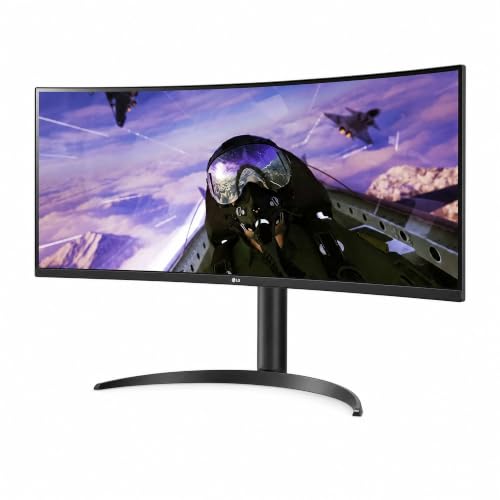
Linked names below lead to each monitor’s Amazon listing, where its HDR wording can be read in the manufacturer’s own terms before ordering. The best 24 inch monitors with HDR require this guide to begin with a calibration rather than a celebration: at 24 inches, HDR is an entry-level feature, and the screens that carry it are, with vanishingly few exceptions, HDR10-compatible or HDR400-class displays whose backlights cannot produce the localised brightness that makes HDR transformative on a good television. That is not a reason to skip this category. It is a reason to buy it accurately — for the tone mapping, the wider colour handling and the future-proofing that HDR support genuinely adds to a small screen — rather than for a cinema experience no 24-inch panel in this guide can deliver.
Understand the two halves of any HDR claim. The first half is signal: the monitor accepts HDR10 metadata from a console, a PC or a streaming device and tone-maps it onto the panel instead of clipping or ignoring it, which alone improves how HDR sources look compared with an SDR-only screen mangling them. The second half is spectacle: peak brightness high enough, delivered locally enough, to make a torch flame or a sunlit window genuinely blaze against surrounding darkness. The first half is real at this size and worth having. The second half needs brightness and dimming hardware that physics and pricing have so far kept at 27 inches and above, and the two prose-only slots in this roundup exist to describe that missing tier honestly instead of letting a badge imply it.
So who should shop here? Console owners whose 24-inch desk screen must handle HDR games gracefully, PC players who watch HDR video and want their monitor to stop being the weak link, and anyone buying a small screen for years who reasonably wants the HDR checkbox present when content arrives. Who should not: buyers whose primary dream is HDR cinema, who will be served honestly only by stepping up in size, a redirection this guide makes explicitly in its final pick and its recommendation rather than apologising for at the end.
Key Takeaways
- At 24 inches, HDR means HDR10 signal compatibility and HDR400-class brightness — an entry tier, useful and honest when bought as such.
- The genuine gain at this size is tone mapping: HDR sources stop being clipped or washed out by a screen that cannot interpret them.
- Local dimming, the hardware behind spectacular HDR, is effectively absent at 24 inches, and no badge in this guide should be read as implying it.
- Four picks here carry verified listings with HDR in their specifications; two prose-only slots describe the emerging mini-LED tier and the vacant flagship tier.
- Consoles are the strongest reason to insist on HDR at this size, since their interfaces and games assume an HDR display.
- Buyers dreaming of HDR cinema should step to a larger screen, and this guide says where and why rather than overselling its own category.
Quick Picks
| Pick | Badge | Why it earns its place |
|---|---|---|
| LG UltraGear 24G411A 120Hz | The balanced HDR all-rounder | A 120Hz IPS panel with HDR10, G-Sync compatibility and LG’s tuning, the most complete expression of what entry HDR at 24 inches should look like. |
| LG UltraGear 24G414B 144Hz | The step-up sibling | Everything the all-rounder offers with a 144Hz ceiling, HDR10 and a height-adjustable stand, for desks that game harder. |
| ViewSonic VX2428A 180Hz | HDR support at full speed | A 180Hz Fast IPS screen whose HDR10 support rides on genuinely quick panel hardware, suiting consoles and PCs equally. |
| AOC 24G4 180Hz | The value route to the badge | AOC’s Fast IPS value pick with HDR in its specification and a long warranty, the least expensive honest way into this category. |
| The 24.5-inch mini-LED class (prose-only) | The emerging exception | A small wave of mini-LED models near this size promises real local dimming; profiled in prose because verified listings are scarce and specifications vary wildly. |
| The true-HDR flagship tier at 24 inches (prose-only) | The vacant tier, named plainly | There is no mainstream 24-inch monitor with flagship HDR hardware; this slot explains the absence and what to buy instead. |
How did we choose the best 24 inch monitors with HDR?
The first rule was that HDR had to appear in the manufacturer’s own specification for a pick to be linked, because this category above all others invites creative relabelling, and a guide that links screens whose HDR exists only in a retailer’s headline has failed its only job. Each linked pick below therefore carries HDR10 or HDR in its verified listing. The second rule was that the underlying monitor had to deserve purchase with HDR ignored entirely — panel, refresh, stand and sync all scored on their own merits — since an HDR badge on a weak screen is a decoration, and several nominally HDR small monitors were excluded on exactly that ground.
The third decision was structural honesty about the tiers. Rather than fill six slots with near-identical HDR400-class screens and imply a richness the category lacks, this guide links the four strongest verified examples and spends its remaining two slots where a truthful map requires them: on the emerging mini-LED class that may shortly change this category’s ceiling, and on the flagship tier that does not exist at this size, described plainly so that readers chasing it can redirect their budget instead of their expectations. A roundup’s job is to represent the market as it is, and at 24 inches the market for HDR is four good entry screens, one promising exception and one instructive absence.
Evaluation of the HDR itself stayed qualitative and comparative, because this guide does not publish invented measurements. The judgements used are the ones any careful owner can replicate: whether HDR sources tone-map gracefully or clip, whether the panel’s colour handling widens convincingly in HDR mode, and whether enabling HDR costs so much brightness or contrast in ordinary content that owners end up disabling it — the quiet failure mode of entry HDR, and the one these picks were selected to avoid.
What does HDR actually do on a small, modest-brightness panel?
Begin with tone mapping, the unglamorous hero. An HDR source contains brightness information far beyond an SDR panel’s range, and a screen without HDR handling must guess what to do with it, typically crushing highlights into white or darkening the whole image into murk. A screen with HDR10 support reads the source’s metadata and maps that range deliberately onto its own, preserving the gradations the creator placed in skies, skin and shadow. The result is not brighter in the showroom sense; it is more faithful, and on consoles — whose menus, games and apps are authored HDR-first — the difference between mapped and mangled is visible in the first minute.
Colour is the second genuine gain. HDR workflows travel with wider colour information, and a panel that accepts the signal typically also deploys its fuller colour capability in that mode, so saturated scenes — a racing game’s livery, an animated film’s palette — render with a richness that the same screen’s SDR mode may not attempt. At 24 inches, where several picks claim strong sRGB coverage and respectable gamut behaviour, HDR mode is often where the panel shows its best colour manners, an irony worth enjoying: the feature marketed for brightness quietly delivers its value in hue.
The limits are equally concrete. Without local dimming, a dark scene with one bright element forces the whole backlight to choose a level, so blacks rise toward grey exactly when HDR promises depth; and with peak brightness in the entry class, highlights glow politely rather than blaze. Owners who understand they bought tone mapping and colour, not spectacle, report satisfaction with this tier year after year. Owners who bought the badge expecting a television’s fireworks write the disappointed reviews. This entire article exists to move its readers from the second group into the first.

LG UltraGear 24G411A 120Hz — The balanced HDR all-rounder
LG’s 24G411A is the screen this guide would hand to a reader who asked simply for a good 24-inch monitor with HDR and meant every word of the request moderately. Its IPS panel refreshes at 120Hz with a 1ms MBR claim, carries HDR10 in its specification, and lists G-Sync compatibility alongside FreeSync, covering both graphics ecosystems with unusual even-handedness for the tier. An overclock toward 144Hz is mentioned in its listing, the kind of headroom that costs nothing to accept and something to rely on, so this guide treats 120Hz as the promise and anything above it as a gift.
The HDR behaviour fits the honest framing of this article. HDR sources tone-map cleanly rather than clipping, the panel’s colour handling in HDR mode is where its UltraGear tuning shows, and SDR content does not pay a penalty for the feature’s presence — the test that quietly eliminates lesser HDR-badged screens, whose owners end up disabling the headline feature within a month. LG’s reader modes and eye-comfort features extend the same philosophy into the working day, making this the pick for a desk where a console, a laptop and long hours all share one small screen and none of them may be treated as the afterthought.
Its ceiling is the category’s ceiling, stated without varnish: highlights will not blaze, blacks in mixed scenes will sit at the panel’s native grey, and a film-lover will recognise entry HDR for what it is. Within those physics, the 24G411A is about as complete as 24-inch HDR currently gets — fast enough, certified enough, comfortable enough — and it anchors this roundup as the balanced default against which the more specialised picks justify their deviations.
- Panel: 24-inch IPS, 1920 x 1080
- Refresh rate: 120Hz, listed overclock headroom above
- HDR: HDR10
- Sync: NVIDIA G-Sync Compatible and AMD FreeSync
- Response claim: 1ms MBR
- Features: reader mode and eye-comfort suite
Strengths
- HDR10 tone mapping that improves console and video sources without punishing SDR content.
- Dual sync compatibility keeps both graphics ecosystems equally welcome.
- A complete all-round specification with no weak department to apologise for.
Trade-offs
- Entry-tier HDR brightness means highlights glow rather than blaze.
- No local dimming, so dark scenes with bright elements raise the blacks.
- Its 120Hz ceiling is a step below the fastest picks in this guide.
Best for: console-and-PC desks wanting honest HDR support in a balanced 24-inch screen. Not suited for: HDR cinema seekers or refresh-rate maximalists.

LG UltraGear 24G414B 144Hz — The step-up sibling
Where its sibling above balances, the 24G414B leans toward the game. The recipe is familiar — 24-inch IPS, HDR10 in the specification, G-Sync named in the listing beside FreeSync — with the refresh ceiling raised to 144Hz, a built-in speaker included, and a stand offering tilt and height adjustment. That last item interacts with HDR more than readers might expect: HDR content is watched, often from slightly farther and lower than a working posture, and a screen that can be repositioned for viewing rather than merely for typing serves its HDR badge better across an evening. Small ergonomics, honestly applied, are part of picture quality.
In HDR terms the two LGs are peers, and this guide will not manufacture a difference the panels do not contain: both tone-map HDR10 sources gracefully, both deploy their colour well in that mode, and both stop where entry brightness and absent dimming tell every screen in this class to stop. The 24G414B’s case is cumulative rather than categorical — a faster ceiling for the PC hours, certified sync for the GeForce household, a speaker for the console hours, a stand for all of them — assembled into the most complete desk specification this category currently offers at a still-reasonable tier.
Readers choosing between the siblings should decide by refresh and stand, not by HDR, and that advice generalises across this entire article: within the entry tier, HDR implementations differ far less than the monitors carrying them. Buy the better monitor and accept its HDR as the honest entry implementation it is. By that rule the 24G414B is the upgrade pick of this roundup, the screen for the reader who games daily at this size and wants every supporting department — motion, sync, posture, sound — to keep pace with the badge.
- Panel: 24-inch IPS, 1920 x 1080
- Refresh rate: 144Hz
- HDR: HDR10
- Sync: G-Sync and FreeSync named in listing
- Stand: tilt and height adjustment
- Audio: built-in speaker
Strengths
- Raises the refresh ceiling while keeping the sibling’s honest HDR10 implementation.
- Height adjustment serves both working posture and HDR viewing distance.
- Certified sync naming suits GeForce households without excluding AMD.
Trade-offs
- Its HDR is the same entry tier as cheaper picks; the premium buys the monitor, not brighter highlights.
- 144Hz remains a tier below the 180Hz pair elsewhere in this guide.
- The speaker covers convenience, not immersion.
Best for: daily gamers at this size who want the complete desk specification with HDR included. Not suited for: buyers expecting the HDR itself to justify the step up.

ViewSonic VX2428A 180Hz — HDR support at full speed
ViewSonic’s VX2428A brings the fastest panel in this roundup to the HDR question, a 24-inch Fast IPS screen at 180Hz with a 0.5ms claim and HDR10 support in its specification, and the combination clarifies something the category often muddles: HDR and speed are separate budgets, and a screen can be generous with both only if its maker refuses to treat either as the headline that excuses the other. Here the motion credentials are genuine gaming hardware, while the HDR is the same honest entry implementation as its rivals — and the pick’s appeal is precisely that a fast player loses nothing on the HDR side by choosing speed first.
Console owners should note the fit. Current consoles cap their high-refresh ambitions at 120Hz in supported titles and author their presentation HDR-first, so a screen with headroom above that rate and proper HDR10 handling covers the console brief completely while keeping a PC’s higher rates in reserve. ViewSonic’s eye-care features and anti-glare treatment suit the mixed lighting of the bedrooms and studies where such shared desks live. FreeSync governs the variable-refresh side; GeForce owners should read the sync line with the usual care this site recommends.
Judged strictly as an HDR purchase, it ties with the LGs on implementation and wins on motion; judged as a monitor purchase, it is the pick for the reader whose evenings are fast games first and HDR films second, in that order, and who wants one screen to stop apologising for either. Its HDR will not blaze. Its pans will not smear. Knowing which of those sentences matters more to you is the whole decision, and this guide respects readers who answer it in favour of speed.
- Panel: 24-inch Fast IPS, 1920 x 1080
- Refresh rate: 180Hz
- HDR: HDR10 support
- Response claim: 0.5ms
- Sync: FreeSync
- Features: eye care, anti-glare coating
Strengths
- The fastest panel in this guide carries full HDR10 support without compromise on either side.
- Console coverage is complete, with refresh headroom above the consoles’ own ceiling.
- Everyday comfort features suit the shared desks this size usually serves.
Trade-offs
- HDR implementation is entry-tier, identical in class to slower, cheaper picks.
- No G-Sync certification for NVIDIA owners who require it in writing.
- Buyers who never game fast are paying for motion they will not use.
Best for: fast-game players who also want HDR sources handled properly. Not suited for: film-first buyers or GeForce owners needing certified sync.

AOC 24G4 180Hz — The value route to the badge
AOC’s 24G4 earns the value slot in this category the way it earns value slots everywhere: by refusing to cut the component that matters. Its Fast IPS panel runs at 180Hz with a 1ms claim, HDR appears in its verified specification, and DisplayPort 1.4 with HDMI 2.0 covers current PCs and consoles without adapters or apologies. A three-year warranty backs the package. For a buyer whose requirement list reads “24 inches, HDR support, fast enough to game, priced like I mean it,” this is the screen that ends the search.
The HDR expectations should be set at the tier’s honest level, and AOC’s own positioning helps: this is HDR as compatibility and tone mapping, delivered by a panel whose brightness belongs to the entry class. What the buyer gains over an SDR-only value screen is real — console interfaces that stop looking washed, HDR video mapped rather than mangled, colour that opens up in HDR mode — and what they do not gain is spectacle, which no amount of value engineering at this size has yet conjured. The pick’s virtue is that everything else about the monitor, panel speed above all, survives the honesty intact.
There is a broader point in this pick’s favour worth stating once. Entry HDR’s worst products are the ones where the badge consumed the budget; the 24G4 demonstrates the opposite allocation, a proper gaming monitor that also speaks HDR. If this category has a correct purchasing philosophy, that is it, and the AOC is its most affordable current expression. First-monitor buyers and gift buyers in particular should start their shortlists here and require every dearer pick to justify itself against it.
- Panel: 24-inch Fast IPS, 1920 x 1080
- Refresh rate: 180Hz
- HDR: HDR in verified specification
- Response claim: 1ms
- Connections: DisplayPort 1.4, HDMI 2.0
- Warranty: three years per listing
Strengths
- A fast panel first and an HDR screen second, which is the correct order of priorities.
- Modern connections cover consoles and PCs at full specification.
- The warranty length suits a screen bought to be kept.
Trade-offs
- HDR brightness is entry-class; highlights will not perform like a television’s.
- No certified G-Sync path in its sync offering.
- Its HDR mode still asks the brightness compromises described throughout this guide.
Best for: value-led buyers and first-monitor shoppers who want HDR support without a weak monitor attached. Not suited for: HDR spectacle seekers, who should read the final pick below.
The 24.5-inch mini-LED class (prose-only) — The emerging exception
Every rule in this guide has one approaching exception, and it deserves a slot rather than a footnote. Mini-LED backlights divide a panel’s illumination into many small zones that dim independently, and a small wave of models around 24.5 inches — largely from value-focused brands and regional lineups — has begun fitting that hardware at sizes where local dimming was previously unheard of. On paper these screens promise the thing this entire article says 24-inch HDR lacks: highlights that blaze locally while neighbouring blacks stay down. If the class matures as its specifications suggest, the entry-tier framing of this category has an expiry date.
The caution is maturity, and it is why this pick is prose-only. Availability outside a few markets is sporadic, specifications vary wildly between models sharing similar names, zone counts and tuning quality differ enough that the badge alone guarantees little, and our verified pool contains no listing for the class that this guide could link with its usual confidence. Early adopters who enjoy auditing a model’s dimming behaviour and firmware reputation may find genuine treasure here; everyone else should treat the class as a reason to feel optimistic about their next monitor rather than a shopping instruction for this one.
Its inclusion also disciplines the rest of the roundup. The linked picks above are not being praised as HDR’s destination; they are the honest present tense of a category whose future is visibly under construction at the edges. A reader who needs a screen today buys the present tense. A reader who can wait a product cycle, and whose heart is set on real HDR at a small size, now knows exactly what to wait for and what evidence to demand when it arrives.
- Panel class: around 24.5 inches, mini-LED backlight
- Dimming: multi-zone local dimming (varies by model)
- HDR promise: genuinely higher peaks with local control
- Availability: sporadic, market-dependent
- Verification: no pooled listing; research per exact model essential
- Status: emerging class, not yet a default recommendation
Strengths
- Local dimming at this size attacks the exact weakness this guide documents.
- Peak brightness in the class can reach tiers entry LCD cannot approach.
- Signals where small-screen HDR is heading within a product cycle or two.
Trade-offs
- Model-to-model variance makes the class badge nearly meaningless alone.
- Stock and support outside core markets remain uncertain.
- No verified listing here, so this slot informs rather than sells.
Best for: informed early adopters who research exact models and enjoy new hardware’s frontier. Not suited for: buyers who need a dependable screen this week with no homework.
The true-HDR flagship tier at 24 inches (prose-only) — The vacant tier, named plainly
This final slot is occupied by an absence, deliberately. There is no mainstream 24-inch monitor — from any major maker, at any sane price — that pairs this size with flagship HDR hardware: a thousand-nit-class peak, dense local dimming, and the colour volume to make HDR a headline experience. Readers who arrived at this article hoping to find that product deserve to be told it does not exist in this size, rather than be sold an HDR400 screen by a guide willing to let adjectives blur into promises. The physics are unforgiving and the economics worse: flagship HDR hardware costs what it costs, and at 24 inches almost nobody will pay it, so almost nobody builds it.
The constructive version of that news is a redirection. The experience those readers are picturing lives one size up, where 27-inch models with mini-LED backlights and genuine HDR certification compete seriously, and in television-derived OLED territory beyond that. A buyer whose evenings are HDR films and showcase games will be happier spending this budget there, on a screen whose HDR is the product, than on the finest entry implementation this guide can link. Saying so costs this article a sale it might have made by silence, and buys the only currency a buying guide actually holds.
For everyone whose needs are the ones this category truly serves — consoles handled gracefully, HDR video mapped faithfully, a small fast screen that will not be embarrassed by the next years of content — the four linked picks above are not consolations. They are the correct products, bought at the correct expectations. The vacant tier is named here so that nobody mistakes them for something else, and so that the reader who genuinely needs the flagship experience leaves with directions to it instead of a badge and a disappointment.
- Panel class: none in mainstream production at 24 inches
- Missing hardware: high-zone local dimming at flagship peaks
- Where it lives: 27-inch mini-LED and OLED categories
- Reason for absence: cost of HDR hardware versus this size’s pricing
- Guide’s advice: redirect the budget if HDR spectacle is the goal
- Status: prose-only by definition — there is nothing to link
Strengths
- Names the category’s limit before a reader’s money discovers it.
- Points HDR-first buyers to the sizes where their goal actually exists.
- Keeps the four linked picks honest by contrast.
Trade-offs
- It cannot be bought, which is precisely its point.
- Stepping up in size may demand a deeper desk and a larger budget.
- Readers set on this exact size must accept entry HDR as the ceiling today.
Best for: HDR-first buyers who needed the truth more than a product. Not suited for: readers whose needs the entry tier already serves completely.
How should you set up HDR on a 24-inch monitor?
Enable HDR at the source first and the screen second, because most disappointment in this tier traces to a signal chain rather than a panel. On a PC, turn HDR on in the operating system’s display settings for the correct monitor, confirm the game or player is outputting an HDR signal rather than an SDR one with HDR ambitions, and check that the cable and port in use carry the full bandwidth — older HDMI leads are silent saboteurs here. On a console, run its built-in HDR calibration routine carefully in your room’s real lighting; those calibration screens exist precisely because entry panels need the source’s help to map their limited range gracefully.
Then set the monitor’s own house in order. Use the HDR picture mode the maker provides rather than forcing a vivid SDR preset to imitate it, set brightness by content rather than by habit, and resist raising the backlight to maximum in a dark room, which lifts the blacks this tier already struggles to hold down. Judge the result with a scene you know — a night sequence with practical lights, a sunset in a game you have finished in SDR — because familiarity exposes tone-mapping quality faster than any test pattern. Finally, keep SDR mode equally well set up rather than treating it as a failure state: most of your computing will live there, and a monitor whose SDR is excellent and whose HDR is honest is the actual product this category sells.
Comparison Table
| Pick | Size and panel | Refresh | HDR tier | Sync | Listing |
|---|---|---|---|---|---|
| LG UltraGear 24G411A | 24-inch IPS | 120Hz | HDR10, entry class | G-Sync Compatible, FreeSync | Linked |
| LG UltraGear 24G414B | 24-inch IPS | 144Hz | HDR10, entry class | G-Sync, FreeSync | Linked |
| ViewSonic VX2428A | 24-inch Fast IPS | 180Hz | HDR10 support, entry class | FreeSync | Linked |
| AOC 24G4 | 24-inch Fast IPS | 180Hz | HDR, entry class | Adaptive-Sync | Linked |
| Mini-LED class near 24.5 inches | Mini-LED LCD | Varies | Local dimming, emerging | Varies | Prose-only |
| Flagship HDR tier at 24 inches | Not in production | — | Vacant tier | — | Prose-only |
What mistakes do buyers make with HDR at this size?
The cardinal mistake is reading the letters HDR as a picture-quality guarantee rather than a signal-handling description, and then judging an honest entry screen against a flagship television it never claimed to be. The second is enabling HDR globally and leaving it on for SDR work, where entry panels often render office content worse in that mode, souring owners on a feature that was only ever meant for HDR sources. The third is skipping the console or PC calibration routines, without which even a good implementation maps its range by guesswork.
A fourth mistake is subtler and worth naming in a guide that links products: buying a dearer screen in this category believing its HDR must be better, when the tier’s implementations are near-identical and the premium usually buys refresh, stand or sync instead. Those are legitimate things to buy — this guide recommends them openly — but they should be bought under their own names. HDR at 24 inches is a checkbox to have, not a ladder to climb, and the buyers who understand that are the ones still satisfied in year three.
Final Recommendation
Choose among the four linked picks by the monitor, and let the HDR come along as the honest entry implementation it is. The LG 24G411A is the balanced default for mixed desks, its 24G414B sibling the step-up for daily gamers who value its stand and ceiling, the ViewSonic VX2428A the speed-first choice that loses nothing on HDR handling, and the AOC 24G4 the value benchmark every other pick must justify itself against. Keep the prose slots in mind as the map’s edges: mini-LED is coming to this size for the patient, and true flagship HDR already exists one size up for the determined. Bought with those expectations printed clearly in your own mind, a 24-inch HDR monitor is a small, fast, future-ready screen that handles the modern signal world gracefully — and that, rather than fireworks, is the product actually on sale.
How does HDR gaming differ from HDR film on a screen like this?
Games are the kinder HDR source for an entry panel, for structural reasons worth understanding. A game’s HDR is rendered in real time against your settings, its bright elements are usually small and purposeful — a muzzle flash, a neon sign, a sun positioned by an artist who knew the display class it would meet — and its calibration sliders let you tune the presentation to your exact screen. Many titles also let you set peak brightness values in their menus, and on an entry panel the honest move is to set those values to what the screen can actually do rather than the defaults written for televisions, which alone rescues many owners from the washed-out look they blamed on the monitor.
Film and streaming are less forgiving. A film’s HDR grade was made for reference displays, its brightest highlights assume headroom your panel does not own, and its darkest scenes lean on the local dimming you do not have. The tone mapping in these picks handles that mismatch gracefully rather than gloriously, preserving the grade’s intentions at a scale the hardware affords. Viewed as fidelity, it satisfies; viewed as spectacle, it refers you, again, to the vacant tier and its larger addresses. Knowing which source type dominates your evenings predicts your satisfaction with this entire category better than any specification in it.
What do brightness figures mean, and how should you read them?
Brightness is quoted in nits, and the entry class in this guide lives in the few-hundred range that office panels have occupied for years. Two literacy rules protect buyers here. First, a panel’s peak figure describes a small area or a brief moment in the maker’s chosen conditions, not a full screen sustained indefinitely, so treat it as a class indicator rather than a promise about a white spreadsheet at noon. Second, brightness without dimming is a blunt instrument: raising an entire backlight to honour one candle makes the surrounding night greyer, which is why this guide keeps returning to local dimming as the real dividing line of HDR quality, and why a modest-brightness screen with good tone mapping can look more convincing than a brighter one without it.
Room light reframes the numbers entirely. In a bright room, reflections and ambient adaptation raise the floor of what your eye accepts as black, compressing every panel’s contrast toward the same modest experience and making entry HDR’s limitations nearly invisible. In a dark room the same limitations stand in high relief. This is why two owners of the same monitor write reviews that seem to describe different products, and why this guide keeps asking about your room before your wallet: at this tier, the room is a component of the display.
Why does HDR on a desktop PC still feel like a compromise?
Because the desktop itself was not built for it. Operating systems have improved their HDR handling cycle by cycle, yet the ordinary computing surface — documents, browsers, design tools — remains an SDR world, and an HDR mode imposed on it can shift colours and brightness in ways that annoy exactly the users who notice most. Games and video applications increasingly handle the transition themselves, enabling HDR within their own windows, which is the arrangement that works best at this tier: SDR for the desktop’s honesty, HDR for the content that was authored in it. The picks in this guide support that arrangement gracefully, and the setup section’s advice to switch deliberately is the practical form of a platform truth.
The trajectory matters more than the current friction. Content pipelines, streaming services and game engines all author HDR-first now, so a screen bought today without HDR handling is a screen that will spend its long life approximating the modern signal world. That, more than any highlight, is the argument for insisting on the badge at this size even in its entry form: not that it dazzles in 2026’s content, but that it will not be the reason a 2030 source looks wrong on a panel otherwise still going strong.
What should a console owner check before choosing from this list?
Three checks, all quick. First, the connection: consoles deliver their HDR and high-refresh output over HDMI, so confirm the pick’s HDMI implementation carries the modes you intend to use, and use the cable that came with the console rather than an anonymous spare. Second, the calibration: budget ten minutes on arrival for the console’s own HDR setup routine, in the room and lighting where you actually play, because an entry panel’s tone mapping is only as good as the information that routine gives it. Third, the seating: HDR viewing pulls owners slightly farther back than working posture, so the stand’s range — or a small riser — becomes part of the picture, and the height-adjustable LG in this guide earns a quiet advantage here.
Owners who run those checks tend to describe entry HDR at this size the way this guide does: not a fireworks show, but the console’s picture finally arriving as authored, on a screen small enough for the rooms consoles actually inhabit. That is a worthwhile product. It is simply not the product the badge’s louder marketing describes, and the distance between those two descriptions is where this article has tried to live.
How does wide colour fit into a small HDR purchase?
HDR and wide colour are travelling companions that marketing often merges into one glow, and separating them improves buying judgement. A panel can handle an HDR signal while offering ordinary colour, and it can offer wide colour for professional SDR work without any HDR ambitions at all — the ProArt tradition elsewhere in this site’s pages is built on the second combination. In this guide’s picks the two arrive together modestly: HDR modes typically unlock the panel’s fuller colour behaviour, so the wide-gamut story at this size is real but bounded, a richness in saturated game and film scenes rather than a calibrated professional gamut. Readers whose work is colour should shop the colour pages; readers whose play is colourful will find this tier’s contribution genuine and sufficient.
The practical test mirrors the brightness one. Put on a scene whose colours you know from life or from a trusted screen — a team’s livery, a familiar animated film, a photograph of a place you have stood — and watch whether HDR mode renders those colours with more separation and depth or merely with more saturation. The first is the feature working; the second is a vivid preset wearing the feature’s clothes, and the picks here were chosen because their HDR modes lean toward the first behaviour.
What will make this category better, and when?
Three forces are converging on this size. Mini-LED manufacturing keeps cheapening, which moves the prose-only exception above toward the mainstream one product cycle at a time. Panel makers keep finding brightness in entry LCD designs, raising the floor even without dimming. And console and PC ecosystems keep standardising HDR authoring, which improves how gracefully every tier tone-maps, because graceful mapping is partly a software culture and not only a hardware budget. A reader buying today is not buying the category’s final form; they are buying a competent present, with a reasonable expectation that the next screen they shop for, years from now, will close the gap this article documents.
That is also the answer to the timing question this category always provokes. Waiting buys a better HDR tier eventually and no screen at all meanwhile, and the content that makes HDR support valuable is arriving now, not eventually. Unless the mini-LED class specifically is your heart’s desire and your current screen still serves, the sensible purchase is the honest entry implementation, at the size your desk wants, with the expectations this guide has printed in large friendly letters.
A short field guide to reading HDR badges in the wild
Because this category will outlive this article, take its literacy with you. HDR10 names a signal standard and says nothing about the panel showing it. A DisplayHDR tier with a number at least anchors brightness to a certification, with the lower numbers certifying an entry experience honestly and the higher ones demanding the dimming hardware that makes HDR sing. Phrases that merely place the letters HDR beside words like ready, support or compatible describe the signal path and nothing else, and retailer headlines that upgrade any of these into a picture promise should be discounted entirely. The screen’s own specification sheet — its brightness class, its dimming description, its colour coverage — is the only document in the transaction that cannot afford to exaggerate, which is why this guide linked only picks whose listings carry the claim in their own specifications.
Apply the same reading to the prose tiers above and the category becomes navigable without a guide at all: entry screens for signal fidelity, mini-LED for the emerging middle, larger sizes for the flagship experience, and a healthy suspicion of any sentence in which HDR is asked to carry a whole product. That suspicion, carried into every future listing, is the most durable thing this article can sell you, and it is free.
What does HDR do to a small screen’s second life as a work monitor?
Very little, and that is a compliment worth explaining. A monitor bought partly for HDR will spend most of its hours in SDR showing documents, calls and code, and the fear that an HDR-badged gaming panel must be a compromised worker is outdated at this tier: the picks here are IPS or Fast IPS screens with eye-care features, sensible stands and colour that behaves. The badge adds a mode; it does not subtract a workday. Buyers furnishing one desk for everything can therefore treat HDR support as pure addition — a console and film capability layered onto a competent working screen — provided the underlying monitor passes the ordinary tests this site applies everywhere, which is precisely how these four were selected.
The one habit to build is modal discipline: work in the SDR mode you calibrated, play and watch in HDR where the content offers it, and let the screen’s memory of per-input settings do the switching where it can. Owners who adopt that split stop thinking about HDR as a setting at all, which is the mature end-state of every display technology — present when wanted, invisible when not, and never again a reason to open a settings menu at midnight.
One more distinction: HDR for one viewer versus a shared screen
Small monitors are usually personal, and HDR at this tier quietly assumes that personality. Tone mapping and brightness are tuned for the viewer on axis, in the chair the stand was adjusted for, and the picture’s HDR manners — like its IPS angles — are at their best exactly there. A second viewer on the edge of a bed or a sofa still gets a perfectly watchable picture, because these panels hold their colour off-axis, but the calibrated centre is a single seat. Households buying a 24-inch screen as a shared mini-television for two regular viewers should weight that honestly against a small television, whose entire design assumes an audience. For the solo desk, the assumption is not a limitation at all; it is the product fitting its actual life, and it is one more reason this size, with this feature, serves its owners as faithfully as it does.
A closing note on expectations as a feature
Every category on this site has a version of the same lesson, but HDR at 24 inches teaches it purest: satisfaction is a function of the distance between what was promised and what arrives, and the buyer’s side of that distance is theirs to set. The screens linked here will tone-map your console’s world faithfully, open their colour for your films, keep their speed for your games and their manners for your work, for years, at prices that leave the rest of a setup funded. Set the expectation there and they will exceed it regularly, in the small nightly ways that never make a headline. Set it at a flagship television’s fireworks and the same faithful screens will feel like a swindle. The hardware is identical either way; the expectation is the feature, and this guide has spent its length installing the right one.
Bring that same expectation-setting to the unboxing: give the screen one evening in each of its modes, on content you love and know, before forming the verdict that a return window exists to protect, because first impressions under showroom habits are the last place this particular technology tells its truth to a patient viewer in a familiar room at home.
And if a friend asks why your small screen’s HDR looks calmer than their television’s, you will have the vocabulary this guide leaves behind: tone mapping, entry brightness, no local dimming, honest tier, bought knowingly and enjoyed accordingly every single evening.
Frequently Asked Questions
Is HDR400 worthless, as some enthusiasts claim?
No, though the criticism contains a kernel worth keeping. The certification guarantees a floor of brightness and signal handling, not a spectacle, and screens in this tier genuinely improve HDR sources through tone mapping and colour. The worthless version of HDR is the unlabelled badge with no specification behind it, which is why this guide only linked picks whose HDR appears in their verified listings.
Why do consoles make HDR matter more at this size?
Because consoles are authored HDR-first. Their dashboards, games and streaming apps assume an HDR display and can look washed or clipped on SDR-only screens that cannot interpret the signal. A 24-inch desk monitor is a common console screen, so its HDR handling is not a luxury feature there — it is the difference between the console’s picture as designed and as approximated.
Should HDR stay switched on all the time?
On most entry-tier panels, no. HDR mode is tuned for HDR sources, and ordinary SDR work — documents, browsing, older games — frequently looks better in a well-set SDR mode. Switch deliberately per content, or use the automatic switching modern operating systems and consoles offer, and judge each mode on the content it was built for.
Does HDR affect gaming performance or input feel?
The signal itself costs the monitor nothing meaningful in responsiveness on modern gaming panels, and the picks here are gaming screens first. On the PC side, rendering in HDR can carry a small graphics cost in some titles, which belongs to the game’s settings rather than the display. Players sensitive to feel will find these screens’ motion and lag behaviour unchanged by the badge.
If I want real HDR, what should I buy instead?
A larger screen, honestly. The 27-inch class hosts mini-LED monitors with dense local dimming and genuine HDR certification, and OLED models whose per-pixel control redefines the question entirely. This guide’s final pick exists to make that redirection without embarrassment: HDR spectacle is a size-and-budget decision before it is a brand decision.
Can I judge a monitor’s HDR from a showroom or a video review?
Imperfectly, and knowing why protects you. A showroom runs panels at maximum brightness in bright light, conditions that flatter entry HDR’s weaknesses into invisibility and exaggerate its brightness into confidence. A video review compresses the very range HDR exists to carry, so you are watching an SDR shadow of an HDR experience and judging the shadow. Use both for ergonomics, design and reputation, and reserve the HDR verdict for the return window in your own room, with your own console’s calibration routine, on scenes you know. At this tier more than any other, the honest showroom is your desk.
Related Guides
Readers calibrating expectations may also benefit from our roundup of the best 24 inch gaming monitors, our survey of the best 23–24 inch IPS monitors, and our explainer on what HDR tiers and certifications actually promise.