What's inside
- Where to buy
- Key Takeaways
- Quick Picks
- How did we choose the best 24 inch gaming monitors?
- Why do competitive players keep choosing 24 inches?
- What about 1440p and 4K at 24 inches for gaming?
- How should you position and configure a 24-inch gaming screen?
- Comparison Table
- What mistakes do 24-inch gaming buyers make?
- Final Recommendation
- Which genres gain and lose the most at this size?
- What does a second 24-inch screen add to a gaming desk?
- How do you grow into a 240Hz screen if your PC is not there yet?
- What settings culture separates experienced players from new owners?
- Should you buy one of these as a gift for a young player?
- How long will a 24-inch gaming monitor stay relevant?
- What separates a gaming monitor from an office monitor with a gaming badge?
- A word on eye comfort during long competitive sessions
- What changes when the same desk hosts a console and a PC?
- Frequently Asked Questions
- Related Guides
As an Amazon Associate I earn from qualifying purchases. This post may contain affiliate links at no extra cost to you.
gizmoverdict.com is reader-supported. When you buy through links on our site, we may earn an affiliate commission.
Where to buy
Each linked name below leads to that monitor’s Amazon listing, where the refresh rate of the exact unit on sale can be double-checked before ordering. The best 24 inch gaming monitors start from a premise the rest of the market keeps relearning: twenty-four inches is not the small option in competitive gaming, it is the standard one. Tournament stages, professional desks and a generation of muscle memory were all built at this size, because a 24-inch screen places the entire field of play — corners, minimap, health, crosshair — inside a single focused gaze, with nothing relegated to peripheral squinting. This guide treats the size as the subject, not the constraint, and gathers the strongest current ways to fill it with fast, well-tuned pixels.
A note on resolutions before the picks, because it shapes everything. At 24 inches the gaming market speaks almost entirely in Full HD, and unlike the reluctant compromises elsewhere, this one is a genuine optimisation: 1080p lets mid-range graphics cards reach the very high frame rates these panels exist to display, while the pixel density at this diagonal keeps the image acceptably fine. QHD at 24 inches exists only in a few professional-flavoured models that refresh too slowly for this page, and 4K at this size belongs to other conversations entirely. So the contest here is honest and narrow — refresh rate, panel tuning, sync ecosystem and the quality of the surrounding monitor — and the six screens below were chosen to represent the best current answers at each point of that contest.
Expect refresh rates from a still-respectable 144Hz up to 240Hz, IPS panels everywhere except one deliberate TN veteran, and adaptive sync in both ecosystems. Expect also a recurring theme that gaming guides underplay: at 24 inches, the monitor is close, personal equipment, more like a racket than a television, and fit — stand, size, glare, the distance to your eyes — decides satisfaction as surely as any frame rate. The sections after the picks take that fit seriously, because the best 24-inch gaming monitor is the one that disappears into your play.
Key Takeaways
- Twenty-four inches remains the competitive standard because the whole scene fits inside one focused gaze without head movement.
- Full HD is the correct gaming resolution at this size, trading pixels the eye barely separates for frame rates every good card can reach.
- The real contest among these picks is refresh ceiling and panel tuning: 144Hz done well versus 240Hz done well are different experiences for different players.
- Adaptive sync appears in both NVIDIA-validated and AMD flavours here, so match the badge to your graphics card’s ecosystem.
- One TN veteran survives in this list on merit, as the budget route to tournament-bred visibility tools.
- Stand quality and viewing distance matter unusually at this size, because the screen sits close enough to be personal equipment.
Quick Picks
| Pick | Badge | Why it earns its place |
|---|---|---|
| ASUS TUF Gaming VG249QML5A 240Hz | The full-attack flagship | 240Hz Fast IPS with ELMB Sync strobing beside adaptive sync, G-SYNC support and an ergonomic stand — the most complete 24-inch gaming specification in this guide. |
| Acer Nitro KG240Y 240Hz | 240Hz without the flagship tax | Acer’s IPS panel brings the top refresh tier down to earth, with FreeSync Premium and everyday colour that keep the desk useful between matches. |
| LG UltraGear 24G414B 144Hz | The GeForce-friendly all-rounder | A 144Hz IPS screen with G-Sync certification in its listing, HDR10 support and a height-adjustable stand, tuned for players who also live at their desks. |
| Samsung Odyssey G3 24-inch (G30D) | The feature-rich 180Hz option | Samsung’s Odyssey toolkit — Black Equalizer, virtual aim point, an adjustable stand — wrapped around a 180Hz panel with FreeSync. |
| AOC 24G4 180Hz | The value overachiever | A Fast IPS 180Hz panel with HDR support and a long warranty, continuing AOC’s habit of embarrassing pricier badges. |
| BenQ ZOWIE XL2411P | The tournament-bred budget pick | A 144Hz TN screen whose shadow-lifting tools were designed for spotting opponents, at the friendliest price in this roundup. |
How did we choose the best 24 inch gaming monitors?
Size discipline came first, strictly applied: every pick measures between 23.8 and 24.5 inches, because a guide about 24-inch gaming that pads itself with 27-inch screens has answered a different question. Within that frame, refresh rate and panel quality were weighed together rather than separately — a 240Hz badge on a panel whose transitions cannot keep pace is a lesser monitor than an honest 180Hz — and each candidate’s overdrive reputation and adaptive-sync implementation were considered as part of the same motion judgement. Sync ecosystem coverage was balanced deliberately across the final six, so that GeForce and Radeon owners each find native-feeling options rather than apologies.
The surrounding monitor was scored as gaming equipment, not as an afterthought. Stands were judged on whether they let a player set the screen at the distance and height their aim assumes, ports on whether both a PC and a console could live on the desk without cable swaps, and gaming toolkits — crosshair overlays, shadow lifting, genre presets — on whether they solve real problems or merely lengthen a feature list. Price formed the final axis, not as a race to the bottom but as a demand that each tier justify itself: the flagships here must feel flagship, and the budget pick must feel like a decision rather than a compromise.
One deliberate omission deserves naming. No QHD model appears, despite the resolution’s popularity at larger sizes, because the verified pool for this guide contains no 24-inch QHD screen with gaming-grade refresh, and the wider market offers barely a handful, mostly aimed at professional users. Rather than borrow a slow professional panel and call it gaming, this guide stays with the resolution the size actually games at, and discusses the QHD question openly in a section below for readers tempted to hunt one down.
Why do competitive players keep choosing 24 inches?
The answer is geometry before it is tradition. At a typical gaming distance, a 24-inch 16:9 screen subtends a field of view that a player can monitor entirely with eye movement, keeping the minimap, the ammunition count and the edges of the scene inside trained attention. Enlarge the screen without enlarging the distance and the corners leave that field; information starts costing head turns and fractions of seconds. Shrink it and the targets shrink with it. Twenty-four inches at desk distance is where the information layout of modern games — designed, not coincidentally, around this very size — sits exactly inside a competitive player’s perception.
Distance habits reinforce the geometry. Gaming desks are shallower than office desks, players sit closer than workers, and many pull the monitor toward them on its stand until the screen fills their view the way a windscreen fills a driver’s. At those distances a 27-inch panel can feel like weather — impressive, enveloping, and slightly too much to read — while 24 inches stays legible as an instrument. The size also travels: to LAN events, between rooms, into the small second-desk setups that ranked players maintain. A 24-inch gaming monitor is personal kit in a way larger screens never quite become.
None of this makes larger sizes wrong for gaming; immersion-led genres adore them, and this site’s other pages celebrate them. It makes 24 inches a considered specialisation, the size a player chooses when the game’s information matters more than its scenery. Readers who recognise their own play in that sentence are this guide’s true audience, and the picks below are ordered with them in mind.

ASUS TUF Gaming VG249QML5A 240Hz — The full-attack flagship
ASUS builds the TUF line for players who read feature lists the way engineers read schematics, and at 24 inches the VG249QML5A is that philosophy concentrated. The Fast IPS panel refreshes at 240Hz, carries a 0.3ms claim that should be read as a best-case transition figure rather than an average, and supports both G-SYNC and FreeSync Premium, so the screen survives a graphics-card change of allegiance without becoming the desk’s weakest link. What lifts it above other 240Hz panels at this size is ELMB Sync, ASUS’s arrangement for running backlight strobing together with adaptive sync, which attacks motion blur from the persistence side while the panel’s raw speed handles transitions.
In play, that combination suits the titles this size exists for. A fast pan in a shooter stays composed, targets remain shapes rather than smears, and the strobing’s clarity is available without surrendering tear-free motion — the old either-or that forced players to choose a flaw. The conditions deserve honesty: strobing dims the image, rewards a high and steady frame rate, and is a mode to engage for competitive sessions rather than a personality to impose on the whole desk. ASUS’s gaming AI features and genre tooling surround the core with the usual TUF abundance, some of it genuinely handy, some of it there because the menu had room.
The stand completes the flagship argument, adjusting with the range a close-sitting player needs to dial in distance and height precisely, and the 99% sRGB colour claim keeps the screen respectable when the match ends and the rest of computing begins. Among 24-inch gaming monitors this is the purchase for the player who wants the size’s full current potential in one unit and will actually use its modes. Buyers who will never open the strobing menu should let the Acer below tempt them instead and keep the difference.
- Panel: 24-inch Fast IPS, 1920 x 1080
- Refresh rate: 240Hz
- Response claim: 0.3ms best-case figure
- Sync: G-SYNC and FreeSync Premium
- Motion feature: ELMB Sync strobing with adaptive sync
- Stand: ergonomic, wide adjustment
Strengths
- Combines the size’s highest refresh tier with strobing that coexists with adaptive sync.
- Dual sync ecosystems protect the purchase against a future graphics-card switch.
- The stand gives close-sitting players the precise placement this size rewards.
Trade-offs
- Strobing costs brightness and asks for a strong, steady frame rate to shine.
- The feature abundance includes menu items most owners will never touch.
- It prices at the top of this roundup, where the Acer argues hard for less.
Best for: competitive players who use their monitor’s modes actively and want the complete 24-inch specification. Not suited for: set-and-forget buyers, or systems that rarely push past 100 frames per second.
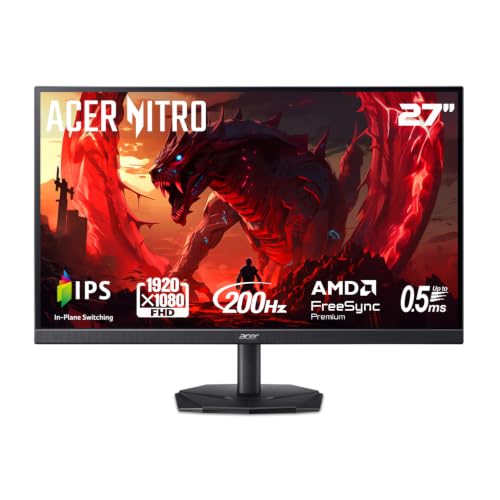
Acer Nitro KG240Y 240Hz — 240Hz without the flagship tax
The Nitro KG240Y asks a disruptive question: if the panel is the experience, why does 240Hz IPS gaming need a flagship price? Acer’s 23.8-inch screen pairs that refresh rate with a 0.5ms claim, FreeSync Premium and 99% sRGB colour, inside a chassis that spends its money on the panel and declines the theatre. For the player whose current screen is a 60Hz or 75Hz hand-me-down, this single purchase delivers the largest motion transformation available at this size — frames arriving four times as often, rendered by a panel quick enough to keep them distinct — and it delivers that transformation without demanding a matching flagship budget for the privilege.
The everyday manners distinguish it from stripped esports specials. IPS angles mean a friend on the bed or the sofa still sees the match properly, the colour claim supports coursework and content creation without apology, and FreeSync Premium’s low-framerate compensation smooths the dips that mid-range systems produce in heavier titles. What you forgo against the ASUS above is the strobing mode and a layer of polish; what you keep is the essential sensation, the clean high-frame-rate motion that is the entire reason this category exists. Many buyers cross-shopping the two are really deciding whether they are mode-tinkerers or players, and the honest ones save the money.
Longevity thinking favours it too. A 240Hz IPS panel will not be the bottleneck of any system built in the next several years, so the KG240Y can be bought ahead of a graphics upgrade and grown into, its headroom waiting patiently while the rest of the desk catches up. In a roundup ordered by completeness it stands second; ordered by value per frame, it may well stand first, and for most 24-inch gaming shoppers that second ordering is the one that should govern.
- Panel: 23.8-inch IPS, 1920 x 1080
- Refresh rate: 240Hz
- Response claim: 0.5ms
- Sync: AMD FreeSync Premium
- Colour: 99% sRGB claimed
- Mounting: VESA compatible
Strengths
- Delivers the 240Hz IPS experience at a tier far below the flagship competition.
- Everyday colour and angles keep it a complete desk monitor between sessions.
- FreeSync Premium certification includes low-framerate compensation for modest systems.
Trade-offs
- No strobing mode for players who prefer blur reduction to raw refresh.
- NVIDIA owners get no certification promise, unlike the LG below.
- Stand and chassis are functional rather than delightful.
Best for: players upgrading from low-refresh screens who want the full transformation in one sensible purchase. Not suited for: strobing enthusiasts or GeForce owners who require certified sync.

LG UltraGear 24G414B 144Hz — The GeForce-friendly all-rounder
LG’s 24G414B occupies the most grown-up position in this roundup: a 24-inch IPS panel at 144Hz with a 1ms claim, G-Sync named in its listing alongside FreeSync, HDR10 support, a built-in speaker and a stand that adjusts in height as well as tilt. Read that specification as a portrait of its intended owner — a player with a GeForce card, a desk that also does homework or office work, and no interest in maintaining separate screens for separate lives. Where rivals specialise, the LG integrates, and integration at this size is a legitimate form of excellence.
The 144Hz figure will draw the obvious comparison with the 240Hz pair above, and the honest framing is that 144Hz remains a superb competitive rate that most players, in blind conditions, would struggle to demote. Its advantage here is ecosystem: a system that holds 144 frames per second in your actual games extracts everything this panel offers every session, while a 240Hz screen fed 130 frames is a promise deferred. LG’s UltraGear tuning reputation, its reader-mode and eye-comfort features, and HDR10 signal support for media round out a monitor that treats the whole evening — match, stream, document, film — as its brief.
Choose it when your graphics card is NVIDIA and your desk is plural. The G-Sync naming in its listing gives GeForce owners the certified path the FreeSync picks cannot promise, the height-adjustable stand fits the close personal geometry of this size properly, and the speaker saves a small desk a peripheral. It is not the fastest screen in this article and does not pretend to be; it is the one most likely to be exactly right for the largest number of real desks, which is its own kind of first place.
- Panel: 24-inch IPS, 1920 x 1080
- Refresh rate: 144Hz
- Response claim: 1ms
- Sync: G-Sync and FreeSync named in listing
- HDR: HDR10 support
- Stand: tilt and height adjustment; built-in speaker
Strengths
- G-Sync naming gives GeForce owners certified variable refresh at this size and tier.
- Height adjustment and a speaker make it the most desk-complete pick here.
- LG’s tuning and eye-comfort features serve the working hours as well as the playing ones.
Trade-offs
- Its 144Hz ceiling sits a full tier below the 240Hz picks for the fastest genres.
- HDR10 at this class is signal support, not a dramatic HDR picture.
- Players chasing every competitive edge will read its balance as compromise.
Best for: GeForce owners whose gaming desk doubles as a working desk. Not suited for: refresh-rate maximalists or players whose systems sustain 240 frames per second.

Samsung Odyssey G3 24-inch (G30D) — The feature-rich 180Hz option
Samsung’s Odyssey line sells gaming as an environment, and the 24-inch G3 brings that environment down to this size with a 180Hz panel, a 1ms claim and the toolkit Samsung loads into the range: Black Equalizer for lifting detail out of shadowed corners, a virtual aim point for titles that withhold a crosshair, Eye Saver mode for the hours after the ranked session ends. The panel sits in an adjustable stand rather than the tilt-only furniture of cheaper screens, which at this close, personal size is a competitive feature in itself, because the screen’s distance and angle are part of a player’s setup as surely as mouse sensitivity.
The 180Hz rate is the specification to weigh. It sits meaningfully above the 144Hz class — motion carries a smoothness that players stepping up from 144Hz describe as subtle but real — while asking less of the graphics card than 240Hz does to stay fed. For systems built around popular mid-range cards, that arithmetic often makes 180Hz the rate the machine can actually sustain in the games that matter, and a sustained 180 is worth more than a theoretical 240 glimpsed in menus. FreeSync governs the variable-refresh side, and Samsung’s flicker-free implementation keeps long sessions civilised.
Its panel character should be understood before ordering: the G3’s strengths are its toolkit, its stand and its rate, and its picture favours the punchy, game-forward presentation Samsung favours over the colour-critical neutrality of creator screens. Players who also edit photographs seriously should weigh the LG or the AOC; players who want a monitor that visibly participates in their gaming, with features they will toggle weekly, will find the G3 the most characterful pick in this roundup.
- Panel: 24-inch, 1920 x 1080
- Refresh rate: 180Hz
- Response claim: 1ms
- Sync: AMD FreeSync
- Tools: Black Equalizer, virtual aim point, Eye Saver
- Stand: adjustable
Strengths
- The Odyssey toolkit addresses real gaming problems rather than decorating a menu.
- 180Hz matches what strong mid-range systems can genuinely sustain at 1080p.
- An adjustable stand respects the close personal geometry of this size.
Trade-offs
- Its picture tuning favours games over colour-critical work.
- FreeSync only, so GeForce owners rely on uncertified behaviour.
- The Odyssey styling announces itself more than minimalist rivals do.
Best for: players who enjoy monitor features and play on mid-range AMD or mixed systems. Not suited for: colour-critical creators or buyers wanting an invisible, office-neutral screen.

AOC 24G4 180Hz — The value overachiever
AOC has built a loyal following by treating the value tier as a design brief rather than an apology, and the 24G4 continues the tradition: a Fast IPS panel at 180Hz with a 1ms claim, HDR support, Adaptive-Sync, modern ports including DisplayPort 1.4 and HDMI 2.0, and a three-year warranty standing behind the whole proposition. Specifications like that were flagship reading not long ago, and their arrival at AOC’s tier is the clearest evidence in this roundup of how thoroughly fast IPS has been democratised at 24 inches.
The Fast IPS panel is the heart of the argument. Value gaming screens historically saved money on the panel and spent it on the badge, producing high refresh figures smeared by slow transitions; the 24G4 inverts that priority, and the result is motion that holds together at its rated speed. HDR support at this level should be read with the usual calibration — it accepts and processes HDR signals, it does not conjure an HDR showcase from an entry panel — but as part of a complete specification it signals a monitor designed recently, for current consoles and PCs alike, rather than a cost-reduced leftover.
Consider it the roundup’s argument that the middle is where the sense is. It concedes the 240Hz tier to the pair above and the certified G-Sync path to the LG, and in exchange offers a fast, modern, well-warrantied screen at the tier where most gaming budgets actually live. For a first gaming monitor, a second-desk monitor, or a gift for a player whose current screen predates high refresh entirely, the 24G4 may be the easiest recommendation in this article to defend.
- Panel: 24-inch Fast IPS, 1920 x 1080
- Refresh rate: 180Hz
- Response claim: 1ms
- Sync: Adaptive-Sync
- HDR: HDR support
- Warranty: three years per listing
Strengths
- A genuinely fast panel at a value tier, with no badge-over-panel inversion.
- Modern ports and HDR signal support suit current PCs and consoles alike.
- The warranty length signals a manufacturer expecting the screen to last.
Trade-offs
- No certified G-Sync path for GeForce owners who require one.
- HDR support is compatibility, not showcase performance.
- It stops at 180Hz where two rivals here continue to 240Hz.
Best for: first gaming monitors, second desks and value-led buyers who refuse a slow panel. Not suited for: 240Hz seekers or NVIDIA owners wanting certification in writing.

BenQ ZOWIE XL2411P — The tournament-bred budget pick
ZOWIE’s XL2411P is the oldest design in this roundup and the only TN panel, and it survives both distinctions because it was engineered for one purpose with unusual purity. Its 144Hz panel and 1ms claim serve a toolkit built around visibility: Black Equalizer raises shadow detail so a crouched opponent stops being a rumour, colour vibrance separates player models from scenery, and the whole presentation is tuned to be read at speed rather than admired at leisure. Generations of competitive players learned their craft on screens from this line, and the design’s refusal to chase fashion is precisely its credential.
The age shows where age always shows. Viewing angles shift when you slouch or share, colour richness trails the IPS picks by a distance nobody should minimise, and the connectivity belongs to an earlier desk era. A buyer choosing the XL2411P in full knowledge is choosing a specialist instrument: a ranked-play screen for a player whose budget prioritises the match over the room, or a second monitor dedicated to competition while a larger, prettier panel handles everything else. In that role it remains oddly unreplaceable, because no IPS value pick in this list replicates its particular visibility tooling.
Its price position completes the case. As the friendliest figure in this roundup, it lowers the cost of entering genuinely competitive hardware to a level a student budget can defend, and its long production run means mature, well-documented behaviour rather than launch-day surprises. Buy it as the specialist it is, and it will feel like a bargain every session; buy it expecting an all-round modern monitor, and its compromises will introduce themselves within the week.
- Panel: 24-inch TN, 1920 x 1080
- Refresh rate: 144Hz
- Response claim: 1ms
- Tools: Black Equalizer, colour vibrance
- Sync: no headline adaptive sync
- Position: long-running esports line
Strengths
- Visibility tooling designed purely for spotting opponents in competitive titles.
- The most accessible price of genuine tournament-line hardware in this guide.
- Motion behaviour documented by years of competitive use.
Trade-offs
- TN angles and colour trail every IPS pick here.
- No headline adaptive sync in a category where rivals include it.
- Connectivity and design belong to an earlier generation of desks.
Best for: ranked specialists on a budget and players wanting a dedicated competition screen. Not suited for: shared viewing, colour work, or buyers wanting one screen for everything.
What about 1440p and 4K at 24 inches for gaming?
The question arrives in every discussion of this size, usually from a reader who has absorbed the correct lesson that resolution matters and applies it one size too small. QHD at 24 inches does exist in the wider market, almost exclusively in professional monitors refreshing at office rates, because the panel industry aims that combination at designers who want density, not players who want frames. A gamer who hunts one down trades the entire point of this category — high frame rates their card can reach — for pixels their eyes, at gaming distance on a 24-inch canvas, will struggle to separate from a good 1080p image. The exchange occasionally suits a simulation player who sits close and plays slowly; for the competitive and mainstream audiences of this guide it is a detour.
4K at this size is a still stranger idea for play, halving frame rates to draw detail below the threshold of visibility while demanding flagship hardware for the privilege. Where higher resolution genuinely transforms gaming is at 27 inches and beyond, and readers torn between a 24-inch high-refresh screen and a larger sharper one are really choosing between two kinds of gaming pleasure — information and immersion — rather than between a right and wrong specification. This guide’s loyalty is to the first pleasure. The second has its own pages, and they are worth reading before deciding which gamer you are.
How should you position and configure a 24-inch gaming screen?
Distance is the setting nobody lists. Start with the screen roughly an arm’s length away, then adjust by genre: competitive players often pull a 24-inch panel closer, until the scene fills their trained field, while strategy and story players push it back toward office distance. Use the stand’s height adjustment, where fitted, to place the crosshair’s natural home — the screen’s centre — at or fractionally below eye level, and tilt the panel to face your eyes squarely, because even IPS panels reward being looked at properly. If your pick’s stand cannot reach the position your posture wants, a VESA arm is not an accessory at this size; it is the completion of the purchase.
Configuration begins with the unglamorous verification that the monitor is actually running at its rated refresh in the operating system, over the cable that carries it — DisplayPort where offered — since high-refresh screens idling at 60Hz are a quiet epidemic. Enable adaptive sync in the driver, set overdrive to its middle gear and test it in a fast pan for the pale fringes that betray overshoot, and decide the strobing question, if your model offers it, per game rather than globally. Finally, tame brightness to your room; gaming monitors ship bright enough to win showroom comparisons, and a panel blazing in a dim room will fatigue the eyes that the rest of this setup exists to serve.
Comparison Table
| Pick | Size and panel | Resolution | Refresh | Sync | Character |
|---|---|---|---|---|---|
| ASUS TUF Gaming VG249QML5A | 24-inch Fast IPS | 1920 x 1080 | 240Hz | G-SYNC, FreeSync Premium | Full-attack flagship |
| Acer Nitro KG240Y | 23.8-inch IPS | 1920 x 1080 | 240Hz | FreeSync Premium | Value at the top rate |
| LG UltraGear 24G414B | 24-inch IPS | 1920 x 1080 | 144Hz | G-Sync, FreeSync | GeForce-friendly all-rounder |
| Samsung Odyssey G3 24-inch | 24-inch | 1920 x 1080 | 180Hz | FreeSync | Toolkit-rich |
| AOC 24G4 | 24-inch Fast IPS | 1920 x 1080 | 180Hz | Adaptive-Sync | Value overachiever |
| BenQ ZOWIE XL2411P | 24-inch TN | 1920 x 1080 | 144Hz | Not headline-listed | Tournament-bred budget |
What mistakes do 24-inch gaming buyers make?
The first is importing size anxiety from television shopping, assuming a gaming monitor must be large to be serious, and buying a 27-inch screen whose corners then escape their attention in the very games they compete in. The second is the mirror error: buying this size for immersion-led gaming — open worlds, flight, cinema-scale adventures — where width and resolution are the pleasure, and finding 24 inches of 1080p honest but small. Both errors come from skipping the genre question this guide opened with. The third is feeding a 240Hz panel with a system that sustains half that, then reviewing the monitor for the machine’s shortcomings.
Two further mistakes concern the desk rather than the panel. Leaving the screen at its factory 60Hz setting — it happens constantly — converts every pick in this article into an expensive office monitor, and accepting a tilt-only stand at a size meant to sit close and personal turns daily posture into the price of a specification. Check the refresh on day one, and budget the placement as part of the purchase.
Final Recommendation
Start with the rate your system truly sustains. If it lives at 240 frames per second in your games, the ASUS VG249QML5A is this size’s complete expression and the Acer KG240Y its value shadow, and choosing between them is choosing how much you tinker. If your world is 144 to 180 frames, the LG 24G414B serves GeForce owners with certification and desk manners, the Samsung G3 brings its toolkit to the middle rate, and the AOC 24G4 makes the value argument of the year. The ZOWIE remains the specialist’s budget instrument, bought knowingly. Twenty-four inches rewards the player who knows their own game; pick the screen that matches the player you actually are, and this supposedly small size will feel, nightly, exactly large enough.
Which genres gain and lose the most at this size?
Tactical shooters and arena titles gain the most, for the geometric reasons this guide opened with: their interfaces are dense, their decisive information sits at the screen’s edges, and their players aim with small, precise movements that a closer, smaller screen flatters. Fighting games belong in the same tier for a different reason — the entire stage is the picture, nothing hides at any edge, and the low input processing of gaming panels at this size serves a genre measured in single frames. Battle royale titles split the difference, their wide landscapes liking size while their interface density likes focus, and their players divide accordingly, which is why both sizes appear on professional stages in that genre.
The middle tier holds racing games played on a pad, sports titles and most action adventures, where 24 inches at a close desk distance fills enough vision to involve without the peripheral sweep that larger or wider screens add. These genres neither need the corners read at a glance nor suffer from their absence, and their players should choose by refresh rate and panel rather than by diagonal doctrine. Strategy and management games quietly prefer the size for a workday reason: their sessions are long, their text is small, and a closer smaller screen at 1080p keeps interface text at the size its designers assumed.
Immersion-first genres lose the most, and honesty requires naming them plainly. Open-world exploration, flight simulation and cinematic adventures trade in horizon and scale, and on 24 inches their vistas arrive as postcards of themselves — beautiful, legible, and smaller than their makers dreamed. A player whose library leans that way should read this guide as a well-argued brief for the opposition and shop the larger pages of this site instead. Knowing which side of that line your own evenings fall on is worth more than every other decision in this article combined.
What does a second 24-inch screen add to a gaming desk?
The dual-24 arrangement is this size’s quiet empire. A matched second panel holds the stream chat, the guide, the voice-call window or the work that resumes between matches, and it does so at a size that pairs symmetrically with the main screen rather than dwarfing or apologising to it. Because 24-inch panels are affordable and light, the second screen is often the old gaming monitor itself, demoted rather than discarded when an upgrade arrives — which makes the upgrade path in this size unusually graceful, each new flagship promoting its predecessor instead of e-wasting it.
Two practicalities govern the arrangement. Drive both screens from the same graphics outputs where possible, and expect the second panel to run at its own rate without disturbing the first; modern systems handle mixed refresh rates calmly, though the gaming screen should keep the primary connection and the full-rate cable. And mind the combined width: two 24-inch screens span most of a desk and all of a small one, so the pairing suits players whose rooms can hold the empire they are building. Where space allows, it is the setup this guide’s picks keep accidentally designing themselves into.
How do you grow into a 240Hz screen if your PC is not there yet?
Buying the monitor ahead of the machine is a defensible strategy in this category, because panels age slowly and graphics cards age quickly, and the guide’s 240Hz picks will still be current when a future upgrade arrives to feed them. The interim is not a punishment: adaptive sync smooths whatever rate the present system sustains, older and lighter titles will reach the full rate immediately and preview the sensation, and competitive settings — the lowered detail levels serious players use anyway — lift frame rates dramatically on modest hardware. Many owners discover their existing card was faster than their old 60Hz screen ever let them know.
The discipline is to buy the headroom once and honestly. Choose the 240Hz panel whose other qualities — stand, sync ecosystem, colour — you would be content with even at half its rate, because those are the qualities you will live with during the interim. Avoid financing the screen with the assumption of an upgrade that keeps receding; a 180Hz pick bought outright serves better than a flagship bought on a promise. Headroom is a strategy when the rest of the desk is content, and a rationalisation when it is not.
What settings culture separates experienced players from new owners?
Experienced players treat a gaming monitor as an instrument with a setup ritual, and three habits recur. They fix brightness per game environment rather than globally, because a panel tuned for a bright office washes out a night map and a panel tuned for darkness glares through a workday. They keep a per-game note of overdrive and strobing choices, since the ideal pairing varies with each title’s frame-rate behaviour, and they revisit those notes when hardware changes. And they distrust every picture preset named after a genre, preferring one honest baseline they calibrated themselves, adjusted at the margins, over a menu of theatrical modes designed to impress in a showroom.
New owners can adopt the culture in an evening. Set the baseline in your most-played title, at your usual hour, in your usual lighting. Write the numbers down. Change one variable at a time when something bothers you, and give each change a full session before judging it, because eyes adapt and first impressions of motion settings are notoriously unreliable. The monitor will not become a different product through this ritual, but it will become yours, tuned to your games and your room, which at this personal size is most of what ownership means.
Should you buy one of these as a gift for a young player?
Few technology gifts land as reliably as a first high-refresh monitor, because the improvement announces itself in the first minute of the first game, requires no installation beyond a cable, and upgrades every title the recipient already owns. The gift logic of this roundup favours the middle picks: the AOC 24G4 for its complete modern specification and warranty, the LG 24G414B where the household’s computer is GeForce-based and the desk doubles for homework, and the Acer KG240Y where the recipient is ready for the full 240Hz experience. All three avoid the specialist compromises of the TN pick and the tinkering assumptions of the flagship.
Two cautions protect the gesture. Check the recipient’s computer outputs and graphics card before choosing a sync ecosystem, since a mismatched badge is the one flaw a delighted unboxing cannot fix. And include the DisplayPort cable conversation in the gift itself, because the difference between the screen they receive and the screen they think they received is often one cable and one settings menu, as this guide’s configuration section explains. A monitor given with those two minutes of guidance is a gift that performs at its specification from the first evening.
How long will a 24-inch gaming monitor stay relevant?
Longer than almost any other component in a gaming setup, because the forces that date it move slowly. Resolution fashion at this size is settled, refresh ceilings have reached the point where further gains are connoisseur territory, and panel quality at the tiers in this guide already exceeds what most games can challenge. A well-chosen pick here plausibly serves across two graphics cards and an entire console generation, migrating from main screen to second screen rather than to the cupboard. That longevity argues for weighting stand quality and sync flexibility — the traits that decide whether a screen adapts to future desks — above the last increment of refresh, which future-proofs nothing but a number.
It also argues for buying from the current generation of fast IPS rather than clearing old stock, tempting as the discounts are. The panel improvements of the last few cycles are the kind that compound daily — cleaner overdrive, better colour, calmer motion at ordinary rates — and a screen bought to be kept should be bought at the point where those improvements have landed, which the six picks above represent.
What separates a gaming monitor from an office monitor with a gaming badge?
The badge inflation of recent years makes this a necessary literacy. A genuine gaming monitor at this size combines four things that office panels with gaming stickers routinely lack in combination: a panel whose transitions are fast enough for its refresh rate, overdrive tuning that stays clean at the middle setting, adaptive sync that operates across a wide range, and processing that adds negligible delay between the cable and the picture. Any single one can be faked in a listing — a strobing figure for the first, a maximum setting for the second, a narrow range for the third — which is why this guide weighed the picks as systems rather than as collections of claims.
The buyer’s home test is simpler than the theory. Play a fast title you know intimately and pan the camera: a genuine gaming screen keeps the world readable mid-pan, holds its sync without tearing through a frame-rate dip, and shows no pale fringing around high-contrast edges at its recommended overdrive. An office panel in costume fails at least one of those in the first minute. Every pick in this roundup passes all three, which is the real content of their selection, and readers who learn the test can audit any future listing, sale or successor model without this guide open beside them.
A word on eye comfort during long competitive sessions
Competitive play concentrates the gaze in a way office work never does: blink rates fall, the eyes hold a narrow field for hours, and the room around the screen often goes dark for contrast while the panel stays bright for visibility. The predictable results are dryness, fatigue and the end-of-session headache players blame on losing. The equipment answers are unglamorous and effective — brightness matched to the room rather than maximised, a bias light behind the screen so the eye is not adapting between a bright rectangle and a black room, flicker-free operation verified rather than assumed, and the low-blue-light modes several picks here offer for the wind-down hours after ranked play ends.
None of that will appear on a box, and all of it decides whether a fast monitor is a pleasure in month three. The players who last in competitive games treat their eyes as part of the setup, and a guide to gaming monitors that ignores the organ doing the gaming would be missing its own point. Choose the screen with the fast panel, then set it up like someone who intends to keep both.
What changes when the same desk hosts a console and a PC?
Shared desks are the norm at this size, and they reward the picks with two usable digital inputs, automatic source switching that behaves, and a picture mode that does not need re-tuning every time the source changes. The consoles’ ceiling of 120Hz in supported titles means every pick here has headroom to spare for console duty, and the size suits the bedroom and study setups where shared desks live. Where the arrangement strains is audio: console audio through a monitor’s speakers or a headphone jack is a convenience with limits, and households that take console sound seriously end up routing it separately, whatever the monitor promises.
The practical advice is to decide which machine owns the best port. Give the PC the DisplayPort connection that carries full refresh and certified sync where applicable, let the console take HDMI, and set the monitor’s input behaviour once rather than negotiating it nightly. A desk arranged that way stops feeling shared and starts feeling equipped, which is the small domestic victory this size class delivers better than any other.
One final thought on fit, because it is the theme this size keeps teaching: a gaming monitor is worn almost as much as it is watched, and the right twenty-four inches, placed at your distance and tuned to your games, will outperform a larger, costlier screen that never quite sits where your eyes want it.
Treat the first week as calibration rather than verdict: aim, posture and eye comfort all adapt to a new screen over days, and the monitor that feels merely fast on Monday often feels inevitable by Friday, once distance and settings have settled around the way you actually play your favourite titles every evening.
And keep the packaging until that week is over, not from doubt about these picks, but because a screen’s fit to a particular room and chair can only be proven in place, and returning an ill-fitting monitor in its own box is the difference between an experiment and an ordeal.
Frequently Asked Questions
Is 24 inches too small for modern gaming?
For competitive and mainstream play, no — it is the size those games’ interfaces were designed around, small enough to read whole, large enough to aim at. For immersion-led genres it can feel modest, which is a preference rather than a defect. Your genre list, not fashion, should answer this question.
144Hz, 180Hz or 240Hz: where is the sensible ceiling?
Where your system stops. A rate you can sustain in your actual games beats a higher rate you visit only in menus, because variable refresh can smooth dips but cannot invent motion. Most mid-range systems find their honest ceiling at 144 to 180Hz at 1080p; strong systems built for competitive titles genuinely use 240Hz.
Do consoles benefit from these monitors?
Yes, within the consoles’ own limits. Current consoles target up to 120Hz in supported titles, which the picks here all meet or exceed, and the size suits bedroom and desk setups where consoles often live. Features beyond 120Hz wait for a PC, but nothing about these screens is wasted on a console desk.
IPS or TN for competitive play at this size?
Modern fast IPS, for most players: its motion now rivals TN closely enough that the viewing angles and colour are worth more than TN’s remaining edge. TN survives in this guide through the ZOWIE’s specialist tooling and price, which is the honest modern framing — a niche with real occupants, no longer the default.
Can a 24-inch gaming monitor double as my work screen?
Comfortably, and several picks here are chosen with exactly that double life in mind. The LG’s stand, speaker and eye-comfort features make it the natural dual citizen, while the flagships serve work perfectly well once their brightness is tamed. Only the TN specialist asks real compromises of a working day.
Should I wait for 24-inch QHD gaming monitors to become common?
The panel industry has had years to make that product and has largely declined, because the economics point the other way: QHD panels are manufactured for 27-inch screens, and 24-inch gaming demand is a frame-rate demand, not a density demand. A reader who specifically wants density at this size for mixed work and play can hunt the professional exceptions knowingly, accepting office refresh rates as the price. Everyone else should buy the mature product that exists, at the size where gaming at this diagonal is a solved problem, rather than waiting for a category the factories keep politely not building.
Related Guides
Players weighing adjacent questions may also find our analysis of the best 1ms response time monitors clarifying, alongside our roundup of the best 23–24 inch IPS monitors and our guide to the best 24 inch monitors with HDR.


