What's inside
- Where to buy
- Key Takeaways
- Quick Picks
- How did we choose the best 23–24 inch IPS monitors?
- Why does the 23–24 inch size refuse to go away?
- How should you set up a 24-inch IPS monitor for a healthier workday?
- What should you check before buying a small IPS monitor for a pair?
- Comparison Table
- What mistakes do buyers make in this size class?
- Final Recommendation
- How do IPS, VA and TN compare at this size specifically?
- Should you consider a 1440p panel at 24 inches instead?
- How can you get better colour from a small IPS screen without instruments?
- How long should a monitor in this class last, and how do you help it?
- What does this class offer students and first-desk buyers?
- How do these screens handle video calls and hybrid work?
- What about glossy screens, matte coatings and room light?
- Is one premium small monitor better than two ordinary ones?
- A note on buying for someone else
- What will you notice in the first week, and what takes a month?
- Frequently Asked Questions
- Related Guides
As an Amazon Associate I earn from qualifying purchases. This post may contain affiliate links at no extra cost to you.
gizmoverdict.com is reader-supported. When you buy through links on our site, we may earn an affiliate commission.
Where to buy
Linked model names throughout this guide lead to each screen’s Amazon listing, where stand adjustments and port selections can be confirmed before ordering. The best 23–24 inch IPS monitors occupy the most sensible corner of the entire display market: large enough to work at all day without squinting, small enough to fit the desks, dorm rooms and spare corners where most computing actually happens, and built on IPS panels whose colour and viewing angles suit the mixed diet of documents, media and light gaming that defines ordinary use. This is not the glamorous end of the catalogue, and that is precisely its virtue — every pick here was chosen to be lived with, not to win a specification contest.
Why insist on IPS at this size? Because a 24-inch screen is viewed closely, shared casually and tilted constantly, and IPS is the panel technology that forgives all three habits. Colours stay put when you lean back or a colleague leans in, text stays clean at the edges of your vision, and the picture survives the imperfect seating that real rooms impose. Cheaper panel types save a little money and charge for it daily in washed-out angles, while the gaming technologies covered elsewhere on this site charge for speed that a spreadsheet will never request. The screens below instead spend their budgets on the things this size class is for: eye comfort over long days, stands that adjust to human beings, and honest colour for photos, video and design-adjacent work.
Expect Full HD almost everywhere in this class, and understand why that is acceptable here when it would be a criticism at 27 inches. At 23.8 to 24 inches, 1920 x 1080 yields a pixel density that keeps text smooth at normal desk distances without demanding display scaling, and it asks nothing heroic of integrated graphics or ageing laptops. One pick breaks the pattern with a taller 16:10 panel for readers who feel vertical space as their scarcest resource. Refresh rates run from a calm 75Hz to a lively 120Hz, and the guide will be plain about who benefits from the higher figures and who is paying for motion they will never see.
Key Takeaways
- At 23–24 inches, IPS earns its place through viewing angles and colour stability, qualities that matter every minute rather than only during fast content.
- Full HD is the correct resolution at this size for most desks, delivering clean text without scaling compromises or graphics demands.
- Stand ergonomics separate the serious picks from the rest: height adjustment is the single feature your neck will thank you for.
- Refresh rates between 75Hz and 120Hz divide this class by intent, from pure office calm to light gaming fluency.
- Eye-care features such as low-blue-light modes and flicker-free backlights are substantive in this category, not garnish, because these screens are bought for long days.
- The 16:10 ProArt pick proves the class still hides variety for readers whose work runs vertically.
Quick Picks
| Pick | Badge | Why it earns its place |
|---|---|---|
| BenQ GW2490 24-inch 100Hz | The modern everyday default | BenQ’s eye-care specialism refreshed with a 100Hz panel, thin bezels and the calm design language of a screen meant for long, ordinary days. |
| HP 24mh 23.8-inch | The ergonomic all-rounder | Height and tilt adjustment, built-in speakers and VESA mounting in a 23.8-inch package that behaves like office equipment in the best sense. |
| ASUS VA249QG 120Hz | The light gamer’s upgrade | A 120Hz IPS panel with adaptive sync and eye-care features, for desks where work ends and play begins on the same screen. |
| BenQ GW2480 24-inch | The proven eye-care classic | BenQ’s long-running formula of adaptive brightness, low blue light and anti-glare treatment, still the reference for comfortable budget viewing. |
| ASUS ProArt PA248QV | The tall-screen specialist | A 24.1-inch 1920 x 1200 panel with factory-calibrated colour ambitions, built for documents, code and design work that runs downward. |
| Acer Nitro VG240Y | The FreeSync footnote | A 75Hz IPS screen with FreeSync, included for buyers whose light gaming deserves tear-free motion without a gaming monitor’s price or costume. |
How did we choose the best 23–24 inch IPS monitors?
The first criterion was panel honesty: every pick is a true IPS-family panel at 23.8 to 24.1 inches, because the category exists to promise IPS behaviour — stable colour off-axis, consistent brightness, no contrast collapse when the chair rolls. Screens that borrow the vocabulary while shipping lesser panels were excluded regardless of price. The second criterion was the stand, weighted more heavily than in any gaming roundup, because this class is bought for eight-hour days and a tilt-only stand is a slow ergonomic debt. Height adjustment earned strong preference; where a pick lacks it, the guide says so and points at the VESA mount as the remedy.
Eye-care engineering formed the third filter, treated as engineering rather than marketing. Flicker-free backlights, credible low-blue-light implementations and anti-glare coatings all reduce measurable strain factors during long sessions, and the manufacturers represented here — BenQ above all — have built genuine specialisms in this area. Fourth came the everyday supporting cast: speakers that spare a small desk a second purchase, port selections that match real laptops, and bezels thin enough for the dual-screen setups this size class so often serves. Refresh rate, the obsession of other categories, was deliberately scored last and in context, because at this size its value depends entirely on whether the screen will ever meet a game.
Finally, each pick had to represent a distinct answer rather than a sixth copy of the same one. The six below divide the territory deliberately: a modern default, an ergonomic all-rounder, a light-gaming step-up, a proven classic, a tall professional outlier and a FreeSync value option. A reader who identifies their own desk in one of those descriptions has effectively finished shopping, which is what a roundup in a mature category should accomplish.
Why does the 23–24 inch size refuse to go away?
Monitor fashion chases larger panels, yet this size persists because it matches constraints that do not change with fashion. Desk depth in homes, dormitories and small offices clusters around values that put a 27-inch screen uncomfortably close and a 24-inch screen exactly right. Dual-screen workers find that two 24-inch panels span a natural field of view, while two 27s demand head-turning. Shipping, pricing and replacement costs all favour the smaller panel, and a generation of office purchasing has standardised mounts, arms and habits around it. The size is not a compromise people settle for; it is an equilibrium the market keeps rediscovering.
Pixel density explains the rest of the persistence. Full HD at 24 inches lands near the threshold where individual pixels disappear at typical viewing distances for most eyes, which means the picture looks finished without the scaling compromises that high-density small screens impose on older software. Text rendered at native resolution stays exactly as applications drew it. For the mixed reality of modern work — crisp native apps beside a legacy tool that scales poorly — that predictability is a feature no specification table lists, and it is a large part of why this class remains the safe recommendation for anyone buying for someone else.
There is also an environmental and economic modesty to the size worth acknowledging. A 24-inch IPS panel draws modest power, ships in a small box, and costs little enough that buying two, or replacing one without ceremony, stays painless. In a category where the flagship instinct is always bigger, brighter and faster, this class defends the proposition that a screen can simply be sufficient — and that sufficiency, reliably delivered, is what most desks were asking for all along.

BenQ GW2490 24-inch 100Hz — The modern everyday default
BenQ’s GW line has spent years as the recommendation for people who work at screens and think about their eyes, and the GW2490 updates that formula with a 100Hz IPS panel that quietly changes the feel of ordinary computing. A hundred frames per second will not trouble the gaming pages of this site, but scrolling a long document, dragging windows and watching the interface move all gain a smoothness that 60Hz cannot imitate, and once noticed it is difficult to surrender. BenQ pairs that motion with its established eye-care repertoire — low blue light, flicker-free operation, adaptive brightness thinking — inside thin bezels that suit the dual-screen desks this monitor will so often join.
The design language deserves a sentence of its own, because BenQ understands that a home-office monitor is furniture. The GW2490 looks like an object from a study rather than a gaming den, with none of the aggressive styling that makes other categories faintly embarrassing on a work call. Built-in speakers handle calls and casual video without pretending to be a sound system. VESA mounting is present for arms and stands. The cumulative impression is of a manufacturer that has thought carefully about what an ordinary excellent day at a desk requires, and declined to spend the budget anywhere else.
As the default recommendation of this roundup it carries one clear condition: the stand’s adjustment range is not the fullest here, and buyers who know they need serious height travel should compare the HP below or budget for a mount. With that noted, the GW2490 is the screen to buy when the brief is simply a good 24-inch IPS monitor bought with modern expectations — crisp, calm, smooth enough to feel current, and kind across a working week. Defaults earn their status by disappointing nobody, and this one understands the assignment completely.
- Panel: 24-inch IPS, 1920 x 1080
- Refresh rate: 100Hz
- Eye care: low blue light, flicker-free design
- Bezels: thin, dual-screen friendly
- Audio: built-in speakers
- Mounting: VESA compatible
Strengths
- The 100Hz refresh makes everyday motion feel modern without gaming-monitor pricing or styling.
- BenQ’s eye-care engineering is the genuine article, refined across generations of this line.
- Thin bezels and restrained design integrate gracefully into home offices and pairs.
Trade-offs
- Stand adjustment is serviceable rather than generous; tall users may want an arm.
- Speakers cover calls and video competently without aspiring beyond that.
- No adaptive sync headline, so gamers should look at the ASUS or Acer picks instead.
Best for: home-office workers who want one calm, current, all-purpose screen. Not suited for: players wanting adaptive sync, or buyers needing extensive stand travel from the box.
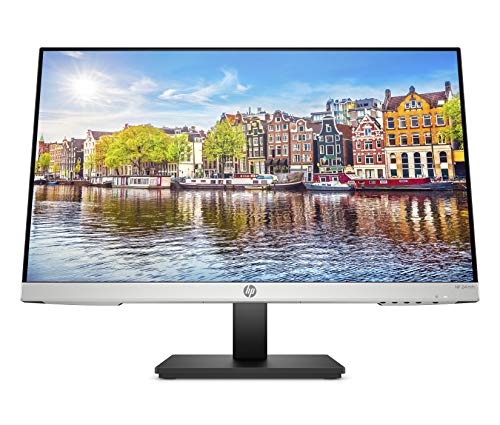
HP 24mh 23.8-inch — The ergonomic all-rounder
The HP 24mh reads like a checklist written by someone who has actually equipped offices. A 23.8-inch IPS panel at Full HD, height and tilt adjustment built into the stand, VESA mounting for those who prefer an arm, built-in speakers for calls, and both HDMI and DisplayPort so that a work laptop and a personal machine can share the screen without a cable ritual. None of those features headlines well. Together they describe the monitor that generates the fewest complaints per year of ownership, which in this category is the highest praise available.
Ergonomics is where the 24mh separates itself from prettier rivals. Height adjustment sounds mundane until you have spent a winter with your screen three inches too low and your neck filing the reports; the ability to set the panel at eye level, and to change it when you change chairs or desks, converts a monitor from an object you endure into equipment that fits. HP’s business heritage shows in that prioritisation, and in a design that assumes the screen will be deployed, redeployed and kept for years rather than unboxed for an audience.
Picture quality sits exactly where the class promises: IPS stability, honest colour for documents and media, and a 75Hz-class smoothness that serves work and casual video without gaming pretensions. Buyers equipping a home office, a family desk or a small business could standardise on this model and stop thinking about monitors, which for most organisations is the entire goal. It is the least exciting pick in this roundup and very possibly the most purchased kind of wisdom in it.
- Panel: 23.8-inch IPS, 1920 x 1080
- Stand: height and tilt adjustment
- Audio: built-in speakers
- Connections: HDMI and DisplayPort
- Mounting: VESA compatible
- Character: business-grade all-rounder
Strengths
- Height adjustment from the box protects necks without an extra purchase.
- Dual digital inputs let work and personal machines share the desk gracefully.
- Built-in speakers and VESA mounting complete a genuinely deployment-ready package.
Trade-offs
- The styling is corporate in a way some home buyers will find plain.
- Refresh and response figures serve work, not play; gamers should look elsewhere in this list.
- It offers no specialist feature to fall in love with — competence is the whole pitch.
Best for: home offices, family desks and small teams standardising on one dependable screen. Not suited for: gamers, or buyers shopping for a design statement.

ASUS VA249QG 120Hz — The light gamer’s upgrade
ASUS positions the VA249QG in its eye-care gaming territory, and the combination sounds like a contradiction until you picture the actual buyer: someone whose 24-inch screen hosts work all day and games in the evening, who wants the evening to feel properly smooth without importing an esports monitor’s compromises into the day. A 120Hz IPS panel with a 1ms-class claim, adaptive sync, 99% sRGB coverage and ASUS’s low-blue-light and flicker-free features is precisely that compromise resolved — fast enough that games feel fluid, gentle enough that documents do not suffer for it.
The 120Hz figure deserves its context. It doubles the classic office rate, which transforms scrolling and casual play alike, and adaptive sync keeps frame rates that wander — as they do on modest hardware — from tearing. Competitive specialists will find the ceiling low and should read this site’s gaming pages instead, but the far larger population of recreational players will experience this screen as the moment games started feeling expensive in the good way. The frameless design and VESA mounting keep the desk story consistent with the rest of this roundup, and built-in speakers cover the casual end of audio.
Within a category defined by restraint, the VA249QG is the pick that admits play exists. It costs the buyer nothing in daytime virtue — the panel is IPS, the eye-care features are real, the size is the class standard — and buys an evening capability the pure office picks cannot offer. For a student, a young professional, or anyone whose single screen must be two things, that dual citizenship makes it arguably the most representative monitor in this entire article.
- Panel: 24-inch IPS, 1920 x 1080
- Refresh rate: 120Hz
- Response claim: 1ms class
- Sync: Adaptive-Sync
- Colour: 99% sRGB claimed
- Features: eye care, speakers, VESA mount
Strengths
- 120Hz and adaptive sync give evening gaming a fluency the office picks cannot match.
- Daytime credentials stay intact, with IPS colour and genuine eye-care features.
- Frameless styling suits pairs and small desks equally well.
Trade-offs
- Serious competitive players will outgrow 120Hz quickly.
- It carries a gaming premium over pure office equivalents of similar panel quality.
- Stand adjustment is not its headline virtue; check the travel if posture is a concern.
Best for: workers who game recreationally on the same screen, and students with one desk for everything. Not suited for: esports-focused players or buyers who will never game at all.

BenQ GW2480 24-inch — The proven eye-care classic
The GW2480 is the elder of this roundup, a 24-inch IPS monitor whose formula BenQ has sold for years: adaptive brightness that responds to room light, low-blue-light modes, anti-glare treatment, flicker-free operation and a restraint in styling that borders on monastic. Its specifications read modestly beside its own successor above — this is a 60Hz-class screen in a guide that also offers 120Hz — yet it survives in the catalogue and in recommendations because the problem it solves, comfortable viewing at a fair price, never stopped existing. Longevity in a commodity category is itself a review.
Its signature feature, brightness intelligence, deserves the attention it rarely gets in spec tables. A sensor watches the room and adjusts the panel so the screen neither glares in a bright afternoon nor blasts in a dark evening, and the cumulative effect across months is fewer manual adjustments and a picture that feels consistently appropriate. Combined with the anti-glare surface, the GW2480 suits the uncontrolled lighting of real homes — windows, lamps, mixed daylight — better than glossier rivals with nominally finer specifications. It is a monitor designed by people who thought about rooms, not just panels.
Choose it when the budget is firm, the use is work and media, and the buyer values a known quantity over a newer number. It includes speakers and the essential ports including DisplayPort and VGA alongside HDMI, a legacy generosity that keeps older machines welcome. Gamers and refresh-rate converts should step to the GW2490 or the ASUS in this list, and this guide says so without embarrassment, because the GW2480’s virtue was never versatility — it is the comfort of a tool perfected for one honest job.
- Panel: 24-inch IPS, 1920 x 1080
- Refresh: 60Hz class
- Eye care: adaptive brightness, low blue light, anti-glare
- Connections: DisplayPort, HDMI and VGA
- Audio: built-in speakers
- Character: long-running comfort formula
Strengths
- Adaptive brightness quietly solves the lighting problem most owners never articulate.
- A proven design with years of owner history behind its reliability story.
- Legacy VGA support keeps older hardware in the family without adapters.
Trade-offs
- Its refresh class feels dated beside the 100Hz and 120Hz picks in this guide.
- Tilt-only ergonomics may push taller users toward a VESA arm.
- No adaptive sync, so it asks gamers to look at its stablemates instead.
Best for: comfort-first workers and media viewers on a firm budget, especially in bright or mixed lighting. Not suited for: anyone who games, or who has already tasted high-refresh scrolling.
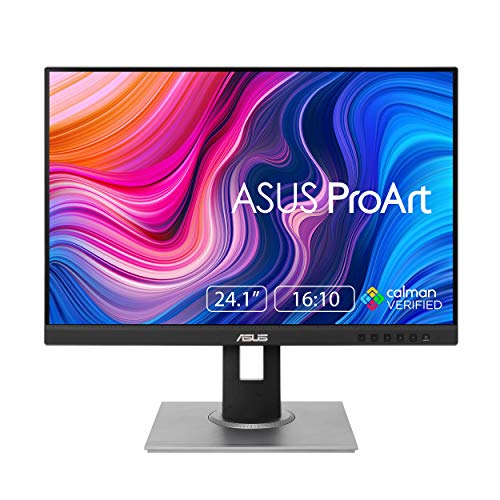
ASUS ProArt PA248QV — The tall-screen specialist
Every category hides one product that answers a different question, and in this class it is the ProArt PA248QV, a 24.1-inch panel at 1920 x 1200. Those extra 120 vertical pixels sound trivial until you spend a day in documents, code, spreadsheets or editing timelines and realise how much of computing is a vertical activity rationed by horizontal screens. The 16:10 aspect ratio restores a proportion that laptops abandoned and many professionals never stopped mourning, and ASUS wraps it in the ProArt line’s calibration ambitions: Calman Verified status, a Delta E figure under 2 in its claims, full sRGB and Rec.709 coverage, and an ergonomic stand worthy of the audience.
The professional framing should not scare off general buyers whose work is tall. Writers gain lines per screen, programmers gain context, analysts gain rows, and photo editors gain a canvas closer to the proportions of their images. Colour accuracy at this tier is a promise about trust — that the red you choose is the red that prints — and while casual users may never test that promise formally, they benefit from a panel built to be right rather than merely vivid. The stand’s full adjustment range also makes the PA248QV the ergonomic flagship of this roundup, a fact necks will appreciate independently of colour science.
Its exclusions are as clear as its inclusions. This is not a gaming screen in any refresh sense, its price reflects professional positioning, and the slightly larger panel at a slightly different aspect can complicate matched pairs with standard 24-inch screens. Buy it as what it is — the connoisseur’s answer within an everyday category — and it may be the most satisfying purchase in this article for the reader it fits.
- Panel: 24.1-inch IPS, 1920 x 1200 (16:10)
- Colour: 100% sRGB and Rec.709 claimed, Calman Verified
- Accuracy claim: Delta E under 2
- Stand: full ergonomic adjustment
- Connections: HDMI and DisplayPort
- Line: ASUS ProArt professional series
Strengths
- The taller 16:10 canvas returns vertical room that documents and code visibly miss.
- Calibration credentials make its colour trustworthy for design-adjacent work.
- The stand offers the fullest adjustment in this roundup.
Trade-offs
- Professional positioning costs more than the office picks here.
- Refresh performance is for work; players should choose the VA249QG instead.
- The odd size and aspect complicate perfectly matched dual-screen pairs.
Best for: writers, programmers, analysts and design-adjacent workers whose screens run vertically. Not suited for: gamers, or buyers pairing it with an existing standard 24-inch panel.

Acer Nitro VG240Y — The FreeSync footnote
Acer’s Nitro VG240Y has been the budget gamer’s IPS answer for so long that its presence in an everyday roundup needs one sentence of justification: plenty of desks want a screen that works all day and plays a little, at the lowest price that still respects both jobs, and this is that screen. Its 23.8-inch IPS panel runs at 75Hz with FreeSync and a 1ms VRB claim, a specification that will not impress the high-refresh pages of this site but that delivers tear-free, slightly smoother-than-office motion for the casual gaming that most households actually do.
The IPS panel is the point of including it among office company. Budget gaming screens historically cut the panel first, and the VG240Y’s refusal to do so means the daytime picture keeps the angles and colour this category promises while the evening gains FreeSync’s smoothness. Its port selection, including VGA beside dual HDMI, betrays its long production run and serves older machines gracefully. As with the BenQ classic above, longevity here is evidence: a model does not survive this many product cycles in the most contested price tier in monitors without satisfying the people who bought it.
Set expectations with care and it will not disappoint. The 75Hz ceiling is real, the VRB response figure is a strobing number rather than a grey-to-grey one, and the build reflects its price in every seam. But as the least expensive route in this article to an IPS screen that can also game a little, it closes the roundup the way the roundup began: by respecting what ordinary desks actually need, and pricing the respect fairly.
- Panel: 23.8-inch IPS, 1920 x 1080
- Refresh rate: 75Hz
- Response claim: 1ms VRB (strobing-based)
- Sync: AMD FreeSync
- Connections: two HDMI and VGA
- Position: long-running budget all-rounder
Strengths
- Keeps a genuine IPS panel at a price tier where lesser panels are the norm.
- FreeSync and 75Hz give casual gaming a smoothness pure office screens lack.
- A long production history means mature pricing and plentiful owner experience.
Trade-offs
- The 75Hz ceiling will feel low to anyone arriving from high-refresh gaming.
- Its response figure is a VRB strobing claim, not a panel measurement.
- Build and stand reflect the budget honestly, which is to say visibly.
Best for: budget desks that work by day and play casually by night. Not suited for: refresh-rate enthusiasts or buyers wanting modern minimal bezels and stands.
How should you set up a 24-inch IPS monitor for a healthier workday?
Position comes before settings. Place the screen so its top edge sits at or slightly below eye level, roughly an arm’s length away, with its centre aligned to your body’s centre rather than to the desk’s. If your pick has height adjustment, use it; if it does not, books are a legitimate interim stand and a VESA arm is the permanent answer. Angle the panel to face your eyes squarely, because even IPS, for all its forgiveness, looks its best on axis, and a screen permanently swivelled toward a window is a glare machine regardless of coating.
Then set brightness by the room, not by the slider’s default. The reliable home method is to hold a sheet of white paper beside the screen in your normal lighting and lower brightness until the white of a blank document roughly matches the paper; most monitors ship far brighter than offices need, and the excess is a leading cause of the vague end-of-day fatigue owners blame on screens generally. Enable the low-blue-light mode for evening hours if your model offers a gentle version, reserving the aggressive amber settings for night, since strong colour shifts during the day distort colour-critical work and annoy everyone else.
Software completes the setup. Run the panel at its native resolution with scaling at the level your eyes prefer rather than the level the operating system guessed, increase refresh to the panel’s full rate in display settings if it exceeds 60Hz — several picks in this guide default lower on some connections — and enable flicker-free behaviour where it is a menu choice rather than a design constant. Twenty minutes of this attention on the first day pays out across every day the monitor serves, which in this durable category may be most of a decade.
What should you check before buying a small IPS monitor for a pair?
Dual-screen setups are this size class’s second career, and they reward a few checks that single-screen buyers skip. Match the model exactly where possible, because two different panels at the same nominal size will differ in colour temperature, bezel and stand in ways that irritate daily at close range. Confirm the bezels are genuinely thin on the sides that will meet, verify both units carry VESA mounts if a dual arm is planned, and budget for the arm itself, since two stock stands consume the desk depth this size was chosen to save. Finally, count your computer’s video outputs before ordering, because the most elegant pair of monitors is defeated by a laptop with one port and no dock.
Comparison Table
| Pick | Size and panel | Resolution | Refresh | Standout trait | Sync |
|---|---|---|---|---|---|
| BenQ GW2490 | 24-inch IPS | 1920 x 1080 | 100Hz | Eye-care modernised | Not headline-listed |
| HP 24mh | 23.8-inch IPS | 1920 x 1080 | 75Hz class | Height adjustment and speakers | Not headline-listed |
| ASUS VA249QG | 24-inch IPS | 1920 x 1080 | 120Hz | Light-gaming fluency | Adaptive-Sync |
| BenQ GW2480 | 24-inch IPS | 1920 x 1080 | 60Hz class | Adaptive brightness | None |
| ASUS ProArt PA248QV | 24.1-inch IPS | 1920 x 1200 | Work-class | 16:10 calibrated canvas | None |
| Acer Nitro VG240Y | 23.8-inch IPS | 1920 x 1080 | 75Hz | Budget FreeSync | FreeSync |
What mistakes do buyers make in this size class?
The most expensive mistake is buying by diagonal alone and discovering the stand cannot reach your eyes, a flaw no panel quality compensates for across eight-hour days. The second is paying gaming prices for a screen that will only ever show documents, or the reverse, saving a small sum on an office panel and then gaming on it unhappily for years; this roundup’s spread exists so that neither error is necessary. The third is dismissing Full HD as outdated without regard to size, importing a resolution anxiety that belongs to larger panels and paying for pixels your seating distance cannot resolve.
A quieter pair of errors concerns pairs and ports. Buying two different models for a dual setup because each was separately discounted guarantees a mismatched desk, and failing to check a laptop’s outputs before choosing screens with particular inputs turns delivery day into adapter shopping. Both are prevented by the checks in the section above, which is why this guide placed them before the table rather than after it.
Final Recommendation
For most readers the BenQ GW2490 is the answer this category currently gives: a calm, modern, eye-kind 24-inch IPS screen with enough refresh to feel alive. Choose the HP 24mh when ergonomics and deployment simplicity lead, the ASUS VA249QG when evenings include games, and the GW2480 when comfort on a budget outranks every number. The ProArt PA248QV serves the vertical workers, the Acer VG240Y serves the careful spenders, and between those six honest specialisations sits nearly every desk this size was ever bought for. A small IPS monitor will never be the most exciting object in a room, yet few objects in the room will be looked at longer — so choose the one your eyes would choose, and let the specification sheet finish second.
How do IPS, VA and TN compare at this size specifically?
Panel debates are usually conducted at gaming sizes, but the verdicts shift at 24 inches because the usage shifts. TN’s speed advantage shrinks in importance when the workload is documents, and its viewing-angle weakness grows in importance when a screen is viewed closely and shared across a desk, so TN has nearly vanished from this class for good reasons. VA makes a subtler case: its deep contrast flatters evening films, and a 24-inch VA screen can be a fine media choice, yet its colour shift off-axis and slower dark transitions argue against it for the colour-trusting, all-day role this category defines. IPS wins here not by being best at everything but by being weakest at nothing this size is used for.
There is one more consideration that spec sheets omit: consistency across a production class. IPS panels at 24 inches are manufactured in enormous volumes for office deployment, and that volume has ironed out the variability that plagues more exotic panels. Two units of the same IPS model bought a year apart will look near-identical on a desk, which matters to the pair-buyers and small businesses this category serves. Exotic panels promise peaks; this class promises that Tuesday’s unit matches Monday’s, and for working equipment that promise outranks most peaks.
Should you consider a 1440p panel at 24 inches instead?
It exists, it is rare, and it divides opinion in a way worth understanding before hunting one down. QHD at 24 inches produces very fine pixels, which makes text rendering exceptionally smooth for readers who sit close and notice such things, and gives photo and design work extra resolving power in a small footprint. The costs arrive elsewhere: everything on screen shrinks unless scaling is applied, scaling reintroduces the software inconsistencies this class usually avoids, graphics hardware works harder for pixels many eyes cannot separate at this size, and the models themselves are few enough that choice and pricing suffer. The market’s near-unanimous verdict — Full HD at 24, QHD at 27 — reflects those trade-offs rather than a conspiracy.
The readers who should overrule that verdict know who they are: they sit close, they read fine detail professionally, and they have already decided the scaling tax is worth paying. Everyone else should hear the market’s answer as information. A category this mature has optimised itself around its users’ real eyes and real desks, and the exotic option is exotic because the ordinary one is right.
How can you get better colour from a small IPS screen without instruments?
Start by choosing the panel’s sRGB mode if it offers one, because the vivid or wide-gamut presets that ship as defaults on some models oversaturate ordinary content in ways owners misread as quality. Set brightness by the paper method described in the setup section, since colour judgement at excessive brightness is unreliable, and let the panel warm up for twenty minutes before judging anything, because backlights drift as they reach working temperature. Then compare a handful of photographs you know well — ideally ones you have seen printed — against your memory of them; skin tones expose colour errors more honestly than test patterns, and a screen that renders familiar faces naturally is a screen calibrated closely enough for all but professional proofing.
Accept the ceiling of the method with good humour. Eyeball calibration gets a good IPS panel most of the way to right, and the remaining distance is what hardware calibrators and the ProArt pick’s factory credentials exist to close. If your income depends on colour — print design, product photography, video for clients — that remaining distance is worth paying for exactly once, in the panel, rather than repeatedly in reprints and apologies. If it does not, the disciplined eyeball method above will serve you for the life of the monitor.
How long should a monitor in this class last, and how do you help it?
IPS office panels are among the longest-lived objects in computing, routinely outlasting two or three computers, because nothing in them moves and their backlights fade slowly and gracefully. The practical failure points are mundane: a stand hinge loosened by years of adjustment, a port worn by daily cable swaps, a power supply ageing in a hot room. You can defend all three cheaply — adjust the stand by its designed grips rather than the panel’s corners, leave cables connected and switch inputs electronically where two machines share the screen, and give the vents air rather than a cubby. A screen treated that way in this class commonly serves a decade, which reframes its price more kindly than any sale.
That longevity also argues for buying the stand and the panel you actually want the first time. A monitor kept for ten years amortises a modest premium into pennies a month, while a false economy repeats its annoyance ten thousand times. This is the class where the old advice to buy once and buy well is not a luxury slogan but arithmetic, and it is why this guide weighted ergonomics and panel honesty above the small savings that dominate its price tier’s advertising.
What does this class offer students and first-desk buyers?
For a first proper desk — a student’s room, a first flat, a home office assembled from a corner — this size class solves more problems per unit of money than any other in computing. It is large enough to write essays and run two windows without misery, small enough to travel between accommodation in a car boot without drama, and cheap enough that its loss or damage is an annoyance rather than a crisis. The picks above divide that audience naturally: the GW2490 for the buyer who wants to forget the purchase for years, the VA249QG for the one whose evenings are games, the VG240Y for the one counting every note twice.
Two buying habits serve this audience especially well. The first is to buy the monitor before upgrading anything else, because a good screen improves every task the existing computer already performs, while a faster computer behind a miserable screen improves only benchmarks. The second is to keep the box and the receipt discipline boringly safe, since student and first-home life involves moves, and a 24-inch panel in its original packaging survives moves that kill unpackaged screens. Neither habit appears in specification tables; both decide whether a good purchase stays one.
How do these screens handle video calls and hybrid work?
Hybrid work quietly rewrote this category’s requirements, and the picks here reflect the rewrite. Built-in speakers, once a dismissed checkbox, now carry the daily weight of calls in rooms where a headset is not always wanted, and the HP and BenQ models include them with exactly that duty in mind. A screen that sits at eye level improves the camera angle of the laptop below it more than any webcam accessory, which is another practical dividend of the height-adjustable picks. And the IPS panel’s stable picture from off-angles matters when a call’s participants gather around one desk rather than one chair.
The remaining hybrid virtue is port charity. A monitor with both HDMI and DisplayPort lets a work laptop and a personal machine coexist without a daily cable swap, and several picks here offer exactly that pairing. In a category where every feature must justify itself in daily use, the hybrid checklist — speakers, height, two digital inputs, a picture that flatters a face at arm’s length — is as honest a buying guide as any refresh figure, and it is woven through the recommendations above deliberately.
What about glossy screens, matte coatings and room light?
Nearly every screen in this roundup wears a matte anti-glare coating, and the near-unanimity is a verdict from the market rather than a coincidence. A matte surface scatters window and lamp reflections into a soft haze instead of mirror images, which keeps text readable in the uncontrolled lighting of homes and shared offices. The cost, debated endlessly by enthusiasts, is a faint grain over the image that glossy panels avoid, along with a small loss of perceived contrast in dark rooms. For the working purposes of this class the trade is correct and it is not close: a screen that can be read at noon in a bright room serves its owner more faithfully than one that looks marginally richer at midnight.
Glossy small monitors still exist and still have their defenders, particularly for media in controlled light, where their blacks deepen and their colours saturate. If your desk lives in a dim room and your evenings are films, a glossy panel is a legitimate preference rather than an error. What this guide resists is the accident: buyers ordering whatever finish a listing happened to carry, then discovering their room in the screen every afternoon. Check the coating the way you check the stand, because both are properties of your room as much as of the monitor.
Is one premium small monitor better than two ordinary ones?
The question divides buyers of this class more than any specification, and the honest answer is that it depends on whether your work is sequential or parallel. Sequential work — one document, one canvas, one game at a time — rewards the single better screen: finer ergonomics, better colour, a stand that fits you, all concentrated where your eyes actually are. Parallel work — writing against sources, monitoring while doing, communicating while producing — rewards the pair, because no single 24-inch panel, however excellent, can be in two attentional places at once. Most knowledge work is more parallel than its owners admit, which is why dual 24-inch setups became the office vernacular, and why this guide keeps returning to pairing as the class’s defining use.
Budget shapes the same answer from the other side. Two ordinary picks from this list, such as a pair of the HP or the BenQ classic, cost roughly what one premium large monitor costs, and for a parallel worker that exchange is obviously right. A sequential worker making the same exchange has bought a second screen to hold email and called it productivity. Know your pattern before the sale decides for you, and either configuration can be the correct one — the only wrong answer is the unexamined one.
A note on buying for someone else
This size class is the one most often bought as a gift, for a parent setting up a home office, a student leaving for university, or an employee the buyer will never meet. Gift logic inverts some of this guide’s priorities in useful ways. Favour the picks with the fewest assumptions: height adjustment that forgives an unknown chair, speakers that forgive an empty desk, both digital inputs that forgive an unknown laptop, and styling that forgives an unknown room. By those lights the HP 24mh is the gift pick of this roundup, with the GW2490 close behind for recipients known to work long hours. Include the receipt, keep the box until the desk is settled, and resist adding a exotic specification the recipient never asked for — in this category, thoughtfulness looks like adjustability.
What will you notice in the first week, and what takes a month?
The first week’s impressions are ergonomic before they are optical. A screen at the right height changes posture within days; a panel that holds its picture when you lean, fetch coffee or turn to a colleague stops being noticed at all, which is IPS’s characteristic triumph — the disappearance of a whole category of small annoyances. The higher-refresh picks announce themselves immediately in scrolling, and then, interestingly, stop being noticeable too, until a visit to a 60Hz screen elsewhere makes the old motion look broken. Good equipment in this class does not keep impressing its owner; it keeps not bothering them.
The month-scale impressions are about trust. Colours that stay where you left them, a backlight that does not flicker at low brightness during evening work, a stand that has not crept a centimetre — these are the properties that convert a purchase into equipment. They are also why this guide weighted boring virtues so heavily in its selection, and why its final advice to a torn reader is simple: between two finalists, choose the one whose virtues are the kind that compound quietly, because a monitor in this class is a decade-long colleague, not a season’s entertainment.
Keep one small habit from this guide whatever you buy: measure your desk’s depth and your chair’s height before ordering, because the finest panel in this class still has to fit the room it will serve, and the room, in the end, is half the product you are actually buying and living with daily.
And if the desk hosts two people across a week, as family desks now do, favour the pick whose settings menu is kindest to navigate, because a screen shared between a tall adult and a growing teenager will be adjusted often, and a hostile menu quietly discourages the adjustments that keep both of them comfortable.
Frequently Asked Questions
Is Full HD enough at 24 inches?
For the overwhelming majority of desks, yes. At typical viewing distances the pixel density keeps text clean and images coherent, and it avoids the scaling compromises and graphics demands of higher resolutions. Readers with exceptional eyesight, very close seating or heavy photo work at pixel level are the exceptions, and the ProArt pick serves the last group best.
Why choose IPS over cheaper panel types at this size?
Because a small screen is viewed closely, shared casually and repositioned constantly, and IPS holds its colour and brightness through all of that while cheaper panels shift and wash. The saving from a lesser panel is small at this size and the tax is collected daily, which makes IPS the rare upgrade that is also the sensible default.
Does 100Hz or 120Hz matter if I do not game?
More than sceptics expect. Scrolling, window movement and interface animation all smooth out noticeably above 60Hz, and many non-gamers describe the change as the screen feeling calmer. It is not essential — the GW2480 built a career without it — but on the picks that offer it, it is the feature owners mention most after a month.
Should I buy one 24-inch screen or two?
Two, if your work routinely involves reference material beside a main document, and your desk and computer outputs support the pair. One, if your tasks are single-focus or your space is tight. Buy matched models for a pair, and read the pairing checks earlier in this guide before ordering either way.
Are built-in monitor speakers worth having?
For calls, casual video and keeping a small desk uncluttered, genuinely yes. For music, film or gaming immersion, they remain a convenience rather than a solution, and a modest external speaker will outclass every set in this roundup. Treat them as equipment for communication, not entertainment, and they will satisfy.
Can a 24-inch IPS monitor serve as a small TV substitute?
For a bedroom, kitchen or student room, very comfortably. Streaming sticks and consoles connect over HDMI, the IPS panel holds its picture from a bed or a sofa at an angle, and the built-in speakers on several picks here cover casual viewing without extra equipment. What it will not do is fill a living room or deliver cinema scale, and its tuners and smart platforms are the streaming device’s job, not the panel’s. Judge it as a personal screen that also shows programmes, and it succeeds; judge it as a television, and the comparison was rigged from the start.
Related Guides
Readers furnishing a whole desk may also appreciate our guide to the best 24 inch gaming monitors, our roundup of the best 24 inch monitors with HDR, and our advice on choosing a monitor arm for a dual-screen desk.