What's inside
- Key Takeaways
- Quick Picks: 1440p-Class Laptops at a Glance
- How Were These Picks Chosen?
- What Does 1440p-Class Actually Mean in Pixels?
- Why Did Laptop Makers Skip Pure 1440p So Often?
- The 1440p-Class Contenders, Reviewed in Detail
- How Do the Picks Compare Side by Side?
- Can a Graphics Card in This Class Really Use the Extra Pixels?
- Is OLED Worth Choosing at This Resolution?
- How Does Scaling Work on a 13.4 Inch Screen This Sharp?
- Should Gamers Prefer the True QHD Blade or a 1600-Line Legion?
- What Does This Resolution Do to Battery Endurance?
- How Do These Screens Handle Creative Colour Work?
- What Should Upgraders From 1080p Expect in the First Week?
- How Do the Gaming Machines Differ as Work Laptops?
- Where Does This Class Sit Against 4K Laptops?
- What Accessories Actually Matter for a Sharper Screen?
- How Should You Read a Listing in This Class Without Being Misled?
- What Is the Ownership Outlook Across Several Years?
- How Do Thermals and Noise Behave When Pixels Multiply?
- What Role Does Refresh Rate Play Beside Resolution?
- How Portable Is Portable in This Class?
- What Should Creators Check Beyond the Panel?
- Common Mistakes Buyers Make in This Class
- Living With a 1440p-Class Screen Every Day
- Final Recommendation
- Frequently Asked Questions
- Related Guides
As an Amazon Associate I earn from qualifying purchases. This post may contain affiliate links at no extra cost to you.
gizmoverdict.com is reader-supported. When you buy through links on our site, we may earn an affiliate commission.
Where to buy: each linked machine below leads to its Amazon listing, where you can read the panel resolution in the title for yourself, confirm the graphics card generation being sold, and check price on Amazon before deciding which tier of sharpness deserves your money.
The best 1440p laptops begin with a confession that most roundups bury: a true 2560 by 1440 panel is a rare creature in the laptop world, because manufacturers largely skipped that exact grid on their way somewhere else. What buyers actually meet, and what this guide honestly covers, is the 1440p class: machines clustered around that level of detail, most of them running 2560 by 1600 in the taller 16:10 shape, plus one genuine QHD gaming laptop that carries the classic resolution at a high refresh rate.
That framing is not a fudge; it is the only truthful way to shop this shelf. A 2560 by 1600 screen holds slightly more pixels than 2560 by 1440, arranges them with extra vertical room that documents and timelines adore, and delivers the same perceived leap over 1080p that shoppers came here seeking. Insisting on the exact 1440 figure would empty the guide of its best machines and reward a spec-sheet technicality over the experience your eyes will actually have.
The six entries below divide into clear camps. Three are gaming laptops where the sharper panel partners a dedicated graphics card, one is a slim Dell XPS 13 that brings the resolution class to ultraportable work, and two prose-only entries mark the ceiling above the class, at 2880 by 1800 and at a 3K tier, for buyers wondering whether to stretch further. A much-loved Razer from a previous GPU generation anchors the value end and is described as exactly that, not dressed up as a current flagship.
Key Takeaways
- Pure 2560 by 1440 laptop panels are uncommon; most machines in this class run 2560 by 1600, which is slightly sharper and noticeably taller for documents.
- The Razer Blade 14 here is the RTX 3070 Ti generation with a true QHD 165Hz panel, a fine machine whose age must be priced into the decision.
- Both Lenovo Legion models pair OLED panels with current dedicated graphics, making them the modern gaming heart of this guide.
- The Dell XPS 13 proves the resolution class also serves ultraportable work, though its eight gigabytes of memory demand a light workload.
- Two prose-only entries sit above the class entirely, and they are context for stretch buyers rather than picks you can click through to here.
Quick Picks: 1440p-Class Laptops at a Glance
| Pick | Badge | Why it made the cut |
|---|---|---|
| Razer Blade 14 Gaming Laptop: AMD Ryzen 9 6900HX CPU – NVIDIA GeForce RTX 3070 Ti – 14" QHD 165Hz – 16GB DDR5 RAM – 1TB PCIe SSD – Windows 11 – Ultra- | True QHD original | The genuine 2560 by 1440 article: a 165Hz gaming panel in a compact fourteen-inch chassis from the RTX 30 generation. |
| Lenovo Legion 5 15IRX10 15.1" WQXGA OLED, Gaming Laptop, Intel Core i9 14th Gen 14900HX 1.6GHz; NVIDIA GeForce RTX 5070 8GB GDDR7; 32GB DDR5 RAM; 1TB | Modern power flagship | A Core i9 HX processor, RTX 5070 graphics and a WQXGA OLED panel make it the current-generation heavyweight here. |
| Lenovo Legion 5a Gaming Laptop, AMD Ryzen 7 250, GeForce RTX 5060, 15.3" WQXGA (2560×1600) 165Hz OLED Display, 32GB DDR5 RAM, 1TB SSD, Wi-Fi 7, RGB Ba | High-refresh OLED all-rounder | A 2560 by 1600 OLED at 165Hz with RTX 5060 graphics and Wi-Fi 7, the balanced modern gamer of the group. |
| Dell XPS 13 Laptop, 13.4" 2560 x 1600 Touchscreen, 500 nits 120Hz Display, Intel Core 5 320, 8GB LPDDR5X RAM, 512GB SSD, Intel Graphics, Wi-Fi 7, 2 x | Ultraportable class representative | The resolution class in a 13.4 inch touch chassis at 500 nits and 120Hz, built for documents rather than games. |
| Samsung Galaxy Book5 Pro 360 (prose-only — 2880 by 1800, above the 1440p class) | Above-class context | A 2880 by 1800 convertible that shows where the next resolution tier begins, included as a landmark rather than a pick. |
| Dell XPS 13 3K configuration (prose-only — a step-up tier above this class) | Step-up marker | The higher-resolution XPS variant that sits above the linked XPS 13, clarifying what the in-class model is and is not. |
How Were These Picks Chosen?
Eligibility for this guide was defined by the panel first and the badge second. A machine qualified when its listing placed it in the 1440p neighbourhood: genuine QHD, or the 2560 by 1600 grid that the industry treats as this tier in 16:10 form. Machines at 1920 by 1200 were excluded as a class below, and anything at 2880 by 1800 or 3K was classified as a step-up, however loudly its marketing borrowed the word sharp.
Within that boundary, the selection balances the two reasons people seek this resolution. Gamers want pixel density that flatters modern titles without the rendering cost of 4K, and they appear here three times with different ages and graphics generations. Creators and document workers want text that stays crisp at small sizes and extra vertical lines, represented by the XPS 13 and by the working space the Legion OLED panels provide when the games are closed.
The two prose-only entries were kept in the guide deliberately, because a buyer researching this class will meet them within minutes and deserves a map of where they sit. The Samsung Galaxy Book5 Pro 360 runs 2880 by 1800, above the class, and the higher-tier Dell XPS 13 configuration occupies a 3K position above its sibling reviewed here. Neither is linked, neither is ranked, and both are labelled so that nobody mistakes context for recommendation.
What Does 1440p-Class Actually Mean in Pixels?
Start with the arithmetic, because the vocabulary in this market is slippery. A 1080p panel holds just over two million pixels. The classic 1440p grid of 2560 by 1440 holds about three and two-thirds million, and the 2560 by 1600 panels used by three of this guide’s four linked machines hold slightly over four million, with the extra lines stacked vertically. On screens between thirteen and sixteen inches, all three of those sharper grids cross the threshold where individual pixels stop announcing themselves during ordinary work.
The practical consequences differ by task. Reading and writing gain the most from the taller 1600-line panels, because more of a document survives on screen before scrolling. Gaming gains from density itself, since fine detail in distant scenery and user interfaces renders with less shimmer. Video sits between the two, largely indifferent to the extra vertical lines because films are framed wider than any of these screens.
Why Did Laptop Makers Skip Pure 1440p So Often?
Panel production follows volume, and volume gathered at the extremes: inexpensive 1080p for the mainstream, and very high resolutions for flagships where the panel also serves as a marketing headline. The middle tier survived mainly where gaming laptops demanded it, because players understand resolution as a performance dial and asked for a step above 1080p that their graphics cards could still drive at high frame rates. The Blade 14 in this guide is a product of exactly that demand.
The revival of 16:10 aspect ratios then reshaped the middle tier into 2560 by 1600, which suited manufacturers standardising on taller screens across premium lines. That is why a shopper hunting the literal numbers 2560 by 1440 in 2026 finds mostly older gaming stock, while the living market sells the same class of sharpness under WQXGA badges. Buying the class rather than the label is how you end up with a current machine.
The 1440p-Class Contenders, Reviewed in Detail
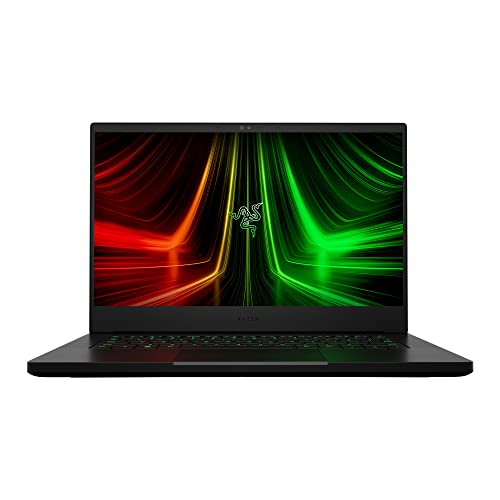
Razer Blade 14 (RTX 3070 Ti) — True QHD original
This Blade 14 is the one machine in the guide that takes the title literally, with a QHD panel refreshing at 165Hz in a fourteen-inch frame that still embarrasses bulkier gaming laptops. Its Ryzen 9 6900HX and GeForce RTX 3070 Ti belong to an earlier generation than the Lenovo pair below, and this review will not pretend otherwise: you are looking at a previous flagship, with the performance and the pricing logic that status implies, rather than a 2026 release wearing a familiar name.
Judged on those honest terms, it remains a deeply appealing object. The compact chassis travels like a work laptop, the screen’s combination of true 1440p density and high refresh flatters both fast games and fine text, and sixteen gigabytes of DDR5 with a terabyte of storage match what many buyers still need. For a player whose library leans on titles from the last several years, or who values portability over chasing the newest graphics silicon, the proposition is coherent.
The cautions are generational rather than personal. Newer graphics cards bring newer efficiency and feature sets, and a buyer planning to keep a machine for many years should weigh how much that matters against the Blade’s likely price advantage. Battery expectations should also stay modest, as they should for every gaming laptop in this guide. Treat it as the connoisseur’s value pick of the class, bought with open eyes, and it rewards the decision.
Strengths
- Genuine QHD 165Hz panel rather than a taller class substitute
- Compact fourteen-inch chassis travels far better than most gaming laptops
- Terabyte storage and DDR5 memory remain respectable today
Trade-offs
- RTX 3070 Ti is a previous generation behind the Legion pair here
- Gaming hardware keeps battery endurance firmly in the modest camp
- Fourteen-inch screen asks for scaling comfort with fine interface text
Key specs
- Display: 14 inch QHD 165Hz
- Processor: AMD Ryzen 9 6900HX
- Graphics: NVIDIA GeForce RTX 3070 Ti
- Memory: 16GB DDR5 RAM
- Storage: 1TB PCIe SSD
Best for: portable players who want true 1440p and high refresh in a compact chassis at a previous-generation position.
Not suited for: buyers who want the newest graphics generation or the longest possible ownership horizon.

Lenovo Legion 5 15IRX10 — Modern power flagship
The Legion 5 15IRX10 is what the 1440p class looks like when a manufacturer spends without flinching: a 15.1 inch WQXGA OLED panel, a Core i9-14900HX from Intel’s HX line, RTX 5070 graphics with GDDR7 memory, and thirty-two gigabytes of DDR5. Each element reinforces the others. The processor feeds the graphics card during complex scenes, the memory holds large game worlds and creative projects without complaint, and the OLED panel renders the results with the contrast that makes night scenes in games genuinely legible.
OLED deserves its own sentence of caution alongside the praise. Its per-pixel lighting delivers blacks that LCD panels approximate, and colours carry a richness that flatters both games and films. The same technology asks for sensible habits around static interface elements left at full brightness for months, and its power draw varies with what is on screen. None of that disqualifies it; it simply means the panel is a performance component to be used knowingly rather than a fit-and-forget window.
Against the Blade 14, this Legion trades portability for modernity in every measurable way, and against its Legion sibling below it offers Intel’s HX flagship character instead of AMD efficiency. The buyer it suits knows that a gaming laptop is a system of compromises and has decided that performance per component matters more than elegance per gram. For that buyer, this is the guide’s most complete expression of what the class can be in its current generation.
Strengths
- Core i9 HX and RTX 5070 form the strongest pairing in this guide
- WQXGA OLED panel delivers exceptional contrast for games and film
- Thirty-two gigabytes of memory removes multitasking ceilings
Trade-offs
- Size and cooling ambitions make it a desk-first machine
- OLED panels reward sensible habits around static bright elements
- Top-tier specification will command the guide’s most serious budget
Key specs
- Display: 15.1 inch WQXGA OLED
- Processor: Intel Core i9 14900HX, 14th Gen
- Graphics: NVIDIA GeForce RTX 5070 8GB GDDR7
- Memory: 32GB DDR5 RAM
- Storage: 1TB
Best for: gamers and creators who want the current generation’s full performance in this resolution class.
Not suited for: travellers who need an ultraportable or anyone whose games are light enough not to use this power.

Lenovo Legion 5a (Ryzen 7 250) — High-refresh OLED all-rounder
The Legion 5a makes the class definition concrete, because its title spells the panel out in full: WQXGA at 2560 by 1600, refreshing at 165Hz, in OLED. That is the 1440p class in its modern 16:10 form, and the surrounding specification is chosen to exploit it, with a Ryzen 7 250 processor, RTX 5060 graphics, thirty-two gigabytes of DDR5 and a terabyte of storage. Nothing in the configuration is a bottleneck dressed as a feature.
Its personality differs from the Intel Legion above in ways that suit a slightly wider life. AMD’s platform and the step down to an RTX 5060 trim the flagship excess while keeping the experience of high-refresh, high-density gaming intact, and Wi-Fi 7 support future-proofs the wireless side for routers that many households will adopt during this machine’s lifetime. The RGB keyboard mentioned in the listing signals its gaming identity plainly, for buyers who enjoy that theatre and buyers who prefer to know it can be dimmed.
For many readers this will be the sweet spot of the guide: current silicon, a superb panel, memory in abundance, and no component asking for an apology. It lacks only the Blade’s compact charm and the XPS’s ultraportable brief. Gamers who play at a desk but occasionally carry their machine to another room or another house will find its balance of virtues the easiest to live with across several years.
Strengths
- 2560 by 1600 OLED at 165Hz is the modern class panel done properly
- RTX 5060 and 32GB memory form a balanced current pairing
- Wi-Fi 7 keeps networking current for the machine’s whole life
Trade-offs
- Still a full gaming chassis, with the weight that implies
- OLED care habits apply just as they do to its Legion sibling
- RGB styling announces gaming in rooms where subtlety might serve better
Key specs
- Display: 15.3 inch WQXGA 2560×1600 165Hz OLED
- Processor: AMD Ryzen 7 250
- Graphics: GeForce RTX 5060
- Memory: 32GB DDR5 RAM
- Storage: 1TB SSD
Best for: gamers wanting the current generation’s balanced build around a superb high-refresh OLED screen.
Not suited for: minimalists seeking an office-quiet ultraportable or buyers indifferent to high refresh rates.

Dell XPS 13 (2560 by 1600 Touch) — Ultraportable class representative
The XPS 13 demonstrates that this resolution class was never only a gaming story. Its 13.4 inch panel packs 2560 by 1600 into a travel chassis, adds touch, reaches 500 nits for bright rooms and airports, and refreshes at 120Hz so scrolling through long documents feels fluid rather than merely adequate. For a writer, analyst or researcher, those qualities translate into text that stays crisp at small sizes during eight-hour reading days, which is a different and equally legitimate reason to buy pixels.
The specification beneath the screen asks for a matching honesty about workload. The Intel Core 5 320 and integrated graphics are productivity components, entirely comfortable with documents, browsing and calls, and eight gigabytes of LPDDR5X memory is the configuration’s genuine limit. Buyers who keep many heavy applications open together will feel that ceiling, and no elegance of design suspends arithmetic. The 512 gigabyte drive, by contrast, is sized generously for a machine of this class.
Consider this pick the guide’s reminder that resolution serves the work in front of it. A gamer would waste this panel’s virtues and miss a dedicated graphics card within the hour, while a travelling professional would waste the Legions’ power and resent their bulk by the second airport. The XPS earns its place by proving the class has two audiences, and by serving the quieter one with unusual polish.
Strengths
- 2560 by 1600 touch panel at 500 nits suits bright, mobile work
- 120Hz refresh keeps long documents and scrolling feeling fluid
- Ultraportable XPS chassis carries the class into airports and meetings
Trade-offs
- Eight gigabytes of memory is the tightest allowance in this guide
- Integrated graphics exclude serious gaming by design
- Small chassis offers a compact port selection to check before buying
Key specs
- Display: 13.4 inch 2560 x 1600 Touchscreen, 500 nits, 120Hz
- Processor: Intel Core 5 320
- Graphics: Intel Graphics
- Memory: 8GB LPDDR5X RAM
- Storage: 512GB SSD
Best for: travelling professionals whose days are documents, reading and calls at maximum sharpness.
Not suited for: gamers, or multitaskers whose open applications would overwhelm eight gigabytes of memory.
Samsung Galaxy Book5 Pro 360 — Above-class context
The Galaxy Book5 Pro 360 appears in this guide without a link and without a ranking, because its 2880 by 1800 panel places it above the class under review. It earns its paragraphs as a landmark: this is the sort of machine a shopper meets when research drifts upward, a premium convertible whose screen resolution exceeds the brief and whose price and positioning follow that excess. Knowing it exists helps you decide whether your needs truly stop at the 1440p class.
For most readers, the honest answer is that they do stop there. The jump from 1080p to this class delivers the obvious transformation in text clarity and gaming detail, while the further step to 2880 by 1800 refines an already fine image at a cost in money and rendering effort. Creatives working at pixel level may value that refinement daily; document workers and gamers will rarely be able to point at what the extra pixels bought them.
Treat this entry as the guide’s ceiling marker, then, and let it sharpen your decision rather than inflate it. If the description of work above the class sounds like your actual week, shop that tier deliberately in a guide written for it. If it sounds like a holiday from your real workload, the four linked machines here cover your needs with money left over.
Strengths
- Marks the resolution tier directly above this class clearly
- Convertible premium format shows the direction of flagship design
- Helps stretch buyers test whether extra pixels serve their work
Trade-offs
- Resolution exceeds the class, so it is context rather than a pick
- No link is offered for it anywhere in this guide
- Premium convertibles price their flexibility as well as their panels
Key specs
- Display class: 2880 by 1800, above the 1440p class
- Format: premium convertible design
- Status in this guide: prose-only context, not ranked
Best for: readers mapping the boundary above the class before deciding whether to stretch.
Not suited for: anyone who came here to choose among in-class machines and wants a direct recommendation.
Dell XPS 13 3K configuration — Step-up marker
Dell sells the XPS 13 idea at more than one resolution, and the 3K configuration is the step-up sibling of the linked machine reviewed above. It is discussed here in prose only, because a guide to the 1440p class owes its readers a clean boundary: the linked XPS belongs to the class at 2560 by 1600, while the 3K variant belongs to the tier above, with the pricing and positioning that tier commands.
The comparison is instructive even without a link. Both machines chase the same travelling professional, so the choice between them is unusually pure: how much is additional sharpness worth to eyes that have already crossed into territory where pixels disappear? For readers who work with photographs at magnification, the step-up may justify itself. For the document majority, the in-class panel already delivers the benefit that brought them here.
Use this entry the way you would use a line on a map. It tells you where the territory you are shopping ends and a more expensive one begins, and it protects you from paying step-up money by accident through a confusingly similar listing title. When you order the XPS from this guide, the resolution in the title should read 2560 by 1600, and anything else deserves a second look.
Strengths
- Clarifies the boundary of the linked XPS 13 configuration
- Shows how a single model family spans two resolution classes
- Protects buyers from paying step-up prices by listing confusion
Trade-offs
- Sits above the class, so it carries no link in this guide
- Extra sharpness offers diminishing returns for document work
- Similar naming makes careful title reading essential at checkout
Key specs
- Display class: 3K tier, above 2560 by 1600
- Format: XPS 13 ultraportable family
- Status in this guide: prose-only step-up context
Best for: XPS shoppers who want to understand exactly which resolution tier they are buying.
Not suited for: readers who want every entry in a guide to be a purchasable recommendation.
How Do the Picks Compare Side by Side?
| Model | Display | Processor | Memory and storage | Character |
|---|---|---|---|---|
| Razer Blade 14 (B09RBH8GWG) | 14 inch QHD 165Hz | AMD Ryzen 9 6900HX | 16GB / 1TB | True 1440p, previous generation |
| Lenovo Legion 5 15IRX10 (B0FHXGDZ5Q) | 15.1 inch WQXGA OLED | Intel Core i9-14900HX | 32GB / 1TB | Current flagship power |
| Lenovo Legion 5a (B0HBS1VQLY) | 15.3 inch WQXGA OLED 165Hz | AMD Ryzen 7 250 | 32GB / 1TB | Balanced modern gamer |
| Dell XPS 13 (B0HKFRDPL5) | 13.4 inch 2560×1600 Touch 120Hz | Intel Core 5 320 | 8GB / 512GB | Ultraportable document machine |
| Samsung Galaxy Book5 Pro 360 | 2880 by 1800 | Above-class convertible | Prose-only | Ceiling landmark, not ranked |
| Dell XPS 13 3K configuration | 3K tier | XPS 13 family step-up | Prose-only | Boundary marker, not ranked |
Can a Graphics Card in This Class Really Use the Extra Pixels?
That is the right scepticism to bring, because a sharp panel driven badly helps nobody. The RTX 5070 and RTX 5060 in the Legion pair were designed with this resolution as a home territory, particularly when modern upscaling features share the rendering load, and the high refresh rates of their OLED panels exist because the hardware can feed them in many titles. Settings judgement still applies: the most demanding games at maximum detail will ask any laptop card to compromise somewhere.
The older RTX 3070 Ti in the Blade answers the same question for its own era, driving the titles of its generation at QHD with enthusiasm and newer releases with sensible settings. The XPS 13, by contrast, never pretends to game on its panel; its pixels serve text. Matching the card to the panel’s purpose is the whole game, and each linked machine here makes that match in its own idiom.
Is OLED Worth Choosing at This Resolution?
OLED’s gifts are contrast and response, and both flatter this class. Dark game scenes hold detail that LCD panels wash towards grey, colours arrive with a depth that makes films feel projected rather than displayed, and pixel response keeps fast motion clean at the refresh rates the Legion pair offers. For buyers whose evenings include games and video in roughly equal measure, the technology earns its place in the budget conversation.
The counterweight is habit management: varied content, sensible brightness and screen sleep timers keep an OLED panel healthy across years of service. Owners who park the same bright spreadsheet at maximum brightness for entire workdays are using the technology against its nature. Most mixed users will never think about it after the first week, which is precisely the ownership profile these two Legion models assume.
How Does Scaling Work on a 13.4 Inch Screen This Sharp?
At 2560 by 1600 on a 13.4 inch panel, running everything at native size would make interface text tiny, so Windows scaling enlarges the interface while keeping its rendering sharp. The result is the best of both arrangements: menus and documents occupy comfortable physical space, yet their edges are drawn from far more pixels than a 1080p screen could offer. Photographs and video, which ignore interface scaling, simply show their extra detail in full.
Occasional older applications handle scaling clumsily, appearing slightly soft or unexpectedly sized, and that remains the tax this entire resolution category occasionally collects. The tax has shrunk with every Windows generation and is now the exception rather than the routine. Buyers moving from 1080p usually report the opposite problem within a month: every lesser screen they meet afterwards looks faintly unfinished.
Should Gamers Prefer the True QHD Blade or a 1600-Line Legion?
The choice is generational before it is geometrical. The Blade’s true 2560 by 1440 panel pairs with previous-generation graphics in a uniquely portable chassis, while the Legion machines pair their taller panels with current cards, more memory and OLED contrast. A player loyal to an existing library and sensitive to price can defend the Blade warmly; a player buying for the next several years of releases should follow the silicon, not the exact pixel count.
The extra vertical lines in the Legion panels also change desktop life between games, giving timelines, editors and documents more room than the 1440 grid offers. Once a machine is used for work as well as play, that taller shape quietly argues for itself every day. Pure gaming minimalists may never notice; hybrid users will wonder how they tolerated less.
What Does This Resolution Do to Battery Endurance?
Pixels are not free, and the bill arrives at the battery. Driving four million pixels asks more of the graphics hardware and the panel than driving two million, and the gaming machines in this guide answer that demand with large batteries, serious cooling and an honest expectation that demanding play happens near a power outlet. Anyone promised all-day gaming endurance at this resolution by any brand should treat the promise as fiction.
Productivity tells a kinder story. The XPS 13’s integrated graphics and efficient platform sip power while rendering documents on its sharp panel, and even the Legion machines behave respectably during browsing and writing when their dedicated cards rest. The class does not condemn you to short endurance; it simply ties endurance to behaviour more tightly than a 1080p machine does, and owners who understand that trade rarely feel betrayed by it.
How Do These Screens Handle Creative Colour Work?
Colour claims deserve the same discipline as resolution claims, so this guide confines itself to what the listings support and to the general character of the panel types. The OLED screens in the Legion pair deliver the saturated, high-contrast image that makes photo and video work pleasurable, and their density keeps fine detail inspectable without constant zooming. For hobbyist and prosumer editing, that combination is genuinely enabling rather than merely attractive.
Professionals billing clients for colour-critical delivery should still plan around a calibrated external reference, as they would with almost any laptop panel at any price. The honest positioning of this class is excellent visual workspace rather than certified colour instrument. Buyers who internalise that distinction tend to be delighted; buyers who expect a laptop screen to replace a studio monitor tend to blame the wrong purchase.
What Should Upgraders From 1080p Expect in the First Week?
The first day brings the obvious pleasure: text with print-like edges, photographs that reveal detail the old screen summarised, and games whose distant scenery resolves instead of shimmering. The second or third day brings the subtler adjustment, as your eyes recalibrate what normal looks like and your old external monitor, if it is a 1080p model, begins to seem like the coarse one in the setup.
Practical adjustments accompany the honeymoon. Scaling preferences need a few days of tuning per application, some older programs will look faintly soft until their settings are coaxed, and storage fills slightly faster when you start capturing screenshots and recordings at the panel’s native resolution. None of this amounts to regret for the typical upgrader; it amounts to a short settling period before the new sharpness becomes invisible through familiarity, which is the fate of every good display.
How Do the Gaming Machines Differ as Work Laptops?
Both Legion models moonlight impressively, because the same specification that drives games also flatters spreadsheets, code and creative suites: abundant memory, fast storage and screens with room to breathe. The Intel machine’s HX processor treats heavy computation as a native language, while the AMD model’s balance suits a mixed day that alternates between a game and a document without either feeling like an interruption.
The compromises are ergonomic rather than electronic. Gaming chassis carry their cooling with them, keyboards lean into travel lighting and gaming aesthetics, and fans announce themselves under load in quiet rooms. An owner who works from a home desk will shrug at all three; an owner who presents in hushed boardrooms may find the XPS’s manners more employable. The electronics overlap heavily; the social signals do not.
Where Does This Class Sit Against 4K Laptops?
Four-million-pixel panels occupy the sensible summit for laptop sizes, because 4K at thirteen to sixteen inches pushes density past the point where most eyes collect further benefit, while taxing graphics hardware and batteries for every frame. The gaming cards in this guide would rather spend their power on refresh rate and settings quality at this class than on surplus pixels at 4K, and that preference shows in how much smoother demanding titles feel.
There are exceptions, and honesty keeps them visible: video editors delivering 4K timelines sometimes want pixel-for-pixel monitoring, and a small number of buyers simply love the flagship object. For the broad middle of gamers, creators and document workers, though, the 1440p class is where the returns stop diminishing and start vanishing, which is why manufacturers keep building their most balanced machines exactly here.
What Accessories Actually Matter for a Sharper Screen?
A larger external monitor is the accessory that changes the most lives in this class, because it lets the laptop’s panel serve travel while a spacious desk display serves long sessions, and the machines here have the graphics to drive that arrangement happily. Choose the external screen’s resolution to complement rather than duplicate the laptop’s, and confirm the port story on your chosen model’s listing before cables enter the basket.
Beyond the monitor, the worthwhile list is short: a stand that raises the laptop panel to eye level when it works as a second screen, a mouse precise enough to honour the extra pixels during editing, and a bag that protects a display you now care about more than you used to. Everything else is decoration, and the class rewards owners who spend on ergonomics before ornaments.
How Should You Read a Listing in This Class Without Being Misled?
Begin with the resolution written as numbers, then translate the marketing name yourself: QHD should mean 2560 by 1440, WQXGA should mean 2560 by 1600, and anything vaguer deserves suspicion until the specification table confirms it. Check the refresh rate next, because two panels with identical grids can feel entirely different at 60Hz and 165Hz, and then confirm which graphics card generation the title actually names.
Finish with the unglamorous trio of memory, storage and condition, and remember that this class attracts configured variants under near-identical titles. The listings gathered here stated their essential facts in their titles, which is why they qualified; a listing that hides its resolution behind adjectives is telling you something about itself. Ninety seconds of reading is the cheapest insurance in the entire purchase.
What Is the Ownership Outlook Across Several Years?
Machines in this class age along two curves at once. Their panels age gracefully, because a four-million-pixel screen will still look modern when lesser displays have dated, while their graphics cards age at the pace of game releases, which no purchase can repeal. The Legion pair’s generous memory extends their useful plateau, the Blade’s older silicon starts its curve further along, and the XPS’s longevity depends entirely on its owner’s workload staying within its memory ceiling.
The practical conclusion is to buy the curve you can accept. A gamer comfortable adjusting settings over time will extract long service from any linked machine here, while a buyer who demands maximum settings in year four should purchase the strongest current silicon and budget accordingly. Resolution, at least, will not be the reason any of these laptops feels old.
How Do Thermals and Noise Behave When Pixels Multiply?
Sharper panels push graphics hardware harder, and in the gaming machines that effort becomes heat that cooling systems must move. The Legion pair carry the fans, vents and chassis volume their specifications require, and under full gaming load they will sound like what they are: compact machines doing desktop-scale work. In quieter duties they settle down, because the same systems that roar during a boss fight have little to do while you write an email.
The XPS sits at the opposite pole, with modest hardware in a thin chassis that prioritises silence during the document work it was built for. Neither behaviour is a defect; each is the honest consequence of a design brief. Buyers who game in shared rooms late at night should factor headphones into the Legion budget, while buyers who record audio or work in libraries should appreciate why the ultraportable exists in this guide at all.
What Role Does Refresh Rate Play Beside Resolution?
Resolution decides how much detail a frame contains, while refresh rate decides how often that detail renews, and the two together define how a screen feels in motion. The Blade and the larger Legion refresh at 165Hz, the XPS at 120Hz, and all three figures sit well above the 60Hz that defined laptops for decades. In games the benefit is responsiveness and clarity during movement; in documents it is the absence of smear when a page scrolls.
It is worth resisting the urge to rank these numbers in isolation. A 165Hz panel fed by an older card at modest settings and a 165Hz panel fed by a current card at rich settings share a specification and little else. The reviews above pair each refresh figure with the hardware behind it for exactly that reason, and your own library’s demands should arbitrate between them.
How Portable Is Portable in This Class?
The spread inside this guide is wider than the shared resolution suggests. The XPS 13 is a genuine daily carry, the sort of machine that disappears into a small bag and reappears in a departure lounge without ceremony. The Blade 14 asks a little more commitment and repays it with gaming hardware, while the Legion models are transportable in the specific sense that they can be moved between desks, houses and events without being anyone’s idea of an all-day shoulder companion.
Power bricks belong in the portability calculation, because gaming laptops travel with substantial adapters that add their own weight and cable management. A buyer whose life is one desk with occasional journeys will never care; a buyer whose office changes daily should weigh the whole travelling system, charger included, before falling for a panel. The class rewards honesty about your calendar as much as about your library.
What Should Creators Check Beyond the Panel?
A creator choosing among these machines should look past the screen to the memory ceiling and the storage runway, because project files grow faster than almost any other data a household produces. The Legion pair’s thirty-two gigabytes and terabyte drives suit growing libraries, while the XPS asks its owner to keep projects lean and archives elsewhere. Neither is wrong, but the difference compounds with every month of accumulated work.
Ports and external display support matter for the same reason: creators add monitors, drives, tablets and audio gear until the laptop becomes the centre of a small ecosystem. Confirm the exact connections on the listing of the machine you choose, and budget for a hub if your peripherals outnumber its sockets. The panel may win the purchase, but the ecosystem decides the workflow.
Common Mistakes Buyers Make in This Class
Hunting the literal numbers and missing the class. A shopper who filters strictly for 2560 by 1440 in 2026 walks past the current 2560 by 1600 machines that define this tier today. Shop the experience level, not a single arithmetic string.
Describing the Blade 14 as a current flagship. Its RTX 3070 Ti generation is precisely what positions its value, and pretending otherwise leads to unfair comparisons against machines built years later. Date the hardware before judging it.
Buying OLED and then feeding it one static screen forever. Varied content and sleep timers are the whole maintenance regime. Owners who ignore them are misusing a superb panel technology and then blaming the panel.
Ignoring memory while admiring the display. The XPS 13’s eight gigabytes suit its document mission and nothing heavier. A beautiful screen cannot compensate a multitasker for a ceiling that arithmetic imposes.
Assuming sharper automatically means better for every task. Films framed for wide screens gain little from taller panels, and some workflows care about refresh or contrast far more. Rank the panel qualities by your own content, not by a single number.
Living With a 1440p-Class Screen Every Day
Sit with the class idea for a moment, because it generalises beyond this guide. Technology categories are often named for a number that the market later routes around, and the wise buyer learns to purchase the experience the name promised rather than the numeral itself. Here, the promise was a screen clearly sharper than 1080p without 4K’s penalties, and the 2560 by 1600 machines deliver that promise more completely than the dwindling stock of literal 1440p panels.
There is also a lesson in the Blade’s presence. A previous flagship, honestly labelled, can be a smarter purchase than a current midrange machine for the right owner, because its panel, chassis and storage were built to a flagship standard that ages slowly. The condition is honesty about the silicon’s generation, which is why this guide repeats the RTX 3070 Ti’s vintage rather than letting the Razer name imply a newer heart.
For the document worker, the XPS reframes the entire category as a reading technology. Most knowledge work is text wearing different costumes: mail, reports, contracts, code, research. A screen that renders that text at print-like density for eight hours a day is not a luxury specification but an ergonomic one, closer in spirit to a good chair than to a gaming accessory, and it should be budgeted with the same seriousness.
Gamers, meanwhile, should notice how completely the refresh conversation has merged with the resolution one. A 165Hz OLED at this density was a fantasy specification not long ago, and its arrival in two machines here signals where the class is heading: density as the baseline, speed and contrast as the differentiators. Buying into that direction now is buying into the part of the market that is still moving.
Whichever camp you occupy, let the final test be a photograph you know well and a page of text you have read a dozen times, viewed on the machine you are considering if you can arrange it. Familiar content exposes a display instantly, because your memory supplies the reference that no specification table can. Failing that opportunity, the numbers in this guide, read literally and in full, will steer you honestly.
One more consideration belongs to households rather than individuals: a laptop in this class tends to become the family’s best screen, migrating toward whoever has the most demanding task that evening. The Legion that games at night will edit the holiday video in the morning, and the XPS that travels all week will show photographs on Sunday. Versatility is not in any title here, yet it may be the quality your household thanks you for most often.
And when the machine eventually retires from front-line duty, a panel this sharp gives it a distinguished second career as a dedicated reading, recipe, music or monitoring station. Screens outlast the relevance of the processors behind them, which is one final argument for buying density generously when the rest of the specification is sound. The pixels you choose today will still be earning their keep when the graphics card is a footnote.
There is a particular pleasure in returning to a familiar desk and finding a screen that makes yesterday’s work look newly legible, and owners of this class mention it often. It is not the pleasure of novelty, which fades, but of friction removed: fewer zooms, fewer squints, fewer moments of scrolling back to find a line that a taller, sharper panel simply kept in view. Productivity tools rarely advertise themselves as kindnesses, yet that is what a well-chosen display becomes.
Consider also the resale and hand-me-down horizon, because screens date more slowly than processors and a sharp panel keeps a machine desirable to its second owner. A Legion handed to a younger sibling in three years will still look modern on the desk, and an XPS passed to a colleague will still read beautifully. That residual usefulness is part of what the class’s premium purchases, even if it never appears in a checkout summary.
And spare a thought for your posture while you enjoy the pixels: raise the laptop on a stand when it works at a desk for hours, keep the top of the screen near eye level, and let the sharper text tempt you into smaller fonts only if your eyes genuinely thank you for it. A display this capable deserves an ergonomic setting worthy of it, and your neck will notice the difference long before your graphics card does.
Finally, hold the whole category in proportion. A laptop is a system, and the screen is the part you look at rather than the part that computes, stores or connects. The machines gathered here were chosen because their other parts honour their panels, each in a different dialect of use. Choose the dialect you speak daily, and the resolution that brought you to this guide will take care of itself.
Final Recommendation
Decide first which audience you belong to, because this guide contains two different bests wearing one resolution. Gamers should choose between the Blade’s portable, previous-generation value and the Legion pair’s current OLED power, with the AMD model standing as the balanced modern default. Document travellers should take the XPS 13 and respect its memory ceiling. The two prose-only machines mark the ceiling above, useful for orientation and deliberately left unlinked.
Buy the class, not the label, verify the numbers in the title with your own eyes, and a 1440p-class laptop will give you the sharpest screen your workload can actually exploit. The buyers who thrive in this category are the ones who stopped chasing a single arithmetic string and started choosing the experience it was always meant to describe.
Frequently Asked Questions
Is 2560 by 1600 better than 2560 by 1440?
It holds roughly eleven percent more pixels, all of them added vertically, so documents show extra lines and the image is at least as sharp everywhere else. Gamers will not feel a meaningful difference in play, while writers and analysts notice the taller workspace daily. In this market the 1600-line grid is also where the current machines live.
Why are there only four linked laptops in a guide of six?
Because the honest pool for this class is thin once higher tiers are excluded. The remaining two entries are prose-only landmarks above the class, a 2880 by 1800 Samsung convertible and a 3K XPS configuration, included so readers can place the boundary accurately instead of being upsold across it by accident.
Is the Razer Blade 14 too old to buy now?
Its RTX 3070 Ti generation is older, and this guide labels it so at every mention, but age alone does not disqualify a flagship-built machine with a true QHD 165Hz screen and a terabyte of storage. It suits buyers whose libraries and budgets match its era; buyers chasing the newest releases should choose a Legion instead.
Can the Dell XPS 13 in this guide play games?
Only lightly, and that is not its mission. Its integrated graphics and eight gigabytes of memory serve documents, browsing and media, while its 2560 by 1600 touch panel serves reading and writing at exceptional sharpness. Asking it to game seriously would waste its virtues and expose its limits in the same afternoon.
Does OLED risk burn-in on these Legion laptops?
Modern OLED panels include protective behaviours, and ordinary varied use, which means games, video and documents in rotation, is exactly the diet they handle well. Leaving one static bright interface at full brightness for months is the misuse to avoid. Sensible brightness and a sleep timer reduce the concern to background noise for most owners.
What resolution should a video editor in this class choose?
An editor cutting 1080p or social content will find the Legion OLED machines excellent, with density for the interface and contrast for judgement. An editor delivering 4K professionally may prefer a step-up panel for pixel-accurate monitoring, which is one reason the above-class entries are mapped in this guide rather than hidden from view.
Related Guides
Sharpness is only one axis of a laptop decision, so widen the view with the neighbouring guides before you settle, particularly if screen size or gaming refresh rates compete with resolution for your attention, beginning with the best 1080p laptops, the best 16:10 laptops and the best 120hz gaming laptops. Readers whose 1440p work is CAD rather than play should step up to the best high end cad laptops.



[…] weighing neighbouring classes should compare the best 1440p laptops for higher-resolution screens beyond this size, the best 120hz gaming laptops for the gaming shelf […]
[…] decision and the chassis decision are easier when each is made on its own evidence, starting with the best 1440p laptops, the best 15.6 inch laptops and the best laptops with long battery […]