What's inside
- Where to buy
- Key Takeaways
- Quick Picks
- How did we choose these small 1080p monitors?
- Where did the true 21.5-inch monitors go?
- How do the six compact monitors compare?
- Does 1080p actually look sharper on a smaller screen?
- How do you fit a monitor into a genuinely small space?
- What mistakes do small-monitor buyers make?
- Who still genuinely needs the smallest screens?
- What do compact monitors save in power, heat and fuss?
- How do you set up a compact desk ergonomically?
- How do you connect a compact monitor to a modern laptop?
- What does gaming look like on a compact 1080p screen?
- How should a school or small office buy these in quantity?
- How do you read a monitor listing without being fooled?
- What is the second life of a compact monitor?
- Why does a compact screen suit a child’s first real desk?
- What should you do in the first week with a new compact monitor?
- Final Recommendation
- Frequently Asked Questions
- Related Guides
As an Amazon Associate I earn from qualifying purchases. This post may contain affiliate links at no extra cost to you.
gizmoverdict.com is reader-supported. When you buy through links on our site, we may earn an affiliate commission.
Where to buy
In this particular guide, the size line on each listing matters more than the headline above it, for a reason we will state once here and repeat without embarrassment throughout: true 21-inch-class monitors have become rare. If you typed a search about 1080p screens in the 21-inch class, the honest answer begins with a small act of cartography. The panel industry has largely abandoned the 21.5-inch size that once filled offices and schoolrooms; production moved to 23.8 and 24 inches, and the surviving 21.5-inch models are mostly older stock, specialist leftovers or names that measure their diagonals generously. So this guide does two things at once: it explains the genuine 21.5-inch situation plainly, and it recommends the closest current monitors — the 23.8 and 24-inch 1080p models that occupy the same desks, the same budgets and the same role — with every pick’s real size printed in its name and its section, so nothing here is sold to you under a size it does not have.
Why did the small size fade? Panel makers cut mother glass into the sizes that sell in volume, and the market’s centre of gravity moved: buyers discovered that a 24-inch screen costs barely more than a 21.5, takes a desk only slightly deeper, and gives spreadsheets and films a noticeably larger stage. The smaller size did not fail; it was outgrown by its own economics. Its virtues, though, were real and remain real for some desks: a genuinely compact footprint, a sharp 1080p picture because the same pixels are packed into less glass, and a price of entry that suits second screens, tills, CCTV desks, children’s rooms and the narrow worktops of the world.
That is the reader this guide serves: the person whose space, budget or second-screen plan points at the small end of the monitor world. You will find the six closest honest alternatives below, each measured truthfully, each chosen for a small-desk virtue — crispness, eye care, ergonomics, gaming pace — and a final section that tells you where the genuine 21.5-inch survivors still hide and how to buy one without being fooled by a diagonal rounded up in a headline.
Key Takeaways
- True 21.5-inch 1080p monitors are now scarce; the living size class is 23.8 to 24 inches, only slightly larger on the desk.
- The BenQ GW2480 is the closest all-round heir to the classic 21.5-inch office monitor, with eye care and speakers included.
- HP’s 24mh adds the height-adjustable stand that small shared desks benefit from most.
- ASUS’s VA249QG brings a 120Hz refresh to the compact class, for smoother scrolling and lighter gaming.
- BenQ’s GW2490 is the newest panel here, with 100Hz and adaptive brightness for mixed day and evening use.
- LG’s 24G411A and ViewSonic’s VX2428A serve compact gaming corners, at 120Hz and 180Hz respectively.
Quick Picks
| Pick | Badge | Why it earns its place |
|---|---|---|
| BenQ GW2480 24in IPS | Best All-Round Successor | At 23.8 inches it is the nearest living relative of the classic small office monitor, speakers and eye care included. |
| HP 24mh 23.8in IPS | Best Stand in Class | Height adjustment and built-in speakers make it the compact screen that fits the viewer instead of the reverse. |
| ASUS VA249QG 120Hz Eye Care | Best Smoothness Value | A 120Hz IPS panel with speakers and eye care, for desks that scroll all day and game a little at night. |
| BenQ GW2490 24in 100Hz | Best Newer Panel | The freshest design here, pairing 100Hz motion with BenQ’s adaptive brightness in a slim frame. |
| LG UltraGear 24G411A 120Hz | Best Compact Gaming Start | G-Sync and FreeSync support with 120Hz pace, for small desks that host serious play. |
| ViewSonic VX2428A 180Hz | Fastest in Class | A 180Hz fast IPS panel that brings esports motion to a footprint barely larger than the old 21.5-inch class. |
How did we choose these small 1080p monitors?
Honesty about size was the first filter, applied before any specification was read. Every pick’s true diagonal is stated wherever its name appears, and any monitor whose marketing size and physical size disagree was excluded from recommendation, because a guide answering a size-specific search owes its readers measurement rather than rounding. Within that rule we chose from the current 23.8 and 24-inch class — the sizes the industry actually builds now — because recommending discontinued 21.5-inch stock as if it were a living product would be a different kind of dishonesty, sending readers to ageing panels with ageing warranties.
Small-desk virtues came next. At this size, 1080p is not a compromise but a match: the pixel density stays crisp at the close distances small desks impose, text renders cleanly without scaling tricks, and ordinary laptops drive the panels without strain. We favoured IPS panels for their viewing angles — small screens get viewed from odd angles more than large ones do, perched as they are on counters, shelves and shared desks — and we treated built-in speakers, eye-care features and stand adjustment as first-order qualities, because a compact monitor is usually a room’s only screen and its owner’s only ergonomic decision.
Finally we spread the six across the small-desk tribes: the home office, the second-screen arranger, the student, the compact gamer. Refresh rates rise as you move down the list not because speed matters more than sense, but because the modern panel market builds its small screens increasingly for play, and a guide that ignored that would misdescribe the shelves you are actually shopping from.
Where did the true 21.5-inch monitors go?
They were the default screen of the 2010s: 21.5 inches, 1920 by 1080 pixels, perched in offices, libraries, call centres and student bedrooms by the million. Their disappearance was not a conspiracy but a spreadsheet. Panel factories earn more from each sheet of mother glass when it is cut into the sizes in highest demand, demand followed buyers up to 24 and 27 inches, and one by one the famous small models ended production — the big makers’ 21.5-inch office lines quietly vanished from catalogues, replaced by 23.8-inch successors built on the same desks’ behalf. The survivors you may still encounter are older designs sold from remaining stock, ruggedised or point-of-sale variants, and marketplace listings whose “22 inch” headline describes a 21.5-inch panel wearing its class name rather than its measurement.
Should you hunt one down regardless? If your constraint is a hard physical one — a cabinet opening, a rack, a fitted study nook measured in centimetres — a genuine 21.5-inch screen may be the only fit, and the way to buy one safely is in the mistakes section below: verify the viewable diagonal in the manufacturer’s own specification, expect an older panel with a shorter remaining life, and pay a survivor’s price rather than a new product’s. For everyone else, the two extra inches of the modern class buy a newer panel, a live warranty and better features for roughly the same money, on a footprint that is larger by about the width of a paperback book. That is the trade this guide recommends, openly.

BenQ GW2480 24in IPS — Best All-Round Successor
Stated plainly first, as promised: this is a 23.8-inch monitor, not a 21.5 — and it is the machine that inherited the smaller size’s job. The GW2480 is the compact office monitor perfected over years of production: an IPS panel with the wide angles a perched screen needs, a brightness sensor that adjusts the picture to the room without being asked, low blue light and flicker-free backlighting for the long days, and built-in speakers so the desk needs no other audio equipment. Its bezels are slim, its stand manages cables, and its inputs include the VGA port through which the world’s remaining older computers still connect — a forgiveness that small offices and spare rooms use more than they admit.
At 1080p across 23.8 inches, text stays crisp at the close working distances this class serves, and the panel’s manners — matte finish, even colour, no drama — make it the screen least likely to be thought about after purchase, which is the highest praise an office monitor can earn. For the reader who arrived wanting the classic small monitor experience, this is that experience, updated: same role, same honesty, a fraction more glass.
Its limits are the class’s limits rather than its own failures: the refresh rate is the standard one, so competitive gaming belongs to the faster picks below, and the stand tilts rather than lifts. Neither matters to the desks this monitor is for. Buy it for a home office, a reception counter, a child’s first real desk, and it will serve the way its 21.5-inch ancestors did — invisibly, for years.
- Panel: 23.8-inch IPS, 1920×1080
- Speakers: built in
- Eye care: brightness sensor, low blue light, flicker-free
- Inputs: HDMI, DisplayPort and VGA
- Design: slim bezel, cable-managed stand
Strengths
- The classic small office monitor, perfected rather than reinvented
- Adaptive brightness suits rooms that change through the day
- Legacy input keeps older machines in service
Trade-offs
- Standard refresh rate, not a gaming panel
- Tilt-only stand
- Two inches larger than a true 21.5-inch screen
Best for: Home offices and counters wanting the classic compact monitor, current edition. Not suited for: Hard size limits under 22 inches, or competitive gamers.
HP 24mh 23.8in IPS — Best Stand in Class
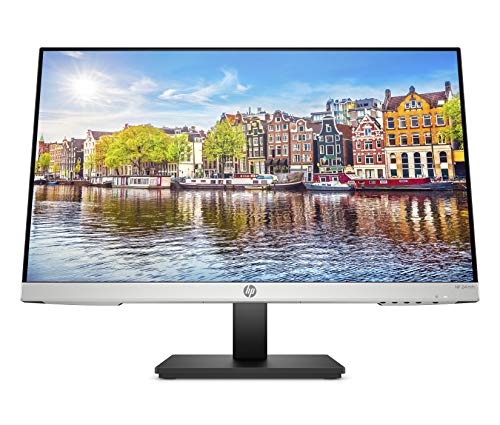
The 24mh is also a 23.8-inch screen, and its distinction is the stand the rest of the class should copy. Small monitors get placed on whatever a room offers — a shelf, a stack of storage boxes, a desk built for someone taller — and a screen that cannot adjust its height condemns its viewer to adjust their neck instead. HP’s panel lifts and tilts across a proper range, so a compact screen can meet a child’s eyes at a homework desk, an adult’s at a worktop, and a standing user’s at a counter, all in the same week. In the small-desk world, that is not a luxury feature; it is the difference between a screen that fits the household and one the household fits around.
The supporting specification is the sound HP formula: an IPS panel with honest angles, full HD resolution that stays crisp at this size, built-in speakers for calls and clips, and HDMI plus DisplayPort for modern laptops. VESA mounting is supported for the shelf-and-arm arrangements small rooms love. Nothing here chases a headline; everything here answers the brief of a compact screen that several people, at several heights, will use without complaint.
Refresh is standard and the design is office-plain, so gamers and stylists should keep reading. For the shared desk, the rental flat and the family worktop, the 24mh is the ergonomic conscience of this guide: proof that at the small end of the market, the most important specification is sometimes a hinge.
- Size: 23.8 inches, IPS, full HD
- Adjustment: lift and tilt range
- Audio: integrated speakers
- Connections: one HDMI, one DisplayPort
- Wall option: VESA mount ready
Strengths
- Height adjustment rare and valuable in this class
- Angles and speakers suit shared, multi-height use
- Mounting options fit shelves and arms
Trade-offs
- Standard refresh rate only
- Plain office styling
- Larger than a true 21.5-inch panel
Best for: Shared desks and counters where viewers come in different heights. Not suited for: Gamers, or openings that physically cap the screen under 22 inches.

ASUS VA249QG 120Hz Eye Care — Best Smoothness Value
The VA249QG, a 24-inch-class IPS monitor, shows what the compact class learned from gaming: refresh rate is a comfort feature, not merely a competitive one. Its 120Hz panel makes scrolling documents glide, window dragging feel weighted and precise, and the cursor stop behaving like a sequence of teleports — small mercies a workday notices hourly. When the desk turns to play, that same rate with adaptive sync support covers casual and mid-level gaming properly, which is more than the office picks above attempt. ASUS wraps the panel in its eye-care clothing: low blue light, flicker-free operation, a frameless design that suits a two-screen arrangement, and built-in speakers that keep the compact desk uncluttered.
That two-screen point deserves emphasis, because the second monitor is one of the classic reasons buyers search the small sizes at all. A pair of these, or one beside an existing screen, gives a compact desk a wide working canvas while each panel stays light, cool and cheap to run — and the frameless edges make the pair read as one workspace rather than two appliances. At 1080p per screen, an ordinary laptop drives the arrangement without complaint.
The compromises are a tilt stand and speakers tuned for clarity at a desk rather than volume across a room. As the compact all-rounder for a working desk that plays a little, the VA249QG is the most modern-feeling value in this guide.
- Panel: 24-inch-class IPS, 1920×1080
- Refresh: 120Hz with adaptive sync
- Speakers: built in
- Eye care: low blue light, flicker-free
- Design: frameless, dual-screen friendly
Strengths
- 120Hz smoothness improves ordinary work, not just games
- Frameless design suits second-screen setups
- Speakers keep a small desk uncluttered
Trade-offs
- Tilt-only stand
- Speakers are desk-scale
- Not a true 21.5-inch panel
Best for: Working desks wanting smoothness and a clean second screen. Not suited for: Esports players, who should take the ViewSonic below.

BenQ GW2490 24in 100Hz — Best Newer Panel
The GW2490 is the GW2480’s younger sibling — 24-inch class, IPS, 1080p — rebuilt for the way desks are used now. Its 100Hz refresh brings the smoothness the ASUS pick argues for, in BenQ’s own dialect: scrolling and video gain composure, while the eye-care suite gains the adaptive brightness that reads the room and adjusts the panel like a considerate colleague. The bezels are thinner, the design lighter, and the whole object feels like the current decade’s answer to the same brief its sibling has served for years: a compact screen for real work that also behaves in the evening.
Built-in speakers and VESA mounting keep its options open — the wall arm over a kitchen worktop, the swung screen in a bedroom, the tidy second display — and the input set covers the modern desk without the legacy VGA its sibling keeps for older machines. Choosing between the two BenQs is therefore a genuine decision rather than an upgrade ladder: the GW2480 for forgiveness and provenance, the GW2490 for freshness and motion, both honest at their sizes and their prices.
As with every pick here, the size on the box is the size on the desk: 24-inch class, not 21.5. If your opening is measured and small, neither BenQ fits it, and the survivor-hunting advice elsewhere in this guide is your route. If your constraint is merely a small desk rather than a small hole, the GW2490 is the most current compact monitor in this guide.
- Panel: 24-inch-class IPS, 1920×1080
- Refresh: 100Hz
- Speakers: built in
- Eye care: adaptive brightness, low blue light
- Mounting: VESA support
Strengths
- Current design with smoother motion than office norms
- Adaptive brightness serves day and evening use
- Slim frame suits compact and dual setups
Trade-offs
- No legacy VGA for older machines
- Tilt-focused stand
- Still two inches beyond the true 21.5 class
Best for: Buyers wanting the newest compact all-rounder for work and evenings. Not suited for: Owners of VGA-only equipment or hard 22-inch openings.

LG UltraGear 24G411A 120Hz — Best Compact Gaming Start
LG’s 24G411A brings the UltraGear gaming line down to the compact class — a 24-inch IPS panel at 1080p with a 120Hz refresh, overclockable higher, and both G-Sync compatibility and FreeSync support, so whichever graphics camp your PC or console belongs to, the screen speaks its language and keeps motion tear-free. Its 1ms-class motion handling and HDR10 support give games the clarity and punch that office panels politely decline to attempt, in a footprint that fits the desks gaming actually happens on in flats and bedrooms, which are rarely the aircraft carriers of streaming fame.
For the small-desk gamer, this is the correct shape of compromise: the panel is fast where games are fast, the size keeps 1080p looking sharp rather than stretched, and the price of entry stays in the compact class’s territory. LG’s gaming software conveniences ride along, and the tilt stand is adequate for a single devoted seat, which is the seat gaming happens in.
Speakers are not this panel’s argument — check the listing’s configuration and plan sound accordingly — and its talents are wasted on a pure office desk, where the BenQ and HP picks serve better for less. As the compact gaming starting point of this guide, though, the 24G411A is the pick that respects both the desk and the game.
- Panel: 24-inch IPS, 1920×1080
- Refresh: 120Hz, overclockable higher
- Sync: G-Sync compatible and FreeSync
- HDR: HDR10 support
- Inputs: HDMI and DisplayPort
Strengths
- Both sync systems covered for PC and console
- Motion clarity well beyond office panels
- Compact footprint for real-world gaming desks
Trade-offs
- Sound is not its strength; plan speakers or headphones
- Tilt stand only
- Gaming features are wasted on pure office use
Best for: Gamers whose desks are small and whose standards are not. Not suited for: Office buyers paying for speed they will never use.

ViewSonic VX2428A 180Hz — Fastest in Class
The VX2428A is where the compact class stops apologising: a 24-inch fast IPS panel running at 180Hz with a half-millisecond-class response, FreeSync, HDR10 and the input set — HDMI and DisplayPort — to serve PC and console alike. Competitive players choose small, fast, 1080p panels on purpose, because at this size the whole screen sits inside the useful field of vision and the resolution lets graphics hardware sustain the frame rates the panel can display. This is that professional pattern at a compact-class price, and it happens to occupy barely more desk than the 21.5-inch screens this guide began by mourning.
ViewSonic’s eye-care touches keep long sessions civilised, and the panel’s IPS nature means the picture stays honest for a second viewer or a streamed audience angle. As a work screen it is entirely competent, if overqualified; as a gaming screen it is the fastest object in this guide by a wide margin, and the one whose specification a competitive player would read first and question least.
The familiar compact-gaming caveats apply: speakers are not the headline, the stand serves one seat, and the speed is invisible in a spreadsheet. Buy it for the games and it is the easiest recommendation in this guide; buy it for an office and you have purchased a racing engine for a delivery round.
- Panel: 24-inch fast IPS, 1920×1080
- Refresh: 180Hz
- Response: 0.5ms class
- Sync and HDR: FreeSync, HDR10
- Inputs: HDMI and DisplayPort
Strengths
- Esports-grade motion in a compact footprint
- Fast IPS keeps angles and colour honest
- Console and PC both properly served
Trade-offs
- Audio and stand are supporting acts
- Speed is wasted on office-only desks
- Not a true 21.5-inch panel, like every current pick
Best for: Competitive and fast-action gamers on compact desks. Not suited for: Buyers whose fastest motion is a scrolling document.
How do the six compact monitors compare?
| Pick | True size | Refresh | Character |
|---|---|---|---|
| BenQ GW2480 24in IPS | 23.8-inch | Standard | The proven office successor with legacy inputs |
| HP 24mh 23.8in IPS | 23.8-inch | Standard | The height-adjustable shared-desk pick |
| ASUS VA249QG 120Hz Eye Care | 24-inch class | 120Hz | The smooth all-rounder and second screen |
| BenQ GW2490 24in 100Hz | 24-inch class | 100Hz | The newest BenQ with adaptive brightness |
| LG UltraGear 24G411A 120Hz | 24-inch | 120Hz+ | The compact gaming start for both sync camps |
| ViewSonic VX2428A 180Hz | 24-inch | 180Hz | The esports motion specialist |
Does 1080p actually look sharper on a smaller screen?
Yes, and the arithmetic is the one unambiguous gift of the small sizes. A 1920×1080 grid spread over 21.5 inches packs its pixels noticeably tighter than the same grid over 24 or 27 inches, so text edges, fine lines and small interface elements render with a crispness that larger 1080p screens cannot match at the same distance. At 23.8 inches — the size of most picks here — the density remains comfortably in the crisp zone for desk distances, which is precisely why this guide can recommend the step up without mourning the picture: you trade a small amount of theoretical sharpness for a newer panel and a larger stage, and at ordinary working distances most eyes cannot cash the difference.
The same arithmetic explains why 1080p struggles at 27 inches and triumphs here. Resolution is not a virtue in itself; it is a density in context. Buyers cross-shopping this guide against larger screens should carry that sentence with them, because it reverses the usual sales logic: at the compact end, the humble specification is the correct one, and paying for more pixels buys numbers rather than visibility.
How do you fit a monitor into a genuinely small space?
Measure the depth before the width, because depth is where small desks fail. A compact monitor’s stand typically needs a palm’s depth of clear surface behind the screen’s face, and a desk against a wall gives you exactly the desk’s depth and no more. The escapes, in order of elegance, are a VESA arm clamped to the desk’s edge, which floats the panel and returns the surface beneath it; a wall mount where the tenancy allows; and a monitor riser that turns the stand’s footprint into storage rather than waste. Most picks in this guide are VESA-ready, which is a deliberate part of their selection: at the small end of the market, mounting is not an accessory decision but the difference between a screen that fits and a screen that merely balances.
Cables are the second half of fit. A compact desk with a laptop, a monitor, a lamp and a charger can drown in its own wiring, so route the monitor’s power and display cables together down one leg of the desk, use the shortest cables that reach without tension, and let the BenQ-style cable-managed stands earn their keep. The small screen’s promise is a calm, exact workspace; an hour of cable discipline is what redeems the promise.
What mistakes do small-monitor buyers make?
The first is trusting a headline size. Monitor marketing speaks in classes and roundings — a “22 inch” label may describe a 21.5-inch panel, and a “24 inch” one a 23.8 — which is harmless when you know it and expensive when your cabinet opening does not. The manufacturer’s specification sheet lists the viewable diagonal precisely; read it there, not in the product name, and measure your space against the panel’s width and height in the same document, stand included. This guide has printed true sizes at every step so you can see what honest labelling looks like.
The second mistake is buying old 21.5-inch stock at new-monitor prices. Remaining inventory of discontinued small models sometimes wears a scarcity premium dressed as value; an ageing panel with a short warranty is worth a survivor’s price and no more. The third is forgetting the second screen’s arithmetic: two 1080p panels ask the laptop for two outputs or a dock, and the time to discover your machine has one port is before the pair arrives. The fourth is neglecting sound and stands at this size exactly as at larger ones — small rooms forgive many things, but a silent screen and a cricked neck are not among them.
Who still genuinely needs the smallest screens?
More people than the market’s drift suggests. The reception desk and the shop counter, where a screen shares space with the public and a till; the CCTV and control corner, where several modest panels in a grid beat one grand one because each feed gets a dedicated window; the music studio’s second desk, where a compact screen carries the mixer window while the main display holds the arrangement; the child’s bedroom desk, where a smaller screen is also a parenting decision about how large digital life looms in a small room. In each case the requirement is not nostalgia for 21.5 inches — it is a footprint, a budget per screen when screens come in fours, or a deliberate modesty of presence, and the modern 23.8-inch class serves nearly all of them, which is why the industry’s consolidation has been an inconvenience rather than a crisis.
The exceptions are architectural. A fitted nook, a broadcast rack, a kiosk enclosure and a vehicle installation all specify their screens the way doors specify their frames, and for those buyers the surviving true-21.5 stock, measured honestly and priced as the ageing specialist equipment it is, remains the correct purchase. The guide’s advice divides cleanly along that line: fit the screen to a hole only when there is literally a hole.
What do compact monitors save in power, heat and fuss?
A small modern panel sips electricity in a way its ancestors did not — the LED-backlit 24-inch class typically draws less power in use than the fluorescent-lit 21.5-inch monitors of a decade ago drew on standby-adjacent idling, and across a four-screen counter or a classroom of desks, that arithmetic becomes a real line in a real budget. Heat follows power, so compact screens warm small rooms less, which students in summer and anyone working in a box room will feel as a quality-of-life specification no review chart prints. And there is a subtler saving: a light screen is a screen one person can carry, mount, lend and rearrange without a second pair of hands, which in flats, classrooms and market stalls is a feature exercised monthly.
None of this argues for smallness as a religion. It argues that the compact class’s virtues are practical rather than merely financial, and that a buyer choosing between a modest new 24-inch panel and a vast discounted one is not choosing between a compromise and a triumph — they are choosing between two different tools, each honest at its own work.
How do you set up a compact desk ergonomically?
The rules shrink with the screen but do not vanish. The top of the panel should sit at or slightly below eye level — the HP 24mh’s height adjustment exists for exactly this, and the other picks achieve it with a riser, a shelf or a modest stack of the household’s sturdiest books as an interim government. The screen should stand at roughly an arm’s length, a distance compact desks sometimes protest; the protest is answered by pushing the keyboard forward and reclaiming the inches, because a screen too close at 1080p makes its pixels visible and its viewer tired in a way no eye-care mode fully forgives.
Light is the compact desk’s second ergonomic system. A small screen in a dark corner against a bright window fights glare all day, so place the panel perpendicular to the window where the room allows, use the matte finishes these picks provide, and let BenQ-style adaptive brightness handle the hours you cannot. A desk lamp aimed at the wall behind the screen — not at the screen, not at your eyes — rests the whole arrangement. Set up this way, a compact monitor is not a small compromise endured by the space-poor; it is a workstation that fits its human, which is the only ergonomic test that has ever mattered.
How do you connect a compact monitor to a modern laptop?
The modern laptop’s port famine is the compact desk’s most common installation problem, and it is solved by knowing which of three situations you are in. If the laptop offers HDMI, life is simple: one cable, picture and — to the monitor’s speakers, on the picks that have them — sound. If it offers only USB-C, check whether that port carries a display signal, which most do in this era, and use a USB-C to HDMI or DisplayPort cable of the length your desk actually needs rather than the length on special offer. If you are building a permanent desk, a small docking hub that charges the laptop and feeds the monitor over one connection converts the daily arrival at the desk into a single gesture, and at compact-desk scale that convenience is worth more than any specification in this guide.
Two small disciplines complete the connection. Set the monitor as the main display in your system settings if it is where your eyes live, so dialogue boxes and notifications stop appearing on the small laptop screen behind you; and match the refresh rate in the settings to the panel you bought, because a 120Hz or 180Hz monitor left at a default lower rate is a common and silent waste of the money this guide just helped you spend. Both settings take a minute, once, and pay rent daily.
What does gaming look like on a compact 1080p screen?
Better than the size suggests, for a reason competitive players have always known: at 1080p, an ordinary graphics card or console can feed a fast panel the frame rates it craves, while the same hardware at higher resolutions spends its budget on pixels instead of motion. A 24-inch screen also fits inside a player’s useful vision without head movement, which is why tournament desks look the way they do. The LG and ViewSonic picks exist to serve exactly this logic at two levels of seriousness, and the ASUS splits the difference for the desk that games in the evening rather than competes at the weekend.
The honest boundary is immersion. A compact screen is a window you look through attentively, not a world that surrounds you, and players whose joy is cinematic scale should buy scale and accept its costs. Players whose joy is responsiveness — the fighting game, the shooter, the racing line — will find the compact fast panel not a compromise but the professional’s own choice, miniaturised to a student’s desk and a student’s budget.
How should a school or small office buy these in quantity?
Institutions buy monitors the way households buy lightbulbs: consistency beats brilliance. Choose one model — the GW2480 and the 24mh are this guide’s institutional temperaments, for their speakers, eye care and, in the HP’s case, stands that fit many bodies — and buy it for every desk, because a fleet of identical screens means identical cables, identical settings, one spare that fits anywhere and no support conversation that begins with “which monitor is it?” The eye-care features stop being marketing at this scale: a classroom of flicker-free, low-blue-light panels is a genuine welfare decision about other people’s children and employees, made once, cheaply, at the point of purchase.
Budget for the unglamorous lines while you are at it: a spare panel in the cupboard against the inevitable accident, cables in the lengths the rooms actually need, and a note of every screen’s purchase date so the fleet ages as a planned wave rather than a series of surprises. Institutions that buy this way discover what the industry’s size consolidation really means for them — very little, because a classroom that standardises on the current compact class is set for the better part of a decade.
How do you read a monitor listing without being fooled?
A monitor listing is a small theatre of emphases, and four checks cut through it. First, find the viewable diagonal and the full dimensions with stand, in the manufacturer’s document rather than the retailer’s headline, because classes and roundings live in headlines while millimetres live in specifications. Second, separate the panel’s native refresh rate from any overclocked figure, and both from the response-time number, which is measured by methods generous enough that the honest comparison is between panels of the same type rather than between marketing departments. Third, confirm speakers by the specification’s audio line, not by a photograph of grilles that may be vents. Fourth, read the input list as a sentence about your own desk: the ports you need must exist in the number you need them, because a compact monitor with one HDMI is a fine screen and a daily unplugging ritual the moment a console arrives.
None of these checks requires expertise — they require only the suspicion that a listing is written to sell rather than to inform, and the two minutes it takes to read the document written to inform. Apply them to every pick in this guide and they hold; apply them to the marketplace’s wilder corners, where 21.5-inch survivors wear rounded-up names, and they will pay for this entire article in one avoided mistake.
What is the second life of a compact monitor?
Compact monitors rarely die; they migrate. The main desk’s screen becomes the child’s first monitor, then the counter screen, then the test bench’s display, because a 1080p panel’s usefulness decays far more slowly than a computer’s. This migratory life is a real argument for buying a known maker’s current model over anonymous old stock: the BenQ, HP, ASUS, LG and ViewSonic names here carry parts, stands and documentation that persist, and a screen that will serve three rooms across a decade should be bought from a maker who will still exist, recognisably, in all three decades of its service. It is also an argument for the unglamorous features this guide keeps praising — speakers, eye care, a stand that adjusts — because the second and third owners of the screen will need them in combinations the first owner never imagined.
When the migration finally ends, dispose of the panel as the electronic waste it legally is, through the maker’s or the council’s scheme, and let the record show that a compact monitor bought well in this class delivers more years per pound than almost any other object on the desk. That, in the end, is the answer to the reader who arrived mourning the 21.5-inch era: the era’s virtues did not die with its diagonal. They moved up two inches, put on better panels, and are listed above.
Why does a compact screen suit a child’s first real desk?
A child’s first monitor is an ergonomic and a philosophical object at once. Ergonomically, a compact panel can sit at the correct height and distance on a small desk without dominating it, leaving room for the paper, books and elbows that homework still involves; the eye-care features across these picks — flicker-free backlights, low blue light modes, brightness that can be set kindly — matter most for the youngest eyes in the house, and they cost nothing extra because the class has standardised them. The HP 24mh’s adjustable stand grows with its owner in the most literal way a monitor can, and the BenQ picks’ room-sensing brightness handles the bedroom whose light changes from homework glare to evening lamp without a parent adjusting settings nightly.
Philosophically, a 24-inch screen in a child’s room is a bounded thing. It is the computer’s window and nothing more — it does not become the room’s television, its cinema and its glowing centre, and when it is off, the room is a room again. Parents who choose the compact class for that reason are not buying a lesser screen; they are buying a proportion, and this guide’s picks let them buy it without sacrificing the picture quality, the speakers for the school video call, or the durability a young owner’s desk will eventually test. Add a keyboard the right size and a chair that lets feet touch the floor, and the small desk becomes the best-proportioned workstation in the house — frequently better fitted to its human than the adult desk down the hall, which was assembled by optimism rather than by measurement.
What should you do in the first week with a new compact monitor?
Treat the first week as fitting rather than testing, because a compact screen’s failures are almost always failures of placement that a specification cannot reveal. Day one: set the panel at its final height and distance, then work a full day before judging it, since eyes forgive a new screen everything for an hour and report honestly by the afternoon. Set the brightness against the room’s ordinary light rather than the showroom blaze it shipped with — most compact panels arrive far brighter than a home desk needs — and switch on the low blue light mode for the evening hours to see whether your sleep notices the difference, as many owners report it does.
Later in the week, run the checks that protect the purchase: a plain white and a plain dark screen to look for dead pixels and backlight unevenness while returns are effortless; every input you own plugged in once, including the console or the old PC you swore the VGA port was for; and the refresh rate confirmed in your system settings at the figure you paid for. Finish by photographing the desk as arranged — cables, stand, arm — because in three years, when the screen migrates to its second room, that photograph is the manual for how it all fitted together, and the second room’s owner, who is also you, will be grateful.
Final Recommendation
If your search for a 21-inch monitor was really a search for a compact, honest 1080p screen, the BenQ GW2480 is the answer that has satisfied that brief for years: buy it, or its fresher GW2490 sibling if you value smoother motion and adaptive brightness. The shared desk should take the HP 24mh for its stand, the smoothness-minded worker the ASUS VA249QG, and the compact gamers the LG 24G411A or the ViewSonic VX2428A according to how fast their games truly move. Every one of those recommendations carries its true size in its name, because that is what this guide promised at the top and intends at the bottom.
And if your constraint is a literal opening that only a true 21.5-inch panel can fill, you now know the landscape honestly: the survivors are older stock, the specification sheet is your only trustworthy witness, and the price should confess the panel’s age. Buy with that knowledge and even the scarcest size in the monitor world can still be bought well. One more encouragement for the majority who are stepping up to the modern class: live with the new screen for a fortnight before mourning the old one. The extra width becomes the natural size of documents and films with surprising speed, the eye recalibrates, and the desk — measured honestly at the start — turns out to have had the room all along. Scarcity forced the change, but comfort usually ratifies it.
Frequently Asked Questions
Are 21.5-inch 1080p monitors still being made?
Largely no, in the mainstream lines — and the reason is worth understanding before you pay a scarcity premium to a reseller: panel factories retool toward volume, and the volume, quite simply, moved up the size chart and stayed there. Nothing about the size failed its users; it simply stopped being where the market’s centre stood. Specialist corners persist — industrial, point-of-sale and embedded displays are still built small for machines rather than people — but those are specified by engineers for enclosures, priced accordingly, and rarely the bargain a household buyer is hoping to find wearing a familiar badge. The major makers have consolidated on 23.8 and 24 inches as their smallest standard size, and remaining 21.5-inch offerings are older designs, specialist variants or old stock. That scarcity is why this guide recommends the current compact class with its true sizes stated, rather than pretending discontinued models are a living range with living warranties, fresh panels and prices that make sense against their modern successors.
How much bigger is a 24-inch monitor than a 21.5-inch one?
Roughly the width of a paperback book in width and a little less in height — noticeable on a measured drawing, modest on a real desk. The stand’s depth is usually the dimension that decides fit, and it differs less between the sizes than the diagonal suggests. Measure your space against the manufacturer’s full dimensions, stand included, before deciding the step up is impossible. If the step genuinely is impossible — the nook is real, the cabinet is fixed — then the survivor hunt described in this guide is your honest route, and it should be walked with the specification sheet in one hand and a firm ceiling on price in the other, because scarcity is a fact about the market, not a quality of the panel.
Is 1080p enough at 24 inches?
At desk distances, yes — it is the resolution this size was built around, with text density that stays crisp for work and a picture that games and films wear well. Higher resolutions earn their money at 27 inches and above, or for specialists editing fine detail at very close range. There is a second, quieter dividend: 1080p asks so little of the computer driving it that older laptops, mini PCs and games consoles all run these panels at their best without strain, which keeps the whole desk’s budget in the compact class where it belongs.
What should I check when buying old 21.5-inch stock?
Four things: the true viewable diagonal on the manufacturer’s specification sheet, the panel’s age and remaining warranty, the inputs — older stock may lack DisplayPort or carry a single HDMI — and the price, which should reflect a discontinued product. A seller who cannot answer the first question has told you enough. Add a fifth check of your own once the screen arrives: run it for a full working day before the return window closes, because backlight bleed, a flickering corner and a speaker that rattles at programme volume are all faults that announce themselves in use rather than in an unboxing, and the compact class’s prices make the return journey cheap insurance rather than a grievance.
Can I use a compact monitor as a second screen?
It is one of the best uses in this guide. A 1080p compact panel beside a laptop adds a full working canvas for documents, chat or reference material, and the frameless ASUS pick is shaped for exactly that pairing. Confirm your laptop has the output or dock the second screen needs, and match heights with the stand or a riser so your neck travels a level road. Also match the two screens’ brightness and colour temperature as closely as their menus allow, because a pair at odds with each other tires the eyes that travel between them all day; five minutes with both panels showing the same plain document, adjusted until they agree, is the whole calibration most desks will ever need.
Do compact monitors have speakers?
Some do and some pointedly do not, and at this size the difference is a purchasing decision rather than a detail. The BenQ, HP and ASUS picks here include speakers; the gaming-focused LG and ViewSonic put their budgets into speed, so plan headphones or desktop speakers alongside them. The listing’s specification, not its photographs, is the authority. If your household’s viewing leans on the screen’s own sound — video calls for school, clips at the counter, the evening programme in a small room — weight the speaker-equipped picks as a class above the silent ones, because adding external speakers to a compact desk spends the very space the compact screen was bought to save, and the tidy single-object desk is half the point of shopping in this size at all.
Related Guides
Still arranging the small desk? These guides share its priorities: best 1080p isp monitors explains IPS panels and picks the colour-true best of them, best 10 tv monitors covers screens that double as televisions for small rooms, and best monitors for small desks widens the compact field beyond 1080p.
Related guides
- Best 100 Dollar Gaming Monitors: Honest Picks and Sensible Stretch Options
- Best 1080p 144Hz Monitors: One True 144Hz Pick, Four Honest 180Hz Upgrades and a Labelled 120Hz Alternative
- Best 10 TV Monitors: The 6 Screens That Actually Earn a Place in Both Lives
- Best 1080p 240Hz Monitors for Competitive Gaming