What's inside
- Key Takeaways
- Quick Picks
- How Did We Map a Budget That Samsung Barely Occupies?
- The Frame, Mapped: Positions Without Prices
- What Does a Year With the Near-Frame A9+ Actually Look Like?
- How Should a Budget Buyer Judge Value Without a Price Tag?
- Where Do Samsung Shoppers at This Budget Go Wrong?
- How Do You Set Up a Budget Samsung for a Child or a Parent?
- Final Recommendation
- Frequently Asked Questions
- Related Guides
As an Amazon Associate I earn from qualifying purchases. This post may contain affiliate links at no extra cost to you.
gizmoverdict.com is reader-supported. When you buy through links on our site, we may earn an affiliate commission.
Where to buy: A pair of the picks below link to pool-verified Galaxy Tab listings, and their positions are described in words — one sits near this guide’s budget frame, the other above it — because this article prints no product prices. The other four picks are prose-only: older Samsung generations and one non-Samsung control, discussed honestly without links.
The best 100 dollar samsung tablets is a search built on a hope, and this guide begins by respecting the hope while correcting its arithmetic. The hope: that Samsung, the biggest name in Android tablets, sells something new and decent at the hundred-dollar frame. The arithmetic: at its ordinary retail posture, it essentially does not. Samsung’s current entry tablet sits above the frame; its previous generations dip toward it as they age, go on clearance or pass through refurbishment channels; and the space directly at the frame is occupied mostly by other brands — Amazon’s Fire line above all. A guide that pretended otherwise, padding itself with listings described optimistically, would waste your money more politely than this one intends to.
So the honest map of this keyword has three territories. There is the near-frame territory, where the current Galaxy Tab A9+ in its 64GB form lives — the closest thing to a new Samsung at this budget, positioned just over the line in qualitative terms, and close enough that sales seasons and household definitions of “about a hundred” routinely pull it into the conversation. There is the older-generation territory, where the Tab S6 Lite’s successive editions, the Tab A8 and the little Tab A7 Lite circulate as old stock, open-box and Renewed units at frame-friendly tiers. And there is the control territory, represented here by Amazon’s Fire HD 10 as a prose-only pick: the non-Samsung benchmark that defines what the frame actually buys elsewhere, included so you can see what the Samsung badge costs and what it buys.
Throughout, price is handled the way this guide’s rules require: no figures, only positions — inside the frame, near it, above it — stated per pick. Positions drift with seasons in a way figures pretend not to, and a reader who understands their target’s position can judge any given day’s listing for themselves. That is a more durable gift than a number that expires.
It is worth saying, before the shortlist, that none of this makes the keyword foolish. A hundred-dollar frame built a generation of perfectly serviceable family tablets, and Samsung’s range genuinely contained such machines within living memory — the A7 Lite in this guide is one. The frame did not move; the range did, upward, as screens grew and costs followed. Understanding that drift is the difference between shopping the market that exists and mourning the one that used to.
Key Takeaways
- A brand-new, current-generation Samsung tablet directly inside the hundred-dollar frame is essentially not a product that exists; the frame buys older generations, refurbished units, or a rival brand.
- The Galaxy Tab A9+ 64GB is the nearest new Samsung — positioned just above the frame in qualitative terms — and the pick to watch when budgets flex or seasons discount.
- The Tab A9+ 128GB sits further above the frame; what the step buys is storage headroom, and this review explains when that headroom is worth leaving the frame for.
- Galaxy Tab S6 Lite generations and the Tab A8 reach the frame as old stock and Renewed units — real Samsung tablets, bought under used-market discipline.
- The Fire HD 10, included as a prose-only control, shows what the frame buys outside the badge: more tablet per tier, inside Amazon’s walled software garden.
Quick Picks
| Pick | Badge | Why it earns its place |
|---|---|---|
| Samsung Galaxy Tab A9+ 11-inch 64GB | Nearest new Samsung to the frame | The current entry Galaxy Tab in its leanest storage form — positioned just above the frame, close enough to be this keyword’s most realistic new purchase. |
| Samsung Galaxy Tab A9+ 11-inch 128GB | The above-frame step worth naming | The same tablet with double the storage, further above the frame — included so buyers can judge the storage step with open eyes rather than by accident. |
| Samsung Galaxy Tab S6 Lite (2022 and earlier generations) | Prose-only: the pen-equipped elder | Earlier S6 Lite editions with their bundled S Pen, reaching frame territory as old stock and Renewed units — under used-market discipline. |
| Samsung Galaxy Tab A8 10.5-inch | Prose-only: the previous mainstream Tab A | The A9+’s predecessor, a 10.5-inch family tablet whose ageing stock now lives at frame-adjacent tiers in secondary channels. |
| Samsung Galaxy Tab A7 Lite 8.7-inch | Prose-only: the genuinely in-frame Samsung | Samsung’s compact budget tablet — the one Galaxy that has honestly lived inside the frame, at the cost of size and speed its review states plainly. |
| Amazon Fire HD 10 (control pick) | Prose-only: the non-Samsung benchmark | Not a Samsung and labelled as such — the tablet that defines what this budget buys elsewhere, included so the badge’s premium is visible rather than assumed. |
Two links, four prose entries, one control from a rival camp: an unusual shape that mirrors the budget’s reality. The reviews below treat each territory on its own terms.
Readers in a hurry can compress the whole guide into one instruction: decide whether your frame bends. If it bends a little, buy the near-frame A9+ and stop reading. If it does not bend at all, read the prose picks carefully, because at a rigid frame the channel and the condition become the product — and the reviews that follow are written for exactly that reader.
How Did We Map a Budget That Samsung Barely Occupies?
The method began with the verified pool, which supplied the two current A9+ configurations, and with a refusal: this guide would not manufacture in-frame Samsungs by linking refurbished listings of uncertain provenance or by describing above-frame products in in-frame language. Instead, the shortlist was organised by distance from the frame — nearest new, the storage step, the older generations that genuinely reach it, the one compact model that lived inside it, and the rival control — so that a reader can locate their own flexibility on the map and shop from there.
Judging criteria followed the budget’s logic. At this level, the questions that matter are durability of software support, screen adequacy for video and reading, storage behaviour over a two-to-three-year household life, and the honesty of the channel selling the unit. Benchmarks were noted and demoted; a frame-budget tablet is a household appliance, and appliances are judged on service, not spectacle. For the prose-only generations, condition discipline — battery expectations, update status, returns — was treated as part of the product, because at their age it is.
Price language was settled before any prose: positions only. “Inside the frame” means the product’s ordinary posture sits within the keyword’s budget; “near” and “above” mark their stated distances; seasonal movement is acknowledged as movement rather than captured as a figure. Readers checking a live listing against this guide should ask which position today’s offer occupies — the guide’s map will still be accurate when any specific number would not be.
A final methodological note concerns the control pick, which some readers will find an odd guest in a brand-specific guide. It was included because a budget is a relative instrument: “what does this money buy” has no meaning without the market’s other answers in view. Guides that omit the control flatter the brand and strand the reader. This one would rather risk a raised eyebrow than a mis-spent frame.
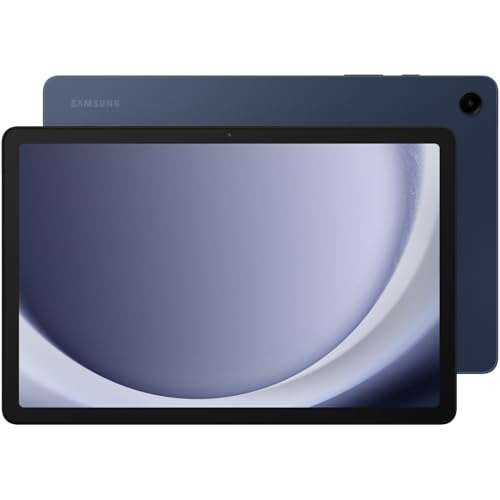
Samsung Galaxy Tab A9+ 11-inch 64GB — Nearest new Samsung to the frame
This is the pick the keyword is really looking for, and its position deserves the first sentence: in ordinary retail posture the 64GB Tab A9+ sits just above the hundred-dollar frame — near it, in the territory that promotions, seasonal events and a household’s reasonable rounding all visit regularly. It is not, in strict terms, an in-frame product, and this guide will not call it one. It is the nearest new Samsung to the frame by a wide margin, and for most readers whose budget has any flex at all, it is where the search should end.
What the near-frame position buys is a current tablet rather than an ageing one. The A9+ pairs an 11-inch display whose scrolling feels a generation smoother than this budget’s history with quad speakers that carry family video honestly, and its metal-bodied build feels like the Samsung of the television advertisements rather than a badge exercise. Software support follows Samsung’s current commitments for the A line — a defined, respectable window measured from a recent launch, which at this budget is the single most valuable specification on the page, because it determines how many years the tablet remains a safe home for accounts, school platforms and banking-adjacent life.
The 64GB in its name is the configuration’s honest compromise, and the microSD slot is its remedy. Sixty-four gigabytes serves a streaming household comfortably — apps, a modest download shelf, a camera roll’s overflow — and strains under game libraries and hoarded offline video. The card slot converts that strain into a cheap errand rather than a replacement cycle, which is precisely the kind of design mercy a budget buyer should prize. Choose this pick if your frame can stretch the short distance to near; the stretch buys currency — of model, of software, of warranty — that no in-frame older unit can match.
There is a buyer’s-psychology point worth making about this pick, because it recurs in every budget category and is rarely named. The near-frame product is the one shoppers apologise for — “we went a bit over” — when it is usually the purchase that behaves best over time. Frames are set from headlines, often from the price of the category’s worst acceptable member; the household’s actual requirement, priced honestly, frequently sits one step up. This guide’s position is that a frame should be a planning tool with a stated tolerance, not a cliff edge, and the A9+ 64GB is the textbook case: the step is small, the gains are structural, and the apology is unnecessary.
- Price position: Just above the frame — the nearest new Samsung, in qualitative terms
- Display: 11-inch panel with above-budget-class refresh behaviour
- Storage: 64GB plus microSD expansion — the slot is part of the value case
- Audio: Quad speakers with Dolby Atmos support
- Software posture: Current A-line support window from a recent launch
- Condition: New, pool-verified listing
Strengths
- Current-generation support runway dwarfs every older pick here
- Screen and speakers exceed what the budget class historically offered
- Expandable storage forgives the lean built-in capacity
Trade-offs
- Not strictly inside the frame at ordinary posture — the budget must flex
- 64GB strains under games and offline-video hoarding without a card
- No active S Pen support for note-takers
Best for: buyers whose frame bends slightly for a new, supported Samsung.
Not suited for: strict in-frame budgets or pen-led students.

Samsung Galaxy Tab A9+ 11-inch 128GB — The above-frame step worth naming
Why does a budget guide include the same tablet twice? Because the step between the two configurations is the most common real-world decision this keyword produces, and it deserves analysis rather than a shrug. The 128GB A9+ sits further above the frame than its sibling — visibly, not marginally — and what the distance buys is exactly one thing: storage headroom that never asks for a memory card. Everything else — screen, speakers, chip, support window — is identical, which makes this the cleanest value question in the article: what is built-in storage worth to your household, priced in frame-distance?
The households that should pay it are identifiable. Downloading households — travellers who load films, children whose game libraries sprawl, anyone whose streaming is rationed by a data cap or a rural connection — consume storage monotonically, and for them the card slot’s remedy is real but imperfect, since some apps and media prefer internal space. A 128GB tablet bought once can be cheaper across three years than a 64GB tablet plus the friction of managing it. Households that stream everything, by contrast, would be buying headroom they never visit; for them this pick is a pleasant irrelevance, and its presence here is a signpost pointing back down to its sibling.
There is a second, quieter constituency for the larger configuration: the keeper. Some buyers hold tablets for five years and hand them down through siblings, and for them storage is the specification that ages worst — apps grow, photo libraries accumulate, operating systems swell. A keeper pricing the 128GB step across a five-year, two-child service life is not breaking the budget’s spirit; they are amortising it. This guide’s frame language cannot capture that arithmetic in a position label, which is why the pick carries a full review rather than a table row: the step is wrong for the frame and right for the keeper, and both facts deserve their sentences.
There is also a discipline argument for including an above-frame pick in a budget guide, and it is worth stating because it governs the whole article: budgets are decisions, not laws of physics. A reader who sees the full staircase — in-frame elders, near-frame current, above-frame comfortable — can choose their step knowingly, including the step that breaks the frame for a stated reason. A guide that hid the staircase to protect the keyword’s purity would leave its readers to discover the steps at checkout, where the lighting is worse. This pick is the staircase’s top step, labelled with its distance, recommended to the households whose usage justifies the climb and to no others.
- Price position: Above the frame — a deliberate step, not a near miss
- Display: 11-inch panel, identical to the 64GB configuration
- Storage: 128GB built in, plus microSD for the truly library-minded
- Audio: Quad speakers with Dolby Atmos support
- Software posture: Same current A-line support window as its sibling
- Condition: New, pool-verified listing
Strengths
- Storage headroom removes the budget class’s commonest friction
- Identical strengths to the lead pick with a longer comfortable life
- Suits downloading households that cards only partly serve
Trade-offs
- The frame is not stretched but left — budget purity ends here
- Streaming households pay for space they will never fill
- Still no active pen support at the higher step
Best for: downloading households who keep tablets for years.
Not suited for: anyone whose budget frame is a hard rule.
Samsung Galaxy Tab S6 Lite, 2022 and Earlier Generations — Prose-only: the pen-equipped elder
Before the A9+ line defined Samsung’s budget present, the S6 Lite defined its budget charm — and the earlier generations, particularly the 2022 edition and its 2020 predecessor, now circulate exactly where this keyword lives: old stock, open-box and Renewed channels at frame-adjacent and sometimes in-frame tiers. They are covered here in prose only, because their condition and provenance vary by seller in ways this guide’s pool did not verify for these generations, and because a Renewed badge deserves a conversation rather than a click. Note the family distinction carefully: the refreshed 2024 S6 Lite is a current product at a higher posture, reviewed in this batch’s plain 10-inch guide; this pick concerns its elders.
The elders retain one capability the current A9+ lacks entirely: the S Pen in the box. A pressure-sensitive, battery-free stylus bundled with a tablet at frame territory remains, years after launch, a combination no new product at this budget reproduces — and for a student whose need is handwriting on a Samsung, a well-kept 2022 S6 Lite can be a smarter purchase than a newer tablet that cannot take a real pen at all. The screens remain pleasant, the builds slim, the speakers adequate, and Samsung’s software of that era was mature and stable.
The discipline is the same used-market liturgy this batch applies everywhere, sharpened by the budget context. Update windows for these generations are partly or largely spent — check the exact model’s current support status and price the remainder honestly. Batteries have aged with the calendar; a returns window is the inspection budget. Renewed units from programme-backed channels carry defined guarantees that random marketplace stock does not, and at this budget the guarantee is worth more than a small tier difference. Buy the elder Lite as a pen with a tablet attached, at a condition you have verified, and it is a genuinely clever purchase. Buy it as a cheap new tablet that happens to be old, and the arithmetic will correct you.
Distinguish the generations before any money moves, because the S6 Lite name covers meaningfully different machines. The 2020 original launched the formula; the 2022 edition refreshed the processor and software baseline and is the elder this guide would steer buyers toward; the 2024 refresh is a current product wearing the same name at a different posture entirely. Listings exploit the shared name relentlessly — photographs, headlines and even box art migrate between editions — so the model number and launch year, verified against the maker’s own pages, are the only reliable identity documents. A buyer who masters that one check shops this pick like a professional.
- Link status: Prose-only — old stock and Renewed channels, unverified per-seller
- Price position: Frame-adjacent to in-frame, depending on channel and condition
- Defining asset: S Pen bundled — unmatched by any new in-frame product
- Generations: 2022 and 2020 editions (the 2024 refresh is a separate, current product)
- Update posture: Windows partly spent — verify the exact model’s status
- Buying rule: Programme-backed Renewed or returns-protected channels only
Strengths
- A real pen in the box at frame territory — still unique
- Mature, stable software from Samsung’s well-kept budget era
- Slim, pleasant hardware that has aged gracefully
Trade-offs
- Support runway is short and shortening
- Battery condition varies and must be verified
- Provenance homework sits entirely on the buyer
Best for: pen-needing students shopping the Renewed and old-stock channels carefully.
Not suited for: shoppers wanting a new unit with a full support window.
Samsung Galaxy Tab A8 10.5-inch — Prose-only: the previous mainstream Tab A
The Galaxy Tab A8 is the A9+’s immediate predecessor: a 10.5-inch family tablet from the previous A generation, built around the same household brief — video, browsing, school platforms, shared media — with the previous generation’s specifications. Its channel story mirrors the S6 Lite elders’: Samsung’s own shelf has moved on, so the A8 now lives in clearance corners, old stock and Renewed programmes, at postures that reach toward and sometimes into this guide’s frame. It is covered in prose for the same reason — condition and provenance are per-seller facts that no pool verification can generalise.
Judged as hardware, the A8 remains a coherent family appliance. The 10.5-inch screen is a comfortable size for the sofa-and-school overlap; the speakers were a point of pride in its generation; the build is the sturdy, unglamorous kind that survives family duty. What time has taxed is the invisible layer: its processor feels its years in modern apps’ opening moments, and its software support window, defined from an earlier launch, is correspondingly shorter than the A9+’s. A household buying an A8 today is buying a two-to-three-year appliance at a frame-friendly posture, and should hold that horizon in mind as the purchase’s real specification.
The comparison that decides this pick is not against its successor’s brochure but against the in-frame alternatives: a Renewed A8 with a programme guarantee versus a new rival-brand tablet at a similar posture. The Samsung offers the fuller Android — Play Store, Google’s services, Samsung’s polish — in an ageing frame; the rival offers newness inside its own compromises. Households anchored in Google’s ecosystem will find the A8’s trade familiar and often preferable. Households buying a child’s first streaming screen may rationally choose otherwise, and the control pick below exists to make that choice vivid.
One A8 trait deserves preservation in the record because families discovered it slowly during its retail life: it was the tablet that normalised the big-screen family purchase, the model that moved a generation of households from sharing a phone for video to owning a dedicated screen. Its ergonomics carry that history — a size that suits two viewers on a sofa arm, speakers voiced for dialogue across a kitchen, a weight that a child can hold for a film without a stand. Ageing processors date quickly; good household ergonomics date slowly, and the A8’s second life in Renewed channels is substantially explained by the difference.
- Link status: Prose-only — clearance, old-stock and Renewed channels
- Price position: Frame-adjacent, reaching in-frame in secondary channels
- Display: 10.5-inch — the previous generation’s family size
- Software posture: Support window shorter than the A9+’s by a generation
- Performance frame: Household duties fluent; modern app weight is felt
- Ownership horizon: Buy as a two-to-three-year appliance
Strengths
- Full Android and Samsung polish at secondary-channel postures
- Family-proven size, speakers and build
- Programme-backed Renewed units carry real guarantees
Trade-offs
- A generation’s worth of support already spent
- Processor age shows in everyday app launches
- Channel homework — condition, provenance, returns — is mandatory
Best for: Google-anchored households comfortable with Renewed discipline.
Not suited for: buyers wanting the longest runway or a sealed-box purchase.
Samsung Galaxy Tab A7 Lite 8.7-inch — Prose-only: the genuinely in-frame Samsung
Here, at last, is a Galaxy tablet that has honestly lived inside the frame: the Tab A7 Lite, Samsung’s compact budget model, whose ordinary posture has spent much of its life at or under the keyword’s budget. It earns its prose place as the answer to the strictest reading of the search — a Samsung, in frame, full stop — and its review must therefore be doubly honest about what that strictness costs, because the A7 Lite’s compromises are the frame’s true price inside this brand.
The costs are size and pace. At 8.7 inches the screen is a large phone’s territory rather than a small tablet’s — fine for one reader, cramped for shared viewing or split-screen schoolwork. The processor is the humblest Samsung ships, and it behaves accordingly: streaming, reading and light apps proceed politely; games and multitasking queue up and wait. The display resolution is modest, the cameras are documentation-grade, and the whole device announces itself as an appliance for defined, gentle duties. None of this is failure. All of it is the actual content of “a hundred-dollar Samsung,” printed plainly so the strict-budget reader can decide whether the badge or the experience matters more.
For defined duties, the little Lite has genuine partisans, and their use cases deserve naming: the commuter whose reading tablet must fit a coat-adjacent bag; the parent buying a first, bounded device for a young child inside Samsung’s Kids environment; the household wanting a dedicated, inexpensive screen for one room’s one job — recipes, a doorbell’s viewer, a grandparent’s video-call station. In those frames the A7 Lite’s compromises shrink to its dimensions, which are the point. As a household’s only tablet, asked to be everything, it will be outgrown by spring.
There is a dignity argument for this pick that budget guides rarely make, and it belongs in an honest one. Not every screen in a house should be a jewel. A tablet that can be lent, dropped, left at a relative’s home or handed to a toddler without a household conference is a genuinely useful object, and its low tier is the enabling feature rather than a flaw to apologise for. The A7 Lite is the Samsung for households that understand this — bought for a job, priced for replacement, and freed by both facts to be used completely.
- Link status: Prose-only — ageing model; verify channel and condition per listing
- Price position: Inside the frame — the strict answer to the keyword
- Display: 8.7-inch — compact by design, cramped for sharing
- Performance class: The humblest in Samsung’s range — gentle duties only
- Software posture: Older launch; support window largely spent
- Natural duties: Reading, kids’ first device, single-room single-job screens
Strengths
- A genuine Samsung inside the budget, with full Android
- Compact size suits commuters and small hands uniquely here
- Samsung’s Kids layer makes it a sane first device
Trade-offs
- Size and speed both cap its ambitions early
- Support horizon is the shortest among the Samsung picks
- As an only tablet, it will be outgrown quickly
Best for: strict budgets and narrow, defined single duties.
Not suited for: a household’s one and only tablet.
Amazon Fire HD 10 — Prose-only control: the non-Samsung benchmark
This pick is not a Samsung, and its presence in a Samsung guide is a deliberate act of accounting. The Fire HD 10 is what the hundred-dollar frame buys when the badge is removed from the equation: a 10.1-inch, 1080p streaming tablet whose ordinary posture lives comfortably inside the frame, sold new, with a fresh warranty and a current product’s support. Any honest answer to this keyword must show that benchmark, because without it the reader cannot see the shape of the Samsung premium — what the badge costs in hardware years, and what it buys in software freedom.
What it buys, stated fairly in both directions. The Samsung route — even an elder Renewed one — delivers full Android: the Play Store, Google’s apps in native form, the whole catalogue without walls. The Fire route delivers Fire OS, Amazon’s walled garden, where the Appstore replaces Google’s store and some essential apps simply do not exist. In exchange, the Fire gives newness: an unworn battery, a current warranty, a device whose support clock starts at your purchase rather than years before it. Neither side of that trade is foolish. They are different goods, and households will weigh them differently depending on whether their lives run through Google’s services or Amazon’s.
The control’s verdict is therefore conditional, as a control’s should be. If your household’s essential apps all live inside Amazon’s store — check them, by name, before ordering anything — the Fire HD 10 at this frame is arguably the rational purchase of this entire article, and the Samsung badge is a luxury your budget need not fund. If even two essentials live outside the walls, the frame’s honest Samsung answers are the ones above: stretch to the near-frame A9+, or shop the elders with discipline. The control pick’s job was to make that fork visible. It has no further ambition, and it is not linked here because this is a Samsung guide whose pool verified Samsung listings; the Fire’s own roundup elsewhere in this batch gives it full linked treatment.
Notice what the control reveals about the keyword itself. “Samsung” in this search is rarely about the logo as jewellery; it is shorthand for a set of assurances — the full Play Store, a familiar interface, a brand whose support pages answer in plain language. The Fire control prices those assurances by showing their absence at a lower posture. Some households will discover the assurances are worth the staircase’s climb; others will discover they were paying for insurance against walls they never intended to climb. Both discoveries are bargains, and both are cheaper made here than after a purchase.
- Link status: Prose-only control — not a Samsung; linked treatment lives in this batch’s 10-inch guide
- Price position: Comfortably inside the frame, sold new
- Display: 10.1-inch 1080p — the frame’s best new screen
- System: Fire OS — Amazon Appstore; no Play Store by default
- Condition: New with a current warranty — the elders cannot match this
- Role in this guide: The benchmark that prices the Samsung badge honestly
Strengths
- New hardware, fresh battery and current support inside the frame
- Streaming and reading quality leads the in-frame field
- Kids+ ecosystem is the deepest at this budget
Trade-offs
- It is not a Samsung — the keyword’s core request unmet
- Appstore walls exclude real essentials for some households
- The interface doubles as an Amazon storefront throughout
Best for: Prime households whose app list passes the Fire OS check.
Not suited for: anyone whose brief begins with the word Samsung.
The Frame, Mapped: Positions Without Prices
| Pick | Position vs frame | Condition | Size | The trade in one line |
|---|---|---|---|---|
| Galaxy Tab A9+ 64GB | Just above | New, linked | 11″ | A small stretch buys a current, supported tablet |
| Galaxy Tab A9+ 128GB | Above | New, linked | 11″ | A bigger step buys storage headroom only |
| Galaxy Tab S6 Lite (elders) | At / near | Old stock, Renewed — prose | 10.4″ | A bundled pen, under used-market discipline |
| Galaxy Tab A8 | Near, reaching in | Clearance, Renewed — prose | 10.5″ | Previous-generation family tablet, shorter runway |
| Galaxy Tab A7 Lite | Inside | Ageing model — prose | 8.7″ | The badge in frame, at compact size and pace |
| Fire HD 10 (control) | Inside | New — prose control | 10.1″ | Newness and value, inside Amazon’s walls |
Read the first column against the second and the keyword’s reality resolves into a staircase: every step toward “new Samsung” climbs out of the frame, and every step into the frame trades away currency, size or software freedom. There is no hidden step. There is only the step your household chooses, now with its trade printed beside it.
The table also quietly answers the question budget shoppers ask in forums every season: does waiting help? Seasonal movement shuffles positions at the margins — a near-frame model dips, an elder’s Renewed stock thins and firms — but the staircase’s shape has been stable across generations, because it is built from Samsung’s range architecture rather than from any month’s promotions. Waiting for a sale is a tactic; understanding the staircase is a strategy, and the strategy survives every calendar the tactic expires in.
What Does a Year With the Near-Frame A9+ Actually Look Like?
Picture the household this guide keeps addressing, because the A9+’s value case is written in its calendar rather than its specifications. In the first month it is the new screen everyone borrows — films on the sofa, a recipe propped in the kitchen, the video call with grandparents conducted at a size where faces are faces. Its speakers and screen, both above the budget class’s habits, make those borrowings pleasant rather than apologetic, and its newness means setup is a single afternoon rather than a restoration project.
By the school term it has acquired its real jobs. The children’s platforms live on it under Family Link; the shared streaming accounts queue their downloads — modestly, at 64GB, with a memory card added in the first month by any household that heeds this guide; a parent’s reading migrates to its larger page in the evenings. The tablet’s midrange processor never announces itself in this life, because this life is the one it was built for. What announces itself instead is the absence of friction: no battery anxiety inherited from a previous owner, no update window expiring mid-year, no channel to argue with. Near-frame money, spent once, buys the absence of a dozen small negotiations.
Year two and three are where the staircase logic completes itself. The elder picks, bought at the same moment, begin their divergences — a support window closing, a battery thinning — while the A9+ continues inside its commitments, patched and ordinary. Ordinary is the highest state a household appliance reaches. When the comparison is drawn across the full span rather than at the checkout, the small stretch above the frame reads as the purchase of ordinary years, and households that made it rarely describe it as overspending. They describe it as the tablet that is still just there, working — which is what the frame was always trying to buy.
How Should a Budget Buyer Judge Value Without a Price Tag?
By converting the purchase into years. A tablet’s cost divides, in the end, by the years it remains supported, secure and pleasant — and at this budget that divisor varies more than any numerator. A near-frame current model with a long support window can be the cheapest tablet in this guide per year of service, while an in-frame elder with a spent window and a tired battery can be the most expensive, purchased twice in the span the current model serves once. The arithmetic needs no figures to perform: estimate each candidate’s remaining supported years honestly, and let the frame flex toward the machine that serves longest.
Apply the same lens to the warranty, which at this budget is a year of service by another name. A new near-frame tablet carries the maker’s full warranty from your purchase date; a Renewed elder carries its programme’s guarantee, shorter and narrower; an anonymous used unit carries the seller’s goodwill, which is to say a hope. Each step down that ladder should be compensated by position — deeper inside the frame — or the ladder is being descended for free. Shoppers who check the guarantee’s length with the same care as the screen size will find their budget stretching further than shoppers who never ask.
The second lens is the whole basket, again. A Renewed elder may need a case, a fresh cable, perhaps a replacement charger; a new near-frame model may need only the case; the little A7 Lite may need nothing and deliver proportionally. Add the basket before ranking the headline postures, because at this budget the accessories are a meaningful fraction of the total rather than a rounding error. The third lens is the household’s app list, which outranks every specification in this article: the tablet that runs your school platform, your library app and your video service is worth more than a faster one that cannot, whatever either costs.
Finally, judge the channel as part of the product. At this budget the difference between a programme-backed Renewed unit with a defined guarantee and an anonymous marketplace listing is not a detail — it is the difference between a managed risk and an unpriced one. Prefer the channel whose returns window lets you test the battery, the screen and the exact configuration in your own home. A budget purchase made through a disciplined channel is a frugal purchase; the same money through a careless one is merely a cheap gamble wearing frugality’s clothes.
Where Do Samsung Shoppers at This Budget Go Wrong?
The signature error is assuming the badge implies a current product. Listings for elder Samsungs are routinely dressed in the language of the current range — similar names, similar photographs, a generation quietly dropped from the headline — and a buyer who does not decode the exact model and year can pay near-frame money for hardware whose support window closed before their child started school. The model number is the product; everything else in a listing is commentary. Decode it, check its launch year and its maker’s current support page, and the fog lifts.
A fifth error hides inside the frame itself: treating “about a hundred” as a single number rather than a household negotiation. The difference between the frame and the near-frame A9+ is, in the life of a household, a handful of grocery items — while the difference in the tablet’s service is measured in years. This guide takes no position on any family’s groceries; it insists only that the trade be seen at its true scale before it is refused. Frames deserve respect. They also deserve arithmetic.
The second error is its mirror: dismissing the elders entirely and stretching the budget in a panic, when a disciplined Renewed purchase would have served the actual need — a child’s bounded tablet, a kitchen screen, a pen for one student’s notes — at the frame the household set. Budgets exist to serve households, not to be defeated by marketing in either direction. The third error is storage blindness at the bottom of the range: the leanest configurations fill fastest in exactly the households — children, downloaders — that buy them, and while Samsung’s card slots forgive much, the buyer must still buy and fit the card, a step perpetually postponed until the “storage full” message teaches it.
Fourth comes the control-blind purchase: never looking at what the frame buys outside the badge. A household that would have been perfectly served inside Amazon’s garden sometimes pays the Samsung premium for software freedom it never uses, while its neighbour buys the Fire and discovers a walled-off school app in September. Both errors are the same error — skipping the app-list check — wearing opposite outcomes. Spend the five minutes. It is the highest-value research in this entire article, and it costs nothing but honesty about which services your household actually opens.
How Do You Set Up a Budget Samsung for a Child or a Parent?
Start with the account architecture, because at this budget the tablet is usually destined for hands other than the buyer’s. Samsung’s Kids environment creates a bounded, parent-controlled space with its own app selection and time limits; Google’s Family Link governs the wider Android layer — installs, screen time, content filters — from the parent’s phone. Set both up before the tablet’s first weekend, while the setup is still an event rather than a negotiation, and add the child’s school and library apps inside the boundaries so the device arrives as a tool with treats rather than a treat with homework.
Do the storage errand in the same sitting. If the household’s life involves downloads at all, fit the memory card during setup — formatted, adopted where the model invites it, and tested with one large download — rather than filing the intention away for the day the internal space runs out mid-holiday. Budget tablets accumulate small postponed tasks the way ships accumulate barnacles, and the setup hour is the one moment when they can all be cleared at once, cheaply, before the tablet enters service.
For an older parent, the same hour is spent in the opposite direction: enlarging text and touch targets, pinning the video-call app and the photo frame to the home screen’s centre, removing everything that can generate a confusing notification, and writing the two or three essential gestures on a card that lives with the tablet. Samsung’s Easy Mode exists for exactly this configuration and deserves use rather than pride. A budget tablet set up with this care becomes the household’s most appreciated screen; the same tablet handed over raw becomes a drawer resident with a flat battery.
Close the setup with the unglamorous protections: a case fitted before the first drop rather than after it, find-my-device enabled and tested, automatic updates switched on so the remaining support window is actually collected, and the charging station placed where the tablet will genuinely live. Budget hardware rewards tended households disproportionately, because its margins are thinner — a cared-for A8 will outserve a neglected A9+ within two years, which is the closest thing this guide offers to a law.
Revisit the arrangement after the first school term or the first holiday, whichever the tablet was bought for. The child’s app list will have migrated; the parent’s confidence will have grown past the simplified home screen; the download shelf will have opinions about the storage decision. Fifteen minutes of adjustment at that point — promoting what is used, retiring what is not, checking the battery’s real behaviour against its promise — converts a budget purchase into a settled one. The frame bought the hardware. The tending buys the years.
Final Recommendation
Let the frame be a compass rather than a cage. If it can flex the short distance to near, the 64GB Galaxy Tab A9+ is this keyword’s most honest fulfilment: a current Samsung, newly bought, with a support runway that re-prices its small stretch into the cheapest years of service in the guide. If the frame is absolute, choose your in-frame truth deliberately — the elders’ pen and polish under Renewed discipline, the A7 Lite’s compact humility for a narrow duty, or the Fire HD 10’s newness inside its walls, having checked your apps by name. What this budget cannot buy is a new, current, full-size Samsung inside the line, and any source claiming otherwise is selling the claim rather than the tablet. Buy the step of the staircase you can see clearly, from a channel that lets you verify it, and the hundred-dollar Samsung question resolves into what it always was: not a price, but a choice among honest trades.
One last word for the reader who arrived hoping this guide would simply name a product and end. The searches that begin with a number and a brand are really asking whether the two can be reconciled — and sometimes, as here, the reconciliation is a map rather than a machine. Take the map. The household that shops this frame with its positions understood will buy well in every season, at every fluctuation, long after any single listing this page could have blessed has sold through and been replaced.
Frequently Asked Questions
Can I actually buy a new Samsung tablet for about a hundred dollars?
Not a current, full-size one at its ordinary posture. The nearest new Samsung is the Galaxy Tab A9+ 64GB, positioned just above the frame; inside the frame you will find older generations as old stock or Renewed units, the compact Tab A7 Lite, or rival brands such as Amazon’s Fire line. This guide maps each of those honestly rather than dressing any of them as something else.
Is a Renewed Galaxy Tab a safe purchase?
From a programme-backed channel with a defined guarantee and a returns window, it is a managed and often sensible risk — the unit has been inspected and restored to working order. From an anonymous listing with no returns, it is a gamble. The channel is the difference, and at this budget the guarantee is worth more than a small saving.
Why does this Samsung guide include an Amazon tablet?
As a control. The Fire HD 10 shows what the frame buys new, outside the badge — a current product with a fresh warranty, inside Amazon’s walled app garden. Seeing that benchmark is the only way to judge what the Samsung name costs and what its full Android freedom is worth to your household.
How much storage do I need at this budget?
Streaming households manage well at 64GB, especially with Samsung’s microSD slot as a safety valve. Downloading households — offline films, large games, travel libraries — should either step up to the 128GB A9+ or budget the memory card from day one and actually fit it.
Which pick is best for a student’s notes?
The elder Galaxy Tab S6 Lite generations, bought as programme-backed Renewed units, are the only route to a bundled S Pen near this frame. Verify the exact model’s remaining update support and the battery through the returns window; for handwriting-led work, the pen outweighs the platform’s age.
Will these tablets keep receiving security updates?
The A9+ pair follow Samsung’s current A-line commitments from a recent launch — the longest runway here. The elder generations’ windows are partly spent and the A7 Lite’s largely so; check Samsung’s published support page for your exact model first, and reckon the remaining years as part of the price.
Is the Tab A7 Lite too small to be useful?
For shared viewing and split-screen schoolwork, its 8.7 inches are genuinely cramped. For one person’s reading, a child’s bounded first device or a single-room dedicated screen, the size is the feature — it fits bags and hands that the 11-inch picks cannot. Match it to a narrow duty and it serves; ask it to be a household’s everything and it will be outgrown quickly.
Related Guides
See the same Galaxy range at full size in our roundup of the best 10-inch tablets, follow the pen thread in our guide to compact tablets with keyboards and styluses, or compare the frame’s other occupants in our budget Android tablet coverage.


