What's inside
- Key Takeaways
- Quick Picks
- How Did We Choose These Home Theater Picks?
- What Actually Makes a Projector Feel Cinematic?
- Which 4K Projectors Earn a Place in a Real Theater Room?
- Long Throw or Ultra-Short Throw: Which Geometry Fits Your Room?
- How Do You Set Up a 4K Theater That Actually Looks Right?
- How Does HDR Behave on a Projector, and Why Is Tone Mapping the Real Story?
- Which Screen and Sound Pairings Complete Each Pick?
- Which Pick Suits Which Kind of Household?
- What Will These Projectors Cost to Live With Over the Years?
- Two XGIMI Flagships, Two Epson USTs — How Do the Pairs Divide?
- Comparison Table
- What Are the Most Common Mistakes When Building a Projector Theater?
- Final Recommendation
- Frequently Asked Questions
- Related Guides
As an Amazon Associate I earn from qualifying purchases. This post may contain affiliate links at no extra cost to you.
gizmoverdict.com is reader-supported. When you buy through links on our site, we may earn an affiliate commission.
Where to buy: Four of the six projectors below link to Amazon listings our team verified for this site, and two of those four sit on the floor or a low console rather than a ceiling mount. The remaining two picks are 1080p machines included deliberately and labelled honestly, because a home theater guide that hides the resolution gap helps nobody.
The best 4K projectors for home theater are not really bought for resolution. They are bought for a feeling: the moment the lights drop, the screen fills the wall, and a film stops looking like television that happens to be large. Resolution is simply the admission ticket. At a hundred inches or more, 1080p begins to show its working — fine hair turns to texture, subtitle edges soften, the weave of a costume in a period drama dissolves into approximation. A 4K image at that size holds together. Faces stay faces. The projector disappears, and what is left in the room is the movie.
That is the standard this guide is built around, and it explains the shape of the shortlist. Four picks are genuine 4K machines: two long-throw XGIMI Horizon models with RGB triple-laser light engines, and two ultra-short-throw models — one from Epson, one from BenQ — that build the theater against the wall instead of across the room. The other two picks, a BenQ LED model and an Epson lamp model, are 1080p. They are here because many real living rooms are not dedicated theaters, and a buyer whose screen is 84 inches, whose seating is close, or whose budget is spoken for by speakers and seating deserves to see exactly what stepping down costs and what it does not. Every pick is labelled with its true resolution wherever it appears.
One more distinction runs through the whole guide: how the 4K is made. Most home projectors in this class reach 4K through pixel-shifting, moving a smaller imaging chip fast enough that the eye assembles a full 4K picture, while a smaller number use native 4K imagers. Pixel-shifted 4K, done well, is genuinely sharp at normal seating distances — this is not a euphemism for upscaling, and the picks below are judged on the image they produce rather than the mechanism inside. What matters more in practice is the light engine behind the pixels, the colour the machine can hold in a dark scene, and whether the projector can be placed where your room actually allows it to live.
Key Takeaways
- Four of the six picks are true 4K; the two 1080p models are labelled as such and included as honest step-down options, not disguised contenders.
- The two XGIMI Horizon picks use RGB triple-laser engines, which mix colour directly and hold brightness without a lamp-replacement schedule.
- Ultra-short-throw models from Epson and BenQ turn a wall and a low console into a theater, removing ceiling mounts and long cable runs from the project.
- In a dark room, contrast and colour decide how cinematic an image feels; headline lumens matter less than they do in a lit living room.
- Screen size and seating distance set the point where 4K stops being a spec and starts being visible — below roughly 90 inches, the gap narrows fast.
Quick Picks
| Pick | Badge | Why it earns its place |
|---|---|---|
| XGIMI Horizon 30 Pro | Best overall for a dedicated room | RGB triple-laser 4K with a listing-stated 4800 ISO lumens and Dolby Vision — the brightest, widest-colour long-throw image here. |
| XGIMI HORIZON 20 Pro | Best placement flexibility | Optical zoom and lens shift in a 4K triple-laser body, so the image can be squared to the screen without moving the furniture. |
| Epson EpiqVision Ultra LS800 | Best ultra-short-throw | 4K PRO-UHD from inches away from the wall, with a listing-stated 4,000 lumens that keeps daytime viewing on the table. |
| BenQ V7050i | Best UST for film colour | A 4K laser UST built around HDR tone mapping and wide colour, aimed squarely at movie nights rather than presentations. |
| BenQ HT2060 | Best 1080p step-down | LED light, wide DCI-P3 colour and vertical lens shift — the theatre experience at 1080p for rooms where 4K is hard to justify. |
| Epson EpiqVision LS300 | Best casual UST | A 1080p laser UST with proper built-in Yamaha sound, for a big casual picture without building a system around it. |
How Did We Choose These Home Theater Picks?
We started from the room, not the spec sheet. A home theater projector lives in darkness, throws a large image, and is judged almost entirely on films and prestige television, so the weighting here favours contrast, colour volume and placement practicality over raw brightness. Every candidate had to be verifiable in our pool with an official listing and image; machines we could not verify were left out rather than described from memory. Resolution claims were read carefully — 4K, 4K PRO-UHD and pixel-shifted variants are described in this guide the way their makers describe them, and the two 1080p picks are flagged at every mention.
Light source was the second filter. Laser engines dominate the 4K end of this list because they suit the way theaters are actually used: long evenings, years of service, brightness that does not sag noticeably between the first film and the five-hundredth. The LED and lamp contrasts were kept because they answer real questions — what does the LED BenQ’s colour buy you at 1080p, and does an ultra-short-throw laser at 1080p beat a long-throw 4K machine in a room that cannot be rearranged? Finally, built-in smart platforms were treated as a convenience, not a virtue: a theater with an AV receiver and a streamer does not need the projector to be clever, so no pick was promoted or demoted for its apps alone.
What Actually Makes a Projector Feel Cinematic?
Ask someone leaving a good cinema what impressed them and they rarely say sharpness. They talk about the black of a night sky that stayed black, skin that looked like skin, a red dress that held its colour in a dim scene instead of collapsing toward brown. Those are contrast and colour achievements. A projector’s contrast — the distance between its deepest black and its brightest white, held in the same frame — is what gives an image depth, and it is why the dark-room picks in this guide are ranked the way they are. The XGIMI models publish native contrast figures in their listings; treat all such numbers as the maker’s own measurements, but note that the triple-laser architecture behind them is genuinely associated with strong colour volume, which is the ability to keep colours saturated even as scenes darken.
Colour standards give this a vocabulary. Rec.709 is the HD standard most content is mastered in; DCI-P3 is the wider cinema gamut; HDR formats such as HDR10, HLG and Dolby Vision carry brightness information scene by scene. A projector that covers DCI-P3 well and tone-maps HDR intelligently will look more cinematic than a brighter machine that clips highlights and washes dark scenes. This is also why the BenQ HT2060, a 1080p machine, keeps its place in a 4K guide: its listing leads with DCI-P3 and Rec.709 coverage, and in a dark room at moderate screen sizes its colour discipline can flatter a film more than a careless 4K image does. Resolution is the floor of the experience, not the ceiling.
The room itself is the third component, and the cheapest to improve. A white ceiling and pale walls bounce light back onto the screen and lift every black toward grey; a darker wall behind the screen, curtains that actually close, and a screen with some gain control will improve any projector in this list more than stepping up one model would. Seating distance closes the loop: the farther you sit, the less 4K’s advantage shows, which is why this guide keeps asking how big your screen is and how far back your sofa sits before it asks which machine you fancy.
Black level deserves its own sentence in this argument, because it is the specification no projector can fully win. A projector’s black is simply the colour of your screen in your room with the machine running; light that spills from pale walls, a hallway door or a standby LED lands on that screen and becomes the floor below which no scene can fall. This is why two owners of the same projector report different cinemas. The machines in this guide with the strongest native contrast give you the most to protect, but protection is environmental: the darkest wall paint you can negotiate, curtains with actual lining, and a screen chosen for the room’s light rather than the room you wish you had. Spend an afternoon on those before spending anything on a brighter projector, because brightness raises the ceiling of the image while light control lowers its floor — and cinema lives in the distance between the two.
Which 4K Projectors Earn a Place in a Real Theater Room?
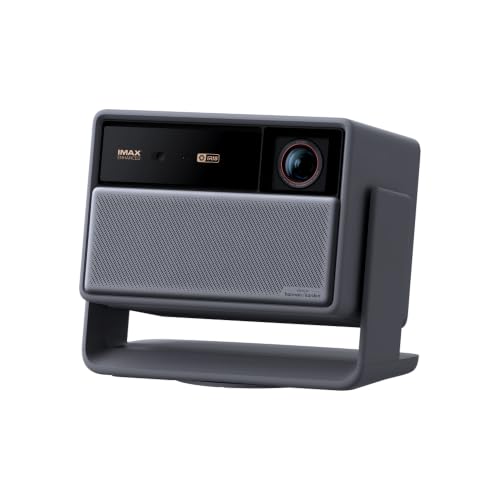
XGIMI Horizon 30 Pro — Best overall for a dedicated room
The Horizon 30 Pro is the projector this guide keeps returning to, because it is the one that asks the fewest compromises of a dedicated room. Its listing describes an RGB triple-laser engine — separate red, green and blue lasers rather than a blue laser exciting a phosphor wheel — behind a 4K image, with a stated 4800 ISO lumens, Dolby Vision support, and a published native contrast figure of 8,000:1. Numbers from a listing are the maker’s own, but the architecture is the story: direct RGB laser light is how a home projector reaches for cinema colour, saturating reds and greens that single-laser designs render politely instead of vividly. In a darkened room with a good screen, that translates to the quality viewers describe as richness — candlelit scenes that glow rather than glare, foliage that separates into shades instead of flattening into one green.
Brightness at this level changes how the theater gets used. A stated 4800 ISO lumens is more output than a dark room needs at 100 inches, which is precisely the point: headroom lets the projector run in a quieter, dimmer eco mode for films while still having the muscle for a 120- or 130-inch screen, or for the occasional afternoon match with the curtains drawn rather than sealed. The built-in Harman Kardon sound and Google TV platform are competent, but in a theater they are best treated as a backup system — this machine earns its ranking paired with a receiver and real speakers, where its image is the only thing it has to be. It is a long-throw projector, so it wants a shelf or mount behind the seating and a clear corridor of air to the screen; rooms that cannot give it that should look at the ultra-short-throw picks below instead.
- Light engine: RGB triple laser, no lamp to replace
- Resolution: 4K UHD with Dolby Vision and HDR support
- Brightness: 4800 ISO lumens as stated in the listing
- Platform: Google TV built in, Harman Kardon speakers
- Placement: long throw — shelf or ceiling mount behind seating
Strengths
- Triple-laser colour gives dark scenes a saturation that single-laser rivals visibly lack.
- Brightness headroom suits screens well past 120 inches without straining.
- Dolby Vision support is still uncommon in projectors and serves film libraries well.
Trade-offs
- Long-throw placement demands a room layout many living rooms cannot offer.
- Built-in audio, though branded, is no substitute for the speaker system a theater deserves.
- It is the flagship of this list, and its price tier reflects that position.
Best for: a dedicated or semi-dedicated dark room with a 110-inch-plus screen and a separate sound system. Not suited for: rooms where the projector must sit on a coffee table or beside the screen.

XGIMI HORIZON 20 Pro — Best placement flexibility
If the Horizon 30 Pro is the extrovert of the pair, the HORIZON 20 Pro is the diplomat. It shares the RGB triple-laser foundation and a 4K image, with a listing-stated 4100 ISO lumens, and then adds the two features that solve the most common installation arguments in real homes: optical zoom and lens shift. Optical zoom changes image size by moving glass, not by resampling pixels, so the picture stays honest; lens shift moves the image up, down or sideways without tilting the projector, which means no keystone correction and none of the softness and geometry compromises keystone brings. A projector that can sit on the shelf that already exists, at the height that already works, and still land a perfectly rectangular image on the screen is a projector that actually gets installed instead of discussed.
The rest of the listing reads like a film-lover’s checklist: Dolby Vision, IMAX Enhanced certification, a published 20,000:1 contrast figure, and Google TV with licensed Netflix — the licensing detail matters, because unlicensed implementations are the ones that quietly drop to low resolutions or stop working after an update. In practice the 20 Pro suits the mixed-use room slightly better than its sibling: a touch less brightness, a touch more grace about where it lives. Its gaming credentials are strong on paper, but this guide ranks it for cinema, where its placement manners and colour discipline are the deciding virtues. Choose it when the room is fixed and the projector must adapt; choose the 30 Pro when the room can be arranged around the machine.
- Light engine: RGB triple laser
- Resolution: 4K with Dolby Vision and IMAX Enhanced
- Brightness: 4100 ISO lumens as stated in the listing
- Optics: optical zoom and lens shift for keystone-free setup
- Platform: Google TV with licensed Netflix
Strengths
- Lens shift and optical zoom end the tyranny of the perfect shelf position.
- Triple-laser colour and Dolby Vision serve films exactly as a theater should.
- Licensed Netflix on Google TV removes the usual smart-platform workaround.
Trade-offs
- Gives up some brightness to the Horizon 30 Pro, which matters on very large screens.
- Still a long-throw design — it cannot hug the wall like the UST picks.
- Its flexibility features reward careful setup; a rushed install wastes them.
Best for: mixed-use rooms where furniture is fixed and the projector must fit around life. Not suited for: buyers who want the absolute brightest image for screens beyond 130 inches.
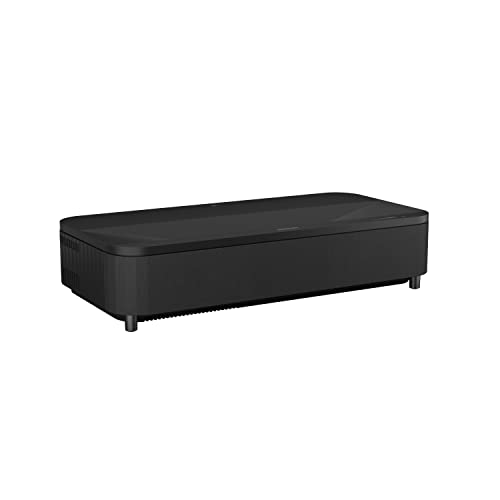
Epson EpiqVision Ultra LS800 — Best ultra-short-throw
The LS800 rewrites the geometry of the whole project. Instead of a machine at the back of the room throwing light over everyone’s heads, Epson’s flagship UST sits on a low console inches from the wall and paints a picture up to a listing-stated 150 inches. Its 4,000 lumens of colour and white brightness — Epson publishes both figures, a habit worth appreciating in a category where some makers quote only white output — make it the most daylight-tolerant 4K pick here, and its 4K PRO-UHD resolution, Epson’s pixel-shifting route to a 4K-class image, keeps text and fine detail convincing at sizes where a lesser UST turns to mush. The 2.1-channel Yamaha speaker system built into the chassis is the most serious attempt at built-in sound in this guide; it will not replace a soundbar, but it is the first projector audio here that a casual viewer might not immediately outgrow.
Ultra-short-throw ownership has its own physics, and the LS800 does not repeal them. The image is exquisitely sensitive to wall flatness — every ripple in drywall becomes a wave in the picture — so this projector really wants a proper screen, ideally an ambient-light-rejecting one designed for UST geometry. The listing we verified is a renewed unit, so check the listing’s condition notes and warranty terms before ordering; the model itself is a known quantity, but renewed stock deserves the extra minute of reading. Set up with a fixed screen and a console at the right height, though, the LS800 delivers the cleanest possible answer to the most common objection to projection: that nobody wants a machine hanging from the ceiling and cables crossing the room.
- Light engine: laser, 3-chip 3LCD
- Resolution: 4K PRO-UHD (pixel-shifted)
- Brightness: 4,000 lumens colour and white, per the listing
- Throw: ultra-short — console placement inches from the wall
- Audio: built-in 2.1-channel Yamaha system
Strengths
- Eliminates mounts, long throws and shadows from people crossing the room.
- Equal colour and white brightness figures keep colours honest at high output.
- Serious built-in sound lowers the total cost of a working setup.
Trade-offs
- Demands a flat wall or, properly, a dedicated UST screen to look its best.
- The verified listing is renewed stock — condition and warranty need checking.
- Console depth and height are dictated by the throw geometry, not by taste.
Best for: living-room theaters that must look like living rooms by day. Not suited for: wavy rental walls or anyone unwilling to budget for a screen.

BenQ V7050i — Best UST for film colour
BenQ builds projectors the way camera makers build lenses — the colour science is the product. The V7050i is a 4K ultra-short-throw laser projector rated at 2500 ANSI lumens in its listing, and that ANSI figure deserves a note: ANSI lumens are measured to a stricter standard than many of the numbers in this category, so this machine is brighter in a real room than a naive comparison against inflated figures would suggest. What the V7050i is tuned for is accuracy — HDR-PRO tone mapping, HDR10 and HLG support, and colour aimed at the DCI-P3 cinema space — which makes it the UST pick for the viewer who notices when a sunset goes neon or a face goes waxy. At 2500 ANSI lumens it is a lights-down projector; it does not pretend to fight a sunlit room, and in darkness it does not need to.
The ownership details are considered in the way BenQ tends to manage: Android TV built in with wireless casting, ARC over HDMI and an optical S/PDIF output for feeding a soundbar or receiver, and a three-year warranty stated in the listing, which is a meaningful commitment for a laser UST. Like the Epson, it wants a flat surface or a screen and a console positioned with care; unlike the Epson, it trades raw output for colour fidelity, so the pairing decision is really about your room. Bright multipurpose space: the LS800. Darkened room, films first, colour above all: the V7050i. It is also the pick that most rewards a calibration session — an evening with test patterns and the picture menus turns a very good image into a genuinely faithful one.
- Light engine: laser, DLP
- Resolution: 4K UHD with HDR-PRO tone mapping
- Brightness: 2500 ANSI lumens as stated in the listing
- Throw: ultra-short-throw, console placement
- Connections: HDMI with ARC, S/PDIF optical, Android TV built in
Strengths
- Colour tuning aimed at cinema accuracy rather than showroom punch.
- ANSI-rated brightness is an honest number that survives real rooms.
- Three-year warranty in the listing is strong cover for a UST laser.
Trade-offs
- Output is sized for dark rooms; bright-room viewing is not its brief.
- Built-in speakers are serviceable, not a reason to buy it.
- Like all USTs, it is unforgiving of uneven walls and casual placement.
Best for: film-first viewers building a dark-room UST setup who value colour accuracy. Not suited for: bright family rooms where the projector doubles as a daytime TV.

BenQ HT2060 — Best 1080p step-down
Every 4K guide needs one pick that argues with the premise, and the HT2060 argues well. It is a 1080p projector — that fact appears in its badge, its table row and here — built around an LED light engine, with a listing that leads on DCI-P3 and Rec.709 wide colour, vertical lens shift, a 1.3x zoom and low input lag figures aimed at gamers. The argument is this: at screen sizes up to about 100 inches, from a sofa at a sensible distance, a well-fed 1080p image with excellent colour and contrast can look more cinematic than a mediocre 4K one, and the money saved buys the screen, the blackout curtains and the centre speaker that improve every film more than pixels do. The LED engine adds its own virtues — instant on and off, no lamp to budget for, colour that stays stable across years.
Where the step-down shows is exactly where physics says it should: very large screens, close seating, and content with fine textural detail — the weave of a tweed jacket in a 4K restoration, crowd scenes, nature documentaries shot for giant screens. If your room points at 120 inches, this is not your projector, and the guide’s 4K picks are waiting above. But the HT2060’s lens shift is a feature the flagship XGIMIs’ smaller sibling also boasts and many budget 4K machines lack entirely, and it makes the BenQ unusually easy to install well. Treat it as the thinking person’s 1080p: not a compromise purchased in ignorance, but a deliberate allocation of budget toward the parts of the theater you will actually see and hear.
- Light engine: LED, long service life, instant on/off
- Resolution: 1080p Full HD with HDR support
- Colour: DCI-P3 and Rec.709 wide gamut per the listing
- Optics: vertical lens shift, 1.3x zoom
- Audio/connections: dual 5W speakers, HDMI 2.0, S/PDIF
Strengths
- Colour discipline punches far above its resolution class in dark scenes.
- Lens shift at this tier makes a properly aligned install genuinely easy.
- LED light removes lamp costs and warm-up rituals from ownership.
Trade-offs
- It is 1080p — on screens past roughly 110 inches the difference is visible.
- Brightness suits dark rooms; it is not a lights-on sports projector.
- Buyers set on 4K sources will feel the downscaling on detailed content.
Best for: screens up to about 100 inches, film lovers allocating budget across the whole room. Not suited for: very large screens or close seating where 4K detail is the point.

Epson EpiqVision LS300 — Best casual UST
The LS300 is the projector for the household that wants the big picture without the hobby. It is an ultra-short-throw laser model — 1080p, and labelled so — with a listing-stated 3,600 lumens of colour and white brightness, Android TV inside, and a Yamaha-designed speaker system that, like its bigger sibling’s, is good enough to be the sound system for casual viewing. It sits on the sideboard, wakes quickly, and turns a blank wall into a 100-inch-plus picture for films, sport and the streaming rotation. For renters, for family rooms, for anyone whose theater must assemble and disassemble around ordinary life, that convenience is not a compromise — it is the entire proposition.
Its place at the foot of a 4K guide is a matter of honest labelling, not dismissal. The 3LCD imaging keeps colours bright and avoids the rainbow artefacts some viewers see with single-chip DLP, and the laser engine means the picture in year three looks like the picture in month one. What it cannot do is resolve 4K detail, because it is not a 4K machine; on a huge screen with 4K sources, the XGIMI and UST picks above will pull away. But households routinely overbuy resolution and underbuy everything else. If the realistic alternative is a 4K projector shining on a wrinkled wall with TV speakers for sound, the LS300’s complete, balanced package will win more evenings than the spec sheet predicts.
- Light engine: laser, 3-chip 3LCD
- Resolution: 1080p Full HD
- Brightness: 3,600 lumens colour and white, per the listing
- Throw: ultra-short — sideboard placement
- Audio: Yamaha speakers built in, Android TV platform
Strengths
- The most complete casual package here: bright, self-contained, quick to live with.
- 3LCD colour brightness keeps sport and daytime viewing lively.
- Laser light and UST placement make it nearly furniture-like to own.
Trade-offs
- 1080p resolution caps how large the picture can go before softening.
- Shares the UST sensitivity to wall flatness and console height.
- Serious film viewers will outgrow its black levels in dark scenes.
Best for: casual big-screen viewing in family rooms and rentals, minimal installation appetite. Not suited for: dedicated dark theaters chasing the best black levels and 4K detail.
Long Throw or Ultra-Short Throw: Which Geometry Fits Your Room?
The deepest divide in this guide is not resolution or light source — it is where the machine sits. Long-throw projectors, the two XGIMIs and the BenQ HT2060 here, live at the back of the room and need an unobstructed cone of light to the screen. In exchange they offer the widest choice of screen sizes, the most forgiving relationship with wall texture (the screen does the work), and the classic cinema arrangement where the projector’s fan sits behind the audience. Their costs are installation costs: a mount or a high shelf, power and HDMI runs across the room, and the discipline of keeping the light path clear of tall guests and taller furniture.
Ultra-short-throw models invert every term of that bargain. The Epson LS800, BenQ V7050i and Epson LS300 sit at the front, inches from the wall, connected by short cables to the same console that holds your other sources. Nobody walks through the beam. Nothing hangs from the ceiling. The price is paid in geometry: the console must sit at a precise height and distance for the image size you want, the wall or screen must be genuinely flat, and a dedicated UST screen — the kind with a lenticular surface that rejects ceiling light — is close to mandatory for the best result. Rooms with a media wall and a sideboard are UST rooms by birth. Rooms with a rear shelf, a dark ceiling and a fixed screen are long-throw rooms. Decide by architecture, not by fashion, and half the shortlist selects itself.
How Do You Set Up a 4K Theater That Actually Looks Right?
Start with the screen size, because it constrains everything else. Measure your seating distance, then choose a diagonal that fills roughly thirty to forty degrees of your field of view — for most sofas that lands between 100 and 130 inches. Mark the rectangle on the wall with painter’s tape and live with it for an evening of ordinary television before ordering anything; screens feel smaller after a week and larger during the first film. Only then place the projector: long-throw models go at the distance their zoom range dictates for that diagonal, UST models at the offset their manual specifies, measured twice because UST geometry forgives nothing.
Alignment is the second act. Use lens shift and physical positioning to square the image; reach for keystone correction only when the room leaves no alternative, because keystone rescales the picture and spends resolution you paid for. Focus at the centre and check the corners, then set the picture mode to the maker’s cinema or film preset, which on every pick in this guide is the honest starting point — the vivid modes exist to win showroom comparisons under fluorescent light. Feed the projector from the best source you own, set that source to output 4K HDR where the content offers it, and if an AV receiver sits in the chain, confirm it passes HDR through rather than quietly converting it. Finally, dim the room in stages and watch a familiar dark scene; if blacks look grey, the fix is almost always light control — curtains, a darker wall, screen gain — before it is a different projector.
How Does HDR Behave on a Projector, and Why Is Tone Mapping the Real Story?
HDR is where projector marketing and projector reality part company most often, so it deserves plain language. A modern television can produce highlights far brighter than any home projector; when an HDR film asks for a specular highlight — sunlight on chrome, a bare bulb in a night scene — the projector cannot reproduce that absolute brightness and must instead remap the scene’s brightness range into its own. That remapping is tone mapping, and its quality is the difference between an HDR image that looks dimensional and one that looks either dull or blown out. Dolby Vision, supported by both XGIMI picks, carries scene-by-scene instructions from the mastering studio, which is why its presence matters more on a projector than on a bright television: the projector needs guidance, and Dolby Vision provides it frame by frame rather than as one static setting for the whole film.
HDR10, the baseline format supported across this list, uses static metadata — one brightness description for the entire film — so the projector’s own processing carries more of the burden. BenQ’s HDR-PRO branding on the V7050i refers to exactly this work: analysing the incoming signal and shaping the tone curve so shadow detail survives without highlights clipping to white. HLG, also supported by the BenQ, is the broadcast variant used by some sports and documentary streams. The practical advice follows from all of this. Judge a projector’s HDR by how it handles a dark scene with one bright element — a candlelit room, a night street with neon — rather than by demo reels of tropical fish, which flatter everything. And expect to use a dedicated HDR picture preset, slightly different from your SDR settings; every pick here stores them separately, and an hour spent setting both up properly pays back across the whole library.
Which Screen and Sound Pairings Complete Each Pick?
A projector is the only display technology sold without its screen, and the pairing decisions deserve the same care as the machine itself. For the long-throw picks — both XGIMIs and the HT2060 — a fixed-frame screen with a matte white surface of modest gain is the reference choice in a dark room; grey screens trade a little peak brightness for deeper perceived blacks in rooms that cannot be fully darkened, which suits the HT2060’s moderate output particularly well. The ultra-short-throw trio wants geometry-specific screens: lenticular UST screens reject light arriving from above — ceiling lights, pale ceilings — while accepting the projector’s steep upward angle, and the improvement over a bare wall is the largest single upgrade available to an LS800 or V7050i owner.
Sound scales with the picture or the picture feels diminished; the ear is unforgiving about a 120-inch image whispering. The honest hierarchy runs from the projectors’ built-in systems — genuinely adequate on the two Epsons for casual viewing — through a competent soundbar with a subwoofer, which is the natural partner for the UST picks since it shares their console, up to a receiver and separate speakers for the long-throw theater builds. Note the connection that makes the middle tier work: HDMI ARC, present on the V7050i and the UST Epsons, lets the projector’s own streaming apps send sound down the same cable to the bar. Buyers planning a receiver should route sources through it and let the projector be a pure display, which also future-proofs the setup — streamers and players evolve faster than projectors, and a dumb, excellent projector outlives several generations of smart ones.
Which Pick Suits Which Kind of Household?
Abstract rankings dissolve on contact with real rooms, so consider four concrete households. The first has a spare room, a tolerant ceiling and a 120-inch ambition: this is the Horizon 30 Pro’s natural habitat, ceiling-mounted behind the seating, paired with a fixed screen and a receiver, its brightness reserve spent on screen size rather than fought against daylight. The second household has a better room but immovable furniture — a bookcase wall where a projector shelf must go, a screen position fixed by a fireplace. The HORIZON 20 Pro exists for them: lens shift and optical zoom absorb the compromises, and nobody has to choose between the projector and the room’s existing life.
The third household is the open-plan majority: a living room that is a theater only after eight in the evening, with a media console, a pale wall and strong opinions about visible technology. Their answer is ultra-short-throw — the LS800 if the room stays bright and the viewing is mixed sport, streaming and film, the V7050i if the household’s heart is in cinema and the curtains are good. The fourth household is renting, or testing whether projection suits them at all: the LS300 on the sideboard, or the HT2060 on a rear shelf with a pull-down screen, delivers the essential experience — scale, darkness, occasion — at a commitment level that survives a change of address. Notice that none of these households made a mistake by choosing differently from the others; the errors in projection are almost never about the machine and almost always about the fit.
What Will These Projectors Cost to Live With Over the Years?
Ownership arithmetic favours the light engines on this list. Laser and LED sources are typically rated in the tens of thousands of hours — at a film a night, that is measured in decades rather than years — and they fade gradually and evenly rather than dimming on a lamp’s steeper curve. There is no replacement-lamp line item, no brightness cliff, and no warm-up wait; the practical running costs become electricity, the occasional filter clean on models that have one, and keeping dust away from vents and, on UST models, the upward-facing lens and mirror, which collect room dust precisely because they point at the ceiling. A soft brush and a can of patience during the weekly clean keep that surface honest; a scratched UST lens is one of the few genuinely expensive accidents in this category.
Warranty terms deserve the same reading as the spec sheet. The V7050i’s listing states a three-year warranty, unusually explicit for the category, and renewed listings such as the LS800’s carry their own terms that should be confirmed before purchase — renewed cover is typically shorter and runs through the refurbisher rather than the manufacturer. Smart platforms age faster than optics: the Google TV and Android TV systems in these picks will feel dated long before the light engines do, which is another argument for treating the projector as a display and letting an inexpensive external streamer handle the apps in later years. Budgeted honestly, a theater built around any pick here is a five-to-ten-year appliance, and the per-evening cost of the flagship works out lower than most households spend on the snacks.
Two XGIMI Flagships, Two Epson USTs — How Do the Pairs Divide?
Because this shortlist contains two pairs of siblings, the within-pair decisions deserve direct treatment. Between the XGIMIs, the dividing line is brightness against flexibility. The Horizon 30 Pro’s extra output — 4800 against 4100 ISO lumens as listed — is not about lighting a bright room; it is about screen size and HDR headroom, the ability to fill 130 inches and still have something in reserve for HDR highlights. The HORIZON 20 Pro answers with the optics: zoom and lens shift that let it live where it must. If your throw distance and shelf are already ideal, the 30 Pro’s optics are sufficient and its brightness is the better spend; if any part of the geometry is awkward, the 20 Pro’s flexibility will produce a better-aligned picture, and an aligned 4100-lumen image beats a keystoned 4800-lumen one every evening of the week.
The Epson pair divides by intent. The LS800 is a flagship ultra-short-throw built to be the main screen of a house: 4K PRO-UHD resolution, the highest brightness in its class here, and sound designed to stand alone. The LS300 is a lifestyle appliance that happens to project — brighter than its resolution class suggests, simpler, and content to be the family’s big casual screen. Choosing between them is really choosing the room’s destiny: a wall that becomes the household’s cinema, or a sideboard that occasionally becomes a very large television. The BenQ V7050i complicates the flagship decision only for film purists, who should weigh its colour tuning and ANSI honesty against the LS800’s output; everyone else can let the room’s brightness decide, because that is the axis on which those two genuinely differ.
Comparison Table
| Pick | Resolution | Light engine | Brightness (as listed) | Placement |
|---|---|---|---|---|
| XGIMI Horizon 30 Pro | 4K UHD | RGB triple laser | 4800 ISO lumens | Long throw |
| XGIMI HORIZON 20 Pro | 4K UHD | RGB triple laser | 4100 ISO lumens | Long throw, lens shift |
| Epson LS800 | 4K PRO-UHD | Laser 3LCD | 4,000 lumens colour/white | Ultra-short throw |
| BenQ V7050i | 4K UHD | Laser DLP | 2500 ANSI lumens | Ultra-short throw |
| BenQ HT2060 | 1080p | LED | Dark-room class (see listing) | Long throw, lens shift |
| Epson LS300 | 1080p | Laser 3LCD | 3,600 lumens colour/white | Ultra-short throw |
What Are the Most Common Mistakes When Building a Projector Theater?
The first is buying brightness for a dark room. Lumens are the easiest number to market and the least relevant once the curtains close; buyers who chase the biggest figure end up with washed-out blacks and a machine running in a loud, hot, high-power mode it never needed. The second is projecting onto whatever wall happens to exist and judging the projector by the result — a screen is not an accessory, it is half the optical system, and for UST models it is the half that determines whether the geometry works at all.
The third mistake is neglecting the audio budget until the picture is up. A 120-inch image with sound from a small built-in speaker feels like watching a film through a keyhole; plan the soundbar or receiver when you plan the projector, and run the cables while the room is already disrupted. Fourth comes the resolution tunnel vision this guide has pushed against throughout: at modest screen sizes, spending the whole budget on 4K while skipping light control and sound produces a worse theater than a balanced 1080p build. The final mistake is skipping the tape measure — throw distances, console heights and screen diagonals are arithmetic, and an evening with the manual’s placement table prevents the most expensive sentence in home theater: it almost fits.
Final Recommendation
For the room that can take it, the XGIMI Horizon 30 Pro is the projector to build around: triple-laser colour, brightness in reserve, and a 4K image that stays composed at sizes where lesser machines fray. Whichever pick you land on, let the room have the first word — measure the wall, tape the screen outline, count the seats — because a projector cannot compensate for a room that was never planned, and rewards a planned room more generously than any other component in the system. If the room’s furniture cannot move, the HORIZON 20 Pro’s lens shift and optical zoom deliver nearly the same cinema with far better manners. Ultra-short-throw buyers should choose by light: the Epson LS800 for rooms that stay sociable, the BenQ V7050i for rooms that go properly dark. And the two 1080p picks are not booby prizes — the HT2060 for the film lover balancing a whole room’s budget, the LS300 for the household that wants the big picture to be effortless. A theater, in the end, is a room that disappears completely; choose the machine that lets yours vanish most completely, and the films will do all the rest.
Frequently Asked Questions
Is pixel-shifted 4K the same as native 4K?
Not mechanically, but closer than the terminology wars suggest. Pixel-shifting moves a lower-resolution imaging chip rapidly so successive sub-frames assemble a full 4K grid on screen; at normal seating distances a well-implemented version, such as the 4K PRO-UHD system in the Epson picks, is difficult to distinguish from native 4K with film content. Native imagers hold an edge with fine text and test patterns, which matters more for spreadsheets than for cinema.
How large should my screen be for 4K to matter?
The advantage grows with size and shrinks with distance. Below roughly 90 inches, or from seating beyond about twelve feet at 100 inches, most viewers find a good 1080p image hard to fault — which is why the HT2060 and LS300 are honest picks rather than filler. From 110 inches upward at typical sofa distances, 4K’s composure in detailed scenes becomes plain, and the four 4K picks justify themselves.
Do I need a screen, or is a white wall enough?
A smooth white wall is a workable start for long-throw models, but a screen improves gain, contrast and colour uniformity enough that it should be the first upgrade on any list. For ultra-short-throw projectors the answer hardens: wall ripples distort the steep projection angle visibly, and a fixed-frame or UST-specific screen is effectively part of the product.
Laser, LED or lamp — which light engine should I choose?
Laser suits heavy use: it holds brightness, starts instantly and removes lamp replacements from the budget, which is why four of these six picks use it. LED, as in the HT2060, shares the longevity with a colour character many film viewers love, at lower maximum brightness. Lamp models can be excellent value but dim progressively and carry a replacement cost; none of the six picks here is lamp-based, though the technology remains rational at lower budgets.
Can these projectors handle sport and gaming too?
Yes, with different strengths. The XGIMI models publish low-latency figures in their listings and handle fast content well; the Epsons’ brightness suits afternoon sport. Serious competitive gaming still belongs on a low-lag monitor, but for casual play and big-match viewing every pick here is comfortable — just use the maker’s game mode, which trades a little processing for speed.
What else should I budget for beyond the projector?
A screen, a mount or console work, cabling, and sound. As a rough discipline, expect the projector to be half to two-thirds of the total project cost; the remainder is what turns a bright rectangle into a theater. Buyers of the UST picks should price the screen first, since those models depend on it most.
Should I ceiling-mount a long-throw projector or put it on a shelf?
A ceiling mount is the tidier end state: the projector leaves the room’s furniture plan entirely, the light path stays clear of heads, and the installation looks intentional. Its costs are the mount itself, a power outlet at ceiling height, and a long HDMI run — which at 4K HDR lengths should be a quality cable or an optical one, tested before the ceiling is closed up. A shelf or projector stand behind the seating is simpler to install and far easier to service, adjust or take with you when you move, at the price of the machine sharing space with the room. The lens-shift picks — the HORIZON 20 Pro and HT2060 — are the most shelf-friendly, since their optics forgive a shelf that is not perfectly centred or level with the screen’s middle. Whichever route you choose, decide before buying cables: the mount decision is the one that determines every length in the system.
How far should I sit from a 120-inch screen?
For most viewers, somewhere between ten and fourteen feet keeps a 120-inch image immersive without demanding head movement during dialogue scenes. Sit closer and 4K earns its keep most clearly, because fine detail resolves before it shrinks below what the eye can use; sit farther and the experience stays grand but the resolution premium fades — one more reason the seating plan, not the spec sheet, should open every projector conversation. When in doubt, tape the outline on the wall and watch ordinary television inside it for a few evenings; the right size announces itself.
Related Guides
Continue planning your setup with our guide to the best 4K laser projectors for a deeper look at light engines, compare portable options in the best 1080p mini projectors, or step back to the full landscape in the best 1080p home theater projectors.
Related guides
- Best 1080p IP Cameras: PoE Domes, Turrets, Bullets and a PTZ That Earn Their Cable
- Best Doorbell Cameras No Subscription: Local Storage Picks, and the Ring/Blink Truth
- Best AC Powered Wireless Security Cameras: Wi-Fi Data, Mains Power, Zero Sleep
- Best 4K HDR Projectors: Tone Mapping, Color and the Rooms They Deserve


