Our Top Picks
 Turtle Beach Stealth Pro II Premium Wireless GamingOne Size7.09 x 3.5 x 7.4 inches0.87 poundsCheck on Amazon
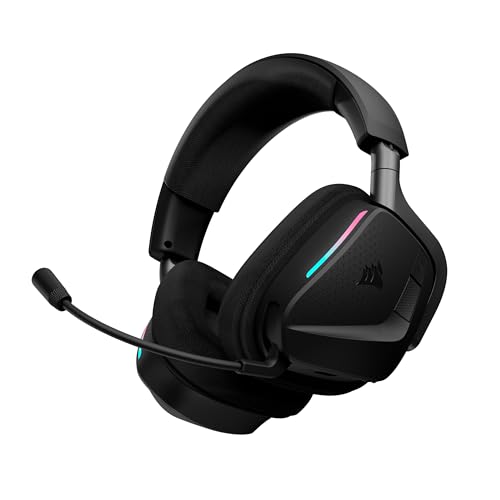
 CORSAIR HS80 MAX WIRELESS Bluetooth PC PS5 SwitchWireless8.07 x 3.81 x 7.2 inches0.8 poundsCheck on Amazon

What's inside
- What Dolby Atmos on PC actually does
- How we built this list
- The eight headsets, reviewed from published research
- Head to head: the differences that actually decide this
- Setting up Atmos on your PC, step by step in spirit
- Everyday trade offs nobody puts on the box
- Check prices on Amazon
- Our recommendations, plainly stated
As an Amazon Associate I earn from qualifying purchases. This post may contain affiliate links at no extra cost to you.
Dolby Atmos changes what a PC headset is actually for. A conventional headset delivers sound in fixed channels: left, right, center, and a ring of surround positions that the game or the headset software pretends exist around your head. Atmos works differently. It treats each sound as an object with a position in three-dimensional space, including height, and then renders those objects through your two earcups in real time. A helicopter does not just move from left surround to right surround; it rises, passes overhead, and recedes behind you. Rain stops sounding like a flat wash of noise and starts to feel layered. Footsteps on a floor above your character gain a vertical cue that ordinary stereo simply cannot fake convincingly.
That promise comes with fine print, and the fine print is where most buying guides go quiet. On PC, Dolby Atmos for Headphones is largely a software layer. The spatial processing happens in Windows, through the Dolby Access app, and the headset receives the finished signal. That means the headset still matters enormously — driver quality, comfort, microphone clarity, wireless stability, and battery life decide whether you enjoy the effect for three hours or thirty minutes — but no headset contains a magic Atmos chip that works on its own. Understanding that split between software processing and hardware delivery is the single most useful thing you can learn before choosing from the eight headsets in this guide.
Here is the honest shape of this roundup. Eight headsets made the cut, and five of the eight come from Corsair. That is not a sponsored pattern and it is not an attempt to pad the list; it reflects what our research found when we checked which current wireless PC headsets carry Dolby Atmos support in their published specifications. Corsair’s VOID v2 family appears several times because the company sells that platform in standard, MAX, color variant, and dual tone forms, and each version differs in ways that matter to different buyers. Alongside them sit a flagship Turtle Beach, Microsoft’s own Xbox Wireless Headset, and an Alienware model with active noise canceling and a notably wide published frequency range. We will tell you plainly where the Corsair versions overlap, where they genuinely diverge, and when a different brand is the smarter pick.
What Dolby Atmos on PC actually does
Traditional surround sound is channel based. A 5.1 or 7.1 mix assigns every sound to one of a fixed set of speaker positions, and virtual surround software then simulates those positions through two headphone drivers. The simulation can be convincing, but it has a structural weakness: sounds are locked to the channels the mixer used. If nothing was mixed into a height channel, nothing can appear above you, and sounds between channels can smear into vague blobs.
Atmos is object based. Game engines and film mixes that support it describe sounds as individual objects with coordinates, and the renderer decides, moment by moment, how each object should reach your ears given that you are wearing headphones. The result is finer placement, smoother movement as objects travel, and genuine height information when the source material contains it. A grenade bouncing down stairs, a teammate calling out from a balcony, an aircraft crossing the sky in a flight sim — these are the moments where object based rendering earns its keep.
There are limits worth stating clearly. Atmos cannot invent height information that a game never encoded. A stereo-only indie title will still be a stereo title, though Dolby Access can upmix and present it in a wider, more spacious way that many listeners enjoy. The quality of the effect also depends on the head related transfer function the renderer assumes, which is a generalized model of how ears and heads shape sound. Individual ears differ, so two listeners can hear the same headset and disagree about how precise the imaging feels. Personalization tools, such as the SoundID technology on two Corsair models in this guide, exist partly to narrow that gap.
How the license works on Windows
On a Windows PC, Dolby Atmos for Headphones is enabled through the Dolby Access app, available from the Microsoft Store. Windows itself provides the spatial sound framework: you select a spatial format in the sound settings for your output device, and the chosen renderer handles the processing before the audio leaves the machine. Dolby Access typically offers a trial period, after which a one time license purchase keeps the feature active for your account across your Windows devices. Some headsets bundle a license or an activation entitlement with the purchase, and some do not, so check the product page of the specific model you are considering rather than assuming the license is included. What matters for this guide is that all eight headsets below are sold with Dolby Atmos support as part of their published feature set, which means the manufacturers have built their PC experience around that Windows spatial pipeline.
Setup, in outline, goes like this. Connect the headset, usually through its 2.4GHz USB receiver for the lowest latency. Install Dolby Access, let it recognize the output device, and enable Atmos for Headphones inside the app. Then, in Windows sound settings, confirm that the spatial sound format for the headset is set to Dolby Atmos for Headphones. In games, choose the headphone or home theater output option the title recommends and disable any competing virtual surround processing inside the headset’s own software, because stacking two spatial processors on top of each other muddies imaging instead of improving it. One renderer at a time is the rule.
Atmos versus virtual 7.1
Many gaming headsets advertise virtual 7.1 surround, and it is fair to ask why Atmos matters at all. Virtual 7.1 takes a multichannel mix and folds it down to stereo with processing. When the source is a genuine 7.1 mix, the result can be spacious, but the fold down is still working from fixed channels. Atmos starts from objects, preserves height, and tends to keep dialogue and effects more distinct when a scene gets busy. In practice, listeners in our research notes most often describe the difference as placement confidence: with a good Atmos render, you turn toward a sound and it is actually there. If you also compare dedicated channel based gear, our guide to best 7 1 gaming headsets covers the traditional approach in depth.
None of this makes virtual 7.1 useless. Plenty of older games output excellent 7.1 mixes and nothing more, and a headset that handles both worlds gracefully is valuable. The headsets below are chosen for Atmos first, but their stereo and multichannel handling still matters, because your library is probably a mix of Atmos titles, plain stereo games, films, and voice chat all in the same evening.
How we built this list
Our research started from published manufacturer specifications and retailer listings, and we checked every feature named in this article against those documents. If a battery figure, a connection type, or a technology such as SoundID appears below, it appears because the product’s own published title and specification material state it. Where a specification is not published in the material we reviewed, we do not guess at it. You will notice, for example, that battery life is stated for the Corsair models that publish it and left unstated where the listing does not give a figure. That restraint is deliberate.
We also weighted the things PC players actually live with. Wireless behavior matters: a 2.4GHz receiver connection generally delivers lower latency than Bluetooth, which matters in competitive play, while Bluetooth wins for walking away from the desk with music or a call. Microphone quality matters because Discord teammates hear you through it every night. Comfort matters because Atmos encourages longer sessions in atmospheric games. And platform range matters, because most of these headsets also work with PlayStation consoles, Switch, Mac, and mobile devices, which changes the value calculation for anyone with more than one screen.
Finally, a note on the Corsair concentration, because pretending otherwise would be dishonest. Five of the eight headsets are Corsair models, and three of those five belong to the VOID v2 line. We treat each version separately because the differences — SoundID personalization on the MAX, the standard model’s balance of features, the dual tone colorway — are real purchasing differences. But if you want a shortlist with maximum brand variety, the Turtle Beach, Xbox, and Alienware entries are the three alternatives, and each one leads this list in at least one category: premium features, first party simplicity, and noise canceling with a wide frequency range respectively.
The eight headsets, reviewed from published research
Turtle Beach Stealth Pro II — the premium all rounder
The Stealth Pro II is the flagship entry in this group, and its published specification reads like a checklist of everything a high end wireless headset can offer in this generation. Turtle Beach lists Hi-Res Audio support, Dolby Atmos, active noise cancellation, simultaneous Bluetooth, and 24-bit audio, in a black finish, with compatibility spanning Xbox Series X|S, PlayStation 5 and 4, and PC. That combination is genuinely rare. Most headsets in this guide offer Atmos and wireless play; very few add active noise cancellation on top, and fewer still pair it with simultaneous Bluetooth, which lets the headset stay connected to your PC through its primary wireless link while also holding a Bluetooth connection to your phone.
Simultaneous Bluetooth deserves a moment of explanation, because it changes daily life more than spec sheet drama suggests. In a long session, your phone buzzes with a call or a message tone. With a single connection headset, answering means swapping devices, re-pairing, or just ignoring the phone. With simultaneous Bluetooth, the call audio can come through the same earcups you are already wearing while the game connection stays alive. For players who game in shared homes, or who keep one ear on family logistics during evening sessions, that convenience compounds night after night.
The active noise cancellation addresses a different problem: the room. PC gaming rooms are rarely quiet. Air conditioning, a partner’s television in the next room, traffic outside, a mechanical keyboard belonging to someone else in a shared space — ANC reduces that low, constant wash so game audio can stay at a saner volume. Combined with Atmos, the effect is practical as well as pleasant. Spatial cues are subtle by nature, and they survive better when the room is not competing with them. If you play in a noisy environment, this headset and the Alienware below are your two noise canceling candidates, and the Turtle Beach adds the stronger audio pedigree on paper with its Hi-Res and 24-bit audio credentials.
Who should choose it? The PC player who also plays on Xbox and PlayStation and wants one premium headset for all three, who values noise canceling, and who will actually use simultaneous Bluetooth. Who should skip it? Players on a careful budget, and players who only ever sit at one PC in a quiet room, where its extra talents would go unused. As the flagship, it asks the most commitment, and it justifies that commitment through breadth rather than through any single trick.
Xbox Wireless Headset — the first party straightforward choice
Microsoft’s own Xbox Wireless Headset, in Carbon Black, takes the opposite philosophy. Its published description emphasizes over ear headphones with spatial audio including Dolby Atmos, and play across consoles, PCs, TVs, and more. There is no long tail of branded sub technologies in the listing, and that restraint is the point. This is the headset Microsoft designed to be the default companion to its own platforms, and on PC that first party status carries a quiet advantage: Windows and Xbox share an ecosystem, and the headset is built to move between an Xbox console and a Windows PC with the least possible ceremony.
For a PC focused buyer, the appeal is simplicity and integration. You are buying the spatial audio experience — Atmos headline support — without needing to learn a vendor’s software suite or sort through tiers of a product line. The over ear design suits long sessions, and the ability to use the same headset with a television and other devices around the home stretches its usefulness beyond the desk. In a guide full of gaming brand flagships with layered feature sets, the Xbox headset is the pick for someone who wants Atmos on PC and console, trusts first party hardware to just work with both, and would rather spend their evening playing than configuring.
Its compromises follow from that simplicity. The published material does not list the extended battery figures, personalization technology, or noise canceling that rivals advertise, so if those specifics top your priority list, the Corsair and Alienware entries below speak more directly to you. But do not mistake a short spec list for a weak product. For the large group of players whose needs are honestly described as “Atmos, wireless, works on my PC and my Xbox, comfortable,” this headset answers the brief with the least fuss in the entire roundup.
Alienware Wireless Gaming Headset — noise canceling with a wide range
Alienware’s entry, finished in the color the company calls Dark Side of the Moon, is the specification nerd’s favorite in this list because it publishes numbers others leave out. The listing states a 20Hz to 40kHz frequency response and 32 Ohm impedance, alongside active noise canceling, a 2.4GHz wireless connection, Dolby Atmos, and Hi-Res Audio. That frequency range extends well above the roughly 20kHz ceiling of human hearing, which is characteristic of Hi-Res Audio design: the point is not that you will hear 40kHz tones, but that drivers built to that standard tend to handle the audible range with headroom and composure, and the certification gives buyers a concrete, checkable claim rather than a mood.
The 32 Ohm impedance is equally practical information. It tells you this headset is designed to be driven easily by ordinary sources — a PC, a controller, a portable device — without demanding a powerful dedicated amplifier. For a wireless headset that figure mostly describes the driver’s electrical character, but it signals a design tuned for the mainstream gear its buyers actually own. If you enjoy comparing dedicated audio chains, our look at best audiophile gaming headsets goes deeper into that world.
In daily use, the Alienware’s pitch mirrors the Turtle Beach in one respect — active noise canceling for players in imperfect rooms — while differing in connection emphasis. The published specification highlights its 2.4GHz wireless link, the low latency choice for desk play. It does not advertise simultaneous Bluetooth in the material we reviewed, so buyers who want the phone-alongside-game trick should weigh the Stealth Pro II or the Corsair MAX models instead. Choose the Alienware if you value published, verifiable audio specifications, want noise canceling, and game primarily at a PC where a 2.4GHz receiver lives permanently in a USB port. Alienware’s desktop and laptop ecosystem is the natural home for it, but nothing in its specification limits it to that brand of computer.
Corsair HS80 MAX Wireless — the microphone and personalization pick
The HS80 MAX Wireless, in gray, is where Corsair’s line stops being a set of variations and starts offering a distinct flagship of its own. Its published features include a clear broadcast quality microphone, Dolby Atmos, SoundID Technology, up to 65 hours of battery life, a 2.4GHz connection plus Bluetooth, memory foam earcups, and compatibility with PC, PlayStation 5 and 4, Switch, Mac, and mobile. Two of those features deserve the spotlight.
First, the microphone. Corsair describes it with the phrase broadcast quality, and while that is the manufacturer’s own characterization, it signals where this model aims: streamers, creators, and anyone whose voice is part of their presence online. Most gaming headset microphones are adequate for callouts. A model that leads with mic quality is aiming at the player who records, streams, or spends hours in voice meetings and wants to sound like themselves rather than like a pilot radioing through weather. If your PC headset doubles as your streaming microphone, this is the Corsair to beat.
Second, SoundID. This personalization technology builds an audio profile based on your individual hearing preferences and characteristics, then shapes the sound accordingly. Remember the earlier caveat about spatial rendering relying on a generalized model of human hearing? SoundID is an attempt to close exactly that gap. Rather than assuming your ears match the average, it calibrates the output toward you. Individual results will vary — personalization is inherently personal — but for listeners who have found spatial audio on other headsets oddly vague, a model with hearing personalization is a rational next step.
The up to 65 hour battery figure rounds out a package aimed at heavy daily users, and the memory foam earcups speak to the same audience: people who wear a headset for a workday of calls and then keep it on for games. Battery figures are always stated as “up to” numbers that depend on volume, connection type, and features in use, so treat 65 hours as a ceiling under favorable conditions rather than a promise. Even discounted for real world use, it places the HS80 MAX firmly in the charge-it-weekly rather than charge-it-nightly class.
Corsair VOID v2 MAX Wireless — the long battery flagship of the VOID line
The VOID v2 MAX Wireless, in black, tops Corsair’s VOID family, and its published specification shows what the MAX badge buys. It lists a clear microphone, Dolby Atmos, SoundID Technology, up to 70 hours of battery life, fast charging, simultaneous connectivity, a 2.4GHz link, and support for PC, PlayStation 5 and 4, Switch, and mobile. Compared with the standard VOID v2 below, the MAX adds the two headline upgrades: SoundID personalization and simultaneous connectivity, while matching the family’s up to 70 hour battery ceiling.
Simultaneous connectivity is the feature to linger on, because it is easy to underrate on a spec sheet and hard to give up once lived with. Like the Stealth Pro II’s simultaneous Bluetooth, it keeps two sources attached at once — the low latency 2.4GHz connection for the game and Bluetooth for a phone or second device. A call comes in, you answer it in the same headset, and the game session never drops its link. For players who game with a phone nearby for chat apps, music control, or actual phone calls, the MAX brings the VOID line to parity with the Turtle Beach flagship on this front.
SoundID’s presence makes this the personalization pick within the VOID family. If you liked the idea of the HS80 MAX’s hearing based tuning but prefer the VOID line’s fit and style, this model is how you get both. The fast charging support matters at this battery size too: a headset that runs for days between charges is wonderful until the morning it is empty before a session, and fast charging turns that failure into a short coffee break rather than a cancelled evening.
Choose the VOID v2 MAX if you want the most complete VOID, full stop — longest feature list in the family, personalization, simultaneous connections, and the family’s best battery figure. Skip it if you would never use simultaneous connectivity or personalized tuning; the standard VOID v2 exists precisely for you, and paying for unused features is how budgets quietly bleed.
Corsair VOID v2 Wireless — the balanced standard model
The standard VOID v2 Wireless, in black, is the version we expect to suit the widest audience. Its published specification includes Dolby Atmos, Bluetooth, a 70 hour battery, dual wireless connectivity, a lightweight design, fast charging, and compatibility with PC, PlayStation 5, Switch, PlayStation 4, and mobile. Strip away the MAX model’s personalization and simultaneous connection extras and what remains is the core VOID proposition: long battery life, two ways to connect wirelessly, low weight for long sessions, and Atmos support, all in the family’s mainstream model.
Dual wireless and simultaneous connectivity sound similar and are worth separating, because the distinction decides which VOID you should buy. Dual wireless means the headset offers both 2.4GHz and Bluetooth and can use either — you choose the connection that suits the moment, low latency at the desk or Bluetooth convenience away from it. Simultaneous connectivity, reserved for the MAX in this family, means both at once. If your habit is one device at a time — and for many PC players it honestly is — dual wireless covers your life completely, and the standard model is not a compromise so much as a correct match.
The lightweight emphasis deserves respect as well. Headset weight is the specification that reviewers underplay and owners feel every single session, in the neck, in the jaw, in the decision to take the headset off during a loading screen. A lightweight frame with a 70 hour battery is a combination aimed squarely at marathon players: the headset disappears on your head and the charger disappears from your routine. For console cross play households, note its Switch and PlayStation support alongside PC; readers comparing console first options may also want our guide to best headsets ps5.
Our research position is simple: start your Corsair deliberation here. Move up to the MAX only if simultaneous connectivity or SoundID names a real need in your life. Move to the dual tone version below only if the standard black finish leaves you cold. That is not faint praise — the standard model is the reference point of the family because its balance is the family at its most sensible.
Corsair HS35 v3 Wireless — the lightweight entry point
The HS35 v3 Wireless, in a finish Corsair calls Carbon, is the accessible door into this list. Its published specification lists a microphone, 2.4GHz and Bluetooth connectivity across PC, PlayStation 5 and 4, Switch, Mac, and mobile, lightweight comfort, and Dolby Atmos. Notably, the listing does not publish a battery figure in the material we reviewed, and it does not claim SoundID, simultaneous connectivity, or noise canceling. What it claims is the essential Atmos wireless experience with an emphasis on comfort and platform breadth, and there is a large audience for exactly that.
Consider who that audience is. A younger player getting a first serious headset. A household buying one headset that must serve a PC, a Switch, and a phone. A player who wears glasses and has learned, painfully, that comfort claims are not marketing fluff but the difference between a headset that gets used and one that lives in a drawer. The HS35 v3’s lightweight comfort positioning speaks to all of them. Its platform list is also quietly the broadest in spirit: Mac support appears here and on the HS80 MAX, which matters for students and workers whose computer is a MacBook during the day and whose gaming happens across everything else at night.
The trade offs are the mirror of its price conscious position in the range, expressed without inventing numbers the listing does not provide: you give up the personalization, the simultaneous connections, the published long battery figures, and the premium microphone positioning of the models above. What you keep is the thing this guide is about — Dolby Atmos spatial audio on PC — delivered wirelessly in a light, broadly compatible package. For many buyers, especially first time Atmos listeners who want to discover whether spatial audio clicks for them before committing to a flagship, that is the correct order of operations.
Corsair VOID v2 Wireless Dual Tone — the style variant, honestly labeled
The final entry is the VOID v2 Wireless in the Dual Tone finish, and honesty requires a specific kind of review here. Its published specification — a clear microphone, Dolby Atmos, a lightweight build, up to 70 hours of battery life, fast charging, a 2.4GHz connection, effortless connectivity, and support for PC, PlayStation 5, Switch, PlayStation 4, and mobile — describes, in substance, the standard VOID v2 platform in a two tone colorway. This is not a criticism. It is a description of how headset lines actually work, and we would rather state it plainly than invent differences that the published material does not support.
Why does a color variant earn its own slot in a best of list? Because it is a genuinely separate product that a real buyer might choose, and because appearance is a legitimate purchasing factor for an object you wear on your head, on camera, for hours a day. Streamers think about how a headset reads on screen. Players with a two tone desk setup care that their gear matches it. If you have already decided the standard VOID v2 is your headset — the dual wireless, the 70 hour ceiling, the lightweight frame — then this version simply asks whether you want it in black or in the dual tone treatment, and there is no wrong answer to a question of taste.
One nuance in its listing is worth noting: where the standard black VOID v2 explicitly names Bluetooth in its published features, the dual tone listing emphasizes effortless connectivity and its 2.4GHz link. Both are VOID v2 platform products with dual wireless positioning across the family, but if Bluetooth specifics are decisive for you, confirm the current product page for the exact variant before ordering, because variant level listings are where small specification differences like to hide. That advice, frankly, applies to every model in this guide: specifications are living documents, and a thirty second check of the current page is the cheapest insurance in tech buying.
Head to head: the differences that actually decide this
With eight headsets described, the decision usually collapses into a handful of real questions. Work through these and the right model tends to identify itself.
- Do you need noise canceling? Only the Turtle Beach Stealth Pro II and the Alienware offer active noise cancellation in this group. Noisy room, shared space, frequent travel — start with those two.
- Do you want two devices connected at once? The Stealth Pro II lists simultaneous Bluetooth, and the VOID v2 MAX lists simultaneous connectivity. Everyone else switches between connections rather than blending them.
- Does personalized sound appeal to you? SoundID appears on exactly two models: the HS80 MAX and the VOID v2 MAX. If hearing based tuning is your priority, your shortlist is already written.
- How much do you care about the microphone? The HS80 MAX leads with broadcast quality mic positioning. The VOID models promise a clear microphone. The HS35 v3 includes a mic without premium claims.
- How long between charges? Published ceilings: up to 70 hours for the VOID v2 family, up to 65 hours for the HS80 MAX. The other listings do not state a figure in the material we reviewed, so ask the product page, not your hopes.
- Which platforms share your desk? Every headset here covers PC. PlayStation support is widespread, Switch support appears across the Corsair range, Mac support is listed for the HS80 MAX and HS35 v3, and the Xbox headset is the natural citizen of Microsoft’s console and PC ecosystem.
Notice what is not on that list: raw Atmos quality as a brand differentiator. Because the spatial rendering happens in Windows through Dolby Access, the Atmos processing itself is a shared foundation across all eight. What differs is everything around it — the drivers reproducing the render, the fit keeping you in the game, the wireless link keeping latency invisible, the microphone carrying your voice. Buy the headset, in other words, not the logo on the spatial format. The format is the same stage; these are eight different seats, sound systems, and ushers.
Setting up Atmos on your PC, step by step in spirit
Whichever headset you choose, the first evening ritual is the same, and doing it in the right order saves the confusion that fills support forums. Charge the headset first. Connect the 2.4GHz receiver to a USB port on the PC itself rather than a hub if you can, because hubs occasionally add negotiation quirks that have nothing to do with the headset. Let Windows recognize the device and set it as your default output and input, so games and chat apps stop arguing about which microphone exists.
Next, install Dolby Access from the Microsoft Store and walk through its headphone setup, which will confirm the spatial format and let you hear demonstration material that sweeps sound around and above you. Then open a game you know well — familiarity is the diagnostic tool here, because you cannot judge new spatial information in a soundscape you have never heard before. Play a scene with verticality: a multi story building, aircraft, weather. If voices sound oddly processed or the image feels smeared, check for double processing: a headset app applying its own virtual surround on top of Atmos is the most common culprit, and switching the headset software to a plain stereo or direct mode while Atmos handles spatial duties usually restores clarity.
A word about wired alternatives and sound cards, since some readers arrive here from the component world. A dedicated sound card with its own spatial processing is a different route to surround, and it can serve desktop speaker setups well; our guide to best 7 1 sound cards covers that path. For headphone Atmos specifically, though, the processing lives in the Windows spatial pipeline described above, which is why these wireless headsets need no special internal card in your PC to deliver the effect.
Everyday trade offs nobody puts on the box
Wireless freedom costs latency and battery, and the two connections in these headsets split that cost differently. The 2.4GHz receiver link is the competitive choice: it is engineered for low delay, so the crack of a shot and the visual event stay married. Bluetooth is the convenience choice, with delay that varies by device and codec, fine for video, music, and casual play, less ideal when a rhythm game or a duel punishes every millisecond. Dual wireless headsets let you pick per moment; simultaneous models refuse to make you pick. Neither answer is wrong, but know which player you are.
Battery claims deserve the same realism. An up to 70 hour ceiling generally assumes moderate volume and the primary wireless connection; Bluetooth use, higher volume, and features like noise canceling where present draw harder. The practical translation is still generous — a week of evenings for most players — and fast charging on the VOID models softens the rare empty battery surprise. Noise canceling models trade some of that endurance philosophy for silence, which is why neither ANC headset here headlines a giant battery figure in its listing: physics collects its fee somewhere.
Comfort, finally, is the trade off with no spec sheet at all. Memory foam on the HS80 MAX, lightweight builds across the VOID family and the HS35 v3 — these phrases are manufacturers pointing at the same truth from different directions, which is that a headset you forget you are wearing beats a technically richer one that nags your jaw by hour two. If you can, think about your own history: the headset you returned, the one you kept. Your head has already voted; listen to it.
Check prices on Amazon
Live listings for the shortlist in this guide are pulled from Amazon below, so prices and availability are always current at the moment you look.


Our recommendations, plainly stated
If money is secondary and one headset must do everything — PC, Xbox, PlayStation, noisy room, phone alongside — the Turtle Beach Stealth Pro II is the flagship that earns the word. If you want first party simplicity across Xbox and Windows, the Xbox Wireless Headset is the calm choice. If published audio specifications and noise canceling in a PC first package appeal to you, take the Alienware. Inside the Corsair range, the HS80 MAX serves streamers and personalization fans, the VOID v2 MAX is the fully loaded VOID, the standard VOID v2 is the balanced default we would hand to most players, the dual tone VOID v2 is that same default with style, and the HS35 v3 is the light, welcoming entry point. Eight headsets, eight honest reasons to exist — which is more than can be said for most roundups, and exactly why we declined to invent differences where the published record shows a shared platform.
Disclosure: This guide was written from research into published manufacturer specifications, product listings, and documentation; the writer did not personally use or handle the headsets covered here, and no manufacturer supplied review units or influenced the conclusions. Where a detail could not be confirmed in published material, it was left out rather than guessed. Gizmoverdict participates in the Amazon Associates program, and as an Amazon Associate we earn from qualifying purchases made through links on this page, at no additional cost to you. That support keeps our research independent, and it never changes which products we include or how we describe them.
Related guides
- Best Mono Bluetooth Headsets: One Ear on the Call, One on the World
- Best Affordable Bluetooth Headsets: Earpieces and Light Work Headsets That Earn Their Keep
- Best Aviation Headsets With Noise Canceling: ANR Flagships and the Honest Passive Pair
- Best Bluetooth Headsets for Noisy Office: 6 Stereo Picks With Dongles, Bases and Big Batteries


