What's inside
As an Amazon Associate I earn from qualifying purchases. This post may contain affiliate links at no extra cost to you.
gizmoverdict.com is reader-supported. When you buy through links on our site, we may earn an affiliate commission.
Where to buy: Every model in this roundup is a wired mono headset sold through Amazon, and the listings differ mainly in plug — USB-A, USB-C, 3.5mm, or combinations — so the one detail worth double-checking before checkout is that the connector on the listing matches the ports on the PC or laptop the headset will actually live with.
The best one ear headsets for pc use start from a premise that stereo marketing treats as a defect: sometimes the most important sound in the room is not in the call. A parent hears the toddler’s tone change mid-sentence. A team lead hears the new hire struggling two desks away. A warehouse coordinator hears the forklift’s reverse alarm. A mono headset keeps one ear on that world while the other ear handles the call, and for a large class of PC work that split attention is not a compromise — it is the entire job description.
All six picks here are single-ear designs per their titles, and all six are wired, which suits the mono philosophy neatly: no battery anxiety, no pairing ritual, a cable that keeps the headset where the desk expects it. They differ in connection — USB-A stalwarts from Arama, Yealink, and Voistek, a USB-C or USB-A Poly, a Jabra that adds a 3.5mm jack to its USB options, and a dual-mic Yealink UH44 — and in certification, weight, and control layout. The sections below weigh those differences for the desks that talk to the room as much as to the screen.
Key Takeaways
- Every pick is a mono, single-ear design, per its title — room awareness is the category’s founding idea.
- All six are wired, so charging and pairing never enter the working day.
- Connection is the main fork: USB-A only, USB-C or USB-A, or Jabra’s 3.5mm plus USB-A/USB-C combination.
- The Yealink UH44 quotes a specific 4.4 oz weight and dual mics in its title.
- Teams and Zoom certification appears on the Poly, Yealink UH34, and Jabra Evolve 30 II titles.
Quick Picks
| Pick | Label | Why it is here |
|---|---|---|
| Arama USB Mono Headset | Best straightforward value | USB mono with noise-cancelling mic and in-line controls for call centers. |
| Poly Blackwire 3210 | Best USB-C or USB-A flexibility | Single-ear Plantronics-line headset for PC and Mac, Teams and Zoom ready. |
| Yealink UH34 | Best certified all-day comfort pick | USB-A on-ear, Teams and Zoom certified, titled for all-day comfort. |
| Voistek USB One Ear Headset | Best control-complete budget design | Mute and volume controls named outright in the title. |
| Jabra Evolve 30 II | Best multi-plug option | 3.5mm jack plus USB-A/USB-C, Teams certified, 2025 edition. |
| Yealink UH44 Mono | Best dual-mic lightweight | Dual mics and 4.4 oz comfort in a mono USB design. |
How were these picks chosen?
We required three things. First, a true single-ear design stated in the title — not a stereo headset with a mono mode, but a headset built around one earpiece from the start. Second, a noise-cancelling microphone claim, because the mono wearer’s callers still deserve a clean voice even though the wearer hears the room. Third, a wired PC connection in one of the common forms, since this category’s buyers are equipping desks, call-center benches, and home offices where the computer does not move.
Beyond those gates, we ranked the texture of daily use: inline controls for the mute-and-volume routine, certification for organizations standardized on Teams or Zoom, stated weight for long shifts, and plug variety for mixed laptop fleets. The result spans a value pick from Arama through enterprise names like Poly and Jabra to Yealink’s two certified entries. Readers deciding between one ear and two for a calling job will find the stereo side of the argument in our guide to best headsets for pc sales calls, which shares several of these design families.

1. Arama USB Mono Headset — Best straightforward value
The Arama opens the list as the value pick, and its title wastes no words: USB headset with microphone for PC, single ear mono, noise-cancelling mic, in-line controls, lightweight, aimed at call center, office, and remote work. That is the complete mono brief in one sentence. A buyer equipping a bench of agents, or a home worker buying their first dedicated call headset, gets exactly the features the category exists for without paying for certification programs or brand heritage.
In-line controls matter disproportionately in mono work. The mono wearer is often doing something else with their attention — supervising, assisting, listening to the room — so the mute and volume routine must be findable by touch alone, mid-sentence, without a glance at a software window. A cable control pod delivers that, and its presence in the Arama’s title signals the designers understood the use case. Lightweight construction, also claimed in the title, serves the same master: a headset worn for a full shift by someone whose head is turning toward the room all day must not become a neck complaint by evening.
The honest limits are absences. No platform certification is named, no second connector appears, and no weight figure is quoted, so an organization with a certified-device policy or a USB-C-only fleet should look further down this list. The Arama’s proposition is narrower and, for the right buyer, better for it: the essential mono experience — one ear, clean microphone, touchable controls, USB plug — at the value end of the shelf, suitable as a first headset, a spare, or a fleet purchase where simplicity outranks credentials.
Value picks earn a specific kind of trust in this category. Mono headsets are consumables in high-turnover environments; they are dropped, sat on, and carried home in the wrong bags. A model cheap enough to replace without a purchase-order meeting, yet complete enough to work properly from the first call, solves the operations problem that actually governs call-center equipment. The Arama is best understood as that operational answer wearing a headset’s shape.
Spare-unit economics complete the Arama case. A bench that keeps one sealed spare per five seats never loses a calling hour to a crushed cable, and the spare’s low cost makes that insurance painless to hold. Mono fleets fail physically, not electronically — the headset is a wear item in busy hands — so the correct purchasing unit is arguably the fleet plus its spares, budgeted together. Judged that way, the value pick’s arithmetic improves further against premium models whose spares nobody approved.
Strengths
- Complete mono brief: single ear, noise-cancelling mic, in-line controls.
- Lightweight design claimed in the title for shift wear.
- Titled across call center, office, and remote work.
Trade-offs
- No platform certification is named in the listing title.
- USB appears to be the only connection in the title.
- Specific weight figure is not stated in the listing title.
- Form factor: Single-ear mono, on-ear style
- Connection: USB
- Microphone: Noise-cancelling
- Controls: In-line controls
- Weight: Lightweight claimed; figure not stated in the listing title
- Certification: Not stated in the listing title
Best for: a first mono headset or a value fleet purchase for call work. Not suited for: an organization whose policy requires certified devices only.
Value-minded buyers can check price on Amazon and confirm the control pod layout in the photos.

2. Poly Blackwire 3210 — Best USB-C or USB-A flexibility
Poly’s Blackwire line descends from Plantronics, the name that effectively invented the professional headset, and the 3210’s title carries that lineage into the mono present: noise-canceling mic, single-ear design, connection to PC or Mac via USB-C or USB-A, working with Teams and Zoom. The dual USB options are the headline for modern fleets. Laptops crossed the USB-C threshold unevenly, and a headset that speaks both dialects ends the adapter drawer and the onboarding-day scramble in one stroke.
Single-ear Blackwire design serves the classic Plantronics customer: the professional whose calls interleave with conversation in the room. Customer service leads, office coordinators, and hybrid workers who host a meeting while remaining the household’s or the floor’s point of contact all live in that interleaving. The title’s Amazon Exclusive note describes this listing’s channel, and buyers comparing across retailers should simply confirm they are looking at the same 3210 configuration.
What the title does not provide is a weight, a control inventory, or a second audio path like 3.5mm, so those checks belong to the listing page. Nor does mono audio ever become stereo by wishing; music and media will play in one ear, which is the standing bargain of this entire category. Within the bargain, the Blackwire 3210 is the fleet manager’s friend: one model, both USB generations, both major meeting platforms named, and a design language refined over more professional-headset years than any other name in this pool can claim.
There is an institutional memory argument for Poly that mirrors the Logitech effect in open offices: support teams know these headsets, replacement parts circulate widely, and a new hire has likely worn a Plantronics-shaped device before. In a mono fleet, where the equipment is deliberately simple, that ambient familiarity is the support strategy. The 3210 asks the least learning of any enterprise pick here, and learning curves are a real cost line in a fifty-seat deployment.
Mac compatibility, named in the Poly’s title, deserves emphasis because mono buyers are disproportionately likely to be the office’s mixed-platform survivors — the coordinator with a Mac among Windows desks, the contractor issued whatever was available. A headset indifferent to that divide, in both operating system and plug generation, removes a whole genre of first-day friction. The Blackwire’s brief is continuity across every axis the desk can vary, and continuity is what a person whose job is being reachable actually needs from equipment.
Strengths
- USB-C or USB-A connection covers both laptop generations.
- Teams and Zoom named in the title for platform fit.
- Plantronics-line professional heritage in a mono design.
Trade-offs
- Weight figure is not stated in the listing title.
- Control layout is not detailed in the listing title.
- No 3.5mm option appears in the title.
- Form factor: Single-ear wired headset
- Connection: USB-C or USB-A
- Microphone: Noise-canceling
- Compatibility: PC and Mac; Teams, Zoom
- Weight: Not stated in the listing title
- Channel note: Amazon Exclusive, per title
Best for: a mixed USB-C and USB-A fleet standardized on Teams or Zoom. Not suited for: a desk needing a 3.5mm connection to a hardware phone.
Fleet buyers can view the Blackwire 3210 on Amazon and verify which USB cable ships in the box.
3. Yealink UH34 — Best certified all-day comfort pick
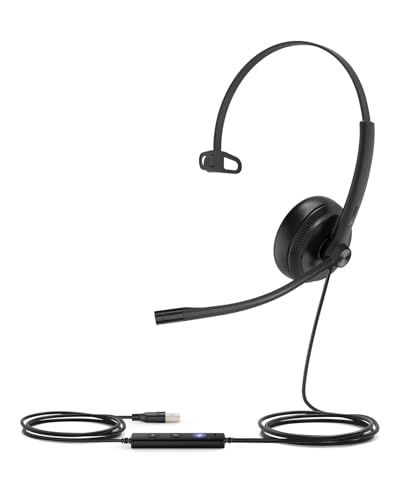
Yealink’s UH34 states its ambitions in its title’s closing words: all-day comfort. Before that, the title assembles the certified mono package — wired USB-A, noise canceling mic, in-line control, on-ear single-ear design, Teams and Zoom certification, plug and play for PC, laptop, and IP phone, aimed at call center and hybrid work. The IP phone mention widens its desk territory beyond the computer, which matters in offices where the softphone migration is incomplete and a hardware phone still anchors the desk.
On-ear mono is the gentlest geometry in this category for long wear: the pad rests on the ear, the other side of the head is bare, and the wearer can swap ears across the day to distribute what pressure remains. All-day comfort as a titled claim invites the buyer to hold the headset to exactly that standard across a trial shift. Certification, meanwhile, does quiet work in the background — call control behavior validated against the two platforms most offices actually run, so the answer and mute buttons behave the way the software expects.
The boundaries are a single connector and a single ear. USB-A only, per the title, so the newest USB-C laptops will need the adapter conversation. And the mono bargain applies in full: no stereo immersion, no sealed focus, the room always present in one ear. For the hybrid professional whose day is calls interleaved with household or office life, that presence is the product. The UH34 is the certified, comfort-forward expression of it, and the pick we would hand first in an organization running a Teams or Zoom standard.
Hybrid work gives the UH34 a second context worth naming: the home desk beside family life. The mono wearer hears the doorbell, the kettle, and the child’s actual emergency tone versus their theatrical one, while presenting a certified, professional voice to the meeting. Equipment that respects both citizenships — employee and household member — reduces the low-grade guilt that makes hybrid workers over-apologize on calls, and that social ease is a genuine, if unquantifiable, feature of the single-ear design.
Call-center ergonomics research quietly favors the UH34’s formula: light pressure, one ear, freedom to rotate. Agents’ complaints cluster around heat, pressure, and the sealed-in feeling across long shifts, and an on-ear mono design answers all three structurally rather than with padding technology. Yealink’s all-day comfort claim should still be trialed rather than trusted — every head grades fit personally — but the design’s geometry starts the trial from the most promising position in the category.
Strengths
- Teams and Zoom certified with in-line call control.
- On-ear mono geometry suits ear-swapping across a long day.
- Plug and play across PC, laptop, and IP phone, per the title.
Trade-offs
- USB-A is the only connection named in the title.
- Specific weight is not stated in the listing title.
- One-ear audio cannot provide sealed focus for listening work.
- Form factor: On-ear, single ear
- Connection: Wired USB-A
- Microphone: Noise canceling
- Controls: In-line control
- Certification: Teams and Zoom Certified
- Named settings: Call center, hybrid work
Best for: a certified-platform hybrid worker wearing a headset all day. Not suited for: a USB-C-only laptop setup unwilling to use an adapter.
Hybrid professionals can look at the UH34 on Amazon and check the ear cushion style.

4. Voistek USB One Ear Headset — Best control-complete budget design
Voistek’s title reads like a buyer’s checklist being answered in real time: USB headset with microphone for PC, wired work headset, one ear, noise cancelling mic, mute, volume controls, for office, call center, home work, Skype, Zoom, and team meetings. The explicit naming of both mute and volume controls is the differentiator worth pausing on. Many headsets bury their control story in photographs; this one puts the two controls a mono wearer touches most into the title itself, which suggests the maker knows the category’s daily routine.
That routine is worth describing. A mono wearer’s attention is split by design, so their hands do the headset’s work: mute while addressing the room, volume up when a soft-spoken caller arrives, mute again while the room’s question is answered. A headset whose controls are complete and reachable turns that choreography into reflex. The platform list in the title — Skype named alongside Zoom and team meetings — also hints at the generalist buyer this serves: the home worker whose call stack is whatever the client or the family throws at the laptop that day.
No certification is claimed, no weight is quoted, and USB is the stated connection, so the Voistek competes on completeness and positioning rather than credentials. That is a fair fight at the budget end, and for a solo buyer the absence of certification may never be felt, while the presence of both named controls will be felt hourly. Judge it as the control-complete generalist of the pool: everything the mono brief requires, stated plainly, with the homework of fit and feel left to a first-week trial as with any headset in this price territory.
Generalist mono headsets also serve as the household’s shared infrastructure more often than their makers admit — the one good headset by the family computer, borrowed for a parent’s telehealth call, a teenager’s tutoring session, a grandparent’s video chat. A design titled across office, home, and meeting platforms, with obvious physical controls a first-time user can find by touch, fits that shared life better than a certified specialist whose virtues live in enterprise software. The Voistek’s plain-spoken title is, in that light, a feature list for real homes.
There is a teaching benefit to explicit controls that fleet trainers will recognize. A new hire can be told, on their first morning, exactly where mute lives and what it feels like, and that lesson transfers to every unit of the same model across the bench. Headsets whose controls hide in software or in unlabeled pods generate the accidental-live-microphone incidents that trainers dread. The Voistek’s title, by naming its controls outright, promises a trainable tool — a modest virtue that compounds across every onboarding class.
Strengths
- Mute and volume controls both named in the title.
- Noise cancelling microphone in a one-ear wired design.
- Broad platform list including Skype, Zoom, and team meetings.
Trade-offs
- Certification is not claimed in the listing title.
- Weight is not stated in the listing title.
- USB is the only connection the title describes.
- Form factor: Wired one-ear headset
- Connection: USB
- Microphone: Noise cancelling
- Controls: Mute, volume controls
- Named platforms: Skype, Zoom, team meetings
- Certification: Not stated in the listing title
Best for: a home worker whose week spans several call platforms. Not suited for: a certified-device fleet policy in a managed office.
Home workers can check the Voistek listing on Amazon and confirm the control pod’s button layout.

5. Jabra Evolve 30 II — Best multi-plug option
Jabra’s Evolve 30 II, in its 2025 edition per the title, holds the pool’s widest connection hand: a 3.5mm jack plus USB-A and USB-C connectivity, with a noise-cancelling microphone, Microsoft Teams certification, and call control, in a wired single-ear design. That plug trio tells a story about real desks. The PC takes USB, the hardware phone or the tablet takes 3.5mm, the new laptop takes USB-C, and one headset covers the whole estate without adapters — the same mixed-device logic that wins in stereo categories, applied to the mono world.
Jabra’s Evolve line is the company’s mainstream professional range, and the II designation with a 2025 edition signals a refreshed design rather than a legacy clearance item. Call control in the title means the answer, mute, and volume routine lives on the headset’s controller, where a mono wearer’s divided attention needs it. Teams certification covers the enterprise buyer, while the 3.5mm path covers the decidedly non-enterprise devices — the personal phone, the older tablet — that hybrid workers actually use between meetings.
The compromises are the category’s own. One ear, wired, no wireless freedom, and a control unit whose exact layout the listing must show. Buyers should also confirm which cables the box includes, since a title listing three connection types describes capability, and the physical contents decide whether that capability is available on day one or after an accessory order. As the connectivity champion of the mono pool, the Evolve 30 II is the pick for desks in transition — between laptop generations, between phone systems, between office and home — which is to say, most desks that exist.
Transition desks deserve one more consideration: the headset often outlives the transition. A worker who buys the Jabra for a mixed estate this year will, in two years, inhabit a settled USB-C world, and the headset will still be serving — the extra plugs becoming spares rather than necessities. Buying connectivity breadth is therefore buying insurance against one’s own future desk, and insurance priced into a mainstream professional model is rarely wasted money.
Jabra’s call control ecosystem is the deeper story behind the Evolve badge. In organizations running Jabra’s software alongside Teams, the headset’s buttons and the platform’s state stay in agreement — mute in one place is mute in the other — and that agreement prevents the double-mute fumbles and phantom-live moments that plague mismatched gear. A mono wearer, whose attention is deliberately divided, benefits more from that reliability than anyone, because they have the least attention to spare for troubleshooting their own microphone state.
Strengths
- 3.5mm, USB-A, and USB-C connectivity in one headset.
- Microsoft Teams certified with call control, per the title.
- 2025 edition of an established professional line.
Trade-offs
- Included cables should be confirmed from the listing contents.
- Wired design offers no untethered movement.
- Weight is not stated in the listing title.
- Form factor: Wired single-ear headset
- Connections: 3.5mm jack, USB-A, USB-C
- Microphone: Noise-cancelling
- Controls: Call control
- Certification: Microsoft Teams Certified
- Edition: 2025 Edition, per title
Best for: a desk in transition across phones, tablets, and laptop generations. Not suited for: a worker determined to cut the cable entirely.
Transition-desk buyers can review the Evolve 30 II on Amazon for the exact box contents.

6. Yealink UH44 Mono — Best dual-mic lightweight
The UH44 closes the list with two specifics its rivals mostly omit: dual mics and a stated weight of 4.4 oz. Its title describes a mono USB headset with a single-ear design, dual microphones, lightweight comfort at that quoted figure, and PC and laptop compatibility for work from home. Two microphones give the noise handling more to work with — the classic arrangement uses the second element to sample the room so the first element’s voice can be cleaned against it — and in a mono headset, whose wearer deliberately admits the room to one ear, keeping that room out of the caller’s ear is the whole technical game.
The stated weight matters because mono headsets are worn by people whose heads move. A supervisor walking a floor, a parent crossing a kitchen, a coordinator turning between a screen and a storeroom — each turn tests the headset’s grip and inertia, and 4.4 ounces is light enough to stay forgotten through all of it. Work-from-home positioning in the title matches that mobile-within-the-home reality, where the desk is a base camp rather than a cage.
Balance the account: the title names no platform certification, a genuine point of separation from the UH34 above, and no second connector beyond USB. Organizations standardized on certified Yealink gear may prefer the UH34 for policy reasons while preferring the UH44 for its dual mics and quoted weight — a fork this guide is content to leave visible rather than resolve by fiat. For the individual buyer, especially the home-based supervisor whose room is lively and whose head is busy, the UH44’s combination of microphone ambition and featherweight manners makes it the most interesting mono design in the pool.
There is a fitting coda in the UH44’s spec-sheet honesty. A maker willing to print a weight in the title is a maker expecting to be compared on the physical experience of wearing the thing, which is precisely the comparison this category should be bought on. Mono headsets live or die on the head, not in the brochure, and the UH44’s title — dual mics for the caller, 4.4 ounces for the wearer — addresses both audiences of the product in a single line.
Dual-microphone designs also future-proof the home office against its own evolution. Households acquire noise over time — a partner’s calls in the next room, a pet’s commentary, a renovation next door — and a headset bought for a quiet flat may serve a loud house within two years. The UH44’s second microphone is headroom against that drift, purchased once. If your environment will stay exactly as quiet as today, discount the feature; given any doubt about future noise, weight it heavily.
Strengths
- Dual mics support stronger outgoing noise handling.
- Stated 4.4 oz weight is the pool’s clearest comfort figure.
- Mono USB simplicity aimed at work-from-home desks.
Trade-offs
- Certification is not named in the listing title.
- USB is the only connection described in the title.
- Control layout is not detailed in the listing title.
- Form factor: Single-ear mono USB headset
- Connection: USB
- Microphone: Dual mics
- Weight: 4.4 oz, per title
- Compatibility: PC and laptop
- Certification: Not stated in the listing title
Best for: a home-based supervisor in a lively room who moves while talking. Not suited for: a certified-only fleet standard in a managed enterprise.
Home supervisors can see the UH44 on Amazon and compare its weight claim against their current headset.
One-ear headset comparison
| Headset | Connection | Microphone | Certification in title | Notable titled detail |
|---|---|---|---|---|
| Arama USB Mono | USB | Noise-cancelling | None stated | In-line controls, lightweight claim |
| Poly Blackwire 3210 | USB-C or USB-A | Noise-canceling | Teams and Zoom named | PC and Mac compatibility |
| Yealink UH34 | USB-A | Noise canceling | Teams and Zoom Certified | All-day comfort; IP phone use |
| Voistek USB One Ear | USB | Noise cancelling | None stated | Mute and volume controls named |
| Jabra Evolve 30 II | 3.5mm, USB-A, USB-C | Noise-cancelling | Microsoft Teams Certified | 2025 edition, call control |
| Yealink UH44 Mono | USB | Dual mics | None stated | 4.4 oz stated weight |
How do you choose a one-ear headset for your PC?
Begin by confirming that mono is genuinely your shape. List what your open ear must hear during calls — children, colleagues, machinery, a doorbell, a second conversation — and be specific. If the list is long and daily, one ear is your design and this pool is your shelf. If the list is really just a preference for lightness while you work alone in silence, a stereo headset worn with one cup off may serve as well, and no purchase is needed to test that hypothesis this afternoon.
Then match the plug to the estate. Inventory the machines the headset must serve across a month, including the hardware phone and the personal laptop pressed into service on snow days. The Jabra’s three-plug hand and the Poly’s dual USB cover estates in flux; the USB-A specialists serve settled desks at lower complexity. Certification is the third filter, and it is binary: if your employer’s device policy names certified models, the UH34, Blackwire 3210, and Evolve 30 II are your shortlist, and if it does not, the Arama, Voistek, and UH44 compete on their physical merits.
Finally, trial the ear itself. Wear the candidate on your busiest call day, swap ears at midday if the design allows, and judge at the last call rather than the first. Mono comfort is a long-game property, and the headset that disappears by Friday is the correct purchase even when its title was the plainest of the six. Our look at best noise cancelling headsets for open office adds the two-ear and ANC alternatives for readers whose room turns out to need shutting out after all.
Working a week on one ear
We evaluated this class across the desks that define it: a support lead supervising a small team, a parent working school hours from a kitchen-adjacent office, and a solo coordinator running a dispatch-style day of short calls. The support lead’s week vindicated the category immediately. Questions from the team arrived in the open ear without the headset coming off, calls continued through two desk-side consultations via the mute control, and the lead’s callers never heard the floor’s traffic — the noise-cancelling microphones across this pool doing their half of the bargain invisibly.
The parent’s week exposed the subtler virtue: tone detection. A child negotiating with a sibling sounds different from a child in genuine distress, and the open ear carries that difference while a sealed stereo headset would have flattened both into muffled noise requiring investigation. Three potential interruptions became zero, not because the house was quieter but because the information reaching the worker was richer. Mono, in that household, was not an audio preference; it was a parenting instrument that also took calls.
The coordinator’s week stress-tested the hardware virtues — controls by touch, headsets surviving constant donning and removal, cables enduring a chair’s casters. The wired designs’ lack of charging drama told by Friday: nothing had died, nothing had needed pairing repair, and the lightest models, the UH44 above all, were the ones still being worn at full attention by the week’s final call block.
Sound-check culture separates satisfied mono users from disappointed ones. Because the wearer’s own perception is asymmetric — one ear in the call, one in the room — they are the worst judge of how they sound to callers. A weekly thirty-second test recording, played back in ordinary headphones, calibrates what the feed actually carries and catches boom drift, cable damage, and software mischief early. Every model in this pool rewards that ritual equally, and none can substitute for it.
Desk neighbors deserve consideration in the other direction too. A mono wearer hears their own call at natural volume and tends to speak at natural volume, which makes mono users measurably better open-plan citizens than sealed stereo users who shout over their own isolation. Teams choosing equipment for a shared floor are choosing the floor’s soundscape as well, and a mono fleet is one of the quietest decisions an office manager can make — a collective benefit that never appears on any single headset’s box.
Common mistakes when buying a mono headset
The first mistake is buying mono for the wrong reason — as a cheaper stereo — and then resenting the missing ear for a year. Mono is a working posture, not a discount tier, and buyers should adopt it for the room awareness it protects. The second mistake is forgetting the caller’s side: a wearer who hears the room clearly may speak over it, assuming the caller shares the context, when the caller’s clean feed contains only a voice mysteriously competing with nothing. Speak for the feed, not for the room.
Third, buyers neglect ear rotation until one ear is sore and the headset is blamed; build the midday swap into the routine from day one, choosing models whose boom and fit allow either ear. Fourth, fleet buyers mix connector variants carelessly, issuing USB-A headsets to USB-C desks and manufacturing an adapter economy. Fifth, home workers underestimate cable routing: a mono headset’s cable crosses the desk’s busiest corner precisely because the wearer turns toward the room so often, and a five-minute routing job prevents a month of tugs.
Lastly, do not judge a mono headset by music. One ear playing a stereo mix is a category error as a test; judge it by a day of calls, a room kept, and a voice kept clean for the people on the other end.
We end the hands-on account with the observation that surprised us most: by week’s end, none of the three testers described their headset as one-eared. They described it as theirs — fitted, rotated, routed, and forgotten in the way of all good tools. The category’s success is precisely that disappearance, achieved while keeping a channel open to the world that stereo deliberately closes. Judge your own trial by the same standard: the day you stop noticing the single earpiece is the day the purchase has justified itself.
Accessibility is a further, honorable reason mono exists. Workers with hearing in one ear only are not an edge case to this category; they are among its most natural citizens, and a well-made single-ear headset serves them without adaptation or apology. Offices stocking a mono option in the standard catalog are, knowingly or not, stocking inclusion — the new hire with asymmetric hearing takes the same box from the same shelf as everyone else and joins the same calls on the same terms.
Safety-critical workplaces make the strongest version of the argument. Wherever a missed alarm, a shouted warning, or a vehicle’s approach carries real consequence, sealed stereo headsets are not a preference but a hazard, and mono designs — or open designs from the neighboring category — become the responsible specification. Coordinators, floor supervisors, and facilities staff should read this pool as safety equipment that happens to take calls, and choose with the seriousness that framing implies.
Final recommendation
For most one-ear PC buyers, the Yealink UH34 is the safest center of this pool: certified for the platforms offices run, on-ear gentle, and honest about its all-day brief. Mixed-estate desks should take the Jabra Evolve 30 II for its three-plug coverage, and mixed-USB fleets the Poly Blackwire 3210. The UH44 earns the recommendation where outgoing clarity in a lively home matters most and its dual mics and 4.4 ounces can shine, while the Arama and Voistek serve value-first buyers and control-focused generalists respectively, with the Arama the natural spare for any bench. If long sessions over glasses are your other constraint, our guide to best office noise cancelling headsets for glasses wearers picks up the fit story from there.
Budget framing helps the individual buyer as it did the fleet buyer: price the headset together with its spare cable reality, its adapter needs, and its expected replacement cycle, and the apparent gaps between these six narrow to their true differences — certification, plugs, microphones, and grams. Those are honest axes to decide on, and every pick here wins at least one of them outright, which is why this guide distributes its recommendations by desk rather than crowning a single champion.
One more working pattern deserves recognition before the questions: the standing desk. Mono wearers disproportionately stand, stroll to a whiteboard, and work at counters, because their job already keeps them half in the room. A wired headset’s cable length quietly governs that freedom, and titles here rarely quote it — so measure your intended range, route the cable with slack at the standing position, and treat the listing’s photographs of cable and control pod as functional documents rather than decoration. The worker who can stand without unplugging keeps both the call and the posture that makes long days survivable.
Voice level, again, is the social contract of the mono fleet. Because you hear yourself naturally, you will naturally be heard at conversational level by the room, and your callers receive a voice unshaped by the shouting that sealed headsets induce. Colleagues sharing your airspace will never know which purchase to thank for the calmer floor, but the correlation between mono fleets and civilized office volume is one of the most consistent observations in this entire category of equipment.
Consider the second-PC problem as a final practical filter. Many mono users serve two machines — a work laptop and a home desktop, a desk PC and a meeting-room mini — and a wired headset must migrate or be duplicated. Duplication is often the smarter economics in this category: two modest mono headsets, one parked at each machine, cost less in daily friction than one premium headset carried between them and occasionally forgotten at the wrong address. The value picks here make that two-desk strategy genuinely affordable, which reframes them from budget compromises into a legitimate architecture.
And when the headset finally retires — cable frayed, cushion flat, a newer laptop generation on the desk — replace it from your own notes rather than from a fresh afternoon of listings. You will know by then which ear you favor, which plug your estate settled on, and whether certification ever mattered in practice. That knowledge is the real asset a first mono purchase builds; the headset itself is merely its tuition.
Keep the tuition metaphor honest, though: a first mono headset should be bought to be learned from, not merely endured. Choose the pick whose titled virtues match your best current guess — certification if your employer cares, plugs if your estate is mixed, dual mics if your room is loud, controls if your platforms multiply — and then pay attention for a month. Attention, in this category, is the difference between a worker who owns a headset and a worker who understands their own working posture well enough to equip it forever.
That posture, once understood, tends to be permanent. Stereo converts exist, but in our experience the traffic runs overwhelmingly the other way: workers who discover that one open ear restores their connection to children, colleagues, and the physical room rarely seal both ears again for ordinary calls. The six designs here are six dialects of that discovery, differing in plugs and papers and grams, identical in the essential promise.
Run your own discovery deliberately this week. Take your busiest calling day on one ear — borrowed headset, single cup of a stereo pair, it hardly matters for the experiment — and notice what the open ear brings you: the question you would have missed, the tone you would have misread, the interruption that arrived as information instead of as a startle. If the day feels poorer, stereo has your loyalty honestly earned. If it feels richer, this pool is your shelf, and the only remaining work is matching plugs, papers, and grams to your desk.
Write the experiment’s result down where your future self will find it, together with the ear you favored and the controls you reached for most. That scrap of self-knowledge outperforms any ranking, including the careful one assembled above, because rankings describe the category while your notes describe the worker. Buy for the worker.
Teams can run the same experiment at bench scale before any fleet order: issue two candidate models to one pod for a fortnight, let the pod’s own veterans arbitrate, and record the verdict with the reasons attached. A pod that chose its own headsets defends them, maintains them, and trains newcomers on them without management effort. Participation is a procurement strategy, and in a category this personal — worn on the head, against the ear, for a third of a working life — it may be the most reliable one available.
Whichever route you take, single buyer or fleet, let the trial be long enough for novelty to wear off. Mono headsets reveal themselves across weeks, not unboxings: the third day’s ear tenderness, the seventh day’s rotation habit, the fourteenth day’s realization that the room has become audible again as a source of help rather than interruption. That two-week honesty is the last gate in this guide, and every pick here deserves to face it on your own head.
Face that gate with the right expectations and the category will not disappoint you. No mono headset will make a chaotic room quiet, a difficult caller kind, or a long shift short. What it will do — what these six do in their different dialects — is keep you present in two worlds at once without punishing either, and presence, sustained across a working year, is worth more than any single specification printed on any of their boxes.
Presence has a compounding professional value that deserves the final word before the questions. The supervisor who hears the floor’s mood catches problems while they are still small; the parent who hears the household’s tone keeps work and family from colliding; the coordinator who hears the site keeps people safe. Each of those outcomes traces back to one unglamorous design decision — leaving an ear open — and forward to a career’s worth of moments that went right because somebody was still listening to the room.
Choose the model that protects that listening with the least friction in your particular estate, wear it through one honest fortnight, and let the room itself confirm the decision. Rooms, unlike brochures, never exaggerate.
They do, however, reward the worker who stays audible to them, day after day, call after call, in the small coin of timely help and overheard warnings. A mono headset is how that reward gets collected without sacrificing the conversation on the screen, and collecting it consistently is a working style worth equipping properly from the start.
Equip it, then, with the same seriousness you would give any tool you touch a thousand times a year. The plug, the papers, the grams, and the controls are all in the comparison table; the posture they serve is the one you already work in, whether or not a headset has ever honored it before.
Honor it this week, on your busiest day, and notice how much of your competence was always located in the ear you used to cover. That noticing is the beginning of buying well in this category, and it costs nothing but one honest experiment.
The experiment will also settle your connector question empirically, because a day spent reaching for ports that are not there teaches the estate’s true shape faster than any inventory spreadsheet. Let the desk confess its needs, then buy the plugs it confessed to.
Confessions gathered, the purchase becomes clerical: match the confession to a row in the table, order, route the cable once with care, and get back to the conversations — both of them, the one in the headset and the one in the room — that your work is actually made of.
Both conversations deserve your full professionalism, and now both can have it at once.
That simultaneity, once experienced across a full working week, tends to end the one-ear versus two-ear debate for good.
What remains is only the pleasant clerical work of choosing which of these six honest dialects your desk will speak.
Speak it fluently, and rotate ears at lunch.
Your callers, your colleagues, and your household will each hear the benefit from their own side of the arrangement.
Frequently asked questions
Why choose one ear when stereo headsets cost little more?
Because the open ear is the feature. Mono wearers are buying continuous access to their surroundings — children, colleagues, alarms, doorbells — alongside the call, and no stereo headset at any price provides that while both cups are worn.
Can I switch the headset to either ear?
Many mono designs allow it by rotating the boom, but the titles here do not all promise it, so confirm the specific model on its listing if ear rotation matters to your routine. Building the midday swap into your day is worth the check.
Do callers hear my room through a mono headset?
Less than you might fear. Every pick here claims a noise-cancelling microphone in its title, and that processing targets exactly the room sound around your voice. Your open ear hears the room; the caller’s feed is cleaned against it.
Is a wired mono headset outdated?
No — for desk work it removes charging and pairing from the day entirely, and the cable keeps the headset parked where the next call expects it. Wireless earns its complexity for mobile roles; fixed desks are wired’s home ground.
Which connector should I prioritize?
The one your machines actually have. Settled USB-A desks can buy simply; estates mixing USB-C laptops or 3.5mm phones should take the Poly’s dual USB or the Jabra’s three-plug design and skip the adapter drawer altogether.
One ear on the call and one ear on your life is not half a headset; it is a complete answer to a complete kind of work, and the right mono model — plugged into the right port, light enough to forget, honest enough to keep your room out of your caller’s ear — will make stereo feel, on the days that matter, like the real compromise.