What's inside
- Key Takeaways
- Quick Picks: The Best Bluetooth One Ear Headsets for MacBook Softphone Work
- How Were These Six Judged for Softphone Duty?
- What Does Certification Actually Buy a Softphone User?
- The Six Earpieces, Fitted to a MacBook Desk
- How Do You Set Up a Mono Earpiece on a MacBook for Softphone Calls?
- How Do the Six Compare on Certification and Stated Hours?
- What Mistakes Do MacBook Softphone Users Make With Mono Earpieces?
- Field Notes: The Softphone Week on One Ear
- How Does a Mono Earpiece Change Video Call Presence?
- What Should a Team Standardise When Every Desk Is a Different MacBook?
- How Long Will a Mono Earpiece Serve Before It Feels Old?
- Final Recommendation
- Frequently Asked Questions
- Related Guides
As an Amazon Associate I earn from qualifying purchases. This post may contain affiliate links at no extra cost to you.
gizmoverdict.com is reader-supported. When you buy through links on our site, we may earn an affiliate commission.
Where to buy: all six earpieces below are Amazon listings, and the product names throughout this guide link to those listings so that dongle types, stated talk times and compatibility lists can be verified against the MacBook and softphone you actually use before ordering.
The hunt for the best bluetooth one ear headsets for macbook softphone begins with a small act of honesty about titles: very few earpieces in this class print the word MacBook, and certification badges are rarer still. So this guide judges the six picks on exactly what their titles state — softphone and Teams certification where it is claimed, computer compatibility where it is named, and silence marked as silence in the spec boxes, with the caution line standing where a listing declines to promise anything. One pick names the Mac outright. One carries Microsoft Teams and Zoom certification in its title. The other four are phone-first earpieces whose softphone life runs through the MacBook’s ordinary Bluetooth pairing, and they are judged as such, without borrowed badges.
Why one ear at all? Because the softphone worker’s day is a braid of calls and room life: a doorbell, a colleague, a child, a kettle, the awareness of a household or an office continuing around the work. A single-ear headset keeps the call in one ear and the world in the other, and for the growing population whose desk is a kitchen table, that divided attention is not a compromise but the entire point. Stereo headsets seal the worker away; mono earpieces let them remain a person in a place while sounding, to the client on the other end, like a professional in a studio.
The MacBook side of the pairing has its own practical shape. Modern MacBooks speak Bluetooth fluently and offer USB-C ports, which makes the dongle question real: an earpiece that ships with a USB-A dongle, as one pick here does, may need an adapter on a current MacBook, while a dongle-free earpiece pairs directly and travels better. Softphone behaviour — the answer button working inside Teams or Zoom rather than merely beside it — is where certification earns its keep, and this guide keeps that distinction visible from the first table onward.
Key Takeaways
- The Yealink BH70 Mono is the certification pick: Microsoft Teams and Zoom Certified in its title, with a USB-A dongle and 35 hours of stated talk time.
- The Plantronics Voyager Legend is the only title that names the Mac directly, alongside PC, tablet and cell phone connections.
- Stated endurance runs from the NVAHVA’s 10 hours through the TMGADTDU’s 30 hours of talk time to the Yealink’s 35.
- Open-ear and in-ear designs divide the field: the TMGADTDU sits outside the ear canal, the Honcas and GOALSEN sit in it, the Voyager Legend and Yealink ride over it.
- Four titles state no softphone certification at all; their spec boxes carry the caution line rather than an implied badge.
Quick Picks: The Best Bluetooth One Ear Headsets for MacBook Softphone Work
| Pick | Badge | Why it made the cut |
|---|---|---|
| Plantronics Voyager Legend (Poly) | The Mac-named veteran | A single-ear Bluetooth headset whose title names PC, Mac, tablet and cell phone connections with noise cancelling, from the line that defined the class. |
| Yealink BH70 Mono (Teams) | The certified softphone pick | A mono Bluetooth headset with AI mic, three-microphone sound isolation, Teams and Zoom certification and a USB-A dongle in its title. |
| NVAHVA Single Earbud Earpiece | The low-profile minimalist | A single low-profile earbud with 10 hours stated, titled for iPhone, Android and TV as a handsfree mini headphone for work and driving. |
| TMGADTDU Open-Ear Mono Headset | The open-ear long-talker | An open-ear Bluetooth 5.4 mono earpiece with ENC noise cancelling mic and 30 hours of stated talk time. |
| Honcas Single Wireless Earbud | The featherweight in-ear | A lightweight single in-ear earbud with mic, titled for Android, iOS and laptop across office, driving and service work. |
| GOALSEN Single-Ear Earbud | The secure-fit commuter | A single-ear in-ear earbud with 12-15 hours of stated playtime and a comfortable secure fit pitched at calls, office and commuting. |
How Were These Six Judged for Softphone Duty?
Certification came first, because it is the only claim in this category that a third party stands behind. A headset certified for Teams or Zoom has had its call controls, audio behaviour and mute logic tested inside those applications; a headset that merely pairs with a computer leaves all of that to chance and to the softphone’s generic Bluetooth handling. Only one title here claims certification, and the guide’s structure honours that scarcity rather than laundering the other five into honorary softphone products. They are here because a MacBook pairs with any competent Bluetooth earpiece — but the difference between paired and certified is printed wherever it matters.
Computer compatibility came second, read literally. The Voyager Legend’s title names the Mac; the Yealink’s names the PC and ships a dongle that gives a computer a dedicated radio link; the Honcas names the laptop; the remaining titles name phones and leave the MacBook to standard Bluetooth, which works, and which the verdicts describe in exactly those terms. Talk time came third, compared only as titled — hours against hours, with the two listings that decline to headline a figure handled accordingly.
Wearing style closed the judging, because one-ear products divide by how they occupy the ear: over-ear boom designs that announce themselves, low-profile buds that vanish, open-ear designs that rest outside the canal for workers who dislike anything inserted. A softphone day can run to six hours of calls, and the right occupation of the ear is a personal, almost anatomical decision. The wider mono shelf is surveyed in our best mono bluetooth headsets guide, and workers whose calls live entirely inside meeting platforms should compare the best headsets for teams and zoom before deciding how much certification their calendar truly needs.
What Does Certification Actually Buy a Softphone User?
It buys the buttons. On a certified headset, the call control answers and ends the softphone call itself, the mute synchronises with the application’s mute so the icon and the earpiece never disagree, and the device is recognised by name rather than as a generic audio accessory. Anyone who has muted on a headset while the meeting showed them live — or answered on a laptop while the earpiece stayed silent — has met the uncertified world’s characteristic failure. It is not catastrophic; it is worse, it is recurrent, a small daily tax on professionalism paid in the first three seconds of every call.
Certification also buys a defined audio path. Softphones treat a recognised headset as a communications device with predictable behaviour, while a phone-first earbud may be handed the media profile, the call profile, or a negotiation between the two that changes when the laptop sleeps. For a worker whose income is partly their voice arriving correctly, that predictability is the product. The remaining picks in this guide are not condemned by its absence — millions of calls run happily through generic Bluetooth every day — but they ask their owner to accept the tax, and this guide’s job is to make sure the tax is paid knowingly.
The Six Earpieces, Fitted to a MacBook Desk

Plantronics Voyager Legend (Poly) — The Mac-named veteran
The Voyager Legend’s title performs one service no other pick here attempts: it names the Mac. Connect to your PC, Mac, tablet and/or cell phone, the listing says, and for a MacBook softphone user that single word removes the compatibility guessing that haunts this category. The headset itself is the class’s defining shape — a single-ear, monaural Bluetooth earpiece with a boom, noise cancelling as titled, worn over the ear with the microphone reaching toward the mouth. Plantronics, now under the Poly name the title carries, effectively invented this product category for mobile professionals, and the Legend is its long-running standard-bearer.
For softphone work the Legend’s proposition is breadth rather than badges. Its title claims no Teams or Zoom certification, so its call controls inside a softphone should be expected to behave as a quality generic Bluetooth device’s do — the audio path is the product, the buttons are a bonus where the application honours them. What the buyer gets instead is a mature wearing design refined across years of all-day use, multi-device habits suited to a worker whose calls arrive on both the laptop and the phone, and the confidence of a title that lists the Mac among its intended partners rather than leaving Apple users to extrapolate from a Windows-first listing.
- Form: Bluetooth single-ear (monaural) headset, over-ear boom design
- Connections named: PC, Mac, tablet and cell phone
- Microphone: noise cancelling, as titled
- Colour as titled: black
- Softphone certification: Not stated in the listing title — verify with the maker’s documentation
- Talk time: Not stated in the listing title — verify with the maker’s documentation
Strengths
- The Mac is named in the title, the only explicit Apple-computer welcome here.
- Four device classes are named, matching the laptop-plus-phone reality of softphone work.
- A defining design from the category’s originator, with noise cancelling stated.
Trade-offs
- No softphone certification is claimed, so in-app button behaviour is not guaranteed.
- No talk-time figure appears in the title for endurance planning.
- The over-ear boom silhouette is visible on video calls, which some workers avoid.
Best for: a MacBook desk built on a proven mono earpiece whose title explicitly includes their computer. Not suited for: a workflow that requires certified in-app call controls, because no certification is stated in the title. Its Amazon listing carries the endurance and control details the title leaves out.
Longevity in a product line cuts both ways, and the Legend’s long life is worth reading correctly. A design that survives this many refresh cycles has had its wearing comfort and its failure modes found and fixed in public, which is information no new listing can offer. The counterweight is that its Bluetooth generation and feature set belong to its era; buyers chasing the newest radio standards should compare the later picks. For the softphone worker, though, the relevant standards are a stable pairing and a microphone callers trust, and on those the veteran’s title makes its quiet, specific promises — Mac included.
The multi-device habit deserves a practical note for MacBook users specifically. A worker whose Legend serves both the laptop and the phone should decide, during setup, which device owns the earpiece’s attention when both ring — because one morning, both will. Softphone veterans usually let the laptop win during desk hours and the phone win away from the desk, and they learn the earpiece’s switching gesture before they need it. The Legend’s long career among mobile professionals means that choreography is well documented by its maker; read it once, practise it twice, and the two-device life becomes the convenience the title’s device list promises.

Yealink BH70 Mono (Teams) — The certified softphone pick
Yealink’s title is the most softphone-literate in this guide, and it is worth reading slowly. A mono Bluetooth headset with an AI mic for work from home on PC; three-microphone sound isolation; Microsoft Teams and Zoom Certified; compatible with Cisco, Zoom and Google; 35 hours of talk; and a USB-A dongle. Every clause answers a question a softphone buyer actually asks. The certification answers the buttons question. The three-microphone isolation answers the noisy-home question. The dongle answers the connection question with a dedicated radio link that bypasses the laptop’s internal Bluetooth queue entirely — often the single most effective reliability upgrade a softphone user can make.
The dongle also frames this pick’s one MacBook caveat, and this guide states it rather than smoothing it over: the dongle is USB-A as titled, and current MacBooks offer USB-C ports, so an adapter or hub stands between the dongle and the machine unless the MacBook is an older model. That is a small, solvable friction — but it must be solved deliberately, ideally in the same order, because the dongle is not an accessory to this headset’s softphone story; it is the mechanism of it. Buyers unwilling to adapt can still pair by ordinary Bluetooth, at which point much of the certification advantage should be re-examined on the maker’s documentation before assuming it survives the change of path.
- Form: mono Bluetooth headset for work from home on PC, as titled
- Certification: Microsoft Teams and Zoom Certified, per the title
- Compatibility named: Cisco, Zoom and Google
- Microphone: AI mic with 3-microphone sound isolation
- Talk time: 35 hours, as titled
- Connection hardware: USB-A dongle included — current MacBooks need a USB-C adapter
Strengths
- The only certified pick, with Teams and Zoom both named in the title.
- A dongle-based link removes the laptop’s internal Bluetooth from the equation.
- Thirty-five stated talk hours is the longest endurance figure here.
Trade-offs
- The USB-A dongle meets a USB-C MacBook only through an adapter.
- Its title speaks of PC work; Mac-specific behaviour should be confirmed in the maker’s documentation.
- Certification value fades for workers whose calls live outside the named platforms.
Best for: Teams and Zoom work from home built on certified controls and a dongle-grade connection. Not suited for: a MacBook setup that refuses adapters on principle, because the titled dongle is USB-A while current MacBooks are USB-C only. The Amazon listing and the maker’s Mac notes together settle the pairing details.
Yealink’s presence at the head of this category is itself a market signal. A maker whose business is desk phones and meeting systems builds headsets as components of a communications system rather than as phone accessories, and the BH70’s title reads accordingly — platforms first, microphones counted, hours stated. Softphone users who have suffered the generic-earbud tax described earlier in this guide will recognise the BH70 as the pick designed by people who have itemised that tax and set out to abolish it.
Three-microphone sound isolation, the title’s other technical clause, targets the work-from-home soundscape precisely: a television in the next room, a partner’s own call, the washing machine’s spin cycle. Isolation claims, like every suppression claim in this guide, are the maker’s language for its own system and are best auditioned in the buyer’s actual rooms — but a maker who counts its microphones in the title is at least describing an architecture rather than an adjective. For the home worker whose background is a household rather than an office, that architecture is the difference between a call that sounds employed and one that sounds domestic.

NVAHVA Single Earbud Earpiece — The low-profile minimalist
The NVAHVA makes the opposite wager from the Yealink: smallness. A single low-profile earbud, a wireless microphone headset with 10 hours stated, compatible with iPhone, Android phone and TV as titled, pitched as a handsfree mini headphone for work, office, truck, car and driving. Nothing in the title addresses computers or softphones at all, and this guide keeps that absence in view: on a MacBook, this earpiece’s life is the generic Bluetooth life — pair it in the laptop’s settings, select it in the softphone, and accept that its button behaviour inside the application is whatever the application grants a standard audio device.
Within those honest limits, the appeal is real and specific. Some workers dislike the boom-headset silhouette intensely — on video calls it reads as call-centre, in a shared office it reads as unavailable — and a low-profile bud preserves the mono benefit, one ear on the call and one on the room, while looking like the earbuds the whole world already wears. Ten stated hours covers a calling day with little to spare, which suits the worker whose calls cluster rather than blanket the day, and whose earpiece returns to a charger each night as part of the desk’s closing ritual. Judged as a softphone instrument it is the guide’s minimalist floor; judged as a discreet mono earpiece that a MacBook will happily pair with, it is coherent.
- Form: single low-profile earbud earpiece
- Stated endurance: 10 hours, per the title
- Compatibility named: iPhone, Android phone, TV
- Stated settings: work, office, truck, car, driving
- Computer or softphone compatibility: Not stated in the listing title — verify with the maker’s documentation
- Softphone certification: Not stated in the listing title — verify with the maker’s documentation
Strengths
- The most discreet wearing profile in this guide.
- A stated 10-hour figure allows honest day planning.
- Phone compatibility is named for both major families.
Trade-offs
- No computer, Mac or softphone claim appears anywhere in the title.
- Ten hours is the shortest stated endurance here.
- A bud without a boom places its microphone farther from the mouth by design.
Best for: clustered, not constant, call patterns that need mono awareness with an earbud’s discretion. Not suited for: an all-day softphone queue, because 10 stated hours and no computer claims make it a light-duty tool. Its Amazon listing is the place to check fit and control details.
There is a travel argument for this pick that desk-bound comparisons miss. An earpiece this small lives in a pocket or a laptop sleeve’s corner, which means it is present for the call that happens in the corridor, the car and the client lobby — the calls that a desk headset, however superior, misses by being somewhere else. Softphone work increasingly happens wherever the worker happens to be, and the minimalist’s answer — modest hours, tiny footprint, universal pairing — fits that dispersed pattern better than its spec box suggests.
Buyers should also weigh what the low profile gives up in conversation quality, honestly. A bud’s microphone sits at the ear, far from the mouth, and must work harder — electronically — to separate voice from room than any boom design does. In quiet rooms the difference is small; in the truck and car habitats the title names, it grows. The NVAHVA’s natural territory is therefore the quiet-to-moderate day: calls from a parked car, a home office, a corridor. Workers whose softphone calls happen against genuine noise should let the boom-bearing picks outrank it, whatever its charms of size.

TMGADTDU Open-Ear Mono Headset — The open-ear long-talker
The TMGADTDU is the comfort radical of this guide: an open-ear Bluetooth 5.4 mono headset, resting outside the ear canal rather than sealing it, with an ENC noise cancelling microphone and 30 hours of stated talk time, compatible with iPhone, Samsung and Android as titled. Open-ear wearing answers the complaint that ends more headset habits than any technical failure — the plugged, pressured feeling of an in-ear bud at hour five. For a softphone worker whose calls are long and whose ear is also their doorbell-listening, child-hearing organ, a design that touches the ear lightly and leaves the canal open is a genuinely different proposition, not a variant.
The softphone honesty paragraph still applies: no certification, no computer named in the title, so the MacBook relationship is standard Bluetooth pairing and the softphone controls are the generic kind. What the pick offers in exchange is endurance and ease — thirty stated talk hours is a week of calling days for most workers, and Bluetooth 5.4 is a current-generation radio for pairing stability. ENC, the title’s term for its microphone’s environmental noise cancelling, is the maker’s framing for how the caller’s surroundings are suppressed; as with every such claim in this guide, it is reported as the listing’s language and best verified by the owner’s own test call from their own noisiest room.
- Form: open-ear wireless mono earpiece
- Bluetooth: version 5.4, as titled
- Microphone: ENC noise cancelling mic, per the title
- Talk time: 30 hours, as titled
- Compatibility named: iPhone, Samsung, Android
- Softphone certification: Not stated in the listing title — verify with the maker’s documentation
Strengths
- Open-ear design removes the in-canal pressure that ends long calling days early.
- Thirty stated talk hours approaches the certified pick’s endurance.
- A current Bluetooth generation supports the pairing stability softphone work needs.
Trade-offs
- No computer or certification claims appear in the title.
- An open ear lets more of the room into the wearer’s own listening.
- Phone brands are named; the MacBook pairing is standard Bluetooth only.
Best for: long-call workers whose ears rebel against in-ear buds and who pair by Bluetooth without needing certified controls. Not suited for: a noisy open-plan office where the wearer must hear callers over the room, because an open ear admits the room by design. The Amazon listing shows the wearing geometry to judge against your own ear.
Open-ear designs also change the social temperature of a home office. A worker wearing one remains visibly available — family and colleagues read the open ear as an invitation the sealed bud never extends — and for many home-based softphone users that availability is worth more than isolation. The TMGADTDU’s thirty hours then do quiet work in the background of that social choice: a headset worn all day, every day, as a light presence rather than an appointment, needs a battery that behaves the same way.
One honest limit of the open-ear idea belongs in the record: confidentiality. A design that lets the room in also lets a little of the call out, and in a shared home office a caller discussing anything sensitive deserves the sealed alternative or a closed door. Softphone workers handling client confidences from a family kitchen table should weigh that leakage — small, real, and entirely absent from the in-ear picks — as part of the comfort bargain, and perhaps reserve the open-ear piece for the hours when the house is theirs alone.
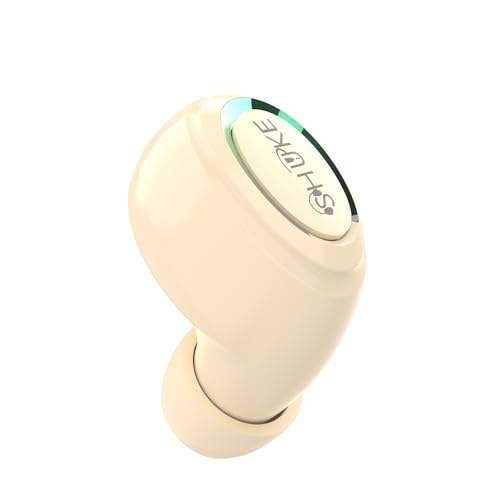
Honcas Single Wireless Earbud — The featherweight in-ear
The Honcas title contains the one word the NVAHVA’s lacks: laptop. A single wireless Bluetooth earbud with microphone, lightweight and in-ear, for Android, iOS and laptop — and its stated habitats widen the picture beyond the office to driving, students, and supermarket and restaurant staff. That breadth tells the buyer what this product is: a general-purpose mono earbud for people who take calls in motion, among whom the MacBook softphone user is one citizen rather than the whole nation. Its softphone life is the standard Bluetooth life, uncertified and unashamed, and the guide’s spec box keeps the certification line at its honest caution.
Lightweight is the title’s only comfort word and, in an in-ear design, the one that matters most: a bud’s pressure on the canal is a function of its mass and fit, and a featherweight bud is the in-ear answer to the open-ear pick’s comfort argument. The beige colour named in the title is a small, telling detail — this earbud expects to be seen on an ear in public-facing work and offers a finish less conspicuous than gadget black. For the softphone worker whose calls happen between a laptop at a counter and a phone in a pocket, across a working day spent standing, the Honcas’s proposition is mobility with a laptop welcome printed on the box.
- Form: single wireless in-ear earbud with mic
- Build claim: lightweight, per the title
- Compatibility named: Android, iOS and laptop
- Stated settings: office, driving, students, supermarket and restaurant staff
- Colour as titled: beige
- Talk time: Not stated in the listing title — verify with the maker’s documentation
- Softphone certification: Not stated in the listing title — verify with the maker’s documentation
Strengths
- The laptop is named in the title, welcoming computer pairing explicitly.
- Lightweight in-ear design suits standing, moving, public-facing work.
- Three platform families are named in one compatibility line.
Trade-offs
- No endurance figure is printed in the title for day planning.
- No certification or computer-specific features are claimed.
- A generalist’s habitat list means the softphone user shares the design with everyone.
Best for: mobile workers whose calls alternate between a laptop softphone and a phone, standing up and out in public. Not suited for: a desk worker planning around a stated talk-time figure, because the title publishes none. Its Amazon listing carries the battery and fit details to confirm.
The service-work habitats in the title hint at a durability expectation worth respecting: supermarket and restaurant floors are wet, busy and unforgiving of fragile electronics, and a maker aiming an earbud there is aiming at a harder life than a desk provides. No rating is stated, so none is claimed here — but the intended habitats tell a buyer which world the product was priced and built for, and a softphone user whose desk is really a counter will read that line with recognition.
The missing endurance figure is this pick’s one real frustration for a planner, and it should be resolved before purchase rather than after: the listing’s detail page and the maker’s documentation are where the number lives, and a worker whose day is unbroken calling should not commit until they have read it. That single errand aside, the Honcas’s honesty elsewhere — three platforms named, habitats named, no badges borrowed — makes it easy to place: it is the mobile generalist of the six, happiest where the laptop is one stop among several in a standing, moving day.

GOALSEN Single-Ear Earbud — The secure-fit commuter
The GOALSEN closes the guide with the commuter’s priorities stated plainly: a single-ear wireless earbud for work and driving, Bluetooth in-ear, 12-15 hours of playtime as titled, and a comfortable secure fit for calls across office and commuting. The fit claim is the headline for its audience. An earbud worn through a commute — train, pavement, bicycle-adjacent bustle, the walk from the station — lives or dies by staying seated, and a maker who prints secure fit in the title is answering the commuter’s first question before the endurance figure is even read.
For MacBook softphone duty the pattern by now is familiar and is stated without varnish: no computer named, no certification claimed, pairing by the MacBook’s standard Bluetooth, controls as the softphone grants them. The 12-15 stated hours cover a commuting day plus an office day of moderate calling, and the honest range format of the figure — a span rather than a single heroic number — is a small mark of candour this guide appreciates and wishes were contagious. Buy this pick for the journey and the general calling day; look to the Yealink for certified desk duty and to the Voyager Legend for the title that names your Mac.
- Form: single-ear Bluetooth in-ear earbud
- Stated playtime: 12-15 hours, as titled
- Fit claim: comfortable secure fit, per the title
- Stated settings: work, driving, office, commuting
- Colour as titled: black
- Computer compatibility: Not stated in the listing title — verify with the maker’s documentation
Strengths
- A stated endurance range allows realistic day planning.
- Secure fit is headlined for a moving wearer’s actual first concern.
- Work, office and commuting are all named habitats.
Trade-offs
- No MacBook, computer or softphone claim appears in the title.
- Playtime wording leaves talk time to the listing’s detail page.
- In-ear wearing will not suit the open-ear comfort seekers.
Best for: commuters whose calling day spans a journey, an office and the walk between them. Not suited for: certified softphone control, because no certification or computer compatibility is stated in its title. The Amazon listing confirms the fit system and the talk-time detail.
A word for the range figure’s honesty, because it models how this whole category should be read. Battery life in a Bluetooth earpiece varies with volume, distance and how much of the day is talk versus standby, and a maker who prints 12-15 is describing that reality instead of advertising its best hour. Buyers comparing titles across this guide should mentally convert every single heroic figure into a private range of their own — and should reward, as this guide does, the listings that did the conversion for them.
Commuting also tests a mono earpiece’s manners in a way desk work never does: one ear must stay genuinely available — for platform announcements, traffic, a colleague’s greeting — and the GOALSEN’s single-ear design is philosophically right for that world in a way stereo buds are not. Workers who take their softphone queue on the move, answering from trains and pavements between desk sessions, will find this pick’s priorities — fit, stated hours, presence in two worlds — arranged in exactly the order their day arranges them.
How Do You Set Up a Mono Earpiece on a MacBook for Softphone Calls?
Pair deliberately, once, in the right order. Charge the earpiece fully, put it in pairing mode, and add it through the MacBook’s Bluetooth settings rather than through the softphone — the operating system owns the connection, the application merely rents it. Then open the softphone’s audio settings and choose the earpiece explicitly for microphone and speaker both; automatic selection is the source of half the “it worked yesterday” mysteries in this category, because the laptop cheerfully reroutes to whatever it last saw. Make one test call to a patient colleague and one to your own phone’s voicemail, and listen to the recording: the voicemail test is the only honest audition your callers will ever give you.
Then set the habits that keep the arrangement alive. Keep the earpiece’s case or charging spot at the desk’s same corner, so the device is found charged rather than hunted flat. Learn where your softphone shows its mute state and rehearse the earpiece’s own mute — or its absence — before a client teaches you the difference mid-sentence. And if your pick uses a dongle, dedicate the adapter and leave the pair assembled; a dongle separated from its headset is a tiny plastic mystery waiting for the morning of an important call. Readers whose whole bench is home-based will find kindred setup thinking in our best work from home headsets with mic guide.
How Do the Six Compare on Certification and Stated Hours?
| Pick | Certification in title | Computer named | Stated endurance | Wearing style |
|---|---|---|---|---|
| Plantronics Voyager Legend | Not stated | PC and Mac named | Not stated | Over-ear boom |
| Yealink BH70 Mono | Teams and Zoom Certified | PC, with USB-A dongle | 35h talk | Mono headset |
| NVAHVA Single Earbud | Not stated | Not stated | 10 hours | Low-profile in-ear bud |
| TMGADTDU Open-Ear | Not stated | Not stated | 30H talk time | Open-ear |
| Honcas Single Earbud | Not stated | Laptop named | Not stated | Lightweight in-ear |
| GOALSEN Single-Ear | Not stated | Not stated | 12-15 hours playtime | In-ear, secure fit |
One certified row and five honest blanks: that is the true shape of this market, and a guide that filled the blanks with implications would be lying in a helpful tone of voice. The blanks do not make the five useless for softphone work — standard Bluetooth pairing is a real and serviceable road — they make them a different purchase, priced and expected accordingly, and the table exists so that difference is chosen rather than discovered.
What Mistakes Do MacBook Softphone Users Make With Mono Earpieces?
The first is assuming the earpiece’s button answers the softphone. On uncertified pairings the button may answer the phone paired second, summon a voice assistant, or do nothing the application recognises — and the user learns which, live, in front of a client. Test every button’s effect inside your actual softphone during setup, and build your answering habit around what the test proved rather than what the box implied. The certified Yealink exists precisely for users unwilling to run that experiment.
The second mistake is ignoring the dongle arithmetic on a modern MacBook. A USB-A dongle and a USB-C-only laptop need an adapter between them, and the cheap, wobbly adapter bought in a panic is a connection problem disguised as a solution. If the dongle route appeals — and for reliability it should — buy a sound adapter in the same order and keep the assembly together. Conversely, buyers who refuse adapters on principle should choose from the dongle-free five and accept the laptop’s internal Bluetooth as their radio.
A fourth mistake is treating the phone pairing and the laptop pairing as one decision. An earpiece can be flawless with the MacBook and infuriating with the phone it also serves — slow to reconnect, confused about which device owns it — and the worker experiences the pair as a single product with a split personality. During the trial week, deliberately summon calls on both devices, in both orders, with the laptop asleep and awake. That small matrix of tests, twenty minutes in total, predicts the working relationship more accurately than any specification in this guide, including the certified pick’s badges.
The third is wearing-style regret: buying an in-ear bud for an ear that hates in-ear buds, because the specification was right. Six hours of calls will audit that decision hourly. The field here spans over-ear, in-ear and open-ear precisely because ears differ more than radios do; a worker who knows their own wearing history should let it outrank every other column in the comparison table, including this guide’s own ordering.
Field Notes: The Softphone Week on One Ear
Monday teaches the mute. Somewhere in the first day, every new mono-earpiece user reaches for a control that behaves differently than expected — and the users who rehearsed during setup smile, while the users who did not apologise to a client. By Wednesday the rehearsed arrangement has become invisible: the earpiece is simply how calls sound, the free ear is how the house sounds, and the worker’s attention has moved to the conversations themselves, which is the entire ambition of the category.
Friday reveals the battery truth. The long-talk picks end the week with charge to spare and no memory of being charged; the shorter-endurance buds have acquired a nightly ritual, harmless if the ritual held, memorable if it did not. Neither outcome surprises the buyer who matched stated hours to their real calling load at purchase — the field note is simply that the matching, done honestly in advance, is the whole game. Spec sheets are read in minutes; wearing is done in months, and the week always grades the purchase more truthfully than the listing did.
How Does a Mono Earpiece Change Video Call Presence?
It makes the worker look like a person rather than a broadcast. A boom headset on camera signals a call centre; a discreet bud or an open-ear piece reads as a colleague who happens to be audible. For client-facing softphone work — sales calls, consultations, support with faces — that visual register matters, and it is a legitimate axis of choice alongside every technical one in this guide. The Voyager Legend wears its professionalism visibly, the NVAHVA and Honcas nearly vanish, and the Yealink splits the difference with a work-from-home honesty about its purpose.
Audio presence cuts the other way: the boom designs put their microphones where voices are made, and callers hear the difference as clarity they rarely attribute correctly. A worker choosing for video should therefore decide which presence they are selling — the face’s naturalness or the voice’s authority — because the mono class, unusually, forces that choice into a single product decision. Our cluster’s neighbouring guide to the best headsets for seniors using iphone shows the same Bluetooth basics judged by an audience that chose comfort and simplicity over both.
What Should a Team Standardise When Every Desk Is a Different MacBook?
Standardise the audio settings, not just the hardware. A team whose members run different MacBook generations and different earpieces from this guide will still sound uniform if everyone shares the same softphone configuration: the earpiece chosen explicitly for input and output, the automatic-device-switching turned off, the test-call ritual performed at onboarding. IT leads who distribute that one-page ritual alongside whatever earpiece a worker chooses will field fewer audio tickets than leads who mandate a single model and let settings wander.
Keep one certified headset in the building — or in the team’s postal reach — as the diagnostic reference. When a worker’s calls sound wrong, the reference unit separates the possibilities in minutes: if the certified Yealink sounds right on the same laptop and softphone, the fault lives in the worker’s earpiece or its pairing; if it sounds wrong too, the fault is upstream, in settings, network or platform. That single reference purchase pays for itself the first time it ends an argument, and it quietly argues, by example, for what the whole team might standardise on next cycle.
How Long Will a Mono Earpiece Serve Before It Feels Old?
Longer than its radio generation suggests, if its wear parts hold. The parts that age on this class are unglamorous: the ear hook’s spring, the bud’s tip, the battery’s patience. A worker who charges nightly and stores the earpiece in one place will usually meet the battery’s decline first, somewhere in the years rather than the months, and by then the softphone platforms themselves will have rearranged their certification lists — which is the real clock on the certified pick’s premium. Buy certification for the platforms you use now, not for a future tenant, because the badge’s value expires with your tenancy.
The uncertified five age differently: having promised nothing platform-specific, they lose nothing when platforms change, and their working life is bounded purely by battery and build. There is a genuine long-game argument for the simple earpiece as the durable purchase and the certified headset as the current-contract purchase, and a worker whose employer changes platforms annually might rationally invert this guide’s ordering. As ever in this category, the honest variable is not the product’s quality but the buyer’s own timeline, stated to themselves before the listings start making promises.
Final Recommendation
Buy the certification if your income runs through the softphone, and buy the wearing style if it merely passes through it. The Yealink BH70 Mono is the professional’s pick — certified for Teams and Zoom, dongle-connected, 35 stated hours — provided your MacBook arrangement accepts its USB-A dongle through a proper adapter. The Plantronics Voyager Legend is the Mac-named all-rounder for workers who want one proven earpiece across computer and phone. Below those two, choose by ear and by day: the TMGADTDU for open-ear comfort across 30 stated hours, the GOALSEN for the commuting fit, the Honcas for featherweight laptop-friendly mobility, and the NVAHVA where discretion and a clustered calling day make minimalism the virtue. Pair whichever you choose deliberately, test its buttons inside your softphone before a client does, and keep it charged in the same corner every night — because a mono earpiece earns its place not in the calls where it impresses, but in the hundred ordinary calls where it is simply, reliably, forgotten. Before ordering any of the six, check the connector your MacBook actually offers and whether the headset’s dongle, cable or pairing route matches it, because that single physical detail decides more softphone setups than any microphone specification printed in a listing title.
Frequently Asked Questions
Will any Bluetooth earpiece work with a MacBook softphone?
At the audio level, yes: a MacBook pairs with standard Bluetooth earpieces and a softphone can use them for microphone and speaker. What varies is control behaviour — answer, end and mute from the earpiece — which is only assured where certification is stated, as on the Yealink BH70. The other picks here work as audio devices with generic control behaviour.
What does Teams certification change in daily use?
It aligns the headset’s controls with the application’s state: the call button answers and ends Teams calls, and the mute on the headset and the mute in the meeting agree. The Yealink’s title claims Microsoft Teams and Zoom certification and names Cisco and Google compatibility; no other title in this guide claims a certification, and their spec boxes say so.
Does the Yealink’s USB-A dongle work with a current MacBook?
The dongle is USB-A as titled and current MacBooks provide USB-C ports, so a USB-C adapter or hub is required between them. That is a routine arrangement, but it should be bought deliberately and kept assembled. Buyers who will not use adapters should choose a dongle-free pick and pair through the MacBook’s internal Bluetooth.
One ear or two for softphone work?
One ear keeps the room in your life — colleagues, family, doorbells — and suits the home and hybrid desks this guide addresses. Two ears isolate better in a loud open-plan office. The mono class exists because most softphone workers, given the honest choice, prefer awareness with their calls; workers in genuinely noisy offices should weigh the open-ear pick’s trade-off carefully, since it admits the most room of all.
How much talk time should I look for?
Enough to cover your longest calling day plus the day you forget to charge. The stated figures here run from 10 hours to the Yealink’s 35 hours of talk time. Clustered callers can live happily at the short end; queue-based workers who cannot choose their moments should shop the 30-hour titles and treat nightly charging as part of the desk’s closing routine regardless. Judge the figure against your calendar’s worst week rather than its average one, because endurance is insurance, and insurance is bought for the bad week, not the average one.
Why do several spec boxes here carry a caution line?
Because the listings themselves are silent on those points — certification, computer compatibility, endurance — and this guide reports silence rather than filling it with a sibling model’s figures or a hopeful guess. The caution line points to the maker’s documentation, which is where the authoritative answer for each specific product lives.
Can I use one of these earpieces for music between calls?
You can, with mono expectations honestly set: a single earpiece plays music into one ear, which suits podcasts, talk radio and background listening while the other ear stays with the room. Workers whose between-call listening is music they love should keep a stereo option for those hours and let the mono earpiece do the job it was bought for. Several titles here pitch themselves at calls and commuting rather than at music, and their priorities — microphone, fit, endurance — reflect that division of labour.
What should I do when the softphone keeps choosing the wrong audio device?
Take the choice away from automation. Set the earpiece explicitly as both input and output inside the softphone’s own settings, then check the MacBook’s sound settings agree, because a disagreement between the two layers is the usual culprit when calls emerge from the laptop’s speakers while the earpiece stays silent. Restart the softphone after changing either layer, and make one test call before the day depends on it. Workers who repeat this small ritual after every system update will find the mystery failures that plague their colleagues largely pass them by.
Related Guides
Workers in louder rooms should compare the best bluetooth headsets for noisy office, and reps whose softphone is a phone first can cross-check the best cell phone headsets for sales reps before settling.
Softphone work rewards a headset that leaves an ear free, and our guide to the best one ear headsets for pc compares the one-ear PC headsets built for that balance.