What's inside
- Where to buy
- Key Takeaways
- Quick Picks
- How did we choose these 7.1 headsets?
- How does virtual 7.1 surround actually work?
- When does surround help, and when does it get in the way?
- The six headsets in detail
- Dongle, software or console — which processor should do the work?
- How should you test a surround headset before committing?
- What about comfort, glasses and long sessions?
- Comparison table
- How do you set up virtual surround properly on PC and console?
- How much should the microphone influence your choice?
- Why does the 7.1 label survive if it is not literal?
- Already own good stereo headphones? The software-only route
- What mistakes do 7.1 headset buyers keep making?
- How long should a headset like this last, and what kills them?
- Final Recommendation
- Open-back, closed-back and why this category is closed
- Frequently Asked Questions
- A note on buying renewed or older revisions
- Related Guides
As an Amazon Associate I earn from qualifying purchases. This post may contain affiliate links at no extra cost to you.
gizmoverdict.com is reader-supported. When you buy through links on our site, we may earn an affiliate commission.
Where to buy
The best 7.1 gaming headsets are sold through Amazon and the usual gaming retailers, and four of the six models in this guide carry verified Amazon listings you can follow directly. The other two — Razer’s wired BlackShark V2 and SteelSeries’ Arctis Nova Pro — are covered in prose because they serve this article as reference points: one explains the spatial-audio alternative to the 7.1 label better than any linked product, and the other shows where the premium end of virtual surround currently sits.
Before any names, the fact this entire category tiptoes around: there is no such thing as a headset with seven speakers and a subwoofer inside it. Every “7.1” gaming headset ever sold has two drivers — one per ear — plus software or a small DSP chip that fakes a surround field using head-related transfer functions, the same psychoacoustic trickery your own ears use to locate sounds in the real world. The 7.1 in the name describes the multichannel signal the processing accepts, not the hardware on your head. Anyone who buys expecting literal speakers arranged around their skull has been marketed at, and this guide refuses to continue that tradition.
None of that makes the category a scam. Good virtual surround genuinely helps in shooters and story games, widening the stage and making direction easier to read, and the headsets below differ enormously in how convincing their processing sounds, how good their microphones are, and how they behave across PC and console. Those are the axes this guide ranks on — the quality of the illusion and the honesty of the package around it — rather than on whose box prints the largest channel count.
Key Takeaways
- Every pick here has exactly two drivers; “7.1” names the virtual processing layered on top, and the quality of that processing is what you are actually shopping for.
- The HyperX Cloud II is the reference point of the class — its bundled USB sound card delivers the surround effect while its aluminium build and microphone keep it relevant years after launch.
- Logitech’s G432 is the flexible budget route: DTS Headphone:X 2.0 over USB on PC, plain stereo over 3.5mm everywhere else, so know which mode your platform will use.
- The Corsair Virtuoso RGB Wireless XT is the stretch pick, where the money buys wireless freedom, Dolby Atmos support and a microphone that embarrasses most rivals.
- The unbranded 7.1 wireless headset in this list trades pedigree for battery claims and connection options — buy it for features per coin, with expectations set accordingly.
- Razer and SteelSeries appear in prose to map the alternatives: THX Spatial Audio and Sonar’s software surround show how the big ecosystems each skin the same underlying idea.
Quick Picks
| Pick | Badge | Why it is here |
|---|---|---|
| HyperX Cloud II | Best Overall | The class benchmark: proven virtual surround dongle, sturdy frame and a detachable mic that still sets the standard. |
| Logitech G432 | Best Flexible Budget | DTS surround on PC via USB, honest stereo anywhere with a 3.5mm jack, and a flip-to-mute mic that just works. |
| Corsair Virtuoso RGB Wireless XT | Best Premium Wireless | Slipstream wireless, Bluetooth, Dolby Atmos and a broadcast-leaning microphone for players who also stream. |
| Wireless Gaming Headset 7.1 (2.4GHz/Bluetooth) | Best Feature Pile-Up | Triple connectivity and a huge battery claim from an unbranded maker — value with eyes open. |
| Razer BlackShark V2 (wired) | Prose-Only Alternative | THX Spatial Audio through Razer’s software shows the other major dialect of virtual surround. |
| SteelSeries Arctis Nova Pro | Prose-Only Premium Reference | Sonar software surround and a hi-res-leaning design mark the ceiling this category leans toward. |
How did we choose these 7.1 headsets?
We started by throwing out the channel-count marketing and scoring what remains. First, the surround implementation itself: whether it rides on a bundled USB dongle, lives in PC software, or comes licensed from Dolby or DTS, and how adjustable it is, because a fixed, over-processed effect you cannot tame is worse than plain stereo. Second, the base stereo quality of the drivers and tuning — virtualisation can only rearrange what the drivers produce, and a muddy headset stays muddy in seven imaginary channels. Third, the microphone, because for most owners the mic is the half of the product their friends experience. Fourth, platform honesty: which of the advertised features survive the move from PC to PlayStation to Switch, since surround processing often quietly dies at the console door.
Listings were checked against this batch’s verified pool, and generic products are labelled as generic in their sections rather than dressed up. Where a headset’s surround depends on software, we say which software and what that means for console players. Where a claim on a listing — a battery figure, a latency boast — comes only from the seller, we attribute it to the seller instead of laundering it into fact.
How does virtual 7.1 surround actually work?
Your ears locate sounds using timing and tonal differences between left and right, plus the subtle filtering your outer ear applies to sounds arriving from behind or above. Virtual surround exploits that machinery. It takes a game’s multichannel output — genuinely mixed for seven speakers and a subwoofer channel in a home theatre — and folds it down to two channels using mathematical models of those ear cues, called head-related transfer functions. Done well, a footstep mixed for the rear-left speaker lands in your perception behind your left shoulder. Done badly, everything sounds like it is happening inside a tiled bathroom.
The catch hides in the word “models”. A generic HRTF is an average ear, and your ears are not average, which is why the same headset’s surround thrills one player and sounds hollow to another, and why better systems let you tune the effect or choose profiles. It also explains the processing hierarchy: a game engine rendering object-based audio with knowledge of your head position can out-perform a dongle blindly folding channels, and platform-level solutions like Windows Sonic, Dolby Atmos for Headphones and PlayStation’s Tempest 3D are all attempts to move the maths closer to the source.
Two practical corollaries follow. First, virtual surround can only be as good as the mix it receives — a game outputting plain stereo gives the processor nothing to fold, and upmixing stereo into fake surround usually just smears it. Second, more processing is not automatically better: competitive players often find heavy surround effects blur the precise left-right cues they rely on, and many quietly play ranked matches in stereo while keeping surround for cinematic single-player sessions. The headsets below were judged partly on how gracefully they let you make that choice.
When does surround help, and when does it get in the way?
Story-driven games are the showcase. Exploration, cutscenes and ambient worlds gain scale when rain seems to fall around you and a companion’s voice arrives from the doorway they are standing in. Horror titles weaponise the effect — a sound behind you that you must decide whether to turn toward is a different experience from the same sound presented flat. In these contexts the processing is doing narrative work, and the premium implementations in this guide earn their keep.
Fast competitive play is the contested zone. Directional information matters enormously, but so does clarity, and thick processing can trade one for the other. Footstep positioning in most modern shooters is already mixed carefully for stereo headphones by the game itself; adding a second layer of spatial processing sometimes sharpens the sense of envelopment while muddying exact distance. This is not an argument against the category — it is an argument for headsets whose surround can be toggled in one click, and for players willing to test both modes in their own game rather than trusting a box.
Movies and streamed content sit in between: a film mixed for surround folds down pleasantly, dialogue stays anchored, and the effect flatters big scenes. Music is where you should switch it off entirely — recordings are mixed for two channels, and running them through surround processing adds reverberant artefacts the artist never approved. A good 7.1 headset is really two products, a stereo headset and a spatial processor, and the owners who love theirs are the ones who learned which product each activity wants.
The six headsets in detail

HyperX Cloud II — Best Overall
The Cloud II has survived a decade of gaming-headset fashion because its fundamentals were right the first time: an aluminium frame that shrugs off desk drops, memory-foam cushions that seal without clamping, and a detachable microphone clear enough that teammates notice an upgrade you made for yourself. Its surround arrives through the bundled USB sound card, a small inline dongle with a button that switches the 7.1 processing on and off — a humble arrangement that turns out to be the model’s genius, because the effect is decent, the toggle is instant, and the headset itself remains a plain, excellent stereo device on any 3.5mm jack when the dongle stays in the drawer.
Judged purely as a spatial processor, newer licensed systems can sound wider. Judged as a whole product at its level, the Cloud II’s balance is why it anchors this guide: the surround widens story games pleasantly without dissolving competitive cues, the tuning underneath is warm and forgiving rather than fatiguing, and the build quality belongs to a more expensive class. Multi-platform support is genuine — PC, PlayStation and the older Xbox controllers with a jack all get a working headset — with the honest footnote that the surround button only does its work over USB on PC. Owners who treat the dongle as a PC accessory and the headset as the product tend to keep these for years.
- Drivers: stereo pair, virtualised by the bundled USB sound card
- Surround: 7.1 virtual, toggled from the inline dongle (PC over USB)
- Build: aluminium frame, memory-foam ear pads
- Microphone: detachable, noise-cancelling design
- Connections: USB via sound card, or direct 3.5mm
Strengths
- Build quality and comfort that embarrass newer, flimsier rivals at similar money
- Instant hardware toggle between stereo and surround, no software spelunking required
- Microphone clarity that has kept it on recommendation lists for a decade
Trade-offs
- Surround processing only works through the USB dongle on PC — consoles get stereo
- The design and cable are from an older, wired-only era of gaming gear
- Its virtualisation is pleasant rather than class-leading against modern licensed systems
Best for: the player who wants one wired headset that does everything well and will still be working in five years. Not suited for: anyone determined to go wireless, or console players whose main wish is surround on the sofa.

Logitech G432 — Best Flexible Budget
The G432’s pitch is flexibility at a gentle price, and its fine print is written in connections. Plug in the USB adapter on a PC and you get DTS Headphone:X 2.0 — Logitech’s licensed spatial processing, genuinely capable of placing sounds around you in supported games — plus access to the G Hub software for equaliser tweaks. Plug the 3.5mm cable into a controller or a Switch and you get a light, comfortable stereo headset with a flip-to-mute microphone. Both products are good; they are simply not the same product, and the buyer who understands that distinction in advance is the buyer this headset delights.
The hardware itself is unpretentious: largely plastic construction, leatherette cushions, and 50mm drivers tuned with the slightly scooped, game-friendly voicing Logitech favours. Nothing about it feels luxurious, and nothing about it feels broken either — the headband distributes its modest weight kindly, and the flip-to-mute gesture becomes muscle memory within a day. As an entry into processed surround on PC, or as a household headset that migrates between a desk and a console, it covers more honest ground than rivals that promise one magical mode and deliver it nowhere.
- Drivers: 50mm stereo pair
- Surround: DTS Headphone:X 2.0 via USB adapter on PC
- Microphone: flip-to-mute boom
- Connections: USB (PC feature mode) and 3.5mm (universal stereo)
- Software: Logitech G Hub for EQ and settings on PC
Strengths
- Licensed DTS spatial audio at an entry price when used the way it intends
- Genuinely multi-platform through the analogue connection
- Light build and simple controls suit long, casual sessions
Trade-offs
- Console players never see the surround feature that headlines the box
- Plastic construction feels its price next to the Cloud II’s metal frame
- G Hub software is required to get the most from the PC mode
Best for: PC-first players on a budget who also want a workable console headset in the same box. Not suited for: PlayStation or Xbox players shopping mainly for surround — they would be buying a feature they cannot switch on.
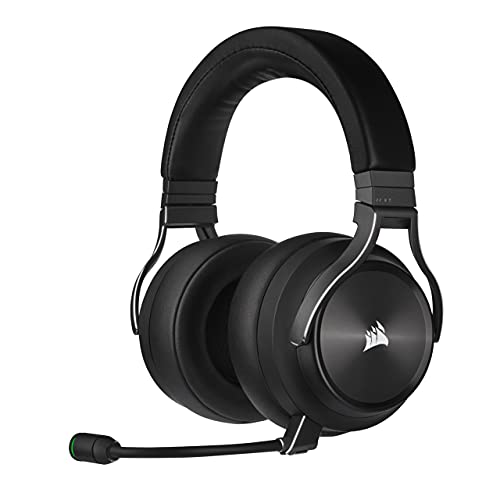
Corsair Virtuoso RGB Wireless XT — Best Premium Wireless
The Virtuoso XT is what the 7.1 idea looks like when money is spent on everything around the processing as well as the processing itself. It connects four ways — low-latency Slipstream wireless, Bluetooth, USB and 3.5mm — carries Dolby Atmos support for its spatial duties, and mounts a detachable microphone that Corsair markets as broadcast quality and that, unusually, roughly deserves the phrase: Discord calls and stream audio through this mic sound like a person at a desk microphone, not a person inside a headset. Simultaneous wireless and Bluetooth means a game on PC and a phone call can share your ears, a small luxury that reorganises how a desk feels.
The compromises are weight, price and realism about wireless surround. The metal-and-memory-foam build is dense, and smaller heads may find long sessions a negotiation. Atmos processing, like every system here, is a PC-and-software affair at its best; console support exists but the full feature stack lives on the computer. What the premium actually buys is the absence of asterisks elsewhere — connection choice, microphone, materials, battery manners — wrapped around a spatial implementation from the top shelf of the licensing world. If the Cloud II is the class’s benchmark, this is its flagship expression.
- Drivers: stereo pair, high-density neodymium
- Surround: Dolby Atmos support plus platform spatial options
- Connections: Slipstream 2.4GHz wireless, Bluetooth, USB, 3.5mm
- Microphone: detachable, broadcast-leaning quality
- Extras: simultaneous dual-wireless mixing, on-ear controls
Strengths
- Microphone quality that serves streamers and meeting-heavy players alike
- Four connection modes including genuinely low-latency wireless for play
- Materials and finish a clear class above the wired benchmarks
Trade-offs
- Heavier than the wired picks, and priced like the flagship it is
- The richest spatial features still belong to the PC side of its life
- Battery discipline becomes part of ownership, as with all wireless flagships
Best for: desk-based players who stream, call and game through one headset and want the full connection menu. Not suited for: budget shoppers or anyone whose surround dreams live entirely on a console.
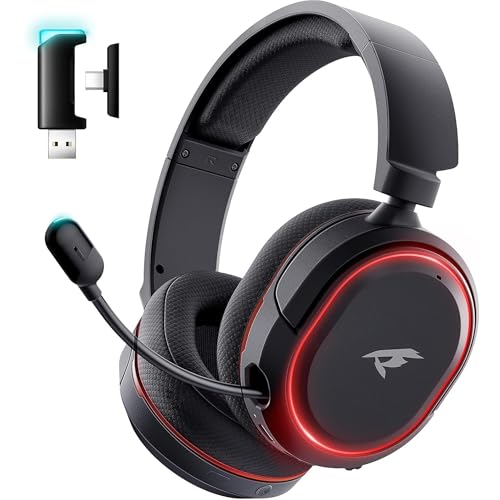
Wireless Gaming Headset 7.1 (2.4GHz/Bluetooth) — Best Feature Pile-Up
This unbranded headset sells a spreadsheet: 2.4GHz wireless, Bluetooth 5.4, a Type-C option, a noise-cancelling microphone and a battery figure the seller states at up to a hundred hours, all wrapped around the same virtual 7.1 proposition as the famous names. Products like this live or die on calibration of expectations. The connectivity genuinely is convenient — one headset wandering between a PC, a PlayStation and a phone without cable swaps is a real quality-of-life win — and the spatial effect, while generic in origin, performs the basic widening trick adequately for story games and films.
Where the unknown badge shows is in the refinements: tuning that leans bass-heavy out of the box, a microphone that is serviceable rather than clear, materials that feel assembled to a price, and software support that may never extend beyond the box it shipped in. Battery claims from unnamed makers should be read as best-case scenery — low volume, Bluetooth only — rather than a promise about your week. Bought as a features-per-coin play by a casual player who values wireless freedom over polish, it makes sense. Bought as a cut-price Virtuoso, it will disappoint in every comparison that matters.
- Drivers: stereo pair with generic virtual 7.1 processing
- Connections: 2.4GHz USB dongle, Bluetooth 5.4, Type-C
- Microphone: noise-cancelling boom, detachable on many listings
- Battery: seller-stated up to 100 hours under ideal conditions
- Platforms: PC, PS5, PS4, Mac and Switch per the listing
Strengths
- Connection menu matching flagships at a fraction of their commitment
- Long claimed battery life suits players who hate charging rituals
- Perfectly adequate spatial widening for films and single-player games
Trade-offs
- Microphone and tuning quality trail the branded picks noticeably
- Seller battery figures assume gentlest-possible use — plan for less
- Long-term software and parts support is a gamble with unbranded gear
Best for: casual multi-device players who want wireless everywhere and polish nowhere in particular. Not suited for: competitive players, streamers, or anyone buying a five-year headset.
Razer BlackShark V2 (wired) — Prose-Only Alternative
The wired BlackShark V2 is in this guide to teach the dialect lesson. Razer does not sell its spatial audio as “7.1”; it licenses THX Spatial Audio, delivered through software, and frames the result as a wider, more customisable field with per-game profiles. Strip the branding from both camps and the underlying proposition is the same — two drivers, HRTF processing, a multichannel game mix folded into your ears — which is precisely why this model matters as a reference: it demonstrates that the honest competition in this category is between processing implementations and ecosystems, not between channel counts.
As hardware, the wired V2 remains a strong piece of kit: featherweight for its class, with titanium-coated drivers and a cardioid microphone that rejects desk noise admirably. It is prose-only here because the version that best represents it moves through listings inconsistently, and because its spatial story only exists on PC through Razer’s software — console buyers get an excellent stereo headset and none of the headline feature. Shoppers already inside Razer’s software world should weigh it seriously against the Cloud II; shoppers outside it should note that the dongle in HyperX’s box asks nothing of them at all.
- Drivers: TriForce titanium-coated stereo pair
- Spatial: THX Spatial Audio via Razer software on PC
- Microphone: HyperClear cardioid, detachable
- Connections: 3.5mm, with USB sound card on the standard package
- Weight class: among the lightest full-size gaming headsets
Strengths
- Spatial implementation with per-application tuning for players who like control
- Featherweight comfort over long sessions
- Microphone noise rejection that flatters noisy rooms
Trade-offs
- Spatial audio is PC-software-only; consoles receive plain stereo
- Lives inside Razer’s software ecosystem, for better and worse
- Covered without a link here because its representative listing rotates
Best for: PC players already running Razer software who want its flavour of spatial audio. Not suited for: console-first buyers or anyone allergic to companion software.
SteelSeries Arctis Nova Pro — Prose-Only Premium Reference
The Arctis Nova Pro marks where the virtual-surround road leads when it keeps climbing: a premium headset whose spatial life runs through SteelSeries’ Sonar software, a full mixing suite that treats game, chat and media as separate channels and applies its surround and equalisation with unusual granularity. It also flirts with the hi-fi world — high-resolution audio certification on the wired path, an optional DAC in its ecosystem — which tells you its intended buyer: the player who wants one serious headset for games, calls and music, and is willing to run software to orchestrate it.
It sits in prose for two honest reasons. Its price belongs to a different conversation from the rest of this list, and its surround — like Razer’s — is a PC software proposition, so the “7.1 headset” a console buyer imagines is not what the box contains. As a reference it is invaluable, though: play Sonar’s processing beside a basic dongle effect and you hear the category’s whole quality range in one afternoon. Readers who discover, through this guide, that processing quality is their true priority may end their search here despite the tariff; readers who mainly want the effect occasionally should not let its polish talk them out of the Cloud II’s simpler bargain.
- Drivers: premium stereo pair, hi-res certified on wired path
- Spatial: Sonar software suite with per-channel mixing on PC
- Microphone: retractable ClearCast design with AI noise features in software
- Connections: wired USB/3.5mm; wireless sibling models exist separately
- Positioning: flagship tier, priced well beyond this guide’s core
Strengths
- The most configurable spatial-and-mixing software in mainstream gaming audio
- Sound quality ambitions that reach toward proper hi-fi headphones
- Premium comfort system suited to all-day desk wear
Trade-offs
- Flagship pricing for benefits casual players may never configure
- Spatial features depend on PC software; consoles get the headset, not the suite
- Complexity is the cost of the control it offers
Best for: enthusiasts who will actually tune Sonar and want one headset for everything at a desk. Not suited for: plug-and-play buyers or console-led households.
Dongle, software or console — which processor should do the work?
There are three places the spatial maths can live, and each has a temperament. A hardware dongle like the Cloud II’s is the simplest citizen: it works without accounts or updates, its button is unambiguous, and it travels between PCs without carrying settings. Its ceiling is fixed at whatever the chip was designed to do, and it does nothing at all for a console. Software systems — Sonar, THX through Razer’s apps, G Hub’s DTS — are the opposite: endlessly adjustable, updated over time, able to store profiles per game, and entirely dependent on a PC, a background process and your tolerance for another launcher in the tray.
Console-native processing is the third path and, for living-room players, quietly the best one. Tempest 3D and the Xbox spatial options are tuned by the platform holders, fed directly by games built for them, and delivered through whatever stereo headset you already like. The trade is control: you get profiles and toggles, not the deep equaliser surgery of a PC suite. Understanding this triangle dissolves most buying confusion in the category — the question is never which headset has surround, but which processor you intend to feed, on which machine, and how much fiddling you consider a feature rather than a tax.
Latency deserves a footnote in this comparison. Wired dongles add effectively none. Software processing adds a sliver that rhythm-game specialists might chase but ordinary players will not find. Wireless links vary: the good 2.4GHz systems in this guide are engineered to keep delay below perception for gaming, while a plain Bluetooth connection to a PC can lag enough to desync lips in cutscenes — which is why the Virtuoso XT’s dual radios and the unbranded pick’s dongle matter more than their shared Bluetooth bullet point suggests.
How should you test a surround headset before committing?
Use material you already know by heart, because unfamiliar content hides processing flaws behind novelty. A film scene with a circling vehicle, a game hub where an NPC walks and talks around you, and one stereo music track you could hum in your sleep form a complete test kit. In surround mode, check three things: whether sounds behind you read as behind rather than merely quieter, whether dialogue stays nailed to the centre instead of swimming when you turn, and whether the bass survives the processing without bloating — the commonest cheap-processing tell is a low end that turns to fog.
Then run the same material in stereo and ask the uncomfortable question honestly: which version would you rather live with for a month? Processing that wins a five-minute demo sometimes loses the month, because exaggerated width fatigues and because your brain keeps re-learning a sound field that fights its expectations. Also test the failure modes — mute the mic and listen to a recording of your own voice, wear the headset for a full hour rather than a song, and if you wear glasses, wear them, because a seal broken by spectacle arms changes both bass and the surround geometry the processing assumes.
If you are buying for a specific competitive title, test in that title or not at all. Games differ wildly in what they hand a processor: some output a genuine multichannel mix, some a carefully crafted stereo headphone mix that processing only vandalises, and a few carry their own object-based audio that outperforms everything downstream. The community around your game will know which camp it sits in; a headset that flatters cinematic adventures may be the wrong tool for your ranked ladder, and no review — including this one — can make that call for your ears and your game.
What about comfort, glasses and long sessions?
Surround processing happens in the signal, but comfort happens at the clamp, and clamp force is the silent variable in every headset purchase. A firmer seal improves bass and gives processing a consistent acoustic chamber to work with; it also presses spectacle arms into temples and turns hour three into a countdown. The picks in this guide spread across that spectrum deliberately — the Cloud II’s memory foam forgives glasses reasonably well, the Virtuoso XT’s plush density rewards patience, the G432’s lightness suits marathon casual play — and none of them can be evaluated from a photograph.
Heat is the second long-session tax. Closed-back designs, which this entire category uses, trap warmth by design, and leatherette-style cushions trap more than fabric ones. Players in warm rooms or warm climates should weight cushion material as a genuine specification, and everyone should expect a short break each hour to be part of the deal — ears, like eyes in VR, perform better with intervals. A headset whose surround you adore but whose fit you endure will lose, across a season, to a slightly plainer headset you forget you are wearing.
Comparison table
| Headset | How the surround happens | Where it works | Microphone in one line | Choose it when |
|---|---|---|---|---|
| HyperX Cloud II | Bundled USB dongle folds the mix for you | Surround on PC; stereo everywhere else | Detachable and reliably clear | You want the proven all-rounder and a hardware toggle |
| Logitech G432 | DTS Headphone:X 2.0 through the USB adapter | Full features on PC; 3.5mm stereo elsewhere | Flip-to-mute boom, simple and effective | Budget matters and your gaming life is PC-led |
| Corsair Virtuoso RGB Wireless XT | Dolby Atmos support within a flagship wireless stack | Richest on PC; broad console compatibility | The closest thing here to a desk microphone | Streaming, calls and wireless freedom all matter |
| Unbranded 7.1 Wireless | Generic DSP processing in the headset/dongle | PC, PlayStation, Switch and phone by radio | Serviceable, not a selling point | Connections per coin outrank polish in your priorities |
| Razer BlackShark V2 (wired) | THX Spatial Audio from Razer’s PC software | Spatial on PC only; stereo on console | Cardioid design that ignores desk noise well | You already live in Razer’s software world |
| SteelSeries Arctis Nova Pro | Sonar suite mixing and spatial processing | Full suite on PC; hardware travels, features thin out | Retractable, with software noise tools | Tuning control is the feature you are buying |
How do you set up virtual surround properly on PC and console?
On PC, the commonest fault is double processing. If your headset’s dongle or software is folding the surround mix, the game should be told to output surround — typically a 7.1 or home-theatre setting — and Windows should be left in the mode your headset maker specifies, with any second spatial system (Windows Sonic, a sound-card suite, a second app) switched off. Two HRTF systems stacked do not add dimension; they add echo and confusion. Pick one processor — the headset’s, Dolby Atmos for Headphones, or the game’s own headphone mode — and let everything else pass the signal through untouched.
Consoles ask for humility about what is possible. PlayStation’s own Tempest 3D audio works with any stereo headset and is, for most PS5 players, the spatial system to use — set the console to output it and run headsets in plain stereo mode rather than feeding the signal through a dongle’s second opinion. Xbox offers Windows Sonic built in, with Dolby Atmos as a licensed upgrade. In both cases the headset’s own “7.1” branding contributes the drivers and the microphone; the console contributes the space. Buying decisions get much saner once that division of labour is understood.
Whatever the platform, finish setup with a test you trust: a game scene you know well, a helicopter or a voice circling the character, checked in both stereo and processed modes. If the processed mode does not clearly win that test in your ears — remember, your ears are not the average the HRTF was modelled on — you have lost nothing by playing in stereo, and gained the clarity that comes free with it.
How much should the microphone influence your choice?
More than most buyers plan for. In team games your microphone is your reputation: callouts that arrive muffled or drowned in keyboard noise get ignored, and ignored callouts lose rounds. The spread in this guide is wide — the Virtuoso XT’s mic could front a podcast in a pinch, the Cloud II and BlackShark V2 deliver the clean, present voice chat that keeps a squad calm, the G432 is honest mid-pack, and the unbranded pick will make you audible without making you pleasant. If you stream, record or simply spend evenings in voice chat, weight the microphone samples and reviews as heavily as any surround comparison.
Placement and settings matter as much as hardware. A boom mic wants to sit beside the corner of your mouth, not in front of it, close enough to favour your voice over the room. Software noise suppression — in Discord, in the headset suites, in your GPU’s tools — can rescue a mediocre mic and strangle a good one into robotic artefacts when stacked carelessly, so enable one layer at a time and listen to a recording of yourself before a match depends on it. The five minutes this takes pays rent every session afterwards.
Why does the 7.1 label survive if it is not literal?
Because it communicates something true in the language shoppers already speak. Home theatre taught a generation that 5.1 and 7.1 mean envelopment, direction and cinema scale, and headset makers borrowed the vocabulary to promise the same feelings in a personal device. The signal path genuinely is multichannel at the start — a game mixed for a 7.1 speaker layout hands your headset’s processor eight channels of intent — so the label describes the input honestly even while it describes the hardware falsely. Regulators and reviewers have grumbled for years, yet the term persists because “virtual surround” sounds like a compromise and “7.1” sounds like a specification.
The industry’s better actors have been quietly migrating their language — spatial audio, 3D audio, object-based sound — partly because platform holders pushed those terms and partly because the processing genuinely changed: modern systems increasingly work from audio objects with positions, not fixed channels at all. A buyer fluent in this history reads a box more sceptically and more fairly at once: sceptically, because the biggest number is the least informative thing printed there; fairly, because the underlying technology, whatever it is called this year, has improved enormously and the best implementations in this guide are genuinely impressive pieces of psychoacoustic engineering.
Already own good stereo headphones? The software-only route
A reader with a beloved pair of wired headphones and a PC does not need a new headset to enter this territory. Platform and licensed processors — Windows Sonic built into the operating system, Dolby Atmos for Headphones and DTS Headphone:X as licensed apps — will spatialise a multichannel game mix for whatever stereo headphones you plug in, and the game’s own headphone mode, where offered, costs nothing at all. Add a clip-on or desk microphone and the result can out-perform integrated headsets on pure sound while rivalling them on voice.
What the integrated headsets in this guide sell, against that modular route, is coherence: one object, one cable or radio, a mic positioned by design, controls on the cup, and surround that was tuned with those exact drivers in the loop. Console players gain even more from the integrated route, since consoles will not run third-party spatial apps over arbitrary headphones beyond their built-in systems. Neither path is the correct one in the abstract — but knowing the software-only path exists stops anyone paying for a headset whose only desired feature was an effect their current headphones could already receive.
What mistakes do 7.1 headset buyers keep making?
The founding mistake is believing the label describes hardware and paying a premium for imaginary speakers. Closely related is buying a PC-software headset for a console and discovering the headline feature never arrives — check which platform each processing system lives on before money moves. A third error is leaving every spatial system switched on at once, then concluding surround “sounds weird”: one processor, one time, tested honestly against stereo.
Buyers also underrate the return of plain stereo quality. Because every surround effect is built on the two drivers, a headset with excellent stereo and modest processing will out-please a headset with theatrical processing and poor drivers in almost every real session, music most of all. And finally, do not let a surround purchase swallow the comfort question — a headset that pinches after an hour delivers its beautiful soundstage to a person who has stopped wanting to wear it.
How long should a headset like this last, and what kills them?
Wired headsets die by cable and cushion, in that order. A cable flexed at the same point ten thousand times eventually breaks a conductor, and the headsets that survive longest are the ones whose cables are treated gently, whose owners coil rather than yank, and — like the Cloud II — whose microphones detach before they can be snapped. Cushions compress and their coverings flake over years of skin oil and heat; replaceable pads, offered by the bigger brands, turn that death sentence into a maintenance item. The Virtuoso XT adds a battery to the list of mortal parts, as all wireless devices must, which is one more reason its wired modes matter to a long-term owner.
The processing side ages differently. A dongle’s effect is frozen at its best forever, while software systems improve — and occasionally break — with updates, and licensed platforms can change their terms. None of this should frighten a buyer; it should inform the price they are willing to pay for processing versus hardware. Spend on drivers, frame and microphone, which age slowly and serve you daily, and treat the spatial layer as the delightful, replaceable software it fundamentally is. That ordering of priorities is, in the end, the whole philosophy of this guide compressed into one sentence.
Final Recommendation
Strip the marketing away and this category becomes refreshingly simple: you are choosing a stereo headset and a spatial processor as a bundle, and the winners are the bundles honest about both halves. The HyperX Cloud II remains the default recommendation — proven drivers, a dongle that makes its surround effortless on PC, a microphone and frame that have outlasted trends. The G432 is the budget expression of the same honesty for PC-led players, and the Virtuoso XT is the flagship for those who want wireless, Atmos and a streamer-grade mic in one object. Choose Razer or SteelSeries when their software worlds are already your home, and choose the unbranded wireless only with your eyes open about polish. Above all, buy the processing you can test and toggle — because the best 7.1 headset is the one whose effect you can switch off the day it stops helping, and still love as a pair of headphones.
Open-back, closed-back and why this category is closed
Every headset in this guide is closed-back, and that is not an accident of fashion. Virtual surround processing assumes a controlled acoustic environment at your ear; an open-back design, which lets sound leak in and out freely, fights the illusion and shares your game audio with the room. Closed cups also deliver the isolation that makes a late-night session viable in a shared home, and the bass pressure that cinematic mixes expect. The costs are the familiar ones — heat, a degree of clamp, and a soundstage that must be synthesised precisely because the physical one is small.
Players who already own open-back hi-fi headphones and love their natural width sometimes find virtual processing on closed gaming headsets a sideways move rather than an upgrade, which loops back to the software-only route described earlier: feed your open-backs a platform spatial mix and you keep the natural stage while gaining the processed one on demand. The closed gaming headset remains the right default for most buyers — it is the only design that gives processing a sealed stage, a boom mic a quiet room to work in, and housemates a silent evening — but it is a default with known reasons, not a law of nature.
Frequently Asked Questions
Are there any gaming headsets with real 7.1 speakers inside?
No. A handful of historical experiments stuffed multiple small drivers into each cup, but no current mainstream gaming headset does this, and none of the products in this guide does. Every modern “7.1” headset uses two drivers plus digital processing that simulates a surround field from a multichannel mix. Judge them on the quality of that simulation and of the underlying stereo sound, not on the number in the name.
Is virtual surround worth it for competitive shooters?
Sometimes, for some ears. It can make direction easier to read in games with true multichannel mixes, but it can also soften the precise cues that a game’s own stereo headphone mix provides. Because generic processing is modelled on average ears, the only reliable test is your own: play the same title in both modes. Headsets with a one-click toggle, like the Cloud II, make that experiment painless.
Will a 7.1 headset give me surround on PlayStation or Xbox?
The headset itself usually will not — its processing typically lives on PC. Consoles provide their own spatial systems instead: Tempest 3D on PS5, Windows Sonic or Dolby Atmos on Xbox, and those work through any stereo headset. So a “7.1” model still functions perfectly on console, but the console is doing the spatial work and the headset is contributing drivers, comfort and microphone.
What is the difference between Dolby Atmos, DTS Headphone:X and THX Spatial?
They are rival implementations of the same idea — folding multichannel or object-based audio into two ears with HRTF processing — differing in tuning philosophy, adjustability and licensing. Atmos works with object-based mixes and height information, DTS Headphone:X emphasises room modelling, and THX Spatial leans on per-game profiles. In practice the headset’s drivers and your own ears matter more than which logo wins; all three sit above generic no-name processing.
Should I use surround for music and films?
Films mixed for surround generally fold down enjoyably and gain scale. Music should almost always be played in plain stereo: recordings are mixed for two channels, and surround processing adds artificial spaciousness and artefacts the mix never intended. Treat the surround button as a per-activity choice, not a permanent setting, and your headset will sound better at everything.
Does virtual surround add lag?
A wired dongle or a well-implemented software layer adds delay measured in small fractions of what a player can perceive, and in practice your display and network contribute far more latency to a game than the audio processing does. The exception is ordinary Bluetooth to a PC, which can lag noticeably — that is why gaming wireless headsets use dedicated 2.4GHz links for play and reserve Bluetooth for phones and calls. If you are sensitive to lip-sync in cutscenes, test your chosen connection with a dialogue-heavy scene first.
Can I use one of these headsets for work calls too?
Absolutely, and many owners do — the same boom microphone that carries callouts carries meetings, usually with better noise discipline than a laptop’s built-in array. The Virtuoso XT is the standout here for its broadcast-leaning mic and simultaneous Bluetooth, which lets a phone and a PC share the headset. The honest caveats are aesthetic and practical: gaming styling in a formal meeting is a look you either own or avoid, and wired models tie you to the desk in a way a dedicated call headset would not.
Do I need the software installed for these headsets to work?
The headsets all work as stereo devices with no software at all. Software — or a bundled dongle — is what unlocks the spatial processing, equaliser and microphone extras, and in Razer’s and SteelSeries’ cases the surround exists only inside the software. If you dislike companion apps on principle, the Cloud II’s hardware dongle approach is the low-friction route to the effect.
A note on buying renewed or older revisions
Popular headsets accumulate marketplace listings across years of revisions, renewed units and regional variants, and the surround story can change between them — a dongle included in one year’s box may be absent from another’s, and a renewed unit may arrive without the sound card that makes the headline feature work. The same caution applies to spare parts: a replacement dongle from a marketplace seller is not always the revision your headset expects, and pairing headaches follow. None of this argues against buying older or renewed stock — several headsets in this guide have been in production so long that the second-hand shelf is deep and tempting — it argues for buying it with a checklist in hand, verifying the processor, the microphone and the cable are all in the box before the return window closes, and testing the surround mode on the first evening rather than the thirtieth. Before buying any long-running model in this guide, read the specific listing’s contents line rather than the model’s reputation, and confirm the USB adapter is explicitly included if the surround is why you are buying. A bargain missing its processor is just a stereo headset with an interesting past. Sellers of current stock occasionally run the opposite trick, bundling a headset with a generic USB adapter and implying the licensed processing of the original package; the adapter’s own branding, or lack of it, tells the truth quickly. When a listing’s photographs show the dongle clearly and name it in the contents, confidence is reasonable; when the adapter appears nowhere in the images, assume it is not in the parcel either, and price the purchase as the stereo-only product it will actually be on arrival day.
Related Guides
If the microphone discussion above struck a chord, our look at headsets built for clear voice calls goes deeper on the work-and-play crossover. Buyers whose real need is quiet rather than surround should read our guide to active noise cancelling headsets, and anyone building a complete desk setup may find our affordable gaming headset roundup for PC a useful companion before spending. Players who split time between flat-screen and VR should also see the best 6dof standalone vr headsets for the standalone side of the hobby.


