What's inside
- Key Takeaways
- Quick Picks
- How We Chose These Picks
- The Six Picks in Detail
- Virtual Surround or True Multichannel: What Is the Actual Difference?
- How Should You Test a Surround Headset in Your First Week?
- Which Surround Route Fits Your Kind of Play?
- How Long Does a Surround Headset Stay Current?
- What Do 5.1 and 7.1 Mean on a Headset Box?
- Comparison Table
- What Are the Most Common Mistakes When Buying a Surround Headset?
- Final Recommendation
- Frequently Asked Questions
- Related Guides
As an Amazon Associate I earn from qualifying purchases. This post may contain affiliate links at no extra cost to you.
gizmoverdict.com is reader-supported. When you buy through links on our site, we may earn an affiliate commission.
Where to buy: Amazon carries all six headsets in this guide, and the links in the table above and heading each review point to the precise model discussed — a discipline that matters here, because surround branding changes between generations of the same headset family and the wrong generation is a different product.
The best surround sound headsets begin with a confession the marketing avoids: almost none of them contain surround sound. A headset has two ear cups, and two ear cups hold — in every pick in this guide — one driver per side. The surround effect is computed, not built: software takes a multichannel or stereo signal and reshapes it with timing, level and tonal cues that imitate how your ears localise sound in a room. Done well, the illusion is genuinely useful — footsteps gain direction, film scenes gain space, a game’s audio mix opens up. Done badly, it is a hollow, echoing smear that competitive players switch off within a day. This guide exists to tell the two apart.
So the judging method here is deliberately backwards from the brochure. Each pick is assessed first as a stereo headset — driver quality, tuning, comfort, microphone — because the stereo foundation is the part no update can fix. The surround layer is judged second, on the strength of the named technology in its listing: DTS:X on the Logitech pair, Dolby Atmos on the Corsair flagship, and, for the picks whose listings name no surround technology at all, an honest account of what that silence means and why the headset still earns its place. True multichannel headsets with multiple physical drivers per cup exist as a rare niche; none appears in this guide, and the text will not pretend otherwise.
One clarification before the picks, because it decides returns every season: a surround headset does not improve a bad source. A compressed, narrow game mix or a film streamed at low quality gives the processing little to work with, and the widening of a poor signal mostly reveals its poverty. The picks below assume the sources most players actually have — modern games with genuine multichannel mixes and films with proper sound design — and under those conditions the differences between processing systems are audible and worth paying for. Under poor conditions, save the money and buy the stereo foundation; the guide’s structure lets you do exactly that with your eyes open.
Connection shapes the surround experience more than shoppers expect. Virtual processing lives in software or in a USB dongle, so a headset’s surround personality can change completely between its USB, wireless and 3.5mm modes — several picks below are really two or three different audio products sharing one shell. The reviews call out which connection carries the processing for each model, because buying the name and using the wrong cable is the most common surround disappointment of all.
Key Takeaways
- Every surround feature in this guide is virtual processing over two drivers — powerful software, not extra speakers in the cups.
- The Logitech G935 and G635 name DTS:X 7.1 in their listings; the Corsair Virtuoso XT names Dolby Atmos. The HyperX pair and the Astro A50 name no surround technology, and this guide says so plainly.
- Judge the stereo sound first: surround processing can be toggled off, but the underlying tuning is permanent.
- Connection decides the feature set — USB and wireless modes carry processing that a plain 3.5mm cable usually cannot.
- The Astro A50’s PLAYSYNC switching and the Virtuoso XT’s four connection paths serve multi-device players better than any single surround badge.
- For competitive play, most players end up preferring clean stereo or a light processing touch; for film and single-player immersion, full processing earns its place.
Quick Picks
| Pick | Badge | Why it is here |
|---|---|---|
| HyperX Cloud III S Wireless | Best stereo-first wireless | A 120-hour battery and a clean foundation that any platform’s spatial processing can build on. |
| HyperX Cloud III Wired | Best wired all-rounder | USB-C, USB-A and 3.5mm in one headset, with the Cloud line’s trusted tuning. |
| Logitech G935 7.1 Wireless | Best wireless DTS:X | Named DTS:X processing over a wireless connection, with big 50mm-class sound. |
| Logitech G635 7.1 Wired | Best wired DTS:X value | The G935’s DTS:X approach in a wired, simpler, PC-focused form. |
| Logitech G Astro A50 | Best for multi-platform players | PLAYSYNC audio switching across PS5, Xbox and PC from one headset. |
| Corsair Virtuoso RGB Wireless XT | Best Dolby Atmos flagship | Dolby Atmos processing, a broadcast-quality mic and four ways to connect. |
How We Chose These Picks
We started by sorting the market by what its listings actually claim, because surround marketing is where headset honesty goes to die. Picks that name a specific, real processing technology — DTS:X, Dolby Atmos — were credited for the claim and judged on that technology’s known character. Picks that name none were not excluded; two of the most respected headset lines in gaming sell on stereo quality, and a surround guide that ignored them would mislead by omission. Instead they are labelled transparently, and their reviews explain the routes by which their owners obtain spatial audio, with the uncertainties flagged rather than smoothed over.
We also read the generations carefully, because surround lineages are confusing by design: a famous model name may span versions with different processing, different connections and different microphones, and a review of one generation is routinely quoted at buyers of another. Every pick here is pinned to its listing — the technology named, the connections enumerated, the battery figure quoted — and where a listing is silent, the silence is reported rather than filled from a sibling’s reputation. In this category more than most, the listing is the product.
Beyond the surround question, the filters were the usual ones for this category, applied hard: a microphone fit for team play and calls, comfort for sessions measured in evenings, and a connection story that matches the buyer’s machines. We also favoured headsets whose surround processing can be switched off cleanly — a non-negotiable feature, because a processing layer you cannot bypass turns every piece of content into a hostage of one algorithm’s taste. Where a listing title leaves a specification unstated, the spec boxes record the gap, and no number has been borrowed from a sibling model to fill it.
The Six Picks in Detail

HyperX Cloud III S Wireless — Best stereo-first wireless
The Cloud III S Wireless is this guide’s honesty test in product form. Its listing advertises multi-platform compatibility, 2.4GHz plus Bluetooth wireless and a 120-hour battery — and names no surround technology whatsoever. It leads this guide anyway, because the Cloud line’s stereo tuning is the foundation a huge number of players actually listen to spatial processing through: the processing, where a player enables it in their platform or software, is only ever as good as the two drivers rendering it, and HyperX’s drivers are the trusted constant in this category. Buy this headset for what it verifiably is — a long-battery, clean-sounding wireless all-rounder — and treat any spatial layer as a property of your source, not of the box.
The 120-hour battery deserves its own sentence in a surround context, because immersion features die with the battery like everything else, and a headset that runs for weeks of evenings between charges keeps its full personality available every night. The dual wireless matters similarly: 2.4GHz for the low-latency connection your games need, Bluetooth for the phone and the handheld, one headset across the evening’s devices. The detachable microphone follows the Cloud pattern — clear, serviceable, removable when the headset moonlights as music headphones.
What you are not buying is a named, in-the-box surround system, and this guide will not dress that up. Players who want DTS or Atmos processing guaranteed by the headset’s own listing should take the Logitech or Corsair picks below. Players who have already chosen their spatial route at the platform level — or who suspect, correctly for many competitive titles, that they will listen in plain stereo most of the time — get in the Cloud III S the strongest foundation-and-battery package in the group. It is the pick for buyers who read listings the way this guide writes them: for what is actually there.
Consider also what the S designation’s restraint says about where gaming audio is heading. The platform holders now build spatial processing into consoles and operating systems, and a headset increasingly competes on the honesty of its drivers, the length of its battery and the quality of its wireless rather than on a licensed badge. The Cloud III S is that philosophy in hardware. Owners who pair it with a well-implemented platform spatial mode frequently report the combination out-performing older badge-first headsets — the processing moved to where the game mix is known best, and the headset’s job narrowed to rendering it faithfully. Whether or not that is your route, the headset loses nothing by it: switch every layer off and the Cloud sound remains the reason the line sells.
- Connection: 2.4GHz wireless plus Bluetooth
- Battery: 120-hour life as stated in the listing
- Surround technology: none named in the listing title — spatial options, if any, are a maker-documentation question
- Microphone: detachable, per listing
- Platforms: multi-platform compatibility per listing
- Family: Cloud III line, S Wireless variant
Strengths
- Weeks-scale battery keeps the headset’s full feature set available every night.
- Cloud-line stereo tuning is the proven foundation spatial processing builds on.
- Dual wireless covers gaming rig and phone without a second headset.
Trade-offs
- No surround technology is named in the listing — processing must come from your platform or software.
- Detachable mic is convenient rather than broadcast-grade.
- Buyers wanting a guaranteed in-box surround badge should choose Logitech or Corsair.
Best for: players who want a superb wireless stereo foundation and handle spatial audio at the platform level. Not suited for: buyers who want the headset itself to guarantee a named surround system.

HyperX Cloud III Wired — Best wired all-rounder
The wired Cloud III solves a problem the wireless picks cannot: it speaks every language your machines speak. Its listing enumerates USB-C, USB-A and 3.5mm connectivity, and that trio is a complete map of modern gaming — PC by either USB flavour, controllers and laptops by the analogue jack, one headset with no dongle anxiety and no battery at all. In a surround guide its role is the control group: the clean, wired, stereo reference against which the processing picks can be judged, and the headset to buy if your spatial audio comes from your PC’s software while your priority is a connection that never drops, never pairs and never dies.
HyperX equips it with the family’s signature memory foam and a durable frame, and the microphone is an ultra-clear 10mm design per the listing — a detail team players will appreciate, since wired headsets in this class sometimes treat the mic as an afterthought. The Cloud III’s tuning follows the line’s house character: balanced, dialogue-forward, forgiving of long sessions. That balance is precisely what makes it a good surround-processing host when the processing lives on the PC — wild, bass-heavy tunings fight spatial algorithms, while a level-headed foundation lets the processing do the spatial work.
The compromises are the wired kind. The cable sets your radius, the 3.5mm mode carries no processing of its own, and the listing names no built-in surround technology — the same honesty note as its wireless sibling applies. What the Cloud III Wired offers instead is the lowest-friction ownership in this guide: plug it into anything, hear the Cloud sound, and add whatever spatial layer your platform provides. For players whose desks host three machines and whose patience for wireless management is thin, that is not a compromise at all.
There is a travel-and-lan angle to the wired Cloud III that its wireless sibling cannot match: it is the headset that works in the tournament hall, the friend’s house and the aeroplane seat with equal indifference to pairing lists and battery gauges. Players who attend anything social with their games learn to value that universality out of proportion to its spec-sheet glamour. Add that its cable is the only failure point and is a cheap one, and the Cloud III Wired becomes the group’s candidate for the headset you will still own, working, in five years — quietly outliving flashier purchases.
- Connection: USB-C, USB-A and 3.5mm — as listed
- Surround technology: none named in the listing title — verify spatial options with the maker’s documentation
- Microphone: ultra-clear 10mm mic per listing
- Cushions: memory foam per listing
- Frame: durable construction per listing
- Platforms: PC, PS5, PS4, Xbox Series X|S — as listed
Strengths
- Three connection types cover every machine at a modern desk with zero pairing.
- Balanced Cloud tuning hosts platform-side spatial processing gracefully.
- No battery to age, charge or die mid-session — ever.
Trade-offs
- The cable defines your movement radius at the desk.
- No surround technology named in the listing; processing is the platform’s job.
- Analogue mode is plain stereo by nature.
Best for: multi-machine desk players who want one wired headset that connects to everything. Not suited for: couch players or anyone who wants wireless freedom plus a named surround system in one box.
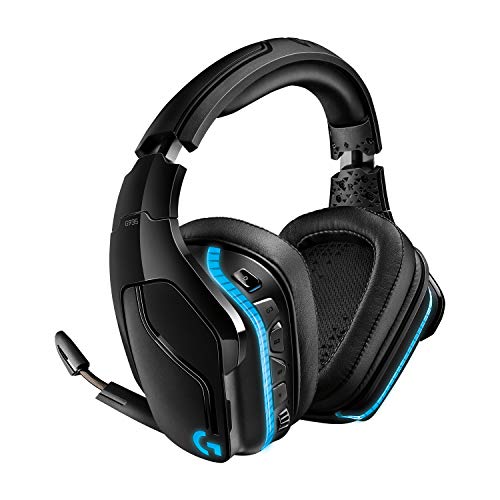
Logitech G935 7.1 Wireless — Best wireless DTS:X
With the G935 the guide arrives at a headset whose listing makes the surround claim outright: DTS:X, in Logitech’s 7.1 virtual implementation, delivered over a wireless connection. This is the classic big-room gaming headset formula — large drivers, a spacious processed soundstage, LIGHTSYNC RGB glowing along with the game — and for single-player immersion it remains deeply persuasive. DTS:X processing on the G935 widens the perceived stage and places effects with a directionality that plain stereo cannot fake, and because the processing rides the wireless link, the full effect survives the trip from desk to couch-side pacing that wireless exists to allow.
Judge it with the guide’s standing rule, though: the processing is a layer, and the G935’s worth underneath it is a big, confident stereo sound that holds up when DTS:X is switched off for competitive play — which is how many owners actually use it, surround for the campaign, stereo for the ranked queue. That dual personality is the mature way to own a surround headset, and the G935 supports it gracefully. The LIGHTSYNC lighting is the frivolous line in the listing, and it costs battery; owners who disable it trade spectacle for endurance, a trade this guide recommends without hesitation.
Its limits are the limits of its generation and its formula. It is a substantial headset, and long sessions test necks that the lighter HyperX picks spare. The surround processing serves PC gaming first, and console players should verify what carries over before assuming the full feature set travels. But as the wireless DTS:X standard-bearer in this group — the headset that defined what virtual 7.1 over wireless should feel like — the G935 remains the pick for immersion-first PC players.
Film and streaming-video duty is the G935’s second act, and for many owners it becomes the first. A wireless headset with a wide processed stage is a private cinema that works at midnight in a shared house, and the DTS:X layer that games underuse is precisely what film mixes — mastered with space in mind — exploit best. Owners who bought the G935 for a shooter and kept it for films are a recognised constituency of this model, and buyers choosing between it and the wired G635 should weigh the couch as honestly as the desk: the wireless premium buys the film use case as surely as it buys gaming freedom.
- Connection: wireless (2.4GHz-class LIGHTSPEED family — verify details in maker documentation)
- Surround: DTS:X 7.1 virtual processing, as named in the listing
- Lighting: LIGHTSYNC RGB per listing
- Microphone: boom design typical of the line — verify exact spec with maker documentation
- Colour: black/blue per listing
- Battery figure: no figure appears in the listing title; refer to the maker’s documentation
Strengths
- Named DTS:X processing delivered over wireless — the full immersion package, untethered.
- Large-scale sound that stays convincing with processing switched off for competitive play.
- A proven, widely understood platform with deep software support.
Trade-offs
- RGB lighting taxes the battery; most owners end up disabling it.
- The fullest feature set is a PC story — console buyers must verify what travels.
- Its size and weight are the group’s most demanding on long sessions.
Best for: immersion-first PC players who want wireless DTS:X for single-player worlds. Not suited for: weight-sensitive players or console-first buyers expecting the complete PC feature set.
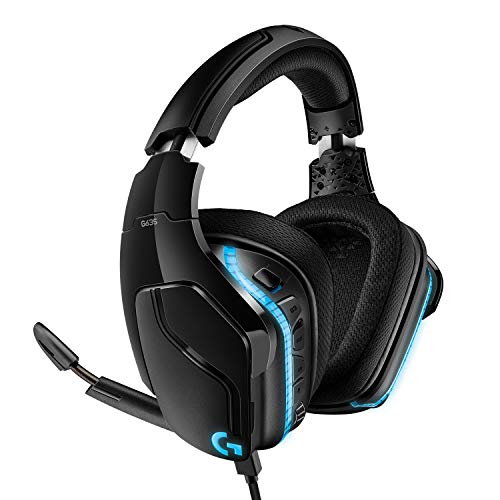
Logitech G635 7.1 Wired — Best wired DTS:X value
The G635 is the G935’s argument with the wireless removed: the same DTS:X 7.1 surround philosophy, the same LIGHTSYNC family identity, delivered over a wire to a PC. That subtraction is a feature for a specific and numerous kind of player — the desk-bound PC gamer whose headset never leaves the setup, who has watched wireless batteries age and dongles vanish, and who would rather spend the difference on the processing and the drivers. The G635 is that player’s headset, and its listing makes the pitch without ornament: DTS, X 7.1 Surround Sound, LIGHTSYNC RGB, PC gaming headset.
Wired delivery changes the surround experience in one subtle, positive way: consistency. The processing path is identical every session, with no wireless power management or interference to vary it, and the headset is ready the instant the PC wakes — a small mercy that compounds across a year of evenings. The G635 also keeps the family’s large-driver sound, so the stereo-under-the-processing test that this guide applies is passed in the same way as its wireless sibling: switch DTS:X off and a substantial, enjoyable gaming headset remains.
The honest debits mirror the HS80’s logic in the streaming guide’s sense — a cable is a cable. Your radius is the desk, your platforms are effectively PC with whatever partial console behaviour the maker documents, and the RGB once again asks for power and attention in exchange for glow. None of that dents the G635’s position: it is the most direct route in this guide to named, reputable virtual surround without paying the wireless premium, and for the PC-only player that directness is the entire point.
The G635 also makes an honest gift-and-first-headset candidate in a way the flagship picks do not: its entire story is legible in one sentence — wired, PC, DTS:X — and a buyer purchasing for a known PC gamer can be confident the headset matches the recipient’s setup without a compatibility interview. Simplicity of fit is a real feature in a category where the most common return reason is a mismatch nobody checked. Within its owner’s setup, meanwhile, nothing about the experience feels entry-level: the processing is the same named DTS:X, the drivers are the family’s large units, and the savings versus the wireless sibling are visible only on the invoice.
- Connection: wired, PC-focused
- Surround: DTS:X 7.1 virtual processing, as named in the listing
- Lighting: LIGHTSYNC RGB per listing
- Microphone: boom design typical of the line — verify exact spec with maker documentation
- Platform focus: PC, per listing
- Battery: none — wired by design
Strengths
- Named DTS:X surround at a wired price, with no battery to manage.
- Identical, repeatable processing path every session.
- Big stereo sound underneath the processing, for the hours you switch it off.
Trade-offs
- Desk-bound by cable, with a PC-first platform story.
- RGB lighting is decoration that wired power makes easy to overuse.
- No wireless mode to fall back on when the setup changes.
Best for: PC-only players who want reputable virtual surround without the wireless premium. Not suited for: console players or anyone whose gaming happens away from a fixed desk.
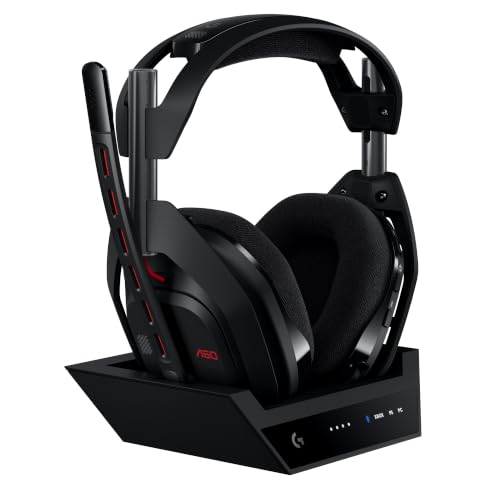
Logitech G Astro A50 — Best for multi-platform players
The Astro A50’s listing leads with a feature that is not about sound at all: PLAYSYNC, an audio switcher for PS5, Xbox and PC. That ordering tells the truth about this headset’s constituency. The multi-platform player — one person, three machines, one desk — does not primarily have a surround problem; they have a switching problem, a forest of cables and settings menus standing between them and the game. The A50, with its base-station heritage and PLAYSYNC switching across 2.4GHz and Bluetooth, is engineered to dissolve that problem, and it has been the default answer for that player for generations of the line.
On the surround question this guide stays precise: the listing names no surround technology, quoting instead the audio resolution figures for console and PC. Astro’s reputation in spatial audio is long, but reputation is not a listing claim, and buyers for whom a named technology is the purchase reason should verify the current model’s processing arrangements in the maker’s documentation — or take the Virtuoso XT’s explicit Dolby Atmos below. What the A50 verifiably offers is a premium wireless platform with a 24-hour battery, simultaneous-class connectivity thinking, and the most practised multi-device workflow in the group.
That workflow is the review’s real subject. Dropping between a console session and a PC call without re-pairing, re-cabling or re-thinking is a quality-of-life difference that spec sheets undersell and owners evangelise. The A50’s price tier within this group reflects that polish. If your gaming life lives on one machine, the polish is wasted money; if it lives on three, the A50 is not the expensive pick — it is the pick that replaces a switchbox, a second headset and a daily five-minute ritual.
The base-station ritual deserves a sentence of its own, because A50 owners consistently cite it as the habit that sold them: the headset lives on its dock, charged and paired, and picking it up is the entire setup procedure. In multi-platform households that ritual replaces a thicket of cables and half-remembered pairing sequences, and it keeps the 24-hour battery from ever becoming the emergency it is on paper — a headset that sleeps on its charger is always full. Judge the A50 as a system rather than a headset and its design logic, dock included, comes into focus.
- Connection: 2.4GHz wireless and Bluetooth, per listing
- Switching: PLAYSYNC audio switcher for PS5, Xbox, PC — as listed
- Battery: 24-hour life as stated in the listing
- Audio figures: under 16-bit/48kHz console, under 24-bit/48kHz PC, per listing
- Surround technology: none named in the listing title — verify with the maker’s documentation
- Colour: black, per listing
Strengths
- PLAYSYNC switching makes one headset serve three platforms gracefully.
- A premium wireless platform refined over generations of the A50 line.
- Bluetooth alongside the gaming link covers calls and media without re-pairing.
Trade-offs
- No surround technology named in the listing — verify processing claims before buying for surround.
- 24-hour battery is the group’s shortest; daily charging is part of the deal.
- Single-platform players pay for switching they will never use.
Best for: players splitting time across PlayStation, Xbox and PC who want one premium headset. Not suited for: single-platform players or buyers whose first requirement is a named surround badge.
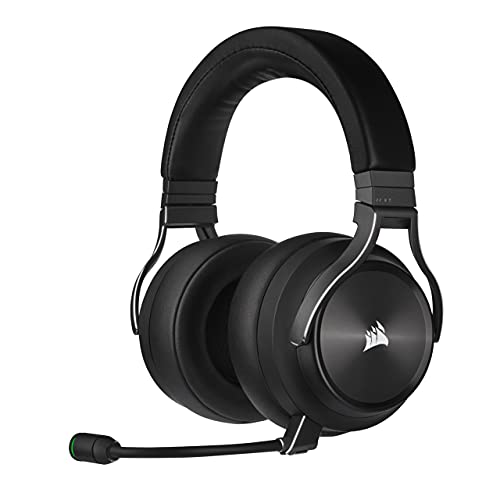
Corsair Virtuoso RGB Wireless XT — Best Dolby Atmos flagship
The Virtuoso XT is the guide’s flagship in the literal sense: the pick that refuses to choose. Its listing enumerates Bluetooth, USB and 3.5mm connections alongside its wireless, names Dolby Atmos as its spatial technology, and claims a broadcast-quality microphone — a combination no other pick here assembles. For the surround buyer, the headline is Atmos: Dolby’s processing brings a height-aware spatial model to supported content, and on the Virtuoso it rides a headset whose stereo foundation — memory foam, a premium build, a sound tuned with more hi-fi restraint than most gaming lines — passes this guide’s stereo-first test with the highest marks in the group.
The connection quartet changes how the headset fits a life. Wireless for the game, Bluetooth for the phone call that interrupts it, USB for the desk’s highest-quality path, 3.5mm for everything else ever made — the Virtuoso XT is the one pick here that never meets a device it cannot talk to. The sub-1ms latency claim in its listing addresses the wireless sceptic directly. And the microphone claim matters beyond streaming: in a surround guide full of serviceable game mics, a broadcast-quality capsule means the flagship also wins the Discord call, the work meeting and the podcast guest spot.
Flagship honesty applies too. This is the group’s premium tier, its battery will not embarrass the HyperX’s 120 hours, and Dolby Atmos delivers its best with content mixed or upmixed for it — plain stereo sources gain spaciousness rather than revelation. Buyers should also note the XT’s ambition makes it the most software-dependent pick here. None of that displaces it: for the player who wants named, top-tier spatial processing on the best all-round headset in the guide, the Virtuoso XT is the complete sentence the other picks each say part of.
One constituency should pay the Virtuoso XT special attention: the player who also works from the same desk. Its broadcast microphone and restrained-by-gaming-standards design cross into meeting duty without embarrassment, its USB path suits a laptop dock, and its Bluetooth covers the phone — which means the flagship’s price can be honestly divided across two jobs in a way a single-purpose gaming headset’s cannot. Several of this guide’s picks can say something similar, but none assembles the whole case — Atmos for the evening, broadcast voice for the day, every connection either job invents — in one product.
- Connection: wireless, Bluetooth, USB and 3.5mm — as listed
- Surround: Dolby Atmos processing, as named in the listing
- Microphone: described in the listing as broadcast quality
- Latency: sub-1ms claim per listing
- Earpads: memory foam per listing
- Platforms: PC, PS5, Switch, PS4, Mac, mobile — as listed
Strengths
- Dolby Atmos on the group’s strongest stereo foundation — processing and drivers both deliver.
- Four connection paths make it the only pick that talks to everything.
- Broadcast-quality microphone wins the call as well as the game.
Trade-offs
- The premium tier of this group; the Atmos badge is part of what you are paying for.
- Atmos shines brightest with Atmos content — stereo sources gain space, not magic.
- Battery endurance is ordinary next to the HyperX’s 120-hour claim.
Best for: players wanting the flagship combination of Dolby Atmos, connections and microphone. Not suited for: value hunters — the G635 delivers named surround for far less commitment.
Virtual Surround or True Multichannel: What Is the Actual Difference?
True multichannel audio means separate channels rendered by separate speakers placed around the listener — a living-room system with five or seven boxes. A handful of exotic headsets have tried to miniaturise that with several tiny drivers per cup, but the results compromise each driver’s size and quality, and none appears in this guide. Everything here is virtual: two drivers, and processing that exploits psychoacoustics — the timing and tonal differences your brain uses to locate sounds — to paint a spatial picture from a stereo pair.
Your own hearing is the final variable, and it explains why surround reviews contradict each other so cheerfully. The cues the processing synthesises are modelled on an average ear and head, and listeners whose own anatomy differs from the average perceive the illusion with different strength — for some, virtual surround snaps into a convincing circle of sound; for others it stays stubbornly inside the skull with a pleasant spaciousness. Neither listener is wrong, and neither can be told in advance which they are. This is the deepest reason the guide insists on the stereo-first test and the first-week A/B ritual: the technology’s ceiling is set by the algorithm, but its value is set by your ears.
The practical consequence is liberating rather than disappointing. Because virtual surround is software, it improves with algorithms, can be tuned per game, and can be switched off when it hurts — none of which is true of hardware channels. The named technologies differ in flavour: DTS:X implementations tend toward a wide, game-forward stage, Dolby Atmos adds a height model that film and Atmos-mixed games exploit, and platform-level processing on consoles and PCs offers a third dialect of the same language. The buyer’s task is not to find “real” surround in a headset — it is to choose whose processing, on which connection, over which stereo foundation, and that is exactly the comparison the reviews above are organised to make.
Head-related transfer functions — the personal acoustic fingerprint of your ears, head and shoulders — are where the technology goes next, with systems beginning to personalise the processing from a photo or a measurement of the listener’s ear. None of the listings in this guide claims such personalisation, so it is noted here only to set expectations honestly: today’s picks use a generalised model of hearing, which is why the same headset can sound revelatory to one player and merely spacious to another. When personalised processing reaches this tier, this guide’s structure will absorb it as one more named, checkable claim — which is all it asks of any technology, present or future.
How Should You Test a Surround Headset in Your First Week?
Test the processing against the content you actually play, in both states. Load your main competitive title and run the same route with surround on and off: if your directional judgement of footsteps and gunfire does not improve — or worsens — the processing is decoration for that game, and clean stereo is your competitive setting. Then load a film scene or a single-player showcase with a busy mix and repeat the comparison; this is where DTS:X and Atmos earn their keep, and the difference should be obvious enough that you do not have to persuade yourself.
Add a comfort test with the processing running, because spatial modes subtly change how long a session feels. A wide, processed stage can make a heavy headset feel more worthwhile — the G935’s bulk is easier to forgive inside a convincing soundscape — while a hollow processing mode can make even a light headset feel fatiguing, as your brain works to resolve cues that do not quite cohere. If a pick’s surround mode tires you within the hour, that is not a personal failing; it is the A/B result your purchasing decision needed, and the stereo mode is your answer for that title.
While the week of testing runs, keep a few notes — which titles flattered the processing, which fought it, which connection you actually used each evening. Surround ownership settles into per-game settings, and the players who keep those notes reach their ideal configuration in a week; the players who rely on memory spend months re-deciding the same toggles. It is a small, unglamorous habit, and it is the difference between owning a surround system and owning a surround badge.
Test the connection matrix too. If your pick has USB, wireless and 3.5mm modes, listen to the same scene through each and note which modes carry the processing — the answer surprises many owners, and discovering it in week one prevents a year of listening to the plain mode by accident. Finally, record your voice through the microphone in each mode you will use for team play. Surround headsets are bought for the ears, but they are judged by teammates through the mic, and a mode that sounds glorious to you while mumbling to them is a mode to avoid on game night.
Which Surround Route Fits Your Kind of Play?
Single-player and story-driven players gain the most from full processing and should shop the named-technology picks without ambivalence: the wider the game’s world, the more DTS:X and Atmos have to work with, and cinematic titles are mixed by people who assume a spatial presentation. For that player the only real fork is wireless freedom with the G935 against the Virtuoso XT’s flagship completeness, with the G635 as the wired value expression of the same idea.
Film-first buyers, a quieter constituency, should weight the decision differently again: your content arrives with deliberate spatial mixes, your sessions are seated, and the processing has no competitive downside to weigh. For you the G935’s wireless cinema and the Virtuoso XT’s Atmos are the two honest finalists, and the choice between them is the choice between a gaming headset that excels at film and a flagship that treats film as a headline feature. Either way, buy for the mix you will actually hear most — a principle that sounds obvious and is violated by badge-led shopping every day.
Competitive players should invert the logic. Buy the stereo foundation you trust — the Cloud III pair exist for you — and treat processing as an experiment your platform provides, to be adopted per-title after honest testing rather than assumed. Mixed players, the majority, should optimise for the toggle: a headset whose processing switches cleanly and whose stereo they love, because their week genuinely contains both kinds of listening and any pick that forces one personality on both will irritate half of it. The A50, finally, answers the platform question rather than the processing one, and multi-console households should let it.
How Long Does a Surround Headset Stay Current?
Longer than most gaming hardware, because its core is two drivers and a fit, and neither dates quickly. What ages is the surrounding layer: wireless standards improve, batteries lose capacity, and processing software — the surround layer itself — is the component most likely to be superseded by a better algorithm delivered at platform level. That ageing pattern quietly favours the stereo-first picks for longevity and the software-strong brands for feature life, and it is one more reason this guide refuses to rank by badge alone: the badge is the part most likely to be obsolete in three years, while the drivers you loved on day one will still be the drivers you love.
There is also a resale and hand-me-down logic to this category that favours the honest picks. A stereo-first headset ages into a second machine, a sibling’s setup or a work desk without its value depending on a licence or a software generation, while a badge-first purchase is worth only what its processing still impresses. Households that pass hardware down — and gaming households do — will find the Cloud III models and the G635 circulating for years after flashier contemporaries have been retired by a dead battery or an abandoned app.
Care extends the interval in the usual unglamorous ways. Cushions flatten and change both comfort and the seal that bass and processing depend on; replacing them restores the headset’s spatial presentation more honestly than any settings tweak. Wireless models reward battery manners — avoid leaving them flat for months — and wired models reward strain relief at the plugs. None of this is surround-specific, which is rather the point: a surround headset is a headset first, and it ages like one.
What Do 5.1 and 7.1 Mean on a Headset Box?
The numbers describe the channel layout of the source mix the processing was designed to interpret — five or seven ear-level channels plus a low-frequency effects channel — not the hardware inside the headset. A “7.1 headset” in this guide contains two drivers and a processor that accepts a 7.1 mix and folds it down to a spatial stereo presentation. That fold-down is a genuine engineering task, and the extra rear channels in a 7.1 mix give the algorithm more directional information to work with than a 5.1 mix does, which is why the badge is not meaningless. It is simply a statement about the processing’s input, and reading it as a statement about speakers is the misunderstanding the entire category’s marketing quietly depends on.
There is a corollary worth knowing when comparing listings across generations: a headset that names its technology — DTS:X on the Logitechs, Dolby Atmos on the Corsair — is making a checkable claim about licensed, specified processing, while a headset that says only “7.1 surround sound” with no technology named may be describing anything from a licensed system to a generic widening effect. In this guide’s picks, the named claims are the G935, the G635 and the Virtuoso XT; the other three name nothing, and are recommended for everything except a promised surround system. Let that asymmetry guide your reading of any listing beyond this guide as well.
Comparison Table
| Pick | Surround (as listed) | Connection | Standout trait |
|---|---|---|---|
| HyperX Cloud III S Wireless | None named | 2.4GHz plus Bluetooth | 120-hour battery, stereo-first foundation |
| HyperX Cloud III Wired | None named | USB-C, USB-A, 3.5mm | Connects to everything, no battery |
| Logitech G935 | DTS:X 7.1 (virtual) | Wireless | Wireless immersion with LIGHTSYNC |
| Logitech G635 | DTS:X 7.1 (virtual) | Wired | Named surround without the wireless premium |
| Logitech G Astro A50 | None named | 2.4GHz plus Bluetooth | PLAYSYNC switching across three platforms |
| Corsair Virtuoso RGB Wireless XT | Dolby Atmos (virtual) | Wireless, BT, USB, 3.5mm | Flagship sound, mic and connections |
What Are the Most Common Mistakes When Buying a Surround Headset?
The founding mistake is believing the cups contain seven speakers; they contain two, and everything else follows from accepting that. The second is buying the badge and never testing the off state — a surround headset whose plain stereo disappoints is a bad headset with a good trick. The third is using the wrong connection: owners listen through 3.5mm for months, conclude surround is a scam, and never learn their processing lived on the USB path. The fourth is leaving processing on for competitive play out of loyalty to the purchase, when the ranked community’s near-universal preference for clean stereo in shooters is data, not snobbery. The last is paying flagship money for a surround badge when the honest need was a good stereo headset — the two HyperX picks exist in this guide to catch exactly that buyer.
One more deserves naming because it is so easy to commit in a shop or on a product page: judging surround from a demo. Store and showroom demos use content chosen to flatter the processing — sweeping effects, dramatic pans, mixes mastered to show off space. Your games at home are ruder and quieter. If a demo is your only evidence, discount it heavily and lean on the structure of this guide instead: foundation first, named technology second, badge last.
Final Recommendation
Decide what you are actually buying. For a named surround system over wireless, the G935 delivers DTS:X untethered; on a wire, the G635 delivers the same philosophy for less. For the flagship expression of the idea — Dolby Atmos over the best stereo foundation and microphone in the group — the Virtuoso XT justifies its tier. The A50 is the multi-platform player’s answer to a different question, and the two Cloud III models are the honest stereo foundations for players whose spatial audio lives in their platform. A surround headset is a stereo headset plus an opinion about space; buy the stereo you love, then choose the opinion that flatters your games.
And keep the receipt mindset for the first week: run the A/B tests this guide describes, in your games, on your ears, through the connection you will actually use. The six headsets above were chosen so that whichever survives that week in your setup will serve for years — the processing may evolve around it, but a foundation you verified yourself does not need to be taken on faith.
One final piece of buying hygiene for this category: check the exact generation at the moment of purchase, not from memory. Headset families reuse names across years, and a surround claim, a connection or a microphone from an earlier or later generation is not evidence about the box in front of you. The listings behind this guide were read individually for exactly that reason, and the two minutes the same check takes you is the cheapest insurance in the whole purchase.
Frequently Asked Questions
Is virtual surround as good as a real speaker system?
It is a different experience rather than a lesser one: a good speaker system places sound in the room, while virtual surround places it around your head with remarkable directional precision for games. For positional awareness in play, many prefer the headset. For shared film watching, speakers win by definition.
Why do some picks in a surround guide name no surround technology?
Because their listings genuinely do not claim one, and this guide reports listings as they are. The Cloud III models and the A50 earn their places on stereo quality, battery and platform craft; their owners typically take spatial processing from the console, PC or software layer.
Should I use surround processing for competitive shooters?
Test it honestly in your main title. Many competitive players find processing smears the precise cues they rely on and play in stereo; others swear by a light touch of it. Your own A/B test in your own game outranks any general advice, including this.
DTS:X or Dolby Atmos — which should I choose?
Both are mature, reputable virtual systems. DTS:X in this guide arrives on Logitech’s gaming-focused headsets; Atmos arrives on the Corsair flagship and is also common at platform level. Choose by the headset and the content you own rather than by the badge in isolation.
Does the connection really change the surround effect?
Yes. Processing typically lives on the digital paths — USB or the wireless link — while a plain 3.5mm connection usually delivers unprocessed stereo. Check each mode in your first week so the mode you actually use is the one carrying the features you paid for.
Do I need special games or films to benefit from DTS:X or Atmos?
No — the processing in these headsets works on ordinary game and film audio, widening and placing what is already in the mix. Content mixed natively for the format gives the strongest result, and Atmos in particular rewards Atmos sources, but the everyday benefit on standard titles is real and is what most owners actually enjoy.
Will a surround headset help me hear footsteps better?
Sometimes, and it depends on the game and on your ears, for the anatomical reasons the guide explains. The reliable path is the first-week test: run your main title’s busiest area in both modes and trust your own directional judgement over any claim — including the claim on the box.
Can a surround headset also be good for music?
With processing off, the better picks here — the Virtuoso XT and the Cloud III models especially — are enjoyable music headphones. With processing on, music usually suffers; spatial algorithms are tuned for games and film, not for a stereo recording that was already a finished spatial artwork.
Related Guides
Spatial audio is one layer of a gaming setup, and it rewards the player who treats it as a craft — tested per game, set per connection, and revisited whenever a new title rearranges the mix. The neighbouring decisions reward the same honesty-first approach: name what a product actually does, test it against your own content, and let the marketing follow the evidence rather than lead it. Continue with our guide to streaming headsets with broadcast-ready microphones if your voice is going public, compare the wider field in our roundup of gaming headsets for audio quality, and read our guide to wireless headsets for long sessions when comfort over a whole evening, rather than any single specification, is the deciding factor for you.


