What's inside
- Where to buy
- Key Takeaways
- Quick Picks
- How We Chose These Picks
- Ledger, Tabloid, A3: What Do the Names Actually Mean?
- Proof, Class Claims and Silence: the Six Titles Compared
- What Should You Verify Before Buying Ledger Tabloid Printers?
- How Do You Set Up a Ledger Printer for Its First Big Job?
- Which Mistakes Waste the Most Ledger Paper?
- What Does Ledger Size Do to Running Costs and Paper Logistics?
- How Do a School, a Studio and a Site Office Each Use the Big Page?
- What Happens When the Whole Office Discovers the Ledger Printer?
- How Should Oversize Originals Be Handled Into an Archive?
- How Does Ledger Printing Change Document Design Habits?
- What Should the First Month of Ownership Establish?
- Final Recommendation
- Frequently Asked Questions
- Related Guides
As an Amazon Associate I earn from qualifying purchases. This post may contain affiliate links at no extra cost to you.
gizmoverdict.com is reader-supported. When you buy through links on our site, we may earn an affiliate commission.
Where to buy
The best ledger tabloid printers exist for the moment a document outgrows letter paper: the spreadsheet with columns refusing to shrink, the floor plan that turns to mush at legal size, the classroom poster, the menu board, the construction markup. The best ledger tabloid printers print on 11×17 paper, the size North America calls ledger when it feeds one way and tabloid when it feeds the other, and that single capability separates them from the entire ordinary office-printer shelf. Six machines compete here: two Brother INKvestment all-in-ones with titles stating 11×17 outright, two HP OfficeJet Pro wide-format models of which one states 11×17 and one does not, an HP colour laser with a title staying silent about paper size, and an Epson WorkForce carrying the wide-format banner.
That uneven evidence is the honest centre of this guide. A ledger printer must be bought on proof, not on family reputation, because model ranges mix sizes freely and a familiar badge guarantees nothing about the paper path. Where a title states 11×17, the review says so and builds on it. Where a title says wide-format without dimensions, the review treats the class claim carefully. Where a title says nothing about size at all, the spec box records the silence in the standard form, and the machine is judged on the virtues its title does claim. A pack of 11×17 paper, for the record, is a supply rather than a printer, and no paper product appears as a pick.
The work itself divides into two temperaments. Inkjet all-in-ones print the big page, scan it, copy it and fax it, at inkjet pace and inkjet running rhythm. The lone laser here prints only, in colour, with the crispness and indifference to idle months that toner brings. Choosing between those temperaments, after proving the size, is the real purchase decision, and the reviews are organised to make it cleanly.
Key Takeaways
- Ledger and tabloid are the same 11×17 sheet in different orientations; genuine capability must come from the listing, not from a model’s reputation.
- Both Brother INKvestment picks state 11×17 in their titles, differing mainly in touchscreen size, 3.5 inch against 2.7 inch.
- The HP OfficeJet Pro 9730 states up to 11×17 through its feeder with duplex print and scan; the 9720’s title stays silent on size.
- The HP CP5225n is the colour laser route, printer-only, with no paper-size claim in its title.
- The Epson WF-7720 flies the wide-format flag with Wi-Fi Direct and Ethernet, the most connection-rich title here.
Quick Picks
| Pick | Badge | Why it earns its place |
|---|---|---|
| Brother INKvestment 6960 (MFC-J6960DW) | The stated 11×17 flagship | 11×17 capability declared in the title, with a 3.5 inch colour touchscreen. |
| Brother INKvestment 6560 (MFC-J6560DW) | The stated 11×17 value twin | The same declared 11×17 capability with a 2.7 inch touchscreen. |
| HP OfficeJet Pro 9720 | The unproven wide candidate | A full OfficeJet Pro all-in-one with a title never stating a paper size. |
| HP OfficeJet Pro 9730 | The stated 11×17 HP | Up to 11×17 through the feeder, with duplex print and scan in the title. |
| HP Color LaserJet Professional CP5225n | The colour laser route | Single-function colour laser printing for offices that never scan. |
| Epson Workforce WF-7720 | The wide-format all-rounder | Wide-format printing with copy, scan, fax, Wi-Fi Direct and Ethernet. |
How We Chose These Picks
The first filter was the keyword’s own demand: a ledger tabloid printer must plausibly print 11×17. That filter operated on evidence rather than on hope. Machines with titles stating the size, or state the wide-format class in terms the market understands as the 11×17 class, form the proven core. Two machines with titles staying silent were retained deliberately, because they surface constantly in searches for this keyword, and a guide that ignores them leaves readers alone with the very ambiguity that causes wrong purchases. Their reviews exist to model the verification a buyer must perform.
The second filter was role coverage. Ledger printing lives in several distinct worlds: the small office printing spreadsheets and plans, the school or church office producing posters and bulletins, the design-adjacent studio proofing layouts at full size, and the records office scanning oversize originals back into digital form. The six picks span inkjet all-in-ones for the mixed workloads, a wide-format Epson for connection-rich environments and a colour laser for print-only departments, so the shortlist maps the territory rather than crowding one corner of it.
The third filter was the standing evidence rule. Every dimension, function and connection quoted in a spec box comes from the listing title of that exact machine. Touchscreen sizes, feeder claims and duplex claims are reported as stated; paper-size claims are reported as stated, as class-level, or as not stated, in those words. No figure migrates from a sibling model, a predecessor or a reviewer’s memory into a spec box here.
Ledger, Tabloid, A3: What Do the Names Actually Mean?
The vocabulary confuses buyers because two naming systems overlap on the same sheet. In North American paper naming, 11×17 inches is ledger when the sheet feeds with the long edge first and tabloid when it feeds short edge first; the paper in the ream is identical, and the printer’s paper path decides which word the manual uses. In the international ISO system, the near-equivalent is A3, marginally different in dimension, close enough that many wide-format printers accept both, different enough that a template set for one can clip on the other. A buyer reading specifications should therefore look for the dimension, 11×17 or A3, and treat the romantic names as orientation notes.
A word about borders belongs in this vocabulary lesson, because it generates a disproportionate share of returns. Printing an 11×17 sheet and printing it borderless are different claims, and a machine can accept the size while still imposing margins on every side. Posters designed to bleed to the edge need the borderless claim stated for the size, in the documentation, before the design is finalised. Spreadsheets and plans, indifferent to margins, never raise the question, which is why it ambushes poster-makers specifically, usually on the morning of an event.
The size earns its keep in specific, repeatable situations. A financial spreadsheet printed at 11×17 holds its columns at readable size instead of shrinking into legal-size fog or splitting across taped letter pages. An architectural or engineering drawing at 11×17, half the size of a full D sheet, carries enough detail for markup and discussion. A poster, menu or notice at 11×17 reads across a room in a way letter paper never will. And a scanned ledger page, the bound-book spreads and certificates that arrive oversize, needs a feeder or flatbed that accepts the full sheet, which is why scanning size deserves the same scrutiny as printing size in the all-in-one reviews below.
One more distinction prevents a classic disappointment: printing 11×17 and scanning 11×17 are separate capabilities with separate hardware limits. A printer can often print the big sheet from a rear feed while its scanner tops out at legal size. The titles here are read for both claims independently, and the reviews flag whichever side of the machine the evidence leaves unproven.
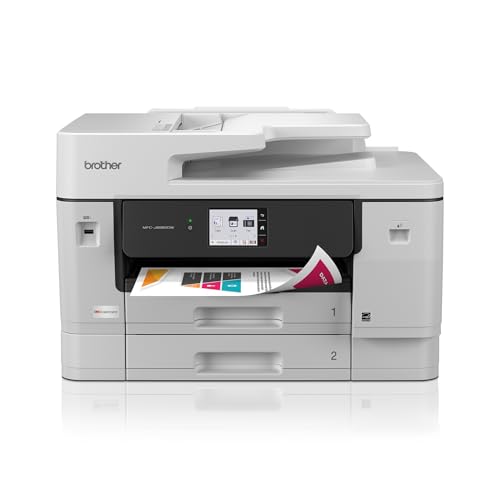
Brother INKvestment 6960 Wireless Color Inkjet All-in-One Printer (MFC-J6960DW) — The stated 11×17 flagship
The MFC-J6960DW leads this guide because its title does the one thing this keyword demands without being asked twice: it states 11×17 capability outright. Around that declaration sit the marks of Brother’s flagship small-office intent: wireless colour inkjet printing in an all-in-one body, a 3.5 inch colour touchscreen, and the INKvestment branding that signals the line’s high-capacity cartridge approach, with a Refresh subscription trial included in the box according to the title. For an office spending its week on ledger spreadsheets, plan markups and the ordinary letter traffic beneath them, this is the most completely evidenced machine in the list.
The touchscreen size is a more practical difference than it first appears. On an all-in-one, the screen is the control surface for copying, scanning destinations and network setup, and the larger panel turns those interactions from menu archaeology into direct manipulation. Staff who would never read a manual will still tap a clear screen, which means the machine’s deeper functions actually get used: scan-to-folder for oversize originals, copy scaling for poster work, and the wireless settings that keep the printer reachable from every desk.
The INKvestment angle deserves its own sentence, because ledger printing drinks ink differently from letter printing. A full-bleed 11×17 page carries roughly twice the area of a letter page, and colour coverage on plans and posters is denser than on memos. A cartridge system designed around capacity, with a subscription trial offered in the title, speaks directly to that arithmetic. The trial is an invitation rather than an obligation, yet its presence in the title tells a buyer the running-cost conversation is one Brother expects and courts.
There is a subtler flagship virtue worth naming: headroom as insurance. An office rarely knows its ledger volume in advance, because the first big printer creates its own demand, as the later section on office discovery describes. Buying the step with the larger panel and the line’s fullest feature set is a hedge against that discovery, priced once, whereas buying the leaner model and replacing it in year two is the same hedge priced twice. The hedge is not always worth taking, yet it should be taken or declined consciously.
What the title leaves unclaimed should temper the recommendation precisely. No feeder size, duplex behaviour or print speed is stated, so an office with ledger work arriving as thick scanned stacks should verify the feeder’s paper size in Brother’s documentation before treating this as the scanning answer as well as the printing one. As a printing answer, though, the evidence is complete: the size is stated, the class is flagship, and the controls are the largest in this guide.
- Paper size: 11×17 capability stated in the listing title
- Class: wireless colour inkjet all-in-one, per the listing title
- Display: 3.5 inch colour touchscreen, per the listing title
- Ink programme: Refresh subscription trial included, per the listing title
- Feeder paper size: Not stated in the listing title — verify with Brother documentation
- Duplex behaviour: Not stated in the listing title — verify with Brother documentation
Strengths
- The keyword’s core capability is declared outright, no verification gamble required.
- The largest touchscreen here makes copy and scan functions genuinely approachable.
- INKvestment positioning suits the heavier ink appetite of big colour pages.
Trade-offs
- Feeder and duplex specifics are unstated in the title and need confirming.
- Flagship positioning carries the line’s flagship price class.
- A subscription trial in the box asks for a decision some offices prefer to skip.
Best for: small offices printing 11×17 spreadsheets, plans and posters as a weekly routine. Not suited for: a print-only department with no use for scan or copy.

Brother INKvestment 6560 Wireless Color Inkjet All-in-One Printer (MFC-J6560DW) — The stated 11×17 value twin
The MFC-J6560DW is the same argument at a gentler step in the range, and its title mirrors its sibling’s almost clause for clause: wireless colour inkjet all-in-one, 11×17 capability stated in plain words, INKvestment branding, a Refresh trial in the box. The single visible demotion is the touchscreen, 2.7 inch against the flagship’s 3.5 inch. A buyer comparing the two is therefore spared the usual spec-sheet fog; the question reduces to how much the larger control panel is worth in daily use, and that is a question an office can actually answer from its own habits.
Think about who touches the machine. In an office where printing flows from computers and the panel is used mainly for the occasional copy, the smaller screen costs nothing that matters, and the money saved buys a great deal of 11×17 paper and ink. In an office where the all-in-one works as a walk-up copier for several staff, the flagship’s screen earns its premium in reduced fumbling. The print engine story, on title evidence, is shared: same stated size, same wireless all-in-one class, same ink programme invitation.
The same verification homework applies as well. Feeder capacity and size, duplex behaviour and speeds are absent from this title too, and the documentation check described in the buying guide below governs those details for both Brothers equally. What does not need checking is the point of the purchase: the 11×17 capability is declared, which puts this machine, like its sibling, in the proven core of the list rather than in the verify-first group. Value twins earn their name when the demotion is cosmetic, and on the evidence available, that is the story here.
- Paper size: 11×17 capability stated in the listing title
- Class: wireless colour inkjet all-in-one, per the listing title
- Display: 2.7 inch colour touchscreen, per the listing title
- Ink programme: Refresh subscription trial included, per the listing title
- Feeder paper size: Not stated in the listing title — verify with Brother documentation
- Print speed: Not stated in the listing title — verify with Brother documentation
Strengths
- Declared 11×17 capability at a step below the flagship’s position.
- The same INKvestment ink story suits big-page colour work.
- Wireless all-in-one coverage handles the office’s ordinary paper too.
Trade-offs
- The smaller touchscreen slows walk-up copying and setup tasks.
- Feeder and duplex details require the same documentation check as its sibling.
- Heavy panel users will feel the demotion every single day.
Best for: cost-conscious offices printing 11×17 from desks more than from the panel. Not suited for: a walk-up copying hub serving many staff.
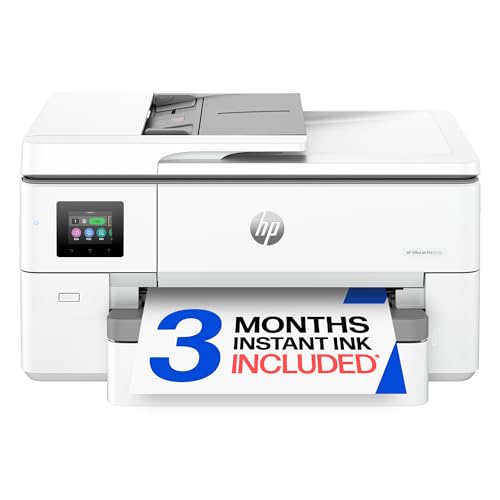
HP OfficeJet Pro 9720 Color Inkjet Printer — The unproven wide candidate
The OfficeJet Pro 9720 arrives in this guide under a cloud of productive suspicion, and its review exists to demonstrate how to handle exactly its situation. The title is full of respectable claims: colour inkjet printing, wireless connection, all-in-one functions spanning print, scan, copy and fax, mobile compatibility and the HP Smart App, aimed at office use. Read it three times and one absence persists: no paper size appears anywhere. Not 11×17, not wide-format, not A3. For a keyword defined entirely by a paper size, that silence is the loudest fact in the listing.
None of that makes the 9720 a bad printer. The OfficeJet Pro line is HP’s small-office backbone, and the functions the title does claim describe a complete document machine for letter and legal work. A buyer with only occasional ledger ambitions might rationally choose it as an excellent office printer and route the rare 11×17 job to a print shop. What the evidence cannot support is buying it as a ledger tabloid printer, because the defining capability is precisely the one the title omits.
The correct procedure is short and is spelled out in the buying guide: find the exact model’s specifications in HP’s own documentation, look for the maximum paper size line, and believe only that. If the documentation confirms 11×17, the 9720 becomes a legitimate contender with strong app-driven workflow. If it confirms a smaller ceiling, the machine’s presence in search results for this keyword is a cautionary tale about family names, since the OfficeJet Pro range spans several paper classes under one badge. Either way, the decision is made from documents, not from the badge’s reputation.
- Functions: print, scan, copy and fax, per the listing title
- Connectivity: wireless with mobile compatibility and HP Smart App, per the listing title
- Class: colour inkjet all-in-one for office use, per the listing title
- Paper size: Not stated in the listing title — verify with HP documentation
- Wide-format claim: Not stated in the listing title — verify with HP documentation
- Duplex behaviour: Not stated in the listing title — verify with HP documentation
Strengths
- A complete four-function office feature set is claimed and coherent.
- App-driven mobile printing suits offices that work from phones.
- The OfficeJet Pro line brings deep software and support infrastructure.
Trade-offs
- The keyword’s defining capability is unproven by the title.
- Buying on family reputation risks a smaller paper path than expected.
- Verification homework is mandatory before this pick can serve the purpose.
Best for: an office seeking a strong all-in-one first, willing to verify size before assigning ledger work. Not suited for: a purchase justified by 11×17 printing alone, made on the title alone.

HP OfficeJet Pro 9730 Wide-Format Wireless All-in-One Color Inkjet Printer — The stated 11×17 HP
The 9730 is what the 9720’s title forgot to be. This title leads with the words Wide-Format, then gets specific in the most useful place possible: up to 11×17 through the automatic document feeder, with duplex print and scan, across print, scan, copy and fax functions, and a three-month Instant Ink trial in the box. Every clause answers a question a ledger buyer actually asks, including the subtlest one, whether oversize originals can be scanned as well as printed. On this title’s evidence, the feeder accepts the big sheet, which makes the 9730 a two-way ledger machine: paper plans come in, marked-up plans go out.
Duplex behaviour at this size deserves emphasis, because two-sided ledger printing is where drafts, reports and bound-document proofs become economical. A twelve-page ledger report printed single-sided is a slab; duplexed, it is a document. Duplex scanning compounds the value for archives, since a stack of two-sided oversize originals digitises in one feeder pass instead of two, with the pages already in order. Offices digitising plan sets or ledger books will feel that difference in hours, not minutes.
The Instant Ink trial introduces the same decision the Brother titles raise, in HP’s dialect: a subscription ink service offered at the start of ownership. Ledger colour work consumes ink at a rate that makes such programmes worth modelling against the office’s real page mix, and the trial period is the honest way to gather that data. One more practical observation belongs to this machine: feeder scanning at 11×17 quietly changes what an office considers scannable. Bound ledger books still belong on a flatbed, yet the loose oversize world, plan sets, certificates, signed forms and poster proofs, moves through a feeder at something approaching letter-paper speed. Archives that were postponed for years because the scanning looked endless tend to get finished in the first quarter of owning a machine like this, and the finished archive then justifies the purchase in every later conversation about it.
Judged whole, the 9730 is the most completely specified pick in this guide, the one with a title leaving the least homework, and the natural HP answer to the Brother flagship.
- Paper size: wide-format with up to 11×17 stated in the listing title
- Feeder: up to 11×17 ADF stated in the listing title
- Duplex: duplex print and scan stated in the listing title
- Functions: print, scan, copy and fax, per the listing title
- Ink programme: 3 month trial of Instant Ink included, per the listing title
- Print speed: Not stated in the listing title — verify with HP documentation
Strengths
- Both directions of ledger work, printing and feeder scanning, are stated.
- Duplex print and scan suit reports and archive digitising at size.
- The most complete title evidence of any pick in this guide.
Trade-offs
- The Instant Ink trial asks for an early subscription decision.
- Speed figures are absent from the title for pace comparisons.
- Wide-format hardware carries a wide-format footprint.
Best for: offices scanning and printing 11×17 in both directions, including archives. Not suited for: a print-only workflow where scan features would sit idle.
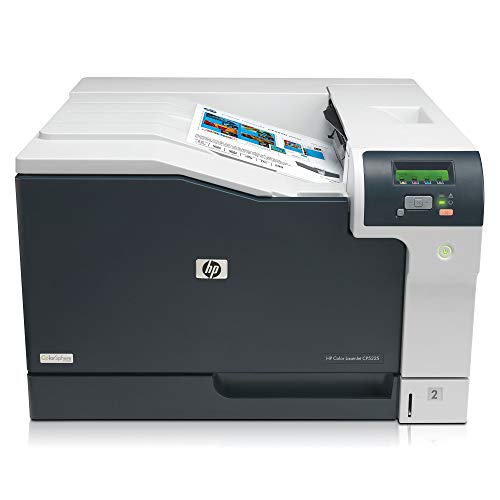
HP Color LaserJet Professional CP5225n — The colour laser route
The CP5225n changes the physics of the conversation. Every other pick here is an inkjet; this is a colour laser printer, and its title says so in the first three words, then adds the constraints with unusual candour: printer only, single function, for office colour documents. No scanner pretends to exist, no feeder is implied, and, conspicuously for this guide, no paper size is mentioned. The CP5225 series is known in the market as a large-format line, yet the standing rule of this guide is that titles, not reputations, confer capabilities, so the spec box records the size as not stated and the verification section below applies to this machine with full force.
What laser brings to ledger work, once size is verified, is a distinct set of virtues. Toner output is crisp, dry and indifferent to the water splashes and coffee rings of a working office; a plan printed on the CP5225n can be marked up in pencil, rained on lightly at a site visit and read a year later without the ink migration inkjet pages risk. Toner also waits patiently: a laser can sit idle for a month and print perfectly on demand, where inkjets punish neglect with clogged heads. For a department printing big colour pages in bursts, a tender package this month and nothing until the next, that temperament is worth real money.
The costs of the laser route are the mirror image. A single-function machine means the office’s scanning and copying live elsewhere, purchase and per-page economics follow toner logic rather than ink logic, and a colour laser of this class is a substantial, heavy object that chooses its location once and keeps it. An office that scans oversize originals daily should look at the 9730; an office that only ever prints them, in bursts, with long silences between, should verify this machine’s paper ceiling and then take its laser virtues seriously.
- Class: colour laser printer, per the listing title
- Functions: printer only, single function, per the listing title
- Audience: office colour documents, per the listing title
- Paper size: Not stated in the listing title — verify with HP documentation
- Scan and copy: not offered; this is a print-only machine
- Network connection: the n suffix suggests networking; confirm details with HP documentation
Strengths
- Laser output survives handling, marking-up and site conditions.
- Toner tolerates idle months that would clog an inkjet.
- Single-function focus suits departments with separate scanning.
Trade-offs
- Paper size is unproven by the title, so verification is mandatory.
- No scan or copy exists for offices seeking an all-in-one.
- Colour laser hardware is heavy and commits to its location.
Best for: print-only departments producing durable colour documents in bursts, after size verification. Not suited for: any workflow that scans or copies oversize originals.

Epson Workforce WF-7720 Wireless Wide-Format Color Inkjet Printer — The wide-format all-rounder
Epson’s WF-7720 closes the list wearing its category in its name: Wireless Wide-Format Colour Inkjet Printer, with copy, scan and fax, Wi-Fi Direct and Ethernet, and a nod to Amazon Dash Replenishment in the title’s tail. The wide-format declaration places it in the 11×17 class by the market’s standard vocabulary, the same class language the HP 9730 makes dimensional, so this review treats it as a ledger-class machine while noting that the title offers the class claim rather than the explicit dimension the Brothers and the 9730 provide.
Connectivity is where this title out-argues every rival in the guide. Wireless covers the ordinary office, Ethernet covers the fixed installation, and Wi-Fi Direct covers the awkward cases the other two miss: a guest laptop, a site office without infrastructure, a phone printing directly to the machine with no network in between. Ledger work often arrives from outside the building, a consultant’s plan, a contractor’s revision, an inspector’s form, and a printer that can accept a job from a stranger’s device without an IT ticket earns genuine operational value.
The WorkForce line’s office intent shows in the full function set: the big page can be printed, copied at size for a second markup set, scanned back for the record and faxed where faxing survives. The Dash Replenishment mention dates the listing’s era and signals an ink-replenishment programme, a detail to check against current availability rather than to rely on. As the connection-rich, function-complete ledger all-rounder, the WF-7720 is the pick that asks the fewest compromises of a mixed office, provided its class-level size claim is confirmed against Epson’s documentation in the same verification pass this guide recommends for every machine.
- Paper class: wide-format stated in the listing title; exact maximum dimension to confirm with Epson documentation
- Functions: print with copy, scan and fax, per the listing title
- Connectivity: wireless, Wi-Fi Direct and Ethernet, per the listing title
- Class: WorkForce colour inkjet for office use, per the listing title
- Feeder paper size: Not stated in the listing title — verify with Epson documentation
- Duplex behaviour: Not stated in the listing title — verify with Epson documentation
Strengths
- The richest connection set here, including direct device printing.
- Full four-function coverage at wide-format class.
- Ethernet plus wireless suits both fixed and flexible offices.
Trade-offs
- Size evidence is class-level rather than an explicit 11×17 statement.
- Feeder and duplex specifics are unstated in the title.
- The replenishment programme named in the title needs a current-status check.
Best for: mixed offices receiving big-page work from many devices and visitors. Not suited for: a buyer requiring explicit dimensional proof from the listing alone.
Proof, Class Claims and Silence: the Six Titles Compared
| Pick | Size evidence in title | Engine | Functions | Notable extra |
|---|---|---|---|---|
| Brother MFC-J6960DW | 11×17 stated | Inkjet | All-in-one | 3.5 inch touchscreen |
| Brother MFC-J6560DW | 11×17 stated | Inkjet | All-in-one | 2.7 inch touchscreen |
| HP OfficeJet Pro 9720 | Not stated | Inkjet | Print, scan, copy, fax | HP Smart App |
| HP OfficeJet Pro 9730 | 11×17 stated, feeder included | Inkjet | Print, scan, copy, fax | Duplex print and scan |
| HP CP5225n | Not stated | Colour laser | Print only | Single-function focus |
| Epson WF-7720 | Wide-format class stated | Inkjet | Print, copy, scan, fax | Wi-Fi Direct plus Ethernet |
The first column is the guide in one view. Three titles prove the size outright, one proves the class, and two stay silent, and a rational shortlist sorts itself in exactly that order before any other feature is allowed to speak.
What Should You Verify Before Buying Ledger Tabloid Printers?
Verification starts with the maximum paper size, hunted in the manufacturer’s specification for the exact model, not in the family brochure. The line to find states the largest sheet the paper path accepts, and it should be read alongside a second line buyers routinely miss: the maximum scan size, which on all-in-ones is often smaller than the print size. The HP 9730’s title settles both at 11×17; most other models settle one or neither in their titles, which is why the documentation pass exists.
The second check is the paper path itself. Some wide machines print their largest size only from a rear manual feed, one sheet at a time, while the cassette tops out smaller. For a poster a month, that is fine; for a weekly run of fifty ledger reports, it is a staffing decision disguised as a specification. The spec sheet’s tray-by-tray size table answers the question precisely, and five minutes with it prevents the commonest ledger disappointment of all.
The third check is the supply shelf. An 11×17 printer consumes 11×17 paper, which local shops stock thinly, and ink or toner at roughly double the letter rate per page. Confirming that paper and cartridges are orderable in the quantities the office actually uses, before the machine arrives, converts the first month from a scavenger hunt into a routine. Storage matters too: a ream of ledger paper is an awkward object that wants a flat shelf of its own.
A fifth check, cheap and decisive, is the return window arithmetic. Wide printers are heavy, freight is unforgiving, and a wrong-size discovery made in week one is a nuisance while the same discovery made in week six is a loss. Scheduling the verification and the test print inside the first days of ownership, rather than at the first real deadline, keeps every option open at the moment the options are worth most. The deadline will arrive soon enough; the machine should be proven before it does.
The final check is the desk. Wide-format printers are wide, their output trays extend further, and their lids open over a larger footprint. Measuring the intended home, including the space a printed 11×17 sheet needs to land, sounds trivial until a machine arrives that fits its shelf only with the output support hanging over the edge, shedding finished plans onto the floor.
How Do You Set Up a Ledger Printer for Its First Big Job?
Setup begins with the paper, loaded in the tray that the documentation assigns to the size, with the guides snugged to the stack. Ledger paper misfeeds dramatically when the guides float, because a large sheet has more leverage to skew, and a skewed 11×17 print wastes twice the paper of a skewed letter page. The first job should therefore be a single test sheet of the real document, checked for margins, scaling and the orientation trap: ledger against tabloid feeding can rotate a layout ninety degrees, and the test sheet is where that surprise belongs.
Software settings come next, and they outnumber the hardware ones. The application must be told the paper size, the driver must agree, and the printer’s own default should be set to the office’s everyday size so the big jobs are the deliberate exception. Saving the ledger configuration as a named preset, in the driver and in the spreadsheet or CAD application alike, converts every future big job into a two-click act and removes the monthly archaeology of rediscovering which dialogue box held the setting.
Colour and quality settings deserve one experiment each. A plan printed in a draft mode can drop the fine lines that carry the information, while a spreadsheet in maximum quality drinks ink for no visible gain. One test of each document type, labelled and filed, becomes the office standard. The filing habit matters beyond this machine: big-paper settings are rediscovered painfully in every office that trusts memory instead of a labelled sheet in a drawer.
Which Mistakes Waste the Most Ledger Paper?
The champion mistake is scaling blindness: sending a letter-designed document to 11×17 paper and receiving a giant memo, or sending a ledger-designed spreadsheet at letter size and receiving confetti. The paper size lives in three places, application, driver and tray, and a mismatch among any two produces one of those outcomes. The preset discipline in the setup section exists to kill this mistake permanently.
The second mistake is buying on badge, covered in the 9720 and CP5225n reviews and worth restating as a rule: a model family’s largest member defines the family’s reputation, not its median capability. The third is neglecting scan size, discovering after purchase that the new all-in-one prints the archive’s ledger pages beautifully and cannot digitise a single one because its feeder tops out at legal. The fourth is paper storage in a damp or sunlit spot, which curls large sheets into feed problems that masquerade as mechanical faults.
The fifth mistake is economic amnesia: costing the machine and forgetting that every big page carries big-page consumables. Offices that model the first year honestly, machine plus paper plus ink or toner at real volumes, choose well between the inkjet all-in-ones and the laser. Offices that model only the purchase price often choose twice.
What Does Ledger Size Do to Running Costs and Paper Logistics?
The arithmetic is simple and unforgiving. An 11×17 page has twice the area of a letter page, so paper cost per sheet rises, ink or toner coverage per page roughly doubles on comparable content, and a ream contains the same count of much heavier sheets. None of this makes ledger printing expensive in context: one ledger spreadsheet replaces two taped letter pages and an hour of squinting, and one plan set printed in-house replaces a print-shop run and a day of waiting. The size pays for itself in the work it consolidates, provided the office prints documents that genuinely need the room.
Logistics follow the arithmetic. Paper arrives in larger, heavier cartons and stores awkwardly; finished ledger documents need larger folders, tubes or flat files, and they mail in larger envelopes at larger rates. Filing cabinets sized for letter work reject them, which is why ledger-heavy offices develop flat storage early. The printer purchase is the visible decision; the shelf, the folders and the storage shelf are its quiet entourage, and budgeting for them in the same conversation keeps the first month dignified.
How Do a School, a Studio and a Site Office Each Use the Big Page?
The school office prints for walls and assemblies: posters announcing the fair, certificates at a size that feels like an honour, music and art reproductions a class can gather around, and the term calendar that must be readable from a corridor. Its ledger printer works in bursts around the school year’s rhythm, long silences and sudden festivals, which argues for the inkjet all-in-ones’ versatility and warns about idle-inkjet maintenance during the summer break. A weekly test page during holidays is the cheapest insurance a school can buy its September.
The studio prints for judgement. A layout proofed at 11×17 is the first moment a design is seen at something like its final scale, when type sizes stop being theoretical and margins confess their true proportions. Colour behaviour matters more here than raw throughput, and the proofing printer’s consistency across a project matters more than its best single page. Studios also scan at size, client artwork, reference boards and signed approvals returning to the record, which pushes the choice toward machines with proven feeder or flatbed capacity at the full sheet.
The site office prints for coordination. Drawings marked up in the morning meeting, revised by noon and reprinted for the afternoon crew live a fast, disposable life where legibility and speed outrank beauty, and where a printer’s tolerance for dust, knocks and indifferent paper handling is the specification that decides its lifespan. The laser’s durability argument lands hardest in this world, once its paper ceiling is proven, while the all-in-ones answer where the site office doubles as the project’s scanning station.
What Happens When the Whole Office Discovers the Ledger Printer?
Every shared big printer follows the same social arc. In month one it is the accounts team’s spreadsheet machine, used twice a week and respected. In month two, marketing discovers posters, facilities discovers signage, and the queue acquires politics. The machine that was bought for one department’s reports becomes the office’s general large-format utility, and its ink, paper and maintenance suddenly serve five masters with five budgets.
Wise offices plan for the arc rather than resenting it. Paper stock expands to include a poster weight alongside the report weight, stored labelled and separate. A simple booking habit, even a shared calendar slot for long runs, prevents the tender deadline from colliding with the bake-sale banner. Cost allocation, however informal, keeps the department that funded the machine from subsidising the whole building’s colour work, and the running-cost section above supplies the arithmetic for that conversation.
The arc also changes the replacement calculus. A machine bought for one workload and adopted by five wears at five times the expected rate, and its successor should be specified for the adopted reality rather than the original brief. The six picks here span enough capacity and temperament range that the second purchase, informed by a year of queue politics, is usually the easiest equipment decision the office makes.
How Should Oversize Originals Be Handled Into an Archive?
Digitising ledger originals rewards method over enthusiasm. The first decision is resolution and format discipline: a consistent setting across the whole archive, high enough to preserve fine print and handwriting, stored in a format the organisation can still open in a decade. Mixed archives, each batch scanned at a different whim, become unsearchable in practice even when every file survives, because nobody trusts what a given folder’s quality means.
The second decision is naming at the moment of scanning, while the original is still in hand and its identity is certain. A file named for its content, date and source can be found by a stranger; a file named by a scanner’s counter can be found by nobody. The feeder-equipped picks make the mechanics fast, yet the naming discipline is human, and the archive’s long-term value is set by the discipline rather than by the feeder.
The third decision concerns the originals after scanning. Some must be kept, legally or sentimentally, and flat, dry, labelled storage protects them better than the rolled tube in the corner that slowly becomes permanent. Others can be recycled once the digital copy is verified, and verification means opening the file, not trusting the scanner’s success message. A ledger archive built on those three decisions outlives the printer that created it, which is the correct ambition for anything called an archive.
How Does Ledger Printing Change Document Design Habits?
A bigger page tempts bigger thinking, and offices that adopt ledger printing well redesign their recurring documents rather than merely enlarging them. The monthly report that was four cramped letter pages becomes one ledger sheet with the summary, the table and the chart in a single field of view, readable in a meeting without page-turning. The rota that was a shrug of tiny type becomes a wall document a whole shift can read at once. The price list that needed a magnifier becomes a counter document customers can actually use.
The redesign discipline runs the other way as well. Documents destined for both paper and screen should be designed at ledger size with the screen version derived, because shrinking a generous layout preserves legibility while enlarging a cramped one preserves only the cramp. Templates, once rebuilt, should be saved as the office standard beside the driver presets from the setup section, so the big versions survive the departure of whoever first designed them.
There is a filing consequence worth one sentence of foresight: a redesigned document family creates a two-size archive, and the folders, labels and storage from the logistics section should be planned for the documents the office will actually produce in year two, not merely the ones it produces in week one.
What Should the First Month of Ownership Establish?
The first month should end with four artefacts in a drawer and one habit in the calendar. The artefacts are a labelled test sheet for each recurring document type, the driver preset names written down where a substitute operator can find them, the paper and ink reorder points decided before the first empty-tray surprise, and the verification notes for the exact model, maximum print size, maximum scan size and tray assignments, recorded once while the documentation is still open. The habit is a monthly ten-minute review: pages printed at size, consumables consumed, jams and their causes, and any document family that has quietly migrated to the big page without a template.
That modest ceremony converts a wide printer from a novelty into infrastructure. Offices that run it discover their real ledger volume within a quarter, which settles every argument the purchase began with, about whether the size was needed, which department uses it most, and whether the next machine should climb toward a laser or stay with ink. Offices that skip it re-litigate those arguments from anecdote at every reorder, which is a slower and more expensive way to learn the same numbers.
Final Recommendation
Buy on proof, then on temperament. For an all-in-one that states the size and adds the richest walk-up controls, the Brother MFC-J6960DW leads, with the MFC-J6560DW delivering the same declared capability a step down for desk-led offices. For two-way ledger work with duplex scanning of oversize originals, the HP OfficeJet Pro 9730 holds the strongest title evidence in the guide. For connection-rich mixed offices, the Epson WF-7720 answers, on a class-level size claim worth one documentation check. The HP 9720 and CP5225n should be bought only after their paper ceilings are proven in HP’s own documents, the laser then becoming a serious print-only contender. A ledger printer earns its floor space on the largest page it can truly handle, and the offices that verify that page first, in documents rather than in hope, are the ones still praising the purchase a year later, long after the spreadsheet that started the search has been replaced by a dozen bigger ideas.
Frequently Asked Questions
Are ledger and tabloid the same paper?
Yes, in substance: both names describe the 11×17 inch sheet. Ledger traditionally means the sheet fed long-edge first, tabloid short-edge first, and the printer’s paper path decides which term its manual uses. The international near-equivalent is A3, close in size but not identical, so templates should be checked when switching between them.
Can these printers also print normal letter paper?
Yes. Wide-format and 11×17 machines handle letter and legal sizes as their everyday work; the big sheet is the additional capability, not a replacement for ordinary printing, correspondence, invoices or the daily paper traffic of any functioning office anywhere. Tray configuration decides which size is loaded where, and most offices dedicate one tray to each of their two working sizes.
Why do two picks in this guide not state 11×17?
Because their listing titles omit paper size entirely, and this guide reports titles rather than borrowing specifications from sibling models. The HP 9720 and the CP5225n are included because searches for this keyword surface them constantly; their reviews explain the documentation check that settles their true ceilings before purchase.
Is an inkjet or a laser better for ledger printing?
The answer follows the workload’s rhythm. Inkjets here add scanning, copying and faxing, and suit steady mixed use. The colour laser prints only, yet offers durable toner output and patience with idle months, suiting bursty print-only departments. Size capability must be proven for either before the temperament question matters.
What paper should I stock for a ledger printer?
11×17 paper in the weight matched to the work: ordinary office weight for spreadsheets and reports, heavier stock for posters and covers, within the printer’s documented limits. Buy it from a reliable source in carton quantities once volumes are known, since local shelves stock the size thinly and a deadline, with a meeting gathering and a director waiting, is entirely the wrong time to discover that the last ream was used for the noticeboard.
Do ledger printers need special trays or paper handling?
They need a paper path rated for the size, which the better machines provide through their main cassettes and some provide only through a rear feed. The tray-by-tray size table in the manufacturer’s documentation is the authority, and it should be checked against the office’s real pattern: occasional single sheets tolerate a rear feed that weekly runs would find exhausting.
Can a ledger printer print banners or longer sheets?
None of the six titles here claims banner or panoramic lengths, so this guide makes no such claim for any pick. A workflow built around long banners belongs to a different machine search, and assuming the capability from a wide paper path is exactly the kind of inference the verification sections warn against.
Related Guides
Ledger printing usually joins a wider office upgrade, and the neighbouring choices are covered in our guides to the best wide format printers for plans and posters, the best all-in-one printers for small offices and the best laser printers for document-heavy teams.