What's inside
- Key Takeaways
- Quick Picks
- How Did We Judge Machines for People Who Type for a Living?
- Why Does the Keyboard Outrank Every Other Specification?
- Six Writing Machines, One Question of Habits
- How Do You Protect a Manuscript on an Inexpensive Laptop?
- What Does a Distraction-Free Writing Setup Actually Require?
- Which Mistakes Do Writers Make When Buying a Cheap Laptop?
- How Should a Writer Test a Keyboard During the Returns Window?
- What Role Can Dictation Play on a Modest Laptop?
- How Do Writing Applications Change the Hardware Question?
- What Does the Travelling Writer Need That the Desk Writer Does Not?
- How Long Will an Inexpensive Writing Laptop Stay Pleasant?
- What About the Writer’s Eyes During a Decade of Drafts?
- How Should a Writing Group or Course Equip Several Writers at Once?
- Why the External Keyboard and the Raised Screen Redeem Almost Any Pick Here
- A Closing Word on Price, Patience and the Unwritten Book
- Final Recommendation
- Frequently Asked Questions
- Related Guides
As an Amazon Associate I earn from qualifying purchases. This post may contain affiliate links at no extra cost to you.
gizmoverdict.com is reader-supported. When you buy through links on our site, we may earn an affiliate commission.
Where to buy: A writer’s laptop is bought by the fingers as much as by the wallet, so order from the linked listing, type your thousand test words during the returns window, and let your hands cast the deciding vote.
The best inexpensive laptops for writers succeed at a job most laptop marketing never mentions: disappearing. A writing machine should fade beneath the work until there is only the sentence and the blinking cursor, and its virtues are therefore the quiet ones — a keyboard that never makes the fingers negotiate, a screen that stays kind through a long chapter, a battery philosophy that survives a cafe afternoon, and a price that leaves the writer’s limited funds available for the radical idea of buying books. Raw performance barely features, because word processors are among the lightest software ever written, and every machine in this guide is comically overqualified for the act of typing itself.
What separates the six below is everything surrounding the typing. Memory decides how gracefully the research browser, the notes archive and the manuscript coexist. Storage decides whether a decade of drafts lives on the machine or in a state of permanent eviction. The screen’s resolution decides whether the page looks like paper or like a photocopy of paper — a distinction one pick in this guide, carrying an HD rather than full HD panel, forces its buyer to confront honestly. And one pick ships in Windows S Mode, a restriction that matters enormously to writers who rely on particular desktop software, and which its review explains in plain terms.
The word inexpensive deserves its own honesty. These are real laptops at the gentle end of the market, not word processors carved from netbook nostalgia, and their compromises are the considered kind: older or humbler processors that writing will never stress, memory figures that reward tidy habits, and build quality that asks for a sleeve and some respect. A writer who understands those trades gets a tool that can draft a novel, file journalism for years and never once make the work about the machine.
Key Takeaways
- The keyboard is the product; every other specification in this guide is supporting cast for the writer’s hands.
- Sixteen gigabytes in the IdeaPad Slim 3 and Inspiron 3530 buys the research-and-manuscript multitasking writers actually do.
- The HP pick’s screen is HD rather than full HD — fine for drafts at its price, but text will never look paper-crisp on it.
- The Aspire Go 15 ships in Windows 11 S Mode; confirm your writing software lives in the Microsoft Store or plan the free switch out of S Mode.
- No battery-hour figures are quoted here beyond what listings state, because writing days vary more than test cycles do.
- Back up the manuscript in two places from the first chapter; the cheapest laptop is expensive if it takes a novel with it.
Quick Picks
| Pick | Badge | Why it is here |
|---|---|---|
| Lenovo IdeaPad Slim 3 | Best overall | Sixteen gigabytes, a Ryzen 7 and a touchscreen over a full HD panel — the most complete writing specification at this level. |
| Acer Aspire 5 | Best value keyboard deck | The backlit keyboard and full HD IPS screen that made this line a budget-writing staple for years. |
| Dell Inspiron 3530 | Best touchscreen option | Intel pace, sixteen gigabytes and touch for the writer who annotates drafts directly on the page. |
| ASUS Vivobook 15 | Best basic pick | An uncomplicated modern machine for the writer who wants the fewest possible decisions between box and first chapter. |
| HP 15.6 (Ryzen 3 7320U) | Best budget pick | HP’s gentlest-priced route to a full-size writing desk, with the HD screen compromise stated plainly. |
| Acer Aspire Go 15 | Cheapest route in | The lowest-cost full Windows laptop here, with an S Mode caveat every software-loyal writer must read first. |
How Did We Judge Machines for People Who Type for a Living?
The keyboard came first, judged on the evidence listings and model reputations provide: key travel and deck stability cannot be measured from a product page, so this guide credits the lines with established typing pedigrees — the Aspire and IdeaPad decks are known quantities among budget writers — and advises every buyer to run the thousand-word test described later, because hands disagree and returns windows exist for exactly this disagreement. Backlighting earned explicit credit where fitted, since writers keep unsocial hours and a dark room should not end a chapter.
The screen was judged as a reading surface. Full HD resolution at fifteen inches renders text with the crispness long sessions reward, and the guide marks down the one HD panel accordingly while acknowledging its price logic. Touchscreens were treated as annotation tools rather than typing features — valuable to editors of their own drafts, irrelevant to writers who never lift their hands from the keys — and matte versus glossy character was weighed for the cafe-and-library circuit where writers actually work.
Performance was deliberately demoted. Every processor here, down to the humblest Core 3, runs word processors, browsers and reference libraries without strain, so the judging spent its attention on memory and storage instead: sixteen gigabytes for the research-heavy workflow, eight as a workable floor with tidier habits, and storage judged against the reality that manuscripts are tiny but a writer’s library of PDFs, interviews and photographs is not. Battery claims were handled with suspicion throughout — endurance is described qualitatively, as the listings’ own framing allows, rather than decorated with invented hours.
Value was the final lens, and it cuts two ways. The cheapest machine that frustrates daily is expensive; the dearest machine in this guide is still firmly inexpensive by laptop standards. The ranking therefore rewards the configurations that remove friction — memory, screen clarity, a proper keyboard — over those that merely remove cost.
Why Does the Keyboard Outrank Every Other Specification?
A writer’s relationship with a keyboard is closer than a driver’s with a steering wheel. Thousands of keystrokes a day pass through a mechanism the conscious mind should never notice, and when it does notice — a flexing deck, a cramped right shift key, a space bar that misses when struck at its edge — the noticing interrupts the only thing the machine exists to serve. Experienced writers develop fierce, specific loyalties about key feel that read as superstition to outsiders and are in fact ergonomics learned at the level of the tendon.
The practical consequences for buying are concrete. A number pad, fitted to most fifteen-inch decks here, delights writers who log word counts and expenses and merely occupies space for those who do not. Key backlighting matters at the hours writing actually happens. And the deck’s stability — whether the centre of the keyboard trampolines under enthusiastic typing — separates machines that feel like instruments from machines that feel like packaging. None of this is visible in a specification table, which is why this guide keeps returning to the test that reveals it: sit down, open a document, and type a thousand real words before the returns window closes.
There is a consolation for the disappointed: an external keyboard transforms any of these laptops at a desk, and many writers prefer that arrangement permanently, with the laptop raised as a screen. A mediocre built-in keyboard is a flaw for the travelling writer and a footnote for the desk writer, and knowing which writer you are should steer the weight you give this entire section.

Lenovo IdeaPad Slim 3 — Best overall
The IdeaPad Slim 3 leads this guide by being the least compromised inexpensive laptop a writer can buy. Its Ryzen 7 5825U is an eight-core processor with power a word processor will never request, which is precisely the point: the machine’s headroom is spent on everything around the writing — the research browser with its forty tabs, the reference library, the interview recordings waiting to be transcribed, the video call with an editor. Sixteen gigabytes of memory keep that whole ecosystem resident at once, and half a terabyte of storage gives a decade of drafts a home with room for the photograph archive besides.
The fifteen-point-six-inch full HD screen is a touchscreen, which divides writers and should be chosen knowingly. For the annotator — the writer who reads drafts like an editor, finger on the sentence that limps — touch is a genuine instrument. For the pure typist it is harmless glass. Either way the resolution renders text at the crispness long sessions deserve, and Lenovo’s keyboard decks in this line have a settled reputation for comfortable, unremarkable typing, which is the highest compliment a writing keyboard can receive.
Small honest notes complete the picture. The camera is a 720p unit, adequate for calls with editors and writing groups rather than flattering, and the DDR4 memory is the previous generation’s standard — a distinction word processing will never detect. Neither matters to the manuscript. What matters is that this is the pick a writer can buy, open and forget, and forgetting the machine is the entire ambition.
- Processor: AMD Ryzen 7 5825U, eight cores
- Memory and storage: 16GB DDR4 and 512GB drive
- Display: 15.6-inch full HD touchscreen
- Camera: 720p HD webcam
- Connectivity: Wi-Fi 6 and Bluetooth 5.2
Strengths
- Most memory and processing headroom in this roundup
- Full HD touch panel suits draft annotation
- Storage figure ends the eviction cycle for archives
Trade-offs
- Touch glass adds reflections in bright cafes
- Webcam is serviceable rather than impressive
- DDR4 memory is last generation’s standard, harmlessly
Best for: the working writer whose research, interviews and drafts all live on one machine.
Not suited for: ultralight travellers — this is a full-size desk-and-bag machine, not a slip of a thing.
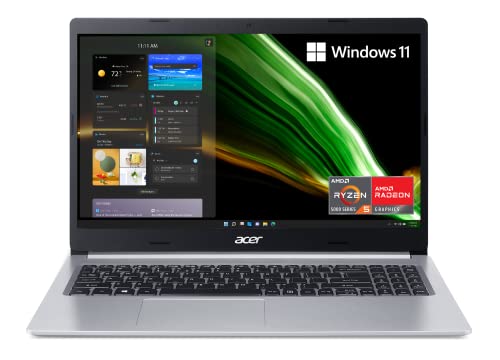
Acer Aspire 5 — Best value keyboard deck
The Aspire 5 is the budget laptop that writing forums have recommended to each other for years, and its virtues are the writerly ones: a backlit keyboard on a stable deck, a full HD IPS screen that renders a page cleanly from any chair angle, and a Ryzen 5 5500U whose six cores handle the writing life without ever becoming the story. Acer has refined this formula across so many generations that its compromises are known, priced and forgiven — which is a more valuable property in a tool than novelty.
The figures that ask for management are memory and storage: eight gigabytes and two hundred and fifty-six gigabytes. A writer whose workflow is a word processor, a notes application and a disciplined browser will live inside those figures contentedly for years. A writer who hoards research tabs and keeps a photographic archive should either choose the IdeaPad above or accept the external-drive habit. Manuscripts themselves are weightless; it is the research around them that eats the disk, and honesty about one’s own hoarding is the whole of the law here.
Everything else about the Aspire is the absence of drama: Wi-Fi 6, a Windows 11 Home installation unencumbered by modes or restrictions, and a design that disappears into any library or cafe without announcing its price. For the writer whose budget must also cover the course, the contest entries or the months between advances, this is the machine that respects the arithmetic while respecting the work.
- Processor: AMD Ryzen 5 5500U, six cores
- Memory and storage: 8GB DDR4, 256GB NVMe drive
- Display: 15.6-inch full HD IPS
- Keyboard: Backlit deck — the pick’s defining feature
- Model reference: A515-45-R74Z
Strengths
- Backlit, stable keyboard deck at a gentle price
- IPS panel keeps text honest from awkward angles
- Generations of refinement mean no surprises
Trade-offs
- Eight gigabytes rewards tidy browsing habits
- Storage is the second-tightest in this guide
- Design is anonymous to the point of invisibility
Best for: the night-writing novelist or journalist whose fingers do the buying.
Not suited for: research hoarders — the IdeaPad’s memory and storage were made for them.

Dell Inspiron 3530 — Best touchscreen option
Dell’s Inspiron 3530 is the Intel-flavoured twin of the IdeaPad’s argument: sixteen gigabytes of memory, half a terabyte of storage, a fifteen-point-six-inch full HD touchscreen and a Core i5-1335U that gives the writing ecosystem brisk, quiet service. Writers whose software history or peripheral habits lean Intel will find the same friction-free proposition here, delivered by the brand whose support network reaches the most places when a student or freelancer far from home needs help.
The touchscreen earns its keep in the editing phase rather than the drafting phase. Reading a chapter on screen with a finger or stylus standing in for the red pen — circling the limp paragraph, dragging the misplaced scene — engages a different editorial brain than the keyboard does, and many writers swear their structural edits improved when the draft became touchable. The Iris Xe graphics, meanwhile, are irrelevant to prose and perfectly adequate for the photograph handling and video calls that surround it.
Carbon Black finish and mainstream Inspiron manners complete a machine designed to be unremarkable in the best sense. Its premium over the Aspire buys the memory and storage headroom outright, which for the research-heavy writer is the correct trade; its cost against the IdeaPad is a matter of platform taste and the day’s listing. Either way, this is a configuration a writer can defend in any company.
- Processor: Intel Core i5-1335U
- Memory and storage: 16GB DDR4 and 512GB drive
- Display: 15.6-inch full HD touchscreen
- Graphics: Intel Iris Xe integrated
- Finish: Carbon Black
Strengths
- Sixteen gigabytes and touchscreen in one configuration
- Dell support reach comforts writers far from home
- Intel platform suits long-standing software habits
Trade-offs
- Touch layer is wasted on writers who never annotate by hand
- Mainstream styling prioritises function throughout
- Price sits above the Aspire’s keyboard-first value
Best for: the self-editing writer who marks drafts on the glass and researches heavily.
Not suited for: pure typists — the Aspire delivers their needs for less.

ASUS Vivobook 15 — Best basic pick
The Vivobook 15 is the guide’s argument for simplicity. A Core 3 100U processor, eight gigabytes of memory and two hundred and fifty-six gigabytes of storage behind a fifteen-point-six-inch full HD screen: there is nothing here a writer does not need and nothing missing that a writer will miss in the first years. ASUS’s Vivobook line aims its polish at exactly this buyer — the student, the new freelancer, the diarist going digital — and the Cool Silver machine looks like a more expensive decision than it is.
Its honesty lies in what the specification does not attempt. The Core 3 will not be editing films or compiling codebases, and it does not need to: it opens documents instantly, keeps a browser of research in order and runs every mainstream writing application with the indifference of a machine built for the task. Eight gigabytes is the figure to respect — this is a one-application-at-a-time temperament with a browser alongside, not a forty-tab research station — and the writer who knows their habits are modest will find the Vivobook’s modesty perfectly matched.
Consider it the clean-sheet purchase: no modes to escape, no touch layer to pay for unused, no legacy quirks to learn. For a writing group equipping several members, a school programme, or a first laptop bought to discover whether the writing life sticks, the Vivobook’s straightforwardness is a feature that specification tables cannot express. It simply starts, every morning, and waits for words.
- Processor: Intel Core 3 100U
- Memory and storage: 8GB memory, 256GB drive
- Display: 15.6-inch full HD
- Finish: Cool Silver
- Model reference: F1504VA-PS34
Strengths
- Full HD screen retained at a basic-pick price
- Clean, unrestricted Windows installation
- Presentable design that flatters any desk
Trade-offs
- Eight gigabytes sets a multitasking ceiling
- Processor is for writing, not for second careers
- Storage asks for a cloud-first filing habit
Best for: new writers, students and writing groups buying a straightforward first machine.
Not suited for: power researchers whose browser is a second manuscript.

HP 15.6 (Ryzen 3 7320U) — Best budget pick
HP’s entry makes the guide’s most visible compromise, and this review will not dress it up: its fifteen-point-six-inch touchscreen is an HD panel, not full HD. Text on it will look softer than on every other screen here, closer to newsprint than to a printed page, and a writer who reads drafts for hours daily should weigh that softness with clear eyes. What the compromise purchases is HP’s gentlest full-size price, a Ryzen 3 7320U that still outruns the act of writing itself, and a Natural Silver machine from a mainstream line with support in every city.
Context rehabilitates the pick more than sceptics expect. Drafting is not proofreading: the first-draft writer generating pages cares about the keyboard, the silence and the cursor, and many bestselling manuscripts were drafted on screens far worse than this one. The touchscreen adds the annotation option, eight gigabytes of memory and two hundred and fifty-six gigabytes of storage match the Aspire and Vivobook tier, and the writer who drafts here and proofreads on a printed page or a borrowed monitor has made a rational allocation rather than a mistake.
The buyer this machine does not suit is the one who will stare at its text rendering for six hours a day doing final editing, because that reader will feel the resolution gap in their eyes by evening. Everyone else — the student, the journal-keeper, the first-draft machine hunter — gets HP’s ecosystem and a full-size keyboard deck at the friendliest figure a major brand offers in this guide. Judge it as a drafting instrument and it is honestly priced; judge it as a proofreading instrument and the full HD picks exist to be chosen instead.
- Processor: AMD Ryzen 3 7320U
- Memory and storage: 8GB memory, 256GB drive
- Display: 15.6-inch HD touchscreen — note the resolution honestly
- Finish: Natural Silver
- Model reference: 15-fc0399nr
Strengths
- Friendliest full-size price from a mainstream maker
- Touch annotation available despite the budget posture
- Ryzen 3 pace is ample for every writing application
Trade-offs
- HD resolution softens text against full HD rivals
- Memory and storage sit at the guide’s floor tier
- Final-edit marathons will tire eyes sooner here
Best for: first-draft writers and students who proofread on paper or elsewhere.
Not suited for: full-time editors reading final text on this screen all day.

Acer Aspire Go 15 — Cheapest route in
The Aspire Go 15 is the least expensive genuine Windows laptop in this guide, and it arrives with the guide’s most important piece of fine print, so let it lead the review: this machine ships with Windows 11 Home in S Mode. S Mode permits only Microsoft Store applications, which is a perfectly workable world for writers who live in Word or the Store’s writing apps — and a locked door for writers devoted to desktop software installed from elsewhere, such as the traditional downloadable versions of specialist manuscript tools. Microsoft provides a free, one-way switch out of S Mode, and many owners will take it on day one; what matters is that the decision is made knowingly, because there is no switching back.
Past that gate, the machine’s honesty continues. A full HD IPS panel — better than the HP’s screen, remarkably — a Core 3 N355 processor, eight gigabytes of DDR5 and a modest one hundred and twenty-eight gigabytes of UFS storage describe a laptop for the writer whose work lives in documents and the cloud. That storage figure is the tightest here by a distance and effectively mandates cloud-first habits: the manuscript in synced storage, the archive elsewhere, the local disk kept as a workspace rather than a warehouse.
For the right writer, none of that is a hardship. The student whose essays live in a school account, the diarist, the blogger, the novelist who drafts in one application and backs up religiously — all receive a full-size, full HD, genuinely inexpensive machine whose compromises align with their habits. The Aspire Go is the guide’s reminder that the floor of the laptop market, chosen with open eyes, is a perfectly respectable place to write a book.
- Processor: Intel Core 3 N355
- Memory and storage: 8GB DDR5, 128GB UFS storage
- Display: 15.6-inch full HD IPS
- Operating system: Windows 11 Home in S Mode — read the review’s explanation before buying
- Model reference: AG15-32P-352Z
Strengths
- Lowest cost of entry to a full-size Windows writing machine
- Full HD IPS screen embarrasses the dearer HP on clarity
- Cloud-first design suits account-based student workflows
Trade-offs
- S Mode restricts software until the free one-way switch is taken
- 128GB storage is a workspace, never an archive
- Processor is the humblest here, adequate for prose alone
Best for: cloud-native writers and students whose software lives in the Store or the browser.
Not suited for: devotees of downloadable desktop writing software who refuse the S Mode switch on principle.
Six Writing Machines, One Question of Habits
| Pick | Memory / Storage | Screen | Keyboard note | Choose it when |
|---|---|---|---|---|
| IdeaPad Slim 3 | 16GB / 512GB | Full HD touch | Settled Lenovo deck | Research and drafts share one machine |
| Aspire 5 | 8GB / 256GB | Full HD IPS | Backlit — the deck to beat | Night typing dominates the schedule |
| Inspiron 3530 | 16GB / 512GB | Full HD touch | Mainstream Dell deck | Annotation and Intel loyalty combine |
| Vivobook 15 | 8GB / 256GB | Full HD | Straightforward ASUS deck | Simplicity is the whole requirement |
| HP 15.6 | 8GB / 256GB | HD touch | Full-size HP deck | Drafting matters, proofing happens elsewhere |
| Aspire Go 15 | 8GB / 128GB | Full HD IPS | Full-size Acer deck | Budget is absolute and the cloud is home |
The table’s lesson is that inexpensive writing laptops differ less in power than in which habit they forgive. The sixteen-gigabyte pair forgive research sprawl; the Aspire 5 forgives darkness; the Vivobook forgives indecision; the HP forgives a tight budget at the cost of text crispness; the Aspire Go forgives almost nothing except the price, and rewards the cloud-disciplined writer who needs no forgiveness. Identify your least reformable habit and buy the machine that has already forgiven it.
How Do You Protect a Manuscript on an Inexpensive Laptop?
The mathematics of writing loss are brutal: a novel represents a year of mornings, and its file weighs less than a photograph. Protection is therefore the highest-value habit in this entire guide, and it costs almost nothing. The rule is that the manuscript must exist in two places before the day’s writing ends — the laptop and a synced cloud folder, or the laptop and an external drive — with a third, versioned copy appearing weekly for work that matters. Every machine here runs the mainstream sync services happily, and the Aspire Go’s small disk makes the habit compulsory rather than optional, which some writers will find is its hidden virtue.
Version discipline matters as much as copies. Save dated milestones at every chapter’s completion, never overwrite the only copy of yesterday’s draft with today’s doubts, and let the cloud service’s version history be the safety net rather than the strategy. Writers lose more work to their own revisions than to hardware failure, and the cheap laptop is innocent of both crimes when its owner keeps versions like a professional. The machine is replaceable by definition — that is what inexpensive means — and the system around it should make that replaceability painless.
What Does a Distraction-Free Writing Setup Actually Require?
Less than the productivity industry claims. A full-screen writing application, notifications silenced at the operating-system level, the browser closed or quarantined to a separate workspace, and a phone in another room will outperform any specialised hardware ever sold. The laptops here all support that discipline equally, because distraction is a software and habit problem wearing a hardware costume. Writers who blame the machine for their wandering attention usually discover, on the new machine, that the attention wandered with them.
The physical half of the setup deserves the money the software half does not need. A chair that supports a long sit, the screen raised toward eye level, the keyboard at an elbow-friendly height and light that does not reflect off the panel — these decide whether a three-hour session ends in pages or in a headache. Touchscreen picks add glare to that calculation in bright rooms; the matte-leaning IPS machines forgive sloppy lighting. Spend on the chair before the specification, always, and let the inexpensive laptop be inexpensive in the company of a humane desk.
Which Mistakes Do Writers Make When Buying a Cheap Laptop?
The first is buying by processor, the specification writing needs least, while accepting a screen and keyboard the writer will suffer daily. The second is ignoring the S Mode question on machines that carry it, discovering the restriction at the moment a beloved application refuses to install. The third is treating storage as an afterthought and learning, a year in, that research archives and interview recordings have evicted the manuscript’s elbow room.
A subtler mistake is assuming inexpensive means disposable and skipping the backup and sleeve that make a cheap machine a durable one. And the most literary mistake is waiting — postponing the purchase until the perfect machine is affordable while the book goes unwritten on a dying one. Every laptop in this guide can draft a masterpiece; the historical record is unambiguous that masterpieces have been drafted on far worse. The correct inexpensive laptop is the one that arrives this month and disappears beneath the work.
How Should a Writer Test a Keyboard During the Returns Window?
Type the way you actually write, not the way typing tests perform. Draft a real scene or article of at least a thousand words, including dialogue punctuation, em dashes, the awkward reaches for brackets and quotes, and a passage typed at full speed when the thought is running hot. Notice the space bar’s behaviour at its edges, the right shift key’s size, whether the deck flexes under enthusiasm and whether the palm rests trigger the touchpad mid-sentence. Then type for twenty minutes in the dark if the deck is backlit, and for twenty minutes in bright window light to judge the screen’s reflections.
Repeat the test on the second day, because first impressions of keyboards are partly novelty. If the hands have stopped commenting by the end of day two, the keyboard has passed; if a specific irritation has acquired a name and a grudge, believe it and use the returns window without sentimentality. Writers keep laptops for years and type millions of words on them, and a small daily friction compounds like interest. The machines in this guide were chosen for decks with good reputations, but reputation is a population statistic and your hands are a sample of one.
What Role Can Dictation Play on a Modest Laptop?
Many writers draft by voice for part of the day — to outrun the inner editor, to rest injured hands, or to capture the rhythm of spoken storytelling — and the good news is that dictation is one of the lightest workloads a laptop carries. The microphones built into these machines suffice for quiet-room dictation into the operating system’s or the writing application’s speech tools, and the processors here transcribe at conversational pace without turning the exercise into a hardware event. The writer who dictates seriously will eventually add a headset microphone, which improves accuracy more than any computer upgrade could, because dictation quality is an audio problem long before it is a computing one.
The honest caveats are environmental. Dictation hates cafes, open-plan offices and houses with thin walls and sleeping children, and it produces a particular kind of messy first draft that demands an editing temperament. Writers curious about the method should trial it on the machine they already own before letting it influence a purchase, because the laptops in this guide are effectively interchangeable for voice work. What matters is the room, the microphone distance and the writer’s willingness to speak punctuation aloud like a radio operator from another century.
There is an accessibility dimension that deserves respect rather than a paragraph’s politeness. For writers whose hands, wrists or shoulders ration their typing, dictation plus a modest laptop is not a novelty but the whole practice, and the inexpensive machines here serve that practice honourably. A tool that keeps a writer writing is a professional instrument whatever its price, and the writing life has always been adapted by its practitioners to the bodies they have.
How Do Writing Applications Change the Hardware Question?
The software landscape splits writers into tribes, and the tribes have different hardware needs. The word-processor majority can live on any machine in this guide, in the cloud or out of it. The specialist-manuscript tribe — devoted to dedicated drafting environments with corkboards, compile pipelines and research folders inside the project — needs its chosen application to install and run happily, which is where the Aspire Go’s S Mode discussion becomes decisive and where sixteen gigabytes flatters the giant project file. The browser-native tribe, writing in cloud documents, should weight Wi-Fi reliability and battery manners above everything else in this article.
File-format thinking belongs in the same conversation. A writer’s archive will outlive several laptops and possibly several applications, so the work should live in formats that travel — the mainstream document standards and plain-text exports — with the application’s own project files treated as working copies rather than as the archive itself. Every machine here handles those formats identically, which liberates the buyer: choose the laptop for hands, eyes and habits, and let the archive strategy, set once and kept forever, guarantee that no future machine change can hold the backlist hostage.
Sync behaviour is the final software variable. Writers who move between a desk and a cafe should let the manuscript sync before the lid closes, every time, because the one occasion it is skipped will be the occasion the other copy was needed. The laptops are blameless in sync failures; the habit is the hardware. Build the habit and even the Aspire Go’s small, cloud-dependent disk becomes a deliberate design rather than a limitation endured.
What Does the Travelling Writer Need That the Desk Writer Does Not?
Mobility rewrites the ranking quietly. The fifteen-inch machines here are bag-friendly rather than featherweight, and the writer who drafts on trains, in libraries and at kitchen tables while visiting will feel their size in the shoulder by the third day of a research trip. Against that, the full-size keyboard that makes home writing pleasant is the same keyboard that makes a hotel desk productive, and many travelling writers accept the weight as the price of never adapting to a lesser deck. A padded sleeve, a charger that lives in the bag and a manuscript that syncs whenever Wi-Fi appears are the travelling writer’s entire support system, and all six machines serve under it equally.
Power discipline is the traveller’s second art. Writing itself sips electricity, so even the humblest pick here can draft through a long journey’s working hours if the screen brightness is governed and the video entertainment is rationed — but this guide quotes no invented hour figures, because journeys vary and a writer stranded mid-chapter by an optimistic estimate has been failed by the reviewer, not the battery. Carry the charger, know where the sockets hide in your regular stations and libraries, and treat every outlet as a drafting opportunity.
Theft and loss complete the traveller’s calculus, and here inexpensive becomes a philosophy. A laptop that can be replaced without a financial crisis, holding a manuscript that exists elsewhere, converts the worst day of a research trip into an errand. The expensive catastrophe is never the hardware; it is the unsynced chapter. Writers who internalise that ordering can travel with any machine in this guide and sleep soundly in strange hotels.
How Long Will an Inexpensive Writing Laptop Stay Pleasant?
Writing software evolves slowly and word counts do not inflate, so a modest laptop can serve a writer far longer than it could serve a gamer or an editor of video. The realistic enemies are physical and peripheral: a battery that tires after years of cycles, a fan that gathers dust, an operating system whose updates eventually outgrow the memory figure. The sixteen-gigabyte picks hold the longest runway against that last enemy, while the eight-gigabyte machines ask their owners to keep the software diet lean — a discipline writers, of all users, are temperamentally suited to maintain.
Care rituals are cheap and effective. Keep the machine’s vents unobstructed, let it update on the writer’s schedule rather than mid-chapter, back up before any major system change, and replace a dying battery rather than a healthy laptop when the time comes. The mainstream brands gathered here all have parts and advice circulating for years, which is an underrated virtue of buying an Aspire or an IdeaPad instead of an exotic bargain: the internet has already solved most of the problems your unit will ever have.
Plan the succession as a writer rather than as a consumer. When the next machine arrives, the old one becomes the dedicated drafting device, the travel spare or the gift that starts another writer’s practice. A laptop that has produced a book has earned a retirement of honourable light duties, and the inexpensive tier makes that two-machine life affordable in a way flagship pricing never could.
What About the Writer’s Eyes During a Decade of Drafts?
A writing career is measured in decades of screen hours, and the display choices in this guide compound accordingly. Full HD resolution earns its advantage not in any single session but across thousands: crisper letterforms ask less of the focusing muscles, and a writer finishing a long day with fresher eyes has more of themselves left for the evening’s reading. This is the deepest argument against the HP’s HD panel for full-time writers and the strongest defence of the Aspire Go’s surprising full HD clarity at its price. Eyes, unlike laptops, are not replaceable at any tier.
Working habits multiply or divide the hardware’s kindness. The twenty-minute rhythm of looking far away, a screen positioned so its top sits near eye level, ambient light that matches the panel’s brightness rather than fighting it, and text sized generously in the writing application instead of squinted at in the name of seeing more page — these cost nothing and matter more than the difference between any two picks here. Writers protect their hands instinctively and their eyes almost never, which is backwards, because the eyes serve the reading that feeds the writing itself.
Blue-light anxieties deserve a calm sentence. Evening writers who find warm screen settings more comfortable should use them for drafting and restore neutral colour for any work where the screen’s appearance itself matters — which, for prose, it rarely does. Comfort is a legitimate specification. A writer who dreads the chair produces less than a writer who loves it, and the laptop is only one component of a chair-side system that should be tuned, unapologetically, for pleasure in the work.
How Should a Writing Group or Course Equip Several Writers at Once?
Shared purchases change the virtues that matter. A writing group, a school or a community course buying several machines should favour the Vivobook and Aspire tier’s simplicity, identical configurations that let members help each other, and a single agreed writing application so that files and advice circulate without conversion friction. The S Mode question must be answered once, collectively, before the Aspire Go is chosen for a fleet: a group whose chosen software lives outside the Store should either budget the switch-out ritual for setup day or choose a different pick.
Support arrangements matter more at fleet scale than any specification. A named member who owns the backup routine, a shared cloud folder structure agreed before the first session, and a spare charger that lives at the meeting place will prevent more lost writing than any hardware decision. Writing groups lose work socially — files emailed to oneself, versions multiplying across inboxes — far more often than they lose it mechanically, and the laptop purchase is the right moment to install the boring systems that prevent the social losses.
Finally, a group should resist equipping to the most demanding member’s workflow. The novelist with the giant research archive needs the IdeaPad; the poet needs a working keyboard and a battery. A mixed fleet, honestly matched to each writer’s habits, serves a group better than a uniform fleet bought to a single specification — and the money saved on the poets’ machines can fund the novelist’s, which is as good a definition of a writing community as any.
Why the External Keyboard and the Raised Screen Redeem Almost Any Pick Here
There is a standing escape hatch for every keyboard and posture complaint in this guide, and it costs less than the difference between the cheapest and dearest picks: an external keyboard the writer chooses by feel, with the laptop raised on a stand so its screen becomes a proper monitor. That arrangement converts even the Aspire Go into a distinguished drafting desk, because the hands — the critics who matter — are typing on an instrument selected for them alone. Writers who work mostly in one place should seriously consider buying a tier down this guide’s ranking and spending the difference on that keyboard, a stand and a chair cushion, a trade no benchmark will ever record and no wrist will ever regret.
The arrangement has one honest cost: it anchors the best experience to one desk, and the travelling writer must still live with the built-in deck on the road. That is why the guide ranks the built-in keyboards as carefully as it does — the Aspire 5’s backlit deck is a genuine asset to the writer whose office rotates — while reminding the settled writer that their loyalty should be to an external instrument instead. Know which life you lead. The desk writer and the roaming writer are both honourable professions, but they should not buy each other’s laptops.
A Closing Word on Price, Patience and the Unwritten Book
Every writer shopping this category is performing the same quiet negotiation between the book they want to write and the money they actually have, and the healthiest outcome of that negotiation is a machine bought soon and used for years. The differences among these six laptops are real — memory, screen clarity, keyboard manners, the S Mode gate — and this guide has weighed them as carefully as it knows how. But they are differences of comfort and friction, not of permission. No pick here will stop a determined writer, and no upgrade elsewhere in the market will start a hesitant one.
So let the decision be made on the honest criteria: the hands’ verdict on the keyboard, the eyes’ verdict on the screen, the archive’s demand on storage, and the software’s demand on the operating system. Then close the comparison tabs, open the manuscript, and let the inexpensive laptop do the only job it was ever hired for — which is to be forgotten, completely, in the middle of a sentence that matters.
Final Recommendation
Buy the IdeaPad Slim 3 if the budget reaches it, because its memory, storage and screen remove every friction a writer can name at this level. The Aspire 5 remains the keyboard-first value that night writers should choose with confidence, the Inspiron serves annotators and Intel loyalists, and the Vivobook covers the straightforward brief without a wasted feature. The HP and the Aspire Go are honest budget instruments whose compromises — an HD screen, a small disk inside S Mode — are worth accepting only with eyes open, and this guide has tried to open them.
Frequently Asked Questions
How much processing power does writing software need?
Very little. Every processor in this guide, down to the Aspire Go’s Core 3, runs word processors and writing applications without strain. Spend attention instead on memory for research multitasking, storage for archives, and the keyboard and screen you will live with daily.
Is eight gigabytes of memory enough for a writer?
For a focused workflow — one writing application, a notes tool and a moderate browser — yes, and four of these six machines prove it. Research-heavy writers who keep dozens of sources open should favour the sixteen-gigabyte IdeaPad or Inspiron configurations.
What is Windows S Mode and why does it matter to writers?
S Mode restricts a PC to Microsoft Store applications. Writers using Store-available tools are unaffected; writers devoted to downloadable desktop software must take the free, one-way switch out of S Mode, as described in the Aspire Go 15 review, before that software will install.
Does an HD screen really matter for text?
It matters for long proofreading sessions, where full HD’s crisper letterforms reduce eye fatigue, and matters far less for drafting. The HP pick is a drafting instrument at a budget price; writers who final-edit on the laptop screen should choose a full HD pick instead.
Can I write a whole novel on a laptop this inexpensive?
Writers have written novels on typewriters, netbooks and borrowed library machines. The manuscript asks for reliability, a tolerable keyboard and a backup habit — all available here. The limiting factor in novel production has never been the processor.
What should I do on the first day with a new writing laptop?
Resist drafting for one hour and spend it on foundations instead: install your writing application, sign into the sync service that will guard the manuscript, restore or create the folder structure your archive will use, set the backup to run automatically, and adjust the keyboard and display settings to your hands and eyes. Then write a page — any page — so the machine’s first association in your working life is production rather than administration. Writers who set up the safety systems before the first chapter never have to retrofit them in a panic, and the hour invested on day one is the cheapest insurance in this entire guide.
Is a fifteen-inch screen better for writing than a smaller one?
For most writers, yes: the larger panel shows a full page at a comfortable size, allows the manuscript and a notes window to share the screen during revision, and comes attached to a full-width keyboard deck with room for the hands to settle. The cost is carried weight, which desk-centred writers never notice and travelling writers notice daily. Choose by where the writing actually happens rather than by where it might happen in an idealised life, and the honest answer usually picks the size for you.
Should I buy a touchscreen for writing?
Only if you annotate. Touch earns its cost during self-editing, when marking a draft by hand engages a different editorial eye; pure drafters should let the Aspire 5’s keyboard or the Vivobook’s simplicity spend the same money more relevantly.
When should a writer replace a laptop that still works?
When its frictions start editing the work: when the battery confines the writing to one room, when the keyboard’s failures interrupt sentences daily, or when the operating system’s demands have outgrown the memory and every session begins with waiting. A machine that still functions but constantly negotiates is already costing pages, and pages are the currency that matters.
Related Guides
Writers building a complete working corner may also value our guide to ergonomic desk setups for long writing sessions, our roundup of backup drives and cloud habits for manuscripts, and our comparison of lightweight laptops for travelling authors.


