What's inside
- Key Takeaways
- Quick Picks
- How We Chose These Picks
- Which Wide-Format Machine Earns the Big Desk?
- How Do the Six Compare Side by Side?
- Tabloid, Ledger or A3: Are They the Same Sheet?
- What Does Tabloid Printing Do to Running Costs?
- How Should You Set Up a Desk for an 11-by-17 Machine?
- What Mistakes Do First-Time Tabloid Buyers Make?
- What Kinds of Work Actually Need the Big Sheet?
- How Do You Proof and Finish a Tabloid Job Properly?
- What Should You Verify in the Documentation, Line by Line?
- How Does Tabloid Printing Change Team Habits?
- When Should an Office Keep Outsourcing Instead?
- How Should Tabloid Stock Be Stored and Handled?
- What Does the First Month With a Wide-Format Machine Teach?
- Which Jobs Should Never Go to the Tabloid Machine First?
- How Do You Brief a Team on Using the Big Machine Well?
- Final Recommendation
- Frequently Asked Questions
- Related Guides
As an Amazon Associate I earn from qualifying purchases. This post may contain affiliate links at no extra cost to you.
gizmoverdict.com is reader-supported. When you buy through links on our site, we may earn an affiliate commission.
Where to buy: Buy through the Amazon listings linked below, and before the first big sheet, confirm the paper path with a single sacrificial page — tabloid stock is too pricey to learn on a full run.
The best printers that will print tabloid size solve a geometry problem that ordinary machines cannot argue with: an 11-by-17-inch sheet simply does not fit through a letter-sized paper path. Tabloid — also sold as ledger, and close kin to A3 in metric markets — is the size of spreadsheets that need their columns, posters that need their presence, architectural sketches, classroom displays, menus, newsletters printed as single folded sheets. When the work demands the sheet, the printer either swallows it or the work shrinks, and shrinking is usually a confession that the wrong machine was bought.
Precision about claims matters here more than in most categories. Exactly one listing in this set — Brother’s INKvestment 6960 — states the 11-by-17 capability in its own title. The other five describe themselves as wide-format machines, which signals a paper path built beyond letter size without printing the exact maximum in the title. Wide-format is a strong hint and a poor contract: the precise maximum sheet for each model lives in its manufacturer’s documentation, and this guide marks that distinction in every spec box rather than laundering a hint into a promise. When the entire purpose is tabloid, the documentation figure should be treated as the purchase itself.
All six machines here are inkjet all-in-ones or printers from Brother, Epson and HP — the three brands that contest this size class — and they divide by ecosystem as much as by hardware: Epson’s EcoTank refillable approach on one model, its WorkForce and WorkForce Pro cartridges on others, Brother’s INKvestment cartridge system, and HP’s OfficeJet Pro wide-format entry. The sheet is the same 11 by 17 for everyone. Everything around the sheet differs.
Our Top Picks
 Epson EcoTank ET-15000 Wireless All-in-One Wide-Format Supertank PrinterAll-in-One29.6 x 19.6 x 14.3 inches26.46 poundsCheck on Amazon
 Epson WorkForce Pro WF-7840 Wireless All-in-One Wide-Format InkjetLarge20.3 x 38.4 x 20.5 inches45.4 poundsCheck on Amazon
Key Takeaways
- Only the Brother INKvestment 6960 states 11-by-17 capability in its listing; the other five say wide-format and leave the exact maximum to documentation.
- Tabloid, ledger and A3 are near relations, not identical twins — check the precise sheet dimensions your work requires.
- Five of the six are Epson or Brother machines, with HP’s OfficeJet Pro 9730 carrying the wide-format flag for its line.
- The Epson EcoTank ET-15000 replaces cartridges with refillable tanks, changing the running-cost shape of large-sheet printing.
- Large sheets amplify everything: ink coverage, paper cost per mistake, and the desk footprint the machine demands.
- Scanning at tabloid size is a separate question from printing at it — several listings state scan functions, none state a scan-bed size.
Quick Picks
| Pick | Badge | Why it is here |
|---|---|---|
| Brother INKvestment 6960 | 11×17 stated | The one listing that names the 11-by-17 capability outright, in a wireless colour all-in-one. |
| Epson EcoTank ET-15000 | Supertank wide-format | Refillable tanks meet a wide-format all-in-one brief for heavy large-sheet users. |
| Epson Workforce Pro WF-7310 | WorkForce Pro wide-format | Epson’s Pro tier aimed at business wide-format output. |
| Epson WorkForce WF-7720 | Full-function wide-format | Copy, scan and fax join wide-format colour printing in its stated function list. |
| Epson WorkForce Pro WF-7840 | Pro all-in-one wide-format | The fuller WorkForce Pro all-in-one expression of the wide-format idea. |
| HP OfficeJet Pro 9730 | HP wide-format | HP’s OfficeJet Pro line in wide-format wireless all-in-one form. |
How We Chose These Picks
Selection started with the paper path. A candidate needed a wide-format claim in its own listing — the manufacturer’s signal that the machine was engineered beyond letter and legal sizes — or, in the Brother’s case, the explicit tabloid dimension itself. Standard-format machines with borderless photo modes were excluded; stretching a letter printer’s software does not widen its rollers.
The second filter was habitat honesty. Tabloid printing serves two different masters: the office producing oversize spreadsheets, charts and in-house posters, and the creative or educational setting producing displays, proofs and folded newsletters. Both need the sheet; they differ in volume, in scanning demands and in tolerance for ink systems. The final six span those habitats across three brands, so the comparison can be made on ecosystem and function rather than on the single shared dimension.
Finally, the guide graded evidence. A stated dimension outranks a stated class, and a stated class outranks silence — there is no silence here, but there is a hierarchy, and the reviews below keep it visible. Where a figure such as maximum sheet size, tray capacity or scan-bed dimension is absent from a title, the spec box says so and points to the documentation that settles it.
Which Wide-Format Machine Earns the Big Desk?
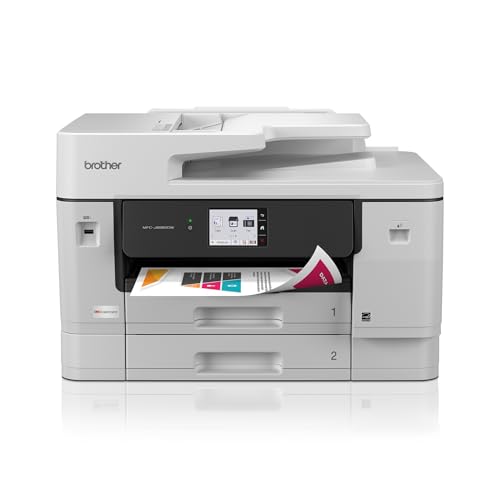
Brother INKvestment 6960 Wireless Color Inkjet All-in-One Printer with 11×17 Capability — 11×17 stated
Brother does the category a favour in this listing: it prints the dimension. The INKvestment 6960 is a wireless colour inkjet all-in-one whose title states 11-by-17 capability in plain figures, which means a tabloid buyer can verify the core requirement without leaving the listing — the only machine here offering that courtesy. In a category built on a measurement, the measurement stated outright is worth real money in confidence.
The INKvestment name signals Brother’s cartridge philosophy for this line: cartridges designed as an in-machine tank system, bought for yield-minded home-office and small-business users. Around that system sits an all-in-one — printing joined by the scan and copy functions the format implies — in wireless form, so the big machine can live where the big desk is rather than where the router happens to be. For a small office whose tabloid work is steady but not industrial — weekly posters, monthly oversize reports, the occasional folded newsletter — this is the most self-explanatory package in the set.
Two checks remain for the diligent. The listing states print capability at 11 by 17; it does not state the scan bed’s maximum, and offices dreaming of scanning tabloid originals must confirm that dimension separately in Brother’s documentation. Tray behaviour with large stock — how many sheets, through which path — is the second check, because tabloid paper handling is where wide-format machines reveal their manners.
- Maximum print size: 11 x 17 inches, stated in the listing
- Print technology: Colour inkjet, stated in the listing
- Format: All-in-one, wireless — stated in the listing
- Scan bed maximum: Listing title gives no figure — check Brother documentation
- Tabloid tray capacity: Absent from the title; Brother documentation carries the number
Strengths
- The only explicit tabloid dimension stated by any listing here
- All-in-one wireless format covers the small-office document loop
- INKvestment cartridge approach suits yield-conscious steady users
Trade-offs
- Scanning at full tabloid size is not confirmed by the listing
- Large-sheet tray details require a documentation check
- Inkjet running costs follow volume more than laser rivals would
Best for: a small office seeking its tabloid capability confirmed in the listing before any further research.
Not suited for: a studio requiring guaranteed tabloid scanning from the same glass.
Epson EcoTank ET-15000 Wireless All-in-One Wide-Format Supertank Printer — Supertank wide-format
The ET-15000’s listing makes two claims and lets them argue for the machine: EcoTank supertank, and wide-format all-in-one. The EcoTank system replaces cartridges with refillable reservoirs filled from bottles, which rewrites the economics of large-sheet printing in a specific way — a tabloid page drinks far more ink than a letter page at the same coverage, so any system that lowers the cost per millilitre matters more at 11 by 17 than anywhere else in the printer aisle. Heavy large-sheet users feel cartridge pricing in their bones; the supertank answers that feeling directly.
Wide-format is the listing’s size language, and it is class language rather than dimension language: the exact maximum sheet is a figure for Epson’s documentation, where this model’s wide-format ceiling is published. Work that is precisely tabloid deserves confirmation that the documented maximum covers 11 by 17 with the margins their work needs — borderless ambitions and printable-area limits are separate lines in the same documentation, and conflating them is a classic large-format disappointment.
The all-in-one wireless format rounds out a machine aimed at the productive home office or small studio: posters, banners-in-sections, oversize charts, and the scanning of ordinary documents alongside. The supertank commitment cuts both ways — the buyer invests more upfront in the ink system and commits to Epson’s bottle ecosystem — but at tabloid coverage rates, the commitment is precisely where the savings live.
- Print system: EcoTank refillable supertank, stated in the listing
- Size class: Wide-format, stated in the listing
- Exact maximum sheet: The title is silent on this — consult Epson documentation
- Format: All-in-one with wireless networking, per its listing
- Borderless capability at full size: No figure appears in the title — see Epson documentation
Strengths
- Refillable tanks attack the ink cost that tabloid coverage magnifies
- Wide-format all-in-one format suits productive small studios
- Wireless placement frees the largest machine from the router’s corner
Trade-offs
- Exact maximum sheet size must be confirmed in documentation
- Supertank value depends on volume — light users repay it slowly
- Bottle refilling is a hands-on ritual some offices will not love
Best for: a high-coverage large-sheet workflow where refillable ink economics compound with every poster.
Not suited for: an occasional tabloid user printing so rarely that the tank investment sits idle.

Epson Workforce Pro WF-7310 Wireless All-in-One Wide-Format Inkjet Printer — WorkForce Pro wide-format
The WF-7310 carries Epson’s Pro banner into wide-format: a wireless all-in-one wide-format inkjet printer, stated in full. WorkForce Pro is the business tier of Epson’s inkjet world, and its presence here matters because tabloid printing in offices is rarely decorative — it is spreadsheets with all their columns, Gantt charts with all their weeks, plans and proofs that exist to be read at arm’s length. Business-tier build and duty expectations suit that working diet better than a home machine stretched to the size.
As with every wide-format listing here, the exact maximum sheet is documentation territory. The Pro tier’s documentation is written for administrators, so expect precise paper-handling figures — tray capacities by size, media weights, the printable area at the largest format. Those figures decide the unglamorous questions that dominate real tabloid ownership: can the main tray hold the big stock, or does every oversize job begin with a manual-feed ceremony?
Cartridge economics frame the comparison against the EcoTank sibling. A cartridge-based Pro machine asks less commitment upfront and prices its ink in cartridges sized for business use; a supertank asks commitment and repays it per millilitre. Volume decides which answer is right, and the honest buyer measures a month of real large-sheet work before choosing the ink system, not after.
- Family: Epson WorkForce Pro, stated in the listing
- Size class: Wide-format, stated in the listing
- Format: An all-in-one inkjet with wireless, per its listing
- Exact maximum sheet: Title omits it — refer to Epson documentation
- Tray handling for large stock: Unstated in the title; Epson publishes it in the full documentation
Strengths
- Business Pro tier suits working tabloid output — charts, plans, proofs
- Wide-format all-in-one format stated completely in the listing
- Administrator-grade documentation supports precise pre-purchase checks
Trade-offs
- Maximum sheet dimension awaits documentation confirmation
- Cartridge ink costs more per millilitre than the EcoTank route
- Business build and footprint exceed casual home needs
Best for: an office producing tabloid output as working documents — oversize spreadsheets, charts and plans — at business pace.
Not suited for: a light home user paying Pro-tier money for two posters a term.

Epson WorkForce WF-7720 Wireless Wide-Format Color Inkjet Printer with Copy, Scan, Fax — Full-function wide-format
The WF-7720’s listing reads like a completeness pledge: wireless wide-format colour inkjet with copy, scan and fax all named. In a set where several listings withhold their function lists, that enumeration matters — a buyer can see the whole document loop in one line. The fax inclusion dates the design’s ambitions to the complete-office era, and offices in legal, medical and property work still run on fax more than the tech press admits; for those desks, a wide-format machine that also faxes removes a separate appliance from the counter.
Wide-format remains the size claim, with the exact maximum again in Epson’s documentation. The interesting question for this model is the scan side: copy and scan are stated, their maximum sizes are not, and wide-format all-in-ones divide sharply on whether the scanner matches the printer’s ambition or merely its letter-sized habits. A studio hoping to digitise tabloid artwork must settle that in documentation before falling for the function list.
As the non-Pro WorkForce entry here, the WF-7720 sits a tier below the WF-7310 and WF-7840 in Epson’s business hierarchy, which typically trades some duty headroom and pace for a friendlier price. For a small office whose tabloid work is regular but not relentless, that trade is often the sensible one — the sheet size is identical, and the calendar, not the badge, decides whether the Pro premium would ever be exercised.
- Print technology: Wide-format colour inkjet, stated in the listing
- Functions: Copy, scan and fax stated in the listing, alongside printing
- Wireless: Stated in the listing
- Exact maximum sheet: Not given in the title — verify against Epson documentation
- Maximum scan size: Listing title does not state it — consult Epson documentation
Strengths
- Most complete function enumeration of any listing in this set
- Fax retention serves the offices that still run on it
- Wide-format colour printing with the full document loop attached
Trade-offs
- Scan maximum at tabloid size is unconfirmed by the listing
- Sits below the Pro tier for duty headroom
- Exact print maximum still requires the documentation trip
Best for: a complete small office — fax included — adding wide-format colour output to a full function set.
Not suited for: a buyer seeking Pro-tier duty or confirmed tabloid scanning.
Epson WorkForce Pro WF-7840 Wireless All-in-One Wide-Format Inkjet Printer — Pro all-in-one wide-format
The WF-7840 is the fullest WorkForce Pro expression in this set: wireless all-in-one wide-format inkjet under the Pro banner. Where the WF-7310 leans toward output, the all-in-one emphasis here puts the document loop — print, scan, copy — at Pro tier, which suits the office where tabloid sheets flow in both directions: plans arrive, get marked, get copied at size, get reissued. That two-way traffic is the natural habitat of a Pro all-in-one, and it is a different purchase from a printer that merely outputs large sheets occasionally.
Documentation questions multiply accordingly, and they are the review’s honest core. Maximum print sheet, maximum scan sheet, feeder capacity for oversize originals if a feeder is fitted, tray behaviour with heavy stock — the listing states none of them, and the Pro tier’s documentation answers all of them. A buyer speccing two-way tabloid traffic should extract those four answers and compare them against the WF-7720’s before the tier premium is paid, because the premium buys precisely those capacities.
Ink economics follow the cartridge path of its Pro sibling rather than the EcoTank’s tanks. At Pro duty levels, business cartridges and predictable yields suit administered offices that prefer consumables as a tidy recurring line. The comparison with the ET-15000 is the set’s central fork: tanks for the ink-cost maximalist, Pro cartridges for the administered fleet, same wide-format ambition underneath.
- Family: Epson WorkForce Pro, stated in the listing
- Format: Wide-format inkjet in wireless all-in-one form, per its listing
- Exact maximum sheet: The title is silent on this — consult Epson documentation
- Feeder and scan maxima: No figure appears in the title — see Epson documentation
- Ink system: Cartridge-based per the WorkForce Pro line’s positioning — verify in Epson documentation
Strengths
- Pro-tier all-in-one suits two-way tabloid document traffic
- Wide-format ambition backed by business documentation depth
- Cartridge consumables fit administered office budgeting
Trade-offs
- Every size figure that matters sits outside the listing
- Pro tier pricing punishes offices whose volume never arrives
- Cartridge ink costs exceed tank economics at heavy coverage
Best for: an office where tabloid documents are printed, scanned and copied as daily traffic at business tier.
Not suited for: an output-only workflow that would leave the all-in-one premium unused.

HP OfficeJet Pro 9730 Wide-Format Wireless All-in-One Color Inkjet Printer — HP wide-format
HP’s entry states its case in the familiar OfficeJet Pro grammar: wide-format, wireless, all-in-one, colour inkjet, with print and scan named as the listing continues. The OfficeJet Pro line is HP’s small-business flagship family, and the 9730 carries that family’s wide-format ambitions — the machine for an HP-standardised office that suddenly needs the big sheet without changing its driver ecosystem, its ink shelf or its support relationship.
That standardisation argument is the pick’s centre of gravity. Offices rarely buy printers in a vacuum; they buy into an existing fleet’s habits. An HP shop adding tabloid capability through the 9730 keeps one management story across its machines, and the value of that continuity — in drivers, in consumable logistics, in staff familiarity — routinely outweighs small specification deltas between brands. The wide-format claim itself still requires the documentation figure for the exact maximum, following the pattern of every non-Brother listing here.
Colour inkjet output at tabloid size serves the presentation end of office work: the chart that must impress in a meeting room, the poster for the corridor, the plan marked in colour. HP’s documentation will settle tray handling and scan maxima; the listing settles the ecosystem question, which for its intended buyer may be the first question asked.
- Print technology: Colour inkjet, stated in the listing
- Size class: Wide-format, stated in the listing
- Format: An all-in-one design with wireless built in, per its listing
- Exact maximum sheet: Title omits it — refer to HP documentation
- Scan maximum: Unstated in the title; HP publishes it in the full documentation
Strengths
- Wide-format capability inside HP’s small-business flagship line
- Fleet continuity for offices already standardised on OfficeJet Pro
- All-in-one wireless format covers the standard document loop
Trade-offs
- Exact tabloid dimension needs documentation confirmation
- Ecosystem value fades for buyers without an existing HP fleet
- Scan-side maxima are, as ever here, unstated in the title
Best for: an HP-standardised small business adding wide-format colour output without a second ecosystem.
Not suited for: a buyer choosing purely on confirmed dimensions from listings alone.
How Do the Six Compare Side by Side?
| Model | Size claim in listing | Ink system | Functions stated |
|---|---|---|---|
| Brother INKvestment 6960 | 11 x 17 stated | INKvestment cartridges | All-in-one, wireless |
| Epson EcoTank ET-15000 | Wide-format | Refillable supertank | All-in-one, wireless |
| Epson WorkForce Pro WF-7310 | Wide-format | Cartridges | All-in-one, wireless |
| Epson WorkForce WF-7720 | Wide-format | Cartridges | Copy, scan, fax, wireless |
| Epson WorkForce Pro WF-7840 | Wide-format | Cartridges | All-in-one, wireless |
| HP OfficeJet Pro 9730 | Wide-format | Cartridges | All-in-one, wireless, print, scan |
The table’s first column of substance is a hierarchy of evidence: one dimension stated, five classes stated. Everything else — ink philosophy, function lists, brand ecosystems — is comparison material layered on top of that hierarchy. A disciplined buyer settles the dimension question for the finalists in documentation, then lets the ink system and the ecosystem argue the remainder, in that order.
Tabloid, Ledger or A3: Are They the Same Sheet?
Nearly, and the nearly matters. Tabloid and ledger describe the same 11-by-17-inch sheet in American usage — tabloid when printed in portrait, ledger in landscape, a distinction of orientation rather than size. A3, the metric near-relation, measures slightly narrower and slightly longer. A printer whose documented maximum is A3 may or may not accept an 11-by-17 sheet depending on its path width and length limits, and a printer rated for tabloid handles A3 comfortably in the other direction. This is why the documentation figure must be read as dimensions, not as a label.
Paper buying follows the same caution. Tabloid stock is sold under all three names plus the raw dimension, and the ream to order is the one whose stated inches match the machine’s documented path. Offices that standardise on the raw dimension — 11 by 17, written on the shelf — avoid the annual confusion when a supplier’s catalogue switches vocabulary.
Margins complete the geometry lesson. A machine may accept the full sheet yet print within a bordered area, or offer borderless output at the full size. Posters and artwork care intensely about that distinction; spreadsheets rarely do. Both facts live in the same documentation page as the maximum sheet, and reading all three lines together is the whole verification.
What Does Tabloid Printing Do to Running Costs?
Arithmetic scales with area. An 11-by-17 sheet carries roughly twice the printable surface of a letter page, so the same coverage percentage spends roughly twice the ink and exactly twice the paper cost per sheet — before counting the premium that large stock itself commands over letter reams. A poster run that looks modest in page count can be the month’s largest consumable event, and offices new to the size routinely under-budget their first quarter of it.
Mistakes scale too. A misprint at letter size is a shrug; a misprint at tabloid, on presentation stock, after a long render, is a small financial event. Proof discipline — a letter-size proof for content, a single tabloid proof for colour and layout, then the run — converts those events into rarities. Every machine in this set will happily print the whole run wrong at full size; the discipline is the operator’s contribution.
Ink system choice interacts with all of this, which is why the ET-15000’s tanks keep entering the conversation. At sustained high coverage, cost per millilitre dominates the ledger and tanks win it. At intermittent office coverage, cartridge convenience and lower commitment can win the year. The sheet does not care which system feeds it; the spreadsheet does, and the spreadsheet should be built from a month of real work.
How Should You Set Up a Desk for an 11-by-17 Machine?
Wide-format machines are furniture before they are electronics. The paper path needs clearance front and back, the output needs a landing zone where a stiff 11-by-17 sheet can arrive without curling off an edge, and the stock itself needs flat storage — large sheets stored leaning will carry their curve into the printer and jam with conviction. Measure the alcove for the machine’s working footprint, not its catalogue footprint; trays extend, lids rise and sheets emerge.
Paper logistics deserve a shelf plan. Keep one ream of tabloid open beside the machine and the reserve stock flat in its wrapper nearby, with letter stock physically separated so the two never interleave in a tray during a hurried refill. Label the trays with the sizes they hold. The most common wide-format jam is not mechanical at all — it is a letter sheet hiding inside a tabloid stack, discovered by the rollers at speed.
Software setup closes the loop: install the correct paper size in the driver defaults, create a named tabloid preset for the standard jobs, and print the test sheet that proves the preset before the first deadline does. A machine this size earns its keep when the big job is a preset and a button, not a research project repeated monthly.
What Mistakes Do First-Time Tabloid Buyers Make?
The signature mistake is buying the class instead of the dimension — reading wide-format as a guarantee of 11 by 17 and discovering the documented maximum only when the first sheet refuses the path. Five of the six listings here invite exactly that reading, which is why this guide repeats the verification until it becomes reflex.
The second mistake is assuming the scanner follows the printer. All-in-one wide-format machines frequently scan at ordinary sizes while printing large, and a plan to digitise a tabloid portfolio discovers the mismatch with the portfolio in hand. Print maximum and scan maximum are separate lines; read both.
Third, underestimating the desk. A wide-format machine shoehorned onto a letter-sized perch sheds output onto the floor, jams its extended trays against walls and teaches its owners to resent the best purchase they made all year. Measure first; the machine’s working footprint is part of its specification.
And the quiet fourth: forgetting the paper order. Tabloid stock is rarely stocked in the small quantities letter paper is, delivery takes longer, and the first big deadline has a way of arriving before the first ream does. Order the paper with the printer, not after it.
What Kinds of Work Actually Need the Big Sheet?
Start with the spreadsheet that refuses to shrink. Financial models, project plans and timetables carry a natural width — a year of months, a project’s full task tree — and compressing them to letter size trades legibility for fit until the document fails its only job, which is to be read across a table by several people at once. Printed at tabloid, the same document becomes a meeting tool: annotated in pen, argued over, pinned up afterwards. Offices discover that certain conversations only happen around a sheet large enough to share, and those conversations are usually the planning ones that matter most.
Education runs on the size for different reasons. Classroom displays, reading charts, certificates and school newsletters folded from a single sheet all live at tabloid dimensions, and a school office with an in-house wide-format machine stops outsourcing its visual life to a print shop’s schedule. The folded newsletter deserves its own mention: one tabloid sheet, printed both sides and folded, becomes a four-page letter-size publication with no binding, no assembly and no collating — the cheapest publishing format ever devised, available only to offices whose printer accepts the sheet.
Creative proofing is the third habitat. A design proofed at letter size lies about its typography; a design proofed at full size tells the truth about hierarchy, whitespace and whether the headline actually lands from two metres away. Studios that proof at tabloid catch scale errors that screen zoom conceals, because the printed sheet restores the physical relationships the work will live with. Add menus, price lists, real-estate particulars and community posters, and the pattern is consistent: the big sheet is not a luxury format but the native size of public-facing paper.
How Do You Proof and Finish a Tabloid Job Properly?
The workflow that keeps tabloid affordable has three gates. Gate one is the screen proof with fresh eyes — ideally another person’s — because every error caught on glass costs nothing. Gate two is a letter-size content proof: the full document scaled down, read for words, numbers and order, since content errors are size-independent and the cheap sheet finds them as reliably as the dear one. Gate three is a single full-size proof, examined for the things only size reveals — margins, image resolution at scale, colour weight, fold lines where a fold is planned.
Resolution deserves its sentence at gate three. An image that looks crisp on a letter proof may soften visibly when stretched across tabloid, because the same pixels now cover twice the area. Check the proof at the distance the final audience will view it — a poster is judged from a corridor, not from reading distance — and replace any image that fails at that range before the run, not after it.
Finishing is where tabloid jobs become products. Folding demands a scored line on heavier stock if the edge must stay clean; trimming demands a straightedge and a fresh blade rather than the office guillotine sized for letter; lamination, where displays must survive a term of corridor life, needs a pouch or a service that accepts the full dimension. Budget the finishing when the job is planned, and the big sheet’s promise survives contact with the real world of walls, weather and small hands.
What Should You Verify in the Documentation, Line by Line?
For the five wide-format finalists, the documentation visit has a precise agenda, and writing it down before the visit keeps it short. Line one: maximum print dimensions, in figures, for both the standard tray and any manual or rear feed, since paths sometimes differ. Line two: borderless availability at that maximum, if posters are the purpose. Line three: maximum scan dimensions, flatbed and feeder separately, if originals will travel the other direction.
Line four: tray capacities at the largest size, because a tray that holds a hundred letter sheets may hold far fewer tabloid ones, and the refill rhythm changes accordingly. Line five: supported media weights at full size — presentation stock and light card behave differently through a long paper path. Line six: the ink system’s yields or bottle capacities, translated into your monthly large-sheet count. Six lines, perhaps twenty minutes, and the wide-format class claim becomes a set of figures a decision can stand on.
Keep the answered sheet with the purchase records. When the machine is replaced years later, those six lines become the specification its successor must beat, and when a colleague questions the purchase, the figures answer with more authority than any recollection of a listing. Verification, done once and filed, keeps paying rent.
How Does Tabloid Printing Change Team Habits?
A wide-format machine quietly reorganises how an office communicates. The chart that used to be emailed as an unreadable attachment gets printed and carried into the room. The plan that lived in a spreadsheet gets a wall. Teams begin designing documents for the sheet — wider tables, honest font sizes, layouts that assume a reader standing rather than squinting — and the quality of internal information rises in ways nobody attributed to a printer purchase. Hardware that changes the size of paper changes the size of thinking the paper can hold.
New habits bring new frictions, and naming them early keeps them small. The big machine becomes a shared resource with a queue etiquette problem: one person’s forty-poster run blocks another’s urgent chart, so a house rule — long runs after hours, urgent jobs announced — prevents the corridor diplomacy that otherwise accumulates. Stock stewardship needs an owner too, because tabloid paper walks away for school projects and home posters at a rate letter paper never does. And somebody must own the proof discipline, or the expensive misprints return wearing the costume of enthusiasm.
Measured after a quarter, the habit change shows up in the consumables ledger: more large sheets than predicted, fewer outsourced print jobs than before, and a team that reaches for the big format by default for anything meant to be read by more than one person. That is the purchase working as intended, and it is why the running-cost section of this guide insists on budgeting from a month of real work — the real work expands to fill the sheet.
When Should an Office Keep Outsourcing Instead?
Honesty requires the counter-case. Where tabloid output is needed only twice a year, in tiny quantities, with professional finishing, the print shop down the road may serve better than a machine depreciating on a desk. The break-even is a rhythm question: in-house wide-format wins when jobs are frequent, deadline-sensitive or iterative — when the proof cycle happens in hours and the sheet is needed before a courier could reasonably arrive. It loses when jobs are rare, huge or bound for gallery finishing.
There is also a ceiling above this entire category. Posters beyond tabloid, banners, and exhibition work belong to dedicated large-format machines of the kind covered by the wide-format guide for designers elsewhere among these reviews. An office whose ambitions are already drifting past 11 by 17 should price that next class before buying this one, because the most expensive printer is the one replaced within the year by the machine that was actually needed.
For the broad middle — weekly charts, monthly posters, term-time displays, folded newsletters — the six machines here sit exactly on the break-even’s happy side, provided the dimension is verified and the desk is measured. The outsourcing question, asked honestly once, protects the purchase from the only regret that matters: owning a big printer that a print shop would have beaten.
How Should Tabloid Stock Be Stored and Handled?
Large paper is fragile in ways letter stock forgives. A tabloid sheet’s own weight bends it when lifted by one corner, and a bent sheet carries a memory into the paper path. Lift with two hands or slide from the stack, store flat in the wrapper until the ream is opened, and keep opened stock in a drawer or flat box rather than leaning against the wall it will one day decorate. Humidity curls big sheets more dramatically than small ones, simply because there is more sheet to curl; the printer’s own room, dry and ordinary, is the right warehouse.
Handling at the machine matters as much. Fan a fresh stack gently to separate sheets, align the edges against the tray guides without forcing them, and never overload the tray beyond its marked line — a large sheet needs room to begin its journey flat. When a jam happens, extract the sheet by the path the manual describes rather than by enthusiasm; a torn tabloid sheet leaves fragments in places fingers cannot reach, and the service call that follows costs more than the patience would have.
Keep one sacrificial sheet for tests. New stock, new settings, a new job type — the first attempt belongs on the sheet already marked as expendable, and a household or office that keeps that ritual prints its real work with a confidence that shows in the waste bin’s emptiness.
What Does the First Month With a Wide-Format Machine Teach?
Week one teaches geometry: the machine is bigger than its photograph, the output tray wants more room than planned, and the first full-size chart produces a small crowd. Week two teaches economics: the ink gauges move visibly on poster work, the paper shelf empties faster than the letter shelf ever did, and the proof discipline stops sounding like advice. Week three teaches appetite: colleagues arrive with projects that were always, apparently, waiting for exactly this machine, and the queue etiquette gets written down at last.
By the end of the first month the office knows its true large-sheet rhythm — how many sheets, of what coverage, for which recurring jobs — and that knowledge converts the running-cost spreadsheet from estimates into a budget. It also settles the recurring argument about whether the machine was necessary, usually in the machine’s favour, because the work it absorbed was previously either outsourced at a premium or shrunk into illegibility. Keep the first month’s figures; they are the baseline every future consumable decision in this size class will be measured against.
Which Jobs Should Never Go to the Tabloid Machine First?
Every shared machine develops a etiquette of restraint, and wide-format etiquette starts with drafts. A document still changing its words belongs on the letter printer or on screen; the tabloid machine’s turn comes when the content has settled and only scale remains to be judged. Offices that print every intermediate version at full size burn their consumable budget on archaeology — a strata of almost-final posters documenting decisions already reversed.
Colour-critical work deserves a similar pause. A brand colour that must match exactly, a photograph that will be judged closely — these deserve the single careful proof and, where the standard is unforgiving, a conversation about whether the office machine or a professional service owns that standard. The machines in this set produce strong business colour; none of them was bought to be a contract proofing system, and pretending otherwise wastes both ink and credibility.
And the truly enormous — the banner, the exhibition panel — belongs to the next class of machine entirely, or to the print shop whose floor exists for it. Knowing the tabloid machine’s ceiling and respecting it keeps the machine brilliant inside its geometry, which is all any of the six picks here ever promised: the big sheet, done well, at a desk that measured for it.
How Do You Brief a Team on Using the Big Machine Well?
A ten-minute briefing at installation saves a term of consumables. Cover the preset: where it lives, what it assumes, when to depart from it. Cover the proof ladder: screen, letter proof, single tabloid proof, then the run — and the rule that nobody skips a rung on a deadline, because deadlines are exactly when the ladder pays. Cover the stock shelf: which ream is open, where the sacrificial sheet lives, and the two-handed lift. Cover the queue rule for long runs. Then write the four points on a card and tape the card to the machine, because briefings evaporate and cards persist.
Appoint the machine’s informal owner in the same ten minutes — the person who notices the stock running low, who knows the documentation answers, who can say whether a strange noise is new. Shared machines without a named human drift toward nobody’s maintenance schedule and everybody’s surprise. The owner is not a technician; the owner is a memory, and a wide-format machine with a memory attached ages measurably better than one without.
That card and that owner complete the purchase in a way the delivery itself does not. A wide-format machine arrives as hardware; it becomes infrastructure through the small social arrangements around it — the preset everyone uses, the proof ladder everyone respects, the stock shelf somebody watches. Offices that arrange those things in the first week speak of their tabloid printer the way they speak of a good colleague. Offices that skip them speak of a machine that is always, mysteriously, out of something at the critical moment, and the mystery is never mechanical.
Judge the six candidates here by that destination. The right machine is the one whose verified dimensions fit your sheet, whose ink system fits your ledger, and whose size fits a corner of the room that can be organised around it properly — trays, stock, landing zone and card on the wall included.
There is a final, quieter satisfaction to buying this class of machine correctly: the documents themselves improve. Spreadsheets stop apologising, posters stop shrinking their headlines, newsletters fold the way newsletters are supposed to fold. Nobody writes a memo thanking the printer, but the work pinned to the corridor wall is the thank-you, renewed every time a chart is read at the size its author intended. Choose the verified sheet, organise the corner, and let the big paper do what it has quietly done in print shops for a century — make information impossible to ignore.
That improvement is measurable in a humble way: count, one month after installation, how many documents were printed at the size their authors chose rather than the size a smaller machine imposed. In most offices the count climbs weekly, and each climb is a small argument the purchase makes for itself, in the only currency that survives budget season — work visibly better than the work that came before it.
Keep counting for a quarter and the pattern usually settles into a house style: certain reports are simply tabloid reports now, certain walls expect a fresh chart monthly, and new staff learn the big machine as part of the furniture of how work gets presented here. Infrastructure is what a purchase becomes when nobody can remember the office without it, and a correctly verified wide-format printer reaches that status faster than almost any other device on the floor.
When that status arrives, protect it with the boring rituals — stock watched, proofs laddered, documentation filed — because infrastructure fails from neglect far more often than from engineering, and a wide-format machine’s second year should be quieter, cheaper and more productive than its first in every office that set it up with the discipline this guide describes.
Discipline, dimensions and a desk that fits — hold all three together and the big sheet stops being an occasional expedition and becomes simply how the office prints.
Simply, reliably and at full size — the standard every candidate in this set should be held to from the first verified sheet onward.
Hold them to it in the documentation check, in the first month’s ledger and in every proof that climbs the ladder before a run begins.
The ladder, the ledger and the verified dimension — three habits, one machine, and a corridor wall that finally says what the meeting meant.
That is the destination worth buying toward, whichever badge the machine in the corner eventually wears.
Badge last, sheet first — in this size class, that ordering never steers a careful buyer wrong.
Sheet first, always — and the desk measured before the machine arrives to claim it.
Final Recommendation
For certainty at the listing level, the Brother INKvestment 6960 stands alone here: 11-by-17 capability stated in its own title, in a wireless all-in-one that suits steady small-office tabloid work. For ink economics at heavy coverage, the Epson EcoTank ET-15000’s supertank design is the set’s compelling alternative, with its exact maximum to be confirmed in Epson’s documentation. Business-tier buyers split between the WorkForce Pro pair — the WF-7310 leaning to output, the WF-7840 to the full all-in-one loop — while the WF-7720 covers the complete function list including fax, and HP’s OfficeJet Pro 9730 serves the office already living in HP’s ecosystem. Every route except the Brother’s passes through one documentation check on the exact sheet dimension, and that check is not a weakness of the guide or the machines; it is the purchase, done properly, for a size class where a centimetre of assumption costs a machine’s whole purpose.
Frequently Asked Questions
Is tabloid the same as 11×17?
Yes — tabloid is the name for the 11-by-17-inch sheet in portrait orientation, and ledger is the same sheet in landscape. A3 is a close metric relative with slightly different dimensions, which is why maximum sheet sizes should always be compared as figures rather than names before buying.
Which of these printers confirms tabloid size in its listing?
The Brother INKvestment 6960, whose title states 11-by-17 capability directly. The other five listings claim wide-format status, a strong class signal whose exact maximum sheet is published in each manufacturer’s documentation — confirm the figure there before ordering for tabloid work.
Can these machines scan tabloid originals too?
Printing size and scanning size are separate specifications, and no listing here states a scan-bed maximum. Several of these all-in-ones state scan and copy functions, but the dimensions of what they can scan live in manufacturer documentation. Check that line specifically if digitising large originals is part of the plan.
Why does the EcoTank model keep coming up for heavy users?
Because tabloid pages consume ink at roughly double the letter rate for the same coverage, so the cost per millilitre — where refillable tank systems hold their advantage — dominates the running-cost ledger faster at this size than at any other. Light users repay the tank commitment slowly; heavy large-sheet users repay it quickly.
What paper should be ordered with the printer?
Stock labelled with the raw dimension — 11 by 17 inches — in a weight suited to the job: ordinary office stock for spreadsheets and charts, heavier presentation stock for posters. Order it with the machine, store it flat, and keep it physically separate from letter paper so trays never receive a mixed stack.
Related Guides
Large sheets pair with large thinking: see our guide to home office printers for the standard-format field, our roundup of poster and display tools for what happens after the big print, and our desk setup recommendations for workstations that can actually hold a wide-format machine.
Related guides
- Best 3rd Party MacBook Chargers: 96W-Class Alternatives, the 100W Cable Rule, and the Apple Benchmark
- Best Graphics Cards with HDMI Out for TV Only: Six Picks for a PC Whose Only Screen Is a Television
- Best TLC SSDs: Six Drives With TLC NAND Confirmed in Their Own Listings
- Best Built PC: Six Prebuilt Gaming PCs Judged on Parts, Power and Upgrades