What's inside
- Key Takeaways
- Quick Picks
- How Did We Sort the Surveillance Tiers Without Inventing Numbers?
- How Many Days of Footage Will a Drive Actually Hold?
- What Separates the Standard Tier From the AI and Pro Tiers?
- How Does Multi-Stream Writing Stress a Drive Differently From Desktop Work?
- Which Recorder Features Should Change the Drive You Choose?
- How Do the Six Compare Side by Side?
- How Long Does a Surveillance Drive Last in Continuous Service?
- What Mistakes Do Recorder Owners Keep Making With Drives?
- How Should You Install and Commission a New Surveillance Drive?
- Final Recommendation
- Frequently Asked Questions
- Related Guides
As an Amazon Associate I earn from qualifying purchases. This post may contain affiliate links at no extra cost to you.
gizmoverdict.com is reader-supported. When you buy through links on our site, we may earn an affiliate commission.
Where to buy: Each of the six drives below links to its own listing, and every capacity, cache figure and interface quoted in this guide is taken from that listing’s title, which you can read at the top of the listing page before paying. Where a title stays silent about a figure, the spec box under that pick says so plainly instead of filling the gap with a guess.
Choosing the best hard drives for video surveillance starts with a fact that surprises people upgrading from desktop storage: a camera system never stops writing. A desktop drive spends most of its life idle, wakes for a burst of work, then sleeps again. A surveillance drive inside a DVR or NVR recorder writes footage around the clock, from every camera at once, in heat that builds inside a small recorder case, and it does that for years. Drives built for that duty are a separate product family from desktop drives, with firmware tuned for continuous streaming writes rather than bursty desktop access, and the six picks here all come from those dedicated families — Seagate’s SkyHawk line and Western Digital’s Purple line.
That distinction matters more than any single specification. A general-purpose drive dropped into a recorder may work for a season, then start dropping frames or failing under a write load it was never shaped for, usually at the moment the footage turns out to matter. The drives below are the ones shaped for the job from the start: three SkyHawk models spanning the standard and AI tiers, and three Purple models spanning the standard and Pro tiers. Between them they cover a single-camera home recorder through to a multi-camera small-business system with analytics running on the recorder itself.
One boundary is worth drawing before the picks. This guide covers the bare internal drives that slot into a recorder you already own or are building. Complete DVR and NVR kits — recorder, cameras and drive bundled — are a different purchase with a different decision shape, and no bundled system appears here as a pick. If your recorder is already on the shelf, the drive is the missing half of it, and choosing that half well is what the rest of this guide is for.
Key Takeaways
- Surveillance drives are a distinct family: SkyHawk and Purple models are built for continuous, multi-camera writing that desktop drives are not shaped to sustain.
- Capacity decides how many days of footage the recorder keeps before overwriting the oldest recordings, so camera count and resolution come before brand loyalty.
- The AI and Pro tiers exist for recorders that run analytics or carry heavier camera counts; plain tiers serve ordinary recording honestly and cost less.
- Cache is stated in the Seagate titles here — 256MB on the 6TB and 8TB SkyHawk models, 64MB on the 4TB — while the WD titles leave cache unstated, so verify it in WD documentation if it matters to you.
- No rotational speed appears in any of these six listing titles; treat any speed figure quoted elsewhere with suspicion until the manufacturer’s own documentation confirms it.
- A surveillance drive is one half of a retention plan — the other half is an export habit for footage you cannot afford to lose when the drive eventually wears out.
Quick Picks
| Pick | Badge | Why it earns its place |
|---|---|---|
| Seagate Skyhawk 6TB Video Internal Hard Drive | Balanced mid-size pick | Six terabytes with a 256MB cache from the standard SkyHawk tier — the middle of the range for a mid-size camera count. |
| Seagate Skyhawk AI 8TB Video Internal Hard Drive | For analytics recorders | The AI tier at eight terabytes, aimed at recorders that analyse footage as well as store it. |
| Seagate Skyhawk 4TB Video Internal Hard Drive | Small-system value | Four terabytes with a 64MB cache for a DVR, sized for a handful of cameras at a home or small shop. |
| Western Digital 8TB WD Purple Pro Surveillance Internal Hard Drive | WD’s top tier here | The Pro badge at eight terabytes, for larger camera counts and recorders doing heavier work. |
| Western Digital 8TB WD Purple Surveillance Internal Hard Drive | Big standard-tier WD | Eight terabytes from the standard Purple line — maximum room without stepping up a tier. |
| Western Digital 4TB WD Purple Surveillance Internal Hard Drive | Entry WD option | Four terabytes from the standard Purple line, the WD starting point for a small recorder. |
How Did We Sort the Surveillance Tiers Without Inventing Numbers?
The honest sorting tools available here are the ones printed in the listing titles: capacity, cache where the title states it, interface where the title states it, and the tier named in the product line itself. Those four signals turn out to be enough to place every pick, because the surveillance market is unusually disciplined about its tiers. SkyHawk is Seagate’s standard surveillance family and SkyHawk AI is the step above it, built for recorders that run video analytics. Purple is Western Digital’s standard surveillance family and Purple Pro is its step up, aimed at larger installations and more demanding recorders. The tier in the name is a real engineering distinction in this category, not decoration.
What this guide refuses to do is decorate that sorting with figures the titles do not carry. Surveillance marketing elsewhere leans heavily on workload ratings, camera-count ceilings and endurance numbers, and those figures genuinely matter — but they live in manufacturer documentation, vary by exact model, and cannot be read off these listing titles. Where a decision below depends on such a figure, the text says which document to check rather than supplying a number from memory. A guide that admits the edge of its evidence is more useful than one that papers over it, because a drive bought on a wrong endurance assumption fails in service, not on the page.
Within those limits, the ordering logic is straightforward. Capacity comes first, because retention days are the thing owners actually run out of. Tier comes second, matched to whether the recorder merely records or also analyses. Brand comes last and is close to a coin toss at equal tier and capacity, which is why this list carries both families at both sizes rather than crowning one maker and padding the rest of the list with its catalogue.
How Many Days of Footage Will a Drive Actually Hold?
Retention is arithmetic, not opinion, and it is worth doing roughly before choosing a capacity. Every camera writes a continuous stream whose size depends on its resolution, its frame rate and how aggressively the recorder compresses. Multiply one camera’s daily footprint by the number of cameras, and the total daily consumption of the system appears. Divide the drive’s usable capacity by that daily figure and the answer is the number of days the recorder holds before the oldest footage is overwritten. Owners are routinely shocked by the result in both directions: a single camera at modest settings can keep months on 4TB, while a yard full of high-resolution cameras can burn through 8TB in under a fortnight.
Two habits distort the arithmetic and deserve naming. Motion-activated recording stretches retention enormously on quiet properties and barely at all on busy ones, so a neighbour’s experience with the same drive tells you little. And retention needs are usually discovered retrospectively — an incident noticed three weeks later, a delivery dispute raised after a month — which argues for sizing to the longest plausible look-back, then adding headroom, rather than sizing to the average week. The drive is the cheapest part of a camera system to oversize at purchase and the most disruptive to upgrade later, because swapping it means opening the recorder and losing the archive in the move unless it is exported first.
There is also a quiet interaction between capacity and wear. A drive that fills and overwrites on a short cycle rewrites its whole surface constantly; a larger drive on the same system spreads the same daily writing across more room and a longer cycle. Capacity is therefore partly an endurance decision as well as a retention one, which is another reason the middle of this range — 6TB and 8TB — is where most multi-camera homes and small businesses sensibly land.
What Separates the Standard Tier From the AI and Pro Tiers?
The standard tiers — SkyHawk and Purple without suffixes — are built for the classic surveillance pattern: several cameras writing continuous streams to one recorder, read back occasionally when something needs reviewing. That pattern is demanding in duration but simple in shape, and the standard drives’ firmware is tuned for exactly it: steady sequential writing from multiple streams, sustained indefinitely, with error handling that prefers keeping the stream alive over pausing to retry a difficult sector, because a dropped second of footage is gone forever while a desktop file can always be re-read.
The AI and Pro tiers address a recorder that does more than record. Modern NVRs increasingly analyse video on the box — detecting people and vehicles, indexing motion, running licence-plate or facial searches across the archive. That analysis adds a second, random-access workload on top of the writing: the drive must keep absorbing streams while also serving reads to the analytics engine. Drives in the upper tiers are built and rated for that combined pattern and for the larger camera counts that tend to accompany it. The practical rule is simple. If the recorder only records, the standard tier is the honest purchase. If the recorder advertises analytics features you actually intend to switch on, the upper tier is the one shaped for the resulting workload, and buying the standard tier to save a little money buys a bottleneck instead.
Neither tier changes the physical basics: all six picks are 3.5-inch internal drives that mount in a recorder bay and connect by SATA, and all six are meant to be installed once and left running. The tier question is about workload shape, not about size or fitting, which is why it is decided by the recorder’s feature list rather than by the drive shelf.
How Does Multi-Stream Writing Stress a Drive Differently From Desktop Work?
A desktop drive’s day is a conversation: short questions, short answers, long silences. A surveillance drive’s day is dictation from several speakers at once, forever. Each camera delivers its encoded stream in chunks, and the recorder interleaves those chunks onto the disk as they arrive, so the drive’s heads are perpetually laying down one stream’s segment, then the next camera’s, then returning — a pattern that looks sequential in aggregate but is stitched together from many sources. Surveillance firmware is written to keep that stitching smooth, prioritising the uninterrupted intake of every stream over the perfectionist re-reading a desktop drive would insist on when it meets a doubtful patch of disk.
Heat is the second stress, and the less discussed one. Recorders are small, fan-light boxes often tucked into cupboards, lofts and back rooms where air barely moves, and a drive inside one runs warm for its entire life. Surveillance families are specified with that environment in mind in a way desktop drives, designed for ventilated towers and long idle sleeps, are not. Owners can help: a recorder given a finger’s width of air around its vents, kept out of direct sun and off the top of other warm equipment, returns measurably calmer drive temperatures, and temperature is one of the few longevity variables entirely within the owner’s control.
The third stress is simply the calendar. Continuous duty accumulates operating hours at roughly three times the rate of an office desktop’s drive, so a surveillance disk reaches in two years the hour count a desktop disk reaches in six. That is why the workload class of the drive — standard versus the upper tiers — is fundamentally a statement about how much writing, for how long, the maker stands behind, and why matching tier to camera count matters more as systems grow. A small system writes gently even though it writes constantly; a large one writes constantly and heavily, and the difference shows up years later in which drives are still on their first disk.
Which Recorder Features Should Change the Drive You Choose?
Start with the bay count. A recorder with a single bay makes the drive decision absolute — one disk carries everything, so capacity and tier must both be right at purchase. A recorder with two bays opens strategies a single bay forbids: two drives splitting the camera load, or a second drive mirroring or extending the first, depending on what the recorder’s firmware supports. Check which of those your recorder actually offers before assuming a second bay means redundancy; on many recorders it simply means more room, which is valuable but different.
Next, the recorder’s maximum supported drive size. Older recorders sometimes refuse or mishandle capacities beyond a ceiling set when they were designed, and an 8TB drive in a recorder that only understands 6TB is money parked in the wrong place. The ceiling is stated in the recorder’s manual or support pages, and checking it takes less time than returning a drive. The same pages usually list tested or recommended drive models, and where such a list exists it deserves real weight — recorder makers test against the drives their firmware knows best.
Finally, consider how the footage leaves the system. Recorders that export to USB or across the network make the export habit easy, which softens the consequences of a shorter retention cycle; recorders with clumsy export push owners toward longer on-disk retention and therefore larger drives. It is an unfashionable factor — nobody shops for a drive by thinking about export menus — but the practical retention a system delivers is the product of both, and the drive is the expensive half to change later.
Seagate Skyhawk 6TB Video Internal Hard Drive — Balanced mid-size pick
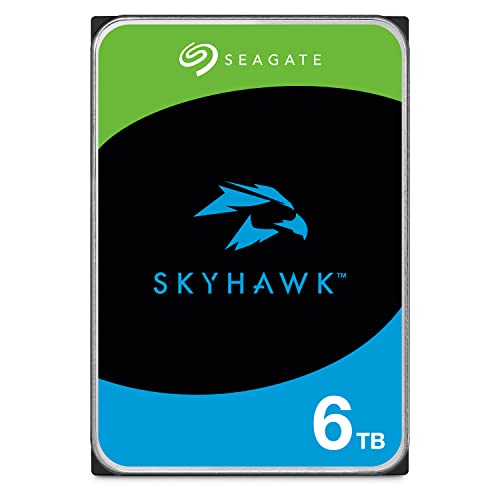
Six terabytes is the capacity where a typical home or small-shop system stops feeling cramped, and this standard-tier SkyHawk pairs that capacity with the larger of the two caches stated anywhere in this list: 256MB, against the 64MB of its 4TB sibling below. Its title states the full working specification plainly — 3.5-inch, SATA 6Gb/s, 256MB cache — which makes it the easiest pick here to verify before buying and the natural centre of the range.
The workload it suits is the common one: a recorder carrying a mid-single-digit count of cameras, writing continuously, reviewed when something happens. The cache figure matters in that setting because multi-stream writing arrives in interleaved bursts as each camera’s encoder delivers its chunks, and a deeper buffer gives the drive more room to organise those arrivals into orderly sequential writing. That is the unglamorous mechanism by which surveillance firmware and cache together prevent the dropped frames that plague recorders fitted with drives meant for desktops.
Against its own family, the choice is a capacity ladder. Step down to the 4TB SkyHawk and the cache shrinks with the room; step up to the AI model and the tier changes for recorders doing analysis. This 6TB standard model is the rung for the large middle of owners whose recorders record and nothing more, and whose camera count has outgrown the entry size. Retention at this capacity, for a modest camera count at sensible settings, stretches from weeks into the comfortable territory where an incident noticed late is still on the disk.
Fitting follows the standard pattern: the drive mounts in the recorder’s 3.5-inch bay, takes a SATA data connection to the recorder board and power from the recorder supply, and is then formatted by the recorder’s own setup routine. Budget the first evening for the recorder to initialise the disk and for a test playback from every camera before trusting the system — a five-minute review per camera confirms the streams are landing where they should.
- Capacity: 6TB
- Cache: 256MB
- Interface: SATA 6Gb/s, 3.5-inch internal
- Family and tier: Seagate SkyHawk, standard surveillance tier
- Rotational speed: Not stated in the listing title — verify with Seagate documentation
One scenario flatters this drive in particular: the system that grows by one camera a year. Owners rarely replace a whole recorder; they add a camera for the new gate, the new till, the side of the house that was previously unwatched, and each addition quietly shortens the retention the original drive delivered. Starting at six terabytes absorbs several of those additions before the overwrite cycle tightens enough to notice, which is precisely the headroom pattern that separates a drive bought once from a drive bought twice.
Strengths
- Full specification stated in the title, cache included
- Capacity sized for weeks of retention on a mid-size system
- Standard tier keeps the price of admission below the AI models
Trade-offs
- Not the tier for recorders running on-box analytics
- Speed figure absent from the title, so documentation decides it
- Single drive means the archive has no redundancy
Best for: A mid-size DVR or NVR that records continuously and does no analysis of its own.
Not suited for: Recorders with analytics switched on, or camera counts in the teens.

Seagate Skyhawk AI 8TB Video Internal Hard Drive — For analytics recorders
The AI suffix is the whole story of this pick. SkyHawk AI is Seagate’s tier for recorders that process what they record — identifying people and vehicles, indexing events, searching the archive intelligently — and this 8TB model carries the same stated 256MB cache and SATA 6Gb/s interface as the standard 6TB above, at a larger capacity and a higher workload class. Its title is truncated in the listing at the same point as its sibling’s, but the distinguishing words are all present: SkyHawk AI, 8TB, video internal hard drive.
The buyer this serves has a specific recorder: an AI-capable NVR whose analytics features are switched on and used, not merely advertised on the box. In that machine the drive never gets to specialise in writing alone. While the cameras stream in, the analytics engine reads back across the disk, and the drive’s firmware and rating must absorb both patterns at once. Fitting a standard-tier drive there does not cause instant failure; it causes the slow accumulation of lag, dropped analysis and shortened patience that ends in a second purchase. Buying the AI tier first is the cheaper path for that recorder.
Capacity interacts with analytics in a way worth understanding. Analysed footage tends to be kept longer, because the indexing makes old footage searchable and therefore valuable, and event clips get protected from overwrite. Eight terabytes gives that habit room. On a recorder without analytics, by contrast, this drive’s premium buys capacity alone, and the standard 8TB Purple further down the list is the more economical way to hold the same footage — tier money should follow workload, not aspiration.
As with every pick here, the title is silent on rotational speed, and the AI tier’s real workload ratings live in Seagate’s documentation. If your recorder’s manufacturer publishes a drive compatibility or recommendation list — many do — this is the pick whose exact model number most deserves checking against it, because analytics recorders are the fussiest about the drives they are fed.
- Capacity: 8TB
- Cache: 256MB
- Interface: SATA 6Gb/s, 3.5-inch internal
- Family and tier: Seagate SkyHawk AI, analytics tier
- Rotational speed: The title gives no figure — Seagate’s documentation for the exact model carries it
There is a division of labour worth arranging deliberately on an analytics recorder: let the drive hold everything, but protect the events. Most AI recorders let detected events — a person in the yard at night, a vehicle at the gate — be locked against the overwrite cycle or copied off automatically. Setting that up takes an evening and converts this drive from a rolling buffer into a genuine evidence store, where the footage the analytics judged important is exactly the footage that survives.
Strengths
- The tier shaped for combined writing and analytics reading
- Eight terabytes suits the longer retention analysed footage invites
- Cache and interface stated in the title for easy verification
Trade-offs
- Premium wasted on a recorder that only records
- Compatibility with a specific AI recorder deserves a list check
- Still a single point of failure for the archive it holds
Best for: An AI-capable NVR with its analytics features in genuine daily use.
Not suited for: Plain recording duty, where the standard tier holds the same footage for less.

Seagate Skyhawk 4TB Video Internal Hard Drive — Small-system value
The entry rung of the Seagate ladder states its brief in the title’s last words: for DVR. Four terabytes, a 64MB cache, the same 3.5-inch SATA 6Gb/s fitting as its larger siblings — a drive sized and priced for the smallest real systems: a home recorder watching a driveway and a door, a small shop with a till camera and an entrance camera, a rental property with a pair of views to keep.
At that scale the smaller cache is a proportionate trade rather than a flaw. Fewer cameras deliver fewer interleaved streams, and the buffer a two-to-four-camera recorder needs is modest. The retention arithmetic still deserves one pass before buying: at high resolutions even a small camera count eats capacity quickly, and owners of 4TB drives are the ones most often surprised by a two-week overwrite cycle when they expected a month. Run the division with your cameras’ actual settings, and if the answer disappoints, the 6TB model above is the same family one rung up.
What the small system gains here over a desktop drive of the same size is the surveillance tuning itself — firmware that treats the writing as a stream to be kept alive rather than a file to be perfected, in a package meant to run continuously in a warm recorder case. That tuning, not the badge, is the reason this guide contains no desktop drives at all, and it applies at 4TB exactly as it does at 8TB. Small systems record evidence too, and their incidents are no less important for the property being smaller.
This is also the natural replacement drive for the ageing recorders still running on whatever disk they shipped with years ago. When an old DVR’s original drive begins to click, drop cameras or fail its health checks, a like-for-like surveillance drive of this class restores the system for a fraction of a new kit’s cost, and the recorder’s own format routine makes the swap an evening’s work.
- Capacity: 4TB
- Cache: 64MB
- Interface: SATA 6Gb/s, 3.5-inch internal
- Family and tier: Seagate SkyHawk, standard surveillance tier, DVR-oriented
- Rotational speed: Absent from the listing title — consult Seagate documentation before relying on any figure
Small recorders also tend to live in the least hospitable corners of a building — the cupboard under the stairs, the stockroom shelf, the warm top of a cabinet — and a drive in continuous service feels its housing. Give this one what air the recorder’s placement allows and it will not ask for more; its whole design brief is to be installed, formatted and forgotten about for years, and at this size that forgetting is a feature the owner has genuinely paid for.
Strengths
- Lowest-cost entry into proper surveillance-tuned storage here
- Specification, cache included, fully stated in the title
- Ideal refresh drive for an ageing small DVR
Trade-offs
- Retention runs short if cameras record at high resolution
- Smaller cache suits small stream counts only
- Outgrown quickly if the camera count creeps upward
Best for: A home or small-shop DVR carrying a handful of cameras.
Not suited for: High-resolution multi-camera systems with long look-back needs.

Western Digital 8TB WD Purple Pro Surveillance Internal Hard Drive — WD’s top tier here
Purple Pro is Western Digital’s upper surveillance tier, and this 8TB model is the WD counterpart to the SkyHawk AI above: a drive for larger installations and for recorders whose work goes beyond plain recording. Its listing title is the tersest in this guide — brand, capacity, family, tier, and the words surveillance internal hard drive — stating neither cache nor interface nor speed. That brevity is a documentation errand, not a demerit: the figures exist in WD’s materials for the exact model, and a buyer at this tier should read them there before committing.
The setting that justifies the Pro tier is scale. More cameras writing simultaneously, a recorder serving several live viewers, an archive searched often — each adds random-access pressure on top of the streaming writes, and the upper tier is built and rated to hold its streaming composure under that combined load. Small systems gain little from it; a two-camera home recorder will never ask the questions the Pro tier answers. The honest framing is that Pro is insurance bought against workload, and it pays out only where the workload exists.
Eight terabytes at this tier also suits the installations where the recorder is one bay of a larger plan — small warehouses, multi-entrance premises, sites where footage retention is a compliance habit rather than a preference. In those settings the drive is usually chosen against the recorder maker’s compatibility list, and that list, plus WD’s own documentation for the model, outranks any guide’s ordering, this one included. Consider this pick the shortlist entry for the WD upper tier, to be confirmed against your recorder’s paperwork.
Owners stepping up from a standard Purple will find the fitting identical — 3.5-inch bay, SATA connection, recorder-side formatting — because the tier difference is internal: firmware, rating and intended workload, not the shape of the drive. The upgrade path is therefore simple mechanically even where the reasoning behind it is not.
- Capacity: 8TB
- Family and tier: WD Purple Pro, upper surveillance tier
- Form: Internal hard drive for surveillance recorders
- Cache: Not stated in the listing title — verify with Western Digital documentation
- Interface and speed: Not stated in the listing title — verify with Western Digital documentation
Installations at this tier often answer to more than one person — a facilities manager, an insurer, a landlord — and that audience changes what good looks like. The Pro choice is partly a documentation choice: a drive whose tier matches the recorder’s workload on paper, confirmable against the maker’s published materials, is the defensible specification when a system’s adequacy is ever questioned after an incident. That paper trail is a real part of what the upper tier sells.
Strengths
- Upper tier built for larger camera counts and busier recorders
- Eight terabytes matches long-retention installations
- Drop-in fitting shared with the standard Purple models
Trade-offs
- Title states almost nothing — documentation must fill every gap
- Tier premium earns nothing on a small, simple system
- Exact-model confirmation against the recorder list is essential
Best for: A larger or analytics-leaning installation standardised on WD.
Not suited for: Small home recorders, where the standard Purple is the proportionate buy.

Western Digital 8TB WD Purple Surveillance Internal Hard Drive — Big standard-tier WD
This is the capacity play in the standard tier: eight terabytes of Purple, the largest room in this guide that does not ask for an upper-tier premium. For a multi-camera home or business whose recorder simply records — no analytics, no heavy searching — it is arguably the sweet spot of the whole list, because retention is the constraint such systems actually hit, and this drive doubles the 4TB models’ room while staying in the tier their workload needs.
Its title, like the Pro’s, is minimal: brand, capacity, family, purpose. Cache, interface and speed all go unstated, so the same documentation errand applies, with one practical addition — because the standard Purple line spans many capacities and generations under one name, confirm the exact model on the listing matches the capacity in the title before ordering, and check its figures in WD’s documentation for that model rather than assuming the line shares one specification throughout.
In service, the character to expect is the surveillance standard: tireless sequential writing, footage served back smoothly on the occasions it is reviewed, and a long overwrite cycle that keeps last month’s incident on the disk. Paired with a recorder whose cameras record at sensible bitrates, eight terabytes converts retention from a weekly worry into a quarterly one, and that conversion — more than any specification — is what owners of the smaller drives say they wish they had bought first.
The comparison inside this guide is direct: against the SkyHawk AI at the same capacity, this drive spends nothing on analytics headroom; against the Purple Pro at the same capacity, it spends nothing on upper-tier workload rating. If neither of those purchases matches your recorder’s actual behaviour, the saving is real money kept, and the footage held is identical in size. Tier discipline is the theme of this list, and this pick is where it pays out most visibly.
- Capacity: 8TB
- Family and tier: WD Purple, standard surveillance tier
- Form: Internal hard drive for surveillance recorders
- Cache: The title is silent on cache — WD’s documentation for the exact model states it
- Interface and speed: Neither figure appears in the title — WD’s model documentation carries both
Consider the household that discovers, after a break-in two streets away, that its recorder kept only nine days because a well-meaning relative raised every camera to maximum settings. The fix applied afterwards is rarely new cameras; it is room — enough room that generous settings and a long memory stop being enemies. That is the everyday job this drive does, and it does it without asking the owner to learn anything new about tiers or firmware.
Strengths
- Maximum standard-tier room in this guide
- Long overwrite cycle keeps older incidents retrievable
- No premium paid for tiers the recorder cannot use
Trade-offs
- Nothing beyond capacity is stated in the title
- Standard tier is not shaped for analytics workloads
- One drive still holds the only copy of everything
Best for: A record-only multi-camera system that keeps running out of retention.
Not suited for: Recorders running analytics, or installations built around an upper-tier rating.

Western Digital 4TB WD Purple Surveillance Internal Hard Drive — Entry WD option
The WD ladder starts where the Seagate one does, at four terabytes in the standard tier. This Purple is the counterpart to the 4TB SkyHawk: same capacity class, same intended habitat of small recorders and few cameras, same surveillance tuning in place of desktop firmware. Owners whose existing recorder already runs a Purple, or whose spares shelf and habits are WD-shaped, will take this as the natural small-system choice, and nothing in either title contradicts them.
The differences between the two 4TB picks are differences of disclosure more than of kind. The SkyHawk’s title states its cache and interface; this Purple’s title states neither, leaving the documentation errand to the buyer. That is worth a few minutes rather than a change of allegiance: WD publishes full specifications for the exact model, and the recorder does not care which family’s badge is on the label nearly as much as it cares that the drive is surveillance-tuned and sound.
Retention at 4TB obeys the same arithmetic as everywhere else in this guide. A pair of cameras at moderate settings can keep a genuinely long archive here; a fistful of high-resolution cameras cannot. The small Purple’s honest role is the small system measured first, and its upgrade path within the family — to the 8TB standard model above — is painless when the camera count grows, since the recorder’s fitting and habits stay the same and only the disk changes.
One more role suits it well: the known-good spare. Recorders fail at inconvenient times and usually by their drives; a small surveillance drive kept on the shelf turns a dead recorder back into a recording one the same evening, at a cost low enough that even home systems can justify it. Evidence has a way of being needed for exactly the days the system was down.
- Capacity: 4TB
- Family and tier: WD Purple, standard surveillance tier
- Form: Internal hard drive for surveillance recorders
- Cache: No figure appears in the listing title — check Western Digital documentation
- Interface and speed: The listing title omits both — confirm them in Western Digital documentation
There is a quiet economy in standardising on the entry drive of a family you trust. The owner who runs this Purple at home and its larger sibling at a small business premises reads one health vocabulary, keeps one spare philosophy and learns one set of habits that transfer between both sites. Storage rewards that kind of familiarity out of proportion to its cost, because the failures that matter are the ones recognised early, and recognition is a habit, not a specification.
Strengths
- Entry price into WD’s surveillance-tuned family
- Right-sized for two-to-four-camera home recorders
- Sensible shelf spare for an existing Purple-based system
Trade-offs
- Title omits cache, interface and speed entirely
- Retention is short under high-resolution recording
- Growth in camera count will outgrow it
Best for: A small WD-based recorder, or a first surveillance drive bought on a budget.
Not suited for: Larger camera counts or long-retention requirements.
How Do the Six Compare Side by Side?
| Drive | Capacity | Tier | Cache from title | Best-matched recorder |
|---|---|---|---|---|
| Seagate SkyHawk | 6TB | Standard | 256MB | Mid-size record-only system |
| Seagate SkyHawk AI | 8TB | Analytics | 256MB | AI-capable NVR using its analytics |
| Seagate SkyHawk | 4TB | Standard | 64MB | Small home or shop DVR |
| WD Purple Pro | 8TB | Upper | Not stated in title | Larger, busier installation |
| WD Purple | 8TB | Standard | Not stated in title | Record-only system seeking room |
| WD Purple | 4TB | Standard | Not stated in title | Small WD-based recorder |
Read the table by workload first and capacity second. The tier column decides whether the drive’s firmware and rating match what the recorder does all day; the capacity column decides how much of that work remains on the disk when you come looking for it. Cache, where stated, breaks ties inside a family. Everything the table leaves blank is a deliberate blank — the titles do not carry the figure, and manufacturer documentation is the only honest source for it.
How Long Does a Surveillance Drive Last in Continuous Service?
There is no honest single number, because service life is the product of workload, temperature and luck, in roughly that order. What can be said usefully is how the end usually announces itself. Recorders keep health logs, and a drive approaching its end typically shows rising error counts, occasional dropped cameras and slower searches through old footage before anything catastrophic occurs. Owners who read those signals get to schedule the replacement; owners who ignore them get to discover it. The practical lifespan planning most owners adopt is simple: expect several years, watch the health screen quarterly, and treat the drive as a consumable with a long fuse rather than a permanent fixture.
One habit extends life more than any other within the owner’s power, and it is unglamorous: do not let the recorder cook. Every few degrees of sustained temperature removed from a drive’s environment is wear that does not happen. The second habit is restraint in settings — recording every camera at maximum resolution and frame rate around the clock, including the camera watching an empty corridor, multiplies the writing the drive absorbs for footage nobody will ever review. Sensible per-camera settings are a drive-longevity decision disguised as a picture-quality decision.
When replacement day comes, the outgoing drive still holds the archive, so sequence matters: export anything live or disputed first, then swap, then let the recorder format the newcomer. The retired drive, if it still spins, makes a reasonable cold store for that exported archive in a drawer — not a backup strategy, but a better fate than the recycling bin for the only copy of an incident’s footage.
What Mistakes Do Recorder Owners Keep Making With Drives?
The classic mistake is fitting a desktop drive because one was spare, then blaming the recorder when footage develops gaps. Desktop firmware handles a difficult sector by pausing and retrying, exactly right for a document and exactly wrong for a live stream that cannot wait. The second mistake is buying capacity by camera count alone, without the retention division — resolution and bitrate move the daily total more than one extra camera does, and the owners surprised by a four-day overwrite cycle almost always skipped the arithmetic.
A third mistake is treating the recorder’s drive as the archive. Surveillance drives overwrite by design; footage that matters must be exported to separate storage when an incident is noticed, because the overwrite cycle will not pause for an insurance claim’s timetable. Closely related is the fourth mistake: never testing playback. A system can record happily for months with one camera’s stream corrupted, and the discovery should happen in a monthly five-minute review, not during a police visit. Finally, owners neglect the recorder’s own drive-health screen, which will usually announce a tiring drive weeks before it fails — long enough to order the replacement and export what matters.
How Should You Install and Commission a New Surveillance Drive?
Power the recorder fully down, open its case, and seat the drive in the 3.5-inch bay with its screws snug rather than forced. Connect the SATA data lead to the recorder board and the power lead from the recorder supply, checking both are fully home, then close the case and power up. The recorder should offer to initialise or format the new disk in its storage menu; accept, because a surveillance recorder wants its own formatting and will manage the overwrite cycle itself from there.
Before the new drive goes in, one preparation pays for itself: photograph the old drive’s label and note the recorder’s current settings, because the swap is the moment settings get lost and the moment the old disk’s identity gets confused with the new one. If the old drive still spins, leave it untouched in a drawer until the new drive has run a full overwrite cycle without complaint; that overlap is the only period in which a mistake costs nothing, and it is the cheapest insurance in the whole procedure.
Commissioning is the step owners skip and later regret. Set the retention behaviour deliberately — overwrite when full is the normal choice — then record for an hour and play back a segment from every camera, checking timestamps are correct and no stream stutters. Note the date the drive entered service, either in the recorder’s log or on a label inside the case; years later, that date is the first clue when behaviour changes. Finally, schedule the two habits that keep the system honest: a monthly playback spot-check and a glance at the health screen, both cheap insurance on the evidence the system exists to gather.
Final Recommendation
For the largest group of owners — a recorder that records, carrying a mid-size set of cameras — the Seagate SkyHawk 6TB is the centre of this list for good reason: full specification in the title, the larger stated cache, and capacity that turns retention from days into weeks. Owners of AI-capable recorders with the analytics actually running should step to the tier built for that combined workload, the SkyHawk AI 8TB on the Seagate side or the WD Purple Pro 8TB on the Western Digital side, and confirm the exact model against the recorder maker’s list. Record-only systems that keep outgrowing their disks should take the standard WD Purple 8TB and spend nothing on tiers their recorder cannot exercise, while small systems are honestly served by either 4TB entry — the SkyHawk where stated specifications are valued, the Purple where an existing WD setup makes it the familiar choice. Whichever rung you land on, run the retention division before ordering, export footage that matters, and let the recorder’s health screen tell you when this decision comes round again — because a camera system earns its keep on the worst week of the year, and the drive is where that week is kept.
A last word on the two families, because brand is the question owners ask first and the one that matters least here. SkyHawk and Purple are mature, directly competing lines, and at matched tier and capacity the practical differences are disclosure style and the documentation behind each model rather than any gulf in fitness for recording. Choose the tier by the recorder, the capacity by the retention division, and let brand follow whichever of those answers your existing equipment already speaks — then stop second-guessing, because a surveillance drive’s virtues are all in the years after the choosing is forgotten.
Frequently Asked Questions
Can I use a regular desktop drive in my DVR instead?
It will usually fit and format, and that is where the good news ends. Desktop firmware pauses to retry difficult sectors and expects idle time to recover and cool; a recorder offers neither pause nor idle, so gaps in footage and early wear are the common outcome. The price gap between a desktop drive and a surveillance drive of the same capacity is small against the value of the footage, which is why every pick in this guide comes from a surveillance family.
Does a bigger drive make my cameras record in better quality?
No. Image quality is set by the cameras and the recorder’s encoding settings. A bigger drive changes only how long the footage survives before being overwritten. If the picture itself disappoints, the remedy sits in camera settings or camera hardware; if good footage vanishes too quickly, that is the drive capacity talking, and it is the problem the larger picks here solve.
How do I know whether my recorder needs the AI or Pro tier?
Look at what the recorder does besides recording. If its feature list includes on-box analytics — person and vehicle detection, smart search, plate recognition — and you have those features switched on, the drive absorbs a reading workload alongside the writing, and the upper tier is the matched purchase. If the recorder simply records and plays back, the standard tier is built for exactly that and the premium buys nothing measurable.
Why do the WD titles state so much less than the Seagate ones?
Listing titles are written to different house styles, and WD’s are terse. The missing figures — cache, interface detail, rotational speed — exist in Western Digital’s published specifications for each exact model. Treat the title as an identity label and the manufacturer’s documentation as the specification sheet, and confirm the model number on the listing matches the capacity you intend to order.
When should a surveillance drive be replaced?
When the recorder’s health monitoring reports degradation, when cameras begin dropping or footage develops unexplained gaps, or when clicking and repeated spin-up sounds appear. Drives in continuous service live hard lives; replacing on the health screen’s early warning, after exporting anything that matters, is far cheaper than reconstructing events the disk no longer holds.
Can one of these drives hold footage from two separate recorders?
A bare internal drive lives inside one recorder and serves that recorder alone. Sites running two recorders need a drive in each, sized by each system’s own camera count and retention target. Sharing happens at the viewing and export level — through the recorders’ software — not by moving a single disk between machines.
Related Guides
Storage decisions rarely stop at one drive. Readers planning the wider setup may also find our coverage of NAS drives for home media libraries useful, along with the companion piece on external drives for backing up footage archives and the overview of SSDs for video editing workstations.