What's inside
- Key Takeaways
- Quick Picks
- How Did We Judge RAID Units on Title Evidence Alone?
- Why Does Mirroring Suit Video Editing Specifically?
- Complete Unit or Empty Enclosure: Which Should an Editor Buy?
- How Does an Editor Live With Half the Headline Capacity?
- What Does a Rebuild Day Actually Look Like in a Working Suite?
- How Should an Editor Choose the Drives for an Empty Enclosure?
- How Do the Complete Units and Enclosures Compare?
- Where Does the Mirrored Volume Sit in a Suite’s Wider Storage?
- What Mistakes Do Editors Make When They Set Up RAID 1?
- How Should an Editor Commission a New Mirrored Volume?
- Final Recommendation
- Frequently Asked Questions
- Related Guides
As an Amazon Associate I earn from qualifying purchases. This post may contain affiliate links at no extra cost to you.
gizmoverdict.com is reader-supported. When you buy through links on our site, we may earn an affiliate commission.
Where to buy: Each unit below links to its own listing, and every claim about RAID, capacity and connection is taken from that listing’s title. Two of the six are enclosures sold without drives — they are labelled diskless wherever they appear, because a video editor planning a purchase deserves to know which boxes arrive ready to store footage and which arrive as empty bays.
The best RAID 1 external hard drives for video editors are bought for one reason that outranks every specification: footage is irreplaceable, and a single drive’s death should never be able to take a project with it. RAID 1 — mirroring — writes everything to two drives at once, so the failure of one disk leaves the other holding the complete, current copy. For an editor, whose media represents days of shooting and whose deadlines do not move for hardware funerals, that arrangement converts the commonest storage disaster into an inconvenience measured in the time it takes to swap a disk.
One piece of arithmetic must be understood before any pick is judged, because it governs the whole list: mirroring halves usable capacity. A unit sold as 32TB holds two 16TB drives; mirrored, it presents 16TB of usable space with every byte existing twice. A 28TB unit presents 14TB. The headline number is the raw total of the disks inside, and editors who plan a project’s storage from the headline will run out of room at exactly twice the expected speed. This guide states both figures for every pre-built pick, because the usable one is the one a timeline cares about.
The six picks divide into two kinds. Three are complete RAID storage units with drives inside — from OWC, WD and Glyph — at headline capacities of 32TB, 28TB and 32TB. Three are dual-bay enclosures with RAID controllers and no drives at all: a TerraMaster unit whose title says diskless outright, and MAIWO and GODO enclosures for drives the editor supplies. Both kinds have honest places in an edit suite; they differ in whether the editor is buying storage or buying the right to choose the storage.
Key Takeaways
- RAID 1 mirrors everything onto two drives, so one disk’s failure costs a swap, not a project — and it halves usable capacity: 32TB headline means 16TB usable.
- Three picks here are complete units with drives fitted; three are enclosures whose titles make clear no drives are included, so budget for disks separately.
- Only the Glyph title prints a speed — 550 MB/s over USB-C; every other unit’s pace must be read in its maker’s documentation, not guessed.
- Mirroring protects against drive failure only. It mirrors deletions and corruption instantly, so the suite still needs a separate backup.
- Enclosures earn their keep when the editor already owns drives, or wants to choose and replace disks personally across years of projects.
- Every pick here is a genuine RAID device by its title — no single-drive unit has been padded into a RAID list.
Quick Picks
| Pick | Badge | Why it earns its place |
|---|---|---|
| OWC Mercury Elite Pro Dual 32TB RAID | Dual-connection flagship | A complete 32TB RAID unit whose title names both USB at 5Gb/s and eSATA — 16TB usable mirrored. |
| WD 28TB My Book Duo Desktop RAID | Mainstream mirrored archive | WD’s desktop RAID at 28TB headline, 14TB usable, with password protection in its title. |
| Glyph Blackbox PRO RAID 32TB | Only stated speed | Thirty-two terabytes with 550 MB/s printed in the title — the list’s one verifiable pace. |
| TERRAMASTER D2-320 USB RAID Enclosure 2-Bay (Diskless) | Honest empty box | A two-bay RAID enclosure that says diskless in its name — drives are bought separately. |
| MAIWO Dual Bay Hard Drive Enclosure with RAID 0/1/JBOD/NORMAL | Mode-flexible enclosure | A 2.5-inch dual-bay enclosure whose title lists its RAID modes outright; drives not included. |
| GODO 3.5 inch Dual Bay Hard Drive Enclosure with RAID | Big-bay enclosure | A dual-bay enclosure for 3.5-inch SATA drives over USB 3.0; an empty chassis awaiting disks. |
How Did We Judge RAID Units on Title Evidence Alone?
The first test was admission: a unit belongs in this guide only if its title establishes RAID as a real feature of the hardware — a RAID storage solution, a desktop RAID, a RAID enclosure with named modes. Single external drives, however excellent, were excluded, because an editor searching on this keyword is shopping for mirroring and should not be handed a list padded with drives that cannot mirror. All six picks pass that test on the face of their titles, three as complete units and three as enclosures with RAID controllers.
The second test was capacity honesty. For the complete units, the titles state headline capacities, and this guide converts each to its RAID 1 usable figure in plain sight — half — rather than letting the larger number do the persuading. For the enclosures, the titles state no capacity at all, which is the correct disclosure for an empty box: their capacity is whatever pair of drives the editor installs, halved by the same mirroring arithmetic, and any figure printed here would have been invented.
The third test was connection and speed, claimed only where printed. The OWC title names USB at 5Gb/s and eSATA; the WD title names USB 3.1; the Glyph title names USB-C and the guide’s only speed, 550 MB/s; the GODO title names USB 3.0. The TerraMaster and MAIWO titles leave their connection details to documentation. An editor planning a suite around a specific port should complete those two checks in the makers’ materials — the guide’s spec boxes say exactly where each title falls silent.
Why Does Mirroring Suit Video Editing Specifically?
Because editing concentrates three risks in one place. The media is irreplaceable — a wedding, a documentary interview, a client’s only take cannot be reshot because a disk clicked. The work is deadline-shaped — a drive failure the night before delivery is not an IT problem but a professional one. And the storage is worked hard — timelines read media for hours daily, renders write for hours nightly, and the drive at the centre of that duty is a mechanism accumulating wear at a professional rate. Mirroring answers the intersection precisely: the second disk is not a backup chore to remember but a live twin, current to the last saved frame, that absorbs the failure whenever it arrives.
The live-twin quality matters more than editors new to RAID expect. A nightly backup leaves up to a day of edits exposed; a mirrored volume exposes nothing, because the copy is written in the same instant as the original. When a disk in the mirror dies, the editor keeps editing from the survivor while the replacement ships — the project’s heartbeat never stops. That continuity, not any transfer figure, is what the premium over a single drive buys, and for professional work it is usually the cheapest insurance in the whole suite.
The boundary must be stated with equal clarity, because mirroring is chronically oversold: RAID 1 protects against exactly one failure mode, a disk’s death. It does not protect against deleting the wrong folder — the deletion is mirrored instantly — nor against corruption, theft, fire or the suite’s own mistakes. The editor’s backup remains a separate device or service, on a schedule, ideally in another place. Mirroring keeps the project alive through hardware failure; backup keeps it alive through everything else; a serious suite runs both and confuses neither with the other.
Complete Unit or Empty Enclosure: Which Should an Editor Buy?
The complete units answer with convenience and accountability. Drives fitted, RAID controller integrated, one maker responsible for the whole mechanism — the editor unboxes, formats, sets the mirror and edits. For a working professional whose hours are billable to clients rather than to hardware administration, that completeness is worth its premium, and the three complete picks here span the mainstream (WD), the connectivity-rich (OWC) and the performance-stated (Glyph) versions of the idea.
The enclosures answer with control and longevity. An editor with a shelf of retired project drives, or strong opinions about which disks to trust, or a plan to grow capacity by swapping drives across years, buys the chassis once and the disks as needed. When a drive dies in an enclosure, the editor replaces that disk alone, choosing its successor personally; when capacities double, the same chassis can host the new pair. The costs are real too: the homework of matching drives to the enclosure’s supported sizes and types, the absence of any stated capacity to plan by until disks are chosen, and the discipline of buying drives in matched pairs for the mirror.
There is a middle truth worth naming: the enclosure route’s savings are largest for editors who already own suitable drives, and smallest — sometimes negative — for editors buying chassis and disks together at retail. Price the pair of drives into every enclosure below before comparing it with the complete units, because an empty box plus two disks is the true sticker, and on some weeks the complete unit is the cheaper way to the same mirrored terabytes.
How Does an Editor Live With Half the Headline Capacity?
By planning projects in usable terabytes and treating the mirror’s tax as rent paid for continuity. A practical suite rhythm helps: the mirrored volume holds the active projects and their media, finished projects migrate to cheaper single-drive or archive storage once delivered, and the volume’s free space is watched the way a shooter watches card space — because a mirrored volume that fills mid-render fails the editor at the same class of moment as a full card on a shoot. The 16TB usable of the 32TB units is, in that rhythm, several features’ worth of active work; the 14TB of the WD is a documentary season’s; both are honest rooms when the migration habit exists.
Capacity planning should also reckon with the project’s own growth during the edit. Media ingested is the floor, not the total: renders, exports in delivery formats, graphics and the safety copies of project files accumulate around it, and experienced editors budget the volume at a multiple of the raw media rather than at its size. The mirror halves the headline; the edit multiplies the media; the editor who knows both numbers before the shoot is the one whose volume never fills at midnight.
What Does a Rebuild Day Actually Look Like in a Working Suite?
It begins with an indicator, an email or a suite member noticing the unit’s complaint — which is why the commissioning habit of assigning the volume a watcher matters. The surviving disk carries the suite alone now, and the day’s first decision is temperamental: keep editing, because the mirror was bought precisely so that editing continues, but postpone the week’s heaviest renders if the schedule allows, because the survivor is doing double duty and the rebuild ahead of it will ask for more. The replacement disk — right model, right size, ordered from the commissioning note rather than from memory — goes in when it arrives, and the rebuild begins.
The rebuild is the mirror’s most honest hour. The array copies everything the survivor holds onto the newcomer, a process whose duration scales with the volume’s contents and during which the project exists, once again, on exactly one disk. Suites treat that window with respect: no experiments, no reorganisation, the backup verified as current before the rebuild starts, because the backup is the only net beneath the tightrope. When the array reports the mirror whole again, the note is updated — new disk, date, rebuild completed — and the suite forgets the incident, which is the correct ending.
Editors who have lived one rebuild day tend to change two habits permanently. They keep the commissioning note where a colleague can find it, and they stop describing the mirrored volume as backed up in front of clients, because they have felt the difference between the two protections in their own schedule. The rebuild day is the mirror’s tuition; the units in this guide are how a suite pays it once instead of per project.
How Should an Editor Choose the Drives for an Empty Enclosure?
Begin with the bay: 2.5-inch for the MAIWO, 3.5-inch for the TerraMaster and GODO classes, and no adapter optimism — a drive that does not match the bay does not belong in the plan. Continue with the pair discipline: two drives of the same model and capacity, bought together, so the mirror’s halves share a design, a size and an expected lifespan. Mixed pairs waste the larger drive’s excess and inherit the weaker drive’s horizon, and a mirror is precisely the wrong place for either compromise.
Then size the pair from the usable end. Decide the mirrored room the projects need — remembering the edit’s habit of multiplying media with renders and exports — and buy the pair whose half equals that room, with headroom. The enclosure’s documentation carries its maximum supported capacity per bay, and exceeding it is the classic first-order error of the enclosure route; read that figure before the disks are in the basket, not after they are on the desk.
Finally, consider the drives’ intended duty. A mirrored volume in a working suite is read and written daily for years; drives designed for always-on, multi-drive environments exist for exactly that life, and the enclosure route’s freedom to choose is wasted if it is spent on the cheapest disks the bay accepts. The chassis was the inexpensive part of this purchase. The pair inside it is the part the projects will live on, and it should be bought like it.

OWC Mercury Elite Pro Dual 32TB RAID — Dual-connection flagship
The OWC unit leads the complete picks on the strength of a title that reads like a specification sheet: a Mercury Elite Pro Dual, 32TB of RAID storage, with USB at 5Gb/s and eSATA both named as connections. In RAID 1 that headline becomes 16TB of mirrored, usable room — several active features’ worth — and the dual connection story is the unit’s distinguishing character: two generations of edit-suite connectivity served by one box, which matters in suites whose machines span years.
OWC’s constituency is the professional creative studio, and this unit is shaped for that desk: a dual-bay RAID solution expected to sit at the centre of a working suite, absorbing ingests and feeding timelines daily. The eSATA presence speaks to the installed base of suites built around it; the USB connection speaks to everything newer. An editor equipping a mixed-generation suite — the new workstation beside the older machine that still handles a legacy project — will feel that duality as a daily convenience rather than a specification.
No pace is printed in the title, and this guide supplies none from imagination; the connection figures it does state set the ceiling honestly, and OWC’s documentation carries the rest. What can be said from the class is that a mirrored pair’s reading can draw on both disks while its writing pays the mirror’s small tax, and that for timeline work the practical experience is set far more by the suite’s connection choice than by any figure a listing could print.
As the flagship complete unit here, it carries the flagship’s caveat too: the editor is buying OWC’s integration of drives and controller as one appliance, and when a disk eventually tires, the replacement conversation runs through the unit’s own design and documentation. Suites that value a single accountable maker will count that a virtue; suites that value choosing every disk will look to the enclosures below, and this guide has placed both philosophies side by side deliberately.
- Headline capacity: 32TB total across the mirrored pair
- Usable capacity in RAID 1: 16TB — mirroring halves the headline
- Connections stated in title: USB at 5Gb/s and eSATA
- Transfer speed: Not stated in the listing title — verify with OWC documentation
- Role: Complete mirrored storage for a mixed-generation edit suite
A suite note on placement: a mirrored volume at the centre of daily work should live where its indicators can be seen and its cables cannot be kicked loose — not behind the monitor where a dead disk’s warning glows unseen for a month. The OWC’s professional constituency tends to rack or shelf such units deliberately, and the habit is worth copying at any scale.
Strengths
- Two connection generations served by one unit
- Largest mirrored room among the complete picks
- Single-maker accountability for drives and controller
Trade-offs
- No speed figure in the title for planning
- eSATA’s value depends on the suite still using it
- Appliance design means replacements follow the maker’s path
Best for: A professional suite with machines from several generations.
Not suited for: Free choice and swapping of disks, on the editor’s own schedule.

WD 28TB My Book Duo Desktop RAID — Mainstream mirrored archive
WD’s entry is the familiar name at this table: a My Book Duo desktop RAID of 28TB headline — 14TB usable in the mirror — whose title adds USB 3.1 and password protection to the family’s desktop identity. For editors whose wider storage life already runs on WD, the Duo is the mirrored volume that arrives speaking the same language as the rest of the shelf, and that familiarity is a genuine operational virtue in a suite that cannot afford surprises.
The password protection in the title deserves the same attention it received in the RED guide’s archive discussion, because client footage is commercially and personally sensitive: unreleased work, private events, material under embargo. A mirrored volume that can be locked adds a layer between the suite’s media and the world’s curiosity, and its presence in the title means the buyer can weigh it before purchase rather than discover it in a manual. It does not replace the suite’s wider security habits; it completes the storage layer of them.
Fourteen usable terabytes places the Duo in the working-archive role for many editors: the active project and its predecessors, the current season’s media, the library of reusable assets — with finished work migrating onward to colder storage as the volume’s rhythm requires. Its desktop form is unapologetically stationary; this is the volume that lives under the desk or on the shelf, present for every ingest, and its stillness is part of its reliability story.
The title states the interface generation but no speed, so the guide claims none; WD’s documentation for the Duo carries the figures and the RAID configuration details, including how the unit’s modes are set, which an editor should read before deciding the volume’s working arrangement. What the title establishes — RAID, capacity, connection family, locking — is the skeleton of the purchase, and it is a complete enough skeleton to shortlist the unit honestly.
- Headline capacity: 28TB total across the mirrored pair
- Usable capacity in RAID 1: 14TB — mirroring halves the headline
- Connection stated in title: USB 3.1
- Stated feature: Password protection, as printed in the listing title
- Transfer speed: Not stated in the listing title — verify with Western Digital documentation
There is a second career waiting for this unit in many suites: when the next generation of working storage arrives, the Duo’s mirror becomes the archive of the projects it once held actively, still mirrored, still locked, demoted in pace but not in trustworthiness. Desktop RAID units tend to age into a second career rather than a cupboard, and that graceful demotion is part of their value.
Strengths
- Mainstream maker’s mirrored volume with locking stated
- Fourteen usable terabytes suits a working project archive
- Familiar family for suites already running WD storage
Trade-offs
- Smallest usable room among the complete picks
- No title speed figure — documentation carries the details
- Desktop form anchors it to one suite
Best for: A WD-standardised editor building a locked, mirrored archive.
Not suited for: The largest active projects, where 16TB usable matters.
Glyph Blackbox PRO RAID 32TB — Only stated speed
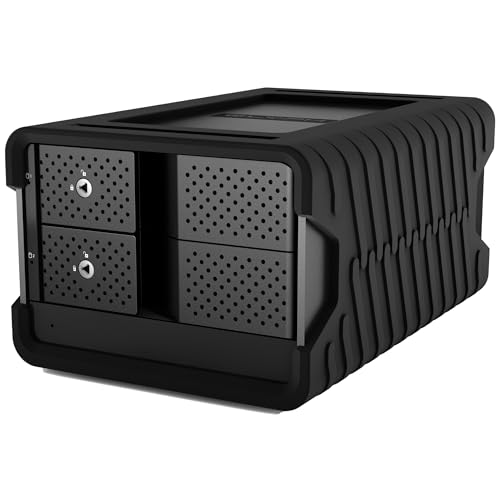
The Glyph is the guide’s evidence purist’s delight: a Blackbox PRO RAID of 32TB whose title prints a speed — 550 MB/s — and its USB-C connection alongside the capacity. Sixteen terabytes usable in the mirror, at a pace the buyer can read before paying: among six picks, this is the one whose working character is a published figure rather than a class expectation, and for an editor scheduling ingests and exports around client deadlines, a published figure is a planning tool.
Glyph’s name circulates in production circles rather than in general computing, and the Blackbox PRO line is aimed at exactly this guide’s reader — media professionals whose storage is a production tool. The stated pace over USB-C describes a unit intended to be worked from, not merely stored upon: timelines fed, media ingested, exports written, at a rate that keeps the drive from becoming the suite’s bottleneck story. The buyer should still confirm the suite’s own port can feed that pace, because a stated ceiling belongs to the pairing of drive and connection.
The desktop RAID format at this size carries the usual concentration counsel, sharpened by the mirror’s presence: editors sometimes speak of a mirrored volume as if it were backed up, and the Glyph’s owner should repeat this guide’s refrain — the mirror survives a disk, the backup survives everything else, and a 16TB working volume deserves its own separate copy arrangement in proportion to the client work it holds.
Between the three complete units, the Glyph is the choice when the suite’s question is how fast, the OWC when the question is which connections, and the WD when the question is which family the rest of the shelf speaks. That the three questions have three different answers is why all three are here; the editor’s own suite will know which question it has been asking.
- Headline capacity: 32TB total across the mirrored pair
- Usable capacity in RAID 1: 16TB — mirroring halves the headline
- Connection stated in title: USB-C
- Stated speed: 550 MB/s, as printed in the listing title
- Role: Complete mirrored volume with a publishable pace
Editors who cut from the volume directly will care about one behaviour the title’s figure cannot fully describe: how the unit sustains its pace across a whole day of mixed reading and writing, renders landing while timelines play. That endurance is the professional class’s quiet claim, and it is best verified in the maker’s documentation and the suite’s own first-week experience rather than in any headline.
Strengths
- The list’s only title-stated transfer speed
- Production-focused maker and desktop RAID design
- Sixteen usable terabytes for active project work
Trade-offs
- Stated pace needs the suite’s port to match it
- Premium professional positioning
- Mirror still requires a separate backup arrangement
Best for: An editor scheduling ingests against deadlines who plans by figures.
Not suited for: A suite hooked up through connections that cannot feed its stated pace.

TERRAMASTER D2-320 USB RAID Enclosure 2-Bay (Diskless) — Honest empty box
The TerraMaster’s title contains the most honest word in this guide: diskless. This is a two-bay USB RAID enclosure — a chassis with bays and a RAID controller — sold with no drives inside, and the listing says so in its name. The editor buys it to install a pair of drives of their own choosing, sets the mirror, and owns every subsequent decision about what spins inside it. Any capacity figure attached to this pick would be fiction; its capacity is the chosen pair’s, halved by mirroring, and the guide prints none.
TerraMaster’s world is storage enclosures and network boxes, and a dedicated two-bay RAID chassis from such a maker is a considered tool: the editor supplies disks — ideally a matched pair, bought together, of a capacity the next several projects justify — and the enclosure supplies the mirroring and the connection. The arrangement suits the editor with drives already on the shelf from retired projects, provided those drives are a true pair in size and health; a mirror built from one new disk and one tired one inherits the tired one’s remaining life as the volume’s horizon.
The title names USB as the connection family without a generation figure this guide can quote, so the documentation check matters here: TerraMaster’s materials for the D2-320 carry the interface particulars and the supported drive details, and an editor planning around a specific port or disk size should read them before the chassis and the disks are ordered in separate baskets on the same day.
What the diskless route buys, beyond the choosing, is the future swap. When the pair fills, the editor migrates to larger disks; when one tires, the editor replaces that one; the chassis persists across generations of the media it holds. For suites that think in five-year arcs, that persistence is the enclosure’s whole argument, and it is a good one — provided the editor also accepts the administrator’s hour it occasionally asks for.
- Drives included: None — diskless, as stated in the listing title; drives are bought separately
- Bays: 2, as stated in the listing title
- Type: USB RAID enclosure
- Capacity: Determined by the pair of drives the editor installs, halved in RAID 1
- Connection detail: Not stated in the listing title — verify with TerraMaster documentation
The enclosure also disciplines its owner in a useful way: because the disks were chosen, their purchase dates and sizes are known, and the mirror’s eventual rebuild or upgrade can be planned from records rather than reconstructed from labels. Editors who keep that small ledger find that storage decisions stop being emergencies and become entries in it.
Strengths
- Diskless stated in the name — no ambiguity about the purchase
- Editor chooses, sizes and replaces the drives personally
- Chassis persists across generations of disks
Trade-offs
- True cost is the chassis plus a matched pair of drives
- No capacity to plan by until disks are chosen
- Supported-drive homework belongs to the buyer
Best for: An editor with drives on the shelf or strong opinions about them.
Not suited for: Anyone expecting to store footage the day it arrives, unboxing alone.

MAIWO Dual Bay Hard Drive Enclosure with RAID 0/1/JBOD/NORMAL — Mode-flexible enclosure
The MAIWO’s title is a mode list: a dual-bay enclosure for 2.5-inch SATA SSDs and HDDs offering RAID 0, RAID 1, JBOD and NORMAL modes. For this guide the operative mode is RAID 1 — the mirror — and the presence of the alternatives is itself information: this chassis can be re-purposed across a suite’s life, mirroring the active project volume this year and serving as a simple two-disk box for archive overflow in another. It is an enclosure; no drives are included, and the capacities of the mirror it builds are set entirely by the pair of 2.5-inch drives the editor installs.
The 2.5-inch format defines its character. Drives of that size — including SSDs — are the compact, lower-capacity-per-disk class, so a mirrored pair built here tops out well below the big desktop units’ rooms. What the format buys is smallness and flexibility: a mirror that fits a cramped desk, travels between suites more easily than a desktop unit, and can be built on SSDs where the editor values a silent, shock-indifferent volume for a specific project. Judged as a compact mirror rather than as a capacity rival to the 32TB units, it is honestly placed.
The mode list also imposes a discipline the complete units hide: the editor must set RAID 1 deliberately and confirm the enclosure reports the mirror as active, because a chassis that offers JBOD and NORMAL will happily run unmirrored if told to. The first hour with this enclosure should end with that confirmation written down — which mode, which drives, what usable capacity resulted — the same commissioning note this guide recommends for every pick, applied where it matters most.
MAIWO’s title leaves the connection’s generation unstated, so the documentation check applies; the enclosure’s supported drive heights and capacities likewise live in its materials. None of that diminishes the pick’s clear niche: the small, mode-flexible mirror for an editor whose projects are modest in terabytes and whose desk is modest in everything.
- Drives included: None — this is an enclosure for 2.5-inch SATA SSD/HDD; drives are bought separately
- Bays: Dual bay, 2.5-inch drives
- Modes stated in title: RAID 0, RAID 1, JBOD and NORMAL — set RAID 1 for mirroring
- Capacity: Set by the installed pair, halved in RAID 1
- Connection detail: Not stated in the listing title — verify with MAIWO documentation
Smallness has one more editorial use: a mirrored pair built on SSDs in this chassis makes a genuinely portable protected volume — the project that travels to a client’s site or a second suite with its mirror intact. No desktop unit in this guide offers that, and for the editor whose work is reviewed in other people’s rooms, it can be the deciding characteristic.
Strengths
- RAID 1 among plainly listed modes — no ambiguity about capability
- Compact 2.5-inch format, SSD-compatible by its title
- Re-purposable across a suite’s changing needs
Trade-offs
- 2.5-inch pairs cap the mirrored room well below the big units
- Mode must be set and confirmed by the editor
- Drives are a separate purchase in every sense
Best for: A compact mirrored volume for modest projects and cramped desks.
Not suited for: Feature-scale media, where the desktop units’ room is required.

GODO 3.5 inch Dual Bay Hard Drive Enclosure, USB3.0 to 3.5" SATA HDDs External Enclosure, RAID — Big-bay enclosure
The GODO closes the list with the enclosure route at desktop scale: a dual-bay chassis for 3.5-inch SATA drives, its title naming USB 3.0 as the connection and RAID among its functions. Like the TerraMaster, it arrives without drives — an enclosure is a home for disks, not the disks themselves — and the mirrored volume it eventually holds will be the installed pair’s capacity halved. The 3.5-inch bays are its distinction from the MAIWO above: the big desktop drive class, with its larger capacities per disk, is what fits here.
That distinction decides the enclosure contest for most editors. A mirrored pair of large 3.5-inch drives in this chassis reaches the same usable territory as the complete units — the mid-teens of terabytes — while preserving the enclosure virtues: the editor chose the disks, can replace one alone, and can re-house a larger pair later. The editor whose archive of retired project drives is in the 3.5-inch class will find this the natural chassis for giving two of them a second career as a mirror.
The title’s RAID mention is briefer than the MAIWO’s mode list, so the buyer’s documentation errand includes confirming the enclosure’s RAID 1 behaviour and how it is set, alongside supported drive capacities. GODO is a less storied name than the complete units’ makers, which places more weight on that reading and on the commissioning checks after setup: mirror active, usable capacity as expected, a test file written and read back, the volume’s behaviour on a simulated disk removal understood before real media trusts it.
Priced as a chassis, it will usually be the least expensive object in this guide — and the most misleading to compare naively, since its true cost carries two drives on top. An editor comparing honestly, chassis-plus-pair against the complete units, will sometimes find the gap small; the enclosure’s enduring advantages are then the choosing and the swapping, which for the right editor are worth more than the difference either way.
- Drives included: None — an enclosure for 3.5-inch SATA drives; drives are bought separately
- Bays: Dual bay, 3.5-inch drives
- Connection stated in title: USB 3.0
- RAID: Stated in the title; confirm RAID 1 setting and behaviour in GODO documentation
- Capacity: Set by the installed pair, halved in RAID 1
Buyers assembling the pair for this chassis should buy the two drives in one order, from one source, so the mirror begins life as a genuine pair — same model, same batch of history, same expected lifespan. A mirror whose halves age together can be planned for; a mirror built from strangers keeps its secrets until the worst possible evening.
Strengths
- Desktop-class bays reach complete-unit capacities with chosen disks
- Connection generation stated in the title
- Chassis pricing leaves the drive budget in the editor’s hands
Trade-offs
- RAID particulars need documentation confirmation
- Lesser-known maker places weight on commissioning checks
- Empty on arrival — disks, setup and mode-setting are the buyer’s
Best for: An editor housing a chosen pair of large desktop drives as a mirror.
Not suited for: A purchase that needs one accountable maker for the whole volume.
How Do the Complete Units and Enclosures Compare?
| Unit | Kind | Headline | Usable in RAID 1 | Speed from title |
|---|---|---|---|---|
| OWC Mercury Elite Pro Dual | Complete unit | 32TB | 16TB | Not stated in title |
| WD My Book Duo | Complete unit | 28TB | 14TB | Not stated in title |
| Glyph Blackbox PRO RAID | Complete unit | 32TB | 16TB | 550 MB/s |
| TERRAMASTER D2-320 | Enclosure, diskless | Drives not included | Half the installed pair | Not stated in title |
| MAIWO Dual Bay | Enclosure, no drives | Drives not included | Half the installed pair | Not stated in title |
| GODO Dual Bay | Enclosure, no drives | Drives not included | Half the installed pair | Not stated in title |
The table’s most important column is the fourth. Every purchasing conversation about these six units should be conducted in usable terabytes — the complete units’ figures printed there, the enclosures’ figures waiting on the editor’s choice of disks. An editor who compares a 32TB complete unit against an enclosure destined for a pair of 8TB drives is comparing 16TB usable against 8TB usable, whatever the headlines say, and the project plan should be written in the same numbers.
Where Does the Mirrored Volume Sit in a Suite’s Wider Storage?
A healthy suite has three layers, and the mirrored volume is the middle one. Above it sits the fast working layer — the timeline drives, the current project’s active media — chosen for pace. The mirror itself holds the project’s complete body: all its media, its project files, its exports in progress, protected against the disk failure that would otherwise stop the work. Below it sits the cold layer — finished projects on archive drives, the backup in its separate place — chosen for room and for distance from the working suite’s accidents.
Material flows downward through those layers on a rhythm: ingested to the mirror, worked from the fast layer by reference or by copy, delivered, then migrated down as the next project claims the mirror’s room. Editors who run that rhythm find the mirror’s usable capacity — 14TB, 16TB, or whatever pair the enclosure holds — stretches across several projects at once, because the volume is a workshop rather than a warehouse. Editors who let finished work accumulate on the mirror discover its halved capacity the hard way, in the middle of an ingest, with a client waiting.
The layers also clarify purchases. A suite short on timeline pace needs the fast layer, not a bigger mirror; a suite losing projects to disk deaths needs the mirror; a suite with no answer to a fire needs the cold layer moved off-site. The six units in this guide all serve the middle layer — the one whose absence is measured in stopped work — and they serve it best when the layers around them are understood to be separate purchases with separate jobs.
What Mistakes Do Editors Make When They Set Up RAID 1?
The first is planning from the headline — the project budgeted against 32TB that discovers 16TB in the middle of the ingest. The second is believing the mirror is the backup, and learning otherwise on the day a folder is deleted from both disks simultaneously by the same keystroke; the mirror’s loyalty is total, which is its virtue against hardware and its danger against humans. The third is mismatching the enclosure’s drives — different sizes, different ages, one disk rescued from a retired machine — and building the suite’s most important volume on the weakest disk’s remaining life.
Fourth comes neglecting the rebuild. When a mirrored disk dies and is replaced, the array must copy the survivor’s contents onto the newcomer, and during that window the volume runs without protection; editors who treat the replacement as finished when the disk is seated, rather than when the rebuild reports complete, misunderstand the most delicate hour of the mirror’s life. Fifth is silence: the volume’s health indicators exist to be watched, and the suite that assigns nobody to glance at them has bought a warning system and declined to listen to it.
How Should an Editor Commission a New Mirrored Volume?
Set the mode deliberately — RAID 1, named and confirmed on the unit’s interface or indicators, not assumed from the box it came in. Format the volume, then write the commissioning note: the unit, the drives inside it by model and size, the mode, the usable capacity the system reports, and the date. That note, kept with the suite’s records, is what a future editor — or the same editor, eighteen months later, mid-crisis — needs to order the right replacement disk in one attempt.
Then test the promise before trusting it with media. Copy a project-sized body of files onto the volume and read it back. If the unit allows the experiment safely, learn how it reports a missing disk now, in calm conditions, rather than during a deadline. Finally, connect the volume to the suite’s wider habits from day one: the backup schedule that covers what mirroring cannot, the migration path for finished projects, and the health check added to the suite’s weekly rhythm. A mirrored volume commissioned this way disappears into the suite’s furniture — out of sight, out of conversation, and out of mind until the day it quietly saves the project.
Final Recommendation
Choose first between the two philosophies, because they answer different editors. For one accountable appliance, the choice runs to the Glyph where its title-stated 550 MB/s matches a suite whose ports can feed it, the OWC where several generations of machines must share one volume, or the WD where the shelf already speaks its language and its stated password protection serves client work — remembering that their usable rooms are 16, 16 and 14 terabytes respectively, whatever the headlines promise. An editor seeking custody of the disks should take an enclosure with open eyes: the TerraMaster for its plainly stated diskless honesty, the GODO for desktop-class bays at chassis pricing, the MAIWO for a compact mirror built on 2.5-inch drives — in each case budgeting the matched pair of drives as part of the purchase, because an empty enclosure stores nothing. Whichever philosophy wins, set the mirror deliberately, commission it with a written note, back it up separately, and let it do the one job it was bought for so completely that the editor forgets it exists — until the evening a disk dies in the middle of a deadline week and the project simply continues, which is the moment the mirror stops being a specification and becomes the best money the suite ever spent.
One last proportion is worth keeping while choosing among these six: the mirrored volume will be judged, in the end, on exactly one evening — the one where a disk fails and the deadline does not move. Every figure in this guide, every stated connection and halved capacity, is a means of being ready for that evening. Buy the readiness in the form your suite will actually maintain, and the rest of the specification sheet can go back to being what it should have been all along: a way to pass the time while the footage copies, safely, twice.
Frequently Asked Questions
Why does a 32TB RAID 1 unit only give me 16TB?
Because mirroring keeps two complete copies. The 32TB headline counts both disks inside the unit; RAID 1 writes every file to both, so the space available for distinct files is one disk’s worth — 16TB. The other 16TB is not wasted; it is the copy that keeps the project alive when a disk fails. Plan projects against the usable figure, always.
Is RAID 1 a backup?
No. It is protection against one disk’s hardware failure, delivered instantly and continuously. Deletions, overwrites, corruption, theft and fire all reach both copies. A backup is a separate copy, on separate storage, ideally in another place, able to show you the project as it was yesterday or last month. Professional suites run mirroring for continuity and backup for history, and need both.
Can I put drives I already own into the enclosures?
Usually, with conditions the documentation states: the bay size must match — 2.5-inch for the MAIWO, 3.5-inch for the GODO and the TerraMaster’s class — the enclosure must support the drives’ capacity, and the pair should match each other in size so the mirror uses both fully. A pair of unequal or tired drives makes a mirror only as roomy as the smaller and only as durable as the weaker.
What happens when one disk in the mirror fails?
The volume keeps working from the surviving disk, and the unit reports the failure. Replace the dead disk with a matching one, and the array rebuilds the mirror by copying the survivor — a process that takes time proportional to the data, during which the volume is unprotected and should be treated gently. The project never stops; that is the entire point of the arrangement.
How long does a mirrored volume’s rebuild take?
As long as the data demands: the array must copy everything the surviving disk holds, so a lightly filled volume rebuilds in hours and a nearly full one can take the better part of a day or longer, depending on the unit and its connection. Suites plan around that window by keeping volumes from running perpetually near full and by starting rebuilds promptly — the unprotected hours are the same length whenever they happen, but they are safer spent in a calm week than discovered during a crisis. The deeper lesson of the rebuild is that the mirror’s protection is a process, not a state: it exists because somebody watches, replaces and verifies, and the suites that schedule those small acts are the ones whose volumes are actually mirrored on the evening it matters, rather than merely labelled as though they were. That distinction — between a mirror that is maintained and a mirror that is merely described — is the last specification in this guide, and the only one no manufacturer can print on a box, because it is supplied entirely by the suite that owns the volume, renewed every time a health light is noticed, a replacement is ordered without panic, and a rebuild is watched through to its verified, recorded, quietly satisfying end, with the project’s next deadline approaching and nobody in the suite losing a single hour of sleep over storage, which was, in the end, the entire idea from the very beginning.
Should the enclosure’s other modes tempt me away from RAID 1?
For a scratch volume whose contents can be recreated, the striping mode’s pace has its place — but it doubles the failure exposure, since either disk’s death takes the volume. The keyword you searched names the priority: footage first, protected by mirroring. Use the flexible modes for volumes whose loss would be an annoyance, and keep the mirror for the volumes whose loss would be a phone call to a client.
Related Guides
Mirrored working storage is one layer of an editing suite. The coverage of SSDs for video editing timelines addresses the layer timelines read from, the guide to large external drives for footage archives covers where finished projects migrate, and the overview of backup systems for creative professionals completes the picture the mirror deliberately does not.