What's inside
- Key Takeaways
- Quick Picks
- How Did We Rank Drives for RED Media Without a Single Benchmark?
- How Much Media Does a RED Shoot Day Actually Produce?
- What Does the Shuttle Between Set and Edit Demand From a Drive?
- How Does the Edit Suite’s Appetite Differ From the Set’s?
- What Should a Smaller Production Steal From the Big Pipelines?
- What Does the Comparison Show at a Glance?
- How Long Should a Production Keep Its RED Originals?
- What Mistakes Do Productions Make With RED Media Storage?
- How Should a DIT Organise the Nightly Offload?
- Final Recommendation
- Frequently Asked Questions
- Related Guides
As an Amazon Associate I earn from qualifying purchases. This post may contain affiliate links at no extra cost to you.
gizmoverdict.com is reader-supported. When you buy through links on our site, we may earn an affiliate commission.
Where to buy: Every drive below links to its own listing, and the only figures this guide quotes are the ones printed in those listings’ titles — capacities throughout, and a stated speed on exactly one pick, the LaCie Rugged SSD Pro5. Where a title prints no speed, none is claimed; RED workflows are too expensive to build on invented numbers.
The best hard drives for RED footage are chosen under a pressure most storage never meets, and it is worth being precise about the name first: RED here means the digital cinema cameras — the machines whose raw recordings are among the largest files in all of filmmaking. A day of RED shooting does not produce a folder; it produces a tide, measured in terabytes, that must be copied off the camera media, verified, backed up and carried to the edit before the next day’s tide arrives. The drives that serve that work are judged on two axes and no others: how much they hold, and how fast they shuttle media between the set, the digital imaging technician’s cart and the edit suite.
The six picks span the whole shape of that work. At one end sits a 24TB four-bay shuttle array from SanDisk Professional — the G-RAID Shuttle 4 — built to be the set’s central reservoir. At the other, LaCie’s Rugged family covers the journey: an SSD Pro5 whose title states Thunderbolt 5 speeds of 6700/5300MB/s, a 2TB Rugged Mini SSD, and a 5TB Rugged USB-C spinning drive whose title promises resistance to drop, shock, dust and rain. Between them, two desktop drives of 16TB and 24TB — WD’s My Book and Seagate’s One Touch — hold the archive at the base the production returns to.
Speed discipline governs everything below. Only one title in this list prints transfer figures, so only one pick is described with numbers; the rest are placed by capacity, form and role, which are the honest variables the listings provide. A shuttle array’s real pace depends on its configuration, a rugged drive’s on its connection, and any guide that decorated those unknowns with benchmarks would be writing fiction at cinema budgets. What can be said truthfully is said: which drive holds the day, which one carries it, and which one keeps it.
Key Takeaways
- RED means the cinema cameras; their raw media makes capacity and shuttle speed the only two axes that decide a drive’s fitness.
- The 24TB G-RAID Shuttle 4 is the set’s reservoir — a four-bay array whose capacity is stated in its title and whose configuration decides its working pace.
- Only the LaCie Rugged SSD Pro5 prints speeds in its title — 6700/5300MB/s over Thunderbolt 5 — so it is the one pick described with transfer numbers.
- Rugged drives earn their place in the journey between set and edit: the 5TB Rugged USB-C’s title promises drop, shock, dust and rain resistance.
- Desktop drives of 16TB and 24TB anchor the archive at base; the day’s media should exist in at least two places before the camera cards are wiped.
- No speed is claimed for any drive whose title does not state it — verify array configurations and interface figures in the makers’ documentation.
Quick Picks
| Pick | Badge | Why it earns its place |
|---|---|---|
| SanDisk Professional 24TB G-RAID Shuttle 4 | The set reservoir | Twenty-four terabytes in a four-bay shuttle array — the day’s media, held centrally. |
| LaCie Rugged SSD Pro5 4TB | Stated-speed sprinter | Thunderbolt 5 SSD whose title prints 6700/5300MB/s — the fastest verified figures here. |
| LaCie Rugged USB-C 5TB Portable Hard Drive | The travelling tank | Five spinning terabytes in a shell rated in its title against drop, shock, dust and rain. |
| LaCie Rugged Mini SSD 2TB | Pocket shuttle | Two terabytes of SSD in the Rugged Mini form — the day’s selects, carried on a person. |
| WD 16TB My Book Desktop External Hard Drive | Base archive, WD | Sixteen terabytes of desktop storage on USB 3.0 with password protection in its title. |
| Seagate One Touch 24TB External Hard Drive Desktop HDD | Largest single unit | Twenty-four terabytes in one desktop drive — a whole production’s archive on one shelf. |
How Did We Rank Drives for RED Media Without a Single Benchmark?
By refusing to rank on what the listings do not say. The evidence available is capacity, form, connection where printed, and stated speed in exactly one case — and it turns out that evidence maps cleanly onto the workflow, because RED media handling is a logistics problem before it is a performance problem. The first question is where the day’s terabytes sleep; the second is how they travel; the third is how quickly the working copy reaches the editor. Capacity answers the first, form answers the second, and the third is answered by drive class — SSD against spinning, array against single disk — with the Pro5’s printed figures as the one hard data point.
Configuration honesty matters most with the array. A four-bay shuttle’s speed and capacity behaviour depend on how its bays are arranged — striped for pace, mirrored or parity-protected for safety, or some blend — and the title states the headline 24TB, not the arrangement. This guide therefore describes the Shuttle 4 by its role and its room, and leaves its working figures to be set by the production’s own configuration choice, which SanDisk’s documentation explains. That restraint is not a gap in the guide; it is the guide declining to publish numbers that would change the moment a technician chose a different array mode.
The same restraint applies to the spinning drives’ connections. A desktop drive’s real shuttle pace is set by its interface and its platters together, and where the title names the interface — the My Book’s USB 3.0 — it is reported; where it does not, the drive is placed by capacity and permanence, the qualities the archive role actually consumes.
How Much Media Does a RED Shoot Day Actually Produce?
Enough to reorganise a production’s evenings around it. RED raw recording is famously generous with data — the format’s whole purpose is to keep everything the sensor saw — and a working day across one or two cameras accumulates media in the terabytes, not the gigabytes. Multiply by a shooting week and the production’s storage requirement stops resembling a drive purchase and starts resembling a plan: a reservoir on set, a shuttle to the edit, an archive at base, and copies enough that no single failure reaches the footage.
That multiplication is why the capacities in this list start where consumer lists end. A 24TB array is not abundance on a RED production; it is a shooting block’s working room, with the understanding that media migrates off it to the archive as the edit proceeds. The desktop drives at 16TB and 24TB are sized by the same logic at the other end of the pipeline — a production’s archive, or a season of smaller shoots, held whole. Editors working from RED media also generate their own gravity: project files, renders and exports gather around the camera originals, and the archive that holds only the originals and nothing else has been sized by someone who has never finished a film.
The practical habit that keeps the arithmetic survivable is verification before erasure. Camera media is expensive and reused daily, so the day’s cards are wiped only after the copies are made and checked — checksums compared, a clip played from the destination, the second copy confirmed. Every drive in this list participates in that ritual; the array receives, the rugged drives carry, the desktops keep, and the ritual is what makes the terabytes trustworthy rather than merely present.
What Does the Shuttle Between Set and Edit Demand From a Drive?
Two opposite virtues at once: speed while it moves data, and toughness while it moves itself. The journey from a location to an edit suite is the most dangerous hour of a drive’s life — vehicles, weather, hurried hands, bags set down hard — and it is also the hour when the drive holds the only travelling copy of footage that cannot be reshot. LaCie’s Rugged line exists precisely at that intersection, and its titles say so: the 5TB USB-C model prints its resistance to drop, shock, dust and rain, which is the vocabulary of location work rather than of desks.
The SSD members of the family answer the same journey differently. With no platters to shock, an SSD’s toughness is structural, and its speed shortens the most schedule-sensitive copy in the pipeline — the handover, where the editor waits on the media before the real work can start. The Pro5’s stated figures, 6700/5300MB/s over Thunderbolt 5, describe a drive built to make that handover brief on a machine with the connection to match; the Rugged Mini SSD’s 2TB describes the smaller, personal version of the same idea — the selects, the day’s hero material, carried on a person rather than in a case.
What the shuttle should never be is the only copy in motion. The professional pattern keeps the set’s reservoir intact until the base archive confirms receipt, so the travelling drive is a courier, not a lifeline. Productions that break that rule save an hour and risk a shoot day; the drives in this list are priced such that the rule is affordable, which is its own kind of recommendation.
How Does the Edit Suite’s Appetite Differ From the Set’s?
The set produces; the suite consumes, transforms and multiplies. An editor working with RED media rarely works from the camera files alone for long: timelines reference them, renders derive from them, exports in several formats leave them, and the project that began as a folder of originals becomes a neighbourhood. That multiplication is why the suite’s storage is layered differently from the set’s — the archive holds the originals inviolate, the fast drives hold the active neighbourhood, and the two are connected by copies, never by edits made directly against the only version.
It is also why the suite feels speed differently. On set, a copy’s pace is a scheduling fact — the night is as long as the ingest takes. In the suite, a drive’s responsiveness is a creative fact, felt in every scrub, every playback of a timeline at full resolution, every moment an editor waits for media instead of judging it. The Pro5’s printed figures speak to that second kind of pace, and the spinning picks’ silence on the subject is the titles’ own way of assigning them to the first kind. A production that understands which pace it is buying, and for which room, will find every drive in this list honestly placed.
One more suite habit deserves stating: the project file is the smallest and most valuable object in the building. It should live everywhere — on the working drive, on the personal shuttle, in the archive beside the media it references — because a project file can be re-created only by redoing the edit, while media can at least be re-copied from its other homes. Storage plans are usually written around the terabytes; the professionals write them around the kilobytes too.
What Should a Smaller Production Steal From the Big Pipelines?
Everything except the scale. The solo RED shooter cannot justify a four-bay reservoir, but the reservoir’s role — one designated place where the day’s media lands first, verified — can be played by the desktop drive at base or even by a disciplined folder structure on the rugged traveller, provided the role is actually assigned and the verification actually happens. The pipeline is a set of promises before it is a set of products: copies verified before cards are wiped, copies travelling separately, an archive that is itself copied, labels that tell the truth at 2 a.m.
The second thing to steal is the log. Big productions write down which card held what, where it was copied and when it was cleared, because their archives must be searchable by people who were not there. A small production’s memory feels sufficient right up to the night, eighteen months later, when a client asks for the other take. A notebook page per shoot — or a text file per drive — is the cheapest item in this entire guide and the one whose absence is regretted longest.
The third steal is the review rhythm: open the archive on a schedule, play something from deep in it, confirm the drives still spin and the folders still open. Archives fail silently and are discovered loudly. Five minutes a quarter converts that discovery into maintenance, and it is a habit available at every budget in this list, from the Mini’s owner to the Shuttle’s.
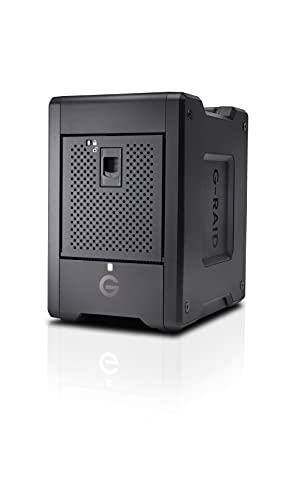
SanDisk Professional 24TB G-RAID Shuttle 4 — The set reservoir
The largest idea in this guide is also the simplest: a four-bay array, 24TB as its title states, from SanDisk’s professional line, designed to sit at the centre of a shooting day and receive everything the cameras produce. Where a single drive is a bucket, the Shuttle 4 is the set’s reservoir — the place media lands, accumulates and is organised, with bay-based flexibility in how that room is arranged between capacity and protection.
That arrangement choice is the owner’s to make and the guide’s to respect. Configured for protection, the array can keep the day’s media safe against a single disk’s failure inside the unit itself; configured for capacity, it presents its full room to a production that keeps its protection in the copies it makes elsewhere. Either way the working pace depends on the configuration and the connection, figures that belong to SanDisk’s documentation and the production’s decisions rather than to a listing title — and a DIT choosing this array will make those decisions deliberately, which is exactly the user the product is built for.
In the pipeline’s geography, the Shuttle is the still point. Rugged drives arrive from the cameras’ side of the set and leave toward the edit; the array stays, accumulating the production’s memory day over day, until whole blocks of media migrate to the base archive and the reservoir empties for the next block. Productions that adopt a reservoir stop having the nightly conversation about whose laptop holds what, and that organisational calm — on a set, at midnight, with tomorrow’s call sheet already printed — is worth as much as the terabytes.
The buyer should go in clear-eyed about scale: this is professional infrastructure, with a professional unit’s size, power and price, and it earns them on productions where a day’s media is measured in terabytes and a lost day is measured in far more. For a single-camera owner-operator, the same money buys the rest of this list twice over — the reservoir’s virtues are real, and they are virtues of scale.
- Capacity: 24TB, as stated in the listing title
- Type: Four-bay shuttle array, SanDisk Professional family
- Array configuration: Set by the owner — see SanDisk Professional documentation
- Transfer speed: Not stated in the listing title — verify with SanDisk Professional documentation
- Role: Central on-set reservoir for a production’s media
There is a staffing truth inside this pick: a reservoir only organises a production if somebody owns it. The DIT or data wrangler whose evening ritual the array becomes is part of the purchase, and productions that buy the hardware without assigning the role discover that a reservoir without a keeper is just a larger place for confusion to accumulate.
Strengths
- Array-scale room for multi-day RED shooting blocks
- Bay configuration lets the production choose its protection balance
- One organisational home for the set’s media
Trade-offs
- Professional scale and price — infrastructure, not an accessory
- Working speed depends on configuration, not a title figure
- Its capacity invites complacency about the second copy
Best for: A production running shooting days measured in terabytes.
Not suited for: A solo shooter carrying media fitting the rugged drives alone.
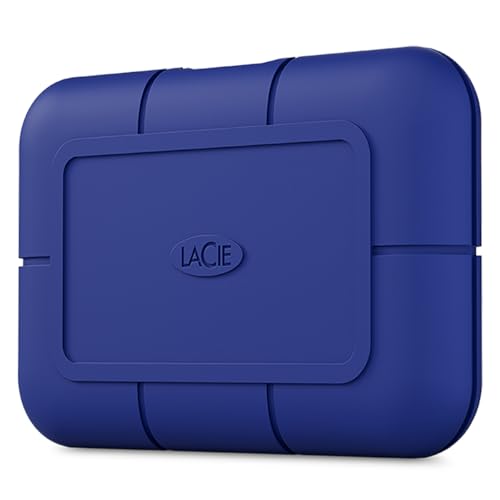
LaCie Rugged SSD Pro5 4TB — Stated-speed sprinter
One title in this guide prints its speed, and it prints a remarkable one: an external SSD of 4TB on Thunderbolt 5, with speeds stated as 6700/5300MB/s. Those figures — read and write, in the order the title presents them — describe the fastest verified shuttle in this list by a wide margin, on the newest connection in it. For the handover copy, the ingest, the editor’s first pass at the day’s material, this is the drive whose pace is a published fact rather than a class assumption.
The conditions deserve the same prominence as the figures. A ceiling stated for Thunderbolt 5 is reachable on machines that offer Thunderbolt 5; on lesser connections the drive runs at the connection’s pace, still swiftly by any external standard, but not at the headline. The buyer audit is therefore a port audit, and it takes a minute: if the edit machine carries the connection the title names, the Pro5’s premium buys exactly the speed printed; if it does not, the premium buys headroom for the next machine, which may or may not be a purchase the production intends.
Four terabytes is the working-set size: a day’s media from a focused shoot, the current project’s camera originals, the material in active editorial motion. It is not the archive and does not pretend to be; it is the drive that lives between the set and the timeline, formatted for speed of exchange, its contents always mirrored in the reservoir or the archive behind it. In that role its rugged SSD construction — no moving parts, in LaCie’s travelling family — suits the journey it makes daily.
There is also a division-of-labour elegance in pairing this drive with the array above: the Shuttle holds everything, the Pro5 moves what is needed now. Editors stop waiting for whole blocks to copy; the day’s selects and the current sequence’s media travel at the printed pace while the reservoir keeps the complete record. Productions that work this way describe the SSD not as storage but as time — the one input a post schedule never has enough of.
- Capacity: 4TB
- Type: External SSD, Rugged family
- Interface: Thunderbolt 5, as stated in the listing title
- Stated speeds: 6700/5300MB/s, as printed in the listing title
- Role: Fastest shuttle between set, reservoir and edit
It is worth pausing on what the stated write figure means for the nightly ritual. Ingest is a write; the handover to the editor is a read of the same material hours later. A drive whose title prints both numbers lets a production schedule both halves of the night honestly, which is why this guide keeps returning to those two figures as the list’s one hard data point.
Strengths
- The only title-stated speeds in the guide, and they are exceptional
- SSD construction suits daily travel between set and edit
- Four terabytes covers a day’s media or a project’s originals
Trade-offs
- Headline pace requires a Thunderbolt 5 machine
- Working-set capacity, not archive capacity
- Premium pricing for the newest connection class
Best for: An edit pipeline with Thunderbolt 5 machines and daily handovers.
Not suited for: Holding a production’s whole archive, or older-connection suites.

LaCie Rugged USB-C 5TB Portable Hard Drive — The travelling tank
The 5TB Rugged USB-C is the list’s working traveller: a spinning portable whose title leads with its armour — drop, shock, dust and rain resistant — and follows with its connection and capacity. Five terabytes is a serious amount of RED media to carry in one hand, and the spinning format is what makes that capacity attainable at a traveller’s price; the trade, accepted knowingly by every production that buys these by the handful, is that a spinning drive’s pace is its platters’ pace, and its toughness, however well armoured, is not an SSD’s indifference to being dropped.
Its characteristic jobs are the unglamorous ones that keep a production honest. It is the second copy that leaves the set in a different vehicle from the first. It is the drive handed to the editor with the week’s media while the reservoir stays on location. It is the overflow that absorbs a longer-than-planned day without a midnight shopping trip. In each job the armour in the title is not decoration: location work happens in dust, weather and haste, and a drive dressed for the office fails that environment in ways that have nothing to do with its electronics.
USB-C as the stated connection makes it the family’s diplomat — the drive that plugs into the widest range of machines on a production, from the DIT’s cart to the producer’s laptop to the edit suite’s oldest workstation. That universality is a workflow feature: the copy that must happen now, on whatever machine is present, happens. The title states no transfer figure, so none is claimed; sequential copies of large media files are the spinning class’s home ground, and the drive performs them at the pace its class performs, which productions have scheduled around for years.
Buyers should hold one discipline with this drive: armour invites carelessness, and carelessness eventually wins. The Rugged survives the journey better than any unarmoured drive; it should still be treated as what it is — the only travelling copy of footage that cannot be reshot — packed, carried and handed over like the asset it contains.
- Capacity: 5TB
- Type: Portable external hard drive, Rugged family
- Connection: USB-C, as stated in the listing title
- Stated resistance: Drop, shock, dust and rain, as printed in the listing title
- Transfer speed: Not stated in the listing title — verify with LaCie documentation
Productions often buy this drive in multiples and treat them as a rotation — one on the set, one in transit, one at the edit — so that the copy chain never waits for a drive to come back. At spinning capacity prices that rotation is affordable in a way the SSD equivalent is not, and the rotation, more than any single drive, is what a mature location workflow actually looks like.
Strengths
- Location-grade armour stated in the title itself
- Five terabytes of travelling capacity at spinning prices
- USB-C connects across the whole production’s machines
Trade-offs
- Spinning pace for copies — patience is part of the format
- Armour reduces travel risk; it does not abolish it
- No speed figure stated for planning the handover
Best for: Carrying the second copy and the week’s media between locations.
Not suited for: The fastest ingest lane, where the SSD picks belong.

LaCie Rugged Mini SSD 2TB — Pocket shuttle
The smallest drive in the guide has the most personal job. Two terabytes of SSD in LaCie’s Rugged Mini form is the drive that travels on a person — in the DIT’s pocket, the director’s bag, the editor’s jacket — carrying the material whose loss would hurt most and whose movement cannot wait for a case to be packed: the day’s selects, the hero takes, the current sequence’s media, the project file itself.
Its title is brief — family, form, capacity, solid-state — and states no speed or connection figures, so this guide claims neither. What the class guarantees is the SSD character: no moving parts to protect, a copy pace of the solid-state kind, and a device that can be plugged into a laptop in a vehicle, a café or a departure lounge and worked from immediately. For the material it carries, immediacy is the specification; a drive that is present beats a faster drive that is in a case in another building.
Two terabytes also defines its discipline. It cannot hold a production; it holds a selection, and making that selection is editorial judgement exercised daily — which takes travel, which project’s originals are active, which day’s media the director wants to review tonight. Owners who use the Mini this way describe it as the production’s short-term memory, with the reservoir and the archive as the long-term store behind it. Used as a would-be archive it disappoints quickly; used as the short-term memory it is the drive the production reaches for most.
The Rugged family membership matters at this size precisely because the drive is carried loose. A pocket drive meets keys, drops, weather and the floor of vehicles; the family’s travelling design is the difference between a tool and a worry. LaCie’s documentation carries the connection and speed particulars for readers checking them before adopting it.
- Capacity: 2TB
- Type: Solid-state drive, Rugged Mini form
- Connection: The title is silent on the connection — check LaCie’s documentation before ordering
- Transfer speed: The title prints no figure — LaCie’s documentation for the model carries it
- Role: Personal shuttle for selects and active project media
Its other quiet role is the review copy: the drive a director takes home, plugs into a laptop and watches the day on. That viewing is part of how the next day gets planned, and a personal SSD that can be handed over at wrap without a case, a cable hunt or a prayer is a small logistical mercy that productions feel nightly.
Strengths
- Carried on a person — always the drive that is present
- SSD construction for loose, daily travel
- Perfect size for selects and the active project
Trade-offs
- Two terabytes is a selection, never an archive
- Title withholds connection and speed figures
- Small drives are the easiest to misplace — label it
Best for: The day’s selects and the current project’s media, carried personally.
Not suited for: Any role that begins with the words whole production.
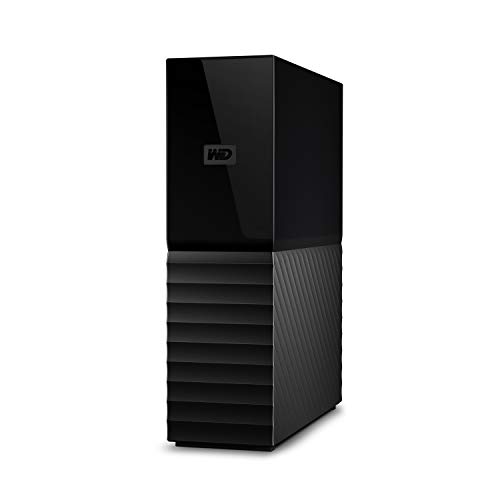
WD 16TB My Book Desktop External Hard Drive — Base archive, WD
The archive end of the pipeline speaks more quietly than the set does, and this drive is its WD voice: sixteen terabytes of desktop storage whose title states its USB 3.0 connection and password protection alongside the My Book family name. Sixteen terabytes holds a substantial body of RED work — a feature’s camera originals with their projects, or a season of shorter productions — in a unit that sits at base, powered and present, receiving the reservoirs’ contents as shooting blocks complete.
The password protection in the title deserves its mention, because an archive of unreleased footage is commercially sensitive in a way most stored data is not. A desktop drive that can be locked is a meaningful layer in a production’s chain of custody for material whose leak would be a genuine loss, and its presence in the title — rather than in fine print — is the kind of disclosure this guide rewards. It does not replace a production’s wider security habits, but an archive drive is exactly where such a feature belongs.
USB 3.0, stated plainly, sets the expectation for the migration copies that fill it: these are scheduled, patient transfers, run overnight or between blocks, at a pace the interface and the spinning format agree on. The archive’s work is not the handover’s work; nobody waits on it with a timeline open, and its virtues are room, permanence and the password at the door. Productions that try to make the archive double as the working drive discover the distinction in their first week; productions that keep the layers separate rarely think about either again.
Sixteen terabytes concentrates a great deal of irreplaceable material in one mechanism, so the standing rule applies with its full weight: the archive drive is itself copied, or its contents exist somewhere else as well, before it is called an archive rather than a hope. Within that discipline, the My Book’s role is the pipeline’s foundation — the still, locked room at the end of the journey every other drive in this list is travelling toward.
- Capacity: 16TB
- Type: Desktop external hard drive, My Book family
- Interface: USB 3.0, as stated in the listing title
- Stated feature: Password protection, as printed in the listing title
- Transfer speed: No figure appears in the title — WD’s documentation states the model’s details
The archive’s placement deserves the same thought as its purchase. A base drive should live where it will be neither cooked by a radiator, borrowed for a side project nor unplugged by a cleaner — the dullest shelf in the production office is the correct address, and the password in the title guards the door of a room that should also have a lock of the physical kind.
Strengths
- Sixteen terabytes of base storage in one unit
- Password protection stated for sensitive unreleased material
- Interface printed in the title — expectations set honestly
Trade-offs
- Migration copies are patient, scheduled affairs
- Desktop unit anchors the archive to one place
- Its contents still require a second existence somewhere
Best for: A production base archiving completed blocks of RED media.
Not suited for: On-set ingest or any drive role that travels.

Seagate One Touch 24TB External Hard Drive Desktop HDD — Largest single unit
The list’s largest single drive matches the array’s headline capacity — 24TB — in one desktop unit, and the comparison between those two 24TB answers is the buyer’s real decision at this end of the guide. The Shuttle offers bays, configuration and a set-side role; this One Touch offers simplicity: one drive, one connection, one shelf, holding a production’s archive entire. Its title states capacity, family and desktop form, and the role follows from those three facts without embellishment.
For the smaller production — the owner-operator, the two-person company, the documentary unit whose base is a single room — that simplicity is not a lesser choice but the proportionate one. Their pipeline has no DIT cart and no reservoir; it has a camera, a rugged drive for the journey, and a base that must hold everything. Twenty-four terabytes at that base absorbs production after production before the archive conversation must be reopened, and the absence of array configuration is, for such a buyer, a feature measured in evenings not spent administering storage.
The One Touch name carries the family’s consumer-friendly identity, and this guide will be plain about the boundary that implies: this is a capacious desktop drive, not professional array infrastructure, and a production whose days are measured in multiple terabytes with a crew waiting on ingest should be looking at the Shuttle end of the list. Judged in its own territory — the archive of a small production, the overflow of a larger one, the second copy of an array’s contents kept in another room — its virtues are exactly the ones the territory rewards: room, quietness of operation in every sense, and a single cable between the production and its history.
Its title states no interface or speed, so none is claimed; Seagate’s documentation carries those figures for anyone planning a migration on a schedule needing them. What the title does state is the only figure the archive role truly consumes, and at 24TB it states it generously.
- Capacity: 24TB
- Type: Desktop external hard drive, One Touch family
- Interface: The listing title omits the connection — confirm it in Seagate documentation
- Transfer speed: Unstated in the title — Seagate’s documentation for the model settles it
- Role: Whole-archive home for a smaller production’s base
Documentary work flatters this drive particularly. A documentary archive is never finished — it grows by returns, by pickups, by years — and a single large unit that simply keeps absorbing, without configuration or ceremony, matches a form of filmmaking whose storage plan is mostly the discipline of never throwing anything away.
Strengths
- Array-matching capacity with single-drive simplicity
- The proportionate archive for a small production’s base
- Excellent second-copy vessel for a larger pipeline
Trade-offs
- No array configuration or bay-level protection
- Title offers no interface or speed to plan migrations by
- One mechanism holds everything — the copy rule applies absolutely
Best for: A small production’s entire archive, kept in one place.
Not suited for: Multi-terabyte daily ingest with a crew waiting.
What Does the Comparison Show at a Glance?
| Drive | Capacity | Type | Speed from title | Pipeline role |
|---|---|---|---|---|
| SanDisk Professional G-RAID Shuttle 4 | 24TB | Four-bay array | Not stated in title | On-set reservoir |
| LaCie Rugged SSD Pro5 | 4TB | External SSD | 6700/5300MB/s | Fastest handover shuttle |
| LaCie Rugged USB-C | 5TB | Portable spinning | Not stated in title | Travelling copy and overflow |
| LaCie Rugged Mini SSD | 2TB | Mini SSD | Not stated in title | Personal selects shuttle |
| WD My Book | 16TB | Desktop spinning | Not stated in title | Locked base archive |
| Seagate One Touch | 24TB | Desktop spinning | Not stated in title | Whole archive, one unit |
Read the table as a map rather than a league. The roles column is a pipeline — reservoir, shuttle, archive — and most real productions need one drive from each stretch of it rather than a winner. The single row of printed speed is also the table’s honesty made visible: where the evidence exists it is quoted, and where it does not, the drive is placed by the qualities its role actually consumes.
How Long Should a Production Keep Its RED Originals?
Longer than feels reasonable, because the costs of the two errors are wildly unequal. Keeping originals costs shelf space and the occasional migration to fresh drives; discarding them costs the film’s future — the re-release that needs a new grade, the director’s cut, the archive sale, the scene a documentary a decade later wants to quote. Productions that finish a film and delete the camera originals to reclaim drives have saved the price of one desktop unit in this list and spent the production’s entire afterlife. The professional default is that originals are kept, in at least two places, for as long as the production entity exists to keep them.
Keeping them is a practice, not a purchase. Drives sleep, and sleeping drives should be woken on a schedule — spun up, spot-checked, their contents sampled — with migration to new units planned before the old ones become antiques whose connections no current machine accepts. The archive drives in this list are the present tense of that practice; their successors are a budget line the production should expect to meet again, because media outlives the mechanisms that hold it and always has.
There is also a cataloguing duty that grows with the terabytes. An archive whose contents are known — production, dates, drives, locations of the second copies — is an asset a company can insure, sell and hand over. An archive that is a shelf of unlabeled units is a rumour of an asset. The log habit described in the offload section is the seed of that catalogue, and the productions that keep it from the first shoot are the ones whose libraries are still worth money when the second decade arrives.
What Mistakes Do Productions Make With RED Media Storage?
The unforgivable mistake is wiping camera media before the copies are verified — checksums compared, a clip played back from the destination, the second copy’s existence confirmed by opening it. Every other mistake in this section is recoverable; footage erased on the strength of an interrupted copy is a reshoot, if a reshoot is even possible. The second mistake is the single travelling copy: the day’s only version riding in the same vehicle, the same bag, the same fate as its own backup. Copies should travel separately or not be called copies.
Third comes sizing the pipeline for the shooting day and forgetting the edit. Projects, renders, exports and the archive’s own growth gather around the camera originals, and a storage plan that fits the media exactly fits nothing else. Fourth is the unlabeled drive — productions accumulate identical rugged drives the way kitchens accumulate identical jars, and the night a wrong one is formatted is the night labelling stops seeming fussy. Fifth, and quietest, is treating the archive as finished: drives in a drawer are not monitored, not refreshed and not copied onward, and an archive that nobody has opened in three years should be opened this week, while its contents can still be rescued from it.
How Should a DIT Organise the Nightly Offload?
The ritual is consistent because the stakes are. Cards come off the cameras and are copied to the reservoir first — the Shuttle in a pipeline that has one, the designated archive-bound drive in one that does not — with verification running as part of the copy, not as an afterthought. The second copy is made to a drive that will sleep somewhere else: the rugged traveller in a different bag, a different vehicle, a different room. Only when both copies verify does the card go back into rotation, and the log — card, contents, destinations, checksums — is written while the memory is fresh, because the log is what turns a shelf of drives into an archive that can be searched at 2 a.m. during the edit.
Staffing the ritual matters as much as equipping it. The offload should belong to one named person per shooting day, with a handover note when the role rotates, because a copy that everyone assumed somebody else had made is the classic hole in a production’s night. The log records the name as well as the checksums, and that small accountability is what keeps the ritual intact on the exhausted final day of a long location block, which is precisely when it is most likely to be skipped and most expensive to have skipped.
Then the shuttle layer does its work: the material the edit needs first — the selects, the current block — is staged onto the fast or personal SSD, so the morning’s editorial begins from the quickest copy rather than from the reservoir’s whole mass. The pattern scales down gracefully to the solo shooter, for whom reservoir, traveller and archive may be three of the smaller drives in this list performing the same three roles in miniature. The roles are the system; the sizes are just the budget’s opinion about them.
Final Recommendation
Build the pipeline in the order media flows. A production shooting RED at scale should anchor its set with the G-RAID Shuttle 4, whose 24TB and bay configuration make it the reservoir the nightly ritual needs, and should confirm its working figures against SanDisk’s documentation while choosing its array mode. The handover belongs to the Rugged SSD Pro5 wherever the edit machines carry Thunderbolt 5 — it is the one pick whose speed is a printed fact — with the Rugged Mini SSD as the personal carrier of selects on every production, and the 5TB Rugged USB-C as the armoured second copy and overflow that location work consumes by the handful. At base, choose the archive by the production’s shape: the My Book where its stated password protection serves a sensitive catalogue, the 24TB One Touch where a smaller production wants its whole history in one simple unit. What no production should do is improvise the pipeline from drives chosen for other work, because RED media forgives nothing — it is too large to move casually, too valuable to hold singly, and too irreplaceable to trust to habit; give it the reservoir, the shuttle and the archive it demands, and the footage will still be there on the morning the edit discovers it needs the take nobody remembered shooting.
A closing word about proportion, because RED storage invites both underspending and theatre. The drives are not the film; they are the film’s safekeeping, and the correct budget for safekeeping is the one that makes loss boringly unlikely without consuming the resources the shoot itself needs. Every pick in this list was placed to serve that proportion at a different scale — and the production that chooses its reservoir, shuttle and archive deliberately, then stops shopping and goes back to shooting, has understood the subject better than one still comparing figures at midnight.
Frequently Asked Questions
Why do RED productions need so much more storage than other shoots?
Because the format’s purpose is fidelity. RED raw recording keeps the sensor’s data at a depth other formats discard, and that depth is measured in terabytes per shooting day rather than gigabytes. The storage plan is therefore part of the production plan — reservoir, shuttle and archive — in a way that a compressed-format shoot can sometimes improvise around and a RED shoot cannot.
Can I edit RED footage directly from these drives?
Editors do work from external drives across this class of storage, with the SSD picks — above all the Pro5, whose title states its speeds — best suited to the timeline’s demands, and the spinning and archive drives better suited to holding media that the working copy is drawn from. The common professional pattern is originals on the reservoir or archive, active material on the fast shuttle, and the timeline pointed at the latter.
How many copies of the footage should exist before cards are wiped?
Two verified copies, in two places, is the floor this guide will defend; many productions keep three for material that cannot be reshot. Verification means the copy was checked — checksums or playback — not merely that a progress bar completed. A card wiped on one unverified copy is the single most expensive storage mistake in filmmaking.
Is the 24TB desktop drive a substitute for the shuttle array?
For the archive role, it can be — a smaller production’s whole history in one unit is a legitimate design. For the set role, no: the array’s bays and configuration exist for the ingest ritual and its protection choices, and a single desktop drive offers neither. Match the unit to the role, as the picks above are matched, rather than to the matching capacity figure.
How should the drives be labelled on a real production?
With the truth, in large characters: production name, contents by shooting day or block, the date the drive was filled, and whether it holds originals, a copy or working material. Productions accumulate identical rugged drives quickly, and the label is the only difference between a system and a shelf of mysteries. A drive whose label lies — or whose contents were changed without the label changing — should be treated as unknown media until its contents are audited, because the night a mislabeled drive is wiped is the night the labelling rule stops being debated. The habit costs a marker, a roll of tape and thirty seconds per drive, and it scales from a student short to a feature without changing its nature in the slightest degree. Crews that have worked under the rule carry it to every subsequent production the way they carry their own tools, which is how a habit becomes a culture and a culture becomes the reason an archive survives its makers, intact and findable, long after everyone who shot the footage has moved on to other productions and other cameras, and the only witnesses left are the labels, the log and the drives themselves, still spinning patiently and reliably on request, exactly as they should.
What should I check before buying the Pro5 for its headline speed?
The edit machine’s ports. The stated 6700/5300MB/s belongs to the Thunderbolt 5 connection named in the title; on an older connection the drive runs at that connection’s pace. Confirm the machine offers the named interface — and that the cable used is the right one — and the printed figures become a plan rather than an advertisement.
Related Guides
Post-production storage rarely stops at the camera media. The companion coverage of SSDs for video editing timelines continues the pipeline into the suite, while the guide to NAS storage for media production teams covers the shared end of the workflow and the overview of portable SSDs for location work widens the shuttle comparison.


