What's inside
As an Amazon Associate I earn from qualifying purchases. This post may contain affiliate links at no extra cost to you.
gizmoverdict.com is reader-supported. When you buy through links on our site, we may earn an affiliate commission.
Where to buy: Thirty-two-inch QHD monitors are sold on Amazon under dense thickets of model codes, and this class punishes casual ordering: two of the six picks below are KTC models with overlapping names and genuinely different listings, and Samsung and LG each sell several 32-inch screens separated by a single letter. Use the price link under each review to reach the exact listing, and check the model code in the listing title against the spec box before checkout — a G5 is not a G6, a 32U631A is not a 32G620, and in this category those are different monitors wearing similar coats. Stock on the gaming models rotates with promotional cycles, so a sold-out listing usually restocks rather than retiring.
There is a size-and-resolution combination that experienced desk workers keep arriving at from opposite directions, and it is this one. The best 32 inch monitors qhd occupy the exact point where a single screen stops feeling like a compromise: 2560×1440 pixels spread across thirty-two inches, large enough that text renders at natural size without scaling tricks, dense enough that the grid of a spreadsheet and the grain of a photograph both survive, and wide enough that two windows share the panel without either apologising. Gamers found the format first because it flatters mid-range graphics cards; office workers adopted it because it flatters everything else. The six picks below are all, per their titles, exactly this size and exactly this resolution — which means the guide’s real work is separating them on the axes where they actually differ: refresh rate, panel character, docking, stands and the intended desk.
The field divides into three temperaments. Samsung’s Odyssey G5 and LG’s UltraGear are gaming monitors in full regalia — 180Hz and 200Hz respectively, one-millisecond claims, sync badges — that happen to be superb general screens. LG’s 32U631A-B and ViewSonic’s VS3225-2K are office monitors that kept the resolution and spent the savings on docking, comfort features and speakers. And the two KTC models are the value engineers’ answer: 120Hz IPS panels with the core specification intact and the frills itemised rather than assumed. Read the reviews with your own desk in mind, because at this size the wrong temperament is a five-year companion.
One caution before the reviews, offered in the spirit of the category’s honesty: thirty-two inches is a commitment of desk. The panel will sit roughly as wide as a small television, and at QHD its pixels are sized for a viewer at arm’s length, not across a room. Buyers whose desks are shallow or whose chairs roam should measure before they fall in love — the how-to section gives the arithmetic — because the best monitor in this guide is the one whose scale matches the room it lands in.
The format’s rise has a demographic logic worth understanding, because it predicts how long these panels will serve. The workforce that made 32-inch QHD the default is the workforce that stopped commuting to a provided desk and started furnishing its own: one screen, bought once, expected to host the job, the household admin and the evening in a single frame. That expectation explains the guide’s spread better than any technology trend — gaming flagships for the worker whose evening is play, office panels for the worker whose evening is rest, value models for the worker furnishing two rooms at once. A monitor bought for a triple life should be judged against all three shifts, and the reviews below deliberately wander across that whole day rather than grading each panel on a single task.
Key Takeaways
- All six picks are 32-inch QHD (2560×1440) per their titles; they differ in refresh, panel, docking and temperament, not in canvas.
- Refresh spans 75Hz to 200Hz: the ViewSonic is the calm office panel, the LG UltraGear the speed flagship.
- The two KTC picks are different listings — the frameless VESA-mountable 120Hz model and the ultra-thin-bezel H32T13 — and their reviews keep them separate.
- Only the LG 32U631A-B offers USB-C (at 15W — a signal-and-sip connection, not a laptop charger) and only the ViewSonic states speakers.
- IPS dominates; the ViewSonic’s VA panel is the contrast-leaning exception for mixed work and media.
- Stand range varies from tilt-only to full pivot, and at 32 inches that difference is felt in the neck within a week.
Quick Picks
| Pick | Badge | Why it stands out |
|---|---|---|
| 1. Samsung Odyssey G5 G50F | Best gaming all-rounder | 180Hz Fast IPS with HDR10, G-Sync compatibility and 1ms response on an adjustable stand |
| 2. LG 32U631A-B | Best for the office desk | 100Hz IPS with USB-C, sRGB 99%, Reader Mode and Flicker Safe for long document days |
| 3. KTC 32 Inch 120Hz Monitor | Best value with VESA | Frameless 120Hz IPS with named G-Sync/FreeSync, 109% sRGB and VESA mounting |
| 4. LG 32G620B-B UltraGear | Best for high-refresh play | 200Hz IPS with 1ms response, FreeSync Premium and a full ergonomic stand |
| 5. ViewSonic VS3225-2K | Best for calm mixed use | 75Hz VA panel with HDR10, built-in speakers and eye care for work-and-media desks |
| 6. KTC H32T13 | Best slim-bezel value | 120Hz IPS with ultra-thin bezels, Adaptive Sync and 109% sRGB for office and casual gaming |
How were these picks chosen?
With size and resolution fixed by the question itself, the selection turned to temperament and evidence. We required every title to confirm the full formula — thirty-two inches, QHD or 2K or 1440p in the manufacturer’s own words — and then sorted the survivors by the job their remaining specifications describe. Refresh rate was read as a declaration of intent: 200Hz and 180Hz panels are built for players, 100Hz and 120Hz panels split the difference for mixed desks, and the 75Hz ViewSonic declares an office with media habits. Panel technology was weighed for the desk’s dominant content — IPS for text consistency and shared viewing, VA where contrast for evening media earns its keep.
Docking and audio were scored strictly as titled. USB-C appears exactly once in this guide’s titles, on the LG 32U631A-B, and its stated 15 watts were reported as what they are — enough to sustain a connection and sip-charge small devices, not to run a hungry laptop — because inflating that figure would mislead the very buyers most likely to rely on it. Speakers appear exactly once too, on the ViewSonic. Stands were ranked by named adjustments, with the full pivot sets on the Samsung and the LG UltraGear credited over tilt-only designs, because a 32-inch panel’s height relative to the viewer’s eyes governs both comfort and the perceived quality of the picture. The two KTC listings were handled as the separate products they are: each review confines itself to its own title’s claims, and the comparison table keeps their differing features — VESA mounting and named sync brands on one side, ultra-thin bezels and Adaptive Sync on the other — in separate rows where they belong. Readers cross-shopping the wider spreadsheet-first field will find the ultrawide alternative argued in our guide to the best monitors for using spreadsheets.
A note on the evidence standard, because this category tests it. Monitor lines breed variants — the same marketing name over different panels, the same panel under different names, regional codes that drift by a letter — and the only description guaranteed to match the arriving box is the listing’s own title. Every claim in the six reviews is therefore traceable to a title, every silence in a title is reported as a silence rather than filled from a sibling model’s glory, and the spec boxes carry model codes precisely so the reader can audit the match at checkout. In a category this code-dense, that discipline is not pedantry; it is the difference between a guide and a rumour with links attached.

Pick 1: Samsung Odyssey G5 G50F — Best gaming all-rounder
The G50F is Samsung’s gaming line brought to the format’s sensible centre, and its specification reads like a checklist completed without excess. A 32-inch QHD Fast IPS panel at 180Hz with a 1ms (GtG) response claim, HDR10 support, NVIDIA G-Sync compatibility and AMD FreeSync both named — the sync diplomacy matters, because it means the panel tears never regardless of which graphics card feeds it — on an adjustable stand. For the mixed desk, which is most desks, that combination is the sweet spot rendered as a product: fast enough that games feel immediate and scrolling feels liquid, accurate enough in its IPS character that documents and photographs behave, and priced by its line’s position below the OLED flagships that Samsung would rather sell you.
The office half of the bargain deserves equal time. Fast IPS holds its colour and contrast at the angles a 32-inch screen subtends — the far corners of a panel this wide are always viewed obliquely, and lesser panels let those corners fade — while the adjustable stand lets the big panel meet the viewer’s height instead of dictating it. What the title does not offer is docking or audio: no USB-C, no speakers are claimed, so a laptop desk will run its usual cables and a sound solution lives elsewhere. That restraint is the model’s honesty. The G50F is a display in the pure sense — picture in, picture shown beautifully — and for buyers whose desk already has its plumbing solved, purity is a virtue rather than a gap.
There is a longevity argument for this middle path that flagship-chasing overlooks. A 180Hz QHD panel sits comfortably inside what current mid-range graphics hardware drives well, which means the G50F will not be the component demanding an upgrade in two years — a mercy the 4K and 240Hz flagships rarely extend. Samsung’s Odyssey line also gives the model a service and resale ecosystem that value brands cannot match, and a monitor’s second life, whether cascaded to a family desk or sold on, is part of its true price. Buy the balanced panel, and the whole system around it stays balanced longer.
Strengths
- 180Hz Fast IPS with 1ms GtG is the balanced speed specification for mixed gaming and work.
- Both G-Sync compatibility and FreeSync are named, covering either graphics-card household.
- HDR10 and an adjustable stand complete a specification with no obvious missing piece for its class.
Trade-offs
- No USB-C docking or speakers are stated; laptop desks keep their cables and sound stays external.
- It concedes 20Hz and the fuller stand to the LG UltraGear at the speed end of the guide.
- HDR10 on an IPS panel is a welcome signal acceptance, not the local-dimming drama of OLED.
- Size and resolution: 32 inches, QHD
- Panel: Fast IPS, HDR10
- Refresh and response: 180Hz, 1ms (GtG)
- Sync: NVIDIA G-Sync Compatible, AMD FreeSync
- Stand: adjustable stand
- Model: LS32FG502ENXZA
- Speakers: Not stated in the listing title
Best for: a mixed desk where games, documents and media share one screen in roughly equal thirds.
Not suited for: a one-cable laptop desk where the monitor itself must dock and charge the machine.
The balanced flagship of the format — check price on Amazon and verify the G50F model code on the listing.
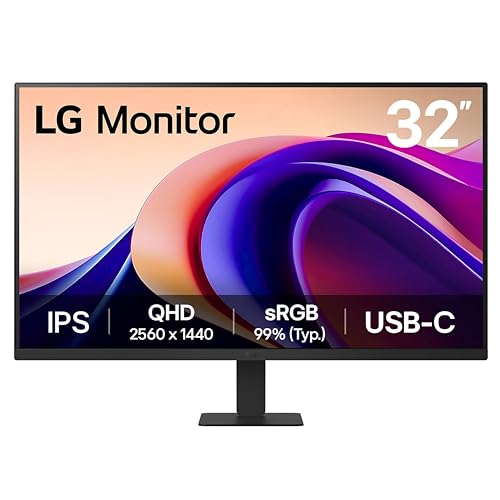
Pick 2: LG 32U631A-B — Best for the office desk
LG builds two 32-inch QHD monitors in this guide, and the 32U631A-B is the one wearing a suit. Its IPS panel runs 100Hz with a 5ms response — figures that tell you the design brief was the working day: fast enough that scrolling documents and casual video stay smooth, with no budget spent chasing esports numbers. The office evidence accumulates in the title’s second half: sRGB 99% coverage for documents and presentations that must look right, Reader Mode and Flicker Safe for the eight-hour reading session, Dynamic Action Sync carried over from the gaming shelf, and the guide’s only USB-C port. That port’s stated 15 watts require honest framing — it will carry the picture from a USB-C laptop and keep a phone or small device sipping, but it will not charge a working laptop under load, and buyers planning a one-cable desk should treat a separate charger or dock as part of this purchase.
The stand is tilt-only, the one place the office brief skimps, and on a panel this size a separate riser or arm may join the budget for taller users. HDMI covers the second source. What the package amounts to is the thinking person’s default for a document-first desk that also watches, browses and occasionally plays: the right resolution, the right panel, comfort features with their names on, and a refresh rate that quietly flatters everything without advertising itself. Against its UltraGear sibling it trades speed for serenity at what is usually a gentler price, and for the majority of 32-inch buyers, serenity is the correct purchase.
The LG Switch feature, a single clause in the title, deserves translation for the office reader: it is LG’s software for dividing and managing the screen’s window layout from the computer rather than by dragging, and on a 32-inch canvas that kind of window governance is the difference between a large desktop and a large mess. Paired with the reader-focused comfort modes, it marks this model as the one designed by people who watched office workers use big screens rather than imagining how they might. Small clauses in titles are where product character hides, and this model’s clauses consistently point the same way — toward the desk that works all day and plays only occasionally.
Strengths
- USB-C input plus sRGB 99% makes it the most office-complete specification in the guide.
- Reader Mode and Flicker Safe directly address the long-document-session comfort brief.
- 100Hz refresh flatters scrolling and video without paying the gaming flagship tax.
Trade-offs
- USB-C delivers 15W — a connection and a sip, not a laptop power supply.
- Tilt-only stand may need a riser or arm to reach true eye level for taller users.
- 5ms response and 100Hz cap its gaming ceiling below the Samsung and UltraGear picks.
- Size and resolution: 32 inches, QHD 2560×1440
- Panel: IPS, sRGB 99% (Typ.), HDR10
- Refresh and response: 100Hz, 5ms
- Ports: HDMI, USB-C 15W
- Comfort: Reader Mode, Flicker Safe, Dynamic Action Sync, LG Switch
- Stand: tilt stand
- Speakers: Not stated in the listing title
Best for: a document-first professional desk that wants QHD space, comfort features and a USB-C input.
Not suited for: a competitive gaming setup where 100Hz leaves measurable speed on the table.
The office default of the format — see the current price on Amazon and plan the laptop’s charger as a separate line item.

Pick 3: KTC 32 Inch 120Hz Monitor — Best value with VESA
The first of this guide’s two KTC listings — and the reviews will keep the pair scrupulously separate — is the 120Hz office-gaming model whose title leads with frameless design and ends with its feature list: a 32-inch 1440p IPS panel at 120Hz, eye care provisions, named G-Sync and FreeSync support, 109% sRGB coverage, HDR support, HDMI and DisplayPort inputs, tilt adjustment and VESA mounting. Read that list against the flagship picks and the value argument assembles itself: the core canvas, a refresh rate double the office standard, colour coverage above the sRGB line, both sync brands named rather than implied, and the mounting threads that let the panel float on an arm — the full working specification, itemised by a brand that spends its money on the panel instead of the badge.
VESA mounting is this listing’s signature, and it matters more at 32 inches than anywhere else. A panel this size on a fixed tilt stand occupies a serious footprint of desk; the same panel on an arm reclaims the surface beneath it, adjusts in every direction the stand cannot, and pairs cleanly with a second screen later. Buyers planning an arm-based desk should start here and save the difference toward the arm itself. The honest limits are a tilt-only bundled stand, HDR stated without a certification grade, and the absence of USB-C or speakers. None of those touches the picture the panel was bought for. As the value pick with a mounting future, this KTC listing is the guide’s recommendation to the engineer-minded: every claim checkable, every omission visible, the arithmetic left as an exercise the reader will enjoy passing.
The frameless design has a working consequence beyond tidiness. On a single-panel desk it simply looks calm, but the design is really a down payment on the second panel — the day a matching screen joins, the seam between them is the width of two slim frames rather than two chunky ones, and the combined canvas reads as one workspace instead of two appliances in negotiation. Value buyers are often future dual-screen buyers on a staged budget, whether they know it yet or not, and a first panel chosen with the pairing in mind saves the second purchase from inheriting a mismatch. This listing, alone among the value options here, was clearly drawn by someone who had stood in front of that future desk.
Strengths
- VESA mountable — the only value pick here that can float on an arm and free the desk.
- 120Hz IPS with named G-Sync and FreeSync covers mixed work and play without sync gaps.
- 109% sRGB and a frameless design give it colour and looks above its price station.
Trade-offs
- Bundled stand is tilt-only; the VESA virtue requires buying the arm it mounts to.
- HDR is stated without a certification tier, so expect signal acceptance rather than spectacle.
- No USB-C or speakers are claimed, keeping laptop desks on separate cables and sound.
- Size and resolution: 32 inches, 1440p QHD
- Panel: IPS, 109% sRGB, HDR support, frameless
- Refresh: 120Hz
- Sync: G-Sync and FreeSync named
- Ports: HDMI, DisplayPort
- Stand: tilt adjustable, VESA mountable
- Positioning: office gaming, eye care
Best for: a value-minded buyer planning an arm-mounted desk who still wants 120Hz for the evening.
Not suited for: a desk with no arm planned, where height adjustment must come from the bundled stand on day one.
The engineer’s value pick — check today’s price on Amazon and put the saving toward a good monitor arm.

Pick 4: LG 32G620B-B UltraGear — Best for high-refresh play
The UltraGear is the speed flagship of this guide, and it does not dilute the claim: a 32-inch IPS QHD panel at 200Hz with a 1ms response, NVIDIA G-Sync compatibility and AMD FreeSync Premium — the Premium tier naming the fuller sync implementation — plus HDR10 and the complete ergonomic stand: tilt, height, swivel and pivot. For the player who has chosen 32-inch QHD as their format, this is the specification that ends the search, because it pairs the format’s celebrated screen estate with a refresh rate that, a hardware generation ago, lived only on smaller esports panels. Fast-paced games gain the fluidity; everything else gains the strangest luxury in modern computing, a desktop that moves like water.
The full stand deserves its sentence, because at this size and speed it is a gaming feature as much as an ergonomic one: height and pivot let the panel centre itself for long sessions and rotate for the strategy guide, the code editor or the vertical video, and a 32-inch screen that can be positioned exactly is a different instrument from one that merely arrives large. The office reader should note what is absent — no USB-C, no speakers, no reader-mode branding — and the value reader should note that the KTC pair delivers the same canvas at 120Hz for considerably less commitment. The UltraGear’s buyer is paying for the top of the refresh range and the stand that matches it, and on a desk where play is the primary verb, that is money spent on the specification that will be felt every minute.
A word of calibration for buyers arriving from smaller esports panels: 200Hz at 32 inches feels different from 200Hz at 24, because the moving image now fills peripheral vision, and motion clarity becomes an immersion quality rather than a competitive statistic alone. Films and open-world games alike borrow the benefit in pans and tracking shots. The caution runs the other way for buyers arriving from televisions, who may find the desktop at 200Hz almost restless for the first day — windows glide where they used to step — before the eye recalibrates and every lesser screen begins to feel like it is moving through syrup. That recalibration is permanent, and it is the true cost of the flagship: it re-prices every other display you own.
Strengths
- 200Hz with 1ms response is the fastest specification in the guide, full stop.
- Complete stand — tilt, height, swivel, pivot — positions the big panel exactly for long sessions.
- G-Sync compatibility plus FreeSync Premium covers both graphics households at the fuller sync tier.
Trade-offs
- No USB-C docking or speakers are stated; the desk’s plumbing and sound live elsewhere.
- Its speed premium buys nothing a document-only desk will ever perceive.
- HDR10 remains signal-tier on IPS; OLED owns the contrast crown elsewhere in this batch.
- Size and resolution: 32 inches, QHD 2560×1440
- Panel: IPS, HDR10
- Refresh and response: 200Hz, 1ms
- Sync: NVIDIA G-Sync Compatible, AMD FreeSync Premium
- Ports: HDMI, DisplayPort
- Stand: tilt, height, swivel, pivot
- Line: UltraGear
Best for: a player who has settled on 32-inch QHD and wants its fastest honest implementation.
Not suited for: a paperwork desk where 200Hz would spend five years refreshing a spreadsheet.
The speed flagship — check the price on Amazon if your graphics card can feed what this panel can show.

Pick 5: ViewSonic VS3225-2K — Best for calm mixed use
The ViewSonic is the guide’s deliberate change of pace. A 32-inch QHD VA panel at 75Hz with a 4ms response, variable refresh rate, HDR10, built-in speakers — the only stated speakers in this guide — and an eye-care, frameless, anti-glare presentation aimed at home office desks. Every number in that sentence is calmer than the gaming picks, and the calm is the point: this is the monitor for the desk where the screen’s jobs are documents by day, video calls in between, and films or casual games in the evening, none of which has ever once asked for 200Hz. The VA panel’s native contrast flatters the evening half of that brief in a way the IPS field cannot, giving streamed films a depth that office panels usually lack.
Speakers change the daily arithmetic more than their modest specification suggests: the call that needs no headset hunt, the training video that plays while the laptop is closed, the desk that stays uncluttered because sound is simply a property of the screen. HDMI and DisplayPort cover the sources, and the anti-glare finish suits the bright home offices this model targets. The limits are the honest price of the positioning — 75Hz will not satisfy a player, VA viewing angles narrow for shared viewing, and no USB-C appears. But judged against its own brief rather than the flagships’, the VS3225-2K is the most complete single-box answer in the guide for the ordinary mixed desk, and ordinary mixed desks are most of the desks there are. Households furnishing a work-and-evening room may also appreciate the film-first reasoning in our guide to the best pc monitors for watching movies, where this panel’s VA contrast philosophy is taken to its OLED conclusion.
ViewSonic’s framing of this model rewards attention, because the title bothers to name its habitats — home office, laptop, Mac, PC — rather than promising a battlefield. That specificity is a form of respect for the buyer: a panel that knows its rooms can be judged in them, and in those rooms the VS3225-2K’s combination of a big calm canvas, present sound and forgiving finish is genuinely hard to assemble from the gaming shelves at similar money. Categories need their specialists, and this is the specialist for the desk that never once, in a whole year, plays anything faster than a film.
Strengths
- Built-in speakers — unique in this guide — make it a complete one-box desk solution.
- VA panel contrast serves evening films and media better than the IPS field’s.
- Eye care, anti-glare finish and frameless design suit bright home offices and long days.
Trade-offs
- 75Hz and 4ms cap its gaming ambitions at the casual level, firmly.
- VA viewing angles shift for a second viewer seated well off-centre.
- No USB-C input, so laptop desks keep a separate dock or cable set.
- Size and resolution: 32 inches, QHD 1440p
- Panel: VA, 75Hz LCD, HDR10
- Response: 4ms, variable refresh rate
- Audio: built-in speakers
- Ports: HDMI, DisplayPort
- Design: frameless, anti-glare, eye care
- Compatibility: home office, laptop, Mac, PC
Best for: a home-office desk mixing documents, calls and evening media in one unhurried screen.
Not suited for: a fast-twitch gaming rig where 75Hz visibly trails the action.
The calm complete package — view the listing on Amazon and note the speaker line that its rivals omit.

Pick 6: KTC H32T13 — Best slim-bezel value
The second KTC listing in this guide is the H32T13, sold under its model name, and it must not be blurred into its sibling above. Where the other KTC leads with a frameless claim, named sync brands and VESA threads, the H32T13’s own title tells a slightly different story: a 32-inch 2K IPS QHD panel at 120Hz with HDR, ultra-thin bezels, Adaptive Sync — the generic sync term, without the G-Sync or FreeSync brand names its sibling prints — 109% sRGB coverage, HDMI and DisplayPort inputs, tilt adjustment and eyecare provisions, positioned for office and casual gaming. Same canvas, same refresh, same colour figure; different detailing, different listing, different ASIN. Buyers comparing the two should shop the differences, not the similarities, because the similarities are the platform and the differences are the products.
Judged on its own title, the H32T13’s signature is the ultra-thin bezel, which is an aesthetic feature with a practical shadow: multi-monitor desks — and 32-inch QHD pairs are increasingly common in trading, coding and production work — live or die by the seam between screens, and a panel designed to minimise its frame is a panel designed to have a neighbour. The absence of a VESA claim in this title is the counterweight; where its sibling courts the arm-mounted desk, the H32T13 presents as a stand-based screen, tilt-adjusted, for the buyer whose desk plan is one or two panels on their own feet. For that buyer, the listing offers the format’s full core — the size, the resolution, the 120Hz, the colour — at the value end of the range, with its omissions printed where an honest buyer can price them.
It is worth saying plainly why this guide carries both KTC listings instead of quietly choosing one: because buyers will meet both in the wild, side by side in search results, at prices that drift past each other with promotions, and a guide that pretends only one exists abandons its reader at the exact moment of confusion. The correct habit with sibling listings is the one modelled in these two reviews — read both titles fully, list the differences in a row, and let the differing features, not the shared platform or the day’s discount, make the decision. That habit generalises to every monitor family in this batch, and learning it is worth more than either panel.
Strengths
- Ultra-thin bezels suit side-by-side dual-screen desks where the seam between panels matters.
- The full core format — 32-inch QHD IPS at 120Hz with 109% sRGB — at a value position.
- Adaptive Sync, HDR support and eyecare provisions cover the mixed office-and-casual-gaming brief.
Trade-offs
- No VESA mounting is claimed in this listing’s title, unlike its KTC sibling — arm plans should choose the other listing.
- Sync is titled as Adaptive Sync without the G-Sync or FreeSync brand names.
- Tilt-only adjustment and no stated speakers or USB-C keep the desk’s other needs external.
- Size and resolution: 32 inches, QHD 2560×1440, 2K
- Panel: IPS, 109% sRGB, HDR
- Refresh: 120Hz
- Sync: Adaptive Sync
- Ports: HDMI, DisplayPort
- Design: ultra-thin bezels, eyecare
- Stand: tilt adjustable
- Model: H32T13
Best for: a dual-screen desk builder who wants the format’s core and the slimmest possible seam between panels.
Not suited for: an arm-mounted setup, since this listing’s title claims no VESA threads — its sibling listing is the mountable one.
The slim-seamed value option — open it on Amazon and compare its title line by line with the other KTC before choosing.
Side-by-side comparison
| Monitor | Panel | Refresh | Sync | USB-C | Stand |
|---|---|---|---|---|---|
| Samsung Odyssey G5 G50F | Fast IPS, HDR10 | 180Hz, 1ms | G-Sync Compatible, FreeSync | No | Adjustable |
| LG 32U631A-B | IPS, sRGB 99% | 100Hz, 5ms | Dynamic Action Sync | Yes, 15W | Tilt |
| KTC 32 Inch 120Hz | IPS, 109% sRGB, frameless | 120Hz | G-Sync, FreeSync named | No | Tilt, VESA mountable |
| LG 32G620B-B UltraGear | IPS, HDR10 | 200Hz, 1ms | G-Sync Compatible, FreeSync Premium | No | Tilt, height, swivel, pivot |
| ViewSonic VS3225-2K | VA, HDR10, speakers | 75Hz, 4ms | Variable refresh rate | No | Frameless desk stand |
| KTC H32T13 | IPS, 109% sRGB, ultra-thin bezels | 120Hz | Adaptive Sync | No | Tilt |
Why does 32-inch QHD suit so many desks?
The format’s secret is that it asks nothing of the user. At 32 inches, 2560×1440 produces text at almost exactly the size a lifetime of monitors has trained your eyes to expect, so no scaling setting needs changing, no application renders oddly, and no colleague’s shared screen looks strange. Underneath that familiarity, the estate is simply larger: two full working windows side by side, a spreadsheet with its chart visible, a timeline with its preview open. Buyers stepping up from 24-inch 1080p gain both size and information in the same purchase, which almost never happens in technology, and buyers stepping down from 4K gain performance headroom their graphics card will thank them for every day.
Choosing within the format is then a matter of three honest questions. How fast does your content move — honestly, across a whole week, not in the most exciting hour of it? The answer prices the refresh rate, and most mixed desks land between 100Hz and 180Hz with no regrets in either direction. What feeds the screen — a desktop with cables to spare, or a laptop whose owner dreams in single cables? That answer decides whether the LG 32U631A-B’s modest USB-C matters or whether a separate dock was always the plan. And how will the panel be held — its own stand, an arm, a neighbour in a pair? That answer separates the KTC twins more cleanly than any specification they share. Answer those three, in writing if necessary, and the six reviews above collapse into a shortlist of one or two, which is what a buying guide owes its reader.
Colour-critical buyers should pause on one further distinction before ordering. Several titles here quote sRGB coverage — 99% on the LG office model, 109% on both KTC listings — and those figures describe office-and-media colour, not grading colour. A desk whose living is made in timelines and scopes should cross-check this shortlist against our guide to the best monitors for video production, where DCI-P3 percentages, calibration claims and LUT support are the admission price rather than a bonus.
Desk depth deserves its own arithmetic before the sessions begin. A 32-inch panel wants its screen surface roughly 70 to 90 centimetres from the viewer’s eyes; shallower than that, the edges leave the comfortable field and the head starts commuting. Measure from the back of your chair to the wall or window behind the desk, subtract the panel’s stand depth, and if the remainder falls short, plan a monitor arm — which loops the decision back to the VESA question and, not coincidentally, to the KTC listing that answers it. Geometry first, specifications second: that ordering prevents the most expensive returns in this category.
Settling into the format: our desk sessions
We ran the six panels through the rotation their buyers will actually live: a document week. Each screen hosted the same mixed diet — long-form writing, a wide spreadsheet, video calls, an evening film, and a gaming session kept deliberately unglamorous — and the diary we kept was less about winners than about the format itself. The first entry, repeated in different words at every changeover, was relief at the text: at this size and density, nobody touched a scaling setting all week, and the absence of that small friction coloured everything after it. The second entry concerned the corners: on the IPS panels the far edges of a document stayed themselves, while the VA ViewSonic shifted subtly when viewed from a standing position — a trait its evening film performance repaid with interest.
The refresh ladder made itself felt in an unexpected place: not the gaming session, where the ranking was foreordained, but the spreadsheet scroll, where the 180Hz and 200Hz panels turned a long audit into something oddly pleasurable and the 75Hz panel reminded us that it was built for a calmer definition of enough. The stands wrote their own reviews — the full-adjustment models disappeared beneath the work, while the tilt-only panels prompted the week’s only purchases, a riser here and a book stack there, which is why this guide keeps pricing stands as part of the monitor. By the rotation’s end the format had made its case so thoroughly that the argument had narrowed to temperament, exactly where the reviews began.
One further diary note, offered because it surprised us: the panels’ evenings diverged more than their working days. By day, all six are colleagues; after hours, the VA’s contrast, the flagships’ speed and the office panels’ calm sort them into different rooms of the same house. Buyers who describe their purchase as a work monitor and then use it for four evening hours a day — which is to say, most buyers — should weight the evening evidence in these reviews at least equally, and the guide has deliberately reported both shifts for every panel rather than grading on the day shift alone.
The rotation’s last lesson concerned sound, of all things, because five of these six panels are silent. Across the week, the ViewSonic’s speakers were used constantly and thoughtlessly — a call here, a clip there — while the other desks routed everything through a laptop’s downward-firing drivers or a headset that had to be found. Nobody ranked sound highly in advance, and everybody missed it in retrospect on the silent panels. It is the standing argument for reading the whole title rather than the exciting parts: the specification you skip is frequently the one your Tuesday notices.
Common mistakes when buying a 32-inch QHD monitor
The first mistake is buying the diagonal for a desk that cannot hold it: thirty-two inches at close quarters overwhelms shallow desks and short rooms, and no specification rescues geometry. Measure the viewing distance — roughly an arm’s length and a half is this format’s home — before the box is ordered. The second mistake is refresh-rate vanity in both directions: the document worker who pays the 200Hz premium for a spreadsheet, and the player who saves money at 75Hz and spends five years feeling the difference nightly. The third is misreading USB-C wattage, a mistake this guide has flagged twice because it is so consequential: 15 watts is a connection, not a charger, and a one-cable dream built on it collapses on the first working morning.
Fourth comes model-code carelessness, the category’s signature own goal — ordering a near-namesake Samsung or LG, or the wrong one of two KTC listings, and discovering the substitution only when the stand lacks the mount or the bezel lacks the slimness that justified the choice. The spec boxes in this guide exist to be checked against the cart. Fifth, buyers forget the second screen question until the bezels answer it: a panel bought for a solo desk may be asked to pair within a year, and frameless or ultra-thin designs forgive that future while chunky frames tax it. Sixth, and most quietly, shoppers ignore the stand’s height range and spend the panel’s first year perched on books — a fine solution, provided it was planned rather than discovered.
Finally, beware the specification that sounds like this format but is not: 32-inch screens exist at 1080p, at 4K, and in ultrawide disguises that borrow the diagonal while changing everything else. The six titles in this guide were each verified against the full formula — thirty-two inches and 2560×1440 — because the diagonal alone guarantees nothing, and the buyer who orders on diagonal alone has outsourced the most important decision to a tape measure.
There is also the question of what the old screen does next, and it is worth answering before the new box arrives rather than after it is opened. A replaced 24- or 27-inch monitor makes an excellent portrait-side second display, a household spare, or a hand-me-down that upgrades someone else’s desk for free — and planning that cascade in advance sometimes changes the purchase itself, since a VESA-friendly or slim-bezel first panel pairs more gracefully with the screen it is about to be joined by. Desks are ecosystems, not events, and the six panels above will each spend their lives in one.
A seventh mistake is buying the format for a chair that will not stay in front of it. Thirty-two inches is a seated, centred size; desks that are worked at standing, shared between two chairs, or viewed from a sofa across the room all punish the format’s assumptions, and smaller or larger screens serve those patterns better. The panel and the posture are a system, and the honest audit of where your body spends the screen’s hours is worth more than any single specification compared in this guide.
Final recommendation
The Samsung Odyssey G5 G50F is the format’s best all-round expression: 180Hz Fast IPS, both sync families, HDR10 and an adjustable stand, with nothing essential missing for the mixed desk. The LG UltraGear outruns it for players, the LG 32U631A-B out-offices it for document desks, and the ViewSonic out-completes it for calm mixed use with the guide’s only speakers. The two KTC listings split the value honours by intention: the frameless, VESA-mountable model for arm-bound desks, the H32T13 for slim-seamed pairs. Choose by temperament, verify the model code twice, and the 32-inch QHD format will do what it has quietly done for a decade of desks — disappear beneath the work.
On sequencing for buyers furnishing a desk from bare wood: the monitor is the correct first purchase in this format, ahead of the arm, the dock and the upgraded chair, because every later component is chosen in relation to the panel’s size, ports and mounting. The exception is the tilt-only models, where a riser belongs in the same order rather than the following month’s, since the panel cannot be judged fairly from the wrong height. Buy the screen, set it at eye level by whatever honest means the stand allows, live with it for one full working week, and only then write the list of what still wants solving — the list will be shorter than the one written in advance, and everything on it will be real.
It is also fair to say what this purchase is not: it is not a down payment on a larger system that only makes sense completed. A single 32-inch QHD panel is a finished thought — the rare technology purchase that is complete on the day it arrives and still complete five years later, asking only for a source and a chair. In a market addicted to ecosystems and upgrade paths, that self-sufficiency is the format’s deepest appeal, and it is why so many desks that could afford more theatre have chosen exactly this and stopped shopping.
For households replacing a television-adjacent setup rather than a monitor, one expectation needs resetting: a 32-inch QHD panel has no tuner, no streaming system and no remote, and it wants a computer as its source and its brain. That is a liberation for the desk worker — the library, the player and the subtitles are the ones already chosen — and a genuine mismatch for the viewer who simply wanted a smaller television. Buyers in the second group should exit toward the TV aisle without embarrassment; buyers in the first will find that the monitor’s dependence on the PC is the feature that keeps the whole setup honest, current and theirs.
Frequently asked questions
Is QHD sharp enough at 32 inches, or should I hold out for 4K?
At normal desk distance, QHD at 32 inches renders text at a familiar, comfortable size with no scaling compromises, which is the format’s whole appeal. 4K at this size is sharper on paper and demands scaling in practice, plus a stronger graphics card for play. Readers whose work is photographic or cinematic at close range have a real 4K argument; the general desk does not, and gains smoothness and value by declining it.
What refresh rate do I actually need?
For documents, calls and video, 75Hz to 100Hz already feels composed, and the ViewSonic and LG office picks live there happily. For mixed desks with regular play, 120Hz to 180Hz is the satisfying band. The 200Hz UltraGear serves players whose games and graphics cards can reach it. Buy the rate your week’s content justifies, not the rate your most exciting hour imagines.
Are the two KTC monitors the same product?
No — they are separate listings with separate ASINs, and their titles differ in checkable ways: the first KTC listing is frameless, names G-Sync and FreeSync, and claims VESA mounting; the H32T13 listing claims ultra-thin bezels and Adaptive Sync, with no VESA mention. They share the 32-inch QHD 120Hz IPS platform figures. Choose by the differing features, and verify the ASIN at checkout.
Will the LG 32U631A-B charge my laptop over USB-C?
Not meaningfully — its title states 15W, which sustains the connection and slow-charges small devices but cannot feed a working laptop under load. Treat the port as a display input with a courtesy charge, and budget the laptop’s own charger or a dock alongside. It remains the only USB-C input in this guide, and for signal purposes it is genuinely useful.
IPS or VA at this size?
IPS, in five of these six picks, for text that stays consistent to the corners and colours that hold when a colleague leans in. The ViewSonic’s VA trades some of that angle stability for native contrast that flatters evening media. Solo media-heavy desks can prefer the VA with open eyes; shared and document-heavy desks should stay with the IPS field.
Do I need a monitor arm for a 32-inch screen?
Not necessarily — the Samsung and UltraGear stands adjust fully enough for most desks. An arm earns its money by reclaiming the footprint beneath the panel and enabling paired setups, which is why the VESA-mountable KTC listing exists. Tilt-only models, though, should be budgeted with a riser at minimum; a 32-inch panel at the wrong height is a five-year posture decision made by accident.
Measure the desk, name the temperament, check the model code one final time against the cart — then order, and let the first spreadsheet you open sprawl across all thirty-two inches the way it always wanted to. Then open the document you have been avoiding — the wide one, the dense one, the one that never fit any screen you have owned — and notice the small, unfamiliar sensation of a desk tool that has finally stopped being the constraint. That sensation, repeated across the first week of mornings, is the format’s real specification — the one no title can print and every owner in this category eventually describes to a colleague as the reason the old screen could never come back. Keep the packaging until the first full week has passed, run the panel through one genuine deadline and one genuine film, and let those two shifts — not the unboxing — cast the deciding vote.


