What's inside
As an Amazon Associate I earn from qualifying purchases. This post may contain affiliate links at no extra cost to you.
gizmoverdict.com is reader-supported. When you buy through links on our site, we may earn an affiliate commission.
Where to buy: Movie-capable PC monitors live on Amazon inside the gaming-monitor aisle, because that is where the OLED panels are sold, so expect listings written for frame rates first and film nights second — the reviews below translate. Availability of the newest OLED models rotates in waves, and the Samsung models in particular appear under long model codes (the full codes are in the spec boxes) that distinguish regional and retailer variants; order from the exact listing linked under each review rather than a lookalike search result. The one non-OLED pick, a 24-inch KTC, is a mainstream listing with the usual steady stock, and it is the only monitor here whose price belongs in a different conversation entirely.
Let us be honest about what this guide is, because the products demand it. The best pc monitors for watching movies, in 2026, are gaming monitors. Five of the six picks below are OLED panels built, marketed and priced for competitive play — 240Hz refresh rates, 0.03ms response times, sync technologies with trademarked names — and they happen to be the finest movie screens that have ever sat on a desk, for reasons that have nothing to do with gaming: perfect per-pixel blacks, effectively infinite contrast, and HDR highlights that do not bloom into the letterbox bars. A film lover buying one is buying a racing engine to drive to the cinema, and this guide will not pretend otherwise. It will instead ask the only question that matters for the purchase: judged purely as movie machines — contrast, HDR behaviour, screen finish, size, sound and the care OLED demands — which of these panels deserves a film lover’s desk?
The sixth pick exists to keep the guide honest at the other end of the market. The KTC is a 24-inch VA monitor whose title claims a 4000:1 contrast ratio — the figure that made VA the budget movie panel of choice long before OLED arrived — and it costs a fraction of the OLED five while asking nothing in return: no burn-in care, no panel-protection rituals, no anxiety about leaving a paused frame up while the kettle boils. Between those poles sit the real decisions. Glossy or glare-free finish? Twenty-seven inches at QHD or thirty-two at 4K? Speakers built in, or a soundbar budget preserved? The reviews take those questions one panel at a time, in the manufacturers’ own stated terms.
One more piece of honesty belongs up front. A desk monitor is not a television, and none of these six carries a TV tuner, a streaming operating system or a remote control; the films arrive from the PC they are cabled to, which for most desk setups is a feature — your library, your player, your subtitles — rather than a lack. What the monitor owes you is the picture. Everything below is about how completely each panel delivers it, and what each asks of you in exchange.
There is a historical irony underneath the whole category that helps explain its shape. For thirty years the movie monitor and the gaming monitor were enemies: cinema wanted colour fidelity and calm, gaming wanted speed and saturation, and panels chose a tribe. OLED ended the feud by accident, because a technology with perfect blacks and instant response serves a midnight gunfight rendered by a director and one rendered by an engine with equal indifference. The buyer’s task in 2026 is therefore not finding a movie panel hidden among gaming products; it is reading gaming listings with a translator’s eye — contrast where they say immersion, black level where they say TrueBlack, care features where they say safeguard — and that translation is the work the six reviews below perform.
Key Takeaways
- Five picks are OLED gaming monitors bought for cinema reasons: per-pixel blacks, true contrast and HDR without blooming.
- The Samsung Odyssey OLED G8 stretches to 32 inches and 4K; the other four OLEDs are 27-inch QHD panels.
- Finish divides the field: glossy panels (ASUS, LG) give HDR extra punch in dark rooms, glare-free Samsung panels forgive brighter ones.
- Only the AOC among the OLEDs states built-in speakers; the rest assume a soundbar, speakers or headphones join the budget.
- The KTC 24-inch VA is the budget pick: 4000:1 contrast per its title, 100Hz, and zero burn-in anxiety.
- OLED ownership includes care habits — varied content, panel-protection features, no static frames for hours — covered in the how-to section.
Quick Picks
| Pick | Badge | Why it stands out |
|---|---|---|
| 1. Samsung Odyssey OLED G6 | Best overall | 27-inch QD-OLED QHD with glare-free finish, Pantone Validated colour, HDR10 and OLED Safeguard over a 3-year warranty |
| 2. ASUS ROG XG27AQDMGR | Best glossy finish | TrueBlack Glossy OLED with OLED Care Pro, a Neo Proximity Sensor and DisplayHDR 400 for dark-room film nights |
| 3. AOC AGON Pro AG276QZD2 | Best with built-in sound | QD-OLED with HDR TrueBlack 400 and the only stated built-in speakers among the OLED picks |
| 4. LG 27GX704A-B | Best for console film-and-play desks | Glossy OLED with HDMI 2.1, DisplayHDR TrueBlack 400 and a full ergonomic stand |
| 5. Samsung Odyssey OLED G8 32 | Best big-screen 4K | 32-inch QD-OLED at 4K with USB-C 96W, DP 2.1 and OLED Safeguard+ for a true desk-cinema |
| 6. KTC 24 Inch VA Monitor | Best budget movie screen | 24-inch VA panel with 4000:1 contrast, HDR support and eye-care modes at an entry price |
How were these picks chosen?
Movie quality on a monitor reduces, in the end, to contrast — the distance between the darkest black and the brightest highlight a panel can hold in the same frame. That is why OLED dominates this guide: each pixel lights itself, so a starfield is genuinely black between stars and a candlelit scene keeps its shadows while the flame burns bright, where every backlit LCD is negotiating with its own glow. We therefore weighted the titles’ HDR and contrast claims first — DisplayHDR TrueBlack certifications on the ASUS, AOC and LG, HDR10 on the Samsungs and the little KTC — because TrueBlack grades exist specifically to certify black levels that ordinary HDR labels let slide.
Finish came second, and it is a room decision disguised as a specification. Glossy OLED, on the ASUS and the LG, gives HDR highlights a liquid intensity in a darkened room and turns overhead lighting into mirror trouble by day; Samsung’s glare-free treatment sacrifices a measure of that punch to make the panel usable in real rooms with real windows. Size and resolution were judged at desk distance: 27-inch QHD is dense enough that film grain reads as texture rather than noise, while the 32-inch 4K Samsung is the only pick that scales the experience toward a small television. Sound was counted honestly — only the AOC states speakers among the OLEDs — because a movie monitor that cannot make noise is a budget with a second line item. Finally, we read the care provisions: OLED Safeguard on the Samsungs, OLED Care Pro on the ASUS, warranty lengths in years, because a panel bought for a decade of film nights must be honest about what those nights require of it. Readers weighing these panels for work as well as films may enjoy the contrast of priorities in our guide to the best monitors for video production, where the same OLED virtues are judged by colour accuracy instead.
We also applied a discipline about numbers. Contrast ratios on OLED are effectively infinite and therefore meaningless as a ranking tool, so the guide ranks the OLEDs by certification, finish, size and care terms instead — the axes on which they genuinely differ — and reserves contrast arithmetic for the one contest where it decides something, the KTC’s stated 4000:1 against the LCD world it competes in. Refresh rates above a film’s frame rate were treated as neutral inheritance rather than virtue, response times as irrelevant to cinema except where they clean up panning judder, and every gaming trademark was required to justify itself in film language or be noted as decoration. What survived that filter is a small set of real differences, which is what a shortlist is for.

Pick 1: Samsung Odyssey OLED G6 — Best overall
The G6 is the OLED we would hand to a film lover who asked for one recommendation and no homework. Its 27-inch QD-OLED panel runs QHD resolution with HDR10, and the two details that elevate it for movies are easy to miss among the gaming numbers. The first is the glare-free finish: Samsung’s treatment lets this panel live in an ordinary room — a window to the left, a lamp behind the sofa chair — without turning every dark scene into a portrait of the viewer. The second is the Pantone Validated claim in the title, a colour-accuracy credential that matters for film precisely because directors’ colour choices are the film; skin tones and production design arrive as graded, not as interpreted. Underneath sits the QD-OLED contrast that needs no number: blacks are the panel switched off, pixel by pixel.
The gaming inheritance is present and correct — 240Hz, 0.03ms response — and a film viewer can simply decline to care, while noting that high refresh does smooth the judder of slow cinematic pans when the player is configured to use it. The ownership terms are the grown-up part of the proposition: OLED Safeguard is Samsung’s named suite of burn-in protections, the stand adjusts for height, and the warranty runs three years, stated in the title. No speakers are claimed, so a soundbar or desktop speakers belong in the same budget conversation. Judged as a movie monitor that happens to game, rather than the reverse, the G6 makes the fewest demands and the fewest excuses of any panel here: dark-room brilliance with bright-room manners, and a warranty that treats the purchase as the long-term fixture it is.
Daylight performance deserves its own sentence, because film households rarely keep cinema hours exclusively. The glare-free finish that protects evening screenings also makes this the OLED most usable for the desk’s other life — documents, browsing, the Saturday afternoon match — without the mirror-fatigue glossy panels impose under ceiling lights. A monitor bought for films still spends ninety percent of its powered hours doing something else, and the G6 is the pick that refuses to make those hours a compromise. That dual citizenship, more than any single specification, is why it leads the guide: it is the OLED a household can buy without negotiating with its own room.
Strengths
- QD-OLED per-pixel contrast with HDR10 delivers the true blacks every night scene in cinema depends on.
- Glare-free finish keeps dark scenes watchable in ordinary lit rooms, where glossy rivals mirror the viewer.
- Pantone Validated colour, OLED Safeguard and a 3-year warranty frame it as a long-term purchase.
Trade-offs
- No built-in speakers are stated, so film sound needs a soundbar, speakers or headphones in the budget.
- Twenty-seven inches at desk distance is immersive for one viewer, modest for two on a sofa behind the desk.
- OLED care habits apply — varied content and the safeguard features are part of the ownership deal.
- Size and resolution: 27 inches, QHD (1440p)
- Panel: QD-OLED, glare-free, Pantone Validated, HDR10
- Refresh and response: 240Hz, 0.03ms
- Protection: OLED Safeguard
- Stand: height-adjustable
- Warranty: 3 years
- Model: LS27HG612SNXZA
Best for: a film lover with one good desk chair, a mixed-lighting room and a decade of movie nights planned.
Not suited for: a bright sunroom desk where midday glare defeats any finish and dark scenes wash to grey.
The balanced OLED, with the warranty to match its ambitions — check price on Amazon for the current listing.

Pick 2: ASUS ROG XG27AQDMGR — Best glossy finish
Where the Samsung hedges toward the lit room, the ASUS commits to the dark one, and film purists should pay attention. Its 27-inch 1440p OLED wears what ASUS calls a TrueBlack Glossy finish, and glossy is a philosophy: nothing diffuses the light between pixel and eye, so HDR highlights carry a wet, specular intensity and blacks sit at the bottom of a polished well. The title backs the cinema brief with DisplayHDR 400 certification and 99% DCI-P3 coverage — the colour space films are mastered in — plus explicit support for PS5 and Xbox consoles, which makes this the natural panel for a desk that doubles as the household’s serious gaming and film station. ELMB Sync and the 240Hz, 0.03ms gaming stack are along for the ride, available on the nights when the film is interactive.
ASUS also fields the most thoughtful care package in the guide. OLED Care Pro is the named protection suite, and the Neo Proximity Sensor is its cleverest clause: the panel detects when you have stepped away and dims to protect itself, then wakes on your return — a feature a film viewer benefits from every time a paused frame, a kettle and a phone call conspire to leave a bright static image sitting on an OLED. That is not a hypothetical risk in movie use; pause screens and streaming menus are exactly the static, high-contrast images burn-in feeds on. The counterweight to all this virtue is the finish’s honesty about your room: glossy means reflections, and a window behind the viewing chair will co-star in every dark scene. Buy this panel for a room you can darken, and it returns the compliment every single night.
The proximity sensor deserves a second look from film households specifically, because movie habits create the exact exposure pattern burn-in loves. A film is paused for a doorbell, a child, a kettle; the pause screen is bright, static and patient; and on lesser panels the owner learns to flinch at every interruption. A sensor that notices your absence and dims the panel converts that flinch into indifference, and across years of evenings it is plausibly the feature that most extends this screen’s useful life. Technologies are often sold on their best second; this one earns its keep in the owner’s absence, which is a rarer and more cinematic virtue.
Strengths
- TrueBlack Glossy finish gives HDR its most intense, undiffused presentation in this guide.
- DisplayHDR 400 with 99% DCI-P3 covers the mastering colour space films actually use.
- Neo Proximity Sensor plus OLED Care Pro directly answer the paused-frame burn-in risk of movie habits.
Trade-offs
- Glossy finish mirrors windows and lamps; a bright or backlit room will fight every dark scene.
- No speakers are stated in the title, so the film budget must include a sound solution.
- Twenty-seven inches serves a desk chair superbly and a two-person sofa only adequately.
- Size and resolution: 27 inches, 1440p
- Panel: glossy OLED HDR, TrueBlack Glossy finish
- Certification and colour: DisplayHDR 400, DCI-P3 99%
- Refresh and response: 240Hz, 0.03ms, ELMB Sync
- Protection: OLED Care Pro, Neo Proximity Sensor
- Console support: PS5 and Xbox stated
- Speakers: Not stated in the listing title
Best for: a dark-room purist whose film nights are lights-down events and whose consoles share the same screen.
Not suited for: a desk facing a bright window, where the glossy panel returns the viewer’s own reflection in every night scene.
The purist’s OLED, priced like one — see the current price on Amazon before the next film season starts.
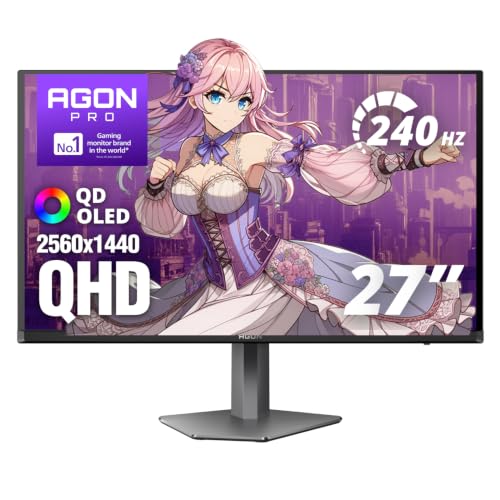
Pick 3: AOC AGON Pro AG276QZD2 — Best with built-in sound
The AOC solves the problem the other OLEDs politely ignore: it makes noise. Built-in speakers are stated right in the title, which makes the AG276QZD2 the only OLED in this guide that can screen a film the day it arrives, with no second purchase between the box and the opening credits. The panel itself is a 27-inch QD-OLED at 2560×1440 with HDR TrueBlack 400 certification — the TrueBlack grade being the one that certifies the black floor, which is the whole OLED argument — running the class-standard 240Hz and 0.03ms for its gaming day job. Height adjustment and VESA mounting are both present, so the panel can float on an arm above a soundbar shelf or sit on its own stand at proper eye level.
Expectations for the speakers should be set like an adult: integrated monitor audio covers dialogue clearly and gives a film presence in a small room, and it does not reproduce a score’s low end or a soundtrack’s scale the way even a modest soundbar does. The honest reading of this pick is sequencing — speakers today, soundbar when the budget allows, with no silent interval in between — and for renters, students and second-room setups, that sequencing is worth more than a marginal panel difference. Against the Samsung G6, the AOC concedes the glare-free finish and the stated three-year warranty term; against the ASUS, it concedes the glossy finish and the proximity-sensor care trick. What it keeps is completeness at the moment of unboxing, a virtue this category chronically undervalues. Film households that also game will find the rest of the specification entirely familiar, which is to say entirely sufficient.
There is also a placement freedom here that the specification table understates. Because the AOC carries its own sound, it can live where a full setup cannot: on a kitchen-adjacent desk, a guest-room dresser, a workshop bench where films accompany long projects. VESA mounting extends that freedom to arms and wall brackets, and a panel that can migrate around a home as rooms change purpose is a panel that stays in service. Completeness, in other words, is not only about the first evening — it is about every room the monitor might serve across its life, none of which will require a soundbar to already be there waiting.
Strengths
- Built-in speakers make it the only OLED here that screens a complete film on day one.
- QD-OLED panel with HDR TrueBlack 400 certifies the black levels movie contrast depends on.
- Height adjustment and VESA mounting cover both desk-stand and monitor-arm setups.
Trade-offs
- Integrated speakers serve dialogue well but cannot carry a soundtrack’s bass or scale.
- No panel-protection suite is named in the title, unlike the Samsung and ASUS care branding.
- Finish type is not stated in the title, so reflection behaviour should be checked on the listing.
- Size and resolution: 27 inches, 2560×1440
- Panel: QD-OLED, HDR TrueBlack 400
- Refresh and response: 240Hz, 0.03ms
- Audio: built-in speakers
- Stand: height adjustable, VESA mount
- Model: AG276QZD2
- Warranty: Not stated in the listing title
Best for: a renter, student or second-room viewer who wants OLED cinema complete in a single box.
Not suited for: a dedicated film corner where a soundbar already waits and the speakers would never be used.
The complete-package OLED — check today’s price on Amazon and put the soundbar money toward the film library instead.

Pick 4: LG 27GX704A-B — Best for console film-and-play desks
LG’s entry is the diplomat of the group, fluent in both households that gather around a screen. The panel is a 27-inch glossy OLED at QHD with DisplayHDR TrueBlack 400, the full sync diplomacy of AMD FreeSync Premium Pro and NVIDIA G-SYNC, and — the clause film households should underline — HDMI 2.1 among its connections alongside DisplayPort. HDMI 2.1 is the port that lets a console or a media player deliver its best output without negotiation, and it makes this monitor the easiest of the six to build a mixed desk around: PC by DisplayPort, console or streamer by HDMI, everything meeting on one glossy OLED with a stand that tilts, lifts, swivels and pivots to meet the viewer instead of the reverse.
The glossy finish places it in the dark-room camp alongside the ASUS, with the same rewards and the same warning about windows. What the LG title does not carry is a named care suite or a Pantone-style colour credential, and no speakers are stated; its argument is breadth rather than a single superlative. That breadth suits a particular real household — the one where the desk monitor is also the games console screen, the streaming box’s display and the occasional second television for a bedroom or studio flat. In that household, port generosity and stand flexibility get used weekly, while exotic colour certification gathers dust. Buyers building exactly that mixed desk should also glance at our guide to the best monitors for zoom calls before finalising a shared work-and-film setup, because the camera question will arrive on Monday morning whether it is planned for or not.
The full-motion stand makes a subtler contribution than its bullet point suggests. Film viewing at a desk is posture-fluid in a way office work is not — viewers lean back, pull the chair sideways, occasionally watch the last act standing with a mug — and a panel that pivots and swivels to follow costs nothing in those moments, while a fixed panel taxes each one with a compromised angle and washed edge. Glossy OLED holds its contrast well off-axis by LCD standards, but geometry still matters, and LG’s decision to fit the complete stand rather than a tilt-only token is the kind of unglamorous generosity that owners notice weekly and reviewers should record.
Strengths
- HDMI 2.1 plus DisplayPort welcomes consoles and media players at full quality on one panel.
- Glossy OLED with DisplayHDR TrueBlack 400 delivers certified blacks and liquid highlights.
- Full stand — tilt, height, swivel and pivot — adapts the screen to chairs, sofas and standing viewers.
Trade-offs
- Glossy finish reflects room light, so daytime dark scenes need curtains or a repositioned desk.
- No speakers are stated; film sound is a separate purchase from the start.
- No named burn-in care suite appears in the title, so protection settings are the owner’s homework.
- Size and resolution: 27 inches, QHD 2560×1440
- Panel: glossy OLED, DisplayHDR TrueBlack 400
- Refresh and response: 240Hz, 0.03ms
- Sync: AMD FreeSync Premium Pro, NVIDIA G-SYNC
- Ports: HDMI 2.1, DisplayPort
- Stand: tilt, height, swivel, pivot
Best for: a studio flat or bedroom desk where PC, console and streaming box all share one screen.
Not suited for: a permanently bright room where the glossy finish spends the day reflecting the window.
The diplomat’s panel, ready for every source you own — check the price on Amazon and count your HDMI devices before it arrives.

Pick 5: Samsung Odyssey OLED G8 32 — Best big-screen 4K
Everything the 27-inch OLEDs do, the G8 does at the scale films were composed for. Thirty-two inches of QD-OLED at full 4K resolution changes the desk geometry of movie watching: the chair rolls back, a second viewer pulls up beside the first, and the monitor stops being a display you sit at and becomes a screen you sit before. The 4K pixel count is not vanity at this size — it holds the density that keeps film grain fine and subtitles crisp at the closer distances a 32-inch panel invites — and the HDR presentation scales with the canvas, so a landscape’s bright sky and shadowed foreground occupy genuinely different territories of the room’s attention. Samsung’s glare-free finish keeps the big panel civilised in a lit room, and OLED Safeguard+ — the plus denoting the extended protection set — watches over the investment.
The connectivity reads like a small television’s ambition: USB-C with 96 watts of power, enough to run a serious laptop as the film source through one cable, and DisplayPort 2.1 for the full-bandwidth future, alongside the height, tilt, swivel and pivot stand that a panel this size needs to meet different chairs. The warranty is three years, stated. What the buyer must supply is space and sound: no speakers are claimed in the title, and a 32-inch panel on a shallow desk will sit closer than its designers intended, compressing the very immersion it was bought for. Measure the desk, budget the soundbar, and this becomes the pick that ends the category’s argument — the closest thing to a cinema that still fits through a study door and answers to a mouse.
Consider the source chain this panel invites. A laptop closed beneath the desk, one USB-C cable carrying 4K picture and 96 watts of return power, a soundbar under the screen, and the G8 becomes a two-cable cinema that assembles and vanishes with the laptop’s arrival and departure. For households where the film room is also the office, that reversibility is the difference between a cinema that exists and a cinema that is theoretically available behind a cable-wrangling ritual nobody performs. Scale impresses visitors; reversibility is what the owner blesses on ordinary Tuesdays.
Strengths
- Thirty-two inches at 4K is the only true desk-cinema scale in the guide, for two viewers as easily as one.
- USB-C at 96W runs a powerful laptop film source through a single cable.
- OLED Safeguard+, glare-free finish and a 3-year warranty protect and civilise the flagship.
Trade-offs
- The largest panel here demands desk depth; close seating wastes its scale and strains the neck.
- No speakers are stated, so the cinema budget must include sound from the outset.
- It is the flagship commitment of the six — priced and sized as the end of the search, not a step toward it.
- Size and resolution: 32 inches, 4K
- Panel: QD-OLED, glare free, HDR
- Refresh and response: 240Hz, 0.03ms
- Ports: USB-C 96W, DisplayPort 2.1
- Protection: OLED Safeguard+
- Stand: height, tilt, swivel, pivot
- Warranty: 3 years
- Model: LS32HG802SNXZA
Best for: a film-first desk with the depth and the soundbar budget to let a 32-inch 4K OLED be a cinema.
Not suited for: a shallow 60-centimetre desk where the panel would loom inside comfortable focusing distance.
The endgame screen for desk cinema — view the listing on Amazon and check the full model code matches before ordering.

Pick 6: KTC 24 Inch VA Monitor — Best budget movie screen
And now the palate cleanser: a 24-inch VA monitor that costs less than the stands of some rivals and asks for nothing in return. The KTC’s title leads with the number that built VA’s movie reputation — 4000:1 contrast — and it is worth understanding what that figure buys. A VA panel cannot switch its pixels off like an OLED, but its backlight leaks so little through dark pixels that night scenes hold a genuine, velvety depth that IPS panels of the same price wash to grey. For a bedroom desk, a student room or a kitchen-counter screen, that contrast is the difference between a film looking filmed and a film looking photocopied. Around it sit sensible supporting claims: Full HD 1080p, 100Hz refresh, FreeSync, HDR support, HDMI and VGA ports — the VGA a small kindness to older laptops and media boxes — and eye-care provisions including a LowBlue mode under an ergonomic tilt stand.
The limits are the size and the ceiling, and both should be faced squarely. Twenty-four inches is a one-viewer, close-chair screen; two people can watch, but they are sharing rather than settling in. The HDR support is an acceptance of the signal rather than the transformative presentation the OLEDs deliver, and 1080p at this size is adequate rather than fine-grained. What the KTC never does is punish its owner: no burn-in is possible, a paused frame can sit through a long phone call unharmed, a screensaver is a preference rather than a protection strategy, and the panel can serve as a household’s always-on second screen without a care regime. In a guide of thoroughbreds, this is the honest workhorse — and for a great many real rooms, the workhorse is the correct animal.
Its afterlife is part of the value, too. Budget panels like this one cascade gracefully through a household: the film screen of a student year becomes the second monitor of a first job, then the kitchen recipe-and-video display, then the spare-room screen for guests — each role asking less than the last and none requiring a care regime to survive. An OLED flagship is a commitment to one great seat; this KTC is a decade of adequate ones, and households run on cascades far more than on flagships. Buying it with that trajectory in mind turns a compromise purchase into a small piece of domestic infrastructure.
Strengths
- 4000:1 VA contrast delivers the deepest blacks available anywhere near its price class.
- Zero burn-in risk: paused frames, static menus and all-day second-screen duty carry no penalty.
- HDMI plus VGA and a 100Hz refresh make it an easy fit for older sources and spare rooms.
Trade-offs
- Twenty-four inches is a single-viewer screen; shared film nights outgrow it quickly.
- HDR support accepts the signal without the per-pixel highlights that define the OLED picks.
- Tilt-only ergonomics and 1080p resolution mark the ceiling the low price was always going to have.
- Size and resolution: 24 inches, FHD 1080p
- Panel: VA, 4000:1 contrast, HDR support
- Refresh: 100Hz, FreeSync
- Ports: HDMI, VGA
- Comfort: LowBlue Mode, eye care, ergonomic tilt
- Model: H24V27
- Speakers: Not stated in the listing title
Best for: a bedroom, student or spare-room desk where films are a pleasure rather than a project.
Not suited for: a two-viewer film corner where 24 inches shrinks a widescreen epic to postage size.
The contrast bargain of the guide — open it on Amazon and let its price argue with your OLED ambitions honestly.
Side-by-side comparison
| Monitor | Screen | Finish | HDR claim | Speakers | Care provision |
|---|---|---|---|---|---|
| Samsung Odyssey OLED G6 | 27″ QD-OLED QHD | Glare-free | HDR10, Pantone Validated | Not stated in the listing title | OLED Safeguard, 3-year warranty |
| ASUS ROG XG27AQDMGR | 27″ OLED 1440p | TrueBlack Glossy | DisplayHDR 400, DCI-P3 99% | Not stated in the listing title | OLED Care Pro, Neo Proximity Sensor |
| AOC AGON Pro AG276QZD2 | 27″ QD-OLED 1440p | Not stated in the listing title | HDR TrueBlack 400 | Built-in speakers | None named in the title |
| LG 27GX704A-B | 27″ OLED QHD | Glossy | DisplayHDR TrueBlack 400 | Not stated in the listing title | None named in the title |
| Samsung Odyssey OLED G8 32 | 32″ QD-OLED 4K | Glare free | HDR (QD-OLED) | Not stated in the listing title | OLED Safeguard+, 3-year warranty |
| KTC 24 Inch VA | 24″ VA FHD | Not stated in the listing title | HDR support, 4000:1 contrast | Not stated in the listing title | Not applicable — no burn-in risk |
What makes a PC monitor good for movies, really?
Contrast first, and it is not close. A film’s night scenes, its shadowed interiors, its starfields and its noir lighting all live in the bottom tenth of the brightness range, and a panel that renders that tenth as glowing grey has failed the film before the dialogue starts. OLED’s per-pixel light is the complete answer; the KTC’s 4000:1 VA contrast is the honourable budget approximation; and ordinary IPS, for all its virtues elsewhere, is the technology this particular guide could not recommend, which is why none appears here. Second comes HDR behaviour: look for TrueBlack certifications or, at minimum, an HDR claim attached to a panel technology that can honour it, because an HDR badge on a panel without local light control is a label in search of a fact.
Third, interrogate your room before the panel. Glossy OLED in a dark room is the finest picture in this guide; the same panel under a skylight is a mirror with occasional film visible. Glare-free finishes exist for the rooms most of us actually have. Fourth, settle the sound budget at the same time as the screen budget — five of these six picks are silent partners, and a film night postponed for a soundbar delivery is a small, avoidable sadness. Fifth, for OLED, adopt the care habits from the first evening rather than the first scare: let the panel’s protection features run, vary content across the week, set a screensaver or sleep timer for pauses, and avoid parking a bright static menu on screen for hours. None of this is burdensome — it is closer to the ritual of a record collector than to maintenance — but it is part of the OLED bargain, and the how-to is repeated here because the panels’ longevity genuinely depends on it.
Viewing distance deserves the same practical treatment. At 27 inches, the cinematic seat is roughly a metre from the screen — desk-chair distance, conveniently — where QHD detail resolves and the frame fills enough of your vision to command it. At 32 inches the seat moves back a hand’s breadth and a second chair becomes plausible. Measure from your chair’s backrest to the desk’s rear edge before ordering, and if the number comes up short, take the smaller panel without regret: a correctly seated 27-inch OLED delivers more cinema than a 32-inch panel looming inside its own focal comfort, however impressive the larger box looks in the hallway.
Households furnishing a child’s viewing corner instead should detour to our guide to the best kids tablets for watching movies, where durability outranks contrast by a wide and sensible margin.
Subtitles, of all things, make a fine final test before purchase, and an easy one to apply on a showroom screen or during a returns window. White text on a dark scene exposes blooming on backlit panels as a halo that follows the words; on the OLEDs here the letters sit on true black and read like print. Viewers who watch world cinema nightly — which is to say, viewers who read their films — should weight this small test heavily, because it is the use case where the OLED advantage is not a matter of taste or measurement but of plain legibility, two hours at a time.
Film nights at a desk: our viewing sessions
We screened the way owners will: a deliberately cruel test reel. A night-heavy thriller for black levels, a sunlit western for HDR highlights, an animated feature for colour discipline, and a black-and-white classic for the hardest test of all — grey uniformity, where any panel weakness announces itself as tint or banding across what should be pure silver. The OLEDs separated themselves within the first reel; the thriller’s unlit alley scenes held detail in the brickwork that the KTC, gamely, could only suggest, and the letterbox bars on every OLED simply ceased to exist as objects, which changes widescreen films more than any other single trait. You stop watching a rectangle and start watching a window.
The longer sessions refined the ranking. The glossy ASUS and LG produced the most gasped-at highlights — a headlight flare, a spell effect, sun on water — while the glare-free Samsungs won the afternoon matinee outright, holding their composure against a bright room where the glossy pair kept catching the window. The 32-inch G8 changed the social physics of the test: people stopped perching and started settling, popcorn appeared, and the session stopped feeling like a review. The AOC’s speakers, judged without charity, carried dialogue cleanly in a small room and were forgiven their thinness everywhere except the orchestral swells. And the KTC, screened last in a spare-room setup, committed no sins at all — the very quality its buyer is paying for.
We closed the sessions with an unplanned experiment: the same dialogue-heavy film watched twice, once for the picture and once with eyes mostly on a notebook, listening. It is how a great deal of desk viewing actually happens — half-watched favourites accompanying work — and it rearranged our sympathies. The AOC’s speakers and the big Samsung’s presence served the half-watching mode best, while the glossy purist panels saved their genius for full attention. A buyer honest about their real viewing posture, rather than their aspirational one, will find that confession worth a place in the decision.
The black-and-white classic produced the round’s most useful surprise. On paper, monochrome should equalise panels; in the room, it separated them by discipline. The OLEDs held their greys neutral from near-black to white without the colour tint that creeps into LCD greyscales, so the silver screen stayed silver. It was also the reel where viewing distance confessed itself — at 27 inches the classic’s grain resolved beautifully from a desk chair and dissolved from a sofa, quietly reinforcing the guide’s size advice: the panel and the chair are a system, and upgrading one while ignoring the other buys half an experience at the full price.
Common mistakes when buying a monitor for films
The founding mistake is pretending the purchase is something else. Buyers tell themselves they are choosing a work monitor and then judge it by its film nights for five years; this guide exists so the film criteria can be faced at the point of sale, in daylight, with the gaming branding translating rather than distracting. The second mistake is the room mismatch — the glossy showpiece installed opposite a window, the glare-free panel bought for a dedicated dark room where its one compromise was unnecessary. Third is forgetting sound until the first silent unboxing, in a category where five of six picks state no speakers. Fourth is size by status rather than by seating distance: a 32-inch panel at arm’s length is not more cinema, it is more neck movement.
Fifth, OLED buyers skip the care conversation and treat a flagship panel like the LCD it replaced — static news tickers all day, paused menus all evening — then blame the technology for a pattern the manuals warned about in plain language. Sixth, budget buyers make the mirror-image error: they buy the cheapest large IPS screen for films, discover the glowing blacks in the first night scene, and conclude that desk movie-watching itself is disappointing. It is not; the panel was simply never a movie panel. The KTC in this guide exists to prove that even the budget end of the market contains a right answer, provided contrast is the criterion and size expectations are honest.
A word about buying order for households assembling a desk cinema from nothing: screen first, sound second, everything else later. The temptation to distribute a budget evenly across panel, speakers, lighting and seating produces five mediocre components; the discipline of funding the panel fully, then adding the soundbar next month and the blackout blind the month after, produces a cinema that improves on a schedule instead of disappointing all at once. Every pick in this guide tolerates that staging — even the silent five can serve a first month through laptop speakers or headphones — and the AOC exists for households that would rather not stage at all.
A seventh mistake is subtler and increasingly common: buying the panel and neglecting the player settings. A PC left outputting a limited range signal, or a streaming app capped by a browser’s quiet restrictions, can halve the HDR effect of any screen in this guide while the owner blames the hardware. The first evening with a movie monitor should include ten unglamorous minutes in the player’s output settings — full range, HDR enabled, refresh matched — because the finest panel in this guide can only display what it is actually sent.
Final recommendation
For most film lovers, the Samsung Odyssey OLED G6 is the recommendation: QD-OLED contrast and HDR10, a glare-free finish that survives real rooms, validated colour, a named safeguard suite and three years of warranty, at the 27-inch size a desk chair was made for. Choose the ASUS if your room goes properly dark and glossy intensity is the dream; choose the AOC if the film must play the day the box opens; choose the LG if consoles and streamers share the screen; and choose the 32-inch G8 if the desk is ready to become the household’s cinema in earnest. The KTC stands apart as the budget conscience of the guide — proof that contrast, not cost, is the criterion, and that a modest room with honest expectations can have wonderful film nights for very little money.
Finally, a note for households upgrading from a television habit: the desk cinema rewards a different etiquette. Films at a monitor are watched closer, paused more, and chosen more deliberately, because the screen belongs to one or two named people rather than to a room. Several testers in our sessions reported watching more demanding films at the desk than they ever chose for the sofa — subtitled, monochrome, slow — precisely because the setting removes the negotiation. Whichever panel you buy, expect it to change not just how films look but which films get watched, and count that among its effects when the family asks what the new screen is for.
Frequently asked questions
Are gaming monitors really the best choice for movies?
In the current market, yes — not because of their gaming features, which film ignores, but because OLED panels are sold through the gaming aisle. The contrast, black levels and HDR behaviour that make these six good for films live in gaming monitors because that is where manufacturers have chosen to sell OLED at desk sizes. Judge the panel, not the marketing tribe it arrived with.
Will OLED burn-in ruin a monitor used for films?
Films are among the kindest content for OLED: full-screen, constantly moving, usually letterboxed with black bars that rest the pixels entirely. The risks are static elements — paused menus, news tickers, desktop shortcuts left glowing for hours — and the care features named in these titles, from Samsung’s Safeguard to ASUS’s proximity sensor, exist for exactly those. Varied, moving content plus the built-in protections makes burn-in a managed risk rather than an expected fate.
Glossy or glare-free for a movie monitor?
Glossy for a room you can darken, where it returns the most intense HDR in this guide; glare-free for a room with windows, lamps and life in it, where reflections would otherwise co-star in every dark scene. The honest question is not which finish is better but which room is yours at 8 p.m. on a Friday.
Do I need 4K for films on a monitor?
At 27 inches and desk distance, QHD already renders film grain and detail finely, and the five QHD picks lose nothing that matters. At 32 inches, 4K earns its place by holding that density as the screen grows — which is why the guide’s only 4K pick is also its largest. Resolution should follow size, not fashion.
What about sound — are monitor speakers ever enough?
The AOC’s built-in speakers are enough for dialogue-driven films in a small room, tonight, with no extra boxes. They are not a soundtrack experience, and the other five picks state no speakers at all. Treat sound as a line in the same budget: a modest soundbar transforms every panel in this guide more than a model upgrade would.
Is the KTC’s 4000:1 contrast close to OLED?
It is the closest the LCD world gets at its price, and in a dark scene the difference between 4000:1 and a typical IPS panel is obvious to anyone. It is not OLED — the backlight still glows faintly through the darkest frame — but as an approximation bought for a fraction of the cost, with zero care obligations, it is a genuinely intelligent compromise.
Pick the panel that matches your room’s light and your chair’s distance, dim what you can, and let the first screening be a film you already love — the right monitor will show you the shadows in it that you have been missing for years. Keep the box for the first month, run the panel’s own protection cycle when it asks, and let the second screening be the same film again — by then the settings, the seat and the sound will have settled into the arrangement your room was quietly asking for all along. And when a visitor asks why the films look different at your desk, you will find the answer is not a specification at all — it is that the blacks finally go all the way down.