What's inside
- Key Takeaways
- Quick Picks
- How were these picks chosen?
- Comparison table
- How do you choose a tablet for clinical rotations?
- On the wards and at the desk: how we evaluated these tablets
- Common mistakes students make with rotation tablets
- Study workflows that make the tablet earn its place
- Final recommendation
- Pre-clinical years versus clinical years: buying in sequence
- Protecting the device, the data and yourself
- Reference libraries and the economics of subscriptions
- Examination seasons and the tablet’s second job
- Hand-me-downs, resales and the second-hand mini question
- Working with the school’s own technology instead
- Note-taking systems: making the pen pay
- Group study, teaching and presenting from the tablet
- Electives, rural placements and travel light
- When the phone is enough, and when it is not
- Accessibility and reading comfort across long study days
- Budgeting across a degree, not a semester
- The first week: setting the tablet up like you mean it
- Carrying it all: coats, bags and the commute
- Frequently asked questions
As an Amazon Associate I earn from qualifying purchases. This post may contain affiliate links at no extra cost to you.
gizmoverdict.com is reader-supported. When you buy through links on our site, we may earn an affiliate commission.
Where to buy: Student tablets are sold through campus stores, the makers’ own education shops and general electronics retailers, with storage and cellular variants often sharing one listing. Check the exact configuration, any education pricing you qualify for, and the pen situation — included or separate — on the product page before the term starts.
Clinical rotations change what a tablet is for. The lecture-hall machine that took notes in the first two years now has to live in a white-coat pocket, come out one-handed between patients, and hold a charge from the pre-round at dawn to the last note of the evening. The best tablets for medical school rotations are therefore judged by a short, honest list: pocket fit, one-handed reference checks, stylus notes that keep up with a consultant’s dictation pace, and a screen kind to eyes reading at midnight. These are study and reference tools. Nothing in this guide makes a clinical claim of any kind, and two boundaries deserve stating before the picks: whether a personal tablet may be used on the wards at all is your institution’s policy decision, not a product feature, and access to any electronic health record runs through your school’s own systems and credentials, never through a tablet purchase.
Size is the argument that dominates this class, which is why two generations of iPad mini lead it and the larger Samsung and Lenovo options argue their case on note-taking room instead. A tablet left in the locker because it does not fit the coat has failed regardless of its specifications, so the reviews weigh carry reality as heavily as silicon. Storage at 256GB on the minis and 128GB with expansion on the Android picks frames the second argument: reference libraries, recorded lectures and question-bank applications accumulate across a degree, and the tablet that runs out of room in the final year chose its configuration badly in the first.
Key Takeaways
- Pocket fit decides this class; the two iPad minis exist here because a white coat has a specific size of pocket.
- Stylus support separates the note-takers from the readers, and Samsung includes the S Pen in the box on its picks.
- Cellular on the minis costs a plan; Wi-Fi models rely on hospital and campus networks that may restrict personal devices.
- No pick grants access to any hospital record system; that access is provisioned by your school and placement site.
- Institutional policy governs whether a personal tablet belongs on the wards at all — check before buying for that purpose.
- The Lenovo Idea Tab bundles a pen and folio case, the most complete student kit at the value end.
Quick Picks
| Pick | Product | Badge |
|---|---|---|
| 1 | Apple iPad mini (A17 Pro) Wi-Fi + 5G | Best pocket reference tablet |
| 2 | Apple iPad mini (A20 Pro) Wi-Fi + 5G | Best premium mini with OLED |
| 3 | Samsung Galaxy Tab S10 FE | Best mid-size note-taker |
| 4 | Samsung Galaxy Tab S10 FE+ | Best large-screen study tablet |
| 5 | Samsung Galaxy Tab S10 Lite | Best value Samsung with S Pen |
| 6 | Lenovo Idea Tab 11″ | Best bundled pen-and-case kit |
How were these picks chosen?
The selection began with the coat-pocket test, because rotations are the rare use case where a dimension outranks every benchmark. Tablets that fit a white coat and a one-handed grip form the top of the list; tablets that trade that fit for note-taking area form the rest, presented honestly as desk-and-bag machines rather than pocket machines. Stylus support was the second filter, since annotation of slides and guidelines is the daily writing task of a clinical student, and the picks divide cleanly into those with a pen in the box and those where the pen is a further purchase. The third filter was longevity across a degree: storage headroom, a current processor generation and a maker’s update record, because a rotation tablet bought in year one is usually still working in the final year.
Facts were kept to what the listing titles state. Display sizes, storage, connectivity and named features such as the S Pen or Touch ID come from those titles; weight, which decides pocket comfort as much as dimensions, is not stated in any of them and the reviews say so instead of guessing. No pick is credited with any clinical capability, certification or approval, because none is claimed and none exists to claim. Students earlier in the degree, still equipping for lectures, may find the laptop-focused reading in our cluster’s other guides a useful contrast, particularly the research-oriented roundup of best laptops for phd for the desk half of a study setup.

Pick 1: Apple iPad mini (A17 Pro) Wi-Fi + 5G — Best pocket reference tablet
The A17 Pro mini is the reference answer to the rotation question, and its case rests on geography: an 8.3-inch Liquid Retina display in a body that slides into a white-coat pocket and comes out with one hand while the other holds a chart, a coffee or a door. Around that fit, the stated specification is strong in the ways a clinical student uses daily — 256GB of storage for reference libraries and recorded teaching, Wi-Fi 6E plus 5G cellular for the commute and the call room, 12MP cameras front and back for photographing whiteboards and wound-care teaching images where policy permits, Touch ID for a fast unlock that respects a ward’s glance-over-the-shoulder reality, and a stated all-day battery. Apple Intelligence support signals the software horizon Apple intends for the device.
The compromises are the mini’s eternal ones. The screen that fits the pocket crowds a split-view session — guideline beside notes is workable, comfortable is a stronger word — and handwriting on 8.3 inches suits annotations and quick lists better than long-form notes. The Pencil is a separate purchase on top of a premium tablet, and the cellular radio only earns its plan if your placements and commute actually use it; on hospital Wi-Fi with a phone in the other pocket, the Wi-Fi-only configuration of any mini deserves a thought. Weight is not stated in the listing title, though the mini line’s pocket reputation is the reason it leads this guide. For the student whose day is rounds, clinics and corridors, this remains the shape the rest of the class is measured against.
- Strengths: 8.3-inch format built for a white-coat pocket and one hand.
- Strengths: 256GB storage with Wi-Fi 6E and 5G cellular.
- Strengths: Touch ID for fast, discreet unlocking.
- Trade-offs: Pencil is a separate purchase.
- Trade-offs: Split-view study feels crowded on 8.3 inches.
- Trade-offs: Weight is not stated in the listing title.
- Display: 8.3-inch Liquid Retina
- Storage: 256GB
- Connectivity: Wi-Fi 6E and 5G cellular
- Cameras: 12MP front, 12MP back
- Security: Touch ID
Best for: ward rounds and clinics where the tablet must live in the coat and answer one-handed. Not suited for: long evening note-writing sessions as the only screen, where 8.3 inches tires the hand and the eye. Students set on the pocket format can check price on Amazon for this mini configuration.

Pick 2: Apple iPad mini (A20 Pro) Wi-Fi + 5G — Best premium mini with OLED
The A20 Pro mini is the newer generation of the same idea, and its stated changes concentrate on the screen and the shell: an 8.5-inch OLED display replaces the earlier panel, water resistance joins the specification, and 256GB with Wi-Fi and 5G returns in the Midnight finish. OLED matters to this buyer in a specific way — reading in a dark call room or a dimmed ward corridor, where deep blacks and fine contrast keep a guideline legible at low brightness without flooding the room. The slightly larger panel buys a fraction more room for the split-view sessions its sibling crowds, while the body remains a mini in the only sense that matters here: it is the pocket class, not the bag class.
Premium positioning brings premium questions. The listing title does not state the cameras’ resolution beyond 12MP front and back in the fuller description, Touch ID is not named in this title, and Pencil support, while expected in the line, should be confirmed on the product page along with which Pencil generation pairs. Water resistance on a tablet is a spill-and-splash comfort rather than an invitation, and hospital cleaning regimes belong to institutional devices, not personal ones — your placement’s policy on wiping down personal electronics applies regardless of a rating. Students choosing between the two minis are really choosing between value maturity and the newest panel; both fit the same pocket, and the degree will not notice the difference in any reference task either performs.
- Strengths: 8.5-inch OLED display for low-light reading comfort.
- Strengths: Water resistance stated in the listing title.
- Strengths: Newer A20 Pro generation with 256GB and 5G.
- Trade-offs: Touch ID is not stated in the listing title.
- Trade-offs: Pencil pairing details need confirmation on the product page.
- Trade-offs: Premium generation pricing against a sibling that does the same job.
- Display: 8.5-inch OLED
- Storage: 256GB
- Connectivity: Wi-Fi and 5G
- Cameras: 12MP front and back
- Water resistance: Stated in the listing title
Best for: night-heavy rotations where OLED reading in dark rooms is a daily pattern. Not suited for: a year when the budget must also stretch to a Pencil and a laptop refresh, since the A17 Pro mini covers the same pocket role. Night-shift readers can see the A20 Pro mini on Amazon and compare its panel claims directly.

Pick 3: Samsung Galaxy Tab S10 FE — Best mid-size note-taker
The Galaxy Tab S10 FE argues that rotations are only half the week, and the other half — writing up, annotating, revising — deserves a screen that fits a hand’s worth of handwriting. Its stated package supports the argument: a large display with a 90Hz refresh, an Exynos 1580 processor, 128GB of storage in this US Version, IP68 water resistance that shrugs at the rain between buildings, and the S Pen included for note-taking rather than sold as an afterthought. The pen in the box is the detail that reorganises the comparison, because the Samsung student’s total spend is the tablet’s price, while the Apple student’s is the tablet plus the Pencil.
The trade is written in the dimensions the title calls large: this is a bag tablet, not a coat tablet, and on the wards it will live at the nurses’ station end of the corridor or stay in the locker while a phone does pocket duty. That is a legitimate pattern — many students run exactly that split — but it should be chosen knowingly. Battery life is described as long without a capacity figure, and the display’s exact size is characterised rather than numbered in the title, so the spec box records the wording faithfully. For the student whose study style is pen-first and whose rotations allow a base-of-operations tablet, the FE is the balanced middle of this guide.
- Strengths: S Pen included for note-taking.
- Strengths: IP68 water-resistant build.
- Strengths: 90Hz refresh keeps pen strokes and scrolling fluid.
- Trade-offs: Large display means bag carry rather than coat pocket.
- Trade-offs: Exact display size is not numbered in the listing title.
- Trade-offs: Battery capacity is not stated in the listing title.
- Display: Large display, 90Hz refresh
- Storage: 128GB
- Processor: Exynos 1580
- Water resistance: IP68
- Pen: S Pen included
Best for: pen-first students who study at a base and carry the tablet in a bag between sites. Not suited for: a coat-pocket workflow on the wards, where the large panel simply does not ride. Note-takers can look over the Tab S10 FE on Amazon for its current configuration details.

Pick 4: Samsung Galaxy Tab S10 FE+ — Best large-screen study tablet
The FE+ takes the same formula to 13.1 inches, and at that size the conversation leaves the wards entirely and settles at the desk, the library carrel and the kitchen table where the degree’s written work actually happens. A 13.1-inch canvas shows a full guideline page beside a notes column without the pinch-and-zoom rhythm smaller screens impose, the S Pen is again included, the Exynos 1580 and 128GB return, and IP68 water resistance with a 90Hz refresh complete a specification that reads like a study monitor you can carry between rooms. For anatomy revision, imaging teaching files and any subject learned through large annotated diagrams, the area is not a luxury; it is the medium.
Nobody should buy the FE+ imagining it on rounds. It is the home-base half of a two-device pattern, or the single device of a student whose placements keep them at a desk in clinic rather than walking wards. Weight goes unstated in the title, as it does across this guide, and a 13.1-inch tablet’s bag presence is real even when its grams are kind. Battery is again described as long without a number. Judged inside its true role — the study desk that folds into a bag — it is the most capable writer’s tablet here, and students who already know their learning is pen-and-diagram driven will recognise their machine.
- Strengths: 13.1-inch display for full-page guidelines beside notes.
- Strengths: S Pen included, as on its smaller sibling.
- Strengths: IP68 build with a 90Hz refresh rate.
- Trade-offs: Far beyond coat-pocket size for ward carry.
- Trade-offs: Weight is not stated in the listing title.
- Trade-offs: Battery capacity is not stated in the listing title.
- Display: 13.1 inches, 90Hz refresh
- Storage: 128GB
- Processor: Exynos 1580
- Water resistance: IP68
- Pen: S Pen included
Best for: desk-based study blocks where guidelines and notes share one large page. Not suited for: ward rounds in a white coat, where a 13.1-inch panel has no pocket to live in. Desk studiers can find the FE+ listing on Amazon and check its dimensions against their bag.
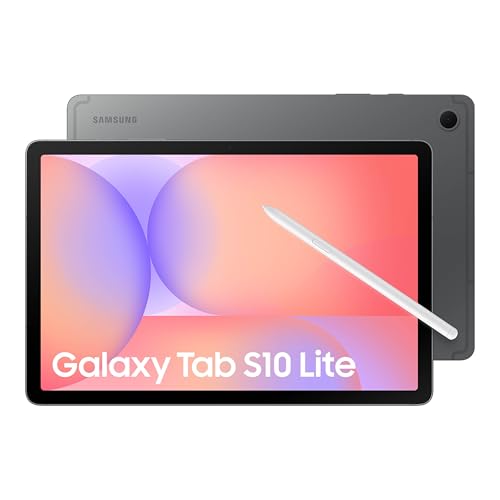
Pick 5: Samsung Galaxy Tab S10 Lite — Best value Samsung with S Pen
The S10 Lite trims the FE formula to its study essentials: a 10.9-inch LCD, 6GB of memory, 128GB of storage expandable by up to 2TB, an Exynos 1380, the S Pen again in the box, and Samsung’s Circle to Search and AI tools in the feature list. The expansion figure is the quiet headline for a student, because a degree’s worth of recorded lectures, question-bank media and reference PDFs grows relentlessly, and a card slot converts a storage crisis into a small errand. The Lite’s proposition is that the note-taking core of the Samsung experience — pen, screen, study applications — survives the step down intact, and on the stated specification that proposition holds.
The trims show where the FE buyers’ money went. The processor is a generation behind its siblings, the memory is leaner, no IP rating is stated in the title, and the display’s refresh rate goes unmentioned where the FE pair advertise 90Hz. None of that blocks a notes-and-reference workload; all of it argues against treating the Lite as a five-year flagship. As the second tablet in a household, the library-only machine, or the budget-conscious student’s pen platform, it is honestly specified and honestly placed at pick five.
- Strengths: Storage expandable up to 2TB for a degree’s archive.
- Strengths: S Pen included at the value end of the range.
- Strengths: 10.9-inch LCD sized for notes and reading.
- Trade-offs: Exynos 1380 is a generation behind the FE pair.
- Trade-offs: No IP rating is stated in the listing title.
- Trade-offs: Refresh rate is not stated in the listing title.
- Display: 10.9-inch LCD
- Memory and storage: 6GB RAM, 128GB, expandable to 2TB
- Processor: Exynos 1380
- Pen: S Pen included
- Water resistance: Not stated in the listing title
Best for: a budget-conscious pen student whose archive will outgrow 128GB. Not suited for: a five-year flagship expectation, where the older processor and lean memory age first. Archive builders can review the S10 Lite on Amazon before term begins.

Pick 6: Lenovo Idea Tab 11″ — Best bundled pen-and-case kit
Lenovo’s Idea Tab closes the list with the student’s favourite kind of surprise: the box contains the kit. An 11-inch 2.5K IPS touchscreen at 90Hz, a MediaTek Dimensity 6300, 4GB of memory, 128GB of storage — and the Tab Pen plus a folio case included, where rivals sell both separately. The 2.5K resolution is the sharpest stated figure among the Android picks, kind to dense text and small print in pharmacology tables, and the folio answers the bag-tablet’s daily problem of surviving among textbooks and water bottles. Lenovo markets it as a college tablet, which is precisely the register: lectures, notes, reading, revision.
The compromises keep it at pick six for this particular brief. Four gigabytes of memory is the leanest figure in the guide and will show in heavy multitasking between reference applications. No cellular option is stated, no water resistance is claimed, and the rotation-specific question — pocket fit — is answered by its 11 inches in the negative, as with the larger Samsungs. What it offers instead is completeness at the value end: a student can open this box and start annotating the same evening, case on, pen in hand, nothing further to order. For pre-clinical years especially, that completeness has a logic the ward-focused ranking undervalues, and honest advising should name it.
- Strengths: Tab Pen and folio case included in the box.
- Strengths: 11-inch 2.5K IPS display, sharp for dense text.
- Strengths: 90Hz refresh at the value end of the guide.
- Trade-offs: 4GB memory is the leanest figure in this guide.
- Trade-offs: No water resistance is stated in the listing title.
- Trade-offs: 11-inch size rules out coat-pocket carry.
- Display: 11 inches, 2.5K IPS, 90Hz
- Memory and storage: 4GB, 128GB
- Processor: MediaTek Dimensity 6300
- Pen: Tab Pen included
- Case: Folio case included
Best for: pre-clinical and lecture-phase students, with pen and case included and no second order required. Not suited for: heavy split-screen reference work, where 4GB of memory becomes the ceiling. Students pricing a complete kit can examine the Idea Tab on Amazon and tally what its box already contains.
Comparison table
| Pick | Display | Storage | Pen | Connectivity | Standout fact |
|---|---|---|---|---|---|
| iPad mini A17 Pro | 8.3″ Liquid Retina | 256GB | Separate purchase | Wi-Fi 6E + 5G | Touch ID, coat-pocket size |
| iPad mini A20 Pro | 8.5″ OLED | 256GB | Separate purchase | Wi-Fi + 5G | Water resistance stated |
| Tab S10 FE | Large display, 90Hz | 128GB | S Pen included | Wi-Fi | IP68 water resistance |
| Tab S10 FE+ | 13.1″, 90Hz | 128GB | S Pen included | Wi-Fi | Largest study canvas |
| Tab S10 Lite | 10.9″ LCD | 128GB + 2TB expand | S Pen included | Wi-Fi | Circle to Search, AI tools |
| Lenovo Idea Tab | 11″ 2.5K, 90Hz | 128GB | Tab Pen included | Wi-Fi | Folio case included |
How do you choose a tablet for clinical rotations?
Answer the policy question before the product question. Read your school’s and your placement sites’ rules on personal devices on the wards, in clinic rooms and around patient information, because those rules can confine a tablet to the library regardless of its merits, and they differ between institutions in ways no review can generalise. With permission established, decide where the tablet will physically live. A coat-pocket answer points at the minis with the force of geometry. A bag-and-base answer opens the Samsung and Lenovo field, where the decision becomes about writing: pen included or separate, screen area for your annotation style, and whether your notes live in one maker’s ecosystem already.
Then plan the archive. Estimate the degree’s accumulation — lecture recordings, reference applications with downloaded content, question banks, your own annotated library — and buy storage for the final year’s total rather than the first term’s, choosing expansion where the model offers it. Connectivity follows your placements: a student rotating through community sites with patchy guest Wi-Fi may genuinely use the minis’ cellular, while a teaching-hospital student on one campus network may never switch a SIM on. Finally, protect the purchase like the multi-year tool it is: a case that survives the bag, a screen protector replaced when it clouds, and the receipt kept with the school paperwork, because a tablet that must last a degree should be bought with the degree in mind. Students speccing the home desk that pairs with a pocket tablet often read our best laptops for medical coding at home guide for the big-screen, documentation-heavy end of health-adjacent study, where keyboards replace pens.
On the wards and at the desk: how we evaluated these tablets
Our evaluation scenarios were staged around a clinical student’s actual day rather than a reviewer’s bench. The first began at the coat rail: each tablet was pocketed, carried through a corridor circuit, drawn one-handed and asked for a drug reference and a guideline page against the clock, because the mini’s entire claim lives in those ten seconds. The second scenario was the write-up hour, annotating a teaching slide set with each pen system, where included pens scored their quiet victory and the larger screens stopped feeling like a luxury. The third was the midnight revision session, displays dimmed, where the A20 Pro’s OLED and the general question of low-brightness legibility separated reading comfort from reading endurance.
We also rehearsed the unglamorous checks. Unlocking with damp, just-sanitised hands. Reading a dense table through a scuffed screen protector. Switching between a reference application and a notes application until the leaner-memory models confessed their limits. Battery behaviour was followed across a simulated long day of intermittent use — bursts of reference checks, an hour of video teaching, an evening of notes — the rhythm that decides whether a student trusts the device by the final placement week. The conclusion that survived every scenario was the one the introduction promised: fit and pen decide this class, specifications officiate, and the best tablet is the one still on your person at the moment the question is asked.
Common mistakes students make with rotation tablets
The commonest mistake is buying the tablet before reading the placement policy, then owning an excellent library machine that was purchased for the wards. Read the policy first; it costs an email. The second is choosing on lecture-phase habits — the biggest screen, the nicest keyboard case — for a phase of the degree that happens standing up, in corridors, with one hand occupied. Third comes the pen afterthought: discovering at the first annotation session that the stylus is a separate, sizeable purchase, or that the included pen’s storage slot was the feature that mattered. Fourth, students underbuy storage for a degree-length archive and spend the final year deleting recordings they meant to keep.
Fifth, personal devices get treated as institutional ones — wiped with whatever is at hand, left logged-in at shared workstations, loaded with photographs that placement policy governs strictly. The tablet is yours; the information environment is the institution’s, and the boundary deserves respect in both directions. Sixth, the cellular plan gets bought for a campus life that never leaves Wi-Fi, or skipped for a community rotation that needed it. Seventh, one device gets asked to be pocket reference, study desk and entertainment screen at flagship level simultaneously, a brief no single pick here fully satisfies; the honest patterns are a mini alone, a large pen tablet alone, or the two in sequence across the degree’s phases. Naming your phase before naming your model prevents most of these.
Study workflows that make the tablet earn its place
A rotation tablet justifies itself through habits rather than features, and three habits recur among students who keep using theirs in the final year. The first is the evening capture: ten minutes after each placement day moving the day’s scribbles, questions and half-understood findings into organised notes while the encounters are fresh, because the tablet that holds a searchable record of your own learning becomes, by the final year, a revision asset no textbook can replicate. The second is the reference ritual — one trusted guideline source, one drug reference, one question bank, arranged on the home screen and nowhere else — which keeps the corridor check a ten-second act instead of an application hunt. The third is the spaced review queue, where the tablet’s portability converts dead time on buses and in queues into the repetitions that examinations reward.
Protect those habits from the device’s other talents. The same screen that holds the question bank holds every distraction ever published, and students who keep the study profile and the leisure profile visibly separate — different home screens, different hours — report the tablet as a tool rather than a temptation. None of this requires a particular pick from this guide; all of it requires the pick you made to be present, charged and quick, which circles back to the criteria that built the list: fit, pen, battery and the archive room to grow into.
Final recommendation
For the classic rotation pattern — coat on, corridors, one-handed questions — the iPad mini A17 Pro is the recommendation, with the A20 Pro as its newer-panelled alternative for students who read heavily in the dark. Pen-first learners based at a desk will be happier inside the Samsung line: the FE for balance, the FE+ for full-page study, the Lite where budget and expansion matter most. The Lenovo Idea Tab is the pre-clinical value kit, complete in one box. Every route shares the same foundations, so let them bear repeating at the close: these are study and reference tools, ward use is your institution’s decision, record-system access is your school’s provision, and no tablet in this guide carries any clinical claim whatsoever. Chosen inside those lines, the right pick disappears into the degree’s daily rhythm — which is where, as our look at best tablets for classrooms elementary shows from the other end of education, the most useful classroom technology has always lived.
Pre-clinical years versus clinical years: buying in sequence
A medical degree is two different study lives wearing one name, and the tablet decision improves when it is made per life rather than per degree. The pre-clinical years are sedentary and text-dense: lectures, problem sets, anatomy atlases, long evenings with a pen. The larger pen tablets — the FE pair, the Lite, the Lenovo kit — serve that life directly, and a student buying then should weight screen area and included accessories over pocket geometry they will not need for two years. The clinical years invert every priority: standing, moving, glancing, pocketing. Students who bought large for the first phase often add a mini for the second, and the pair, bought in sequence across four years, usually costs less in frustration than one flagship asked to excel at both lives. Students entering directly into clinical-heavy programmes should simply start with the pocket logic and let the desk borrow a laptop’s screen. The unfashionable truth is that timing is a specification: the right tablet at the wrong phase is the wrong tablet, and the degree’s calendar, which your school publishes, is a buying guide in itself.
Protecting the device, the data and yourself
A personal tablet in a clinical environment carries three kinds of risk, and a thoughtful student manages all three before the first placement. The physical risk is the familiar one — drops, spills, the bag left on the bus — answered by a case, a protector and a backup habit that keeps notes and annotations synced somewhere beyond the device. The information risk is sharper: a tablet used around clinical teaching accumulates photographs, screenshots and documents that placement policy may govern strictly, so learn your institution’s rules on capturing and storing any clinical material, keep the device’s lock short and its unlock biometric, and let the tablet stay a study tool rather than becoming an informal archive of the wards. The professional risk is the subtlest — the appearance of a screen between you and a patient — and it is managed socially rather than technically: explain the reference check in a sentence, keep the device brief and pocketed, and let the patient encounter remain a human one. None of these cautions argues against the tablet; together they describe the difference between a student whose device is an asset on the firm’s assessment forms and one whose device becomes a conversation in a feedback meeting.
Reference libraries and the economics of subscriptions
The tablet’s purchase price is the visible cost of a study system whose recurring costs live in software, and students budget better when the whole stack is priced in the first term. Guideline applications, question banks, flashcard platforms with shared decks, reference texts in digital editions — each is a separate subscription or purchase, none is bundled with any pick in this guide, and together they can rival the hardware’s cost across a degree. The rational response is sequencing rather than abstinence: adopt the one or two resources your school’s teaching actually references, exploit every institutional licence your library already pays for — many students duplicate a subscription their medical school provides free — and let the tablet’s storage plan assume the library will grow. That sequencing also explains the storage advice threaded through the reviews: downloaded reference content is what makes the corridor check work without a network, and it accumulates precisely because the subscriptions renew. A student who prices the stack honestly in September will never face the final-year choice between a question bank and a storage upgrade, which is a choice this guide’s larger-storage and expandable picks exist to prevent.
Examination seasons and the tablet’s second job
As examinations approach, the rotation tablet changes jobs without changing hands. The corridor reference tool becomes the revision engine: question banks on the commute, flashcards in every queue, recorded lectures at double speed in the library’s last hour. Screen size reasserts itself in this season — timed practice papers and long stems read more honestly on the larger panels — which is one more reason the two-size pattern recurs among final-year students. Battery behaviour matters differently too, since revision days are screen-heavy in a way ward days are not, and the student who knows their device’s real endurance under continuous use plans the library day around a socket rather than discovering the limit mid-paper. Whatever the pick, build the examination library before the season starts: resources downloaded, subscriptions current, notes exported to a second location. The week before a major examination is the worst week of the degree to meet a storage warning, a lapsed licence or a cracked screen, and every one of those meetings is preventable in the calm month before it.
Hand-me-downs, resales and the second-hand mini question
Medical schools run an informal internal market in tablets, as graduating students sell to incoming ones, and the mini in particular circulates well because its job description never changes. A second-hand purchase in this class deserves the same two tests applied to any used device, sharpened by the degree’s demands. Battery first: a unit that cannot hold a placement day is a desk tablet wearing a pocket tablet’s clothes, so run it through a bright, busy afternoon before agreeing a price. Software second: confirm the current reference and question-bank applications still support its operating system version, because a degree is long and a device frozen out of its applications in year two is a poor bargain at any discount. Storage cannot be upgraded after the fact on the Apple picks, which makes the 256GB configurations the safer circulating stock. Bought with those checks, a used mini is a rational student’s route into the top of this guide; bought without them, it is a lottery ticket with a nice screen.
Working with the school’s own technology instead
Some schools issue devices, run loan pools or provide shared workstations at every clinical site, and the honest buyer weighs those provisions before spending anything. An issued tablet carries the institution’s accounts, policies and support, and where it exists and works, the personal purchase can shrink to the study-desk role or disappear entirely. Loan pools suit the student whose rotations are brief and centralised. Shared workstations answer the record-access question while leaving the pocket-reference question open, which is exactly the gap a personal mini fills. Map your own school’s provision first — the answer is published in handbooks and student forums — and let the gaps in that provision, rather than a retailer’s feature list, define what your money needs to buy. This guide’s six picks cover the gaps students most commonly report; your institution’s specifics decide which gap is yours.
Note-taking systems: making the pen pay
A pen tablet only earns its price when the notes it captures stay findable, and the system matters more than the stylus. Students who thrive with these devices share a filing discipline that takes minutes to describe and a term to build: one notebook per rotation or module, a page convention that puts the date and setting at the top, and a weekly pass that converts the week’s raw annotations into a short summary in their own words — the conversion being where the learning actually happens. Handwriting search has improved enough that the archive stays usable without transcription, provided the writing is legible at capture, which argues for the larger screens during long sessions and the mini for the corridor jottings it was born for. Diagrams deserve their own habit: draw them big, label them generously, and photograph the whiteboard versions where policy allows, because the sketch you made yourself is the one you will remember in the examination hall. None of the six picks automates any of this; all six provide the surface. The student is the system, and the tablet is where the system lives.
Group study, teaching and presenting from the tablet
Clinical students teach constantly — each other, junior students, occasionally patients under supervision — and the tablet’s presentation life deserves a line in the buying decision. A larger screen gathers a small group around a scan or a diagram in a way a mini cannot, and the FE+ and the Idea Tab serve the tutorial end of the week as naturally as they serve the desk. Casting to a seminar-room display depends on the room’s equipment and your institution’s network rules, both worth discovering before you volunteer to present. The mini’s teaching role is different: the quick sketch on the spot, the guideline shown to one colleague at the bedside workstation, the question bank passed around a call-room table. Neither role is superior; they are scheduled differently, and a student whose week is heavy with group teaching should let that weight show in the size decision rather than discovering in October that the pocket tablet they love keeps being borrowed by the whole firm for its screen.
Electives, rural placements and travel light
Rotations increasingly scatter students — rural hospitals, community clinics, electives in other cities — and travel redraws the tablet brief once more. A single pocket device with downloaded references and a cellular option stops depending on unfamiliar guest networks, while the student based away from their library learns to value the archive they built at home. Power adapts too: call rooms and borrowed desks reward the student whose charger, cable and tablet travel as one small kit rather than three separate memories. Where an elective involves a different institution’s systems, the policy lesson of this guide applies with double force, since your home school’s permissions do not travel with you and the host site’s rules are the only ones in the room. The mini format was designed, in effect, for this itinerant term of the degree, and students planning travel-heavy final years should weight its pocket-and-cellular combination accordingly when the shortlist is drawn.
When the phone is enough, and when it is not
Every student already carries a capable reference screen, so the tablet must justify a second device honestly. The phone wins on presence — it is simply always there — and for the single quick check, nothing in this guide beats reaching for it. The tablet wins on everything sustained: the twenty-minute guideline read, the annotated slide set, the question-bank session, the diagram. It also wins on separation, keeping the study archive off the device that rings, buzzes and belongs to your life outside the degree, and keeping your personal notifications off the screen you open in a clinical corridor. Students who try to run the whole degree through the phone usually buy the tablet in the second clinical year anyway, having spent the first discovering the boundary this paragraph describes; students who know the boundary in advance buy once, in the right size, at the right phase.
Accessibility and reading comfort across long study days
Clinical study is reading at industrial volume, and the comfort settings of a tablet deserve the same deliberation as its processor. Text scaling, contrast themes in reference applications, and the discipline of raising brightness for diagrams and lowering it for evening text all protect the eyes that must still work at midnight. The OLED mini’s behaviour at low brightness suits dark-room reading, while the larger LCD panels suit the bright library and the shared desk. Students with specific visual or motor needs should test their own accessibility settings on the actual device in a shop or a friend’s hands before ordering, because pen grip, touch targets and display character interact personally in ways a specification cannot settle. The degree is long, the reading is longer, and the device that respects the reader’s body across four years of evenings is worth more than a marginal processor advantage that no reference application will ever reveal.
Budgeting across a degree, not a semester
Student budgets work in terms while degrees run in years, and the tablet decision sits exactly on that fault line. The full cost of any pick here is the device plus its pen where separate, its case, its storage decision made once and correctly, the subscriptions sequenced across the years, and a repair-or-replace reserve for the accident that statistics promise somebody in every cohort. Spread across eight or ten terms, the difference between the value picks and the premium minis narrows to a modest monthly figure, which reframes the question usefully: not which tablet is cheapest this September, but which pattern of spending leaves no term holding a crisis. Students with access to education pricing, institutional discounts or the internal second-hand market described earlier should apply those channels first and let the savings fund the pen, the storage tier or the subscription stack, in that order — the accessories and content being where a rotation tablet’s daily value is actually decided, long after the unboxing photograph has faded from the camera roll.
The first week: setting the tablet up like you mean it
A rotation tablet’s setup hour repays itself all year, and it follows a short order. Install the institution-facing items first — the school email, the library access, the reference applications with content downloaded for offline use — because a tablet configured for the wards before the first round never has to be configured during one. Arrange the home screen by frequency rather than alphabet: the two references you open hourly in the centre, the notes application beside them, everything else a folder away. Set the lock short, the biometric unlock on, and the notifications silent for everything except the school’s own channels. Then rehearse the three corridor acts — drug check, guideline page, note capture — until each takes seconds, because fluency built in a quiet kitchen is fluency available in a loud corridor. Students who skip the rehearsal own the same hardware and a different device, and the difference shows on the first busy morning of the first rotation, which is precisely when nobody has time to fix it.
Carrying it all: coats, bags and the commute
The journey to the placement is part of the device’s working day, and it argues quietly for the formats this guide ranks highest. A mini in a coat pocket rides the bus, the bike and the hospital stairs without a decision ever being made about it, while a large tablet requires the bag, the locker and the intention — friction that, repeated twice daily across a rotation, decides which device is actually present when the teaching moment arrives unannounced in a corridor. Students whose commute is itself study time should weigh the screen they will read standing in a crowded train, where the mini’s one-handed grip and the phone’s presence compete honestly, against the desk screen waiting at home. There is no universal answer, only a personal geography: map your own day from front door to ward and back, and let the map, rather than the showroom, pick the size. The same geography explains the accessories that matter: a case with a hand strap for the corridor, a stand for the call-room table, a cable long enough for the library’s awkward sockets — small, cheap answers to the specific frictions of one student’s actual route, worth more in daily use than any single specification upgrade the budget might otherwise have chased. Add a labelled charger that lives in the placement bag rather than migrating around the flat, and the morning routine loses its last avoidable failure — the device present, willing and flat — which no examination timetable forgives and no specification sheet mentions. Charge it where the bag sleeps, and the habit maintains itself through every rotation change of the degree, from the first nervous week to the final elective, without a single decision left to willpower on the mornings when willpower is scarce and time scarcer. Small systems like this one, repeated daily, are what separate the students whose technology quietly compounds their learning from the students whose technology keeps asking to be managed.
Frequently asked questions
Can I use a personal tablet on the wards?
That is your institution’s policy decision, not a product feature. Schools and placement sites set their own rules for personal devices around patients and patient information, and those rules govern regardless of which tablet you buy.
Does any of these tablets include access to patient record systems?
No. Record-system access is provisioned by your school and placement site through their own systems and credentials. A tablet is only the screen; the access, accounts and permissions are institutional.
Which size suits rotations best?
The coat decides. An 8.3- to 8.5-inch mini rides in a white-coat pocket for one-handed reference checks, while the 10.9- to 13.1-inch models serve desk and bag study. Many students use different sizes across the degree’s phases.
Is the pen worth prioritising?
If your study method annotates slides and guidelines daily, yes — and note that Samsung and Lenovo include a pen in the box on these picks, while Apple’s Pencil is a separate purchase for the minis.
Do I need the cellular models?
Only where your placements lack usable Wi-Fi or your commute study matters. Downloaded reference content works offline, and hospital guest networks vary; judge by your own rotation map rather than by the feature list.
Buy for the phase you are entering, keep the institution’s rules ahead of the feature list, and the tablet will do the quiet work a good instrument should — present in the pocket, ready in the corridor, and forgotten entirely in the moments when the patient in front of you deserves the whole of your attention.
Related guides
- Best Balancing Stabilizers for Mirrorless Cameras: Payload, Balancing and Native Vertical Shooting
- Best Canon Point and Shoot Digital Cameras: PowerShot Picks From Pocket Compacts to Travel Zooms
- Best Basic Phones Camera Buyers Can Trust: Flip Phones and Simple Handsets That Still Take a Photograph
- Best Sony Full Frame Cameras for Astrophotography: Sensitivity vs Resolution


