What's inside
- Key Takeaways
- Quick Picks
- How Did We Choose These Picks?
- What Actually Makes a 55-Inch TV Good at Games?
- Which Panel Technology Suits Which Kind of Player?
- How Far Should You Sit, and What Should the First Evening’s Setup Look Like?
- The Six Gaming TVs, Pick by Pick
- How Do the Six Compare Side by Side?
- What Mistakes Do Gaming-TV Buyers Keep Making?
- Final Recommendation
- Frequently Asked Questions
- Related Guides
As an Amazon Associate I earn from qualifying purchases. This post may contain affiliate links at no extra cost to you.
gizmoverdict.com is reader-supported. When you buy through links on our site, we may earn an affiliate commission.
Where to buy: all six televisions below are sold on Amazon, and the product names in this guide link to their listings, where the full title wording, the port layout photographs and the warranty terms can be checked before money moves. A gaming television is a five-to-eight-year purchase, so the listing deserves a slow read at the end of the process rather than a glance at the beginning.
The best 55 inch TVs for gaming are decided by a short list of panel behaviours that ordinary television shopping barely touches. A film forgives a slow panel; a fighting game does not. What separates the six sets below is how honestly their titles talk about refresh rate, variable refresh and the game modes that keep input lag down — and, just as importantly, which of them stay silent on those subjects and force the documentation to speak instead. Every claim in this guide is drawn from the listing titles themselves, and the spec boxes show the silences as plainly as the claims.
One clarification before the shortlist, because the research for this category kept surfacing it: nothing here is a CRT, and nothing here pretends to be. The old tube class has effectively vanished from mainstream retail, and the retro-gaming virtues people associate with it — zero processing delay, native handling of old resolutions — are now chased through modern panels with fast refresh and proper game modes. That chase is exactly what these six 55-inch sets are ranked on.
The field divides by panel technology and by candour. Two sets lead with Mini-LED backlights, two fly the QLED flag with high native refresh, one Roku model leans on a named game mode with VRR and ALLM printed in the title, and one Insignia keeps its headline almost entirely about size and platform. Read the group as a ladder: the higher rungs buy motion clarity and gaming features stated outright, while the lower rungs buy the same screen size and a familiar smart platform with the gaming questions left to the manual.
A note on model years, because the titles wear them openly: several of these sets identify as 2026 models, and the television industry refreshes its lines annually whether or not the panels change much. The guide treats the year as a fact about the listing, not as a virtue in itself. A current-year set earns its place here through stated refresh rates and named features, and an older design with the same evidence would have been ranked by the same ruler. Buy the evidence, not the calendar.
Key Takeaways
- Native refresh is the headline divide: the TCL T7 and the Toshiba Z670R both state high native rates in their titles, while the Insignia QF states no refresh figure at all.
- VRR and ALLM appear by name in only two titles — the TCL’s Game Accelerator and VRR wording, and the Hisense E6SR’s Game Mode Plus with VRR and ALLM — so console features must be verified model by model.
- Mini-LED backlights anchor the Samsung M70H, the Toshiba Z670R and the Roku Plus Series, the three sets whose titles promise the most backlight control.
- Platform splits three ways — Google TV, Fire TV and Roku TV — and the choice follows the household’s existing remotes and accounts more than the panel.
- Dolby Vision appears in four of the six titles; the Insignia and the Roku’s own Dolby Vision wording differ, so HDR support is a per-model check, not a class assumption.
- Every gaming figure in this guide comes from the listing titles; anything a title omits is flagged in the spec box rather than filled in from reviews.
Quick Picks
| Pick | Badge | Why it made the list |
|---|---|---|
| TCL 55″ T7 QLED (144Hz) | Refresh-rate headline | Native 120Hz panel language, Game Accelerator 240 and VRR are all printed in the title, the most explicit gaming wording here. |
| Toshiba 55″ Z670R Mini-LED (144Hz) | Mini-LED with Game Mode Pro | A native 144Hz Mini-LED panel with Dolby Vision IQ and a named Game Mode Pro, the deepest feature list of the six. |
| Samsung 55″ M70H Mini LED | Mini LED processing pick | Samsung’s Mini LED line with its Vision AI Companion and a Motion Xcelerator plus DLG 120Hz motion claim. |
| Roku 55″ Plus Series MiniLED | Roku platform, MiniLED panel | The only Roku TV in the group, pairing a QLED MiniLED panel with Dolby Vision and the Enhanced Voice Remote. |
| Hisense 55″ E6SR (Game Mode Plus) | Console features named outright | Game Mode Plus, VRR and ALLM are stated in the title alongside Dolby Vision, rare candour at this end of the shelf. |
| INSIGNIA 55″ QF QLED | Simple Fire TV value | A QLED 4K Fire TV whose title promises the platform and the panel type and leaves the gaming homework to the buyer. |
How Did We Choose These Picks?
The first filter was size honesty: every set here is a genuine 55-inch class television, the size that fits the widest range of gaming rooms — large enough for split-screen and cinematic titles at typical sofa distances, small enough for a desk-adjacent setup or a bedroom wall. The second filter was gaming evidence in the title itself. Refresh rates, VRR, ALLM and named game modes were scored exactly as printed; a model that prints “Game Mode Pro” or “VRR” in its headline earned more trust than one whose gaming story has to be excavated from a manual.
Panel technology formed the third filter, because backlight behaviour is picture behaviour. Mini-LED sets promise finer local dimming for the dark scenes modern games love; QLED sets promise colour volume for the saturated art direction of the same games. Neither promise was taken at face value — the guide reports what each title claims and marks the rest as documentation errands. Finally, platform mattered as a tiebreaker: Google TV, Fire TV and Roku TV each appear, so a household can stay inside its existing ecosystem without surrendering the gaming features.
Ranking followed evidence density. The sets whose titles state native refresh and console features outright lead; the sets whose titles emphasise platform and panel type follow; and the one set whose title is nearly silent on gaming closes the list, kept because its QLED panel and Fire TV platform still serve game-adjacent rooms honestly once its limits are understood.
A word about what was excluded, because the exclusions shaped the list as much as the inclusions. Smaller sets with strong gaming claims were set aside — this is a 55-inch guide, and a brilliant 43-inch panel answers a different question. Projectors surfaced repeatedly in the research and were removed for the same reason: a projected image is a wonderful gaming experience and a different product category. What remains is deliberately narrow — six televisions of one size, judged on the evidence their own headlines provide.
What Actually Makes a 55-Inch TV Good at Games?
Refresh rate is the foundation, and the vocabulary matters. A native rate — the TCL title’s “Native 120Hz Refresh Rate”, the Toshiba’s “Native 144Hz” — describes the panel itself redrawing the picture that many times per second. Motion-processing figures with brand names describe interpolation layered on top, which is useful for sport and film but is usually switched off for games because processing adds delay. When a title prints both kinds of number, as the TCL does with its Game Accelerator 240 wording beside the native figure, the native number is the one to plan around.
Variable refresh rate solves a different problem: the console or PC does not deliver frames on a metronome, and when the panel’s fixed redraw meets an irregular frame stream, the picture tears or stutters. VRR lets the panel wait for the frame, and its presence in a title — stated by the TCL, the Hisense and, in the Toshiba’s case, implied by the gaming feature set around Game Mode Pro — is the clearest sign a manufacturer designed the set with consoles in mind. ALLM, named only in the Hisense title here, is the convenience layer on top: the set detects the console and switches itself into its low-latency mode, so the picture settings chosen for films do not quietly sabotage a game session.
Input lag is the figure almost no title prints, and honesty requires saying so. None of the six titles below states a millisecond figure, so this guide does not invent one. The practical approach is to treat the named game modes as the lag story each maker is willing to tell in public, then confirm the measured behaviour in the documentation and in the console’s own display settings once the set is home. A named game mode is a promise that a low-latency path exists; the manual is where its terms are written.
HDR formats complete the gaming picture more often than buyers expect, because modern games are graded for HDR displays first and everything else second. Dolby Vision appears in four of the six titles here, HDR10+ in two, and the difference between a game rendered in its intended HDR format and the same game tone-mapped by a set that lacks the format is visible in exactly the scenes players screenshot. When two finalists tie on refresh evidence, the HDR column is a legitimate tiebreaker — it is the rare specification that improves every session rather than only the fast ones.
Which Panel Technology Suits Which Kind of Player?
Mini-LED earns its keep in dark rooms. By shrinking the backlight’s light sources and multiplying the zones they form, a Mini-LED set can keep a starfield black while a heads-up display burns bright in the corner — the exact contrast pattern of a night-drive racing game or a horror title. The Toshiba Z670R, Samsung M70H and Roku Plus Series all fly this flag, and their titles pair it with HDR format support, which is the combination dark-room players are actually shopping for.
QLED answers a different room: the bright one. Quantum-dot colour holds saturation when ambient light fights the picture, which suits daytime gaming, sports-adjacent game sessions and rooms where blackout curtains are not negotiable. The TCL T7 and the Insignia QF carry QLED branding, and the Hisense E6SR’s Hi-QLED wording places it in the same family. Neither technology wins outright; the room decides, and this guide’s per-pick sections keep returning to that question because it predicts satisfaction better than any single specification.
There is a hybrid truth worth stating plainly: several sets here carry both vocabularies at once. The Toshiba is a Mini-LED and a QLED; the Roku is a QLED MiniLED. The terms describe different layers — the backlight’s structure and the colour film in front of it — so their combination is not a contradiction but a fuller description. Buyers comparing across brands should separate the two questions: how is the light made and dimmed, and how is the colour produced? A set can win one question and lose the other, and knowing which loss the room will forgive is the real shopping skill.
How Far Should You Sit, and What Should the First Evening’s Setup Look Like?
Viewing distance quietly decides whether a 55-inch panel feels cinematic or merely large. For mixed gaming and viewing, the comfortable band for this size runs roughly from just under two metres to a little over three: closer than that, individual pixels and upscaling artefacts start introducing themselves during desktop-style use; farther away, the high-refresh benefits remain but the 4K detail that justified the purchase dissolves into ordinary sharpness. Measure the room before the panel, because the correct answer sometimes argues for the neighbouring size class instead of this one.
Setup order matters more than setup enthusiasm. First, put the console on the input the documentation identifies as the full-bandwidth one — sets differ in which ports carry their best behaviour, and titles never say. Second, enable the game mode for that input and confirm the set remembers it per-input rather than globally, so film inputs keep their processing. Third, check the console’s own display readout: modern consoles report the modes the television has actually offered them, which turns the console into an honest witness of whether VRR and high-refresh handshakes succeeded. That three-minute audit catches most disappointments while the box is still in the room.
Sound deserves the same discipline. Four of these six titles name an audio technology — Dolby Atmos on the TCL, Toshiba and Roku, DTS Virtual:X on the Hisense — and each is a processing promise about the set’s own speakers or its output behaviour, not a substitute for placement. Play one familiar scene through the speakers before deciding a soundbar is unnecessary, and play it at the volume the room actually uses; television speakers reveal their limits honestly at real levels and flatter themselves at showroom ones.
Mounting is the last physical decision, and 55-inch sets conceal a trap in their feet. Many modern designs place their stand legs near the panel’s edges, which demands a cabinet nearly as wide as the television itself; a soundbar-length unit that served the previous set may not serve this one. Measure the leg span from the listing’s dimension figures before the set arrives, or choose the wall mount deliberately rather than in a hallway scramble. Gamers should also leave the rear ports reachable: a television fixed flush to a wall turns every console swap into furniture moving, and the household that can reach its inputs is the household that keeps its setup tidy.
The Six Gaming TVs, Pick by Pick

TCL 55″ T7 QLED (144Hz) — Refresh-rate headline
The T7’s title is the most gaming-literate headline in this group. It calls the set a 4K 120Hz QLED Google TV, then adds the sentences that matter: Game Accelerator 240, VRR named outright, and a closing clarification — “Native 120Hz Refresh Rate” — that separates the panel’s real redraw speed from the accelerator figure. That separation is the mark of a listing written for buyers that know the difference, and it makes the T7 the easiest set here to evaluate from the listing alone.
The picture story around the gaming core is equally complete. Dolby Vision HDR and Atmos are both stated, HDR10+ joins them, and the platform is Google TV with Alexa+ compatibility mentioned in the title. For a player whose library mixes high-frame-rate competitive titles with cinematic releases, the T7’s title describes a set that refuses to make them choose: the refresh hardware serves the first habit, the HDR formats serve the second, and VRR smooths the seam between console output and panel behaviour.
The honest caveat is that the title’s generosity still stops at input lag. No millisecond figure is printed, so the Game Accelerator wording carries the low-latency promise without quantifying it. Buyers for whom measured lag is the deciding statistic will find the number in the maker’s documentation; buyers deciding on refresh, VRR and HDR coverage can decide from this headline alone, which is more than most of the shelf allows.
There is also a dual-life argument for this set. A native 120Hz panel with VRR is precisely the specification a gaming PC asks for when it moonlights on a television, and the 55-inch size is the largest that still behaves at desk-adjacent distances. The T7’s title, unusually, supports both readings of the purchase — console headline features for the sofa, panel-rate honesty for the desk — without forcing the buyer to decode which number was meant for which audience.
- Panel as titled: 55-inch QLED, 4K
- Native refresh as titled: 120Hz, with Game Accelerator 240
- Gaming features as titled: VRR stated
- HDR/audio as titled: Dolby Vision, Dolby Atmos, HDR10+
- Smart platform as titled: Google TV, Alexa+ compatible
- Input lag figure: Not stated in the listing title — verify with the maker’s documentation
Strengths
- The title separates the native 120Hz panel rate from the Game Accelerator figure, so the refresh story needs no decoding.
- VRR is named outright, the clearest console-intent signal a headline can send.
- Dolby Vision, Atmos and HDR10+ cover the cinematic side of a mixed game library.
Trade-offs
- No input-lag figure is printed, leaving the most competitive players a documentation errand.
- QLED brightness serves lit rooms well, but the title makes no Mini-LED dimming claim for dark-room contrast.
- Google TV is the only platform on offer; households standardised on Fire TV or Roku remotes start over.
Best for: players who split time between fast competitive titles and HDR showcase games and read refresh specifications closely. The listing states its gaming case more completely than any rival here; check price on Amazon once the documentation confirms the lag behaviour.
Not suited for: a panel decision made purely on a published input-lag number — the title withholds that figure, so the manual must be read before the purchase means anything.

Toshiba 55″ Z670R Mini-LED (144Hz) — Mini-LED with Game Mode Pro
Toshiba’s Z670R stacks the longest feature list of the six. The title opens with Mini-LED and 4K UHD, states a native 144Hz refresh — the highest native figure printed anywhere in this guide — and then keeps going: HDR10+, Dolby Vision IQ, the REGZA Engine Zri, Dolby Atmos, Game Mode Pro and Alexa built in, under a “Japan Quality” banner. Each phrase is a separate promise, and together they describe a set aimed at the player who games in a darkened room and cares about how black the blacks stay.
Mini-LED plus Dolby Vision IQ is a considered pairing. The backlight supplies the contrast hardware; the IQ variant of Dolby Vision adapts the picture to the room’s ambient light, which matters for a gaming den that is dark at midnight and merely dim at seven in the evening. Game Mode Pro, meanwhile, is the title’s way of saying the low-latency path has a name and a menu entry rather than being a side effect of a picture preset. The 2026 model-year wording and the 55Z670R model code close a headline that hides very little.
Fire TV is the platform, which splits opinion cleanly: households already inside Amazon’s ecosystem get their apps and their voice assistant without a thought, while Google TV loyalists face a migration. The title does not name VRR, an interesting silence in an otherwise exhaustive list — the Game Mode Pro wording suggests console care was taken, but the specific variable-refresh promise is one for the documentation to confirm before a PC gamer builds plans around it.
The REGZA Engine Zri deserves a sentence of its own, because processing is where Toshiba’s pitch quietly lives. A named picture engine in the title signals that motion handling and upscaling are part of the product’s identity rather than an afterthought, and for gamers that matters in a specific way: older consoles and lower-resolution sources are upscaled constantly in a mixed household, and the quality of that work is visible every minute. The title cannot prove the engine’s quality, but its presence tells the buyer where Toshiba spent its effort.
- Panel as titled: 55-inch Mini-LED QLED, 4K UHD
- Native refresh as titled: 144Hz
- Gaming features as titled: Game Mode Pro
- HDR/audio as titled: Dolby Vision IQ, HDR10+, Dolby Atmos
- Smart platform as titled: Fire TV, Alexa built in
- VRR: Not stated in the listing title — verify with the maker’s documentation
Strengths
- Native 144Hz is the highest panel rate printed in this guide, headroom for PC gaming as well as consoles.
- Mini-LED backlighting with Dolby Vision IQ targets dark-room contrast from both the hardware and software sides.
- Game Mode Pro gives the low-latency path a name in the title itself.
Trade-offs
- VRR is not named, so variable-refresh support must be confirmed in the documentation.
- Fire TV divides households; the platform is a commitment, not a detail.
- The feature density assumes a buyer that will actually calibrate; left on defaults, much of the headline goes unused.
Best for: dark-room players, especially PC gamers who can use a native 144Hz panel and viewers who watch as much as they play. Check price on Amazon after confirming the VRR position in the maker’s documentation.
Not suited for: a setup that depends on confirmed VRR from the headline alone — this title, unusually thorough elsewhere, leaves that single box unticked.

Samsung 55″ M70H Mini LED — Mini LED processing pick
Samsung’s M70H headline speaks in the brand’s own dialect. It is a 55-inch class Mini LED 4K smart TV, 2026 model, and its named technologies are the Samsung Vision AI Companion, a Mini LED Processor 4K, Pure Spectrum Color and a motion line reading “Motion Xcelerator + DLG 120Hz”. Translated carefully, the gaming-relevant claim is the last one: motion handling with a 120Hz figure attached through Samsung’s DLG wording, rather than a plainly stated native panel rate of the kind TCL and Toshiba print.
That dialect difference is the whole story of this pick. Samsung buyers are purchasing an ecosystem and a processing philosophy: the Vision AI Companion is the set’s assistant layer, the Mini LED Processor is its picture brain, and “Endless Free Content” is its pitch to households that stream ad-supported channels alongside their subscriptions. The Mini LED backlight is genuine gaming-relevant hardware — dimming control serves dark game scenes exactly as it serves dark film scenes — but the title frames the set as an all-round living-room television first and a gaming panel second.
Nothing in the headline names VRR, ALLM or a game mode, so a console-first buyer must do documentation work that the TCL and Hisense buyers skip. What the Samsung offers instead is brand continuity: the household that already runs Samsung phones, soundbars and a larger Samsung in another room gets one remote language and one account structure. That is a real virtue, priced honestly here as a platform decision rather than disguised as a gaming specification.
Daily life with this set is where the headline’s priorities make sense. The Vision AI Companion is pitched as the layer that answers questions, surfaces content and smooths the thousand small interactions a family television mediates, and “Endless Free Content” is a real budget argument in households trimming subscriptions: the set arrives with a viewing life already stocked. A console benefits from none of that directly, yet it benefits indirectly every day the television remains the room’s uncontested screen — the gaming display that the household also loves is the one that never gets demoted to a smaller room.
- Panel as titled: 55-inch class Mini LED, 4K
- Motion as titled: Motion Xcelerator + DLG 120Hz
- Processing as titled: Mini LED Processor 4K, Samsung Vision AI Companion
- Colour as titled: Pure Spectrum Color
- Native refresh rate: Not stated in the listing title — verify with the maker’s documentation
- VRR / ALLM: Not stated in the listing title — verify with the maker’s documentation
Strengths
- Mini LED backlighting brings real dimming control to dark game scenes.
- Samsung’s processing and assistant layers suit households already inside that ecosystem.
- The free-content pitch fits mixed households where gaming shares the screen with everyday viewing.
Trade-offs
- The 120Hz figure arrives through DLG motion wording, not a plainly stated native rate.
- No game mode, VRR or ALLM is named, so console features are documentation homework.
- The headline spends its words on AI and content features a gaming-first buyer may not value.
Best for: Samsung households adding a 55-inch set that games respectably while serving as the room’s everyday television. Check price on Amazon once the documentation has answered the refresh and VRR questions the title leaves open.
Not suited for: headline gaming specifications taken at face value — this title’s gaming evidence is a motion-processing line, not a stated native rate or named game mode.
Roku 55″ Plus Series MiniLED — Roku platform, MiniLED panel
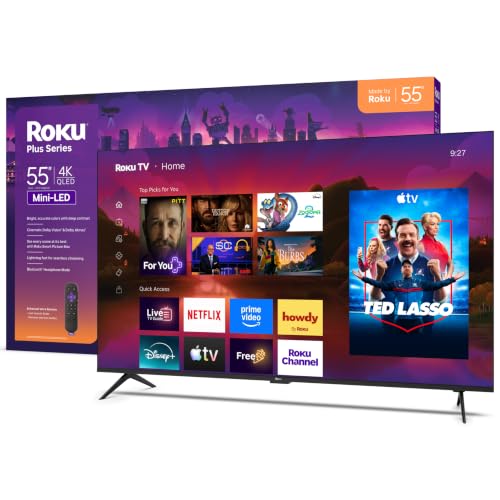
The Roku Plus Series is the platform loyalist’s entry, and its title is refreshingly plain about the hardware underneath: a 55-inch 4K QLED MiniLED television running Roku TV, with Dolby Vision, Dolby Atmos and Wi-Fi for streaming, plus an Enhanced Voice Remote in the box. Roku’s own sets have historically competed on interface simplicity, and the Plus Series wording suggests the company now wants the panel taken seriously too — MiniLED is not a word a maker prints when it expects the picture to be ignored.
For gaming, the title is a study in what is missing. No refresh rate is stated, no game mode is named, and neither VRR nor ALLM appears. That silence does not make the set a bad games display — plenty of casual and family gaming happens happily on panels that never advertise the fact — but it does move this pick’s centre of gravity. The Plus Series is a streaming-first television whose MiniLED panel will flatter games, rather than a gaming television that also streams.
Where it earns its place is the mixed household. Roku’s interface is the one non-technical family members reliably navigate, the voice remote handles the search problem, and the free and live TV emphasis in the title matches how such households actually watch. A games console plugged into this set gets a good panel and a household that can find its input; a games console that is the household’s whole reason for the purchase should look at the TCL or Toshiba first.
Consider the Saturday this set is built for. Morning cartoons arrive through the free channels the title emphasises, a film streams at lunch with Dolby Vision doing quiet work, and the console wakes in the evening on a panel with genuine dimming hardware. No single moment justifies the purchase on gaming grounds, and that is precisely the point: the Plus Series spreads its value across the whole day, and households whose gaming is a pleasure rather than a discipline will feel that spread as the wiser buy.
- Panel as titled: 55-inch QLED MiniLED, 4K
- HDR/audio as titled: Dolby Vision, Dolby Atmos
- Smart platform as titled: Roku TV, Enhanced Voice Remote included
- Refresh rate: Not stated in the listing title — verify with the maker’s documentation
- Game mode / VRR / ALLM: Not stated in the listing title — verify with the maker’s documentation
Strengths
- MiniLED hardware under the friendliest interface in the group.
- Dolby Vision and Atmos are both stated, covering film nights as well as games.
- The Enhanced Voice Remote keeps input-hunting painless for the whole household.
Trade-offs
- The title states no refresh rate, so motion performance is unproven from the listing.
- No gaming feature of any kind is named in the headline.
- Roku’s platform is a walled garden; sideloading habits from other ecosystems do not transfer.
Best for: family rooms where the console shares the screen with heavy everyday streaming and the interface must stay simple. Check price on Amazon with the understanding that the panel, not the gaming feature list, is the purchase.
Not suited for: competitive play that leans on a stated refresh rate or named low-latency mode — the title offers neither figure to plan around.

Hisense 55″ E6SR (Game Mode Plus) — Console features named outright
The E6SR’s title performs a small act of honesty that bigger brands in this very guide declined to perform: it names its console features. “Game Mode Plus, VRR, ALLM” appears in the headline of a set that also carries Hi-QLED branding, Dolby Vision and DTS Virtual:X, runs Roku TV, supports Apple AirPlay and works with both Alexa and Google Assistant. For a console owner reading listings at midnight, that single line answers the three questions that decide whether a television and a console get along.
Game Mode Plus is Hisense’s named low-latency path, VRR handles the frame-pacing problem, and ALLM means the set switches itself when the console wakes — the complete handshake, stated in public. The Roku platform underneath keeps the everyday interface simple, and AirPlay support quietly serves the iPhone households that Fire TV and Google TV sets sometimes strand. DTS Virtual:X is the audio counterpart: virtualised surround from the set’s own speakers, for rooms without a soundbar.
The restraint in this headline is refresh rate: no native figure is printed, which caps how far the gaming story can be pushed from the listing alone. A player chasing 120Hz console modes must verify the panel rate in the documentation, because the title’s gaming vocabulary, however welcome, describes features rather than redraw speed. Judged on what it states, though, the E6SR is the console-convenience pick of the six — the set whose headline was written by someone who owns a console.
The supporting cast strengthens the console story in ways spec sheets underplay. AirPlay means a phone’s clip of a gameplay moment reaches the big screen without a cable hunt; compatibility with both Alexa and Google Assistant means the household’s existing voice habits keep working; and DTS Virtual:X means the set’s own speakers attempt the wide soundstage that competitive players usually buy a soundbar to obtain. None of these is a headline gaming specification, yet together they describe the least friction a console has ever met in a living room.
- Panel as titled: 55-inch Hi-QLED, 4K UHD
- Gaming features as titled: Game Mode Plus, VRR, ALLM
- HDR/audio as titled: Dolby Vision, DTS Virtual:X
- Smart platform as titled: Roku TV, Apple AirPlay, Alexa and Google Assistant compatible
- Native refresh rate: Not stated in the listing title — verify with the maker’s documentation
Strengths
- VRR and ALLM are both named in the title, the complete console handshake in one line.
- Roku TV plus AirPlay covers the widest spread of household phones and habits here.
- DTS Virtual:X gives rooms without a soundbar a stated audio plan.
Trade-offs
- No native refresh figure is printed, so high-frame-rate console modes need documentation proof.
- Hi-QLED branding carries no Mini-LED dimming claim for dark-room contrast.
- Roku’s interface, while simple, offers less tinkering depth than Google TV.
Best for: console households that value the automatic game-mode handshake and a simple shared interface over headline refresh numbers. Check price on Amazon after the documentation confirms the panel’s native rate.
Not suited for: 120Hz console modes treated as a given — the title names the features around the panel while leaving the panel’s own rate unstated.

INSIGNIA 55″ QF QLED — Simple Fire TV value
The Insignia QF’s title is the shortest in this guide by a wide margin: a 55-inch class QF Series LED 4K UHD QLED smart Fire TV with an Alexa voice remote, model NS55-UQFL26. Everything a gaming buyer asks about — refresh, game mode, VRR, ALLM, HDR formats — is absent from the headline. What remains is still a coherent proposition: a QLED 4K panel of the most popular gaming size, running the platform Amazon itself maintains, sold under Best Buy’s house brand with the support channel that implies.
Read generously, the QF is the set for the room where gaming is one input among many and nobody in the household reads specification sheets for pleasure. Fire TV brings the streaming catalogue, the Alexa remote brings voice search, and the QLED panel brings colour that flatters both games and Saturday sport. Read strictly, it is a television whose gaming credentials are entirely undocumented at headline level, and a buyer with competitive online sessions should treat the documentation check as the purchase, not a formality after it.
Its position at the foot of this list is therefore a statement about evidence, not about worth. The five sets above it printed their gaming stories; the QF asks to be believed on platform and panel type alone. Households replacing a dead television quickly, in a room where a console lives alongside cable and streaming, will find that bargain reasonable. Households building a dedicated gaming corner will find it unfinished.
One more consideration keeps the QF in this guide rather than outside it: upgrade paths. A television bought for platform and panel today can be joined by a streaming stick, a soundbar or a next-generation console tomorrow, and the 55-inch QLED foundation remains sound through each addition. The sets above ask to be bought as finished systems; the QF is bought as a foundation, and foundations are judged by what they can carry.
There is a replacement-cycle honesty to this pick as well. House-brand televisions live or die on whether the retailer stands behind them, and Insignia’s retail footprint means a failed set is a store conversation rather than a shipping ordeal. For a bedroom, a rental or a first apartment — the rooms where a 55-inch QLED at an uncomplicated pitch makes the most sense — that support story may outweigh every gaming feature the headline declined to mention. The guide simply insists the trade be made knowingly.
- Panel as titled: 55-inch class QLED, LED 4K UHD
- Smart platform as titled: Fire TV, Alexa Voice Remote included
- Refresh rate: Not stated in the listing title — verify with the maker’s documentation
- Game mode / VRR / ALLM: Not stated in the listing title — verify with the maker’s documentation
- HDR formats: Not stated in the listing title — verify with the maker’s documentation
Strengths
- QLED colour at the most popular gaming size, without feature-list complexity.
- Fire TV and the Alexa remote make the everyday interface immediately familiar.
- House-brand backing gives the purchase a clear retail support channel.
Trade-offs
- The title states no gaming feature whatsoever; every gaming question is a manual question.
- No HDR format is named, leaving film performance as unproven as game performance.
- Buyers outgrow evidence-free purchases; this set’s ceiling is set by its silence.
Best for: mixed-use rooms replacing a television quickly, where the console is one input among several and Fire TV is the household standard. Check price on Amazon only after the documentation has supplied the refresh and HDR facts the headline omits.
Not suited for: a dedicated gaming setup assembled from listing evidence — this headline supplies a size, a panel type and a platform, and nothing a session can be planned around.
How Do the Six Compare Side by Side?
| Pick | Panel | Refresh evidence in title | Gaming features named | Platform |
|---|---|---|---|---|
| TCL 55″ T7 QLED | QLED | Native 120Hz stated | VRR, Game Accelerator 240 | Google TV |
| Toshiba 55″ Z670R | Mini-LED QLED | Native 144Hz stated | Game Mode Pro | Fire TV |
| Samsung 55″ M70H | Mini LED | DLG 120Hz motion wording | None named | Samsung smart platform |
| Roku 55″ Plus Series | QLED MiniLED | None stated | None named | Roku TV |
| Hisense 55″ E6SR | Hi-QLED | None stated | Game Mode Plus, VRR, ALLM | Roku TV |
| INSIGNIA 55″ QF | QLED | None stated | None named | Fire TV |
The table’s pattern is the guide in miniature: refresh evidence and feature evidence rarely arrive in the same headline. The TCL and Toshiba state their panel speeds; the Hisense states its console handshake; the Samsung, Roku and Insignia ask the documentation to finish their stories. None of those positions is dishonest — but they suit different buyers, and the rows above are the quickest way to see which unfinished story, if any, matches the homework a given household is willing to do. Readers weighing a size step up will find the neighbouring shelf surveyed in best 65 gaming tvs, where the same evidence discipline applies at 65 inches.
One column deserves a second look: platform. It is the only attribute in the table that touches every hour the television is switched on, gaming hours included, because the interface is how the household reaches the console’s input, the streaming apps and the settings alike. A panel advantage measured in hertz is felt during play; a platform disadvantage is felt during everything. Households divided on the question should let the person who watches most, rather than the person who games most, cast the deciding vote — an unfashionable ruling that ages well.
What Mistakes Do Gaming-TV Buyers Keep Making?
The first mistake is reading a motion-processing number as a panel speed. Titles in this very category print accelerator and motion-rate figures beside native rates, and the larger number is always the more flattering one. The defence is vocabulary: the word “native” beside a refresh figure is the claim that matters for games, and its absence is information. The second mistake is assuming VRR from a game mode’s existence. A named game mode promises a low-latency path; variable refresh is a separate technology with a separate name, and the sets above that have it say so.
The third mistake is buying the platform last. A gaming television is also the household’s streaming screen for most of its life, and a panel chosen brilliantly for the console but painfully for the family’s nightly viewing will be resented in proportion to its screen time. The fourth mistake is ignoring the room: Mini-LED contrast is wasted in a sunlit space that never darkens, and QLED brightness is wasted in a dedicated dark den. The fifth is skipping the documentation on the finalist. Every spec box in this guide contains at least one line pointing at the maker’s documentation, and those lines mark exactly the facts the purchase depends on.
A sixth mistake belongs to the first week rather than the purchase: leaving the television on its showroom picture preset. Retail modes exaggerate colour and motion processing for the shop floor, and both habits actively harm games — processing adds delay, and exaggerated colour hides the shadow detail competitive players read like text. Ten minutes in the menus, per input, with the game mode engaged and the enhancements audited one by one, returns more performance than any accessory bought afterwards. The television purchased is rarely the television experienced until that audit happens.
Final Recommendation
Start from the evidence each headline offers. The TCL T7 is the default recommendation for the mixed library — competitive titles plus cinematic games — because its title states the native rate, the VRR support and the HDR coverage in one place. The Toshiba Z670R is the dark-room and PC-leaning alternative, trading the TCL’s explicit VRR line for a higher native rate and Mini-LED contrast. The Hisense E6SR is the console-convenience choice, the set whose automatic handshake removes friction from every session.
The Samsung M70H suits the Samsung household that games as part of a broader viewing life, and the Roku Plus Series suits the streaming-first family room that hosts a console. The Insignia QF is the quick, simple replacement whose homework the buyer must accept. Two households deserve a specific steer before the links. The PC gamer with a desk-adjacent setup should weight the native-rate evidence above everything else in this guide, because a PC will use every hertz the panel honestly offers. The film-first household adding a console for the children should weight platform and HDR coverage instead, because those are the qualities their evenings will actually exercise. Readers still torn between this size and a smaller high-refresh panel for a desk corner may also want best 4k 120hz tvs open in a second tab, and those whose console is a PlayStation first should cross-check best ps5 compatible tvs before deciding. Whatever the shortlist, let the documentation have the final word on any figure a title declined to print — the panel that survives that reading is the one that belongs on the wall, because a gaming television earns its place in the first frame-pacing stutter it refuses to show you.
Frequently Asked Questions
Is 55 inches the right size for a gaming room?
For most rooms, yes: at typical sofa distances a 55-inch panel fills enough of the visual field for cinematic games while staying manageable for split-screen and desk-adjacent setups. Very large rooms push toward 65 inches, and very small desks toward monitor territory, but 55 inches is the size where panel choice, rather than room geometry, decides the experience. It is also the size where the feature-per-price balance of the whole television market tends to peak, because manufacturers concentrate their gaming lines here — the depth of this guide’s own shortlist, six credible sets with genuinely different strengths, is evidence of that concentration.
Does a gaming TV need a native 120Hz panel?
Only if the sources can feed it. Current consoles and gaming PCs offer high-frame-rate modes that a 60Hz-class panel cannot display, so players who use those modes benefit directly from a stated native rate like the TCL’s 120Hz or the Toshiba’s 144Hz. Players whose library is 60fps throughout gain less, and for them the named game modes and VRR support matter more than the headline rate.
What is the difference between VRR and ALLM?
VRR is a display behaviour: the panel synchronises its redraw to the console’s irregular frame delivery, preventing tearing and judder. ALLM is a switching behaviour: the television detects the console and moves itself into its low-latency mode automatically. The Hisense E6SR names both in its title, which is why its console handshake is described in this guide as the most complete. The two solve different problems — one smooths the picture, the other removes a settings chore — and a set can honestly offer either without the other, which is why the titles are read word by word here.
Why do several spec boxes here say a figure is not stated?
Because the listing titles genuinely omit those figures, and this guide reports titles rather than borrowing numbers from reviews or sibling models. A refresh rate or lag figure that cannot be traced to the maker’s own headline is treated as unverified, and the spec box points to the maker’s documentation, where the figure can be confirmed before purchase.
Mini-LED or QLED for games?
The room decides. Mini-LED’s dimming control pays off in dark rooms and dark games, where contrast is the experience; QLED’s colour volume pays off in bright rooms and daytime sessions. The Toshiba, Samsung and Roku picks carry Mini-LED or MiniLED wording, while the TCL, Hisense and Insignia carry QLED-family branding, and neither family is a wrong answer in the room it suits.
Can these TVs double as PC gaming monitors?
The high-native-refresh picks are the natural candidates — a 144Hz or 120Hz panel with a game mode is most of what PC gaming asks of a display. Text clarity at desktop distances and chroma behaviour are separate questions, covered in the companion guide to best big tvs for computers, and worth reading before a television replaces a monitor outright.
Do I need a special HDMI cable for these sets?
High-frame-rate console and PC modes travel over HDMI only as well as the cable allows, and the cable bundled with a console is chosen by its maker to suit it — start there before buying anything. If a longer run is required, buy the replacement by its rated capability for the modes in use rather than by price or plating, and test the console’s display readout afterwards; the console reports what the whole chain, cable included, actually negotiated.
Related Guides
Keep exploring the gaming-display shelf: best 60 inch 4k tvs for gaming under 1000 dollars maps the size class above this one, and best 1080p tvs for gaming 2 covers the smaller value shelf where the same feature vocabulary applies at lower resolutions.


