What's inside
- Key Takeaways
- Quick Picks
- How Did We Choose Routers for a Phone-Backup Role?
- How Does USB Phone Tethering Through a Router Actually Work?
- What Should a Backup Plan Include Beyond the Router?
- What Actually Breaks in a Home or Business When the Line Dies?
- How Do You Choose the Data Plan Behind the Backup?
- How Do the Six Backup Routes Compare?
- How Do You Rehearse a Failover Before It Matters?
- What Mistakes Ruin Phone-Backup Plans?
- Final Recommendation
- Frequently Asked Questions
- Related Guides
As an Amazon Associate I earn from qualifying purchases. This post may contain affiliate links at no extra cost to you.
gizmoverdict.com is reader-supported. When you buy through links on our site, we may earn an affiliate commission.
Where to buy: All six routers below link to their Amazon listings from the Quick Picks table and from each detailed review. Several are sold alongside near-identical siblings with different modems or port layouts, so match the full model name on the listing to the model named in each review before ordering.
The best routers for tethered phone backup exist for one specific bad day: the day the fixed internet stops. A storm takes the line down, a provider schedules maintenance that becomes an outage, a work crew severs the neighbourhood’s fibre — and a household or small business that runs on connectivity discovers how much of its life was rented from a single cable. A phone in a drawer, with its own battery and its own independent path to a mobile mast, is the obvious understudy. The router’s job is to let that phone step into the leading role for the whole network, not just for one laptop plugged into it in a panic.
There are three distinct ways the picks below accomplish that rescue, and confusing them is the main way buyers go wrong. The first is literal tethering: a travel router accepts a phone’s USB tethering connection and shares it with every device on the network. The second is a router with its own built-in mobile modem and a SIM slot, which never touches a phone at all — it fails over to its own cellular connection. The third is a dual-WAN router that treats a cellular link, however it arrives, as a second internet source alongside the fixed line. This guide groups all three under the keyword because households shop for the outcome — the network survives — but each review states plainly which mechanism its pick actually uses, and where a listing title stays silent about tethering or failover, the spec boxes say so instead of assuming.
Expectations deserve setting before any product appears. A phone backup is a lifeboat, not a second ship: mobile data allowances, carrier tethering rules and real-world cellular speeds all apply, and a household trying to live on tethered data for a month will meet its plan’s limits. What the backup buys is continuity through the hours that matter — the working day finished, the payment terminal kept alive, the security cameras still reporting, the homework submitted. Judged by that standard, the six routers below are the difference between an outage as an inconvenience and an outage as a crisis.
Key Takeaways
- Tethering, built-in cellular modems and dual-WAN failover are three different mechanisms; each pick below is labelled with its own.
- USB tethering from a phone is the cheapest backup path and the one most dependent on the phone plan’s tethering terms.
- Industrial routers with SIM slots fail over without a phone, at the cost of a second data plan.
- Only some picks state failover or tethering in their listing titles; the rest are flagged for documentation checks.
- A backup link keeps essentials running — it is not a like-for-like replacement for a month of fixed-line use.
- Test the failover before the outage: an untested backup is a hope, not a plan.
Quick Picks
| Pick | Badge | Why it earns its place |
|---|---|---|
| GL.iNet GL-MT3000 Beryl AX | Best tethering travel router | A Wi-Fi 6 travel router with 2.5G WAN and OpenWrt, from the brand whose line is built around phone tethering. |
| GL.iNet GL-SFT1200 Opal | Budget tethering option | An AC1200 dual-band travel router that covers the tethered-backup job at the pool’s gentlest tier. |
| Teltonika RUT241 | Industrial SIM failover | A Cat 4 industrial LTE router with Wi-Fi that carries its own cellular connection for automatic failover. |
| Teltonika RUT240 | Proven industrial workhorse | The long-running 4G LTE industrial router for sites that value a documented track record over novelty. |
| Peplink B One 5G | Dual-WAN with 5G aboard | A dual-WAN router with a built-in 5G path, aimed at homes and offices that cannot afford downtime. |
| TP-Link TL-WR1502X Roam 6 | Portable Wi-Fi 6 router | An AX1500 portable travel router from TP-Link; its tethering position needs confirming in documentation. |
How Did We Choose Routers for a Phone-Backup Role?
The first question was mechanical: how does the mobile connection physically reach the router? A pick had to offer a credible path — a USB port and tethering support, a SIM slot and modem, or a second WAN input designed to be fed by a cellular source. Routers that merely have a USB port for storage were excluded from consideration, because a socket is not a feature until the firmware treats a phone plugged into it as an internet source, and that distinction is exactly where disappointed buyers get caught.
The second question was behavioural: what happens at the moment of failure? A backup that requires someone to notice the outage, find the router, change settings and reboot devices is a backup that fails the home-alone test — the cameras, the heating controls and the lone worker’s laptop need the switch to happen by itself, or at worst by plugging in one cable that was left ready. Automatic failover therefore weighed heavily, and where a listing title does not state it, the review says so and directs the buyer to the maker’s documentation, because failover behaviour is a promise that should be read in the manufacturer’s own words before money changes hands.
Third came the ownership realities of each approach. Tethered travel routers are inexpensive and use the phone plan the household already pays for, but they borrow the phone — someone must surrender it, charged and present, for the duration. SIM routers demand a second plan and reward it with independence. Dual-WAN designs ask the most money and return the most seamless result. The order below is not a league table of quality; it is a map of those trade-offs, arranged so a reader can stop at the mechanism that matches their household and read its champion closely.
How Does USB Phone Tethering Through a Router Actually Work?
Start with what the phone does. When USB tethering is switched on, the phone presents itself to whatever it is plugged into as a network adapter — a small modem with a cable — and shares its mobile data connection through that link. A laptop understands this instantly. A router that supports tethering understands it too: the phone appears as a WAN source, the router performs its usual address translation, and every device on the home network — wired and wireless — reaches the internet through the phone without knowing anything has changed. The phone, meanwhile, charges from the same cable, which matters more than it sounds during a long outage.
The chain has three weak links, and a prepared household checks all of them on a quiet Sunday rather than during a storm. The first is the cable and the phone’s settings: tethering must be enabled, and some phones ask for confirmation each time. The second is the carrier’s terms: many plans throttle tethered traffic, cap it separately from handset data, or slow it after an allowance, and a router sharing that connection among a whole house consumes allowances at household speed. The third is the mobile signal itself — the phone that gets one bar in the kitchen may perform far better on an upstairs windowsill, which is why the router’s position, or a long USB cable’s worth of freedom, belongs in the plan.
Wi-Fi hotspot mode is the alternative everyone already knows, and the comparison explains why this guide exists. A hotspot serves the devices that join it, one password at a time, while the wired devices, the smart TV, the printer and the network drive sit stranded; it also drains the phone and heats it. Routing the tether through a proper router keeps the home network’s name, addresses and device relationships intact, so the outage becomes invisible to everything except the household’s data allowance. That invisibility — the meeting that continues, the doorbell that still rings — is the entire product being bought.
What Should a Backup Plan Include Beyond the Router?
The router is the centrepiece, but the plan around it decides whether the centrepiece gets used. Power comes first: a phone-backup router sipping from a small battery pack or the household’s existing UPS keeps the network alive through the power cuts that so often accompany line failures, and the travel-router picks below are valuable partly because their power appetites are modest enough for that arrangement. A router that dies with the mains has failed at the exact moment it was bought for.
Data comes second. Decide in advance what the backup is for — work essentials, payments, security devices, messaging — and what it is not for, because a games console downloading a vast update over a tethered phone can consume the household’s monthly tethering allowance before lunch. Some routers let the owner prioritise traffic or cap the backup link’s use; even without such features, a household agreement written down in calm times beats an argument conducted during an outage. Business users should also confirm that their phone plan permits tethering for the use intended; personal and business terms differ, and the time to discover a prohibition is before the card terminal depends on it.
Rehearsal completes the plan. Pull the fixed line’s cable on a quiet evening, watch what the network does, time how long the switch takes, and check that the devices that matter — the work laptop, the cameras, the phone system — come back without help. Note what did not work and fix it while the fix is optional. Every failover arrangement in this guide, from the pocket travel router to the dual-WAN Peplink, rewards that half hour out of all proportion to its cost, because the first real outage is the worst possible classroom.

GL.iNet GL-MT3000 Beryl AX — Best tethering travel router
The Beryl AX is the pick that most literally matches this keyword. GL.iNet’s travel routers are built around the assumption that their owner’s internet arrives by whatever means the day provides — hotel Ethernet, a café’s captive portal, or a phone’s tethered connection — and tethering is a documented part of this line’s repertoire rather than an afterthought. The listing title stacks the rest of its credentials plainly: Wi-Fi 6, a 2.5G WAN port, VPN support and OpenWrt underneath, in a box small enough to live in a laptop bag or a kitchen drawer until it is needed.
As a home backup, the Beryl’s virtues are readiness and thrift. It can sit configured in advance — home network name matched, tethering mode understood, cable coiled beside it — so the outage drill is: plug in the phone, wait a moment, carry on working. The OpenWrt foundation matters to the technically minded owner, who can shape failover behaviour and VPN policy in unusual detail, while the standard GL.iNet interface keeps the same tasks approachable for everyone else. Its 2.5G WAN port is forward-looking garnish in this role; the fixed line it backs up will rarely feed it anything like that speed, but the port costs the backup mission nothing.
The limits are the travel router’s birthmarks. This is a small device with a small device’s capacity: a household of heavy simultaneous users will find its ceiling during a long outage, especially with the tethered phone’s own limits stacked on top. It also borrows the phone, so the household member whose handset becomes the network’s lifeline loses it for the duration — a negotiation worth having in advance. And its Wi-Fi, while modern, is a single small unit’s Wi-Fi, asked to cover a home it was not sized for; during an outage, the rooms nearest the router will fare better than the rooms at the edges.
None of that dents its position here, because the job description is continuity, not luxury. For the price class of a single family takeaway, the Beryl AX converts a phone already in the house into a whole-network backup that has been rehearsed and understood. That is the best value in this guide, and for most households it is where the search should start.
One deployment detail separates the prepared Beryl owner from the improviser: the phone’s position. Because the router and phone are joined by a cable, the pair must live where both the home’s devices can reach the router’s Wi-Fi and the phone can hear the mobile network — two requirements that occasionally pull in opposite directions. A longer USB cable is the humble hero here, letting the phone sit on the windowsill with the best signal while the router stays nearer the household’s centre. Owners who discover this during the rehearsal, rather than during the storm, report that the whole arrangement suddenly performs a class better than the first attempt suggested, which is the rehearsal’s purpose in miniature.
- Type: travel router with phone tethering as a documented GL.iNet feature of the line
- WAN: 2.5G WAN port stated in the listing title
- Standard: Wi-Fi 6, per the listing title
- Firmware: OpenWrt-based, with VPN support stated in the listing title
- Failover automation details: Not stated in the listing title — verify with GL.iNet documentation
Strengths
- Tethering is core to the product line’s purpose, not a buried experiment.
- Small, low-power and pre-configurable, so the outage drill takes a minute.
- OpenWrt depth and VPN support serve owners who want control over the backup’s behaviour.
Trade-offs
- A travel router’s capacity caps how much household a long outage can carry.
- The donor phone is occupied and must stay near the router for the duration.
- One small unit’s Wi-Fi will not cover a large home evenly during the emergency.
Best for: a household or solo worker who wants a rehearsed, inexpensive phone-tether backup ready in a drawer. Not suited for: a busy multi-user office expecting full normal service through a week-long outage, where its travel-router ceiling arrives quickly.

GL.iNet GL-SFT1200 Opal — Budget tethering option
The Opal is the Beryl’s smaller sibling and this guide’s budget answer to the same question. Its title describes an AC1200 dual-band travel router — an older wireless standard than the Beryl’s Wi-Fi 6, a plainer specification all round — and like the rest of GL.iNet’s travel line it is built to take internet from wherever it can be found, with phone tethering among the line’s documented talents. The Opal’s proposition is that a backup does not need to be impressive; it needs to exist, be understood, and work on the one day it is called.
That proposition survives scrutiny because of what a backup day actually demands. Email, documents, messaging, a payment terminal, a child’s homework portal, a video call at reduced quality: the traffic of continuity is mostly light, and an AC1200 router sharing a phone’s 4G connection is rarely the bottleneck in that chain — the phone’s signal and the plan’s tethering terms are. The Opal also travels for its living, so the household that buys it for outages gains a hotel-room router the rest of the year, one that can repeat a lobby network or take a room’s Ethernet and give the family’s devices their own familiar network behind a VPN.
The economies are real, though. AC1200 dual-band Wi-Fi is a generation behind, and its coverage from a single small unit is the modest end of this guide. Owners with larger homes will feel the edges fray during an outage, and owners whose backup scenario involves several simultaneous video calls should be looking at the Beryl above or the dual-WAN hardware below. The Opal’s failover automation — whether it switches to a tethered phone by itself or wants a human to select the source — is also a detail its title does not publish, and the documentation check in the spec box is the place to settle it before the router is assigned a critical role.
As a first step into backup thinking, the Opal is easy to defend: it costs little, it teaches the household the tethering drill, and it can be retired to pure travel duty if the home later graduates to an automatic system. Many resilience plans in larger organisations began exactly this way, with the cheapest box that made the idea real.
- Type: travel router; tethering is a documented feature across the GL.iNet travel line
- Standard: AC1200 dual-band Wi-Fi, per the listing title
- WAN and port layout, and failover automation: Not stated in the listing title — verify with GL.iNet documentation
- Role: backup and travel duty, sized for light continuity traffic
Strengths
- The gentlest price of entry to a genuine tethered-backup capability.
- Doubles as a travel router, so it earns its keep between outages.
- Light continuity traffic — mail, documents, payments — sits well within its capacity.
Trade-offs
- AC1200 Wi-Fi is a generation behind the Wi-Fi 6 picks in this guide.
- Single small unit; larger homes will see coverage fray at the edges.
- Automatic failover behaviour must be confirmed in documentation before relying on it.
Best for: a small household or traveller who wants the tethering safety net at the lowest commitment. Not suited for: a home office running several simultaneous video calls through the backup, where its wireless class becomes the ceiling.
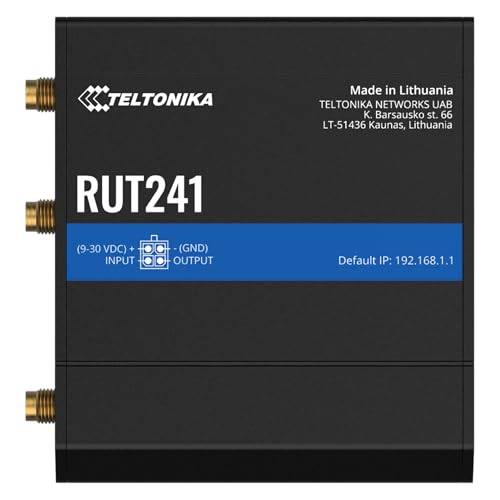
Teltonika RUT241 — Industrial SIM failover
The RUT241 changes the mechanism entirely. This is an industrial 4G LTE router — Cat 4, with Wi-Fi and dual Ethernet ports per its title — which means the mobile connection lives inside the router itself, behind a SIM card, and no phone is borrowed at all. Teltonika’s world is the world of kiosks, vehicles, remote pumps and pop-up sites: equipment expected to hold a connection unattended for months, be managed remotely, and treat failover between wired and cellular paths as an ordinary Tuesday. Failover and remote management are documented pillars of this line, and that heritage is the reason it appears in a guide about backup.
Deployed as a home or small-office backup, the RUT241 plays the role differently from the travel routers. It can serve as the network’s main router with the fixed line as primary and its own LTE as the understudy, switching when the primary dies and switching back when it recovers, all without a human in the building. That autonomy is what the extra money buys, along with a second data plan — the honest cost of the arrangement, since the SIM must be fed monthly whether or not an outage ever comes. For a business whose outage cost is measured in lost trading, that standing charge is trivially justified; for a household, it is the line between a hobby and an insurance policy.
The industrial character cuts both ways for domestic buyers. The hardware is built for cabinets, DIN rails and temperature swings rather than for shelves, its Wi-Fi is a utility radio rather than a whole-home system, and its administration assumes a technical owner comfortable with a professional interface. Most homes will pair it with separate access points or place it as the backup brain behind the existing network rather than as the household’s only wireless voice. Cat 4 speeds, meanwhile, define the backup’s ceiling: entirely adequate for continuity traffic, no substitute for a fast fixed line.
Judged on the keyword’s promise — do not be left offline — the RUT241 is the most literal fulfilment in this guide after the Peplink: a self-contained, automatic second path to the internet that asks nothing of anyone’s phone. Readers who recognise their situation in the words “unattended” and “automatic” should read its documentation closely and forgive its industrial manners.
It is worth picturing where these routers ordinarily work to understand the design’s confidence. Teltonika units hold connections for ticketing machines, solar installations, construction-site cabins and delivery lockers — places where the connection is the business and a site visit costs more than the hardware. A home or office backup asks far less of the RUT241 than those deployments do, which is precisely the point of buying industrial gear for a domestic job: the device experiences the household’s worst day as an ordinary one. The owner’s work is front-loaded — SIM chosen, failover rules set, antenna position tested — and after that the router’s contribution to family life is silence, month after month, which is the highest praise connectivity equipment can earn.
- Type: industrial router with built-in 4G LTE modem (Cat 4, per the listing title)
- Wi-Fi: stated in the listing title; treat as utility coverage, not a whole-home system
- Ports: dual Ethernet stated in the listing title
- Failover and remote management (RMS): documented features of the Teltonika line; confirm plan requirements with Teltonika documentation
- SIM: requires its own data plan, separate from any phone contract
Strengths
- Self-contained cellular backup — no phone needs to be present or surrendered.
- Automatic failover suits unattended sites and empty houses.
- Industrial build and remote management come from a line designed for reliability work.
Trade-offs
- The SIM’s data plan is a standing monthly cost for an event that may not happen.
- Cat 4 cellular caps the backup’s speed at continuity levels.
- Professional administration and utility Wi-Fi assume a technical owner.
Best for: a small business, remote property or serious home office that needs the backup to engage with nobody present. Not suited for: a casual household unwilling to fund a second data plan, where the tethered travel routers do the job with the phone already owned.

Teltonika RUT240 — Proven industrial workhorse
The RUT240 is the elder of the two Teltonika picks: a 4G LTE industrial router whose title offers no adjectives at all, because by the time a product has been deployed in the numbers this one has, adjectives become unnecessary. It predates its RUT241 sibling and shares its essential arrangement — a built-in cellular modem, a SIM, Ethernet for the wired world, Wi-Fi for the local one, and a design brief written by people who install connectivity in places where sending an engineer is the expensive failure mode.
For a buyer researching backups, the RUT240’s age is its argument. Its behaviour is documented exhaustively by years of installers’ notes, forum threads and integration guides; its quirks are known quantities; its failover between a wired primary and the cellular path is a solved problem with a paper trail. A site that values being able to search for any error message and find a predecessor’s answer will understand the appeal immediately. In resilience planning, boring is a compliment, and the RUT240 has earned it in the field rather than in a brochure.
The same age defines its ceiling. Its cellular and wireless capabilities belong to its generation, and a buyer comparing specification tables will find the newer sibling and the 5G Peplink below offering more headroom. The title publishes no port count and no speed figures, so the documentation check matters here as much as anywhere in this guide — particularly for the exact failover configuration options and any remote-management plan requirements, which have evolved across this line’s long life and differ by firmware era.
Choose the RUT240 when the backup’s job is to be a known quantity: a holiday property whose connectivity must recover by itself, a small site whose installer already speaks Teltonika, a business that keeps spares on a shelf and wants the spare to match the fleet. It is not the fastest path in this guide, nor the friendliest, but it may be the most thoroughly understood — and on the worst day of the year, understood beats novel.
- Type: industrial router with built-in 4G LTE modem, per the listing title
- Port count and Wi-Fi specification: Not stated in the listing title — verify with Teltonika documentation
- Failover: a documented function of the line; exact configuration options to confirm in Teltonika documentation
- SIM: requires its own data plan
- Character: previous-generation hardware with an extensive deployment record
Strengths
- Years of field deployment mean documented answers exist for almost any behaviour.
- Built-in cellular removes the phone from the backup equation entirely.
- Industrial design brief prioritises unattended recovery over domestic polish.
Trade-offs
- Previous-generation cellular and wireless capability caps the backup’s speed.
- The sparse title makes documentation homework part of the purchase.
- Administration assumes professional confidence, not consumer wizards.
Best for: an installer-led or technically confident site that prizes a proven, documented failover device. Not suited for: a backup path built on the newest cellular standard, where the 5G pick below is the correct address.

Peplink B One 5G — Dual-WAN with 5G aboard
The Peplink B One 5G is the heavyweight answer in this guide, and its two-word title conceals the most complete interpretation of the keyword: a dual-WAN router — dual-WAN being a documented pillar of Peplink’s line — with a 5G cellular path built in. Where the travel routers improvise a backup from a borrowed phone and the Teltonikas insure a site with 4G, the B One is designed from the first sketch for premises that treat connectivity as a utility that must not stop: two independent internet sources under one router’s management, with the cellular side speaking the current generation’s language.
The dual-WAN arrangement deserves its due, because it changes the outage from an event into a non-event. With a fixed line as primary and 5G as the standing second source, the router can fail traffic over automatically, balance load between the two in normal times where that helps, and present the whole arrangement to the network as one unbroken connection. The devices in the building never learn that anything happened. For a business running cloud phones, card payments and video meetings simultaneously, that invisibility is worth a great deal more than the hardware costs, and it is something no amount of phone-tethering improvisation quite replicates.
Peplink’s ecosystem is the context a buyer should verify: the company’s management platform, support arrangements and any subscription elements attached to advanced features belong in the purchase decision, and the listing title — just a model name — states none of them. The spec box therefore sends the reader to Peplink’s documentation for port layout, Wi-Fi specification and platform terms. That homework is the price of admission to this tier, and it should be done before ordering, because a dual-WAN installation also involves decisions about the second line’s data plan that deserve calm consideration.
For the household whose work, income or safety genuinely rides on connectivity — the remote worker whose employer is a video call away, the rural property beyond the reach of quick repairs, the small business whose till is a cloud application — the B One 5G is the pick that treats the problem at its own scale. It is the most expensive idea in this guide and the only one that makes the backup disappear entirely.
The B One’s buyer should also think about the second line as an asset in normal times, not merely an insurance premium. A 5G connection standing beside the fixed line can carry the household’s overflow, serve as the path for a particular office or device class, or simply be tested weekly by the router’s own health checks so that its readiness is proven rather than assumed. That last habit — a backup that reports its own health — closes the loop that the rehearsal section of this guide opens: resilience is not the purchase, it is the ongoing knowledge that the second path works. Peplink’s platform is built around exactly that knowledge, which is why the documentation homework flagged above is worth doing properly rather than treating this as a bigger version of a travel router.
- Type: dual-WAN router with built-in 5G cellular, per the model line’s documented design
- Dual-WAN: fixed line plus cellular under one management, per Peplink documentation
- Port layout, Wi-Fi specification and management platform terms: Not stated in the listing title — verify with Peplink documentation
- SIM and data plan: the cellular path requires its own plan
Strengths
- Dual-WAN with 5G aboard makes failover automatic and nearly invisible to the network.
- Cellular path speaks the current generation’s standard, with headroom 4G picks lack.
- Built for premises where downtime has a direct financial cost.
Trade-offs
- The most expensive route in this guide before the second data plan is counted.
- Platform and subscription details must be researched; the title discloses nothing.
- Overkill for households whose outages are rare, brief and merely annoying.
Best for: a business or remote household whose income stops when the internet does, and which can fund a standing 5G plan. Not suited for: a home seeking cheap insurance against a rare afternoon’s outage, where a tethering travel router covers the risk for a fraction of the outlay.

TP-Link TL-WR1502X Roam 6 — Portable Wi-Fi 6 router
The TP-Link TL-WR1502X, sold under the Roam 6 name, is the mainstream brand’s entry in the travel-router class: an AX1500 portable Wi-Fi 6 router, per its title, from the company whose home routers fill more cupboards than any other in this guide. Its inclusion comes with the most important documentation flag in this article, stated here rather than buried: the listing title does not mention USB tethering, and a reader whose entire purpose is phone backup must confirm in TP-Link’s documentation that this model accepts a tethered phone as a WAN source before relying on it. A USB port’s presence, if any, proves nothing by itself.
With that caution given its proper weight, the router’s own merits are easy to see. Wi-Fi 6 at AX1500 class in a portable chassis is a modern specification for the travel half of its life — hotel rooms, rented flats, a caravan’s corner — and TP-Link’s administration is the most familiar in the business to the average household, which lowers the learning curve on setup day. Travel routers in this class typically offer several modes for taking internet from a wired socket or an existing wireless network and re-sharing it privately, and those modes make the Roam 6 useful on trips regardless of how the tethering question resolves.
As a backup candidate, then, the honest assessment is conditional. If TP-Link’s documentation confirms phone tethering for this model, the Roam 6 becomes a credible mainstream alternative to the GL.iNet picks, trading their OpenWrt depth and tethering-first design for brand familiarity and retail availability. If it does not, the router belongs in a different guide — a good travel router that was never a phone-backup device — and the buyer should choose the Beryl or the Opal instead, whose tethering credentials are part of their line’s documented identity.
This pick is therefore this guide’s lesson in buying discipline. The keyword promises a capability; the title neither confirms nor denies it; the documentation decides. Readers who absorb that habit here will be immune to a whole species of networking disappointment, in this category and beyond it.
- Type: portable travel router, per the listing title
- Standard: Wi-Fi 6, AX1500 class, per the listing title
- USB phone tethering and failover behaviour: Not stated in the listing title — verify with TP-Link documentation before relying on it
- Modes for sharing wired or existing wireless connections: confirm the exact list in TP-Link documentation
Strengths
- Modern Wi-Fi 6 specification in a portable chassis from a mainstream brand.
- Familiar TP-Link administration lowers the setup learning curve.
- Genuinely useful as a travel router independent of the backup question.
Trade-offs
- Tethering — the keyword’s core capability — is unconfirmed by the listing title.
- Backup suitability is therefore conditional on a documentation check.
- Lacks the tethering-first design focus of the GL.iNet travel picks.
Best for: a traveller who wants a TP-Link portable router and will verify tethering support before assigning it backup duty. Not suited for: a purchase requiring phone tethering guaranteed at the moment of buying, where the GL.iNet picks carry that credential openly.
What Actually Breaks in a Home or Business When the Line Dies?
It helps to be concrete, because “the internet is down” conceals how many separate threads snap at once. In a home, the obvious casualties are work and entertainment, but the quieter ones accumulate: the video doorbell becomes a regular doorbell, the cameras record to nothing, the voice assistants go deaf, the smart heating schedule freezes at its last instruction, and the teenager’s games console — often the household’s loudest network citizen — begins its complaint first and loudest. In a small business the list turns financial within the hour: card terminals that cannot authorise, a booking system that cannot be seen, cloud phones that cannot ring, and staff improvising with personal phones in ways nobody planned.
A tethered or cellular backup does not restore all of that at full strength, and pretending otherwise would repeat the marketing this guide avoids. What it restores is the order of importance. The payment terminal and the work laptop come back at full usefulness. The cameras and doorbell resume reporting, which is most of their value. The meeting continues at slightly reduced quality. The games console can be told, truthfully, that the backup is not for it. That triage — essentials first, luxuries waiting for the repair — is the difference between a household experiencing an outage as a story and one experiencing it as a loss.
There is also a duration curve to plan around. For the first hour, almost any of the six picks suffices. Across a working day, the differences emerge: the tethered phone’s battery and allowance become managed resources, the SIM routers settle into unnoticed duty, the dual-WAN Peplink simply becomes the network. Across a week — the timescale of serious infrastructure damage — even good backups need rationing and the household’s expectations need managing. Choosing between the picks is therefore partly a question about which duration you are insuring against, and honesty about that answer saves money in both directions: no Peplink for a street with one outage a year, no pocket router for a business that trades online daily.
How Do You Choose the Data Plan Behind the Backup?
The SIM-based picks in this guide are only ever as good as the plan inside them, and plan selection has its own logic. The first principle is independence: the backup’s carrier should not be the fixed-line provider’s mobile arm running over the same local infrastructure where avoidable, and it definitely should not be a network whose signal is known to be poor at the property. A backup that shares its primary’s failure modes is a decoration. Drive the decision with tests at the actual address — borrowed SIMs, a phone on another network held in the router’s intended spot — rather than with coverage maps, which are drawn with an optimism no regulator has yet cured.
The second principle is sizing for the outage you are insuring against. A plan for a shop’s card terminal and email can be genuinely small; a plan for a household of remote workers needs headroom measured in tens of gigabytes before a week-long incident stops being frightening. Some households solve this with a modest standing plan plus the knowledge that allowances can be topped up mid-incident from the phone itself — the one device still online. Others, running the dual-WAN Peplink as a permanent second path, buy the larger plan and use the capacity daily so it never feels wasted. Either is defensible; the indefensible plan is the unexamined one, discovered to be capped at a trickle on the morning the fibre died.
Finally, mind the plan’s fine print about routers. Some tariffs are sold for handsets or tablets and treat a router’s traffic as out of scope; others are explicitly data-device plans. The industrial-router world assumes data-device SIMs, and matching the plan type to the hardware avoids the particular misery of a backup suspended for a terms violation during its first real shift. Fifteen minutes with the carrier’s wording, before the outage, is the cheapest reliability in this entire guide.
How Do the Six Backup Routes Compare?
| Pick | Mechanism | Needs a phone? | Extra plan? |
|---|---|---|---|
| GL.iNet Beryl AX | USB tethering | Yes, during the outage | No — uses the phone’s plan |
| GL.iNet Opal | USB tethering | Yes, during the outage | No — uses the phone’s plan |
| Teltonika RUT241 | Built-in 4G modem, failover | No | Yes, a SIM data plan |
| Teltonika RUT240 | Built-in 4G modem, failover | No | Yes, a SIM data plan |
| Peplink B One 5G | Dual-WAN with 5G built in | No | Yes, a cellular data plan |
| TP-Link Roam 6 | Tethering unconfirmed in title | To verify | No, if tethering is confirmed |
The table compresses the whole guide into one trade: money versus dependence. The tethering routers cost the least and depend on a person and a handset being present. The modem routers cost a standing plan and depend on nobody. The Peplink costs the most and makes the whole question disappear. There is no wrong row — there is only the row whose dependencies match the household that will live with them.
How Do You Rehearse a Failover Before It Matters?
Pick a quiet evening and announce the drill to the household, because the first lesson is always social: who notices what, and which devices complain. Disconnect the fixed line at the router, start a timer, and simply watch. Note when the backup engages — or, for the manual tethering picks, perform the plug-in exactly as planned and note how long the household’s part takes. Then test the shortlist of things that matter: a work login, a video call, the camera feed, the payment terminal if there is one, the heating app. Each success is evidence; each failure is a fixable item on a list made in peacetime.
Run the drill long enough to meet the second-order problems. Phones heat and throttle; tethering allowances shrink faster than intuition suggests; a router placed for the fixed line’s convenience may sit in a cellular dead corner of the house. Half an hour of rehearsal surfaces all three, while the fixed line waits patiently in your hand to be plugged back in. Finish by writing the drill down — the cable, the setting, the order of operations — and taping it inside the cupboard door where the router lives. The person who needs that note may not be the person who wrote it.
What Mistakes Ruin Phone-Backup Plans?
The commonest mistake is assuming a USB port equals tethering support; the Roam 6 review above exists because of it. Next comes discovering the carrier’s tethering cap during the outage, when the household’s normal traffic meets a plan designed for occasional laptop use. A third mistake is placement amnesia: the backup arranged around a phone that lives in a signal-poor room, because that is where the router happens to be, when an upstairs windowsill would have doubled the cellular speed.
Two more deserve naming. Failing to keep the donor phone charged and present — the backup that left for the shops in someone’s pocket is a parable told in many offices — and never testing the return journey: some arrangements fail over beautifully and then cling to the expensive cellular path for days after the fixed line recovers, quietly consuming the allowance. A plan that includes a monthly glance at which WAN the router is actually using avoids paying for an outage that ended last Tuesday.
Final Recommendation
Most households should buy the rehearsal before the hardware class: start with the Beryl AX if the budget allows, or the Opal if it does not, configure the tethering drill, and learn what an outage actually feels like with a phone at the helm. Sites that need the backup to engage with nobody home graduate to the Teltonika pair — the RUT241 for the current model, the RUT240 for the proven one — and premises whose income stops with the internet should go straight to the Peplink B One 5G and stop thinking about it. The Roam 6 joins the shortlist only after its documentation answers the tethering question. Whatever the tier, the principle is the same: the network survives the bad day because somebody prepared it on a good one.
Frequently Asked Questions
Will tethering through a router use my data faster?
The router itself uses nothing; the household does. A whole home’s devices sharing a phone connection will consume a tethering allowance far faster than one laptop would, because background updates, cloud backups and streaming all wake up at once. Agree in advance which devices and activities the backup is for, and pause the hungry ones during an outage.
Does my carrier allow router tethering?
Terms vary by carrier and plan, and tethering is often metered separately from handset data, throttled, or restricted on some tariffs. The router cannot change those terms. Check your plan’s tethering provisions before building a backup on it — especially for business use, where the permitted-use wording matters.
Is a phone hotspot just as good?
For one or two devices, briefly, it is close. The router approach wins when the whole network must survive: wired devices, smart home equipment and anything that expects the usual network name and addresses. A hotspot also occupies and drains the phone far more aggressively than a USB tether that charges it while it works.
Can the backup switch over automatically?
On the modem and dual-WAN picks, automatic failover is the design’s purpose — confirm the exact behaviour in the maker’s documentation. With tethered travel routers, the phone must be present, charged and plugged in; some arrangements can then switch sources automatically, but the human part of the chain never fully disappears.
How fast will the backup be?
As fast as the cellular path allows, which depends on signal, carrier, plan and — on the industrial picks — the modem’s category. Expect continuity speeds: entirely workable for documents, calls, payments and messaging, noticeably thinner for large downloads or several simultaneous high-quality streams. Position the phone or router where the mobile signal is strongest to get the best of it.
Can I use an old spare phone as the permanent donor?
Often, yes — and it is a tidy arrangement, because the spare stays plugged in beside the router and nobody’s daily handset is borrowed. Check three things: the spare’s plan or SIM must carry a data allowance with tethering permitted, the phone must hold up under being permanently charged (battery swelling is a real long-term concern worth inspecting periodically), and its mobile reception in the router’s location must be decent. Many households run exactly this setup with a retired handset and a modest SIM.
What if my home has poor mobile signal?
Then placement and carrier choice matter more than router choice. Test each available network at the spots where a phone or modem router could live — upstairs windowsills are frequently several times faster than ground-floor cupboards — and consider that the backup may need a different carrier from the household’s phones. Industrial routers in this guide are often installed with external antenna options in their ecosystems; confirm the exact model’s provisions in its documentation if signal is marginal.
Should the backup router stay plugged in all the time?
For automatic systems, yes — that is their point. For a drawer-based tethering router, keep it configured, cabled and stored with the phone cable it needs, and rehearse often enough that setup is memory rather than research. An unconfigured backup bought in a panic is just another box to learn during the outage.
Related Guides
Related reading: our guides to the best travel routers for frequent flyers, the best dual-WAN routers for small businesses and the best mesh Wi-Fi systems for working from home cover the neighbouring ground.


