What's inside
- Key Takeaways
- Quick Picks
- How Did We Choose Routers for Players Who Fear Being Hit Offline?
- How Does Being Hit Offline Actually Work?
- What Actually Keeps a Player Online?
- What Can Your ISP Do That Your Router Cannot?
- How Do Streamers and Competitive Players Layer Their Defences?
- How Do the Six Picks Divide the Protection Work?
- What Should You Do During an Actual Attack?
- What Mistakes Leave Players Exposed?
- Final Recommendation
- Frequently Asked Questions
- Related Guides
As an Amazon Associate I earn from qualifying purchases. This post may contain affiliate links at no extra cost to you.
gizmoverdict.com is reader-supported. When you buy through links on our site, we may earn an affiliate commission.
Where to buy: The six gaming routers below link to their Amazon listings from the Quick Picks table and from each detailed review. Gaming lines are sold in several regional and hardware variants, so confirm the full model name on the listing matches the model in the review before ordering.
The best routers to not get hit offline need an honest introduction before a single product is named, because the phrase “hit offline” describes something a router can only partly prevent. Being hit offline means a distributed denial-of-service attack: a flood of traffic, usually bought cheaply from a stresser service, aimed at your home’s public IP address until your connection chokes and every game, call and stream in the house drops. That flood saturates your line out at your internet provider’s network, before the traffic ever reaches your router. No box sitting in your home can drink a flood that has already filled the pipe leading to it, and any product page implying otherwise is selling you a story.
So what can a router honestly do? Three things, and they are worth having. First, it can help keep your home IP address hidden in the first place — through VPN support that routes your gaming traffic through a tunnel, so the address other players and stresser services see belongs to the VPN, not to your house. An attacker cannot flood an address they do not have. Second, a router’s firewall and denial-of-service protections can shrug off the small, crude floods and scans that make up most casual attacks, the ones aimed at an exposed or already-known address at modest volume. Third, a gaming router’s quality-of-service tools keep your own household’s traffic from knocking you offline — a sibling’s cloud backup saturating your upload mid-match feels exactly like being hit, and is far more common.
The six picks below are therefore judged on that honest brief: VPN capability and how openly it is stated, firewall seriousness, the quality of their traffic management, and the raw capability to stay composed under load. Where a listing title stays silent about VPN or protective features — and several do — the spec boxes record that silence rather than filling it with the brand’s reputation, because the reader buying protection deserves to know exactly which claims the listing itself makes. Read the strategy section after the picks as carefully as the picks themselves: in this category, habits protect you more than hardware does.
Key Takeaways
- A true DDoS flood saturates your line at the ISP’s network; no home router can absorb it after the fact.
- The strongest protection is never exposing your home IP — VPN tunnelling is the router feature that matters most here.
- Router firewalls and DoS protections handle small, crude attacks and everyday scans, not volumetric floods.
- Most “I got hit offline” moments are actually self-inflicted congestion, which gaming QoS genuinely fixes.
- Several picks do not state VPN support in their listing titles; those are flagged for documentation checks.
- Habits — which lobbies you join, which links you click, which apps leak your address — decide your exposure more than any purchase.
Quick Picks
| Pick | Badge | Why it earns its place |
|---|---|---|
| ASUS ROG Strix GS-BE12000 | Flagship Wi-Fi 7 gaming router | ASUS’s ROG Strix gaming flagship on Wi-Fi 7, for players who want the newest platform under their network. |
| MSI Radix AXE6600 | AI QoS tri-band pick | A Wi-Fi 6E tri-band gaming router whose title leads with AI QoS — the tool against self-inflicted lag-outs. |
| TP-Link Archer GE650 | BE11000 gaming platform | A tri-band Wi-Fi 7 gaming router in TP-Link’s dedicated gaming line. |
| NETGEAR Nighthawk XR1000 | Gaming-OS specialist | A Wi-Fi 6 pro gaming router built around gaming-focused software for connection control. |
| GL.iNet GL-BE9300 Flint 3 | VPN-led Wi-Fi 7 router | A tri-band Wi-Fi 7 router with five 2.5G ports whose title states VPN outright — the protection feature that counts. |
| ASUS RT-AX82U | Value gaming router | An AX5400 Wi-Fi 6 gaming router with a gaming port and mobile game mode, at the pool’s gentlest tier. |
How Did We Choose Routers for Players Who Fear Being Hit Offline?
The judging began by discarding the claims this category usually makes. No pick was scored on “anti-DDoS” marketing, because the honest version of that feature — firewall rules that drop malformed and flooding traffic at small scale — is table stakes in a modern router, and the dishonest version, immunity to a real flood, does not exist at any price a household can pay. Instead, each router was asked three questions it could truthfully answer: can it hide the home’s address behind a VPN, can it keep the household’s own traffic from sabotaging a match, and does it stay fast and stable for the games themselves?
VPN support therefore carried unusual weight in the ordering, and it was scored strictly on evidence. One pick states VPN in its listing title; the others ask the buyer to verify it in documentation, and their reviews say so in the open. That asymmetry is itself information: a manufacturer who builds a router around tunnelling tends to say so on the box, and a player whose threat model involves rivals harvesting IP addresses from peer-to-peer lobbies should treat documented, performant VPN client support as the headline feature, ahead of wireless class.
Traffic management came second, because the data of everyday experience says most disconnections blamed on attackers are domestic: an upload saturated by cloud photos, a console downloading a patch at full tilt, a housemate’s video call spiking at the wrong second. Gaming-focused QoS — especially the automatic, game-aware kind — is the genuine cure for that everyday version of being hit offline, and it is the benefit every buyer in this guide will actually feel, whether or not an attacker ever learns their address.
How Does Being Hit Offline Actually Work?
An attacker needs two things: your public IP address, and enough rented traffic to bury it. The address leaks more easily than most players realise. Older and peer-to-peer game architectures expose participants’ addresses to each other directly; voice chat in some titles and platforms has historically done the same; streaming while showing certain screens, joining a stranger’s hosted lobby, or clicking a link sent by a sore loser can each hand over the one number the attacker needs. Once they have it, a stresser service — sold by the hour, marketed with a wink as network testing — directs a flood of junk traffic at that address.
The flood’s mechanics explain the router’s limits. Your connection is a pipe of fixed width. A volumetric attack fills that pipe at the provider’s side, upstream of your house; by the time any of it reaches your router, the damage — a pipe full of junk, with no room for your game’s packets — is already done. Your router can drop the junk instantly and it changes nothing, because the next junk is already occupying the line. This is why the only true remedies for an ongoing volumetric attack are upstream: the provider filtering or null-routing the traffic, or the address itself changing so the flood pours into an empty lot.
Smaller attacks are a different story, and they are the majority. A single-source flood, a clumsy scan-and-strike against an exposed service, or a modest rented burst can be absorbed by a competent firewall that recognises and discards the pattern while legitimate traffic passes. Gaming routers also reduce the attack surface itself: no open ports that were never needed, no remote administration exposed to the internet, universal plug-and-play handled with suspicion. The picks below live on this realistic spectrum — prevention by concealment, resilience against the small stuff, and no promises about the flood that only an ISP can stop.
What Actually Keeps a Player Online?
Concealment first. A VPN tunnel from the router means every device behind it — console included, which cannot run its own VPN app — presents the VPN provider’s address to the world. Rivals in peer-to-peer lobbies harvest the tunnel’s address; stresser traffic aimed there is absorbed by infrastructure built for exactly that abuse, or the tunnel reconnects through a fresh address while the home’s real one stays unpublished. This is the single most effective purchase a targeted player can make, and it reframes the router question: the best anti-DDoS router is largely the one with the best VPN client support, honestly documented and fast enough not to tax the game.
Hygiene second. Treat your home address like a phone number you do not post publicly: prefer games and platforms that route through central servers, be wary of peer-to-peer voice and lobby arrangements with strangers, never click links sent mid-feud, and think before streaming anything that displays connection details. If your address does leak and an attack follows, the practical remedies are to wait it out, to contact the provider — some will rotate your address or filter upstream — and, where the provider assigns addresses dynamically, to leave the modem off long enough to be issued a fresh one. None of that is glamorous, and all of it works better than any box.
Self-defence third, against the enemy within. Set the router’s QoS so the console or PC is favoured and bulk traffic — backups, patches, other people’s uploads — is shaped to leave headroom. Wire the gaming machine where possible, removing Wi-Fi wobbles from the list of suspects. Keep firmware updated, since the firewall’s competence is a moving target. A player who does these three things has addressed, in order, the catastrophic risk, the common risk and the daily risk — which is more than any single product, however many antennas it wears, can claim.

ASUS ROG Strix GS-BE12000 — Flagship Wi-Fi 7 gaming router
The ROG Strix GS-BE12000 is the flagship gesture in this pool: a Wi-Fi 7 gaming router wearing ASUS’s Republic of Gamers badge, built for the player who wants the current platform’s full headroom under a competitive setup. Its title confirms the standard and the gaming intent and nothing about protection, so let this review be precise about its role in the anti-offline brief. What a flagship buys is capacity and composure — the ability to run a busy household’s traffic, prioritise the game, and never be the reason a session stutters — plus the ASUS ecosystem’s depth for owners who like their network visible and tunable.
ASUS’s gaming routers have historically carried a serious software bench: traffic prioritisation for games, security tooling bundled with the platform, and VPN client and server functions across the line. But the discipline of this guide is that the listing title is the evidence, and this title does not state VPN support — so the spec box flags it for verification in ASUS’s documentation, where the exact tunnel options and their performance for this model should be confirmed before a targeted player builds a concealment strategy on it. That check takes minutes and decides whether this flagship serves the keyword’s core need or merely its atmosphere.
On the everyday side of the brief, the case is straightforward. Wi-Fi 7’s improvements in efficiency and latency behaviour benefit the rooms the router serves directly, and a flagship’s processor headroom is what keeps QoS, firewall duties and a houseful of devices from ever contending. The “hit offline” most players actually meet — the household’s own traffic ambushing a final-circle moment — is the one this machine is engineered to prevent, and it prevents it by abundance rather than by rules.
Buy the GS-BE12000 as the network’s foundation, then complete the protection story deliberately: verify the VPN position, configure it if offered, and practise the hygiene in the strategy section. Bought that way, it is the strongest all-round platform in this guide. Bought as a talisman against floods, it would be misunderstood — as would every router here, which is why this guide insists on the distinction in every review.
There is a household shape this flagship suits particularly well: the multi-generational gaming home, where a parent’s ranked sessions, a teenager’s console and a third player’s streaming habit all peak at the same evening hour on the same connection. In that house, the router is less a peripheral than a referee, and refereeing at Wi-Fi 7 scale with headroom to spare is what the ROG premium actually purchases. The protection conversation in such a home is mostly about fairness and stability — who gets priority, whose patch waits — and a flagship answers those questions by making them rarely worth asking. Add the verified tunnel for the one player with genuine rivals, and the platform’s story is complete.
- Type: gaming router, ROG Strix line
- Standard: Wi-Fi 7 stated in the listing title
- VPN support and DDoS or firewall feature claims: Not stated in the listing title — verify with ASUS documentation
- Role in this guide: flagship capacity and traffic composure
Strengths
- Flagship Wi-Fi 7 platform gives a busy gaming household maximum headroom.
- ASUS’s gaming software bench is deep, visible and tunable.
- Processor headroom keeps protection and prioritisation from taxing gameplay.
Trade-offs
- The title states no VPN or protective features, so the core anti-offline check is homework.
- Flagship pricing buys capacity many households will not use.
- No router at any price absorbs a volumetric flood; this one is no exception.
Best for: a competitive household wanting the newest ASUS gaming platform as its network foundation. Not suited for: a player whose sole requirement is documented VPN tunnelling stated up front, where the Flint 3 below leads with exactly that.

MSI Radix AXE6600 — AI QoS tri-band pick
The MSI Radix AXE6600 has the most on-brief title of the flagship tier: a Wi-Fi 6E tri-band gaming router with AI QoS, a 1.8GHz quad-core processor, and — the title’s own flourish — RGB. Strip the lighting away and the substantive claim is the QoS, because MSI is pointing its headline at the disconnection problem that actually happens nightly. An AI-labelled quality-of-service engine watches the traffic, recognises games among the bulk, and holds the road open for them while the household’s backups, patches and streams queue behind. That is the honest, working version of “not getting hit offline” for ninety percent of players: not being knocked off by your own house.
The tri-band structure supports that mission in a crowded home. With three bands to distribute, the gaming machine can be given clean air while the rest of the household’s devices spread across the remaining capacity, and the 6GHz band — short-ranged, same-room — suits a setup where the router and the rig share a space, as serious gaming desks usually arrange. The quad-core processor in the title matters for the same reason the flagship’s headroom did: QoS decisions, firewall inspection and a full device list are continuous work, and a router that does them without breaking stride is the difference between protection and a slideshow.
On the attack side of the brief, the title is silent about VPN, and the spec box records that silence faithfully. A player whose worry is a rival with a stresser subscription must verify MSI’s documentation for tunnel client support and its performance, or plan to handle concealment another way. What the Radix offers without qualification is resilience against the domestic flood — the only flood most players will ever actually meet — plus a modern tri-band platform for the games themselves.
There is a buyer this router fits precisely: the player in a shared, busy house, on a street with no particular enemies, whose disconnects have always suspiciously coincided with a housemate’s upload. For that player the Radix is not a compromise pick; it is the correct diagnosis with a processor attached.
One more domestic scenario belongs in this review, because it decides many real purchases: the shared student or young-professional house, where four gaming machines, three consoles and a small server’s worth of background sync compete on one connection bought for its price rather than its grace. In that house the Radix’s QoS is not a feature but a peace treaty, and its tri-band layout is the physical space the treaty is negotiated in. Nobody in such a house is likely to be the target of a rented flood; everybody in it has been hit offline by a housemate’s patch download at least once. Hardware that ends that recurring accident will be remembered as the best purchase of the tenancy, long after the RGB debate is forgotten.
- Type: gaming router, tri-band
- Standard: Wi-Fi 6E, AXE6600 class, per the listing title
- QoS: AI QoS stated in the listing title
- Processor: 1.8GHz quad-core stated in the listing title
- VPN support: Not stated in the listing title — verify with MSI documentation
Strengths
- AI QoS targets the commonest real cause of mid-game disconnections.
- Tri-band layout gives gaming traffic clean air in a busy household.
- A stated quad-core processor backs the continuous work of prioritisation.
Trade-offs
- VPN support is unstated in the title; concealment-minded buyers must verify.
- Wi-Fi 6E rather than 7 — a shorter runway than the newest picks.
- RGB styling will divide opinion in a shared living space.
Best for: a player in a busy shared house whose disconnects track the household’s own traffic. Not suited for: a streamer with known hostile rivals, where documented VPN tunnelling must be confirmed before any other feature is weighed.

TP-Link Archer GE650 — BE11000 gaming platform
The Archer GE650 represents TP-Link’s dedicated gaming line at Wi-Fi 7 scale: a tri-band BE11000 gaming router, per its title, from the manufacturer whose mainstream routers already anchor millions of homes. The GE badge matters because it signals where the engineering attention went — gaming traffic patterns, prioritisation, and the presentation layer of dashboards and game statistics that players in this market genuinely use to understand their own connection. A player who has ever tried to prove to a provider that the evenings are worse than the mornings will appreciate a router that keeps receipts.
For the anti-offline brief, the GE650’s contribution divides along the same honest lines as its rivals. Domestically, a BE11000 tri-band platform with gaming QoS is a fortress against self-inflicted congestion: capacity in depth, bands to separate the rig from the rabble, and prioritisation to keep the match’s packets at the front of every queue. Against the external attacker, the title offers no VPN statement, and this guide will not award the feature by association with TP-Link’s other products — the spec box sends the reader to TP-Link’s documentation, where the tunnel client position for this exact model is the fact that decides its rank for a targeted player.
TP-Link’s scale brings one underappreciated protective virtue: ubiquity of support. Firmware updates, documentation, and a vast trail of owner experience accumulate around high-volume models, and a router’s security posture over a five-year life depends on that maintenance more than on any launch-day feature list. A buyer choosing between near-equal gaming platforms is entitled to count the manufacturer’s update cadence as a defensive feature, because unpatched routers are how home networks quietly become someone else’s infrastructure.
The GE650, then, is the mainstream-flagship route: enormous wireless capacity, gaming-first traffic handling, and a homework assignment on VPN that its buyer should complete before the box is asked to stand between them and a grudge. Players whose threat model is mostly their own household can skip the homework and simply enjoy the headroom.
The GE650 also illustrates a buying pattern worth copying: choose the platform for the traffic you have, then audit it against the threat you fear, in that order. Most evenings, this router’s value will be measured in matches that never stuttered while the house streamed around them — the invisible dividend of capacity. The audit is a single documentation visit, checking the tunnel client list and the firewall’s stated behaviour, after which the owner knows precisely which of this guide’s three pillars the box covers natively and which it needs help with. That knowledge, more than any specification, is what separates a defended network from a decorated one.
- Type: gaming router in TP-Link’s GE line
- Standard: Wi-Fi 7, tri-band, BE11000 class, per the listing title
- VPN support and protective feature claims: Not stated in the listing title — verify with TP-Link documentation
- Role in this guide: high-capacity gaming platform with prioritisation
Strengths
- BE11000 tri-band capacity swallows a busy household’s competing traffic.
- Gaming-line software focuses on prioritisation and connection visibility.
- TP-Link’s scale brings deep documentation and a long update trail.
Trade-offs
- VPN — the concealment feature — is not stated in the title and must be verified.
- Capacity this large is wasted on a small, quiet household.
- Like every pick here, it cannot absorb a volumetric flood at the line.
Best for: a gaming household that wants TP-Link’s gaming flagship and will confirm the VPN position in documentation. Not suited for: a minimalist setup with two devices, where this platform’s capacity would spend its life idling.

NETGEAR Nighthawk XR1000 — Gaming-OS specialist
The Nighthawk XR1000 approaches the problem from software first. NETGEAR’s pro gaming line is built around a gaming-oriented operating layer — the title calls it a 6-stream Wi-Fi 6 pro gaming router — whose reason to exist is control over the connection’s behaviour: seeing which servers a game uses, shaping bandwidth so one device cannot swamp the house, and stabilising the variables a player can actually influence. In a guide about not being knocked offline, that philosophy deserves respect, because the connection a player controls is the connection that fails them least.
The XR line’s signature ideas map onto this brief in specific ways. Server selection tools reduce the player’s exposure to bad routes and bad lobbies; bandwidth allocation by device ends the housemate-download ambush by policy rather than by argument; and a gaming dashboard makes the network’s state legible at a glance, which matters at midnight when something feels wrong and the player must decide whether the fault is the house, the game or the wider internet. Diagnosis is a defensive skill, and this router is built to teach it.
The honest flags are the familiar ones, plus a generational one. The title states no VPN capability, so concealment — the brief’s first pillar — must be verified in NETGEAR’s documentation for this model before a targeted player relies on it. And Wi-Fi 6, while entirely serviceable, is a step behind the Wi-Fi 7 picks in this pool; the XR1000’s case rests on its software rather than its radios, and a reader mainly after radio headroom will find more of it elsewhere at similar money.
What remains is a coherent proposition: the player who suffers from chaotic home traffic, opaque connection behaviour and lobbies on the far side of the planet gets more protection from this router’s control layer than from a faster radio. The XR1000 is the tactician’s pick in a guide full of heavy artillery, and tactics are what the everyday version of this problem rewards.
Consider the evening this router is built for. A ranked session keeps dying at the same hour, and the player no longer has to guess why: the dashboard shows the household’s traffic, the game’s server and the line’s behaviour in one view, and the culprit — a cloud backup that wakes at nine, a server route that crosses an ocean unnecessarily — can be seen, named and fixed. That transformation of a mysterious curse into a list of solvable items is worth more to most players than another band of wireless capacity, because most disconnection stories end not with an attacker unmasked but with a setting changed. The XR1000 sells the ability to change the right setting on the first evening rather than the fifth.
- Type: pro gaming router, Nighthawk XR line
- Standard: Wi-Fi 6, 6-stream, per the listing title
- Software: gaming-focused operating layer for connection control
- VPN support: Not stated in the listing title — verify with NETGEAR documentation
- Role in this guide: connection management and diagnosis
Strengths
- Gaming operating layer gives unusual control over servers and bandwidth allocation.
- Visibility tooling helps a player diagnose whether a fault is domestic or external.
- Device-level allocation ends household traffic disputes by policy.
Trade-offs
- Wi-Fi 6 platform in a pool that now includes Wi-Fi 7 at similar tiers.
- VPN support unstated in the title; targeted players must verify before buying.
- Its control depth rewards owners willing to learn the dashboard.
Best for: a player who wants to govern the connection — servers, shares, stability — from a gaming-first dashboard. Not suited for: a purchase driven by the newest wireless standard above all else, where the Wi-Fi 7 picks carry the longer runway.

GL.iNet GL-BE9300 Flint 3 — VPN-led Wi-Fi 7 router
The Flint 3 is the only pick whose listing title uses the word this guide cares most about: VPN. GL.iNet’s tri-band Wi-Fi 7 router states “VPN Router” outright, adds five 2.5G ports, and comes from the company whose entire reputation is built on tunnel-friendly hardware. For the player whose fear is specific — a rival harvesting their address from a peer-to-peer lobby and renting a stresser for the evening — this is the pick that answers the actual threat model in its own title, and that directness earns it the central place in this guide’s protection story.
The mechanism bears repeating in this pick’s context. Run the router as a VPN client and every device behind it, consoles included, reaches game servers through the tunnel; the address visible to other players belongs to the VPN service, whose infrastructure absorbs abuse as a business model, and whose endpoint can be switched if it is ever targeted. The home’s real address never enters the lobby. GL.iNet’s firmware tradition — OpenWrt roots, straightforward tunnel configuration, support for the modern VPN protocols — is built for exactly this always-on arrangement, and the five 2.5G ports mean the wired core of a serious setup never becomes the bottleneck while it happens.
Proportion is still required. A VPN adds a hop and can add latency, so the concealment strategy should be configured thoughtfully: tunnel the devices and titles that expose addresses, consider split arrangements where the platform allows them, and test the chosen VPN endpoint’s distance like any other server choice. Nor does the tunnel repeal this guide’s opening honesty — if an attacker already holds the home’s real address, the flood still arrives at the ISP’s pipe regardless of what the router runs. The Flint 3’s VPN is a lock on the door of address discovery, not a sandbag against a known flood.
As a router beyond the brief, the Flint 3 is also simply current: Wi-Fi 7 tri-band, multi-gigabit wired ports, and a maker whose updates arrive with the regularity of a company that knows its users check. A player can buy it for the VPN headline and find the rest of the household’s networking improved as a side effect — the happiest shape a defensive purchase can take.
A practical note on running the tunnel well, since this pick will be bought to do it: choose the VPN endpoint as carefully as a game server, because the tunnel’s exit point becomes your apparent location for matchmaking and latency alike. An endpoint in your own region, from a provider with a record of absorbing abuse, keeps ping honest while the address stays hidden. Test the arrangement in unranked play first, confirm that every device in the setup is actually routed through the tunnel — one untunnelled console in the same lobby undoes the scheme — and only then take it into the matches that matter. Concealment is a configuration, verified, not a hope.
- Type: VPN router, tri-band
- Standard: Wi-Fi 7, BE9300 class implied by model name; title states Tri-Band Wi-Fi 7
- VPN: stated in the listing title — the only pick in this pool to state it
- Ports: five 2.5G ports stated in the listing title
- Tunnel throughput figures: Not stated in the listing title — verify with GL.iNet documentation
Strengths
- VPN support is stated in the title, matching the brief’s most effective protection.
- Five 2.5G ports give a wired gaming core real headroom.
- GL.iNet’s tunnel-first firmware tradition suits always-on concealment.
Trade-offs
- A VPN subscription is an additional standing cost, and tunnelling can add latency.
- Concealment cannot help once the real address is already known to an attacker.
- Tunnel speeds need confirming against the chosen VPN protocol in documentation.
Best for: a player with a genuine exposure problem — peer-to-peer lobbies, streaming, known rivals — who will run an always-on tunnel. Not suited for: a casual player with no exposure concerns, where the VPN headline solves a problem they do not have.
ASUS RT-AX82U — Value gaming router
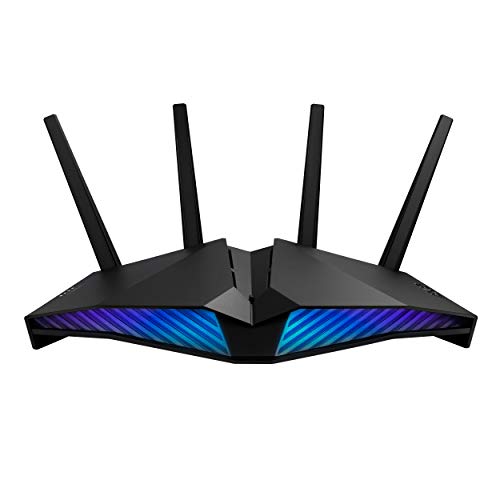
The RT-AX82U closes the pool at its most accessible tier: an AX5400 dual-band Wi-Fi 6 gaming router whose title adds two telling details — a dedicated gaming port and a mobile game mode. The gaming port is a small idea with a real effect: plug the console or PC into the marked socket and the router favours that traffic without the owner configuring anything, a prioritisation shortcut for players who want the benefit of QoS without a dashboard apprenticeship. The mobile game mode extends the same courtesy to the phone in your hand, which in many households is the actual competitive device.
Within this guide’s brief, the AX82U covers the domestic half competently and the hostile half conditionally. A household whose “attacks” have always been a sibling’s streaming habit will find the gaming port and ASUS’s traffic tools entirely sufficient armour, on a platform that has served in enormous numbers and accumulated the documentation and update history that follow volume. The hostile half — concealment from a determined rival — depends on VPN client support that the title does not state, and the spec box directs the reader to ASUS’s documentation for this model, as it did for the flagship above. The difference is budgetary: at this tier, a player might reasonably pair the router with platform-level precautions and accept the arrangement.
Dual-band Wi-Fi 6 sets the ceiling honestly. In a quiet household the AX82U’s capacity is ample; in a house where three people game, stream and call simultaneously, the tri-band picks above hold their composure longer. Its design — all sweeping angles and gaming posture — also announces itself in a way the minimalist picks do not, which households sharing a living room should weigh as a genuine, if unglamorous, specification.
As the entry point to this category, though, the AX82U is easy to recommend on its own terms: it makes the most common protection — prioritisation — automatic at the socket, it comes from a line with deep support, and it leaves budget for the VPN subscription that the concealment strategy requires if the documentation confirms the client support. That is a sensible allocation of a limited defensive budget, and more players should make it than buy flagships as talismans.
- Type: gaming router, dual-band
- Standard: Wi-Fi 6, AX5400 class, per the listing title
- Gaming features: dedicated gaming port and mobile game mode stated in the listing title
- VPN support: Not stated in the listing title — verify with ASUS documentation
- Role in this guide: accessible prioritisation for smaller households
Strengths
- The gaming port delivers prioritisation with zero configuration.
- ASUS’s platform brings deep documentation and a long update record.
- The pool’s gentlest tier leaves budget for a VPN subscription.
Trade-offs
- Dual-band Wi-Fi 6 saturates sooner in a busy multi-gamer household.
- VPN support is unstated in the title and must be confirmed for concealment use.
- Assertive gaming styling will not suit every room it might sit in.
Best for: a smaller household wanting automatic game prioritisation without flagship spending. Not suited for: a house with several simultaneous gamers and streamers, where the tri-band platforms above keep their composure longer.
What Can Your ISP Do That Your Router Cannot?
The provider sits where the flood actually happens, and its toolbox is correspondingly larger. At its edge, an ISP can recognise attack traffic by pattern and discard it before it enters the pipe to your street, spread the load across infrastructure designed for weather like this, or null-route a targeted address — sacrificing that one address’s connectivity to protect everyone sharing the segment. Large providers do this routinely and invisibly; the floods their customers never notice vastly outnumber the ones they do. This is worth remembering when choosing a provider in the first place: a network with a serious abuse desk is a defensive feature no router purchase can substitute for.
The customer’s part of that relationship is communication. Providers act on reports with specifics — timestamps, durations, the game or platform involved — far more readily than on a general complaint that the internet felt bad on Friday. Keep the router’s logs where the platform allows, note when attacks begin and end, and ask the direct questions: can this address be changed, is filtering available on this tier, does the provider offer any gaming or protection add-on that operates at its edge rather than in your home? Some providers do sell upstream protection services; unlike a router’s marketing, those can genuinely touch a volumetric flood, because they operate where the flood is still separable from your line.
There is also a longer game. Every reported stresser customer, every banned account harvesting addresses, slightly raises the cost of the next attack. The ecosystem that produces hit-offline services survives on victims treating attacks as weather. Players who report — to the platform, to the provider, with timestamps — are doing the only thing that has ever shrunk that ecosystem, and it costs less than every router in this guide.
How Do Streamers and Competitive Players Layer Their Defences?
Players with an audience are the ones genuinely hunted in this story, and their arrangements are instructive because they are built in layers rather than around a single purchase. The foundation is separation: the gaming and streaming traffic runs through a tunnel as a matter of routine, so the address the world can discover belongs to infrastructure that expects abuse. Some go further and keep an entirely separate connection for the broadcast side of the operation, so that even a successful attack on the gaming path leaves the stream — the income — standing. That is the dual-connection logic of the previous guide’s business world arriving in a bedroom studio, and it works for the same reason: independence defeats single points of failure.
The middle layer is platform discipline. Streamers learn to keep connection details off the screen, to use the privacy features platforms provide, to prefer server-mediated play, and to treat every unsolicited link and lobby invitation as the harvesting attempt it sometimes is. They also learn the dull administrative arts: separate accounts, recovery options set before they are needed, and a provider relationship established in calm times, so that the first call during an attack is to a support desk that already has their details. None of this appears on a router box, and all of it has saved more broadcasts than any firewall feature.
The router’s layer, in that company, is the innermost and least heroic: keep the household’s traffic shaped, the firmware current, the tunnel configured, and the dashboard readable at a glance. That is precisely the work the picks in this guide divide among themselves — the Flint 3 carrying the tunnel, the Radix and XR1000 governing the traffic, the flagships supplying headroom. A player assembling a serious defensive setup is not choosing between those virtues but stacking them, in the order this guide has argued throughout: conceal the address, govern the house, and let the provider handle the weather.
How Do the Six Picks Divide the Protection Work?
| Pick | VPN in title | Main defensive strength | Platform |
|---|---|---|---|
| ASUS ROG Strix GS-BE12000 | Not stated | Flagship capacity and composure | Wi-Fi 7 |
| MSI Radix AXE6600 | Not stated | AI QoS against household congestion | Wi-Fi 6E tri-band |
| TP-Link Archer GE650 | Not stated | BE11000 headroom and prioritisation | Wi-Fi 7 tri-band |
| NETGEAR XR1000 | Not stated | Connection control and diagnosis | Wi-Fi 6 |
| GL.iNet Flint 3 | Stated | Always-on tunnelling to hide the home address | Wi-Fi 7 tri-band |
| ASUS RT-AX82U | Not stated | Automatic prioritisation via gaming port | Wi-Fi 6 dual-band |
The table’s starkest column is the second one, and it is printed without embarrassment because it is the guide’s thesis in miniature: in a pool of six gaming routers marketed to players who fear being hit offline, exactly one states VPN support in its title. The others may well offer it — their documentation will say — but a buyer defending against a real threat should start from the stated fact and the verified facts, in that order, and treat everything else as atmosphere.
What Should You Do During an Actual Attack?
First, confirm it is one. A household congestion collapse feels identical from the player’s chair, and the router’s dashboard — several picks here make this legible — will show whether the line is full of your own traffic or of something else. If the flood is external, do not waste the evening rebooting the router repeatedly; the water is upstream of your door. Note the time, keep any evidence the game or platform offers, and contact the provider: ISPs can filter at their edge, and reports are how repeat offenders lose their stresser accounts and their own connectivity.
Second, change what the attacker is aiming at, if your setup allows it. Where the provider assigns dynamic addresses, a modem left off for a while — overnight is the folk remedy, and it often works — may return with a fresh address, and the flood keeps pouring into the old, now-empty one. Then close the leak that published the address in the first place: the peer-to-peer lobby habit, the exposed service, the link that should never have been clicked. An attack survived without a lesson learned is an appointment to have the same evening again.
Third, report upward through the game as well. Platforms ban address-harvesters and stresser customers when they can identify them, and they can identify them far more often when victims file the report with timestamps. The player who treats an attack as weather — endured, unrecorded — guarantees the forecast never changes.
What Mistakes Leave Players Exposed?
The expensive mistake is buying a router as a shield against volumetric floods, then neglecting the free protections because the box was supposed to handle it. Close behind is exposing the address carelessly after paying to conceal it: a VPN on the router undone by one device configured to bypass it, or by joining the same peer-to-peer lobbies from an untunnelled connection. Consistency is the whole game in concealment, and it is a habit, not a setting.
The quieter mistakes are domestic. Leaving remote administration or unnecessary port forwards open enlarges the attack surface for no benefit. Skipping firmware updates lets known flaws accumulate in the one device that faces the internet. And blaming every disconnection on attackers — when the household’s own upload was the culprit — sends the player shopping for armour against enemies they do not have, while the real fix, a QoS rule, goes unconfigured for another season.
Final Recommendation
Start from the threat you actually face. If rivals can learn your address and have shown they will use it, the Flint 3 is this guide’s centrepiece: stated VPN support, modern platform, wired headroom — paired with a good tunnel subscription and strict lobby hygiene. If your offline moments have always coincided with your own household’s traffic, the Radix’s AI QoS or the XR1000’s control layer will change your evenings more than any concealment could. The GE650 and the ROG flagship serve players building the strongest general platform, with the VPN documentation check completed before purchase, and the AX82U covers smaller households honestly at the gentlest tier. No router here can stop a flood that fills your line at the provider’s edge — but the right one, honestly chosen and properly configured, can make sure the flood’s target is never your address, and that your own house never does the attacker’s work for free.
Frequently Asked Questions
Can a gaming router stop a DDoS attack?
It can stop small, crude attacks at its firewall and ignore scans and malformed traffic. It cannot stop a volumetric flood, because that flood fills your connection at the provider’s network before reaching your home. Anyone selling total DDoS immunity in a home router is describing a product that cannot exist.
How does a VPN stop me being hit offline?
By hiding the target. With the router running a VPN client, other players see the VPN service’s address, not your home’s. Attacks aimed at that address hit infrastructure built to absorb them, and the endpoint can be changed. Your real address stays unpublished — provided every device and game session actually uses the tunnel.
Why do I keep disconnecting if nobody is attacking me?
Most likely your own household is the flood. Uploads are the usual culprit: cloud backups, photo sync and game patches can saturate an asymmetric connection and strangle the game’s traffic. Gaming QoS that prioritises your machine and shapes bulk traffic is the direct cure, and it is the benefit most buyers of these routers will actually feel.
Should I pay my ISP for a static IP if I get attacked?
Usually the opposite: a static address cannot be changed when it leaks, which makes it a permanent target. A dynamic address at least offers the modem-off remedy for obtaining a fresh one. Static addresses suit people hosting services, not players trying to be hard to find.
Does a wired connection protect me?
It protects your last ten metres, not your address. Ethernet removes Wi-Fi interference and jitter from the list of things that can end a match, which is valuable and worth doing where possible. The attack surface question — who knows your public address — is unchanged by the cable.
My whole house goes offline, not just the game. Is that still an attack?
It can be — a flood aimed at your address takes the entire connection, so every device in the house loses service together, which is actually one of the signatures of an external attack. The other common cause of whole-house collapse is the modem or router itself failing under load or heat. The router’s dashboard and a call to the provider separate the two: if the provider can see attack traffic aimed at your address, you have your answer and your evidence.
Will a better router at least reduce how often it happens?
Indirectly, yes. A router that runs your VPN properly reduces how often your address is exposed at all; a router with good QoS eliminates the domestic incidents that feel like attacks; and a well-maintained router presents fewer open doors to the small-scale probing that precedes casual attacks. Frequency falls even though the theoretical worst case — the big rented flood against a known address — remains the provider’s problem to solve.
Is it illegal to hit someone offline?
In most jurisdictions, yes: knowingly impairing someone else’s computer service without authorisation is a computer-misuse offence, and stresser services have been prosecuted as exactly that. Report attacks to the platform and your provider with timestamps; enforcement works from accumulated reports.
Related Guides
See also our guides to the best VPN routers for whole-home tunnelling, the best gaming routers for competitive play and the best Wi-Fi 7 routers for busy households.