What's inside
- Key Takeaways
- Quick Picks
- How Did We Choose Extenders Specifically for the R8000?
- What Should an R8000 Owner Expect an Extender to Change?
- How Long Will an R8000-Centred Network Remain Worth Extending?
- What About the Rooms the R8000 Already Serves Well?
- How Do the Six Compare Side by Side?
- Where Should the Extender Sit in an R8000 Household?
- What Mistakes Do R8000 Owners Keep Making When Adding an Extender?
- Final Recommendation
- Frequently Asked Questions
- Related Guides
As an Amazon Associate I earn from qualifying purchases. This post may contain affiliate links at no extra cost to you.
gizmoverdict.com is reader-supported. When you buy through links on our site, we may earn an affiliate commission.
Where to buy: Every extender below comes from this site’s verified product pool and links to its own listing. The R8000 has been in homes for years and several of these extender models have equally long histories, so confirm the exact revision the listing ships before ordering.
The best range extenders to go with r8000 start from what the R8000 is: NETGEAR’s Nighthawk X6, a tri-band AC3200 router that was a flagship in its day and remains, in a great many homes, a thoroughly capable centre of the network. Owners searching this keyword are not usually shopping for a new network. They are shopping for the missing last room of an existing one — and they are asking a narrower, better question than most extender buyers: not “what works with my provider?” but “what pairs well with this specific, known router?”
The honest answer has two halves. The first half is universal: the R8000 broadcasts standard Wi-Fi, so any standard extender from any brand will repeat it, and nothing about the pairing requires NETGEAR’s permission. The second half is why this roundup is nevertheless an all-NETGEAR list. NETGEAR’s mesh-style extenders were designed in the same house as the Nighthawk routers, speak the same single-name roaming language, and match the R8000’s temperament — enthusiast-grade home networking, configured once and expected to disappear. When the router is a Nighthawk, the extender shortlist naturally fills with Nighthawks and their mesh cousins, and the six picks below are exactly that family, spanning the EX7000’s veteran desktop design to a WiFi 7 extender with a 4.5 Gbps class figure in its title.
One generational truth must be stated before any of them is praised. The R8000 speaks the AC generation of Wi-Fi. An extender with newer radios — WiFi 6, WiFi 7 — will still converse with it perfectly well, but the conversation home runs at the router’s generation, and the newer radios’ full character expresses itself only on the extender’s side of the house and in a future where the router is replaced. This guide treats that not as a defect but as a purchasing axis: some of these picks are sized for the R8000 as it is, and some are sized for the network the R8000 will eventually hand over to.
Key Takeaways
- Any standard extender works with the R8000, but NETGEAR’s own mesh extenders pair with a Nighthawk router’s single-name roaming most naturally — which is why all six picks are NETGEAR.
- The R8000 is an AC-generation tri-band router, so every extender’s link home runs at AC speed; WiFi 6 and WiFi 7 picks invest in the local hop and in a future router upgrade.
- The mesh extenders — EX8000, EAX80, EX7700 — are the picks for households that want one network name and coordinated hand-off rather than a second SSID.
- The EX7000 is the veteran of the list: a proven design for owners who value a known quantity over a newer radio.
- Placement decides more than model: the R8000’s remaining dead zone is a geometry problem, and every pick here obeys the same halfway rule.
Quick Picks
| Pick | Badge | Why it is here |
|---|---|---|
| NETGEAR WiFi Mesh Range Extender EX8000 | Best mesh partner | NETGEAR’s flagship-style mesh extender, built to extend a strong router like the R8000 under one network name. |
| NETGEAR Nighthawk WiFi 6 Mesh Range Extender EAX80 | Best WiFi 6 mesh | A Nighthawk mesh extender with WiFi 6 radios, for far rooms full of current-generation devices. |
| NETGEAR WiFi Mesh Range Extender EX7700 | Best mid mesh | The mesh extender a step below the EX8000, for the same one-name experience at a more modest position in the range. |
| NETGEAR WiFi Mesh Range Extender EX7000 | Best proven veteran | A long-serving mesh extender with years of production behind it and no surprises left in it. |
| NETGEAR Nighthawk WiFi Extender EAX17 | Best compact Nighthawk | Title figures of up to 1,500 sq ft and 3 Gbps in NETGEAR’s wall-plug Nighthawk extender form. |
| NETGEAR Nighthawk WiFi 7 Extender EXS25 | Most future-proof | A WiFi 7 extender rated in its title at up to 1,500 sq ft and 4.5 Gbps class — bought for the router after the R8000 as much as for the R8000. |
How Did We Choose Extenders Specifically for the R8000?
The first screen was brand gravity, applied openly rather than apologetically. Third-party extenders would work — the guide says so in its second paragraph — but the keyword’s readers own a Nighthawk and are asking about companionship, and NETGEAR’s mesh extenders are the companions designed for the household the R8000 anchors. Restricting the pool to NETGEAR is therefore not favouritism; it is answering the question that was actually asked, while stating plainly that the wider market remains open to anyone who wants it.
The second screen was generational spread across the R8000’s own era and beyond it. The list holds two mesh extenders of the router’s own AC generation, one WiFi 6 mesh model, and two newer Nighthawk extenders reaching to WiFi 7. That spread exists because R8000 owners divide into two honest camps: those extending the network they have, and those quietly preparing the network they will have next. A roundup that served only one camp would mislead the other about what its money buys.
The third screen was claim discipline, and it bites hardest on the two oldest mesh models. The EX8000 and EX7700 are widely known products, but their verified listing titles here state their identity — WiFi mesh range extender — without class or band figures, and this guide prints nothing beyond that identity as specification. Where a figure would help, the spec boxes direct the reader to NETGEAR’s documentation rather than borrowing numbers from the models’ reputations. A guide that invents precision for famous products teaches its readers to distrust precision everywhere.
Finally, every pick had to be a true standalone extender usable with the R8000 as a router — no product requiring a different NETGEAR system as its base, no access point masquerading as a repeater. The R8000 stays the centre of the network in every scenario below; the extender is always the satellite, never the coup.
What Should an R8000 Owner Expect an Extender to Change?
Expect geography to improve and physics to stay in office. The R8000, for all its tri-band flagship heritage, obeys the same radio laws as a budget router: its signal weakens with distance, surrenders to masonry, and dies in the specific room this purchase is about. An extender relocates the network’s effective edge to a better position. It does not raise the R8000’s ceiling, modernise its generation, or repair a placement problem at the router itself — and if the R8000 is currently broadcasting from a basement corner or a metal cabinet, moving it remains the cheapest upgrade available, worth more than any single pick below.
Expect the purchase to clarify the router’s own report card, too. Owners frequently discover, mid-survey, that the dead zone was the only item on it — the R8000 acquits itself everywhere else — and that discovery is worth the extender’s price by itself, because the alternative purchase, a new router bought to fix one room, would have spent far more to learn the same lesson.
Expect, too, a specific division of labour in a tri-band household. The R8000’s three bands were its era’s answer to crowding: more air to share among many devices. A mesh extender that preserves one network name lets that division of labour extend into the far rooms, with devices sorted by the system rather than stranded by their own stubbornness on a fading signal. This is the lived difference between the mesh picks and a plain repeater with a second network name — not speed, but the absence of friction as people and devices move around the house.
And expect the far room to be good rather than identical. Behind any relay, the rescued room gets a strong, usable share of the R8000’s network — ample for streaming, calls, work and play — at some cost in raw throughput and a little in latency against a device sitting beside the router. Households that judge the extender by the room it rescued are delighted; households that judge it against the router’s own postcode start an argument no extender can win.
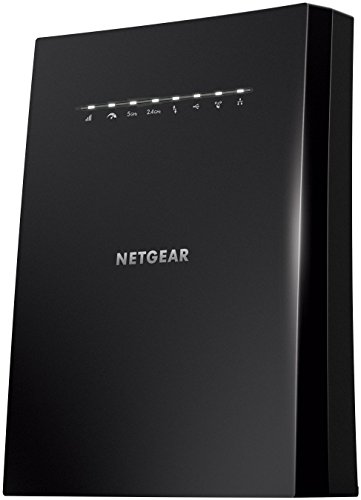
NETGEAR WiFi Mesh Range Extender EX8000 — Best mesh partner
The EX8000 is the natural first name on an R8000 owner’s list: NETGEAR’s premium mesh range extender of the same era and the same design philosophy, built to take a strong router’s network and carry it — same name, same behaviour — into the rooms the router cannot reach. If the R8000 was the flagship answer to the whole house’s centre, the EX8000 was the flagship answer to its edges, and pairing them restores the combination their maker intended.
Mesh behaviour is the substance of the pick. Rather than standing up a second network with its own name and its own border, a mesh extender of this kind extends the existing one, so the household’s devices experience one network with a larger map. For an R8000 household — typically device-rich, typically intolerant of networking chores — that seamlessness is worth more than any class figure, and it is why this model leads the roundup despite its title’s silence on specifications.
That silence deserves its own sentence, because this guide will not fill it with borrowed numbers. The verified listing title identifies the EX8000 as a WiFi mesh range extender and nothing more; its band structure and class figures are therefore carried in the spec box below as matters to verify in NETGEAR’s documentation. Readers who know the model’s reputation will find the documentation confirms a substantial product; readers who do not should take the extra minute, because a flagship-tier purchase deserves first-hand figures rather than a reviewer’s memory.
Who should skip it? The owner whose R8000 is nearing replacement. The EX8000’s virtues are tuned to the AC-era network it was born into, and a household planning a WiFi 7 router within the year should put its extender money where the future is — the EXS25 at the bottom of this list — rather than completing a period-correct pairing it is about to dismantle. For the owner keeping the R8000 for years, though, this is the companion it was designed to have.
- Mode: WiFi mesh range extender (single-name extension of the router’s network)
- Brand line: NETGEAR mesh extenders
- Wireless class: Not stated in the listing title — verify with NETGEAR documentation
- Band structure: Not stated in the listing title — verify with NETGEAR documentation
- Coverage figure: Not stated in the listing title — verify with NETGEAR documentation
Consider the household that flatters this pick most: a large, device-dense home where the R8000 sits centrally and proudly, and the failure is a grand tour away — the primary suite beyond two bathrooms of tile and plumbing, the office over a three-car garage. Tile, water and vehicles are among the most expensive materials a signal can meet, and the rooms behind them need a relay with genuine ambition placed at the last clear point. That is this unit’s native assignment, and lesser tiers visibly strain at it.
Strengths
- The era-matched flagship companion the R8000’s network was designed around
- True one-name mesh behaviour rather than a second SSID to manage
- Built for device-rich Nighthawk households that want the edge rooms to feel central
Trade-offs
- Its generation is the R8000’s own — no headroom for a future router
- Key figures sit outside the title and require a documentation check
- A household about to replace the router should not complete a pairing it will dismantle
Best for: an R8000 owner keeping the router long-term and wanting the flagship mesh companion of its own era. Not suited for: an R8000 already on its final year of service — the EXS25’s WiFi 7 headroom is the better destination for that money.

NETGEAR Nighthawk WiFi 6 Mesh Range Extender EAX80 — Best WiFi 6 mesh
The EAX80 is the roundup’s bridge between the R8000’s era and the present: a Nighthawk mesh range extender whose title states its WiFi 6 generation outright. Its proposition to an R8000 household is subtle and genuinely useful. The link home to the router runs at the router’s AC generation — nothing can change that — but the far rooms’ local network, the one the phones, laptops and consoles actually join, is run by WiFi 6 radios with all the crowd composure that generation brings.
That local benefit is not a consolation prize. In most houses the far room’s problem at 8 p.m. is not the strength of the relay’s link home but the disorder of a dozen devices sharing one edge of the network. WiFi 6 was engineered for precisely that disorder. An EAX80 at the hallway’s end gives the bedrooms a modern, orderly local network fed by an honest AC relay — which, in lived experience, feels like a much larger upgrade than the spec-sheet logic suggests.
The mesh identity completes the case. Like the EX8000, the EAX80 extends the network under one name with coordinated behaviour, so the household gains the new local radios without gaining a second SSID to administer. Against the EX8000 the choice is philosophical: period-correct flagship pairing, or a generation step forward at the edge while the centre stays AC. Households whose device fleet has largely turned over to WiFi 6 — phones, laptops, tablets of recent years — will feel the EAX80’s side of that argument every evening.
Its limitation is the mirror of its virtue: it cannot promote the R8000. If the household’s frustration is actually with the router’s own ceiling — its generation, its centre-of-house performance — an extender of any class is a deferral, and the honest money goes to a new router with the EAX80 re-roled or replaced later. Buy it to fix the edges of a network whose centre you still respect.
A note on expectations for the hand-off experience, since mesh is half this pick’s pitch: devices moving between the R8000’s territory and the EAX80’s will be passed by the system rather than clinging by their own judgement, and in a house with stairs, landings and a garden in play, that passing is the feature felt most often — more often than any speed figure. Owners upgrading from a second-SSID repeater consistently describe the change as the network becoming boring, and boring, in home networking, is the highest available praise.
- Mode: WiFi 6 mesh range extender (single-name extension)
- Wireless generation: WiFi 6, stated in the listing title
- Brand line: NETGEAR Nighthawk
- Wireless class figure: Not stated in the listing title — verify with NETGEAR documentation
- Coverage figure: Not stated in the listing title — verify with NETGEAR documentation
Strengths
- WiFi 6 local network for the far rooms, where the device crowd actually lives
- One-name mesh behaviour shared with the rest of the Nighthawk extender family
- A generation step that survives, in part, even a future router change
Trade-offs
- The link home still runs at the R8000’s AC generation
- Class and coverage figures are outside the title and need verification
- Cannot fix dissatisfaction with the router itself — only with its reach
Best for: an R8000 household whose far rooms are crowded with WiFi 6 devices every evening. Not suited for: an owner whose real complaint is the R8000’s own performance at the centre — that complaint is a router budget, not an extender one.
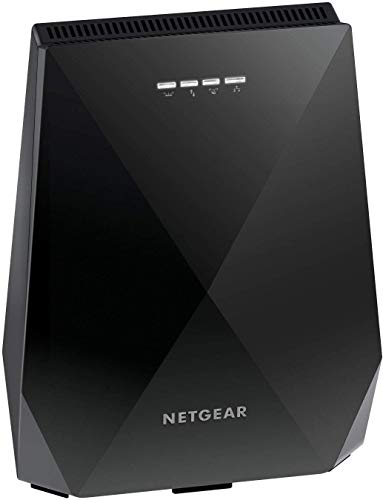
NETGEAR WiFi Mesh Range Extender EX7700 — Best mid mesh
The EX7700 occupies the sensible middle of NETGEAR’s mesh extender family: the same one-name, extend-the-router philosophy as the EX8000, at a step down in position within the range. For an R8000 household whose dead zone is real but not enormous — one bedroom wing, one floor’s far end — that step down is not a compromise so much as a correct sizing, and correct sizing is this guide’s favourite virtue in networking gear.
Everything said about mesh behaviour in the EX8000’s entry applies here with the volume turned down slightly: one network name, coordinated hand-off, the far rooms admitted to the household network as citizens rather than annexed as a colony with its own SSID. The R8000’s tri-band centre and a mesh extender of this class make a coherent period pairing, and households that do not need the flagship’s full ambition will not miss it in daily use — the daily use of an extender is mostly invisibility, and invisibility is available at this tier in full.
As with its senior sibling, this guide declines to borrow specification figures the verified title does not state. The title identifies a WiFi mesh range extender; class, band structure and coverage live in NETGEAR’s documentation, and the spec box says so. That restraint costs the entry some colour and buys the roundup its credibility — the same restraint, applied to every pick, is what lets a reader trust the figures that are printed elsewhere on this page.
The EX7700’s real competitor is not the EX8000 but the owner’s own floor plan. If the survey shows the failing area is one defined zone within fair reach of a single relay point, this unit is sized to the job. If the survey shows failure in several directions, neither this pick nor its flagship sibling is the answer — the answer is a mesh system, and the R8000’s retirement party. Read the survey honestly and the EX7700 will either be obviously right or obviously not, which is the mark of a well-placed product.
There is a quiet budgeting truth in this tier’s favour: the difference between the EX7700 and its flagship sibling, held over the years both will serve, is small money spread very thin — but so is the difference in daily experience for a modest dead zone, which is exactly the point. Extender tiers should be bought by the size of the territory they must hold, and the discipline of buying the middle tier for a middle-sized job is what leaves budget for the things that actually compound, like a second node later if the house grows a new wing of failure.
- Mode: WiFi mesh range extender (single-name extension)
- Brand line: NETGEAR mesh extenders
- Wireless class: Not stated in the listing title — verify with NETGEAR documentation
- Band structure: Not stated in the listing title — verify with NETGEAR documentation
- Coverage figure: Not stated in the listing title — verify with NETGEAR documentation
Strengths
- The mesh experience of the flagship tier, sized for an ordinary dead zone
- One-name extension keeps the R8000’s household on a single network
- Period-matched pairing with the router’s own generation
Trade-offs
- Less headroom than the EX8000 for the largest or busiest far zones
- Specification figures require a documentation check before purchase
- Same generational horizon as the router — no future-proofing dimension
Best for: an R8000 home with one defined dead wing and no appetite for flagship sizing. Not suited for: a house failing in several directions at once — no single mesh extender, at any tier, covers a compass.
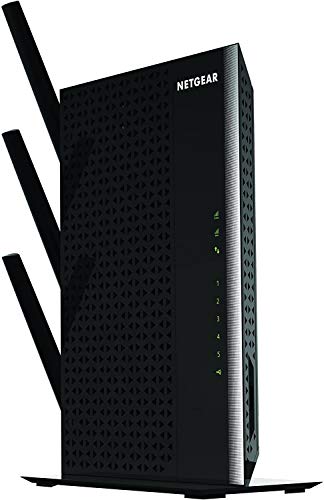
NETGEAR WiFi Mesh Range Extender EX7000 — Best proven veteran
The EX7000 is the elder of this roundup, a mesh range extender with a production history long enough that its behaviour in real houses is about as thoroughly documented as consumer networking behaviour ever gets. Models that survive this long in a fast-moving category do so by being adequate at everything and surprising at nothing, and for a certain kind of R8000 owner — the kind who bought the router for its reliability and has been rewarded for years — that profile is not a fallback. It is the point.
Its mesh identity places it in the same one-name family as the EX7700 and EX8000: it extends the R8000’s network rather than founding a rival one. The differences among the three are of tier and era rather than of kind, and the honest way to choose is by the size of the job and the household’s appetite for the newest available thing. A modest dead zone behind an R8000 that has served faithfully for years is a job description the EX7000 has filled in a great many houses.
Age imposes its two standard cautions, both worth printing. First, long production runs can span internal revisions, so the listing’s exact unit deserves a careful read. Second, a veteran model’s generation is fixed in its era: behind the R8000 that is symmetry, but the EX7000 offers nothing to a future router, and households already contemplating an upgrade should let this pick go with respect and buy forward instead.
There is a final, unfashionable argument for the veteran: troubleshooting capital. A model owned by millions accumulates answers — every odd behaviour it has ever exhibited has been exhibited before, in public, with a remedy attached. When a network misbehaves at midnight, that accumulated public knowledge is worth more than a spec-sheet advantage. The EX7000 is the pick for the owner who values being able to solve the problem over never having it.
It is also, quietly, the easiest of these picks to buy with confidence second-hand or from remaining stock, because a model this documented carries no mystery: its dimensions in a household’s life are known, its behaviour behind an R8000 is known, and the gap between a good unit and a tired one is the ordinary gap of used electronics rather than an unknown design’s gamble. For a router of the R8000’s vintage, surrounded by an ecosystem of equally seasoned gear, that knowability has a coherence the newer picks cannot offer.
- Mode: WiFi mesh range extender (single-name extension)
- Brand line: NETGEAR mesh extenders
- Wireless class: Not stated in the listing title — verify with NETGEAR documentation
- Band structure: Not stated in the listing title — verify with NETGEAR documentation
- Coverage figure: Not stated in the listing title — verify with NETGEAR documentation
Strengths
- Years of production and an enormous base of real-world knowledge
- Same one-name mesh behaviour as the family’s newer tiers
- Generation-matched to the R8000 with no wasted modernity
Trade-offs
- The oldest design here — nothing to offer a future router generation
- Long runs may span revisions; confirm what the listing ships
- All specification figures live outside the title in NETGEAR’s documentation
Best for: an R8000 owner who prizes a fully known quantity for a modest, stable dead zone. Not suited for: a router replacement already pencilled into the calendar — buy the extender for the network you are moving toward, not the one you are leaving.

NETGEAR Nighthawk WiFi Extender EAX17 — Best compact Nighthawk
The EAX17 changes the roundup’s shape, literally: where the mesh extenders above are substantial units that sit on a surface, the Nighthawk extender line in this class takes the compact wall-plug form that disappears into a hallway outlet. Its title figures are stated plainly — up to 1,500 sq ft of coverage ambition and a 3 Gbps class — and its appeal to an R8000 household is the combination of Nighthawk polish with an installation that takes minutes and shows nothing.
The 3 Gbps class figure deserves placement against the router. The R8000’s own tri-band AC3200 identity belongs to the same numerical neighbourhood, which makes the EAX17 a well-matched companion on paper: neither side of the relay is wildly out of scale with the other. Class figures are combined, ideal-condition numbers on both sides of that comparison, and this guide prints them as orientation rather than promise — but orientation matters, and an extender hopelessly outclassed by its router, or vice versa, wastes money in one direction or the other.
The wall-plug form is a genuine trade and should be chosen knowingly. In its favour: no shelf, no cable, no visible hardware, and a hallway placement that is often exactly where the halfway rule wants an extender to live. Against it: the unit’s position is fixed to wherever the outlets are, its radios sit at outlet height rather than on a shelf, and a plug-in unit shares its wall with whatever furniture gets pushed against it. Hallways with a well-placed outlet flatter this design; rooms where the only outlet hides behind a bookcase punish it.
For the R8000 household whose dead zone is one floor’s far bedrooms and whose hallway offers the right socket, the EAX17 is arguably the least-effort correct answer on this page. It lacks the mesh-flagship presence of the EX8000 and the future horizon of the EXS25, but it asks the least of its owner in exchange for a modern, honestly sized relay — and least-effort, in home networking, is a feature that compounds daily.
Renters and the redecoration-prone should note a virtue the spec sheet cannot express: a wall-plug extender leaves no trace. No shelf bracket, no cable run, no unit to dust — when the household moves or the room changes purpose, the EAX17 comes out of the wall and the network’s geography can be redrawn in an afternoon. In houses where the R8000 itself has survived three furniture arrangements, an extender with the same impermanence is a well-matched companion.
- Mode: Nighthawk WiFi extender (repeater)
- Coverage figure in title: up to 1,500 sq ft
- Class figure in title: 3 Gbps
- Wireless generation: Not stated in the listing title — verify with NETGEAR documentation
- Mesh/single-name behaviour: Not stated in the listing title — verify with NETGEAR documentation
Strengths
- Compact wall-plug form installs in minutes and disappears into a hallway
- 3 Gbps class is well scaled to the R8000’s own class neighbourhood
- Stated coverage ambition suits a floor’s worth of far bedrooms
Trade-offs
- Position is hostage to outlet placement, at outlet height
- Generation and mesh behaviour need verification beyond the title
- Coverage figure is an ideal-condition claim real walls will reduce
Best for: an R8000 home with a well-placed hallway outlet between the router and the dead bedrooms. Not suited for: a house whose only available outlets hide behind furniture at floor level — a desktop mesh unit that can sit high on a shelf will serve that geometry better.
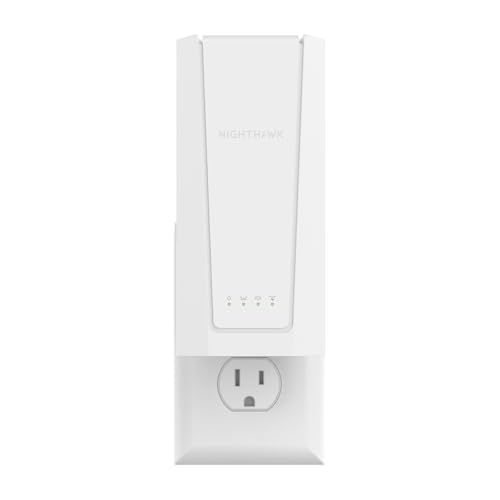
NETGEAR Nighthawk WiFi 7 Extender EXS25 — Most future-proof
The EXS25 is the roundup’s letter to the future: a Nighthawk WiFi 7 extender with title figures of up to 1,500 square feet and a 4.5 Gbps class. Bought for an R8000 today, it is deliberately over-qualified — its link home runs at the router’s AC generation, and its newest capabilities wait in reserve. Bought for the household the R8000 will eventually hand over to a WiFi 7 successor, it is the only pick here that will not need re-buying on that day.
That dual identity should be purchased consciously. If the R8000 has years of service left and the far rooms are full of current devices, the EXS25 still earns its place today through headroom: the most capable local hop in this list, loafing at a fraction of its capacity, with the composure that headroom buys on crowded evenings. If the R8000 is healthy and the far room is a sleepy spare bedroom, the same money is honestly better spent on the EAX17 or the EX7700, and this guide’s flagship discipline requires saying so.
The comparison with the EAX80 is the interesting one for undecided owners. Both step beyond the router’s generation; the EAX80 steps one generation, in a mesh form, while the EXS25 steps two, in the compact Nighthawk extender form with the larger class figure. The EAX80 is the balanced modernisation; the EXS25 is the maximal one. Households that replace routers reluctantly and keep extenders for a decade should lean maximal; households that refresh gear often will never collect on the EXS25’s longest promises and should lean balanced.
One caution is inherited from every WiFi 7 conversation in this series: a new generation’s benefits concentrate where its devices are. The far room gains most when the devices in it are themselves current, and an extender cannot modernise the laptop it serves. Audit the far room’s actual fleet before paying the newest generation’s premium — the premium is real money, and it buys the most for the rooms whose devices can spend it.
There is a discipline this pick demands of its buyer: patience with its own premise. A future-proof purchase only pays if the future arrives while the hardware still serves, which means the EXS25 should be bought by households with stable addresses and slow replacement cycles — the same households, not coincidentally, still running an R8000 with satisfaction. For that reader, the logic closes neatly: the router proved that good gear kept long is cheap gear, and this extender is bought in the router’s own philosophy.
- Mode: Nighthawk WiFi 7 extender (repeater)
- Coverage figure in title: up to 1,500 sq ft
- Class figure in title: 4.5 Gbps
- Wireless generation: WiFi 7, stated in the listing title
- Mesh/single-name behaviour: Not stated in the listing title — verify with NETGEAR documentation
Strengths
- WiFi 7 radios with the largest class figure in the roundup
- The only pick that survives a future WiFi 7 router upgrade un-replaced
- Headroom keeps today’s far rooms composed under the heaviest load
Trade-offs
- Deliberately over-qualified for the R8000 — much of its value is deferred
- Premium buys little for a far room full of older devices
- Mesh behaviour is not stated in the title and needs verification
Best for: a long-tenure household buying the extender once, across the R8000 and its successor. Not suited for: a spare-bedroom fix on a healthy network — the EAX17 solves that room without the flagship premium.
How Long Will an R8000-Centred Network Remain Worth Extending?
This is the question underneath the keyword, and it deserves a direct treatment. The R8000 belongs to a generation that has already outlived several successors, and its owners are not holding on out of ignorance — the router still covers most houses well, still handles a modern device fleet’s ordinary demands, and still anchors networks whose only complaint is geography. A network whose only complaint is geography is precisely the network an extender exists to serve, and on that evidence the R8000-centred home has years of rational life left in it.
The calculus changes when the complaint list grows. If the household’s frustration includes the router’s own behaviour — its handling of a much larger device fleet, its performance in the rooms near it, the arrival of devices whose newest radios the router cannot answer — then the extender conversation is a deferral, and deferrals compound. The honest sequence is to name the complaints in order: geography first, generation second, capacity third. Extenders cure the first completely, the second partially at the edges, and the third barely at all. Buy for the complaint you actually have.
There is also a resale-and-hand-me-down dimension that Nighthawk owners understand instinctively: this class of gear cascades. An EX8000 or EAX80 bought today can follow the household to a relative’s home, a rental property or a workshop network later, because mesh extenders of this family work behind any router they are asked to extend. The purchase is therefore less of a bet on the R8000’s lifespan than it first appears — the extender’s usefulness is portable in a way the router’s, tied to the main house, is not.
What About the Rooms the R8000 Already Serves Well?
An extender purchase is usually audited only in the room it rescued, but its effects — good and neutral — are household-wide, and R8000 owners should know the ledger. On the good side: devices that previously clung to the router from the far edge, consuming its attention with weak, retransmission-heavy conversations, move to the extender and speak locally instead. A strong router like the R8000 actually benefits from shedding those expensive distant conversations; the centre of the network often feels marginally healthier once the edge is properly served.
On the neutral side: nothing about the rooms near the router gets faster. The extender adds no capacity to the router, upgrades no radio it owns, and changes no plan. Households sometimes buy an extender half-hoping for a general network rejuvenation and then review it against that hope. Judge the purchase by the map it redrew — the room admitted, the hand-offs smoothed — and it will be judged fairly; judge it by the den’s speed test and it will be convicted of a crime it never claimed to address.
Finally, the extender changes the household’s failure geography in a way worth anticipating: when something does go wrong, there is now a second device in the chain to consider. Keeping the installation documented — which extender, which outlet, configured when — turns that future troubleshooting from archaeology into reading. Nighthawk households tend to keep gear for years; the note you write today is the support department of 2029.
How Do the Six Compare Side by Side?
| Pick | Form | Generation | Class / coverage in title | Choose it when |
|---|---|---|---|---|
| EX8000 | Mesh extender | R8000’s own era | Not stated in title | You want the flagship period pairing |
| EAX80 | Mesh extender | WiFi 6 | Not stated in title | Far rooms are full of WiFi 6 devices |
| EX7700 | Mesh extender | R8000’s own era | Not stated in title | One dead wing, sensibly sized |
| EX7000 | Mesh extender | R8000’s own era | Not stated in title | You value the longest track record |
| EAX17 | Wall-plug extender | Not stated in title | 3 Gbps / up to 1,500 sq ft | The hallway outlet is in the right place |
| EXS25 | Nighthawk extender | WiFi 7 | 4.5 Gbps / up to 1,500 sq ft | You are buying across two router eras |
One pattern in the table deserves a name, because R8000 owners will feel it in the shop: the family’s centre of gravity is mesh. Four of the six picks extend the network as citizens of it rather than as annexes, and that proportion reflects how Nighthawk households actually live — many devices, much movement, no patience for network bookkeeping. The two non-mesh-labelled picks earn their places on form and future respectively, and a buyer choosing either should do so for those stated reasons rather than by accident.
The table’s honest lesson is how much of the decision lives off it: three of these products state almost nothing in their titles, yet they are distinct tiers of a family any Nighthawk owner can navigate by job size. Use the table to sort by era and form, then let the survey of your own house pick the tier.
Where Should the Extender Sit in an R8000 Household?
The R8000’s strength makes the survey more important, not less: a strong router’s signal degrades gracefully, so its dead zone has a wide, mushy border where connections work badly instead of failing cleanly. Walk the path to the problem room on a video call and find where the call first becomes noticeably worse — not where it dies. The extender belongs a few steps back toward the router from that point, where the R8000 is still speaking clearly, ideally elevated and in the open: a landing shelf, a hallway table, the top of a bookcase.
One R8000-specific survey trick is worth borrowing: because the router is strong, test with the household’s most demanding portable workload rather than a phone’s idle signal readout — a laptop on a video call, carried slowly. Idle readouts flatter a strong router’s borderlands; a live call tells the truth about them. The point where the call’s quality first thins, marked honestly, is the survey’s whole product, and every placement decision after it is arithmetic.
For the mesh picks, placement has a second dividend: a well-sited mesh extender does not merely rescue the dead room, it re-draws the roaming map so devices hand over cleanly on the stairs and landings between. Test that hand-off deliberately, walking the boundary with a call running. For the wall-plug EAX17, the survey’s answer must coincide with an outlet; if the ideal spot has none, a shelf-sited mesh unit that can sit at the ideal spot will beat a plug-in unit at the available one.
Finish by testing the room that prompted the purchase, with its real workload, at the real worst hour. R8000 households are often gaming and streaming households, and the evening peak is the only audit that counts. When the room passes at 8 p.m. with the house full, the installation is done; label the spot, because extenders get unplugged for vacuuming, holidays and guests, and the right outlet is worth remembering.
What Mistakes Do R8000 Owners Keep Making When Adding an Extender?
The first is generational confusion in both directions. Some owners assume a WiFi 7 extender will modernise the R8000 — it cannot; the router’s generation caps the link home. Others assume anything newer than the router is pointless — also wrong, because the local hop and the future both have value. The picks above are labelled by which side of that line their value sits on; buy with the label in view and neither disappointment is available.
The second is stacking a second network name on a house that wanted one. A plain repeater running its own SSID beside a Nighthawk’s network creates the sticky-device purgatory — phones clinging to the router from the far bedroom, laptops needing manual rescue — that mesh extenders exist to prevent. R8000 owners, whose router anchors a device-rich house, feel that purgatory more than most, which is why four of this list’s six picks are mesh designs.
A fourth mistake is treating the extender as the end of the project rather than the middle. The households that get the most from these picks finish the job: they re-walk the house after installation, retire the second network name if one lingered from an older repeater, check that the far room’s devices have actually migrated to the extender’s care, and revisit the placement after a week of real life. An extender installed and forgotten at eighty percent of its potential is the category’s most common outcome, and it is entirely self-inflicted.
The third is neglecting the router while shopping for its companion. The R8000’s firmware, its placement, and its channel environment are all worth an hour before any extender is judged, because an extender faithfully amplifies the network it is given — including a badly sited, out-of-date one. Tune the centre first; then extend it. This guide deliberately says nothing about the router’s software features beyond that advice, because the listing titles it works from do not describe them, and the placement hour pays regardless.
Final Recommendation
Match the extender to the R8000’s remaining lifespan in your house. Keeping it for years: the EX8000 for the flagship pairing, the EX7700 for the same idea sensibly sized, the EX7000 where a proven veteran is the comfort being bought. Modernising the edges while the centre stays: the EAX80, whose WiFi 6 local network the far rooms will feel nightly. Solving one hallway-shaped problem with minimum fuss: the EAX17. Buying across the router’s eventual replacement: the EXS25, the only pick whose story improves when the R8000 retires. And whichever name you choose, site it where the Nighthawk still speaks clearly — because a great router and a good extender are separated by one hallway of physics, and the owner who respects that hallway gets the network both boxes promised.
Frequently Asked Questions
Will a NETGEAR extender work better with my R8000 than another brand?
It will work more seamlessly, which is a different claim from working faster. Any standard extender can repeat the R8000’s Wi-Fi, but NETGEAR’s mesh extenders were designed alongside the Nighthawk line to extend the network under one name with coordinated hand-off. That behavioural fit — not raw radio performance — is the honest content of “goes with” in this keyword, and it is why this roundup is drawn from NETGEAR’s own family.
Does adding an extender slow down the R8000 for everyone else?
Devices using the R8000 directly keep their experience; the relay’s cost falls on the traffic the extender carries, which shares airtime on its path back to the router. There is even a small countervailing gain worth knowing: devices that once shouted at the router from the far edge — consuming its attention with weak, error-prone conversations — move under the extender’s local care, and the router’s remaining conversations get cleaner air. A well-extended network is often a slightly calmer network at its centre, not merely a larger one at its edge. On a busy evening the whole household is sharing one router’s attention in any case. A well-sited extender minimises the overhead; a badly sited one, straining to hear the router, taxes the shared air far more — one more reason placement outranks model choice.
Should I choose a mesh extender or a plain one for the R8000?
For most R8000 households, mesh. The router anchors a device-rich, mobile household, and the single network name with coordinated hand-off removes the daily friction of sticky devices and second SSIDs. A plain extender earns consideration only for a fixed, single-purpose outpost — a workshop machine that never moves — where roaming behaviour is irrelevant. Four of the six picks here are mesh designs because the keyword’s typical house is a roaming house.
Is the WiFi 7 EXS25 wasted on an AC router like the R8000?
Partly deferred, not wasted. Today it provides the strongest local hop in this roundup and generous headroom for current devices; its full generation expresses itself only behind a future WiFi 7 router. Whether that is a sensible purchase depends on tenure: a household that will replace the R8000 within a few years and keep the extender collects the deferred value, while a household that refreshes everything together should save the premium and buy the EAX80 or EAX17.
Why do some picks list so many specifications as not stated?
Because this guide prints as fact only what a product’s verified listing title states, and the older mesh models’ titles state their identity without class, band or coverage figures. Those figures exist in NETGEAR’s documentation, and the spec boxes point there deliberately. A roundup that filled the gaps from reputation or memory would be inventing the precision it pretends to offer; the not-stated lines are the price of trusting the numbers that do appear.
My R8000 is five years old. Should I extend it or replace it?
Age alone is a poor reason to replace a router that still performs; networks should be retired for complaints, not birthdays. If the R8000’s centre-of-house performance still satisfies and the complaint is one room’s reach, extend it — the picks above exist for exactly that household. If the complaints have spread to the centre — sagging under the device fleet, disappointing the rooms beside it — replacement is the honest spend, and the extender budget belongs inside the new network’s plan rather than propping up the old one.
Can one extender cover both my upstairs bedrooms and the garden office?
Only if both happen to lie in the same direction from a single good relay point, which gardens and bedroom wings rarely do. One extender occupies one position and serves the territory around it. Two directions of failure call for either a mesh system with nodes in each direction or a repositioned router feeding one extender — and the survey in this guide’s setup section will show you which geometry your house actually has.
Related Guides
Owners weighing the bigger decision should read when to replace a flagship router instead of extending it; for the roaming behaviour discussed throughout, see mesh extenders versus repeaters, explained, and for the survey method itself, how to map your home Wi-Fi before buying anything.


