What's inside
- Key Takeaways
- Quick Picks
- How Did We Choose Extenders for Frontier Homes?
- What Does “Works with Frontier” Actually Mean in Practice?
- Frontier Fiber versus Older Frontier Connections — Does the Line Change the Extender?
- What Should a Frontier Home Do About the Gateway’s Own Position?
- How Do the Six Compare Side by Side?
- How Should You Place an Extender in a Large or Rural Frontier Home?
- What Mistakes Do Frontier Customers Keep Making with Extenders?
- Final Recommendation
- Frequently Asked Questions
- Related Guides
As an Amazon Associate I earn from qualifying purchases. This post may contain affiliate links at no extra cost to you.
gizmoverdict.com is reader-supported. When you buy through links on our site, we may earn an affiliate commission.
Where to buy: All six extenders below are taken from this site’s verified product pool, and each one links to its own listing. Frontier households span fiber and older DSL-era installations, so check the listing for the exact model revision — several of these extender families have long production histories.
The best wireless extenders that work with frontier service begin with the same liberating fact as every ISP guide in this series: an extender does not know or care who your provider is. It hears a Wi-Fi network and repeats it, and a Frontier gateway — whether it terminates a modern Frontier Fiber line or an older connection — broadcasts Wi-Fi like any other. No Frontier certification exists for third-party extenders, no approval is required, and any listing that implies a special Frontier blessing for an ordinary repeater is selling ink, not engineering.
There is, as in the AT&T case, one genuine carrier-issued exception, and it leads this list: the Airties Air 4920, the smart mesh extender Frontier itself supplied to its customers. Everything after it is independent hardware you own outright — TP-Link, Cudy and NETGEAR repeaters spanning a humble dual-band workhorse with an Ethernet port to a WiFi 7 model carrying a 2.5G port in its title. Between the carrier unit and the five independents sits the real decision for a Frontier household, and it is a decision about ownership and ecosystem, not about compatibility, because compatibility was never in question.
Frontier’s footprint shapes the rest of this guide. It also shapes the buying calendar: rural households often order networking gear by mail and live with the choice for years, which argues for deciding slowly and correctly — survey first, catalogue second — rather than quickly and twice. The company serves a great deal of suburban and rural America, where houses are larger, lots are longer, and the network’s job often includes a detached garage, a workshop, a barn office or a guest unit that urban guides never mention. Distances in a Frontier home can be rural distances. That reality elevates placement from a tip to the main event, and it is why this roundup weighs honest range behaviour and Ethernet options — the ability to wire a device to the extender, or feed a far room properly — as heavily as wireless class.
Key Takeaways
- Every standard extender works with a Frontier gateway because extenders repeat Wi-Fi and Frontier gateways broadcast standard Wi-Fi; no Frontier certification for third-party extenders exists.
- The Airties Air 4920 is the one carrier-issued pick — the smart mesh extender Frontier itself supplied — and its value is inseparable from staying inside Frontier’s ecosystem.
- Frontier homes are often large or spread across outbuildings, so placement and honest range behaviour matter more than headline class figures.
- Two picks put an Ethernet port in their titles — the TP-Link RE220 and RE515X — and one, the RE403BE, raises that to a 2.5G port, which changes what a far room can host.
- A single extender cures a single direction of failure; a house failing toward both the bedrooms and the barn is describing a mesh system or a wired access point, not a second relay.
Quick Picks
| Pick | Badge | Why it is here |
|---|---|---|
| Airties Air 4920 Smart Mesh WiFi Extender | The carrier’s own unit | The smart mesh extender Frontier itself issued to its customers, designed to extend Frontier’s gateway Wi-Fi as one managed network. |
| TP-Link WiFi Extender RE220 with Ethernet Port | Best simple wired option | A dual-band repeater with an Ethernet port in its title, for feeding one wired device in the room it rescues. |
| Cudy AC1200 Wi-Fi Booster RE1200 | Best mesh-flavoured value | An AC1200 dual-band mesh-capable range extender from Cudy, for households that want mesh manners from a repeater. |
| TP-Link RE515X AX1500 WiFi 6 Range Extender | Best WiFi 6 with a port | AX1500 WiFi 6 repeating with an Ethernet port in its title — the current-generation all-rounder of this list. |
| NETGEAR WiFi Mesh Range Extender EX6150 | Best proven NETGEAR | Title figures of up to 1200 sq. ft. and 20 devices from a long-serving NETGEAR mesh-style extender. |
| TP-Link BE6300 Wi-Fi 7 Range Extender RE403BE | Most future-proof | A BE6300 Wi-Fi 7 extender with a 2.5G port in its title — the strongest specification here by a wide margin. |
How Did We Choose Extenders for Frontier Homes?
The first screen was the one this series always applies to ISP-flavoured keywords: ignore the provider, examine the house. Frontier households divide into two broad camps — fiber homes with a modern gateway and a conventional suburban floor plan, and the larger, older, more spread-out properties where Frontier’s rural footprint shows. The pool was built to serve both: enough wireless generations to match either camp’s gateway, and enough architectural variety — a carrier mesh unit, plain repeaters, a mesh-flavoured repeater, ported models — to match either camp’s geometry.
The second screen was port honesty. In spread-out homes, the extender’s Ethernet port stops being a footnote and becomes a feature with a job: wiring the desktop in the rescued room, feeding a camera hub, or giving a workshop machine a connection it can trust. Three picks state a port in their titles, at three different levels, and their entries treat the port as a headline rather than a spec-box secret. Where a title is silent about a port, the spec box says so instead of assuming one exists.
The third screen was claim discipline. Coverage figures appear in this guide only where a listing title states them — the NETGEAR’s 1200 square feet and 20 devices — and they are printed with the standing warning that such figures are ideal-condition ambitions. Rural construction, with its metal roofs, thick walls and outbuilding gaps, taxes those ambitions harder than suburban drywall does, and the entries below argue from architecture and generation rather than from any number a box can print.
Finally, the Airties unit was included with its nature stated plainly. It is easy to mishandle carrier hardware in a roundup — either overselling it as magic or dismissing it as a rental trap. It is neither. It is a well-matched extender for households content inside Frontier’s managed Wi-Fi, and its entry below weighs that fit honestly against the freedom of the five independents.
What Does “Works with Frontier” Actually Mean in Practice?
In practice it means three small things and no big ones. It means the extender can join the network name your Frontier gateway broadcasts, using the password on the gateway’s label or the one you set. It means it can rebroadcast that network under the same name or a second one, according to its design and your preference. And it means your devices will treat the repeated network as home, because it is home — the same network, relayed. That is the entire content of the phrase, for every pick on this page and every honest extender anywhere.
What it does not mean is worth equal print. It does not mean Frontier tested the unit, endorses the unit, or will support the unit; the carrier’s support responsibility ends at its gateway, which is one reason the Airties pick exists for households who want that boundary drawn differently. It does not mean the extender can improve the Frontier service itself — a slow line, an overloaded gateway or a failing drop stays exactly as it was, merely better distributed. And it does not mean the extender speaks any Frontier-specific language: the five independent picks here would work identically behind a cable modem in another state, which is precisely their long-term virtue.
There is one Frontier-specific wrinkle worth naming, and it concerns the gateway’s age rather than its brand. Frontier’s installed base includes gateways from several eras, and an extender purchase should be read against the unit actually in the house. A WiFi 7 extender behind a elderly gateway is not wasted — its local hop is still the best on this page — but the household should know which link in its chain is the old one before spending flagship money to gild the new one.
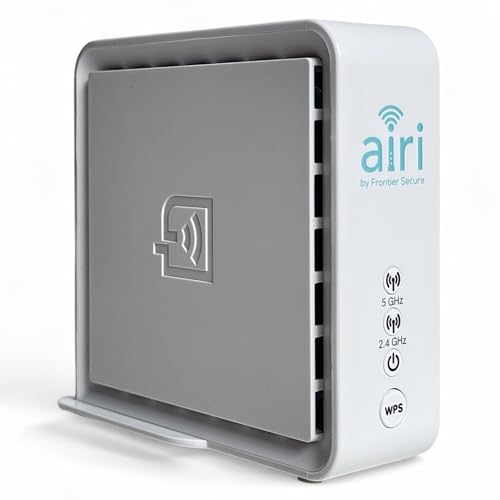
Airties Air 4920 Smart Mesh WiFi Extender — The carrier’s own unit
The Air 4920 leads this list because it is the only pick with a genuine Frontier relationship: it is the smart mesh extender Frontier itself supplied to its customers, built by Airties to extend the carrier’s gateway Wi-Fi as part of a managed whole-home system. Where the independents below repeat the gateway’s network as guests, this unit was designed to extend it as family — one network, carrier-managed behaviour, and a setup story aimed at customers who never want to open a settings page.
That design has a real constituency in Frontier country. Plenty of the company’s customers are not networking hobbyists and do not wish to become any; they want the far bedroom to work and the carrier to own the problem when it does not. For that household, a carrier-issued mesh extender that pairs with the gateway it was built for is not a compromise — it is the product working as intended, and its presence at the top of this list is a recommendation, not a courtesy.
The counterweights are the familiar ones for carrier hardware, and they should be weighed with eyes open. The unit’s identity is bound to Frontier’s ecosystem and management, so its value travels poorly: a household that later leaves Frontier, or replaces the gateway with its own router, holds a device whose reason for existing has retired. Units circulating second-hand also carry the usual provenance questions of carrier gear. And its generation belongs to an earlier Wi-Fi era than the WiFi 6 and WiFi 7 independents below, so households with modern devices and heavy far-room workloads will feel the ceiling sooner.
None of that diminishes the pick for its intended reader. It simply defines the reader precisely: a Frontier customer, staying with Frontier, who values the managed single network over generational headroom and portability. If that description fits, stop here — this is your extender, and the rest of the page is for your neighbours.
A practical note on acquiring one: because these units were distributed through Frontier’s own channels, many listings represent individual resales rather than retail stock, and condition and completeness vary accordingly. Read such listings the way you would read any carrier-hardware listing — what exactly is included, what state the unit is in, and whether anything about its previous service could follow it. The model itself is a known quantity; the individual unit is the variable, and the discount on carrier gear is partly payment for accepting that variable.
- Origin: smart mesh extender issued by Frontier for its customers, built by Airties
- Mode: mesh extender for Frontier gateway Wi-Fi, per its product identity
- Wireless class: Not stated in the listing title — verify with Frontier documentation
- Use with non-Frontier gateways: Not stated in the listing title — verify with Frontier documentation
- Ethernet port provision: Not stated in the listing title — verify with Frontier documentation
Strengths
- Designed to pair with Frontier’s gateways as one managed network
- The only pick whose Frontier fit is by design rather than by universal compatibility
- Carrier-issued behaviour keeps Frontier support able to own coverage problems
Trade-offs
- Value is bound to remaining inside Frontier’s ecosystem and gateway line
- Earlier-generation hardware than the WiFi 6 and WiFi 7 independents below
- Second-hand units carry carrier-hardware provenance questions
Best for: a Frontier household that wants the carrier’s own matched mesh extender and a managed single network. Not suited for: an exit from Frontier, or swapping the gateway for a privately owned router — the unit’s whole value retires with the Frontier pairing.
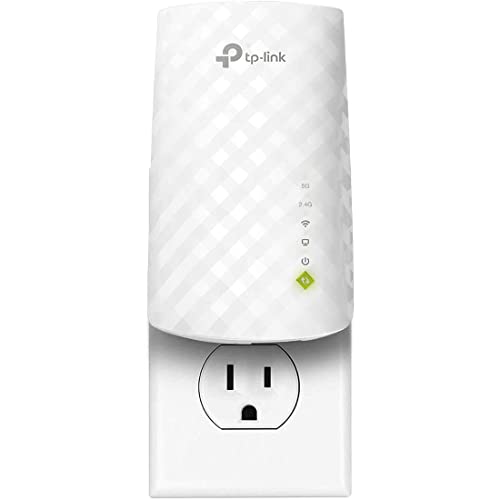
TP-Link WiFi Extender RE220 with Ethernet Port — Best simple wired option
The RE220 is the roundup’s honest workhorse, and its title tells its whole story in one breath: a TP-Link WiFi extender, dual band across 5GHz and 2.4GHz, with an Ethernet port. That port is why it earns its slot in a Frontier guide specifically. Spread-out homes generate spread-out problems, and one of the commonest is a single wired device stranded in a wireless dead zone — the desktop in the barn office, the older machine in the workshop, the hub that only speaks Ethernet. An extender with a port rescues the room and the device in the same purchase.
Understand the port’s direction and the RE220 will never disappoint you. On a repeater of this class, the port faces the room: it offers a wired connection to devices near the extender, carried over the extender’s wireless link back to the gateway. It is a bridge for one wired citizen, not a way to feed the extender itself — the extender still lives or dies by the wireless signal at its outlet. Households that grasp that distinction get exactly the product they imagined; households that reverse it build a small, confusing monument to a skipped paragraph.
As a wireless proposition the RE220 is deliberately unglamorous: dual-band repeating of a previous generation, sized for the ordinary traffic of the rooms extenders serve. In a Frontier home whose gateway is of similar vintage, that is symmetry rather than deficiency. The households that should look further down this list are the ones whose far room is a genuine workstation or whose gateway has already moved to WiFi 6 — for them the RE515X repeats this unit’s port trick with modern radios, and the comparison writes itself.
There is also a longevity argument for simple hardware in rural service. A basic repeater with a port has few ambitions and therefore few failure modes; it can serve a spare room for years, then migrate to the garage, then to a relative’s cottage, working behind every router it meets because it asks nothing of any of them. In a category where flagships age into e-waste, the workhorse’s talent for remaining useful is a genuine specification.
- Mode: dual-band WiFi extender (repeater) with Ethernet port
- Bands stated in title: 5GHz and 2.4GHz dual band
- Port direction: serves wired devices in the room — verify specifics with TP-Link documentation
- Frontier certification: none exists for third-party extenders — compatibility is by standard Wi-Fi repeating
- Wireless class: Not stated in the listing title — verify with TP-Link documentation
Strengths
- Ethernet port rescues a wired-only device in the dead zone as well as the room
- Simple, provider-agnostic design that stays useful across houses and routers
- Dual-band repeating covers both the travelling band and the local sprint band
Trade-offs
- Previous-generation radios cap the local hop for modern devices
- The port serves the room; it does not give the extender a wired feed
- Class and coverage figures are outside the title and need verification
Best for: a Frontier home with one dead room containing one wired device that matters — a desktop, a hub, a workshop machine. Not suited for: a far room expected to host several wired devices at full pace; that room needs the port to be fed by cable, which is an access point’s job.

Cudy AC1200 Wi-Fi Booster RE1200 — Best mesh-flavoured value
Cudy’s RE1200 is the roundup’s representative from outside the two giant brands, and it arrives with a combination the giants’ basic models often skip: AC1200 dual-band repeating with mesh behaviour in its identity. Its title calls it a Wi-Fi booster and a mesh wireless range extender in the same breath, and that pairing is the product’s argument — repeater simplicity with mesh manners, the single-name, better-coordinated experience that makes a house feel like one network instead of two.
The AC1200 class places it honestly in the middle of history: dual-band, ample for the streaming-and-browsing workload of the rooms it will serve, and a generation behind the WiFi 6 picks. For a Frontier household with an AC-era gateway — a large share of the installed base — the RE1200 is generation-matched, and its mesh flavour is the differentiator that matters day to day. Devices wandering from the gateway’s territory into the extender’s are the daily friction of repeater life, and any unit that softens that friction earns goodwill out of proportion to its class figure.
Cudy as a brand asks a small act of trust that TP-Link and NETGEAR do not: it is a smaller name in this market, and households should expect a correspondingly smaller footprint of documentation and community knowledge. Against that, the product’s proposition is legible and its role in this list is specific. It is the pick for the Frontier home that wants mesh behaviour without buying a mesh system, behind a gateway of its own generation, at the value end of the range — a coherent brief, honestly served.
Placement advice for this unit is the guide’s usual sermon with a rural accent: in a long house, the RE1200 belongs at the point where the gateway’s signal is still healthy on the way to the failing rooms, not at the far end where the failure lives. Mesh manners cannot rescue a starved link; they can only make a well-fed one feel seamless. Site it fed, and the Cudy will make a two-network house feel like one.
One more household fits this pick precisely: the one that has already decided against a full mesh system on grounds of cost or complexity, but whose members are quietly miserable about the two-network shuffle — phones clinging to the gateway’s fading signal in the far bedroom, laptops manually re-joined at desks. That misery is a behaviour problem, and mesh-flavoured repeating is the cheapest honest cure for it short of rebuilding the network. The RE1200 exists in this roundup for that household, and it will know itself when it reads this paragraph.
- Mode: dual-band mesh wireless range extender (repeater)
- Wireless class: AC1200, per the listing title
- Brand: Cudy
- Frontier certification: none exists for third-party extenders — compatibility is by standard Wi-Fi repeating
- Ethernet port provision: Not stated in the listing title — verify with Cudy documentation
Strengths
- Mesh behaviour softens the hand-off friction of ordinary repeater life
- AC1200 dual-band class matches the large AC-era share of Frontier gateways
- A value-lane route to a single-network feel without buying a mesh system
Trade-offs
- Smaller brand footprint means thinner documentation and community knowledge
- Previous-generation radios behind a WiFi 6 gateway leave local pace unused
- Mesh manners still depend on a well-fed link — placement remains decisive
Best for: an AC-era Frontier household that wants the one-network feel without replacing its network. Not suited for: a WiFi 6 household building a busy far-room workstation — the RE515X below speaks that gateway’s generation and adds the port.

TP-Link RE515X AX1500 WiFi 6 Range Extender — Best WiFi 6 with a port
The RE515X is where this roundup’s two Frontier themes — modern generation and the honest Ethernet port — meet in one product. Its title states both plainly: AX1500 WiFi 6 range extender, with Ethernet port. For the Frontier Fiber household with a current gateway, a dead room, and something in that room that wants a wire, this is the most precisely aimed pick on the page.
The WiFi 6 half of the proposition is about composure under load. A far room in a modern household is rarely one device; it is a laptop on a call, a television streaming, a phone or two, and the background murmur of smart devices, all sharing the relay. WiFi 6 was designed for exactly that crowding, and behind a WiFi 6 Frontier gateway the RE515X speaks the same generation on both sides of its relay — the first pick in this list of independents that can say so while also offering the port.
The port half deserves the same clarity given to the RE220’s: it serves the room. Wire the desktop or the console to the extender and that device rides the relay on a cable’s stability rather than its own wireless luck, which is often the difference between a workable home office and a frustrating one. What the port does not do is feed the extender — the link home remains wireless, remains placement-dependent, and remains the reason the setup section of this guide should be read before the box is opened.
Against the flagship below, the RE515X’s case is proportionality. The RE403BE offers WiFi 7 and a 2.5G port; this unit offers WiFi 6 and a standard port, at the AX1500 class. For the overwhelming majority of Frontier far rooms — whose workloads are calls, streams and one wired desktop — the RE515X’s ceiling is above the work and the flagship’s extra headroom is a luxury. Buy the flagship for the next decade’s devices; buy this for this decade’s rooms.
- Mode: WiFi 6 range extender (repeater) with Ethernet port
- Wireless class: AX1500 WiFi 6, per the listing title
- Port direction: serves wired devices in the room — verify specifics with TP-Link documentation
- Frontier certification: none exists for third-party extenders — compatibility is by standard Wi-Fi repeating
- Coverage figure: Not stated in the listing title — verify with TP-Link documentation
Strengths
- WiFi 6 generation matched to current Frontier Fiber gateways
- Ethernet port gives the rescued room a wired citizen at full local stability
- AX1500 class is proportionate to real far-room workloads
Trade-offs
- The relay home is still wireless — placement governs everything
- No tri-band or 6 GHz dimension for future-router headroom
- Coverage figure is not in the title, so expectations must come from the survey, not the box
Best for: a Frontier Fiber home with a WiFi 6 gateway, a dead room, and a desktop or console in that room wanting a wire. Not suited for: a dead zone sitting in an outbuilding beyond honest wireless reach — that gap wants a cable run and an access point, not a stronger relay.

NETGEAR WiFi Mesh Range Extender EX6150 — Best proven NETGEAR
The EX6150 is NETGEAR’s long-serving mesh-style extender, and its title carries the two figures this guide prints exactly as stated: coverage up to 1200 sq. ft., and service for 20 devices, in an AC-class mesh range extender. Those numbers describe a household-scale ambition — one extender, one wing of a house, a family’s worth of devices — and the model’s long production life says the ambition has been tested by an enormous number of real hallways.
The mesh framing matters to its behaviour as NETGEAR intends it: a single network identity shared with the router, so the Frontier household is not herding devices between two names. In a home where the gateway sits at one end and life happens at the other, that single-name experience is the difference between an extender that feels installed and one that feels bolted on. It remains, for all that, an independent repeater — no Frontier relationship exists or is needed — and it will serve any future router with the same manners.
Its generation is its honest limitation. This is AC-era hardware in a list that now includes WiFi 7, and a device-dense modern household at the evening peak will feel the difference between this unit’s composure and the RE515X’s. The counter-argument is the one long-serving models always make: the workload of most far rooms has not changed as fast as the standards have, and a proven extender sited well beats a modern extender sited badly every day of the week. Buyers should decide which of those sentences describes their house before deciding between this pick and the WiFi 6 lane.
The device-count figure deserves a translation, because “20 devices” sounds like a ceiling a smart home would smash by Tuesday. In practice the figure describes the class of service the unit was designed around — a normal household’s far-half population of phones, laptops, televisions and gadgets — rather than a hard cliff at the twenty-first gadget. Frontier homes with heavy smart-device counts concentrated behind the extender should read it as a sizing hint and lean toward the modern picks; homes with ordinary counts can take it as the reassurance it was printed to be.
There is a temperament this model rewards: the set-and-forget household. NETGEAR’s mainstream extenders have never asked their owners to develop opinions about networking, and the EX6150 continues that tradition — configure it once, name the network once, and let years pass. In Frontier’s rural heartland, where the nearest technically inclined relative may be two counties away, that temperament is not a soft benefit. It is the difference between a network that gets maintained and one that gets endured, and it explains a good part of this model’s long production life.
- Mode: WiFi mesh range extender (repeater)
- Coverage figure in title: up to 1200 sq. ft.
- Device figure in title: 20 devices
- Frontier certification: none exists for third-party extenders — compatibility is by standard Wi-Fi repeating
- Wireless class detail: AC-class per the listing title — verify specifics with NETGEAR documentation
Strengths
- Long production record and a huge installed base — a fully mapped product
- Mesh-style single-name experience from NETGEAR’s mainstream line
- Stated coverage and device figures are honestly household-scaled
Trade-offs
- AC-era generation behind the WiFi 6 and 7 picks for crowded air
- Coverage figure assumes kind construction; rural builds will see less
- Long model runs can span revisions — confirm what the listing ships
Best for: a Frontier household wanting NETGEAR’s proven single-name extender for one wing of the house. Not suited for: a smart-device-dense home whose far half hosts dozens of chatty gadgets — the RE515X’s WiFi 6 composure fits that crowd better.

TP-Link BE6300 Wi-Fi 7 Range Extender RE403BE — Most future-proof
The RE403BE closes the list at the opposite pole from the Airties unit: a BE6300 Wi-Fi 7 dual-band range extender whose title adds the detail that makes network people sit up — a 2.5G port. Where the carrier unit’s value is its Frontier pairing, this unit’s value is its independence and its headroom: the newest wireless generation, a class figure far beyond any far room’s current appetite, and a wired port fast enough to serve a genuinely demanding wired device at the end of the relay.
The 2.5G port deserves its moment, because it changes the far room’s ceiling. On lesser extenders the port is a convenience for one patient device; a 2.5G port invites a workstation, a storage drive or a small switch feeding several wired devices, all riding the relay at speeds the port itself will not bottleneck for years. In a Frontier home where the rescued room is a real office — the barn conversion, the workshop studio — that invitation is the difference between an extender that hosts the room and one that merely visits it.
The standing WiFi 7 honesty applies in full: behind a current Frontier gateway, the link home runs at the gateway’s generation, and the BE6300’s full character waits on a future router. What the buyer gets today is the strongest local hop on this page, the best port, and an extender that will still be the junior partner in no conversation five years from now. That is a purchase about tenure — the long-held house, the permanent office — and it should be made by households whose plans match its horizon.
It should not be made by the household with one sleepy spare room and a streaming stick. Flagship headroom is not a virtue where it cannot be felt, and this guide’s credibility depends on saying so beside its own flagship. The RE403BE is the right answer to a demanding question; the RE220 and RE515X are the right answers to the common ones, and most Frontier homes are asking common questions.
- Mode: Wi-Fi 7 dual-band range extender (repeater) with 2.5G port
- Wireless class: BE6300 Wi-Fi 7, per the listing title
- Port: 2.5G, stated in the listing title — direction and modes to verify with TP-Link documentation
- Frontier certification: none exists for third-party extenders — compatibility is by standard Wi-Fi repeating
- Coverage figure: Not stated in the listing title — verify with TP-Link documentation
Strengths
- WiFi 7 BE6300 class is the largest headroom in this roundup
- 2.5G port can host a real workstation or a switchful of wired devices
- The extender least likely to be outgrown during a long tenure in one house
Trade-offs
- Its full generation waits on a WiFi 7 gateway Frontier has not yet issued
- Flagship capacity is invisible in a lightly used spare room
- The relay home remains wireless — the port does not repeal placement physics
Best for: a long-tenure Frontier home whose rescued room is a genuine office with wired ambitions. Not suited for: a single sleepy guest room with a streaming stick — the RE220 cures that room at a fraction of the commitment.
Frontier Fiber versus Older Frontier Connections — Does the Line Change the Extender?
It changes the expectations, not the equipment. On a Frontier Fiber line, the service arriving at the gateway is fast enough that the home network becomes the bottleneck everywhere, and extender choices show their differences clearly: generation, composure under load, and the port all matter, because the line itself is no longer the excuse. On an older, slower Frontier connection, the arithmetic inverts. The line is the ceiling for anything internet-bound, and even the humblest pick here can distribute that ceiling to the far room without being the constraint. Households on older connections should therefore buy for coverage and reliability — the RE220’s port, the Cudy’s manners — rather than for class figures they cannot spend.
There is one exception to that calm logic, and it is local traffic. A household moving files between its own machines, streaming from its own storage, or running a home office against a local server uses the extender’s radios at full value regardless of the line’s speed. If your far room’s work is substantially local, generation matters even on a modest connection. If its work is the open internet on a modest line, the extender’s job is simply to arrive — and arriving reliably, through a well-chosen outlet, is a virtue the workhorse picks have in full.
The upgrade path also argues differently by line type. Fiber households can expect gateway generations to keep advancing beneath their extender, which lends the RE403BE’s headroom a plausible future. Older-line households should be more sceptical of future-proofing premiums: the day the line is upgraded, the gateway, the extender and possibly the house’s wiring all join the same conversation, and money held back today is money available for that larger rebuild.
What Should a Frontier Home Do About the Gateway’s Own Position?
Before any extender is ordered, the cheapest coverage upgrade in Frontier country deserves its five minutes: look at where the gateway sits. In many Frontier homes it lives where the line enters — a corner of the basement, the utility room, the far end of the house from the bedrooms — because that is where the installer finished, not where the household lives. If the gateway can be moved toward the centre of the home on its existing wiring, the dead zone may shrink to a size one modest extender cures, or vanish from the list of problems entirely.
Where moving is impossible — and in spread-out rural properties it often is, the line entering at the road-side wall of a long house — the extender stops being an accessory and becomes the second half of the gateway. That reframing changes how it should be bought and sited: not as a patch for a corner, but as a planned relay at the house’s midpoint, chosen with the same care as the gateway itself. The RE515X and the Airties unit, in their different allegiances, are the picks this guide would shortlist for that formal role; the workhorses are for the corners.
Either way, record the decision. A note in the household’s papers — gateway here, extender there, chosen for this reason — is the kind of unglamorous documentation that saves the next troubleshooting session, the next owner, and the next support call a great deal of archaeology. Networks in long-held rural homes outlive the memories of the people who built them; write the map down while you still remember drawing it.
How Do the Six Compare Side by Side?
| Pick | Relationship to Frontier | Generation / class | Port in title | Choose it when |
|---|---|---|---|---|
| Airties Air 4920 | Issued by Frontier | Not stated in title | Not stated in title | You want the carrier’s managed mesh unit |
| TP-Link RE220 | Independent repeater | Dual band, class not in title | Ethernet port | One dead room, one wired device |
| Cudy RE1200 | Independent repeater | AC1200 | Not stated in title | You want mesh manners at the value end |
| TP-Link RE515X | Independent repeater | WiFi 6 AX1500 | Ethernet port | WiFi 6 gateway plus a wired citizen |
| NETGEAR EX6150 | Independent repeater | AC-class mesh | Not stated in title | You trust NETGEAR’s long record |
| TP-Link RE403BE | Independent repeater | WiFi 7 BE6300 | 2.5G port | The far room is a real office for years |
Two columns do the deciding here: the first, because the carrier-versus-independent choice is a genuine fork, and the fourth, because in spread-out Frontier homes the port is so often the feature the purchase was secretly about. Generation matters third, and only after placement has had its say.
Read the port column with the room in mind rather than the spec sheet. A port’s value is exactly the value of the most important wired device waiting in the rescued room, no more and no less: priceless beside a work desktop, meaningless beside a bed. Households that inventory the room before the catalogue routinely buy one tier lower than households that shop by class figure — and end up, on the evidence of this guide’s whole argument, with the better network for it.
How Should You Place an Extender in a Large or Rural Frontier Home?
Survey before you spend. Walk from the gateway toward the failing room with a phone on a call, and mark where the call first degrades; then walk back and mark the last place it was flawless. The extender’s home is near that second mark, elevated, in the open, aimed down the path the signal must travel. In a long ranch house that is usually a hallway outlet; in a two-storey farmhouse it is often the landing; toward an outbuilding it is the window-side wall nearest the target — because a signal that exits through glass loses far less than one that exits through the wall beside it.
Outbuildings deserve their own rule, because they are where rural extender dreams go to be educated. If the garage or barn is within honest reach — the gateway’s signal detectable outside the house on that side — an extender at the house’s edge can hand coverage across the gap. If the signal is undetectable at the house’s own wall, no extender placed in the outbuilding can invent it, and the honest tools become a cable run, a dedicated outdoor link, or an access point fed by one of those. This guide sells extenders hard where they work and refuses to sell them across a gap they cannot jump.
One Frontier-specific siting pattern deserves emphasis: the long single-storey house with the gateway at the road end. There, the temptation is a relay halfway down the hall — correct as far as it goes — but the braver and often better answer is to check whether the failing rooms cluster at one end, in which case the extender belongs at the near edge of that cluster, fed by the strongest signal that still reaches it, rather than at the house’s geometric midpoint serving everyone mediocrely. Coverage follows need, not symmetry.
Verify at the worst hour and in the worst weather your region serves, because rural links live outdoors in a way suburban ones do not: foliage in full leaf, rain and a house full of evening devices all tax the path. When the placement survives that audit, label the outlet. Rural homes accumulate networking folklore, and the next person to troubleshoot the barn office — possibly you, in three years — deserves the map you drew today.
What Mistakes Do Frontier Customers Keep Making with Extenders?
The first is shopping for a Frontier blessing that does not exist. Third-party extenders are compatible with Frontier the way they are compatible with electricity — by standard, not by endorsement — and premiums paid for implied carrier approval buy nothing. The one product with a real Frontier relationship is identifiable by being Frontier’s own issue, the Airties unit, not by a badge printed on a stranger’s box.
The second is misreading the port. Buyers cable the gateway to a repeater’s Ethernet port expecting to feed it, or expect the port to multiply into a switch’s worth of full-speed wired networking. On the ported picks here the port serves the room’s devices over the wireless relay — a fine and useful thing, and a different thing from a wired feed. The spec boxes state the direction; read them before the imagination furnishes the room.
A fourth mistake is forgetting the household’s other citizens: the cameras, doorbells, thermostats and garage openers that live at the property’s edges and join whichever network they can hear. An extender re-sited during troubleshooting can quietly orphan a camera that had been clinging to the gateway, or adopt one that then overwhelms a modest relay. After any placement change, walk the property’s edge devices as deliberately as the rooms — in rural homes the network’s most important member is sometimes the camera over the gate, and it does not file complaints when it drops.
The third is asking one extender to cover two directions of failure — bedrooms one way, barn the other — and concluding extenders do not work when the geometry was impossible from the start. One relay has one position. A house failing in two directions needs either a centrally fed mesh or a cable and an access point, and recognising that on paper is cheaper than learning it from two disappointed purchases.
Final Recommendation
Choose your allegiance first. Frontier’s own answer is the Airties Air 4920, and for the household that wants the carrier’s managed network and the carrier’s responsibility, it is the correct pick and the conversation ends there. The independent answers divide by the room you are rescuing: the RE220 where one wired device waits in a dead room, the Cudy RE1200 where mesh manners matter more than generation, the EX6150 where a proven NETGEAR name is the comfort being bought, the RE515X where a WiFi 6 gateway and a wired citizen meet, and the RE403BE where the far room is a long-term office worthy of a flagship. Then place whichever you chose where the gateway’s voice is still strong — because across Frontier’s long houses and longer lots, an extender is only ever as good as the signal it can hear, and it will repeat your placement decision faithfully to every room beyond it.
Frequently Asked Questions
Will any of these extenders work with my older Frontier gateway?
Yes. Extenders repeat standard Wi-Fi, and every Frontier gateway generation broadcasts it. An older gateway simply means the link home runs at that gateway’s generation: a WiFi 6 or WiFi 7 extender will still improve the local hop in the far room, but it cannot promote the gateway. Match your spending to that reality — the RE220 and Cudy RE1200 are generation-appropriate for older gateways, while the flagships are bets on a gateway upgrade to come.
Is the Airties Air 4920 the only extender Frontier supports?
It is the extender Frontier itself issued, which makes it the one whose pairing with Frontier’s gateways and managed Wi-Fi is a matter of design. Independent extenders are not “unsupported” in the sense of being blocked or incompatible — they work by the Wi-Fi standard — but Frontier’s support responsibility naturally covers its own gateway and its own issued gear, not a third-party repeater you bought elsewhere. Choose based on how much you value the carrier owning the whole chain.
Can an extender reach my detached garage or barn?
If the gateway’s signal is detectable at the house wall facing the outbuilding, an extender placed there has something to work with and can often carry usable coverage across a modest gap. Modest deserves a number’s honesty: think of the gap between a house and its garage, not the gap between a house and the far barn across a pasture. If the signal is already gone at the house’s own wall, an extender in the outbuilding has nothing to repeat, and the honest solutions are a cable run with an access point or a dedicated outdoor wireless link. Distance, metal siding and earth between buildings are the usual verdicts; survey with a phone before spending.
What does the Ethernet port on an extender actually do?
On the ported repeaters in this roundup, it gives wired devices in the rescued room a connection that rides the extender’s wireless link back to the gateway — ideal for a desktop, a console or a hub that lacks Wi-Fi or performs better wired. It does not feed the extender itself, and the room’s wired speed is still bounded by the wireless relay. The RE403BE’s 2.5G port raises the local ceiling of that arrangement; the direction of the arrangement is the same.
Does an extender help if my Frontier connection itself is slow?
It helps the distribution, not the supply. If the line delivers modest speeds to the gateway, the extender delivers those same modest speeds — minus the relay’s fair exchange — to rooms that previously had nothing. For many rural households that trade is the whole point: a usable, steady modest connection in the office beats a fast connection that exists only in the room where the line enters. But if the complaint is the line itself, no extender on this page is the remedy, and the conversation belongs with Frontier.
Should I run the extender under the same network name as the gateway?
For most Frontier homes, yes — mesh-style picks like the Airties, the Cudy and the NETGEAR are designed around a single identity, and one name means devices roam without your management. The exception is the deliberate second name for a fixed workstation room, where you want a device to stay on the extender’s network by your choice rather than wander by its own. Start with one name; split only if a specific device misbehaves.
One extender or mesh — how do I know which my house needs?
Count the directions of failure. Then count the years you expect to stay: a house you will leave in a year deserves the cheap cure that works today, while the house you will grow old in deserves the architecture — mesh or wired — that will not need re-arguing every time a room changes purpose. Extenders are the right answer to a present problem; systems are the right answer to a permanent address. One dead wing, one failing room, one outbuilding within reach: extender territory, and this page is your menu. Failures in several directions, or a house so large that the gateway cannot feed any single relay point well: mesh territory, ideally with the nodes placed where an extender survey would have put them. The survey in this guide’s setup section doubles as the diagnostic — walk it, and the house will tell you which purchase it is asking for.
Related Guides
For the outbuilding problem in depth, read how to get Wi-Fi to a barn, garage or workshop; households weighing the bigger rebuild should compare mesh Wi-Fi versus extenders for large homes, and anyone feeding a far office will want extenders with Ethernet ports, explained honestly.


