What's inside
- Key Takeaways
- Quick Picks
- Why Is a Tunnel the Only Respectable Way to Look at Your Own Cameras?
- What Can Stop the Whole Pattern Working?
- Six Doors Into the House You Already Own
- The Six Doors, Compared
- How Would You Bring a Viewing Setup Online, in Order?
- What Mistakes Turn Remote Viewing Into Remote Worry?
- What Changes When the Cameras Feed a Recorder?
- Who Else in the Household Gets a Key to the Door?
- What Does Viewing From the Road Actually Feel Like, Done Well?
- When Is the Camera Maker’s Own Cloud the Right Answer Instead?
- Final Recommendation
- How Should the Cameras’ Own Network Manners Be Arranged?
- What Should Happen When a Camera or a Credential Is Retired?
- Frequently Asked Questions
- Related Guides
As an Amazon Associate I earn from qualifying purchases. This post may contain affiliate links at no extra cost to you.
gizmoverdict.com is reader-supported. When you buy through links on our site, we may earn an affiliate commission.
Where to buy: The routers and VPN kits below are available on Amazon through the linked names. Because several picks are kits — a home unit plus travelling companions — read the listing’s contents list carefully so the number of boxes in the parcel matches the number of locations in your plan.
Start with the premise, because this keyword is widely misunderstood. The best routers for remote camera viewing are not really about cameras. Remote viewing, done safely, runs through a VPN tunnel into the home network: the router is the door, the tunnel is the corridor, and the cameras stay exactly where they belong, on the private side of the wall, never exposed to the open internet. The cameras themselves are not picks in this guide and were never going to be. What is being bought here is a doorway — hardware that can terminate a tunnel, hold a home’s identity steady, and let an owner look in on the house from another city as if they had quietly walked into the study.
That premise disqualifies the naive version of this purchase immediately. A camera with its own cloud app needs no router’s help, and a camera reached by forwarding its port to the internet needs a stern conversation, not a router recommendation. The reader this guide serves is the one in the middle: cameras on the home network, perhaps a recorder, perhaps a doorbell and a couple of outbuildings, and a wish to view them from away without publishing them to every scanner on earth. For that reader, the six picks divide into ready-made tunnel kits, a classic site-to-site pair, and three routers whose VPN roles anchor the pattern inside an ordinary network.
Two caveats ride along from the first paragraph to the last, because they decide whether any of this works at all. Some home connections sit behind carrier-grade NAT, where no inbound tunnel can reach the router whatever it cost, and some homes are stuck behind an ISP-supplied router that cannot be removed and must be negotiated with. Both caveats get their full discussion in the guide sections below. Neither is a reason to abandon the pattern; both are reasons to check the connection before choosing the door.
Key Takeaways
- The router’s job is to be the VPN door into the home LAN; the cameras remain private behind it and are not picks here.
- Two kits — Maui MA-B256 and Capri CP-EL128 — bundle a home server unit with two travel routers and near-identical titled promises about keeping your home IP anywhere.
- The IPsec pair is the classic site-to-site pattern sold as a matched server and client, with the sparest title in the guide.
- TP-Link’s Omada ER706W is the only pick that is also a full Wi-Fi 6 router, with USB storage and LTE backup via dongle in its title.
- The GL.iNet Flint 3 is the wireless flagship route: tri-band Wi-Fi 7 with five 2.5G ports and VPN in its name.
- Carrier-grade NAT can defeat inbound tunnels entirely; connection type must be checked before any purchase is finalised.
Quick Picks
| Pick | Badge | Why it made the cut |
|---|---|---|
| Maui MA-B256 VPN Server Kit | The ready-made Maui kit | A VPN server plus two travel routers, titled to keep your home IP wherever you are, with full VPN control. |
| Capri CP-EL128 VPN Server Kit | The ready-made Capri kit | The same kit architecture under a second name — server and two travel routers for secure home access from anywhere. |
| IPsec VPN Server & Client Pair | The classic pair | A matched IPsec site-to-site server and client pair, sold for joining two locations without a cloud in the middle. |
| TP-Link Omada ER706W | The router-shaped Omada | An AX3000 Wi-Fi 6 VPN router with USB storage, LTE backup via dongle and Omada Mesh in its title. |
| GL.iNet Flint 3 (GL-BE9300) | The flagship Flint | Tri-band Wi-Fi 7, five 2.5G ports and a VPN router designation for the house that wants one box to do everything. |
| Omada Fusion 2.5G VPN Router | The wired Fusion | A multi-WAN wired VPN router with five 2.5Gb ports, a built-in Omada controller, a touch screen and IPS/IDS in its title. |
Why Is a Tunnel the Only Respectable Way to Look at Your Own Cameras?
Because a camera is the worst device in the house to expose. It runs software its owner cannot inspect, it is updated on a schedule its owner does not control, and it watches the most private spaces in a life. Publishing one to the internet through a forwarded port invites the world’s scanners to knock on exactly that software, forever. The tunnel pattern reverses the exposure: nothing about the cameras is reachable until a visitor has authenticated to the router’s VPN door, at which point the cameras behave as they do for someone standing in the hall. The viewer experience is identical. The risk is not in the same county.
The tunnel also ages better than any camera app. Apps are discontinued, clouds are sunset, viewing subscriptions are repriced; a tunnel into your own network, terminating on your own hardware, answers to none of that. The owner who builds viewing around a VPN can replace cameras one at a time, across brands and years, without rebuilding the way the house is reached. Readers setting up the viewing side itself will find the camera choices in best cameras to watch your pets and the outbuilding cases in best barn cameras — this guide’s concern begins where those cameras’ network begins.
What Can Stop the Whole Pattern Working?
Carrier-grade NAT is the great silent veto. Where a provider shares one public address among many households, inbound connections have nowhere to land: the tunnel’s knock never reaches the door, because the door is behind the provider’s own door. No router in this guide can repeal that arrangement, and this guide will not pretend otherwise. The checks are simple and belong before the purchase — look at the address the current router reports, compare it with the address the world sees, and ask the provider directly whether a public address is available. Some provide one on request; some sell one; some cannot. The answer decides whether the inbound-tunnel pattern is available at all, or whether the household should lean on a kit or service whose traffic is arranged outbound instead.
The ISP-supplied router is the second, softer obstacle. Where it cannot be removed, the chosen VPN door sits behind it, and the outer box must be taught to pass the tunnel through or step aside. That negotiation is usually possible and occasionally miserable, and it is a property of the existing installation rather than of anything in this shortlist. A third, gentler limit deserves a sentence: the home connection’s upload speed is the viewing quality’s ceiling. A tunnel delivers the cameras faithfully at whatever the upstream can carry, and a house with several high-resolution cameras and a thin upload will learn to view fewer of them at once. The router governs the door. It does not widen the road beyond it.
Six Doors Into the House You Already Own

Maui MA-B256 VPN Server Kit — The ready-made Maui kit
The Maui kit is the pattern, pre-assembled. Its title describes a server and two travel routers as a VPN arrangement for secure home network access from anywhere, keeping your home IP wherever you are, with private, full VPN control. Translate that into camera language and the proposition is complete in one parcel: the server unit lives at home and terminates the tunnel, the travel units live in the bags and desks of the owner’s life, and viewing the house’s cameras from any of them becomes a local act — the tunnel makes the distant network behave as if the viewer were on the sofa, home address and all.
Keeping the home IP, the title’s most distinctive promise, matters to camera viewing in a way that is easy to miss. Services and cameras alike can be suspicious of viewers who appear from a new city every week; a tunnel that presents the traveller as arriving from their own house removes that friction and, not incidentally, makes every other home service behave the same way. Two travel units rather than one is the kit’s quiet realism — one for the bag, one for the second base — since a viewing habit that depends on remembering a single gadget is a habit with a single point of failure. What the title does not state is the home unit’s wired specification or any wireless role for it, and the spec box records that silence rather than filling it.
- Kit contents: VPN server plus 2 travel routers as titled
- Stated purpose: secure home network access from anywhere
- Identity: keep your home IP wherever you are, as titled
- Control framing: private, full VPN control as titled
- Home unit port layout: Not stated in the listing title — verify with the maker’s documentation
- Wireless specification: Not stated in the listing title — verify with the maker’s documentation
Strengths
- The complete tunnel pattern — home anchor plus two travelling ends — in one purchase.
- Home-IP continuity makes distant viewing feel local to cameras and services alike.
- Two travel units remove the single-gadget failure point from the viewing habit.
Trade-offs
- The title itemises no ports or radios for the home unit.
- A kit’s fixed shape suits the pattern it imagines; unusual homes may outgrow parts of it.
- Everything depends on the home connection accepting inbound tunnels, CGNAT permitting.
Best for: the camera-viewing tunnel as a finished product — anchor at home, endpoints packed — bought complete, without assembling it from parts at all. Not suited for: a connection confirmed to sit behind carrier-grade NAT with no public-address option, because an inbound door cannot be installed where no inbound path exists. Run the address check in this guide’s caveat section before the kit is ordered, not after it arrives.
The kit form deserves a word of respect. Most networking purchases ask the buyer to become a systems integrator in their spare time; this one declines to. For the camera owner whose actual desire is modest — to check the house, the dog, the gate, from wherever life has taken them — a pre-assembled pattern with the travel ends included may be worth more than any specification the title omitted, because it converts a project into an afternoon.
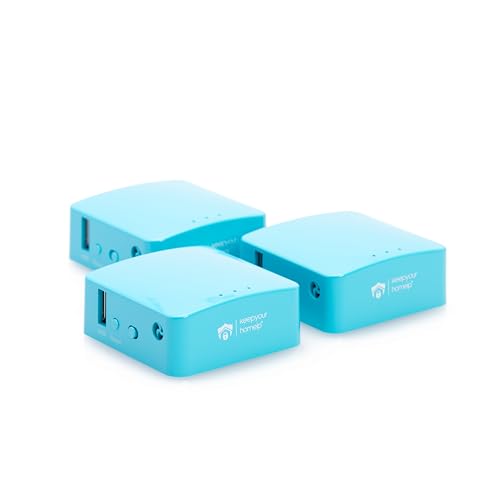
Capri CP-EL128 VPN Server Kit — The ready-made Capri kit
Honesty requires this review to open with a resemblance. The Capri CP-EL128’s title is, word for practical word, the Maui’s: a server and two travel routers, VPN, secure home network access from anywhere, keep your home IP wherever you are, and private, full VPN control. Two kits, two model names, one titled proposition. A guide that invented distinctions between them would be manufacturing evidence, so this one does the opposite — it presents the Capri as the same architecture under a second name, and lets the choice between the pair rest where it honestly can: on the listings themselves, their current terms, their support footprints and the buyer’s own research into each maker’s documentation.
That said, the architecture deserves its second full telling, because repetition in a catalogue sometimes signals where a market has settled. The home server unit as anchor, twin travel routers as the viewing ends, the home identity carried abroad — this is the shape that the remote-viewing problem, thought through carefully, keeps producing. A buyer choosing the Capri is choosing that shape with a different badge, and the questions to carry to its listing are the same ones the Maui raises: the home unit’s wiring, the setup’s demands, and the maker’s responsiveness when a tunnel misbehaves in a foreign hotel at midnight.
- Kit contents: server plus 2 travel routers as titled
- Stated purpose: secure home network access from anywhere
- Identity: keep your home IP wherever you are, as titled
- Control framing: private, full VPN control as titled
- Home unit port layout: Not stated in the listing title — verify with the maker’s documentation
- Difference from the Maui kit’s title: none stated in the listing title — verify with the maker’s documentation
Strengths
- The same complete anchor-and-travellers architecture as its kit rival.
- Home-IP continuity for camera viewing that behaves like a local visit.
- A second source for the same pattern is genuinely useful if one listing’s terms disappoint.
Trade-offs
- Its title distinguishes it from the Maui kit in no stated particular.
- No wired or wireless specification for the home unit is printed.
- The CGNAT caveat applies with the same force as to every inbound design here.
Best for: a buyer who has settled on the kit architecture and prefers this listing’s terms, availability or maker after reading both in full. Not suited for: a household hoping the second kit somehow escapes the connection-type question, because the pattern it sells is the same inbound tunnel wearing a different badge. Decide the architecture first, then let the two listings compete on their documented details.
There is a consumer lesson folded into this pair of reviews, and it generalises beyond cameras. When two products’ titles converge to the same sentence, the market is telling you the category has standardised — and standardisation moves the real competition to the unglamorous ground of documentation, support and terms. Buyers who learn to shop that ground, rather than hunting for a specification difference the titles do not contain, will make the better purchase of the two, whichever badge it wears.

IPsec VPN Server & Client Pair — The classic pair
The oldest idea in this guide arrives with the shortest title: an IPsec site-to-site VPN server and client pair. The remaining words in the listing — a security superlative in the maker’s own phrasing, and a promise that the arrangement is designed to be approachable — are marketing’s garnish, and this review repeats no superlative as fact. What matters is the architecture, which predates every kit above: two fixed locations, each with a box, joined by a permanent encrypted corridor. For camera viewing, that shape fits a specific and common life — the house and the holiday home, the home and the small office, the property and the relative’s spare room where the owner actually stays.
A permanent corridor changes the viewing experience in one subtle way the kits’ dial-up pattern does not. The cameras at the far location are simply there, on the extended network, whenever the viewer sits down at the paired location — no connection ritual, no client to launch. The price of that permanence is scope: the pair serves its two named places and no third, so the owner who views from hotels and airports as often as from the second home will find the fixed pair only half an answer. IPsec itself, named in the title, is the elder protocol family of this whole category — standardised, interoperable in principle, and unforgiving of sloppy configuration in a way the friendlier modern kits work hard to hide.
- Architecture: IPsec site-to-site VPN server and client pair as titled
- Locations served: two fixed sites, by the nature of a pair
- Security wording: the title’s own superlative, reported as marketing rather than measurement
- Approachability: designed to be approachable, as titled in the maker’s phrasing
- Port and radio specification: Not stated in the listing title — verify with the maker’s documentation
- Additional client devices: Not stated in the listing title — verify with the maker’s documentation
Strengths
- A permanent corridor between two places makes distant cameras feel permanently local.
- A matched pair removes the compatibility guessing of mixed-vendor tunnels.
- The site-to-site pattern carries every home service, not only the cameras.
Trade-offs
- Two fixed locations is the whole map; ad-hoc viewing from elsewhere is unserved.
- IPsec configuration has historically punished the careless more than newer designs do.
- The title offers no hardware specification whatsoever for planning.
Best for: two properties that should behave as one network — house and holiday home, home and office — with camera viewing as a permanent facility rather than a travel feature. Not suited for: viewing from a rotating cast of hotels and rentals, because a fixed pair has no endpoint to pack in a bag. Map your actual viewing locations before choosing the pair over a kit.
The pair also earns its place as this guide’s memento mori for standards. Protocols outlive products; an IPsec corridor configured carefully can be re-terminated on newer hardware at either end across the years, which is a kind of longevity no app-mediated viewing service promises. Buyers who think in decades — the house, the second house, the long arrangement — will recognise the appeal under the terse title, and will forgive the title its brevity for the same reason.

TP-Link Omada ER706W — The router-shaped Omada
The ER706W is the pick for the household that wants its tunnel door to also be its router, full stop. TP-Link titles it an Omada gigabit AX3000 WiFi 6 VPN router, with a USB 3.0 port supporting USB storage and LTE backup via an LTE dongle, Omada Mesh support and easy set-up. The VPN is in the product class rather than in a kit, the wireless is a real AX3000 system rather than an afterthought, and the Omada name places the unit inside a managed ecosystem — the same family as the wired Fusion below — for homes whose networks have begun to resemble small businesses in their ambitions.
Two title details speak directly to camera viewing. USB storage hints at a household already keeping footage or files on the network, served from the router itself. LTE backup is the more evocative one: a house whose cameras matter is a house whose connection matters, and a router that can fall back to a mobile data path when the main line dies keeps the door — and therefore the viewing — alive through the exact incidents, the storm and the dug-up street, that make owners want to look in on the house in the first place. The dongle is an addition rather than an inclusion, and the title says so plainly enough for a careful reader.
- Class: gigabit AX3000 WiFi 6 VPN router as titled
- USB: 1x USB 3.0, supporting USB storage and LTE backup with an LTE dongle
- Ecosystem: Omada, with Omada Mesh support stated
- Setup: easy set-up claimed in the title
- VPN server particulars: Not stated in the listing title — verify with the maker’s documentation
- Port layout beyond gigabit class: Not stated in the listing title — verify with the maker’s documentation
Strengths
- A genuine Wi-Fi 6 router and the VPN door in a single, managed unit.
- LTE backup via dongle keeps remote viewing alive when the main line fails.
- USB storage suits a household already keeping footage on the network.
Trade-offs
- The LTE path depends on a dongle and a data arrangement the title leaves to the buyer.
- AX3000 wireless is a tier below the Flint 3’s Wi-Fi 7 flagship specification.
- Its VPN particulars must be confirmed in documentation, as the title stays general.
Best for: a camera-serious household that wants one managed router to be the door, with a mobile-data fallback for the days the street’s cables fail. Not suited for: a home whose cameras are few and whose line has never failed, because the backup path and the managed ecosystem would be insurance bought against a risk the house does not run. Match the resilience to the record of your own street.
The Omada framing deserves a closing sentence of its own. A household that adopts it is buying into a way of running a network — one controller’s view of router, switches and access points — and camera viewing benefits from that coherence every time a new camera or a new room joins. The ER706W is therefore best read as the residential end of a business-minded family, and households that expect to grow into the Fusion below will find the two speak the same language.

GL.iNet Flint 3 (GL-BE9300) — The flagship Flint
The Flint 3 is what happens when the tunnel door is also asked to be the best wireless router in the house. GL.iNet titles the GL-BE9300 a tri-band Wi-Fi 7 router with five 2.5G ports in a VPN router design, quoting 9 Gbps of wireless speed in service of 8K streaming, low-latency gaming and video calls. For camera viewing, the relevant translation is headroom and wiring: five fast ports give a recorder, several wired cameras and the household’s other fixed machines proper homes, while the tri-band radios serve the people, and the VPN designation in the title keeps the door’s purpose printed on the front of the box.
A flagship’s virtues are real and so is its question: how much of this does viewing a handful of cameras actually need? The honest answer is that the cameras need the least of it — the door, a wired port or two, a stable life — while the household around them may want every gigabit the title offers. That makes the Flint 3 the consolidation purchase: one unit, bought once, that ends the router conversation for years and happens to terminate the tunnel as a matter of course. GL.iNet’s VPN-first heritage, visible across this batch’s shortlists, is the reassurance that the door was designed by people who consider it a main entrance rather than a side hatch.
- Class: tri-band Wi-Fi 7, GL-BE9300 as titled
- Ports: 5 x 2.5G as titled
- Wireless figure: 9 Gbps wireless speed as titled
- Titled workloads: 8K streaming, low-latency gaming and video calls
- Role: VPN router named in the title
- Device rating: Not stated in the listing title — verify with the maker’s documentation
- Coverage: Not stated in the listing title — verify with the maker’s documentation
Strengths
- Five 2.5G ports wire cameras, a recorder and the fixed household properly.
- Tri-band Wi-Fi 7 gives the human traffic three radios of headroom.
- A VPN-first maker treats the tunnel as a headline role, not an appendix.
Trade-offs
- Flagship capacity is far beyond what camera viewing alone requires.
- No coverage or device figures are printed for planning the wireless side.
- One powerful unit remains one point of failure for door and network alike.
Best for: a household consolidating on one flagship that routes, broadcasts and terminates the camera tunnel in a single purchase. Not suited for: a cameras-only side network in a shed or annex, because a tri-band Wi-Fi 7 flagship is a cathedral built for a parish of four cameras. Let the main house’s ambitions, not the cameras, justify this one’s scale.
There is a pleasure argument for the Flint 3 that this guide will permit itself exactly once. Some households enjoy the machine at the centre of the house being excellent — over-specified, current, quietly admired by the one person who knows what it is. If that household also wants to look in on its cameras from a beach, this is its pick, and no apology is required for buying the flagship when the flagship is also, on the titled evidence, a thoroughly competent door.

Omada Fusion 2.5G VPN Router — The wired Fusion
The Fusion closes the reviews at the serious end: an Omada Fusion 2.5G multi-WAN wired VPN router with five 2.5Gb ports, the Omada controller built in, a quad-core CPU, a touch screen, and ACL, QoS and IPS/IDS named among its functions. Nothing here broadcasts; this is the boundary appliance for a property whose cameras, recorder and network are infrastructure rather than gadgets. Multi-WAN is the headline for viewing reliability — the door can be reached through more than one connection — and the built-in controller means the whole Omada estate, access points included, answers to the box at the centre of it.
The security vocabulary in the title deserves the same care this batch applied elsewhere. IPS and IDS name intrusion functions whose presence suits a property exposing a door to the world, and ACL — access control lists — is the unglamorous mechanism by which the cameras’ segment is told exactly which visitors it may speak to. A touch screen on a wired router sounds like theatre until the first time the network must be interrogated in the room where it lives, without a laptop, during an incident. For the large house, the smallholding, the business premises with a yard full of cameras, the Fusion is the pick that treats remote viewing as one duty of a properly run boundary.
- Form: multi-WAN wired VPN router as titled
- Ports: 5×2.5Gb ports as titled
- Management: Omada Controller built in; touch screen stated
- Processor: quad-core CPU as titled
- Functions named: ACL, QoS and IPS/IDS
- Wireless: none; this is a wired appliance
- WAN count: multi-WAN stated; exact arrangement in the listing
Strengths
- Multi-WAN plus five 2.5Gb ports is the strongest wired foundation in this guide.
- A built-in controller unifies the property’s whole Omada network under the door.
- Named access-control and intrusion functions suit a camera estate of real size.
Trade-offs
- It provides no Wi-Fi; access points are a separate purchase and project.
- Its business register will overwhelm a two-camera household completely.
- A touch screen cannot compensate for an unconfigured controller behind it.
Best for: a large property or small business running a real camera estate on a managed, multi-WAN boundary. Not suited for: a flat with a doorbell and one indoor camera, because every capability in the title presumes an estate that setting does not contain. Scale the door to the property, and let the ER706W carry the households this one would crush with kindness.
Placed beside its Omada sibling, the Fusion completes the guide’s spectrum. At one end, kits that hand the owner a finished pattern; at the other, a controller-built boundary for owners who are, in effect, their property’s network department. Both ends honour the same premise — tunnel first, cameras private — and the distance between them is not correctness but scale, which is the most reassuring thing a shortlist can demonstrate about its own logic.
The Six Doors, Compared
| Pick | Shape of the pattern | Wireless | Wired headline |
|---|---|---|---|
| Maui MA-B256 VPN Server Kit | Home server plus two travel routers | Not printed in the title | Not printed in the title |
| Capri CP-EL128 VPN Server Kit | Home server plus two travel routers | Not printed in the title | Not printed in the title |
| IPsec VPN Server & Client Pair | Permanent site-to-site corridor | Not printed in the title | Not printed in the title |
| TP-Link Omada ER706W | Router as the door, LTE backup path | AX3000 Wi-Fi 6 | Gigabit class, USB 3.0 |
| GL.iNet Flint 3 (GL-BE9300) | Flagship router as the door | Tri-band Wi-Fi 7 | 5 x 2.5G |
| Omada Fusion 2.5G VPN Router | Wired boundary with built-in controller | None | 5×2.5Gb, multi-WAN |
How Would You Bring a Viewing Setup Online, in Order?
First, the connection audit from this guide’s caveat section: confirm the home address situation, and whether an inbound path exists at all. Second, the door: install the chosen anchor — kit server, pair’s home end, or VPN router — behind the connection, with the cameras and any recorder on the home network it protects, each with a fixed address and a name a tired person can recognise. Third, the credentials: individual accounts for each viewer, never one shared password for the whole family, so a lost phone is a revocation rather than a rebuild.
Fourth, the rehearsal, conducted from genuinely outside the house — a phone hotspot in the garden does not count as abroad, but a café across town does — opening each camera in turn and noting which ones stutter under the home upload’s real ceiling. Fifth, the paperwork: the tunnel’s name, the accounts, the camera addresses and the recovery steps, written where the household keeps such things. Owners who have already built the sibling pattern for a home server, in best routers for running a web server, will recognise this choreography; the cameras simply join a doorway discipline that was worth having anyway.
What Mistakes Turn Remote Viewing Into Remote Worry?
The unforgivable one is exposing the cameras directly — a forwarded port per camera, each with a password chosen in a hurry — because it converts the most private devices in the home into public endpoints. The second mistake is subtler: building the whole arrangement on one shared credential, so that every phone in the family holds the same key to the house and losing any one of them means changing all of them. The third is skipping the connection audit and discovering carrier-grade NAT only after the kit is unpacked, the cameras are mounted and the viewing has been promised to a spouse.
A fourth mistake is expecting the tunnel to fix the cameras themselves. A camera that drops its connection on the home network will drop it through the tunnel too, only now from further away and with more variables to blame. The viewing pattern should be built on cameras that already behave locally; the door’s job is to extend a working system, not to redeem a flaky one. And the final mistake is forgetting the arrangement exists — accounts for people who moved out, a travel router in a drawer still holding its credential, a door faithfully guarding a house whose guest list nobody has reviewed in two years.
What Changes When the Cameras Feed a Recorder?
A recorder — the box that gathers the cameras’ footage in a cupboard — simplifies remote viewing in one decisive way: the tunnel’s destination becomes a single machine. Instead of addressing each camera through the corridor, the distant viewer opens the recorder, and the recorder presents the whole estate in its own arrangement. That is a tidier security posture as well as a tidier experience, since one well-kept device answers the door’s visitors instead of a dozen cameras of varying vintages each maintaining their own software. Households designing a system from scratch should weigh that tidiness heavily; households with cameras already scattered across a house can still adopt the pattern, viewing the recorder where one exists and the individual cameras where it does not.
The recorder pattern also disciplines the upload problem. A recorder can present a composed view — several cameras at modest quality, one at full — that respects the home line’s ceiling in a way that opening six raw camera streams cannot. Owners who find their first rehearsal stuttering should therefore look to the recorder’s viewing settings before blaming the door or the line. The tunnel was never the bottleneck in that story; it was merely the messenger, faithfully delivering more footage than the road home could carry.
Who Else in the Household Gets a Key to the Door?
Every viewing arrangement eventually faces its guest list. The partner, obviously. The adult child who feeds the cat in August, for August. The housesitter, for the fortnight. The neighbour with the spare key, perhaps, for the alarm that cries wolf. Each name on that list is a judgement about trust expressed as a credential, and the tunnel pattern’s great administrative virtue is that such judgements can be individual — an account for the housesitter that exists for the fortnight and then, deliberately, does not. Viewing systems built on one shared password cannot express that sentence at all; the password is either given, and given forever, or withheld entirely.
There is an etiquette to agree alongside the accounts. Cameras that watch a house also watch the people in it, and the household that installs viewing owes its members a plain conversation about which cameras exist, which are viewed from afar, and when. The technology in this guide is neutral on that conversation, but the guide is not: a door used to check the dog is a comfort, and the same door used to audit a teenager’s afternoon is a policy, and families are better when the two are not confused. Buy the tunnel for the first purpose, govern it in the open, and the cameras will remain what they were bought to be — the house’s memory, not its management.
What Does Viewing From the Road Actually Feel Like, Done Well?
Uneventful, which is the entire point. The travel unit joins whatever network the hotel or rental offers, the tunnel rises to the house, and the cameras appear with the same ordinariness as the home screen door’s creak. The owner checks the gate after the storm warning, confirms the delivery landed inside the porch, glances at the dog asleep in the forbidden chair, and closes the viewer without having thought about networking once. Every pick in this guide is ultimately purchased in service of that absence of thought — the kits by pre-assembly, the routers by consolidation, the pair by permanence.
Done badly, the same ritual is a small daily defeat: a client that will not connect on this network, a camera that answers on Tuesdays, a password that lives in a message thread from March. The distance between those two experiences is rarely the hardware’s specification; it is the rehearsal, the individual credentials, the written recovery notes and the connection audit — the unglamorous paragraphs of this guide. Readers who perform them will find the road experience boring within a week, and boring, in this category, is the sound of a purchase that worked.
When Is the Camera Maker’s Own Cloud the Right Answer Instead?
When the household’s honest requirement is one camera, one viewer and no appetite for infrastructure — the flat watching a front door, the small shop checking a till — the maker’s cloud, with its subscription and its sunset risk, can be the proportionate tool, and this guide’s tunnel apparatus would be a cathedral on a garden shed. The crossover arrives with the second and third camera, the recorder, the second property, the second viewer, the first discontinued app. Owners can feel it as a friction: each addition costs a separate negotiation with a separate service. The tunnel pattern’s economics are the reverse — one door, built once, under which every subsequent camera arrives as a local citizen. Households near the crossover should buy for the side of it they are growing toward, which is usually, though not always, the door.
Final Recommendation
Choose by the shape of your viewing life. The kits — Maui and Capri, near-identical in title and equal in architecture — serve the owner who views from many places and wants the pattern pre-assembled. The IPsec pair serves two fixed properties that should be one network. The ER706W serves the household that wants its router to be the door, with a backup path for bad days; the Flint 3, the household consolidating on a flagship; and the Fusion, the estate whose cameras are infrastructure. Every one of them honours the premise this guide opened with.
Build the door before the cameras multiply, keep the credentials individual, audit the guest list yearly — and the house will be there when you look for it, down a private corridor, exactly as unremarkable and as reassuring as walking in through your own front hall.
How Should the Cameras’ Own Network Manners Be Arranged?
Behind the door, the cameras deserve a neighbourhood of their own. A separate segment or guest-style network for the camera estate — the arrangement the Fusion’s titled access controls exist to enforce, and that humbler routers approximate with their guest networks — means the cameras can be reached by the recorder and the tunnel’s visitors, and by very little else. They have no business browsing the household’s computers, and the household’s laptops have no need to browse them back. That separation is the interior counterpart of the tunnel’s exterior discipline, and a viewing setup that has both is protected in depth rather than at a single wall.
The same tidiness applies to names and addresses. A camera called by its location — gate, porch, barn, hall — in the recorder’s list and the router’s device table turns a midnight alert into information instead of a guessing game, and fixed addresses mean the tunnel’s visitor always finds the same citizen at the same door. These are clerical virtues, costing an hour on installation day, and they repay it on the one night the viewing actually matters, when the owner is far away, the light is bad, and the question is which camera, exactly, just saw something move.
What Should Happen When a Camera or a Credential Is Retired?
Devices leave estates as surely as they join them. A camera replaced, a travel router lost, a housesitter’s season ended, a phone traded in — each departure should trigger the same small ceremony: the credential revoked, the address released, the recorder’s list updated, the note in the household file amended. The tunnel pattern makes that ceremony possible, because access was individual from the start; the shared-password pattern makes it nearly impossible, which is one more reason this guide has insisted on individual accounts from its second section onward. Estates that hold the ceremony stay legible to their owners. Estates that skip it accumulate ghost viewers — forgotten phones and departed helpers still holding keys — until the door’s guest list describes a household that no longer exists.
Sell or give away a travel unit, in particular, only after it has been reset and its credential revoked at the home end; the little box in a stranger’s drawer should be a paperweight, not a key. The same care, reversed, applies when a second-hand unit joins the house: reset first, enrol second. None of this is advanced practice. It is the ordinary hygiene of owning a door, practised by people who expect to keep the house for a long time.
Frequently Asked Questions
Can I view my cameras without any of this, using their app?
Often, yes — many cameras offer cloud viewing of their own. This guide serves the owner who prefers the house’s own doorway: no dependence on a camera maker’s cloud surviving, no per-brand apps, and one tunnel through which every camera, recorder and home service can be reached on the same terms.
What is carrier-grade NAT and why does it matter here?
It is the arrangement where your provider shares one public address among many customers, keeping a layer of its own equipment between your router and the internet. Inbound tunnels then have nowhere to arrive. Check your connection type before buying; some providers will supply a public address if asked, and that answer decides the whole design.
How many cameras can one tunnel carry?
The tunnel itself is rarely the limit; the home connection’s upload speed is. Each camera viewed simultaneously spends some of that upload, so the practical count is set by the line and the cameras’ own settings. View fewer at once, or at gentler quality, and a modest line carries a surprising estate.
Do the kits replace my existing router?
Their titles describe a VPN server unit plus travel routers, not a full wireless specification, so treat the home unit’s networking role as a question for the listing rather than an assumption. Many households will run the kit’s server alongside or behind the router they already own.
Is a permanent site-to-site pair better than a kit?
For two fixed properties, the pair’s always-on corridor is the more elegant answer, and the cameras feel permanently local. For viewing from wherever life happens — hotels, rentals, relatives — the kits’ travel units serve places a fixed pair cannot. The map of your own viewing decides, and it should be drawn honestly before either is ordered.
One final rehearsal belongs in the calendar rather than the installation week: the annual viewing audit. Once a year, on a quiet day, list every account that can open the door, every travel unit still enrolled, every camera still answering, and compare the lists against the household as it currently is. Remove what no longer belongs. Test the tunnel from outside. Note the date. The exercise takes less time than the weekly shop and it is the difference between a viewing system that remains the owner’s instrument and one that slowly becomes a folk tradition nobody fully remembers setting up. The routers and kits in this guide will faithfully serve either version; the audit is how the owner chooses the first.
And keep the recovery note beside that audit — the tunnel’s name, the anchor’s location, the order in which things should be restarted after a power cut, written for the person who will be standing in the house while the owner is the one far away. Remote viewing is, in the end, a relationship between two places: the house being watched and wherever its people have gone. The paperwork is how those two places stay in conversation across the years, the moves, the new cameras and the changed passwords, long after the excitement of the installation day has been forgotten by everyone except the door itself, still standing, still asking each visitor, politely, who they are.
There is a smaller, kinder test worth running before any of the annual ones, on the first trip after installation: view the house once, briefly, for no reason at all. Not to check a delivery or investigate a noise — simply to confirm that the corridor works and that the ordinary sight of the hall, the garden and the sleeping dog is as calm as it should be. Systems that are only ever used in a worry acquire the worry’s colouring; a viewing habit that includes the occasional idle, affectionate glance keeps the cameras in their proper emotional category, as the house’s way of waving from a distance rather than as its alarm bell. The door, after all, was built for the people who live behind it, and the best evidence that it works is how rarely it needs to matter.
File that first-trip note with the audit page, dated, while the details are fresh. Years from now it will read as the founding document of the household’s quietest system — the one that let its people leave, travel and live elsewhere for a while, secure in the knowledge that home could be looked in on, gently, through a door that only ever opened for its own.
That is the standard to hold every pick in this guide to, in the end: not the length of its title or the shine of its specification, but whether, a year from installation, the household still trusts its door without thinking about it — and still remembers, on the rare evening it matters, exactly why that trust was earned.
Trust of that kind is never an accident; it is the accumulated result of the audits, rehearsals and revocations this guide has described, performed on schedule by people who understood what the door was for.
Related Guides
The doorway theme continues in best security focused routers for properties whose boundary has outgrown a router entirely, and in best 1080p ip cameras for the cameras themselves, chosen to live behind the doors this guide has built.


