What's inside
- Key Takeaways
- Quick Picks
- What Does Prioritisation Actually Do Inside a Busy Network?
- Why Do the Names Differ So Much Between Brands?
- Six Routers That Claim to Know What Goes First
- The Evidence, Arranged in One Table
- How Would You Configure Priority Without Making Enemies at Home?
- What Do Buyers Most Often Get Wrong About QoS?
- Why Does a Fast Line Still Stutter Under Load?
- What Changes When the Priority Traffic Is a Job, Not a Game?
- Where Does Prioritisation Stop Helping?
- How Do Wired and Wireless Priority Differ in Practice?
- Final Recommendation
- How Should a Household Test Whether Its QoS Is Working?
- What Will This Category Look Like in Five Years?
- How Do Two Gamers, or a Gamer and a Streamer, Share One Referee?
- Frequently Asked Questions
- Related Guides
As an Amazon Associate I earn from qualifying purchases. This post may contain affiliate links at no extra cost to you.
gizmoverdict.com is reader-supported. When you buy through links on our site, we may earn an affiliate commission.
Where to buy: The six routers below are listed on Amazon at the linked names. QoS implementations hide in firmware menus rather than on boxes, so the listing’s feature pages — and the maker’s manual linked from them — are worth the extra minutes before a model is chosen for its prioritisation alone.
Quality of service is the least photogenic feature a router can have, and for a crowded household it may be the most valuable. The best quality of service routers are not the fastest routers here in any simple sense; they are the ones whose titles name a mechanism for deciding what goes first when everything wants the connection at once. A game, a work call and a film can share a modest line gracefully if something in the middle is empowered to rank them. Without that ranking, the connection is a queue with no manners, and the loudest flow wins.
A discipline governs this whole guide, stated now so the reviews can be trusted later: QoS claims appear only as titled. Where a listing names AI QoS, that phrase is examined. Where it names Game Boost, or Game Acceleration, or plain QoS, those words carry the review. Where a title names no prioritisation mechanism at all — and one famous model in this set does not — the review says so and judges the router on its other titled merits. No latency figure, no ping number, no responsiveness promise appears anywhere in these pages, because no title here supplies one and this guide does not invent measurements.
The cast spans three generations of wireless and at least four philosophies of priority. MSI leads with an AI-branded system on a Wi-Fi 6E design. ASUS fields two Wi-Fi 7 machines whose Game Boost wording does the QoS work, one a twin-10G flagship and one a mesh-capable model with eight 2.5G ports. TP-Link offers a Wi-Fi 7 gaming router with Game Acceleration and a dedicated gaming port, plus a previous-generation flagship whose bare title is its own kind of evidence. NETGEAR closes the set with the only title that uses the actual words quality of service’s abbreviation — QoS — on an AC-era design that costs its owner no illusions about modernity.
Key Takeaways
- Named prioritisation systems appear in five of six titles: AI QoS, Game Boost twice, Game Acceleration, and QoS itself on the NETGEAR.
- The TP-Link Archer AX11000 title names no QoS mechanism at all; its review rests on its tri-band gaming design alone.
- ASUS’s GT-BE19000AI pairs its Game Boost with the deepest wired array here: two 10G ports and four 2.5G ports as titled.
- The ROG Strix GS-BE12000 trades peak ports for plenty — eight 2.5G ports — plus mesh in its title.
- TP-Link’s GE650 is the only pick with a titled dedicated gaming port, a physical answer to prioritisation.
- No pick’s title states a latency figure, so none is promised anywhere in this guide.
Quick Picks
| Pick | Badge | Why it made the cut |
|---|---|---|
| MSI Radix AXE6600 (AI QoS) | The AI-prioritised MSI | AI QoS named in the title of a tri-band Wi-Fi 6E gaming router with a 1.8 GHz quad-core processor. |
| ASUS GT-BE19000AI | The twin-10G ASUS | Game Boost on a Wi-Fi 7 flagship with two 10G ports, four 2.5G ports and 3,500 square feet of claimed coverage. |
| ASUS ROG Strix GS-BE12000 | The eight-port ASUS | Game Boost again, this time with eight 2.5G ports and mesh in a 12 Gbps tri-band design. |
| TP-Link Archer GE650 (BE11000) | The gaming-port TP-Link | Game Acceleration plus a dedicated gaming port and panel, on an 11 Gbps Wi-Fi 7 design with two 5G ports. |
| TP-Link Archer AX11000 | The bare-title flagship | A Wi-Fi 6 tri-band gigabit gaming router whose title promises nothing about QoS — included with that caveat in plain view. |
| NETGEAR Nighthawk R7350 | The literal QoS NETGEAR | The only title here that simply says QoS, on an AC2400 design with five gigabit ports and a dual-core processor. |
What Does Prioritisation Actually Do Inside a Busy Network?
Picture the connection as a single-lane bridge. Without prioritisation, vehicles cross in arrival order, and a slow lorry uploading a photo library delays the ambulance of a voice call exactly as long as physics dictates. QoS is the traffic officer on that bridge: it inspects what each flow is, and waves the time-sensitive ones through ahead of the patient ones. The game packet and the call packet are tiny but urgent. The film stream is large but buffered, able to wait a breath without anyone noticing. The backup job is enormous and entirely indifferent to arriving at three in the morning instead. A good prioritisation system knows these temperaments and orders the bridge accordingly.
Two families of mechanism do that ordering, and the titles in this guide gesture at both. Rule-shaped systems let the owner declare priorities — this device first, that application always — and hold the owner responsible for the wisdom of the rules. Adaptive systems, the kind the AI-branded titles are reaching for, watch the traffic and attempt to classify it themselves, trading the owner’s control for freedom from configuration. Neither family can create bandwidth. Both can decide who feels its absence, which is the entire honest promise of this category, and the reason a household with a slow line and a gamer in it may benefit more from prioritisation than from a faster router with no manners at all.
Why Do the Names Differ So Much Between Brands?
Because QoS became a marketing surface before it became a standard vocabulary. One maker’s AI QoS is another’s Game Boost and a third’s Game Acceleration, and the titles give no reliable way to convert between them — a frustration this guide refuses to hide by pretending the phrases are interchangeable. What can be compared is structure. A titled system exists or it does not. A dedicated gaming port exists or it does not, and that one is admirably unambiguous: a physical socket whose traffic the router promises to favour, no classification required. Readers comparing across brands should therefore rank evidence in that order — named system, physical mechanism, then everything else the title offers — and should treat the gaming pages in best asus gaming routers as the wider context for two of these picks.
Six Routers That Claim to Know What Goes First

MSI Radix AXE6600 (AI QoS) — The AI-prioritised MSI
MSI’s Radix puts its prioritisation claim first among equals: a WiFi 6E tri-band gaming router with AI QoS, RGB lighting, a 1.8 GHz quad-core processor, MU-MIMO, tri-band gigabit wireless and an 8-stream design, billed as a high-speed long-range gaming router. The AI prefix is the review’s centre of gravity. In place of rules the owner writes, the title promises a system that classifies traffic itself — the adaptive philosophy described above — and the quad-core processor named beside it is the plausible engine for that classification, since inspecting flows and reordering queues is processor work before it is radio work.
The surrounding specification is a generation behind the Wi-Fi 7 picks and makes no apology for it. Tri-band 6E with gigabit-class ports describes a router for a household whose line and devices are current-mainstream rather than bleeding-edge, and whose problem is contention rather than capacity. RGB lighting will divide households exactly as it always does. What the title does not give the QoS story is any granularity: no named gaming port, no stated coverage, no device figure. The claim stands or falls as a system, and a buyer whose household mixes a competitive gamer with two homeworking parents is the reader this title was written for.
- Class: WiFi 6E tri-band gaming router, 8-stream as titled
- Prioritisation: AI QoS named in the title
- Processor: 1.8 GHz quad-core as titled
- Radio features: MU-MIMO named; tri-band gigabit wireless
- Extras: RGB lighting stated
- Coverage: Not stated in the listing title — verify with the maker’s documentation
- Dedicated gaming port: Not stated in the listing title — verify with the maker’s documentation
Strengths
- AI QoS is the headline system, not a menu item discovered after purchase.
- A quad-core processor at a stated clock gives the classification work real hardware.
- Tri-band design lets the prioritised traffic have a cleaner band to be prioritised on.
Trade-offs
- Wi-Fi 6E and gigabit ports trail the Wi-Fi 7 picks in raw modernity.
- An adaptive system offers less manual control than rule-writing owners may want.
- No coverage figure is printed for larger homes to plan against.
Best for: a mixed household — gaming, calls, streaming — that wants prioritisation handled adaptively rather than configured rule by rule. Not suited for: a multi-gigabit wired setup, because the title’s wired story stops at the gigabit class. Read the listing’s QoS pages to see how much manual override the AI system permits before choosing it over a rule-based rival.
MSI’s presence here is itself worth a sentence. A maker whose reputation was built inside gaming PCs is applying the same instinct — throw processor headroom at the problem — to the router, and in the QoS category that instinct is unusually well aimed. Classification quality is the whole game in adaptive prioritisation, and it is bought with exactly the silicon this title bothers to specify.

ASUS GT-BE19000AI — The twin-10G ASUS
ASUS titles this machine like a flagship that happens to do QoS, rather than a QoS router that happens to be fast: a tri-band WiFi 7 AI gaming router with 10G in its opening words, Game Boost named as its prioritisation system, coverage up to 3,500 square feet, two 10G ports, four 2.5G ports, and Game Boost described as serving low-latency gaming and streaming, with VPN support closing the list. The Game Boost wording is the QoS evidence, and this review treats it as such — a named system aimed at game and stream traffic — without converting the title’s low-latency phrase into any figure, because the title itself offers none.
The wired array is the deepest in this guide and it changes what prioritisation can mean. Six fast sockets let the prioritised devices — the gaming PC, the streaming box, the work machine — live on cables, where QoS has the least work to do, while the wireless crowd shares three bands behind them. Coverage of 3,500 square feet as titled is the largest claim here, suited to the big-house gaming den this router was plainly designed to anchor. The AI in the model name pairs with the adaptive end of the QoS spectrum described earlier, though the title assigns the AI label to the router generally rather than to the boost system specifically, and the review keeps that distinction intact.
- Class: tri-band WiFi 7 AI gaming router as titled
- Prioritisation: Game Boost named, described for gaming and streaming
- Ports: 10G port x2 and 2.5G port x4 as titled
- Coverage: up to 3,500 sq. ft. as titled
- Extras: VPN support named
- Device rating: Not stated in the listing title — verify with the maker’s documentation
- Mesh capability: Not stated in the listing title — verify with the maker’s documentation
Strengths
- Two 10G ports is the strongest wired foundation in this guide.
- Game Boost is a named, gaming-and-streaming-aimed prioritisation system.
- The largest titled coverage suits the large homes flagships are bought for.
Trade-offs
- Flagship scope is wasted on a small flat with a single gaming corner.
- No mesh wording appears for houses that defeat any single unit.
- The title’s AI branding does not specify which functions the AI actually runs.
Best for: a large, gaming-led household that wants its priority system riding on the deepest wired and wireless hardware here. Not suited for: a two-room flat on a basic broadband line, because every headline capability in the title presumes space, devices and line speed that setting does not have. Let the floor plan and the internet contract vote before the flagship charm does.
There is a coherence to this pick that deserves naming. Game Boost on modest hardware asks software to rescue an overloaded bridge; Game Boost here supervises a bridge with six lanes and three radios, where prioritisation becomes refinement rather than triage. Owners who can afford the whole stack get QoS in its most comfortable form — rarely needed, instantly available, and backed by wired headroom that makes its interventions small and early instead of large and late.

ASUS ROG Strix GS-BE12000 — The eight-port ASUS
The second ASUS answers its sibling with a different shape of generosity. The ROG Strix GS-BE12000 is titled a WiFi 7 gaming router, tri-band at 12 Gbps, mesh-capable, covering up to 3,300 square feet, with eight 2.5G ports — eight — and the same Game Boost system described for low-latency gaming and streaming, plus VPN support. Where the flagship concentrated speed into two spectacular sockets, the Strix distributes it: a whole desk row of wired machines, consoles and streaming boxes can each have a faster-than-gigabit port, and the prioritisation system then arbitrates among citizens who are all properly connected.
Mesh in the title adds the second structural virtue. A gaming household spread across a large or awkward house can extend this router rather than replace it, keeping one QoS philosophy across the whole floor instead of bolting a foreign extender onto the network’s edge. The 12 Gbps class sits a step below the flagship’s tier, and the coverage claim a step below its 3,500, and in exchange the buyer gets the port census and the growth path. For a household whose gaming happens in two rooms — the den and a teenager’s cave of a bedroom — that exchange may be the wisest one in this guide.
- Class: tri-band WiFi 7 gaming router, 12 Gbps as titled
- Prioritisation: Game Boost named, described for gaming and streaming
- Ports: 2.5G port x8 as titled
- Coverage: up to 3,300 sq. ft. as titled
- Expansion: mesh stated in the title
- Extras: VPN support named
- 10G ports: Not stated in the listing title — verify with the maker’s documentation
Strengths
- Eight 2.5G ports wire an entire gaming household without a switch.
- Mesh capability lets coverage grow without abandoning the QoS setup.
- Game Boost gives the wired crowd a named arbitration system.
Trade-offs
- No 10G socket appears for a single very fast uplink or server.
- Its band class trails the flagship sibling’s headline tier.
- Eight fast ports presume a household with the devices to fill them.
Best for: a wired-heavy gaming home spread over a large floor, where several machines deserve fast ports and priority together. Not suited for: a single-desk setup built around one 10G-fed workstation, because the title’s fastest socket is 2.5G and no upgrade path changes that. Count the wired gaming devices in the house; if the count embarrasses a normal router, this is the shortlist’s answer.
The Strix also makes the guide’s quietest argument about what QoS is for. Prioritisation matters most where contention is real, and contention is real where many capable devices share one connection — exactly the household eight fast ports describe. ASUS has, in effect, titled the problem and the referee in the same breath, and the pairing is more honest than a prioritisation claim attached to a router with two sockets and a prayer.

TP-Link Archer GE650 (BE11000) — The gaming-port TP-Link
TP-Link’s GE650 contains this guide’s favourite piece of QoS evidence, because it is made of metal. The title describes a tri-band BE11000 Wi-Fi 7 gaming router, 6-stream at 11 Gbps with 320 MHz channels, two 5G ports and three 2.5G ports, USB 3.0 — and then, alongside Game Acceleration in the software column, a gaming port and a gaming panel in the physical one, with RGB lighting and HomeShield completing the list. A dedicated gaming port is prioritisation you can point at: the machine plugged into that socket is the machine the router favours, no classification algorithm consulted, no rule written.
That physical certainty suits a particular household perfectly — one gaming PC that matters, in a home whose other traffic is somebody else’s problem. Game Acceleration then handles the wireless and secondary flows with the adaptive approach, giving the GE650 a two-layer story no other pick here tells: hardware priority for the chosen machine, software priority for everything else. The port array behind it is strong, two 5G sockets being an unusual middle tier between the 2.5G crowd and the 10G flagships, and the 320 MHz channel width places its wireless firmly in Wi-Fi 7’s wide-lane territory.
- Class: tri-band Wi-Fi 7 gaming router, BE11000, 6-stream, 11 Gbps as titled
- Prioritisation: Game Acceleration named; dedicated gaming port and panel stated
- Ports: 2x5G plus 3×2.5G as titled
- Channels: 320 MHz stated
- Extras: USB 3.0, RGB lighting and HomeShield named
- Coverage: Not stated in the listing title — verify with the maker’s documentation
- Device rating: Not stated in the listing title — verify with the maker’s documentation
Strengths
- A dedicated gaming port is the least ambiguous prioritisation mechanism in this guide.
- Game Acceleration covers the flows that are not on the chosen socket.
- Two 5G ports give wired headroom between the 2.5G and 10G tiers.
Trade-offs
- One gaming port crowns one machine; households with two serious players must negotiate.
- No coverage figure is printed for planning a larger home.
- RGB and a gaming panel are theatre a work-first household may not want on the shelf.
Best for: a household with one gaming machine whose priority should be physical and absolute, backed by adaptive handling for the rest. Not suited for: two equally serious gaming PCs in different rooms, because a single dedicated port cannot crown both and the title names no second. Decide whose machine gets the socket before the router arrives and the argument starts.
The gaming panel deserves its half-sentence of defence. A visible, physical interface for the priority system — something a household member can see and touch — makes QoS a household fact rather than a buried menu, and features that are visible get used, adjusted and understood. TP-Link appears to grasp that prioritisation is as much a social arrangement inside a home as a technical one, and the GE650 is designed, unusually, for both halves of that truth.

TP-Link Archer AX11000 — The bare-title flagship
Here is the guide’s honesty exercise, printed in full. The Archer AX11000’s title, in its entirety, calls it a Wi-Fi 6 tri-band gigabit gaming router. No QoS. No boost, no acceleration, no AI. A buying guide that quietly credited this model with a prioritisation system based on its reputation would be inventing the very evidence it claims to judge by, so this review does the opposite: the AX11000 is included because a tri-band gaming flagship of its generation is a legitimate contender for a busy household’s traffic, and it is flagged, in the open, as the one pick whose title gives this keyword’s central feature no mention whatsoever.
Judged on what its title does say, the case is structural. Tri-band design spreads a household’s flows across three radios, which relieves contention by architecture rather than by arbitration — the bridge gets more lanes instead of a traffic officer. Gigabit ports and a gaming flagship’s general specification made it, in its era, the default big-house TP-Link. A buyer who values that architecture, and who confirms any prioritisation features directly on the listing rather than through this guide, may still choose it rationally. A buyer shopping specifically for a named QoS system should pass it by for the five picks whose titles actually make the claim.
- Class: Wi-Fi 6 tri-band gigabit gaming router as titled
- Prioritisation system: Not stated in the listing title — verify with the maker’s documentation
- Ports: gigabit class as titled; count unitemised
- Coverage: Not stated in the listing title — verify with the maker’s documentation
- Device rating: Not stated in the listing title — verify with the maker’s documentation
- Processor: Not stated in the listing title — verify with the maker’s documentation
Strengths
- Tri-band architecture relieves contention structurally, with a third radio for the crowd.
- A previous-generation flagship position can mean a gentler market price than the Wi-Fi 7 set.
- Its gaming design centres the household this keyword mostly serves.
Trade-offs
- The title names no QoS system, the central feature of this guide.
- Wi-Fi 6 and gigabit ports are the oldest specification tier among the branded flagships here.
- Almost every planning figure an office or large home needs is absent from the title.
Best for: a tri-band architecture purchase at a previous-generation position, made by a reader who verifies prioritisation on the listing personally. Not suited for: a purchase justified by QoS alone, because the listing title — the evidence this guide is built on — never claims any. If priority is the point, the five titled systems above are the honest shortlist and this is the footnote.
Keeping the AX11000 in the guide, caveat and all, is a deliberate editorial act. Shortlists that silently drop the famous name leave readers to find it elsewhere, un-caveated, on pages happy to repeat its reputation as fact. Better to meet it here, with its title quoted at full length and its gap named in plain words, and let the reader decide with the evidence arranged honestly in front of them.
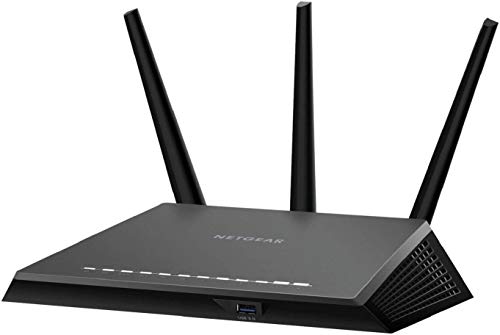
NETGEAR Nighthawk R7350 — The literal QoS NETGEAR
After five titles of branded euphemism, NETGEAR’s R7350 simply says the words. Its title describes an AC2400 router with fast beamforming Wi-Fi for gaming and 4K UHD streaming, 2,400 Mbps, 2,500 square feet of coverage, QoS — unadorned, unpatented, right there in the list — a dual-core processor, 2.4 and 5 GHz bands, five gigabit ports and a USB 3.0 port, under the Smart WiFi Router banner. It is the oldest design in this guide by a clear margin, and the only one whose prioritisation claim needs no translation from marketing into English.
The rest of the specification is a time capsule that still functions. AC2400 dual-band wireless will not trouble the Wi-Fi 7 picks on any chart, and this review will not pretend otherwise; but five gigabit ports is a wired census several modern routers would envy, beamforming was a real technology for aiming signal at devices, and 2,500 square feet was and remains a plausible single-router footprint. For a small household on a modest line — the setting where QoS does its most dramatic work, because scarcity is what makes priority matter — an inexpensive, honestly labelled AC router with a named QoS system is a coherent purchase rather than a nostalgic one.
- Class: AC2400 dual-band router as titled
- Prioritisation: QoS named directly in the title
- Titled speed: 2400 Mbps across 2.4 and 5 GHz
- Coverage: 2500 sq ft as titled
- Processor: dual core as titled
- Ports: 5 gigabit plus USB 3.0 as titled
- Radio feature: beamforming named
- Wi-Fi 6 or later features: Not stated in the listing title — verify with the maker’s documentation
Strengths
- The plainest QoS claim in the guide, stated in the category’s own vocabulary.
- Five gigabit ports wire a small household’s key machines without a switch.
- Its AC-era position suits modest lines where prioritisation matters most.
Trade-offs
- Dual-band AC wireless is two generations behind the Wi-Fi 7 picks.
- No third band exists to separate the gaming flow from the crowd.
- Its dual-core processor is the lightest engine here for heavy classification work.
Best for: a small home on an ordinary broadband line where one named, no-nonsense QoS system matters more than wireless generations. Not suited for: a house full of Wi-Fi 6E and Wi-Fi 7 devices expecting their radios to be met at their own level, because an AC2400 design speaks an older wireless language to all of them. Match this one to the line and the device fleet you have, not the one in the brochure.
The R7350 closes the reviews as a useful corrective. Prioritisation is not a new invention wearing AI clothing; routers have ranked traffic for years, and a household that understands the principle can buy it at almost any tier of this market. What the newer picks add is horsepower, radios and automation around the same old, honourable idea — that when everything cannot go first, something wise should decide what does.
The Evidence, Arranged in One Table
| Pick | Prioritisation as titled | Wireless class | Wired headline |
|---|---|---|---|
| MSI Radix AXE6600 (AI QoS) | AI QoS | WiFi 6E tri-band | Gigabit class |
| ASUS GT-BE19000AI | Game Boost | WiFi 7 tri-band | 2x 10G plus 4x 2.5G |
| ASUS ROG Strix GS-BE12000 | Game Boost | WiFi 7 tri-band, mesh | 8x 2.5G |
| TP-Link Archer GE650 (BE11000) | Game Acceleration plus gaming port | Wi-Fi 7 tri-band | 2x 5G plus 3x 2.5G |
| TP-Link Archer AX11000 | Not printed in the title | Wi-Fi 6 tri-band | Gigabit class |
| NETGEAR Nighthawk R7350 | QoS | AC2400 dual-band | 5x gigabit plus USB 3.0 |
How Would You Configure Priority Without Making Enemies at Home?
Begin with the flows, not the people. The household argument is never really about whose device is nobler; it is about which activities forgive delay and which do not. Rank by temperament: live calls and competitive games first, because they cannot buffer their way out of trouble; streams next, because their buffers forgive almost everything except starvation; downloads, updates and backups last, with the household’s blessing, into the small hours. Every system in this guide, from the AI-branded to the plainly named, can express that temperament ranking in its own dialect, and a ranking by activity survives the arrival of a new device far better than a ranking by owner.
Then test it under honest load. Start a large download, begin a call, and play — in that order — on an ordinary evening, and adjust the one setting that the evidence indicts. QoS misconfigured is worse than QoS absent, because it lends the owner’s mistakes the router’s authority; the classic version is a forgotten rule enthroning a tablet that left the house two years ago. Households that treat the priority list as a living document, reviewed when devices change, get the category’s real benefit. Households comparing raw throughput instead should be reading best routers for streaming and multiple devices, where the contest is capacity rather than manners.
What Do Buyers Most Often Get Wrong About QoS?
The founding error is expecting prioritisation to behave like bandwidth. QoS cannot make a slow line fast; it can only decide who notices the slowness, and a household that buys it as a speed upgrade will feel cheated by a feature that is working exactly as designed. The second error is the mirror image: buying a very fast router and assuming its capacity abolishes contention. It does not. It merely raises the load at which contention begins, and a household with a backup job, a cloud sync and a tournament player will find that load on any line money can buy.
The third error is setting priorities once, at installation, in a spirit of constitutional permanence. Devices leave, jobs change, the work call that mattered in one year is a school call in the next. A priority list is a roster, and rosters are reviewed. Finally, there is the error this guide was built to prevent: believing a prioritisation claim that was never made. Names are not evidence. If the title does not name a system, the purchase should proceed — if it proceeds at all — on the architecture that is titled, with eyes open.
Why Does a Fast Line Still Stutter Under Load?
Because the queue, not the pipe, is where delay is born. When a large upload fills a router’s buffers, every small urgent packet that arrives behind it must wait for the buffer to drain, and it waits in an order that has nothing to do with its importance. The line’s rated speed describes how fast the drain runs at full tilt; it says nothing about who stands in the queue or how long the queue is allowed to grow. This is the phenomenon prioritisation exists to govern, and it explains the otherwise puzzling household report that the connection tests beautifully at midnight and misbehaves at dinner time, when every device in the house is awake and contributing.
It also explains why the upload direction punches above its weight in these stories. Domestic connections are usually asymmetric, generous coming down and modest going up, and the urgent traffic of modern life — the call’s audio, the game’s inputs, the streamer’s broadcast — travels up. A single cloud backup can occupy that narrow upward lane completely, and when it does, the household experiences a fast connection behaving slowly, which no speed test run in a quiet moment will ever reproduce. QoS earns its keep precisely in that lane, on that evening, by insisting the backup’s packets wait their turn behind the conversation’s.
What Changes When the Priority Traffic Is a Job, Not a Game?
The gaming vocabulary of this category disguises how general the need has become. The homeworker’s video call has the same temperament as the gamer’s match — small, live, unforgiving of delay — and it keeps the same hours as the household’s other demands. A router bought for a teenager’s tournament may spend its weekdays protecting a parent’s client presentation, and the systems in this guide do not care which story they are serving; Game Boost and AI QoS alike are, under the branding, mechanisms for ranking live traffic over patient traffic. Households shopping for work reasons should therefore read this gaming-heavy shortlist without embarrassment. The referee does not ask why the ambulance is travelling.
There is one work-specific refinement worth making at configuration time. A household can rank activities, but a job sometimes needs ranking by meeting rather than by application — the ordinary team call can queue behind a game, while the interview, the pitch and the disciplinary hearing cannot. Most systems here rank by device or application rather than by appointment, so the practical equivalent is to rank the work machine itself during working hours. That small act of scheduling is the difference between a QoS setup that serves the household’s economy and one that merely serves its entertainment, and it takes five minutes to arrange in any of the titled systems.
Where Does Prioritisation Stop Helping?
At three honest boundaries. The first is total capacity: if the household’s simultaneous needs exceed the line itself, ranking decides who suffers but cannot prevent suffering, and the correct purchase becomes a faster connection rather than a cleverer router. The second boundary is the far side of the connection. A router governs only its own queue; congestion in the provider’s network or at the game’s servers answers to nobody in this guide, and a household chasing a problem that lives out there will tune its QoS forever without touching it. The third boundary is wireless physics. Prioritisation orders packets at the bridge, but a device at the edge of coverage, retransmitting through a wall, has a problem no queue discipline can solve — that device needs a closer radio, not a higher rank.
Knowing the boundaries is what separates a guide from a sales pitch, and it should also shape the order of operations in a troubled household. Fix coverage first, because no ranking survives a bad signal. Confirm the line can carry the household’s honest total second, because ranking cannot manufacture capacity. Then, and only then, buy the referee — at which point the systems in this shortlist will do visible, daily good, because the problems that remain are exactly the problems they were built to arbitrate.
How Do Wired and Wireless Priority Differ in Practice?
A wired device lives in a queue the router fully controls, which is why the gaming port on the GE650 can make its unconditional promise. A wireless device lives in two queues — the router’s, and the shared airtime of its band — and the second queue has its own politics, governed by signal strength, neighbouring networks and the behaviour of every other device on the band. This is the unglamorous reason the port-rich picks in this guide matter to a QoS purchase: every machine that can be wired removes one contestant from the airtime argument entirely, letting the prioritisation system spend its authority on the devices that genuinely have to be wireless.
Tri-band design plays the same role one level up. A third band is a second courtroom: the ranked traffic can be given a quieter room in which to be ranked. Households configuring any of these six should therefore think of bands, ports and priority as one system rather than three features — wire what can be wired, place the live traffic on the calmest band available, and let the named QoS mechanism arbitrate what remains. Configured that way, even the oldest design in this guide, the little dual-band NETGEAR, can run a small household’s evenings with surprising grace, because its referee is governing a small, well-arranged room instead of a riot.
Final Recommendation
For most households the decision narrows quickly. The GE650 is the pick where one gaming machine must be favoured absolutely, by socket as well as by software. The two ASUS models serve the bigger gaming home — the flagship where twin 10G ports and the largest coverage claim matter, the Strix where eight fast ports and mesh growth matter more. The MSI is the adaptive choice on a sane previous-generation platform, and the little NETGEAR remains the honest answer for a small home on a modest line that simply wants the traffic ranked. The AX11000 is the architectural alternative, bought with its caveat understood.
Whichever system earns the shelf, configure it by temperament, review it when the household changes, and remember what was actually purchased — not speed, but judgement, exercised packet by packet on the household’s behalf, so that on the evening everything happens at once, the thing that cannot wait does not have to.
How Should a Household Test Whether Its QoS Is Working?
With a rehearsal, not a benchmark. Choose the household’s worst ordinary evening — not a synthetic stress test nobody lives through, but the real hour when the calls, the match and the film overlap — and run it twice: once with the priority system in its shipped state, once after an hour of honest configuration. The evidence to collect is testimonial, not numerical. Did the call hold its composure while the download ran? Did the match feel like itself while the film buffered in the next room? The people in the house are the instruments this category is measured with, and their verdicts, gathered on the same evening under the same load, are worth more than any figure a guide could print — especially a guide that has forsworn figures on principle.
If the rehearsal disappoints, the diagnosis order matters. Check first whether the prioritised device is wired or on the calmest band, because queue discipline cannot rescue a bad radio path. Check second whether some unranked flow — the backup nobody scheduled, the console updating itself at dinner — has been silently eating the lane the ranking was meant to protect. Check third whether the line itself is simply too small for the household’s honest total, in which case the rehearsal has produced a purchasing answer of a different kind. Only after those three should the router itself stand accused, and by then the accusation will at least be specific enough to act on.
What Will This Category Look Like in Five Years?
Probably quieter. The direction of travel in these titles — adaptive classification wearing an AI label, priority expressed as a physical port, systems described by the activity they protect rather than the protocol they inspect — points toward prioritisation becoming an assumed behaviour rather than a marketed feature, something a router simply does while its box talks about other things. The NETGEAR in this guide, stating QoS in one unadorned word, may turn out to have been the most prophetic title of the six: not because its hardware will last, but because its vocabulary assumed the reader already knew the term and valued it plainly.
Until that quiet future arrives, the buyer’s task remains the one this guide has practised throughout: find the named system, understand whether it ranks by rules or by adaptation, give it wired and tri-band architecture to work with, and refuse — politely, in the face of considerable marketing — to believe any number that was never printed. A household that shops that way will end up with a referee it understands, which is the only kind that ever really keeps the peace.
How Do Two Gamers, or a Gamer and a Streamer, Share One Referee?
The hardest QoS problem in any house is not technical; it is diplomatic. Two competitive players have identical claims, and a ranking that crowns one has made an enemy of the other with the router as its instrument. The honest solutions are structural. Wire both machines, so neither depends on classification for a fair path. Place them on the same band or on equally calm bands, so the airtime argument is symmetric. Rank the category — games — rather than the person, and let both players’ traffic share the top tier equally, accepting that the system’s job is to protect the match from the backup job and the film, not to adjudicate between siblings.
The gamer-and-streamer household is subtler, because the streamer’s upload is both a performance and a broadcast: it must be smooth enough to play behind and steady enough to publish. Ranking it demands a decision about which half of that double duty matters more at the moment of contention, and the answer changes between a casual session and a scheduled broadcast with an audience waiting. Households in that position should use the working-hours trick from earlier in this guide — rank by device during the broadcast window — and should notice that the ASUS titles’ own wording, Game Boost described for gaming and streaming together, at least acknowledges the pairing in a single system rather than forcing the household to choose a camp.
What no household should do is run the experiment in secret. Priority settings discovered by the person they disadvantage become household folklore of the worst kind, retold at every subsequent network failure regardless of cause. Announce the ranking, rehearse it together on a loaded evening, and adjust it in the open. A referee whose decisions are public can be argued with and improved; a referee discovered hiding in a menu becomes the villain of every story the network ever stars in.
Frequently Asked Questions
Will QoS lower my ping?
This guide prints no latency figures, because no title here states one and invented numbers would be worthless. What prioritisation can honestly claim is ordering: when a line is busy, the flows ranked first are served first. Whether that changes any particular game’s feel depends on the line, the load and the system, and should be tested at home rather than promised in a guide.
Is AI QoS better than setting rules myself?
It is different, not automatically better. Adaptive systems spare the owner the configuration and the maintenance; rule-shaped systems give the owner exact control and exact responsibility. Households that enjoy tuning will prefer rules. Households that want the ranking to simply happen will prefer the titled AI approaches here.
Does a gaming port really do anything a setting cannot?
A dedicated port, as titled on the GE650, makes one machine’s priority physical and unconditional, independent of how traffic is classified. Settings can approximate that for any device, but they depend on classification being right. The port’s virtue is certainty for exactly one machine — which is also its limit.
Can QoS help a work call while the kids stream?
That is nearly the canonical case for the category. A call is small and unforgiving; a stream is large and buffered. Ranking the call first costs the stream almost nothing and rescues the call entirely, provided the underlying line has enough total capacity for both to exist at once.
Why is a router with no QoS in its title included at all?
Because readers will meet the Archer AX11000 everywhere this topic is discussed, and meeting it here — with its title quoted and its gap named — is safer than meeting it on a page that repeats reputation as evidence. Its tri-band architecture is a real contender for relieving contention; its prioritisation is simply not something this guide can certify.
One last configuration habit, offered because it decides whether all of the above survives contact with the calendar: export the priority configuration, with a note of the date and the reasoning, whenever it is changed. QoS setups decay socially — a rule added for a device that has left, a tier rearranged during a forgotten experiment — and the household that can see its own history can restore the last version everyone agreed worked. The routers in this guide were bought to exercise judgement on the household’s behalf. The export file is how the household exercises a little judgement of its own, in return, over the referee it appointed.
And when the system has run a full season — a school term of calls, matches and film nights — hold the review the configuration deserves. Ask the house, plainly, whether the evenings feel fair. That testimony, not any specification in any title above, is the final measure of a quality of service purchase, and a router that earns a yes has done everything its name ever promised to do.
It is worth recording, too, which flow surprised the household most. In rehearsal after rehearsal of this kind, the culprit is rarely the film or the match; it is the invisible background citizen — the photo library’s first great upload, the game console’s unannounced update, the laptop that chose Sunday evening to back up a year of itself. Naming that citizen, and scheduling it into the small hours as a household rule, does more for the ranked traffic than any single setting in any of these six routers. Prioritisation, in the end, is partly a machine feature and partly a family’s agreement about its own traffic, and the routers above are best bought as the enforcement half of an agreement the family has actually made.
Keep the rehearsal evidence, while you are at it: a dated note of what the loaded evening felt like before configuration and after, in the household’s own words. Six months later, when someone insists the router never helped, that note is the difference between an argument and a memory — and it will also tell the next buyer in the family, years from now, exactly which of these systems earned its keep in a real house rather than in a catalogue.
File that note beside the exported configuration, where the next pair of hands to administer this network will find both the settings and the reasons in a single place, rather than having to reconstruct the household’s intentions from a menu somebody else arranged in a hurry one forgotten evening last spring.
Small paperwork, kept faithfully, is what turns a clever router into a household institution rather than a gadget with a shelf life.
Related Guides
The neighbouring reads are best wifi routers fir streaming 4k, where the same households optimise for the stream rather than the match, and best medium office routers for the workplaces whose contention problem wears a suit.


