Our Top Picks
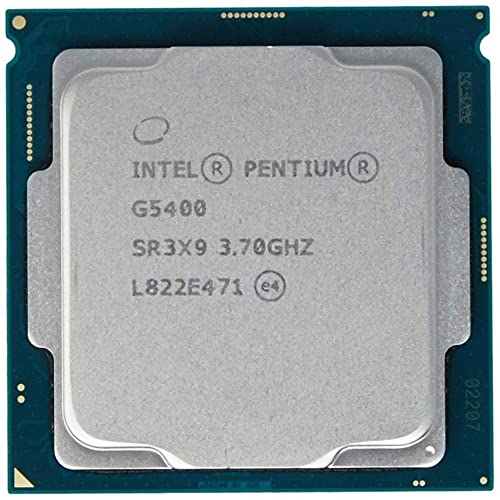
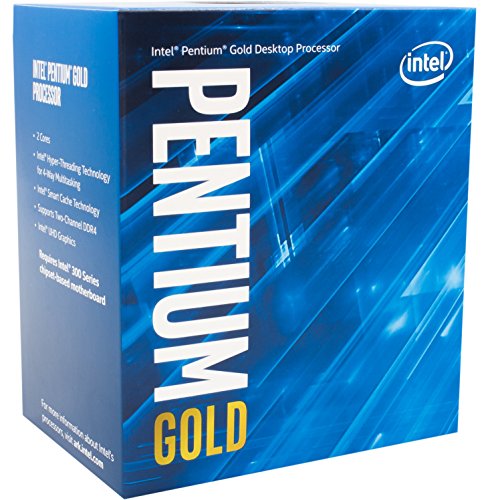 Intel® Pentium® Gold G5400 Desktop Processor 2 Core4.57 x 2.76 x 3.98 inches6.04 KilogramsCheck on Amazon


What's inside
- Know the processor before judging any board
- The socket trap: two generations wearing one name
- Chipset differences, laid out a single time
- Entry-level H310 boards, where value is the entire argument
- The B360 middle ground, where most builds should land
- Higher chipsets and small form factors
- Memory rules that apply to every board here
- Storage, M.2 slots, and lane sharing explained
- Firmware and BIOS compatibility, handled carefully
- Form factor, cases, and the physical side of the build
- Buying used boards without inheriting someone else’s problem
- Where this platform sits against its neighbours
- Three more boards that listings keep surfacing
- Matching boards to real workloads
- Ports, networking, and audio: the everyday differences
- First-boot settings worth changing, and those worth leaving alone
- Troubleshooting the builds that refuse to start
- Adding a graphics card later, and what the Pentium can feed
- Total cost thinking: board price is only the opening bid
- Questions builders ask about this pairing
- Assembly order that prevents most beginner mistakes
- Check prices on Amazon
- Disclosure
As an Amazon Associate I earn from qualifying purchases. This post may contain affiliate links at no extra cost to you.
Pairing a motherboard with the Intel Pentium Gold G5400 looks simple until the socket starts lying to you. The processor uses LGA1151, a socket that served two incompatible generations of Intel chips, and the second-hand market cheerfully mixes boards from both eras in the same search results. Buy the wrong revision and the system will not even begin its power-on self-check, despite the processor dropping into the socket with a perfect mechanical fit. This guide exists to prevent that expensive misunderstanding, and to help you choose sensibly among the boards that genuinely belong with this chip.
Our research is grounded in Intel’s published processor and chipset specifications, board manufacturers’ support lists and manuals, and the memory and storage documentation each vendor maintains for these models. The G5400 itself is a modest part: two physical cores with hyper-threading, a fixed 3.7 GHz clock, UHD Graphics 610 integrated graphics, support for DDR4 memory at up to 2400 MT/s, and a 54-watt thermal envelope. A board cannot make it faster in any meaningful overclocking sense, since the multiplier is locked, but the board absolutely decides how much memory you can fit, how storage connects, which displays plug in, and whether a stronger processor can take over later.
Know the processor before judging any board
Intel launched the G5400 in 2018 as part of the Coffee Lake generation, aimed at office desktops, home theatre machines, point-of-sale terminals, and budget family computers. Its two cores and four threads handle browsing, documents, media playback, video calls, and light photo work without drama, and the integrated graphics drive everyday displays while decoding common video formats in hardware. What the chip lacks is equally clear: no turbo boost behaviour, no support for memory faster than its rated ceiling, and a core count that modern games and heavy multitasking expose quickly. Honest expectations make the platform satisfying; inflated ones make it feel broken.
Because the processor sips power, almost any compatible board feeds it comfortably. Voltage regulator quality, the obsession of high-end platforms, barely matters here in stock operation. What matters instead is the feature layout around the socket: slot count, storage connectors, rear panel generosity, and the firmware support that determines which future processors the board can accept. Builders planning an eventual step up to a six-core or eight-core Coffee Lake chip should weigh that upgrade path now, because it changes which chipset deserves the money.
Some shoppers will reasonably ask whether an older platform deserves attention at all when newer entry-level systems exist. Our surveys of best 10th gen motherboards and best 12th gen intel motherboards map those later generations for anyone starting completely fresh. The G5400 route makes its case on total cost when a processor is already in hand, on the depth of the used board market, and on how little electricity the finished machine draws in daily service.
The socket trap: two generations wearing one name
LGA1151 arrived first with the 100 and 200 series chipsets for Skylake and Kaby Lake processors. Coffee Lake reused the physical socket while changing the electrical assignments and platform requirements, so 300 series boards became mandatory for eighth and ninth generation chips. A G5400 in a Z170 or Z270 board is a non-starter, full stop, and no firmware update bridges that divide. Sellers who advertise a board as LGA1151 without naming the chipset are withholding the single detail that decides compatibility, so insist on the chipset before discussing anything else.
Within the correct generation, six chipsets appeared: H310, B360, H370, Q370, Z370, and Z390, with B365 joining later as a curious hybrid. Consumer attention concentrates on H310, B360, B365, H370, Z370, and Z390, and those six anchor the comparisons below. Q370 surfaces occasionally in corporate surplus; it behaves much like H370 with extra management features and accepts the G5400 happily, though listings rarely price it sensibly for home builders. Every board profiled in this guide comes from the compatible 300 series family.
One more generational wrinkle deserves attention. Ninth generation processors also fit these boards, usually after a firmware update, which is why support lists mention chips the platform did not launch alongside. For a G5400 buyer the relevance is practical: a board whose firmware already supports ninth generation parts is a board with a wider future upgrade pool, and sellers sometimes highlight that readiness in listings. Check the vendor support page for your exact board revision rather than trusting a headline claim.
Chipset differences, laid out a single time
Shared platform facts are collected here once so the board profiles can concentrate on what actually differs between models. Every chipset in this family talks to the processor over the same DMI link, supports the same integrated graphics outputs in principle, and leaves final port selection to the board maker. The G5400 itself supplies sixteen PCI Express lanes for graphics or expansion, and its memory controller sets the DDR4 ceiling regardless of board ambition. Chipset choice therefore governs the supporting cast: how many USB ports the board can offer, how many extra PCIe lanes feed slots and storage, whether RAID arrays are possible, and how many high-speed storage devices can run before lanes get shared or disabled.
H310 is the minimalist of the group. It provides fewer chipset PCIe lanes, expressed in the older second-generation standard, offers no support for the fastest USB revision found on its siblings, and typically appears on boards with two memory slots and a short feature list. B360 steps up with third-generation chipset lanes, more USB including high-speed ports, integrated wireless support circuitry, and room for an M.2 storage slot on most designs. B365 arrived later as an oddity: built on an older manufacturing process, it drops the integrated USB 3.1 generation two support and the wireless integration, yet offers a generous lane count and broad ninth generation support from the factory, which made it popular for budget gaming boards.
H370 resembles B360 with additional storage flexibility, more high-speed input and output in total, and support for RAID configurations that B360 omits. Z370 launched alongside the first Coffee Lake processors as the enthusiast tier, adding processor overclocking for unlocked chips, multi-graphics lane splitting, and plentiful connectivity; the G5400 cannot use the overclocking, but the boards themselves are often the best equipped of the generation. Z390 refined that formula with integrated high-speed USB and wireless support, plus native ninth generation readiness, and it anchors the top of the used market for this socket.
Memory support follows board design more than chipset branding. Flagship ATX models usually provide four slots, compact boards provide two, and the processor’s ceiling means memory kits rated far above its limit simply run at the cap. Anyone hoping faster memory would unlock hidden performance from this Pentium should redirect that budget toward storage or a better board, because the controller in the chip has the final word.
Entry-level H310 boards, where value is the entire argument
ASRock H310M-HDV, the no-frills baseline
The H310M-HDV represents the floor of sensible G5400 ownership. Its micro-ATX layout carries the essentials — a pair of memory slots, a graphics card slot, a handful of SATA connectors, and display outputs that include an analogue VGA port older monitors still appreciate. What distinguishes it is honesty: nothing on the specification sheet pretends to be more than it is, and used prices usually reflect that modesty. Choose it for a refurbished office machine, a home server running light services, or a grandparent’s browsing computer. Skip it if an M.2 solid-state drive is part of the plan, because this design leaves that connector off entirely, pushing you toward SATA storage or a different board.
Gigabyte H310M H, a slightly tidier take on the same formula
Gigabyte’s interpretation of the entry tier keeps the same broad outline but pays extra attention to the rear panel and fan control software, small touches that matter in a machine expected to run quietly in a living space. Its distinguishing quirk is an M.2 slot on some revisions, which transforms the storage conversation for a board at this level; verifying the exact revision before purchase is essential, since visually similar boxes differ in that one important respect. For a compact media computer that must boot from fast flash storage while costing as little as possible, a confirmed M.2-equipped revision of this board is a shrewd find.
MSI H310M Pro-VDH Plus, aimed at small business desktops
MSI positioned this model toward system integrators building fleets of modest desktops, and its personality reflects that audience. Legacy connectivity survives here in a way home boards abandoned, including support for older peripherals that small firms keep in service for years. The board’s appeal for a G5400 build lies in durability of supply: integrators bought them in volume, so the used market holds plenty, often from machines retired as complete units. If your build needs to drive an ageing receipt printer alongside a modern monitor, this odd mixture of old and new ports solves a problem its prettier rivals ignore.
ASUS Prime H310M-E, the polished budget option
ASUS brought its Prime styling and firmware interface down to the cheapest chipset, giving this board a setup experience that feels a class above its hardware tier. The distinguishing feature for many buyers is an M.2 slot included as standard equipment rather than as a revision lottery, paired with ASUS fan tuning that behaves well in small cases. It suits a first-time builder who wants the reassurance of thorough documentation and a forgiving firmware layout while learning the platform. Nothing here courts enthusiasts, and that restraint is precisely its charm at the price these boards now command second-hand.
The B360 middle ground, where most builds should land
Gigabyte B360M DS3H, the crowd-favourite all-rounder
If one board embodies the sensible centre of this platform, the B360M DS3H makes a strong claim. Four memory slots give it headroom its H310 rivals lack, an M.2 slot covers fast storage, and the rear panel balances modern and legacy displays generously. Its distinguishing strength is balance rather than any headline feature: nothing important is missing, and nothing frivolous inflates the cost. Home office builds, student machines, and family desktops all fit its brief. Used examples are plentiful because it sold in serious numbers, which also means replacement hunting stays easy if a board ever fails.
MSI B360M Mortar, compact but dressed for a windowed case
The Mortar line borrows the visual language of MSI’s enthusiast boards and applies it to a micro-ATX B360 design, adding reinforced slot hardware and a more deliberate aesthetic than the segment usually receives. Beneath the styling sits a practical layout with four memory slots and dual M.2 coverage on some configurations, aimed at builders who care how a small system looks through tempered glass. Pick it when the machine will sit visibly on a desk and the budget stretches slightly beyond the bare minimum. The premium buys presentation and a touch more storage flexibility, not raw capability the G5400 can exploit.
ASUS Prime B360M-A, quiet competence for work-focused builds
ASUS aimed this Prime model at productivity desktops, and its port selection shows it: display variety for multi-monitor office setups, dependable firmware behaviour, and none of the gaming decoration that distracts in a workplace. The board distinguishes itself through refinement of the ordinary — clear silkscreening, sensible connector placement, and documentation that anticipates first-time builders. For a G5400 workstation expected to run two screens, several storage devices, and a tangle of USB peripherals without complaint, this is the board that disappears into the background and lets the machine get on with its job.
ASRock B365M Pro4, the late-arriving value spoiler
B365 boards reached the market after the original 300 series wave, and the B365M Pro4 exploits that timing. Factory support for ninth generation processors removes the firmware anxiety described later in this guide, while the feature set borrows liberally from more expensive models: four memory slots, dual M.2 slots, and a rear panel that embarrasses many B360 rivals. The trade-offs live in the chipset’s older roots, notably the absence of the fastest integrated USB standard, which most G5400 owners will never notice. As a foundation for a Pentium today and a stronger second-hand processor tomorrow, few boards in this roundup argue their case better.
Higher chipsets and small form factors
ASUS Prime H370M-Plus, storage flexibility in a compact board
H370 boards never matched B360 sales, which makes survivors like the H370M-Plus interesting used finds. The chipset unlocks RAID support and extra connectivity that this particular design spends on storage: multiple M.2 slots and a full complement of SATA ports for builders assembling a small file server around an efficient processor. With a G5400 sipping power at the centre, such a machine idles frugally while hosting several drives. Choose it when storage count matters more than gaming pedigree, and when the listing price undercuts the Z390 crowd, as H370 stock frequently does.
MSI Z370-A Pro, enthusiast bones at second-hand prices
Buying a Z370 board for a locked Pentium sounds like overkill until the upgrade math appears. This board’s power delivery and slot layout were designed for unlocked processors and serious graphics cards, so a future swap to a used Core i7 from the same generations slots in without a platform change. Its distinguishing trait is exactly that headroom, plus the generous expansion that full ATX dimensions allow. The catch is firmware: early Z370 boards shipped before ninth generation support existed, so confirm the installed version or be ready to update using the G5400 itself, which conveniently boots on every revision and can perform the update before any swap.
Gigabyte Z390 UD, the pragmatic top-shelf choice
Among Z390 models, the UD favours electrical substance over decoration, channelling its budget into a sturdy power stage and a straightforward full-size layout. For a G5400 build that hardware is admittedly idle capacity, yet the board earns its place through longevity: native ninth generation support, modern USB coverage, and construction intended to survive several processor swaps. Buyers who view the Pentium as a placeholder while saving for a stronger chip will find this the least regrettable foundation in the roundup. Buyers certain they will never upgrade should save the difference and take a B360 instead.
ASRock H310M-ITX/ac, the miniature route with wireless included
Mini-ITX changes the conversation from expansion to footprint. This ASRock board squeezes the platform into the tiny standard, keeping onboard wireless that most H310 models omit, and accepting the format’s usual compromises: a single expansion slot and two memory slots. It suits a home theatre computer tucked behind a television, a small emulation box, or a tidy desk machine driving one display. Cooling deserves planning in miniature cases, though the processor’s modest heat output forgives a lot. Verify the wireless antennas are included in any used listing, because replacements are fiddly and the bare board without them loses much of its point.
Gigabyte B360N WiFi, small board, fuller feature set
Gigabyte’s mini-ITX B360 entry answers the ASRock with a richer chipset underneath: faster storage support, more capable USB, and the same integrated wireless convenience. The distinguishing decision between the two small boards is storage ambition — this model courts builders who want a quick M.2 system drive inside a truly compact enclosure. Home theatre and small-form-factor office builds both fit. As with any ITX purchase, confirm the I/O shield and antenna leads are in the box, and expect cable management to test your patience in cases that leave no room for slack.
Memory rules that apply to every board here
DDR4 is the only memory family this platform accepts; DDR3 modules from an older machine will not fit the slots and should never be forced. The processor’s controller officially supports speeds up to 2400 MT/s, so kits rated at 2666 or beyond simply operate at the ceiling when paired with this chip, a behaviour that surprises builders expecting the sticker speed. Some chipsets and boards allow faster memory with other processors, and support lists reflect that platform maximum rather than a promise for the G5400 specifically. Capacity planning matters more than frequency here: sixteen gigabytes in a dual-channel pair covers the realistic workload of this processor comfortably, while two-slot boards should receive a matched pair sized for the machine’s whole life, since upgrading later means replacing both sticks.
Physical installation holds one platform-specific comfort. Because the memory controller lives in the processor and the traces on even budget boards are short and direct, compatibility with ordinary desktop DDR4 is broad. Consult the board’s qualified vendor list when buying unusual high-density modules, populate the slots in the order the manual specifies, and enable the memory profile only if the kit’s rated speed sits within what the processor allows; otherwise the firmware will negotiate a safe speed on its own. Stability problems on a fresh build are far more often a poorly seated module than a genuine incompatibility, so reseat before troubleshooting deeper.
Storage, M.2 slots, and lane sharing explained
Storage is where board tiers separate most visibly in daily use. H310 designs lean on SATA alone or offer a single M.2 slot whose wiring varies by model, while B360 and above normalise M.2 support for NVMe drives. A quick NVMe system disk transforms how responsive a G5400 machine feels, far more than any other single upgrade, so treat M.2 availability as a first-order filter when comparing listings. Check whether a given slot accepts NVMe, SATA, or both, because early implementations sometimes restricted one type, and a SATA-only slot will not recognise an NVMe drive.
Lane sharing explains the fine print in manuals. Chipset lanes feed slots, ports, and controllers from a shared pool, so populating a second M.2 slot may disable a SATA port or narrow another slot on some designs. None of this is a defect; it is arithmetic. Builders planning several drives should read the sharing table in the manual for their exact board before purchase, sketch which connectors the final build will occupy, and confirm the combination is supported. Full ATX Z390 models generally offer the most forgiving arrangements, while compact boards demand the closest reading.
Display outputs deserve the same scrutiny when the integrated graphics will do the work, as they will in most G5400 systems. Boards vary between HDMI alone, HDMI with legacy VGA, and richer combinations including DisplayPort on select models. Shoppers needing two digital displays from the processor should study our dedicated survey of best 2 hdmi motherboards alongside the rear panel photographs in each listing here, because a missing port discovered after delivery means an adapter, a graphics card, or a return.
Firmware and BIOS compatibility, handled carefully
The G5400 enjoys one luxurious advantage: as an original Coffee Lake launch-era chip, it is supported by the earliest firmware of every 300 series board, so it boots on any compatible board regardless of revision history. That makes it an ideal tool for updating a board destined for a ninth generation processor later. The reverse journey needs care. A board bought for a future Core i5-9400F or similar chip may need a firmware update first, and the G5400 sitting in the socket is exactly what performs that update, provided you complete it before swapping processors.
Updating firmware on a discontinued platform follows a calm routine. Download the file only from the board manufacturer’s support page for your precise model and revision, apply it with a stable power supply, and resist interrupting the process. Note that some vendors split support across stepping-specific releases, so read the description attached to each version rather than grabbing the newest blindly. After an update, load optimised defaults, confirm the G5400 and memory are recognised correctly, and only then change settings such as boot order or fan curves.
One trap catches owners of the very first Z370 boards in particular: a small number of early firmware versions behaved poorly with certain memory kits until later releases matured. If a newly assembled system refuses to train memory at rated settings, a firmware update and a single-module boot attempt resolve most cases. The processor itself is almost never the problem, and its low power draw makes it a forgiving diagnostic chip while you stabilise a second-hand board.
Form factor, cases, and the physical side of the build
Board size should follow the case and the expansion plan, not fashion. Full ATX models from the Z370 and Z390 families bring the most slots and the easiest cable routing, suiting tower builds that may gain capture cards, extra storage controllers, or multiple graphics-era leftovers over time. Micro-ATX dominates the value chipsets and fits the majority of compact towers while keeping four-slot memory layouts available on better designs. Mini-ITX serves genuinely small enclosures at the cost of nearly all expansion, a trade worth making only when the footprint is the point of the machine.
Cooling a G5400 rarely justifies exotic hardware. The boxed cooler shipped with retail processors handles the chip quietly in any case with a sane airflow path, and low-profile aftermarket coolers suit the ITX builds. What deserves attention instead is chipset and VRM airflow on boards that may later host a stronger processor: a case fan washing air across the socket area extends the comfortable life of a budget board asked to feed a six-core upgrade. Plan the case purchase for the machine you might own in two years, not only the one on today’s parts list.
Power supplies follow a similar logic of restraint. A quality unit in the modest wattage range covers any single-graphics-card evolution of this platform, and the processor’s frugality means efficiency at low load matters more than headline capacity. Reusing an elderly, no-name supply is the one false economy to avoid, since unstable power produces symptoms that masquerade as board faults and waste diagnostic hours. Builders salvaging a supply should at minimum confirm it carries the connectors a modern board expects, including the supplementary CPU power plug near the socket.
Buying used boards without inheriting someone else’s problem
Discontinued platforms live and die by the quality of their second-hand supply, and LGA1151 boards carry one notorious vulnerability: the socket pins live on the board, not the processor, and they bend if you look at them carelessly. Demand a clear, angled photograph of the socket in any listing, and treat a missing socket cover as a warning sign about how the board was stored. Bent pins can sometimes be straightened by a patient expert, but a G5400 build should never begin as a repair project unless the discount truly compensates for the risk.
- Socket condition comes first: rows of pins should appear uniform, with no flattened or twisted outliers catching the light differently.
- Included accessories change real value, especially the I/O shield, wireless antennas on ITX models, and any M.2 screws or standoffs the design requires.
- Capacitor and board inspection matters on boards that lived in hot offices; bulging tops or residue near power components end the negotiation.
- Revision numbers printed on the board should match the listing, since revisions occasionally alter slots or wireless hardware.
- Return terms are part of the product on a discontinued platform, and a short testing window from a reputable seller beats a lower price with none.
First power-on with a used board deserves a minimalist bench setup: processor, one memory module, display on the integrated output, nothing else. A board that posts cleanly in that state has passed the meaningful gate, and peripherals can join one at a time. Keep the G5400’s cooler properly latched during these experiments, since an unseated corner produces thermal shutdowns that imitate deeper faults. Only move the assembly into the case once the operating system installs and survives a restart cycle without complaint.
Where this platform sits against its neighbours
Context helps final decisions. The 400 series boards covered in our guide to best 400 series motherboards serve the generation that followed, with a different socket revision that breaks physical compatibility despite the family resemblance, so do not let a bargain 400 series listing tempt you for this processor. Within its own generation, the G5400 platform’s charm is maturity: firmware is finished, quirks are documented, prices have settled, and every board in this roundup has years of owner experience behind it. Newer platforms promise longer futures; this one promises fewer surprises.
That maturity also frames realistic upgrade ceilings. The strongest processors these boards accept are ninth generation Core i9 models on suitable Z390 designs with adequate power delivery, though pairing such a chip with a board bought for a Pentium deserves honest scrutiny of the regulator hardware. For most owners, a six-core i5 from the eighth or ninth generation represents the sweet spot the platform was quietly designed around, doubling or tripling performance while reusing memory, storage, case, and supply. Buying a B365 or Z390 board today keeps that door fully open; buying H310 narrows it to whatever the lightest boards can feed comfortably.
Three more boards that listings keep surfacing
MSI B360 Gaming Plus, full-size value with gaming clothes
Not every B360 board shrank to micro-ATX, and this full-size MSI design shows why some builders still prefer the larger canvas. Spread-out slots simplify fitting a graphics card beside a capture device or a sound card, and the board’s red-accented styling dressed many a first gaming build during the platform’s prime. Under a Pentium it functions as a roomy, forgiving foundation with four memory slots and an M.2 connector placed clear of graphics card heat. Its distinguishing merit is elbow room at a chipset price tier that usually forces compromises, which makes tidy cable work and future expansion noticeably easier than on cramped rivals.
ASRock Z390 Phantom Gaming 4, enthusiast features without flagship pricing
ASRock’s Phantom Gaming line targeted buyers who wanted Z390 connectivity while skipping decorative excess, and this model delivers that brief faithfully. Networking receives unusual attention for the tier, memory support stretches to the platform’s practical limits with stronger processors, and the slot layout assumes a large graphics card from day one. For a G5400 system it is pure forward planning: the board waits patiently with capabilities the Pentium cannot touch, ready for the day a used unlocked chip arrives. Listings price it below the famous flagship names, which is exactly where its value hides.
ASUS TUF H370-Pro Gaming, durability branding on a sensible chipset
The TUF line built its identity on component protection and conservative engineering, and the H370-Pro Gaming applies that thinking to a chipset most gamers overlooked. Buyers get the H370 storage and connectivity advantages wrapped in a board marketed for long service in less-than-gentle environments, including models with onboard wireless in some variants. In the used market it competes with cheaper B360 boards while quietly offering more, particularly for a home server or workshop machine built around the Pentium’s efficiency. Confirm the exact variant when comparing listings, since wireless equipment and port mixes differ between sub-models sharing similar names.
Matching boards to real workloads
An office desktop built on this processor spends its life in browsers, documents, video calls, and perhaps a second monitor full of spreadsheets. Nearly every board in this roundup serves that life well, so selection should follow the desk rather than the spec sheet: count the displays, count the USB devices, and let those totals pick between an H310 board and a B360 design with a richer rear panel. Reliability of supply matters too, because an office that standardises on one board model can keep a spare on the shelf and swap it in minutes.
A home theatre machine rewards a different checklist. Small size, wireless networking, an HDMI output that handshakes politely with televisions, and fan control that stays inaudible during quiet film scenes outrank expansion entirely. The two mini-ITX profiles above exist for this job, and the processor’s hardware video decoding handles mainstream streaming and local media libraries without help from a graphics card. Builders reusing an older television should verify the board’s HDMI revision against the display’s expectations, a detail manuals state plainly.
For a low-power home server, the calculus shifts toward storage connectors and idle behaviour. H370 and B365 boards with generous SATA counts and dual M.2 slots let a frugal Pentium anchor a surprising amount of disk, while the chip’s modest appetite keeps electricity bills civilised around the clock. Wired networking quality matters more here than wireless convenience, and boards with Intel network controllers carry a quiet reputation advantage among server hobbyists. Wake-on-LAN support, documented in most manuals, turns such a machine into an always-available household appliance.
Student and family machines sit between these poles: homework, streaming, video chat with relatives, and light gaming on older or undemanding titles. A B360 board with four memory slots gives that machine the longest useful runway, since a memory doubling and a processor swap two years later can carry it through school. Budget the savings from a cheaper board against the cost of replacing it entirely when ambitions grow, and the middle tier usually wins the arithmetic.
Ports, networking, and audio: the everyday differences
Rear panels decide daily happiness more than chipset diagrams do. H310 boards commonly provide a modest cluster of USB ports split between older and newer standards, while B360 and Z390 designs add high-speed ports that external drives appreciate. Front panel headers deserve a glance as well, because a case with modern front connectors deserves a board that can feed them at full speed rather than through a compromised header. Keyboard-and-mouse legacy ports survive on several business-flavoured models in this roundup, a small mercy for owners of beloved older peripherals.
Networking splits the field into wired personalities. Every board here includes gigabit Ethernet, but the controller vendor varies, and Intel-equipped models tend to draw fewer complaints under sustained transfer loads and in alternative operating systems. Wireless appears mainly on ITX boards and selected higher-tier models; where it is absent, a PCIe card or USB adapter fills the gap, at the cost of a slot or a port. Bluetooth usually travels with the wireless module, so a board without one also lacks the easy path to wireless headsets and game controllers.
Audio implementations differ in codec tier and in how carefully the analogue circuitry is isolated from board noise. For typical desktop speakers and headsets, every profiled board sounds acceptable; for recording, streaming commentary, or quality headphones, the higher codec tiers on gaming-flavoured B360 and Z390 models hold a modest edge, and a USB audio interface sidesteps the question entirely. Optical audio output, present on some upmarket models and absent on most budget ones, remains the cleanest route into older home theatre receivers.
First-boot settings worth changing, and those worth leaving alone
A fresh G5400 build needs only a handful of deliberate firmware choices. Set the boot order to the installation media first and the system drive thereafter, confirm the storage controller mode matches your installation plan before the operating system goes on, and enable the memory’s rated profile only when the kit speed falls within the processor’s ceiling. Fan curves deserve five patient minutes: a gentle slope keeps office machines silent at idle while still responding when summer heat and a long video call coincide.
Equally important is what to leave untouched. Voltage controls exist on Z-series boards for processors that can use them; the Pentium cannot benefit, and casual adjustments there create instability without upside. Leave power limits at defaults, since the chip draws so little that limits never bind in honest use. Disable unused controllers, such as legacy serial hardware on business boards, only if you enjoy tidy device lists; functionally they cost nothing when idle. Document any change you do make, because a discontinued platform rewards owners who can retrace their steps years later when a forgotten setting resurfaces as a mystery.
Secure Boot and TPM settings deserve a forward-looking moment. Operating system requirements have tightened since this platform launched, and the firmware TPM built into these chipsets can be enabled in setup on most boards, which may decide whether a machine accepts a newer operating system gracefully. Enabling it now, before an upgrade forces the question under time pressure, is the calm order of operations. Record any recovery keys the operating system issues at that moment, and store them somewhere other than the machine itself.
Troubleshooting the builds that refuse to start
A silent board with a G5400 installed almost always traces back to a short list of causes. Generation mismatch tops it: a 100 or 200 series board wearing an LGA1151 label will never post with this processor, and the fix is a different board, not another hour of cable swapping. Next comes memory seating, the eternal culprit, followed by a missed supplementary CPU power connector hiding under a cooler cable. Builders should also confirm the display cable sits in the motherboard output rather than in a graphics card that the firmware has not initialised, a mix-up that has embarrassed every experienced assembler at least once.
Intermittent faults on used boards follow their own pattern. A system that posts on the bench but fails in the case may be shorting against a misplaced standoff, particularly when a smaller board replaces a larger one and leaves an orphan standoff beneath it. Random shutdowns under no meaningful load point toward the power supply more often than the board, and swapping in a known-good unit settles the question faster than any diagnostic menu. Keep notes as you eliminate suspects; on a platform this mature, somebody has met your exact fault before, and precise symptoms are what find their solution.
Adding a graphics card later, and what the Pentium can feed
Many G5400 machines begin life on integrated graphics and gain a discrete card when a household discovers gaming or a student starts a media course. The processor’s sixteen lanes connect directly to the primary slot on every board profiled here, so even an H310 model delivers the full electrical connection a mid-range card expects; the bottleneck in such a pairing is the processor itself, not the board. Sensible companions are modest cards whose performance a dual-core chip can actually keep supplied, and the used market for those overlaps neatly with the used market for these boards.
Two practical checks precede any card purchase. The power supply needs the wattage headroom and the correct supplementary connectors for the chosen card, since office-grade units fitted to Pentium desktops often lack both. Case clearance matters as well, particularly in the compact enclosures that micro-ATX and ITX builds favour, where a long card can collide with drive cages. Measure the space, consult the card maker’s length figure, and remember that a slightly humbler card that fits beats an ambitious one that does not.
Expectations should travel with the upgrade. The G5400 will hold back frame rates in processor-hungry titles no matter how capable the card, which is why the strongest version of this plan treats the graphics purchase and a future processor swap as one staged project. Boards from the B365 and Z390 sections above were recommended with precisely that staging in mind: their power delivery and slot layouts welcome the stronger chip when it arrives, turning today’s budget desktop into tomorrow’s respectable gaming machine without a second platform purchase.
Total cost thinking: board price is only the opening bid
Comparing boards by listing price alone misleads on a discontinued platform, because the surrounding costs differ. A bargain board missing its I/O shield, antennas, or M.2 hardware quietly bills you for replacements and postage. A cheap H310 board that forces a SATA drive purchase, when an NVMe drive already sits in a drawer, has spent its saving before the build begins. Conversely, a Z390 board priced keenly by a seller who upgraded can undercut the true cost of a lesser board once accessories enter the ledger.
Time belongs in the same calculation. Firmware updates, socket inspection, and bench screening consume an evening at most, and they convert uncertain hardware into known hardware. Skipping them to save an hour risks the far longer weekend of diagnosing a machine assembled entirely inside a case. The platform’s low prices tempt buyers toward haste, yet the whole appeal of mature hardware is predictability, and predictability is purchased with exactly those small investments of attention.
Resale value, modest as it is, favours the documented and the complete. A board kept with its box, shield, and accessories will find its next owner faster than a bare board in an antistatic bag, and matched bundles of board plus processor attract builders who want a known-good pairing. Owners who photograph the socket before storage, keep the protective cover in place, and note the installed firmware version are effectively writing the listing that will sell the board years from now.
Questions builders ask about this pairing
Will any LGA1151 board from a bargain listing work? No, and this remains the platform’s defining hazard. Only the 300 series chipsets belong with the G5400; the earlier 100 and 200 series boards share the socket’s shape while differing electrically in ways no adapter or update can reconcile. Read the chipset in the listing title, then confirm it against the manufacturer’s page for the exact model before paying.
Does a Z390 board make the Pentium faster? By itself, no. The processor’s clocks are fixed, its memory ceiling is fixed, and its lane count is fixed, so the flagship chipset changes everything around the chip rather than the chip itself. What the expensive boards genuinely buy is room to become a different computer later, plus richer connectivity today. Owners certain about staying with the G5400 should let B360 boards keep the change.
How much memory is enough? Eight gigabytes keeps the machine functional for light duties, while sixteen in a dual-channel pair is the configuration this guide would choose for a system expected to serve for years. Beyond that, returns diminish sharply for the workloads a dual-core processor handles gracefully, and money aimed at thirty-two gigabytes serves the owner better as storage or as the beginning of a processor upgrade fund. Two-slot boards should jump straight to the sixteen-gigabyte pair, because upgrading them later means discarding the original modules.
Can the finished machine run a modern operating system well? For browsing, office work, media, and communication, yes, provided expectations stay aligned with the hardware. The platform’s firmware TPM, solid-state storage, and sixteen gigabytes of memory together deliver an experience that feels contemporary in those tasks. Heavy creative suites, large codebases, and current games belong to stronger processors, and no motherboard choice in this roundup changes that verdict.
Which single board should a hesitant buyer default to? The B360M DS3H earns that role in our judgement: broadly available, generously equipped for the tier, forgiving of first-time builders, and priced in the calm middle of the used market. Specialists should deviate deliberately — toward ITX for size, toward B365 or Z390 for upgrade headroom, toward H310 only when the budget is truly the whole story — but the default exists for everyone else, and it is a good one.
A final question hides behind many listings: does the board’s age alone make it a gamble? Age matters less than treatment. A board that spent five years in a ventilated office tower, running a word processor and a browser, has lived an easier life than a two-year-old board baked inside a dusty gaming case beside a hot graphics card. Ask sellers about the machine a board came from, look for the environmental clues in photographs, and let condition evidence outweigh the calendar every time the two disagree.
Assembly order that prevents most beginner mistakes
Sequence quietly determines how smoothly a build goes, and this platform rewards a particular order. Begin outside the case: seat the processor by aligning its marker with the socket’s, close the retention mechanism without forcing anything, then fit the cooler and one memory module. Connect a power supply on the bench, attach a display to the board’s own output, and confirm the firmware screen appears. That five-minute ritual, performed on a table rather than inside a cramped enclosure, catches the majority of dead-on-arrival disappointments while every connector remains easy to reach.
Only after that first sign of life should hardware migrate into the case. Verify standoff positions against the board’s holes before the board goes anywhere near the tray, because a standoff left beneath a spot with no matching hole can short circuitry the moment power flows. Route the CPU power cable before fitting a large cooler or graphics card blocks the path, connect front panel leads while you can still see the header labels, and add drives last so their cables do not fight you during board installation. Photograph the finished interior; future troubleshooting, and any eventual sale listing, both benefit from the record.
Software installation follows the same philosophy of calm stages. Install the operating system with only the target drive attached, so boot files land where you intend, then reconnect additional storage afterwards. Load chipset and network drivers from the board maker’s page for your exact model, restart, and let the system idle while you watch temperatures and fan behaviour in the firmware or a monitoring utility. A machine that survives an evening of updates, restarts, and ordinary use without a hiccup has effectively graduated; peripherals, personal files, and the second memory module’s twin can now join with confidence.
Keep the packaging and paperwork from every component until the build has run for a few weeks. Return windows on used parts are short, and a board box with its accessories is the difference between a painless exchange and an argument. File the firmware version you settled on, the memory kit’s exact part number, and the seller’s details alongside the photographs mentioned above. That small dossier turns any future fault into a solvable problem rather than an archaeological dig, and it costs nothing beyond a folder and five minutes of discipline at the moment when everything works.
One last courtesy to your future self: label the build. A small note inside the case recording the board model, the date of assembly, and the firmware in use saves real time when the machine is opened years later for a drive swap or a memory upgrade. Technicians who service family computers learn this habit quickly, because memory — human memory — is the least reliable component in any long-lived system. The G5400 platform rewards that kind of record keeping more than most, precisely because its parts are old enough for their details to blur together in a seller’s listing or an owner’s recollection.
Check prices on Amazon
Live listings for the shortlist in this guide are pulled from Amazon below, so prices and availability are always current at the moment you look.


Disclosure
A quick word on how this site funds itself: some links in our articles earn us a commission when readers buy through them, at no extra cost to the buyer. That support keeps guides like this one free to read. Our board selections rest on published specifications and manufacturer documentation, and no vendor can purchase a favourable mention or remove an unfavourable observation.
Choose the chipset for the machine you will actually own next year, verify the socket with your own eyes before money moves, and a humble Pentium build becomes the rare computer purchase that holds no surprises at all.