Our Top Picks


What's inside
- Why a SIM slot changes how a mid-size tablet gets used
- Reading LTE band lists without guessing
- Regional variants and the grey-import trap
- eSIM, nano-SIM, and dual arrangements
- Storage expansion versus second-line trade-offs
- Voice calling from a tablet: what actually works
- SMS, verification codes, and messaging realities
- Data plans shaped for tablets
- Hotspot behaviour and tethering limits
- Battery behaviour with the modem awake
- 5G variants and whether the premium earns its keep
- Antenna design and case interference
- Navigation performance away from Wi-Fi
- Work patterns that justify a connected slate
- GSM heritage and network naming confusion
- Roaming behaviour and travel configuration
- Security, theft, and remote management
- Display, performance, and media considerations
- Durability and ownership costs over several years
- Understanding signal readouts beyond the bars icon
- Troubleshooting connections that refuse to cooperate
- Tablets for younger users on family plans
- Older users and accessibility advantages
- Vehicles, boats, and recreational setups
- Healthcare, home visits, and community work
- Education fleets and shared classroom devices
- Choosing between Wi-Fi-only plus phone tethering
- Environmental and resale notes
- A compact pre-purchase checklist
- Ownership rhythm: the first month with a cellular slate
- LTE longevity as networks evolve
- Data consumption planning for common tasks
- Comparing modem categories in plain terms
- Privacy considerations unique to always-connected devices
- Accessories that earn their place beside a connected tablet
- What coverage maps promise versus what streets deliver
- Dual-device etiquette: phone in pocket, tablet in hand
- Check prices on Amazon
- How this guide was assembled
As an Amazon Associate I earn from qualifying purchases. This post may contain affiliate links at no extra cost to you.
A ten-inch tablet with a working SIM slot occupies a niche that phones and Wi-Fi-only slates both leave open. The screen measures roughly 25 centimetres diagonally, large enough for split-view document work, chart reading, and video at arm’s length, yet the chassis still slides into a jacket pocket on larger coats or a small daypack without forcing a laptop bag. Adding cellular hardware turns that screen into a self-sufficient terminal: maps load at a rural trailhead, dispatch software stays live inside a service van, and a boarding pass appears even when airport Wi-Fi demands a login page that never renders. This guide works through the radio details that decide whether a given model connects on your carrier, the practical split between embedded and physical SIM formats, voice calling behaviour, and the battery cost of leaving mobile data active all day.
Readers comparing screen sizes first may want the broader overview in best 10 inch tablets, which covers Wi-Fi models alongside cellular ones. Anyone stepping down slightly in diagonal can check best 10 1 inch tablets for near-identical footprints with different aspect ratios. Those two references frame the size class; everything below concentrates on the modem, the tray, and the network side of ownership.
Why a SIM slot changes how a mid-size tablet gets used
Wi-Fi tablets assume infrastructure. Homes, offices, hotels, and campuses provide it, yet the gaps between those islands define many working days: a delivery route, a market stall, a building site, a train carriage crossing farmland. A cellular model bridges each gap without asking a phone to share its battery through tethering. The tablet holds its own data session, receives push notifications independently, and keeps its own number reachable for verification codes sent by banks, courier platforms, and two-factor systems that still rely on SMS.
Independence also matters for households handing a device to a child or an older relative. A grandparent living alone can video-call family from a tablet that stays online through power cuts affecting a home router, provided the mobile network remains up. Parents equipping a young traveller gain location sharing that persists outside school Wi-Fi coverage. Field technicians benefit differently: work orders, parts catalogues, and signature capture run on one ruggedised screen instead of a phone hotspot chain that drops whenever a call arrives.
There is a cost dimension beyond hardware. A second line or a data-only plan adds a recurring charge, and carriers treat tablet lines inconsistently, sometimes throttling video resolution, sometimes restricting tethering from the tablet onward. Weighing those plan rules matters as much as weighing the device itself, because a technically capable modem trapped behind a restrictive tariff delivers a poorer experience than its specification sheet promises.
Reading LTE band lists without guessing
Long Term Evolution networks fragment across regions. North American carriers lean on bands 2, 4, 5, 12, 13, 66, and 71, while European operators concentrate traffic on bands 1, 3, 7, 8, and 20. Asian markets add band 1, 3, 5, 8, 28, and 40 in various combinations, and several countries still run time-division networks on band 40 or 41 that frequency-division-only modems cannot touch. A tablet listing support for a dozen bands may still miss the single low-frequency band your local carrier uses for rural reach, which is why headline counts mislead.
Low bands below 1 GHz travel farther and penetrate walls, basements, and train carriages more effectively. Mid bands between 1.8 and 2.6 GHz carry most urban capacity. A model missing band 20 will struggle indoors across much of Europe; a model missing band 71 loses the deep-coverage layer of one major United States network. Before purchase, match the printed band list against the carrier’s published deployment for the districts where the tablet will actually roam, not the flagship city coverage used in advertising.
Carrier aggregation complicates the picture further. Modems combine two or three carriers to raise throughput, yet the supported combinations vary by chipset generation and regional firmware. Two tablets sharing a modem family can behave differently because one firmware enables aggregation pairs common in Europe while another enables pairs tuned for North America. Specification pages rarely list aggregation combos, so buyers depending on peak speed for large file transfers should look for the modem category rating, such as Cat 6, Cat 12, or Cat 18, as a rough proxy for capability.
Regional variants and the grey-import trap
Manufacturers ship region-specific SKUs that look identical in photographs. A unit built for Southeast Asia may omit band 71 entirely and include band 40 instead; a Latin American variant might carry different aggregation firmware. Grey imports sold through marketplaces often carry the wrong radio mix for the buyer’s country, and the mismatch surfaces only after the return window closes, when the tablet clings to a weak high-frequency signal indoors while a locally sold unit would have dropped to a stronger low band.
Checking the exact model code printed on the box, then cross-referencing that code against the manufacturer’s regional specification page, prevents most of these mistakes. IMEI-based compatibility checkers offered by carriers add a second layer of verification: entering the identifier confirms whether the network will provision the device at all, since some operators maintain allowlists for voice services even when data would technically function.
Software updates follow region too. A tablet imported from another market may receive security patches on a slower cadence or route update downloads through servers that throttle foreign connections. None of this makes an import unusable, but each friction compounds, and buyers who need dependable connectivity for work usually fare better paying attention to SKU codes rather than pursuing the lowest listing.
eSIM, nano-SIM, and dual arrangements
Physical nano-SIM trays remain the most flexible option for travellers who buy local prepaid cards at kiosks. Swapping a card takes seconds, works without network access, and transfers between devices freely. The tray also doubles as a diagnostic tool: moving a known-good card into the tablet isolates whether a fault lies with the subscription or the hardware. Downsides include tray fragility, the need for an ejector pin, and water-ingress paths that sealed designs avoid.
Embedded SIM technology stores carrier profiles in rewritable memory soldered inside the device. Activation happens by scanning a QR code or entering an activation code, and several profiles can coexist with one active at a time on most tablets. Roaming-focused providers sell data packages for dozens of countries through apps, which suits short trips where buying a local card wastes half a day. However, eSIM transfer between devices remains clunkier than a physical swap, some carriers still refuse to provision tablet eSIM profiles on certain tariffs, and a factory reset can strand a user who deleted the profile without keeping the original QR code.
Hybrid designs pair one physical tray with eSIM storage, letting a home line stay embedded while travel cards rotate through the tray. Dual standby behaviour means both numbers can receive calls or messages, though only one data session runs at a time on most implementations. Buyers running a business line and a personal line on a single device should confirm whether the tablet supports dual standby at all, because several models expose the second profile slot only for memory cards, sharing the tray between microSD storage and a second SIM in an either-or arrangement.
Storage expansion versus second-line trade-offs
Shared trays force a choice that spec sheets phrase delicately. Wording such as dual SIM with expandable storage often means the second slot accepts either a nano-SIM or a microSD card, never both simultaneously. Media-heavy users who download series for offline viewing and also want a travel line must pick one. Dedicated triple-slot designs exist but cluster in certain regional product lines, so verifying tray layout through the manual, rather than marketing copy, avoids disappointment.
Internal storage tiers interact with this decision. A 128 GB model reduces reliance on card expansion and frees the slot for a second line, while a 64 GB model pushed into service for navigation, offline maps, and photographed documents fills quickly. Map data alone for a single country can occupy several gigabytes at full detail, and messaging apps cache media aggressively unless configured otherwise.
Voice calling from a tablet: what actually works
Not every LTE tablet places ordinary phone calls. Some modems handle data only, leaving voice to internet-based applications. Others support circuit-switched fallback or Voice over LTE, exposing a dialler that behaves like a phone’s. The distinction hides in fine print: phrases such as voice call support or calling function signal native telephony, while data-only models stay silent on the subject. Buyers intending to replace a phone for an elderly relative must confirm native calling explicitly, because app-based calling requires accounts, contacts configured inside each service, and a data connection healthy enough for real-time audio.
Voice over LTE delivers clearer audio through wideband codecs and keeps the data session at full speed during a conversation. Older fallback mechanisms drop the connection to 3G for the duration of a call, which matters in regions where 3G networks have already shut down; a tablet relying on fallback may register for data yet fail every call attempt on a network that retired its legacy layers. Checking whether the target carrier still operates 3G in your area, and whether the tablet supports VoLTE on that carrier’s profile, prevents a purchase that works for browsing but never rings.
Speaker and microphone placement shapes call quality on a large slate. Bottom-firing speakers aimed away from the user sound thin at arm’s length, and holding a ten-inch device to an ear is impractical beyond a brief exchange. Most owners end up using speakerphone mode or a Bluetooth earpiece. Echo cancellation tuned for speakerphone use varies noticeably between models, and rooms with hard surfaces expose weak implementations quickly. For desk-based calling, a stand that angles the microphones toward the speaker improves intelligibility more than any software toggle.
SMS, verification codes, and messaging realities
Tablets with native telephony usually include a messaging client capable of receiving SMS, which unlocks banking codes and carrier notifications. Data-only models cannot receive those messages at all, a limitation that surprises buyers who assumed any SIM slot implies full line behaviour. Two-factor systems progressively offer app-based alternatives, yet plenty of regional banks, government portals, and courier services still default to text messages.
Rich Communication Services support depends on both the tablet’s messaging client and carrier provisioning. Where RCS is absent, group threads with phone users degrade to MMS with compressed images and fragmented ordering. Owners who plan to treat the tablet as a primary communication device should test group messaging behaviour early, during any return window, rather than discovering quirks months later.
Data plans shaped for tablets
Carriers sell tablet access in several forms: standalone data plans with a fixed monthly allowance, add-on lines sharing a phone plan’s pool, and prepaid passes sold by the day or week. Add-on lines usually offer the smoothest experience, inheriting the main account’s roaming agreements and priority level. Standalone prepaid data suits seasonal use, such as a tablet kept in a holiday property or a market trader’s stall active only on weekends.
Video throttling clauses deserve close reading. Several networks cap streaming resolution on tablet lines regardless of signal strength, which turns a sharp 2000-by-1200 display into a softer picture than its panel can show. Download-heavy work such as map updates or podcast syncing remains unaffected, so the cap matters mainly to buyers planning regular streaming over cellular rather than Wi-Fi.
Fair-use thresholds on nominally unlimited tariffs can trigger speed reductions after a set volume, sometimes as low as a few dozen gigabytes. A tablet used as a household’s backup connection during a broadband outage can cross that threshold within days once laptops and televisions join through its hotspot. Understanding the threshold in advance helps households ration the backup link to essential devices.
Hotspot behaviour and tethering limits
Most cellular tablets can share their connection through a Wi-Fi hotspot, effectively becoming a travel router with a large battery. Limits appear in three places: the plan may forbid or meter hotspot traffic separately, the tablet firmware may cap the number of connected clients, and sustained hotspot use generates heat that throttles the modem on warm days. Client caps of five or eight devices are common, adequate for a family car journey but tight for a small work crew.
Band selection for the hotspot matters in crowded environments. A 5 GHz hotspot avoids congestion in apartment blocks and conference venues, while 2.4 GHz reaches farther through walls in houses and warehouses. Tablets that allow manual band choice for the hotspot give owners a useful lever; automatic-only designs occasionally pick poorly and need a restart to reconsider.
Security settings on the hotspot deserve the same care as a home router: WPA3 where offered, a non-obvious network name, and a password distinct from other household credentials. A tablet hotspot left on open or default settings in a public place invites strangers onto the connection and burns through the data allowance silently.
Battery behaviour with the modem awake
Cellular radios draw power in bursts shaped by signal quality. In strong coverage the modem negotiates efficiently and sleeps between transmissions; at the edge of coverage it raises transmit power and retries failed handshakes, draining the cell noticeably faster. Practical screen-on time over LTE in good signal often lands between eight and eleven hours on this size class, while fringe-signal use can cut that figure by a third. Standby drain also rises because the tablet maintains registration and listens for paging signals even with the display dark.
Capacity figures cluster between roughly 6,000 and 8,600 milliamp-hours for ten-inch models. Larger cells offset modem draw but add weight that matters during long handheld reading sessions. Fast-charging support softens the trade-off: a tablet accepting 18-watt or faster input can recover a useful margin during a lunch break, whereas slow 10-watt charging demands overnight planning on multi-day trips away from reliable sockets.
Settings that genuinely extend runtime include forcing the modem to LTE only in areas where 5G coverage is patchy, since repeated band switching wastes energy, and disabling background sync for applications that do not need live updates. Aeroplane mode scheduled overnight prevents the slow overnight bleed that leaves a tablet at half charge by morning in weak-signal bedrooms. Readers weighing a larger cellular slate for long trips can compare notes with best 10 12 inch tablets with stylus, where bigger batteries pair with pen input for annotation work.
5G variants and whether the premium earns its keep
Some ten-inch models now ship with 5G modems, typically sub-6 GHz rather than millimetre wave at this size. Real-world gains appear in congested urban cells where LTE queues lengthen during rush hours, and in upload speeds that help field workers send large photo sets. Outside dense cities, 5G coverage thins quickly and the modem falls back to LTE for most of a journey, narrowing the practical difference.
The costs are tangible: higher purchase prices, slightly heavier boards, and radio firmware that matures over the first year of updates. Buyers keeping a tablet for four or five years may value the future-proofing as carriers refarm spectrum toward 5G. Buyers replacing devices every two years, or living where LTE already delivers consistent throughput, often find the LTE variant perfectly adequate and kinder to battery life.
Antenna design and case interference
Tablet antennas sit along the frame edges, frequently near the top corners in landscape orientation. Metal-backed cases and magnetic folio covers with steel plates can detune those antennas, shaving signal bars in marginal areas. Plastic or leather covers rarely cause trouble. Users who notice connectivity drops after fitting a new case should test briefly without it before blaming the network.
Grip matters as well. Holding a tablet with both hands wrapped over the top corners during a video call can attenuate the very antennas handling the call. Rotating the device or shifting grip downward restores throughput in many instances. This behaviour is normal physics for compact radios rather than a defect, and stands that free the edges sidestep it entirely during stationary use.
Navigation performance away from Wi-Fi
Cellular models almost always include a dedicated GNSS receiver, because the modem chipset bundles positioning support. Wi-Fi-only tablets frequently omit it or rely on network-based estimates that wander by hundreds of metres in rural areas. For drivers using a mounted tablet as a navigation display, the dedicated receiver locks faster after tunnels and holds lanes more accurately at complex junctions.
Assisted GPS downloads orbital data through the cellular link, cutting cold-start fix times from a minute or more down to a few seconds. Offline map downloads remain wise for dead zones, but the combination of live traffic, incident reports, and quick re-routing makes a connected navigation setup markedly calmer on unfamiliar routes. Mounting hardware should keep the tablet clear of the windscreen’s coated zones, since metallic heat-reflective coatings on some vehicles weaken both GNSS and cellular reception.
Work patterns that justify a connected slate
Field service and inspections
Technicians photographing installations, scanning serial plates, and capturing customer signatures benefit from a screen that shows schematics at readable size while uploading completed job packs before leaving the site. A SIM-equipped tablet removes the fragile step of tethering inside metal-clad plant rooms where phone signal at pocket height differs from tablet signal held at chest height. Supervisors receive documentation in near real time, and rescheduling decisions happen the same day rather than after an evening sync at the depot.
Retail, markets, and pop-up selling
Point-of-sale software, card readers, and stock lookups converge on one device for traders who set up in halls, fields, and street pitches lacking tenant Wi-Fi. A dedicated data line keeps payment authorisations flowing when venue networks collapse under crowd load. The larger display doubles as a customer-facing menu or catalogue during quiet spells, and end-of-day reconciliation uploads complete before packing the van.
Study and commuting
Students travelling between campuses, libraries, and part-time jobs keep cloud notes, lecture recordings, and reference libraries synchronised without hunting for captive portals. On trains with congested onboard Wi-Fi, a personal LTE link frequently outperforms the shared carriage network for loading learning platforms. The ten-inch class balances page readability for journal PDFs against a weight that a shoulder bag tolerates across a full day.
GSM heritage and network naming confusion
Older listings still describe tablets as GSM models, a label dating from second-generation networks that now functions as shorthand for compatibility with carriers built on that lineage, as opposed to legacy CDMA systems that have largely shut down. Shoppers browsing best 10 gsm android tablets will encounter that terminology frequently; in modern practice it signals a device expecting a SIM-based network with LTE bands, rather than any technical reliance on the original GSM air interface, which most operators have retired or scheduled for retirement.
Unlocked status matters more than heritage labels. A carrier-locked tablet sold subsidised through a network shop may refuse other operators’ cards until an unlocking condition is met, sometimes months into a contract. Buyers planning international use should confirm unlocked status in writing, since policies differ and marketplace descriptions blur the distinction between unlocked for data roaming and fully unlocked for foreign local cards.
Roaming behaviour and travel configuration
Roaming agreements decide which foreign networks a home SIM may join and at what priority. Some tablets expose manual network selection, letting a traveller force a stronger partner network when automatic selection clings to a weak one. APN settings occasionally need manual entry for local prepaid cards, particularly with smaller regional operators; the carrier’s support pages list the exact strings, and entering them wrongly produces a tablet that shows signal bars yet passes no traffic.
Data roaming toggles ship disabled on many builds to protect owners from accidental charges. Turning the toggle on is an obvious step that nonetheless explains a large share of first-day travel failures. Equally common: a travel eSIM profile installed but never set as the active data line, leaving the tablet still drawing on the home profile at roaming rates. A two-minute settings review after landing, checking active profile, data line selection, and roaming permission, prevents both mistakes.
Time zones and network time can confuse calendar alerts when a tablet crosses borders overnight. Allowing network-provided time keeps alarms honest, while manually fixed zones suit travellers who prefer home-time scheduling. Dual-clock widgets help frequent cross-border commuters who coordinate with an office left behind.
Security, theft, and remote management
A permanently connected tablet stays reachable for location services after loss, unlike a Wi-Fi model that only reports when it happens upon a known network. Owners should enable device-finding features, set a strong lock-screen credential, and confirm that remote wipe functions before travel. Encryption is standard on modern builds, but the lock credential remains the practical barrier protecting accounts signed in on the device.
Organisations issuing tablets to staff gain policy controls through mobile device management platforms: enforcing updates, restricting application installs, and separating work profiles from personal space. SIM-based connectivity keeps those policies enforceable outside office walls, and some management suites can disable a lost line’s data while preserving the ability to locate the hardware.
Public charging introduces a modest risk worth a habit: use a personal charger or a charge-only cable rather than unknown USB ports offering data connections. The tablet’s own battery endurance over LTE reduces reliance on opportunistic charging in the first place, which is an underappreciated security benefit of the larger cells in this class.
Display, performance, and media considerations
Panel resolutions in this segment range from 1920 by 1200 up to sharper 2560 by 1600 options. Outdoor legibility depends more on peak brightness and anti-reflective treatment than on pixel counts; a 400-nit panel with a matte-leaning finish stays readable at a sunny market stall where a glossy 300-nit screen mirrors the sky. Buyers intending outdoor work should prioritise brightness figures and, where possible, in-store checks under strong lighting.
Chipsets span entry-level octa-core parts through mid-range silicon with capable graphics. For browsing, documents, video, and light photo sorting, even modest processors feel fluid; heavy multitasking with large spreadsheets alongside video calls separates tiers more clearly. RAM of 4 GB handles everyday loads, while 6 or 8 GB keeps more applications resident during rapid switching on inspection rounds or retail peaks.
Speaker tuning influences streamed content during breaks and the clarity of calls. Dual speakers placed on opposite short edges produce genuine stereo in landscape viewing; single-speaker designs sound lopsided for films. A 3.5 mm headphone socket survives on some models and remains handy for wired headsets in noisy depots where Bluetooth pairing queues frustrate quick calls.
Durability and ownership costs over several years
Glass fronts on consumer slates dislike site work. A tempered-glass protector and a corner-reinforced case cost little relative to a screen replacement, which on some models approaches half the device’s value. Ruggedised variants with sealed ports and reinforced frames exist for industrial buyers, trading slimness for survival rates in warehouses and workshops.
Battery longevity follows charge habits. Keeping the cell mostly between moderate charge levels during desk-bound weeks, and avoiding overnight heat exposure in vehicles, slows capacity fade. Most owners notice reduced endurance after two to three years of daily cycling; replacement services exist for popular models, extending useful life where performance still suffices.
Software support windows vary widely. Security patch commitments of three to five years appear on better-supported lines, while no-name imports may receive a single update or none. For a device holding work credentials and payment applications, patch cadence deserves weight equal to hardware specifications during selection.
Understanding signal readouts beyond the bars icon
Signal bars compress complex radio measurements into a friendly glyph, and different manufacturers calibrate that glyph differently, so two tablets side by side can display different bar counts on identical reception. Android settings expose numeric values under SIM status for those who want precision. Reference Signal Received Power, abbreviated RSRP, expresses strength in negative decibel-milliwatts: figures near minus 80 indicate excellent reception, minus 100 remains workable, and values approaching minus 120 signal a fringe connection where speeds collapse and battery drain climbs.
Signal quality metrics add a second dimension. RSRQ and SINR describe how cleanly the tablet hears its serving cell amid interference from neighbours. A strong but dirty signal in a stadium or dense apartment district can underperform a weaker yet cleaner rural link. When a connection disappoints despite healthy bars, congestion or interference is usually responsible, and relocating a few metres, stepping away from metal cladding, or waiting out a crowd surge often restores throughput more effectively than toggling settings at random.
Band locking tools exist on some engineering menus, though consumer firmware rarely exposes them. Enthusiasts sometimes wish to pin a tablet to a less crowded mid band instead of a congested low band; manufacturers discourage this because a locked device may fail to hand over correctly while moving. For ordinary owners, automatic selection with occasional aeroplane-mode resets, which force a fresh cell survey, resolves most sticky-connection episodes.
Troubleshooting connections that refuse to cooperate
A methodical order of checks saves hours. First confirm the plan includes tablet data and has not exhausted a high-speed allowance. Next verify the active data profile matches the inserted card or selected eSIM entry. Then inspect APN fields against the carrier’s published values, character by character, since a single wrong letter in the APN name silently blocks traffic while registration appears normal. Restarting after APN edits is essential on many builds, which apply the settings only during a fresh network attach.
Physical inspection follows: reseat the nano-SIM, check its contacts for grime, and try the card in a phone to separate subscription faults from hardware faults. Tray damage is subtle; a slightly bent tray can leave one contact intermittent, producing random drops that mimic coverage problems. If a second known-good card also fails in the tablet while both work elsewhere, service attention is warranted.
Software causes include outdated carrier settings bundles delivered through system updates, VPN profiles that route traffic into dead endpoints, and private DNS entries pointing at unreachable resolvers. Testing briefly with VPN paused and private DNS set to automatic isolates those layers. A network settings reset, which clears saved Wi-Fi networks and Bluetooth pairings alongside cellular preferences, sits near the end of the ladder before a full factory reset.
Tablets for younger users on family plans
Parents adding a child’s tablet to a family plan should explore the carrier’s content controls and the platform’s family management tools together, because neither layer alone covers everything. Data limits per line prevent a streaming binge on a long drive from consuming the shared pool. Download restrictions keep application purchases behind adult approval, and location sharing through the family account offers reassurance during independent travel to clubs or friends’ homes.
Durability planning differs for children: foam bumper cases, wrist straps for smaller hands, and screen protectors treated as consumables rather than permanent fixtures. A ten-inch device is large for a seven-year-old yet suits shared sibling use at a kitchen table, where homework platforms, reading applications, and video lessons benefit from the extra space compared with a phone borrowed from a parent.
School-issued connectivity programmes in some regions supply discounted tablet lines for students. Eligibility rules and acceptable-use terms vary, and families should read data handling clauses before enrolling a personal device. Where such programmes exist, they can undercut commercial family-plan add-ons substantially for households meeting the criteria.
Older users and accessibility advantages
Large text, generous touch targets, and simplified launchers make tablets friendlier than phones for many older adults. Cellular connectivity removes the household Wi-Fi password ritual after every router reboot, a recurring source of support calls in families. A tablet that simply stays online, receives video calls from relatives, and displays photographs pushed from family accounts fulfils its role with minimal configuration drift.
Hearing-aid compatibility, captioning for streamed content, and voice assistants that place calls by name all reduce friction. Relatives configuring a device in advance should enlarge fonts, pin essential contacts to the home screen, disable confusing gesture shortcuts where the platform allows, and test an incoming call together before leaving. A printed card listing two or three recovery steps, such as restarting the tablet or checking the aeroplane-mode icon, empowers the owner between visits.
Vehicles, boats, and recreational setups
Caravans, camper vans, and narrowboats progressively treat a tablet as navigation centre, weather station, and evening cinema in one. Roof-mounted external antenna kits exist for vehicles with metal shells that behave like partial Faraday cages; the antenna connects through cradle mounts or nearby routers rather than directly into most consumer tablets, which lack external antenna ports. Even without such kits, positioning the tablet near a window rather than low between metal cabinets improves reception markedly at rural pitches.
Marine use adds salt air and glare. Rinsing salt spray from ports, choosing cases rated for water resistance, and favouring matte screen protectors keep a device serviceable through a season afloat. Chart-plotting applications with offline downloads remain essential offshore, where coverage fades a few miles from the coast, yet harbour-side LTE handles updates, tide tables, and berth bookings conveniently.
Power in recreational vehicles comes from leisure batteries and inverters. A tablet sipping power through a modest USB supply is gentler on stored energy than a laptop, and its hotspot can serve a partner’s phone during evening browsing without running a separate router. Monitoring the leisure battery state matters on still, sunless days when solar input drops.
Healthcare, home visits, and community work
District nurses, physiotherapists, and social workers carrying tablets between homes rely on cellular links to open care records at the doorstep, update visit notes before driving away, and receive schedule changes without returning to base. Offline caching inside care applications guards against dead spots in stone-built villages, syncing when the modem next finds a cell. The screen size supports showing clients their own care plans legibly, which encourages participation in decisions about visits and medication routines.
Data protection obligations shape device configuration in these roles: automatic locking within a minute, encrypted storage, remote wipe enrolment, and prohibitions on personal cloud backups of work profiles. A SIM line registered to the organisation, rather than a personal contract, simplifies number retention when staff change and keeps audit trails clean.
Education fleets and shared classroom devices
Schools deploying class sets sometimes choose cellular models for learners lacking home broadband, closing a homework gap that Wi-Fi-only hardware cannot address. Fleet managers should weigh per-line costs against hotspot lending schemes; tablets with managed lines offer tighter control, while loaned hotspots are cheaper but easier to lose and share among siblings in ways that complicate filtering.
Charging carts, asset labels, and protective cases rated for daily stacking matter more in classrooms than marginal processor differences. A uniform fleet simplifies lesson planning because every learner sees identical menus, and teachers troubleshoot from familiarity rather than per-device detective work. Refresh cycles of four years align with battery endurance expectations under daily charging.
Choosing between Wi-Fi-only plus phone tethering
The honest alternative deserves a fair hearing. If outings are brief, coverage at destinations is reliable, and the phone plan includes generous hotspot data, tethering a cheaper Wi-Fi tablet avoids a second line entirely. Phones, however, heat up and shed charge quickly while hosting, incoming calls can disturb the shared session, and some plans throttle tethered traffic below direct tablet-line speeds. The arrangement also collapses when the phone owner leaves the room, taking the household’s connectivity along.
Frequency decides the verdict. Occasional café-free afternoons favour tethering; daily field work, solo travel by dependants, or any role where the tablet must stay reachable independently favours a dedicated line. Readers can estimate their pattern by counting, over one honest week, the moments a tablet would have been useful away from trusted Wi-Fi, then comparing that count with the monthly cost of a line.
Environmental and resale notes
Keeping a capable tablet in service longer reduces electronic waste more effectively than marginal packaging choices. Battery replacement, a fresh case, and a storage-clearing reset often restore an ageing cellular slate for a second role: kitchen display, vehicle navigator, or a child’s first device. Before resale or donation, owners must remove SIM cards, delete eSIM profiles, sign out of accounts, and perform a factory reset, then verify the activation lock has cleared so the next owner can set up without obstruction.
Recycling programmes accept devices with damaged screens or tired batteries, recovering metals and keeping cells out of landfill. Trade-in values for cellular variants often exceed Wi-Fi equivalents of the same generation, reflecting the extra radio hardware and the broader second-hand demand from buyers seeking navigation or field devices.
A compact pre-purchase checklist
- Match the printed LTE band list against your carrier’s bands for the districts you frequent, especially low bands for indoor and rural reach.
- Confirm whether native voice calling and SMS are supported, or whether the modem handles data alone.
- Decide between nano-SIM flexibility, eSIM convenience, or a hybrid tray, and check whether the second slot conflicts with memory expansion.
- Read the plan’s video throttling, hotspot allowance, and fair-use clauses before committing to a tariff.
- Verify the exact regional model code and unlocked status, particularly when buying through marketplace sellers.
- Weigh battery capacity and charging speed against your longest typical day away from sockets.
- Check the maker’s security update commitment if the tablet will hold work or banking credentials.
Ownership rhythm: the first month with a cellular slate
The opening weeks reveal habits worth setting early. Label the line in carrier apps so its usage is distinguishable from phone lines on a shared account. Set a data warning below the plan’s cap and a hard limit slightly above it if the platform supports one, preventing background updates from consuming the month’s allowance during the first sync storm. Download offline maps for home territory and any planned trips while on Wi-Fi, then let cellular handle deltas rather than full datasets.
Review which applications earned background data privileges. Photo libraries, podcast queues, and application stores can each move gigabytes unprompted; restricting them to unmetered connections preserves the line for interactive work. Finally, place the ejector tool, a spare charging cable, and any travel adapters in the same pouch as the tablet, because the day a local card must be swapped at a foreign kiosk is precisely the day a missing pin becomes a small crisis retold for years.
LTE longevity as networks evolve
Carriers worldwide are refarming spectrum toward newer generations, yet LTE remains the coverage backbone for the coming decade in most markets, with operators publicly committing to its operation well beyond current device lifespans. A tablet bought today on LTE should remain connectable through a normal ownership span. The greater risk lies in 3G-dependent voice fallback disappearing, which argues for VoLTE-capable models, and in very old modems lacking bands that carriers progressively favour as they rebalance networks.
Voice over Wi-Fi offers a partial safety net: tablets supporting Wi-Fi calling through a paired phone account or carrier profile can place calls indoors where cellular penetration fails. Support varies and often ties to the account holder’s handset, so it complements rather than replaces native capability.
Data consumption planning for common tasks
Estimating consumption prevents mid-month surprises. Standard-definition video streaming uses roughly a gigabyte per hour, high-definition roughly three times that, and video calls sit between half a gigabyte and one and a half depending on resolution and participant count. Music streaming at typical quality consumes around seventy megabytes hourly, navigation with live traffic only a few megabytes, and document synchronisation varies with file sizes but rarely surprises. A commuter watching two hours of high-definition video daily on cellular can exhaust a modest plan in under a week, which is why download-over-Wi-Fi habits matter more than any tariff feature.
Operating system updates deserve scheduling on unmetered links: major version upgrades can exceed two gigabytes, and security patches arrive monthly. Application stores allow update behaviour to be restricted to Wi-Fi, a setting worth enabling during initial configuration before the first large update lands on the data line unnoticed.
Comparing modem categories in plain terms
Category ratings describe theoretical peak throughput under laboratory aggregation. Cat 4 modems cap near 150 megabits per second downlink, Cat 6 doubles that through two-carrier aggregation, and higher categories stack further carriers and modulation gains. Real networks rarely deliver laboratory peaks to a single user, yet higher categories correlate with better performance under load because aggregation flexibility lets the modem exploit whichever carriers are least congested at a given moment.
Uplink categories matter to creators and field staff sending large files. Many tablets advertise impressive download figures while uplink peaks remain modest, so photographers uploading full-resolution sets from event venues should read both directions of the specification. Antenna count also plays a role: 2-by-2 MIMO is standard, while premium modems with 4-by-4 MIMO on certain bands squeeze extra reliability from difficult signal environments.
Privacy considerations unique to always-connected devices
A cellular identity ties a tablet to a subscriber record, and networks log cell associations as part of ordinary operation. Owners concerned about location privacy can limit application-level location permissions, review advertising identifier settings, and use aeroplane mode deliberately during periods when connectivity is unnecessary. None of this is cause for alarm for typical users, yet journalists, activists, and professionals handling sensitive client matters should understand that a registered line creates records beyond the device itself.
Application permissions deserve a periodic audit. Flashlight utilities and casual games requesting location or phone-state access rarely justify those grants on a tablet. Removing unused applications shrinks both the privacy surface and background data consumption in one pass, a tidy quarterly habit alongside checking which profiles and accounts remain signed in.
Accessories that earn their place beside a connected tablet
A stand case that props the screen at typing and viewing angles is the accessory owners use hourly, and models with a hand strap suit inspectors who record data while standing. Bluetooth keyboards sized for ten-inch slates turn café tables into passable desks for email and report drafting, though trackpad-equipped variants add bulk that frequent flyers may resent. A compact multi-port charger in the travel kit covers tablet, phone, and earbuds from one socket, valuable in older hotels offering a single free outlet.
Stylus support divides the range. Tablets with active pen protocols suit annotators marking up plans or students sketching diagrams, while passive capacitive pens merely replicate a fingertip. Buyers drawn to pen work on a larger canvas can cross-check the stylus-focused roundup linked earlier in this guide. For pure media and communication roles, money saved by skipping pen hardware buys storage or a better panel instead.
Cable discipline sounds trivial until a frayed lead fails mid-journey. Keeping one short cable in the tablet pouch and a longer one in luggage provides redundancy, and colour-coding family cables prevents disputes in shared charging spots. A small power bank sized around ten thousand milliamp-hours restores roughly one full tablet charge, bridging the gap between a drained device and the next dependable socket on expedition days.
What coverage maps promise versus what streets deliver
Carrier coverage maps paint optimistic gradients generated from propagation models, not street-level measurement. Indoor reception, basement venues, and the far side of a hill from the mast routinely contradict the shading. Crowdsourced coverage applications, built from millions of real measurements contributed by subscribers, offer a grittier picture worth consulting for specific neighbourhoods, workplaces, and regular routes before selecting a network for the tablet line.
Trial periods and cooling-off rules provide the definitive check. Activating a line, carrying the tablet through a representative week, and logging dead spots gives evidence no map can match. If the carrier permits returns within a fortnight, that window should be used deliberately rather than letting the device sit at home on Wi-Fi, where any network appears flawless.
Dual-device etiquette: phone in pocket, tablet in hand
Owning both a connected phone and a connected tablet raises small coordination questions. Notifications arriving twice, once per screen, quickly become noise; choosing the tablet as the primary alert surface during work hours and silencing duplicates keeps attention intact. Call forwarding settings can route voice to whichever device is active, and shared clipboard or handoff features on some platforms let an article begun on the phone finish on the larger display without emailing links to oneself.
Message continuity deserves a decision. Some owners keep messaging accounts exclusively on the phone and treat the tablet as a reading and media terminal, which simplifies security reviews. Others mirror everything for redundancy during travel, accepting the duplicate alerts as the price of resilience if one device fails or is lost. Either pattern works when chosen deliberately; drifting into partial mirroring by accident produces missed messages and confusion about which screen holds the authoritative thread.
Battery stewardship across two devices also benefits from a routine: charge the tablet on alternate nights if its endurance comfortably spans two days, reducing nightly cable clutter and slowing cumulative charge cycles on both batteries over the years.
One further habit separates satisfied long-term owners from frustrated ones: revisiting the tariff annually. Carriers quietly introduce revised tablet plans with larger allowances or better roaming terms, and loyalty rarely migrates customers automatically. A short annual review of the line’s actual consumption, visible in the carrier’s usage history, tells owners whether they are paying for headroom never touched or bumping against caps that a different tier would erase. Pairing that review with a settings audit, clearing stale eSIM profiles from old trips and confirming emergency contact details remain current, keeps a connected tablet dependable year after year without any dramatic intervention.
Finally, keep the original packaging and proof of purchase somewhere findable. Warranty claims, insurance paperwork after theft, and carrier unlocking requests all move faster when the IMEI printed on the box can be produced within minutes rather than reconstructed from fading memory.
During the first fortnight with a new line, resist judging coverage by a single journey. Weather, crowd load, and temporary cell maintenance all distort impressions; a brief log of places, signal behaviour, and battery notes across varied days gives a truthful picture and guides any decision about switching networks with evidence instead of mood.
Check prices on Amazon
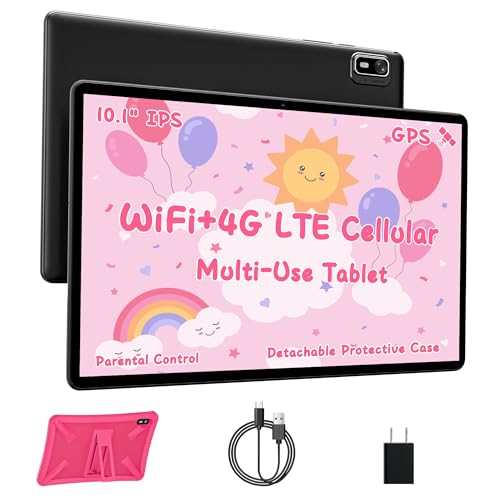
Live listings for the shortlist in this guide are pulled from Amazon below, so prices and availability are always current at the moment you look.

How this guide was assembled
Our research drew on manufacturer specification sheets, carrier band documentation, modem chipset references, and operator plan terms published for consumers. Research notes emphasise verifiable radio details, tray configurations, and network requirements rather than impressions gathered from brief handling, and readers should confirm band lists against their own carrier before ordering, since regional SKUs differ. We keep researching carrier policy changes, because plan rules for tablet lines shift more often than hardware revisions.
Disclosure: this article contains affiliate links to retailers. If you buy through those links, the site may earn a commission that supports its publishing work, at no additional cost to you. Prices, plan terms, and network availability change over time, so check the retailer’s current listing and your carrier’s coverage documents before deciding.
A connected ten-inch tablet will not suit everyone, yet for the reader whose workday unfolds between buildings, vehicles, and temporary pitches, the right band list and an honest data plan turn dead travelling minutes into finished tasks, and that quiet reliability, once experienced on a rainy platform with a timetable loading instantly, is remarkably hard to give up.