What's inside
- Quick picks: best 200 dollar 8 inch tablets
- What "best 200 dollar 8 inch tablets" really means
- How the picks were chosen
- The six best 200 dollar 8 inch tablets
- Comparison table
- Buying guide
- Using and looking after your tablet
- Common mistakes to avoid
- Which pick suits which reader
- Final recommendation
- Frequently asked questions
- Keep reading on GizmoVerdict
As an Amazon Associate I earn from qualifying purchases. This post may contain affiliate links at no extra cost to you.
Finding the best of best 200 dollar 8 inch tablets means matching the tablet to the work, not chasing the biggest numbers. A cheaper tablet with the right screen and enough storage often beats a faster one that fights you on the basics. Eight inches is the size for a tablet that travels everywhere, and the value tier is where that size makes the most sense: cheap enough to carry without worry, good enough for reading, video, and light games. The picks below are judged on the screen, the battery, and the total cost including a case.
Whether you are buying your first tablet or replacing one that has served for years, the structure below stays the same: six honest picks, a comparison table, and a buying guide that explains the decisions behind the ranking.
Quick picks: best 200 dollar 8 inch tablets
| # | Product | Where to buy |
|---|---|---|
| 1 | Amazon Fire HD 8 (12th Generation) | Check on Amazon |
| 2 | Samsung Galaxy Tab A7 Lite | Check on Amazon |
| 3 | Lenovo Tab M8 (4th Gen) | Check on Amazon |
| 4 | Samsung Galaxy Tab A9 | Check on Amazon |
| 5 | TCL Tab 8 | Check on Amazon |
What "best 200 dollar 8 inch tablets" really means
This category rewards a clear-eyed look at total cost. A tablet that looks cheap can turn expensive once you add a pen, a case, and a keyboard, while a slightly dearer model that includes the accessories can end up the better value over two or three years of use.
How the picks were chosen
Every tablet below was assessed against the same checklist, so the recommendations stay comparable. We looked at the screen first, because it is the part you stare at for hours, then at performance under everyday loads, battery life in normal use, storage and expansion, the quality of the pen or keyboard experience where one applies, and how long the manufacturer supports the device with updates.
- We checked the screen, the storage, and the total cost including accessories for each pick for every pick.
- We penalised models whose total cost with accessories pushed them out of the value tier.
The six best 200 dollar 8 inch tablets
Amazon Fire HD 8 (12th Generation)
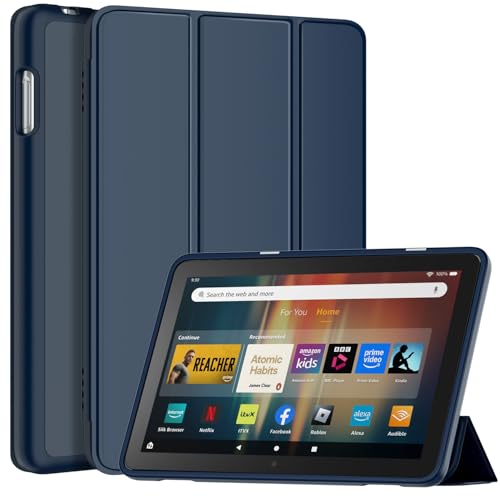
At a glance: 8-inch LCD display, 1280×800 | Hexa-core 2.0GHz | 2GB RAM, 32GB storage | Up to 13 hours of reading, browsing and video.
Among the six picks, the Amazon Fire HD 8 (12th Generation) stands out as an 8 inch tablet in the value tier, in a compact size. It brings 8-inch LCD display, 1280×800 | Hexa-core 2.0GHz | 2GB RAM, 32GB storage | Up to 13 hours of reading, browsing and video, a combination that suits its intended use well. The sections below break down where it shines and where it asks you to compromise, so you can judge it against your own routine rather than a marketing claim.
What keeps the Amazon Fire HD 8 (12th Generation) competitive is a practical set of strengths. MicroSD slot, so storage can grow cheaply later. Compact size that fits one hand and slips into a small bag. And low cost for what it does, so it suits a second tablet or a first one. None of these is dramatic on its own, but together they add up to a tablet that is pleasant to live with rather than merely adequate on a spec sheet.
Strengths:
- MicroSD slot, so storage can grow cheaply later.
- Compact size that fits one hand and slips into a small bag.
- Low cost for what it does, so it suits a second tablet or a first one.
Trade-offs:
- LCD panel rather than OLED, so blacks look grey in a dark room.
- Modest memory, so heavy multitasking can slow it down.
- No pen support, so handwriting and drawing need another device.
The compromises are real and worth knowing before you buy. LCD panel rather than OLED, so blacks look grey in a dark room. Modest memory, so heavy multitasking can slow it down. And no pen support, so handwriting and drawing need another device. None of these is necessarily a deal-breaker, but they are the reasons this tablet sits where it does in the ranking rather than higher.
Ownership is where the Amazon Fire HD 8 (12th Generation) either earns its keep or shows its limits. LCD panel rather than OLED, so blacks look grey in a dark room. That is worth weighing against the strengths above, because a tablet you use every day is judged by its worst day, not its best one.
For the right buyer, the Amazon Fire HD 8 (12th Generation) is an easy recommendation. MicroSD slot, so storage can grow cheaply later. That matters more than any single specification, because it is the quality you notice every time you pick the tablet up. The trade-offs listed above are the cost of that focus, and for the audience this tablet is built for, they are a fair exchange.
Best for: a buyer who wants a small, cheap tablet for reading and video
Not suited for: anyone who needs Google apps
Samsung Galaxy Tab A7 Lite
Check price on Amazon: Amazon Fire HD 8 (12th Generation)
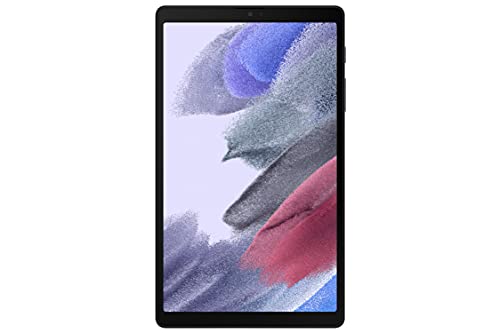
At a glance: 8.7-inch LCD display, 1340×800 | MediaTek Helio P22T | 3GB RAM, 32GB storage | 5,100mAh battery, up to 13 hours of video.
Positioned as an 8 inch tablet in the value tier, in a compact size, the Samsung Galaxy Tab A7 Lite offers 8.7-inch LCD display, 1340×800 | MediaTek Helio P22T | 3GB RAM, 32GB storage | 5,100mAh battery, up to 13 hours of video. Those figures tell only part of the story. A tablet lives or dies on the details that never appear in a headline: how the screen handles glare, how comfortable it is to hold for an hour, and whether the software gets out of your way.
What keeps the Samsung Galaxy Tab A7 Lite competitive is a practical set of strengths. MicroSD slot, so storage can grow cheaply later. Cellular version available, so it stays online away from Wi-Fi. And compact size that fits one hand and slips into a small bag. None of these is dramatic on its own, but together they add up to a tablet that is pleasant to live with rather than merely adequate on a spec sheet.
Strengths:
- MicroSD slot, so storage can grow cheaply later.
- Cellular version available, so it stays online away from Wi-Fi.
- Compact size that fits one hand and slips into a small bag.
Trade-offs:
- LCD panel rather than OLED, so blacks look grey in a dark room.
- Modest memory, so heavy multitasking can slow it down.
- No pen support, so handwriting and drawing need another device.
No tablet at this level is without trade-offs, and the Samsung Galaxy Tab A7 Lite is no exception. LCD panel rather than OLED, so blacks look grey in a dark room. Modest memory, so heavy multitasking can slow it down. And no pen support, so handwriting and drawing need another device. If those limitations clash with how you plan to use the tablet, one of the other picks will serve you better.
Ownership is where the Samsung Galaxy Tab A7 Lite either earns its keep or shows its limits. LCD panel rather than OLED, so blacks look grey in a dark room. That is worth weighing against the strengths above, because a tablet you use every day is judged by its worst day, not its best one.
Stepping back, the Samsung Galaxy Tab A7 Lite makes sense for a buyer who values microsd slot, so storage can grow cheaply later. over outright speed or the newest design. It is not the flashiest tablet on this list, and it does not try to be. Its appeal is narrower and more honest than that: it does one job well, at a cost that leaves room for the accessories that make a tablet genuinely useful.
Best for: a buyer who wants the cheapest small Samsung tablet for basic use
Not suited for: anyone who needs a large screen for split-screen work
Lenovo Tab M8 (4th Gen)
Check price on Amazon: Samsung Galaxy Tab A7 Lite

At a glance: 8-inch LCD display, 1280×800 | MediaTek Helio A22 | 3GB RAM, 32GB storage | 5,100mAh battery, up to 13 hours of video.
Positioned as an 8 inch tablet in the value tier, in a compact size, the Lenovo Tab M8 (4th Gen) offers 8-inch LCD display, 1280×800 | MediaTek Helio A22 | 3GB RAM, 32GB storage | 5,100mAh battery, up to 13 hours of video. Those figures tell only part of the story. A tablet lives or dies on the details that never appear in a headline: how the screen handles glare, how comfortable it is to hold for an hour, and whether the software gets out of your way.
The case for the Lenovo Tab M8 (4th Gen) rests on how it handles ordinary days. MicroSD slot, so storage can grow cheaply later. Cellular version available, so it stays online away from Wi-Fi. And compact size that fits one hand and slips into a small bag. That combination is what you notice after a week of use, long after the novelty of a new device has worn off.
Strengths:
- MicroSD slot, so storage can grow cheaply later.
- Cellular version available, so it stays online away from Wi-Fi.
- Compact size that fits one hand and slips into a small bag.
Trade-offs:
- LCD panel rather than OLED, so blacks look grey in a dark room.
- Modest memory, so heavy multitasking can slow it down.
- No pen support, so handwriting and drawing need another device.
No tablet at this level is without trade-offs, and the Lenovo Tab M8 (4th Gen) is no exception. LCD panel rather than OLED, so blacks look grey in a dark room. Modest memory, so heavy multitasking can slow it down. And no pen support, so handwriting and drawing need another device. If those limitations clash with how you plan to use the tablet, one of the other picks will serve you better.
Ownership is where the Lenovo Tab M8 (4th Gen) either earns its keep or shows its limits. LCD panel rather than OLED, so blacks look grey in a dark room. That is worth weighing against the strengths above, because a tablet you use every day is judged by its worst day, not its best one.
Stepping back, the Lenovo Tab M8 (4th Gen) makes sense for a buyer who values microsd slot, so storage can grow cheaply later. over outright speed or the newest design. It is not the flashiest tablet on this list, and it does not try to be. Its appeal is narrower and more honest than that: it does one job well, at a cost that leaves room for the accessories that make a tablet genuinely useful.
Best for: a buyer who wants a small, cheap tablet for basic use
Not suited for: anyone who needs a large screen for split-screen work
Samsung Galaxy Tab A9
Check price on Amazon: Lenovo Tab M8 (4th Gen)
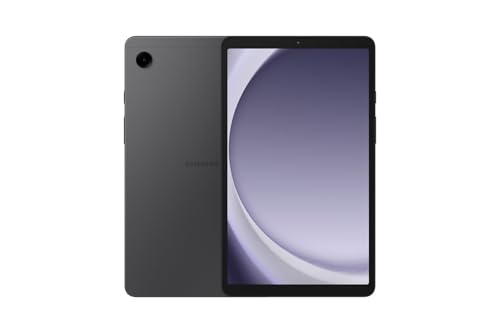
At a glance: 8.7-inch LCD display, 1340×800 | MediaTek Helio G99 | 4GB RAM, 64GB storage | 5,100mAh battery, up to 13 hours of video.
The Samsung Galaxy Tab A9 earns its place here by being an 8 inch tablet in the value tier, in a compact size. The specification sheet reads 8.7-inch LCD display, 1340×800 | MediaTek Helio G99 | 4GB RAM, 64GB storage | 5,100mAh battery, up to 13 hours of video, which is a fair summary of what you get, but the real question is whether the everyday experience holds up: scrolling, typing, watching video, and switching between apps without stuttering or waiting.
What keeps the Samsung Galaxy Tab A9 competitive is a practical set of strengths. MicroSD slot, so storage can grow cheaply later. Strong built-in speakers that sound fuller than most tablets in this class. And cellular version available, so it stays online away from wi-fi. None of these is dramatic on its own, but together they add up to a tablet that is pleasant to live with rather than merely adequate on a spec sheet.
Strengths:
- MicroSD slot, so storage can grow cheaply later.
- Strong built-in speakers that sound fuller than most tablets in this class.
- Cellular version available, so it stays online away from Wi-Fi.
Trade-offs:
- LCD panel rather than OLED, so blacks look grey in a dark room.
- Modest memory, so heavy multitasking can slow it down.
- No pen support, so handwriting and drawing need another device.
The compromises are real and worth knowing before you buy. LCD panel rather than OLED, so blacks look grey in a dark room. Modest memory, so heavy multitasking can slow it down. And no pen support, so handwriting and drawing need another device. None of these is necessarily a deal-breaker, but they are the reasons this tablet sits where it does in the ranking rather than higher.
Ownership is where the Samsung Galaxy Tab A9 either earns its keep or shows its limits. LCD panel rather than OLED, so blacks look grey in a dark room. That is worth weighing against the strengths above, because a tablet you use every day is judged by its worst day, not its best one.
Stepping back, the Samsung Galaxy Tab A9 makes sense for a buyer who values microsd slot, so storage can grow cheaply later. over outright speed or the newest design. It is not the flashiest tablet on this list, and it does not try to be. Its appeal is narrower and more honest than that: it does one job well, at a cost that leaves room for the accessories that make a tablet genuinely useful.
Best for: a buyer who wants a small, cheap Samsung tablet for reading and video
Not suited for: anyone who needs a large screen for split-screen work
TCL Tab 8
Check price on Amazon: Samsung Galaxy Tab A9

At a glance: 8-inch LCD display, 1280×800 | MediaTek Helio P22T | 3GB RAM, 32GB storage | 4,080mAh battery, up to 10 hours of use.
TCL Tab 8 is an 8 inch tablet in the value tier, in a compact size. Its headline figures are 8-inch LCD display, 1280×800 | MediaTek Helio P22T | 3GB RAM, 32GB storage | 4,080mAh battery, up to 10 hours of use, and on paper that is a sensible balance for the money. What matters in practice is how those parts behave together: the screen you look at, the responsiveness when you switch apps, and whether the battery still has charge left at the end of the day.
The case for the TCL Tab 8 rests on how it handles ordinary days. MicroSD slot, so storage can grow cheaply later. Cellular version available, so it stays online away from Wi-Fi. And compact size that fits one hand and slips into a small bag. That combination is what you notice after a week of use, long after the novelty of a new device has worn off.
Strengths:
- MicroSD slot, so storage can grow cheaply later.
- Cellular version available, so it stays online away from Wi-Fi.
- Compact size that fits one hand and slips into a small bag.
Trade-offs:
- LCD panel rather than OLED, so blacks look grey in a dark room.
- Modest memory, so heavy multitasking can slow it down.
- No pen support, so handwriting and drawing need another device.
The compromises are real and worth knowing before you buy. LCD panel rather than OLED, so blacks look grey in a dark room. Modest memory, so heavy multitasking can slow it down. And no pen support, so handwriting and drawing need another device. None of these is necessarily a deal-breaker, but they are the reasons this tablet sits where it does in the ranking rather than higher.
Ownership is where the TCL Tab 8 either earns its keep or shows its limits. LCD panel rather than OLED, so blacks look grey in a dark room. That is worth weighing against the strengths above, because a tablet you use every day is judged by its worst day, not its best one.
For the right buyer, the TCL Tab 8 is an easy recommendation. MicroSD slot, so storage can grow cheaply later. That matters more than any single specification, because it is the quality you notice every time you pick the tablet up. The trade-offs listed above are the cost of that focus, and for the audience this tablet is built for, they are a fair exchange.
Best for: a buyer who wants a small, cheap tablet with LTE data
Not suited for: anyone who needs a large screen for split-screen work
Amazon Fire 7 (12th Generation)
At a glance: 7-inch LCD display, 1024×600 | Quad-core 2.0GHz | 2GB RAM, 16GB storage | Up to 10 hours of reading, browsing and video.
Positioned as an 8 inch tablet in the value tier, in a compact size, the Amazon Fire 7 (12th Generation) offers 7-inch LCD display, 1024×600 | Quad-core 2.0GHz | 2GB RAM, 16GB storage | Up to 10 hours of reading, browsing and video. Those figures tell only part of the story. A tablet lives or dies on the details that never appear in a headline: how the screen handles glare, how comfortable it is to hold for an hour, and whether the software gets out of your way.
What keeps the Amazon Fire 7 (12th Generation) competitive is a practical set of strengths. MicroSD slot, so storage can grow cheaply later. Compact size that fits one hand and slips into a small bag. And low cost for what it does, so it suits a second tablet or a first one. None of these is dramatic on its own, but together they add up to a tablet that is pleasant to live with rather than merely adequate on a spec sheet.
Strengths:
- MicroSD slot, so storage can grow cheaply later.
- Compact size that fits one hand and slips into a small bag.
- Low cost for what it does, so it suits a second tablet or a first one.
Trade-offs:
- LCD panel rather than OLED, so blacks look grey in a dark room.
- Modest memory, so heavy multitasking can slow it down.
- No pen support, so handwriting and drawing need another device.
The compromises are real and worth knowing before you buy. LCD panel rather than OLED, so blacks look grey in a dark room. Modest memory, so heavy multitasking can slow it down. And no pen support, so handwriting and drawing need another device. None of these is necessarily a deal-breaker, but they are the reasons this tablet sits where it does in the ranking rather than higher.
Look beyond the headline figures with the Amazon Fire 7 (12th Generation) and the picture stays consistent: a device built for a particular job, with clear strengths in that job and clear limits outside it. MicroSD slot, so storage can grow cheaply later. That focus is exactly why it belongs on this list.
Stepping back, the Amazon Fire 7 (12th Generation) makes sense for a buyer who values microsd slot, so storage can grow cheaply later. over outright speed or the newest design. It is not the flashiest tablet on this list, and it does not try to be. Its appeal is narrower and more honest than that: it does one job well, at a cost that leaves room for the accessories that make a tablet genuinely useful.
Best for: a buyer who wants the cheapest small tablet for reading
Not suited for: anyone who needs Google apps
Check price on Amazon: TCL Tab 8
Comparison table
Side by side, the differences between the six picks are easier to judge than from individual listings. The table below uses the headline figures for each model.
| Model | Display | Processor | Memory and storage | Best suited to |
|---|---|---|---|---|
| Amazon Fire HD 8 (12th Generation) | 8-inch LCD display, 1280×800 | Hexa-core 2.0GHz | 2GB RAM, 32GB storage | an 8 inch tablet in the value tier, in a compact size |
| Samsung Galaxy Tab A7 Lite | 8.7-inch LCD display, 1340×800 | MediaTek Helio P22T | 3GB RAM, 32GB storage | an 8 inch tablet in the value tier, in a compact size |
| Lenovo Tab M8 (4th Gen) | 8-inch LCD display, 1280×800 | MediaTek Helio A22 | 3GB RAM, 32GB storage | an 8 inch tablet in the value tier, in a compact size |
| Samsung Galaxy Tab A9 | 8.7-inch LCD display, 1340×800 | MediaTek Helio G99 | 4GB RAM, 64GB storage | an 8 inch tablet in the value tier, in a compact size |
| TCL Tab 8 | 8-inch LCD display, 1280×800 | MediaTek Helio P22T | 3GB RAM, 32GB storage | an 8 inch tablet in the value tier, in a compact size |
| Amazon Fire 7 (12th Generation) | 7-inch LCD display, 1024×600 | Quad-core 2.0GHz | 2GB RAM, 16GB storage | an 8 inch tablet in the value tier, in a compact size |
Buying guide
Value: total cost, not sticker cost
The cheapest tablet is not always the cheapest to own. Add the cost of the pen, the keyboard, the case, and any subscription the software pushes you toward, and the ranking can change completely. A tablet that includes the pen and offers years of updates can be better value than a cheaper rival that charges for every accessory and stops getting updates after a year. Think in terms of cost per year of useful life, and buy the tablet you will still be happy with in two years, not just the one that looks good on the day.
Screen: size and quality matter most
Screen size shapes everything else about a tablet. A compact screen is easier to hold for long reading sessions and fits in a small bag, while a larger screen is better for split-screen work, handwriting, and video. Resolution matters too, but only up to a point: once text looks sharp at normal reading distance, extra pixels buy little. What does matter is brightness for outdoor or bright-room use, colour accuracy if you edit photos, and whether the panel handles reflections well. A high refresh rate makes scrolling and handwriting feel smoother, and it is worth having if you write a lot by hand. Glare is the quiet deal-breaker: a glossy screen that mirrors every window will tire your eyes faster than a slightly dimmer matte-friendly panel.
Storage and expansion
Storage is the spec buyers most often underestimate. Apps, cached video, photos, and documents add up, and a tablet that felt roomy on day one can feel cramped within a year. A microSD card slot is the cheapest fix, but not every tablet has one, and cards are slower than built-in storage, so they suit media better than apps. If there is no card slot, buy the larger storage tier. Cloud storage helps, but it needs a connection, and it does not help when you want video available offline on a flight.
Battery: all-day means all-day
Battery claims are measured under gentle conditions, so treat them as a rough guide rather than a promise. What matters is how the tablet behaves in your routine: streaming video over Wi-Fi, taking notes with the screen at a comfortable brightness, and staying connected. A tablet that comfortably survives a full day of that mix is worth more than one that needs a midday charge. Charging speed matters too, especially if you top up between classes or meetings, and a tablet that charges slowly can be more annoying than one with a slightly smaller battery that refills quickly.
Performance: enough is enough
For browsing, video, notes, and office apps, a mid-range chip with enough memory is all you need, and paying for flagship speed buys little you can feel. Where performance does show up is in multitasking, large documents, and games: too little memory means apps reload when you switch between them, and a weak graphics chip stutters in demanding games. Storage is the more common bottleneck. A tablet with limited built-in storage fills up fast once you install apps, download video for offline viewing, and save documents, so a microSD slot or a larger storage tier is worth more than a slightly faster processor for most buyers.
One last point from the buying guide is worth repeating: buy the tablet for the use you actually have, not the use you imagine. A tablet bought for reading that ends up running video calls all day is a different purchase from the one on the box, and the same is true in reverse. If you can, handle the tablet before you buy it, check the return policy, and keep the receipt until you have used it for a full week. The right tablet should feel right on day seven, not just on day one.
Using and looking after your tablet
Learn the multitasking gestures for your tablet. Split-screen, floating windows, and quick app switching turn a tablet from a single-task device into a real work tool, and they take an afternoon to learn. Pair a Bluetooth keyboard and mouse if you write long documents; the combination is surprisingly capable.
Set the tablet up properly on day one and it will repay you. Install the updates, sign into your accounts, and set up cloud backup for notes and documents before you have anything to lose. Turn on automatic backups for anything handwritten, because a lost notes database is far harder to replace than a lost app.
Manage storage before it manages you. Offload video you have finished watching, clear app caches occasionally, and move photos to cloud storage or a computer. A tablet that is nearly full runs slower and cannot install updates, so keeping a little headroom is a practical habit, not a chore.
Battery care is mostly about habits. Avoid leaving the tablet at full charge in a hot car or on a sunny windowsill, and do not let it sit dead for weeks. A partial charge kept between roughly a fifth and four fifths of capacity is kinder to the battery over years than constant full charges, and most tablets now offer a battery-protection setting worth turning on.
Common mistakes to avoid
- Assuming all apps are available: Some tablets run a limited app store, and a specific app you rely on may be missing or behave differently. Check your must-have apps exist before you commit.
- Buying on storage you will outgrow: The most common regret is buying the smallest storage tier to save money, then spending the tablet’s life deleting apps and photos. If there is no card slot, buy more storage than you think you need.
- Judging by benchmarks alone: Benchmark scores say little about how a tablet feels in daily use. Screen quality, speaker quality, and software polish matter more than a few points on a synthetic test.
- Skipping the case: Most cracked tablet screens happen in the first month, before the owner gets around to buying a case. Fit protection on day one; it is the cheapest repair you will ever buy.
- Forgetting the pen and keyboard are extras: A tablet that needs a pen and keyboard to do its job can cost far more than its headline figure once you add them. Price the whole kit, not just the tablet.
Which pick suits which reader
The six picks overlap more than they differ on paper, so the choice comes down to who you are and what the tablet has to do every day. Use the short guide below to narrow the list to two or three, then read those sections in full.
Amazon Fire HD 8 (12th Generation): best suited to a buyer who wants a small, cheap tablet for reading and video. Think twice if you are anyone who needs Google apps.
Samsung Galaxy Tab A7 Lite: best suited to a buyer who wants the cheapest small Samsung tablet for basic use. Think twice if you are anyone who needs a large screen for split-screen work.
Lenovo Tab M8 (4th Gen): best suited to a buyer who wants a small, cheap tablet for basic use. Think twice if you are anyone who needs a large screen for split-screen work.
Samsung Galaxy Tab A9: best suited to a buyer who wants a small, cheap Samsung tablet for reading and video. Think twice if you are anyone who needs a large screen for split-screen work.
TCL Tab 8: best suited to a buyer who wants a small, cheap tablet with LTE data. Think twice if you are anyone who needs a large screen for split-screen work.
Amazon Fire 7 (12th Generation): best suited to a buyer who wants the cheapest small tablet for reading. Think twice if you are anyone who needs Google apps.
Final recommendation
If you want the best all-round pick here, start with Amazon Fire HD 8 (12th Generation): it is the choice for buyers who want a small, cheap tablet for reading and video. Samsung Galaxy Tab A7 Lite is the alternative if you want the smallest tablet here for reading.
There is no single winner here, because the right tablet depends on the job. If you want the cheapest usable tablet, start at the budget end of the list and check the storage and screen first. If you write by hand every day, the pen experience matters more than the processor. And if the tablet has to work away from Wi-Fi, buy the connected model once rather than regretting the Wi-Fi-only one later. Whichever you choose, buy the storage tier you will still be happy with in two years, fit a case on day one, and check the update promise before you pay.
Frequently asked questions
How do I judge value without overpaying?
Compare the total cost: tablet, case, pen, and keyboard if you need them. A cheap tablet that needs expensive accessories can cost more than a dearer one that includes them. Think in cost per year of useful life rather than the headline figure.
Are cheap tablets worth buying?
They can be, if you match them to light use: reading, video, browsing, and simple notes. Where cheap tablets disappoint is in heavy multitasking, demanding games, and long-term software support, so be honest about what you will ask of one.
Should I buy the smallest storage tier to save money?
Only if the tablet has a microSD slot or you use cloud storage heavily. Without expansion, a small storage tier fills up fast and becomes a daily annoyance, so the larger tier is usually the better buy.
Are cheap tablets worth buying?
They can be, if you match them to light use: reading, video, browsing, and simple notes. Where cheap tablets disappoint is in heavy multitasking, demanding games, and long-term software support, so be honest about what you will ask of one.
What accessories should I budget for?
At minimum, a case and a screen protector. Add a pen if you handwrite and a keyboard if you type long documents. Buying those with the tablet is usually cheaper than adding them later, and it means the tablet is useful from day one.
Does screen size matter for reading?
Yes, but in opposite directions. A smaller screen is lighter to hold for long reading sessions, while a larger screen shows more text and suits split-screen work. For pure reading, comfort in the hand matters more than resolution.
How long should a tablet last?
A well-chosen tablet should serve for three to five years. The limiting factors are usually battery wear and the end of software updates rather than raw performance, so buy a model with a good update promise and a battery that comfortably covers your day.
Wi-Fi only or cellular?
Choose cellular if you regularly work away from Wi-Fi: commuting, fieldwork, or travel. The tablet costs more and needs a data plan. If you are usually at home, at work, or on campus Wi-Fi, the Wi-Fi model is the same device for less.
Keep reading on GizmoVerdict
best 7 inch android tablets under 200 | best 8 9 inch android tablets | best 8 inch tablets
Related guides
- Best 16 Inch Tablets: Six Very Large Tablets, the Closest to 16 Inches
- Best 12 Android Tablets: The Top 12 Android Tablets Compared
- Best 10 Inch Tablets With Usb Port: Six 10 Inch Picks With a USB Port for Accessories
- Best 10 Tablets With Sim Card Slot: Ten Tablets With a SIM Card Slot, Six Picks Compared