What's inside
- Key Takeaways
- Quick Picks
- How did we test listings against the best video projectors for playing video of flash drives brief?
- Why does the same USB stick play on one projector and not another?
- When is flash-drive playback better than streaming or a laptop?
- What file formats and drive habits separate success from embarrassment?
- Which of the six should you trust with your stick, your files and your audience?
- How do the six compare on USB evidence and general character?
- How do you prepare a flash drive that any projector will love?
- What do classrooms, halls and families each need from stick playback?
- What mistakes make flash-drive playback fail in public?
- Final Recommendation
- Frequently Asked Questions
- Related Guides
As an Amazon Associate I earn from qualifying purchases. This post may contain affiliate links at no extra cost to you.
gizmoverdict.com is reader-supported. When you buy through links on our site, we may earn an affiliate commission.
Where to buy: All six machines below can be reached through Amazon — the Quick Picks table links each one, and so does its review. Because USB playback depends on the exact port and firmware of the exact listing, open the linked page and confirm the USB function described there matches the job in this guide before ordering.
The best video projectors for playing video of flash drives solve a problem that streaming quietly created: sometimes the video lives on a stick. A teacher with a lesson film on a USB drive, a grandparent with a memory card of family footage, a trainer in a hall with no network, a salesperson whose demo must work in a client’s basement — all of them need a projector that treats a flash drive as a first-class source, reads its files directly and plays them without a laptop, a login or a prayer to the Wi-Fi.
That requirement is stricter than it looks, because a USB port is not a promise. Projectors carry USB sockets for several different jobs: playing media files directly, supplying power to a streaming stick, servicing firmware, or accepting a signal. A listing that says “USB” may mean any of them. This guide therefore reads every pick’s title for exactly what it states about USB, credits direct playback only where the listing supports it, and — where a title is silent about flash-drive playback — says so in plain words in the spec box: not stated in the listing title. Two of the six picks carry that honest label, and they remain in the guide for their other strengths, clearly marked.
The six divide into three groups. First, the machines whose listings put USB playback at the centre of the offer — a networkable ViewSonic office projector with USB in its name, and two portables whose titles list USB among the sources they play from. Then a high-output home machine whose compatibility list includes USB. Finally, the two marked picks: an excellent Epson whose title never mentions USB playback, and a clever HP portable whose USB-C is about power, not files. Read the labels as carefully as the badges; in this category the label is the review.
Key Takeaways
- A USB port is not a playback promise — ports also exist for power and service, so read what the listing actually states.
- Where a title is silent about flash-drive playback, this guide says “not stated in the listing title” rather than guessing.
- File format support decides real-world success: a projector that reads your stick but not your codec helps no one.
- The ViewSonic PG603X puts USB in its model pitch; the HP MC425’s USB-C is for power banks, a different job entirely.
- Carry a short, plainly formatted test stick to audition any projector before the day it matters.
- For a classroom or hall, direct playback removes the laptop, the login and the network from the failure list.
Quick Picks
| Pick | Badge | USB playback status |
|---|---|---|
| ViewSonic PG603X 3600 Lumens XGA Networkable Home and Office Projector with HDMI and USB | The office USB anchor | A 3,600-lumen networkable office projector whose title names HDMI and USB together — the institutional pick for stick-fed rooms. |
| AuKing Projector, 2026 Upgraded Mini Portable Projector, Full HD 1080P Movie Projector for | The mini all-source portable | A mini portable whose compatibility list runs HDMI, USB, smartphone, TV box and laptop — USB named as a playing source. |
| YGSKK Mini Projector with Wifi and Bluetooth, Built-in Apps,Movie Projector | The connected mini with USB support | A WiFi and Bluetooth mini with built-in apps and electric focus, whose supported sources include USB alongside HDMI and games consoles. |
| NICPOW 2000 ANSI Lumens Projector with WiFi and Bluetooth, 4K Supported, 300” & Zoom Home | The high-output home claim | A home projector claiming 2,000 ANSI lumens with USB in its compatibility list, a 300-inch picture claim and zoom. |
| Epson EpiqVision Flex CO-FH02 Full HD 1080p Smart Streaming Projector | The excellent projector with an unstated USB case | The superb 3,000-lumen 3LCD smart projector from this batch’s other guide — included here with its USB position stated honestly: not stated in the listing title. |
| HP Projector with Apps, FHD 4K Supported, USB-C Power Bank Compatible MC425 | The power-bank portable — read the USB label carefully | A native 1080P mini with apps, auto focus and keystone, whose USB-C headline is about power-bank compatibility — not file playback. |
How did we test listings against the best video projectors for playing video of flash drives brief?
We treated the listing title as the evidence and graded what it states. A title that names USB among the projector’s playback sources — devices it is compatible with, inputs it plays from — earned a playback credit, because manufacturers write those compatibility lists to describe exactly this use. A title that names USB-C power compatibility earned a different label, because charging from a power bank and reading a video file are unrelated talents. A title that never mentions USB at all earned the guide’s plainest sentence: not stated in the listing title.
That discipline matters more in this category than in any other in this batch, because the disappointment it prevents is specific and common: a projector bought for stick playback that turns out to power a streaming dongle beautifully and read nothing at all. Buyers should still confirm the port’s function and the supported file formats on the full listing before ordering — titles are summaries, and the detail page is where formats live — but a guide’s first duty is to refuse to upgrade silence into a feature.
Beyond the USB question we weighed the ordinary projector virtues with this use case in mind: stated brightness for rooms that are rarely dark, simplicity of the built-in media player’s menus, and the connections that serve as plan B when a file refuses to play. A projector that reads sticks well and also takes HDMI gracefully is the one that survives contact with a real classroom, hall or family archive.
Why does the same USB stick play on one projector and not another?
Three separate gates stand between a file on a stick and a picture on the wall, and a failure at any one looks identical from the sofa. The first gate is the port’s job: the projector’s USB socket must be wired and programmed for media playback, not merely for power or service. The second is the file system: most projector media players read FAT32-formatted drives happily, many accept exFAT, and a drive formatted for a single computer’s private system may be invisible to all of them — with FAT32 carrying its own four-gigabyte ceiling on individual files, which long recordings can hit.
The third gate is the codec, and it is the one that surprises people most. A video file is a container — MP4, MKV, AVI — holding picture and sound encoded in particular ways. A projector whose player recognises the container but not the sound encoding inside it will show a silent film; one that misses the picture encoding shows a black screen with perfect audio. Phones, action cameras and screen recorders all write their own dialects, which is why the same stick can be a triumph in the living room and a mystery in the classroom.
The working defences are simple and worth adopting before the important day. Keep a dedicated stick for projection, formatted plainly, carrying files in the most ordinary formats you can produce; convert treasured clips into a common MP4 form rather than trusting exotic originals; and test the exact stick in the exact projector before the audience, the class or the client arrives. Direct playback is a convenience built out of small certainties, and each of these habits removes one uncertainty.
When is flash-drive playback better than streaming or a laptop?
Playback from a stick wins wherever the network cannot be trusted or should not be involved. Village halls, school classrooms, site cabins, exhibition stands and clients’ meeting rooms share the same profile: unknown Wi-Fi, captive logins, or a policy against guests on the network. A projector that reads a drive directly turns the presentation into a object you carry — the file is either on the stick or it is not — and removes the three commonest causes of a delayed start in a single move.
It also wins on privacy and permanence. Family footage, a company’s unreleased product film, a teacher’s licensed classroom copy: none of these belongs on a streaming account or a borrowed laptop, and a stick in a pocket keeps custody simple. Archives matter too — the drive holding a decade of family video will still plug into a projector long after the app that once hosted it has been redesigned twice and discontinued once.
The laptop keeps its own honest advantages: every codec ever made, effortless seeking, presenter tools. This guide’s position is not that sticks replace computers, but that a projector fluent in both — direct playback for the simple days, HDMI for the complicated ones — is the machine that never has to apologise. That is the standard the six below were chosen against, with their USB labels stated exactly as their listings state them.
What file formats and drive habits separate success from embarrassment?
Think of compatibility as a chain with four links: the port must be a playback port, the drive’s formatting must be recognised, the file’s container must be understood, and the encodings inside it must be decodable. Listings speak most clearly about the first link, manuals about the second and third, and only experience about the fourth — which is why this guide keeps returning to the same practical liturgy: a plainly formatted dedicated stick, files converted into the most ordinary MP4 form you can produce, and a rehearsal with the exact files before any audience depends on them.
Conversion deserves a defence, because it sounds like a chore and behaves like insurance. Modern phones and cameras record in efficient modern encodings that older or simpler media players may not decode; a five-minute pass through any common converter turns those files into the lingua franca every projector speaks. Do it once, when the footage is gathered, and the archive becomes permanently portable — across this year’s projector, next year’s, and the borrowed one at the hall.
Keep the archive itself like a librarian. One drive for projection, labelled; folders named plainly; a text file in the root noting what has been tested and where. It sounds fussy until the evening when a grandparent asks for the wedding video of thirty years ago and the household produces it in ninety seconds, on the wall, in sound and in colour. That moment is what this entire category of projector exists to make ordinary.
Which of the six should you trust with your stick, your files and your audience?
Read the spec boxes first in this guide — each states the USB position exactly as the listing title supports it, including the two picks where flash-drive playback is not stated in the listing title.

ViewSonic PG603X 3600 Lumens XGA Networkable Home and Office Projector with HDMI and USB — The office USB anchor
The PG603X earns first place here because its listing states the one thing this category needs most: it puts USB in the model’s own pitch, alongside HDMI, in a networkable home and office projector rated at 3,600 lumens. That is the profile of a machine built for rooms where content arrives by whatever means the presenter carries — a laptop on HDMI, a stick in a pocket — and where the projector is expected to cope with both without a technician in attendance. ViewSonic’s office range is built for exactly that institutional forgiveness.
The supporting specification suits the rooms in question. A 3,600-lumen rating in the maker’s terms is working brightness for classrooms and meeting rooms that are never fully dark, and the networkable design lets facilities manage the machine alongside the rest of the building’s equipment. Its XGA resolution is the honest trade in the package: entirely adequate for documents, lessons and presentations, a step behind the full HD machines for film detail. For the stick-fed classroom, that trade is usually the right way round — legibility and brightness first, cinema second.
As with every pick here, confirm the port’s media formats on the full listing before a term’s worth of lesson files depends on it; titles state the connection, and detail pages state the codecs. Judged on its evidence, though, this is the guide’s most credible flash-drive workhorse: an office machine whose USB socket exists in the context of sources, not of charging cables.
Institutions should note the unglamorous detail that makes this class of machine succeed across a school or an office: consistency. A projector whose media player behaves identically in every room lets a teacher learn the routine once and trust it everywhere, and lets IT support the whole fleet with one page of instructions. The PG603X’s office lineage is exactly that promise — not the cleverest player in this guide, but the one whose behaviour a whole building can standardise on.
A procurement thought for the institutions reading: buy the same model for every room if you possibly can. The PG603X class exists to be standardised — identical remotes, identical menus, identical media behaviour — and the saving in training, support and presenter confidence dwarfs any marginal gain from optimising each room separately. The flash-drive brief is, at heart, a brief about predictability, and a fleet of one model is predictability in its purest form.
- Stated output: 3,600 lumens as listed, in the maker’s terms
- Resolution: XGA, per the listing title
- Connections in the title: HDMI and USB named together
- Design: networkable home and office projector
- USB position: named as a source connection in the title — confirm supported formats on the full listing
Strengths
- USB presented as a source, in an office machine
- Working brightness for lit classrooms
- Networkable for institutional management
Trade-offs
- XGA resolution trails full HD for film
- Format support must be confirmed on the listing
- Office manners over home-cinema polish
Best for: classrooms, training rooms and offices where lessons and presentations arrive on a stick
Not suited for: a home cinema whose priority is full HD film detail
A long-running office model with channel-dependent pricing; check price on Amazon, and double-check that the model named there is the PG603X.
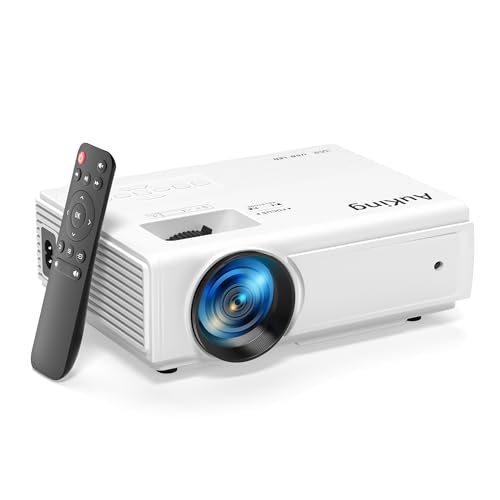
AuKing Projector, 2026 Upgraded Mini Portable Projector, Full HD 1080P Movie Projector for — The mini all-source portable
The AuKing’s title makes its USB case in the grammar this guide trusts: a compatibility list. The projector is described as compatible with HDMI, USB, smartphone, TV box and laptop — a list of sources it plays from, with the flash drive’s connection named in the middle of them. In a mini portable pitched as a full HD 1080P movie projector for home theater, that makes it the home-scale answer to the same brief the ViewSonic answers for offices: plug the stick in, and the film collection you carry is the cinema.
Mini portables earn their place on friction, or its absence. A machine this size lives where the evening happens — a bedroom, a small living room, a garden with a sheet for a screen — and its media player turns a pocket stick into the entire programme, with no laptop fan competing with the dialogue. The honest limits of the class apply: brightness in this segment is an evening quantity rather than a lit-room one, whatever language a listing reaches for, and this guide credits the AuKing with the sources its title states rather than with output it does not.
For a household whose video genuinely lives on drives — downloaded collections, family archives, a child’s films on a stick for a grandparent’s house — the combination of a stated USB source and a body that travels in a small bag is precisely the product. Test your files first, keep the test-stick habit, and this little machine will do the job it was bought for.
A word about expectations for the built-in player, because mini projectors share the same honest limit: the menu will be simple, the folder navigation unhurried, and exotic formats unwelcome. Households who organise the stick tidily — few folders, plain filenames, converted files — will find the experience perfectly pleasant. Households who plug in a chaotic archive drive will blame the projector for the archive. The AuKing rewards the tidy, as every machine in this category quietly does.
Battery-free simplicity is the AuKing’s unlisted feature: it asks for a socket and a stick and nothing else — no accounts, no updates holding the evening hostage, no network at all. For a grandparent’s house, a holiday let or a child’s room, that absence of administration is a genuine virtue, and it is why the humble end of this guide will still be working, unchanged, on the day fancier machines are waiting for a software fix.
- Resolution claim in the title: full HD 1080P movie projection
- Compatibility list as listed: HDMI, USB, smartphone, TV box and laptop
- Type: mini portable projector
- USB position: USB named among the sources it is compatible with
- Brightness: no figure stated in the listing title
Strengths
- USB named plainly among its sources
- Mini body travels anywhere the stick goes
- Wide source compatibility beyond the drive
Trade-offs
- Evening-class brightness, as with all mini portables
- No output figure stated in the title
- Built-in player menus are basic in this class
Best for: bedrooms, small rooms and family film collections that live on a flash drive
Not suited for: a bright living room or a large screen in ambient light
Mini portables are promoted constantly; check price on Amazon rather than trusting any remembered deal figure.

YGSKK Mini Projector with Wifi and Bluetooth, Built-in Apps,Movie Projector — The connected mini with USB support
The YGSKK approaches the brief from the connected side: a mini projector with WiFi and Bluetooth, built-in apps and electric focus, whose title lists the sources it supports — smartphone, TV stick, iPad, PS5, laptop, HDMI and USB. The USB entry in that company is the relevant evidence here: the drive is treated as one of the machine’s playing sources, in a body that also streams, mirrors and connects wirelessly. For a bedroom or a small flat, that is the whole modern brief in one small box — stick tonight, streaming tomorrow, console at the weekend.
Electric focus deserves its mention, because in mini portables the nightly ritual of focus is where goodwill leaks away; a motorised adjustment from the remote keeps the picture sharp from the bed or the sofa. The built-in apps carry the same convenience argument as the platform projectors elsewhere in this batch: the machine is a complete source in itself, and the flash drive becomes the archive it draws on when the internet has nothing to say.
The class limits are the familiar ones, stated plainly: mini projectors are evening machines, their built-in players are simple, and a title’s support list is a promise to verify with your own test stick before the important screening. Within those terms, the YGSKK is the most connected of this guide’s stick-capable minis, and the one whose owners are least likely to need any other box in the room.
The built-in apps change the stick’s role in a way worth understanding. On a machine like this, the drive is no longer the only offline source — downloaded content inside the apps covers some of the same ground — so the stick becomes the archive and the odd file rather than the whole library. That is arguably the healthiest arrangement in this guide: streaming for the everyday, the drive for the irreplaceable, and a projector fluent in both without asking the owner to choose a religion.
The iPad entry in this model’s source list hints at its real household role: it is the screen the family’s devices gather around. A stick of downloaded films for the train journey’s end, a console for the weekend, a tablet’s slideshow for a grandparent — the YGSKK treats them as one continuous life rather than separate setups. Machines that unify a household’s habits get used daily, and daily use is the only specification that never appears in a listing.
- Type: mini projector with WiFi and Bluetooth, per the listing title
- Platform: built-in apps listed
- Focus: electric focus, per the title
- Supported sources as listed: smartphone, TV stick, iPad, PS5, laptop, HDMI and USB
- USB position: USB named in the supported-source list
Strengths
- USB supported alongside a full modern source list
- Built-in apps make it a complete source
- Electric focus from the remote
Trade-offs
- Evening-class output like all minis here
- Simple built-in media player
- Support list should still meet your test stick first
Best for: bedrooms and small flats wanting one small box for sticks, streaming and consoles
Not suited for: lit rooms, big screens or format-exotic archives without conversion
A keenly promoted segment; check price on Amazon and compare the bundle against the AuKing above.
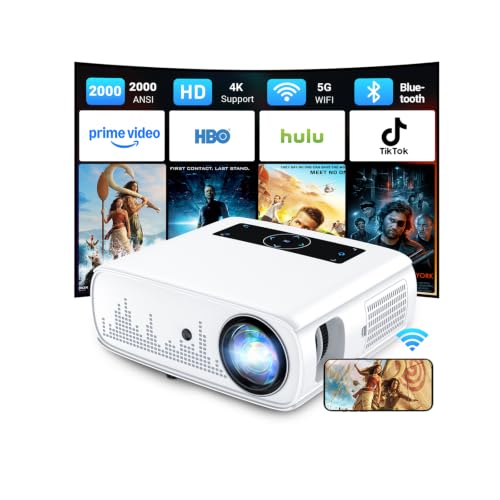
NICPOW 2000 ANSI Lumens Projector with WiFi and Bluetooth, 4K Supported, 300” & Zoom Home — The high-output home claim
The NICPOW makes the boldest brightness claim among this guide’s home picks: 2,000 ANSI lumens, stated in the title with the ANSI label attached. This guide’s standing rule is to report such figures as their listings state them, and a claim in ANSI terms is at least a claim made in the honest currency — while remaining, until independently measured, the maker’s own number. Its compatibility list is equally direct, running through HDMI, USB, AV, smartphone, pad, laptop, DVD, TV stick and games console: the flash drive named among the sources of a machine pitched at indoor and outdoor home cinema.
If the output claim holds up in the room, the proposition is strong: a home projector bright enough to bully a lamplit living room, playing from a stick, a console or a stick-shaped streamer with equal indifference, and zooming to fit its screen rather than demanding the room rearrange itself. The 300-inch figure is the customary maximum-size language of the class — a darkness number, not a recommendation — and the sensible home picture will live far inside it, where the claimed lumens can do their work.
This is the pick where the rehearsal habit matters most, because its promise is the largest. Put your test stick in it early, try your most demanding file, and judge the brightness with your own curtains open. A machine that passes those honest tests at this specification would be the home pick of the guide; the listing’s claims earn it the audition, and your room delivers the verdict.
Outdoor use is named in this model’s pitch, and it is where the claimed output would earn its keep if it performs as stated: a garden at dusk is a kinder test than a lit living room, and a big claimed figure gives the picture authority as the light fades. Take a power lead even so — home machines of this output class are mains creatures — and let the evening, rather than the listing, confirm what the ANSI claim is worth in your garden.
Zoom, mentioned in this title and rare in the class, changes the room maths in the owner’s favour: the projector can sit on the shelf that exists rather than the stand that must be bought, and still fill the screen exactly. Combined with the claimed output, it makes the NICPOW the most placement-tolerant of the playback-credited home picks — provided, as this review keeps insisting, that your own test stick and your own curtains confirm the rest of the story.
- Stated output: 2,000 ANSI lumens claimed in the listing title — the maker’s figure, in ANSI terms
- Compatibility list as listed: HDMI, USB, AV, smartphone, pad, laptop, DVD, TV stick and PS5
- Picture claim in the title: up to 300 inches, with zoom
- Wireless: WiFi and Bluetooth listed
- USB position: USB named in the compatibility list
Strengths
- Strongest output claim among the home picks
- USB in a comprehensive source list
- Zoom eases placement against a fixed screen
Trade-offs
- Brightness is a maker claim awaiting your room’s verdict
- Maximum-size claim is a darkness figure
- Home-class player menus remain basic
Best for: a home cinema room wanting stick playback with enough claimed light for lamps and curtains
Not suited for: an evidence-first institutional purchase, where the ViewSonic’s office pedigree speaks louder
Claimed specifications in this segment are priced aggressively; check price on Amazon and let your own tests confirm the value.

Epson EpiqVision Flex CO-FH02 Full HD 1080p Smart Streaming Projector — The excellent projector with an unstated USB case
The CO-FH02 appears in this guide under a flag of honesty, because it is a genuinely excellent projector whose listing title says nothing about flash-drive playback at all. What the title does state is formidable: a three-chip 3LCD engine rated at 3,000 lumens for colour and white alike, full HD 1080p sharpness, and a built-in Android TV platform with Wi-Fi and Bluetooth. As a streaming and laptop-fed projector for rooms with real light in them, it is arguably the strongest machine in this entire list of six.
But this guide is about a stick, and the discipline that runs through it — credit only what the listing states — requires the plain sentence: flash-drive playback is not stated in the listing title. Epson’s full specification, available on the listing, is where a determined buyer should look next, because titles are summaries and this model may well offer more than its headline mentions. What this guide will not do is upgrade that possibility into a promise, because whoever discovers the truth after delivery has been failed by exactly that upgrade.
Choose the CO-FH02 when its stated strengths are the ones you need — light, colour, resolution and a complete smart platform — and let the USB question be settled by the full listing or by choosing a pick above whose title carries the evidence. It stands in this guide as proof that the marking system works: an excellent machine, honestly labelled, in a category where the label is the whole point.
There is a scenario where this pick is not merely defensible but ideal: the room already lives on streaming. A household with Android TV habits, a laptop for work presentations and no archive of files gains nothing from a stick player’s talents and everything from this machine’s light and colour. The honest label in its spec box then reads as what it is — a signpost pointing different buyers to different machines, which is the entire purpose of a guide that refuses to blur its evidence.
It is worth stating what would change this pick’s label, because the mechanism matters beyond one model. If the full listing or the manual confirms a USB media function, the CO-FH02 instantly becomes one of the strongest stick projectors in this guide on its other merits. Guides that read titles strictly will always lag one step behind a model’s full documentation — and that is the correct direction for the error to fall, because the cost of a missed feature is a pleasant surprise, while the cost of an invented one is a returned projector.
- Brightness as listed: 3,000 lumens covering both colour and white output
- Resolution and design: full HD 1080p, 3-chip 3LCD as listed
- Platform: Android TV smart streaming, Wi-Fi and Bluetooth listed
- USB position: not stated in the listing title — check the full listing specification
- Role in this guide: the strong all-rounder with an unconfirmed stick case
Strengths
- Top-tier stated brightness for lit rooms
- Colour output rated alongside white
- A complete smart platform in the box
Trade-offs
- Flash-drive playback not stated in the title
- Mains-powered only, so placement follows the sockets
- Smart platform may make the stick unnecessary for some
Best for: a bright room served by streaming and a laptop, where stick playback is a bonus to verify rather than the brief
Not suited for: a purchase whose single deciding requirement is confirmed flash-drive playback
Positioned as a premium smart model in its class; check price on Amazon and read the full specification for the USB detail.

HP Projector with Apps, FHD 4K Supported, USB-C Power Bank Compatible MC425 — The power-bank portable — read the USB label carefully
The MC425 closes this guide as its most instructive pick. Its title is attractive and modern: an HP projector with apps, native 1080P picture with 4K sources supported, WiFi and Bluetooth, auto focus and keystone, a HiFi speaker, and USB-C power-bank compatibility. Read that last phrase with this guide’s discipline and its meaning separates cleanly from the flash-drive brief: the USB-C connection lets the projector run from a power bank. It is a power feature. The title states no USB media playback, and so — in the plain formula this guide uses — flash-drive playback is not stated in the listing title.
None of that diminishes the machine’s actual proposition, which is considerable. A native 1080P mini that runs from a power bank is a genuinely untethered projector: garden, campsite and bedroom ceiling without a mains lead, with auto setup, apps built in and a speaker in the same small body. For streaming-led households, that may be a better answer to their evenings than any stick player in this list, and its inclusion here is a compliment to everything except its relevance to a flash drive.
It earns its place in this guide precisely as the cautionary tale the category needs. A hurried buyer searching for USB would meet this listing, see the letters, and buy a power feature believing it a playback one. Read every USB claim for the job it actually describes — power, service, signal or files — and you will never make that purchase by accident. The MC425 is a fine portable; it is simply not, on its title’s evidence, a flash-drive projector.
Power-bank running has one more implication owners discover happily: the projector becomes independent of the room. A screening can happen on a gable wall, a garage door or a tent side, wherever the picture fits, because the power arrives in the same bag as the machine. That freedom is the MC425’s real headline, and judged as a portable streaming projector rather than a file player, it is one of the most complete small machines in this guide.
Finally, a defence of this pick on its own terms, because it deserves one. The untethered streaming projector is a real and growing category, and the MC425’s combination — native resolution, automatic setup, apps, a proper speaker and power-bank running — is close to its ideal form. If your video life lives in streaming services rather than on drives, this may be the best machine in the guide for you. It is included here so that you can choose it knowingly, for what it is, rather than mistakenly, for what it is not.
- Resolution: native 1080P, with 4K sources supported as listed
- USB position: USB-C power-bank compatibility stated — a power feature; flash-drive playback not stated in the listing title
- Setup: auto focus and keystone listed
- Platform and audio: apps built in, HiFi speaker, WiFi and Bluetooth listed
- Type: mini portable projector
Strengths
- Runs from a power bank for true portability
- Native 1080P with automatic setup
- Apps and speaker complete the untethered brief
Trade-offs
- USB-C headline is power, not playback
- Stick playback unconfirmed by the title
- Mini-class brightness for evenings
Best for: untethered streaming in gardens, campsites and bedrooms where a power bank replaces the mains
Not suited for: any purchase whose purpose is playing video files from a flash drive
A premium mini with a distinctive power story; check price on Amazon and read the USB wording as carefully as this guide did.
How do the six compare on USB evidence and general character?
| Pick | USB position and character |
|---|---|
| ViewSonic PG603X 3600 Lumens XGA Networkable Home and Office Projector with HDMI and USB | 3,600 lumens (maker terms), XGA, HDMI and USB named — the institutional stick player. |
| AuKing Projector, 2026 Upgraded Mini Portable Projector, Full HD 1080P Movie Projector for | 1080P claim, USB in the source list, mini body — the home stick player. |
| YGSKK Mini Projector with Wifi and Bluetooth, Built-in Apps,Movie Projector | WiFi, apps and electric focus; USB in the supported list — the connected mini. |
| NICPOW 2000 ANSI Lumens Projector with WiFi and Bluetooth, 4K Supported, 300” & Zoom Home | 2,000 ANSI lumens claimed, USB compatible, 300-inch claim — the boldest home specification. |
| Epson EpiqVision Flex CO-FH02 Full HD 1080p Smart Streaming Projector | 3,000 lumens across colour and white (as listed), 1080p 3LCD, Android TV; the title offers no USB playback statement. |
| HP Projector with Apps, FHD 4K Supported, USB-C Power Bank Compatible MC425 | Native 1080P, USB-C power-bank compatible — a power feature, with stick playback not stated in title. |
The USB column reports what each listing title states, nothing more. “Not stated in the listing title” means the title offers no evidence about flash-drive playback — check the full listing specification, or choose a pick whose title carries the evidence.
How do you prepare a flash drive that any projector will love?
Start with the drive itself. Choose a modest, reputable stick — media players are happier with ordinary drives than with enormous or exotic ones — and format it as FAT32 for maximum compatibility, accepting its four-gigabyte file ceiling, or as exFAT if your projector’s listing confirms support and your files are large. Keep the drive dedicated to projection rather than sharing duty as a general file ferry, because a clean, predictable stick is a reliable one.
Prepare the files as carefully as the drive. Convert important clips into plain MP4 form with common picture and sound encodings, keep filenames short and free of unusual characters, and organise by simple numbered folders if the projector’s menu is basic — many built-in players navigate folders slowly and reward tidiness. Put a ten-second test clip first on the drive: if a strange projector plays that, in sound and picture, it will very likely play the rest.
Finish with a rehearsal in the actual room, on the actual projector, with the remote you will actually hold. Learn how its media menu lists files, how it resumes after a pause, and what it does at the end of a clip — loop, stop or wander to the next file — because each behaviour is a gift or a trap depending on the occasion. Five minutes of rehearsal converts direct playback from a hope into a routine.
While the rehearsal habit is forming, make the test stick a physical ritual: one labelled drive, kept in the projector’s bag or the classroom drawer, holding the test clip and the current term’s or season’s converted files. When a new projector arrives — at home, at school, at the hall — that stick is the first thing it meets, and within two minutes everyone in the room knows whether the evening is going to work.
What do classrooms, halls and families each need from stick playback?
Classrooms need custody and speed. A teacher moving between rooms with a stick of lesson films wants the projector to wake, read and play within the first minute of the lesson, with a menu a supply teacher can navigate without training. For that life, the office-class machines in this guide — built for institutions — carry an advantage in manners that no specification table captures, and the stick itself becomes the lesson’s portable home.
Halls and community venues need forgiveness. The projector there meets other people’s files: the dance school’s show reel, the historical society’s scanned slides, a wedding slideshow assembled the night before. Forgiving format support and a graceful HDMI fallback matter more than any single feature, and the volunteer running the evening needs the rehearsal habit this guide keeps recommending — every outside file tested before its audience arrives.
Families need the archive to work. The stick or drive holding birthdays, holidays and grandparents is irreplaceable in a way no streaming library is, and its files arrive in a decade’s worth of phone formats. For family duty, conversion is the loving act: gather the treasures into common formats on one clearly labelled drive, keep a second copy somewhere safe, and the projector becomes the cinema of the family’s own history.
A closing habit ties the whole category together: name your files like a person who will be tired later. Dates first, plain words, no punctuation adventures — a drive organised that way can be navigated on any projector’s clumsy menu, by any volunteer, under time pressure, in the dark. The technology in this guide will keep changing; the labelled stick, plainly formatted and honestly tested, will still be working when several of these projectors are antiques. That is the quiet triumph the flash-drive brief was always aiming at.
What mistakes make flash-drive playback fail in public?
The founding mistake is assuming a USB port means playback. As this guide’s own list demonstrates, ports also exist to power streaming sticks and to charge from power banks, and a projector bought on the assumption can be an excellent machine that simply does a different job. Read the listing for playback language — compatibility with USB sources, a media player, file support — and treat silence as an answer, not an oversight.
The second mistake is arriving with an untested file. An exotic codec, a drive in the wrong format, a filename full of punctuation: each is trivial at home and fatal in front of a class. The test-stick habit — one short, ordinary clip, tried in the machine beforehand — catches nearly all of them, and the conversion of important files into plain formats catches the rest.
The third is neglecting the plan B. Even a fluent stick-playing projector should meet a room with an HDMI cable within reach and a laptop or phone that can take over, because the one file that refuses to play will choose the most important evening to do it. Direct playback earns its place by being the simple first plan, not the only one.
One more failure mode is worth naming because it is social rather than technical: the borrowed stick. A file that arrives on a stranger’s drive, in an unknown format, five minutes before the event, carries every risk this guide has catalogued in a single object. The defence is a house rule, stated kindly and early — files a week ahead, or files converted by the host — and venues that adopt it stop having the conversation at the worst possible moment.
Final Recommendation
For a classroom, office or hall where the stick is the source, the ViewSonic PG603X is this guide’s anchor: an institutional machine whose listing puts HDMI and USB at the centre of its pitch, with the brightness to work in real rooms. The AuKing and YGSKK portables carry the same USB-source language into home and travel duty, while the NICPOW states the strongest output figure among the playback-credited picks.
One last thought for the buyer still weighing a laptop against a stick: the two are not rivals but seasons. The laptop is for the presentation with builds, notes and a dozen sources; the stick is for the film, the lesson and the slideshow that must simply play. A projector fluent in both — and honest about which of its ports does what — lets each occasion use the tool it deserves, and that fluency, more than any single specification, is what this guide has been shopping for.
And let the two marked picks teach the guide’s lesson one last time: the Epson is an excellent projector whose title does not state flash-drive playback, and the HP’s USB-C is a power feature — so buy the evidence, not the assumption, and your stick will play on the day it matters.
Frequently Asked Questions
How can I tell whether a projector’s USB port actually plays video files?
Look for playback language in the listing: compatibility with USB as a source, a built-in media player, or named video formats. A port described alongside power — charging, power-bank support, powering a streaming stick — is doing a different job. Where a title is silent, as with two picks in this guide, treat playback as unconfirmed and check the full specification or the manual before buying.
What format should my flash drive and files be for the best compatibility?
FAT32 is the safest file system across projector media players, with a four-gigabyte limit per file; exFAT lifts that limit where the listing confirms support. For the files themselves, plain MP4 video with common encodings is the most widely accepted form. Converting treasured or important clips into that ordinary form is the single most effective compatibility habit.
Why does my video play without sound on a projector?
Usually because the projector’s player recognises the video container but not the audio encoding inside it — a container and its contents are separate questions. Converting the file so its sound uses a common encoding almost always cures it. This is a file problem, not a projector fault, and it is exactly what the rehearsal habit in this guide exists to catch early.
Can I power a streaming stick from the projector instead of using a drive?
On many projectors, yes — that is one of the commonest jobs a USB port does, and it is a perfectly good way to watch streamed content. But it is a different job from reading files, which is why this guide grades the two separately. A port powering a stick tells you nothing about whether the same port can play a video from a drive.
The Epson in this guide is marked “not stated” — is it a bad projector?
Not at all; it is an excellent smart projector whose listing title simply does not discuss flash-drive playback, and this guide reports titles exactly. Its Android TV platform may cover your needs entirely. The mark exists so that anyone whose single requirement is stick playback chooses a pick whose listing carries the evidence, rather than discovering the answer after delivery.
What size of flash drive should I use with a projector?
Modesty wins. Many built-in media players are happiest with common drive sizes and simple formatting, and an enormous drive full of folders can make a basic menu sluggish. A dedicated, tidily organised stick of moderate size, carrying converted files in plain formats, will outperform a giant archive drive in reliability every time.
Can a projector play video straight from my phone’s storage instead?
Sometimes, through mirroring or a wired connection, and several picks here support phones as sources in exactly those ways. But that is a different mechanism from flash-drive playback, with its own dependencies on cables, apps and the phone’s battery. If the requirement is a self-contained stick that works with the phone in another building, only the playback-credited picks in this guide answer it on their listings’ evidence.
My projector reads the drive but shows “file not supported” — what now?
The drive and the port have done their jobs; the file itself is the remaining suspect. Convert it into a plain MP4 with common encodings, shorten its filename, and try again with the converted copy beside the original. In practice this cures the overwhelming majority of such messages, and the converted version becomes the permanent archive copy your future projectors will thank you for.
Related Guides
How to convert home videos into projector-friendly files Classroom projectors that start fast and read anything Streaming sticks versus built-in smart platforms compared


