What's inside
- Key Takeaways
- Quick Picks
- How did we weigh reading comfort against browsing speed for this list?
- What makes a screen easy to read on for an hour at a time?
- Which six tablets actually earn a place beside the reading chair?
- How should you arrange a tablet that splits its life between books and the browser?
- How does battery behaviour differ between a reading day and a browsing day?
- Which accessories genuinely improve a read-and-browse tablet, and which are clutter?
- What changes when the tablet is shared between several readers in one house?
- How do the six compare on the measures that matter for reading and browsing?
- What do people most often get wrong when choosing one tablet for books and the web?
- What should you make of eye-comfort claims when every screen here is a glowing rectangle?
- How long should a tablet bought for reading and browsing stay pleasant to use?
- Why does the reading app you choose matter as much as the tablet under it?
- Final Recommendation
- Frequently Asked Questions
- Related Guides
As an Amazon Associate I earn from qualifying purchases. This post may contain affiliate links at no extra cost to you.
gizmoverdict.com is reader-supported. When you buy through links on our site, we may earn an affiliate commission.
Where to buy: Every pick in this guide links to its Amazon listing, where stock and configuration options change often enough that checking the live page beats trusting any summary. Read the six reviews first, note which screen size suits your hands, then follow the link on the pick that matches.
Finding the best tablets for both ereading and internet usage sounds simple until you notice the two jobs pull in opposite directions. Reading rewards a calm screen, modest weight and a battery that forgets what week it is. Browsing rewards the opposite temperament: a quick processor, generous memory, a browser that keeps a dozen tabs alive without reloading them, and Wi-Fi that does not stutter when the router sits two rooms away. A tablet that only reads is an ereader with ambitions. A tablet that only browses is a small laptop missing its keyboard. This guide is about the overlap, the machines that stay pleasant at page four hundred of a novel and still feel brisk when you fall down a research hole at midnight.
The six picks below span that overlap from several directions. There is a mainstream iPad for households already living inside Apple’s shelves of apps and books. There are two Samsung tablets at different sizes and prices of ambition, a pair of Lenovos that lean on included folio cases and sharp screens, and one small Lenovo built for the reader who mostly reads and only occasionally browses. None of them is a dedicated e-ink device, and that is deliberate: e-ink wins on glare and battery, but it loses the moment your reading session turns into checking a reference, following a footnote link, or comparing three reviews of the book you just finished.
One more framing note before the picks. Price bands in this category tempt people to shop by discount rather than by fit, and that is backwards for a device whose whole value is daily comfort. A tablet read every evening for four years repays a better screen many times over, while a bargain that irritates your eyes or your patience is expensive at any figure. We have therefore ordered this guide by balance, and we mention cost only as a live check at the listing, where it belongs.
Screen quality matters more here than raw power, so the reviews pay close attention to resolution, brightness behaviour and the ambient light sensors that quietly adjust a page as evening arrives. Weight gets equal billing, because a tablet read in bed is held, not docked, and fifty grams becomes a real opinion by chapter nine. Where a listing states a figure, we use it. Where it stays silent, we say so rather than inventing a number, and we judge the machine on the qualities its maker was willing to print.
Key Takeaways
- Reading comfort is mostly resolution plus weight; browsing speed is mostly memory plus Wi-Fi, and the six picks balance those pairs differently.
- An 11-inch screen is the natural compromise for this double job, big enough for split-screen reference work, small enough to hold one-handed for short stretches.
- The Lenovo Tab One is the reading-first outlier at 8.7 inches, trading browsing room for a genuinely lighter carry.
- Included folio cases on the Lenovo picks matter more than they sound, because a stand changes reading posture more than most settings do.
- Every pick here runs a full browser, so library apps, web serials and reference sites all work without a second device.
Quick Picks
| Pick | Badge | Why it earns its place |
|---|---|---|
| Apple iPad 11-inch: A16 chip, 11-inch Model, Liquid Retina Display, 128GB, Wi-Fi 6, 12MP Front/12MP Back Camera, Touch ID, All-Day Battery Life — Blue | Best all-round balance | The A16 keeps heavy pages and tab stacks fluid while the Liquid Retina screen stays easy on the eyes through long chapters. |
| Samsung Galaxy Tab A9+ Tablet 11” 64GB Android Tablet, Big Screen, Quad Speakers, Upgraded Chipset, Multi Window Display, Slim, Light, Durable Design, US Version, 2024, Graphite | Best for split-screen readers | Multi Window Display lets a book sit beside the notes or the shop page you are checking it against. |
| Lenovo Tab M11, 11” Display, MediaTek Helio G88 Octa-Core, 4GB RAM, 128GB SSD, 1920×1200 px, Ambient Light-Sensor, 10 Hour Battery, Comes w/Folio Case, Luna Grey | Best reading posture out of the box | The bundled folio case and ambient light sensor handle the two things readers fiddle with most: angle and brightness. |
| Lenovo Tab One | Best for pure reading sessions | An 8.7-inch HD screen in a lightweight body that disappears into a coat pocket between chapters. |
| Samsung Galaxy Tab A11+ Plus 6+128GB Wi-Fi Only International X230 Gray | Best memory headroom | Six gigabytes of memory keeps more tabs and reading apps alive in the background than the usual budget allowance. |
| Lenovo Idea Tab | Best screen for text | A 2.5K IPS panel at 90Hz renders small print crisply and scrolls long articles without the shimmer of slower screens. |
How did we weigh reading comfort against browsing speed for this list?
We started from the reading chair, not the benchmark chart. Each candidate had to render text at a resolution where letters stay clean at normal holding distance, hold a page steady without brightness hunting, and remain comfortable in two hands for the length of a long chapter. Tablets that failed that first test never reached the browsing test, however fast their processors looked on paper. That ordering matters, because the market is full of quick tablets with coarse screens that are genuinely unpleasant to read on, and a dual-purpose recommendation that ignores the reading half has answered only half the question.
The browsing test came second and was deliberately unkind. We favoured machines whose memory and chipset could keep a reading app, a browser with a fistful of tabs, a mail client and a store app resident at once, because that is the real pattern of use: you pause the book, check the thing, buy the other thing, come back. Wi-Fi generation counted as well. Wi-Fi 6 on the iPad and the general modernity of the Samsung and Lenovo radios mean these tablets hold a signal at the far end of a house better than older designs did, and a dropped page load in the garden is a browsing failure no processor can fix.
Finally we weighed the unglamorous extras. An included folio case is worth real money and real comfort, so the Lenovos that bundle one got credit for it. Storage mattered in proportion to reading habits: books are small, but downloaded magazines, PDFs and offline article archives are not, and 128GB is the point where most households stop thinking about space. The Tab One’s 64GB is the honest exception, acceptable because its whole purpose is a narrower job. What we did not do is rank by speaker quality or camera output; both appear in these listings, both are fine for video calls and page scanning, and neither decides whether a tablet reads and browses well.
What makes a screen easy to read on for an hour at a time?
Resolution is the first answer and the easiest to verify. At 11 inches, a 1920×1200 panel like the Tab M11’s puts enough pixels under each letter that serifs stay serifs instead of suggestions, and the Idea Tab’s 2.5K panel goes further, which is why small-print PDFs and dense web articles look calmer on it. The Tab One’s HD screen is coarser on paper, but at 8.7 inches the pixels sit closer together than the raw figure implies, and for novels and news it is honestly sufficient. What ruins reading is rarely resolution alone; it is resolution stretched over too large a panel, and none of these six makes that mistake.
Brightness behaviour is the quieter half. A good reading tablet adjusts itself as the room changes, and the Tab M11’s ambient light sensor exists precisely for the moment the sun leaves the window and the page should dim without you digging through settings. Refresh rate plays a supporting role: the Idea Tab’s 90Hz panel does not change static text at all, but it changes scrolling, and readers who move through long articles, feeds and documents by flicking rather than paging feel that smoothness constantly. For book-style page turns it is irrelevant; for web reading it is a daily pleasure.
Then there is the software layer, which no spec sheet captures. Every pick here can run the major reading apps, a proper browser with a reading mode, and a read-later service, so the same article can start on your phone in a queue and finish on the tablet at home. Night modes, sepia themes and font controls live in the apps rather than the hardware, which is why we refuse to credit any tablet with eye comfort features that are really software gifts. The hardware owes you a clean, even, adjustable screen. The apps do the rest, and all six of these machines run all of the apps.
Which six tablets actually earn a place beside the reading chair?
The reviews below follow the order of the quick picks table, but the ranking is a balance ranking, not a speed ranking. A tablet sits higher because it gives up less on either side of the double job, not because it wins a single measure outright.

Apple iPad 11-inch: A16 chip, 11-inch Model, Liquid Retina Display, 128GB, Wi-Fi 6, 12MP Front/12MP Back Camera, Touch ID, All-Day Battery Life — Blue — Best all-round balance
The base iPad is the pick that asks the fewest questions of its owner. The A16 chip is far quicker than reading or browsing can challenge, which shows up not in page turns but in the absence of friction everywhere else: heavy news sites render without the pause-and-bloom of slower tablets, tab stacks survive being abandoned for a week, and the browser never becomes the reason you reached for a phone instead. Wi-Fi 6 keeps that speed honest at the edges of a house, and 128GB swallows a serious library of books, magazines and saved articles without negotiation.
As a reading surface the Liquid Retina display is calm and even, with the kind of brightness range that handles a bright kitchen and a dim bedroom in the same evening. Touch ID in the button is a small mercy repeated daily, unlocking the device and approving book purchases without a passcode dance while you are holding it one-handed. The honest limitation is the ecosystem toll: the reading apps are excellent, but sideloading is not part of the deal, and readers with libraries scattered across unusual formats will feel the walls of the garden. For everyone else, this is the tablet that disappears into the habit.
There is also the matter of longevity, which reading households feel more than most because a reading tablet is kept, not churned. The A16 sits comfortably above the demands of browsers and book apps for years, and Apple’s update cadence means the machine bought for this winter’s reading list will still be receiving fresh software when that list has grandchildren. Resale values follow the same curve, so even the exit is gentler. None of that shows up in a first-week review, yet it is precisely what separates a tablet that becomes furniture from one that becomes e-waste. If you intend to keep a device until the battery gives up, this is the pick engineered for that intention.
- Display: 11-inch Liquid Retina
- Chip: Apple A16
- Storage: 128GB
- Wireless: Wi-Fi 6
- Unlock: Touch ID
Strengths
- Performance headroom that keeps browsing fluid for years, not months.
- Even, bright screen that behaves itself in mixed household lighting.
- The deepest bench of reading and read-later apps of any platform here.
Trade-offs
- No memory card slot, so the 128GB is a ceiling, not a starting point.
- Readers with ebook files in odd formats face conversion chores.
- The glossy screen still reflects a window placed directly behind you.
Best for: households that want one tablet to serve reading, browsing, video calls and everything else without a second thought.
Not suited for: collectors whose libraries live outside the major stores and formats.
Blue finish aside, the sensible way to buy this iPad is to check price on Amazon in the configuration shown, because Apple storage tiers shift the value quickly.

Samsung Galaxy Tab A9+ Tablet 11” 64GB Android Tablet, Big Screen, Quad Speakers, Upgraded Chipset, Multi Window Display, Slim, Light, Durable Design, US Version, 2024, Graphite — Best for split-screen readers
The Tab A9+ earns its place through one feature that sounds like a productivity gimmick and turns out to be a reading feature: Multi Window Display. Put the book on the left and the browser on the right and the tablet becomes a reference desk. Checking a map while reading historical fiction, pricing the sequel while the current chapter loads, translating a passage without leaving the page — this is how people actually read with the internet nearby, and the 11-inch screen is just large enough to split without either half feeling cheated.
Samsung describes the design as slim, light and durable, and in hand that translates to a tablet that does not punish long sessions the way heavier glass slabs do. The upgraded chipset keeps the split view responsive, and quad speakers are a bonus for the audiobook crowd, filling a kitchen in a way single-speaker tablets cannot. The compromise sits in storage: 64GB is the listed configuration, fine for books and browsing, tight if your reading habit includes large downloaded magazine archives or offline video. Treat this as the browser-reader’s Samsung, not the archivist’s.
One more habit deserves mention: reading aloud and listening. Households that share stories with children, or readers who alternate between eyes and ears across a long book, will find the quad speakers change the ritual. An audiobook chapter played in a kitchen while dinner happens sounds present rather than piped through a keyhole, and the tablet returns to silent reading the moment the room empties. It is a small versatility, but dual-purpose machines are exactly the sum of small versatilities, and the A9+ collects more of them than its price of admission suggests.
- Display: 11-inch
- Storage: 64GB
- Speakers: Quad speakers
- Standout feature: Multi Window Display
- Version: US Version, 2024, Graphite
Strengths
- Split-screen reading and reference work feels natural at this size.
- Slim, light build that respects long handheld sessions.
- Audiobook and podcast playback benefits from proper quad speakers.
Trade-offs
- 64GB fills quickly if downloads extend beyond books.
- The screen is good rather than exceptional next to the 2.5K Lenovo.
- No case is bundled, so budget for one if you read away from home.
Best for: readers who constantly look things up mid-chapter and want the lookup beside the text, not instead of it.
Not suited for: hoarders of offline media who need deep storage on day one.
For the split-screen habit described above, check price on Amazon for the Graphite US version before assuming a marketplace import is the same machine.

Lenovo Tab M11, 11” Display, MediaTek Helio G88 Octa-Core, 4GB RAM, 128GB SSD, 1920×1200 px, Ambient Light-Sensor, 10 Hour Battery, Comes w/Folio Case, Luna Grey — Best reading posture out of the box
The Tab M11 is the pick that understands reading is a physical activity. It arrives with a folio case in the box, and that case is a stand, a cover and a grip improvement in one — the three things that decide whether a tablet gets read on a train, propped at breakfast, or left in a drawer. Too many tablet recommendations ignore the case entirely and then wonder why the device feels unfinished. Lenovo simply included the finishing piece, and the M11 is better for it every single day.
The 1920×1200 screen is the resolution this size wants, text stays clean, and the ambient light sensor trims brightness as rooms change, which matters during the long evening slide from daylight to lamplight. Lenovo quotes a 10 hour battery, and reading is the gentlest work a tablet does, so that figure is believable in this role. The Helio G88 and 4GB of memory are the modest part of the package: browsing is perfectly serviceable, but a browser carrying a crowd of heavy tabs will reload more often than the iPad does. Read first, browse second is this tablet’s honest personality, and it wears it well.
Consider also who else touches this tablet. The M11 is the pick we would hand to a parent or a teenager without a briefing, because its virtues are physical and immediate: it stands up by itself, it dims itself, it survives being read at the breakfast table among the toast crumbs. Shared household tablets live harder lives than personal ones, and a bundled case plus a sensible screen is a better survival kit than a faster chip. In the family role, steadiness beats brilliance, and the M11 is nothing if not steady.
- Display: 11-inch, 1920×1200
- Processor: MediaTek Helio G88 octa-core
- Memory and storage: 4GB RAM, 128GB
- Battery: 10 hours as listed
- In the box: Folio case included
Strengths
- Bundled folio case transforms reading posture from the first day.
- Ambient light sensor keeps page brightness appropriate without fiddling.
- 128GB gives a real library room to grow.
Trade-offs
- 4GB of memory shows its limits under a pile of open tabs.
- The chipset is tuned for steadiness, not speed records.
- Speakers are adequate for speech, unremarkable for music.
Best for: readers who prop, carry and commute with their tablet and want it dressed for that life immediately.
Not suited for: tab maximalists who keep thirty pages open and expect all thirty alive.
Because the folio case is part of this listing’s value, check price on Amazon and confirm the case is shown in the configuration before ordering.

Lenovo Tab One — Best for pure reading sessions
Every list like this needs one honest specialist, and the Tab One is ours. Its 8.7-inch HD display and lightweight build make it the only pick here that genuinely competes with a paperback for hand comfort. It slips into a jacket pocket, balances in one hand on a crowded train, and asks so little of your wrist that long sessions end because the chapter did, not because your arm filed a complaint. Lenovo rates it for up to 12.5 hours of YouTube streaming, and reading, which barely sips power by comparison, stretches a charge across days of commutes.
The browsing half of the bargain is real but narrower. The MediaTek Helio G85 and 4GB of memory handle news, reference lookups and shopping perfectly well, yet the smaller screen turns split-view into a squeeze and long web articles into more scrolling. That is the correct trade for its audience. If your pattern is ninety percent reading and ten percent looking things up, the Tab One’s compromises land exactly where you will never notice them, and its included folio case means it arrives ready for the bag it will live in. Judge it as a reading tablet that browses, and it is excellent. Judge it as a small laptop, and you have brought the wrong ruler.
Its size also changes the social geometry of reading. An 11-inch tablet announces itself; the Tab One behaves more like a book, unobtrusive in a café, easy to set down mid-page when a conversation starts, easy to pick up again without ceremony. Readers who abandoned tablets because the devices felt like laptops in denial often come back through exactly this door. The Tab One is the reminder that for the reading half of this guide’s title, smaller is not a compromise at all — it is the original form factor of the novel, finally with a browser inside.
- Display: 8.7-inch HD
- Processor: MediaTek Helio G85
- Memory and storage: 4GB, 64GB
- Battery claim: up to 12.5 hours of YouTube streaming
- In the box: Folio case included
Strengths
- The lightest, most pocketable reading experience on this list.
- Battery endurance that suits a read-on-the-move routine.
- Folio case included, so no accessory hunt before first use.
Trade-offs
- HD resolution is fine for novels, less kind to dense PDFs.
- 64GB is the smallest storage allowance among the six.
- Split-screen browsing is cramped at this size.
Best for: commuters and travellers whose tablet time is overwhelmingly pages, not pages of tabs.
Not suited for: anyone planning to research, write or shop at length on the same screen.
Travellers comparing small tablets should check price on Amazon for the Tab One with its folio case bundled, since that bundle is the version reviewed here.

Samsung Galaxy Tab A11+ Plus 6+128GB Wi-Fi Only International X230 Gray — Best memory headroom
The A11+ makes its case with two numbers in its name: 6 and 128. Six gigabytes of memory is the quiet hero of dual-purpose tablets, because it decides how much of your digital life stays where you left it. The reading app keeps your place, the browser keeps its tabs, the article you saved at lunch is still rendered at dinner. On 4GB tablets that juggling act drops balls; here it mostly does not, and for a reader whose browsing is really a long chain of interruptions, that smoothness is the feature.
Storage matches the memory’s generosity at 128GB, enough for a serious offline library plus the usual sprawl of apps. Two cautions belong in this review. First, this is the international X230 model and it is Wi-Fi only, so there is no cellular option hiding in the settings, and warranty handling can differ from a domestic version. Second, the listing is unusually terse, stating neither screen size nor resolution, so we will not invent them; Samsung’s A-series panels are consistently decent, but anyone for whom pixel density is the deciding factor should confirm the panel details on the listing page itself. What is stated, we stand behind: memory, storage and a Samsung tablet that handles the read-browse shuffle with unusual ease at its level.
Think of the A11+ as the pick for households where the tablet is a shared surface rather than a personal one. Profiles switch, a half-read article waits beside someone else’s novel, the browser holds the household’s collective research from holiday planning to homework help. Memory is what makes that sharing feel seamless instead of sluggish, and 6GB is the threshold where the juggling stops being visible. It will not win a beauty contest against the sharper screens here, but as the family noticeboard that also reads books, it has a quiet claim on the role.
- Memory and storage: 6GB, 128GB
- Connectivity: Wi-Fi only
- Model: International X230
- Colour: Gray
- Screen details: Not stated in the listing title
Strengths
- 6GB of memory keeps reading and browsing apps alive side by side.
- 128GB removes storage anxiety for book and magazine collectors.
- Samsung’s software polish smooths the everyday basics.
Trade-offs
- International model, so check warranty terms for your region.
- No cellular variant in this listing for reading on the move.
- Listing omits display specifications worth confirming before purchase.
Best for: interrupt-driven readers who bounce between a book, a browser and a store all evening.
Not suited for: readers who travel beyond home Wi-Fi and need a SIM for data on the road, plus a domestic warranty they can claim at a local counter.
If the memory and storage pairing is what draws you, check price on Amazon and read the listing’s warranty line carefully, since this is the international version.
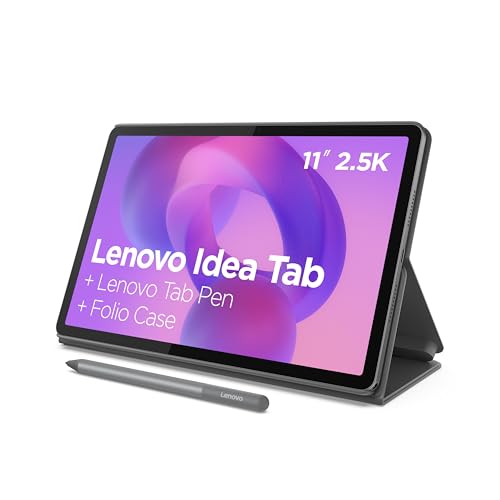
Lenovo Idea Tab — Best screen for text
The Idea Tab is sold as a college tablet, and its specification reads like an answer to a student’s two biggest complaints: fuzzy text and sluggish scrolling. The 11-inch 2.5K IPS touchscreen is the sharpest panel in this guide, and sharpness is not a luxury for readers — it is the difference between text that looks printed and text that looks rendered. Footnotes, captions, dense academic PDFs and small-print web pages all stay legible without the pinch-zoom ritual. The 90Hz refresh rate then makes moving through long documents feel like turning pages in a well-made book rather than dragging a reluctant window.
Underneath, the MediaTek Dimensity 6300 with 8GB of memory and 256GB of storage is the strongest Android browsing package in this particular six, keeping tabs, documents and reading apps in easy coexistence. The bundled Tab Pen and folio case extend the machine toward note-taking and propped reading alike. Its compromises are subtler: the sharper screen and faster refresh ask more of the battery than the Tab One’s gentle HD panel does, and the whole package is aimed at people who will use the pen at least occasionally. As a pure reading-and-browsing machine it is arguably the most complete Android here; the pen is a bonus, not a tax.
The college framing deserves one more sentence, because it explains the storage. Course readers, scanned chapters, recorded lectures and a semester of PDFs accumulate faster than any novel collection, and 256GB is the size that lets a student stop curating and start keeping. Pair that with the pen for annotating the very documents being read, and the Idea Tab becomes less a reading tablet with extras than a study desk that folds flat. Households buying for a student who reads everything on screen will find this the least compromised Android route.
- Display: 11-inch 2.5K IPS touchscreen, 90Hz
- Processor: MediaTek Dimensity 6300
- Memory and storage: 8GB, 256GB
- Graphics: Integrated Arm Mali-G57 MC2
- In the box: Tab Pen and folio case
Strengths
- 2.5K resolution renders small text with print-like clarity.
- 8GB of memory and 256GB of storage lead the Android picks here.
- 90Hz scrolling flatters long articles and documents.
Trade-offs
- The ambitious screen draws power faster than simpler panels.
- Pen and case bundle suits students more than sofa readers.
- Dimensity chip is brisk, though a step behind flagship silicon.
Best for: students and professionals who read dense documents as often as novels.
Not suited for: minimalists who want the smallest, lightest reading slab possible.
Students weighing the pen bundle should check price on Amazon for the full Idea Tab package, pen and folio included, rather than a bare-tablet listing.
How should you arrange a tablet that splits its life between books and the browser?
Start with the home screen, because dual-purpose tablets fail there first. Put your primary reading app and your browser side by side on the dock, and banish everything else to the second screen; the tablet’s identity should be obvious every time it wakes. Inside the reading app, set your default font and size once, properly, at reading distance in your usual chair, rather than accepting the factory choice. Most people read for months at a type size chosen by nobody, then blame the screen.
While you are in the settings, deal with notifications, the silent killer of reading sessions. A tablet that buzzes with every email arrival trains you to stop mid-sentence, and the fix takes one visit: reading time means the reading app and the browser may speak, and everything else waits. Most of these machines offer a focus or do-not-disturb schedule; tie it to your usual reading hour and the tablet learns manners.
Next, tame the browser. Turn on reading mode where the browser offers it, save long articles to a read-later app instead of leaving them as tabs, and let the tablet close ancient tabs without sentimentality. A browser carrying forty stale pages is a browsing tax you pay every session. Finally, match the light to the room: enable the automatic brightness, choose a warm night setting for evening reading, and prop the tablet on its folio stand whenever a table is available. Posture is a reading feature. The readers who love their tablets in year two are almost always the ones who spent twenty minutes on this setup in week one.
How does battery behaviour differ between a reading day and a browsing day?
Reading is the kindest workload a tablet ever meets. A static page asks almost nothing of the processor, the radios can nap, and the screen — the one real expense — sits at the modest brightness indoor reading prefers. Browsing is the opposite personality: pages render and re-render, scripts run, images pour in over Wi-Fi, and the processor wakes a hundred times a minute. The practical consequence is that the same tablet can look like a three-day device to a novelist and a one-day device to a researcher, and both reports are true. When a listing quotes a battery figure, as the Tab M11 does with its 10 hours and the Tab One does with its streaming figure, read it as a browsing-era estimate and expect reading to outlast it comfortably.
This asymmetry should shape how you choose. If your evenings are mostly pages with occasional lookups, battery size is nearly a solved problem on all six picks, and you can spend your attention on screens and weight. If your pattern is the reverse — hours of active web work punctuated by reading — then the bigger machines with their bigger cells, and the iPad’s efficient chip in particular, earn their keep. Either way, build the charging habit around the reading chair rather than the desk: a cable where you actually sit turns battery anxiety into a non-topic, and a tablet that lives charged is a tablet that gets read on.
Which accessories genuinely improve a read-and-browse tablet, and which are clutter?
The folio case stands alone at the top of the list, which is why its inclusion with the Lenovo picks keeps earning mentions. A stand changes posture, a cover changes how carelessly the tablet can be carried, and both change how often the device is used at all. After that comes a simple reading light strategy for households where one person reads after the other sleeps: the tablet’s own warm night mode usually suffices, and a clip light is clutter. A matte screen protector divides opinion; it tames reflections in bright rooms and slightly softens text, so try the bare screen for a week before committing.
Keyboards are the accessory most often bought for this category and least often used. A dual-purpose reading and browsing tablet does not become a writing machine by adding keys; it becomes a heavier reading machine. Unless homework or long emails are genuinely on your list — in which case the homework guide in our related reading is the better starting point — skip the keyboard and spend the difference on storage or the sharper screen. The honest accessory list for this job is short: a case that stands, a cable by the chair, and the discipline to leave the rest in the shop.
What changes when the tablet is shared between several readers in one house?
Sharing rearranges the priorities in ways solo shoppers rarely predict. Separate user profiles matter more than processor speed, because each reader’s library, bookmarks and place in a shared book stay intact only if the software keeps them apart — the Android picks handle multi-user households gracefully, while the iPad leans toward a single owner’s library with family sharing around it. Storage pressure multiplies too, since every reader downloads as if the space were theirs alone, which is another reason the 64GB specialists belong to individuals rather than families.
The physical routine changes as well. A shared tablet migrates — kitchen in the morning, sofa at night, a child’s hands on Saturday — and it accumulates the small knocks of communal life. This is the scenario where the bundled folio cases stop being a convenience and become insurance, and where the Tab M11’s steady, cased, self-dimming character makes its strongest argument. Decide honestly whether you are buying a personal reading instrument or a household appliance; the six picks divide almost cleanly along that line, and choosing across it is the most common source of quiet dissatisfaction we see.
How do the six compare on the measures that matter for reading and browsing?
| Tablet | Screen | Memory / Storage | Reading strength | Browsing strength |
|---|---|---|---|---|
| Apple iPad 11-inch (A16) | 11-inch Liquid Retina | Not stated / 128GB | Even brightness, huge app choice | Fastest and most fluid here |
| Samsung Galaxy Tab A9+ | 11-inch | Not stated / 64GB | Split view beside the text | Multi Window multitasking |
| Lenovo Tab M11 | 11-inch 1920×1200 | 4GB / 128GB | Folio case and light sensor | Steady, tab reloads under load |
| Lenovo Tab One | 8.7-inch HD | 4GB / 64GB | Lightest long-session hold | Light duties only |
| Samsung Galaxy Tab A11+ | Not stated in listing | 6GB / 128GB | Apps stay where you left them | Smooth task switching |
| Lenovo Idea Tab | 11-inch 2.5K, 90Hz | 8GB / 256GB | Sharpest text of the six | Strongest Android package here |
What do people most often get wrong when choosing one tablet for books and the web?
The classic error is buying for the processor and reading on the screen you happened to get. Browsing benchmarks are loud and legible; screen quality is quiet, and so households end up with a very fast tablet that renders text coarsely and gets left behind. Run the priorities in the order this guide does: panel first, weight second, memory third, processor last. Any modern chip browses. Not every screen reads.
A second mistake is treating storage as an afterthought because books are small. Books are small; your library’s behaviour is not. Magazine subscriptions download issues automatically, read-later apps cache articles with images, PDFs from work arrive by the dozen, and the tablet that felt spacious in January is negotiating with you by June. The 64GB picks here are honest specialists, not all-rounders, and choosing one for a general household role is the mistake, not the tablet.
There is a subtler mistake worth naming: judging a reading tablet in a bright shop. Showroom lighting flatters glossy screens and punishes nothing, while your actual reading happens in lamplight, daylight from a side window, and the grey glow of a train carriage. If you can, test a candidate in the worst light you regularly read in — or at least weight the reviews that mention sensors and brightness range, like the Tab M11’s ambient adjustment, over those dazzled by showroom sparkle. A screen that behaves across your real rooms beats a screen that performs in a store.
Third, people forget the case until the first drop or the first uncomfortable hour. A folio stand changes reading more than most settings menus do, which is why the bundled-case Lenovos punch above their specifications in daily life. If your chosen pick arrives naked, dress it before you judge it. And a final small error: leaving brightness on manual. These screens manage light better than your thumb does; let the sensor work.
What should you make of eye-comfort claims when every screen here is a glowing rectangle?
Honesty first: none of these six is an e-ink screen, and no setting turns an LCD or IPS panel into paper. What the hardware can do is narrower and still worthwhile — even brightness without flicker at low levels, a wide adjustment range that reaches genuinely dim for night reading, and colour controls that warm the image after dark. Every pick here covers that ground through its reading apps and system night modes. What actually protects your eyes across a long session is behaviour the tablet cannot supply: holding the device at a natural distance instead of hunched over it, matching screen brightness to the room rather than running it at noon levels in a dark bedroom, and letting your gaze leave the page regularly. Readers who follow those habits read comfortably on tablets for years; readers who ignore them get headaches on paper too, just slower.
There is one more comfort factor that rarely appears in specifications: how a tablet handles the transition between its two jobs. A machine that keeps your book open behind the browser, returns to the exact page, and restores your place after an update is a machine your eyes and patience both forgive. That is software and memory working together, and it is why the memory-rich picks — the Idea Tab with 8GB, the A11+ with 6GB — feel calmer in daily use than their screens alone would predict. Comfort, in the end, is the absence of small irritations, and irritation is usually a memory shortage wearing a disguise.
How long should a tablet bought for reading and browsing stay pleasant to use?
Plan on the screen outliving the software. Panels do not meaningfully tire; batteries and updates decide the lifespan. A tablet in this role is charged gently and often, which is kind to its battery, and the workload — books and browsers — is the last thing advancing hardware leaves behind. Realistically, the iPad’s support horizon is the longest here, the Samsungs and Lenovos follow with respectable update commitments, and the limiting factor in five years will be app requirements rather than raw speed. That is a comforting thought for a device bought to hold a library: the books are not going anywhere, and neither, for a long while, is the machine.
It is also worth saying what will not wear out: your habits transfer. The library, the reading app account, the browser bookmarks and the muscle memory of where everything lives all move to the next tablet in an afternoon, whichever of these six you start with. That portability is the hidden safety of the category — you are choosing a first home for your reading life, not a permanent one, and every pick here keeps the door open behind you.
Two habits extend that life further. Keep a little storage headroom free, because a tablet choking on a full drive ages in dog years, stalling updates and caching alike — another quiet argument for the 128GB and 256GB picks. And replace the case before you replace the tablet. A worn folio makes a healthy machine feel tired in the hand, and more than one good tablet has been retired for the crime of a frayed cover. Buy the screen and memory for the long term, maintain the cheap parts, and a dual-purpose tablet becomes one of the longest-serving screens in the house.
Why does the reading app you choose matter as much as the tablet under it?
Because the tablet supplies the glass and the app supplies the book. Typography, margin control, dictionary lookup, synchronisation with a phone, the handling of footnotes — these live in software, and they differ enough between apps to change how a novel feels. The good news buried in this guide is that all six tablets run the major reading apps, so the choice of hardware does not lock you out of the software you prefer. The exception to keep in mind is the iPad’s walled garden in reverse: its app selection is the richest here, but libraries built in unusual formats may need conversion before they move in.
A practical routine follows from this. Before committing to any pick, install your reading app of choice on whatever device you own today, load your most awkward book — the one with footnotes, images or strange formatting — and see how it behaves. Then check that the same app exists for the tablet you are considering. Five minutes of that homework prevents the only genuinely disappointing outcome in this category: beautiful hardware reading your library badly. The six machines above all pass that test for mainstream libraries, which is precisely why they are the six.
Final Recommendation
For most households the iPad is the answer that needs no defending: it reads beautifully, browses faster than the connection usually allows, and will still feel fresh when the others are showing their age. Android households should look first at the Idea Tab, whose screen is the best reading surface in this guide and whose memory and storage forgive heavy habits, with the Tab A9+ as the split-screen alternative and the A11+ as the quiet multitasker. The Tab M11 is the value pick with the smartest bundle, and the Tab One is the specialist to buy when reading is not half the job but nearly all of it. Choose by the proportion of your own evenings, and the right name above will already be obvious.
Frequently Asked Questions
Can one tablet really replace a dedicated ereader for long novels?
For most readers, yes, with one honest caveat about sunlight. Indoors and in the evening, these screens are comfortable for hours, and the reading apps offer the fonts and themes people actually use. Outdoors in hard sun, e-ink still wins outright. If your reading life happens on beaches and bright terraces, keep the ereader for those days and let the tablet handle everything else.
Does screen size change how much you read?
It changes where you read more than how much. The 11-inch picks live on sofas, desks and kitchen tables, propped and shared. The 8.7-inch Tab One lives in bags and pockets, which means it is present for the ten-minute gaps — queues, trains, waiting rooms — where reading habits are actually built. Pick the size that matches the gaps in your day.
How much storage does a reading and browsing tablet honestly need?
Books alone would fit in almost nothing, but tablets never hold books alone. Photos wander in from the phone, apps swell with caches, and the operating system itself takes a larger share every year, so the honest way to read a storage figure is to subtract a generous allowance for the machine’s own life before counting your library’s room. At 64GB you will manage space actively; at 128GB the question mostly disappears; at the Idea Tab’s 256GB it vanishes. Count your magazine subscriptions, offline downloads and work PDFs, not your novel count, when you decide.
Is a stylus useful if the tablet is mainly for reading?
Useful, not essential. The Idea Tab’s bundled pen earns its keep when you annotate PDFs, mark up documents or jot the note that a passage provokes. Pure novel readers will leave it in its loop for weeks. Treat the pen as a tiebreaker between close picks, never as the reason for the purchase.
Should you read in dark mode or light mode in the evening?
Whichever keeps you reading, with one practical steer: in a dim room, a dark or sepia page at matched brightness usually feels gentler because the screen throws less light at your face, while in a bright room a light page reads cleaner and reflects less of the room back at you. Every pick here supports both through its reading apps, so make the choice per room rather than per ideology, and let the ambient sensor handle the brightness while you handle the theme.
Will these tablets handle library borrowing apps?
Yes. All six run the mainstream library and bookstore apps, along with full browsers for catalogue searching and holds management. That combination — app for reading, browser for everything around reading — is exactly the dual-purpose pattern this guide was built around. It is also why we weighted memory so heavily in the rankings: borrowing queues, hold notifications and half-finished chapters all live in the background at once, and the tablets that keep them resident are the ones that make library reading feel effortless rather than administrative.
Related Guides
Reading and browsing are only one corner of tablet life. If your evenings lean toward the sofa screen, our companion guide to tablets chosen purely for video is the natural next read, and students may prefer the homework-focused roundup where keyboards enter the picture. Start with the streaming-first tablet guide, compare it with tablets picked for homework and schoolwork, and if handwriting matters more than either, finish with the guide to tablets with proper pen input. See also most durable tablets for children.
Related guides
- Best Basic Phones Camera Buyers Can Trust: Flip Phones and Simple Handsets That Still Take a Photograph
- Best Sony Full Frame Cameras for Astrophotography: Sensitivity vs Resolution
- Best Affordable Android Tablets: Five True Android Slates and One Fire OS Specialist, Clearly Labelled
- Best 400 FPS High Speed Cameras: The Honest Truth About Burst Slow Motion


