What's inside
- Quick Picks
- How We Chose
- Laser or Inkjet: Which Engine Belongs in a Restaurant?
- How Do You Design a Menu That Prints Well?
- What Does a Menu Reprint Workflow Look Like When It Works?
- Should a Small Café Even Print Its Own Menus?
- How Do You Keep Menu Colour Honest Across a Whole Year?
- Comparison Table
- Common Mistakes
- Final Recommendation
- FAQ
- Related Guides
As an Amazon Associate I earn from qualifying purchases. This post may contain affiliate links at no extra cost to you.
gizmoverdict.com is reader-supported. When you buy through links on our site, we may earn an affiliate commission.
Where to buy: all six machines below are sold on Amazon, and their listings state the facts a menu printer is judged by — colour engine, duplexing, speed where published, sheet capacity and format — so read the listing against the review before you order. A restaurant hunting for the best printers for color menus is solving a problem with three moving parts. The menu must look like the food: colour that makes a salad read as fresh and a steak read as seared, on stock heavy enough to feel like a decision rather than a handout. It must survive the service: wiped, spilled on, laminated or reprinted nightly without the economics collapsing. And it must change at the speed of the kitchen, because the modern menu is a living document — prices move, dishes rotate, the specials board is rewritten by the week.
The six picks divide by philosophy. Four are colour lasers, the high-volume route: toner that shrugs off lamination heat, duplex printing for folded menus, and the stamina to reprint a full set between lunch and dinner. One is a wide-format inkjet, the only machine here that can produce an 11 x 17 menu board or an oversize display menu at full bleed of ambition. And one is a refillable-tank inkjet built for small businesses, whose argument is cost per page across the thousands of colour pages a busy café actually prints in a year. Between them they cover the diner, the bistro, the food truck with a commissary, and the multi-site group standardising its look.
A discipline note: no pick below is a supply. Menu paper, laminating pouches and toner are consumables a restaurant buys forever; the machines are what this guide judges. Where a listing states a warranty or a capacity, that figure is quoted; where it does not, the spec box says so in the agreed wording, and no figure has been borrowed from a sibling model to make a box look fuller.
Key Takeaways
- Lasers are the laminated-menu route: four of the six picks are colour lasers with duplex printing for folded, wipeable, high-volume menus.
- The Canon imageCLASS MF662Cdw is the only laser here whose listing states a speed — 26 ppm — and a three-year limited warranty.
- The HP OfficeJet Pro 9720 is the wide-format pick, the route to 11 x 17 menu boards and oversize display pieces.
- The Epson EcoTank Pro ET-5800 is the running-cost pick: cartridge-free, up to 25 ppm, with a stated 500-sheet capacity and an ADF.
- The Brother MFC-L8930CDW argues business discipline — duplex everything, low-cost printing positioning and advanced security.
- Choose by menu format first: folded letter menus, laminated sets, or wide display boards each point at a different pick.
Quick Picks
| Pick | Badge | Why it earns its place |
|---|---|---|
| Canon Color imageCLASS MF662Cdw | The warranted all-rounder | A wireless duplex colour laser with copier and scanner, a stated 26 ppm and a three-year limited warranty. |
| HP Color LaserJet Pro 3204dw | The compact laser | A duplex colour laser in printer-only form for the small dining room that needs menus, not a copy centre. |
| Lexmark CS331dw Color Laser | The networked single-function | Ethernet and wireless colour laser printing with automatic two-sided output, built for a fixed station. |
| Brother MFC-L8930CDW | The business disciplinarian | A colour laser all-in-one with duplex print, scan and copy, low-cost printing positioning and advanced security. |
| HP OfficeJet Pro 9720 | The wide-format board maker | A wide-format colour inkjet all-in-one for 11 x 17 menu boards and display pieces no laser here can produce. |
| Epson EcoTank Pro ET-5800 | The running-cost champion | Cartridge-free colour at up to 25 ppm with a 500-sheet capacity and an ADF, for cafés printing colour by the thousand. |
How We Chose
Menu format was the first filter, because it eliminates more machines than any other question. A folded letter-size menu — the bistro standard — needs duplex colour and nothing exotic. A laminated full set needs toner that tolerates the laminator and a machine that can reprint the set without a meeting. A menu board needs width, and only the OfficeJet Pro 9720’s wide-format listing answers. Each pick was therefore placed by the format it serves before its other virtues were weighed, and no laser was praised for a board it cannot print or forgiven a duplex it does not state.
Colour engine came second, judged as the listings state it. Four colour lasers carry the volume argument: toner fuses to the page, resists the wipe-down, and survives lamination in a way inkjet output must be protected from. The two inkjets answer differently — the 9720 with format, the ET-5800 with ink economics — and the guide keeps those answers distinct rather than pretending one engine wins every kitchen. Speed was taken only where a title prints it: 26 ppm for the Canon, up to 25 ppm for the Epson. The other listings’ silence on speed is recorded in their spec boxes, not papered over with figures from a maker’s other models.
Whole-life cost was the third axis, and in restaurants it is rarely the purchase price. A menu printer’s real budget is toner or ink across years of reprints, plus the paper it ruins when a set comes out wrong the night before a menu launch. The ET-5800’s cartridge-free design and 500-sheet stated capacity speak directly to that budget; the Brother’s low-cost printing positioning makes the same argument from the laser side; the Canon’s three-year warranty caps the repair side of the ledger. Each claim is the maker’s own wording, quoted as such.
Finally, the back-office test: menus are printed by whoever is on shift, often between services, often by someone whose real job is the pass. Machines were credited for the unglamorous virtues that decide whether that goes well — duplex that happens automatically rather than by re-feeding, networking that keeps the printer reachable from the office and the bar tablet alike, and all-in-one functions that let the same machine scan the supplier invoice it sits beside. A menu printer is restaurant infrastructure, and it was judged as infrastructure.
Two deliberate exclusions shaped the shelf. Dedicated photo inkjets were left out despite their colour, because a menu is a production document, not a gallery print, and the machines built for it must survive production rhythms. And the monochrome lasers that crowd every office category were excluded on the simplest ground of all: the keyword is colour menus, and a black-and-white menu in a colour world is a statement no restaurant in this guide’s audience is trying to make. What remains is six colour machines whose listings, read strictly, cover the folded set, the laminated set, the board and the everyday river of café colour — the four shapes restaurant printing actually takes.
Laser or Inkjet: Which Engine Belongs in a Restaurant?
The laminated menu decides the argument for most full-service restaurants. Lamination is heat and pressure; toner, already fused to the page by heat, takes the pouch in stride, while inkjet output needs more care and the wrong pairing can misbehave. Add the working life of a dining-room menu — wiped nightly, handled by hundreds of hands, read under warm light that shows every fade — and the laser’s case compounds: toner sits on the page as a durable surface, resists the damp cloth, and reprints identically next month when the set needs refreshing. That is why four of the six picks are lasers, and why a restaurant whose menus live in diners’ hands for months should start there.
The inkjet case is real but narrower, and it has two heads. The first is format: no laser in this guide prints the wide sheet, so the board, the window menu and the oversize display piece belong to the OfficeJet Pro 9720 by default. The second is volume economics at the café scale: a business printing colour constantly — menus, table tents, loyalty cards, event flyers — may find the ET-5800’s refillable tanks cheaper across a year than any toner budget, provided its menus live protected lives in sleeves or frames rather than bare under the wipe-down. Inkjet output on the right coated stock also renders food photography with a richness some brands insist on; the honest answer is to proof your own menu’s most photographic page on both engines before deciding, because that page, not a spec sheet, is the argument.
What neither engine excuses is the unprotected paper menu in a high-turnover room. If your menus are bare paper by design — the daily-printed sheet, the disposable placemat menu — then the calculus flips entirely toward cost per page and speed of reprint, and the tank machine and the fastest laser divide the honours. Match the engine to the menu’s intended lifespan and the debate resolves itself.
How Do You Design a Menu That Prints Well?
Start with the fold, because the fold is where home-printed menus go to die. A folded menu is a duplex document with a front, a back and an inside spread, and the printer’s automatic two-sided printing — stated by the Canon, the HP laser, the Lexmark and the Brother in this guide — is what makes that geometry reliable at volume. Design in printer’s order, proof one physical copy, and check the fold before a set is run: the classic failure is a beautiful PDF whose inside spread emerges upside down against its cover, discovered by the first customer rather than the first proof.
Colour discipline comes next. Menu colours are food colours, and food is unforgiving: a tomato rendered orange, a herb rendered grey-green, and the dish is diminished before it is ordered. Keep brand colours in the file exactly as specified, avoid relying on screen brightness to judge richness — the screen glows, the page does not — and print the proof on the actual stock, because coated and uncoated papers drink colour differently. The menu that looks right on the office monitor and wrong on the table was proofed in the wrong medium, and the fix costs one sheet.
Typography is the third leg, and it is a printing question as much as a design one. Small text in light colours on dark backgrounds is where modest printers confess their limits; body text reversed out of a photograph is where menus go to become illegible in candlelight. Set menu body text at sizes a diner can read at arm’s length in evening light, keep fine type in strong contrast, and let one test print under the restaurant’s own lighting — not the office’s fluorescence — be the judge. A menu is read in the room it describes, and it should be proofed there too.
What Does a Menu Reprint Workflow Look Like When It Works?
It looks boring, which is the point. The master file lives in one known place, versioned by date, and the person on shift can find it without archaeology. The printer holds the menu stock as its default load — or the stock change is a thirty-second job, not a ritual — and the set quantity is known: this many dining-room menus, this many bar copies, this many for the window. A price change on Tuesday becomes fresh menus by Wednesday’s service because nobody had to negotiate with the equipment to make it happen.
The machines in this guide support that boredom in specific ways. A 500-sheet stated capacity, as the ET-5800 offers, means the stock is simply there. Automatic duplexing means the fold comes out right without an operator’s technique. Networking — Ethernet on the Lexmark, wireless across most of the group — means the file can be sent from wherever the manager actually is. And a warranty measured in years, as Canon states for the MF662Cdw, means the workflow’s worst day is a service call rather than a purchase decision taken in panic before a Friday service.
Build the workflow before the launch, not during it. Print the full set once in a quiet week, time it, count the failures, and write the recipe down — stock, tray, settings, quantity — where the next manager will find it. Restaurants that do this discover their printer choice was the easy part; restaurants that skip it re-litigate the choice every menu change, with a dining room full of witnesses.
Should a Small Café Even Print Its Own Menus?
Sometimes the honest answer is no, and a guide that never says so is selling something. If your menu changes twice a year, your print run is a dozen copies, and a local print shop turns them around beautifully in a day, the shop is your menu printer and the money is better spent on the food. Ownership pays when change is frequent, runs are urgent, or volume is steady — the daily specials sheet, the seasonal rotation, the multi-site group whose brand discipline dies in a dozen different print shops.
The middle path is the one many cafés actually live: own the machine for the living documents — specials, table tents, event menus, the laminated core set’s replacements — and let the print shop keep the ceremonial work, the grand-opening boards and the bound wine book. Every pick in this guide can carry that middle path, and the two inkjets in particular thrive in it. The question is never really whether to print; it is which printing is yours, and the answer is the printing whose deadline you cannot afford to negotiate.
Run the arithmetic once, on paper, before deciding. Count last quarter’s outsourced menu and signage jobs, their invoices and — harder to count but real — the moments a change waited three days for a print slot while the kitchen had already moved on. Set that total against a year of owning the machine that fits your format, including its consumables at your volume. For the venues this guide serves, the ownership case usually wins on the urgent jobs alone, and the print shop keeps the ceremonial work it was always better at. The hybrid is not indecision; it is the mature form of the decision.
How Do You Keep Menu Colour Honest Across a Whole Year?
Consistency is the unglamorous menu virtue nobody photographs. A set printed in January and a replacement printed in August should be indistinguishable when they land in the same diner’s hands across a season, and achieving that is a process, not a hope. Keep one master copy of the current menu — the golden print — in the office, and judge every reprint against it under the same light. When a reprint drifts, the golden copy tells you whether the drift is in the machine, the stock batch or the file someone quietly edited, and it settles the argument in seconds instead of services.
Stock discipline does half the work. Menus printed on whichever heavy paper was on offer will vary in whiteness, coating and appetite for colour, and the variation will be blamed on the printer. Standardise the stock, record its identity in the menu workflow note, and reorder before the last ream rather than substituting in a panic on a Friday. The machines in this guide are consistent enough; it is the inputs that wander. Toner and ink deserve the same respect — a cartridge changed mid-set can shift a run subtly, so plan consumable changes between sets where the work allows, and keep the golden copy habit as the tripwire that catches what planning missed.
Finally, schedule the boring maintenance. Colour lasers and inkjets alike drift gently with dust, wear and environment, and the restaurant’s environment — flour, steam, heat — is harder on office equipment than any office. A monthly wipe-down, a test print compared against the golden copy, and a note in the log will keep the year’s menus looking like one restaurant printed them, which is precisely the impression a menu exists to make.
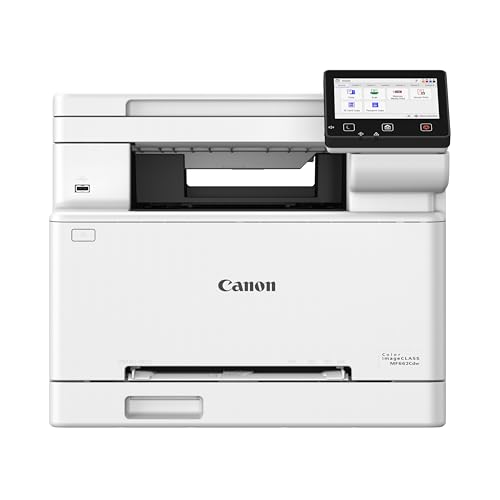
Canon Color imageCLASS MF662Cdw — The warranted all-rounder
Canon’s listing for the MF662Cdw is the most forthcoming of the laser group: a wireless duplex colour laser with copier and scanner, a stated speed of 26 ppm, and a three-year limited warranty written into the title. Each of those facts answers a restaurant question directly. Duplex for the folded menu. A speed figure, the only one among the lasers here, that lets a manager estimate the between-services reprint in real minutes. And a warranty three years long, which in restaurant time is an eternity of services, spills and seasonal menus — the machine is warranted across the whole early life of the business it serves.
The all-in-one functions earn their space in a restaurant office that is usually a desk, a shelf and a prayer. The same machine that prints the menus scans the supplier invoices, copies the allergen sheets for the kitchen wall and stands ready for the health inspector’s paperwork. Consolidation matters where square footage is priced like the dining room’s, and a single colour laser centre quietly replaces a shelf of single-purpose devices.
Nothing in its proposition is exotic, and that is its strength. This is the pick for the restaurant that wants the menu problem solved competently and durably, with the longest stated warranty in the guide standing behind the solution. Kitchens run on equipment that shows up every day; the MF662Cdw’s listing reads like a machine that intends to.
There is a staffing comfort to this machine that deserves naming. In a restaurant, the printer’s operator is whoever drew the short straw — the host between seatings, the manager on a phone call, the owner at midnight before a menu launch. A wireless all-in-one with automatic duplex removes most of the ways that operator can fail: no cable to find, no manual page-flipping to ruin the fold, no second device to warm up for the invoice scan. Equipment that forgives the occasional operator is worth more in a restaurant than in an office, because the restaurant’s operators are occasional by definition. The Canon’s spec sheet will not tell you that, but a season of services will.
- Engine: colour laser, as listed
- Functions: print with copier and scanner, as listed
- Duplex: wireless duplex printing, as listed
- Rated speed: 26 ppm, as listed
- Warranty: 3-year limited warranty, as listed
- Paper capacity: Not stated in the listing title — verify with the maker’s documentation
Strengths
- Three-year warranty is the longest support promise stated in this guide
- The only laser here that publishes its speed — reprint timing can be planned
- Full all-in-one set consolidates a small restaurant office onto one machine
Trade-offs
- Letter-class format only; menu boards belong to the wide-format pick
- Toner costs across three years still belong in the menu budget
- Capacity unstated in the title, so stock-loading habits need confirming
Best for: full-service restaurants printing folded duplex menus and office paperwork from one warranted machine.
Not suited for: venues whose menu identity depends on oversize boards and window displays.
Restaurants that want the menu problem settled for years can start with the MF662Cdw — check its price on Amazon and read the warranty terms the listing advertises.

HP Color LaserJet Pro 3204dw — The compact laser
HP’s listing for the 3204dw repeats itself like a machine clearing its throat — colour laser, duplex, printer only, single function, ideal home office use — and buried in the repetition is a genuinely useful clarity: this printer prints. No scanner bed, no copier lid, no fax ghosts. For the small restaurant whose office functions already live elsewhere, or whose “office” is a corner of the pass, a single-function colour laser with automatic duplex is not a stripped-down compromise; it is the menu machine with everything irrelevant removed.
The duplex matters most. The folded menu is the small venue’s standard, and automatic two-sided printing is what turns it from a craft project into a reprint. HP positions the model at home-office scale, and the guide takes that positioning honestly: this is a machine for the bistro, the café-bar, the food operation whose menu run is dozens rather than hundreds, and whose owner would rather buy exactly the function used than a console of features gathering dust between services.
Its listing states no speed and no capacity, and the spec box records the silence. What it does state — engine, duplex, single-function intent — is enough to place the machine precisely: the compact laser for the venue that knows its menu format, knows its volume, and wants the laminated set to come out right every time without feeding a larger machine’s appetite for space and attention.
There is an underappreciated virtue in a machine that does one thing in a business that does everything at once. The small restaurant’s technology fails socially as often as technically — the all-in-one whose scanner lid is buried under menus, the console nobody remembers how to drive. A printer that prints is teachable in one sentence, and in a workplace with seasonal staff turnover, teachability is uptime. The 3204dw will never be the most capable machine in this guide, and for the venue that fits it, that is not a criticism but the entire design brief, honestly met.
- Engine: colour laser, as listed
- Functions: printer only, single function, as listed
- Duplex: duplex printing, as listed
- Positioning stated by maker: home office use
- Rated speed: Not stated in the listing title — verify with the maker’s documentation
- Paper capacity: Not stated in the listing title — verify with the maker’s documentation
Strengths
- Single-function focus: nothing to maintain that the menu workflow never uses
- Automatic duplex makes the folded menu a routine reprint
- Compact home-office scale suits the smallest back-of-house corners
Trade-offs
- No scanning or copying when the office unexpectedly needs them
- Speed and capacity unstated; heavy reprint days need verification first
- Home-office positioning caps its ambitions for multi-site volume
Best for: small bistros and café-bars whose menu run is modest and whose office jobs live on other devices.
Not suited for: restaurant groups standardising high-volume menu production across several sites.
Small venues that print and only print should look at the 3204dw’s Amazon page — see its current price on Amazon — and confirm the unstated figures in HP’s documentation.

Lexmark CS331dw Color Laser — The networked single-function
Lexmark’s listing leads with connection: Ethernet first, mobile-friendly, wireless — a colour laser with automatic two-sided printing, described in the plain language of office infrastructure. That ordering suits the restaurant group more than the lone café. A printer with a wired network address is a printer that stays where IT put it, reachable from the manager’s office, the bar terminal and the laptop at home base, printing the updated menu to whichever site machine is awake. In multi-site operations, where last month’s menu still circulating at one location is a brand failure, that reachability is a menu feature, not a networking footnote.
Like the HP laser above, the CS331dw is single-function in spirit: it prints, in colour, on both sides, and it joins networks properly. The mobile-friendly note deserves translation for restaurant life — the manager who spots the price error at 5 pm and sends the corrected menu from a phone in the dining room is not a contrived scenario but a Tuesday. A printer that accepts that job without a pilgrimage to a particular computer earns its place in a business run on its feet.
The listing states no speed, and Lexmark’s own series numbering is the only hint of class; the spec box leaves the figure to the maker’s documentation, as agreed. What is stated is enough to define the machine’s candidacy: the fixed-station, properly networked colour laser for operations that treat menu consistency across people and places as a system rather than a hope.
Consistency deserves one more paragraph, because it is where groups quietly bleed money. When each site prints its own menus on its own ageing machine with its own idea of the brand red, the group’s identity dissolves one reprint at a time — and the customers who visit two locations notice, even when the owners do not. A standardised, networked printer at each site, fed the same master file and the same stock, is how the dissolution stops. The CS331dw’s listing reads like it was written for exactly that standardisation programme: same machine, same connection, same duplex behaviour, everywhere the brand is served.
- Engine: colour laser, as listed
- Networking: Ethernet and wireless, mobile-friendly, as listed
- Duplex: automatic two-sided printing, as listed
- Functions: print (single-function class), as listed
- Rated speed: Not stated in the listing title — verify with the maker’s documentation
- Paper capacity: Not stated in the listing title — verify with the maker’s documentation
Strengths
- Ethernet plus wireless makes it a fixed, reachable station on any site network
- Mobile-friendly printing fits managers who work the floor, not a desk
- Automatic duplex keeps folded menus consistent across whoever prints them
Trade-offs
- No scan or copy functions for the office jobs that ambush a restaurant
- Speed unstated in the listing; reprint timing needs the documentation
- Its infrastructure virtues are wasted on a single tiny site
Best for: small groups and system-minded independents who print menus to a fixed networked station and update them from anywhere.
Not suited for: a one-room café where the printer will live beside one laptop and never meet a network cable.
Operations that think in systems can examine the CS331dw on Amazon — look at its price on Amazon and verify the speed figure in Lexmark’s documentation.

Brother MFC-L8930CDW — The business disciplinarian
Brother’s listing for the MFC-L8930CDW reads like a operations manager wrote it: business colour laser all-in-one, duplex print, scan and copy, low-cost printing, advanced security features. Every phrase is a control. Duplex everything, because the restaurant’s paper traffic — menus, prep sheets, allergen cards, training documents — is relentlessly two-sided. Low-cost printing as a stated positioning, because the owner reading the toner invoices is the same owner reading the food-cost reports, and both are disciplines. And security, which in a restaurant means the office network that also touches reservations and payments deserves a printer that behaves like it knows that.
The all-in-one completeness is the broadest in the laser group: where the HP and Lexmark picks print only, the Brother prints, scans and copies, which in a multi-role back office makes it the default destination for paper in both directions. Menus go out; supplier documents, signed delivery notes and staff paperwork come in. A restaurant standardising on one machine per site could do worse than standardise on the one whose listing was written as a checklist of business controls.
The security phrase in its listing deserves a fair reading rather than a dismissive one. Restaurant networks carry card payments in the next room and reservation data on the next desk; a printer is a network device with storage and a long memory for documents, and in a business that would never leave the office laptop unlocked, the printer’s own discipline is part of the same hygiene. Brother chose to print the words “advanced security features” in the title because some buyers have started asking — and a restaurant group answering a payment provider’s questionnaire will be glad the question was asked at purchase time rather than at audit time.
Its listing, like its single-function rivals, declines to state a speed, and the spec box says so. The Brother’s candidacy rests instead on the combination — full functions, duplex discipline, cost positioning, security — offered as a package. Restaurants are margin businesses wearing an apron; a printer pitched in the language of margins and controls is speaking to the owner in the owner’s own tongue, and that fluency is worth recording as a virtue in itself.
- Engine: colour laser, as listed
- Functions: all-in-one — print, scan, copy, as listed
- Duplex: duplex print, scan and copy, as listed
- Positioning stated by maker: low-cost printing, advanced security features
- Rated speed: Not stated in the listing title — verify with the maker’s documentation
- Paper capacity: Not stated in the listing title — verify with the maker’s documentation
Strengths
- Broadest function set among the lasers here, with duplex across all of it
- Low-cost printing positioning speaks directly to a margin business’s budget
- Advanced security suits an office network that neighbours payments and bookings
Trade-offs
- Speed unstated; the between-services reprint needs a documentation check
- Full business console is more machine than a tiny café will ever use
- Letter-class format only, like every laser in this guide
Best for: owner-operators and small groups who want one disciplined machine running menus and the whole paper office.
Not suited for: a stall or truck operation whose entire office fits in a glovebox.
Owners who think in margins should read the MFC-L8930CDW’s Amazon listing closely — check the price on Amazon and confirm its speed in Brother’s documentation.
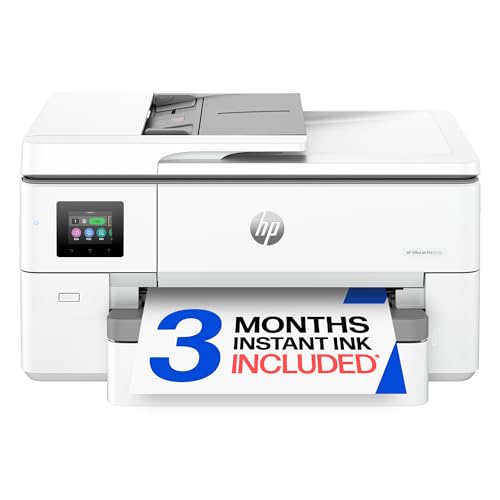
HP OfficeJet Pro 9720 — The wide-format board maker
Every other pick in this guide prints the menu a diner holds. The 9720 prints the menu a diner reads from across the room. HP lists it as a wide-format colour inkjet all-in-one — print, scan, copy and fax, wireless, with mobile compatibility and the HP Smart App — and its pool designation is the one that matters: this is the wide-format pick, the route to 11 x 17 menu boards, window displays, counter cards at poster scale and the specials board that has to be legible from the queue. No laser here can follow it onto that sheet, and that single fact secures its place regardless of any other comparison.
Wide format changes a restaurant’s visual grammar. A board printed in-house can change with the market run — the fish that arrived this morning is on the wall by lunch, at full size, in the brand’s colours — instead of waiting on a print shop’s turnaround. The all-in-one functions keep it employed between boards: the same machine scans, copies and prints the ordinary letter-size traffic, so the wide capability does not sit in the corner as a single-purpose luxury. It is the office printer that can also do the big thing, which is the correct order of priorities for most venues.
The inkjet caveats from this guide’s engine section apply in full: board output lives behind glass, in frames or on the wall, not bare under the nightly wipe, and a venue whose main need is laminated hand-held sets should buy a laser and treat the 9720 as its display department. Judged on its own brief — the big, colourful, changeable display — it has no competitor in this line-up, and its review should be read as the case for giving one machine in the building a larger imagination.
Think about the queue for a moment, because that is where boards earn their money. A customer deciding while they wait is reading whatever the wall offers, and a board that can be reprinted the morning the kitchen changes its mind is a selling surface that stays honest. Print shops cannot serve that rhythm; their turnaround belongs to a slower world. The 9720’s wide format is therefore not really a size feature at all — it is a freshness feature, the ability to keep the largest text in the restaurant as current as the food itself. Fast-casual operations, delis and coffee bars built around the counter queue will feel that distinction in the till, not just on the wall.
- Engine: colour inkjet, wide format, as listed
- Functions: print, scan, copy and fax, as listed
- Networking: wireless with mobile compatibility and HP Smart App, as listed
- Wide-format role: 11 x 17-class menu boards, per the pool designation for this pick
- Rated speed: Not stated in the listing title — verify with the maker’s documentation
- Paper capacity: Not stated in the listing title — verify with the maker’s documentation
Strengths
- The only wide-format route here — menu boards and displays at 11 x 17 scale
- Full all-in-one set keeps it employed on ordinary office work between boards
- In-house boards change at kitchen speed instead of print-shop speed
Trade-offs
- Inkjet output needs protection; it is not the bare laminated-set champion
- Wide hardware takes wide space in a back office that rarely has it
- Speed unstated, so board-plus-set reprint days need planning
Best for: cafés, delis and fast-casual rooms whose identity lives on boards, windows and counter displays.
Not suited for: white-tablecloth rooms whose menus are laminated, hand-held and changed twice a season.
If your menu’s most important copy is read from six feet away, the 9720 is your machine — open its Amazon listing to check the price and confirm the wide sheet sizes.

Epson EcoTank Pro ET-5800 — The running-cost champion
The ET-5800’s listing is a small business argument written in specifications: cartridge-free colour printing with scan, copy and fax, up to 25 ppm, a 500-sheet capacity, an ADF, aimed squarely at small offices and small businesses. Translated into restaurant terms, this is the machine for the operation that prints colour constantly — menus, yes, but also the table tents, the loyalty cards, the event flyers, the catering sheets, the daily specials — and has discovered that cartridge and toner budgets bleed exactly in proportion to ambition. Refillable tanks change that arithmetic at the root: the marginal colour page becomes cheap enough that the marketing department of one can stop rationing itself.
The supporting figures matter as much as the tanks. Up to 25 ppm is a real working speed for the between-services scramble, and the stated 500-sheet capacity means the machine holds a serious stack of menu stock rather than asking for a refill mid-set. The ADF serves the office’s incoming paper — contracts, invoices, the health department’s correspondence — with the same indifference to page counts that the tanks serve the outgoing. It is a coherent machine: every stated figure points at volume without anxiety.
The inkjet disciplines apply, as they did to the 9720: protect the menus that live hard lives, proof food photography on the real stock, and remember that no listing here promises lamination behaviour. What the ET-5800 promises instead is a year of colour printing whose ink line stays boringly small — and for the café whose menu is one item in a river of colour, boring ink costs are the most exciting specification of all.
One more habit separates cafés that love this machine from cafés that merely own it: feeding it steadily. Tank printers, like all inkjets, are happiest in regular work, and the café workflow — something colour, every day, without exception — is nearly the ideal duty cycle. The machine that prints the morning’s specials board insert, the afternoon’s catering quotes and the evening’s event flyers never sits long enough to sulk. If your operation’s colour printing comes in one monthly landslide instead, the laser group’s temperament may suit you better; the ET-5800 was built for the river, not the flood.
- Ink system: cartridge-free supertank, as listed
- Functions: print, scan, copy, fax, as listed
- Rated speed: up to 25 ppm, as listed
- Paper capacity: 500-sheet capacity, as listed
- Document feeder: ADF, as listed
- Intended use stated by maker: small offices and small businesses
Strengths
- Tank economics make constant colour printing affordable to a small business
- 500-sheet stated capacity keeps menu stock loaded through a full set run
- Speed, ADF and full functions make it a complete colour office in one box
Trade-offs
- Inkjet menus need sleeves or lamination care the lasers shrug off
- No wide format; boards belong to the OfficeJet pick
- Tank value only materialises at genuine volume — light users overbuy
Best for: cafés and casual restaurants printing colour daily across menus, tents, cards and flyers.
Not suited for: a formal dining room reprinting a laminated set four times a year and nothing else.
High-volume colour on a small-business budget is the ET-5800’s whole argument — see its price on Amazon and weigh it against your last year of toner and cartridge receipts.
Comparison Table
| Printer | Engine (as listed) | Duplex (as listed) | Stated speed | Distinguishing fact (as listed) |
|---|---|---|---|---|
| Canon Color imageCLASS MF662Cdw | Colour laser | Wireless duplex | 26 ppm | 3-year limited warranty; copier and scanner |
| HP Color LaserJet Pro 3204dw | Colour laser | Duplex | Not stated in the listing title | Printer only, single function |
| Lexmark CS331dw | Colour laser | Automatic two-sided | Not stated in the listing title | Ethernet and wireless, mobile-friendly |
| Brother MFC-L8930CDW | Colour laser | Duplex print, scan, copy | Not stated in the listing title | Low-cost printing; advanced security features |
| HP OfficeJet Pro 9720 | Colour inkjet, wide format | Not stated in the listing title | Not stated in the listing title | Wide-format all-in-one; HP Smart App |
| Epson EcoTank Pro ET-5800 | Cartridge-free inkjet | Not stated in the listing title | Up to 25 ppm | 500-sheet capacity; ADF |
Common Mistakes
The first mistake is choosing by the dining room’s fantasy rather than its format. A venue whose menu is a folded letter sheet gains nothing from wide-format hardware, and a café whose identity is a wall board gains nothing from the finest duplex laser. Format first, engine second, brand last — the order this guide was written in. The second mistake is proofing on the wrong light and the wrong paper: a menu approved under office fluorescence on bright white stock will be read under warm lamps on cream, and the colours will not have moved — the room will have moved them. Proof where the menu will live.
Third, the reprint nobody planned for. Menus fail socially before they fail mechanically: the price changes, the dish is eighty-sixed for a season, a spelling error survives three proofreads and is found by a food critic. A workflow that makes a corrected set a ten-minute job — right stock loaded, master file findable, duplex automatic — converts those moments from crises into chores, and a workflow that does not converts them into a week of apologetic inserts. Buy and set up for the correction, not just the launch.
Fourth, ignoring the consumables ledger. Toner, ink, the heavy stock, the laminating pouches: across a year these outspend the machine, and the ET-5800’s tanks and the Brother’s low-cost positioning exist because their makers know it. Price a year of your real volume on your shortlisted machines before choosing. And fifth, the solo-printer gamble in a business that cannot pause: when the only menu printer fails on a Friday, the menu becomes whatever the staff can handwrite. A backup plan — even a modest second machine or a print shop on account — is part of the menu system, and the time to arrange it is before it is needed.
Final Recommendation
Match the machine to the menu’s physical life. Folded, laminated, hand-held sets belong to the lasers: the Canon MF662Cdw if you want the stated speed and the three-year warranty, the Brother MFC-L8930CDW if you want the full business console, the Lexmark CS331dw if your operation is networked and mobile, and the little HP 3204dw if printing is all you ask. Boards and displays belong to the OfficeJet Pro 9720 alone. And the river of everyday colour — menus among a hundred other jobs — belongs to the EcoTank Pro ET-5800 and its merciful ink bills. A menu is the hardest-working page in any restaurant, read more closely than the reviews and remembered longer than the specials; print it on a machine chosen for the life it will actually live, and it will sell the food before the food arrives. Before the first service on any new machine, run the golden-print ritual from this guide: one perfect set, proofed under your own lights, kept in the office as the standard every reprint must match. That single habit will do more for your menus across the next three years than the difference between any two machines in this line-up — and it costs exactly one set of paper. Keep the golden set in a sleeve, label it with the date and the stock it was printed on, and replace it only when the menu itself is redesigned, so the standard always describes the current menu rather than a fond memory of an older one.
FAQ
Can I laminate inkjet-printed menus?
With care, and after testing. Toner-based laser output tolerates lamination’s heat as a matter of physics, which is why the laminated route in this guide is laser-led. Inkjet menus are more often protected in reusable sleeves or frames. Whichever engine you choose, laminate one test menu and live with it for a week before committing a full set.
Which pick handles an 11 x 17 menu board?
The HP OfficeJet Pro 9720 — it is the wide-format pick, and the only machine here whose role covers boards and display pieces at that scale. The lasers and the EcoTank are letter-class machines; their menus are the ones diners hold.
How fast can I reprint a full menu set between services?
Only two listings state a speed: the Canon at 26 ppm and the Epson at up to 25 ppm, both rated on standard pages rather than heavy menu stock, so treat them as rankings rather than stopwatch promises. In practice the workflow decides more than the rating — stock loaded, file ready and duplex automatic will beat a faster machine buried in setup.
Is a single-function printer enough for a restaurant?
For the menu job itself, yes — the HP 3204dw and the Lexmark CS331dw exist precisely for venues whose scanning and copying live elsewhere. It stops being enough the day the back office discovers it also needs to scan invoices and copy allergen sheets, which is why the all-in-one picks exist. Answer for your whole paper office, not just the menu.
What paper should menus be printed on?
Heavier than office paper, always — a menu’s stock is its handshake. Beyond that, the choice is between bare heavy stock for daily-printed menus, coated stock for photographic richness, and lamination or sleeves for longevity. Paper is a consumable rather than a pick in this guide, so the honest advice is to proof your actual menu on two or three candidate stocks under your dining room’s light and let the room decide.
Colour laser or EcoTank for a café that prints everything?
If “everything” means constant colour across menus, tents, cards and flyers, the ET-5800’s refillable tanks usually win the year-long arithmetic. If the menu set itself is laminated and hard-lived while the rest is occasional, a laser carries the menu better and the tank’s advantage narrows. Your last quarter’s print volume, honestly counted, settles it.
How often should a restaurant reprint its menus?
Whenever the food, the prices or the seasons change — and immediately when a set starts to look tired, because a worn menu tells diners a story about the kitchen that the kitchen may not deserve. The practical rhythm most venues settle into is a full fresh set at each menu revision, with small between-services runs for corrections. That rhythm is exactly why the reprint workflow matters more than any single specification: the printer you barely notice is the one doing its job.
Related Guides
- best printers for elementary schools
- best printers for coworking spaces
- best printers for sticker printing
Colour you can trust on a menu board starts with colour you can trust on paper, and our guide to the best printers for fine art photography holds the strictest standard on this page.
Colour judgement crosses media — what a kitchen trusts on paper, a studio trusts on the wall — and our guide to the best art projectors for large canvas applies the same eye to projection.


