What's inside
- Key Takeaways
- Quick Picks: The Best Hard Drives Compatible With Xbox One at a Glance
- How Did We Choose These Picks?
- What Should You Know Before Adding a Drive to an Xbox One?
- How Do These Six Xbox Game Drives Stack Up Against Each Other?
- How Does Game Pass Change the Storage Calculation?
- Can One Drive Serve Two Consoles in a Household?
- How Do You Set Up an External Drive on an Xbox One?
- Which Mistakes Do Xbox One Owners Make Most Often When Choosing Game Drives?
- How Does Backward Compatibility Affect Your Storage Choice?
- What Happens to Your Games If the External Drive Fails?
- How Should You Organise a Large Installed Library?
- Why Do Game Updates Need Free Space Beyond the Game’s Size?
- How Do You Move an Existing Library to a New Drive Without Re-Downloading?
- What Should You Check Before Buying a Drive for a Child’s Console?
- How Does an External Drive Change the Life of an Older Xbox One?
- What Is the Difference Between Storing and Playing Games on Newer Consoles?
- How Should a Drive Be Placed in an Entertainment Unit?
- How Do Download Caps Change the Storage Decision?
- What Should You Do With the Internal Drive Once an External One Arrives?
- How Long Should an External Game Drive Last?
- What Is the Kindest Setup for a Shared Family Console?
- Should You Buy Storage Before or After the Library Demands It?
- What Does a Full Library Do to How a Console Gets Used?
- Final Recommendation
- Frequently Asked Questions
- Related Guides
As an Amazon Associate I earn from qualifying purchases. This post may contain affiliate links at no extra cost to you.
gizmoverdict.com is reader-supported. When you buy through links on our site, we may earn an affiliate commission.
Where to buy: you will find these drives at gaming retailers, in console accessory shops and through the manufacturers’ own stores, and every link in this guide leads to a listing that was cross-checked against the real product page while this research was being done. Check that the listing names Xbox compatibility for the specific model, because each brand also sells visually similar drives aimed only at computers.
The internal storage of an Xbox One disappears quickly once a few large titles, their updates and a Game Pass habit start competing for room, and deleting a game you still play just to install the next one gets old fast. The best hard drives compatible with xbox one are external USB drives the console can format for game storage, letting a whole library stay installed and ready instead of being shuffled on and off the internal disk.
All six picks are external drives sold for console gaming, spanning portable models that draw power from the USB cable and one larger desktop unit with its own power supply for a permanent place beside the console. Each one connects to an Xbox One, formats through the console’s storage settings and holds Xbox One, Xbox 360 and original Xbox titles that play through backward compatibility.
One honest clarification belongs at the front of this guide. These USB drives play and store Xbox One generation games directly. On the newer Series X and Series S consoles, games optimised for those machines must run from the internal storage or an official expansion card; a USB drive can store those titles and hold backward-compatible games for play, but it cannot launch the optimised Series versions. For an Xbox One owner, which is who this guide serves, every pick below plays its library directly.
Key Takeaways
- Every pick connects by USB, formats through the Xbox One storage menu and then installs and plays Xbox One generation games directly from the drive.
- Portable models need no power outlet and travel easily between consoles, while the desktop D10 trades portability for the largest capacity in this list.
- A 4TB or 5TB drive holds a very large library of Xbox One titles, their updates and downloadable content without constant deletion decisions.
- On Series X or Series S hardware, USB drives store optimised games but cannot play them; optimised titles need internal storage or an expansion card to run.
- Format the drive on the console it will live with, because the Xbox format cannot be read as ordinary PC storage afterwards without reformatting.
Quick Picks: The Best Hard Drives Compatible With Xbox One at a Glance
| Drive | Badge | Why it earns a place |
|---|---|---|
| Seagate Game Drive for Xbox 4 TB External Hard Drive Portable HDD | Certified Library Builder | Built and certified specifically for xbox libraries. |
| Seagate STEA2000403 Game Drive for Xbox STEA2000403-Hard 2 TB-USB 3.0-Green, 2TB | Compact Original Pick | The smaller original game drive for a modest collection. |
| WD_BLACK 5TB P10 Game Drive, Portable External Hard Drive, Works with Playstation, Xbox, & | Five-Terabyte Traveller | Five terabytes that travel between consoles in a jacket pocket. |
| WD_BLACK 8TB D10 Game Drive | Never-Delete Desktop | Eight terabytes and its own power supply for a permanent setup. |
| Toshiba Canvio Gaming 2TB Portable External Hard Drive USB 3.0, Black for PlayStation, Xbo | Slim Console Companion | Slim, quiet and easy to tuck behind the console. |
| Toshiba 4TB Canvio Gaming Portable External Hard Drive USB 3.2 Gen 1 for PlayStation and X | Roomy Portable Upgrade | Four terabytes of portable room with a gaming pedigree. |
How Did We Choose These Picks?
Compatibility came first: each drive connects over USB at speeds the Xbox One supports and is marketed and sized for console game storage, with capacities well above the console’s minimum requirement for an external gaming drive. Models designed for gaming also pay attention to sustained transfers during long installs, which is the workload a game library actually creates.
The list deliberately spans the realistic choices an Xbox One owner faces. There are compact drives that disappear behind the console, a mid-size option from each major gaming line, and one large desktop unit for the player who never wants to delete anything again. Each review describes the living-room reality of the drive: its size, its power needs and the kind of library it suits.
What Should You Know Before Adding a Drive to an Xbox One?
When the console first sees a suitable external drive, it offers to format it for games and apps. Accepting that format erases the drive completely and dedicates it to Xbox storage, so move anything valuable off it beforehand. After formatting, the console can be told to install new games to the external drive by default, which keeps the internal disk free for the system and a rotating selection of favourites.
Capacity planning for a game library differs from PC storage because modern titles arrive with large updates that need temporary working room during installation. Leaving a comfortable margin free keeps installs smooth. Players with a growing Game Pass rotation usually find the mid-size drives in this list the sweet spot, while collectors who keep everything installed gravitate to the largest options.
Placement matters more than people expect. A portable drive should rest flat with its cable unstressed, away from the console’s warm exhaust, and it should not be unplugged while the console is on or in its instant-on sleep state. Sudden disconnections during a write are how game installations corrupt, so treat the drive as a permanent fixture rather than a cable to tidy away.

Seagate Game Drive for Xbox 4 TB External Hard Drive Portable HDD — Certified Library Builder
This is the drive Xbox owners reach for first, built specifically for the console with certification behind it and a design that looks at home beside the machine.
Four terabytes holds a large library of Xbox One titles with their updates, and the built-in lighting detail gives the setup a small moment of theatre every time the console wakes.
The LED bar on this Seagate is more than decoration in a dark room: it confirms at a glance that the drive is awake and working during a long install. Owners tend to park it on top of or beside the console permanently, and its certification means the console’s formatting and power behaviour hold no surprises.
- Capacity: 4TB portable
- Connection: USB 3.2 Gen 1
- Design: Xbox certified, LED accent
- Power: bus powered
- Plays: Xbox One generation titles
This Seagate is the drive the Xbox One was practically designed to meet. It formats without argument, wears the certification that guarantees the console’s storage behaviour, and its four terabytes swallow the modern reality of game sizes — the hundred-gigabyte flagships, their seasons of updates, the downloadable expansions — without asking the owner to curate anything. For most households it ends the storage conversation for the life of the console.
The green LED accent will divide opinion in a minimalist living room, yet in a dark room it usefully confirms the drive is awake during a long install. More importantly, the drive’s manners are console manners: it wakes with the machine, sleeps when asked and never demands a computer’s attention to stay healthy. Owners who want the official-feeling answer to Xbox One storage, with no research rabbit holes, start and usually finish here.
Households with two Xbox consoles will appreciate a subtler virtue: a certified drive can be moved between machines, carrying its library to whichever console is free once the owning account signs in. That turns one purchase into shared infrastructure for the whole house, and four terabytes is the size at which sharing stops requiring negotiation about whose games get deleted to make room.
Installation behaviour is where this Seagate quietly shines. Large games land on it at the pace the connection and the console allow, without the drive becoming the story, and its certified status means the Xbox’s power management treats it as a citizen rather than a guest. Owners who use the console’s instant-on mode for overnight updates will find the arrangement particularly harmonious: games simply appear, finished, in the morning.
One more pattern suits this certified drive: the household that buys the console and the drive on the same day and never experiences the internal disk’s limits at all. Storage anxiety is entirely learned from scarcity, and a generation of players who start with four external terabytes simply never learn it.
Give it the console’s rear port if one is free, where the cable is least likely to be disturbed by controllers, headsets and the general traffic of a gaming household, and the certified drive will reward the consideration with years of invisibility.
Strengths
- Certified specifically for Xbox storage
- Four terabytes hold a deep library
- Portable power with no extra brick
Trade-offs
- Lighting accent will not suit minimal setups
- Premium over generic portables
- Series-optimised games still need internal storage on newer consoles
Best for: Xbox One owners building a lasting library.
Not suited for: players wanting the cheapest possible terabyte.

Seagate STEA2000403 Game Drive for Xbox STEA2000403-Hard 2 TB-USB 3.0-Green, 2TB — Compact Original Pick
The smaller green-accented original remains a friendly entry point, doubling a console’s room for games without any fuss or extra power cables.
Two terabytes will not hold a giant modern library forever, yet for a focused collection of favourites it removes the delete-and-redownload cycle completely.
This older green drive has a second life in many homes as the children’s console drive or the bedroom Xbox companion, holding a focused set of family favourites. Its modest capacity disciplines the library in a healthy way, keeping installed games close to the ones actually played each month.
- Capacity: 2TB portable
- Connection: USB 3.0
- Design: green-accented game drive
- Power: bus powered
- Plays: Xbox One generation titles
The original two-terabyte Game Drive is the elder statesman of this list, a design from the years when doubling an Xbox One’s storage felt like a revelation. It still performs that trick honourably. For a console holding a focused library — the sports title played all year, a handful of adventures, the children’s favourites — two terabytes removes the friction of deletion without the cost of capacity that will never be used.
Its honesty is its ceiling. A household rotating a large subscription library will fill it and return to juggling, and its older design language shows beside newer rivals. Yet as a first external drive, a second-room drive or a gift that upgrades someone’s console in five minutes, it remains a thoroughly sensible object whose limitations are simply the arithmetic of its size.
There is a nostalgia economy around this older drive as well: it is inexpensive enough now to be bought almost casually, the way a spare controller is bought, and it transforms a launch-era console with a small internal disk into a machine that feels current. For a console still giving good service in a spare room, that is exactly the right scale of investment.
The little green drive also makes a thoughtful hand-me-down. When its owner graduates to a larger model, this one can move to a younger relative’s console with its dignity intact, carrying a starter library’s worth of room and asking nothing but a format. Technology that cascades gracefully through a family earns its cost several times over.
Do not overlook this little drive for a travel console — the machine that lives at a holiday home, a dorm room or a relative’s house where the main library cannot follow. Two terabytes of favourites, chosen deliberately, is a better travelling companion than a vast drive whose contents nobody curated.
And if this older drive is where a household starts, it teaches the right lesson at the right price: that a console’s storage should be a decision made once, generously, rather than a problem revisited monthly. Many owners who began here later bought its larger rivals in this list with the confidence of experience.
Strengths
- Friendly size for a first upgrade
- No power adapter to manage
- A long-proven console companion
Trade-offs
- Two terabytes fill with modern libraries
- Older design language
- Heavy downloaders will outgrow it
Best for: modest collections and second consoles.
Not suited for: Game Pass completists installing everything.

WD_BLACK 5TB P10 Game Drive, Portable External Hard Drive, Works with Playstation, Xbox, & — Five-Terabyte Traveller
Western Digital’s gaming line answers with five portable terabytes, the most room in this list that still runs purely from the USB cable.
It moves between an Xbox and other platforms gracefully, which suits households where the drive might serve a console now and a PC library later.
Five terabytes in a bus-powered shell makes the P10 the drive most likely to visit friends’ houses, carrying a whole library to another console for the weekend. Its cross-platform flexibility also future-proofs it: if the household’s gaming centre of gravity shifts to a PC, the drive simply changes jobs.
- Capacity: 5TB portable
- Connection: USB, gaming line design
- Compatibility: Xbox, PlayStation and PC
- Power: bus powered
- Plays: Xbox One generation titles
The P10’s five terabytes make it the largest library that still travels in a coat pocket, and that combination defines its appeal. It can live behind the console for months, then migrate to a friend’s machine, a holiday rental or a PC without a power brick or a second thought. Players whose gaming life happens in more than one room — or more than one house — will feel that portability weekly.
Western Digital’s gaming line also gives it a second career path: if the household’s centre of gaming gravity shifts toward a computer, the same drive becomes the PC game library without complaint. That flexibility softens the purchase for families unsure which platform a teenager will favour next year, and its capacity means the question of what to delete simply stops arising in the meantime.
Download-heavy households on slow connections should value the P10 for a reason beyond size: re-downloading a deleted flagship can consume an evening or a weekend, so capacity is effectively time. Five terabytes of keep-everything storage converts the connection’s slowness from a recurring punishment into a one-time cost per game.
One caution travels with all that portable capacity: label the drive’s underside with the owner’s name. A five-terabyte black box looks like every other black box at a gathering of gamers, and the P10’s whole purpose is to be carried into such gatherings. The label is a two-minute insurance policy on a library that took years to assemble.
The P10’s cross-platform nature also makes it the diplomat of a mixed household, where one partner games on a PC and the other on the Xbox. A library drive that can change allegiance without a format argument settles questions that would otherwise require two purchases, and its capacity is large enough that neither side feels like the compromise.
One last P10 habit worth adopting: keep a short note in its case listing the ten games you would re-download first if the drive were ever lost. The note takes two minutes, and it converts a hypothetical disaster into a checklist, which is the form in which gamers, like everyone else, handle bad news best.
Strengths
- Five portable terabytes lead this list
- Works across consoles and PC
- No mains power required anywhere
Trade-offs
- Gaming styling may not match every room
- Large portable premium over desktop units
- Same USB limits as every rival here
Best for: players moving between consoles and rooms.
Not suited for: a fixed setup wanting maximum capacity.
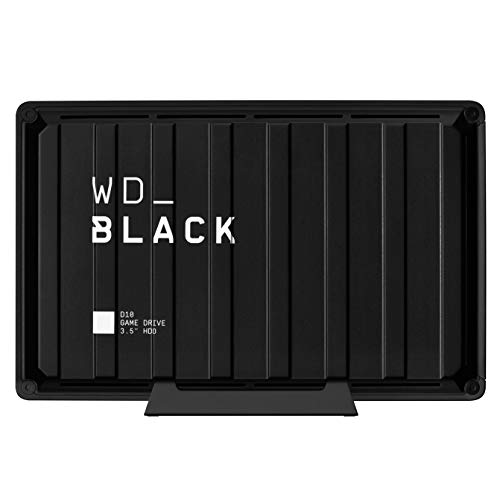
WD_BLACK 8TB D10 Game Drive — Never-Delete Desktop
The D10 is the maximalist choice: eight terabytes, its own power supply and an active-cooling design intended to live permanently beside the console.
Players who keep everything installed, including large backward-compatible collections, will appreciate never auditioning games for deletion again.
The D10 asks for commitment: a shelf position, a power socket and a permanent cable run. In exchange it behaves like part of the console itself, waking with it and holding a library so large that the storage screen stops being a source of anxiety entirely, even after years of downloads.
- Capacity: 8TB desktop
- Connection: USB, gaming line design
- Power: mains adapter
- Cooling: designed for permanent placement
- Plays: Xbox One generation titles
The D10 is the maximalist’s answer and makes no apology for it. Eight terabytes, its own power supply and a design intended to sit permanently in the entertainment unit turn the Xbox One into a machine that holds its owner’s entire history: every flagship, every backward-compatible treasure, every experiment downloaded on a whim and never removed. For collectors, the deletion screen becomes a place they used to visit.
Commitment is the price. It needs a shelf position and an outlet, it will not travel to a friend’s house in a pocket, and its capacity is wasted on a household that plays three games a year. Judge it by the library it serves: if that library is measured in dozens of large titles and growing, the D10 is not excess but accuracy.
The D10 also suits the household media-centre pattern, where the Xbox serves streaming apps and local media alongside games and the console effectively never gets replaced. A permanent, powered, high-capacity drive matches that permanence; it is infrastructure for a machine that has become furniture in the best sense.
Heat management is the D10’s hidden curriculum. A powered desktop drive in a closed entertainment cabinet can cook itself slowly across a summer, so give it air, check the cabinet’s warmth after a long session, and let its active design do the rest. Owners who respect that single condition report the kind of uneventful service that makes eight terabytes feel like a utility rather than a gadget.
There is a collector’s argument for the D10 that goes beyond capacity: a complete, installed library is a playable archive of a console generation. Discs on a shelf cannot be browsed the way this drive’s contents can, and in twenty years the machines that still work will be the ones whose libraries were kept whole, powered and occasionally played.
Set a calendar reminder, a year from installation, to glance at its health and its free space; a drive this large deserves that single annual minute of attention, and it will almost certainly repay it with nothing whatsoever to report, which is the happiest outcome storage can ever offer anyone, anywhere.
Strengths
- Eight terabytes end deletion decisions
- Own power supply suits permanent duty
- Cooling designed for long sessions
Trade-offs
- Needs an outlet and shelf space
- Least portable option by far
- Overkill for a handful of games
Best for: collectors keeping everything installed.
Not suited for: anyone carrying a drive to friends regularly.
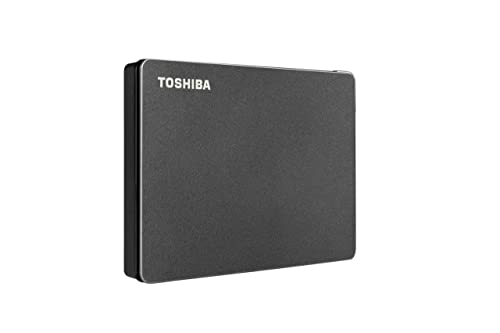
Toshiba Canvio Gaming 2TB Portable External Hard Drive USB 3.0, Black for PlayStation, Xbo — Slim Console Companion
Toshiba’s gaming portable keeps things slim and simple, with a two-terabyte capacity that suits a second-room console or a younger player’s growing collection.
Its understated black shell disappears behind the machine, and the bus-powered design keeps the entertainment unit free of extra wall adapters.
Canvio Gaming’s restraint is its charm in a shared living room, where a slim black box attracts no attention and makes no noise worth mentioning. Parents often choose it for a family console precisely because it disappears, quietly doubling or tripling the games the machine can hold.
- Capacity: 2TB portable
- Connection: USB 3.0
- Compatibility: PlayStation, Xbox, PC and Mac
- Power: bus powered
- Plays: Xbox One generation titles
Toshiba’s Canvio Gaming two-terabyte model is the quiet option, in every sense. Its slim black shell disappears behind the console, it asks for nothing but the USB cable, and it doubles or triples a modest library without changing the look or sound of the entertainment unit. For a family console in a shared living room, that invisibility is a genuine feature rather than a lack of ambition.
It suits the household that knows its habits: a rotation of favourites, a few large staples and no ambition to archive a subscription service. Owners who outgrow it will likely step to its four-terabyte sibling in this list, keeping the same manners at twice the scale, which makes this model a comfortable first step rather than a dead end.
Parents often land on this Canvio for a reason its specification sheet does not mention: it is uninteresting to small hands. No lights to chase, no brick to unplug, no presence to investigate — just a slim box that quietly holds the family’s games and survives being ignored for years, which is the highest praise available for living-room technology.
The Canvio’s restraint extends to travel: it is the drive most likely to be thrown into a bag for a holiday rental without a protective case or a second thought, and its slim shell tolerates that casualness. A library that can holiday with its owner, on the rental’s television through the console it accompanies, is a small luxury this size of drive uniquely enables.
The slim Canvio also earns a place in households where the console shares a television with sceptics. Equipment that does not announce itself tends to be forgiven its shelf space, and a drive that nobody has to defend is a drive that stays connected, which is where its value lives.
There is a final, practical test this little Toshiba passes that larger drives sometimes fail: the borrowed-console test. Carried to another house with the owner’s account, it simply works, presenting its library without a power supply hunt or a settings expedition. For social gaming — the kind the Xbox One generation was built around — that frictionless arrival is worth more than a terabyte of specification.
Strengths
- Slim shell hides behind the console
- Quiet, simple and bus powered
- Easy first step into external storage
Trade-offs
- Two terabytes are a starting point only
- Plain styling beside gaming rivals
- Growing libraries will replace it eventually
Best for: a tidy entertainment unit with a focused library.
Not suited for: households installing dozens of large titles.

Toshiba 4TB Canvio Gaming Portable External Hard Drive USB 3.2 Gen 1 for PlayStation and X — Roomy Portable Upgrade
The larger Canvio Gaming doubles that portable room to four terabytes while keeping the same cable-only convenience and console-friendly manners.
It is a sensible middle path for players whose library outgrew a starter drive but who still want the drive to travel easily between rooms or consoles.
Stepping from two to four terabytes in the same Canvio line is the upgrade players make when a starter drive fills, and the familiarity helps: same cable, same manners, simply twice the room. It is a sensible final size for an Xbox One that will remain in service for years.
- Capacity: 4TB portable
- Connection: USB 3.2 Gen 1
- Compatibility: PlayStation and Xbox
- Power: bus powered
- Plays: Xbox One generation titles
The four-terabyte Canvio Gaming is the considered middle of this entire guide: portable like the small drives, spacious like the large ones, and free of both the desktop model’s power brick and the starter models’ ceiling. For an Xbox One expected to serve for years — as a main console now, perhaps as a bedroom or children’s console later — that balance ages gracefully.
Its newer design means a shorter public track record than the veterans here, which cautious owners should weigh honestly. Against that, its compatibility across consoles gives it the same second-career flexibility as the other cross-platform drives, and its size hits the point where most libraries simply stop being a management problem.
For the player whose Xbox One will eventually hand its duties to a newer console, this four-terabyte drive has a graceful future: it becomes the backward-compatibility library on the new machine, holding and playing the older generations directly while the new console’s internal storage is reserved for its own optimised titles. Few purchases in this guide plan their own second act so neatly.
Buying this model is often the moment a household stops thinking of the Xbox as one person’s console. Four terabytes is family scale: several members’ libraries coexisting without territorial disputes over deletions. The drive becomes shared ground, and shared ground, in a house with one television, is a diplomatic achievement as much as a technical one.
Finally, note how this drive treats the console’s twilight years kindly. As an Xbox One ages into a dedicated backward-compatibility and family machine, a four-terabyte library drive becomes its whole personality: everything it will ever be asked to play, already installed, waiting for whoever sits down.
Strengths
- Four terabytes without a power brick
- Gaming-line compatibility across consoles
- Easy to carry between rooms
Trade-offs
- Mid-list in both size and ambition
- Portable premium over desktop capacity
- Newer model with a shorter track record
Best for: players upgrading from a starter drive.
Not suited for: collectors needing the absolute maximum room.
How Do These Six Xbox Game Drives Stack Up Against Each Other?
| Drive | Capacity and format | Badge |
|---|---|---|
| Seagate Game Drive for Xbox 4 TB External Hard Drive Portable HDD | 4TB portable | Certified Library Builder |
| Seagate STEA2000403 Game Drive for Xbox STEA2000403-Hard 2 TB-USB 3.0-Green, 2TB | 2TB portable | Compact Original Pick |
| WD_BLACK 5TB P10 Game Drive, Portable External Hard Drive, Works with Playstation, Xbox, & | 5TB portable | Five-Terabyte Traveller |
| WD_BLACK 8TB D10 Game Drive | 8TB desktop | Never-Delete Desktop |
| Toshiba Canvio Gaming 2TB Portable External Hard Drive USB 3.0, Black for PlayStation, Xbo | 2TB portable | Slim Console Companion |
| Toshiba 4TB Canvio Gaming Portable External Hard Drive USB 3.2 Gen 1 for PlayStation and X | 4TB portable | Roomy Portable Upgrade |
How Does Game Pass Change the Storage Calculation?
A subscription library encourages trying large games on a whim, and every trial install competes with the permanent collection. External storage turns that habit from a juggling act into a genuine library, where a downloaded title can wait patiently for months until curiosity returns, instead of being deleted to make room for the next experiment.
Can One Drive Serve Two Consoles in a Household?
A drive formatted for games can travel between consoles, and titles on it become playable when the account that owns them signs in. Households with two machines often keep the shared library on one portable drive that migrates to whichever console is free, while each machine’s internal storage holds the current favourites of its main player.
How Do You Set Up an External Drive on an Xbox One?
Connect the drive to a USB port on the console with the cable supplied, then power the console on. A prompt appears offering to format the device for games and apps; choose that option, give the drive a recognisable name such as Library, and confirm the format. The console prepares the drive and shows it in the storage settings alongside the internal disk.
Open the storage settings and set the external drive as the default install location if you want new games to land there automatically. Existing games can be moved rather than re-downloaded: open the manage screen for a title, choose move, and select the external drive, which is far kinder to a data cap than deleting and downloading again.
Finish by testing a game launched entirely from the external drive and by checking that the console’s power settings treat the drive kindly during sleep. If the library will travel to a friend’s console, sign in with your account there and the games on the drive become playable once ownership is verified.
Which Mistakes Do Xbox One Owners Make Most Often When Choosing Game Drives?
The most common disappointment comes from expecting a USB drive to run games optimised for Series X or Series S on those newer consoles. Those titles must run from internal storage or an expansion card; the USB drive remains excellent for Xbox One, Xbox 360 and original Xbox games, and as storage for optimised titles between sessions on the internal disk.
Other frequent mistakes include unplugging the drive while the console sleeps, which can interrupt background updates writing to it, formatting the drive on a PC after the console has claimed it and expecting the games to survive, and filling the drive completely so large game updates have no room to stage themselves during installation.
How Does Backward Compatibility Affect Your Storage Choice?
An Xbox One library is really three libraries: the Xbox One titles themselves, the Xbox 360 games that play through backward compatibility and the original Xbox classics. The older generations are smaller per game, which tempts owners to dismiss them in capacity planning, yet collectors accumulate them by the dozen, and their combined weight surprises people. The generous drives in this list exist partly for that long tail of gaming history.
There is also a preservation pleasure in keeping those older titles installed and ready. A drive that holds everything turns the console into a personal museum that actually gets visited, rather than a shelf of discs whose downloadable updates must be fetched again before a nostalgic evening can begin.
What Happens to Your Games If the External Drive Fails?
The saves are safer than the installs. Game saves live with the console and the account’s cloud copy, so a failed external drive costs time rather than progress: the games themselves must be downloaded or installed again onto a replacement. That is still a miserable weekend on a slow connection, which is why the larger lesson of this guide is to treat the drive as permanent infrastructure — placed safely, never unplugged casually, and replaced at the first sign of ill health rather than the last.
Warning signs deserve the same respect as on a computer: installs that fail repeatedly, a game that corrupts twice, the drive vanishing from the storage screen, or new clicking from the enclosure. Any of those means the library should be re-homed while re-homing is a choice rather than a rescue.
How Should You Organise a Large Installed Library?
The console’s groups feature becomes valuable once a drive holds dozens of titles. Group by household member, by genre or by the simple honesty of now playing versus archived, and the library stays navigable as it grows. Pin the current rotation to the home screen and let the rest of the collection rest one menu away, present but not clamouring.
Review the library seasonally rather than constantly. A twice-yearly pass that removes the genuinely finished and forgotten keeps the drive’s free space healthy for the large updates modern games deliver, without turning storage management into a weekly chore that defeats the purpose of buying a big drive.
Why Do Game Updates Need Free Space Beyond the Game’s Size?
Modern updates often stage themselves beside the existing installation before replacing files, so a drive that is technically large enough for a game can still refuse its patch for lack of working room. Keeping a comfortable margin free — the habit this guide recommends for every drive here — prevents the specific frustration of a console that owns a game it cannot update on the evening friends are waiting to play it together.
That margin also protects the installation process itself, which writes and verifies large amounts of data. Storage that is calm, cool and unhurried produces fewer corrupt installs than storage being squeezed to its final gigabytes, another small way in which generosity with capacity buys reliability rather than mere room.
How Do You Move an Existing Library to a New Drive Without Re-Downloading?
Connect both drives, open the storage settings and use the transfer tools to move titles in bulk, ideally overnight for a large library. Moving preserves the installations exactly as they were, updates included, which on a slow connection is worth days. Verify a handful of moved games by launching them before formatting or retiring the old drive, and keep the old drive untouched for a week as the library’s insurance policy.
If the old drive was failing, prioritise the irreplaceable-feeling items first — the games with the largest updates, the ones a household member is mid-way through — because a dying drive should be read in order of value, not alphabetically. Saves, remember, are protected separately, so the migration is about time and convenience rather than progress.
What Should You Check Before Buying a Drive for a Child’s Console?
Simplicity beats capacity for a young player’s machine. A bus-powered portable that formats in minutes, hides behind the console and never needs a parent to troubleshoot a power supply will serve better than a vast desktop unit with cables to be pulled. The two-terabyte models in this list exist in that spirit, and their limits are a feature in disguise: a library that must occasionally be curated teaches its owner to finish things.
Set the external drive as the default install location during setup, show the child how the storage screen works once, and the arrangement will run itself for years. The goal is a console that asks nothing of the household’s adults, and these small drives deliver exactly that.
How Does an External Drive Change the Life of an Older Xbox One?
Launch-era consoles with small internal disks are the machines transformed most completely by this guide’s subject. A console that once held three modern games can suddenly hold thirty, and that change alters how the machine is used: more experimentation, more backward-compatible archaeology, less dread at a visiting friend’s suggestion. An inexpensive drive can postpone a console replacement by years, which is among the best value propositions in gaming hardware.
It also restores the console’s dignity as a shared appliance. A machine that always has something installed for every member of the household gets used by every member of the household, and the drive that made that possible has paid for itself in evenings rather than specifications.
What Is the Difference Between Storing and Playing Games on Newer Consoles?
This distinction deserves its own plain explanation, because it decides whether a drive bought today still pleases its owner after a console upgrade. On an Xbox One, every drive in this guide both stores and plays the console’s games, full stop. On the newer Series X and Series S machines, the same USB drives store any game but play only the older generations — Xbox One, Xbox 360 and original Xbox titles — while games optimised for the new hardware must run from internal storage or an official expansion card and can merely rest on a USB drive between sessions.
That makes these drives a sensible purchase even for owners planning an upgrade: the backward-compatible library they build will play directly on the new machine from the same drive, and the optimised titles can be parked on it to save internal space. What a USB drive cannot do, on any of these consoles, is substitute for the expansion card’s role in playing the newest games, and no honest guide should imply otherwise.
How Should a Drive Be Placed in an Entertainment Unit?
Flat, ventilated and boring. Give a portable drive a stable surface where its cable hangs without tension, keep it out of the console’s warm exhaust path, and route the cable so that vacuuming, children and enthusiastic celebrations cannot snag it. A desktop model deserves the same respect plus an honest assessment of the cabinet’s temperature after a long session, since enclosed furniture can turn a healthy drive’s environment hostile across a summer.
Once placed, leave it. The drives in this guide are infrastructure, and infrastructure rewards being forgotten: the console updates games onto them overnight, the library persists between sessions, and the only maintenance they ask is the occasional glance at the storage screen to confirm that free space remains healthy.
How Do Download Caps Change the Storage Decision?
Where an internet plan counts every gigabyte, storage becomes a form of savings. Every game kept installed is a game that never has to be downloaded twice, and a large drive can repay its cost in avoided re-downloads alone for households near their monthly limit. That arithmetic favours the generous end of this list — the four and five terabyte portables, or the D10 for a permanent setup — because the alternative is a recurring negotiation between the console and the rest of the household’s internet life.
The same logic applies to game updates, which arrive whether a household is ready or not. A library kept whole on a big drive updates in place; a library constantly deleted and restored multiplies its traffic several times over, and the cap feels it every month.
What Should You Do With the Internal Drive Once an External One Arrives?
Keep it as the system’s home and a fast-rotating selection. The internal disk holds the console’s operating environment and suits the handful of titles in heaviest current rotation, while the external drive becomes the library proper. That division also means a problem with the external drive never leaves the console unusable — the favourites remain playable while a replacement is arranged, which is a calmer failure mode than a machine with nothing installed at all.
Periodically rebalance the two: move the finished campaigns out to the library drive, pull the current obsession inward, and let each device do the job its position suits. Five minutes of housekeeping a month keeps both feeling spacious.
How Long Should an External Game Drive Last?
Plan on years of service rather than a console generation of worry, provided the drive lives the calm life this guide keeps describing: fixed in place, ventilated, never unplugged mid-write and replaced at the first trustworthy sign of decline. Spinning drives in consoles have an easier existence than those in laptops — no travel shocks, no daily transport — and a drive treated as furniture commonly outlasts the console it serves, moving on to library duty for the next machine or a second room.
When replacement day does come, the migration tools make it an evening’s background task rather than a project, particularly between two drives from this list. Buy the successor slightly larger than the library’s current size, move everything overnight, verify by playing, and the library’s continuity survives the hardware’s mortality — which is the entire philosophy of keeping games on external storage.
What Is the Kindest Setup for a Shared Family Console?
One generous drive, set as the default for everything, with groups named for each player and a standing household rule that nobody deletes another person’s current game. That tiny constitution prevents most storage conflict, because conflict rarely comes from capacity itself; it comes from surprise. A library everyone can see, organised by owner, on a drive with room for everyone’s habits, turns the console back into shared furniture rather than contested territory.
Add a seasonal amnesty: a twice-yearly evening where finished games are ceremonially archived together, and the drive’s free space is restored without blame. Rituals like that keep a family library healthy far longer than any specification in this guide.
Should You Buy Storage Before or After the Library Demands It?
Before, and by a comfortable margin. Storage bought in a crisis is bought in a hurry, at whatever size is available, and usually one size too small because the crisis makes the current library look like the final one. Storage bought calmly — the pattern every recommendation in this guide assumes — can be sized for the library’s next two years, placed properly, formatted once and then forgotten. The difference between the two purchases is rarely money; it is the difference between infrastructure and apology, and consoles, like households, run noticeably better on infrastructure.
What Does a Full Library Do to How a Console Gets Used?
It lowers the threshold for play itself. When every owned game is already installed, a twenty-minute gap becomes a session instead of a download decision, older titles get revisited on whims, and children discover the back catalogue the way earlier generations discovered a shelf of discs. That change in behaviour is the real return on any drive in this guide, larger than the convenience of avoiding deletions: the library stops being a queue and becomes a room the household actually lives in, and the Xbox One, a machine with a deep and generous catalogue, rewards exactly that kind of living.
Final Recommendation
Most Xbox One owners should pick one of the 4TB or 5TB portable drives here, format it once, set it as the default install location and then forget storage management for the life of the console.
The largest desktop option suits the collector whose library never shrinks, while the compact 2TB models remain sensible for a second console or a modest collection. Whichever drive you choose, it will hold and play your Xbox One library directly, and that simple promise, kept every evening you sit down to play, is the entire point of adding one.
Frequently Asked Questions
Will these drives also work with an Xbox Series X or Series S?
They connect and work as storage on the newer consoles, and they play Xbox One, Xbox 360 and original Xbox titles directly. Games optimised for Series X or Series S can be stored on a USB drive but must be moved to internal storage or an expansion card before they will launch, which is a platform rule rather than a fault of any drive here.
How many games fit on a 4TB or 5TB drive?
Game sizes vary enormously, from small indie titles to flagship releases with very large installs and updates. In practice the mid-size drives here hold dozens of typical Xbox One games plus their downloadable content, which is why most owners stop thinking about storage entirely once one is attached.
Can I move games between the internal drive and the external drive?
Yes, the console’s manage screens let you move or copy installed titles between storage devices without downloading them again. Moving is the sensible way to free internal space before a big new release while keeping the older game available to play from the external drive.
Does an external drive slow down Xbox One games?
Xbox One games were designed around internal spinning storage, and a healthy USB hard drive delivers a comparable experience for this generation of titles. Loading times feel similar in everyday play, and the convenience of keeping the whole library installed outweighs tiny differences between drives.
What happens if I unplug the drive and use it on a PC?
A PC will not read the Xbox-formatted file system as ordinary storage, and formatting it for PC use erases the game library. Decide which job the drive owns before formatting, and treat a console drive as dedicated games storage from that moment on.
Whichever model you settle on, give it one calm evening of setup — format, default location, a first batch of games moved across — and then judge it by how completely it disappears. The best console storage is the kind a household stops discussing, because the games are simply there, every evening, for whoever sits down, already updated, already organised, already waiting, patient as a bookshelf — which is all any player, of any age, in any household, has ever really asked of the machine in the corner of the room, and all that any of the drives in this guide, each in its own way and at its own size, is ultimately trying to provide for the many years of play that still lie ahead of it, its owners and its library.
Related Guides
Players kitting out the rest of a gaming corner can browse our best external drives for consoles best game drives compared best portable drives for travel coverage, where console storage sits alongside the other upgrades that change how a library feels.


