What's inside
- Key Takeaways
- Quick Picks
- How Did We Order This Ladder of Reading Machines?
- Climbing the Ladder: What Each Rung Actually Adds
- How Do You Build a Reading Habit Around an E-Ink Page?
- What Should You Check Before Choosing the TCL’s Open Door Instead?
- How Does a Reader Keep a Library Across Years and Devices?
- How Does Genre Change the Right Rung?
- What Makes a Reading Tablet a Good Gift for an Adult?
- How Do These Readers Behave on the Road?
- What Comfort Settings Should Every New Owner Adjust Once?
- When Does a Second Reader Join the Household?
- What Mistakes Do Adult Readers Make When Choosing a Reading Tablet?
- Final Recommendation
- Frequently Asked Questions
- Related Guides
As an Amazon Associate I earn from qualifying purchases. This post may contain affiliate links at no extra cost to you.
gizmoverdict.com is reader-supported. When you buy through links on our site, we may earn an affiliate commission.
Adult reading has a shape that general tablets keep interrupting. A novel wants an hour of unbroken attention, a battery that thinks in weeks, a screen that behaves like a page in both lamplight and noon sun, and a device light enough to hold above your face in bed without negotiating with your wrist. The best reading tablets for adults are therefore mostly not tablets in the everyday sense at all. Five of this guide’s six picks are Kindles, successive rungs of one ladder built by a single maker over many years, and the sixth is a full Android tablet included for the readers whose books live outside any single store. Reading this guide well means reading it as a ladder, not a contest: each Kindle adds something specific to the rung below, and the right question is how high your reading life actually climbs.
Where to buy: all six picks sit on Amazon; the listing states storage, colour and lockscreen configuration, and the page carries the current price to weigh before you choose your rung. One configuration note applies across the whole Kindle line and is mentioned here once, as it deserves: lockscreen-ads variants exist for these devices, with ad-free configurations also offered, so check which version a listing describes before assuming. Judge the device on its reading qualities; treat the lockscreen choice as a small, deliberate configuration decision rather than a surprise on the first evening.
Two listings carry facts that belong up front. The Kindle Colorsoft linked here is the International Version, stated in its own listing title, and that designation matters for availability, language and service details depending on where the reader lives, so it is repeated in the Colorsoft’s review rather than hidden here. And the TCL TAB 10 Gen 4, the ladder’s non-Kindle guest, is an LCD Android tablet: a fine, versatile screen of the glowing kind, not e-ink, and this guide will never blur that distinction, because the entire case for e-ink rests on the difference.
What e-ink buys a reader is worth stating plainly before the rungs begin. The page reflects light instead of emitting it, so it reads in direct sun like paper and asks almost nothing of the battery while a page sits still. Page turns cost a sip; a holiday of reading costs a charge. Against that calm, an LCD offers everything else a tablet does: colour that glows, apps without limit, video, browsing, and a screen that fights darkness with its own light. Both are legitimate reading lives. They are simply different ones, and the six reviews below keep returning to which life sounds like yours.
Key Takeaways
- The five Kindles here are rungs of one ladder, base Kindle to Colorsoft, not five rivals fighting for one crown.
- Warm light, a larger page and faster turns are what the Paperwhite rung adds; the Signature rung adds storage, an auto-adjusting light and wireless charging.
- The Colorsoft listing linked here is the International Version, and its colour screen serves covers, comics and colour documents rather than plain novels.
- The TCL TAB 10 Gen 4 is an LCD Android tablet for library apps and mixed use; its screen is not e-ink and is never described as such here.
- Lockscreen-ads variants exist across the Kindle line, so check the configuration a listing describes before buying.
- Most adult readers should start their thinking at the Paperwhite rung and climb only for a named reason.
Quick Picks
| Pick | Badge | Why this rung earns its climbers |
|---|---|---|
| Amazon Kindle (2024) | The first rung | The light, compact 16GB Kindle with fast page turns and a high-contrast page for readers who want the essentials done well. |
| Amazon Kindle Paperwhite (8 GB) | The warm-light step | A larger display with adjustable warm light and faster turns, the rung where bedtime reading becomes luxurious. |
| Amazon Kindle Paperwhite 16GB (2024) | The default rung | The 2024 Paperwhite with a 7-inch glare-free display and weeks of battery life, in a cheerful Raspberry finish here. |
| Amazon Kindle Paperwhite Signature Edition | The comfort rung | Thirty-two gigabytes, an auto-adjusting front light and wireless charging for readers who live on the device. |
| Amazon Kindle Colorsoft | The colour rung | The International Version of the colour Kindle, for covers, comics and colour documents in e-ink’s calm register. |
| TCL TAB 10 Gen 4 | The open-door rung | A 10.1-inch FHD Android LCD tablet for library apps, mixed media and readers whose books live in many places. |
How Did We Order This Ladder of Reading Machines?
By additions, honestly labelled. The base Kindle defines the promise: a light, compact e-ink page, fast turns, high contrast, weeks between charges implied by the technology’s nature. Each higher Kindle was then required to name its addition in the listing’s own language, a larger display, adjustable warm light, more storage, an auto-adjusting light, wireless charging, a colour panel, and to justify that addition against a real reading habit rather than against novelty. Rungs that added only glamour would have been demoted to a sentence; in the event, each of the five adds something a definable reader genuinely uses, which is why the ladder metaphor survived editing.
The TCL was judged by a different doorway entirely. It does not compete with e-ink at e-ink’s game, and scoring it on battery weeks would be a rigged exam. It was assessed as the answer to a specific reader: the one whose books arrive through several library apps, whose reading mixes articles, documents and colour material, and who wants one screen for the sofa’s whole evening. Its LCD is brighter in behaviour, busier in nature and hungrier in battery, and all three traits are stated in its review without apology in either direction. Readers whose curiosity extends to the wider e-ink category beyond one maker will find our guide to best e ink tablets a useful parallel read.
Comfort evidence was weighted as heavily as specifications. A reading device is held longer than any other gadget a person owns, often one-handed, often reclined, so weight, bezel grip and page-turn ease recur through the reviews as first-class criteria. Warm light was treated as a genuine feature with a genuine constituency, readers in bed beside a sleeping partner, rather than as a luxury garnish, because for that constituency it is the entire purchase. Battery language throughout is kept to the listings’ own framing of weeks, without invented hour counts.
Finally, the lockscreen question was handled once, in the introduction, rather than repeated as a nag in every review. Variants with lockscreen advertising exist across this line, ad-free configurations exist too, and the reader’s only task is to confirm which one a given listing sells. With that said once and clearly, the reviews are free to discuss reading, which is what the devices are for.

Amazon Kindle (2024) — The first rung
Every ladder needs a first rung that is not a compromise, and the 2024 Kindle is exactly that. Its listing promises a light and compact body, fast page turns and a high contrast ratio in a 16GB device, and those three phrases describe most of what most readers most of the time actually need. The page is crisp, the device disappears into a coat pocket or the side compartment of a bag, and the whole machine asks so little of its owner that reading becomes the path of least resistance in a day full of louder screens.
Contrast is the quiet hero here. E-ink contrast is what makes a page feel printed rather than displayed, and a high-contrast panel at this rung means the base Kindle does not read like the budget option when the book is open. It reads like a Kindle. What the first rung leaves behind is the comfort layer: no warm light to soften the page for a dark bedroom, a smaller canvas than the Paperwhite family offers, and storage sized for a reader’s active shelf rather than a lifetime library, though 16GB still holds more novels than a year of evenings can finish.
Buy this rung if your reading happens in lit rooms, on trains, in gardens and waiting rooms, and if the device’s job is to be present everywhere rather than perfect somewhere. It is also the natural second Kindle, the one that lives in the travel bag while a Paperwhite guards the bedside, a two-device strategy whose total cost still undercuts many single flagships. Readers who start here and later climb rarely regret the first purchase; they simply discover which comfort they actually missed, which is the most reliable market research a reader can run.
- Storage: 16GB as listed
- Character: light and compact as listed
- Page: high contrast ratio as listed
- Turns: fast page turns as listed
- Colour of device: Black as listed
- Class: e-ink reader, base rung
Strengths
- Pocketable size means the book is present for every spare ten minutes
- High-contrast page keeps text feeling printed, not displayed
- Simplest ownership in the line: charge rarely, carry always
Trade-offs
- No warm light for dark-room reading comfort
- Smaller page than the Paperwhite rungs
- Storage suits an active shelf rather than an archive
Best for: everyday readers in lit places who want the essential Kindle without the comfort layer’s cost.
Not suited for: bedtime readers who need warm light, or archive-scale libraries kept entirely on-device.
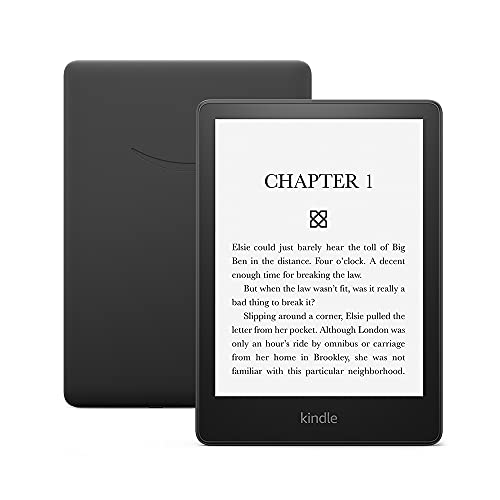
Amazon Kindle Paperwhite (8 GB) — The warm-light step
The Paperwhite name earned its fame by solving the bedroom problem, and this 8GB model carries the solving features in its listing: a larger display than the base Kindle, adjustable warm light, increased battery life and faster page turns. Warm light deserves its reputation among night readers. Shifting the page’s glow from a cool white toward amber as the evening deepens makes the device feel less like a screen intruding on a dark room and more like a lamp-lit page, and for readers beside a sleeping partner it lowers the light the device spills into the room to a considerate murmur.
The larger display changes reading in a way specifications understate. More lines per page means fewer turns, and fewer turns means the small rhythm interruption of e-ink reading recedes; long novels acquire the flow that readers describe, imprecisely but accurately, as forgetting the device. Eight gigabytes, in a world of text files measured in kilobytes and modest megabytes, is a library of thousands of ordinary books, and the readers who genuinely outgrow it are the manga, audiobook-file and document hoarders who will meet their own rung further up this ladder.
Position this model carefully in the family. It is the established Paperwhite formula rather than the 2024 refresh reviewed next, and buyers choosing between them are choosing between a proven configuration at this storage size and the newer generation’s refinements. Neither choice is a mistake; they are adjacent rungs sawed from the same tree. For a reader whose evenings are the main event and whose budget has a ceiling, this warm-light step remains one of the most satisfying purchases in the entire guide.
- Storage: 8GB as listed
- Display: larger display as listed
- Light: adjustable warm light as listed
- Battery: increased battery life as listed
- Turns: faster page turns as listed
- Colour of device: Black as listed
Strengths
- Warm light transforms bedtime reading beside a sleeping partner
- Larger page reduces turn frequency and deepens immersion
- Storage still holds thousands of ordinary text books
Trade-offs
- An earlier formula than the 2024 Paperwhite below
- 8GB pinches readers with large graphic or audio libraries
- No wireless charging or auto-adjusting light at this rung
Best for: night readers who want warm light and a larger page without climbing to the newest generation.
Not suited for: readers with huge graphic libraries or those who want the line’s latest refinements.
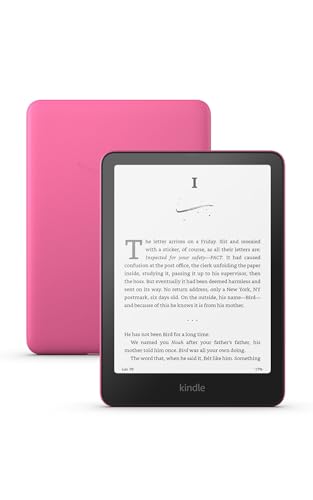
Amazon Kindle Paperwhite 16GB (2024) — The default rung
If a stranger asked which single device in this guide to buy without further questions, this is the one the guide would name. The 2024 Paperwhite’s listing offers a 7-inch glare-free display and weeks of battery life, in a 16GB configuration shown here in Raspberry, a colour that makes the device findable in a bag and personal on a table. Glare-free is the operative phrase for daytime readers: the page stays matte and legible under a window, a garden sun or a beach umbrella, in the conditions where every glowing screen in the house goes to die.
Seven inches is the Paperwhite line’s settled idea of enough: enough lines to forget the turns, enough width for comfortable margins, small enough to hold one-handed above a pillow for the chapter that becomes three. The 2024 generation’s refinements live in the reading rhythm, turns that keep pace with an eager reader, contrast and responsiveness tuned by a maker on its many-th iteration of the same idea. Sixteen gigabytes doubles the previous rung’s shelf, which in practice means the active library and the archive can finally share one device for most readers.
Call it the default rung because its compromises are the ones fewest readers feel. It lacks the Signature’s wireless charging and auto-adjusting light, comforts that matter to daily heavy users and barely register for the evening reader. It lacks colour, which matters to a different reader entirely, two rungs up. For the central case, the adult who reads novels and nonfiction most nights and wants the best-balanced page Amazon currently sells at the line’s heart, this Paperwhite is where the ladder’s traffic rightly gathers. Our guide to best large screen tablets for reading covers the readers who outgrow even this page size.
- Storage: 16GB as listed
- Display: 7-inch glare-free display as listed
- Battery: weeks of battery life as listed
- Generation: 2024 model as listed
- Colour of device: Raspberry as listed
- Light: warm light family feature of the Paperwhite line
Strengths
- Glare-free 7-inch page reads in sun as happily as in lamplight
- Weeks of battery make charging a monthly afterthought
- The line’s best balance of size, comfort and storage for most readers
Trade-offs
- No wireless charging for the drop-it-on-a-pad habit
- No auto-adjusting light for readers who move between rooms nightly
- Colour material still renders in e-ink greys
Best for: the majority of adult readers, as the balanced default for nightly novels and nonfiction.
Not suited for: colour-document readers or those who specifically want charging and light automation.

Amazon Kindle Paperwhite Signature Edition — The comfort rung
The Signature Edition exists for the reader who has stopped pretending the Kindle is an occasional device. Its listing adds three things to the Paperwhite formula: 32GB of storage, an auto-adjusting front light and wireless charging, in a 2024 Metallic Black device. Each addition maps to a heavy reader’s real friction. The storage swallows graphic novels, reference works and a serious archive without the deletion ritual. The auto-adjusting light follows the reader from a bright kitchen to a dark bedroom without the brightness slider becoming a nightly chore. Wireless charging turns the nightstand pad into the device’s home, so it is simply always ready.
None of these features changes a single sentence of any book, and the Signature’s honesty is that it never claims otherwise. It is a comfort rung, priced for people whose reading hours justify removing small frictions from every one of them. A reader who finishes a book a week, who reads in four rooms and two gardens, who keeps a working library rather than a current novel, will feel these additions weekly. A reader who opens the device on Sunday afternoons will feel them almost never, and should stay a rung or two below with a clear conscience.
The finish deserves a sentence because objects held for thousands of hours earn aesthetic scrutiny. Metallic Black reads as the line’s formal dress, understated in a way that suits a device whose entire purpose is to be forgotten in favour of the text. Pair the Signature with the habit of keeping it on its charging pad and it becomes the closest thing in this guide to a book that refills itself, which, for the reader it was built for, is not a luxury at all but the correct tool finally assembled.
- Storage: 32GB as listed
- Light: auto-adjusting front light as listed
- Charging: wireless charging as listed
- Generation: 2024 model as listed
- Colour of device: Metallic Black as listed
- Battery: weeks of battery life as listed
Strengths
- Auto-adjusting light removes the nightly brightness ritual
- Wireless charging keeps the device perpetually ready on its pad
- 32GB ends storage management for serious libraries
Trade-offs
- Comforts are wasted on occasional readers
- Still monochrome, so colour work belongs to the next rung
- Highest Paperwhite pricing in the ladder
Best for: daily heavy readers with large libraries who read across many rooms and lights.
Not suited for: weekend readers, for whom the standard Paperwhite delivers the same books for less.

Amazon Kindle Colorsoft — The colour rung
State the listing fact first, as this guide promised: the Colorsoft linked here is the International Version, a 16GB 2024 model with a colour display and adjustable warm light, in a no-ads configuration per its title. The International Version designation can affect availability and service details by region, so readers outside the device’s home market should read the listing’s terms with care, and readers inside it should simply note which version they are buying. With that said plainly, the device itself answers a question the monochrome ladder cannot: what happens to e-ink when the books have colour in them?
Colour e-ink renders in a muted, print-like register, closer to a newspaper’s colour pages than to a glowing screen, and for the right material that register is exactly right. Book covers arrive as covers rather than grey ghosts, which restores the small pleasure of browsing a library by eye. Comics and graphic novels become genuinely readable in the calm e-ink manner, children’s picture books shared on a knee work beautifully, and colour documents, charts, highlighted texts, travel guides with maps, keep their meaning instead of collapsing into shades of grey.
Plain novels, it must be said, gain nothing here, and a reader of plain novels should not pay the colour rung’s premium for a feature their library never uses. Colour e-ink also asks slightly more of the light than its monochrome siblings, a known trait of the technology. The Colorsoft’s reader is specific and real: the comics devotee, the picture-book-sharing grandparent, the professional whose reading is documents with data in them. For that reader, this rung is not the ladder’s decoration. It is the first rung that was ever actually built for them.
- Version: International Version, as stated in the listing
- Storage: 16GB as listed
- Display: colour display with adjustable warm light as listed
- Configuration: no ads, as stated in the listing title
- Generation: 2024 model as listed
- Colour of device: Black as listed
Strengths
- Covers, comics and colour documents keep their colour in e-ink calm
- Warm light keeps the colour page bedroom-friendly
- Restores browsing a library by cover, a monochrome loss
Trade-offs
- International Version terms need checking against the reader’s region
- Plain novels gain nothing from the colour panel
- Colour e-ink asks more of the available light than monochrome
Best for: comics readers, picture-book sharers and professionals reading colour documents.
Not suited for: plain-novel readers, who should save the premium and take the Paperwhite.

TCL TAB 10 Gen 4 — The open-door rung
The TCL closes the guide by opening the doors the Kindles keep shut. It is a 10.1-inch FHD Android tablet with an LCD screen, and let the distinction be stated for the last time with total clarity: this is not e-ink. The page glows, the battery thinks in days of mixed use rather than weeks of reading, and sunlight is an opponent to be managed with brightness rather than a friend to be read by. In exchange, the TCL offers the entire Android world: every library app, every store, the browser, documents, video, and the reading-adjacent life of articles, newsletters and research that e-ink deliberately refuses.
The listing’s specification suits that mixed brief: an octa-core processor, 4GB of memory with 128GB of storage, a 6,000mAh battery, Android 15, dual speakers and a metal body, positioned by TCL toward students, young adults and families. As a reading machine within that mix, the FHD panel shows text crisply, colour material glows as its makers intended, and page layouts from PDFs and magazines arrive exactly as designed. A reader whose books live across a public library app, a subscription service and a shelf of PDFs will feel at home here in a way no single-store device can offer.
Choose the TCL knowingly and it is the guide’s most versatile pick; choose it accidentally, expecting Kindle calm, and it will disappoint hourly. Its reader charges more often, manages notifications, and treats reading as one room in a larger house rather than as the whole house. For students and mixed-media households that is not a flaw but a description of their actual evenings. The ladder and the open door coexist in this guide because adult reading lives in both houses, and honesty about which house is yours is the whole decision. Students weighing this route further will find kindred analysis in our guide to best tablets for college note taking and text book reading.
- Screen: 10.1-inch FHD LCD as listed, not e-ink
- Platform: Android 15 as listed
- Memory and storage: 4GB and 128GB as listed
- Battery: 6,000mAh as listed
- Build: metal body as listed
- Audio: dual speakers as listed
Strengths
- Every library app and store is available in one device
- Colour, documents and PDFs render exactly as designed
- Doubles as the household’s general tablet between books
Trade-offs
- LCD glows and drains faster than any e-ink pick here
- Sunlight reading fights glare instead of using it
- Notifications and apps compete with the book for attention
Best for: readers whose books live across library apps and services, and mixed-use households.
Not suited for: readers seeking e-ink’s calm, sunlight ease and weeks-long battery.
Climbing the Ladder: What Each Rung Actually Adds
| Pick | Addition over the rung below | Reader it serves |
|---|---|---|
| Kindle (2024) | The promise itself: light, compact, high contrast | Everyday readers in lit places |
| Paperwhite (8 GB) | Larger display, adjustable warm light | Bedtime readers |
| Paperwhite 16GB (2024) | 7-inch glare-free page, newer generation, double storage | The default nightly reader |
| Paperwhite Signature | 32GB, auto-adjusting light, wireless charging | Daily heavy readers |
| Colorsoft | Colour e-ink, International Version listing | Comics, covers and colour documents |
| TCL TAB 10 Gen 4 | Leaves the ladder: full Android on an LCD | Multi-app library readers |
Climb by naming your friction. If nothing about your current reading hurts, the first rung is the answer and the ladder is a museum. If the bedroom hurts, warm light is the rung. If storage management or charging rituals hurt, the Signature is the rung. If grey covers and flattened charts hurt, colour is the rung. And if the walls of a single store hurt, the TCL’s open door is not a rung at all but a different building, chosen with its glowing, hungry nature fully understood.
How Do You Build a Reading Habit Around an E-Ink Page?
The device is the easy part; the habit is the purchase that matters. Begin by making the reader the most available book in the house. The base Kindle’s pocketability and the Paperwhite’s bedside presence both serve the same law: the book that is within reach wins the ten spare minutes that scrolling would otherwise take. Charge on a schedule so dull it cannot be forgotten, the first Sunday of the month, the night the clocks change, because e-ink’s weeks of battery breed a complacency that ends, once a year, in a dead device on the first evening of a holiday.
Organise the library in collections that match a reader’s real moods rather than a librarian’s categories: current, next, comfort rereads, work. A library that opens onto the current book in two taps gets read; a library of nine hundred unsorted titles gets browsed and closed. Sample generously, since e-book samples are the format’s gift to the uncertain, and delete samples ruthlessly at the month’s end so the shelf stays a shelf rather than a guilt archive. Readers who annotate should export their notes on a schedule, because a year’s marginalia is a document worth owning outside any single device or store.
Light discipline completes the habit. Set the warm light once for the bedroom and let the Signature’s auto-adjustment handle the rest if you own that rung; in daylight, turn the front light down or off and let e-ink do the thing it was born to do. Readers coming from glowing screens often keep the light high out of habit and then wonder why the page feels like a screen. Lower it until the page looks like paper in the room you are in, and the device’s whole character changes. Our musicians’ guide to best sheet music tablets explores the same e-ink calm applied to scores rather than novels.
What Should You Check Before Choosing the TCL’s Open Door Instead?
List your sources before you list your preferences. Write down where your next twenty books actually come from: one store, a public library app, a subscription service, PDFs from work, some braid of all four. A single-store braid belongs on the ladder without further debate. A genuinely mixed braid is the TCL’s entire case, and it should be made on that evidence rather than on a general feeling that openness is virtuous. Then list your reading places. Gardens, beaches and bright trains tax an LCD in ways a bedroom never will, and a reader whose life is half outdoors should let the e-ink rungs argue first.
Check the household’s second uses honestly. If the device will also carry video for a kitchen, school platforms for a teenager or video calls with family, the TCL stops being a reading compromise and becomes the house’s hardest-working screen, with reading as one honoured duty among several. If it will only ever read, its extra talents are weight, cost and distraction carried for nothing. Neither answer is a judgement; both are descriptions, and matching the description to the household is the entire skill this guide has been practising on every rung.
Finally, consider the two-device settlement that many adult readers quietly arrive at: a Kindle for books, chosen from the ladder’s middle, and whatever glowing tablet the household already owns for everything else. The settlement costs less than most flagship single devices, gives each job its native tool, and explains why this guide refuses to declare a war between the ladder and the door. Most readers are not choosing a philosophy. They are choosing where the novels live, and novels, overwhelmingly, live calmest on e-ink.
How Does a Reader Keep a Library Across Years and Devices?
Treat the library as a collection you curate rather than a pile you accumulate. Once a season, walk the shelves: finish or release the abandoned, promote the next three, and let the current book stand alone at the front where the device opens. Readers who keep a small, honest front shelf read more than readers guarding a vast one, because choosing the next book takes seconds instead of an evening of dithering that ends with the phone.
Keep one document outside the ecosystem entirely: a simple list, in a notebook or a file the household controls, of the books that mattered and the ones that await. Stores change terms, devices die, accounts tangle, and the reader with an independent record of their own canon can rebuild a library anywhere, on any rung, in an afternoon. It is the same insurance this site’s other guides recommend for music libraries and field data, translated to the quietest medium of all: your books, listed in your own hand, answerable to nobody’s catalogue.
And lend like a reader, not like a librarian. E-books lend within their stores’ rules and Kindles lend within households most easily when the devices share an account’s library by design rather than by password-sharing improvisation. Set the household’s arrangement up deliberately, especially where a partner’s or a parent’s reader joins the same shelves, and the collection becomes a family’s common room instead of a set of locked studies. The ladder was built by one maker; the library that climbs it belongs to the readers.
How Does Genre Change the Right Rung?
Literary fiction and narrative nonfiction, the ladder’s home ground, ask almost nothing of hardware beyond a calm page, which is why the middle rungs serve them so completely. A reader whose year is thirty novels and ten histories will feel no difference between the base Kindle and the Signature except in the bedroom light and the charging ritual, and should buy accordingly. Genre loyalty, honestly examined, is the cheapest buying advice in this guide: most readers are one-genre creatures with occasional excursions, and the excursions rarely justify a rung.
Graphic storytelling reverses the arithmetic. Comics and manga live on panel detail, lettering and, often, colour, so the Colorsoft’s panel and the Signature’s storage stop being luxuries and become the medium’s requirements. A monochrome rung renders graphic work legibly, even pleasantly, in the way a black-and-white reprint serves a colour original: honourably, and with something lost that the reader can name. Readers whose shelves are half graphic should start their thinking at the top of the ladder or at the TCL’s glowing colour, and work down only if the samples persuade them.
Reference, study and professional reading form the third pattern. Textbooks, manuals, scores of documents with charts: these reward storage, search, annotation habits and, frequently, colour fidelity for data. The Signature’s archive room and the TCL’s PDF-native Android world divide this constituency between them, the decider being whether the documents live inside one store’s ecosystem or arrive from the whole internet. Poetry deserves a footnote of its own: line breaks and page shape are the poem’s body, and readers of poetry should set margins and font with unusual care on whichever rung they choose, because a reflowed line is a changed poem in a way a reflowed paragraph never is.
What Makes a Reading Tablet a Good Gift for an Adult?
Reading is the most personal of habits, which makes its hardware a better gift than its reputation suggests, provided the giver shops for the recipient’s shelves rather than their own. The questions are few and answerable by observation. Where do they read: bed, garden, commute? The answer picks the rung’s light and size. What do they read: novels, comics, documents? The answer picks monochrome or colour, ladder or door. Whose store already holds their library? That answer, the most practical of all, prevents the elegant catastrophe of a beautiful reader incompatible with a decade of purchased books.
Give the setup with the device. Load nothing presumptuous, but do the unglamorous kindnesses: charge it fully, connect it to their account with them present, set the font to a size that flatters rather than tests, and place one known-loved book on the front shelf. A reading tablet handed over factory-sealed transfers an hour of administration to the person least likely to enjoy it; the same tablet handed over ready, with the first page a tap away, begins its life as a book rather than as a project. Include the receipt’s details in a card, because warranties, like bookmarks, are only useful when findable.
And respect the reader who declines the whole category. Some adults love paper with a completeness no screen argument survives, and a gift that argues with its recipient’s pleasures is a debate wearing a ribbon. For them, this guide’s ladder still serves the giver: it identifies exactly which rung not to buy, and how much was saved for the bookshop voucher that will actually be used by Friday.
How Do These Readers Behave on the Road?
Travel is where e-ink’s temperament becomes a superpower. A Paperwhite charged the night before a trip treats a fortnight of flights, trains and hotel evenings as a single reading session with scenery changes, and it does so in a bag pocket that a paperback would bulge. The base Kindle is the traveller’s second device par excellence: light enough to justify itself purely as insurance against a long delay, cheap enough in spirit that its loss would sting the library less than the journey. Download before departure, because airport Wi-Fi and a boarding call are poor librarians, and let the device’s airplane-mode nature be the holiday’s first small silence.
The TCL travels differently, as the trip’s whole screen: films on the flight, maps and documents at the destination, books in the evening, video calls home. For a traveller who packs one device by principle, that consolidation outweighs the charging discipline it imposes, provided the itinerary includes nightly power, which most do. The honest failure mode to avoid is the hybrid hope, carrying the TCL for everything and a Kindle just in case, which delivers the weight of both philosophies and the calm of neither. Pick the trip’s pattern, pack to it, and let the other device wait at home without resentment.
Beach and poolside reading deserve their own sentence because they are where buying decisions meet weather. E-ink reads in full sun like the paper it imitates, which is why the glare-free Paperwhite owns the lounger in a way no glowing screen contests. Sand, splashes and unattended towels argue for the rung whose loss or damage the household can absorb philosophically, one more reason the ladder’s lower and middle rungs travel while flagships, in every category, so often stay home being admired.
What Comfort Settings Should Every New Owner Adjust Once?
Font first, and without vanity. Choose the size at which a page can be read at the distance the device is actually held, which for most adults is a step larger than pride initially selects, and let the line spacing breathe. Every Kindle in this guide offers these adjustments because the makers understand that a page is a fit, like a shoe, and the readers who set theirs once, deliberately, read longer per sitting than the readers who accept defaults. Margins deserve the same single minute: narrower margins honour more of the page, wider margins rest the eye at the line’s end, and only the reader’s own evening can arbitrate between them.
Boldness and typeface follow the same principle. A slightly bolder setting rescues readers in dim rooms more cheaply than brightness does, and several of the bundled typefaces exist precisely because different eyes befriend different letterforms. None of this is medical advice and none of it needs to be; it is typography, the oldest comfort technology in reading, offered by devices that finally let every reader be their own typesetter. Set it on the first evening, in the chair and the light where reading actually happens, and then leave it alone for a year.
The TCL’s comfort settings live in a different house, Android’s display and reading-app preferences, brightness discipline, night modes within apps, and the same font logic applied per library. Its owner should spend the same first evening, because a glowing screen unadjusted is a television that happens to show books, while the same screen tuned, dimmed, warmed inside its reading apps and stripped of interruptions, becomes a respectable reading room that also does everything else.
When Does a Second Reader Join the Household?
Usually at the first shared holiday, when one Paperwhite is discovered to be a monogamous object. Couples who read solve this in one of two honourable ways: matched devices on one household library, so either reader can pick up either machine and find the shared shelves, or deliberately separate devices and accounts for readers whose tastes would curate each other’s shelves into chaos. Both work. The failure mode is the unplanned middle, one device, two bookmarks, and a recurring negotiation conducted at midnight over whose chapter the page should show.
Children entering chapter books redraw the map again, and many households find the base Kindle, demoted with love from a parent’s bag, becomes the child’s first real reader while the parent climbs a rung. That cascade is the ladder’s hidden economics: rungs are rarely retired, they are inherited, and a device bought at the middle often serves three readers across a decade. Buy the rung your habits describe, by all means, but know that the household will find its second and third uses without asking permission.
What Mistakes Do Adult Readers Make When Choosing a Reading Tablet?
Buying the top rung to be safe is the gentlest and the commonest. The Signature’s comforts are real and, for an occasional reader, entirely invisible, which makes them an expensive insurance against frictions that reader will never meet. The ladder exists so that money follows habits rather than anxiety. The mirror mistake is buying the base rung for a bedtime reader and discovering that warm light was not a garnish but the meal; the reviews above name each rung’s constituency precisely so that both errors can be avoided in the same five minutes.
The third mistake is blurring the TCL’s nature, in either direction: expecting e-ink calm from an LCD and then blaming the tablet, or dismissing the LCD’s genuine library freedom because a glowing screen feels less literary. Both errors come from choosing a philosophy instead of a fit. The fourth is ignoring the configuration line, the lockscreen variant and, on the Colorsoft, the International Version designation, then being surprised by details that were printed in the listing all along. The fifth is treating the purchase as the habit: a reader who does not build the charging rhythm, the front shelf and the reachable resting place will read no more on a Signature than on a base Kindle, and the device will be blamed for a routine that was never built.
Final Recommendation
Start at the Paperwhite. The 2024 16GB model is this guide’s default answer for adult reading: a glare-free 7-inch page, warm light in the family formula, weeks of battery and room for a serious shelf. Step down to the base Kindle if your reading lives in lit rooms and coat pockets, or to the earlier Paperwhite if its warm-light value suits your ceiling. Step up to the Signature when reading is a daily heavy practice whose small frictions have earned their removal, and to the Colorsoft, International Version listing and all, when your shelves genuinely hold colour. Take the TCL’s open door when your books honestly arrive from many places and one glowing screen must serve the whole evening. Choose the rung your habits describe, and then go and read on it tonight, because the best page in this entire guide is the one that disappears under a good book before the second chapter ends.
One habit separates readers who finish books from readers who accumulate them, and no rung sells it: the same chair, the same hour, the device waiting there like a dog that knows the walk’s time. Put the reader where the reading happens, on the pillow’s side of the bedside table, in the garden chair’s pocket, beside the kettle if mornings are the reading time, and let place do the persuading that willpower does badly. Every pick in this guide is light enough to live in such a place without ceremony, which is, in the end, the specification that matters most and appears on no listing.
Keep a pencil-and-paper list, too, of the next three books, somewhere in the physical house. It sounds like a superstition in a guide about screens, but the moment of finishing a book is fragile, and a reader who knows the next title begins it within the hour, while a reader who must browse begins, too often, something else entirely. The ladder’s job is to hold the library; the little list’s job is to hold the thread, and together they carry a reading life across years with remarkably little machinery.
Rereading deserves its defence before this guide closes its advice. A device that holds a library holds a past, and the comfort reread, the novel returned to in a hard month, the childhood favourite met again at forty, is a use no streaming habit replicates. Keep the rereads in their own collection, exempt from every seasonal cull described above, because a reader’s canon is not clutter. The ladder’s storage arguments were never really about capacity; they were about permission to keep the books that made the reader, close at hand, for the evenings when only they will do.
And when a device in this guide is finally replaced, pass the old one on with its library wiped and its case intact, to the friend who has been meaning to try e-ink since approximately forever. More reading lives have begun with a hand-me-down Kindle and one recommended novel than with any advertisement, and the ladder, climbed generously, turns out to be a staircase other people climb behind you.
Book clubs, finally, have opinions about hardware that buyers should hear before the first meeting rather than after it. A club that reads one edition together benefits when everyone’s page behaves alike, and several clubs have quietly standardised on the Paperwhite’s middle rungs for exactly that peace. A club that reads across formats, one member on paper, one on the TCL with the library’s copy, one on a Colorsoft with the illustrated edition, has made the opposite choice with equal logic: the discussion is the point, and every format arrives with its own evidence. Ask the club, if there is a club, before the ladder is climbed in solitude.
Whatever rung is chosen, write the purchase date inside the case with a pencil, the way readers once wrote their names inside a book’s cover. Years later that small inscription turns an object into a memoir: the autumn the reading came back, the holiday of the long novels, the winter of rereading. Devices forget nothing and remember nothing; the pencil line is how the reader keeps the part that matters.
Then shelve this guide, in the mind if not in the house, and let the argument end where all hardware arguments should: with the book open, the room quiet, and the device, whichever rung it is, doing the one trick it was bought for, which is vanishing.
If a single sentence from this whole comparison survives the evening, let it be the ladder’s rule: buy for the friction you actually feel, in the room where you actually read, and every rung becomes the right one.
Keep that rule beside the little list of next books, and the two scraps of paper will out-advise every future product launch.
They cost nothing, they travel in the case, and unlike a battery they never once run flat in the middle of a chapter or a long quiet evening at home with tea nearby, always, and a bookmark that has long since become purely ceremonial over the years together reading side by side in companionable silence every single evening.
Frequently Asked Questions
Which Kindle should a first-time e-reader buyer choose?
The 2024 Paperwhite 16GB for most adults, because it balances page size, warm light, storage and battery at the ladder’s centre. Readers who read only in lit places and value pocket size can start at the base Kindle happily.
What does the Colorsoft’s International Version designation mean for me?
It is the version stated in this listing’s title, and it can affect availability and service details depending on region. Read the listing’s terms for your location before buying, and note the designation is repeated in the Colorsoft’s review.
Is the TCL an e-ink reader?
No. The TCL TAB 10 Gen 4 is an LCD Android tablet. It is included for readers whose books live across library apps and services, and this guide never describes its screen as e-ink.
Do these Kindles show lockscreen advertising?
Variants with lockscreen ads exist across the Kindle line, alongside ad-free configurations; the Colorsoft listing here is described as no ads in its title. Check the configuration stated on any listing before purchasing.
How much storage does a reader actually need?
Text books are small, so 8GB and 16GB hold thousands of ordinary titles. Storage becomes a deciding factor for graphic novels, colour material, reference works and large archives, which is the Signature’s 32GB constituency.
Can one device serve both novels and library-app borrowing?
That depends on the services involved. A Kindle serves its own store’s world natively; the TCL’s Android openness serves multiple library apps directly. List your sources first, as the guide section above advises, and let the braid decide.
Related Guides
For the other end of the reading household, see our guide to best lightweight tablets for seniors, and for e-ink applied to scores and study, the sheet music guide linked earlier in this article.
placeholder-never
Evenings split between a novel and a film need both guides open; ours on the best wireless tv headsets dolby 5.1 covers the film half.


