What's inside
- Key Takeaways
- Quick Picks
- How Did We Choose These Sheet Music Tablets?
- Which Screen Suits Your Stand, Page by Page?
- How Do You Set Up a Tablet Library That Survives a Season?
- What Should You Check Before the First Downbeat?
- Which Screen Size Fits Which Instrument?
- How Does Annotation Change the Way a Section Rehearses?
- What Power Habits Keep a Tablet Alive Through a Festival Day?
- Which File Habits Keep a Score Library Findable?
- What Does a Rehearsal Week Actually Feel Like on Each Display Family?
- What Should You Decide Before Spending Anything?
- How Do You Handle the Pieces That Only Exist on Paper?
- What Mistakes Do Musicians Make When They Switch to a Tablet?
- Final Recommendation
- Frequently Asked Questions
- Related Guides
As an Amazon Associate I earn from qualifying purchases. This post may contain affiliate links at no extra cost to you.
gizmoverdict.com is reader-supported. When you buy through links on our site, we may earn an affiliate commission.
Ask a section leader what ruins a rehearsal and the answer is rarely the music itself. It is the folder that will not stay open, the page corner lost under stage light, the photocopy that shrank a full score until the noteheads turned to gravel. The best sheet music tablets exist to remove exactly those small failures. A screen at thirteen inches or larger shows a printed page at close to its real size, a library of thousands of parts rides in one slim slab, and a page turn becomes a tap instead of a lunge. This guide compares six machines that can genuinely hold a place on a stand: three large e-paper tablets from BOOX, a colour e-paper sibling, a big Samsung with a proper pen, a fifteen-inch Android built for this job, and a colour e-ink notebook from reMarkable.
Where to buy: every linked pick below sits on Amazon, where you can check price on Amazon from the product page and compare storage variants before committing. One honest note before the list begins. Musicians often ask why no iPad appears among the linked picks. The answer is a listing problem rather than a judgement on the hardware: current iPad Pro 12.9 listings on Amazon are renewed-only, and this guide links only to listings we could verify cleanly, so the iPad is discussed as a reference point in the guide sections instead of being sold to you here. Page-turn pedals, stand clamps and stylus tips show up in searches for this topic constantly, and they matter, but they are accessories. A pedal cannot display a score, so no pedal is a pick; pedals get their proper discussion in the how-to section further down.
Two display families divide the field, and choosing between them is the real decision. E-paper reflects light the way ink on paper does, so it stays readable under a bright stage wash and sips battery across a week of rehearsals. An LCD or IPS panel answers faster, renders colour scores and annotation apps without ghosting, and doubles as an ordinary tablet for email, video calls and everything else in a working musician’s day. Neither family wins outright. A pit player under dim, shifting light cares about frontlight behaviour; a teacher marking up PDFs all afternoon cares about pen latency and app choice. The six reviews below keep returning to that split, because the right answer depends on where your music actually happens.
Size is the second dividing line, and it is less forgiving. A ten-inch screen forces most scores into a shrunken view or a half-page crop, which is why every pick here starts at 11.8 inches and most sit above thirteen. At that scale a single page of orchestral score, a piano grand staff or a lead sheet with chord diagrams stays legible at arm’s length on a stand. Weight still matters, since the tablet rides on a stand that was designed for paper, and several sections below deal with stand stability, cases and the unglamorous question of what happens when a battery dies ten minutes before a downbeat.
Key Takeaways
- A screen of thirteen inches or more keeps a full score page near print size, which is why nothing smaller made this list.
- E-paper suits long rehearsals and bright rooms; the Samsung and the 15.6-inch Android suit colour scores, fast annotation and general tablet work.
- The BOOX Note Max has no frontlight at all, a fact that matters enormously in a dark orchestra pit and barely at all in a lit studio.
- Page-turn pedals are accessories that pair with these tablets, never substitutes for one, so budget for the display first.
- Current iPad Pro 12.9 listings on Amazon are renewed-only, which is why this guide links BOOX, Samsung, reMarkable and Android alternatives instead.
Quick Picks
| Pick | Badge | Why it earns its stand space |
|---|---|---|
| BOOX Tab X 13.3 | Top e-paper choice | A 13.3-inch e-paper page with a frontlight, so full scores read at near print size in lit rooms and dim halls alike. |
| BOOX Note Max 13.3 | Sharpest page | Its 300 PPI black-and-white panel renders fine staff lines crisply, provided your playing space has decent ambient light. |
| BOOX Tab XC 13.3 Color | Colour e-paper pick | Colour e-paper for conductors and teachers whose markings, cues and highlighted passages carry meaning in red and blue. |
| Samsung Galaxy Tab S10 FE+ 13.1 | Best all-rounder | A 13.1-inch LCD, an included S Pen and an IP68 body make it the pick that also handles the rest of a musician’s week. |
| 15.6-inch Android Sheet Music Tablet | Largest page | The biggest screen here shows two-page spreads and oversized scores that force every other pick into compromises. |
| reMarkable Paper Pro | Focused notebook | An 11.8-inch colour e-ink page with a reading light and a writing feel that suits annotating parts by hand. |
How Did We Choose These Sheet Music Tablets?
The first filter was physical and non-negotiable: the screen had to present a full page of music at a size a player can read from a stand at normal playing distance. That single rule removed the entire ten-inch class, however good those tablets are for other jobs, and it removed several large but dim or low-resolution panels whose staff lines blurred at the edges. What survived were displays of 11.8 inches and upward, most of them at 13.1 inches or beyond, with resolutions that keep five thin staff lines separate instead of merging them into a grey band.
The second filter concerned the library. A sheet music tablet earns its keep by holding an entire season of parts, set lists and method books, then finding the right page in seconds between pieces. Storage of 128GB, as listed for the BOOX models, swallows thousands of PDF scores without management anxiety. Android-based machines scored well here because the established score-library apps live on Android and iOS, while closed systems had to prove their own file handling was painless rather than merely possible.
Lighting behaviour came third. We weighed whether each screen carries its own frontlight, because a rehearsal room, a church balcony and a theatre pit offer wildly different ambient light, and a screen that depends entirely on the room will eventually meet a room that fails it. That is why the Note Max’s lack of a frontlight is flagged wherever it appears in this guide: it is a superb page in good light and a genuine risk in bad light, and pretending otherwise would mislead exactly the players most likely to buy it.
Finally, we checked the annotation path. Musicians write on music: bowings, fingerings, breath marks, cuts. Each pick had to offer a credible pen story, whether that is a bundled stylus, an established pen ecosystem or handwriting-focused software. Machines that treated the score as a read-only picture were marked down, because a tablet that cannot take a pencil mark forces paper back onto the stand for exactly the pieces that need the most rehearsal attention. Readers comparing budgets across categories may also want our guide to best affordable tablets for musicians, which covers smaller screens for practice-room use.

BOOX Tab X 13.3 — Top e-paper choice
The Tab X is the machine most working players picture when they decide to leave the paper folder behind. Its 13.3-inch e-paper screen presents a standard page at nearly the size it came off the printer, so an orchestral part with dense passagework stays readable without pinching, cropping or the half-page scrolling that breaks concentration mid-phrase. Because the panel is e-paper, it behaves like the page it replaces: light from the room does the work, glare stays low under stage wash, and the battery is measured in days of rehearsals rather than hours of screen time.
Unlike the Note Max reviewed next, the Tab X carries a frontlight, and for gigging musicians that difference is decisive. Weddings move outdoors at dusk, pits sit in near darkness, and church lofts vary by the hour. A built-in light with adjustable warmth lets the page stay constant while the room changes around it. The Android foundation underneath means the established score-library apps run here, so organising parts by concert, set or student is handled by software written for musicians rather than a generic file browser, and the 128GB class of storage listed for this BOOX line holds a career’s worth of PDFs.
Annotation is pen-based and calm. E-paper pens do not glide the way a stylus does on glass, and the slight friction suits handwriting: bowings stay where you put them, fingerings land legibly in margins, and the page does not skitter under your hand. Where the Tab X asks compromise is responsiveness. Page turns and app navigation happen at e-paper pace, deliberate rather than instant, and colour scores lose their colour coding entirely on this black-and-white panel. Players whose parts arrive colour-marked by a conductor should look at the Tab XC below instead.
- Screen: 13.3-inch e-paper, black and white
- Lighting: built-in frontlight for dim venues
- Platform: Android, runs score-library apps
- Storage class: 128GB, sized for large PDF libraries
- Input: pen annotation for markings and fingerings
- Battery character: multi-day between charges in typical rehearsal use
Strengths
- Full pages land at near print size, so dense orchestral parts need no zooming mid-piece
- Frontlight keeps the page steady when venue lighting drops or shifts
- Battery endurance removes the charger from the gig bag for a week of calls
Trade-offs
- Black-and-white panel discards colour cues that some conductors and teachers rely on
- E-paper refresh makes fast library browsing feel unhurried next to an LCD
- The large body needs a stand rated for tablet weight, not a light wire frame
Best for: orchestral, chamber and pit players who read full pages for hours and want paper-like calm with digital storage.
Not suited for: musicians whose scores depend on colour marking, or anyone who wants one device for video, browsing and scores equally.

BOOX Note Max 13.3 — Sharpest page
Read the listing title for the Note Max carefully, because BOOX prints its defining trait in plain sight: 300 PPI, and No Frontlight. That 300 PPI black-and-white e-paper panel is the sharpest page in this guide. Fine engraving, small ossia staves, editorial fingering in tiny type and the hairline slurs of a critical edition all survive at reading distance, where lesser panels smear them into suggestion. For score study at a desk, for a teacher working through editions all day, or for a player whose rehearsal rooms are reliably lit, this is the page that feels most like good paper.
The missing frontlight is not a footnote; it shapes who should buy this machine. E-paper without its own light is a mirror for the room: excellent under a studio lamp or daylight, increasingly hopeless as light falls. A pit engagement, an evening outdoor ceremony or a dim stage wing can leave the page grey and strained. BOOX’s choice keeps the panel slimmer and the text closer to the surface, which study-focused readers prize, but it transfers the lighting burden entirely to your environment. Clip-on lights exist, yet needing one reintroduces exactly the accessory juggling a tablet was meant to end.
Storage and memory follow the listing’s 6G and 128G figures, ample for score libraries and the annotation layers that accumulate over a season. The Note Max behaves like its siblings for library apps and pen work, with handwriting that feels deliberate and paper-adjacent. Treat it as the specialist of the three BOOX picks: the finest page when light is guaranteed, the riskiest when it is not. Players who split time between a bright teaching studio and unpredictable venues often pair this class of device with the frontlit Tab X logic above, choosing per engagement which screen travels.
- Screen: 13.3-inch e-paper at 300 PPI, black and white
- Lighting: no frontlight, stated in the listing title
- Memory and storage: 6GB RAM, 128GB as listed
- Platform: Android-based BOOX software with pen support
- Page character: text sits close to the surface for a paper feel
- Battery character: e-paper endurance across many sessions
Strengths
- The 300 PPI panel keeps tiny editorial markings and fine staff work legible
- Slim, light-free design puts the ink layer close to the pen tip
- Generous storage holds complete edition libraries without pruning
Trade-offs
- No frontlight means dim pits and evening gigs can defeat the page
- Black-and-white only, so colour-coded parts lose information
- Depends on room lighting more than any other pick in this guide
Best for: score study, teaching studios and reliably lit rehearsal rooms where page sharpness is the priority.
Not suited for: pit players, outdoor evening work or any engagement where you cannot control the light.

BOOX Tab XC 13.3 Color — Colour e-paper pick
Colour on e-paper is muted by nature, closer to newsprint than to a glossy magazine, and the Tab XC turns that restraint into a musical tool. A conductor’s red cuts, a teacher’s blue fingering reminders and the yellow highlighter of a section leader all survive on this 13.3-inch colour e-paper page, where the black-and-white BOOX models would flatten them into identical grey. Anyone who has received a part pre-marked in colour by someone else knows that flattening is not a cosmetic loss; it deletes information the rehearsal depends on.
The XC keeps the family virtues: a full page at near print size, battery life measured across days, and an Android base that accepts the score-library apps musicians already use. Its listed configuration matches the 6G memory and 128G storage pattern of the Note Max, so library size is a non-issue. Colour e-paper does render the underlying page slightly darker than a dedicated black-and-white panel, a known trade of the technology, and in exchange for colour you accept a page that rewards decent lighting and the frontlight’s help.
For teachers, the XC may be the most practical pick in this entire guide. Marking a student’s part in three colours during a lesson, then handing the same file back with the colour intact, closes a loop that paper handled naturally and black-and-white screens broke. Choral directors working from colour-coded scores and accompanists juggling highlighted cues in musical theatre books will feel the same relief. The pen experience stays in the BOOX mould: unhurried, precise, paper-textured. Speed merchants should still look at the Samsung; colour scholars should start here.
- Screen: 13.3-inch colour e-paper
- Memory and storage: 6GB RAM, 128GB as listed
- Platform: Android-based, compatible with score-library apps
- Colour role: preserves coloured markings, cuts and highlights
- Input: pen annotation in multiple colours
- Battery character: multi-day e-paper endurance
Strengths
- Coloured bowings, cuts and highlights remain distinct instead of collapsing to grey
- Full-size page keeps colour scores readable at stand distance
- Teacher-friendly annotation in several colours during lessons
Trade-offs
- Colour e-paper is muted, so subtle pastel markings can be hard to separate
- The page runs darker than the black-and-white BOOX panels
- E-paper pace still applies to navigation and library searches
Best for: conductors, teachers and accompanists whose scores carry meaning in colour.
Not suited for: players who read only plain black notation and would rather have the sharpest monochrome page.
Samsung Galaxy Tab S10 FE+ 13.1 — Best all-rounder
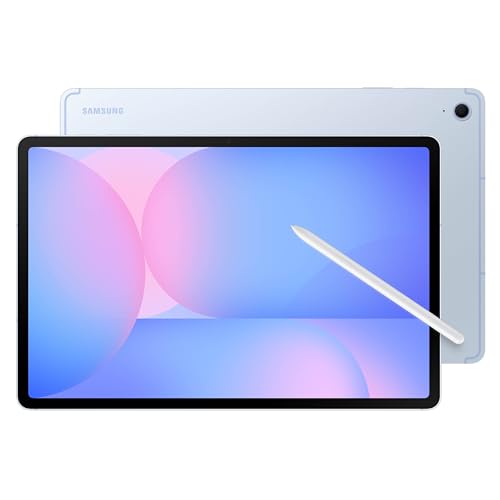
The Galaxy Tab S10 FE+ answers a different question from the BOOX trio. Instead of asking how closely a screen can imitate paper, it asks how much of a musician’s whole working life one device can carry. The 13.1-inch display, listed at a 90 Hz refresh rate, shows scores with the instant page turns and fluid scrolling that LCD technology does best, and the included S Pen turns annotation into the fastest, most precise marking experience in this guide. When rehearsal ends, the same tablet handles email from the ensemble manager, video lessons, streaming and the ordinary internet without a gear change.
Samsung lists this model with an Exynos 1580 processor, 128GB of storage in the cited configuration and an IP68 water-resistant body, a rating that earns respect anywhere drinks, rain at outdoor gigs or damp green rooms threaten electronics. The S Pen needs no charging ritual in the way musicians actually use it, so it is ready when a conductor changes a cut thirty seconds before the downbeat. Score apps from the Android ecosystem run at full speed, colour arrives exactly as the publisher encoded it, and split-screen views let a player keep the part open beside a metronome, tuner or the evening’s running order.
The costs are the familiar LCD ones. Battery life is counted in hours of screen time, so a festival day of rehearsals and a concert needs a charging plan the e-paper picks never demand. Glossy glass under hard stage light can throw reflections a matte e-paper page would shrug off, and brightness wars with battery the longer the call runs. None of this disqualifies the Samsung; it simply defines its player. If the tablet must also be your teaching screen, your admin hub and your travel entertainment, this is the pick that refuses to make you carry two devices. Musicians weighing pen-first tablets generally should also read our roundup of best 10 12 inch tablets with stylus for smaller pen machines.
- Screen: 13.1-inch LCD, 90 Hz refresh as listed
- Processor: Exynos 1580 as listed
- Storage: 128GB in the listed configuration
- Body: IP68 water-resistant rating as listed
- Pen: S Pen included for annotation
- Platform: full Android with the complete app store
Strengths
- Instant page turns and fluid scrolling suit fast-moving rehearsals
- S Pen annotation is the quickest marking tool in this guide
- One device covers scores, teaching, admin and entertainment
Trade-offs
- Battery measured in screen hours, so long calls need a charging plan
- Glossy panel can reflect hard stage lighting
- Heavier daily software load can distract in a way e-paper never does
Best for: teachers, gigging players and music directors who want scores plus a complete Android tablet in one bag.
Not suited for: players who rehearse for days between charges or read under punishing stage glare.

15.6-inch Android Sheet Music Tablet — Largest page
Most sheet music tablets imitate a single page. This 15.6-inch Android machine, sold explicitly as a sheet music display for musicians, imitates the open folder. Its FHD IPS screen is wide enough to show a two-page spread at a readable size, which changes the rehearsal experience for pianists, accompanists and conductors more than any other feature in this guide. Page turns halve. Awkward mid-phrase turns engineered by publishers into single-page views disappear back into the natural spread layout the engraver intended. For oversize orchestral scores and big-band charts, the extra inches are not luxury; they are legibility.
The listed hardware supports the role: a Helio G99 octa-core processor, memory and storage listed at 12GB and 128GB, quad speakers for reference tracks and rehearsal playback, and a 12,000mAh battery that acknowledges how much power a screen this size consumes. Android 16, per the listing, runs the standard score-library apps, so the giant page is not trapped inside weak proprietary software. A 32MP rear camera is listed as well, useful for capturing a borrowed part or a whiteboard of rehearsal notes straight into the library.
Size cuts both ways, and honesty requires dwelling on it. A 15.6-inch slab needs a serious stand; the folding wire stand that survived years of paper service may flex or tip, and this tablet will dominate a shared orchestral desk in a way a 13-inch machine does not. It is a deliberate, semi-fixed piece of kit: superb on a piano, a conductor’s podium or a dedicated studio stand, cumbersome for a marching-adjacent gig or a crowded pit ledge. Buy it for the spread, house it properly, and it solves the one problem no smaller pick can touch.
- Screen: 15.6-inch FHD IPS, the largest in this guide
- Processor: Helio G99 octa-core as listed
- Memory and storage: 12GB and 128GB as listed
- Battery: 12,000mAh as listed
- Audio: quad speakers for rehearsal playback
- Platform: Android 16 with score-library app access
Strengths
- Two-page spreads display at readable size, halving page turns
- Oversize scores stay legible without cropping or zooming
- Large battery is honestly matched to the large screen
Trade-offs
- Demands a heavy-duty stand that many players do not own yet
- Too wide for cramped pit ledges and shared orchestral desks
- LCD power draw still trails the e-paper picks for endurance
Best for: pianists, accompanists and conductors who live in two-page spreads and oversized scores.
Not suited for: players on tight shared desks or anyone whose stand is a lightweight folder frame.

reMarkable Paper Pro — Focused notebook
The Paper Pro comes from a company that builds notebooks first and tablets reluctantly, and musicians who annotate heavily can feel that priority in every session. Its 11.8-inch colour e-ink display is the smallest in this guide, which rules it out for dense orchestral parts at distance, but for lead sheets, choral scores, lesson material and songwriting drafts it offers something the others chase: writing that feels like a good pen on slightly toothy paper. The listing pairs the screen with a reading light, so evening practice rooms and dim corners stay usable, and the Marker Plus pen completes a setup aimed squarely at people who think with a pencil.
Colour here serves annotation more than publication. Published colour scores render softly, as colour e-ink always does, but your own coloured markings, highlights and layered lesson notes stand out clearly against the page. The reMarkable system keeps files in its own calm organisational world, which players either love for its freedom from app clutter or resist because their library already lives inside a dedicated score app on another platform. That divide is real, and it should decide this pick more than screen specifications do.
Endurance follows the e-ink pattern of days rather than hours, and the slim body slips into a gig bag beside a folder without announcing itself. Where the Paper Pro concedes ground is ecosystem breadth: no full Android app store waits behind the score, so metronomes, tuners and library apps must live on your phone instead. For the singer-songwriter marking charts at a desk, the teacher annotating lesson copies, or the choral singer whose part is one line among four, that focus is the appeal. Orchestral players reading dense full pages should stay with the thirteen-inch class above. Readers curious about the wider e-ink category can compare our guide to best e ink tablets after this one.
- Screen: 11.8-inch colour e-ink with reading light
- Pen: Marker Plus included in the listed bundle
- Focus: handwriting-first digital notebook system
- Colour role: strongest for your own markings and highlights
- Battery character: days of use between charges
- Body: slim, bag-friendly beside a paper folder
Strengths
- Pen-on-page feel is the most paper-like in this guide
- Reading light keeps dim practice spaces workable
- Distraction-free system keeps rehearsal attention on the score
Trade-offs
- Smallest screen here, so dense full-page parts crowd quickly
- No broad app store for score-library or utility apps
- Colour rendering of published scores is soft rather than vivid
Best for: annotators, teachers, choral singers and songwriters who write on music as much as they read it.
Not suited for: orchestral players who need a full dense page at stand distance.
Which Screen Suits Your Stand, Page by Page?
| Pick | Display | Lighting | Deciding trait |
|---|---|---|---|
| BOOX Tab X 13.3 | 13.3-inch e-paper, monochrome | Frontlight built in | Full pages with light insurance for changing venues |
| BOOX Note Max 13.3 | 13.3-inch e-paper, 300 PPI | None, per its listing title | Finest print detail when room light is guaranteed |
| BOOX Tab XC 13.3 Color | 13.3-inch colour e-paper | Frontlight built in | Coloured markings survive the move from paper |
| Samsung Galaxy Tab S10 FE+ 13.1 | 13.1-inch LCD, 90 Hz | Self-lit panel | S Pen speed plus a complete Android tablet |
| 15.6-inch Android Sheet Music Tablet | 15.6-inch FHD IPS | Self-lit panel | Two-page spreads at readable size |
| reMarkable Paper Pro | 11.8-inch colour e-ink | Reading light built in | Handwriting feel for heavy annotators |
Read the table by venue rather than by brand. A player whose work happens in one well-lit studio can exploit the Note Max’s sharper page without ever missing a frontlight. A player whose diary mixes halls, churches and outdoor evenings needs light built into the device, which pushes the decision toward the Tab X, the Tab XC or either self-lit LCD. Conductors and pianists should let layout decide: the spread view on the 15.6-inch Android removes a whole category of page-turn planning that single-page machines merely make faster.
How Do You Set Up a Tablet Library That Survives a Season?
Start with file discipline, because a tablet library fails by chaos long before it fails by storage. Name every part the same way: composer, work, movement, instrument. Keep one folder per ensemble and one per concert cycle, and let your score app mirror that structure instead of inventing a second one. The week a guest conductor adds a piece, you will add it once, in the right place, and find it in the dark between pieces while the audience is still applauding the previous work. Players who also read long-form material on the same device may find our guide to best large screen tablets for reading useful for library organisation ideas that transfer well.
Page turns deserve a rehearsal of their own. Decide per piece whether turns happen by tap, by swipe or by pedal, and practise the awkward ones at tempo before the dress rehearsal. A Bluetooth page-turn pedal belongs under the foot you do not use for expression pedals or tapping time, and it should be paired, charged and tested during setup, not discovered dead during a quiet movement. Mark pedal turns in the score where a hand turn would land mid-phrase; publishers placed page turns for paper, and the freedom to move them is one of the tablet’s quiet superpowers.
What Should You Check Before the First Downbeat?
Run a pre-concert routine until it is boring. Charge the tablet the night before, then top it during the day if it is an LCD model. Download or sync every part locally, because venue Wi-Fi is a rumour, not a service. Set brightness and frontlight for the actual hall during the sound check, disable notifications and automatic updates, and engage the screen lock settings that keep the page awake for the longest work on the programme. Carry the humble backups: a charger in the bag, and for genuinely critical engagements, a printed copy of your own part folded inside the case. Technology earns trust by surviving the night it fails.
Stand craft matters as much as software. Weigh your tablet, then check the stand’s rating and the ledge depth; a tablet that slides during a page tap will eventually slide during a performance. Foam pads or a lipped case stop the slow creep, and a slight backward tilt keeps reflections from ceiling lights out of your eyes. If you share a desk, agree whose machine carries the shared part and set both screens to the same brightness philosophy so one glowing panel does not wreck the other’s night vision in a dark pit.
Which Screen Size Fits Which Instrument?
Instrument by instrument, the geometry of reading differs more than newcomers expect. A violinist reads a single staff, often from a part with generous margins, and can thrive on the 11.8-inch Paper Pro at a pinch, though the thirteen-inch class still feels calmer. A cellist reads the same single staff from farther away, because the instrument itself pushes the stand back; distance, not staff count, is what pushes cellists toward the largest screens they can mount safely. Bassists share that distance problem and add low-light stages in jazz settings, which argues for frontlit panels over raw size.
Pianists live in a different geometry entirely. The grand staff doubles the vertical information, the music desk sits at a fixed distance, and the score competes with the keyboard for the player’s visual attention. This is why the two-page spread on the 15.6-inch Android matters so much at the piano: the eye travels horizontally across a layout that matches printed editions, and the hands never leave the keys for a turn that the publisher placed at a system break. Solo pianists who read from single-page layouts in lessons can use the thirteen-inch machines happily, but accompanists turning other people’s pages all evening should treat spread view as the headline feature.
Singers hold music differently again. A choral singer’s part is usually one line inside a full score, so the question is whether the whole page stays legible at arm’s length while standing in a riser row. Thirteen inches answers yes; smaller screens answer with zooming that nobody can manage while watching a conductor. Solo singers working from lead sheets and chord charts have lighter demands and can prioritise weight, since the music may be held rather than mounted. Wind players sit between: one staff, moderate distance, and a stand shared with a partner whose screen choice becomes a negotiation about brightness in dark halls.
Conductors should think in spreads and in margins. A full score page is the densest object in this entire guide, and even at 13.3 inches it asks good eyes and good light. The 15.6-inch machine earns its podium space here, and the colour of the Tab XC earns consideration because rehearsal marks accumulate in layers across a preparation period. Whatever the instrument, run the same test before committing: load your single most demanding page, the one with the smallest print and the most ink, place the tablet where the stand will be, and read it at performance distance in performance light. Screens that pass that page will pass the season.
How Does Annotation Change the Way a Section Rehearses?
Paper annotation had a hidden cost: it was trapped on one copy. A principal’s bowing decisions lived in the principal’s folder, and sharing them meant photocopiers and lost rehearsal minutes. A tablet library turns markings into a file. The section leader annotates once, exports the marked part, and every desk in the section reads identical bowings from the first rehearsal. Teachers feel the same shift in lessons: fingerings written during a session travel home inside the student’s own copy instead of being copied by hand at the door.
The pen tools in this guide differ in feel more than in function. The Samsung’s S Pen on glass is fast and slick, suiting quick conducting gestures and rapid lesson notes. The BOOX and reMarkable pens drag slightly, like a pencil with a soft lead, suiting careful handwriting that must stay legible at small sizes in crowded margins. Neither feel is superior in the abstract; match the pen to the writing you actually do. A player who only ever adds a breath mark and a circled dynamic needs less pen than a teacher whose margins fill every week.
Layers deserve a mention because they change how musicians think about permanence. Most serious score apps let markings sit in layers or in duplicated files, so a clean publisher’s page survives underneath your rehearsal decisions. Keep one pristine copy of every part, annotate a working copy, and archive the working copy at the end of each concert cycle. That habit preserves the option to rethink a bowing next season without archaeological digging through erased pencil ghosts, and it makes the end-of-season backup described later genuinely useful rather than a snapshot of chaos.
What Power Habits Keep a Tablet Alive Through a Festival Day?
A festival day is the stress test: a morning rehearsal, an afternoon masterclass, an evening concert, and no single long break near a socket. E-paper picks treat this schedule as a light snack, because their screens draw serious power only when the page changes. LCD picks can absolutely survive the same day, but they ask for intention. Drop brightness to the lowest comfortable level for the hall, close the streaming and mail apps that wake the screen, and take the thirty-minute top-up during the lunch break rather than gambling on the evening.
Cold and heat both tax batteries, and musicians meet both: unheated churches in winter, outdoor stages in summer. Keep the tablet in the gig bag rather than on a freezing stand during a long setup, and never leave any of these machines on a car dashboard between calls. A battery that ages gracefully is mostly a battery that avoided extremes and avoided sitting empty for months between seasons. During a genuine off-season, store the tablet partially charged and wake it monthly; the library will thank you in September.
Carry charging as part of the instrument kit, not as an afterthought. One cable and one compact wall adapter live permanently in the bag, beside the rosin, reeds or valve oil that your instrument already demands. If your stand setup includes a pedal, its batteries or charge belong on the same checklist line as the tablet’s. The goal is a routine so dull that nobody in the section can remember the last time power was discussed, because dull routines are the ones that survive contact with a real concert week.
Which File Habits Keep a Score Library Findable?
Most score libraries are PDFs, and the quality of the scan matters as much as the screen that shows it. A crisp publisher PDF renders beautifully on every pick here; a crooked phone photograph of a page, grey and keystone-distorted, will look tired on all of them. When you must scan paper, use a proper scanning app that flattens and cleans the page, and check the result at full size before the original goes back in the folder. Ten honest minutes at scanning time saves a season of squinting.
Metadata is the unglamorous hero. Title every file with composer and work before anything else, because alphabetical order is the only filing clerk who never sleeps. Inside the score app, build set lists per concert rather than relying on search alone; search finds pieces, but a set list preserves order, and order is what a dark stage between pieces actually demands. Duplicate the library to a cloud folder or a home drive on a schedule, weekly in season, and treat the tablet as a reader of the library rather than its only home.
Finally, respect editions. Different editions of the same work paginate differently, and a tablet makes it fatally easy for a section to rehearse from three editions at once because each player downloaded a different file. The fix is social, not technical: one named source file per work, distributed by one person, with the edition stated in the file name. Tablets remove paper’s friction; they also remove paper’s accidental consistency, and a library habit has to replace it deliberately.
What Does a Rehearsal Week Actually Feel Like on Each Display Family?
Monday is a studio day. The e-paper machines feel invisible in the best sense: the page sits there like paper, the pen whispers, and nobody thinks about the device between the first scale and the last run-through. The Samsung earns its keep in lessons, where a teacher can pull up a recording, a fingering chart and the score in rotation without changing tools. The big Android on a piano turns a coaching session into a conversation about music instead of page management, because the spread never breaks the phrase being discussed.
Wednesday is the orchestral rehearsal in a hall with ambitious lighting design. Frontlights stop being a specification and become the difference between reading and guessing. The Note Max, peerless on Monday, now depends on the hall’s mercy, while the Tab X simply holds its page steady. The Samsung’s glass catches a follow spot once or twice an hour, a brief flare that a matte screen would never produce, and its owner learns the small head tilt that dodges it. These are not flaws in a lab sense; they are the lived texture of matching a screen to a room, repeated until the match becomes instinct.
Saturday is the concert. What matters now is everything decided earlier: the set list in order, the pedal tested at sound check, the brightness set for the hall rather than the dressing room, the backup print of one personal part folded in a case. Players who made those decisions in the calm of the week discover that the tablet has become the least interesting object on stage, which is the highest praise performance equipment can earn. The folder era demanded attention at every turn; a well-matched screen asks for none, and gives the attention back to the conductor.
What Should You Decide Before Spending Anything?
Write down three answers before opening a single product page. First, your light: name the dimmest room you play in regularly, and let that room veto any screen without its own light. Second, your layout: decide whether your musical life is single pages, spreads or full scores, and let that set the size floor. Third, your pen: be honest about whether you annotate weekly or almost never, because heavy annotators should pay for pen feel while pure readers should pay for page quality instead.
Then price the whole system, not the tablet. A rated stand, a case that survives the gig bag, a pedal if your repertoire’s turns demand one, and the score app subscription if your chosen library software has one: together these turn a screen into an instrument station. Buying the tablet alone and improvising the rest is how good screens end up sliding off wire stands. The picks in this guide span a wide range of roles, but every one of them assumes that supporting cast, and the players who budget for it are the ones still paperless three seasons later.
How Do You Handle the Pieces That Only Exist on Paper?
Every working library has a paper residue: the borrowed part that must go back unmarked, the out-of-print edition a teacher guards, the new commission that arrives as a printed stack. A tablet workflow absorbs these instead of pretending they do not exist. Scan the borrowed part before the first rehearsal, annotate the scan freely, and return the original pristine. For the guarded edition, ask permission once, scan carefully, and let the tablet carry the rehearsal wear that paper would have absorbed as torn corners and coffee rings.
Rental parts deserve special care because the rental library’s markings are part of the deal and yours are not. Work from a scan, keep your annotations in your own file, and let the printed rental set travel back untouched. Choirs face the same pattern with licensed octavos: the licensed copies stay clean in the folder while the singing happens from screens where the law and the licence allow it, and directors should confirm their licence terms rather than assuming. The tablet is a reading surface, not a licence, and treating it that way keeps ensembles out of trouble.
Over a season, the paper residue shrinks on its own. Each scanned part joins the library permanently, each new purchase arrives as a file, and the folder that once held everything becomes a slim archive of originals. Players who resist the switch often imagine an overnight conversion; the ones who succeed describe a tide going out, a few parts per concert cycle, until one day the stand holds only a screen and nobody can name the exact rehearsal when paper stopped being the default.
What Mistakes Do Musicians Make When They Switch to a Tablet?
The classic error is buying by diagonal alone and discovering that a widescreen ten-inch tablet shows less music than the paper it replaced. Page shape matters as much as page size, which is why this guide starts above eleven inches and prefers taller panels. The second error is ignoring light: choosing a frontlight-free screen for pit work, or a glossy LCD for an outdoor summer series, then blaming the category instead of the match. The third is treating accessories as an afterthought. A pedal, a rated stand and a protective case are part of the instrument setup, and budgeting for the tablet alone leaves the system unfinished.
A subtler mistake is neglecting the archive. Scores accumulate annotations that represent hours of rehearsal decisions, and a tablet lost without a backup takes a season of bowings with it. Sync the library to a second location, export annotated parts after each concert cycle, and keep the original clean files separate from marked copies. Finally, players sometimes load the tablet with their entire digital life and then fight notifications, messages and app clutter during performances. The calmest setups keep the music machine boring: one library, one purpose, nothing buzzing. A companion piece on tablets for writing and typing covers the annotation-first workflow from the writing side.
Final Recommendation
For most players making the switch, the BOOX Tab X is the safest first step: a full page at near print size, a frontlight for the venues you cannot control, and battery life that removes charging from the rehearsal conversation. Score scholars in guaranteed light can trade that insurance for the Note Max’s finer page, while teachers and conductors whose markings carry colour should step to the Tab XC. The Samsung S10 FE+ serves the musician who needs the tablet to run the whole working week, the 15.6-inch Android serves pianists and conductors who think in spreads, and the Paper Pro serves writers-on-music whose pencil never rests. Match the screen to your light, your layout and your pen, in that order. When the folder finally stays home and the whole season rides in one slim case, the stand feels lighter, the turns come easier, and the music gets the attention the paper used to steal.
One last practical habit separates satisfied owners from frustrated ones: rehearse the technology before you rehearse the music. Spend one unhurried hour at home loading the library, setting the set list order, pairing the pedal, and turning pages at tempo through the hardest work on the next programme. Every surprise found in that hour is a surprise that will not ambush a dress rehearsal. Musicians practise transitions between movements without thinking about it; the page turn is simply the newest transition, and it deserves the same unglamorous repetitions until it disappears from conscious thought entirely.
Budget a few minutes after each concert to close the loop while the performance is fresh. Export the annotated parts into the season archive, note which page turns misbehaved and why, and fix the set list order or the pedal placement before the memory fades. That small ritual converts one concert’s improvisations into the next concert’s preparation, and over a season it quietly builds the most valuable document a section owns: a record of how the music was actually performed, markings and all, ready for whoever sits in the chair next year, and it costs nothing but the walk back to the dressing room after the applause ends and the hall empties.
Frequently Asked Questions
Can a tablet really replace a full paper folder for orchestral work?
Yes, provided the screen is large enough to show a complete page at reading distance and the library is organised before the season starts. The thirteen-inch class in this guide exists precisely because smaller tablets force cropping that paper never demanded.
Do I need a page-turn pedal to use one of these tablets?
No pedal is required, since every pick turns pages by touch. A pedal helps when both hands stay on the instrument through a passage where the paper edition placed a turn, which is why pedals appear in the setup section as accessories rather than picks.
Why is there no iPad among the linked picks?
Current iPad Pro 12.9 listings on Amazon are renewed-only, and this guide links only to listings verified cleanly at the time of writing. The iPad remains a capable reference point in discussion, but it is not sold to you here.
Is e-paper or LCD better for reading music outdoors?
E-paper generally handles bright daylight with less glare and far less battery drain, while LCD fights sunlight with brightness that shortens battery life. For outdoor series work, the frontlit e-paper picks are the calmer choice.
How much storage does a score library actually need?
PDF scores are small; even a large personal library of parts, method books and annotated copies fits comfortably in the 128GB configurations listed here. Storage anxiety belongs to video libraries, not music ones.
What happens if the battery dies during a concert?
Prevention is the routine described above: charge the night before, sync locally, and carry a printed backup of your own part for critical engagements. E-paper picks stretch days between charges, which is their quiet insurance policy.
Related Guides
Players building a wider music workstation can continue with our thoughts on best rugged android tablets for instruments that travel hard, and on best reading tablets for adults for the long-form reading that surrounds a musician’s score study.
One ear open is also the rehearsal-room rule, and our guide to the best call center mono wired headsets explains the desk version of it.
Musicians who print their set lists sometimes print their photographs too, and our guide to the best cost effective instant cameras prices that habit honestly per shot.
Related guides
- Best Sony Full Frame Cameras for Astrophotography: Sensitivity vs Resolution
- Best Affordable Android Tablets: Five True Android Slates and One Fire OS Specialist, Clearly Labelled
- Best 400 FPS High Speed Cameras: The Honest Truth About Burst Slow Motion
- Best Kids Smartwatches for Texting and Calling: Six Watch-Phones Under Parent Control


