What's inside
- Where Should You Buy a Colour Barcode Printer, and Why Is the Shelf So Confusing?
- Key Takeaways
- Quick Picks
- How Did We Choose These Picks?
- What Makes a Barcode Scannable When the Label Around It Is in Colour?
- Should Your Label Ink Be Pigment or Dye?
- Which of These Six Machines Matches Your Label Volume and Environment?
- Which Label Stock Should You Pair With an Inkjet Colour Printer?
- How Does Colour-Coding Change Warehouse and Retail Practice?
- What Does Owning an Inkjet Label Printer Ask of You Week to Week?
- How Do Roll Inkjet, Standalone and Craft Machines Stack Up for Colour Labels?
- How Do You Set Up a Colour Label Workflow That Scans First Time?
- How Do You Design a First Label That Survives Contact With Customers?
- What Mistakes Make Colour Labels Fail in the Real World?
- What Must a Compliant Product Label Carry Besides the Barcode?
- Do QR Codes and Other 2D Symbols Change the Rules?
- When Should You Keep Outsourcing Labels Instead?
- Final Recommendation
- Frequently Asked Questions
- Related Guides
As an Amazon Associate I earn from qualifying purchases. This post may contain affiliate links at no extra cost to you.
gizmoverdict.com is reader-supported. When you buy through links on our site, we may earn an affiliate commission.
Where Should You Buy a Colour Barcode Printer, and Why Is the Shelf So Confusing?
Buy the best color barcode printers from an industrial labelling supplier or a general retailer with a proper business-equipment section, and walk in expecting the shelf to mislead you, because most machines sold as label printers cannot print colour at all. The volume end of the label market is monochrome thermal: fast, cheap, superb at black barcodes on white stock, and entirely unable to print the red hazard band, the green organic flash or the brand-blue header that makes a colour label worth printing. A smaller, more specialised class of inkjet machines prints full colour on roll label stock and cuts each label free as it emerges — and it is that class, and only that class, that this guide ranks.
Why print barcodes in colour at all? Because on a real product label the barcode rarely travels alone. It sits inside a design that carries branding, flavour or scent variants, allergen panels, batch colour-coding and regulatory marks, and printing the whole label in one pass replaces the old two-step routine of buying pre-printed colour labels and overprinting the variable data in black. Colour also does operational work: a warehouse that colour-codes labels by day, route or product family catches picking errors at a glance in a way no barcode scan can, because the human eye sees the wrong colour before the scanner ever questions the code. The barcode itself, though, must still scan perfectly — colour is the frame, never an excuse for a code that a tired scanner at a dim loading dock cannot read.
That is why this guide holds two ideas at once. The picks are colour label printers judged on the quality of the whole label, and the buying guide keeps returning to the barcode discipline underneath: contrast, quiet zones, bar width accuracy and ink that survives the product’s real life, whether that is a chilled drinks fridge, a cosmetics shelf or a chemical drum stored outdoors. Two of the six entries are discussed in prose without links, because no clean printer listing for them could be verified — only refill kits, label stock and ink cartridges surfaced — and inventing a link would send you to the wrong product entirely. Shops whose colour needs are really about labels with finished shapes as well as codes should also read the best die cut label printers guide, where cutting takes centre stage.
Key Takeaways
- Colour barcode printing is a thin industrial class: the Epson ColorWorks CW-4000 anchors it, the Primera LX500 and QL-E100 serve smaller colour-label runs, and the Liene PixCut covers the craft sticker tier.
- Never let colour anywhere near the barcode’s contrast: bars must stay dark and dense on a light, matte background, with a clear quiet zone on both sides, or scanners will fail the label no matter how pretty it looks.
- Pigment ink is the water-and-chemical-resistance choice; dye ink gives vivid retail colour but asks more care around moisture — choose by the product’s real environment, not by the sample label.
- The Afinia L502 and QuickLabel QL-120Xe are genuine colour label machines discussed in prose because no clean printer listing was verified for either; their ink and accessories are easy to find, the printers themselves less so.
- A monochrome thermal printer is the right tool for pure shipping barcodes — colour earns its cost only when the label carries branding, variants or colour-coding too.
Quick Picks
| Machine | Badge | What it does best |
|---|---|---|
| Epson ColorWorks CW-4000 | Industrial Colour Anchor | A matte inkjet colour label printer with an auto cutter, built for product labels that must scan at the till and survive the shelf. |
| Primera LX500 Color Label Printer | Compact Retail Label Press | High-resolution colour label printing with a built-in cutter, sized for short runs of jars, bottles and boxes on a back-room desk. |
| QL-E100 Full Color Label Printer | Touchscreen Standalone | Prints from stored memory, a USB stick or a Windows PC, with a touchscreen and auto-cutter for label work away from a desk computer. |
| Liene PixCut S1 Inspire Kit | Craft-Tier Sticker Rung | A dye-sublimation sticker printer and cutter in one small kit, for decorative labels and short sticker runs rather than warehouse duty. |
| Afinia L502 Color Label Printer | Pigment Prose Pick | The pigment-ink durability route for labels that face water and abrasion, discussed in prose because no clean listing was verified. |
| QuickLabel QL-120Xe | Production Prose Pick | A production colour label name whose cartridges surface readily while the printer itself resists clean listing — covered honestly in prose. |
How Did We Choose These Picks?
The first test was the category’s defining one: does the machine print colour, itself, on the label? That sounds obvious until you see how the search results behave — monochrome thermal machines wearing colourful product photography, colour printers that cannot take roll label stock, and ink cartridges and refill kits impersonating the printers they serve. Each linked pick below is a verified printer listing whose title states the colour capability plainly. The two prose picks passed the same identity test as machines but failed the listing test: for the Afinia L502, refill kits and label stock were what surfaced; for the QuickLabel QL-120Xe, its ink cartridges. Rather than drop two relevant machines or, worse, link you to a box of cartridges dressed as a printer, the guide discusses them in prose and says exactly why.
The second test was barcode fitness. A colour label printer earns a place here only if its output can carry a scannable code as part of the label: sufficient resolution to keep bar edges clean, a cutter or tear-off arrangement that does not chew the quiet zone, and a stock-and-ink path that produces dense, dark bars. The third test was role coverage across real buying situations — the industrial anchor, the compact short-run press, the standalone touchscreen machine, the craft tier, and the two prose machines that represent the pigment-durability and production directions a serious buyer should at least consider before spending. Pure shipping-label thermal machines were deliberately excluded even when excellent, because they answer a different question; that question has its own guide in the best shipping label printers roundup.
What Makes a Barcode Scannable When the Label Around It Is in Colour?
A scanner reads contrast and geometry, not beauty. The bars must be substantially darker than the spaces between them across the scanner’s light, the narrowest bar must be reproduced at a consistent width, and the quiet zones — the blank margins at both ends of the code — must stay empty and light. Colour threatens each requirement in a specific way. A coloured background tint under the code lowers contrast. A glossy stock reflects the scanner’s light back as glare. A design element drifting into the quiet zone confuses the code’s start and end. And bars printed in a colour the scanner’s light cannot see as dark — many scanners illuminate in red, under which red bars effectively vanish — produce the eerie failure of a label that looks perfect to you and blank to the machine.
The working rules are simple to state and worth taping above the printer. Keep the barcode itself black on white or on the lightest panel of the design. Reserve the required quiet zone as sacred blank space in the artwork template, locked so no designer nudges a logo into it. Proof every new label design with the worst scanner the label will meet — the old handheld at the market stall, not the new one on your desk — and proof it under the lighting of the real environment. Print resolution matters here in a practical way: the LX500’s high stated resolution exists precisely to keep narrow bars crisp at small label sizes, while a lower-resolution device asked to print a dense code on a tiny label will round bar edges until widths drift. None of this requires colour to be timid. It requires colour to know its place, which is everywhere on the label except inside the code’s working area.
Should Your Label Ink Be Pigment or Dye?
The ink decision decides where your labels may live. Dye-based colour soaks into the label stock’s coating and produces the vivid, saturated look retail brands love; its weakness is water, which can re-wet and smudge dye, and prolonged strong light, which fades it sooner. Pigment-based colour sits its particles on the surface and shrugs off water, abrasion and chemicals far better, which is why pigment machines dominate labelling for drinks, cosmetics, cleaning products and anything stored cold, wet or outdoors. The Epson ColorWorks line built its reputation on that durability logic, and the Afinia L502’s prose section below exists because it is the pigment alternative buyers cross-shop against it.
Match the ink to the product’s worst day, not its best. A jam label’s worst day is a dry pantry shelf, and dye serves it beautifully at lower fuss. A bottled sauce’s worst day is a condensation-covered fridge door and a customer’s wet hands. A workshop chemical label’s worst day involves splashes of the very liquid it names. Also weigh stock pairing: inkjet label rolls are coated to receive a specific ink behaviour, and the rich results in every manufacturer’s sample book come from their tested stock-and-ink combinations. Wander off that pairing and you become your own testing laboratory — sometimes worth it for cost, never free. Readers who enjoy the underlying chemistry will find the same dye-versus-pigment tension, in photographic dress, in the best dye based inkjet printers guide.
Which of These Six Machines Matches Your Label Volume and Environment?

Epson ColorWorks CW-4000 — Industrial Colour Anchor
The CW-4000 is where this category stops being a craft and becomes infrastructure. Its listing states the essentials without decoration: a matte inkjet colour label printer with an auto cutter. Matte matters — matte label output avoids the glare that troubles scanners and looks at home on food, beverage and cosmetics packaging. The auto cutter matters just as much in production, because a label run that emerges cut to length, label after label, feeds straight into application, while a run that must be separated by hand steals labour at exactly the moment a small producer can least spare it. Epson’s ColorWorks line exists for businesses whose labels face retail tills, cold storage and customer handling, and the CW-4000 is the compact expression of that line.
Choose it when labels are a daily production input rather than an occasional project: a drinks brand labelling every batch, a cosmetics maker running several scents from one artwork family, a food producer whose variant colour-coding changes weekly. Its inkjet-on-roll-stock design prints the full label — brand, variant band, allergen panel and barcode — in a single pass at the moment of need, which quietly abolishes the storeroom shelf of pre-printed label variants that expire whenever a recipe, a regulation or a logo changes. The trade it asks is commitment: this is a business machine with business consumables, and a hobbyist printing twenty labels a month will never use enough of it to justify its place on the bench.
- Print method stated: Matte inkjet colour label printing
- Finishing: Auto cutter built in
- Stock form: Roll label stock for production runs
- Role in this guide: The industrial anchor pick
Strengths
- Full-label single-pass printing ends dependence on pre-printed label inventory.
- Matte output keeps scanners and retail lighting on your side.
- Auto cutting keeps pace with application instead of creating a separating chore.
Trade-offs
- Production intent is wasted on occasional, tiny label jobs.
- Inkjet stock and ink are an ongoing business consumable commitment.
- Overkill for decorative sticker work, which the craft tier below handles better.
Best for: producers labelling daily, whose labels must scan at retail and survive real product life. Not suited for: hobbyists, sticker artists, or anyone whose labelling is a monthly handful.
Primera LX500 Color Label Printer — Compact Retail Label Press
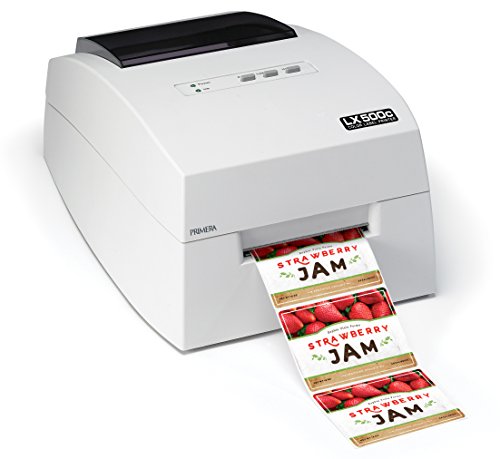
Primera built its name on exactly the buyer the CW-4000 overshoots: the small producer whose labels must look retail-grade but whose runs are counted in hundreds, not thousands. The LX500’s listing leads with its 4800 DPI resolution and its built-in cutter, and both claims aim at the same virtue — labels that look professionally printed at small sizes. High resolution keeps small text legible and narrow barcode bars honest on the compact labels that jars, lip balms, candles and sample bottles wear. The built-in cutter finishes each label or run cleanly, so a back-room desk can go from artwork file to labelled shelf without a guillotine session.
The LX500 suits the producer who prints in step with production: a morning’s bottling run gets its labels that same morning, in exactly the count the batch needs, with the batch code and date printed as part of the design rather than stamped on afterwards. That rhythm — print what today’s batch needs, nothing warehoused — is where desktop colour label printing beats both pre-printed stock and the print shop’s minimum order. Its ceiling is throughput and label width ambition; a business that grows into daily thousands should expect to graduate toward the anchor class above. But as the machine that carries a brand from market stall to first retail accounts, the LX500’s combination of resolution, cutter and desk footprint is precisely aimed.
- Resolution stated in listing: 4800 DPI
- Finishing: Built-in cutter
- Stock form: Roll label stock, desktop scale
- Role in this guide: Short-run retail label press
Strengths
- High stated resolution keeps small labels’ text and barcodes crisp.
- Built-in cutter delivers finished labels straight from the run.
- Desktop size fits the back-room reality of small producers.
Trade-offs
- Throughput ambition tops out below the industrial anchor class.
- Short-run economics depend on using matched label stock.
- Not the durability-first choice for wet or chemical environments.
Best for: small food, drink and cosmetics producers printing retail-grade labels in step with batches. Not suited for: high-volume plants, or labels destined for harsh wet and chemical duty.
QL-E100 Full Color Label Printer — Touchscreen Standalone
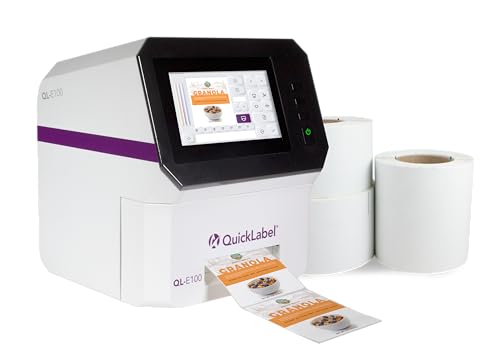
The QL-E100’s interesting idea is independence from the desk computer. Its listing describes a full-colour label printer with a built-in touchscreen and auto-cutter that prints professional-quality labels on inkjet label rolls from stored memory, from a USB stick, or from a Windows computer, with free design software in the package. Each of those three sources suits a different workplace moment. Stored memory serves the repetitive label — the bakery’s standard loaf label, recalled and printed by whoever opens the shop. The USB stick serves the supervisor who designs centrally and distributes artwork files to a packing bench. The Windows connection serves the design session itself.
That flexibility earns the QL-E100 its place in workplaces where the label printer lives at the point of packing rather than the point of design: market stalls, warehouse benches, food-prep areas where a dedicated PC is impractical or unwelcome. The touchscreen is the interface that makes standalone operation real rather than theoretical, because selecting a stored design and setting a count must be doable by gloves-adjacent, time-pressed staff. Keep the honesty note, though: standalone convenience does not change inkjet label economics or barcode discipline, and the quiet-zone and contrast rules from the guide above apply to its output exactly as they do to the anchor machines. Judge it as a workflow pick — the right machine where labels are printed by many hands in a place without a desk.
- Interface stated: Built-in touchscreen
- Print sources: Stored memory, USB stick, or Windows computer
- Finishing: Auto-cutter
- Software: Free design software included per listing
Strengths
- Stored-memory printing frees routine labels from any computer.
- Touchscreen operation suits packing-bench staff and shared workplaces.
- Three input routes cover design, distribution and repeat printing cleanly.
Trade-offs
- Standalone convenience does not lower inkjet consumable costs.
- Design work still belongs on a computer for complex artwork.
- Less established support trail than the Epson or Primera names.
Best for: bakeries, stalls and packing benches that print routine colour labels without a desk PC. Not suited for: design-led studios needing deep colour management, or industrial daily volume.

Liene PixCut S1 Inspire Kit — Craft-Tier Sticker Rung
Label this pick clearly before praising it, because it plays a different sport from the three machines above. The PixCut S1 Inspire Kit is an all-in-one colour sticker printer and cutting machine built around a thermal dye-sublimation photo printer at 300 DPI, supplied with 180 sheets — 36 photo and 144 sticker paper. It prints and then cuts custom stickers and small labels in one small device, aimed at craft sellers, journalling and gift personalisation. Barcodes can appear on its output as design elements, and for a craft seller’s branded thank-you sticker carrying a scannable social or shop code, that is a legitimate small-scale use.
What it is not is a production barcode label printer. Sheet-fed dye-sublimation at photo-printer scale cannot match roll-fed inkjet economics, throughput or label-stock variety, and presenting it as a warehouse tool would mislead everyone. Its honest charm is integration: design on a phone, print, and watch the same machine cut the sticker free, with the kit’s included sheets removing every supply question for the first projects. Craft sellers whose labels are really decorative seals, logo stickers and short personalised runs will find it delightful; the moment a product needs five hundred durable, scannable retail labels, the conversation returns to the inkjet machines above. In this guide the PixCut is the craft-tier rung, labelled as such, and within that tier it is the most complete starter of its kind.
- Print method stated: Thermal dye-sublimation photo printer, 300 DPI
- Finishing: Integrated cutting — printer and cutter in one
- Kit contents stated: 180 sheets (36 photo + 144 sticker paper)
- Role in this guide: Craft sticker tier, not production labelling
Strengths
- Print-and-cut in one small machine suits craft workflows perfectly.
- Generous included sheet supply removes starter guesswork.
- Photo-grade colour flatters decorative and branded stickers.
Trade-offs
- Sheet feeding cannot compete with roll economics at volume.
- Not built for durable retail barcode duty or harsh environments.
- Sticker sizes are bounded by the sheet format.
Best for: craft sellers and hobbyists making decorative stickers and small personalised labels. Not suited for: retail product labelling at volume, or any compliance-driven barcode work.
Afinia L502 Color Label Printer — Pigment Prose Pick
The Afinia L502 earns a prose place in this guide because buyers researching durable colour labels will meet its name, and they deserve a straight account of it. The L502 is known in the colour label world as a pigment-ink machine — the durability route, aimed at labels that must survive water, oils, abrasion and the general hostility of real product life, from bottled goods to industrial containers. In cross-shopping terms it stands as the pigment alternative a buyer weighs when the anchor pick’s ecosystem does not fit, or when a label’s environment is harsh enough that ink chemistry becomes the first specification rather than an afterthought.
Why prose, then? Because at verification time no clean printer listing for the L502 could be confirmed — what surfaced were refill kits and label stock, the accessories of the machine rather than the machine. Linking those would have sent you to a checkout for supplies you cannot use without the printer, which is precisely the failure this guide exists to prevent. If the pigment route is your direction, source the L502 through Afinia’s dealer channels, confirm the exact configuration and ink supply with the seller, and treat the easy availability of its refills and stock as reassurance about owning one. The machine’s reputation in durable labelling is real; only its shelf presence failed the test, and the guide reports that distinction rather than papering over it.
- Print class: Pigment-ink colour label printer (class knowledge, discussed in prose)
- Listing status: No clean printer listing verified — refills and stock only
- Buying route: Manufacturer dealer channels
- Role in this guide: The pigment durability alternative
Strengths
- Pigment ink targets the wet, oily and abrasive label environments dye fears.
- Established name in durable colour labelling with ready consumable supply.
- Suits producers whose labels face fridges, workshops and outdoor storage.
Trade-offs
- No verified clean listing means dealer sourcing and configuration homework.
- Pigment running costs and stock pairing need planning.
- Over-specified for dry-shelf products that dye serves at less fuss.
Best for: producers whose labels live wet, cold or rough lives and who will source through dealers. Not suited for: buyers who need a one-click purchase today, or dry-goods labelling.
QuickLabel QL-120Xe — Production Prose Pick
QuickLabel is one of the long-standing names in in-house colour label production, and the QL-120Xe represents its production-minded direction: a colour label printer aimed at businesses printing their own product labels at meaningful scale, with the brand’s own ink cartridges forming the consumable backbone. In a complete market this machine would be cross-shopped directly against the anchor pick, and production buyers should know the name before committing, because QuickLabel’s heritage is precisely this category — printers for manufacturers who decided label printing belonged in-house.
It appears in prose for the same reason as the Afinia: at verification, only its ink cartridges surfaced as clean listings, not the printer itself. That pattern — consumables easy to buy, machine elusive — usually means the printer moves through dealer and distributor channels rather than open retail shelves, which carries a practical implication for buyers: the purchase conversation will include a human seller, configuration questions and probably a support arrangement, and that is not a defect. Production equipment bought with a dealer’s ear is often better matched to its workload than equipment clicked into a basket at midnight. What this guide will not do is dress a cartridge listing as a printer. If your volumes point toward production colour labelling, take the QL-120Xe name to QuickLabel’s channels alongside the CW-4000 comparison, and let both makers argue for your bench.
- Print class: Production colour label printer (class knowledge, discussed in prose)
- Listing status: No clean printer listing verified — ink cartridges only
- Buying route: Manufacturer and distributor channels
- Role in this guide: The production alternative to research alongside the anchor
Strengths
- Brand heritage is in-house label production specifically.
- Cartridge supply is readily visible, a good ownership sign.
- Dealer-channel purchase brings configuration advice with the machine.
Trade-offs
- No verified retail listing — buying takes a channel conversation.
- Production scale is wasted on short-run and craft labelling.
- Running-cost picture needs dealer figures, not shelf prices.
Best for: manufacturers evaluating production colour labelling through proper channels. Not suited for: small producers wanting a desktop machine delivered this week.
Which Label Stock Should You Pair With an Inkjet Colour Printer?
Label stock is a coated engineering material disguised as paper on a roll, and choosing it deserves the same care as choosing the printer. Inkjet label rolls carry a receiving layer tuned to grab dye or pigment and hold it at the surface, where ordinary uncoated label paper would let the ink wick along fibres and feather every bar edge. Finishes divide into matte, semi-gloss and gloss, and the choice is functional before it is aesthetic: matte finishes scan most forgivingly and suit the anchor pick’s matte positioning, gloss finishes make colours glow on dry retail shelves but can glare under scanner light and show fingerprints on dark designs, and semi-gloss splits the difference for general product work. Adhesive is the other half of the stock decision — permanent adhesive for product labels that must never lift, freezer-grade adhesive for anything applied to cold or frosted surfaces, and removable adhesive for reusable containers and pricing that must come away cleanly.
Qualify a new stock the way you would qualify a new supplier: with hostility. Print a full test sheet, scan every code on it, then abuse the labels the way your product’s life will — chill them, wet them, rub them with the product itself if it is oily or alcoholic, stick them to the actual container material rather than a notebook page, and leave a set in sunlight on a windowsill for a week. A stock that passes the printer but fails the fridge has failed. Record the winning combination of stock, finish, adhesive and driver media setting in the same notebook discipline the sublimation guide preaches, because the most common colour-label mystery — “the same file printed differently this month” — is almost always an unrecorded stock change underneath.
Also respect the roll itself. Core size, roll diameter and label gap must match what your machine’s feed and sensor expect; a bargain roll wound for another printer’s core can jam, skew or defeat the gap sensor that tells the machine where each label begins. Skew is a barcode problem as much as a feeding problem, since a label that travels crookedly prints its bars crookedly, and a scanner’s tolerance for rotated codes is generous but not infinite. Buy the first rolls of any new size from the printer maker’s listed range, learn what correct feeding looks and sounds like, and only then experiment with third-party stock from a position of knowledge.
How Does Colour-Coding Change Warehouse and Retail Practice?
The operational case for colour deserves its own section, because it is the reason many buyers should choose this category over a fleet of thermal machines. Colour-coding works on the human visual system faster than any text: a picker walking a shelf reads a blue band as “this route” or a red flash as “check the date” before conscious thought engages, and error rates fall because the wrong item looks wrong. Producers use variant colours to stop the classic packing mistake — the right product in the wrong flavour’s label — by making the label itself shout its identity across the bench. Retailers use colour to rotate stock honestly, with each delivery week’s labels tinted so old stock is visible at a glance rather than discovered by a customer.
Designing a colour code is a discipline of restraint. Assign each colour exactly one meaning across the whole business, write the key down where new staff can find it, and never let marketing borrow a code colour for decoration, because a code that sometimes means nothing soon means nothing always. Keep codes as bands, headers or flashes rather than full-label floods, partly for ink economy and partly because the barcode panel must stay light and neutral regardless. And test the code under your real lighting: warehouse sodium light and shop LED panels shift colours differently, and two code colours that separate cleanly in daylight can merge into twins under a yellow lamp. The printers in this guide can reproduce any code you design; whether the code survives your building’s light and your team’s habits is a management question the hardware cannot answer for you.
What Does Owning an Inkjet Label Printer Ask of You Week to Week?
Inkjet label printers are honest machines that repay small regular attentions. Printheads that sit idle dry at the nozzle, so a shop that labels in monthly bursts should run a small colour test print weekly — the same discipline recommended for sublimation machines — and should store the printer where dust from packing materials cannot settle into the roll path. Keep the stock path clean: label adhesive ooze and paper dust accumulate on rollers and sensors, and the symptoms arrive disguised as feeding faults and mysterious label-position drift. A soft, dry cloth and the maker’s cleaning routine, done monthly, prevent most of them.
Consumable planning is the other weekly habit. Ink cartridges for colour label machines are model-specific and not interchangeable across brands, so the time to discover your supplier’s delivery rhythm is before the run that empties the magenta, not during it. Track which colour your designs drink fastest — a label family heavy on green backgrounds will empty cyan and yellow long before magenta — and hold spares weighted accordingly. Keep at least one full spare roll of your qualified stock beside the printer, because a torn roll leader or a dropped, edge-damaged roll can halt a labelling day as surely as an empty cartridge. None of this is burdensome; it is the ordinary housekeeping of a small production tool, and shops that build the habits find these machines boring in the best possible way — they simply work, run after run, while the business thinks about products instead.
How Do Roll Inkjet, Standalone and Craft Machines Stack Up for Colour Labels?
| Pick | How it prints colour | How labels are finished | Honest workload |
|---|---|---|---|
| Epson ColorWorks CW-4000 | Matte inkjet on roll stock | Auto cutter, label after label | Daily production for retail-bound products |
| Primera LX500 | Inkjet at a stated 4800 DPI on roll stock | Built-in cutter | Short retail runs printed in step with batches |
| QL-E100 | Inkjet on label rolls, driven by touchscreen, memory, USB or PC | Auto-cutter | Routine labels printed at the packing bench by many hands |
| Liene PixCut S1 Inspire Kit | Thermal dye-sublimation at 300 DPI on sheets | Integrated cutter shapes each sticker | Decorative stickers and tiny personalised runs |
| Afinia L502 | Pigment inkjet colour labelling (prose pick) | Production label finishing via dealer configurations | Durable labels for wet and abrasive product lives |
| QuickLabel QL-120Xe | Production colour label printing (prose pick) | Production label finishing via dealer configurations | In-house manufacturing label volume |
The pattern in that table is a workflow ladder, not a quality ranking. Each rung removes a different friction: the craft machine removes the separate cutter, the standalone removes the computer, the desktop press removes the print shop, and the anchor removes the ceiling on daily volume. The two prose machines remind you the ladder continues into dealer territory, where the friction removed is doubt itself — a seller who configures the machine for your label size and environment.
How Do You Set Up a Colour Label Workflow That Scans First Time?
Begin with the artwork template, because most scanning failures are born there. Build the barcode as a locked object at its final printed size, with its quiet zones drawn as visible guides in the template, and forbid scaling of the code independently from the label — a barcode stretched to fill a gap is a barcode whose bar widths no longer mean what the standard says. Keep the code black on the lightest panel, and place colour fields so none can drift into the quiet zone when a designer rearranges the layout. Then print a proof sheet of the single label repeated, and scan every position on the sheet; a code that scans at the centre of the printer’s width but not at the edge is telling you something about print consistency you want to know before a production run does.
Keep a printed golden label for every product — one verified, scanned, approved example pinned at the labelling station with its stock name, driver settings and approval date written on its back. Every future run compares its first label against that standard in the same light, and any drift in colour, density or position becomes visible instantly instead of accumulating across a morning’s production. When a stock or ink change is unavoidable, the golden label is re-qualified and re-pinned, never quietly replaced, so the standard itself has a history.
Next, match stock to ink deliberately. Buy the label stock the printer maker lists for your ink type, in the finish your environment needs — matte for scanner friendliness, and the durability grade your product’s life demands — and run one full roll before judging. Record the driver settings that produced your passing proof: media type, quality mode, and any colour adjustments, because the second operator, or yourself in three months, will otherwise rediscover them by trial. Finally, build a verification habit into production: the first label off every run gets scanned with the oldest scanner in the building and eyeballed for quiet-zone violations, and any artwork change, however small, triggers a fresh proof. Labels are cheap at proof stage and expensive on filled bottles, and the whole discipline costs minutes per run.
How Do You Design a First Label That Survives Contact With Customers?
Design at the size the label will be, on screen at one hundred percent, and tape a paper printout to the real container before touching the printer. Distance is the first test: a product label is read at arm’s length on a shelf, in a hand, or across a market stall, and the hierarchy that works at those distances is brutal in its simplicity — product name largest, variant unmistakable, everything else content to be found rather than shouted. Colour earns its keep in that hierarchy by separating variants at a glance, which is why consistent variant colours across a range matter more than any single label’s beauty. The second test is the hand test: a filled, chilled or greasy container, handled the way customers handle it, will smudge weak ink, lift weak adhesive at the corners and turn gloss into a fingerprint gallery; discover that with your proof, not with a retailer’s complaint.
Leave breathing room at the label’s edges, because die-cutting and application both wander by small amounts, and a design that bleeds its critical text to the very edge will eventually be trimmed into illegibility by an ordinary tolerance. Keep the barcode panel, as established, light, matte and uncrowded, placed where the container’s curve will not wrap it out of a scanner’s flat reading plane — a code wrapped around a tight bottle radius distorts its bar spacing geometrically, and no printer resolution repairs geometry. Finally, print one label, apply it, live with it on the shelf for a day among its competitor products, and only then commit the run. Labels are a product’s clothing; a day spent looking at the outfit in company prevents a season of being underdressed.
What Mistakes Make Colour Labels Fail in the Real World?
The classic failure is the beautiful unscannable label: a designer, enchanted by the new colour capability, prints the barcode in brand navy over a soft cream panel, and contrast falls below what the checkout scanner tolerates. The code must stay functionally black on near-white, however the rest of the label dresses. A sibling failure prints bars in red to match a logo, forgetting that red-light scanners see red as light, and the code disappears. Keep the code’s colours boring and let the rest of the label be brilliant.
Quiet-zone trespass is the second failure: a flavour name, a leaf motif, a web address nudged into the blank margin the standard reserves, until the scanner cannot find where the code begins. Lock the zone in the template. Third is stock optimism — dye-ink labels on unprotected stock sent into a chilled drinks fridge, emerging smeared at the first condensation; match ink and stock to the environment as the guide above insists. Fourth is scaling artwork between label sizes without rebuilding the barcode, so a code designed for a jar becomes a dense smudge on a sample bottle. Fifth is judging proofs on the newest scanner under office light instead of the oldest scanner under shop light. Sixth, and quietest, is forgetting that colour labels invite redesigns, and every redesign is a new chance to break the code — proof after every change, no exceptions for small ones.
What Must a Compliant Product Label Carry Besides the Barcode?
New label printers often discover, mid-design, that the barcode is the smallest tenant on the label. Food and cosmetics labelling carries required information — ingredient lists in prescribed order, allergen emphasis, net quantity, maker identity and address, batch or lot identification, and date marks — and the rules differ by product class and by where the product is sold. This guide cannot give legal advice for your category, and you should confirm your obligations with your local trading-standards or food-safety authority before printing a production run. What it can say is how in-house colour printing changes the compliance workflow: because you print at the moment of production, batch codes and dates become part of the artwork run rather than a separate stamping step, recipe changes reach the label the same day rather than after a storeroom of pre-printed labels is used up or binned, and a corrected label can be reprinted in an afternoon when a regulation or a supplier’s ingredient declaration changes.
That agility carries a matching responsibility: version control. Keep every artwork file dated and named so the label on a jar made in March can be traced to the exact file that produced it, and retire old files to an archive folder rather than deleting them, because a customer query about an older batch needs the older artwork as evidence. Print a single proof of any revised label and read every word aloud against the approved text — the eye skims familiar layouts and misses a transposed allergen, while the ear catches it. In-house printing removes the print shop’s second pair of eyes, so build your own into the routine. The machines above will print whatever file they are given, brilliantly or disastrously; the compliance craft is in the file discipline around them.
Do QR Codes and Other 2D Symbols Change the Rules?
Many colour labels now carry a QR code beside or instead of a linear barcode — linking to recipes, traceability pages, reordering or provenance stories — and the 2D symbol plays by friendlier and stricter rules at once. Friendlier, because QR carries built-in error correction: a code can lose a surprising share of its modules to damage or design overlay and still decode, which is why branded QR codes with a small centred logo exist. Stricter, because the code is a two-dimensional geometry problem — its finder patterns at three corners and its overall squareness must survive printing and container curvature intact, and shrinking a QR below the size where your printer renders its modules as clean squares produces a symbol that phones squint at and fail. Print QR at a comfortable module size for your printer’s resolution, keep its quiet zone on all four sides rather than two, and test with an older phone under shop lighting, since your customers’ handsets, not your flagship, define the real scanning fleet.
Resist the temptation to make one code do every job. A retail product may need the till barcode for the point of sale, a QR for the customer story, and a batch code for your own traceability, and cramming those duties into a single symbol serves none of them well. Colour helps here too: the QR can live inside the brand’s coloured field as long as its modules stay dark on light, while the till barcode keeps its neutral panel. Two codes, each honest at its own task, scan faster than one overworked symbol, and the label’s colour design has room for both when the template reserves their spaces from the start rather than squeezing them in at the end.
When Should You Keep Outsourcing Labels Instead?
Honesty requires the exit case. If your labelling is one large, unchanging run per product per year — a single flagship product in the tens of thousands, with artwork frozen by regulation — a commercial label printer’s roll-to-roll economics and finishing options will usually beat any desktop machine in this guide, and your capital belongs elsewhere. If your products need metallic foils, embossing or other effects beyond inkjet’s reach, that too is the print shop’s craft. And if your team has no one willing to own the notebook — the stock qualifications, driver settings, proof scans and artwork versions this guide keeps returning to — outsourced labels arrive with that discipline embedded in the supplier, while an in-house machine without an owner becomes an expensive way to produce inconsistency.
The in-house case wins on change and on count: many products, frequent variants, short runs, seasonal editions, test batches for market stalls, private-label work for local shops whose orders are too small for print-shop minimums. That is the profile of most readers of this guide, and it is the profile the picks were chosen for. Judge your own pattern over the last year rather than your ambitions for next year; the machine that matches your real label history will still be earning its place when the ambitious one would have become a shelf ornament beside a stack of half-used rolls.
Final Recommendation
Let your label’s working life choose the machine. Daily retail production belongs to the Epson ColorWorks CW-4000, whose matte inkjet output and auto cutter were designed for exactly that shift. Small producers printing in step with batches should take the Primera LX500 and its resolution, while packing benches without a desk computer belong to the QL-E100 and its touchscreen memory. Craft sellers should enjoy the PixCut for what it honestly is, and buyers whose labels live wet or whose volumes run to production should carry the Afinia L502 and QuickLabel QL-120Xe names into dealer conversations before deciding. Buy the colour for the label’s sake, keep the barcode boring, and your codes will still be scanning long after the colours have done their selling.
Frequently Asked Questions
Can a colour label printer replace my shipping label printer?
It can print a shipping label, but it should not replace the thermal machine for that job. Inkjet colour printing costs more per label in ink and stock, runs slower for pure barcode work, and adds nothing a courier scan can use. Keep thermal for shipping, colour for product labels, and each machine pays for itself in its own lane.
Why does my barcode look fine but refuse to scan?
Work through contrast, quiet zones and bar width in that order. Check the code is near-black on a near-white, matte panel; check nothing has crept into the blank margins at either end; and check the code was not scaled or printed at a size below your printer’s clean resolution. Then test with a different scanner to separate label faults from scanner faults.
Are pigment labels worth it for food products?
For dry pantry goods, usually not — dye output on suitable stock looks superb and lives an easy life. The honest test is to print your real label, stick it on the real filled product, and subject it to the worst week that product will meet: the fridge’s condensation, the delivery van’s heat, the customer’s wet shopping bag. Pigment earns its premium only when that week defeats dye, and for a shelf of jams and dry mixes it rarely does — which is why so many small producers start on dye machines happily and meet pigment only when a chilled or bottled line joins the range. For anything chilled, frozen, bottled with condensation, or handled with wet hands, pigment’s water resistance stops being a luxury and becomes the difference between a label and a smear, so the environment decides rather than the food category itself.
Why are two picks in this guide not linked?
Because no clean printer listing could be verified for the Afinia L502 or the QuickLabel QL-120Xe — only their refill kits, label stock and ink cartridges surfaced. Linking an accessory as if it were the printer would mislead you at checkout, so both machines are discussed honestly in prose with their proper buying routes named.
What label size should a beginner start with?
Start with the label your best-selling product actually wears, and resist stocking five sizes at once. One size means one artwork template to perfect, one stock to qualify, and one set of driver settings to record; add a second size only when a real product demands it, and rebuild — never merely rescale — the barcode for it.
How many labels should I print in one run?
Print to the batch, not to the storeroom. In-house colour printing’s whole advantage is freshness — labels produced when the product is made, carrying today’s batch code and the current artwork — so runs sized to a production batch, plus a small allowance for application spoilage, beat heroic monthly runs that sit in a drawer ageing, getting dusty and quietly going out of date whenever a recipe or a phone number changes. If you find yourself printing far ahead, ask whether the design is truly frozen; if it is, that product may be the one candidate for outsourced rolls, while everything still evolving stays in-house where change is cheap.
Related Guides
When the cutting matters as much as the colour, the best die cut label printers guide follows the print-and-cut branch of this family. Sellers graduating from craft stickers to pressed merchandise will cross into the best affordable sublimation printers roundup sooner than they expect. And photographers printing giveaways at the same events where labelled products sell should see the best event photo printers guide for the roll-fed dye-sub side of the story.
The office that labels its archive boxes also equips its meeting rooms, and our roundup of the best business conference room projectors handles that second purchase.
Labels printed here are usually scanned at a touch till, and the best capacitive touch screen monitors are the screens that till is built around.


