What's inside
- Key Takeaways
- Quick Picks
- How Did We Shortlist the Best ARM64 Laptops?
- Does Your Software Actually Run on ARM64?
- How Do You Move Your Working Life Onto ARM64?
- Which Snapdragon Tier Matches Your Workload?
- What Mistakes Do First-Time ARM Buyers Make?
- Final Recommendation
- What Does Living With Emulation Actually Feel Like?
- How Do These Machines Handle Docks, Monitors and Desks?
- Why Does Instant Wake Change Habits More Than Benchmarks?
- What Should Creators and Developers Expect From Snapdragon?
- How Should You Think About Memory and Storage Ceilings?
- What Happens on the Road With an ARM Laptop?
- How Long Will an ARM Laptop Stay Useful?
- Which Details Separate a Good ARM Buy From a Regret?
- What Should You Set Up During the First Week?
- Frequently Asked Questions
- Related Guides
As an Amazon Associate I earn from qualifying purchases. This post may contain affiliate links at no extra cost to you.
gizmoverdict.com is reader-supported. When you buy through links on our site, we may earn an affiliate commission.
Where to buy: Follow each linked name to its Amazon listing and read the configuration line carefully before ordering, because Snapdragon machines are sold in Elite and Plus tiers that share model names, and the listing, not the badge on the box, is what decides which silicon actually arrives.
The best arm64 laptops in this guide share a trait no previous laptop generation could claim: every one of them runs Windows on a Qualcomm Snapdragon X processor built on the ARM64 architecture, the same instruction-set family that powers modern phones and Apple silicon Macs. That shared foundation makes this a strange and refreshing category to shop in. The honest question is no longer whose processor is fastest in a straight line, because the chips are close cousins; it is whose software you depend on, how that software behaves when it was written for a different architecture, and which physical design fits the way you actually carry a computer through a day.
Windows on ARM lives or dies by translation. Applications compiled natively for ARM64 run at full speed with the efficiency that makes these machines feel cool and quiet. Applications still written for the older x86 world run through Microsoft’s Prism emulation layer, which has become good enough that most mainstream software simply works, at a modest cost in speed and battery. A shrinking list of specialised tools, certain drivers and some anti-cheat-protected games still refuse the journey entirely. Every recommendation below is therefore written for readers who understand that bargain and want its rewards: silent operation, instant wake and travel weight that older performance laptops never offered.
Readers coming from the Intel and AMD world may find it useful to compare this list with our guide to best fanless laptops, since the silence these Snapdragon designs achieve overlaps heavily with that category’s promise, and with best dual screen laptops if a second panel rather than a second architecture is the upgrade you are really shopping for.
Key Takeaways
- Every pick runs a Snapdragon X chip, so the real buying question is software compatibility, not a processor shootout.
- Native ARM64 applications deliver the full efficiency promise; emulated x86 applications work through Prism with a modest cost.
- The two Surface Pro listings are configuration rungs of one detachable design, differing in finish rather than in character.
- The Galaxy Book4 Edge headline storage figure includes a bundled dock drive; its internal storage is the smaller number in its title.
- Sixteen gigabytes of memory is the uniform specification here, comfortable for mainstream work and a genuine ceiling for heavy multitaskers.
Quick Picks
| Pick | Badge | Why it earns its place |
|---|---|---|
| Lenovo Yoga Slim 7X (Snapdragon X Elite) | OLED showcase pick | A 3K OLED touchscreen and Snapdragon X Elite in the sleekest conventional laptop shape on this list. |
| Microsoft Surface Laptop 2024 (13.8-inch) | Reference clamshell | Microsoft’s own 13.8-inch clamshell, the safest expression of what Windows on ARM is supposed to feel like. |
| Microsoft Surface Pro 2024 (Snapdragon X Plus, Dune) | Detachable all-rounder | The detachable Surface Pro formula on Snapdragon X Plus, for people who genuinely use a tablet half the week. |
| Microsoft Surface Pro 2024 (Snapdragon X Plus, Sapphire) | Detachable in Sapphire | The same detachable proposition in the Sapphire finish, an equal rung rather than a lesser one. |
| Samsung Galaxy Book4 Edge 14 | AMOLED plus dock bundle | A 3K AMOLED Samsung with a fingerprint reader and a bundled dock that inflates its headline storage figure. |
| HP OmniBook 3 14 (Snapdragon X) | Entry Snapdragon rung | The most accessible way into Snapdragon Windows, a 14-inch WUXGA machine with a USB hub in the box. |
How Did We Shortlist the Best ARM64 Laptops?
We began by refusing to treat ARM64 as a novelty badge. A laptop earns a place here by being a good laptop first: a screen you can read all day, a keyboard that does not apologise, storage that does not force immediate housekeeping, and a design whose efficiency advantages survive contact with a real working week. Only after those basics did we weigh the architecture-specific questions, because a machine that is merely ARM is a science project, while a machine that is ARM and excellent is a recommendation.
Compatibility screening shaped the order more than any benchmark could. We favoured the Snapdragon X Elite configurations for readers whose workloads include heavier native applications such as photo editing and development work, and we kept the Plus and base Snapdragon X machines in view for readers whose days are documents, browsers, communication tools and media, where those chips feel indistinguishable from their pricier siblings. Throughout, battery discussion stays qualitative on purpose: endurance in this class is genuinely strong, but it varies so much with emulated workloads that invented hour figures would mislead more than they inform.
Two honesty rules governed the details. First, where a listing bundles accessories into its headline numbers, as the Samsung does with storage, we separate the bundle from the machine in plain language. Second, where two listings describe the same design in different finishes, we present them as rungs of one idea rather than manufacturing a rivalry between a colour and itself.
Does Your Software Actually Run on ARM64?
This is the section to read twice. Native ARM64 builds now exist for the mainstream of Windows life: the major browsers, Microsoft’s own office suite, the big communication platforms, popular photo editors and a growing share of development tools all run without translation, and on those applications a Snapdragon laptop feels not merely adequate but serene. The emulation layer handles the long tail of older x86 software with a competence that would have seemed implausible a few years ago, and for occasional use of a legacy utility the experience is usually a shrug rather than a story.
The refusals cluster in predictable places. Hardware drivers for unusual peripherals, some VPN and security clients with kernel components, certain engineering and audio tools with plug-in ecosystems, and games guarded by anti-cheat systems written only for x86 can all decline to run. None of that makes these laptops bad; it makes them specific. The professional move is to list your five most important applications, confirm each one’s ARM status from its publisher, and only then enjoy how good the machines below are at everything else.
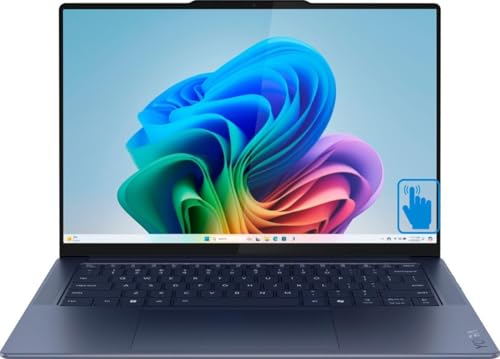
Lenovo Yoga Slim 7X (Snapdragon X Elite) — OLED showcase pick
The Yoga Slim 7X is the pick for readers who want Windows on ARM to feel like a flagship rather than an experiment. Lenovo pairs the Snapdragon X Elite X1E-78-100 processor with a 14.5-inch 3K OLED touchscreen rated at 1000 nits in the listing, a specification that makes documents, photographs and streamed video look expensive in a way that changes how a machine feels at midnight. Sixteen gigabytes of memory and a 1TB solid-state drive give the design room to breathe, and a 1080p infrared hybrid camera handles both video calls and face sign-in with an ease the name rather buries.
What distinguishes the Lenovo in daily use is proportion. It is a conventional clamshell, which sounds dull until you remember that conventional is what laps, train trays and lecture desks were designed around, and its slim build carries the Elite chip without the bulk that used to accompany serious performance. For a writer, analyst or photographer whose core tools have native ARM builds, this is the machine on the list that asks for the fewest explanations and offers the most screen in return.
- Processor: Snapdragon X Elite X1E-78-100, from the listing title
- Display: 14.5-inch 3K OLED touchscreen, 1000 nits stated
- Memory: 16GB RAM as configured
- Storage: 1TB SSD
- Camera: 1080p FHD infrared hybrid camera listed
- Operating system: Windows 11 Home
Strengths
- The 3K OLED panel is the most luxurious screen among the conventional laptops here
- Snapdragon X Elite gives the strongest native-application headroom in the Lenovo line
- A 1TB drive avoids the early housekeeping smaller configurations invite
Trade-offs
- Windows 11 Home rather than Pro may matter to managed-workplace buyers
- 16GB of memory is a ceiling for very heavy multitasking, not a floor to grow from
- Touch adds cost that keyboard-first workers may never repay
buyers who need Windows 11 Pro management features, or whose essential software remains x86-only.
Best for: The Yoga rewards a particular workflow beautifully: long documents beside reference material, photographs reviewed at full quality, and video calls that look like you meant them. Its screen invites you to keep work on the laptop rather than fleeing to an external monitor, which makes it the natural recommendation for readers who work in many places and set up in none of them.
Not suited for: travelling professionals and creators whose main applications have native ARM64 builds and who live on the built-in screen.

Microsoft Surface Laptop 2024 (13.8-inch) — Reference clamshell
If the category has a reference design, this is it. Microsoft builds the Surface Laptop around the same Snapdragon X Elite family as the Lenovo, here in a 13.8-inch touchscreen clamshell with 16GB of memory and a 1TB drive in the Dune finish. Because Microsoft makes both the hardware and the operating system, this machine is where Windows on ARM’s intended experience is most legible: wake is instant, the fan story is a quiet one, and the Copilot+ PC features the platform advertises are present without asterisks about tiers.
The 13.8-inch size is a considered choice rather than a small one. It is the footprint that disappears into a briefcase and opens comfortably in an economy seat, while still giving documents a full working width. Readers choosing between this and the Yoga are really choosing between two philosophies of the same silicon: Microsoft’s slightly smaller, integration-first clamshell, or Lenovo’s larger OLED showcase. Neither answer embarrasses the other, and the deciding factor should be how much of your life happens on the internal display.
- Processor: Snapdragon X Elite, 12-core as listed
- Display: 13.8-inch touchscreen
- Memory: 16GB RAM as configured
- Storage: 1TB SSD
- Finish: Dune, per the listing title
- Operating system: Windows 11, Copilot+ PC
Strengths
- The most integrated expression of Windows on ARM, from the company that writes the OS
- Elite-tier silicon with a generous 1TB drive in a travel-first footprint
- Touchscreen clamshell suits readers who annotate as well as type
Trade-offs
- The smaller panel gives up the Yoga’s cinematic working area
- 16GB of memory is shared with every other pick here as a hard ceiling
- Its refinement is priced like refinement, not like a bargain
desk-bound buyers who would feel the 13.8-inch panel as a daily constraint rather than a travel gift.
Best for: Choose the Surface Laptop when the machine is a companion rather than a workstation: carried everywhere, opened a hundred times a week, and trusted to be awake and composed every single time. Its virtues compound quietly, which is another way of saying that owners tend to stop thinking about it, and a laptop you stop thinking about is a laptop doing its job.
Not suited for: mobile professionals who value integration, finish and instant readiness over maximum screen size.

Microsoft Surface Pro 2024 (Snapdragon X Plus, Dune) — Detachable all-rounder
The Surface Pro is the design that defined the detachable category, and its Snapdragon X Plus incarnation is the most flexible machine in this guide. The listing describes a 13-inch touchscreen 2-in-1 with the 10-core Snapdragon X Plus, 16GB of memory and 512GB of storage in the Dune finish. As a tablet it is a reading, annotating and presenting device; with its keyboard attached it is a small laptop with an unusually good screen; and that dual identity is either the whole point or an expensive distraction, depending entirely on whether your work genuinely includes the tablet half.
The Plus chip deserves a calm assessment. For the work a detachable actually does, meaning documents, browsing, communication, media and light creative tasks, its ten cores feel ample, and the efficiency story that justifies ARM in the first place survives intact. What the Plus does not offer is the Elite’s headroom for heavier native applications run simultaneously, so the honest dividing line is workload ambition rather than quality. Buy the Pro for its shape, and let the chip be the sensible one for that shape’s natural work.
- Processor: Snapdragon X Plus, 10-core as listed
- Display: 13-inch touchscreen, detachable 2-in-1 design
- Memory: 16GB RAM as configured
- Storage: 512GB
- Finish: Dune, per the listing title
- Operating system: Windows 11, Copilot+ PC
Strengths
- The detachable design serves tablet and laptop duties in one carried object
- Snapdragon X Plus efficiency suits the on-the-move work this shape invites
- The 13-inch touchscreen is a fine canvas for annotation and presentation
Trade-offs
- 512GB of storage is the joint-smallest figure among the premium picks
- Lap use is a compromise inherent to every detachable kickstand design
- Heavier native workloads will find the Plus tier’s ceiling sooner than the Elite’s
lap-typists who write for hours in chairs and trains, where a rigid clamshell hinge serves better.
Best for: The readers who love Surface Pros share a habit: they mark things up. Reviewers of drafts, teachers, field workers, presenters and note-takers who think with a pen all extract value from the tablet half that a clamshell cannot repay. If that description fits, the Pro is not a compromised laptop but a different instrument, and this Dune configuration is its straightforward expression.
Not suited for: pen-first workers, presenters and travellers who will genuinely use the tablet mode every week.

Microsoft Surface Pro 2024 (Snapdragon X Plus, Sapphire) — Detachable in Sapphire
This second Surface Pro listing carries the same Snapdragon X Plus processor, the same 13-inch touchscreen detachable design, the same 16GB of memory and the same 512GB of storage as its Dune sibling, presented in the Sapphire finish. We list it separately, and describe it honestly, because it is a separate listing a buyer will actually encounter, and because pretending that a colourway is a different computer would insult the reader. Treat the pair as two doors into the same room and choose the finish you would rather look at for four years.
That framing is not a dismissal. Finish matters in objects you touch daily, and Sapphire’s deeper tone hides the small scuffs of travel differently from the paler Dune. Specification shoppers should simply understand that any comparison between these two listings that discusses performance is theatre: the meaningful comparisons for a Pro buyer are against the clamshells, on shape, and against the Elite tier, on headroom, and both of those comparisons are made in the neighbouring sections of this guide.
- Processor: Snapdragon X Plus, 10-core as listed
- Display: 13-inch touchscreen, detachable 2-in-1 design
- Memory: 16GB RAM as configured
- Storage: 512GB
- Finish: Sapphire, per the listing title
- Operating system: Windows 11, Copilot+ PC
Strengths
- Identical detachable capability to the Dune rung, in a finish many travellers prefer
- The Sapphire tone wears travel marks gracefully
- Plus-tier efficiency matches the tablet-and-documents life this design leads
Trade-offs
- No specification advantage over the Dune listing, and none should be imagined
- Storage and memory ceilings match its sibling exactly
- Detachable ergonomics remain a shape compromise for long lap-typing sessions
anyone hoping this listing hides a performance upgrade; it does not, and the Elite machines are the honest step up.
Best for: If you have already decided that the Pro is your design, this listing simply asks a taste question, and taste questions deserve unembarrassed answers. Pick the colour that pleases you, because the machine underneath, its chip, its screen and its storage, will serve identically either way, and four years of looking at a finish you chose beats four years of one you settled for.
Not suited for: Surface Pro buyers who prefer the Sapphire finish and want the same specification as the Dune rung.
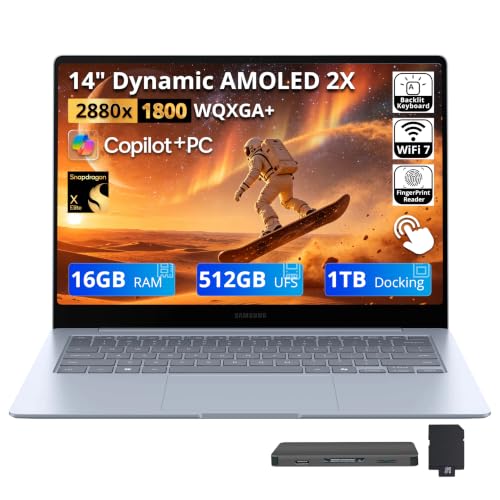
Samsung Galaxy Book4 Edge 14 — AMOLED plus dock bundle
Samsung’s Galaxy Book4 Edge 14 brings the most dramatic screen technology in the guide to the ARM party: a 14-inch 3K AMOLED touchscreen driven by a Snapdragon X Elite, with a backlit keyboard and a fingerprint reader in the listing. Samsung’s pitch to its phone owners is continuity, and even for readers outside that ecosystem the hardware argument stands on its own, because AMOLED contrast at this resolution makes text, photographs and video feel richly rendered in a slim 14-inch frame.
Now the storage, which must be read with care. The listing’s headline figure combines 512GB of internal UFS storage with a 1TB drive in a bundled dock, and those are different things with different speeds and different homes: one lives inside the laptop, the other lives on your desk inside the dock. Presented plainly, the bundle is genuinely useful for a desk-based owner, since the dock drive is a fine archive and backup home. Presented as internal storage, it would be a fiction, and this guide declines to present it that way.
- Processor: Snapdragon X Elite, from the listing title
- Display: 14-inch 3K AMOLED touchscreen
- Memory: 16GB RAM as configured
- Storage: 512GB internal UFS, plus a 1TB drive in the bundled dock
- Sign-in: fingerprint reader listed; backlit keyboard
- Operating system: Windows 11
Strengths
- The 3K AMOLED panel rivals the Lenovo for the finest screen in the guide
- Fingerprint sign-in adds a convenience the face-camera picks handle differently
- The bundled dock drive is a useful desk archive, honestly labelled
Trade-offs
- Headline storage counts the dock; internal space is 512GB and fills accordingly
- Internal UFS storage is a different class from the SSDs in rival listings
- Samsung’s ecosystem charms mean least to readers outside its phone world
buyers who need a full terabyte inside the machine itself for work away from the desk.
Best for: The Edge suits the desk-anchored traveller: someone whose laptop docks at home, where the bundled drive earns its keep as the archive, and travels light between dockings, where the AMOLED screen earns its keep every hour. Buy it with the storage arithmetic understood and it is a pleasure; buy it believing the headline and the first large project will teach the arithmetic rudely.
Not suited for: Samsung-ecosystem owners and desk-docking buyers who want an AMOLED screen and understand the storage bundle.

HP OmniBook 3 14 (Snapdragon X) — Entry Snapdragon rung
The HP OmniBook 3 14 is the democrat of this guide, the machine that brings Snapdragon Windows to readers who cannot justify flagship pricing for the privilege. Its listing pairs the base Snapdragon X X1-26-100 processor with integrated Adreno graphics, 16GB of memory, a 256GB solid-state drive and a 14-inch WUXGA display, and bundles a USB 3.0 hub, a small accessory that quietly acknowledges how dongle-dependent slim modern laptops have become. For documents, browsing, study and communication work, this specification is not a apology; it is the shape of most people’s actual computing.
Expectations should be set with the same honesty. The base Snapdragon X is the entry tier of the family, and while its efficiency and native-application manners are genuine, it is not the Elite and should not be asked to behave like one under heavy simultaneous workloads. The 256GB drive is the other discipline the price imposes: it suits cloud-anchored workers and students whose files live in institutional storage, and it will punish collectors of local media and large local projects. Within those lines, the OmniBook is a coherent, likeable route onto the architecture.
- Processor: Snapdragon X X1-26-100, from the listing title
- Graphics: integrated Qualcomm Adreno
- Display: 14-inch WUXGA panel
- Memory: 16GB RAM as configured
- Storage: 256GB SSD, the smallest in this guide
- Extras: bundled USB 3.0 hub listed; Windows 11 Home
Strengths
- The most accessible entry into Snapdragon Windows in this guide
- 16GB of memory matches the flagship picks, which flatters everyday multitasking
- The bundled hub softens the slim-laptop port problem from day one
Trade-offs
- The 256GB drive demands cloud habits or external storage from the start
- Base-tier silicon lacks the Elite machines’ heavy-workload headroom
- The WUXGA panel is a workspace screen rather than a showcase
local-storage collectors and anyone planning heavy native creative workloads as their daily centre.
Best for: Students and cloud-first workers are this machine’s natural owners, particularly those whose institutions provide the storage and software licences and who need the laptop to be light, quiet and ready. It is also a sensible second machine for a household whose main computer lives elsewhere, provided its storage ceiling is respected rather than resented.
Not suited for: students, cloud-first workers and households seeking an efficient second laptop at an accessible tier.
How Do You Move Your Working Life Onto ARM64?
Migration deserves a weekend, not an evening. Start by listing every application you used in the last month, then sort the list into three piles: native ARM64 builds available, x86 applications that will run under emulation, and anything with a driver, a kernel component or a licence dongle attached. The first pile moves without ceremony. The second pile moves with a test: install each one, open a real file rather than a blank document, and do the specific task you actually perform, because emulation failures hide in printing, plug-ins and export paths rather than in launch screens.
The third pile decides the purchase, so interrogate it before money moves. Check each publisher’s support pages for ARM statements, and where a tool is essential and unsupported, decide whether a remote session to an older machine, a web version or a substitute application is an acceptable bridge. Many professionals run exactly such a bridge for one stubborn tool and enjoy ARM for the other ninety-five percent of the week; the arrangement fails only when it is improvised after the purchase instead of planned before it.
Peripherals deserve the same audit, since printers, docks and capture devices bring their own drivers to the marriage. Readers whose work is presentation-heavy should also glance at our coverage of best laptops for remote work, because the remote-desktop bridge that rescues an unsupported application is the same technology that reshapes where these light machines can work from.
Which Snapdragon Tier Matches Your Workload?
| Pick | Processor tier | Display | Storage inside the machine | Design | Best-matched owner |
|---|---|---|---|---|---|
| Yoga Slim 7X | Snapdragon X Elite | 14.5-inch 3K OLED touch | 1TB SSD | Clamshell | Screen-first travelling professional |
| Surface Laptop 13.8 | Snapdragon X Elite | 13.8-inch touchscreen | 1TB SSD | Clamshell | Integration-first mobile worker |
| Surface Pro X Plus, Dune | Snapdragon X Plus | 13-inch touchscreen | 512GB | Detachable 2-in-1 | Pen-and-tablet reviewer, Dune |
| Surface Pro X Plus, Sapphire | Snapdragon X Plus | 13-inch touchscreen | 512GB | Detachable 2-in-1 | Pen-and-tablet reviewer, Sapphire |
| Galaxy Book4 Edge 14 | Snapdragon X Elite | 14-inch 3K AMOLED touch | 512GB UFS, dock drive extra | Clamshell | Docking Samsung-ecosystem owner |
| OmniBook 3 14 | Snapdragon X, base tier | 14-inch WUXGA | 256GB SSD | Clamshell | Cloud-first student or second machine |
The table’s lesson is that tier and shape are separate decisions wearing one price tag. Elite silicon appears in two clamshells and the Samsung, the Plus appears only in the detachable, and the base chip appears in the value clamshell, so a buyer is really choosing a combination: how much headroom, in what shape, at what screen quality. Decide the shape first, because you will touch it daily; then decide the tier, because you will feel it weekly; then check that the storage inside the machine, not inside a bundled dock, fits the life you actually lead.
What Mistakes Do First-Time ARM Buyers Make?
The classic mistake is buying the architecture for its battery reputation and only then discovering that one indispensable application, often an unglamorous one such as a label printer driver or a legacy VPN client, refuses to cooperate. The second mistake is the opposite snobbery: dismissing emulation entirely, when for the long tail of occasional utilities it is perfectly serviceable and getting better with every Windows release. The third is comparing headline storage figures across listings without reading what the figure contains, an error the Samsung’s dock bundle turns from a technicality into a genuinely important reading exercise.
A quieter mistake is expecting a gaming library to follow you. Some titles run, some run through emulation with grace, and some guarded by particular anti-cheat systems do not run at all, and no honest guide should blur that distribution. Readers for whom gaming is central should treat these machines as what they are: superb general-purpose laptops whose architecture happens to be new, bought for silence, readiness and travel weight, with gaming as a welcome bonus where it works rather than as the foundation of the purchase.
Final Recommendation
Start with the Yoga Slim 7X if you want the fullest expression of the idea in a conventional shape, or with the Surface Laptop if you prize integration and a slightly smaller footprint over screen drama. Choose a Surface Pro, in whichever finish pleases you, only if the tablet half of its life will be real, and choose the Galaxy Book4 Edge if your desk-and-dock routine makes its bundle honest value. The OmniBook 3 is the sensible doorway for the cloud-first and the curious. Above all, audit your software first, because on the day your last essential application confirms its ARM build, these machines stop being a compromise you manage and become simply the quietest, readiest laptops you have owned.
What Does Living With Emulation Actually Feel Like?
Emulation has a texture that specifications cannot convey, and setting expectations about that texture is the difference between a delighted ARM owner and a disappointed one. A native application on these machines feels instantaneous in the small ways that accumulate: windows appear rather than load, scrolling holds its composure, and the machine stays cool and silent while doing it. An emulated application feels a half-step behind that standard. It launches a touch more slowly, it asks a little more of the battery while it works, and under sustained load it reminds you that translation is labour. For a utility opened twice a week, that difference is trivia. For the application you inhabit eight hours a day, it is the whole review, which is why this guide keeps returning to the audit rather than to averages.
The encouraging truth is that the boundary moves in the buyer’s favour month by month. Publishers compile ARM builds when an installed base justifies it, and every Snapdragon machine sold enlarges that base, so the catalogue of native software a buyer inherits next year is larger than the one available today. Purchasing an ARM laptop is therefore partly a bet on a direction of travel, and like all bets it should be sized honestly: a reader whose essential tools are already native is not betting at all, while a reader waiting on three stubborn publishers is making a real wager and should price it as one.
There is one more emulation nuance worth naming, which is that not all x86 software emulates equally. Single-purpose utilities with modest demands translate gracefully, while sprawling applications with plug-in architectures can run in their core and stumble at their edges, in an export filter, a scanner integration or a licence check. Testing with real files and real tasks, as the migration section advises, is the only reliable way to learn which kind your own tools are, and an afternoon of that testing is worth more than any compatibility list, including the reassuring ones.
How Do These Machines Handle Docks, Monitors and Desks?
The modern laptop lives two lives, and the desk life deserves as much scrutiny as the travel life. All six picks present themselves to a dock through USB-C, and the Snapdragon platform handles external displays and peripherals with a maturity that early ARM machines could not claim. For most owners the routine becomes pleasingly dull: one cable at the desk, the machine wakes, the monitor lights, and the laptop that crossed the city in a small bag becomes the centre of a full workstation. That dullness is the achievement, and it is worth verifying with your specific dock and monitor during a return window rather than assuming it in month three.
Two cautions belong in this section. The first is that docks concentrate driver risk: a dock is a small computer full of controllers, and its firmware and drivers are exactly the category of software where ARM support should be confirmed rather than presumed. The second is that the Samsung’s bundled dock drive, discussed at its pick, is a storage companion rather than a full docking station in the one-cable sense, and buyers planning a desk setup should read its listing for what the bundle actually contains before designing their desk around it.
Screen strategy follows from shape. The clamshell picks, particularly the Yoga with its large OLED and the Samsung with its AMOLED, can serve as their own second display beside an external monitor, while the Surface Pro’s kickstand makes it a surprisingly natural raised companion screen in tablet posture. Owners who plan a two-screen desk should think about these postures when choosing, because the best second screen is often the laptop you already bought, arranged thoughtfully.
Why Does Instant Wake Change Habits More Than Benchmarks?
Ask long-term Snapdragon owners what converted them and few begin with processing figures. They talk about opening the lid in a corridor and being in the document before the door closes, about a machine that sleeps for a weekend and wakes with its battery essentially where it left it, and about fans that so rarely announce themselves that silence becomes the expected condition of work. These are phone manners arriving in a laptop, and they reshape habits in ways a faster processor does not: you check the thing in short bursts, you carry it to conversations you would previously have left it out of, and you stop organising your day around charging opportunities.
That behavioural shift explains the shape of this entire list. The detachables make sense in a world of short, frequent, pen-friendly sessions. The slim clamshells make sense as always-with-you companions rather than as desk anchors that occasionally travel. Even the value-priced OmniBook participates in the same story, because readiness and quiet are properties of the architecture rather than of the price tier. A buyer who works in long, stationary, plugged-in stretches will feel these virtues least, and that buyer should weigh the conventional competition more heavily; a buyer whose work is scattered across places and moments will feel them every hour.
What Should Creators and Developers Expect From Snapdragon?
Creative work on ARM64 has crossed from curiosity to practicality, but it crosses unevenly by discipline. Photography is the success story: major editors ship native builds, the Elite machines in this guide hold large catalogues comfortably within their memory ceiling, and the OLED and AMOLED panels on the Lenovo and Samsung flatter the work itself. Video is a more qualified story, where native editors exist and perform well on moderate projects, while the deepest plug-in ecosystems and some capture hardware still assume the older architecture. The honest summary for creators is to audit by tool rather than by trade, because two photographers with different software stacks can reach opposite correct conclusions about the same laptop.
Developers occupy a genuinely interesting position on this platform. Native toolchains, containers and the Windows subsystem for Linux all participate in the ARM world, and a developer whose stack is web, scripting or cloud-oriented will find these machines fast, cool and unusually pleasant to carry between home, office and the occasional conference. Developers bound to x86 virtual machines, legacy enterprise tooling or specific compiled dependencies face the same audit as everyone else, with higher stakes, because a broken build chain is not an inconvenience but a stopped week. The platform rewards the stack that lives in text and browsers and interrogates the stack that lives in binaries and drivers.
Students deserve a specific word, because their software is chosen for them. A course that teaches through mainstream, web-delivered or natively supported tools pairs beautifully with a quiet Snapdragon machine and its all-day manners. A course built around a particular engineering, statistics or design package should trigger the audit before enrolment week rather than after it, with the department’s own IT guidance as the first source. Where the answer is mixed, the OmniBook’s accessible tier is a rational way to adopt the architecture for the majority of student life while keeping a lab or an older machine for the stubborn remainder.
How Should You Think About Memory and Storage Ceilings?
Every pick in this guide carries 16GB of memory, and that uniformity is itself information: this generation of Snapdragon laptops is aimed at the mainstream of work, and its ceiling should be read as a definition of the class rather than as a series of individual shortcomings. Sixteen gigabytes holds a browser-heavy research day, office applications, communication tools and a native creative application in comfortable combination. It becomes a negotiation when several heavy applications, large datasets and a forest of tabs compete simultaneously, and readers who live in that negotiation daily should either moderate their expectations or look at the conventional market’s higher-memory tiers with clear eyes.
Storage divides the list more sharply than memory does. The two 1TB clamshells forgive local habits; the 512GB machines, including the Samsung’s internal drive, ask for a light archival discipline; and the OmniBook’s 256GB presumes a cloud-anchored life. None of these is a trap if it is chosen knowingly, and all of them become traps when chosen by headline. The professional habit, on any architecture, is to measure your current machine’s drive before replacing it: the number you find there, grown by a sensible margin, is the only storage recommendation that has ever really mattered.
Upgradeability should be assumed to be absent. Machines of this slimness treat memory and storage as birth specifications rather than as future projects, so the configuration on the listing is the configuration of the machine’s life. That finality raises the stakes of the listing-reading this guide keeps recommending, and it is the practical reason the larger drives earned explicit praise at their picks rather than a line in a table.
What Happens on the Road With an ARM Laptop?
Travel is where this architecture stops explaining itself and simply performs. The machines in this guide share a talent for the in-between moments of a working trip: the forty minutes in a departure lounge, the train table too small for a charger cable to reach anywhere sensible, the hotel desk where the only socket is already hosting a phone. In those moments the relevant specification is not processing speed but composure, a laptop that wakes instantly, works quietly, sips its battery and asks for nothing. Owners consistently report that this composure changes packing behaviour too, since a machine trusted to last is a machine whose charger can live in the checked bag rather than the cabin bag, a small liberation that frequent travellers feel out of all proportion to its size.
Connectivity on the road deserves one practical note. None of these listings promises built-in cellular data, so the travelling ARM laptop leans on Wi-Fi and on tethering to a phone, which the architecture’s efficiency makes a painless arrangement for document and communication work. Readers whose travel involves large file transfers in bandwidth-poor places should plan their synchronisation at the hotel rather than at the gate, a discipline that costs nothing once it becomes habit. Security habits matter more than hardware here: keep the drive encrypted, keep sign-in biometric where the machine offers it, and let the laptop’s readiness serve you rather than whoever finds it.
There is a final travel virtue that rarely appears in specifications, which is thermal politeness. A laptop that stays cool on a tray table and silent in a quiet carriage is a better citizen than a faster machine that announces its workload to the row. The Snapdragon designs in this guide were effectively bred for that citizenship, and for readers whose professional life is substantially lived in other people’s spaces, it may be the most persuasive argument in this entire article.
How Long Will an ARM Laptop Stay Useful?
Longevity on a new architecture cuts both ways, and a balanced guide should say so. In the buyer’s favour, these machines begin life with efficient silicon, modern connectivity and operating-system support that is aligned with Microsoft’s own flagship hardware, which historically means prompt updates and a long feature horizon. The software catalogue argument also compounds with time, since every year adds native builds and retires the emulation caveats that cautious buyers weighed at purchase. A Snapdragon laptop bought today is likely to feel more capable in its third year, relative to its software world, than a conventional machine does, because its world is still arriving.
Against that optimism stand the fixed ceilings already discussed. Memory and storage cannot grow with your ambitions, and a reader whose work is visibly expanding, in dataset size, in project complexity or in the number of simultaneous tools, should buy the configuration that fits the third year rather than the first. Resale and hand-me-down value follow the same logic: a 1TB Elite clamshell will find a grateful second owner long after a 256GB entry model has become a drawer object, which is a legitimate, if unromantic, part of the value calculation.
The practical maintenance story is mercifully plain. Keep the operating system and the firmware current through the manufacturer’s own channel, since platform updates on a young architecture carry real compatibility improvements rather than mere cosmetics. Protect the battery with the ordinary courtesies, avoid living permanently at a full charge where the software offers a limit, and let the machine’s efficiency do the rest. These are not exotic machines to keep; they are simply new ones, and their upkeep rewards the same calm regularity as any good tool.
Which Details Separate a Good ARM Buy From a Regret?
Small print decides satisfaction in this category more than in most, because the machines are so closely related. Read the finish and the configuration as one decision, as the two Surface Pro listings teach: a colour is not an upgrade, and a bundle is not internal storage, and the buyer who internalises those two sentences is immune to the commonest disappointments in the whole list. Read the operating-system edition too, since Home and Pro divide along workplace-management lines that matter to some readers enormously and to others not at all, and the listings here are not uniform on the point.
Then read your own habits with the same care. Count the applications you truly depend on, weigh how much of your storage is archive rather than working set, and decide whether a tablet mode would be a weekly reality or a first-week novelty. The ARM laptops in this guide are unusually honest machines, in the sense that each one does exactly what its design says it does; the regrets in this category almost never come from a machine breaking its promise, and almost always from a buyer who bought a promise they never actually needed.
What Should You Set Up During the First Week?
Commission an ARM laptop deliberately and it will repay the attention for years. On the first day, run every update the machine offers, operating system and firmware alike, because a young platform’s updates carry compatibility substance. Then install your audited applications in order of importance, testing each with a real file and a real task, and keep a short written note of anything that behaved unexpectedly; that note, made while you are calm, is the troubleshooting document your future self will want. Set up your sign-in method, your backup routine and your browser synchronisation before the machine accumulates anything precious, and resist migrating a decade of clutter onto a clean architecture out of mere habit.
By the end of the week, rehearse the desk life as well as the travel life: connect the dock, the monitor and the printer, print something real, present something real, and confirm that the peripherals your work depends on have made the crossing with you. Whatever fails that rehearsal is a problem discovered at the cheapest possible moment, while returns and workarounds are still easy. A laptop adopted this carefully stops being an experiment within a fortnight and becomes, as its owners keep reporting, simply the way a computer was supposed to behave all along.
Frequently Asked Questions
Will my older Windows programs work on a Snapdragon laptop?
Most will, through the Prism emulation layer, and mainstream native builds cover the centre of working life. The exceptions cluster around drivers, kernel-level security tools and some anti-cheat games, which is why this guide insists on auditing your five essential applications by name before buying.
Is the Snapdragon X Elite worth choosing over the Plus?
For heavier native applications run together, such as photo editing beside development tools, the Elite’s extra headroom is real. For the documents-and-communication life a detachable leads, the Plus feels ample, and its efficiency is the same story that makes the architecture attractive in the first place.
Why do two listings describe the same Surface Pro?
Because finish is sold as separate listings. The Dune and Sapphire Surface Pro configurations in this guide share their processor, screen, memory and storage, and we present them as equal rungs so that no reader mistakes a colour choice for a performance decision.
How much storage does the Galaxy Book4 Edge really have?
Inside the machine, 512GB of UFS storage. The larger headline figure in its listing adds a 1TB drive housed in the bundled dock, which is useful at a desk and unavailable on a train, and the two should never be mentally merged.
Can these laptops replace a desktop?
For mainstream workloads, increasingly yes, particularly docked to a monitor at a desk. The honest limits are the 16GB memory ceiling shared by every pick here, the storage ceilings on the smaller configurations, and any essential x86-only software your work cannot bridge or replace.
A closing word on confidence. New architectures attract two kinds of coverage, evangelism and suspicion, and both distort a purchase that is, at heart, ordinary: a person needs a laptop for known work. The six machines here were chosen to survive that ordinary scrutiny, and the reader who matches shape, tier and storage to a honestly audited working life will not need either evangelism or suspicion. The technology underneath can take care of itself; it has been doing so, quietly and efficiently, in the pockets of the world for years, and its arrival in these laptops is less a leap than a homecoming.
Do these laptops need antivirus or VPN software chosen specially?
The mainstream security and VPN providers increasingly publish native ARM builds, and the platform’s built-in protections are fully present. The caution from the audit still applies: a niche corporate VPN client with a kernel driver is exactly the kind of software to confirm by name before purchase, because a workplace connection that refuses to connect is a problem no amount of battery life can sweeten.
Are Snapdragon laptops good for students?
For courses taught through mainstream, web-based or natively supported tools, they are arguably the most pleasant student machines available: light, quiet, ready instantly and durable across a teaching day. Where a department mandates a specific package, the department’s own guidance outranks any guide, including this one, and should be checked before the term begins.
One habit separates satisfied ARM owners from the rest more reliably than any specification: they keep a short list, on paper or in a note, of the two or three legacy tools they still reach through a browser or a remote session, and they revisit that list twice a year. Publishers keep shipping native builds, and a tool that needed a bridge in spring may run natively by autumn; the list keeps the bridge honest and temporary instead of letting it harden into a permanent workaround nobody re-examines.
And when a colleague asks, a year from now, whether the experiment worked, the answer most owners give is disarmingly plain: the laptop stopped being a topic. It is simply there, awake, quiet and charged, in the bag and on the desk, doing the ordinary work of the week without asking to be discussed. For a technology purchase, there is no higher verdict than becoming uninteresting.
Keep the box and the invoice until the return window closes, run the peripheral rehearsal before it does, and the decision, whichever of the six you chose, will have been made the way good equipment decisions should be: early, informed and only once.
That, in the end, is the whole discipline this category asks for: audit first, choose the shape honestly, read every headline number twice, and then enjoy a quieter kind of laptop without another thought.
Related Guides
Continue with best 1440p laptops if panel resolution is your next question, and with best 13 inch business laptops for the conventional-architecture business machines these Snapdragon designs are quietly challenging.
An efficient ARM laptop driving a back-of-room projector is a quietly sensible pairing, and our guide to the best gaming long throw projectors maps the projector half of it.
Battery-first ARM machines get borrowed for tracking sessions more often than their spec sheets suggest, and our guide to the best audio engineer laptops judges that job by fan noise and plugin headroom instead.


