What's inside
- Where to buy
- Key Takeaways
- Quick Picks
- How Did We Choose These Picks?
- Why Does Basketball Punish Ordinary Cameras?
- Are You Filming for Coaching Analysis or for Family Viewing?
- How Do You Survive a Tournament Day?
- What About Phones and Action Cameras for Basketball?
- How Do the Six Compare Side by Side?
- Where Should You Stand, Sit or Mount the Camera?
- How Do You Handle Gym Light and Gym Sound?
- How Do You Choose Between the Sony Pair and the Panasonic Pair?
- How Do You Set Up a Stream That Families Can Actually Watch?
- What Does a Second Camera Add?
- What Rules Govern Filming and Streaming School Games?
- What Are the Common Mistakes When Recording Basketball Games?
- Final Recommendation
- Frequently Asked Questions
- Related Guides
As an Amazon Associate I earn from qualifying purchases. This post may contain affiliate links at no extra cost to you.
gizmoverdict.com is reader-supported. When you buy through links on our site, we may earn an affiliate commission.
Where to buy
The six cameras below are sold through Amazon’s US store under the listings we verified, and each linked pick points at the exact listing whose title we checked. Camcorders in particular attract bundle variants and grey-market lookalikes, so confirm the model name in the listing title matches the one in the product section before ordering, and treat any accessory bundle as a bonus rather than a reason to choose one camera over another.
Finding the best cameras to record basketball games means choosing between two honest philosophies, and this guide refuses to pretend otherwise. The first philosophy puts a person behind a real camcorder at the baseline or in the bleachers: optical zoom that reaches the far basket without dissolving into digital mush, stabilisation that forgives excited hands, and a recording that exists on a card whether or not the gym WiFi cooperates. The second philosophy removes the operator entirely, with cameras that track the play themselves or stream wirelessly to the families who could not make the trip. Four of our picks serve the first philosophy, two serve the second, and the right choice depends on whether your bottleneck is image quality, your own availability, or an audience watching from home.
Basketball is a crueller test than most sports. It happens indoors under mixed lighting, on a small court where the action reverses direction every few seconds, and the ball moves faster than any player’s feet. A camera that films football beautifully from a distant sideline can fail in a gym because its zoom overshoots, its autofocus hunts under sodium lights, or its battery dies during the fourth quarter of the second game of a double-header. Everything below is judged against that reality.
Key Takeaways
- A proper camcorder remains the dependable route: optical zoom, stabilisation and card recording that ignores the gym’s network entirely.
- Sony’s AX43A and FDR-AX53 anchor the handheld end, while Panasonic’s HC-X1200 and HC-X1500 bring 24X zoom lenses and, on the X1500, built-in live streaming.
- The XbotGo Chameleon follows basketball play by itself using AI tracking, which suits teams and parents who cannot spare a camera operator.
- NearStream’s VM33 is the wireless streaming specialist, with 10X optical zoom and RTMP, RTSP and NDI output for proper broadcasts.
- Position beats equipment: an elevated seat at centre court improves footage more than any specification on this page.
- Gym audio is mostly echo and sneaker squeak, so set expectations for sound and get close or add a microphone plan for commentary.
Quick Picks
| Pick | Badge | Why it is here |
|---|---|---|
| Sony AX43A 4K Handycam | Best Handheld All-Rounder | Sony’s current-generation 4K Handycam for the parent or coach who films from the bleachers week after week. |
| Sony FDR-AX53 4K Camcorder | Best Proven Sony | The long-serving 4K Handycam whose handling and stabilisation reputation were earned across many seasons of gym use. |
| Panasonic HC-X1200 4K Camcorder | Best Zoom Value | A 24X zoom and hybrid stabilisation in a lightweight body that sheds heat during long tournament days. |
| Panasonic HC-X1500 4K Camcorder | Best Camcorder for Streaming | The professional sibling with 24X optical zoom plus WiFi HD live streaming when the audience is remote. |
| XbotGo Chameleon AI Sports Camera | Best Hands-Free Tracking | An AI camera system that follows basketball play itself, records in 4K at 60 frames per second and asks for no subscription. |
| NearStream VM33 Wireless Streaming Camera | Best Wireless Broadcast | A streaming camera with 10X optical zoom, app control and battery power for gyms where cables cannot run. |
How Did We Choose These Picks?
We started from the ways basketball actually gets filmed: a parent in the stands, a coach building a film library for Monday’s practice, a school streaming to grandparents, and a club that plays three games in a day and has nobody free to hold a camera. Each scenario punishes different weaknesses, so the pool was built to cover all four rather than to rank six near-identical camcorders. Listings were checked for the claims that matter in a gym: optical rather than digital zoom where a title states it, stabilisation named in the title, streaming protocols spelled out, and recording that lands on local media as well as in a stream.
Specification discipline was strict. Where a listing title states a zoom figure, the article uses it; where a title is silent, as both Sony titles largely are, the spec box says so and sends you to the manufacturer’s documentation rather than inventing a number. Battery endurance is quoted only where a title claims it, and then as a claim. This matters because basketball buyers are routinely sold digital zoom arithmetic and low-light promises that evaporate under gym lighting, and a guide that repeats marketing as measurement has failed before the first tip-off. Readers filming other indoor events will recognise the same trade-offs in our coverage of the best 4k church video cameras, where low light and long lenses rule in a similar way.
Why Does Basketball Punish Ordinary Cameras?
Begin with the geometry. A basketball court is compact enough that the far basket sits well within zoom range, yet wide enough that a fixed wide shot turns players into chess pieces. The camera must constantly reframe: tight enough to read a jersey number on a fast break, wide enough to hold a half-court set without sawing back and forth. That is a zoom lens’s job description, and it is why phones and action cameras disappoint here despite their fine sensors; they offer one fixed view and a digital crop dressed up as reach.
Light is the second punishment. School and community gyms mix daylight from high windows with fluorescent or LED fittings of varying colour, and the court surface reflects all of it upward. Autofocus systems hunt, white balance drifts between possessions, and shutter speeds that freeze a layup push sensitivity into noisy territory. Camcorders built for this work carry image stabilisation and exposure behaviour tuned for continuous indoor shooting rather than holiday snapshots, and their larger bodies dissipate heat across a full game instead of throttling in the third quarter.
The third punishment is duration. A single game is manageable; a tournament day is an endurance event of three or four games, warm-ups, and the ceremony nobody warned you about. Card capacity, battery strategy and heat management stop being specifications and become the difference between filming the final and filming most of the final. The guide sections after the picks treat position, sound and workflow with the same seriousness as the hardware, because in this category the operator’s decisions routinely matter more than the camera’s badge.

Sony AX43A 4K Handycam — Best Handheld All-Rounder
Sony’s listing for the AX43A is terse, just the model name and the Handycam badge, so this section judges the camera by its class and its place in the range rather than by numbers the title never gave us. The AX43A is Sony’s current-generation compact 4K Handycam, the descendant of a line that has owned the bleacher-filming job for a decade, and its design brief shows in the hand: a body shaped for one-handed holding across two hours, controls that fall under the thumb without a menu dive, and stabilisation as a headline engineering concern rather than a bullet point, because Sony knows exactly where these cameras earn their living.
For basketball, the appeal is steadiness of the whole experience. Handheld footage from bleacher height lives or dies on stabilisation, since the operator is standing, turning, and occasionally forgetting the camera entirely during a close finish. A Handycam’s forgiving handling also suits the rotating cast of volunteers who film school sports; a parent handed this camera at the door will bring back watchable footage, which cannot be said of a mirrorless body with a manual zoom ring and a recording limit. Treat the zoom and battery specifics as things to verify in Sony’s documentation for the exact listing, because the title does not state them, and what you are buying on reputation is the handling, the stabilisation philosophy and 4K capture in a body that asks nothing of its operator.
- Capture: 4K Handycam recording per the listing title
- Zoom: not stated in the listing title — verify the lens specification in Sony documentation
- Stabilisation: a headline concern of the Handycam class; verify the system name in Sony documentation
- Form: compact one-handed camcorder body for bleacher use
- Workflow: card recording, no network required
- Audience: parents, volunteers and coaches who film handheld
Strengths
- Handling that a first-time volunteer can succeed with immediately.
- Stabilisation-first design philosophy aimed squarely at handheld sports.
- Compact body that travels in a kit bag without negotiation.
Trade-offs
- The listing title states few specifications, so homework is required before buying.
- No streaming role is claimed in the title; broadcasting needs another route.
- It assumes an operator, which tournament days cannot always provide.
Best for: the reliable handheld record of a season, filmed by whoever is free to hold it. Not suited for: unattended filming or a programme built around live broadcasts.
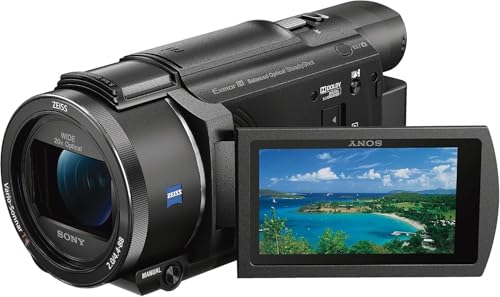
Sony FDR-AX53 4K Camcorder — Best Proven Sony
The FDR-AX53 is the elder statesman of this group, a 4K HD camcorder that has been filming youth sports since long before AI tracking was a phrase. Its listing title is as plain as its reputation: this is the camera that school programmes bought in quantity, that rental houses stocked, and that a generation of highlight reels came from. Longevity like that is evidence of a particular kind. It means the handling is understood, the accessories and batteries are everywhere, and the failure modes are known and manageable rather than mysterious.
Against its younger sibling, the AX53’s argument is maturity rather than novelty. Coaches who build film libraries value a camera whose footage cuts cleanly with last season’s archive, whose batteries interchange with the unit already in the equipment cupboard, and whose behaviour under gym lighting holds no surprises in a playoff game. The honest caveat is generational: autofocus and low-light processing have moved on since this design was drawn, and a buyer choosing between the two Sonys is really choosing between the proven tool and the current one. Neither answer is foolish. Programmes with existing AX53 batteries and muscle memory will feel at home instantly; new buyers starting from an empty cupboard should weigh the younger model’s refinements, which Sony’s own documentation can detail better than a listing title that declines to.
- Capture: 4K HD video recording per the listing title
- Zoom: not stated in the listing title — verify the lens specification in Sony documentation
- Design generation: long-serving Handycam platform with a deep accessory ecosystem
- Form: traditional camcorder body for handheld and tripod work
- Workflow: card recording suited to coaching film libraries
- Audience: school programmes and clubs with existing Sony kit
Strengths
- Years of gym service have mapped its strengths and limits honestly.
- Batteries and accessories are widely available and familiar to volunteers.
- Footage matches the archive many programmes already own.
Trade-offs
- An older design generation than the AX43A beside it here.
- The title offers no streaming capability for remote audiences.
- Specification details must be confirmed in Sony documentation, not the listing.
Best for: established programmes extending a known, trusted filming setup. Not suited for: buyers who want the newest processing or built-in broadcasting.
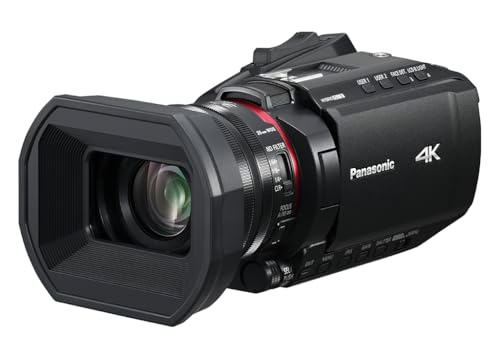
Panasonic HC-X1200 4K Camcorder — Best Zoom Value
Panasonic’s X1200 states its case right in the title: a wide-angle telephoto lens with 24X zoom, hybrid optical image stabilisation, 4K capture, and a lightweight heat-dispersing design. That combination reads like a direct answer to a tournament director’s complaints. The zoom covers the court’s full length from a centre-court seat without resorting to digital cropping, the wide end holds a half-court set without backing into the wall, and the heat-dispersing body addresses the unglamorous truth that camcorders filming back-to-back games in warm gyms can overheat where stills cameras never get the chance.
The hybrid stabilisation matters at the long end of that zoom, where 24X magnification turns a heartbeat into an earthquake. Hybrid systems blend optical correction with electronic smoothing, and at full reach on a fast break that blend is the difference between footage a coach can analyse and footage that merely proves a game occurred. Lightweight is also a tactical property rather than a comfort footnote: a camera that rides a monopod or a small tripod for six hours of tournament play will be repositioned often, carried between courts, and lifted by tired arms, and every gram saved is paid back in willingness to keep filming the consolation game with the same care as the final.
- Zoom: 24X, wide-angle telephoto lens per the listing title
- Stabilisation: Hybrid O.I.S. named in the title
- Capture: 4K camcorder recording
- Body: lightweight, heat-dispersing design for long sessions
- Streaming: not claimed in the title; this is a recording-first model
- Audience: tournament crews and coaches filming multiple games a day
Strengths
- 24X optical reach covers a full court from one centre position.
- Heat-conscious design suits stacked tournament schedules.
- Hybrid stabilisation keeps long-zoom footage analytically useful.
Trade-offs
- No live streaming is claimed, so remote audiences need a separate path.
- Full-zoom footage still demands a stable support for best results.
- Its talents are wasted on a fixed wide shot behind one basket.
Best for: coaches and tournament videographers who record everything and stream nothing. Not suited for: programmes whose families expect a live broadcast from the same camera.

Panasonic HC-X1500 4K Camcorder — Best Camcorder for Streaming
The X1500 takes the X1200’s recording virtues, 24X optical zoom and 4K capture in a professional camcorder body, and adds the capability its sibling lacks: WiFi HD live streaming, stated plainly in the listing title. That single addition changes who the camera serves. A school whose gym fills with grandparents on a stream, a club whose away games draw a remote following, or a coach who wants the broadcast and the archive from one device no longer needs a laptop, a capture card and a prayer over the venue network; the camera itself is the broadcast unit, while the card inside keeps the trustworthy local recording.
Professional in Panasonic’s title language signals the working details that volunteers learn to love: controls laid out for gloved or hurried hands, a body built to be mounted, carried and mounted again across a season, and the expectation of long continuous sessions rather than clips. The streaming is HD rather than 4K, which is the correct engineering trade for gym networks of unpredictable quality; a stable HD stream that never buffers beats a 4K ambition that collapses whenever the crowd’s phones join the same access point. Buyers should still scout the venue’s upload capacity before promising anyone a broadcast, because the camera can only send what the building’s connection can carry, and the wisest streamers test from the exact seat, at game time, with the crowd present.
- Zoom: 24X optical per the listing title
- Capture: 4K professional camcorder recording
- Streaming: WiFi HD live streaming built in
- Class: professional model in Panasonic’s camcorder line
- Workflow: simultaneous local recording and broadcast
- Audience: schools and clubs with remote followings
Strengths
- Broadcasting lives inside the camera, simplifying the whole streaming rig.
- The local card recording survives any network failure untouched.
- 24X reach and pro handling cover the filming job completely.
Trade-offs
- The stream tops out at HD even though recording is 4K.
- Venue upload speed, not the camera, decides broadcast quality.
- It is the most production-minded camcorder here, with a learning curve to match.
Best for: programmes that record for coaches and broadcast for families with one device. Not suited for: gyms with no usable network, where its streaming premium buys nothing.

XbotGo Chameleon AI Sports Camera — Best Hands-Free Tracking
The Chameleon represents the second philosophy in its purest form: a camera system that watches the game itself. The listing describes an AI sports action camera system, sold with a carry case, that tracks soccer and basketball, records at 4K and 60 frames per second, live streams, works with iOS and Android apps, and charges no subscription. Set it on its elevated mount at centre court, start it, and go coach, cheer or keep score while the camera pans to follow play, which is a sentence that would have read as fantasy when the FDR-AX53 in this guide was young.
Judge it by the right standard. An AI tracker does not frame like a thoughtful human operator; it follows the ball and the flow of play with machine logic, occasionally preferring the referee’s jog to a weak-side cutter, and its framing serves analysis and family viewing rather than cinema. What it returns is consistency: every possession filmed, no fourth-quarter lapse when the volunteer’s own child checks in, no games lost because nobody could be found to hold a camera. The absence of a subscription deserves emphasis because rival systems have trained buyers to expect a monthly toll; here the listing states none is required, which changes the maths for a club filming several teams across a season. The 60-frame capture also flatters fast play in review, letting a coach step through a crossover or a block frame by frame in a way 30-frame footage smears.
- Tracking: AI team-sports tracking for basketball named in the title
- Capture: 4K at 60 frames per second
- Streaming: live streaming supported per the listing
- Apps: iOS and Android control
- Fees: no subscription stated in the listing title
- Kit: system sold with a carry case; elevated mounting is the intended setup
Strengths
- Nobody has to operate it, which rescues understaffed game days.
- Every possession is covered with machine consistency.
- No subscription keeps a club’s season costs predictable.
Trade-offs
- Machine framing lacks a human operator’s anticipation and taste.
- Tracking can follow the wrong cluster of players in broken play.
- It needs its elevated position; a low sideline spot undermines the view.
Best for: clubs and parents who need complete game film without a camera operator. Not suited for: highlight filmmakers who frame deliberately and cut tightly.

NearStream VM33 Wireless Streaming Camera — Best Wireless Broadcast
NearStream’s VM33 Gen 3 is a camera designed around the broadcast rather than the archive. The listing states a 10X optical zoom, app control, RTMP, RTSP and NDI outputs, up to six hours of battery operation as a maker’s claim, 1080p streaming, and 1440p recording to microSD. Those protocol letters matter more than they appear to: RTMP is the lingua franca of streaming platforms, RTSP feeds local production software, and NDI lets the camera join a network-based production alongside other sources, which is why the same model shows up in gyms, sanctuaries and studios. A camera that speaks all three can start as a lone streamer and later become one angle in a proper multi-camera show.
The wireless, battery-powered design solves the gym problem that ruins more broadcasts than any codec: cable runs. School gyms rarely offer a safe path for an HDMI cable from a centre-court camera to a laptop, and gaffer tape across a walkway is a liability conversation waiting to happen. The VM33 sits on a stand, joins the network, and sends its picture through the air, while the zoom lets a fixed camera reframe between a wide establishing view and a tighter following shot under app control. Respect the honest limits in the title: the stream is 1080p and the local recording 1440p, so this is not the camera for a 4K archive, and the six-hour figure is a claim to plan around with a power bank for tournament days rather than a guarantee to bet a final on.
- Zoom: 10X optical per the listing title
- Outputs: RTMP, RTSP and NDI streaming protocols
- Streaming resolution: 1080p; local recording 1440p to microSD
- Power: battery operation up to six hours is the maker’s claim
- Control: app-based, wireless by design
- Audience: streamers, schools and small production teams
Strengths
- Three broadcast protocols let it grow from solo streamer to production camera.
- Wireless placement ends the cable-run problem in school gyms.
- Optical zoom under app control reframes a fixed installation.
Trade-offs
- Recording resolution sits below the 4K camcorders in this guide.
- Everything depends on the venue network’s strength and stability.
- Battery claims should be backed by a power bank on long days.
Best for: schools and creators whose first job is a dependable live broadcast. Not suited for: archivists building a 4K film library for frame-by-frame coaching.
Are You Filming for Coaching Analysis or for Family Viewing?
The same game filmed for two audiences becomes two different productions, and recognising which one you are making prevents the commonest purchasing regrets in this category. Coaching film is an analytical instrument. It wants the whole court, held wide enough to show spacing, defensive rotations and the weak side that broadcast framing ignores. It is watched in pieces, paused, rewound and annotated, often at reduced speed, and its viewers forgive plain production values entirely while forgiving a missed rotation not at all. For that purpose the camcorders rule: a Panasonic at elevated centre court, zoomed to hold the full offensive set, recording continuously to card, with the XbotGo as the tireless alternative when the coaching staff cannot spare an operator because they are, reasonably enough, coaching.
Family viewing is a broadcast, and broadcasts are judged by feeling. Grandparents on a stream want to find their grandchild’s number, hear something of the gym, and feel the game’s tide turn. Tighter framing, a scoreboard visible or a score kept by the streamer’s overlay, and sound that carries the buzzer and the crowd’s swell all matter more than tactical width. This is the X1500’s and VM33’s home ground, where streaming is native and the framing can follow the ball with a storyteller’s intent. Many programmes discover they need both films: the wide analytical record for Monday and the warm broadcast for Saturday’s audience, which is an argument for two modest cameras in two positions over one expensive camera asked to be in two minds at once.
Highlight culture adds a third audience with a third appetite. Players and parents cut vertical clips for social feeds, and those clips are harvested from whatever master you recorded, which quietly argues for the highest clean resolution your workflow can hold and for framing that keeps individual players large enough in the picture to survive a crop. A coach’s wide film can yield serviceable clips of a fast break; a tight broadcast film yields better ones of a single player’s moment. None of this requires buying for the highlight first, but it explains why the family that films only in a fixed wide shot ends up with a season nobody can turn into the keepsake they wanted.
How Do You Survive a Tournament Day?
Tournament days are where filming setups go to be audited by reality. Three or four games, unfamiliar gyms, brackets that move your team to a different court with twenty minutes’ notice, and a championship game under lights that differ from the morning’s. The crews who thrive treat the day as a logistics exercise with a camera attached. They scout both courts during the first warm-up, noting the elevated position, the outlet locations and the network’s behaviour under a crowd, because a gym’s WiFi at nine in the morning, empty, is a different substance from the same network at noon with four hundred phones aboard.
Power and storage planning become arithmetic rather than vibes. Total the minutes: warm-ups you choose to record, games at roughly an hour and a quarter of real time each with stoppages, and the ceremony at the end, then double the storage that arithmetic demands and bring batteries or charging for one and a half times the day. The heat-dispersing design of the HC-X1200 stops sounding like a brochure phrase by game three in a warm gym, and the battery cameras’ claimed hours get tested against a schedule that ignores claims. Rotate cards between games rather than trusting one card with the whole day; a card that fails then costs a game, not a tournament, and label each card as it comes out, in the moment, because four identical cards in a pocket at midnight are a riddle nobody solves correctly.
The human plan matters as much as the kit list. Decide before the day who films, who streams, who swaps batteries at halftime and who owns the tripod during the dash between courts, and write the streaming test into the first game’s warm-up rather than its tip-off. Feed the crew, too; the fourth-quarter collapse in footage quality across amateur sports correlates suspiciously with an operator who has not eaten since breakfast. A tournament film that survives to the final is a triumph of sandwiches and spare batteries wearing a camera as a disguise.
What About Phones and Action Cameras for Basketball?
Every season someone asks why the team does not simply film on a phone, and the question deserves a fair answer rather than a scoff. Modern phones record beautiful video, stabilise impressively, and stream natively to the platforms families already use. For a single game, a parent with a good phone on a small tripod at centre court will produce footage that makes everyone happy. The phone’s case collapses across a season: zoom is a crop that sheds the detail needed to read a far jersey, the battery is also the family’s communication lifeline and will not survive a tournament day of filming, storage fills with the rest of a life, and a phone call arriving mid-possession is an interruption no camcorder has ever suffered.
Action cameras fail differently. Their fixed ultra-wide lenses are built to make the wearer’s world dramatic, and from the bleachers that drama translates into a court rendered distant and curved, with players at the far end reduced to suggestions. Mounted on a backboard or a fence they can offer a delightful novelty angle for highlights, and some programmes use one exactly that way, as a garnish. As the main record they ask the viewer to do the zooming with their eyes for two hours, which viewers decline to do.
The deeper point is that basketball filming is a season-long, hours-long, reach-dependent job, and tools reveal their design briefs under exactly those pressures. A camcorder’s whole existence is pointed at this: optical reach, continuous recording, swappable power, and controls a volunteer can run by feel. The automated cameras in this guide exist because even that brief assumes a spare human. Phones and action cameras are magnificent at their own jobs; the mistake is only in believing that a job defined by zoom, duration and distance is among them.
How Do the Six Compare Side by Side?
| Camera | Operator needed | Zoom stated | Streaming | Defining trait |
|---|---|---|---|---|
| Sony AX43A | Yes, handheld | Not stated in the listing title | Not claimed in the title | Current Handycam handling and stabilisation philosophy |
| Sony FDR-AX53 | Yes, handheld | Not stated in the listing title | Not claimed in the title | Proven platform with a deep accessory ecosystem |
| Panasonic HC-X1200 | Yes | 24X | Not claimed in the title | Heat-dispersing lightweight body for tournament days |
| Panasonic HC-X1500 | Yes | 24X optical | WiFi HD live streaming | Recording and broadcasting in one professional body |
| XbotGo Chameleon | No, AI tracking | Tracking system; zoom not headlined | Live streaming supported | Follows play itself, 4K at 60 frames, no subscription |
| NearStream VM33 | No, fixed with app control | 10X optical | RTMP, RTSP and NDI at 1080p | Wireless battery camera built for broadcasts |
The table’s first column is the real decision. Four cameras need a person and reward one; two remove the person and reward planning. Zoom figures exist only where listings state them, which is why the Sony rows read as homework rather than numbers, and streaming ranges from absent to a full professional protocol suite across a pool that shares one sport and almost nothing else.
Where Should You Stand, Sit or Mount the Camera?
Position is the cheapest image-quality upgrade in sports filming, and basketball’s ideal is well established: elevated, at centre court, high enough to see over the near bench and read the far side’s spacing. Elevation turns the game into the diagram coaches draw, revealing defensive shape and fast-break lanes that a floor-level camera flattens into a crowd of shoulders. Most school gyms offer this from the top bleacher row; arrive early enough to claim the centre seat, because the same logic occurs to every other parent with a phone.
Height has a ceiling of usefulness. Film from too high, a balcony or a catwalk, and players become tokens on a board, faces vanish, and the emotional content of the footage drains away. The sweet band is a few rows up: enough to see the court’s geometry, low enough to keep jerseys, expressions and the ball’s arc human. Behind-the-basket positions flatter dunks and disappoint everything else, since half the game happens at the far end rendered tiny, while a corner seat biases the film toward whichever team attacks your end in the second half.
One refinement separates polished game film from merely adequate coverage: keep the scoreboard reachable. A brief tilt or zoom to the clock at quarter breaks, or a fixed framing that catches it at the frame’s edge, anchors every later viewing, because a highlight without a score is a rumour. Coaches reviewing film at midnight and grandparents watching on delay both bless the operator who spent two seconds per quarter proving what the score was, and both curse, with feeling, the beautiful footage of a comeback nobody can prove was one.
Mounted cameras follow the same geometry with stricter discipline. The XbotGo and the VM33 both want that elevated centre position, fixed firmly enough that crowd vibration in a close game does not transmit through a bleacher into the frame; a stand on a solid floor section beats a clamp on a shaking rail. Scout the position at a real game, not an empty practice, because the view that is clear on Tuesday afternoon may sit directly behind the pep band, the standing student section, or a banner that only appears on Fridays. Filming children playing other sports follows the same elevated-centre logic, adapted per field, in our guide to the best cameras to film children s sports.
How Do You Handle Gym Light and Gym Sound?
Gym light rewards humility. Set the camera’s white balance for the dominant fitting rather than letting it wander between possessions, accept a slightly higher sensitivity over a shutter so slow that layups smear, and resist the urge to zoom into the darkest corner of the court where exposure goes to struggle. Mixed light from windows will defeat perfection; aim for consistency, because a film that is uniformly slightly warm reads as atmosphere, while one that oscillates between orange and blue reads as broken. The rehearsal principle from every camera discipline applies: film one full half at your settings before the game that matters, and watch it on the screen your audience will use.
Sound is basketball’s neglected half. A camcorder’s built-in microphones at bleacher distance record the gym itself: echo, squeaking shoes, the buzzer, a hundred conversations, and only approximately the game. For coaching film that hardly matters. For family broadcasts it matters enormously, and the honest options are positional rather than electronic: sit the camera nearer the action when the rules allow, add a microphone closer to the court where the venue permits, or accept the ambience and let a commentator’s voice, recorded near a quiet microphone, carry the broadcast. Event filmmakers face the same distance problem at ceremonies, and our look at the best cameras to film a wedding treats microphone placement with the seriousness it deserves.
One more gym reality: power outlets are contested territory. Scorekeepers, shot clocks, the opposing team’s streamer and your camera all want the same two sockets. Battery discipline, arriving charged, carrying the spare, and treating any outlet as a bonus rather than a plan, is what separates the crew that films the final from the crew telling stories about the first three quarters. The battery cameras in this pool soften that contest but do not abolish it, since their claims are measured in hours that a double-header can spend.
How Do You Choose Between the Sony Pair and the Panasonic Pair?
Buyers cross-shopping the four camcorders often stall on brand, so it is worth stating plainly what actually separates them in a gym. The Panasonic models argue from their lenses and their working design: stated 24X optical zoom, hybrid stabilisation, and in the X1200 a body engineered to shed heat across stacked games, in the X1500 the addition of WiFi streaming that turns the camera into the broadcast. Their case is specification-forward; the titles tell you the reach and the features, and a buyer can plan around those numbers with confidence because they came from the listing rather than from hope.
The Sony models argue from handling and heritage. The Handycam line’s decades in bleachers produced bodies that volunteers operate successfully without training, stabilisation philosophies tuned by exactly this kind of footage, and an accessory world of batteries and chargers that any programme can replenish in a hurry. Their listings here are terse, which pushes the diligent buyer toward Sony’s documentation for lens and battery specifics, a chore the Panasonic titles largely spare you. Neither philosophy is a trick. Programmes that film with rotating parents should weight the Sony handling heavily, because the best camera is the one a nervous volunteer frames well in a loud gym; programmes with a dedicated videographer can exploit the Panasonic reach and features to their full, considerable extent.
The automated pair reframes the question entirely, and some buyers will find the honest answer is one from each world: a camcorder for the games a person can attend and the tracking or streaming camera for the rest of the schedule. Schedules, not specifications, are what actually differ between programmes, and a camera bought for the schedule you have will outperform a finer camera bought for the schedule you wish you had, every single week of the season.
How Do You Set Up a Stream That Families Can Actually Watch?
A stream succeeds or fails on everything except the camera. Start with the network audit, performed at game time in the actual seat: run the broadcast at your intended settings for a full quarter of a prior game and watch it on a phone over a different connection, the way grandma will. Gym networks sag when crowds arrive, and the stream that purred during Tuesday practice can strangle on Friday night; the X1500’s HD streaming and the VM33’s 1080p ceiling are virtues here precisely because they ask less of the building. If the venue connection cannot hold your intended quality, lower the stream’s ambition before tip-off rather than letting the platform’s buffering make the decision mid-game.
Give the broadcast a human layer. A score shown on screen, updated at breaks, transforms a silent wide shot into a game a remote viewer can follow, and a single commentator with a modest microphone near their mouth outperforms the finest camera microphone across a gym. Announce the stream where families actually look, the team chat and the school page, with the link posted before warm-ups and a named person responsible for starting it, because the most common streaming failure in school sports is not technical at all: nobody pressed go. Keep the local recording sacred throughout, started first and stopped last, so the archive exists even if the broadcast has a bad night.
After the game, the stream becomes a recording on the platform, and its second life matters. Title it with the teams, the date and the level, check that the platform’s copy kept the sound in sync, and download or preserve it according to the programme’s habits rather than trusting a platform’s indefinite hospitality. Families rewatch these games at graduations and reunions; the programme that treats each broadcast as an artefact, named and stored like the card recordings, builds an archive that outlives any single season’s technology choices.
What Does a Second Camera Add?
Programmes that film seriously eventually ask whether a second angle is worth the trouble, and basketball answers more generously than most sports. A second camera placed behind a basket or at floor level near the bench captures what the elevated centre view cannot: faces at the free-throw line, the bench’s reaction to a run, the physical texture of play under the hoop. Cut against the main film, even briefly, those shots turn a record into a programme, and for highlight purposes the low angle often holds the season’s most valuable thirty seconds.
The practical route is asymmetric. Keep the dependable camera, a camcorder or the tracking unit, as the unbroken master that never stops and never experiments, and let the second camera be the gambler: the VM33 joining by NDI, an older camcorder retired from main duty, even the novelty backboard angle. Production software can switch or combine the two for streams, and in the edit the second angle rescues moments the master framed poorly. What a second camera must never do is halve the reliability of the first; the day both cameras need the same volunteer is the day the programme owns two ways to miss a game instead of one way to film it.
Cost the idea in attention before equipment. Two cameras mean two batteries to charge, two cards to clear, two files to sync by a clap or a buzzer in the edit. For a coaching library the second angle is a luxury that rarely changes an analysis; for a school building a public programme, or a club whose families live far away, it is often the step that turns dutiful coverage into something a community gathers around. Buy the second camera when the first one’s film has become a habit the audience depends on, not before.
What Rules Govern Filming and Streaming School Games?
A short word on permissions, because cameras in gyms operate under other people’s rules. School and league policies on filming minors vary widely: many programmes film freely for coaching and family purposes with consent handled at registration, while some venues restrict streaming, tripod placement in walkways, or recording of opposing teams for scouting. The camera operator’s job includes knowing which regime applies before the tripod legs open, and the programme director, not the volunteer, should own that question. When in doubt, ask the athletic office in the off-season, when the answer can become a written policy instead of a doorway argument at tip-off.
Music is the quiet trap in streaming. Gym warm-ups run on commercial playlists, and a broadcast that carries that audio to a platform can be muted, claimed or taken down by automated systems that do not care about your intentions. Programmes that stream regularly learn to position the camera’s microphone for the game rather than the speakers, to favour commentary over ambient capture during warm-ups, or to start the public broadcast at the introductions. None of this diminishes the archive, whose local recording keeps the day’s full sound for the team’s own purposes, governed by the programme’s own judgement.
What Are the Common Mistakes When Recording Basketball Games?
The most common mistake is filming the ball instead of the game. New operators chase the dribble in tight zoom, producing seasick footage in which every pass leaves the frame and no defence is ever visible. Coaches want width: hold a frame that contains the ball and the shape around it, zoom with restraint, and let plays develop inside the picture. The second mistake is the opposite sin, a fixed wide shot from a low corner that records a game’s existence without its content; the cure for both is the elevated centre position and a rehearsal half watched honestly.
Technical mistakes cluster around trust misplaced. Trusting digital zoom because the number is large, trusting the venue WiFi because it worked at noon, trusting a battery claim because it was printed in a title, trusting autofocus under mixed light without checking the first quarter’s footage at a timeout. Each trust is reasonable in isolation and ruinous in combination during a final. The operators who finish seasons with complete archives share a habit: they verify one thing per game, a card’s free space, a stream’s test broadcast, a spare battery’s charge, until verification becomes the culture of the whole programme.
The last mistake is archival. Games recorded onto a single card that is formatted for the next game, files named by camera defaults, a season scattered across three laptops and a drawer. Name files by date, opponent and team the night they are recorded, copy them to two places, and keep the streaming cameras’ local recordings even when the broadcast succeeded, because the stream’s compressed copy is a poor master for the highlight film someone will inevitably request in May.
Final Recommendation
Choose by deciding who, if anyone, will hold the camera. If a volunteer can be found, the Panasonic HC-X1500 is the most complete single purchase in this guide, recording in 4K with real reach and broadcasting in HD from the same body, while the X1200 serves the record-only programme with the same lens philosophy and a body built for long days. Sony loyalists and programmes with existing kit will be happy with either Handycam, the AX43A as the current expression of the idea and the AX53 as its proven elder. If nobody can be spared, stop apologising for it and buy the automation: the XbotGo Chameleon for film that follows play for coaching and families, the NearStream VM33 when the broadcast itself is the product and protocols matter. Whichever route you take, claim the elevated centre seat, rehearse for a half, and remember that somewhere in the fourth quarter a kid who rarely scores is going to hit the shot of his season, and the whole point of every camera on this page is to be rolling, framed and charged when it happens.
Frequently Asked Questions
Is 4K necessary for recording youth basketball?
Not for watching, since most families view on phones and televisions where a good HD picture satisfies completely. 4K earns its place in the edit: cropping into a play, stabilising a shaky passage, or pulling a still photograph from a frame all spend resolution, and a 4K master holds that currency. Record in 4K when the camera and cards allow it comfortably, and stream in HD for stability.
Can an AI tracking camera really replace a camera operator?
It replaces the operator’s presence, not the operator’s judgement. Tracking systems follow play reliably enough for coaching film and family viewing, and they never miss a game for want of a volunteer. They will not anticipate a weak-side cut, hold a poetic wide shot, or notice that the scoreboard should be in frame at the buzzer, so programmes that care about those things still benefit from a human when one is available.
How much zoom does a basketball camera actually need?
Enough optical reach to read a jersey at the far basket from centre court, which is why the 24X lenses on the Panasonic models feel generous and the VM33’s 10X suits a fixed streaming view. Beyond that range, digital zoom merely enlarges pixels. Judge any camera by its optical figure stated in the listing, and treat unstated zoom numbers as a question to take to the manufacturer’s documentation.
Why does my gym footage look orange and noisy?
Because gyms light for players, not cameras: mixed fittings push colour in several directions at once while modest light levels force sensitivity upward. Set white balance deliberately for the main light source, favour a faster shutter over pristine sensitivity for moving players, and accept a consistent warm cast over an automatic balance that changes its mind every possession.
Should the stream or the local recording be the priority?
Protect the local recording first, because it is the only copy that cannot be ruined by the venue’s network, then build the stream on top of it. The X1500 and VM33 both keep local media while broadcasting, which is the correct architecture. A stream that fails embarrasses you for an evening; a lost recording disappoints a team for a season.
Do I need a tripod, or is handheld filming enough?
Handheld filming with a stabilised camcorder is enough for most single games, and it keeps you mobile when the good seat disappears. A tripod or monopod earns its place across tournament days and in every streaming setup, where an unmoving frame lets viewers relax and lets the operator rest, check the stream, and be a spectator for a few possessions without the picture wandering off with their attention.
What is the best seat in the gym for filming?
The elevated centre, a few rows up, on the side opposite the benches if you want the coaches in frame or the same side if you want the court unobstructed by them. Arrive early, because every experienced sports parent in the building has read the same advice, and the centre seat at the top row is the most contested real estate in scholastic sport.
Related Guides
Neighbouring filming jobs reward the same habits. Outdoor field sports stretch zoom and weather tolerance further, covered in best video cameras for football. Parents filming several sports across a school year should compare the wider view in best cameras to film children s sports. Readers building broader video skills from scratch will find the foundations in best entry level cameras for videography.
The camera shelf for people selling rather than streaming is best product photography cameras.
Sanctuaries need the same unattended coverage, and best church live streaming cameras is built around it.
Related guides
- Best 1080p IP Cameras: PoE Domes, Turrets, Bullets and a PTZ That Earn Their Cable
- Best Basic Phones Camera Buyers Can Trust: Flip Phones and Simple Handsets That Still Take a Photograph
- Best Sony Full Frame Cameras for Astrophotography: Sensitivity vs Resolution
- Best Affordable Android Tablets: Five True Android Slates and One Fire OS Specialist, Clearly Labelled


