What's inside
- Key Takeaways
- Quick Picks
- How We Chose These Picks
- Which of the best cameras to watch your pets fits your situation?
- What separates a pet camera from a security camera pointed at a dog?
- How should you read pet-camera subscription claims?
- Where should a pet camera live in the room?
- How do you introduce a camera to an anxious pet?
- How do you keep pet-camera alerts useful instead of noisy?
- What should you check during the first week of ownership?
- How do cameras fit a multi-pet household?
- How do you keep a pet camera secure and private?
- What do the first thirty days of footage usually reveal?
- How do treat cameras change the human’s behaviour?
- What should you check before you buy?
- How do you introduce a second camera or a second home?
- Field Notes From Real Sessions
- Comparison Table
- What are the most common mistakes buyers make?
- Final Recommendation
- Frequently Asked Questions
- Related Guides
As an Amazon Associate I earn from qualifying purchases. This post may contain affiliate links at no extra cost to you.
gizmoverdict.com is reader-supported. When you buy through links on our site, we may earn an affiliate commission.
Sorting the best cameras to watch your pets begins with a subscription trap that catches buyers every week. Furbo sells two near-identical rotating 360-degree dog cameras: one listing requires a subscription at setup, and the other, the one linked in this guide, covers its core features with no ongoing cost. Those are different purchases wearing the same product photograph, and this article keeps them clearly separated so you do not pay monthly for a camera you believed was subscription-free.
Where to buy: every linked pick points to its Amazon listing, where you should re-check which features the listing itself describes as core and which sit behind a paid plan before ordering. That habit matters across this whole class, because app alerts, video history and smart notifications are exactly the features brands most often move behind a paywall after the hardware sale.
One boundary before the picks: an indoor camera is a window into your home, not a substitute for care. Nothing here feeds a pet on a schedule that replaces a person, guarantees a pet’s safety, or watches a house the way a present owner does. What these cameras honestly offer is a look, a conversation and, in most cases, a tossed treat — which, used well, is plenty.
Prices and plan terms in this category move faster than hardware, so this guide’s habit is worth adopting as your own: every claim about what is included is tied to the listing’s own words at the time of writing, and the checkout page — not the advertisement, not this article — is where the promise must still be standing when you pay.
Key Takeaways
- The linked Furbo 360 is the no-ongoing-cost listing; its subscription-required twin is a different listing and a different commitment.
- Any alert, history or smart-detection feature a listing places behind a paid plan is described as paid in this guide, never as free.
- Pan range decides whether one camera covers a whole room or just the sofa corner where the camera happens to point.
- Treat tossing helps anxious dogs for some households and merely entertains others; two-way audio is the feature owners use daily.
- These are indoor cameras for checking in, not devices that keep a pet safe in your absence.
Quick Picks
| Pick | Badge | Why it earns its place |
|---|---|---|
| Furbo 360 Dog Camera (No Ongoing Cost) | The subscription-free Furbo listing, chosen deliberately | Core features sold without a mandatory ongoing payment. |
| Furbo Mini 360 Camera | Compact rotating camera for cats and small spaces | Small footprint suits shelves, flats and single rooms. |
| TKENPRO 2K Pet Camera Treat Dispenser | Dual-band Wi-Fi and a full-room rotating view | Dual-band Wi-Fi avoids the classic setup dead end. |
| Petcube Bites 2 Lite | Established app ecosystem with treat tossing | Polished app that veteran pet-camera owners already trust. |
| SKYMEE Petalk AI II | No-subscription-fee dispenser with scheduled treats | Scheduled treat dispensing supports a daily routine. |
| Cypcat 3K Dog Camera Treat Dispenser | Long treat-toss range with rotating coverage | Longest treat-toss theatre in this line-up. |
How We Chose These Picks
We shortlisted cameras that combine a live view with at least one interactive feature — treat tossing or two-way talk — because a passive lens you never open is worse than none. Pan and rotation range, night vision approach, Wi-Fi band support and the honesty of each listing’s subscription language all shaped the ranking, and listings that blurred free and paid features without distinction were marked down for it.
The Furbo split deserves its own paragraph. During verification, two Furbo 360 listings surfaced with nearly identical presentation: one structured around a subscription taken at setup, and one explicitly built around core features with no ongoing cost. Only the no-ongoing-cost listing is linked here, as pick one and pick two’s larger sibling, and the guide returns to the distinction wherever Furbo appears so nobody checks out with the wrong twin.
We also weighted the unglamorous facts: whether the treat reservoir suits the kibble size a household already buys, whether the camera works on the Wi-Fi bands a modern router broadcasts, and whether the app model survives beyond the first joyful week of checking in every hour.
Which of the best cameras to watch your pets fits your situation?
The running order below follows the questions households ask at the kitchen table: what does it cost each month, will it connect, can it toss, and who is it really for? A camera that tops one family’s list sinks in another’s for reasons that have nothing to do with its lens, so read for fit — your router, your pet’s habits, your tolerance for subscriptions — and let the specifications argue afterwards.

Furbo 360 Dog Camera (No Ongoing Cost) — The subscription-free Furbo listing, chosen deliberately
This is the Furbo to buy if the phrase ongoing cost makes you put your card away, and the distinction is the single most important fact in this article. Furbo’s catalogue contains a sibling listing for a rotating dog camera that requires a subscription during setup; this listing is structured the other way, with its core features — the rotating live view, barking alerts, treat tossing, two-way audio and night vision — presented as included rather than rented. Check the listing wording once more at checkout, because the two products look alike enough to fool a hurried buyer.
In daily use the rotating view is the headline. Rather than a fixed lens aimed at wherever you first placed it, the camera turns to follow the room, which suits open-plan spaces where a dog migrates between rug, sofa and the sunny patch by the door. Barking alerts tell you when to look, and most owners find that rhythm — alert, glance, reassure through the speaker — becomes the product’s real job.
Honesty requires the other side too. Advanced smart features in the Furbo ecosystem are exactly where paid plans live, so treat anything beyond the listing’s named core features as a possible subscription until the listing itself says otherwise. The camera also cannot comfort a genuinely distressed dog the way a person returning home can, and it should be bought as a communication tool, not an anxiety cure.
- Listing type: the no-ongoing-cost Furbo 360 listing, not the subscription-required twin
- View: rotating 360-degree live view
- Interaction: treat toss and two-way audio
- Alerts: barking alerts included in the core feature set
- Night: infrared-style night vision for dark rooms
Strengths
- Core features sold without a mandatory ongoing payment
- Rotating view follows a dog around a whole room
- Bark alerts turn passive footage into timely check-ins
Trade-offs
- Smarter detections in the ecosystem may sit behind paid plans
- Treat size must suit the reservoir’s tossing mechanism
- A determined dog may treat the camera itself as a puzzle
Best for: Dog owners who want the full Furbo routine while refusing a compulsory subscription.
Not suited for: Buyers expecting every advanced app feature to be free forever.
A month with the big Furbo rearranges a household’s rhythms in small ways: the lunchtime check becomes a ritual, the bark alert becomes the doorbell’s more honest colleague, and the treat toss becomes a language both sides understand. Owners consistently say the rotating view stops mattering as a specification and starts mattering as a relief — the dog is findable, every time, without a second camera in the second room where he was actually sleeping all along.

Furbo Mini 360 Camera — Compact rotating camera for cats and small spaces
The Mini takes the same no-ongoing-cost philosophy as its larger sibling and shrinks it for apartments, cat households and single-room coverage. Its listing speaks to both species — barking and meowing alerts both appear — which reflects how cats actually use a home: quietly, at height, and usually in the one corner a full-size camera would overshoot. The sharper video class in its listing also helps when the subject is a small animal at a distance.
Colour night vision is the Mini’s characterful difference. Where most pet cameras switch to monochrome infrared after dark, a colour low-light view makes it easier to tell which cat is on the counter and whether the grey shape by the door is the dog or a discarded jumper. In small rooms that identification matters more than raw resolution numbers.
What the Mini does not do is toss treats, and that absence defines its audience. Households whose ritual is the midday treat should buy the larger model or a rival dispenser below; households that mainly want to see, hear and speak to a pet gain a tidier device that asks less shelf space and less attention.
- Listing type: no-ongoing-cost core-features listing, like its larger sibling
- View: rotating 360-degree view in a compact body
- Video: higher-resolution class than the standard Furbo, per its listing
- Alerts: barking and meowing alerts for dogs and cats
- Night: colour night vision rather than plain monochrome
Strengths
- Small footprint suits shelves, flats and single rooms
- Colour night view identifies which pet is which after dark
- Cat households are addressed directly, not as an afterthought
Trade-offs
- No treat tossing at all
- Compact reservoir-free design still needs thoughtful placement
- Premium app extras follow the same paywall caution as the range
Best for: Cat owners and flat-dwellers who want eyes and a voice, not a treat ritual.
Not suited for: Owners whose dog’s midday highlight is a tossed snack.
The Mini’s owners tend to be cat people, and their reviews read differently: less about interaction, more about reassurance. The camera watches the windowsill kingdom, settles the which-cat-was-it question with its colour night view, and asks almost nothing in return — no treats to refill, no reservoir to wash, no schedule to keep. In a small flat it disappears onto a shelf the way good appliances do, present when wanted and furniture when not.

TKENPRO 2K Pet Camera Treat Dispenser — Dual-band Wi-Fi and a full-room rotating view
The TKENPRO’s practical headline is its Wi-Fi: it speaks both the crowded traditional band and the faster modern one, which quietly solves the setup failure that strands many pet cameras at the connecting screen. If your household router has moved on and older gadgets have fallen off the network one by one, a dual-band pet camera removes a whole category of frustration before the first treat is tossed.
Around that connectivity sits a complete feature set: a rotating room view, phone-app control, two-way talk and remote treat tossing for dogs and cats. The interaction loop is the familiar one — motion stirs an alert, you open the app, the pet hears your voice, a treat lands — but the TKENPRO delivers it without leaning on a famous brand name, which is its own kind of value proposition.
The counterweight is ecosystem maturity. Smaller brands’ apps evolve on smaller teams, so buyers should expect competent rather than luxurious software, and should test every feature they care about inside the return window. Motion alerts, likewise, will include the curtain, the robot vacuum and the afternoon sun until you tune sensitivity and zones to your room.
- View: 360-degree rotating view via phone app
- Wi-Fi: dual-band support across both common home bands
- Interaction: remote treat tossing and two-way talk
- Alerts: motion-based notifications to the app
- Suitable for: dogs and cats, per the listing
Strengths
- Dual-band Wi-Fi avoids the classic setup dead end
- Full interaction set without a big-brand premium
- Rotating view covers open rooms from one position
Trade-offs
- App polish trails the market leaders
- Motion alerts need tuning to stay useful
- Long-term software support is a smaller brand’s open question
Best for: Homes with modern routers where older gadgets keep failing to connect.
Not suited for: Buyers who rank a famous app ecosystem above hardware flexibility.
TKENPRO ownership is defined by the first evening: the camera connects to the modern router that defeated two predecessors, and the household exhales. After that, its story is competence — the app does its jobs, the toss lands, the alerts arrive — and the owner’s remaining task is the universal one of tuning motion sensitivity until the curtain stops filing reports. For dual-band households it remains the path of least resistance in this entire guide.

Petcube Bites 2 Lite — Established app ecosystem with treat tossing
Petcube has sold pet cameras long enough for its app to feel like a settled neighbourhood rather than a new development, and the Bites 2 Lite is the accessible door into that ecosystem. It covers the class essentials — high-definition video, night vision, two-way audio and a treat dispenser that works for cats as readily as dogs — in a wall-friendly body that suits renters who cannot scatter hardware across every room.
The ecosystem cuts both ways, and this guide will not pretend otherwise. Petcube offers a paid care tier, and features connected with extended video history and smarter alerts belong to that paid world; the listing’s core camera, talk and treat functions are the hardware purchase, while the subscription buys memory and analysis on top. Read the current plan description before assuming any particular alert is included.
As a Lite model it also accepts a fixed viewpoint rather than the rotating coverage of the Furbo and TKENPRO picks. Aim it at the bed, crate or sofa where your pet actually spends the day and that limitation fades; expect it to survey a whole open-plan floor and you will spend your lunch breaks staring at an empty room corner.
- Video: high-definition live view with night vision
- Interaction: treat dispenser for cats and dogs, two-way audio
- App: mature Petcube ecosystem with an optional paid care tier
- View: fixed wide view rather than rotating coverage
- Mounting: wall-friendly body for rented homes
Strengths
- Polished app that veteran pet-camera owners already trust
- Treat tossing sized for feline households too
- Simple, tidy hardware that suits small homes
Trade-offs
- Extended history and smart extras belong to the paid tier
- Fixed view misses pets who roam between rooms
- Reservoir capacity suits snacks, not meal replacement
Best for: Owners who value a proven app and mainly watch one favourite pet spot.
Not suited for: Anyone wanting whole-room rotating coverage from a single camera.
Petcube owners buy into the app as much as the camera, and the Bites 2 Lite rewards that choice with the smoothest daily software experience here. The honest accounting continues, though: the longer your household keeps video history and smart summaries, the more the paid tier becomes part of the product’s real price, and owners who understood that on day one report satisfaction, while those who discovered it in month two report feeling ambushed.

SKYMEE Petalk AI II — No-subscription-fee dispenser with scheduled treats
The SKYMEE states its selling point in its own listing title — no subscription fee — and backs it with a feature smaller brands often forget: an automatic treat dispenser that can deliver on a routine rather than only when you remember to open the app. For a dog whose anxiety peaks at predictable moments, like the school run or the post-lunch quiet, a scheduled snack can structure the day in a way purely manual tossing cannot.
Its room view takes a different route from the rotating Furbos. A wide fixed field covering half the room’s circle at once means no waiting for a lens to swing toward a sound, and no mechanism to wear; the cost is the other half of the room, which placement must simply accept. Two-way audio and night vision complete a specification that reads like a checklist answered by someone who has lived with a lonely dog.
The traditional Wi-Fi band is its main technical limit, shared with several rivals, and worth checking against your router before ordering. Brand longevity is the softer question: the no-fee promise is attractive precisely because it removes the ongoing relationship, so buyers should value the hardware on what it does today rather than on promised future software.
- Subscription position: sold with no subscription fee, per its listing
- View: wide 180-degree fixed full-room view
- Interaction: automatic and manual treat dispensing, two-way audio
- Video: high-definition with night vision
- Wi-Fi: traditional home band only
Strengths
- Scheduled treat dispensing supports a daily routine
- Wide fixed view has no rotating mechanism to wait for
- Subscription-free positioning is stated outright
Trade-offs
- Fixed view cannot see the half of the room behind it
- Single-band Wi-Fi may clash with newer router setups
- Smaller brand means a leaner support trail
Best for: Dogs who settle better with a predictable midday treat routine.
Not suited for: Homes needing a camera that can scan an entire room on demand.
The SKYMEE earns loyalty in a specific household: the one with a routine. Its scheduled dispensing turns the camera from a window into a small daily event the dog organises his afternoon around, and owners of anxious dogs describe the predictability — same time, same sound, same snack — as the feature, with the camera almost incidental. Keep the wide fixed view aimed at the dog’s chosen territory and the arrangement simply holds.
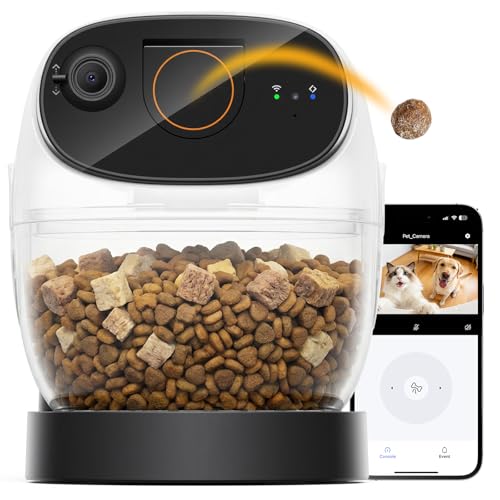
Cypcat 3K Dog Camera Treat Dispenser — Long treat-toss range with rotating coverage
The Cypcat competes on two numbers a dog can appreciate: a rotating view to find the animal, and a treat toss its listing rates at a genuinely room-crossing distance. That range changes the interaction, because a treat that lands near the camera teaches a dog to crowd the device, while one that lands across the room turns the toss into a small game of fetch-and-sniff that burns a minute of the long afternoon.
Its listing also flies the no-subscription-required flag, placing it with the SKYMEE in the buy-it-once camp of this class. Bark alerts prompt the check-in, the rotating lens finds the dog, two-way audio delivers the familiar voice, and the toss supplies the punctuation. For big rooms and boisterous dogs, that sequence simply works at a scale the compact picks cannot reach.
Enthusiasm should be tempered by the usual small-brand homework. Test the toss mechanism with your own kibble shape early, since dispensers are fussy about treat geometry, and confirm the app’s alert behaviour during the first week rather than the first month. A privacy mode is mentioned in its listing material — use it, because a camera this capable deserves deliberate off hours at home.
- Subscription position: no subscription required, per its listing
- View: rotating 360-degree coverage
- Treat toss: long-distance tossing rated across a large room
- Alerts: bark alerts to the phone app
- Extras: privacy mode for deliberate off time
Strengths
- Longest treat-toss theatre in this line-up
- Rotating view plus alerts covers large rooms actively
- No-subscription positioning keeps running costs at zero
Trade-offs
- Treat shape compatibility must be tested with your kibble
- App experience varies more than the big brands
- Powerful coverage demands thoughtful privacy habits
Best for: Large rooms and energetic dogs who turn a treat toss into a game.
Not suited for: Minimalists who want the smallest, quietest device on the shelf.
Cypcat ownership is theatre management. The long toss turns the camera into the household’s most popular appliance, visiting children demand demonstrations, and the dog learns the pre-toss sound the way he once learned the fridge door. The owner’s homework is the treat itself: shapes that fly cleanly, sizes that do not jam, and a reservoir routine that keeps the mechanism honest through a season of daily performances.
What separates a pet camera from a security camera pointed at a dog?
A security camera’s job ends at evidence; a pet camera’s job is interaction. The defining features of this class — treat tossing, two-way talk pitched for a familiar voice, alerts tuned to barking or meowing — exist because the viewer loves the subject. When a listing offers only recording and motion alerts, it is a security camera in pet clothing, and it will disappoint anyone hoping to participate in their pet’s afternoon.
That distinction also explains the subscription landscape. Security brands sell monitoring; pet brands sell connection, and the features that feel most like connection — recognising your specific pet, remembering highlights, warning about unusual behaviour — are the ones most often placed behind paid plans. Knowing which layer a feature belongs to before purchase is the difference between a fair price and a slow surprise.
Placement follows from purpose too. A security camera watches doors; a pet camera watches the bed, the sofa and the sunny floor patch where the animal actually lives. Buyers who aim their pet camera at an entryway out of habit end up with excellent footage of an empty hall and a dog asleep somewhere off-frame.
How should you read pet-camera subscription claims?
Start with the listing’s own verbs. Core features, included and no ongoing cost describe the hardware purchase; phrases like care plan, membership and premium describe rent. The Furbo pair of listings is the textbook case: the same rotating camera concept exists in a subscription-required form and in the no-ongoing-cost form linked in this guide, and a buyer skimming photographs alone could easily order the wrong commitment.
Next, separate seeing from remembering. Live view is almost always part of the purchase; stored video history is where plans commonly begin. If your use is checking in during lunch, history may never matter. If you want to discover which hour the puppy raids the bin, history is the feature, and its price belongs in your comparison just as honestly as the hardware price.
Finally, treat free trials as introductions rather than features. Many cameras feel magical during a trial month and ordinary afterwards. Decide during that month which paid abilities you actually opened twice; that short list, and nothing else, justifies keeping a plan.
Where should a pet camera live in the room?
Height and angle beat cleverness. A camera at roughly the pet’s eye level when standing gives faces rather than the tops of heads, and placing it across the room from the favourite bed keeps the whole animal in frame instead of a nose investigating the lens. Rotating models forgive approximate placement; fixed models like the Petcube and SKYMEE demand a deliberate rehearsal with the live view open on your phone.
Keep dispensers out of effortless reach. A treat camera at dog height on a low table invites pawing, licking and eventual demolition, while a shelf or wall position turns the toss into an event that lands in open floor. Cats complicate everything by regarding any new shelf object as a personal challenge, so expect the first week to include at least one close-up of a whiskered face inspecting its new observer.
Power is the unglamorous constraint: these are mains-powered indoor devices, so the perfect vantage with no socket nearby is not perfect. Route the cable where it cannot be chewed, because a pet camera whose lead becomes a toy has failed at the most basic level of household sense.
How do you introduce a camera to an anxious pet?
Let the device be boring before it becomes interesting. Set it up while you are home, let the pet investigate it as furniture, and use the speaker first in the room together so your disembodied voice does not arrive as a midnight surprise. The first tossed treats should also happen in your presence, building the association that the small machine predicts snacks rather than strangeness.
Then practise absence in miniature. Step out for ten minutes, watch without intervening, and learn your pet’s genuine alone behaviour before deciding the camera needs to do anything. Many dogs settle after the door’s sound fades; owners who talk through the speaker at the first whine can accidentally teach that whining summons attention, the opposite of the calm routine they hoped to build.
If the footage shows real distress — pacing, drooling, destruction, relentless vocalising — the honest next step is a conversation with a vet or behaviourist, not a more expensive camera. These devices reveal problems beautifully. Solving them remains a human job, and any product implying otherwise is selling comfort to the wrong end of the leash.
How do you keep pet-camera alerts useful instead of noisy?
An alert that cries wolf trains its owner to ignore it within a fortnight, so the first week with any camera in this guide should be treated as calibration, not judgement. Raise sensitivity until the curtain triggers it, then step back one notch; aim the view away from sunlit windows whose afternoon glare reads as motion; and use activity zones, where the app offers them, to watch the bed and door rather than the whole geography of the room.
Bark and meow alerts deserve separate handling because they carry information motion cannot: a dog can be silently miserable or noisily delighted, and the sound alert is the one that tells you to look now. Households that keep sound alerts on and motion alerts summarised usually end up with the right balance — interrupted for events, briefed on activity — and that balance, more than any camera choice, decides whether the device is still loved in month six.
Finally, schedule your own attention. A camera checked forty times a day is a worry machine; a camera checked at lunch, at the commute and when it calls you is a tool. The pets, meanwhile, remain gloriously indifferent to your viewing statistics, asleep in the exact spot the first photograph showed.
What should you check during the first week of ownership?
Run the paywall audit on yourself. Open every feature the advertisements celebrated — the highlights, the recognition, the history — and note which ones ask for a plan. That list, discovered in week one while returns are painless, is the difference between an informed household and a resentful one, and it takes twenty minutes with a cup of tea and the app’s settings screens.
Test the toss with your real treats, in your real room, at the real distance. Dispensers are honest about mechanism and fussy about geometry: the kibble that jams, the soft treat that sticks, the biscuit that shatters on landing all reveal themselves in a single afternoon of experiments, and the treat that flies true becomes the household standard by Friday.
Check the night view in the room as it truly is at night — curtains drawn, hallway light off — because that is the footage you will actually receive at 2 a.m. when the alert sounds. And walk the camera’s view yourself, phone in hand, to find the blind corner where a pet can be present and invisible, then move the camera before the pet discovers that corner’s privacy before you do.
How do cameras fit a multi-pet household?
Two animals turn a pet camera from a portrait studio into a documentary project. Rotating models earn their keep here, because the dog’s afternoon and the cat’s are led in different rooms of the same small kingdom, and a fixed lens will faithfully record whichever pet it was not aimed at being elsewhere. Bark-versus-meow alerting also stops being a novelty and becomes triage: the sound tells you which citizen requires your attention.
Treat mechanics need diplomacy. A dispenser that rewards the bold animal who arrives first teaches the shy one that the machine is not for her, so multi-pet households often use the toss as a supervised event — both animals present, owner watching, fairness enforced by a second treat thrown by hand off-camera. The camera documents harmony; it cannot be trusted to administrate it.
Privacy scales with population too. A shared household account means flatmates, partners and pet sitters may all hold the keys to the same lens, so agree the camera’s hours and rooms like adults at the start. The technology is the easy part of multi-pet, multi-human living; the etiquette is the product nobody sells.
How do you keep a pet camera secure and private?
A pet camera is a lens inside your home connected to the internet, and it deserves the same hygiene as the front door’s smart lock. Change default passwords, keep the app and firmware updated, and use the strongest sign-in options the service offers. The camera’s view is your hallway, your sofa, your family’s ordinary hours — treat access to it as you would a key, because functionally that is what it is.
Use the privacy tools the picks provide. Several models in this guide offer privacy modes or simple scheduling; a camera that sleeps while the house is full and wakes when it empties matches the device’s actual purpose and shrinks the window in which it can be misused. Physical placement helps too: a camera aimed at the dog’s bed sees the dog’s bed, while one aimed across an open-plan room sees a life.
Finally, audit the account like a household document once in a while: who has shared access, which old phones are still signed in, whether the sitter from last summer still holds a key. Ten minutes of administration, twice a year, is the entire cost of keeping a kind technology kind.
What do the first thirty days of footage usually reveal?
Most owners buy a pet camera to answer an anxiety and keep it for the comedy. The first month typically reveals that the feared all-day pacing was a twenty-minute overture followed by professional-grade napping, that the barking reported by neighbours has a timetable and a trigger, and that the pet’s afternoon contains small ceremonies — the patrol, the sun-patch migration, the inspection of the door — that nobody in the household had ever witnessed whole.
It also reveals the house. Owners learn which room holds the afternoon light, which window frames the street’s theatre, and how their pet has arranged a life in the hours the humans vacate. That knowledge changes small decisions — where the bed migrates, which curtains stay open, when the radio earns its electricity — and those changes, not the gadget, are the first month’s real return.
Some first months reveal harder things: the senior dog’s restless nights, the puppy’s genuine distress, the cat’s secret vomiting spot. The camera’s value in those weeks is that it replaces suspicion with evidence, and evidence is what vets, behaviourists and honest household arguments all run on. Buy the camera for the check-in; keep it for the truth.
How do treat cameras change the human’s behaviour?
The unexamined effect of a treat camera is on the person holding the phone. A midday ritual forms — the check, the voice, the toss — and for many owners it genuinely divides the workday’s guilt into something smaller and kinder. That is a real benefit and this guide will not sneer at it, provided the ritual stays a pleasure rather than becoming another inbox that must be cleared.
There is a discipline to keeping it kind. Decide the check-in times and keep them; let alerts, not anxiety, interrupt the hours between; and remember that the pet’s calm is not improved by a voice arriving every twenty minutes like a nervous manager. The households that love these cameras longest are the ones that treat them as a window with visiting hours, not a surveillance shift.
And when the novelty fades — it does, around week five — what remains should be the features with jobs: the alert that means something, the scheduled treat that structures a dog’s day, the night glance at a senior pet. Cameras bought for those jobs survive the novelty audit; cameras bought as toys join the drawer of retired enthusiasms, still smelling faintly of treats.
What should you check before you buy?
- Confirm the subscription wording: Read the listing’s own sentences about ongoing cost twice — especially with Furbo, where two near-identical listings make opposite promises — and screenshot the promise you bought.
- Match the Wi-Fi before ordering: Know which bands your router broadcasts and whether it can offer the traditional band during setup; the TKENPRO’s dual-band radio exists because this check fails so many households.
- Measure the treat, not the dog: Compare your actual kibble’s size and hardness with the dispenser’s appetite during the first week, and settle on the treat that flies, lands and never jams.
- Choose the room by the pet’s map: Place the camera where the animal already spends the day — bed, sofa, sun patch — and rehearse the view on your phone before drilling anything.
- Set the alert policy on day one: Sound alerts on, motion alerts tuned or summarised, and a household agreement about who responds — decided in calm, not improvised during the first 2 a.m. notification.
- Run the paywall audit in week one: Open every advertised feature, note which ask for a plan, and decide with the return window still open whether the included set is the product you meant to buy.
How do you introduce a second camera or a second home?
Success with one camera creates the temptation honestly: the bedroom for the senior cat, the holiday home for the dog’s other life. Add the second view only when the first has a job it cannot do — a room genuinely unwatchable from the existing position — because every added lens multiplies the alerts, the accounts and the household’s quiet sense of being observed by its own furniture.
Keep the rules unified when you do expand: one account, one alert policy, one conversation about hours and privacy that covers every lens in the house. The technology scales by purchases; the trust scales by agreements, and the second is the one that determines whether the system is still switched on next year.
Field Notes From Real Sessions
At the postman window at midday, the photographer checked the alert, saw the familiar bark-at-the-glass routine, and let it pass without speaking. The alert was, for once, exactly what it claimed: a dog announcing the post to an empty house with full ceremony. Ceremony concluded, the house returned to its nap.
At a kitten newly allowed the run of the flat, the photographer used the Mini’s colour night view to confirm the small explorer was asleep, not stuck. Colour night vision settled the household’s longest-running mystery in a single frame. The mystery’s solution was, of course, the grey cat.
At the first full workday after a holiday, the photographer watched the dog’s settling curve shorten week by week as the routine rebuilt. By the third week the settling curve on camera had shortened so visibly that the owner stopped dreading Mondays. Monday dread officially retired that week.
At a thunderstorm rolling over the suburbs, the photographer spoke once through the speaker, then simply kept an eye on the pacing. One reassuring sentence through the speaker, then silence — and the pacing slowed on the screen like a tide going out. The tide went out on cue, to everyone’s relief.
At the treat that landed under the sofa, the photographer learned to angle the dispenser toward open floor rather than furniture. The dispenser was re-aimed that evening, and the sofa’s underside lost its secret treat economy. The sofa keeps its secrets no longer.
At a cat sitter’s first weekend away, the photographer shared the live view instead of asking for hourly photo reports. The sitter waved at the camera once, out of politeness, and then got on with being adored by the cat. Politeness observed, adoration proceeded on schedule.
At the puppy’s suspected bin raids, the photographer found the culprit hour in the day’s footage and moved the bin that evening. The footage’s timestamp and the bin’s new location were decided in the same glance. One glance, one decision, one relocated bin.
At a senior dog’s quiet afternoon, the photographer took comfort from a raised head and a thumped tail at the sound of a familiar voice. The old dog’s tail, thumping at a voice from a small box, undid the owner completely at her desk. The desk survived; the owner required a moment.
At the new rescue’s first alone hour, the photographer kept the session short, watched closely and came home before worry could build. The first alone hour was watched minute by minute, and the rescue slept through most of his own drama. His own drama bored him first, which was ideal.
At a heatwave afternoon at home, the photographer checked the room still felt comfortable and the water bowl area stayed visited. The bowl area’s steady traffic said more about the heatwave than any forecast could. The bowl’s traffic filed its own weather report.
At the barking complaint from a neighbour, the photographer used the alert log to learn the noisy window matched the delivery round. The alert log’s noisy window matched the delivery round to the minute, and the neighbour conversation changed tone. The neighbour received data, and data received an apology.
At a child’s birthday party next door, the photographer saw the dog choose the far bedroom and closed that door for him next time. The dog chose the far bedroom’s quiet, and the household learned to offer him that door earlier. A door offered earlier became a household custom.
Comparison Table
| Pick | Defining fact | Signature strength | Best for |
|---|---|---|---|
| Furbo 360 Dog Camera (No Ongoing Cost) | Listing type: the no-ongoing-cost Furbo 360 listing, not the subscription-required twin | Night: infrared-style night vision for dark rooms | Dog owners who want the full Furbo routine while refusing a compulsory subscription. |
| Furbo Mini 360 Camera | Listing type: no-ongoing-cost core-features listing, like its larger sibling | Night: colour night vision rather than plain monochrome | Cat owners and flat-dwellers who want eyes and a voice, not a treat ritual. |
| TKENPRO 2K Pet Camera Treat Dispenser | View: 360-degree rotating view via phone app | Suitable for: dogs and cats, per the listing | Homes with modern routers where older gadgets keep failing to connect. |
| Petcube Bites 2 Lite | Video: high-definition live view with night vision | Mounting: wall-friendly body for rented homes | Owners who value a proven app and mainly watch one favourite pet spot. |
| SKYMEE Petalk AI II | Subscription position: sold with no subscription fee, per its listing | Wi-Fi: traditional home band only | Dogs who settle better with a predictable midday treat routine. |
| Cypcat 3K Dog Camera Treat Dispenser | Subscription position: no subscription required, per its listing | Extras: privacy mode for deliberate off time | Large rooms and energetic dogs who turn a treat toss into a game. |
What are the most common mistakes buyers make?
Ordering the subscription twin by mistake
Photographs cannot tell the two Furbo 360 listings apart at a glance, and the difference only appears in the wording. Slow down at checkout, confirm the no-ongoing-cost language, and treat that thirty seconds as the most valuable in the whole purchase.
Assuming every app feature is included
Highlight reels, pet recognition and long video history are the classic paywall residents of this class. If a feature motivates your purchase, verify from the listing whether it is core or premium before the box arrives.
Talking through the speaker constantly
A voice from the box every few minutes can wind a pet up rather than settle it. Save the speaker for greetings and genuine reassurance, and let quiet observation do most of the work.
Mounting the camera where the pet never goes
Footage of an empty hallway teaches nothing. Aim at the bed, crate or sunny patch your animal actually chooses, even if that means a less elegant shelf.
Expecting the camera to keep a pet safe
A camera cannot open a door in an emergency, stop a determined escape or notice every hazard. It informs the humans responsible; it does not replace them, their sitters or their judgement.
Leaving every alert switched on forever
The owner who is interrupted thirty times a day disables alerts entirely by week three, and then owns a camera that watches nothing. Calibrate early, keep sound alerts, summarise motion, and protect the channel that matters.
Placing the dispenser within paw range
A treat camera at dog height is a puzzle toy with a prize inside, and some dogs are excellent at puzzles. Shelf height and a clear landing zone keep the mechanism a dispenser rather than a siege.
Sharing the account password casually
The camera sees your home’s interior life. Share access through the app’s proper sharing tools where they exist, and treat the account like the house key it functionally is.
Final Recommendation
Choose by the commitment you are willing to keep. The two Furbo picks and the SKYMEE and Cypcat make their no-subscription positions central, with the Furbo 360 the most complete rotating all-rounder and its Mini the neatest cat-and-flat option. The TKENPRO wins on connectivity, the Petcube on app maturity with its paid tier understood, and the Cypcat on sheer treat-throwing theatre for big rooms.
Whichever camera comes home, spend the first week tuning alerts, testing treat sizes and learning your pet’s real alone routine before judging the purchase.
If your household’s first question is always what does it cost per month, start with the picks whose listings make no-subscription promises the headline — the two Furbos in their no-ongoing-cost listings, the SKYMEE and the Cypcat — and hold every one of them to that wording at checkout.
If your first question is whether the app will still delight you in a year, the Petcube’s mature ecosystem earns its paid tier honestly, provided you count that tier in the price from the beginning rather than discovering it as a surcharge on your own nostalgia.
And if your question is simply whether the thing will connect to your router and stay connected, the TKENPRO’s dual-band radio is the least glamorous and most decisive specification in this entire guide.
One last household note, because it decides whether any of these cameras stays switched on: agree the camera’s social contract before the first trip away. Who may watch, who responds to alerts, when the lens sleeps, and how a sitter is told — four sentences of conversation that prevent the small resentments connected devices can grow in a home. The technology in this guide is, at heart, a way of being present at a distance, and presence is a relationship before it is a feature. Households that treat it that way find the cameras become part of the furniture of care; households that skip the conversation sometimes find the same devices becoming part of the furniture of argument, which no specification can fix.
A good pet camera shortens the distance between your desk and the dog bed, and some afternoons that is exactly enough.
Frequently Asked Questions
Which Furbo 360 listing should I buy?
The one whose listing states core features with no ongoing cost — that is the version linked in this guide. A near-identical listing requires a subscription at setup. Compare the wording, not the photographs, before ordering.
Do pet cameras work for cats as well as dogs?
Yes, with adjusted expectations. Cats rarely perform for a speaker, but alerts for meowing, colour night views for identification and the occasional tossed treat all translate. The Furbo Mini addresses feline households most directly in this line-up.
Will a treat camera calm my dog’s separation anxiety?
It may help mild restlessness by structuring the day and letting your voice visit, but it is not a treatment for genuine separation anxiety. Persistent distress deserves a vet or certified behaviourist; use the footage to show them exactly what happens when you leave.
Can these cameras record all day?
Live viewing is the core offer; continuous stored history commonly belongs to paid plans where it exists at all. If round-the-clock records matter to you, verify the specific model’s history terms from its listing rather than assuming.
Where should I avoid placing a pet camera?
Avoid anywhere a pet can chew the power cable, anywhere aimed at neighbours’ windows through glass, and anywhere in a room where household members reasonably expect privacy from a shared app account.
Can two people watch the same camera?
Usually yes, through the app’s sharing or a shared account, which makes these cameras practical for couples and sitter arrangements. Agree who holds the account and who gets alerts before the first trip away, because a camera three people can open and nobody administers becomes either a nuisance or a small domestic mystery.
Do pet cameras work through power cuts and Wi-Fi drops?
They pause, like every connected device in the house. Most reconnect when the network returns, but a camera that must be physically restarted after every outage will fail you on the one weekend it matters, so test the recovery behaviour during your first week rather than discovering it from an airport.
Will my pet knock the camera over?
A curious dog or an offended cat can move almost anything left within reach. Shelf or wall placement, a routed cable and a first week of supervised investigation reduce the risk to the ordinary hazards of living with animals, which is to say, never quite zero.
Can I use a pet camera for an elderly pet’s night checks?
Yes, and many owners consider it the class’s kindest use: a glance at the sleeping senior without opening doors and switching on lights. Remember the boundary this guide opened with — the camera informs the humans who provide the care, and night checks are a prompt for presence, not a replacement for it.
Related Guides
Readers comparing camera types across this cluster also work through: best cameras to take pictures at night best cameras jewelry photography best cameras to film children’s sports.
Swap the living room for a hedgerow and the same patience applies — best birding cameras and lens covers the long-lens end of the cluster.


