What's inside
- Key Takeaways
- Quick Picks
- How Did We Weigh Gaming Muscle Against Hours Away From the Wall?
- Which of These Machines Keeps Its Manners Longest Once the Charger Stays Home?
- How Do You Stretch a Gaming Laptop Through a Full Travel Day?
- Why Does the Graphics Switch Matter More Than Battery Size?
- Which Habits Quietly Shorten a Gaming Laptop’s Battery Life?
- How Does Battery Capacity Translate Across These Six Machines?
- What Settings Should You Change in the First Week of Ownership?
- How Do You Game on Battery Without Wasting the Experience?
- What Happens to a Gaming Laptop’s Battery After Two Years?
- Which Pick Suits Which Kind of Player, Honestly?
- How Do Heat and Noise Behave When the Room Is Not a Gaming Den?
- What Should You Check on the Listing Before the Box Is Sealed?
- How Does This Field Compare With a Desktop Plus a Cheap Laptop?
- How Do You Read a Gaming Laptop Review — Including This One — With a Cold Eye?
- A Short Word on Warranties for Machines That Travel
- Final Recommendation
- Frequently Asked Questions
- Related Guides
As an Amazon Associate I earn from qualifying purchases. This post may contain affiliate links at no extra cost to you.
gizmoverdict.com is reader-supported. When you buy through links on our site, we may earn an affiliate commission.
Where to buy: Battery claims are the slipperiest numbers in gaming-laptop marketing, so shop this category by hardware rather than by headline hours: follow the link on the pick you are considering and confirm the exact graphics card, memory and storage configuration on the listing that day, because several models below ship in more than one build.
The best gaming laptops with long battery life solve a contradiction that used to be unsolvable. A gaming laptop earns its name from components that treat electricity as an all-you-can-eat buffet — a discrete graphics card that can draw more power than an entire office laptop, a processor tuned for burst speed, a bright high-refresh screen. Yet the same machine is expected to survive a train journey, a lecture hall and a delayed flight on the battery sealed inside it. The six laptops below are the current answers to that contradiction, and they answer it in genuinely different ways: efficient AMD silicon, switchable graphics that retire the hungry GPU when it is not needed, large batteries in thin chassis, and power management that has finally grown up.
One honesty note before the picks. Nobody plays demanding games for a full working day on battery, on any laptop, at any price — the physics of a high-wattage graphics card forbid it, and any guide that implies otherwise is selling you something. What these machines actually deliver is a split personality: serious gaming when plugged in, and a long, quiet, efficient life away from the wall for work, study, browsing and lighter play. That split is what this guide judges. We have deliberately left invented hour counts out of it; where a battery figure appears below it is a capacity the model line is known for, not a runtime promise, because runtime depends on your screen brightness, your workload and the age of the battery itself.
A second absence is worth explaining. HP’s Omen Transcend 14 would normally contend in a thin-and-light gaming roundup, but the listing found for it in this check was a renewed unit, so it does not appear here; this guide links only to listings verified as proper retail stock. The MSI Stealth 14 was left out for a related reason — no clean listing surfaced — and its larger sibling, the Stealth 16 AI+, carries the thin-and-light slot instead. What remains is a field of six machines you can actually buy with confidence, spanning fourteen-inch travellers to a sixteen-inch desktop replacement that still respects its battery.
Key Takeaways
- Judge this category by the split personality: plugged-in gaming power plus calm, efficient behaviour on battery — not by any single headline hour figure.
- The ROG Zephyrus G14 pairs the strongest graphics card here with the most travel-friendly chassis, which is why it leads.
- Integrated-graphics modes and MUX switching matter more to real endurance than battery size alone; every pick below can hand light work to the efficient GPU.
- The TUF Gaming A14 is the honest budget route: last-generation graphics, but the same efficient Ryzen AI platform as the flagship G14.
- Screen choice is a battery decision — OLED panels at full brightness on white documents draw hard, and refresh rate should drop when you unplug.
- No pick here should be bought for unplugged AAA gaming marathons; buy for the workday endurance and treat battery gaming as a bonus for lighter titles.
Quick Picks
| Pick | Badge | Why it is here |
|---|---|---|
| ASUS ROG Zephyrus G14 (RTX 5080) | Best overall | Flagship RTX 5080 power and a 3K OLED in the fourteen-inch body that defined this category, built around AMD’s efficient Ryzen AI silicon. |
| Razer Blade 14 (RTX 5070) | Best premium | The machined-aluminium answer: slimmest chassis here, a 3K 120Hz OLED, and the polish of a machine designed to be carried daily. |
| Lenovo Legion 5a (RTX 5060) | Best mid-size value | A 15.3-inch WQXGA 165Hz screen and RTX 5060 graphics at the sensible end of the field, without the flagship tax. |
| ASUS TUF Gaming A14 | Best compact value | The same Ryzen AI 9 HX 370 as the G14 with RTX 4060 graphics and a durability-first build at a friendlier tier. |
| MSI Stealth 16 AI+ | Best thin step-up | A 16-inch QHD+ OLED at 240Hz and RTX 5070 Ti graphics in a chassis that still belongs in a work bag. |
| Lenovo Legion 5 16″ | Best big-screen | Intel’s HX-class muscle and a 240Hz sixteen-inch panel for the player whose desk is home base but whose battery still matters. |
How Did We Weigh Gaming Muscle Against Hours Away From the Wall?
Every laptop in this guide had to clear two bars that pull in opposite directions. The first is gaming credibility: a current or recent NVIDIA GeForce RTX graphics card, a processor that will not bottleneck it, at least sixteen gigabytes of memory, and a screen whose refresh rate and resolution do the hardware justice. The second bar is endurance credibility: an efficient platform underneath the performance parts, a battery of serious capacity for the chassis size, and — critically — the ability to run light work on integrated graphics alone, so the discrete GPU can sleep through your spreadsheet hours instead of sipping power all day.
We also weighted the unglamorous details that decide whether a gaming laptop survives real travel. Charging flexibility matters: machines that accept USB-C power top-ups can borrow a colleague’s charger or a seat-back supply at reduced wattage, which stretches a day in ways a proprietary brick cannot. Weight matters because a laptop left at home has zero battery life in every practical sense. And keyboard, port selection and build quality matter because the hours between gaming sessions are most of a laptop’s life, and this category only makes sense if the machine is pleasant during them.
Finally, we discounted manufacturer runtime claims to near zero. Those figures are measured under conditions — dim screens, video looping, radios managed — that no owner reproduces, and they are not comparable between brands. What can be compared honestly is the hardware story: battery capacity where the model line publishes it, the efficiency reputation of the silicon, the presence of graphics switching, and the display’s appetite. That is the evidence the reviews below argue from, and where the evidence runs out, the reviews say so and turn qualitative rather than inventing numbers.
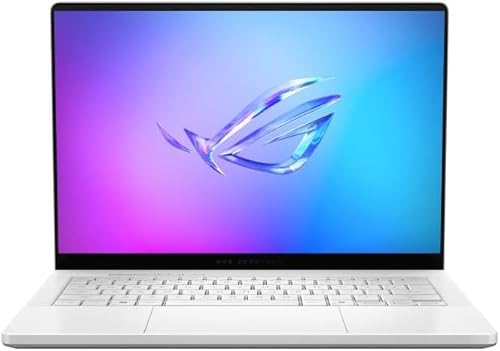
ASUS ROG Zephyrus G14 (RTX 5080) — Best overall
The Zephyrus G14 has spent several generations as the answer to a question the industry kept fumbling — how much gaming power fits in a laptop you would genuinely carry every day — and this configuration is its most complete statement yet. An RTX 5080 is flagship-tier graphics, the sort of card that drives demanding games at high settings without negotiation, and it sits here inside a fourteen-inch aluminium body that disappears into a messenger bag. The 3K OLED screen at 120Hz completes the plugged-in picture: deep contrast for night scenes, colour that flatters creative work, and enough resolution that text stays crisp during the working hours between sessions.
The battery story rests on the AMD Ryzen AI 9 HX 370 beneath it. That platform earned its reputation by doing light work frugally — its integrated Radeon graphics handle browsing, documents, video and even modest gaming without waking the RTX card at all, and the G14’s graphics switching hands tasks between the two automatically. The model’s battery capacity, around 73 watt-hours, is generous for a fourteen-inch chassis, and combined with the efficient silicon it produces the longest unplugged workdays in this roundup’s smaller class. None of that makes it a battery-gaming marathoner — push the 5080 hard off the charger and the same physics apply as everywhere — but as a machine that games seriously at a desk and then works all day away from one, nothing else here balances the two lives as evenly.
Ownership details reinforce the case. Thirty-two gigabytes of memory and a two-terabyte SSD are the configuration to have: modern games are storage-hungry, and this build postpones the delete-something-to-install-something ritual for a long while. The keyboard and speakers are strong for the size class, the port selection covers a docked desk without dongle gymnastics, and the Platinum White finish shrugs off the fingerprints that darker gaming laptops collect. It is the most expensive route into this guide’s smaller machines, and the premium buys the whole package rather than a single headline part.
- Processor: AMD Ryzen AI 9 HX 370
- Graphics: NVIDIA GeForce RTX 5080
- Display: 14-inch 3K OLED, 120Hz
- Memory and storage: 32GB RAM, 2TB SSD
- Battery note: Around 73Wh in a 14-inch chassis, with automatic graphics switching
Strengths
- Strongest graphics card in this guide inside the most portable body
- Efficient AMD platform gives the integrated GPU real work to do all day
- Generous memory and storage configuration needs no early upgrades
Trade-offs
- Flagship pricing for the size class
- Fourteen inches is a small canvas for split-screen work
- Memory is not user-upgradeable, so the configuration must be right at purchase
Best for: players who travel weekly and refuse to leave real gaming power at home.
Not suited for: desks where a large external monitor does all the displaying and portability earns nothing.

Razer Blade 14 (RTX 5070) — Best premium
The Blade 14 is what happens when a gaming laptop is designed by people who also envy ultrabooks. Its CNC-milled aluminium unibody is the slimmest in this guide, the fit and finish closer to a premium business machine than to the glowing plastic the category is known for, and yet inside sits an RTX 5070 with thirty-two gigabytes of DDR5 memory and a terabyte of storage. The 3K OLED display refreshes at 120Hz, and Razer’s per-key Chroma lighting remains available for those who want it — and, mercifully, easy to switch off for those presenting in a boardroom an hour later.
Endurance comes from the same AMD direction as the G14: a Ryzen AI 9 365 whose integrated graphics are genuinely capable, letting the RTX 5070 rest through office work, study and streaming. Razer quotes the slimmest chassis in the class, and slim chassis constrain battery capacity, so the Blade’s unplugged life is best described as strong for its size rather than the longest here in absolute terms — the trade is deliberate, exchanging some capacity for a body that slips into bags other gaming laptops bulge out of. For the buyer whose laptop crosses a campus or a city daily, that trade is often the right one, and the Blade’s USB-C charging support adds travel flexibility on top.
What the premium buys beyond thinness is cohesion. The keyboard feels engineered rather than assembled, the trackpad is large and precise, the speakers hold their own, and the whole machine carries itself like a single object instead of a kit of parts. It will not match the G14’s graphics tier, and Razer’s pricing asks a lot for the privilege of the badge and the build. But as a single laptop for work, travel and play — the machine this entire category promises — the Blade 14 remains the most polished interpretation of the idea.
- Processor: AMD Ryzen AI 9 365
- Graphics: NVIDIA GeForce RTX 5070
- Display: 3K OLED, 120Hz
- Memory and storage: 32GB DDR5 RAM, 1TB SSD
- Battery note: Capacity traded slightly for the slimmest chassis here; efficient AMD platform underneath
Strengths
- Finest build quality and thinnest body in the roundup
- OLED screen and strong speakers flatter both games and film
- Passes as a professional laptop in rooms where gaming styling would not
Trade-offs
- Premium pricing well above its component list
- One graphics tier below the G14’s flagship card
- Slim chassis leaves less thermal headroom on the hottest days
Best for: professionals who game seriously and carry their laptop into rooms where appearance counts.
Not suited for: value hunters counting frames per unit of currency.

Lenovo Legion 5a (RTX 5060) — Best mid-size value
Lenovo’s Legion line has always been the pragmatist’s gaming brand, and the 5a shows why. The screen grows to 15.3 inches with a WQXGA resolution and 165Hz refresh — a combination that gives strategy games and shooters room to breathe while keeping text work comfortable — and the RTX 5060 behind it is the sensible modern card: current-generation features, credible performance at this panel’s resolution, and a power appetite modest enough that the machine’s unplugged behaviour stays civilised. The AMD Ryzen 7 250 keeps the platform on the efficient side of the ledger for everyday work.
Sixteen gigabytes of memory and a terabyte of storage are the honest mainstream configuration, adequate for today’s libraries and easily the spec most buyers actually need. Where the Legion earns its place in a battery-focused guide is Lenovo’s software discipline: its power modes are legible, the quiet and balanced profiles genuinely restrain the hardware, and the machine defaults to integrated graphics for desktop work rather than keeping the RTX card idling warm. A laptop this size will never be the traveller’s first choice, but for the student whose machine moves between dorm desk, library and seminar room, the endurance is entirely workable and the gaming ceiling far higher than the price tier suggests.
The build follows Legion tradition — sturdy, understated in black, with a port selection that remembers Ethernet-era practicality better than most. It lacks the OLED glamour of the two machines above it, and its panel, while fast and sharp, is the conventional route rather than the showpiece. Judge it as the field’s centre of gravity: everything competently done, nothing oversold, and a battery story built on efficient parts and sensible defaults rather than on a giant cell.
- Processor: AMD Ryzen 7 250
- Graphics: NVIDIA GeForce RTX 5060, 8GB
- Display: 15.3-inch WQXGA, 165Hz
- Memory and storage: 16GB RAM, 1TB SSD
- Battery note: Endurance built on efficient silicon and restrained power profiles
Strengths
- Screen size and refresh hit the mainstream sweet spot
- Current-generation graphics without flagship pricing
- Power modes that visibly change the machine’s manners
Trade-offs
- No OLED panel at this tier
- Sixteen gigabytes is adequate rather than future-proofed
- Too bulky to be an effortless daily carry
Best for: students and home players who game at one desk but study and work all over the building.
Not suited for: commuters who feel every extra hundred grams by the evening train.

ASUS TUF Gaming A14 — Best compact value
The TUF A14 is the value pick with an unusually strong argument: it runs the same AMD Ryzen AI 9 HX 370 platform as the flagship Zephyrus G14 above. That means the efficient integrated graphics, the responsive everyday performance and the modern AI-era silicon are all present; what steps down is the discrete card, an RTX 4060, and the fit-and-finish tier. For a great many players that exchange is shrewd. The 4060 remains a capable card for 1080p and 1440p-class gaming, the 14-inch WQXGA screen refreshes at 165Hz, and the money saved against the G14 buys a lot of games.
Battery behaviour is where the shared platform pays off twice. Off the charger, the A14 leans on the same frugal integrated GPU as its expensive sibling, and its battery capacity is in the same generous class for a fourteen-inch machine, so the working day away from a socket looks much like the G14’s even though the gaming ceiling sits lower. TUF’s military-inspired durability positioning is more than a sticker here — the chassis feels built to be thrown in a bag daily, hinges and corners included, which suits the student and junior-professional lives this price tier actually lives.
The compromises are visible if you look for them: the design language is plainer, the materials less jewellery-like, the screen a fast IPS-class panel rather than OLED. Sixteen gigabytes of LPDDR5X memory and a terabyte of PCIe Gen 4 storage match the mainstream, and Wi-Fi 6E keeps networking current. Nothing about the A14 pretends to be a flagship, and that honesty is its charm — it is the compact gaming laptop for buyers who would rather spend the difference on their library than on aluminium.
- Processor: AMD Ryzen AI 9 HX 370
- Graphics: NVIDIA GeForce RTX 4060
- Display: 14-inch WQXGA 16:10, 165Hz
- Memory and storage: 16GB LPDDR5X, 1TB PCIe Gen 4 SSD
- Battery note: Same efficient platform as the G14; endurance is a genuine strength, not a token
Strengths
- Flagship-grade processor platform at a mid-tier price
- Durability-first build suits daily bag life
- Unplugged manners inherited from the efficient Ryzen AI line
Trade-offs
- RTX 4060 sets a lower ceiling for the newest titles at native resolution
- Plainer materials and styling than the Zephyrus
- No OLED option in this configuration
Best for: students who game nightly and haul the same machine to every lecture.
Not suited for: players set on maximum settings at high resolution for years to come.

MSI Stealth 16 AI+ — Best thin step-up
The Stealth 16 AI+ is here because its smaller sibling could not be. The Stealth 14 had no clean listing in this check, so the sixteen-inch Stealth takes the slot — and makes a case of its own once you look at the screen. A 16-inch QHD+ OLED running at 240Hz is a rare combination: OLED contrast and colour with a refresh rate usually reserved for esports panels. Behind it, an Intel Core Ultra 9 processor and RTX 5070 Ti graphics give the machine genuine high-end reach, and thirty-two gigabytes of DDR5 memory with a terabyte NVMe drive keep the rest of the specification from bottlenecking the headline parts.
MSI’s Stealth line exists to hide gaming hardware inside a chassis that reads as a slim workstation, and this generation continues the trick — dark, restrained, thin enough that the RTX 5070 Ti inside surprises people. The battery angle is the size dividend: a sixteen-inch slim chassis has room for a substantially larger cell than any fourteen-inch machine here, and Intel’s Core Ultra platform has matured into respectable efficiency for light work, handing documents and browsing to its integrated graphics and efficiency cores. Wi-Fi 7 future-proofs the networking. The result is the guide’s best answer for the buyer who wants the big screen and the long day in the same machine, accepting that sixteen inches will always be a deliberate carry.
Two cautions belong in the record. Thin-and-powerful still means fans with a job to do under full gaming load, and OLED owners should let brightness breathe on white-document days if they want the longest unplugged stretch. Neither dents the central appeal: this is the step-up for someone who found the fourteen-inch picks cramped, wants OLED without surrendering refresh rate, and still expects the laptop to behave itself through a conference day.
- Processor: Intel Core Ultra 9 (per listing configuration)
- Graphics: NVIDIA GeForce RTX 5070 Ti
- Display: 16-inch QHD+ OLED, 240Hz
- Memory and storage: 32GB DDR5, 1TB NVMe SSD
- Battery note: Larger chassis makes room for a larger cell; Core Ultra efficiency cores handle light work
Strengths
- OLED at 240Hz is a combination few rivals offer at any size
- RTX 5070 Ti gives real headroom above the mid-field
- Slim, sober styling travels into professional settings unnoticed
Trade-offs
- Sixteen inches is a committed carry despite the thin frame
- Understated design leaves the gaming-flair crowd cold
- OLED brightness discipline is needed for the longest battery days
Best for: creators and players who split time between a big beautiful screen and rooms away from their desk.
Not suited for: ultralight purists for whom fourteen inches is already the ceiling.

Lenovo Legion 5 16″ — Best big-screen
Every roundup needs its heavyweight, and the sixteen-inch Legion 5 is this one’s — included not despite its size but because of what the size buys. Intel’s Core Ultra 9 275HX is an HX-class processor, the desktop-leaning end of mobile silicon, paired with RTX 5060 graphics, thirty-two gigabytes of DDR5 memory and a terabyte of NVMe storage. The 16-inch WQXGA panel runs at 240Hz, fast enough that the screen will never be the reason a competitive player loses a frame fight. Gigabit Ethernet and Wi-Fi 7 both appear, a pairing that respects how seriously this machine takes its desk.
The battery framing must be honest: HX silicon is bred for plugged-in throughput, and this Legion will not sip power like the AMD fourteen-inchers on a light-work day. What it offers instead is a large battery in a large chassis and power profiles that can rein the hardware in when the day demands mobility — enough for meetings, classes and a café session between desk stretches, which is the realistic mobility pattern of a machine like this. Buyers who need eight unplugged hours should look up the page; buyers whose laptop lives on a desk but relocates weekly — to a friend’s house, a family home, a LAN weekend — get the endurance they actually need plus the strongest processor here.
As an ownership proposition it is the traditional Legion formula at full size: a deep port selection, a keyboard with room to spread out, cooling that prioritises sustained performance over silence, and a build that feels like it expects years of service. It is the least portable laptop in this guide and the most at home being a desktop that occasionally travels — a legitimate answer to the battery question for anyone whose “away from the wall” is measured in hours between desks rather than days between charges.
- Processor: Intel Core Ultra 9 275HX
- Graphics: NVIDIA GeForce RTX 5060, 8GB GDDR7
- Display: 16-inch WQXGA, 240Hz
- Memory and storage: 32GB DDR5, 1TB NVMe SSD
- Battery note: Big-chassis cell and restraining profiles; endurance is the supporting act, not the headline
Strengths
- Strongest processor in the guide for heavy multitasking and content work
- 240Hz panel keeps competitive play honest
- Full-size port selection including wired Ethernet
Trade-offs
- Heaviest and least bag-friendly machine here
- HX silicon drinks deeper on battery than the AMD picks
- Fans prioritise performance, and you will hear about it under load
Best for: desk-based players who relocate weekly and want desktop manners with a battery safety net.
Not suited for: all-day unplugged workers — the fourteen-inch picks serve that life far better.
Which of These Machines Keeps Its Manners Longest Once the Charger Stays Home?
| Pick | Screen | Graphics | Endurance character |
|---|---|---|---|
| ROG Zephyrus G14 | 14″ 3K OLED 120Hz | RTX 5080 | The complete split personality: flagship play plugged in, longest small-machine workdays unplugged |
| Razer Blade 14 | 3K OLED 120Hz | RTX 5070 | Strong for its slimness; capacity traded for the thinnest body here |
| Legion 5a | 15.3″ WQXGA 165Hz | RTX 5060 | Steady mainstream endurance from efficient parts and restrained defaults |
| TUF Gaming A14 | 14″ WQXGA 165Hz | RTX 4060 | G14-class unplugged behaviour at a friendlier tier |
| Stealth 16 AI+ | 16″ QHD+ OLED 240Hz | RTX 5070 Ti | Big-cell advantage in a slim frame; brightness discipline rewards the owner |
| Legion 5 16″ | 16″ WQXGA 240Hz | RTX 5060 | Hours between desks rather than days between charges |
How Do You Stretch a Gaming Laptop Through a Full Travel Day?
Start the night before: charge to full, then open the manufacturer’s control software and confirm the machine will run on integrated graphics for desktop work. Every pick in this guide can do this, and it is the single largest endurance lever you control — a discrete GPU idling awake can halve a light-work day. While you are there, set the battery or balanced profile as the unplugged default so the processor stops chasing burst clocks for email.
At the airport or café, treat the screen as the second lever. Dropping refresh rate from 240Hz or 165Hz to 60Hz on battery is invisible in documents and spreadsheets and meaningfully cheaper in power; OLED owners gain further by lowering brightness a few notches and using dark themes in applications that offer them. Close the game launchers and updaters that idle in the system tray — they wake hardware you are trying to keep asleep — and download films, playlists and game updates before you leave rather than streaming them over power-hungry radios all day.
Pack a USB-C charger even if your laptop ships with a big proprietary brick. Several machines here accept USB-C power at reduced wattage: not enough to game at full tilt, but plenty to hold charge during work or refill the battery during a layover from whatever socket or power bank is available. Finally, if a session truly matters — the presentation, the exam, the tournament final — plug in for it. Battery discipline is for the hours around the moments that count, and no endurance strategy beats a wall socket for the main event.
Why Does the Graphics Switch Matter More Than Battery Size?
A modern discrete GPU at idle can consume as much power as an entire thin-and-light laptop doing office work. That single fact explains most of the real-world endurance gap between gaming laptops with similar battery capacities. Machines with a MUX switch or well-implemented automatic graphics switching can route the display through the integrated GPU and power the discrete card fully down; machines stuck with the discrete card awake — or with software that keeps waking it — burn their larger batteries just standing still. This is why the reviews above keep returning to platform behaviour rather than raw watt-hours: capacity is the size of the tank, but graphics switching decides whether the engine is idling at every red light.
The AMD Ryzen AI platforms in the G14, Blade 14, TUF A14 and Legion 5a pair that switching with integrated graphics strong enough to be useful in their own right — light esports titles, older games and creative previews all run acceptably without touching the RTX card. Intel’s Core Ultra machines answer with their own Arc integrated graphics and efficiency-core scheduling. Either way, the buying lesson is the same: confirm the pick can live on its integrated GPU, and learn where that setting lives in its software on day one.
Which Habits Quietly Shorten a Gaming Laptop’s Battery Life?
The first is treating manufacturer runtime figures as a promise rather than a best-case measurement. The second is leaving the discrete GPU selected as the global default, a setting some owners enable chasing smoother desktop animations and then forget. The third is brightness bravado: running an OLED or a 240Hz panel at full brightness and full refresh on battery because the defaults carried over from the desk. Each habit is individually small; together they can turn the longest-legged machine in this guide into an ordinary one.
Two more mistakes are about buying rather than using. Choosing an HX-class processor for a life lived mostly unplugged mismatches silicon to reality — HX parts are magnificent plugged in and merely thirsty away from the wall. And ignoring charging flexibility leaves travellers stranded by a forgotten proprietary brick, when a USB-C-capable machine could have borrowed power from almost anything. The picks above were chosen so that none of these mistakes is forced on you — but the settings and habits remain yours to keep.
How Does Battery Capacity Translate Across These Six Machines?
Watt-hours are the honest currency of this category, and even they need translating. A watt-hour figure tells you the size of the tank; it says nothing about the engine’s thirst, which is set by the platform, the screen and the workload. The fourteen-inch AMD machines in this guide pair mid-sixties-to-seventies-class watt-hour capacities with the frugal end of modern silicon, which is why their light-work endurance leads the field despite tanks no larger than their rivals’. The sixteen-inch machines carry bigger cells into battle against bigger screens and, in the Legion’s case, an HX processor whose thirst is structural. Comparing raw capacity across these classes misleads; comparing capacity against platform appetite is the whole skill of shopping this category.
There is also a regulatory footnote travellers should know: aviation rules cap spare lithium batteries and effectively standardise laptop cells just under one hundred watt-hours, which is why even the largest gaming laptops cluster below that line. Every machine here is carry-on legal by design. The practical consequence is that no manufacturer can simply solve endurance with a bigger battery — the ceiling is fixed — so efficiency engineering, of the kind the Ryzen AI and Core Ultra platforms represent, is the only road forward. That is precisely the road this guide’s picks were chosen from.
When you compare a future model against these six, run the same translation: find the capacity, identify the platform’s reputation at light load, check whether the discrete GPU can fully sleep, and weigh the screen’s size, brightness class and refresh rate as a power cost. Four honest inputs beat any single advertised runtime figure, because they describe your workload rather than a laboratory’s.
What Settings Should You Change in the First Week of Ownership?
Each of these machines ships with its personality set by someone else’s priorities, and an hour of configuration in week one pays back for years. Start in the manufacturer’s control software — Armoury Crate on the ASUS pair, Razer Synapse on the Blade, Legion Toolkit or Vantage on the Lenovos, MSI Center on the Stealth — and do three things. Set the unplugged profile to the balanced or silent mode rather than performance. Confirm the graphics mode is the automatic or hybrid setting, so integrated graphics own the desktop. And enable the battery charge limit, typically eighty percent, if the machine lives mostly on a desk charger: a gaming laptop that spends its life plugged in ages its battery on a schedule its owner can slow with one toggle.
Then move to Windows itself. In the display settings, create the habit of dropping refresh rate on battery — some of these machines can automate it per power source, and where they cannot, the manual switch is worth the ten seconds on travel days. In the power settings, let the screen sleep quickly and the machine hibernate rather than idle through the night in a bag. Review the startup list with suspicion: game launchers, updaters and RGB utilities all wake hardware, and each one you evict from the boot sequence is power returned to the work you bought the machine for.
Finish with the peripherals. A USB-C charger that lives in the travel bag, rated for the highest wattage your pick accepts over USB-C, turns every café socket and loaned cable into usable range. A small mouse you actually like prevents the trackpad compromises of a long train-table session. And a backup of the recovery image, made while the machine is new and clean, is the cheapest insurance in computing — the week-one hour is complete, and the laptop is now configured like yours rather than like a showroom’s.
How Do You Game on Battery Without Wasting the Experience?
Unplugged gaming is a genre with its own rules, and played by them it is genuinely enjoyable rather than a compromise endured. Choose the library first: indie titles, older favourites, strategy and management games, and anything turn-based sip power in a way the latest cinematic shooters never will. The integrated graphics in these machines — especially the capable Radeon in the AMD picks — run that library natively and well, which keeps the RTX card asleep and the session long.
Then set the frame budget. Capping a game at thirty or sixty frames per second on battery is the single kindest setting you can give the cell, because an uncapped engine will spend every watt available chasing frames your eyes barely register on a small screen. Lower the resolution a step before lowering the settings that carry the game’s look — texture and shadow quality survive downscaling better than the reverse — and let the manufacturer’s battery-boost features, where offered, do their quiet arithmetic in the background.
Cloud gaming deserves its sentence: streamed over good Wi-Fi, a service that renders the game remotely turns your laptop into a thin client drawing a fraction of native power, at the cost of latency that suits some genres and ruins others. On a train with strong connectivity it can be the longest gaming session of the trip. The through-line of all three strategies is the same — on battery, you are spending a fixed purse of watt-hours, and the skill is choosing what they buy.
What Happens to a Gaming Laptop’s Battery After Two Years?
It holds less, and how much less is substantially in the owner’s hands. Lithium cells age by cycles and by time spent at extremes — held at full charge in a hot chassis is the hardest life a battery can live, and it is precisely the life of a gaming laptop used as a desktop replacement. The mitigations are the ones this guide keeps recommending because they work: the charge limit for desk-bound machines, profiles that keep the discrete GPU asleep during light work, and brightness habits that reduce the depth of each day’s discharge. Owners who apply them meet year three with a battery that still performs recognisably; owners who never open the settings meet it with a machine that has quietly become desk-bound.
Replacement is the other half of the story, and here the field divides by design philosophy. The Legion and TUF lines descend from serviceable traditions — batteries that a competent technician, or a confident owner with the service manual, can replace when the cell finally fades. The thinnest machines, the Blade above all, trade some of that accessibility for their figure, and their owners should budget for a professional battery service in the machine’s later years. Neither path is wrong; both are cheaper than a new laptop, and knowing which one your pick follows is part of buying it honestly.
Which Pick Suits Which Kind of Player, Honestly?
Run the field against five real owners. The travelling consultant who games in hotels wants the G14: flagship power that fits the carry-on, an OLED for the evening film, and a working day on battery between the client site and the airport. The design-conscious professional who plays after hours wants the Blade 14, because it is the only machine here that looks as good in the meeting as it performs in the game, and its owner will pay for that coherence knowingly. The student with one machine for everything wants the TUF A14 or the Legion 5a — the TUF if the bag matters, the Legion if the screen does — because both refuse to make their owner choose between the library and the lobby match.
The creator-player, editing video by day and gaming by night, wants the Stealth 16 AI+: the big OLED at 240Hz serves timelines and titles alike, and its battery behaves through the conference days that punctuate the creative ones. The home-based competitor with a weekly LAN habit wants the big Legion, because its owner’s travel is measured in journeys between desks, where the HX processor and 240Hz panel are worth more than sipping efficiency. Five owners, five correct answers, and not one of them is “the most expensive one” by default — the matching is the skill this category demands.
How Do Heat and Noise Behave When the Room Is Not a Gaming Den?
A gaming laptop’s second personality includes its acoustics, and the owners who share rooms, libraries and late-night households feel them directly. Under full gaming load every machine here makes fan noise — moving that much heat is physics, not a design flaw — but the characters differ: the thin machines pitch higher, the big Legion moves more air at a lower register, and all of them quieten dramatically the moment the workload drops to the integrated-graphics world of work and study. The silent-profile settings in each manufacturer’s software exist precisely for the shared-room hours, trading a slice of performance for manners.
Heat follows the same split. Chassis warmth under gaming load concentrates where the cooling lives and is a lap-gaming argument nobody wins; on a desk, all six are composed. For the battery-focused owner the relevant point is subtler: heat is wasted electricity made audible, and the efficient profiles that keep these machines quiet in a library are the same ones stretching the cell. Silence and endurance are not two features in this category. They are one feature, described twice.
What Should You Check on the Listing Before the Box Is Sealed?
Gaming laptops are configuration mazes, and the listing check is the map. Confirm the exact graphics card first — this category sells near-identical chassis with different RTX tiers, and the difference between a 5060 and a 5070 Ti build of the same name is the difference between two of this guide’s reviews. Confirm memory and storage second, in the configuration actually selected rather than the range the page advertises. Confirm the screen third, because several of these model lines ship with alternative panels at different refresh rates, and the panel in the box is the one you will look at for years.
Then the quieter checks: the wattage of the included charger, which tells you how the machine was meant to live; the warranty’s plain terms; and the return window, which is the honest buyer’s insurance against the one specification no listing conveys — how the keyboard feels under your own hands. Run the checklist against the specification boxes in this guide and the machine that arrives is the machine reviewed. In a category this expensive, ninety seconds of verification is the highest-value time in the entire purchase.
How Does This Field Compare With a Desktop Plus a Cheap Laptop?
The alternative deserves its hearing: a gaming desktop and a basic travel laptop cost, together, roughly what the flagship picks here cost alone, and the desktop will out-game them all. What the two-machine strategy cannot do is be in the same place at the same time. The game library, the saves, the work files and the machine itself split across two devices, and the owner becomes the integration layer — syncing, choosing, leaving the wrong laptop at home. The six machines in this guide exist for owners who refuse that split: one library, one desk setup, one bag, the full power available wherever the machine happens to be.
The honest boundary is frequency. A player who games at home ninety-five percent of the time and travels twice a year may rationally take the desktop’s power and rent the road’s inconvenience. A player whose life is genuinely distributed — terms away, weekly travel, a home that is also an office that is also a LAN venue — is exactly who the battery-capable gaming laptop was invented for. This guide has argued their case throughout; the desktop keeps its own counsel, and both can be right in different houses.
How Do You Read a Gaming Laptop Review — Including This One — With a Cold Eye?
Begin by separating the three kinds of sentence a review contains. There are specification sentences, which can be verified against the listing and should be — this guide’s specification boxes exist to be checked, not trusted. There are mechanism sentences, which explain why a machine behaves as it does: graphics switching, platform efficiency, thermal design. These are the sentences that survive contact with your own workload, because they describe causes rather than outcomes. And there are outcome sentences — endurance impressions, noise impressions — which are honest only when framed as tendencies, as this guide has framed them, because outcomes depend on the owner’s settings and habits more than on the hardware.
Apply the same cold eye to what reviews omit. A roundup that prints runtime hours without describing the test is selling certainty it does not possess. A review that never mentions the listing’s condition — new, renewed, marketplace — is omitting the fact most likely to change what arrives in the box; this guide excluded a famous model over exactly that fact, and said so in its introduction. And a comparison that ranks by benchmark alone has answered a question about desks, not about the battery life in its title. Read for mechanisms, verify the specifications, discount the certainties — and the six machines above will still be standing when the reading is done, which is the test any guide in this category should invite.
A Short Word on Warranties for Machines That Travel
Gaming laptops that live in bags meet the world harder than desk machines do, and the warranty deserves the same configuration care as the memory. Register the machine in week one, photograph the serial number, and read the accidental-damage terms before deciding whether the extension earns its price — for a laptop carried daily, it often does, and for the desk-bound Legion it often does not. Keep the original charger even after buying travel spares, since support conversations go more smoothly with the factory equipment present. Small print, attended to once, is the difference between a bad day and a bad month when a travelling machine meets a hard floor.
Final Recommendation
For most buyers, the ROG Zephyrus G14 in this RTX 5080 configuration is the machine this category has been promising for years: flagship gaming at the desk, genuine all-day working endurance away from it, and no apology required in either life. The Razer Blade 14 is the connoisseur’s alternative — slightly less graphics muscle, the finest body in the field — while the TUF Gaming A14 delivers the same efficient platform and most of the experience for considerably less commitment. The Legion 5a holds the sensible middle, the Stealth 16 AI+ serves those who want OLED size without surrendering mobility entirely, and the big Legion 5 is the desktop-hearted option for travel measured in hours.
Whichever you choose, learn its graphics-switching settings in the first week and let the machine’s quiet personality become the default. A gaming laptop that only performs at a desk is a desktop with extra steps; the six above earn their batteries.
Frequently Asked Questions
Can any gaming laptop actually play demanding games all day on battery?
No — and be suspicious of any source claiming otherwise. A high-end graphics card under full load draws power at a rate that empties even a large laptop battery quickly, and most machines also reduce performance on battery to protect the cell. These laptops are built for serious gaming plugged in and long, productive days unplugged, with lighter gaming available away from the wall.
Does a bigger battery always mean longer life away from the charger?
Not on its own. Battery capacity sets the ceiling, but the processor platform, the screen’s brightness and refresh rate, and whether the discrete graphics card can fully sleep decide how close you get to it. An efficient machine with a mid-sized battery routinely outlasts a thirsty one with a bigger cell.
Is OLED bad for battery life?
OLED power draw depends on what is on screen: dark scenes and dark themes sip, while full-screen white documents at high brightness draw hard. Owners who lower brightness slightly and use dark modes where available find OLED perfectly compatible with long days; the panels also reward you with the best contrast in this guide.
Should I choose AMD or Intel for a battery-focused gaming laptop?
Both camps field efficient platforms now. The AMD Ryzen AI machines here have an excellent reputation for light-load frugality, while Intel’s Core Ultra line counters with strong integrated graphics and efficiency cores — the HX-class Intel chip in the big Legion is the exception, tuned for plugged-in power. Judge the specific platform, not the badge.
Can I charge these laptops from a power bank?
Several accept USB-C charging at reduced wattage, which a high-output power bank can supply for work use and slow refills. It will not sustain full-power gaming, and wattage support varies by model, so confirm the listing details for the specific pick before relying on it for travel.
Why is there no HP Omen in this roundup?
The Omen Transcend 14 listing found during this check was a renewed unit rather than new retail stock, and this guide links only to verified listings. The model line is a legitimate contender in the category; it simply did not have a listing we were willing to send readers to on the day the pool was built.
Related Guides
Keep exploring the laptop shelf: our roundup of the best inexpensive lightweight laptops covers the non-gaming travellers, the best laptops for remote work judges machines by webcam and dock manners, and our guide to the best ASUS touchscreen laptops follows the 2-in-1 branch of the family tree.
Related guides
- Best 4K UHD HDR HDMI Extenders: 4K60, Long-Run and 4K120 Kits Compared
- Best 25–35 Inch Monitors With Lowest Display Lag: An Honest Ranking Without Invented Numbers
- Best Color Product Label Printers: Six Desktop Machines for Short-Run Product Labels
- Best Enterprise SATA SSDs: Endurance Classes, Power-Loss Protection and Fleet Sense



[…] reading around the student shelf: our Chromebook roundup for students covers the lighter operating-system route for earlier years, the best laptops for remote work […]