What's inside
- Where to buy
- Key Takeaways
- Quick Picks
- How did we choose the best 144Hz TN gaming monitors?
- Which 144Hz TN gaming monitors still deserve a place on your desk?
- How do the best 144Hz TN gaming monitors compare?
- Why did TN rule competitive gaming for so long?
- TN or fast IPS: how should a buyer in this decade decide?
- How do you set up a TN gaming monitor for its best motion?
- Which buying mistakes do 144Hz TN gaming shoppers keep making again and again?
- How do you inspect a used TN panel before paying?
- What does backlight strobing actually do to the image?
- How do shadow-lifting features change the competitive picture?
- Which genres still reward TN most?
- Why did tournaments standardise hardware, and what does it mean for you?
- How do you live with a TN panel day to day?
- When should a TN owner finally upgrade, and to what?
- What about consoles and casual play on a TN panel?
- How does TN handle brightness, flicker, and long sessions?
- What is the total cost of the TN route, honestly counted?
- What should you test in the first evening with a TN gaming monitor?
- How does input lag fit into the TN story?
- Why do so many TN panels end up as second screens?
- What does the TN era leave behind for monitor design?
- How should a parent, coach, or club choose from this class?
- What is the one-sentence verdict on each kind of TN buyer?
- Final Recommendation
- Frequently Asked Questions
- Related Guides
As an Amazon Associate I earn from qualifying purchases. This post may contain affiliate links at no extra cost to you.
gizmoverdict.com is reader-supported. When you buy through links on our site, we may earn an affiliate commission.
Where to buy
This is a guide about a technology in the middle of being replaced, and it will not pretend otherwise. The best 144hz tn gaming monitors earned their throne honestly: for a decade, a TN panel was simply the fastest thing a civilian could buy, with pixel transitions so quick that motion stayed legible at speeds where every other technology smeared. Tournament stages standardised on 24-inch TN screens at 144Hz, a generation of players built their aim on them, and BenQ’s ZOWIE line — the source of both verified picks in this guide — became the closest thing esports has to an official instrument. What has changed is the competition: modern fast IPS panels now approach TN’s motion clarity while keeping the colour and viewing angles TN never had, and they have absorbed most of the market’s shelf and most of its future. TN’s remaining kingdom is real but specific, and this guide maps it without nostalgia and without contempt.
The verified centre of the guide is the BenQ ZOWIE XL2411P: a 24-inch TN panel at a genuine 144Hz, 1080p, with Black eQualizer and the esports-first, decoration-free design the line is known for — the classic itself, still the reference against which the phrase “144Hz TN” is defined. Beside it sits its bigger sibling, the ZOWIE XL2746S, included with its true specification stated everywhere: a 27-inch TN panel at 240Hz, which is above this guide’s standard, with DyAc+ motion technology — a pick for the player who reads this guide and decides to buy past its headline rather than at it. The remaining four picks are prose-only descriptions of the classic TN shapes that defined the class — from ASUS, ViewSonic, AOC, and the 24.5-inch generation — because the honest way to shop a thinning category is to know its shapes cold and verify the individual listing when one surfaces.
Who is TN still for? The player whose priority list begins and ends with motion clarity per unit of money; the competitor who trains on the same panel family the tournaments used; the buyer of the deep secondhand market, where classic TN panels change hands at prices fast IPS cannot match; and the strobe enthusiast, because TN’s backlight-strobing implementations remain among the cleanest ever shipped. Who is it no longer for? Anyone who watches, creates, shares the screen, or simply looks at colour for a living. The sections below argue both sides in full, because a technology this storied deserves a fair trial rather than a eulogy or a sales pitch.
Key Takeaways
- The BenQ ZOWIE XL2411P is the verified classic: 24-inch TN, genuine 144Hz, 1080p, built for esports and nothing else first.
- The ZOWIE XL2746S is a 240Hz TN panel — above this guide’s 144Hz standard — included for buyers stepping past the headline, and labelled so everywhere.
- TN’s surviving advantages are motion clarity, strobing quality, and price, especially secondhand; its costs are viewing angles and colour shift, which no setting fixes.
- Fast IPS has taken the mainstream: most buyers who do not specifically need TN’s last few percent of clarity should read this guide and then buy IPS.
- The other four picks are prose-only classic shapes — know them, verify any listing’s panel type and refresh in its specification table, because TN lookalikes and mislabels are common.
- On any TN panel, sit centred and at the panel’s intended height: the technology’s angles punish a slouched or off-axis viewer more than any rival.
Quick Picks
| Pick | Badge | Why it is here |
|---|---|---|
| BenQ ZOWIE XL2411P | Verified — the true 144Hz TN classic | The tournament-bred reference: 24-inch TN at a genuine 144Hz with Black eQualizer and zero decorative ambitions. |
| BenQ ZOWIE XL2746S | Verified — 240Hz, above the 144Hz standard | The step-up sibling with DyAc+ strobing for players buying past the headline on purpose. |
| ASUS 24-inch TN 144Hz classic class | Prose-only — the VG248-era shape | The other founding shape of the category, common and cheap on the secondhand market. |
| ViewSonic 24-inch TN gaming class | Prose-only — the XG240-era shape | The value TN with honest tuning that served a generation of budget competitors. |
| AOC 24-inch TN 144Hz class | Prose-only — the G2590-era shape | The frameless-look TN that brought the class to its lowest new prices. |
| 24.5-inch TN 144Hz esports class | Prose-only — the later tournament size | The slightly larger standard that later tournament desks adopted. |
How did we choose the best 144Hz TN gaming monitors?
Verification first, in a category where it matters unusually much. TN’s decline means listings are old, revisions are many, and marketplace copy is frequently wrong about the two facts that define the class — panel type and refresh rate. Our pool verified exactly two TN monitors, both ZOWIE, and this guide builds outward from them honestly: the four remaining picks are class descriptions, written from the technology’s known behaviour, with explicit instructions for verifying any individual listing before money moves. No ASIN, price, or measurement has been invented for them, and their spec lists describe the class’s typical form rather than a specific unit’s promise.
Judgement then followed the esports brief rather than the general one. Motion clarity outranked colour, strobing quality outranked brightness, and the features that tournament players actually use — shadow lifting, colour vibrance controls, instant mode, a stand that goes where a player’s posture needs it — outranked every lifestyle extra. That ordering is why the ZOWIE design philosophy, which treats speakers and decoration as weight, leads this guide while richer-featured TN shapes follow as context. It is also why the guide keeps returning to the fast-IPS question: a TN pick that cannot state whom it beats IPS for has not earned its place, and each pick section below makes that argument for its shape or concedes the ground.
A final method note: because this class lives increasingly secondhand, the guide treats condition-checking as a selection criterion in its own right. A pick’s value depends on the surviving population’s health — backlights age, and a decade-old tournament panel has lived a life — so the buying sections teach the inspection as carefully as the comparison.
Which 144Hz TN gaming monitors still deserve a place on your desk?

BenQ ZOWIE XL2411P — The true 144Hz TN classic
Every category has a product that is less a model than a definition, and for 144Hz TN it is this one. The XL2411P is a 24-inch TN panel at 1920 by 1080 and a genuine 144Hz, with a 1ms grey-to-grey claim in its listing, Black eQualizer to lift detail out of dark corners, Colour Vibrance controls, and a stand that adjusts the way players actually adjust — height, tilt, swivel, pivot — because ZOWIE’s design brief begins in tournament halls rather than in living rooms. There are no speakers worth naming, no decorative lighting, no lifestyle curves. The monitor is a tool with a screen attached, and its long production life means the tool’s behaviour is understood to the last quirk by the community that competes on it.
In play, the XL2411P’s argument is legibility. Fast pans stay readable; a target crossing a dark background remains a target rather than a rumour; the image’s response to your hand feels unmediated in the way that made TN the competitive default. Black eQualizer deserves its reputation handled carefully: it genuinely reveals opponents in shadowed corners, at the cost of flattening the scene’s intended mood, which is a trade a competitor makes gladly and a cinematic player should refuse. This is the pick for the reader who knows which of those two people they are — and the guide’s structure assumes that if you are still reading a TN guide in the fast-IPS era, you probably are that person.
The costs are TN’s costs, undiluted by this panel’s pedigree. Lean back, stand up, or share the screen and the colour shifts and the contrast inverts its manners, because the technology’s viewing angles are what they were in its glory years: a private window for one centred viewer. Colour accuracy is a working approximation rather than a reference. None of this is a flaw in the unit; it is the physics you are buying, at what is now a very reasonable point in the product’s long life. Buy it centred, buy it for speed, and it remains what it always was — the standard.
- Panel: 24-inch TN, 1920 by 1080
- Refresh: genuine 144Hz, 1ms GTG class per its listing
- Extras: Black eQualizer, Colour Vibrance, full ergonomic stand, flicker-free design
Strengths
- The reference motion clarity of the 144Hz TN class, verified and buyable.
- Tournament-bred features that competitive players actually use.
- A long production life means deep community knowledge and support.
Trade-offs
- TN viewing angles punish any off-centre or shared viewing.
- Colour is an approximation; creators should look at the IPS guides.
- No meaningful speaker or media story — it is an instrument.
Best for: competitive players who want the classic standard itself. Not suited for: media, creation, shared screens, or relaxed viewing angles.
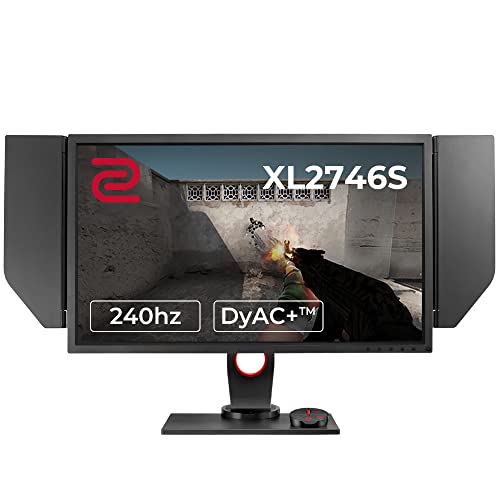
BenQ ZOWIE XL2746S — 240Hz TN with DyAc+, above this guide’s standard
Label first, as this guide insists: the XL2746S runs at 240Hz, not 144Hz. It appears in a 144Hz guide as the deliberate step beyond it — the pick for the reader who came for TN speed, found the classic, and wants the fastest, most refined version of the same philosophy. That philosophy, at this tier, is DyAc+: BenQ’s backlight-strobing technology, which flashes the backlight in sync with the panel’s refresh to erase the eye-tracking blur that even the fastest pixel transitions leave behind. Judged purely as motion clarity per frame, a well-implemented strobe on TN remains one of the most legible images in gaming, and DyAc+ is the implementation the competitive scene knows best.
The panel grows with the ambition: 27 inches of TN at 1080p, which spreads the pixels wider than the 24-inch classic does. For its intended player that trade is correct — targets are larger, the desk-filling presence suits a dedicated gaming station, and pixel density is simply not the currency this purchase is made in — but it must be chosen knowingly, because text on a 27-inch 1080p screen is coarse by modern standards and this monitor will show you that coarseness every time you alt-tab to a browser. The rest of the ZOWIE brief carries over: Black eQualizer, vibrance control, the full stand, the absence of everything that is not about the next round.
Strobing has its own honest costs, and they belong in this section rather than a footnote. DyAc+ trades brightness for clarity, asks for a high and stable frame rate to look its best, and is a single-player technology in the sense that its benefits live at the panel’s full refresh. Players whose systems cannot feed 240 frames per second in their titles should buy the classic above and spend the difference elsewhere; players who can feed it are holding the strongest argument TN still makes, in its most developed form.
- Panel: 27-inch TN, 1920 by 1080
- Refresh: 240Hz — above the 144Hz headline, stated plainly
- Extras: DyAc+ strobing, Black eQualizer, full ergonomic stand
Strengths
- DyAc+ motion clarity is TN’s finest surviving argument, fully realised.
- 240Hz headroom for systems and titles that can feed it.
- Larger targets and presence for a dedicated gaming station.
Trade-offs
- 1080p at 27 inches is visibly coarse for text and desktop work.
- Strobing costs brightness and demands a stable high frame rate.
- Premium pricing for a philosophy fast IPS is busy absorbing.
Best for: serious competitors with high-end systems who strobe and mean it. Not suited for: mixed work desks, or frame rates that live below its demands.
ASUS 24-inch TN 144Hz classic class — Prose-only, the VG248-era shape
If the ZOWIE is the class’s official instrument, the ASUS VG248-era shape is its folk instrument: the 24-inch TN 144Hz monitor that a generation of players actually owned, sold in enormous numbers, and now circulating secondhand in quantities that make it the most likely TN panel a bargain hunter will ever meet. Its historical specification — Full HD, 144Hz, a 1ms-class claim, GamePlus overlays and the gaming furniture of its era — matters less than its population: these panels are everywhere, their failure modes are documented, and their prices on the used market routinely undercut any new fast panel by a margin that reframes the whole TN argument.
Bought new-old-stock or used with the inspection discipline the later sections teach, this shape delivers the essential TN experience — the legibility, the immediacy — at the lowest cost of entry in the guide. Its era shows in the expected places: colour and angles are period TN, the stand and inputs belong to their decade, and a used example’s backlight has lived years that a listing photograph will not confess. Judge the individual unit, not the model name: a clean, bright, evenly lit example is a bargain that embarrasses modern value panels on motion; a tired one is a lesson.
Because this pick is prose-only, the shopping instruction is the content: verify TN and 144Hz in the specific listing’s specification table — the VG248 name acquired suffixes and successors with different panels over the years — test on arrival with the grey and dark-scene checks, and pay the used-market price for the used-market risk, never the new price for the old panel.
- Panel: 24-inch TN class, 1920 by 1080
- Refresh: 144Hz class in its defining specification
- Character: the mass-market classic; deep secondhand population
Strengths
- The cheapest honest route into true TN motion clarity.
- Enormous population means parts, knowledge, and availability.
- Delivers the essential experience without the ZOWIE premium.
Trade-offs
- Used examples vary enormously; inspection is the product.
- Era inputs and furniture belong to their decade.
- Suffixes and successors blur the name — verify the exact unit.
Best for: bargain hunters and second-PC builds willing to inspect. Not suited for: buyers who want a warranty and a sealed box.
ViewSonic 24-inch TN gaming class — Prose-only, the XG240-era shape
ViewSonic’s XG240-era TN panels occupied the honest middle of the classic market: 24-inch TN at 144Hz, FreeSync support in a period when that was still a differentiator, and tuning that owners consistently described as less theatrical than the competition’s — colour that aimed for plausible, response behaviour that did not need taming out of the box. In a class where several brands shipped panels that required an evening of settings archaeology before they looked right, the ViewSonic shape’s out-of-box manners were its identity, and they remain the reason to prefer a clean example today.
For the dual-purpose reader — yes, TN can have one — this was always the TN most tolerable outside games: its colour manners made documents and video merely ordinary rather than actively shifted, provided the viewer sat where TN demands, in the centre. That tolerance has a modern echo: as a second machine’s screen, a child’s first gaming monitor, or a LAN-party panel that travels in a car boot without ceremony, a surviving example of this class earns its keep in ways a fragile flagship never will. Durability, in the long tail of a technology’s life, becomes a feature.
The prose-only cautions are the class cautions, repeated because they are the purchase: confirm the panel type and rate in the listing, expect period inputs, and let the individual unit’s backlight health decide. Among equals on a used shelf, choose the ViewSonic shape when the seller can show it running; its manners reward the demonstration.
- Panel: 24-inch TN class, 1920 by 1080
- Refresh: 144Hz class with adaptive sync in its era’s specification
- Character: honest tuning, out-of-box manners, durable population
Strengths
- The most tolerable classic TN outside pure competition.
- Sensible default tuning that needs little correction.
- Surviving examples make rugged secondary and travel panels.
Trade-offs
- Still TN at the angles — centre seat or colour consequences.
- Period inputs may need adapters on modern laptops.
- Availability is a used-market lottery like the whole class.
Best for: secondary rigs, first gaming monitors, and LAN duty. Not suited for: anyone expecting modern colour or connectivity.
AOC 24-inch TN 144Hz class — Prose-only, the G2590-era shape
AOC’s contribution to the TN era was price pressure with a design accent: the G2590-era shape wrapped a 24-inch-class TN 144Hz panel in a frameless-look shell at prices that repeatedly reset what the class cost new. For a few years it was the answer to a specific forum question — the cheapest legitimate way into 144Hz TN from a recognised brand — and the population it sold into bedrooms and student desks is now the used market’s other great reservoir. Its gaming features were the era’s standard kit, its colour was the era’s standard compromise, and its stand was where the price showed, as stands usually confess.
Read in the present tense, this shape’s role is the disposable-serious panel: fast enough for real competition, cheap enough — now — that a scratch, a move, or a lending is not a financial event. Teams, clubs, school labs, and tournament organisers building a rack of matched practice stations have always understood this arithmetic, and it is why AOC TN panels persist in institutional corners long after the spotlight moved on. A matched set of them, verified and cleaned, is a legitimate esports infrastructure purchase in a way that a single prestige panel is not.
The verification sermon applies with AOC-specific force, because the brand’s model names span TN and IPS siblings that look identical in a thumbnail. The panel-type line in the specification table is the whole purchase. Get it right and the shape delivers exactly what its era promised; get it wrong and you have bought a different technology at a TN price, which is the one genuinely bad outcome in this guide.
- Panel: 24-inch-class TN, 1920 by 1080
- Refresh: 144Hz class in its defining specification
- Character: frameless-look value shape; institutional second life
Strengths
- Historically the lowest legitimate new price for the class; now a used reservoir.
- Matched sets suit clubs, labs, and practice stations.
- Cheap enough to treat as equipment rather than treasure.
Trade-offs
- Model names span panel technologies — verification is everything.
- Stand and finish confess the price immediately.
- Colour and angles are unapologetic period TN.
Best for: institutions, matched practice sets, and strict budgets. Not suited for: buyers who cannot verify a listing’s panel type with confidence.
24.5-inch TN 144Hz esports class — Prose-only, the later tournament size
The last shape records the class’s final refinement before the IPS tide: the move from 24 to 24.5 inches, the size later tournament desks standardised on because it fills a player’s central vision a touch more completely at the same 1080p grid, in panels from several makers with names a listing search will surface. As a class it represents TN at its most considered — the fastest response tuning of the era, strobing options on the flagship examples, stands built for the circuit — produced just as the market’s centre of gravity shifted to fast IPS, which makes clean examples oddly poignant and, for the committed, oddly available.
For the buyer, the 24.5-inch shape is the connoisseur’s used purchase: marginally better presence than the 24-inch classics, the same legibility, and a population small enough that finding a good one feels like sourcing rather than shopping. It is also the shape most likely to be misdescribed by sellers riding the esports vocabulary, so the guide’s verification refrain reaches its final verse here — panel type, native refresh, and strobe behaviour, all from the specification table and a running demonstration where possible, never from the listing’s headline adjectives.
If the shape teaches one lesson, it is that TN did not lose because it got worse. It lost because its rival got nearly as fast while keeping everything TN sacrificed — and a buyer who understands that can shop this class’s remains with clear eyes, paying for the last few percent of clarity only when their game, their seat, and their budget all say the percent matters.
- Panel: 24.5-inch TN class, 1920 by 1080
- Refresh: 144Hz class, with strobing on flagship examples
- Character: the final tournament standard of the TN era
Strengths
- The most considered form of the classic TN proposition.
- Slightly fuller central-vision presence than the 24-inch shapes.
- Availability rewards the patient, knowledgeable hunter.
Trade-offs
- Small population; sourcing takes time.
- Seller descriptions lean on esports adjectives over facts.
- Every TN cost applies, unsoftened by novelty.
Best for: committed TN players hunting the era’s best form. Not suited for: anyone in a hurry, or new to verifying used listings.
How do the best 144Hz TN gaming monitors compare?
| Pick | Panel | Real refresh | Distinction | Honest role |
|---|---|---|---|---|
| BenQ ZOWIE XL2411P | 24-inch TN | 144Hz genuine | Black eQualizer | The verified classic |
| BenQ ZOWIE XL2746S | 27-inch TN | 240Hz | DyAc+ strobing | Above-standard flagship |
| ASUS TN classic class | 24-inch TN | 144Hz class | Mass-market population | Used-market staple |
| ViewSonic TN class | 24-inch TN | 144Hz class | Honest tuning | Secondary and travel duty |
| AOC TN class | 24-inch-class TN | 144Hz class | Value frameless shape | Sets and institutions |
| 24.5-inch TN class | 24.5-inch TN | 144Hz class | Later tournament size | The connoisseur’s hunt |
Two verified ZOWIEs anchor the table; the four class shapes around them are the map of what the used and remaining market actually holds.
Why did TN rule competitive gaming for so long?
Because motion clarity is a physical contest and TN was physically ahead. A pixel transition is a liquid crystal twisting; TN’s geometry twisted fastest, so at any given refresh rate a TN panel finished changing sooner and spent more of each frame showing the correct image rather than the journey toward it. Layer the era’s other facts on top — 1080p kept frame rates high, 24 inches kept the whole scene inside a player’s focal arc, and tournament organisers standardised hardware so practice matched the stage — and TN’s reign explains itself without a single marketing dollar. Understanding the reign matters for a modern buyer because it identifies what TN purchases still buy: not nostalgia, but the tail end of a genuine physical advantage, narrowed by fast IPS to a few percent and a strobe, yet not wholly erased.
TN or fast IPS: how should a buyer in this decade decide?
Run the decision as three questions. First, what fraction of the screen’s life is competitive play at a level where motion legibility is the binding constraint? If the honest answer is most of it, TN remains defensible and the XL2411P is its standard-bearer. Second, who else looks at the screen, and from where? A shared, leaned-back, or colour-judged screen disqualifies TN in one step, because its angles are not a preference but a geometry. Third, what does the same money buy in fast IPS this season — because the comparison is not TN against the IPS of five years ago but against panels that have closed most of the clarity gap while keeping every other virtue. Most readers who run those three questions honestly land on IPS, and this guide considers that a successful outcome: its job is to sell the right monitor, and only sometimes is that monitor TN.
How do you set up a TN gaming monitor for its best motion?
Seat and settings, in that order, because TN punishes posture before it rewards tuning. Centre yourself on the panel, set its height so your gaze meets the upper third squarely, and lock the chair distance you will actually keep — the colour you calibrate from any other position is fiction. Connect over DisplayPort and set the full refresh in the operating system. In the panel’s menu, enable its instant or low-lag mode, set response or AMA-type controls to the middle-high setting that competitive communities favour for the model rather than the maximum that overshoots, and decide the strobe question by frame rate: enable DyAc-class strobing only where your titles hold a high, stable rate, and leave it off where rates wander. Set Black eQualizer and vibrance per game, saved as profiles if the panel allows, because the settings that win a dark tactical map will vandalise a bright racing title. Finish by re-checking your seat — TN ownership is a posture with a refresh rate.
Which buying mistakes do 144Hz TN gaming shoppers keep making again and again?
Nostalgia is the first: buying the panel of a favourite player’s 2016 setup without asking what that player’s organisation issues now. The second is the mislabelled listing — a TN search returns IPS siblings, VA cousins, and 60Hz antiques in TN clothing, and the specification table is the only court that matters. Third is judging TN in a bright store from a standing position, a test the technology is guaranteed to fail and which tells you nothing about the centred, seated experience you are buying. Fourth is feeding a 240Hz pick a 120-frame diet and blaming the strobe. Fifth is forgetting the second chair: the partner, friend, or future child who will watch from the side and see a washed-out ghost of your game. Each mistake is a mismatch between the technology’s narrow, genuine excellence and a life that needed something wider.
How do you inspect a used TN panel before paying?
Bring the tests to the seller, on a laptop, and spend ten unhurried minutes. A full-screen mid-grey reveals backlight age and uniformity; a black screen in the dimmest available light shows bleed and the panel’s true contrast manners; solid red, green, and blue expose stuck pixels that a desktop hides. Run a motion test — a scrolling text page or a UFO-style chase — and watch for the smearing or artefacts that a tired panel or a wrong listing will confess immediately. Check every port you intend to use at the full refresh, work the stand’s adjustments through their range, and read the panel’s own information screen if it offers an hours count. Pay for what the demonstration proved, discount for what it could not show, and walk away from any seller who will not power the panel on: in a thinning category, patience is plentiful and good units are not rare enough to buy blind.
What does backlight strobing actually do to the image?
Strobing attacks a blur that lives in your eye, not in the panel. When your eyes track a moving object across a screen that holds each frame steady until the next arrives, the image smears across your retina during the hold — and no pixel speed, however extreme, removes it, because the panel is showing the right image while your eye is in transit. A strobed backlight shows each frame only in a brief flash, dark between frames, so the retina never integrates a moving hold. The result, at a high and stable frame rate, is motion that reads like print: a nameplate crossing the screen stays spellable. The costs are equally physical — brightness falls because the light is off most of the time, flicker-sensitive viewers may feel the flashing at lower rates, and a wandering frame rate turns the rhythm irregular, which is why the guide ties strobing to strong systems and stable titles. On TN, whose transitions finish early in each frame’s interval, the flash can be timed cleanly, and that timing is the technical heart of the XL2746S’s DyAc+ argument.
How do shadow-lifting features change the competitive picture?
Black eQualizer and its rivals across the classic shapes perform a small, deliberate act of infidelity: they brighten the darkest parts of the image so that a figure standing in a shadowed doorway separates from the doorway. In competitive terms this is information the game’s artists hid, recovered by the monitor — which is why tournaments permit it as equipment while purists grumble about intent. For the buyer the practical guidance is calibration by scene: raise the feature until dark corners confess their occupants, then stop one notch early, because past that point the whole image flattens, your own sense of where darkness lies erodes, and bright scenes wash toward grey. Save the setting per game if the panel allows profiles. And carry the honest awareness that the feature is a competitive instrument, not a picture improvement — the same scene, watched as a film, is better with it off and the shadows allowed to be shadows.
Which genres still reward TN most?
The reward follows the camera. Tactical and arena shooters, with their fast flicks, dark corners, and targets that exist for three frames, extract the most from TN clarity and shadow lifting — they are the genres the class was built inside. Fighting games value the low, consistent latency feel and are indifferent to colour, making a classic TN a perfectly rational tournament-practice screen. Rhythm and precision titles similarly trade in milliseconds and legibility. The reward fades as the camera slows and the palette widens: racers prefer width and contrast, adventure and role-playing games are colour exhibitions that TN undersells, and strategy titles — where the screen is a map read at leisure — gain nothing from the class at all. Match the panel to the camera you live behind; the genre list in your library is a more honest buying guide than any specification table, including this one.
Why did tournaments standardise hardware, and what does it mean for you?
Standardisation solved a fairness problem and accidentally created a training doctrine. When every stage station runs the same panel, no player gains or loses by the draw of a monitor, and — the part that matters at home — a player can practise on the identical instrument the stage will provide. That doctrine is the deepest reason the ZOWIE shapes anchor this guide: buying the classic is buying the rehearsal for the real room. Its modern caveat is that the circuit’s standard has itself been migrating, toward higher refresh rates first and, increasingly, toward fast IPS and even OLED at the top events. The home buyer should therefore treat “tournament standard” as a dated claim worth verifying against the current season of their specific game, rather than as a permanent property of a model name — the XL2411P’s standard status is historical fact and present value, but the future it rehearses for is moving.
How do you live with a TN panel day to day?
By arranging the small things the technology cares about. Fix the chair and the panel height once, properly, and resist the reclined slouch that TN punishes with a gradient you will blame on the panel. Keep the room’s light behind the screen rather than behind you, because TN’s matte surface handles it well and your centred eyes stay the panel’s best angle. Use the monitor’s colour temperature and vibrance to reach a plausible desktop, accept that photographs will look better on your phone, and let that acceptance be peaceful rather than resentful — you bought a stopwatch, not a gallery. Owners who make this peace routinely keep TN panels for a decade; owners who fight the technology daily replace it within the year and describe the experiment as a mistake, when it was only ever a mismatch.
When should a TN owner finally upgrade, and to what?
The honest triggers are life changes, not specification envy. Upgrade when the screen gains a second regular viewer, when colour work starts paying or mattering, when your main title’s competitive scene moves its standard and your practice should follow, or when the panel’s own backlight ages past what brightness can forgive. The destination, for most, is the fast IPS class this site’s other guides cover — chosen at the size and refresh your system feeds — with the TN retained, not discarded: as the second screen for the competitive title it still serves best, as the LAN and travel panel, as the hand-me-down that starts another player’s career. Technologies this useful rarely deserve a bin; they deserve a succession plan, and a TN panel with years of legibility left in it will always find a desk that needs exactly that.
What about consoles and casual play on a TN panel?
Consoles complicate the TN story in a way that actually flatters the classic. A console’s output is a fixed, known quantity — conventional resolutions at rates the 144Hz TN class covers comfortably over HDMI in most of its classic forms — and the living-room virtues TN lacks matter less at a desk, where the console player sits centred in exactly the seat the technology wants. The XL2411P generation of panels spent years as fighting-game tournament monitors for console brackets, a role that certifies the pairing better than any review can. The cautions are the port check — confirm the specific model’s HDMI carries the rate your console outputs — and the audience check: a console at a desk is a solo instrument, while a console in a living room, watched from sofas at angles, is precisely the geometry TN fails. Keep the TN console desk-based and it is a connoisseur’s setup; move it to the couch and it becomes an argument.
How does TN handle brightness, flicker, and long sessions?
The classic TN panels were built in the flicker-free era’s better half, and the ZOWIE line in particular built its reputation partly on eye-care steadiness at the brightness levels players actually use — a virtue that compounds across the long practice sessions the class exists for. Brightness ceilings are modest by modern showroom standards, which in a dim gaming room is no ceiling at all, and in a sunlit office is one more reason the technology belongs to dedicated gaming desks. Strobing reintroduces an intentional flicker, as the earlier section explained, and sensitive players should test it in a store or in the returns window rather than discovering their sensitivity in a ranked match. The through-line is the same as everywhere in this guide: TN’s comforts and discomforts are specific, knowable, and seated — arrange the seat and the settings honestly and the panel will not surprise you in hour six.
What is the total cost of the TN route, honestly counted?
Counted whole, the TN route is cheaper than its reputation in both directions. The panel itself, new old stock or used, undercuts fast IPS decisively. Against that, charge the things the TN desk eventually buys: possibly a second, kinder screen for everything else, if the household’s patience with angles runs out; the time cost of verification and inspection in a market of thinning, ageing stock; and the opportunity cost of colour you are not seeing in the games that are secretly exhibitions. For the committed competitor those charges are trivial and the route is a bargain with a clear conscience. For the generalist they accumulate past the price of the IPS panel that would have served the whole life from the start — which is why this guide’s final arithmetic is a question about your life rather than about the market, and why it trusts you to answer it.
What should you test in the first evening with a TN gaming monitor?
Test the promise, not the brochure. Begin with posture: centred seat, panel height set, room light arranged, because every later judgement is invalid from the wrong chair. Run a motion chase test and a fast pan in your main title and simply read the screen — nameplates, signs, the small text of the world — while it moves; legibility in motion is the entire purchase, and your eyes are the only instrument that can certify it. Toggle the strobe if your panel offers it, at your real frame rate, and decide by comfort as much as by clarity. Display the greys and the dark scene, set Black eQualizer against a corner you know hides opponents in your game, and save the profile with the game’s name. Then play a full session, not a demo: TN’s virtues and its angles both reveal themselves across an hour, and the returns window is the only time the revelation is free.
How does input lag fit into the TN story?
Carefully, because lag is the most mythologised number in gaming displays. The panel’s contribution to the chain from hand to photon is one link among many — game engine, rendering queue, cable, scaler, and pixel response all add their shares — and TN’s historical advantage lived mostly in the response link rather than in processing, where the esports lines from every technology have long been comparably lean. What a buyer should actually do is prefer models with a documented low-processing mode, connect directly rather than through receivers or capture chains, and distrust any single lag figure quoted without its measurement method. The felt immediacy that TN owners describe is real; its sources are a system, and the monitor is the visible part of it rather than the whole explanation.
Why do so many TN panels end up as second screens?
Because demotion suits them. A retired TN panel beside a modern main screen keeps the jobs it was always best at — the competitive title, the practice session, the console bracket — while the new panel handles colour, company, and cinema. The arrangement also solves TN’s social problem by geometry: the second screen is angled toward the same centred chair, so its one good viewing position is the one its owner occupies anyway. If you are buying into this guide with an upgrade already in mind, plan the succession at purchase: choose the classic whose stand and size will serve as a flank later, keep its box, and the TN route’s total cost — the subject of an earlier section — improves by exactly the second career’s value.
What does the TN era leave behind for monitor design?
More than its market share suggests. The esports-first discipline the TN flagships practised — stands that adjust like tools, menus built for the dark between rounds, features that serve the match and delete everything else, honesty about what a panel is for — migrated wholesale into the fast IPS and OLED lines that replaced them, which is why modern gaming monitors of every technology read like ZOWIE’s descendants. Even the strobing idea persists across panel types. A technology can lose the shelf and win the argument about how its category should behave, and TN has done exactly that; the picks in this guide are worth buying, where they are worth buying, partly because the rest of the industry spent a decade learning from them.
How should a parent, coach, or club choose from this class?
Institutions buy TN differently from individuals, and the guide would be incomplete without their arithmetic. A club or school programme needs matched panels, survivable furniture, and a price that lets a broken unit be an errand rather than a budget meeting — the AOC class’s institutional afterlife and the ASUS classic’s population both serve exactly that brief, and a rack of verified, cleaned examples teaches competitive fundamentals as faithfully as any flagship. Coaches should standardise settings across the rack, disable the per-station experiments, and keep one spare panel against the inevitable casualty. Parents buying a first competitive monitor for a young player should hear the kind version of the guide’s thesis: the classic ZOWIE is a serious instrument that will not be the reason a match is lost, its costs are invisible to a centred young player, and its price leaves room for the chair, which at that age matters more to a spine than any panel technology does to a scoreline.
What is the one-sentence verdict on each kind of TN buyer?
For the competitor at a centred desk, TN at 144Hz remains a rational, even elegant choice, and the verified classic in this guide is its purest form. For the strobe devotee with a powerful system, the 240Hz sibling is the technology’s summit and priced like one. For the bargain hunter, the classic shapes secondhand are the best motion clarity per unit of money anywhere in gaming, provided the inspection is real. For the institution, matched TN sets are infrastructure at a sane price. And for everyone else — the watcher, the creator, the sharer, the leaner-back — the verdict is the one this guide has repeated without flinching: your monitor is fast IPS, your TN curiosity is hereby satisfied in full, and the money you were about to spend on the past belongs in the guides next door, where the present tense of gaming monitors is faster, kinder to colour, and far more forgiving of the way you actually sit, lean, share, and watch when the match is over and the evening turns into something else entirely, as evenings in real rooms with other people in them reliably tend to do, sooner or later, one way or another, for every kind of player alike.
Final Recommendation
Buy the XL2411P if your seat is centred, your games are competitive, and your priority is the classic clarity standard at a fair point in its long life — it remains, verifiably, the thing itself. Buy past it to the XL2746S only with a system that feeds 240 frames per second and a genuine appetite for strobed motion. Hunt the classic shapes secondhand with the inspection discipline above if value leads. And let the guide’s closing judgement be the one it has argued throughout: TN is no longer the default and does not need to be, because for the player whose life fits its narrow, brilliant brief, the best 144hz tn gaming monitors are not relics at all — they are the last purpose-built instruments of an era that knew exactly what it was for.
Frequently Asked Questions
Is TN still faster than IPS?
At the margins, yes — TN’s best transitions and strobing remain a step ahead of fast IPS’s best, which is why this guide exists. The honest scale of the step has shrunk from a gulf to a few percent, which most players will never feel and a few will never give up.
Why do TN colours look washed out from the side?
It is the technology’s viewing-angle physics: contrast and colour shift as the viewing angle widens, dramatically by IPS standards. A centred, seated viewer sees the panel as intended; a standing or side viewer sees the compromise. No setting corrects it.
What is DyAc and do I need it?
DyAc is BenQ’s backlight-strobing technology, flashing the backlight to reduce the blur your eye creates when tracking motion. It earns its keep at high, stable frame rates in competitive titles; casual play and wandering frame rates are better served with it off.
Is 144Hz TN worth buying secondhand?
It is one of the used market’s better propositions — deep supply, documented behaviour, prices no new fast panel matches — provided you inspect the individual unit for backlight health, pixels, ports, and stand wear before paying.
Can I use a TN monitor for work as well?
You can, seated centrally, for text and general tasks, and thousands do. Colour-sensitive work, shared review, and relaxed media viewing are where the technology’s costs stop being theoretical, and those desks should buy IPS.
Will TN monitors disappear entirely?
The trajectory points that way for new production, with fast IPS absorbing the competitive mainstream. The installed base and the used market will keep TN in service for years, which is precisely why this guide teaches its shapes and its inspection as carefully as its picks.
Related Guides
Read the other side of the argument in our guides to 1440p IPS monitors, 144Hz dual monitor setups, and 144 Hz ultrawide gaming monitors.
Related guides
- Best 1440p 165Hz Monitors: One Native 165Hz Pick, Three 180Hz Upgrades, an Overclock Headline and a 160Hz Ultrawide
- Best 144 Hz 27in Monitors: Six 27-Inch Screens That Go Beyond the Label
- Best 1440p IPS Monitors
- Best 1080p Monitors 120Hz: Two Native 120Hz Picks, a Labelled 100Hz Comfort Option and Honest Headroom Above the Rate

