What's inside
- Where to buy
- Key Takeaways
- Quick Picks
- How did we judge 1ms claims without a laboratory?
- What is the honest difference between GtG and MPRT?
- How do the best 144Hz 1ms monitors compare side by side?
- How should you set overdrive on a fast monitor?
- What mistakes do response-time shoppers keep making?
- How long will the 144Hz 1ms class remain the sensible centre of gaming?
- How does input lag differ from response time?
- Why do dark scenes expose slow pixels first?
- What role does backlight strobing play in clarity?
- How should frame rate targets be set for a 144Hz screen?
- What separates a gaming monitor’s game mode from its picture presets?
- How do these panels behave for films, streaming and everyday media?
- What should you inspect during the first evening with a fast monitor?
- Why does screen size change how response problems look?
- How does a fast monitor change older and slower games?
- What is the sensible upgrade path away from this class?
- How should two-monitor households think about a fast screen?
- Final Recommendation
- Frequently Asked Questions
- Related Guides
As an Amazon Associate I earn from qualifying purchases. This post may contain affiliate links at no extra cost to you.
gizmoverdict.com is reader-supported. When you buy through links on our site, we may earn an affiliate commission.
Where to buy
Model names throughout this guide link to their Amazon listings, where the refresh figure and the response claim of the unit actually on sale can be confirmed before ordering. The best 144 1ms monitors — sold everywhere as 144Hz 1ms monitors — pair two promises that sound like twins and are not. The first promise counts how often the screen redraws each second. The second describes, under conditions chosen by the manufacturer, how quickly pixels can change from one shade to another. A panel can honour the first number beautifully while the second dissolves under scrutiny, so this roundup treats the 1ms figure as a claim to be explained rather than a fact to be repeated.
That explanation shapes the whole selection. Three picks genuinely run at 144Hz with a stated 1ms response: an IPS all-rounder from LG, a TN esports veteran from BenQ ZOWIE, and two 4K flagships that prove the pairing scales beyond Full HD. Two further picks overshoot the refresh target on purpose, a 165Hz Nano IPS panel and a 240Hz ASUS whose own response claim is actually faster on paper than 1ms, and both are labelled with their true figures wherever they appear. Nothing here runs slower than the headline, and nothing borrows a response number it did not earn in its own listing.
Why insist on the pairing at all? Because refresh without pixel speed produces a peculiar blur, where frames arrive promptly yet smear into one another, and pixel speed without refresh wastes its talent on a screen that updates too rarely to show it. Competitive players feel the combination as clarity during a fast turn; everyone else notices it as text that stays readable while scrolling and camera pans that keep their detail. The six screens below were chosen to deliver that combination at different sizes, resolutions and panel philosophies.
Key Takeaways
- GtG and MPRT measure different things, and a 1ms figure means little until you know which yardstick produced it.
- The LG 24G414B, BenQ ZOWIE XL2411P, Samsung G70B and LG 27GN950-B all pair a true 144Hz with a stated 1ms claim.
- TN remains the response purist’s panel, while modern fast IPS has closed most of the practical gap for most players.
- Overdrive settings decide real-world clarity; the middle preset usually beats the fastest one once artefacts are counted.
- The ASUS TUF pick claims 0.3ms and 240Hz, exceeding this guide’s headline on both axes and priced accordingly.
- Chasing response numbers beyond this class yields diminishing returns unless the rest of your setup is equally serious.
Quick Picks
| Pick | Badge | Why it earns its place |
|---|---|---|
| LG UltraGear 24G414B 144Hz | The textbook pairing at 1080p | A 24-inch IPS panel delivering exactly 144Hz and a stated 1ms, with HDR10 and a height-adjustable stand rounding it out. |
| BenQ ZOWIE XL2411P 144Hz | The TN esports original | A tournament-bred TN screen whose Black Equalizer and colour vibrance tools serve competitive players above all else. |
| Samsung Odyssey G70B 32-inch 144Hz | The pairing at 4K scale | Thirty-two inches of UHD IPS running 144Hz with a 1ms claim and both sync families supported. |
| LG 27GN950-B 144Hz | Density with the same speed | A 27-inch 4K Nano IPS panel that keeps the 144Hz 1ms pairing while adding wide colour for creators. |
| LG UltraGear 27GP850-B 165Hz | Faster than the headline | A 1440p Nano IPS screen running to 165Hz with a 1ms claim, labelled honestly as an overshoot pick. |
| ASUS TUF VG249QML5A 240Hz | The ceiling breaker | A 24-inch Fast IPS panel at 240Hz whose maker claims 0.3ms, with ELMB Sync for strobed clarity. |
How did we judge 1ms claims without a laboratory?
By refusing to pretend they were measurements. Every response figure in this article is the manufacturer’s own, quoted as a claim and attached to the method that produced it whenever the listing names one. Grey-to-grey figures describe a pixel travelling between two shades under overdrive; moving-picture figures describe perceived blur with backlight strobing involved, a technique that cannot run alongside adaptive sync on many models. Conflating the two produces the fantasy that rival screens are directly comparable by a single digit, and this guide declines the fantasy in favour of explaining what each number can and cannot promise.
Selection therefore leaned on panel reputation and architecture. Fast IPS implementations from LG and ASUS, Samsung’s gaming IPS line and BenQ’s tournament TN panels all have long public track records in this response class, discussed for years by players who notice smearing the way sommeliers notice cork. Models whose listings hid behind vague motion language without a stated figure were passed over, however attractive their refresh rate looked. The result is a roundup where every pick can point to a specific claim in its own specification and a panel technology known to behave accordingly.
Refresh honesty received the same discipline as response honesty. A pick either meets 144Hz exactly or exceeds it with the true figure printed in its heading, its specification list and the comparison table. Readers comparing this guide with a neighbouring 1080p roundup will find the emphasis deliberately different: there, the question was which screens hit a rate; here, the question is what happens to the picture in the milliseconds after each frame lands.
What is the honest difference between GtG and MPRT?
Grey-to-grey timing follows a pixel as it changes value, usually between two mid-tones chosen to flatter the result, with voltage overdrive pushing the transition faster than the panel would naturally travel. It is a real physical quantity, yet the quoted figure typically reflects a favourable transition rather than the average across the whole shade range, and dark-to-light journeys often lag well behind the brochure number. When a listing says 1ms GtG, read it as evidence of a fast panel family and aggressive tuning, not as a promise that every colour change completes within a millisecond.
Moving picture response time approaches from perception instead. It estimates how long a moving edge remains blurred to a tracking eye, and manufacturers frequently achieve their figures by strobing the backlight, flashing light only when pixels have settled so the smear is never seen. Strobing works, and competitive players have used it for years under names like DyAc and ELMB, but it dims the image and usually refuses to coexist with variable refresh. A 1ms MPRT claim therefore describes a mode with conditions attached, useful when its conditions match how you play.
The practical synthesis is simpler than the terminology. Prefer GtG figures when comparing panels for adaptive-sync gaming, treat MPRT figures as a note about an available clarity mode, and remember that overshoot, the halo that appears when overdrive pushes pixels too far, degrades real pictures more than a millisecond of transition time ever will. The picks below were chosen with that hierarchy in mind, and their individual reviews say which kind of claim each one carries.

LG UltraGear 24G414B 144Hz — The textbook pairing at 1080p
Begin with the screen that matches the search term without any footnotes. LG’s 24G414B is a 24-inch Full HD IPS monitor running a genuine 144Hz with a stated 1ms response, G-Sync certification in its listing, FreeSync alongside it, HDR10 acceptance and a built-in speaker for the days when headphones feel like too much ceremony. Its stand adjusts for height as well as tilt, a detail that sounds administrative until the third hour of a session, when neck posture becomes the only specification that matters.
IPS behaviour defines its picture. Colours hold together from off-centre chairs, motion stays clean without the colour shifting that older TN panels show at angles, and the panel’s response tuning is aimed at the broad middle of players rather than a tournament niche. The 1ms figure should be read the way this guide’s introduction prescribes: as the signature of a fast IPS implementation that will keep 144Hz frames distinct in ordinary play, not as a laboratory guarantee for every shade transition a game can invent.
What it does not attempt is equally clear. Full HD at 24 inches is the esports format, not the creator’s canvas, and HDR10 here signifies compatibility rather than dazzling highlights. Buyers wanting a bigger picture, a denser one or a strobed clarity mode should keep reading. Buyers wanting the headline pairing in its most balanced, least theatrical form have arrived early, and the rest of the roundup exists to test whether their needs are really as simple as this screen assumes.
At a glance:
- Panel: 24-inch IPS, Full HD 1920 by 1080
- Refresh: 144Hz native
- Response claim: 1ms as stated by LG
- Sync: G-Sync listed, FreeSync supported
- Extras: HDR10, built-in speaker, LG Switch software
- Stand: tilt and height adjustment
Strengths
- Exact headline figures, no asterisks
- Height adjustment included at this size
- Both graphics camps served for sync
Trade-offs
- Full HD limits creative ambitions
- HDR is a compatibility note, not a feature
- Speaker is convenience-grade only
Best for: a PC gamer who wants the classic 144Hz 1ms combination in a tidy 24-inch IPS package for everyday competitive play.
Not suited for: creators needing resolution, or players determined to use backlight strobing as their main clarity tool.

BenQ ZOWIE XL2411P 144Hz — The TN esports original
Some hardware earns its place by being the thing professionals used before marketing departments learned the vocabulary. The XL2411P is a 24-inch TN panel at 1080p and 144Hz with a stated 1ms, built by ZOWIE for players who treat a monitor as sporting equipment. TN technology trades viewing angles and colour richness for native pixel speed, and in this company that trade is a philosophy rather than an apology: when the only question is how cleanly a target crosses the screen, this older panel still answers with authority.
ZOWIE’s surrounding tools explain its longevity in tournament rooms. Black Equalizer lifts shadow detail so opponents hiding in dark corners become visible shapes instead of rumours, while Colour Vibrance lets players push saturation until enemy models separate from backgrounds. Neither feature flatters a film or a photograph; both exist because competitive visibility outranks beauty in the rooms this monitor was designed for. The absence of modern adaptive sync branding in its classic specification surprises newcomers, yet its audience historically locked frame rates to the refresh and played on.
Ergonomics follow the same serious pattern, with a stand built for adjustment rather than minimalism, because tournament desks are set up by people who measure their working height. The honest compromises are the familiar TN ones: colours wash when viewed from above or below, image richness trails every IPS pick in this guide, and the design language belongs to an earlier, more utilitarian era. Choose it knowingly, as a specialist instrument, and it remains a remarkably focused way to own the 144Hz 1ms pairing.
At a glance:
- Panel: 24-inch TN, Full HD 1920 by 1080
- Refresh: 144Hz native
- Response claim: 1ms as stated by BenQ
- Gaming tools: Black Equalizer, Colour Vibrance
- Design era: classic ZOWIE esports styling
- Stand: full ergonomic adjustment in ZOWIE tradition
Strengths
- Native TN speed without strobing tricks
- Shadow-lifting tools built for competition
- Stand designed for serious setups
Trade-offs
- Viewing angles narrow by TN nature
- Colour richness trails the IPS picks
- Feature set ignores media and office life
Best for: a competitive player who values raw pixel speed and visibility tools over colour, angles and modern trimmings.
Not suited for: anyone who watches films with friends, edits photographs, or sits off-centre from the screen for long stretches.
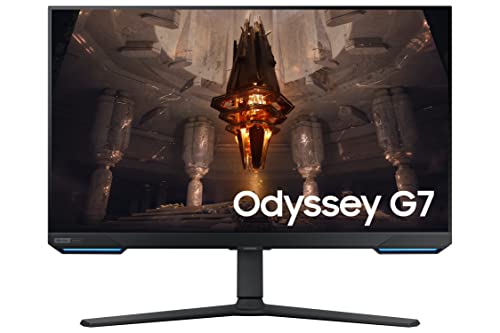
Samsung Odyssey G70B 32-inch 144Hz — The pairing at 4K scale
Scaling the headline pairing to 4K changes its meaning from reflexes to immersion, and Samsung’s G70B carries that argument at 32 inches. The panel is UHD IPS, runs 144Hz, claims 1ms, carries HDR400 and supports both G-Sync and FreeSync Premium Pro, a specification that reads like the smaller picks translated into a larger, sharper language. A graphics card capable of feeding it turns open-world games into landscapes rather than arenas, and the pixel speed keeps that landscape from smearing when the camera swings.
Size interacts with response in ways brochures omit. On a 32-inch screen, motion covers more of your visual field, so blur becomes easier to notice and fast pixel behaviour earns its keep more honestly than it does on a small panel viewed from the same chair. Samsung’s flat IPS avoids curved-screen geometry debates, which matters when the display also hosts design work or spreadsheets. The ultrawide game view option in its menus lets certain titles crop to a wider aspect for players who enjoy that framing.
The demands are the familiar 4K ones, amplified. Desk depth, graphics budget and viewing distance all need to grow with the panel, and HDR400 remains an entry-level promise. Yet as proof that 144Hz and 1ms are not exclusively esports vocabulary, the G70B is this guide’s most persuasive exhibit: the same numbers, spent on breadth and detail instead of tournament minimalism, with enough refresh in hand to satisfy a console’s 120Hz mode as a restful side duty.
At a glance:
- Panel: 32-inch IPS, 4K UHD 3840 by 2160
- Refresh: 144Hz native
- Response claim: 1ms as stated by Samsung
- Sync: G-Sync and FreeSync Premium Pro compatible
- HDR: DisplayHDR 400 class as listed
- Extras: ultrawide game view menu option
Strengths
- Headline pairing at cinematic scale
- Flat panel keeps work geometry honest
- Sync support covers both ecosystems
Trade-offs
- Desk depth and GPU budget must follow
- HDR tier promises tidiness, not drama
- Too large for close competitive setups
Best for: an immersion-first player with the desk and graphics hardware to feed 4K at genuinely high frame rates.
Not suited for: small desks, modest laptops, or tournament players who scan a compact screen in a single glance.

LG 27GN950-B 144Hz — Density with the same speed
Where Samsung stretches the pairing wide, LG compresses it. The 27GN950-B places a 4K Nano IPS panel behind a 27-inch frame, keeps the refresh at 144Hz, states the same 1ms claim, and adds G-Sync Compatibility with FreeSync Premium Pro. The resulting density is the point: pixels small enough that text, reticle edges and distant detail all render with a printed quality, while the panel underneath still behaves like the UltraGear gaming hardware it is.
Nano IPS colour gives this pick its second profession. Its wide gamut reach suits video editing and photographic work in colour-managed software, where the extra range is information rather than decoration. Unmanaged content can look exuberant, and owners should expect to use the panel’s restrained modes for everyday browsing if accuracy matters to them. The stand’s tilt, height and pivot support the posture such work demands, and the overall package feels like a creator monitor that kept its gaming reflexes instead of trading them away.
Response honesty matters doubly here because the audience reads specifications professionally. The 1ms claim is LG’s, achieved under the favourable conditions this guide has already explained, and real transitions across the full shade range will vary as they do on every LCD. What the panel genuinely delivers is clarity comfortably matched to its refresh, which is the pairing’s real promise. Buy it for density and colour with speed included, not for speed alone wearing a 4K costume.
At a glance:
- Panel: 27-inch Nano IPS, 4K UHD 3840 by 2160
- Refresh: 144Hz native
- Response claim: 1ms as stated by LG
- Sync: G-Sync Compatible, FreeSync Premium Pro
- Stand: tilt, height and pivot adjustment
- Character: creator density meets gaming pace
Strengths
- Sharpest text in this roundup
- Wide colour for managed creative work
- Full stand adjustment fitted
Trade-offs
- Interface scaling becomes necessary
- Unmanaged colour can look theatrical
- 4K frame rates demand strong hardware
Best for: a creator who games seriously and wants one dense, colourful 27-inch panel to cover both callings.
Not suited for: players seeking the largest possible canvas, or anyone whose graphics card already struggles at 1440p.

LG UltraGear 27GP850-B 165Hz — Faster than the headline
An overshoot pick earns its slot by serving the buyer whose search began at 144Hz but whose machine has already outgrown it. The 27GP850-B is a 27-inch Quad HD Nano IPS monitor running natively to 165Hz with a stated 1ms, G-Sync Compatible certification and FreeSync Premium. Set it to 144Hz and it behaves exactly as the headline requests; unlock the ceiling and the same panel follows a stronger graphics card upward without being replaced. That flexibility, in the resolution tier most PC players now call home, is why it interrupts a guide it technically exceeds.
Quad HD at 27 inches hits the density most desks describe as finished: crisp text, roomy timelines, games that look detailed without the hardware tribute 4K collects. Nano IPS colour leans vivid out of the box, flattering games and demanding a calmer mode for colour-critical tasks. The ergonomic stand, with pivot included, is the sort of grown-up inclusion that faster bargain panels often skip, and over years of daily use it may outvalue the extra hertz that justified the purchase.
Labelling discipline is this pick’s tax. It is not a 144Hz monitor, and its price reflects a 165Hz panel, so a buyer with a hard ceiling in either dimension should choose a native pick instead. For the larger group whose systems hover between the two rates, though, the GP850-B resolves the dilemma by refusing it: buy the headroom once, use what the current machine can feed, and let the monitor wait patiently for the next upgrade elsewhere in the system.
At a glance:
- Panel: 27-inch Nano IPS, Quad HD 2560 by 1440
- Refresh: 165Hz native, runs 144Hz happily
- Response claim: 1ms as stated by LG
- Sync: G-Sync Compatible, FreeSync Premium
- Stand: tilt, height and pivot adjustment
- Status: labelled overshoot pick throughout
Strengths
- Headroom that survives a GPU upgrade
- Quad HD density suits work and play
- Stand ergonomics are thoroughly handled
Trade-offs
- Costs more than native 144Hz screens
- Vivid defaults need calming for accuracy
- No 4K option for media-first buyers
Best for: a PC player whose system sits between rates today and will climb tomorrow, settled at 1440p for the long term.
Not suited for: strict budget builds, console-only desks, or anyone who wants a native 144Hz panel and nothing beyond it.

ASUS TUF VG249QML5A 240Hz — The ceiling breaker
The final pick breaks the headline in both directions at once, and says so on its face. ASUS’s TUF VG249QML5A is a 24-inch Full HD Fast IPS monitor running 240Hz, with a manufacturer claim of 0.3ms that outruns the 1ms in this guide’s title, plus ELMB Sync, FreeSync Premium, G-Sync branding in its listing and a 99 percent sRGB figure. It is included because shoppers researching response times eventually meet this class of hardware and deserve a guided introduction rather than a hard sell at the top of a search page.
ELMB Sync is its signature trick, combining backlight strobing with variable refresh in a way older strobing systems could not, attacking perceived blur from both directions. Fast IPS keeps viewing angles civilised where the ZOWIE’s TN panel cannot, and the ergonomic stand and three-year warranty language in its listing suit a purchase expected to be worked hard. In motion, this is the clearest picture in the roundup for players whose systems can actually sustain the frame rates involved, which is a smaller population than its marketing implies.
That population clause is the honest review. A 240Hz panel fed 90 frames is an expensive 90Hz experience, and the 0.3ms claim belongs to the same favourable-conditions family as every other figure here, only more so. Buy this ASUS when the graphics card, the games and the player’s own ambitions all justify it, as the summit of the response-time road this guide has been walking. Everyone else should treat it as a reference point that makes the native 144Hz picks look sensibly priced.
At a glance:
- Panel: 24-inch Fast IPS, Full HD 1920 by 1080
- Refresh: 240Hz native, far above headline
- Response claim: 0.3ms as stated by ASUS
- Clarity tech: ELMB Sync strobing with sync
- Colour note: 99 percent sRGB claimed
- Stand: ergonomic design, warranty noted in listing
Strengths
- Clearest motion available in this guide
- Strobing and sync can operate together
- Fast IPS keeps angles friendly
Trade-offs
- Demands elite frame rates to justify itself
- Response claim needs the usual scepticism
- Full HD only, despite premium positioning
Best for: a high-end esports build whose hardware genuinely sustains frame rates most players only read about.
Not suited for: mid-range systems, console desks, and anyone whose budget would be raided from other components to afford it.
How do the best 144Hz 1ms monitors compare side by side?
| Model | Size and resolution | Refresh | Panel and sync | Standout trait |
|---|---|---|---|---|
| LG 24G414B | 24-inch, 1080p | 144Hz | IPS, G-Sync listed | The balanced textbook pairing |
| BenQ ZOWIE XL2411P | 24-inch, 1080p | 144Hz | TN, visibility tools | Tournament heritage and shadow control |
| Samsung Odyssey G70B | 32-inch, 4K | 144Hz | IPS, both sync families | Immersion at full pairing spec |
| LG 27GN950-B | 27-inch, 4K | 144Hz | Nano IPS, G-Sync Compatible | Density plus creator colour |
| LG 27GP850-B | 27-inch, 1440p | 165Hz | Nano IPS, G-Sync Compatible | Headroom above the headline |
| ASUS TUF VG249QML5A | 24-inch, 1080p | 240Hz | Fast IPS, ELMB Sync | The response-time summit |
Two columns do the real sorting in that table. Resolution decides what your hardware must feed and what your eyes receive in still detail, while the refresh column quietly separates native answers from headroom answers. Response claims, by contrast, bunch together so tightly that they should break ties rather than make decisions, which is exactly the opposite of how most product pages arrange their priorities.
Panel type is the tiebreaker with genuine consequences. TN buys native speed and surrenders angles; fast IPS buys angles and colour while approaching the same clarity; Nano IPS adds colour reach for people whose work can use it. None of those exchanges appears in a millisecond figure, and all of them will be visible every day you own the screen.
How should you set overdrive on a fast monitor?
Find the overdrive control in the monitor’s menu, where it may hide behind names like response time, trace free or overdrive level, and begin in the middle. Manufacturers ship competitive presets that push pixel transitions hard, and the fastest setting frequently overshoots, wrapping moving objects in pale or dark coronas that are more distracting than the blur they cured. The middle setting on most modern fast panels delivers the cleanest tracked motion, which can be verified with any scrolling test pattern or simply by dragging a window of text across the screen and reading it as it moves.
Revisit the setting when the frame rate changes character. Overdrive tuned for 144 frames can behave badly at sixty, because pixels have longer to travel and the same voltage push overshoots further. Variable overdrive, offered on some certified panels, adjusts the push with the refresh and removes much of this babysitting. Where it is absent, players who split time between a fast shooter and a slow strategy title may keep two picture presets and swap them with the game, a small ritual that pays in clarity.
What mistakes do response-time shoppers keep making?
Comparing digits across measurement methods leads the list, because a strobed MPRT figure and a GtG figure describe different physical stories wearing the same unit. The second mistake is assuming the fastest overdrive preset is the best one, when its artefacts are visible to anyone who looks. Third comes neglecting the source: a 144Hz screen connected by an elderly cable or left at a 60Hz operating-system setting delivers none of its promise, and its owner blames the panel for a paperwork error.
Finally, shoppers overbuy response and underbuy everything else. A stand that cannot reach eye height, a resolution the graphics card cannot feed, or a panel whose angles punish the room’s seating will all outlast the novelty of a millisecond. The specification in this guide’s title matters, genuinely, and it matters most when the rest of the purchase has been given equal thought. Let the 1ms claim qualify a monitor for consideration; let size, resolution, ergonomics and sync decide which qualified monitor comes home.
How long will the 144Hz 1ms class remain the sensible centre of gaming?
Probably for years, because it sits where hardware economics and human perception shake hands. Mainstream graphics cards feed 144 frames at 1080p and increasingly at 1440p, consoles have normalised high-refresh thinking even at their lower ceiling, and the perceptual gains beyond this tier arrive in smaller increments that fewer players can feel. The class also spans resolutions gracefully, as the two 4K picks here demonstrate, so its centre of gravity can drift upward in pixels without abandoning the pairing that defines it.
Ownership economics agree. A monitor typically outlives two graphics cards, and a screen bought at the sensible centre today will still be flattering the next system and acceptable to the one after. The overshoot picks exist for buyers who knowingly trade that centrality for headroom or summit performance. Everyone else can buy into this class with the rare confidence that the middle of the road is, for once, where the best driving actually happens.
How does input lag differ from response time?
These two delays are routinely confused because both are quoted in milliseconds and both influence how connected a game feels. Input lag is waiting time: the interval between a signal arriving at the monitor and the corresponding picture beginning to appear, governed by the panel’s processing electronics. Response time is travel time: how long pixels spend changing once they have been told to change, governing how smeared motion looks. A monitor can be prompt and blurry, or sluggish and sharp-edged, and only testing both properties describes it honestly.
Gaming monitors in this class generally keep processing lag very low in their game modes, which is why manufacturers compete on response figures instead. The practical lesson for buyers is to distrust any advertisement that merges the two into a single speed story. Ask which delay a number describes, and be suspicious when the answer is a shrug. The picks in this guide were selected from product families whose game modes are known to bypass picture processing, keeping the waiting time as short as the travel time is quick.
Television habits explain much of the confusion in the wider market. On a TV, image processing for films adds delay that game modes then remove, and response figures are rarely quoted at all. Monitor buyers arriving from that world should recalibrate: here the processing is lean by default, the quoted milliseconds describe pixels rather than pipelines, and the remaining delays in a setup usually live in wireless peripherals and the games themselves.
Why do dark scenes expose slow pixels first?
Pixel transitions are not equally difficult. Journeys between dark shades ask the liquid crystals to move through the laziest part of their range, and many panels that post sparkling mid-tone figures slow noticeably when a night scene pans across the screen. This is the origin of the dark smearing associated with some VA panels, and it is why a single transition figure can never summarise a monitor. Averages conceal exactly the transitions that horror games, space titles and stealth levels spend their lives performing.
IPS panels in this roundup handle dark transitions more evenly, one reason the technology dominates the selection despite TN’s native speed. ZOWIE’s answer on the TN side is different in kind: Black Equalizer raises the visibility of dark content so that slow shadow detail matters less, trading image fidelity for information. Neither approach is cheating. They are two honest responses to the same physical problem, aimed at players who prioritise atmosphere on one hand and competitive information on the other.
Buyers can test the issue without instruments. A dark game scene panned steadily, a starfield scrolled in a space title, or even a dark-mode document dragged across the desktop will reveal trailing that bright content hides. Judge a new monitor with the material you actually play, during the return window, rather than trusting a bright showroom loop designed to flatter every panel equally.
What role does backlight strobing play in clarity?
Strobing attacks blur from the perception side. By flashing the backlight briefly once pixels have settled, instead of holding each frame lit for its full duration, it mimics the impulse behaviour of old CRT displays and lets the eye track moving objects without smear. Names vary by brand, and the ASUS pick’s ELMB Sync is notable because it permits strobing to coexist with variable refresh, historically an either-or choice. Used well, the technique produces the cleanest tracked motion available from an LCD.
The costs are consistent across implementations. Brightness falls because the light is off for much of each cycle, flicker-sensitive viewers may find long sessions tiring, and some implementations introduce crosstalk, a faint double image when pixels have not finished changing before the flash. Competitive players accept those costs during matches and disable strobing for everything else, which is the sensible pattern for any owner. Treat the mode as a specialist tool in the kit, not as the monitor’s personality.
Strobing also explains some of the most aggressive response claims in the industry, since a strobed moving-picture measurement can reach figures that pixel transitions alone cannot. When a listing quotes a spectacular number without naming its method, strobing is usually the silent partner. This guide has flagged the technique wherever a pick offers it, so its benefits can be weighed with its conditions attached rather than discovered after purchase.
How should frame rate targets be set for a 144Hz screen?
Aim for stability before altitude. A game locked to a steady rate the system can hold feels smoother than a game oscillating wildly beneath a higher average, because adaptive sync can only smooth variation within its operating window. Many players cap frames a few below the panel’s ceiling, which keeps the sync system engaged permanently and avoids the tearing or lag that returns when a game briefly exceeds the refresh. That small sacrifice of peak numbers buys consistency through entire sessions.
Settings should be spent in an order that protects motion clarity. Resolution scaling and the heaviest post-processing effects usually cost the most frames for the least competitive benefit, while texture quality often survives on modern hardware with memory to spare. Esports titles reward the discipline immediately; cinematic titles reward it differently, by holding their chosen rate through crowded scenes instead of collapsing in them. The monitor’s job is to display what arrives cleanly, and a well-set game lets every pick here do exactly that.
Finally, remember that desktop habits count too. Browsers, launchers and video applications should be allowed to run at the panel’s full refresh, and per-application profiles that cap background programs can silently cap a game launched through them. When a new 144Hz screen feels underwhelming, the cause is more often a setting three menus deep than a defect in the glass, and the fix takes minutes once the hiding place is known.
What separates a gaming monitor’s game mode from its picture presets?
Picture presets rearrange colour, brightness and contrast to flatter different content, while a true game mode reaches deeper into the electronics, bypassing processing that would otherwise add delay. Some monitors merge the two ideas confusingly, offering a game picture preset that changes only the colours, and owners should verify which behaviour their screen implements. On the picks here, game modes are the low-latency paths, and colour presets can usually be adjusted independently once latency is secured.
Genre presets deserve particular scepticism. A first-person-shooter mode that crushes shadows and inflates saturation may help visibility in one title and vandalise another, and the calibrations that reviewers praise are rarely the factory’s themed attempts. Build one honest preset with sensible brightness, a middle overdrive setting and colour you find natural, then judge games through it for a week before experimenting. Consistency trains the eye; constant novelty only trains dissatisfaction.
How do these panels behave for films, streaming and everyday media?
Refresh wealth mostly sits idle during films, which are mastered at frame rates far below these ceilings, yet the panels still contribute. Good pixel behaviour keeps panning shots in documentaries and sports broadcasts tidy, and adaptive sync is irrelevant while panel uniformity and colour take over the judging. The IPS picks handle shared viewing with the grace their angles provide; the ZOWIE, faithful to its vocation, is the screen to watch alone and critically rather than socially.
HDR expectations should stay calibrated to the class. These monitors accept HDR signals and tone-map them within brightness limits that suit a desk in a lit room, so highlights gain order rather than spectacle. Viewers whose evenings are primarily cinematic should weight that reality heavily and perhaps look at televisions instead. Viewers whose screens divide the week between matches, work and a film on Friday will find the compromise entirely liveable, which is the honest verdict for the whole category.
What should you inspect during the first evening with a fast monitor?
Run the checks that specifications cannot pass on your behalf. A plain dark screen reveals backlight bleed at the edges, a plain bright one exposes uniformity patches, and a dead-pixel inspection takes two minutes with any solid colour fill. IPS glow, the sheen that shifts as you move your head before a dark image, is normal for the technology and should be distinguished from defects before complaints are filed. Every panel technology has a signature; the task is confirming that your unit’s signature is the ordinary one.
Then play the most familiar fast game you own and move deliberately: slow pans, quick flicks, a minute of reading scrolling text. Clarity problems announce themselves to a player who knows the material, and overdrive artefacts appear exactly during those practised movements. Adjust overdrive once, replay the same sequence, and stop when the picture is clean rather than when the menu runs out of notches. That single comparison teaches more than a week of reading about milliseconds, including the ones in this guide.
Why does screen size change how response problems look?
Motion blur is angular before it is numerical. The same transition time smears a target across more of your visual field on a 32-inch panel than on a 24-inch one at equal distance, which is why the Samsung G70B’s pixel behaviour matters more than its specification suggests and why small esports panels forgive average panels so readily. Stepping back restores the balance, because distance shrinks the angle again, and seating position quietly becomes part of the response-time equation that no product page will ever print.
Resolution complicates the same picture. Denser panels give moving edges more steps to travel through, so a well-tuned 4K screen can look cleaner in motion than a mediocre 1080p screen despite identical quoted figures. This is one reason the two 4K picks belong in a guide about speed rather than merely about sharpness: their density and their pixel behaviour cooperate. Buyers comparing across sizes should therefore weight hands-on reputation more heavily than brochure equality, because equal numbers describe unequal experiences.
How does a fast monitor change older and slower games?
The back catalogue benefits unevenly. Titles with unlocked frame rates wake up immediately, running at speeds their original audiences never saw, and their motion clarity improves in proportion to the panel’s pixel behaviour. Titles locked to sixty frames gain only the panel’s lower processing delay and cleaner transitions between their fewer frames, a modest but real polish. A small library of classics tied to their original timing can even misbehave when forced faster, though such cases live on the PC side and yield to a frame cap.
Emulation and retro play deserve a sentence of their own, because strobing modes can imitate the impulse display character that older games were drawn for, at the cost of brightness and some flicker. Owners who split time between modern competition and older libraries may find the ASUS pick’s clarity tools unexpectedly relevant to the past as well as the future. The broader point stands: a fast monitor is not a single-purpose purchase, and its benefits leak into corners of a collection that its marketing never mentions.
What is the sensible upgrade path away from this class?
Owners rarely leave this tier because it stops working; they leave because a neighbouring desire grows louder. Players chasing ranking ladders climb toward 240Hz and strobing, creators climb toward colour accuracy and 4K density, and immersion seekers climb toward size or curve. Each direction sacrifices a different part of the balance assembled here, which is why the wisest upgrade begins by naming the dissatisfaction precisely. A vague itch answered with a flagship usually returns within a season wearing a new name.
Until that itch becomes specific, money spent around the monitor often outperforms money spent replacing it. A proper arm, a chair that supports the posture the stand demands, lighting that stops fighting the panel, and a graphics card that holds the chosen rate through crowded scenes all deepen the experience this class already provides. The 144Hz 1ms combination earned its central position by being sufficient in the way that matters nightly, and sufficiency, properly supported, has a longer half-life than novelty.
There is also resale dignity in the sensible centre. Screens at this specification remain easy to hand down to a sibling’s desk, a second workstation or a console corner, because their virtues are general rather than eccentric. The summit picks date faster, the niche picks fit fewer rooms, and the balanced picks keep finding work. Buying the middle of the road, in this category at least, is less a compromise than a form of insurance against your own changing tastes.
How should two-monitor households think about a fast screen?
Pairing a 144Hz panel with an older 60Hz companion is the most common arrangement in real homes, and it works better than forum anxiety suggests. Keep the fast screen as the primary display where games open, let the older panel carry chat, guides and timelines, and expect the mouse to feel different as it crosses the boundary; that contrast is the refresh gap made tangible, not a fault. Colour will also differ between generations, so colour-critical work should live entirely on one panel rather than straddling the seam.
Cabling and ports decide whether the arrangement sings. The primary screen deserves the best connection the graphics card offers, with the companion taking what remains, and daisy-chaining should only be attempted where the hardware explicitly supports it at the rates involved. Owners planning the pairing in advance may favour picks with generous inputs, while owners improvising from existing stock can still reach a happy result with one deliberate cable purchase. Either way, the fast panel should be bought for the desk’s centre, because peripherals gravitate toward the screen the eyes already trust.
A closing note on cables, because fast panels fail quietly through cheap ones. Use the cable supplied in the box first, however unglamorous that advice sounds, since manufacturers bundle leads rated for the panel’s full specification. If a longer run is required, buy a certified replacement in the correct generation rather than the longest bargain on the page, and re-check the reported signal in the monitor’s information screen after any swap. Most mysterious cases of a 144Hz monitor behaving like a lesser screen end at exactly this unglamorous junction, solved in minutes by the owner who thought to look at the wire before blaming the glass.
Warranty and support deserve one unglamorous paragraph of their own. Panels in this class are mature products, yet backlight faults and dead pixels still occur, and the ease of exchanging a unit varies more between sellers than between brands. Buy through a channel with a painless returns process, register the product where the maker offers it, and keep the invoice somewhere findable. A fast monitor is a long-term relationship; the paperwork is how that relationship survives its first bad week.
Sound, finally, should be planned rather than discovered. Only some of these panels carry speakers worth using, and none will flatter a game’s soundtrack the way even modest headphones do. Decide where audio will come from before the monitor arrives, and the first session can be about the picture, which is where a screen in this class has been waiting to impress you all along.
Keep the box through the first fortnight, as dull as that counsel sounds.
Final Recommendation
Let panel philosophy choose before numbers do. The LG 24G414B is the default answer for a 24-inch IPS desk that wants the pairing exactly as advertised, while the ZOWIE XL2411P remains the purist’s instrument when competitive visibility outranks every other virtue. Money aimed at immersion belongs with the Samsung G70B, money aimed at density and colour with the LG 27GN950-B, and money aimed at the future with the 165Hz GP850-B at 1440p. The ASUS stands apart as a summit to climb only when the rest of the system already lives at altitude. Whichever name wins, spend the first evening in the overdrive menu rather than the store page, because the middle preset will tell you more about your monitor than any millisecond printed on its box.
Frequently Asked Questions
Is 1ms response time a measured fact or a marketing figure?
It is a manufacturer’s figure gathered under favourable conditions, usually a selected grey-to-grey transition with strong overdrive or a strobed moving-picture test. Treat it as evidence that a panel belongs to the fast family, then judge clarity by panel type, tuning reputation and the overdrive behaviour you can see for yourself.
Which matters more, 144Hz or 1ms?
Refresh rate matters first, because it decides how much new information the screen can present each second. Response speed matters immediately after, because it decides how cleanly that information separates into distinct frames. A fast panel at a low refresh wastes its talent; a slow panel at high refresh smears its opportunity.
Does TN still beat IPS for competitive gaming?
At the margins, for players who notice them. TN retains a native speed and strobing heritage that tournaments trusted for years, while current fast IPS panels have narrowed the practical difference to the point where most players gain more from IPS viewing angles and colour than they lose in transition speed.
What is overshoot, and why should I care?
Overshoot happens when overdrive pushes a pixel past its target shade, painting bright or dark halos around moving objects. It is the most common way a fast monitor makes its own picture worse, and it is why the highest overdrive preset is so often a trap for new owners chasing the brochure number.
Can a console benefit from a 144Hz 1ms monitor?
Partially. Consoles output up to 120Hz, so the refresh headroom goes partly unused, but low input lag, clean pixel behaviour and adaptive sync still improve supported titles. The 24-inch picks suit console desks well; the 240Hz ASUS would be spending most of its talent on a signal that never arrives.
Why does the ASUS pick claim 0.3ms instead of 1ms?
Because its Fast IPS implementation and measurement conditions let ASUS publish a faster figure than the class standard. It signals a genuinely quick panel, while remaining a best-case claim in the same family as every other number in this guide, and it should be weighed alongside its 240Hz appetite rather than admired in isolation.
Related Guides
Continue along the refresh road with best 120Hz monitors for the cross-resolution picture at console speed, best 1440p 165Hz monitors when the headroom pick in this guide starts to look like a destination, and best 1440p monitors for the wider Quad HD landscape beyond gaming specifications.
Related guides
- Best 1440p 165Hz Monitors: One Native 165Hz Pick, Three 180Hz Upgrades, an Overclock Headline and a 160Hz Ultrawide
- Best 144 Hz 27in Monitors: Six 27-Inch Screens That Go Beyond the Label
- Best 1440p IPS Monitors
- Best 1080p Monitors 120Hz: Two Native 120Hz Picks, a Labelled 100Hz Comfort Option and Honest Headroom Above the Rate


[…] exploring the monitor shelf with our companion roundups: best 1440p 165Hz monitors for PC players ready to spend the headroom discussed above, best 1440p monitors for a wider tour of […]