What's inside
- Key Takeaways
- Quick Picks
- How Did We Judge a Shelf of Near-Twins?
- What Does Direct Thermal Printing Mean for Your Labels?
- How Do the Six Compare on Stated Facts Alone?
- How Do You Choose Label Stock That These Printers Will Love?
- How Do You Set Up a Bluetooth Label Printer for a Selling Day?
- What Mistakes Do New Label Printer Owners Make?
- Why Is the Companion App the Real Product?
- How Do You Keep Bluetooth Printing Reliable on a Busy Bench?
- What Else Can a 4×6 Thermal Printer Label, Honestly?
- How Does a Label Printer Change a Small Seller’s Working Day?
- How Do You Care for a Thermal Print Head?
- What Should You Test in the First Week Before Trusting It?
- Rolls or Fanfold: How Should Your Labels Arrive?
- When Is Bluetooth the Wrong Connection?
- How Do the Selling Platforms Shape the Choice?
- What Does the Running-Cost Story Look Like Across a Selling Year?
- How Should a Market Stall or Pop-Up Shop Use One?
- What Happens When Your Selling Outgrows a Single Label Printer?
- Final Recommendation
- Frequently Asked Questions
- Related Guides
As an Amazon Associate I earn from qualifying purchases. This post may contain affiliate links at no extra cost to you.
gizmoverdict.com is reader-supported. When you buy through links on our site, we may earn an affiliate commission.
Where to buy: Amazon carries all six label printers below; the names link to their listings, where the current app names, label-size ranges and platform compatibility statements can be checked before ordering.
Start with the honesty this shelf demands: the best bluetooth label printers are, with few exceptions, near-identical machines wearing different badges. Open the six listings side by side and you will meet the same compact 4×6 thermal printer six times — same job, same shape, same promise — sold under names like Nelko, JADENS, KNAON, Rongta, Gloryang and HKHKPI. This is the white-label shelf of printing, where factories produce a competent common design and brands differentiate at the margins. Pretending otherwise would make this guide fiction, so instead it judges the margins that genuinely differ: the companion app you will live in, the reliability of the Bluetooth connection, the range of label sizes each listing supports, and the platform compatibility each brand actually states.
Underneath the badges sits direct thermal printing, a technology with one glorious virtue and one honest flaw. The virtue: there is no ink, no toner, no ribbon — the print head heats chemically treated label paper, and the label simply appears. The flaw: that image is not permanent. Direct thermal labels fade with heat, sunlight and time, which makes them perfect for a parcel that travels for a week and wrong for an archive box meant to be read in five years. Every pick here prints the 4×6 shipping label that carriers and marketplaces revolve around, connects by Bluetooth to phones, and claims compatibility with the selling platforms home businesses actually use. The differences are real but narrow, and this guide will keep them in proportion.
Key Takeaways
- This is a white-label class: six near-identical 4×6 thermal printers, differentiated mainly by their apps, Bluetooth behaviour and stated label ranges.
- Direct thermal means zero ink or toner costs forever — and labels that fade with heat, sunlight and age, so never use them for long-term archive labelling.
- The companion app is the real product: label templates, platform imports and print reliability live there, not in the plastic.
- Every pick states Bluetooth printing from iPhone and Android; computer support varies by listing, so check the exact wording if you print from a desk.
- Carrier and marketplace compatibility — USPS, UPS, Amazon, Shopify, Etsy — is quoted only as each listing states it.
Quick Picks
| Pick | Badge | Why it earns its place |
|---|---|---|
| Nelko Bluetooth Thermal Label Printer | The established name | The most recognised badge on this shelf, with quick setup, crisp output claims and the widest stated platform list. |
| JADENS Bluetooth Thermal Label Printer | Blue, simple, proven | A long-running 4×6 model in blue with phone and computer compatibility and USPS named among its uses. |
| KNAON Shipping Thermal Label Printer | Portable white design | A portable 4×6 machine pitched at home offices and small businesses, with Etsy and USPS in its stated world. |
| Rongta Bluetooth Shipping Label Printer | Phone-first Rongta | A phone-led 4×6 printer from a brand with genuine point-of-sale heritage, spanning Windows, macOS, Android and iOS. |
| Gloryang Bluetooth Thermal Shipping Label Printer | Pink, inkless, laptop-friendly | An inkless 4×6 machine in pink that names laptops alongside phones, with Amazon, UPS and Shopify stated. |
| HKHKPI Bluetooth Thermal Label Printer | Pink newcomer | A pink 4×6 shipping printer for small business parcels, naming iPhone, Android, Shopify, Amazon and USPS. |
How Did We Judge a Shelf of Near-Twins?
By refusing to invent differences in the hardware and looking where differences actually live. First, the stated compatibility: which operating systems, which carriers, which marketplaces each listing names in its own words — because in a class built on a common design, the listing’s promises are the product. Second, the app: every one of these printers is operated through a phone app for design, sizing and printing, and the quality of that app — its templates, its platform connections, its reliability after updates — decides whether the printer feels like a tool or a puzzle. Third, the practicalities a listing can support: label sizes beyond 4×6 where stated, portability where claimed, and the colour of the shell, which matters more than reviewers admit when the printer lives on a shop counter.
Brand heritage was deliberately not invented. Where a brand has a real background — Rongta’s history in point-of-sale printing hardware is genuine trade knowledge — the review says so plainly. Where a name is simply a badge on a common design, the review treats the machine on its stated merits and lets the app and the listing do the talking. Speed claims in this class are marketing figures measured in millimetres per second under ideal conditions; they are noted as listing claims, never as verified fact.
What Does Direct Thermal Printing Mean for Your Labels?
The label stock itself is the ink. Direct thermal paper carries a heat-sensitive coating; the printer’s head heats tiny points, the coating darkens where heated, and text and barcodes appear. No consumable exists besides the labels themselves, which is why these machines are so cheap to run and so popular with home sellers shipping daily parcels. A shipping label’s working life is days: printed, stuck, scanned across a network, delivered. Fading over months is irrelevant to a parcel — and decisive for anything else. Storage-box labels in a hot attic, archive files, freezer labels expected to last years, and anything displayed in sunlight will all betray the technology eventually. Keep a conventional printer for permanent labelling, and let the thermal machine do the job it is chemically suited to: the endless, cheerful production of labels that only need to survive a journey.

Nelko Bluetooth Thermal Label Printer — The established name
On a shelf of badges, Nelko is the one most buyers have heard of, and its listing behaves like it: a Bluetooth thermal shipping label printer for 4×6 labels, promising quick setup, fast speed and crisp print quality as listing claims, compatible with iPhone, Android, Windows and Mac, and stated to work with Amazon, Shopify, Etsy and UPS. That platform list is the widest in this guide, and it maps neatly onto the home seller’s actual week — marketplace orders flowing in from three directions, parcels flowing out through a carrier.
The ownership story here is the app-mediated routine every pick in this guide shares, executed by the class’s most established badge. Labels are designed or imported in the phone app, the printer pairs over Bluetooth, and 4×6 labels emerge at a pace that turns a pile of parcels into a production line. For a seller shipping daily, the difference between a good and bad label printer is measured in friction per parcel — pairing that holds, an app that remembers the label size, a feed that does not waste two labels calibrating for every ten printed — and Nelko’s reputation on this shelf rests on keeping that friction low.
The honest cautions belong to the class rather than the badge. This is a direct thermal machine: labels fade with heat and time, the app is a dependency no specification can remove, and the printer’s talents begin and end with labels — it will not print a letter, an invoice on plain paper, or anything wider than its label path allows. Buy it as the shipping department of a small business, not as a printer that happens to be small.
- Label format: 4×6 thermal shipping labels
- Connections stated: Bluetooth; iPhone, Android, Windows and Mac
- Platforms stated: Amazon, Shopify, Etsy, UPS
- Claims stated: quick setup, fast speed, crisp print quality
Strengths
- The broadest stated platform compatibility in this guide.
- An established badge in a class where after-sale support varies wildly.
- Phone and computer compatibility both stated, covering desk and counter workflows.
Trade-offs
- Direct thermal fading limits labels to journey-length duties.
- The app is the control centre; sellers who dislike phone-led tools should think twice.
- Labels only — no plain-paper printing of any kind.
Best for: daily marketplace sellers shipping through major platforms. Not suited for: archive labelling or anyone wanting a general-purpose printer.

JADENS Bluetooth Thermal Label Printer — Blue, simple, proven
JADENS has occupied this shelf long enough for its blue 4×6 machine to become a familiar sight in home-business photographs. The listing describes a Bluetooth thermal shipping label printer, wireless, compatible with Android, iPhone, Windows and Mac, widely used for Amazon, Shopify, Etsy and USPS — the carrier list differing from Nelko’s in one telling detail: USPS named where Nelko names UPS. Sellers should read those lists the way this guide does, as the platforms each brand chose to state, and match them against the carrier mix their own parcels actually use.
In practice the JADENS proposition is continuity. The design is the class design; the app-led workflow is the class workflow; what a long market presence buys is a deep pool of owner experience under the listing, answered questions about label stock, pairing quirks and app behaviour that a newer badge cannot offer. For a first label printer — the upgrade from printing shipping labels on a sheet-fed inkjet and cutting them out with scissors, a ritual every home seller remembers — that accumulated public knowledge is a genuine feature.
The class caveats apply undiluted: thermal labels fade, the Bluetooth-and-app chain is the machine’s personality, and label-size flexibility beyond the standard formats should be confirmed on the listing if your products need smaller labels for jars, cables or jewellery boxes. Within the 4×6 shipping mission, though, JADENS remains what it has been for several selling seasons — the blue default that a great many small shops started with.
- Label format: 4×6 thermal shipping labels
- Connections stated: Bluetooth; Android, iPhone, Windows and Mac
- Platforms stated: Amazon, Shopify, Etsy, USPS
- Finish stated: blue
Strengths
- A long-selling model with deep owner experience attached to its listing.
- USPS named in its stated platform world, suiting postal-heavy sellers.
- Full phone and computer compatibility on paper.
Trade-offs
- The design is the common class design; differentiation is software-deep only.
- Thermal fading rules it out for permanent labels.
- Smaller label sizes need listing confirmation for product-labelling side jobs.
Best for: first-time label printer buyers and USPS-heavy home sellers. Not suited for: archive labels or wide-format needs.

KNAON Shipping Thermal Label Printer — Portable white design
KNAON’s pitch leans on portability: a 4×6 portable label printer in white, described as a Bluetooth label printer for home office and small business, working with iPhone, Android and PC, and aimed at Etsy and USPS workflows. Portability in this class means a machine light enough to move between the packing bench, the market stall and the spare-room office — a real pattern for sellers whose business does not yet own a fixed room.
The Etsy emphasis is worth reading carefully. Craft and vintage sellers ship smaller, lighter, more varied parcels than the average marketplace seller, and their labels often share the bench with product tags and thank-you notes. A compact thermal printer that lives beside the packaging materials, pairs to the phone where the Etsy orders already live, and produces a clean 4×6 label per parcel fits that bench exactly. The white finish, like the pink finishes further down this page, is a small-business aesthetic decision: equipment that looks at home in a craft studio rather than borrowed from a warehouse.
Portability’s shadow is that the listing’s computer compatibility is stated more narrowly — PC named, Mac not foregrounded — so a Mac-led household should verify the current listing wording before ordering. And the class rules stand: labels fade, apps mediate, 4×6 is home. For the mobile Etsy seller the machine describes, those are acceptable terms stated in advance rather than discovered later.
- Label format: 4×6 thermal shipping labels
- Connections stated: Bluetooth; iPhone, Android, PC
- Platforms stated: Etsy, USPS orientation
- Design stated: portable, white, home office and small business
Strengths
- Portability suits sellers whose packing bench moves with the business.
- Etsy and USPS framing matches craft-seller shipping patterns.
- A clean white design for studio and home-office benches.
Trade-offs
- Mac compatibility is not foregrounded in the listing summary — verify first.
- Thermal labels fade; not for the product archive or long-term storage boxes.
- Newer badge, so less accumulated owner experience than JADENS or Nelko.
Best for: mobile Etsy sellers and small home offices. Not suited for: Mac-first desks without a listing check, or permanent labelling.
Rongta Bluetooth Shipping Label Printer — Phone-first Rongta
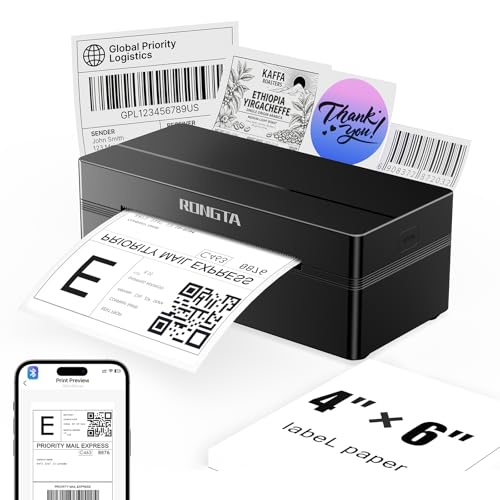
Rongta is the one name in this guide with a genuine industrial backstory: the company builds point-of-sale and receipt printing hardware as its main trade, and this Bluetooth shipping label printer is that heritage miniaturised for the small business parcel bench. Its listing describes a wireless 4×6 thermal label printer for shipping packages, supporting phones, compatible with Windows, macOS, Android and iOS — the full four-platform set, matching Nelko and JADENS on stated reach.
Why does heritage matter in a white-label class? Because receipt printers live brutal lives — heat, dust, thousands of daily cycles in shops and restaurants — and a manufacturer whose reputation rests on that world designs feed paths and print heads with different instincts from a badge that appeared last spring. That is a reason for confidence, stated carefully: it is not a specification, and this guide does not convert it into one. The specification is the familiar one — 4×6 labels, Bluetooth, phone-led printing — executed by the badge with the most relevant day job.
The buyer’s checks are the class checks. Platform and carrier names in this listing are less elaborately stated than Nelko’s roll call, so sellers wedded to a particular marketplace workflow should confirm the app’s current integrations on the listing page. Thermal fading applies here as everywhere. And like its rivals, this machine prints labels and only labels, beautifully narrow in purpose. For a seller who values the maker’s trade history and prints from a mix of phones and computers, Rongta is the connoisseur’s pick on a shelf that rarely offers one.
- Label format: 4×6 thermal shipping labels
- Connections stated: Bluetooth; Windows, macOS, Android, iOS
- Focus stated: phones, small business shipping packages
- Background: manufacturer rooted in point-of-sale printing hardware
Strengths
- Real point-of-sale printing heritage behind the badge.
- All four operating systems named in the listing.
- Phone-first design matches how small sellers actually receive orders.
Trade-offs
- Marketplace integrations are less explicitly listed — confirm the app covers your platforms.
- Thermal fade limits labels to shipping-duty lifespans.
- Heritage is reassurance, not a feature; the hardware brief is the class brief.
Best for: mixed-device small businesses that value a trade-proven maker. Not suited for: sellers needing stated marketplace integrations without checking.
Gloryang Bluetooth Thermal Shipping Label Printer — Pink, inkless, laptop-friendly
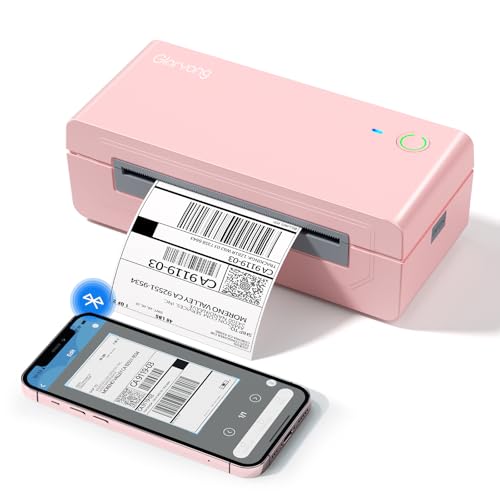
Gloryang’s listing uses the word this class loves most — inkless — and pairs it with a pink shell and a compatibility list that explicitly includes laptops alongside iOS and Android: a Bluetooth thermal shipping label printer for 4×6 labels, for small business, compatible with Amazon, UPS and Shopify. The laptop mention deserves more weight than readers usually give it. Many sellers design labels, manage shops and print from a laptop at a desk, reaching for the phone only at the packing bench; a listing that names the laptop workflow speaks directly to them.
The pink finish deserves the same seriousness as any other design decision in this guide. Small businesses increasingly work in visible spaces — a studio corner, a shop counter, a market stall — and equipment colour is part of how a workspace feels and photographs. Gloryang and HKHKPI both sell the pink version of the common design, and choosing between them comes down to their stated platforms and app details rather than to any hardware romance. Gloryang’s stated trio of Amazon, UPS and Shopify fits the Shopify-led boutique seller particularly neatly.
Inkless, to close the loop on vocabulary, means direct thermal — the same heat-and-coated-paper chemistry as every pick here, with the same fading horizon. The word describes a genuine virtue, the absence of ink purchases, and should never be read as permanence. Sellers labelling products for a shop shelf under lights should test how a sample label ages in their conditions before committing the whole range to thermal stock.
- Label format: 4×6 thermal shipping labels
- Connections stated: Bluetooth; iOS, Android, laptop
- Platforms stated: Amazon, UPS, Shopify
- Finish stated: pink; process described as inkless (direct thermal)
Strengths
- Laptop compatibility named explicitly for desk-based sellers.
- A stated platform trio matching Shopify-led boutiques.
- Pink design for visible, customer-facing workspaces.
Trade-offs
- Inkless still means thermal — labels fade with heat, light and time.
- A newer badge with a thinner public track record than the class leaders.
- USPS is not in its stated list; postal-heavy sellers should verify app support.
Best for: Shopify and Amazon boutiques printing from laptop and phone. Not suited for: USPS-first sellers or permanent product labels.

HKHKPI Bluetooth Thermal Label Printer — Pink newcomer
HKHKPI is the newest badge in this guide, and its listing wastes no words: a Bluetooth thermal label printer, a 4×6 shipping label printer, a wireless label printer for small business and shipping packages, compatible with iPhone, Android, Shopify, Amazon and USPS, in pink. Read against its rivals, the stated platform list is genuinely competitive — the two big marketplaces plus the postal carrier — wrapped around the same common 4×6 thermal design that powers this entire category.
How should a buyer treat a newcomer on a white-label shelf? By shifting weight from the badge to the verifiables. The app attached to this listing — its name, its template library, its update history — is discoverable on the listing page and in its questions section, and it will decide the ownership experience far more than the shell. The first-week tests recommended later in this guide matter doubly here: pair it to every phone in the business, print a real day’s labels, reload the roll, and confirm the feed behaves. A common-design machine that passes those tests is a good machine, whatever its badge’s age.
The newcomer’s compensating virtue is focus: this listing is aimed squarely at the small business shipping package, with no pretensions beyond it. Sellers who match that description, like the pink finish, and are willing to do the week-one homework get the class’s standard competence with the freshest badge on the shelf. Sellers who want a decade of owner questions already answered should look at JADENS or Nelko instead — a legitimate preference, honestly served by this guide’s ordering.
- Label format: 4×6 thermal shipping labels
- Connections stated: Bluetooth; iPhone, Android
- Platforms stated: Shopify, Amazon, USPS
- Finish stated: pink; focus: small business shipping packages
Strengths
- A stated platform list covering both big marketplaces and USPS.
- Unpretentious, shipping-focused brief in a pink shell.
- The common class design means label stock and workflow knowledge transfer freely.
Trade-offs
- The newest badge here — the least accumulated public experience behind it.
- Computer printing is not foregrounded; desk-based sellers should verify.
- Thermal fading, as with every pick, bars archive use.
Best for: small package sellers wanting the pink design and broad stated platforms. Not suited for: buyers who lean on long owner histories before purchasing.
How Do the Six Compare on Stated Facts Alone?
| Model | Devices stated | Platforms stated | Distinguishing note |
|---|---|---|---|
| Nelko | iPhone, Android, Windows, Mac | Amazon, Shopify, Etsy, UPS | Widest stated platform list |
| JADENS | Android, iPhone, Windows, Mac | Amazon, Shopify, Etsy, USPS | Blue; long-selling model |
| KNAON | iPhone, Android, PC | Etsy, USPS orientation | Portable, white |
| Rongta | Windows, macOS, Android, iOS | Confirm app integrations | Point-of-sale heritage |
| Gloryang | iOS, Android, laptop | Amazon, UPS, Shopify | Pink; laptop named |
| HKHKPI | iPhone, Android | Shopify, Amazon, USPS | Pink; newest badge |
What this comparison really catalogues is promises, not hardware. The machines are cousins; the listings are the individuals. Choose the row whose stated devices and platforms match your bench, then let the app reviews on the listing page cast the deciding vote.
How Do You Choose Label Stock That These Printers Will Love?
All six machines eat the same diet: direct thermal labels, most happily the standard 4×6 shipping format, on rolls or fanfold stacks depending on how each model feeds. The buying rules are consistent across the class. Match the label’s core size and outer diameter to what the printer physically accepts — the listing states the supported range, and a roll that does not fit is a sculpture, not a supply. Choose adhesive honestly: standard permanent adhesive for cardboard parcels, and be wary of labels marketed for freezer or outdoor duty unless their thermal coating suits the job, because a shipping label that lets go in a sorting hub is worse than no automation at all.
Quality differences in thermal stock are real and visible. Better coatings print darker at lower head temperatures, which is kinder to the print head and crisper on barcodes — and barcodes are the one place “good enough” is a dangerous phrase, because a label that looks fine to you and scans badly at the carrier’s hub creates the worst kind of shipping problem: the invisible kind. Buy a modest quantity of any new stock, print a day’s real labels, and scan them with a phone app before committing the business to a bulk box. Store spare rolls away from heat and sunlight, since the same chemistry that makes them printable makes them perishable on a sunny shelf.
How Do You Set Up a Bluetooth Label Printer for a Selling Day?
Pair it once, properly, in the app rather than in the phone’s Bluetooth menu — most of this class pairs through its companion app, and pairing in the wrong place produces the classic symptom of a printer that shows as connected and prints nothing. Load the labels, run the machine’s size calibration if it offers one, and print a single test label to confirm the 4×6 boundaries land where the design expects. Then set the app’s default label size and your return address template, because a selling day should involve zero decisions about either.
Position the printer where parcels are packed, within arm’s reach of the scale and the tape, on a surface where the label path can exit without curling against a wall. Bluetooth range in a home studio is rarely the issue; the pile of boxes between the phone and the printer at the busiest moment is. Before a big dispatch day, print one label early as a handshake — a machine that has printed once in the morning tends to behave all day — and keep a small stock of pre-cut patience: spare labels loaded, the charging or power cable where it belongs, and the old inkjet’s label template retired so nobody prints a shipping label the slow way out of habit.
What Mistakes Do New Label Printer Owners Make?
The archival mistake leads the list, and this guide has flagged it from the first page: thermal labels on storage boxes, filing and keepsakes fade, sometimes within a single hot summer. Use the thermal printer for journeys and a conventional printer for permanence. The second mistake is stock roulette — buying the cheapest unbranded labels in bulk before testing a single roll, then blaming the printer for pale prints and adhesive failures that belong to the paper. The third is app neglect: skipping app updates for months, then meeting a changed platform integration on the busiest dispatch day of the season.
A fourth mistake is expecting the shipping printer to be a printer. It will not produce the invoice, the thank-you card on cardstock, or the returns form on plain paper, and sellers who plan those pieces separately — even on a modest household inkjet — stop resenting the label machine for its specialisation. Finally, owners underuse the template tools: the apps in this class can store product labels, address labels and warning labels alongside the shipping template, turning one-trick hardware into the bench’s general labelling station for everything whose lifespan is measured in weeks rather than years.
Why Is the Companion App the Real Product?
Strip the app away and every machine in this guide is a warm brick that can warm labels. The app is where labels are designed, where marketplace orders become printable files, where the Bluetooth connection is negotiated, and where the difference between a thirty-second dispatch and a five-minute wrestling match is decided. Judge an app on four things, all discoverable from its listing presence and its store page before you spend anything: whether it imports or generates labels for the platforms you sell on, whether its templates cover the sizes you print, whether it remembers your settings between sessions, and whether its update history looks like maintenance or abandonment.
The subtlest app quality is failure behaviour. Connections drop in every wireless workflow; the good app notices, says so in plain language, and reconnects without losing the label on screen. The bad app spins silently while a queue of parcels waits. Sellers feel this difference in their shoulders by the end of a dispatch day, which is why this guide keeps returning ownership to software on a shelf where the hardware is deliberately identical. When two listings tie on stated platforms, the app is the tiebreaker — read its recent reviews with the same care you would give the printer’s own.
How Do You Keep Bluetooth Printing Reliable on a Busy Bench?
Most Bluetooth label problems are geography wearing a disguise. The printer sits behind a stack of boxes, the phone sits in a pocket, a metal shelving unit stands between them, and the connection that paired beautifully in an empty room sulks in a working one. Give the printer a clear, elevated spot within a few metres of where the phone actually works, and keep it away from the microwave and the metal stock shelves that make radio signals miserable. Pair one primary phone properly, through the app, and teach a second phone the same ritual before it is needed in anger.
When a connection does fail mid-day, the recovery order matters: toggle the phone’s Bluetooth once, confirm the printer is awake and loaded, and only then re-open the app and re-pair. Restarting everything in a panic usually works eventually and teaches nothing; the methodical order finds the actual weak point — often a printer that fell asleep, or an app update waiting to be applied. Sellers who dispatch daily develop this liturgy within a fortnight, and their label printers acquire reputations for reliability that are really reputations for their owners’ habits.
What Else Can a 4×6 Thermal Printer Label, Honestly?
More than parcels, within the fading horizon. Address labels for the business’s own correspondence, product labels for items that will be sold and used within months, price and SKU labels for market stalls, organisational labels for stock bins and shelving, warning and handling labels for fragile contents, sample and swatch labels, pantry labels for a household that cans and freezes on a seasonal rhythm — all of these live comfortably inside direct thermal’s lifespan, provided the app supports the sizes or the stock is cut to the machine’s path. The creative sellers in this class treat the shipping printer as the bench’s general labelling engine and reach for it constantly.
The honest boundary remains time and temperature. A label on a storage box in a cool room may read clearly for a long while; the identical label in a hot attic or a sunlit shop window can wash out in a season. Freezer labelling deserves a specific caution: cold itself is usually kinder than heat, but condensation and frost test the adhesive more than the image, and stock choice matters more than printer choice. When a label’s job is to be read years from now, print it on a conventional machine and let the thermal printer keep the work it was born for — the label that needs to survive a journey, not a decade.
How Does a Label Printer Change a Small Seller’s Working Day?
Before the label printer, the home seller’s dispatch ritual runs through a sheet-fed household printer: print the label page, cut the label out, tape it down under a window of clear tape and hope the carrier’s scanner reads through the shine. It works, and it costs minutes per parcel, every parcel, forever. The thermal machine collapses that ritual into peel and stick. Orders are batched in the app, labels emerge in a ribbon, and a morning’s dispatch becomes a single continuous motion from scale to label to carrier bag. Sellers consistently describe the purchase as the moment their hobby started behaving like a business, and the arithmetic is not really about money — it is about a bottleneck that used to scale with success being removed.
The second-order effects are quieter. A printed thermal label looks like the labels on parcels from companies a hundred times larger, and customers read that professionalism without consciously noticing it. Returns shrink when addresses are machine-printed rather than hand-copied. The bench itself tidies: no label sheets, no scissors, no tape window ritual, just a compact machine and a stack of stock. None of this requires the most expensive badge on the shelf, which is the deepest truth of this category — the workflow transformation is the class’s, and the brands merely deliver it with different accents.
How Do You Care for a Thermal Print Head?
The print head is the machine: a line of tiny heating elements that touches every label you will ever print. Its enemies are dust, adhesive residue and abrasive cheap stock. The care routine is measured in seconds — with the machine off and cool, wipe the head gently with a soft cloth or a cleaning pen made for the purpose whenever print quality develops a pale stripe, because a pale stripe down every label is the head asking for exactly that attention. Feed it decent stock, keep the label path free of the dust that packing benches generate in industrial quantities, and never scrape at the head with anything harder than a fingernail.
Adhesive deserves a special mention. Labels that ooze — some bargain stocks soften at the edges in warm rooms — deposit glue along the path, and the printer begins to misfeed in ways that look electronic and are purely mechanical. A gentle clean of the rollers and path cures it. Owners who build the ten-second wipe into the weekly bench tidy find their thermal printers outlast several generations of the phones that drive them, which is a respectable lifespan for the hardest-working small machine in a small business.
What Should You Test in the First Week Before Trusting It?
A real dispatch day, simulated honestly. Pair every phone and computer the business uses. Print labels for each platform you sell on, from inside the actual selling workflow rather than from a sample file, and scan each printed label with a phone to prove the barcodes read cleanly. Reload the stock once, mid-batch, because that is when misfeeds choose to happen in real life. Print one label, wait an hour with the machine asleep, and print another, because the wake-and-reconnect behaviour is the one your busiest mornings will depend on.
Finish with the label nobody wants to think about: a return. Print a return label, a product label if the app supports the size, and an address label for the business itself, so the machine’s whole repertoire is proven while the return window stands open. A printer that passes this week has told you everything its listing could not — how its app behaves under your platforms, how its Bluetooth behaves in your room, how its feed behaves with your stock. That knowledge, not the badge, is what you actually bought.
Rolls or Fanfold: How Should Your Labels Arrive?
Thermal stock comes in two physical philosophies, and benches develop loyalties. Rolls live inside or behind the printer, feed smoothly, and suit the steady daily rhythm of a fixed packing station; their constraint is size, since a roll must fit the machine’s holder or an external stand. Fanfold stacks sit in a neat pile behind the printer and feed flat, which high-volume sellers prefer because a large stack needs no roll changes and the labels emerge without the curl a tight roll can impart — a small thing that matters when a label must lie flat on a small parcel instantly.
Neither format changes print quality; both change the choreography of a dispatch session. A seller printing five labels a day will never feel either constraint and should buy whichever stock is easier to source in good quality. A seller printing two hundred should experiment once with each, on real dispatch days, and let the bench vote. The class’s common design means most of these machines can be fed either way with the right arrangement, but the listing’s stated stock range remains the authority — read it before ordering a mountain of the wrong format, because thermal labels are the one supply in a small business that cannot be repurposed for anything else.
When Is Bluetooth the Wrong Connection?
Bluetooth is the right connection for this class’s natural habitat — a phone, a bench, a few metres — and the wrong one in a few recognisable situations. A fixed, high-volume desk station that prints from one computer all day may be better served by a wired connection where a model offers it, removing pairing from the busiest workflow entirely. A multi-station business, where three packers share printers, outgrows phone-pairing logic and should look at network-connected label printers a tier above this shelf. And a seller whose phone is also the shop’s card reader, camera and customer hotline may find that dedicating an inexpensive tablet to the bench — paired once, living beside the printer — calms the whole system.
None of that diminishes the Bluetooth brief these six machines were bought for. It simply marks the growth path: the label printer that transforms a hobby bench is the same class a growing business eventually supplements, not replaces, when volume arrives. Sellers who understand that arc buy their first machine on this page without anxiety about the second, because the first will still be earning its corner long after the business changes around it.
How Do the Selling Platforms Shape the Choice?
Each platform hands the seller its labels in a different dialect — a marketplace’s print flow, a shop platform’s order page, a carrier’s own label — and the companion app is the translator. Sellers living inside one ecosystem should weight that ecosystem’s name in a listing’s stated list above every other consideration in this guide: a Shopify-only seller gains nothing from the widest platform list if their own platform’s integration is the clumsy one, and everything from the badge whose app treats Shopify as home. Multi-platform sellers, the ones juggling marketplace, shop and postal accounts in a single morning, are the natural constituency of the broadest stated lists — Nelko’s roll call exists for them.
The carrier question runs parallel. A USPS-led seller, dropping parcels at the post office daily, and a UPS-led seller, whose parcels leave by courier, should each find their carrier named or confirmed in the app before the printer is ordered, because the label that matters is the one your parcels actually wear. These are five-minute checks on a listing page, and they are worth more than any comparison of shells, colours or claimed speeds that this class’s marketing would prefer you to conduct.
What Does the Running-Cost Story Look Like Across a Selling Year?
Qualitatively — the only honest way without inventing figures — the thermal label printer has the simplest cost shape in all of printing. There is the machine, bought once, and there are labels, bought in rolls or stacks at a rhythm set by your order book. Nothing else is consumed. No cartridge ambushes a dispatch morning, no cleaning cycle drinks the supply, no colour set expires unused. A seller can predict the year’s label consumption from last year’s parcel count with an accuracy no inkjet owner would believe, and the stock itself, stored cool and dark, waits patiently between selling seasons.
The costs that do exist are behavioural. Cheap stock that prints pale or sheds adhesive costs reprinted labels and carrier rescans, which is why this guide keeps steering buyers toward tested, mid-quality labels rather than the absolute cheapest box. An app subscription tier, where a platform’s ecosystem offers one, is a business decision to read carefully rather than a printer cost — the listings here pitch their printers as straightforward purchases, and any recurring software charge belongs to the platform conversation, evaluated against the orders it processes. Kept in proportion, a label printer is the rare business machine whose running costs can be written on an index card: labels, electricity measured in pennies of attention, and a cleaning wipe once in a while.
How Should a Market Stall or Pop-Up Shop Use One?
The travelling seller is this class’s second natural habitat. A compact thermal printer, a phone and a stack of labels turn any stall into a operation that can print a shipping label for the customer who wants the display item posted to a friend, a price label for the piece finished that morning, or an address label for the wholesale order taken between shoppers. Battery-free designs draw from whatever power the stall provides, and the Bluetooth brief means the phone never leaves the seller’s hand for long. The pink and white finishes in this guide photograph well in that setting, which is not a trivial point for businesses whose stall is also their advertising.
The stall teaches the same lesson as the bench, faster: set the templates before the doors open, test one label while the kettle boils, and keep the stock dry and shaded — a market gazebo in summer is precisely the hot, bright environment thermal paper dislikes for storage, even though the labels printed there only need to survive the post. Sellers who internalise that rhythm describe the little machine as the hardest-working object they transport, and its corner of the van is earned anew every weekend.
What Happens When Your Selling Outgrows a Single Label Printer?
Success on this shelf has a recognisable shape: the dispatch bench gets a second pair of hands, the daily label count climbs past what one phone-and-printer pairing handles gracefully, and the business starts dreaming of a second machine by the door for returns. The good news is that everything learned on the first machine transfers — the stock, the templates, the platform workflow, the calibration habits — because the class’s common design makes the second unit a colleague rather than a stranger. Many sellers simply buy the same badge again; others use the growth moment to correct the first purchase’s one compromise, choosing the broader platform list or the laptop-friendly listing they skipped the first time.
What should not change is the honesty about the technology’s place. A growing business adds label capacity the way it adds shelving — as infrastructure for journeys — while its permanent records, its product branding and its archive stay on technologies built for permanence. The sellers who keep that boundary clear are the ones still praising their little thermal machines years later, because the machines were never asked to be anything other than what they are: the fastest, cheapest, most cheerful way to put a travelling label on a box.
Final Recommendation
For most home sellers, the Nelko is the safest first step onto this shelf: the widest stated platform list, computer and phone compatibility, and the class’s most established badge. Postal-heavy sellers should weigh the JADENS and its USPS framing, craft sellers who move their bench will like the KNAON, and buyers who value a maker’s trade history should choose the Rongta. The pink pair divide by workflow: Gloryang if a laptop shares the printing, HKHKPI if phones rule the bench. Whichever badge you pick, buy it as what it honestly is — a dedicated, ink-free shipping-label machine whose labels are built to travel bravely across a carrier network, not to last in an archive — set it up once, feed it honest stock, keep its print head clean and its templates ready, and it will earn its corner of the packing bench within the first week and hold that corner, parcel after parcel, season after season, for years.
Frequently Asked Questions
What is the first label I should print as a test?
A real shipping label, for a real parcel, generated through your actual selling platform — not the sample pattern in the app. The sample proves the head heats; the real label proves the whole chain your business depends on: platform to app, app to printer, printer to a barcode a phone can scan. Scan that first label with a barcode app, stick it on the parcel it belongs to, and let it travel. If it arrives scanned at every step, the system works, and every subsequent label is a repetition rather than an experiment. Sellers who skip this rehearsal and go straight to a fifty-parcel day are gambling the business’s busiest morning on an untested chain, and the chain, being a chain, will find its weakest link at the worst available moment.
How long does a direct thermal label stay readable?
Long enough for any parcel’s journey, and not forever. Heat, sunlight, friction and some plastics accelerate fading, so a label in a cool, dark drawer can outlast one on a sunny shelf by years. Treat thermal output as temporary by design: ideal for shipping, wrong for archives. If a label’s information matters beyond the journey — a return address you will reuse, a product batch code, a warranty reference — copy that information somewhere permanent at the moment you print, in the order notes, a spreadsheet or a notebook, because the label itself has made no promise to remember it for you. Sellers who build that one habit never lose information to fading; sellers who trust the label as the only record eventually meet the parcel, the box or the file whose label has gone politely blank, usually at the exact moment its contents finally matter.
Do these printers need ink or toner cartridges?
No. The label stock itself reacts to the heated print head, so the only consumable is the labels. That is the class’s great economy and the reason sellers adopt it — no cartridge has ever ruined a dispatch day on one of these machines.
Can I print labels smaller than 4×6 for products and jars?
Many models in this class accept narrower label widths, but support varies by listing and by app. Check the stated label-size range on the listing of the model you choose, and test a small roll before designing a product range around it.
Will the printer work with my selling platform’s labels?
Each review above lists the platforms its listing states — Amazon, Shopify, Etsy, USPS and UPS appear in various combinations. Compatibility flows through the companion app, so confirm the current app’s integrations on the listing page for the exact platform and carrier mix you use.
Can one of these printers serve two sellers in one household?
Comfortably, provided the household agrees on the plumbing. Two sellers can pair their own phones to the same machine in turn, keep their templates inside their own platform accounts, and share one stock of 4×6 labels between two businesses whose parcels look identical from the outside. The friction points are social rather than technical: whose dispatch happens first on a shared busy morning, whose label stock order replaces the roll that ran out, and which phone stays paired when both sellers are packing at once. Households that settle those three questions in advance — usually in a single conversation over the first shared dispatch — find one machine genuinely sufficient for two micro-businesses, which is a remarkable amount of commerce to run through a device smaller than a loaf of bread. When the day comes that the queue for the label printer itself becomes the bottleneck, that is the happiest possible signal that the businesses have outgrown the arrangement, and the second machine conversation in this guide begins.
Why do all these printers look the same?
Because the class is built on a common, competent thermal design produced for many brands. The meaningful differences live in apps, stated compatibility, support and small design choices — which is why this guide compares listings and software rather than pretending the shells hide different machines.
Related Guides
Sellers whose printing grows beyond labels into full paperwork should compare the machines in best home office and small business printers. Home offices still weighing a single all-rounder will find the household shortlist in best home office multifunction printers, and text-only desks can pair a label printer with one of the machines in best laser black printers.
Related guides
- Best Direct Thermal Printers: Shipping-Label Machines and Professional Label Systems
- Best 4K UHD HDR HDMI Extenders: 4K60, Long-Run and 4K120 Kits Compared
- Best Color Product Label Printers: Six Desktop Machines for Short-Run Product Labels
- Best 25–35 Inch Monitors With Lowest Display Lag: An Honest Ranking Without Invented Numbers


