What's inside
- Key Takeaways
- Quick Picks
- How Did We Choose Printers for a Dealership’s Paper?
- What Does the F&I Office Actually Ask of a Printer?
- How Should a Dealership Organise Printing Across Its Departments?
- What About Window Stickers, Buyers Guides and Lot Paper?
- What Mistakes Do Dealerships Make With Their Printers?
- How Does the Service Department’s Printing Differ From the Sales Floor’s?
- What Should a Dealership’s Printer Service Arrangement Look Like?
- How Do Digital Deal Jackets Change What a Dealership Should Buy?
- How Should a Dealership Budget Printing Across a Year?
- What Happens at Month-End, and Why Does It Decide Printer Purchases?
- How Should Staff Actually Be Trained Around These Machines?
- What About the Used-Car Operation and Its Particular Paper?
- How Do Electric-Vehicle and Online Sales Shifts Change Dealership Printing?
- A Note on Disposing of the Old Fleet
- How Should a Small Rural Dealership Choose Differently From a Big-City Store?
- One More Department: Parts, Bodyshop and the Paper Nobody Photographs
- A Final Practical Test Before Any Dealership Buys
- Why This Guide Trusts Departments Over Devices
- Final Recommendation
- Frequently Asked Questions
- Related Guides
As an Amazon Associate I earn from qualifying purchases. This post may contain affiliate links at no extra cost to you.
gizmoverdict.com is reader-supported. When you buy through links on our site, we may earn an affiliate commission.
Where to buy: Dealerships buy through many channels, and fleet pricing conversations happen off the page; the links in this guide go to listings checked in this site’s product pool, offered as the verified route to the machines themselves, and your office manager is welcome to haggle from there.
The best printers for car dealerships are not chosen in a showroom, whatever the irony, because a dealership’s printing does not happen where the cars are sold under the lights. It happens in the F&I office at eight in the evening, where a buyer’s order, a finance contract and a sheaf of disclosures must emerge perfectly, in sequence, while a customer waits with a pen and a cooling enthusiasm. It happens at the service desk, where repair orders and invoices flow all day in a fine mist of workshop dust. It happens in the back office, where deal jackets are assembled, scanned and filed — the paper skeleton of every car that leaves the lot. A dealership printer is therefore judged by a harsher standard than an ordinary office machine: not by what it prints on its best day, but by whether it ever, on its worst day, makes a customer wait.
The six machines below divide the dealership between them the way dealerships actually divide themselves. Compact monochrome all-in-ones serve the F&I desk and the sales office, where the work is contracts, copies and scans in intense bursts around each deal. A colour inkjet and a tank machine serve the showroom’s other paper — the brochures, the event flyers, the service specials — where colour sells and volume is steady. And two heavy machines, Brother’s high-volume MFC-L6900DW and Xerox’s VersaLink B415, anchor the departments whose page counts are measured in reams per week and whose downtime is measured in deals delayed.
One modern honesty belongs up front. The multi-part carbonless forms of the old dealership — the pink and yellow copies — belong to impact printers, and none of these laser and inkjet machines will print through a multipart set. What they print, superbly, is the modern deal: laser-printed contracts and forms generated by the dealer management system, one copy per party, each as crisp as the first. A dealership still running genuine multipart stock needs that impact machine kept alive in the corner for that one job; everything else in the building belongs to the class reviewed here.
Key Takeaways
- F&I printing is burst printing: short, intense, unforgiving — the machine must wake fast and never jam mid-deal.
- Scan-to-file for deal jackets is the dealership’s second printing job, and an auto document feeder is its essential tool.
- The Brother MFC-L6900DW is the high-volume F&I anchor; the VersaLink B415 is the enterprise step above it.
- Colour in a dealership is marketing paper — window material, service specials, event flyers — and the inkjet picks serve it.
- Modern laser printers do not print through multipart carbonless forms; that job still belongs to an impact machine.
- Uptime is the true specification: a spare cartridge shelf and a backup machine are worth more than any speed figure.
Quick Picks
| Pick | Badge | Why it earns its place |
|---|---|---|
| Brother MFC-L2820DW | Best overall | Compact monochrome all-in-one with copy, scan, fax and duplex for the F&I desk’s daily bursts. |
| Canon imageCLASS MF465dw | Best all-in-one step-up | 42 pages per minute, an ADF and a three-year warranty for busier desks and service reception. |
| HP OfficeJet Pro 9125e | Best colour for showroom material | Colour all-in-one printing for the flyers, specials and window material the sales floor consumes. |
| Epson EcoTank ET-3850 | Best ink economy | Tank colour printing with an ADF and Ethernet for steady marketing and office volume without cartridge churn. |
| Brother MFC-L6900DW | Best high-volume F&I | Brother’s heavy-duty all-in-one class for the department whose contracts never stop. |
| Xerox VersaLink B415 | Best enterprise step-up | Up to 50 pages per minute with duplex in Xerox’s VersaLink line for multi-department dealerships. |
How Did We Choose Printers for a Dealership’s Paper?
We walked the building. At the F&I desk we asked for burst reliability, a scanner for the licence and the trade title, copying for the documents a deal accumulates, and duplex because modern contracts are long and paper is a cost with a signature on it. At the service desk we asked for dust tolerance, speed and a machine that treats a repair order with the same indifference at four in the afternoon as at eight in the morning. In the back office we asked for scan-to-file manners — the deal jacket’s journey from paper to archive — and in the showroom we asked for colour that makes a service special look like an invitation rather than a photocopy.
Across all four stations we applied the dealership’s own arithmetic: downtime is denominated in deals. A printer that fails during a Saturday — the week’s mountain of customers compressed into one day — does not cost a cartridge; it costs momentum at the exact desks where momentum is money. So we weighted proven engines, generous paper handling and high-yield supplies over novelty, and we treated every machine’s warranty and service story as part of its specification, because in this building it is.
Finally, we respected the fleet principle that the home-office guide elsewhere in this batch also teaches: a dealership does not buy a printer, it buys positions in a system. The compact at F&I, the colour machine at marketing, the heavy all-in-one at volume — each pick here is a position, and a dealership reading this guide should feel free to field several of them at once, which is what the departments’ different appetites demand.
What Does the F&I Office Actually Ask of a Printer?
Everything, in bursts, under observation. The F&I manager prints the deal’s documents in a choreographed sequence — buyer’s order, finance or lease contract, disclosures, warranty paperwork — often while explaining each page to a customer who has already spent two hours buying a car and whose goodwill is a finite resource. The printer in that room must wake from sleep instantly, produce the first page without a warm-up overture, and never — the word is chosen carefully — misfeed on page nine of a contract, because a jam in that room is not an inconvenience; it is a crack in the customer’s confidence at the precise moment the deal is being signed.
The scanner beside it works the other half of the desk: driving licences, insurance cards, trade-in titles, proof of income — the documentary evidence of the deal — copied and scanned into the jacket before the customer leaves. A compact all-in-one earns its F&I place by making that copying a single button’s work at the moment it is needed, at a quality the compliance file will accept years later. Duplex, finally, is the quiet economist: contracts have doubled in length across a generation, and printing them single-sided doubles their paper, their filing bulk and, not trivially, the time the customer spends initialling a brick.
It follows that the F&I printer should be dedicated, not shared with the service department’s dust and the sales floor’s flyers, and that its supplies shelf should be managed like the desk’s other essentials — never discovered empty. The compact picks in this guide are sized for exactly this dedicated role; the heavy picks serve the dealerships whose F&I volume has outgrown compact engines, which announces itself the same way it does everywhere: in refills, queues and a Saturday that feels like a siege.

Brother MFC-L2820DW — Best overall
The MFC-L2820DW is the compact all-in-one this category keeps reinventing because the brief never changes: a wireless monochrome laser with print, copy, scan and fax, automatic duplex, in a body sized for a desk that already holds a computer, a phone and a customer’s paperwork in progress. Brother’s MFC line is the default furniture of small finance offices for a reason — the machines are unglamorous, quick to wake and cheap to feed — and in an F&I office those three virtues outrank every other quality a printer can possess.
The feature list maps onto the deal with unusual completeness. Print for the contract set; scan for the licence and the title; copy for the document the customer forgot they would need copied; fax for the shrinking but stubborn set of lenders and agencies who still live there. Duplex halves the contract’s bulk. Wireless and mobile printing cover the modern intrusions — the document on the manager’s phone, the form the salesperson sends from the lot. The bundled toner subscription trial, as this guide has said of its siblings, is an option to evaluate against a real month’s page count, not a decision to make during setup with a customer watching.
Its ceiling is the compact class’s ceiling: a dealership whose F&I office closes deals in a continuous stream will outgrow its pace and capacity, and the step-ups below exist for that graduation. But most single-point dealerships, and most individual F&I desks within larger ones, live comfortably beneath that ceiling for years, and for them this Brother is not the budget choice — it is the correct one, wearing its correctness plainly.
- Functions: Print, copy, scan, fax — monochrome laser
- Two-sided printing: Automatic duplex
- Connectivity: Wireless, mobile printing
- Included extra: Toner subscription trial per the listing
- Sweet spot: The dedicated F&I desk
Strengths
- The complete F&I syllabus — print, scan, copy, fax — in one compact machine.
- Quick-waking laser manners for burst printing in front of a waiting customer.
- Duplex contract printing that halves paper and filing bulk on every deal.
Trade-offs
- Compact capacity caps out at genuinely high-volume F&I departments.
- Monochrome only; showroom colour lives on other machines in this guide.
- The subscription trial deserves a month’s data before a decision.
Best for: the typical F&I desk and sales office in a single-point dealership. Not suited for: departments closing deals in a continuous all-day stream.

Canon imageCLASS MF465dw — Best all-in-one step-up
The MF465dw is the step up for desks that have felt the compact ceiling: a monochrome duplex wireless laser all-in-one with scanner, copier and fax, an auto document feeder, mobile readiness, output at 42 pages per minute and a three-year limited warranty. Forty-two pages per minute in an F&I context is not about printing a novel quickly; it is about the contract set emerging as one continuous, unhurried event rather than a sequence of waits, and about the service desk’s morning stack of repair orders clearing before the first customer reaches the counter.
The ADF changes the scanning half of dealership life in the way this guide keeps returning to: the deal jacket’s documents, the multi-page trade file, the sheaf of service records — fed as a stack, scanned as a file, filed as a record — instead of page-by-page flatbed labour that busy staff quietly skip, to the compliance file’s later sorrow. A dealership digitising its archives, or feeding a document-management system its daily bread, will feel the feeder’s absence in any machine that lacks one within a week.
Canon’s three-year warranty is the other deliberate signal. Dealerships keep printers for years and work them hard; a maker who warrants the machine across three of those years is pricing its own confidence into the deal, and a business manager comparing this Canon against cheaper compacts should count the warranty as the feature it is. In white, per the listing, it also sits more lightly in a bright modern showroom office than the traditional black box — a trivial point, until the office in question is glass-walled and customer-visible, at which point it is not trivial at all.
- Functions: Print, scan, copy, fax — monochrome laser
- Speed: 42 pages per minute
- Feeder: Auto document feeder
- Two-sided printing: Duplex
- Warranty: Three-year limited warranty per the listing
Strengths
- Pace that turns the contract set into one continuous event.
- An ADF built for deal jackets and document digitising at volume.
- A three-year warranty matched to dealership working life.
Trade-offs
- A step up in price and presence from the compact class it succeeds.
- Still monochrome; the showroom’s colour paper needs its own machine.
- Its talents are wasted on a desk that prints a handful of deals a week.
Best for: busy F&I offices and service receptions that have outgrown compact pace. Not suited for: quiet single-desk operations whose volume never strains the smaller Brother.
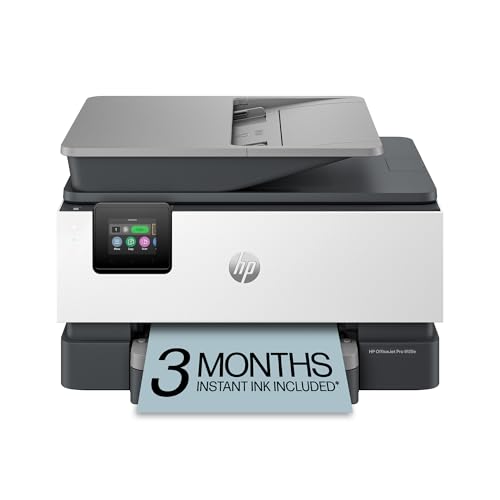
HP OfficeJet Pro 9125e — Best colour for showroom material
Every dealership prints a second, unofficial newspaper: the service special taped to the window, the flyer on the coffee machine, the event announcement for Saturday’s promotion, the handout that explains the warranty in colours a customer might actually read. The OfficeJet Pro 9125e is this guide’s machine for that newspaper — a wireless colour inkjet all-in-one with print, scan, copy and fax, mobile compatibility and an easy-printing posture aimed at the home-and-office border where dealership marketing actually gets made, usually by whoever in the office draws the short straw.
Colour inkjet is the right technology for this job on two grounds. The first is the colour itself: inkjet’s saturated, friendly output on ordinary paper makes a special look special, where colour laser’s formality suits documents more than invitations. The second is intermittence. Showroom material is printed in campaigns — a stack for the event, nothing for a fortnight — and while this guide has elsewhere warned that ink dislikes long idleness, the OfficeJet Pro class is built for exactly the small-office rhythm of bursts and pauses, provided it is used often enough to keep its pathways exercised, which a working dealership’s marketing calendar generally guarantees.
It is not, and should never be asked to be, the F&I machine. Its talents are breadth and colour, not the monochrome river; a dealership that puts its contracts on an inkjet will pay more per page for slower, less archival output and will deserve the lecture its office manager delivers. Fielded in its proper position — the marketing and general-office desk — the 9125e is the machine that makes the dealership’s paper look like its cars: presentable, colourful and ready for the public.
- Functions: Print, scan, copy, fax — colour inkjet
- Connectivity: Wireless, mobile compatibility
- Desk role: Showroom and marketing paper
- Class: OfficeJet Pro small-office line
- Sweet spot: Flyers, specials, window material, handouts
Strengths
- Colour that makes marketing paper look like an invitation.
- A complete all-in-one feature set around the colour engine.
- Suited to the campaign rhythm of dealership marketing work.
Trade-offs
- Inkjet page costs and pace are wrong for contract volume.
- Needs regular use to stay in good humour, like all ink systems.
- Its colour talents tempt offices to print colour by default; governance applies.
Best for: the marketing and general-office desk producing the dealership’s public paper. Not suited for: F&I contract printing, where laser economics and pace rule.

Epson EcoTank ET-3850 — Best ink economy
The ET-3850 brings the tank argument into the dealership: a cartridge-free colour all-in-one supertank with scanner, copier, an auto document feeder and Ethernet, mobile printing, and a listing that bundles a bonus black ink bottle and a USB cable. Where the OfficeJet above serves colour in campaigns, the EcoTank serves colour as a utility — the steady weekly volume of internal documents, service menus, training material and marketing stock whose ink bill, on cartridges, would be a recurring conversation with the accounts department.
Ethernet is the dealership-specific detail to notice. A shared colour machine serving several desks belongs on the wired network, at a fixed address, where the sales office, the service desk and the manager’s computer can all find it without wireless weather; Epson’s inclusion of it on a tank machine signals the office role the model was designed for. The ADF completes the picture of a general-office workhorse: this is the machine that digitises the supplier invoices and prints the staff notices, that copies the parts diagrams and produces the colour handouts, all week, without its ink becoming a budget item anyone discusses.
The tank discipline is the price, and it is small: keep an eye on levels, refill from the correct bottle into the correct tank, and enjoy the fact that refills are events separated by months. A dealership whose colour volume is real but whose contracts are laser work — which is to say, most dealerships — will find the ET-3850 quietly absorbing the building’s colour life at a running cost that makes the cartridge alternative look like a subscription to a problem.
- Functions: Print, scan, copy — colour supertank
- Ink: Cartridge-free refillable tanks
- Feeder: Auto document feeder
- Connectivity: Ethernet, mobile printing
- Included extras: Bonus black ink bottle and USB cable per the listing
Strengths
- Tank ink economics for the building’s steady colour volume.
- Ethernet permanence for a machine shared by several desks.
- An ADF that makes it a complete general-office workhorse.
Trade-offs
- Inkjet pace still bows to laser for the contract river.
- Tank care — levels watched, bottles matched — is a small standing duty.
- Colour quality serves office and marketing paper, not photographic display.
Best for: dealerships with steady weekly colour volume across several departments. Not suited for: a building whose colour needs are a dozen flyers a month.

Brother MFC-L6900DW — Best high-volume F&I
The MFC-L6900DW is Brother’s heavy-duty all-in-one class — print, scan, copy, fax in a monochrome laser built for volume — and it is the machine this guide points to when a dealership’s F&I and back-office paper stops being a desk job and becomes a department’s output. Everything about its class is scaled for the river: paper capacity, toner yield, an engine and a scanner built to run all day, and the fleet manners of a machine designed to be the office’s centre rather than its accessory.
In dealership terms, this is the printer for the store whose Saturday is a siege and whose month-end is a second siege: the contract sets, the lender packages, the scanned jackets, the copies of everything, flowing through one machine that treats the load as its design brief rather than as an imposition. Its scanning half matters as much as its printing at this scale — high-volume digitising of deal files is production work, and a machine built for it converts the archive from a backlog into a by-product of the day.
The buying logic is the volume logic this guide has applied throughout: the MFC-L6900DW is irrational for a quiet store and inevitable for a busy one, and the signal, as ever, is in the refills and the queues at the machine it replaces. A dealership that recognises its own week in this review should also budget the machine’s natural companions — the supplies shelf stocked deep, and the compact Brother retained at a secondary desk as the understudy that keeps a dead-printer Saturday from ever becoming a story the staff tell for years.
- Functions: Print, scan, copy, fax — heavy-duty monochrome laser
- Class: Brother high-volume workgroup line
- Toner posture: High-yield, volume economics
- Paper posture: Large-capacity handling
- Sweet spot: High-volume F&I and back-office departments
Strengths
- Built for the continuous contract and document river of a busy store.
- Scanning at production scale for deal-jacket digitising.
- High-yield economics that reward the volume it was bought for.
Trade-offs
- A departmental machine whose size and cost overshoot a small store’s needs.
- Monochrome only, by design; colour remains the other machines’ parish.
- Its value is invisible until volume arrives to justify it.
Best for: high-volume F&I departments and back offices in busy dealerships. Not suited for: small stores whose deal flow a compact handles without strain.

Xerox VersaLink B415 — Best enterprise step-up
The VersaLink B415 is the enterprise name in this guide: a Xerox multifunction printer rated up to 50 pages per minute, with duplex, and TAA compliance noted in its listing — the credential that matters to fleet and institutional buyers. Xerox’s VersaLink line is built for organisations that administer their printers as a fleet: consistent interfaces across departments, security and management tooling, and service ecosystems that treat uptime as a contractual matter. For the multi-rooftop dealer group, or the single large store whose printing has become infrastructure, that is the correct vocabulary in which to buy.
Fifty pages per minute at the top of this guide’s range is not vanity; at group scale, centralised printing — the lender packages, the month-end reporting, the multi-copy document sets that several departments share — concentrates volume in a way that makes pace a staffing question. A machine that clears the morning’s central queue in an hour returns that hour to the people who were standing at it. TAA compliance, meanwhile, is the kind of line most readers will skip and exactly the line a group purchasing manager searches for; its presence signals the procurement world this machine was built to satisfy.
The counterweight is the familiar one, stated for the last time in this guide: enterprise machinery in a small store is money spent on governance nobody will perform. The VersaLink earns its place where several departments, several rooftops or a genuine fleet policy exist to be governed. A dealership at that scale will also, typically, buy it through a dealer or service arrangement rather than a listing — and the listing’s role here is to name the machine and its class correctly for the manager beginning that conversation.
- Functions: Multifunction monochrome printing
- Speed: Up to 50 pages per minute
- Two-sided printing: Duplex
- Compliance: TAA compliant per the listing
- Class: Xerox VersaLink enterprise line
Strengths
- The fastest engine in this guide, for centralised group volume.
- Fleet administration and security in the VersaLink manner.
- Procurement credentials, TAA included, that group buyers require.
Trade-offs
- Enterprise governance is wasted where no fleet exists to govern.
- Typically bought with a service arrangement rather than off a shelf.
- Monochrome focus; the group’s colour still lives elsewhere.
Best for: dealer groups and large stores administering printers as infrastructure. Not suited for: the single small store, whose needs the machines above already meet.
How Should a Dealership Organise Printing Across Its Departments?
By position, not by purchase history. F&I gets a dedicated machine — compact or step-up according to volume — that serves no other master, because its bursts are the dealership’s most expensive paper. Service gets pace and dust tolerance near the desk where repair orders print, and a supplies shelf within arm’s reach, because a service writer cannot leave a customer to hunt toner. The back office gets the scanner with the feeder, where the deal jackets are digitised. Marketing gets the colour machine. And the whole fleet, where the store is large enough, standardises within families so that toner, drivers and habits are shared rather than multiplied.
The backup rule completes the system: every critical position has an understudy. The understudy need not be equal — the compact from the sales office can hold F&I together for a day — but it must exist, be connected, and be known to the staff before the Saturday it is needed. Dealerships rehearse fire drills for the building; the printer plan deserves the same one-line entry in the manager’s mind, because the cost of improvising it mid-deal has already been described, in the F&I section above, in the only currency this industry truly counts.
What About Window Stickers, Buyers Guides and Lot Paper?
The lot has its own paper: the window sticker with the vehicle’s details, the federally required buyers guide in every used car’s window, the price and feature cards that dress the showroom stock. This paper is printed in batches, often on stock heavier or glossier than office paper, and it rewards the colour machines in this guide — the OfficeJet for its friendly colour on campaign schedules, the EcoTank for steady volume — provided the media is fed as its maker directs and the driver is told the truth about its weight. A dealership that prints its own lot paper should trial the exact stock through the exact machine before committing a Saturday’s inventory to it; adhesive-adjacent and coated stocks are the ones that punish assumptions.
Accuracy on this paper is a compliance matter as well as a presentational one: the buyers guide’s wording and the window information must match the vehicle and the deal, and the habit that protects both is printing from the dealer system’s data rather than retyping at the desk. The printer’s job is fidelity; the system’s job is truth; the manager’s job is never to confuse which of them failed when a sticker is wrong.
What Mistakes Do Dealerships Make With Their Printers?
The first is sharing the F&I printer with the whole building, so that the contract set queues behind the service department’s morning and a salesperson’s flyer run — a false economy that spends the dealership’s most expensive minutes saving its cheapest hardware cost. The second is buying on the same shelf-price logic this guide has warned against in every category: the compact bought for a volume department, fed dear and replaced early, costs more than the heavy machine that was deferred as extravagant.
The third mistake is neglecting the scan side of the deal jacket until an audit or a lender’s request turns a filing gap into a crisis; digitising is daily work or it is archaeology. The fourth is the empty shelf — toner discovered exhausted during a deal, in a building that stocks three kinds of coffee. And the fifth is forgetting the multipart truth from this guide’s opening: the dealership that retires its last impact printer while a single carbonless form survives in its process will rediscover the fact at the worst possible moment, in front of the customer the form was for.
How Does the Service Department’s Printing Differ From the Sales Floor’s?
Service printing is industrial printing in office clothing. Repair orders print all day, in a department where the air carries workshop dust, the counter is a workbench and the printer’s neighbours are a parts catalogue and a coffee that has been reheated twice. The machine for that desk wants a closed paper tray — an open stack in service air becomes grey at the edges within a week — a tolerance for being fed by gloved and hurried hands, and supplies that a service writer can change in a minute without a manual. It also wants to be nobody’s colour machine and nobody’s scanner of record; its job is the relentless, legible, black-and-white documentation of work promised, work done and work billed.
The sales floor’s printing, by contrast, is theatre paperwork: the deal worksheet, the appraisal form, the customer’s copy of everything, produced in the rhythm of negotiation — a page now, a revised page in ten minutes, a final set when the numbers settle. That rhythm argues for the printer being close, quick to wake and cheap to feed, and it explains why so many dealerships end up with a compact laser at the sales tower and the heavy machinery in the back: the building’s paper geography follows its deal geography, and a guide that ignored the geography would mislead even with every specification correct.
What Should a Dealership’s Printer Service Arrangement Look Like?
At compact scale, the arrangement is a shelf and a habit: spare toner for every machine in the building, counted monthly; a relationship with a supplier who delivers in days rather than weeks; and a named person — usually the office manager — who owns the fleet the way they own the petty cash. At the heavy end, where the MFC-L6900DW and the VersaLink live, the arrangement becomes a contract conversation: response times, loan machines, cost-per-page agreements that fold toner and service into one predictable figure. Dealer groups negotiate these at group scale, and should, because a group’s combined volume buys terms no single store can.
Either way, the principle is that a printer’s downtime should be a planned event with a known cost, never a surprise with an unknown one. The dealership that can say, for each machine, who comes, how fast, and what it costs when it stops — and what prints in the meantime — has understood that in this building the printers are not office equipment. They are part of the production line, and they are managed like it.
How Do Digital Deal Jackets Change What a Dealership Should Buy?
The industry’s direction is unambiguous: the jacket is becoming a file. Lenders audit electronically, manufacturers require digital records, and the customer increasingly signs on a screen. That direction shifts the buying weight inside this guide’s list toward the scanning half — feeders, scan-to-file manners, machines that integrate with the document system rather than merely producing paper near it. A dealership equipping itself today should therefore read the ADF lines in these reviews as first-order specifications, not as conveniences, and should ask of every machine not only how it prints the deal but how it files it.
It does not follow that printing disappears. Paper persists at the exact points where law, habit and human reassurance intersect — the customer’s copies, the signed originals some processes still demand, the buyers guide in the window by regulation. The wise dealership buys for both directions at once: printers that produce the remaining paper beautifully, attached to scanners that retire it into the file the same day. Every all-in-one in this guide is, in that sense, a bridge machine — and bridges, in an industry mid-crossing, are exactly where the money should go.
How Should a Dealership Budget Printing Across a Year?
Count it the way the dealership counts everything else: per unit of work. The meaningful figure is cost per deal — paper, toner and ink, and the service arrangement’s share, divided by the month’s closed deals — because that figure can be compared across months, across stores in a group, and against the cost of the delays when printing fails. A store that knows its cost per deal can judge every machine in this guide in its own currency: the heavy Brother pays if it lowers the figure or protects the deals inside it; the compact is extravagant if its failures inflate the figure with remakes, queues and one memorable Saturday.
The budget should also carry the unglamorous lines that experience adds: paper in the weights the building actually uses, a spare-machine policy costed honestly, and the digitising labour that turns paper jackets into files, which is staff time and therefore money. Dealerships are sophisticated costing machines about everything metal that enters the lot. Extending the same sophistication to the paper that sells the metal is this guide’s entire commercial argument, and it is why the reviews above keep returning to yields, warranties and feeders rather than to the gloss of any single specification.
What Happens at Month-End, and Why Does It Decide Printer Purchases?
Every dealership has a second business that operates in the last three days of the month: closing. Deals must be funded, paperwork completed, lender packages assembled and the month’s numbers made true, and the printing load of those days can exceed a normal week’s. Machines reveal their class at month-end the way cars reveal theirs on a hill. A compact that has been charming all month becomes the queue at the centre of the closing effort; a department whose printer was bought with month-end in mind experiences those days as busy rather than as besieged.
The purchasing rule follows directly: size the F&I and back-office machines for the month-end you actually have, not the average Tuesday you wish for, and let the average days enjoy the headroom. It is the same logic by which a dealership staffs its Saturday. Nobody buys capacity for the average; they buy it for the peak that the business’s reputation is made in, and they let the quiet days be quiet. A manager who has lived one month-end behind an undersized printer will never need this paragraph explained twice.
How Should Staff Actually Be Trained Around These Machines?
A dealership’s printer problems are disproportionately people problems wearing a machine’s clothes: the salesperson who loads letterhead into the contract tray, the new service writer who clears a jam by force, the well-meaning soul who orders toner for the machine the store replaced in March. The cure is the same laminated two minutes this guide has prescribed in other buildings, adapted to this one: which machine prints what, which tray holds which stock, how a jam is cleared in the direction of travel, and whose job the toner shelf is. Put the card where the machines are, train to it at induction, and the fleet’s failure rate falls by more than any upgrade could achieve.
The F&I office deserves its own line in that training, because its printing is a performance with an audience. The manager who knows — without thinking — how their machine wakes, feeds, duplexes and recovers is a manager whose attention stays on the customer, where the deal is actually closed. Fluency with the machine is part of the desk’s professionalism, and dealerships that treat it as such find that the printer disappears from the customer’s experience entirely, which is the highest state dealership paper can achieve.
What About the Used-Car Operation and Its Particular Paper?
Used-car departments print with their own accent: appraisal forms in the rain’s aftermath, reconditioning lists that travel to the workshop and return annotated, window buyers guides that are a legal fixture of every vehicle on the lot, and the sold paperwork for cars whose histories are longer and more documentary than a new car’s. The volume is steadier than new-car F&I and the compliance weight is, if anything, heavier, because the buyers guide and the disclosure trail are where used-car disputes are won and lost years later.
That profile — steady volume, heavy records, paper that must be findable forever — maps onto this guide’s step-up territory: the Canon with its feeder and warranty for the department’s own desk, the heavy Brother where the volume concentrates, and scanning discipline applied from the day a car is appraised rather than the day its file is requested. A used-car manager reading this guide should hear their own department in those descriptions, and should budget the department’s printer as compliance equipment, because in every way that matters to the store’s future self, that is what it is.
How Do Electric-Vehicle and Online Sales Shifts Change Dealership Printing?
The deal itself is migrating — configured online, negotiated by message, signed increasingly on screens — and a candid guide should say what that does to its own subject. It reduces the contract set’s page count in some stores and eliminates none of it in most, because regulation, lender requirements and customers’ own desire for paper copies persist long after the technology to abolish them arrives. It increases, meanwhile, the premium on the scanning and filing half of the fleet, since a hybrid deal — part screen, part paper — must be assembled into one jacket that an auditor can read whole. The dealership buying today should therefore weight the all-in-one machines’ document manners at least as heavily as their print engines, which is precisely the weighting this guide has applied from its first pick onward.
What does not change is the moment at the centre of it all: a customer, a car, and a set of documents that must be right. Whether those documents arrive from a compact Brother at a traditional desk or from a VersaLink serving a digital retailing floor, the standard they are judged by is the one this guide opened with — never make the customer wait, and never let the paper be the reason a deal cools. Technology rearranges the building; it does not repeal the standard.
A Note on Disposing of the Old Fleet
Dealership printers retire with the store’s documents inside their memory — job logs, scanned images, stored files on the larger machines — and a store that sells or scraps a machine without clearing it has mailed its deal jackets to a stranger. Follow the maker’s reset procedure for each retired unit, keep a note that it was done, and only then let the machine leave the building, whether to a recycler, a charity or the group’s smaller store. It is a five-minute discipline that belongs in the same laminated-card world as the toner shelf, and it closes the fleet’s life with the same professionalism the fleet was bought to project.
How Should a Small Rural Dealership Choose Differently From a Big-City Store?
Distance changes the arithmetic. A rural store’s nearest service agent may be a day’s drive in organisational terms, its deliveries slower, its Saturday no less sacred for being smaller. Such a store should weight the virtues this guide has treated as background — proven engines with long public records, supplies stocked deep because the courier is not coming today, a genuine understudy machine rather than a plan to borrow one — above the last increments of pace or features. It should also favour machines whose consumables are stocked by ordinary suppliers everywhere, because a toner cartridge that only one distant warehouse holds is a single point of failure wearing a part number.
The big-city and group store inverts the weights: service is near, volume is high, governance pays, and the enterprise end of this list earns its keep. Neither store is the other’s poor relation; they are different risk shapes, and the fleet that suits one would quietly fail the other. A manager who names their own store’s shape honestly — its distances, its peaks, its staffing — will find that the six machines in this guide sort themselves with very little further argument, which is what a well-built list is for.
One More Department: Parts, Bodyshop and the Paper Nobody Photographs
Beyond the departments this guide has walked through sits the long tail of dealership paper: parts counter invoices and pick tickets, bodyshop estimates and supplements, rental and loaner agreements, the courtesy-shuttle log. None of it is glamorous and all of it is daily, and its collective volume surprises stores that count it for the first time. The practical answer is rarely another specialised machine; it is the nearest fleet machine with capacity to spare, deliberately assigned, with its own small supplies stock at the counter rather than a walk to the office for every cartridge. A dealership mapping its fleet should walk these counters too, pencil in hand, because the long tail’s aggregate appetite has ended more than one compact printer’s quiet life — and because the parts counter, of all places, understands better than anyone that a machine is only as good as the availability of what it consumes.
A Final Practical Test Before Any Dealership Buys
Spend one Saturday counting. Not estimating — counting: the pages at F&I, the scans into jackets, the service desk’s stack, the colour run for the promotion, and the minutes lost to any printer that jammed, queued or ran dry. That single day’s tally, multiplied honestly across a month and a year, is the specification sheet no manufacturer can print for you, and it will point at the correct machines in this guide more reliably than any review, including this one. Dealerships run on counted things — units, hours, gross per deal. Count the paper once, with the departments’ real peaks included rather than smoothed away, and the printer decision becomes what it should always have been: honest arithmetic that the whole management team can read, question and defend together.
Why This Guide Trusts Departments Over Devices
A closing observation for the manager who has read this far: every mistake this guide has catalogued — the shared F&I machine, the empty shelf, the undersized engine discovered at month-end — was a department mistake before it was a device mistake. The stores that print well think in departments, volumes and peaks, and let the hardware follow. The stores that print badly think in bargains, and let the departments cope. Six good machines are listed above; the difference between them mattering and not mattering is entirely in which of those two habits brings them home.
Final Recommendation
Equip the F&I desk first and dedicate its machine: the Brother MFC-L2820DW for the typical store, the Canon MF465dw where pace and paperwork have outgrown compact class, and the MFC-L6900DW where the department’s river never slows. Give the showroom its colour — the HP OfficeJet Pro 9125e for campaigns, the EcoTank ET-3850 for steady volume — and let dealer groups step up to the VersaLink B415 when the fleet becomes infrastructure. Stock the toner shelf like it matters, keep an understudy connected, and remember the impact printer in the corner if a multipart form still lives in your process. Do those things, and the paper will keep pace with the cars — which, in a dealership, is the whole of the job.
Frequently Asked Questions
Can these printers handle multi-part carbonless deal forms?
No. Laser and inkjet machines print one sheet at a time and cannot strike through a carbonless multipart set. Dealerships still using genuine multipart forms need an impact printer retained for that job; the machines here handle the modern, system-generated deal documents that have replaced multipart stock in most stores.
What matters most in an F&I printer?
Burst reliability: instant waking, jam-free feeding through a long contract set, and duplex to keep that set manageable. Scanning and copying for licences and titles come next, because the desk digitises as much as it prints. Speed matters, but as the absence of waiting rather than as a headline figure.
Why does this guide recommend both inkjet and laser machines?
Because a dealership prints two different newspapers. Contracts, forms and deal documents are monochrome laser work — fast, cheap per page, archival. Showroom material — specials, flyers, window cards — is colour work where inkjet’s colour and the tank’s economics serve better. One technology forced to do both jobs does one of them badly.
How should a dealership handle deal-jacket scanning?
Daily, at a machine with an auto document feeder, into the document system the store actually uses — not as a monthly archaeology project. The Canon MF465dw and the EcoTank ET-3850 carry feeders for this reason, and the high-volume Brother was built for it at departmental scale.
Is one printer enough for a small dealership?
One well-chosen all-in-one — the MFC-L2820DW class — can carry a small store’s F&I, sales and back-office work, provided an understudy arrangement exists for its bad day. As soon as colour marketing or real volume enters, the fleet should split by position as this guide describes.
What does TAA compliance on the Xerox actually signal?
It is a procurement credential — compliance with the Trade Agreements Act — that institutional and fleet buyers often require. For a dealer group buying through formal purchasing, it can be a gating item; for a single store it is simply evidence of the enterprise world the VersaLink was built for.
Related Guides
Dealerships equipping the whole office may also want our survey of high-volume monochrome lasers for busy departments, the companion guide to document scanners and feeders for paper-heavy offices, and our overview of colour printers for small-business marketing paper.
Related guides
- Best 4K UHD HDR HDMI Extenders: 4K60, Long-Run and 4K120 Kits Compared
- Best 25–35 Inch Monitors With Lowest Display Lag: An Honest Ranking Without Invented Numbers
- Best Color Product Label Printers: Six Desktop Machines for Short-Run Product Labels
- Best Enterprise SATA SSDs: Endurance Classes, Power-Loss Protection and Fleet Sense


