What's inside
- Where to buy
- Key Takeaways
- Quick Picks
- How did we choose these best 3 lcd portable projectors?
- What does 3LCD actually mean, and why does it matter in a portable?
- How many lumens does a portable projector really need?
- Which resolution should you choose: WXGA, 1080p or 4K PRO-UHD?
- What does “portable” actually cover, from briefcase to backyard?
- How do fan noise, heat and upkeep differ across the range?
- Which sources and connections should you plan around?
- How far back does the projector need to sit?
- What else belongs in the budget besides the projector itself?
- How do the six compare side by side?
- What mistakes do portable projector buyers keep making?
- How should you set up a portable 3LCD projector for the best picture?
- Final Recommendation
- Frequently Asked Questions
- Related Guides
As an Amazon Associate I earn from qualifying purchases. This post may contain affiliate links at no extra cost to you.
gizmoverdict.com is reader-supported. When you buy through links on our site, we may earn an affiliate commission.
Where to buy
All six projectors in this guide are sold through Amazon in the United States, and every linked pick below takes you to the live listing for that exact model, where you can check the current price before deciding. Nothing here is a refurbished or renewed listing, so what you are comparing is straightforward retail stock of current or recent Epson machines.
Searching for the best 3 lcd portable projectors leads you to one brand’s shelf, and it is worth understanding why before you spend anything. 3LCD is Epson’s technology: the company developed the three-chip design, manufactures the panels, and has spent decades refining it, so a guide to portable 3LCD machines is, in practice, a guide to Epson’s portable range. That is not a weakness in the category. It means the real decision is not which logo sits on the case but which point on Epson’s own brightness, resolution and portability curve matches the rooms you actually present or watch in.
The six machines below span that curve deliberately. At one end sit the Lifestudio models, lifestyle projectors with modest brightness, designer cases and sound tuned by Bose, built for a living room that dims its lights at movie time. At the other end sits the EX3290, a 4,000-lumen workhorse that treats brightness as the whole point. Between them are two Flex models that split the difference between home and office, and the PowerLite 1781W, the closest thing this category has to a classic road-warrior projector. Read the brightness numbers carefully as you go: on 3LCD machines, the color brightness figure equals the white brightness figure, and that equality is the technology’s defining advantage, explained in full further down.
Key Takeaways
- Every portable 3LCD projector worth buying is an Epson, because 3LCD is Epson’s own three-chip technology — the choice is between Epson models, not between brands.
- On these machines the color brightness rating matches the white brightness rating lumen for lumen, so a 3,000-lumen Epson shows saturated color at full rated brightness in a way single-chip rivals in this class do not.
- The CO-FH02 is the natural default for most people: genuine 1080p, 3,000 lumens, and Android TV built in, in a case that still travels.
- The Lifestudio Flex Plus and Pop Plus trade most of that brightness away — 1,000 and 700 lumens — for Google TV, Bose-tuned sound and furniture-friendly design, so they only make sense in rooms you can darken.
- Resolution climbs quietly through this range from WXGA on the CO-W01 and 1781W to 1080p on the CO-FH02 and on to Epson’s 4K PRO-UHD pixel-shifting on both Lifestudio models.
Quick Picks
| Pick | Badge | Why it earns its place |
|---|---|---|
| Epson EpiqVision Flex CO-W01 | Best value all-rounder | A 3,000-lumen WXGA machine with an HDMI port and a built-in speaker that covers classroom, office and backyard duty without demanding a dark room or a big budget conversation. |
| Epson EpiqVision Flex CO-FH02 | Best for most buyers | Full HD 1080p at the same 3,000 lumens, with Android TV, Wi-Fi and Bluetooth inside, so it streams on its own and still packs flat enough to move between rooms. |
| Epson PowerLite 1781W | Best true travel projector | The road professional’s pick: 3,200 lumens, WXGA, wireless built in, and a slim briefcase-friendly body designed around hotel rooms and client sites rather than a fixed shelf. |
| Epson EX3290 | Brightest in this guide | Four thousand lumens of color and white brightness through two HDMI ports make it the one to choose when the blinds stay open and the screen has to win against daylight. |
| Epson Lifestudio Flex Plus | Best lifestyle design | A 4K PRO-UHD pixel-shifted picture, Google TV and sound by Bose in a projector styled like furniture — dim the lights and it is the most pleasant machine here to live with. |
| Epson Lifestudio Pop Plus | Best compact lifestyle pick | The smaller, quieter sibling at 700 lumens: same PRO-UHD picture path and Bose sound in black, made for bedrooms and small dark rooms rather than bright shared spaces. |
How did we choose these best 3 lcd portable projectors?
We started from the constraint the category itself imposes: a pick had to be a genuine three-chip 3LCD machine and genuinely portable, meaning one person can carry it in one hand or a normal bag and set it up on a table without tools. Fixed-installation Epson models, however good, were excluded, as were the many no-name mini projectors that borrow LCD language for single-panel designs that share nothing with a three-chip light engine. Every linked model here was verified against its manufacturer’s listing data, and the brightness and resolution figures quoted in this guide come from those listings rather than from retailer shorthand.
Within that frame we weighted four things. First, honest brightness for the intended room, because a portable projector lives or dies by whether its picture survives ambient light. Second, resolution matched to screen size: WXGA is perfectly serviceable on a 100-inch presentation screen, while a 120-inch movie image starts to reward 1080p and beyond. Third, what the machine does without help — built-in streaming, wireless casting and speaker quality all matter more on a projector that moves than on one bolted to a ceiling. Fourth, the ownership details: lamp or light-source life, fan behaviour, and how the case handles being carried. The six survivors are not six versions of one machine; they are six different answers to six different versions of the portable question.
What does 3LCD actually mean, and why does it matter in a portable?
A 3LCD projector splits its light source into three beams, passes each through its own LCD panel — one filtered red, one green, one blue — and recombines the three images through a prism before the lens. Because all three colors are projected simultaneously and continuously, the color image is exactly as bright as the white image. Epson publishes both numbers for every machine in this guide, and they are always equal: 3,000 lumens of color brightness and 3,000 lumens of white brightness on the CO-W01, 4,000 and 4,000 on the EX3290. That equality sounds like bookkeeping until you watch a competitor’s single-chip machine render a saturated red slide or a deep green football pitch at a fraction of its headline brightness.
The three-chip design also sidesteps the rainbow effect, the brief color fringing some viewers see when a color wheel sequences red, green and blue in rapid succession. Sensitivity varies — many people never notice it — but in a portable that gets passed around a family or a sales team, a technology nobody in the room can be sensitive to is a genuine practical advantage. The trade-offs are equally real: 3LCD panels pass light rather than reflect it, so native contrast and black depth on these mainstream models trail the best single-chip home theater machines, and the light path needs a filter that wants occasional cleaning. For the rooms portables actually work in — lit classrooms, offices, living rooms with a lamp on — brightness and color integrity beat absolute black levels almost every time.
How many lumens does a portable projector really need?
Work backwards from the room, not forwards from the spec sheet. In a bedroom or a living room you can genuinely darken, 700 to 1,000 lumens — the Lifestudio pair’s territory — produces a satisfying 80-to-100-inch image, and the picture’s contrast actually benefits from not being blasted. In a typical living room with curtains drawn against evening light but a lamp or two still on, 3,000 lumens is the comfortable floor, which is exactly where the CO-W01 and CO-FH02 sit. In a classroom, training room or office where the lights stay fully on because people are taking notes, you want the EX3290’s 4,000 lumens, and even then you should keep the image nearer 100 inches than 150.
Screen size multiplies the problem faster than most buyers expect. Doubling the diagonal quadruples the area the same lumens must cover, so a projector that looks punchy at 80 inches can look washed out at 150 even in the same room. Epson rates the CO-W01 for displays up to 300 inches, and it will indeed draw a picture that large in the dark, but a rating is a maximum, not a recommendation. The honest portable range for the 3,000-lumen machines is roughly 80 to 130 inches in dim light and 70 to 100 inches in lit rooms. Buy brightness for the biggest screen and brightest room you will honestly use, not for the one you might use once.
Which resolution should you choose: WXGA, 1080p or 4K PRO-UHD?
WXGA, the 1280-by-800 resolution of the CO-W01, 1781W and EX3290, matches the 16:10 screens business laptops used for years and remains the natural fit for slides, spreadsheets and streamed video at presentation sizes. Text stays legible, charts keep their edges, and at ten feet from a 100-inch screen most viewers cannot point to what is missing. Step to the CO-FH02’s native 1080p and the gains appear exactly where home use lives: film grain resolves instead of smearing, game interfaces sharpen, and subtitles stop looking stamped on.
The Lifestudio models use Epson’s 4K PRO-UHD approach, which pixel-shifts a 1080p-class panel to put far more visible detail on screen than native 1080p while stopping short of a true native 4K panel. We describe it that way deliberately: it is a real and visible step up in detail, and it is not the same thing as the native 4K imaging in far more expensive theater projectors. For streamed film and TV — the Lifestudio pair’s actual job — PRO-UHD’s extra fineness plus good processing is the difference between a picture that looks projected and one that looks televised, especially on screens past 100 inches. Choose resolution by content: slides forgive WXGA, cinema rewards everything above it.

Epson EpiqVision Flex CO-W01 — Best value all-rounder
The CO-W01 is the machine we would hand to a teacher, a coach or a parent and stop explaining. Its 3,000 lumens of color and white brightness handle a lit classroom at nine in the morning and a living-room film at nine at night with the same indifference, and the WXGA image stays honest on screens in the 80-to-120-inch range where portable projectors actually get used. The case is plain in the way of tools rather than gadgets — nothing about it asks to be admired, and everything about it asks to be carried, plugged in and believed. An HDMI port and a built-in speaker complete the minimum viable kit: laptop, cable, wall, done.
What lifts it above the anonymous mini projectors crowding the same search results is the light engine. Three real LCD chips mean the colors in a child’s animated film or a sales deck’s charts arrive at the brightness the box promises, with no rainbow fringing for sensitive viewers in the audience. It also means the machine behaves predictably: set it on a table, square it to the wall, and the picture looks like the picture, day after day. Owners who present from it tend to stop thinking about it, which is the highest compliment presentation hardware can earn.
Its limits are the honest ones of its tier. WXGA softens fine film detail on very large screens, there is no built-in streaming so a stick or laptop must feed it, and the built-in speaker covers a classroom’s front rows rather than a party. None of those are flaws in context — they are the price of a bright, simple, genuinely portable 3LCD machine that does not ask its owner to become a hobbyist.
- Light engine: 3-chip 3LCD, 3,000 lumens color and white brightness
- Native resolution: WXGA widescreen
- Maximum display size per listing: up to 300 inches
- Inputs and audio: HDMI port, built-in speaker
- Intended rooms: classrooms, offices, living rooms, backyard screenings
Strengths
- Full rated brightness in color as well as white, so charts and films hold up in lit rooms.
- Dead-simple setup: one HDMI cable and a wall produce a working presentation in minutes.
- No rainbow effect for any viewer, which matters when the audience changes every day.
Trade-offs
- WXGA resolution is the ceiling — big-screen movie detail is good, not fine.
- No smart streaming inside; it needs a laptop or streaming stick as a source.
- The built-in speaker is a presentation voice, not a movie soundtrack.
Best for: teachers, trainers and families who need one bright portable that works anywhere without fuss. Not suited for: dedicated dark-room cinephiles who will feed it 4K film sources and notice every missing pixel. When you are ready, check the current price of the CO-W01 on Amazon and confirm it still ships with everything your room needs.

Epson EpiqVision Flex CO-FH02 — Best for most buyers
If the CO-W01 is the tool, the CO-FH02 is the appliance. It keeps the same 3,000 lumens of color and white brightness and the same take-anywhere Flex case, then fixes the two things home users actually complain about: resolution rises to genuine Full HD 1080p, and Android TV moves inside the machine, with Wi-Fi and Bluetooth alongside. The result is a projector that streams a film under its own power on the patio, presents from a laptop at work the next morning, and never asks which dongle you forgot.
The 1080p panel changes the machine’s center of gravity toward entertainment without giving up its work credentials. Films gain the fine texture WXGA smears — hair, fabric, film grain — and games stop looking soft at 100 inches. Android TV’s interface is the familiar one from televisions, so the learning curve for family members is effectively zero, and Bluetooth opens the door to a proper speaker or a pair of headphones for late sessions. In a dim room it is bright enough to be careless with; in a lit room it remains a real projector rather than a toy.
Where it asks for compromise is at the extremes. It is not the travel-optimized sliver the 1781W is, its internal speaker is fine rather than memorable, and 3,000 lumens, while generous, will not defeat direct afternoon sun through open blinds on a huge screen. Within the wide middle ground where most portable projectors actually live — mixed rooms, mixed content, mixed audiences — it is the most complete answer in this guide.
- Light engine: 3-chip 3LCD, 3,000 lumens color and white brightness
- Native resolution: Full HD 1080p
- Smart platform: Android TV built in
- Wireless: Wi-Fi and Bluetooth
- Intended rooms: living rooms, patios, mixed home-and-work use
Strengths
- Real 1080p detail at full 3LCD color brightness — the balanced spec of this guide.
- Streams by itself: no laptop, stick or cable required for a movie night.
- Bluetooth audio lets a cheap external speaker transform its sound in seconds.
Trade-offs
- Slightly less travel-tuned than the PowerLite 1781W for weekly road use.
- Built-in sound is serviceable, not cinematic — plan on Bluetooth for films.
- Like every 3,000-lumen machine, it prefers curtains to direct sunlight.
Best for: households that want one projector for films, sport and the occasional work presentation, with nothing extra to plug in. Not suited for: buyers building a fixed dark theater who should spend the same money on contrast instead. The sensible next step is to see today’s price for the CO-FH02 on its Amazon listing before you compare it against lesser 1080p claims.

Epson PowerLite 1781W — Best true travel projector
The 1781W comes from Epson’s PowerLite line, the range built for people who present in rooms they do not own, and its priorities show in every gram. It is slim enough to ride in a briefcase beside the laptop it serves, light enough to forget it is there, and bright enough — 3,200 lumens of color and white brightness, the strongest figure among the travel-shaped machines here — to hold a strange conference room’s washed-out wall to account. Wireless connectivity is built in rather than bolted on, because in a client’s office the cable you need is always the one in another city.
On the road, its virtues compound. WXGA matches the aspect of business content and keeps text crisp at the 60-to-100-inch sizes hotel and office walls allow. Setup is fast and forgiving, which matters when your audience is already seated. The 3LCD engine’s color honesty flatters the charts and product photography that road presentations run on, and there is no color-wheel fringing to distract a sensitive client in the front row. It has been the default recommendation in its niche for years because the niche keeps asking the same question and it keeps being the answer.
Home users should read its spec with clear eyes: this is a presentation instrument that can show a film, not a film machine that can present. WXGA resolution, presentation-tuned processing and a working speaker define its ceiling at home. Buy it for the road and it will delight you for years; buy it for a media room and you will spend those years noticing what it was never trying to be.
- Light engine: 3-chip 3LCD, 3,200 lumens color and white brightness
- Native resolution: WXGA widescreen
- Wireless: built-in wireless projection
- Inputs: HDMI connectivity
- Intended rooms: hotel rooms, client offices, training spaces
Strengths
- Genuinely briefcase-portable — the only pick here designed travel-first.
- The brightest travel body in the guide, strong in uncontrolled lighting.
- Built-in wireless removes the forgotten-cable failure mode entirely.
Trade-offs
- WXGA and presentation tuning cap its home-cinema appeal.
- No built-in streaming platform for entertainment use.
- Its speaker serves a meeting room, not a movie.
Best for: consultants, salespeople and trainers who present weekly in other people’s rooms. Not suited for: home-theater builders, who should take the CO-FH02 or a Lifestudio instead. Road warriors can check the 1781W’s current Amazon price and weigh it against years of borrowed projectors that never quite worked.

Epson EX3290 — Brightest in this guide
Some rooms cannot be negotiated with. The blinds are broken, the lights are fluorescents on a single switch, the screen is a pale wall twelve feet wide — and the quarterly review still has to be readable from the back row. The EX3290 exists for those rooms. Its 4,000 lumens of color brightness and 4,000 of white are the highest figures in this guide, delivered through a 3LCD engine so the brightness survives contact with saturated charts, brand colors and video. Two HDMI ports mean the laptop and the room PC can both stay connected, and the built-in speaker is voiced for speech in working spaces.
Notice what the brightness buys beyond raw punch. At 4,000 lumens you can run a genuinely large image — 120 inches and beyond — in a lit room and keep contrast respectable, which changes what a portable can be asked to do: all-hands meetings, wedding slideshows in a bright hall, classroom video with the lights up for note-taking. WXGA resolution is the deliberate trade underneath, and in these rooms it is the right one; nobody in row six is counting pixels, but everybody is squinting at washed-out gray text on lesser machines.
The compromises follow from its mission. It is the least living-room-shaped machine here, with no smart platform and a fan and case tuned for work rather than hush. Films at home will look bright and a little businesslike. But judged as what it is — the portable you buy when brightness is the requirement and everything else is a preference — nothing else in this guide stands where it stands.
- Light engine: 3-chip 3LCD, 4,000 lumens color and white brightness
- Native resolution: WXGA widescreen
- Inputs: 2 HDMI ports
- Audio: built-in speaker
- Intended rooms: bright classrooms, halls, offices with lights on
Strengths
- The guide’s brightness ceiling, in color as well as white.
- Two HDMI inputs suit shared rooms with fixed and visiting sources.
- Big-image confidence in lit spaces where 3,000 lumens starts to fade.
Trade-offs
- WXGA resolution — reach and brightness were chosen over fine detail.
- No streaming inside; it expects a proper source device.
- Work-first design and sound, not a lifestyle object.
Best for: schools, churches, businesses and event use where the lights stay on and the screen must win. Not suited for: dark-room film lovers, for whom its brightness is wasted and its resolution is the story. If your room sounds like the ones above, look at the EX3290’s live Amazon price and settle the brightness question for good.
Epson Lifestudio Flex Plus — Best lifestyle design
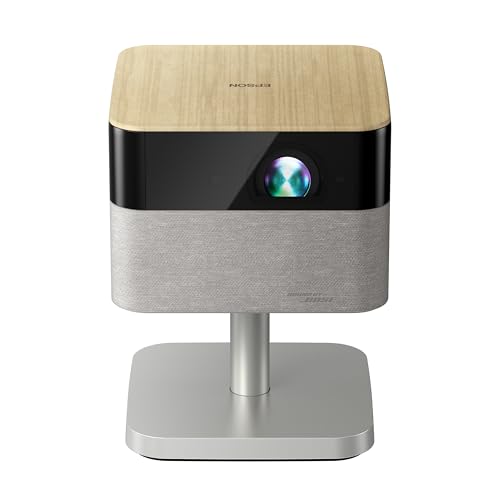
The Lifestudio Flex Plus begins from a heretical premise: that a projector should be allowed to look like something. Where the Flex and EX machines wear the anonymous black of office equipment, the Flex Plus is styled as a piece of living-room furniture, runs Google TV as its native language, and hands its audio to sound design by Bose — a partnership whose results you hear immediately, in dialogue that stays clear and music that has a floor to stand on. Its picture comes from a 3-chip 3LCD engine with what Epson calls a Triple Core Engine, producing a 4K PRO-UHD pixel-shifted image with 1,000 lumens of color and white brightness.
That brightness figure defines the contract. One thousand honest 3LCD lumens in a darkened room is a genuinely lovely 100-inch picture, with color that holds together and the PRO-UHD shift adding visible fineness to streamed film. In a bright room it is out of its depth, and no honest review should pretend otherwise — this is an evening machine, a curtains-closed machine, a lamp-off machine. Inside that contract it is superb: Google TV brings the apps, the Bose-tuned sound removes the usual soundbar errand, and the design removes the usual apology for the box on the shelf.
Consider it the anti-EX3290: every priority inverted. Where the EX buys lumens, the Flex Plus buys integration, appearance and sound. Buyers who understand which room they are furnishing will find it the most satisfying object in this guide; buyers who need it at noon in a glass-walled office will find its one real limitation waiting for them.
- Light engine: 3-chip 3LCD Triple Core Engine, 1,000 lumens color and white brightness
- Picture: 4K PRO-UHD (pixel-shifted)
- Smart platform: Google TV
- Audio: Sound by Bose
- Intended rooms: darkened living rooms, media corners, design-led homes
Strengths
- The best-integrated sound in this guide — no immediate soundbar purchase.
- PRO-UHD detail and Google TV make it a complete evening system in one box.
- Furniture-grade design that earns its place in a styled room.
Trade-offs
- 1,000 lumens demands a room you can darken — it is not a daylight machine.
- Pixel-shifted PRO-UHD is a step above 1080p, not native 4K.
- Portability here means room-to-room, not briefcase travel.
Best for: film and streaming households who dim the lights and care how the room looks doing it. Not suited for: bright offices or classrooms — take the EX3290’s lumens instead. Evening viewers can check the Flex Plus price on Amazon and picture it on their own shelf.

Epson Lifestudio Pop Plus — Best compact lifestyle pick
The Pop Plus is the Flex Plus idea distilled for smaller rooms and quieter ambitions. It keeps the recipe — 3-chip 3LCD with the Triple Core Engine, 4K PRO-UHD pixel-shifted picture, Google TV inside, sound by Bose — and turns the brightness down to 700 lumens of color and white brightness in exchange for a smaller, simpler black unit that disappears into a bedroom or a studio flat. Think of it as a television replacement for rooms where a television would dominate: on movie night the wall becomes a screen, and the rest of the week the wall is just a wall.
Seven hundred lumens sounds like a concession until you place it in its intended habitat. In a genuinely dark bedroom at 80 to 100 inches, the Pop Plus is not straining — it is in its element, and the 3LCD engine’s color honesty means skin tones and night scenes hold together instead of graying out. Google TV removes the last friction: no stick, no laptop, no cable across the floor, just the apps you already use, and Bose-tuned audio that respects dialogue at low volume, which is exactly what a bedroom projector is for.
The discipline this pick requires is honesty about light. A streetlamp through thin curtains, a hallway door left open, a partner reading by a lamp — each eats into a 700-lumen budget fast. Owners who can give it darkness get the most charming machine in this guide; owners who cannot should climb to the CO-FH02’s 3,000 lumens and accept a plainer box as the price of defiance.
- Light engine: 3-chip 3LCD Triple Core Engine, 700 lumens color and white brightness
- Picture: 4K PRO-UHD (pixel-shifted)
- Smart platform: Google TV
- Audio: Sound by Bose
- Finish and rooms: black; bedrooms, studio flats, small dark media rooms
Strengths
- The full lifestyle recipe — PRO-UHD, Google TV, Bose sound — in the smallest footprint here.
- Bedroom-perfect at sensible sizes in real darkness.
- Nothing else to buy or plug in for streaming nights.
Trade-offs
- 700 lumens is the strictest light discipline in this guide.
- Not a shared-bright-room machine in any configuration.
- PRO-UHD is pixel-shifted, a refinement of 1080p rather than native 4K.
Best for: bedrooms and small flats where the lights truly go off and the wall is free. Not suited for: living rooms with daytime ambitions or large screens. If your room goes properly dark, see the Pop Plus at its current Amazon price and claim the wall.
What does “portable” actually cover, from briefcase to backyard?
The word portable stretches across this guide until it nearly tears, and it is worth pinning down before you choose. At the strict end stands the 1781W: a machine shaped by the carry-on and the briefcase, whose portability is measured in whether you notice it during a working day of trains, taxis and borrowed meeting rooms. Its slimness is not styling; it is the product. One shelf down, the CO-W01, CO-FH02 and EX3290 are portable the way a toolbox is portable — one hand, one trip from the car, at home in a cupboard between uses. Nobody commutes daily with them, but everybody can move them without planning, and that freedom is why they outsell fixed machines: the projector goes to the audience instead of the audience coming to the projector.
The Lifestudio pair stretch the word furthest. They are portable the way a good speaker is portable — designed to migrate between rooms as life rearranges them, to appear on a patio for one summer evening, to be lent to a neighbor without a training session. Judged by briefcase standards they fail; judged by the standards of objects that live in homes, they are exactly as portable as they need to be. When you read the word in this guide, translate it by pick: travel, carry, or move. All three are real freedoms. They are simply not the same freedom, and paying for the wrong one is how good projectors end up resented.
There is a fourth, quieter dimension: setup portability. A machine that needs a ceiling mount, a calibration ritual and twenty minutes of menu archaeology is not portable in any sense that matters, however light it is. Every pick here runs the same simple drill — table, power, source, focus — and the smart models go further by removing the source from the list entirely. When you compare portables, weigh minutes-to-picture alongside pounds-on-the-scale; in real households and real offices, the minutes are what people feel.
How do fan noise, heat and upkeep differ across the range?
Brightness is made of light, and light is made of power, and power leaves as heat through a fan. That chain explains the acoustic personality of this whole category. The EX3290, pushing 4,000 lumens through a compact case, has the most heat to shed and makes no secret of it; in a classroom or hall the sound vanishes under speech and ventilation, but in a silent bedroom it would be a presence. The CO pair sit in the middle — audible in quiet scenes at close range, unremarkable anywhere else. The Lifestudio models, with their lower brightness and living-room brief, are the quietest company, designed to sit near sofas rather than at the front of halls.
Practical placement tames most of it. A portable on a shelf behind the audience puts both the fan and the exhaust where nobody sits, and a few feet of distance costs more decibels than any eco mode buys. Eco or quiet modes trade brightness for calm and make sense for the Lifestudio pair in dark rooms, where their lumens are surplus anyway; on the work machines, eco is a lamp-life strategy for owners who present in dim rooms and would rather bank hours than lumens. Either way, decide with the room’s noise floor in mind: an office with servers humming will never hear any of these machines, while a small bedroom hears all of them.
Upkeep on 3LCD portables is mercifully light. The air filter wants a rinse or a brush every so often — more often in dusty classrooms and workshops — because a clogged filter is a heat problem in waiting. Lamp-based models eventually need a lamp, an errand measured in years of typical use rather than months, and one worth pricing into any school or business buying several units. The three-chip engine itself has no moving color wheel to wear, which is one reason these machines accumulate long, unglamorous service lives in institutions. Treat the filter kindly, keep the vents unblocked, and a portable 3LCD will usually outlast the laptop that feeds it.
Which sources and connections should you plan around?
A portable projector is only as flexible as what you can plug into it, and the six divide neatly by philosophy. The CO-W01, 1781W and EX3290 are source-fed machines built around HDMI, the universal handshake of laptops, consoles, streaming sticks and document cameras. That dependence is a feature in working environments, where the source changes daily and the projector’s job is to accept all of them without opinion. The EX3290’s second HDMI port deserves its reputation in shared rooms: the fixed PC stays cabled, the visitor’s laptop gets the other port, and nobody crawls behind furniture mid-meeting.
The CO-FH02 and the Lifestudio pair invert the philosophy by absorbing the source. Android TV and Google TV put the streaming services inside the projector, Wi-Fi brings the content, and Bluetooth sends the sound onward to speakers or headphones. For homes this removes the stick, the cable and the input-switching ritual in one move. The cost is dependence on the platform’s app support and updates, a trade television buyers already understand. Wireless casting on the presentation side — the 1781W’s built-in wireless above all — serves the same instinct in offices: the fewer cables between a visitor and the screen, the fewer meetings start late.
Plan the audio path with the same care. Built-in speakers across this guide are honest tools for speech and casual viewing, and the Bose-tuned Lifestudio units rise well above that baseline. Everyone else should know their answer before the first film night: a Bluetooth speaker for the CO-FH02, a soundbar near the screen for the work machines, or headphones for the bedroom. Projectors are bought for pictures and returned over sound; a five-minute audio plan prevents the most common disappointment in the category.
How far back does the projector need to sit?
Throw distance — the gap between lens and screen that a given image size requires — is the specification that ambushes more portable buyers than any other, because rooms are measured in furniture, not in spec sheets. These are standard-throw machines, not ultra-short-throw models: they expect a table a sensible distance from the wall, roughly the length of a living room or classroom, and they reward owners who pace that distance out before ordering. The discipline is simple. Decide the image size your brightness can feed, find the surface the projector will actually live on — coffee table, bookshelf, meeting-room credenza — and confirm the geometry closes. If the only available surface sits too close, the picture shrinks; too far, and the zoom range may not pull it back to the wall you have.
Zoom is your adjustment, within limits. Optical zoom lets you fine-tune image size from a fixed position without losing resolution, which is why presenters love it: the same table works in different rooms because the lens absorbs the difference. What zoom cannot do is rescue a fundamentally wrong placement, and what keystone correction does to rescue it — squaring a tilted image digitally — costs pixels and sharpness in direct proportion to how much you lean on it. The professional habit, portable or not, is boring and undefeated: square the machine to the wall physically, center the lens on the screen, level the case, and let the electronics do as little as possible.
Ceiling mounting deserves a word even in a portable guide, because many portables end their days semi-fixed. All of these machines can live on a shelf or mount, but the moment a projector stops moving, its portability premium is spent — so mount only when the room has truly settled. Most owners find the honest answer is a shelf behind the seating, high enough to clear heads, close enough to reach. It keeps the machine portable in spirit, aligned in practice, and out of the audience’s sightline.
What else belongs in the budget besides the projector itself?
The projector is the largest purchase in the room, but it is rarely the only one, and planning the supporting cast in advance is what separates a system from a gadget. Start with the surface: a painted wall costs nothing and serves most owners well, while a pull-down or tripod screen buys flatness, gain and a clean border — and for the portable machines here, a tripod screen preserves the whole point, because it travels to the garden, the classroom or the hall alongside the projector. Match the screen size to the brightness you bought, not to the wall you happen to have; a modest screen lit properly outperforms a vast one lit thinly, every single time.
Then the source and the sound. The CO-W01, 1781W and EX3290 expect a feeder — a laptop you already own, a console, or a streaming stick that turns any of them into a smart projector for the price of a sandwich. The CO-FH02 and Lifestudio models fold that cost away with their built-in platforms, which is part of their value story. Audio deserves the same line in the plan: presenters can stop at the built-in speakers, film households should earmark a Bluetooth speaker or soundbar unless a Lifestudio’s Bose tuning is doing the work. Finally, the unglamorous lines: a spare HDMI cable of honest length, a surge protector for the shelf, and — for institutions buying lamp machines in quantity — the knowledge of what a replacement lamp costs and how long the rated life runs. None of these extras is large. Together they are the difference between unboxing a projector and owning a cinema.
There is also a budgeting truth specific to this category: brightness is the one specification you cannot retrofit. A dim projector cannot be upgraded with an accessory, while a bright one’s rough edges — plain sound, no streaming — can all be sanded down later with cheap additions. If your money forces a choice, spend it on the light engine and the lumens your room demands, and let the extras arrive over the following months. Owners forgive a projector that starts simple; they do not forgive one that starts dim.
How do the six compare side by side?
| Model | Brightness (color / white) | Resolution | Smart platform | Character |
|---|---|---|---|---|
| Epson EpiqVision Flex CO-W01 | 3,000 / 3,000 lumens | WXGA | None — source required | Simple bright all-rounder |
| Epson EpiqVision Flex CO-FH02 | 3,000 / 3,000 lumens | 1080p | Android TV | Balanced home-and-work default |
| Epson PowerLite 1781W | 3,200 / 3,200 lumens | WXGA | Wireless presentation | Briefcase travel machine |
| Epson EX3290 | 4,000 / 4,000 lumens | WXGA | None — source required | Maximum brightness for lit rooms |
| Epson Lifestudio Flex Plus | 1,000 / 1,000 lumens | 4K PRO-UHD (pixel-shift) | Google TV | Design and Bose sound |
| Epson Lifestudio Pop Plus | 700 / 700 lumens | 4K PRO-UHD (pixel-shift) | Google TV | Compact bedroom lifestyle |
Read the table as a map of two philosophies. The first four machines spend their budgets on light, because their rooms cannot be controlled; the last two spend theirs on everything around the light, because their rooms can. Neither philosophy is superior — but confusing them is the single most common buying error in this category, and it is entirely avoidable once you describe your room honestly.
What mistakes do portable projector buyers keep making?
The classic error is comparing headline lumens across technologies as if the numbers were one currency. A single-chip projector’s white brightness can tower over its color brightness, so a rival’s bigger number may deliver a dimmer red, green and blue than the Epson figures quoted here, where color and white are identical by design. Compare color brightness to color brightness, or better, compare machines in rooms like your own. The second error is sizing the screen to the wall instead of to the light: every extra foot of diagonal spreads the same lumens thinner, and a slightly smaller, punchier image beats a huge gray one every evening of the year.
Third, buyers forget the sound plan. Presentation machines carry presentation speakers; if films are the point, budget attention — not necessarily money — for the audio path, whether that is the Lifestudio models’ Bose tuning, the CO-FH02’s Bluetooth, or a speaker you already own. Fourth, they ignore throw: a portable on a coffee table needs the lens distance your room actually offers, so measure from the likely table to the likely wall before ordering, and remember that keystone correction, while convenient, throws away resolution every time it rescues a crooked setup. Finally, they buy for the room they wish they had. The machines in this guide are honest about their rooms; be as honest about yours.
How should you set up a portable 3LCD projector for the best picture?
Start with geometry. Put the projector square to the wall or screen, lens centered on the image area, and use the optical zoom — not digital keystone — to size the picture. Every degree of tilt you correct electronically costs sharpness, so a stack of books under one end is genuinely better technology than the keystone slider. Then give the lens the distance the image size needs, and check focus at the corners, not just the center, once the machine has warmed up for a few minutes.
Next, the picture settings. Choose the color mode that matches the room: a cinema or natural mode for dark-room film, a brighter presentation mode for lit rooms, and resist the dynamic modes that pump brightness by distorting color. On the Lifestudio models, let Google TV’s setup run fully and connect a decent Wi-Fi network — streaming quality is half the picture. Finally, sound: presenters should test speech at the back of the room, film watchers should pair Bluetooth or place the machine where its speaker fires toward the audience rather than into a corner. Ten unhurried minutes of setup is the difference between a projector people tolerate and one they ask for by name.
Final Recommendation
For most readers, the Epson EpiqVision Flex CO-FH02 is the answer: real 1080p, 3,000 honest lumens in color and white alike, Android TV inside, and a case that still moves. It asks nothing of you and covers the widest ground. If your rooms are brighter than your ambitions, the EX3290’s 4,000 lumens settle the argument; if your work is done in other people’s offices, the 1781W is the professional’s tool; and if your evenings are dark and your taste runs to design, the Lifestudio Flex Plus and Pop Plus turn projection into furniture. The CO-W01 remains the quiet value underneath them all. Pick by room, not by spec sheet — the wall you already own has been waiting to become the biggest screen in the house.
Frequently Asked Questions
Is 3LCD really only made by Epson?
3LCD is Epson’s technology — the company developed the three-chip LCD light engine and remains its manufacturer, which is why every credible portable in this category carries the Epson name. Other brands sell LCD-based mini projectors, but single-panel designs are a different and much cruder technology that borrows the letters without the three-chip light path.
Why do Epson listings quote two brightness numbers?
Because the two numbers tell the truth separately: white brightness measures a white image, color brightness measures the primary colors. On 3LCD machines they are equal, since all three colors project simultaneously at full strength. On some competing designs the color figure falls well below the white figure, which is why a lower-rated Epson can look more vivid than a higher-rated rival.
Can these projectors really fill a 300-inch screen?
The CO-W01 is rated for displays up to 300 inches, and in a fully dark space it will draw an image that large. Treat ratings as ceilings, not targets: brightness spreads across area, so the satisfying range for the 3,000-lumen machines is roughly 80 to 130 inches in dim rooms and smaller in lit ones. Bigger is only better while the picture stays punchy.
Is 4K PRO-UHD the same as native 4K?
No, and we flag it wherever it appears in this guide. PRO-UHD pixel-shifts a lower-resolution panel rapidly to place substantially more detail on screen than 1080p — a real, visible improvement — but it is not a native 4K imager. For streamed film and TV at living-room sizes it satisfies most viewers completely; purists building fixed theaters should compare it against native 4K machines in person.
Do I need a screen, or is a wall enough?
A smooth, light-colored wall is enough to start, and most portable owners never go further. A proper screen adds gain, flatness and a defined border, and it matters most in lit rooms where every photon counts. If you buy one upgrade later, make it a screen sized to the image your brightness can honestly feed.
Can a portable 3LCD projector replace a television?
For the right household, yes — and the Lifestudio models are designed around exactly that ambition. A television is brighter, simpler and better in daylight; a projector is bigger, disappears when off, and turns a blank wall into an event. Households that watch mostly in the evening, value screen size over daylight convenience, and enjoy the ritual of a room going dark will find the swap liberating. Households that graze daytime television with the blinds open should keep the TV and let the projector be the weekend instrument instead. The CO-FH02 splits the difference gracefully, which is why it anchors this guide.
How long do these projectors last?
The light engines and electronics in mainstream Epson portables are built for years of service, and the wearing parts announce themselves: lamp-based models eventually ask for a lamp, filters ask for cleaning, and fans ask not to be suffocated in cupboards. Institutions run machines like the EX and PowerLite lines for the better part of a decade. Home owners who clean the filter and give the vents air will usually upgrade out of curiosity long before the projector gives up.
Which of these is best for a classroom?
The EX3290, because classrooms keep their lights on. Its 4,000 lumens of color and white brightness keep text and video readable, its two HDMI ports suit a fixed PC plus a visiting laptop, and its speaker is voiced for speech. For smaller or dimmer teaching rooms, the CO-W01 covers the same duties with lumens to spare.
Related Guides
Brightness hunters should continue to our roundup of the best 4000 lumen plus projectors, where the lights-on class gets larger and more specialized. If your portable will double as a work machine, the best 4k projectors for office guide covers the boardroom end of the market. And for readers whose evenings matter more than their meetings, our best 1080p home theater projectors comparison stays in the dark where cinema belongs. Home users curious about the legacy 3D shelf should read the best 3d hd projectors. Hall-scale brightness is covered by the best 7000 lumens projectors.


