What's inside
- Key Takeaways
- Quick Picks
- How Did We Choose Coolers for a Mature Platform?
- Why Does AM4 Still Deserve a Serious Cooler?
- Which AM4 Machines Are These Coolers Really For?
- How Do You Re-Cool an Existing AM4 Machine?
- What Mistakes Do AM4 Owners Make When Replacing a Cooler?
- How Does Cooling Change an AM4 Processor’s Behaviour?
- When Should an AM4 Owner Stop Spending?
- What Should You Check on the Motherboard Before Ordering?
- How Do You Keep an Air Cooler Honest for a Decade?
- Comparison Table
- Final Recommendation
- Frequently Asked Questions
- Related Guides
As an Amazon Associate I earn from qualifying purchases. This post may contain affiliate links at no extra cost to you.
gizmoverdict.com is reader-supported. When you buy through links on our site, we may earn an affiliate commission.
Where to buy: Every cooler below is a verified listing from this site’s product pool, and every one states AM4 support in its own listing title. Socket claims in this guide are copied from those titles, never assumed from a brand’s general reputation.
The best am4 cpu coolers serve a platform that refuses to retire, and understanding why is the key to buying well for it. AM4 arrived in 2017 and went on to host generation after generation of AMD processors on the same socket, which means the installed base is enormous and unusually long-lived: machines built around early Ryzen chips have been upgraded in place, sometimes twice, and a great many of them are still doing serious daily work. Their owners are not shopping for nostalgia. They are shopping because a cooler fan has grown noisy, because a processor upgrade within the socket runs hotter than the old one, or because a build that began life modestly has quietly become the household’s main machine and deserves cooling to match.
That framing matters, because it changes what “best” means here. An AM4 cooler bought in this platform’s later years should be judged on three things a launch-era review never had to weigh. First, it must fit the reality of an existing machine — a case bought years ago, memory already installed, a motherboard whose mounting holes follow the AM4 pattern that cooler makers have served for a long time. Second, it should be strong enough for the hottest chip the platform offers, since an in-socket upgrade is precisely what many buyers are cooling for. Third, it earns extra credit if its mounting system gives it a life beyond AM4, because a cooler that can follow you to a newer platform is a purchase, while one that cannot is a farewell gift to a socket.
The six picks below span that whole argument. Two generations of Thermalright’s Peerless Assassin 120 SE carry the value flag, be quiet!’s Dark Rock 5 and Dark Rock Pro 6 carry the silence-and-muscle flag, Noctua’s NH-D15 chromax.black carries the flagship tradition, and the NH-U9S returns in its role as the compact escape hatch for AM4 machines in small cases. Every one of them names AM4 in its listing. What separates them is temperament, size and price of admission — and the age and ambition of the machine they are joining.
Key Takeaways
- AM4 is a previous-generation platform that remains worth cooling well because so many machines still run, and upgrade within, the socket.
- Both Peerless Assassin 120 SE versions state AM4 and AM5 support, making them the value route that can also outlive the platform.
- The Dark Rock Pro 6 carries a stated 300W TDP and twin 135mm Silent Wings fans for the hottest AM4 processors.
- The Dark Rock 5 trades the Pro’s second tower for easier RAM and VRM clearance around crowded AM4 boards.
- Noctua’s NH-D15 chromax.black stands 168mm tall per its listing — measure an older case before falling for the flagship.
- The NH-U9S gives small-case AM4 builds a 125mm option with stated full RAM compatibility.
Quick Picks
| Pick | Badge | Why it earns its place |
|---|---|---|
| Thermalright Peerless Assassin 120 SE | Best value | Six heatpipes and dual 120mm fans at the price point that made this cooler a byword. |
| Thermalright Peerless Assassin 120 SE V2 | Best updated value | The V2 revision spins its dual fans to a stated 1850 RPM and refreshes the formula. |
| be quiet! Dark Rock 5 | Best single-tower premium | Six heatpipes and a Silent Wings 4 fan with clearance designed around real motherboards. |
| be quiet! Dark Rock Pro 6 | Best for hot chips | A stated 300W TDP, seven heatpipes and two fans for AM4’s most demanding processors. |
| Noctua NH-D15 chromax.black | Best flagship tradition | The dual-tower benchmark of the air-cooling world, in black, with Noctua’s accessory depth. |
| Noctua NH-U9S | Best for small cases | A 125mm tower for AM4 machines whose cases cannot host the giants above. |
How Did We Choose Coolers for a Mature Platform?
The first test was documentary: the listing itself had to name AM4. That sounds pedantic until you remember how platform transitions actually strand buyers — a cooler line refreshes, a mounting kit changes, and a product whose family once supported a socket ships without the bracket for it. Every pick below passed the documentary test in its own title, with most naming AM5 in the same breath, which is how the shortlist quietly became a list of coolers that respect both the machine you have and the one you might build next.
The second test was range. AM4 machines are not one machine: they are office boxes built in 2018, gaming rigs upgraded twice, small-form-factor experiments, and everything between. A useful guide had to include a cooler for the case with 125mm of clearance and a cooler for the owner cooling the platform’s hungriest chip, plus the broad middle where most machines live. The third test was honesty about age. These are air coolers — mature, well-understood technology — so the guide evaluates them on mounting quality, fan character, clearance behaviour and stated ratings rather than novelty, because nothing about a fin stack benefits from being this season’s.
One more consideration shaped the order. AM4 buyers are often spending on a machine that has already given them years of service, and they are unusually resistant to being upsold; the guide therefore leads with the coolers whose performance-per-currency is hardest to argue with, and presents the premium models as what they are — purchases of quiet, finish and headroom — rather than as necessities. A cooler that costs more than the processor it cools can still be the right buy. It should just never pretend to be the only buy.
Why Does AM4 Still Deserve a Serious Cooler?
Because the processors are still serious. The AM4 catalogue’s upper reaches include chips with high core counts and, in the gaming line, stacked-cache designs that became benchmarks legends — parts that reward good cooling with sustained boost behaviour and punish weak cooling with noise and throttled plateaus. A machine upgraded to one of those chips on a cooler chosen for a modest early Ryzen is a machine wearing shoes two sizes small. The cooler upgrade is not cosmetic in that story; it is the difference between the processor you bought and the processor you actually get, hour after hour.
There is also a longevity argument unique to this platform’s moment. AM4 motherboards in service today have known characters: their memory is bought, their quirks are mapped, their owners have no desire to rebuild around a new socket for cooling’s sake. A strong air cooler is the cheapest way to extend such a machine’s useful life by years, because heat is the tax every other component pays. And air, specifically, suits a mature machine’s temperament — no pump to age, no coolant to permeate, a fan as the only moving part, replaceable in minutes if it ever asks to be.
Finally, the mounting-kit question deserves plain words. AMD kept AM4’s mounting pattern consistent across the platform’s life, and the makers below have long histories with it; several of these listings state AM4 and AM5 support side by side, reflecting mounting systems designed to span the transition. If you buy one of those, keep every bracket and screw the box provides, labelled, in the motherboard carton. The difference between a cooler that migrates to your next build and one that retires with the old board is usually a small bag of hardware somebody threw away in 2026.
Which AM4 Machines Are These Coolers Really For?
Picture four owners. The first upgraded an ageing Ryzen build to one of the platform’s celebrated gaming chips and discovered the old cooler singing at full voice through every session. The second runs a many-core AM4 workstation that compiles and renders through the night. The third inherited a compact AM4 machine and wants it quiet enough for a shared room. The fourth is simply replacing a dying fan on a cooler that was never good. The picks below are ordered so each of those owners meets their answer early — value flagships first, then premium silence, then the famous flagship, then the small-case specialist — but the verdicts matter more than the order, because an AM4 machine’s case and chip, not its owner’s enthusiasm, decide which cooler belongs in it.

Thermalright Peerless Assassin 120 SE — Best value
Few products in PC building have a reputation as disproportionate to their price as the Peerless Assassin 120 SE, and the listing explains the mechanics of it plainly: six heatpipes with AGHP technology, a dual-tower fin arrangement, and two 120mm PWM fans stated at 1550 RPM, covering AMD AM4 and AM5 plus a run of Intel sockets. Dual towers at this end of the market were supposed to be impossible without a catch, and the catch, after years of ownership reports, appears to be mostly that the box is less glamorous than the flagships’. The cooling is the glamorous part.
For an AM4 owner, the appeal compounds. This is the cooler that lets an in-socket processor upgrade stay an in-socket budget: the money saved against a premium tower funds the chip, the memory, the storage — the parts of the upgrade you can actually feel — while the cooling simply stops being the machine’s limiting factor. Its fans, governed by a sane curve, have the headroom to treat even the platform’s warmer gaming chips as a normal workload rather than an emergency. And because the listing states AM5 support in the same title, the cooler does not expire with the platform; it is one of the few farewell-proof purchases an AM4 owner can make.
The ownership caveats are the familiar dual-tower ones. It is a substantial object that wants its height and its memory clearance checked against your specific case and sticks, and its installation in a board already resident in a case — the classic AM4 scenario — rewards removing the graphics card first and working with patience rather than optimism. The fans are good rather than legendary, which at this price is not a criticism but a description of where the money went: into copper and fin area, where it belongs.
- Design: dual tower, six heatpipes, AGHP per listing
- Fans: dual 120mm PWM, 1550 RPM per listing
- Sockets per listing: AMD AM4/AM5, Intel LGA 1700/1150/1151/1200/1851
- Character: performance-first value
- Best paired with: in-socket AM4 upgrades
Strengths
- Dual-tower cooling at a price that leaves the upgrade budget intact.
- Stated AM4 and AM5 support makes it a cooler with a future beyond this build.
- Six heatpipes give it sustained-load composure beyond its price class.
Trade-offs
- Dual-tower bulk demands height and memory-clearance checks in older cases.
- Fan refinement is a step behind the premium German and Austrian rivals.
- Installing it around an existing build takes more patience than a fresh build would.
Best for: AM4 owners upgrading within the socket who want flagship-class cooling economics. Not suited for: very compact cases, or buyers who prize silence and finish above all measurable things.

Thermalright Peerless Assassin 120 SE V2 — Best updated value
The V2 exists because the original’s success earned it a revision, and Thermalright’s listing describes the refresh in working terms: still a dual-tower design with six heatpipes and dual 120mm PWM fans, but with the fans now stated at 1850 RPM, and the socket list tidied to AMD AM4 and AM5 with Intel LGA1851, 1700, 1200 and 115X. That higher fan ceiling is the headline change, and it should be read correctly — not as a cooler that runs faster all the time, but as one with more headroom in reserve for the hottest days and the hottest chips, to be spent by the fan curve only when the workload presents the bill.
Choosing between the two Assassins is this guide’s happiest problem. The original’s lower fan ceiling suits owners whose machines are quiet-first and whose chips are mainstream; the V2 suits the AM4 owner cooling one of the platform’s demanding parts in a case with ordinary airflow, where reserve capacity converts directly into lower temperatures at the same noise, or the same temperatures at less. Both state the AM4-plus-AM5 span that makes them migration-friendly. Neither asks the buyer to enter an ecosystem, install a suite, or forgive a proprietary anything. The revision simply moves the value line a little further along, and the existence of two versions lets the buyer decide which side of the noise-headroom exchange their machine lives on.
In every other respect the V2 inherits the family’s character: honest materials, an installation that rewards the usual dual-tower patience, and a total indifference to fashion. It will not light up, it will not display anything, and in five years it will be exactly as fashionable as it is today, which is to say not at all — and still cooling. For a platform whose owners demonstrably keep machines for the long haul, that indifference reads less like a limitation and more like a shared philosophy.
- Design: dual tower, six heatpipes per listing
- Fans: dual 120mm PWM, 1850 RPM per listing
- Sockets per listing: AMD AM4/AM5, Intel LGA1851/1700/1200/115X
- Character: refreshed value flagship
- Best paired with: hotter AM4 chips in ordinary cases
Strengths
- Higher fan ceiling buys real headroom for demanding processors and warm rooms.
- Keeps the family’s AM4-to-AM5 migration path in its stated socket list.
- The same spend-on-copper discipline that made the original a byword.
Trade-offs
- Owners of quiet mainstream builds may never use the headroom they paid for.
- Same dual-tower clearance homework as its sibling — height and memory first.
- At full fan speed it is audible in a way the premium rivals work harder to avoid.
Best for: AM4 builds around the platform’s warmer processors, and buyers who want reserve capacity. Not suited for: silence-absolutists, or cases whose clearance fails the dual-tower measurement.

be quiet! Dark Rock 5 — Best single-tower premium
The Dark Rock 5 is the premium answer for the AM4 board that cannot, or will not, host a dual-tower giant. be quiet!’s listing describes a single tower with six high-performance heatpipes and a Silent Wings 4 120mm fan on fluid-dynamic bearings, and it repeats one phrase twice, which tells you where the design effort went: high RAM and VRM cooler compatibility. On a mature AM4 motherboard — tall memory bought years ago, a substantial VRM heatsink fitted by a maker who expected hot chips — that clearance engineering is not a footnote. It is the difference between a premium cooler that installs cleanly and one that starts an argument with components you already own.
Its character is the house character: silence treated as a specification rather than a hope. The Silent Wings fan’s bearing and blade design aim at the low, smooth register that shared rooms and open-plan desks demand, and the single-tower format keeps the whole cooler in a more manageable physical and financial class than the Pro below. For the broad middle of AM4 processors — the gaming chips, the six- and eight-core workhorses, the machines that burst rather than plateau — the Dark Rock 5 delivers the premium experience without asking the case to swallow a flagship’s full silhouette.
The boundary is thermal ambition. A single tower, however refined, concedes sustained-load headroom to the dual towers in this guide, and the AM4 owner cooling the platform’s hungriest many-core chip through nightly renders should read the Pro’s review next rather than asking this cooler to be something it is not. Within its brief, though, the Dark Rock 5 is the most civilised object in this article: quiet, clearance-aware, finished like furniture, and priced like the premium it is rather than like a utility. AM4 machines that have earned a little luxury will find it here.
- Design: single tower, six heatpipes per listing
- Fan: Silent Wings 4 120mm FDB PWM per listing
- Clearance: high RAM and VRM compatibility per listing
- Character: premium quiet
- Best paired with: mainstream-to-strong AM4 chips in full cases
Strengths
- Clearance designed around real motherboards — memory and VRM heatsinks keep their space.
- The quietest temperament in this guide at ordinary and gaming loads.
- Single-tower size fits cases and builds the dual towers complicate.
Trade-offs
- Sustained many-core plateaus belong to the dual towers; this concedes that ground.
- Premium pricing buys refinement, not a different performance class.
- Its composure depends on a decent case airflow path to show its best.
Best for: AM4 owners who want premium quiet and clean installation around existing components. Not suited for: the platform’s hottest chips under nightly all-core loads, or strict value calculations.
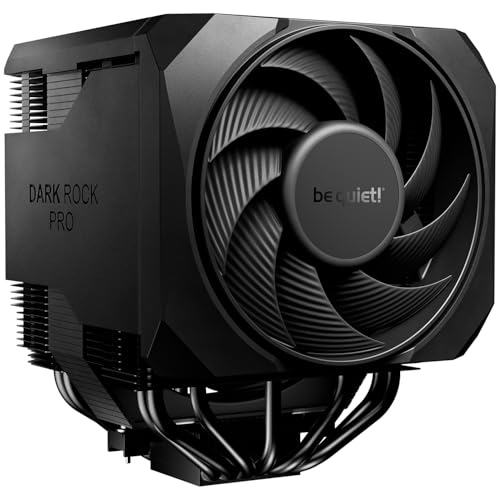
be quiet! Dark Rock Pro 6 — Best for hot chips
Where the Dark Rock 5 is diplomacy, the Pro 6 is force. The listing’s numbers describe the intent without subtlety: seven heatpipes, two Silent Wings 135mm fans, a stated 300W TDP, a semi-passive mode, and a two-mode speed switch. This is be quiet! building its dual-tower flagship for processors that run hot as a way of life — and AM4, unusually for a mature platform, has such processors in genuine circulation, the many-core parts that workstations were built around and that still chew through rendering and compilation queues every night. For those machines, this is the guide’s answer when the question is simply: what is the strongest quiet air cooler that states AM4 support?
Two features deserve translation. The semi-passive mode lets the fans rest at low loads, so a workstation idling between jobs can fall properly silent rather than idling at a murmur — a quality-of-life detail that owners notice daily. The speed switch offers a choice of fan character at the hardware level, a small confession that noise preference is personal and that the maker would rather hand you the dial than decide for you. Combined with the house’s clearance engineering, repeated in this listing as well, the Pro 6 manages the flagship trick of being enormous in capability while remaining considerate about the motherboard it sits on.
Enormous, though, is a word with a tape measure attached. A dual-tower cooler with 135mm fans is a serious object, and in an AM4 machine of some vintage the case may predate the era of cavernous interiors. Measure height, check the first expansion slot’s neighbourhood, and accept the answer. If the case says yes, the Pro 6 is the kind of purchase that ends a machine’s thermal story permanently: the last cooler an AM4 build ever needs, bought once, at flagship money, with flagship manners.
- Design: dual tower, seven heatpipes per listing
- Fans: two Silent Wings 135mm PWM per listing
- Rating: 300W TDP per listing
- Modes: semi-passive mode, two-mode speed switch per listing
- Clearance: high RAM and VRM compatibility per listing
Strengths
- The strongest stated rating in this guide, aimed squarely at AM4’s hottest processors.
- Semi-passive behaviour gives a working workstation a genuinely silent idle.
- Retains the family’s clearance awareness despite its flagship scale.
Trade-offs
- Flagship money for a platform many owners are deliberately not overspending on.
- Its physical scale will simply not fit a share of older AM4 cases.
- Mainstream chips will never reveal most of what the price bought.
Best for: many-core AM4 workstations and the platform’s most demanding chips in roomy cases. Not suited for: compact or elderly cases, mainstream processors, or value-led upgrades.
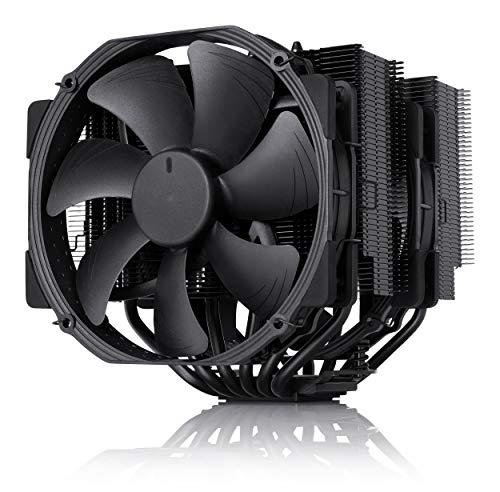
Noctua NH-D15 chromax.black — Best flagship tradition
The NH-D15 is less a product than a reference point — the dual-tower cooler against which a decade of rivals has been measured — and the chromax.black version answers the only criticism its silver original ever consistently drew, which was about how it looked. The listing states the essentials: 168mm of height, six heatpipes, dual 140mm fans, enthusiast-grade low-noise intent, and a rich accessory kit. For an AM4 owner, its presence in this guide is about certainty. This is the cooler whose behaviour in a build is the most thoroughly documented in the hobby, whose mounting system is a byword, and whose maker has built a reputation on supporting sockets across eras with kits rather than shrugs.
That support culture matters specifically here. AM4 owners are, by definition, people keeping a platform alive, and Noctua is the maker whose whole business model rhymes with that instinct. The rich accessory kit in the box, the quality of the mounting hardware, the fans’ bearing pedigree — these are the things that make a cooler feel like infrastructure rather than an accessory, and on a machine expected to serve for years more, infrastructure is the right register. The black finish, meanwhile, lets a windowed AM4 build look intentional rather than archaeological, no small thing for a rig that has grown by accretion.
The cautions are physical and financial. At 168mm per its listing, the D15 demands a case from the generous end of the AM4 era; plenty of beloved older cases will refuse it, and the NH-U9S below exists partly for their owners. Its width asks the usual questions of the first expansion slot and tall memory. And its price, against the Peerless Assassins’ disruption, now buys refinement, support culture and acoustic polish more than raw degrees. Buyers who value exactly those things will find this the most satisfying object in the guide. Buyers who value only degrees should let the Thermalrights close the sale.
- Height: 168mm per listing
- Design: dual tower, six heatpipes per listing
- Fans: dual 140mm per listing
- Finish: chromax.black
- In the box: rich accessory kit per listing
Strengths
- The category’s benchmark cooling with the deepest ownership documentation anywhere.
- Mounting hardware and accessories set the standard every rival is judged by.
- Black finish suits windowed builds that outgrew the silver original’s look.
Trade-offs
- 168mm of height excludes a real share of the AM4 installed base’s cases.
- Premium pricing now buys polish and support more than temperature.
- Its width requires the standard first-slot and memory checks before ordering.
Best for: roomy AM4 builds whose owners value refinement, support and acoustic polish. Not suited for: cases under its height, strict budgets, or builds where the Assassins’ value is decisive.
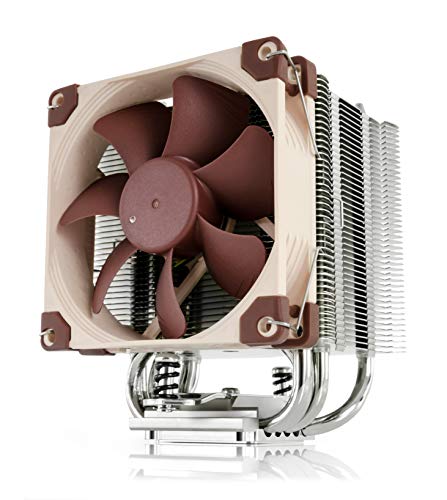
Noctua NH-U9S — Best for small cases
Not every AM4 machine lives in a tower with flagship clearance, and the platform’s long life means a meaningful number of them live in compact cases chosen when the build was young and modest. For those machines the NH-U9S is the guide’s escape hatch: a single tower standing 125mm tall per Noctua’s listing, turning on a 92mm fan, with the listing’s promise of full RAM compatibility and the family’s rich accessory kit. It brings the flagship maker’s manners to a size class the giants cannot enter, and for a small AM4 build that combination is not a lesser version of the dream — it is the dream, correctly sized.
Its role in an AM4 context is usually restorative. The small machine’s original cooler — often a stock or budget unit fitted when the processor was humbler — grows loud as the chip is upgraded within the socket, and the U9S is the replacement that restores civility without demanding a new case. Its designed-in memory clearance matters doubly in compact builds, where a cooler that eats a slot has solved nothing, and its mounting hardware suits the bench-first installation method small cases reward: cooler on the board outside the enclosure, memory verified by eye, then the assembly lowered in.
Its limits are the honest limits of its size, already mapped in this guide’s 92mm coverage: sustained loads from the platform’s hottest chips will ask more of its single fan than quiet-loving owners want to give. But AM4’s small machines rarely run those chips, and for the efficient-to-mainstream processors they do run, the U9S offers something the big towers cannot — a perfect fit. In a guide full of headroom arguments, it is the reminder that the best cooler is always, first, the one that fits the machine you actually own.
- Height: 125mm per listing
- Design: single tower, 92mm fan
- Compatibility note: 100% RAM compatibility per listing
- Platforms: Intel and AMD per listing
- In the box: rich accessory kit per listing
Strengths
- Brings flagship mounting quality and manners to AM4 cases with modest clearance.
- Memory compatibility is designed in — decisive in compact existing builds.
- The restorative upgrade a small, ageing AM4 machine most often actually needs.
Trade-offs
- Not the answer for the platform’s hottest chips under sustained load.
- Premium-per-degree economics if the case could have fitted an Assassin.
- A single fan offers no redundancy for owners who like a spare installed.
Best for: compact AM4 cases around 125mm of clearance running efficient to mainstream chips. Not suited for: many-core sustained workloads, or roomy cases wasting its size advantage.
How Do You Re-Cool an Existing AM4 Machine?
Cooling a machine that already exists is a different job from cooling a fresh build, and the differences reward a methodical hour. Start by recording the present: idle and load temperatures and, just as important, the noise as you currently experience it, so the upgrade has a baseline to be judged against rather than a memory to be argued with. Then clean before you spend — a mature AM4 machine’s radiator-less heatsink fins, case filters and fan blades carry years of dust, and some “failing” coolers are simply wearing a blanket. If the numbers and the noise still disappoint, the replacement has earned its budget.
Removal and fitting deserve patience in a resident build. Power down, give the old cooler’s paste a gentle twist rather than a vertical pull — mature paste can grip a processor firmly enough to test the socket’s retention, and a slow rotational break of the bond is the veteran’s move — then clean both surfaces until they shine. Fit the new cooler’s mounting on the bench if the case allows the board to come out; if it does not, remove the graphics card for knuckle room and work in good light. Check memory and slot clearances with the cooler offered up before paste commits you, and route the fan cable before the card goes back.
Afterwards, tune for the machine’s real life. A fan curve set for the processor’s actual workload — calm through desktop and gaming bursts, committed only under genuine plateaus — is what converts a strong cooler into a quiet machine, and on an AM4 build that has been noisy for years, the first evening of that quiet is the moment the upgrade justifies itself. Recheck temperatures against your baseline after a week of normal use, in the room’s normal warmth, and the story is complete.
What Mistakes Do AM4 Owners Make When Replacing a Cooler?
The sentimental mistake comes first: assuming that because the platform is mature, any cooler will do, and buying on price alone for a chip that was the platform’s flagship. The opposite mistake follows it — buying a flagship cooler for a modest chip in a small case, then blaming the guide, the maker or the platform when it does not fit. Both errors are cured by the same two measurements: the processor’s real workload and the case’s real clearance. A third error is documentary: trusting that a cooler line “supports AM4” in general while the specific listing in the cart has moved on. This guide repeated each pick’s stated sockets precisely because the listing, not the lineage, is the contract.
Two practical errors close the list. Discarding the spare mounting hardware of a cooler that spans AM4 and AM5 throws away the migration path that justified the purchase. And judging the new cooler in its first ten minutes — fans still at motherboard defaults, curve untuned, paste fresh — mistakes a first impression for a verdict. Give the installation its week, tune its curve, and then decide; mature platforms reward owners who think in years, and so do the coolers in this guide.
How Does Cooling Change an AM4 Processor’s Behaviour?
Modern processors do not run at a fixed speed; they negotiate, moment by moment, between the workload’s demands and the thermal room available. That negotiation is why a cooler upgrade on AM4 so often feels bigger than a specification sheet predicts. Under a weak cooler, a strong chip boosts eagerly for the first minute of a load, then settles into a lower, hotter plateau as the fin stack saturates, and its fan announces the whole transaction. Under one of the stronger coolers in this guide, the same chip reaches a higher plateau and stays there, because the heat has somewhere to go. The benchmark that improves most is rarely the one-minute sprint; it is the twenty-minute render, the long compile, the extended gaming session — the loads that resemble actual use.
The stacked-cache gaming chips that crown the platform add their own nuance. Their cache sits atop the compute dies, and the design’s gaming brilliance comes with a preference for being cooled decisively rather than merely adequately; owners who upgraded to one on a legacy cooler form the single largest group of readers this guide was written for. They do not need liquid, and they do not need the most expensive object here. They need a dual tower with honest fin area — the Assassins are the value expression of that, the Dark Rock Pro 6 and NH-D15 its premium expressions — and a fan curve that lets the cooler work at a steady, committed pace instead of oscillating around the chip’s boost attempts.
There is a subtler dividend, paid in the room rather than the benchmark. A cooler running within its comfort holds a steady acoustic line, and steady sounds disappear from attention in a way that hunting, surging sounds never do. Much of what AM4 owners describe as their machine feeling “old” is actually this acoustic restlessness — a cooler at its limit, negotiating loudly. Restore the headroom and the same machine, same chip, same case, feels years younger. It is the closest thing PC maintenance offers to a rejuvenation, and it costs a fin stack.
When Should an AM4 Owner Stop Spending?
Honesty requires a section most buying guides skip: the point at which further spending on this platform stops making sense, and how cooling fits into that judgement. The test is the machine’s remaining ambition. If the AM4 build is a stepping stone — a new platform planned within the year — then the right cooler is one of the migration-ready picks whose listings state AM5 support, bought at the value end, because its cost travels with you. If the machine is a keeper, expected to serve three or more years in its current role, premium quiet earns its price honestly, because you will be listening to the decision for thousands of hours. If the machine is neither — drifting, roleless, kept from inertia — then the correct cooler purchase is the cheap fix for the immediate problem, or none at all, and the money belongs in the fund for whatever replaces it.
Cooling also interacts with the platform’s other upgrade paths in ways worth sequencing. A processor upgrade within the socket should never precede its cooler by more than a few days, because the new chip’s behaviour is defined by the cooling it meets. Memory and storage upgrades are thermally indifferent and can happen any time. A graphics card upgrade, by contrast, changes the case’s whole thermal weather — more heat dumped into the same air the CPU cooler breathes — and owners planning one should choose CPU cooling with that future weather in mind, favouring headroom over exact-fit sufficiency. The AM4 platform’s gift is that all of this can happen gradually, one considered component at a time. The coolers in this guide are written for gradualists.
What Should You Check on the Motherboard Before Ordering?
An existing board holds three traps for the cooler buyer, and all three are visible before money moves. The first is the socket’s neighbourhood: AM4 boards from the platform’s long life vary enormously in how much hardware crowds the socket — tall VRM heatsinks on enthusiast boards, memory slots pressed close on compact ones, an M.2 heatsink standing proud on some designs. The premium picks in this guide advertise their clearance engineering precisely because this neighbourhood varies; the value dual towers ask you to verify it. Photograph the socket area, compare it against the cooler’s stated dimensions, and let the Dark Rock line’s clearance-first designs arbitrate any doubt.
The second trap is the header situation. A dual-fan cooler wants either two fan headers or a splitter, and a mature board’s headers may already be fully committed to case fans fitted across the years. Check what is free before the cooler arrives, not during the install with the side panel off and the light fading. The third trap is subtler: BIOS fan control on older boards can be cruder than modern owners expect, with fewer curve points and no coolant-style smoothing. Every cooler here still works under such control — PWM is PWM — but the quiet these designs are capable of may need a simple, conservative curve rather than an elaborate one, and expectations should be set by the board’s era as much as by the cooler’s pedigree.
None of these checks requires opening the wallet, and together they take twenty minutes. They are also the difference between the two classic AM4 cooler stories: the one where the new cooler drops in and the machine is transformed by dinner, and the one where it waits on a desk for a splitter, a lower memory stick and a free weekend. The platform has been patient with its owners for years. Twenty minutes of reciprocation is a fair price.
How Do You Keep an Air Cooler Honest for a Decade?
The maintenance story of these six coolers is short enough to fit in one section, and its brevity is itself a buying argument for a mature platform. Twice a year, or when the seasons change the room’s dust, the fin stacks want a blow-through with compressed air or a soft brush, working from the exhaust side so the dust leaves the way it would have preferred to all along. Case intake filters, if the case has them, want the same appointment. That is the whole ritual. There is no coolant level to wonder about, no pump hours to budget, no tubing to inspect for the brittleness of age — a list of absences that owners of long-lived machines learn to price correctly.
The fan is the one component with a lifespan conversation attached, and it is a friendly one. A quality fan on these coolers — Noctua’s and be quiet!’s especially, with their fluid-dynamic and rifle bearing pedigrees — is built for years of continuous service, and if it ever does grow rough, it unclips and is replaced as a fan, not as a cooler. Owners should note their cooler’s fan size and clip style in the build’s records, the way one notes a tyre size, so a future replacement is a purchase rather than an investigation. The Thermalright pair accept standard 120mm fans with equal indifference, which is another quiet form of the value they represent: even their wear parts are commodity parts.
And once in a great while — if the cooler is removed for a processor change, a deep clean, a move of house — the paste gets renewed as a matter of course, because the joint is open anyway and fresh compound costs minutes. That is the complete liturgy. An AM4 machine maintained this way does not merely survive its second decade of service; it arrives there still quiet, still cool, and still recognisably the machine its owner chose to keep.
Comparison Table
| Pick | Design | Stated sockets | Signature figure | Choose it when |
|---|---|---|---|---|
| Peerless Assassin 120 SE | Dual tower | AM4/AM5 + Intel | 6 heatpipes, fans 1550 RPM | Value leads the decision |
| Peerless Assassin 120 SE V2 | Dual tower | AM4/AM5 + Intel | Fans 1850 RPM | Extra headroom is worth having |
| Dark Rock 5 | Single tower | See listing kit | Silent Wings 4 fan | Premium quiet with easy clearance |
| Dark Rock Pro 6 | Dual tower | See listing kit | 300W TDP stated | The hottest AM4 chips, quietly |
| NH-D15 chromax.black | Dual tower | Intel & AMD per listing | 168mm height | Flagship tradition and support |
| NH-U9S | Single tower, 92mm | Intel & AMD per listing | 125mm height | Small AM4 cases |
Final Recommendation
For most AM4 owners, the Peerless Assassin 120 SE — or its V2 revision, if your chip runs hot and your room runs warm — is the cooler this platform’s second act deserves: strong, honest, and priced so the rest of the upgrade survives. Step to the Dark Rock 5 when quiet and clearance around an existing board matter more than the last degree, and to the Dark Rock Pro 6 when the processor is one of AM4’s genuine heavyweights. The NH-D15 chromax.black remains the connoisseur’s flagship where the case allows it, and the NH-U9S keeps small AM4 machines in the family. Whichever you choose, you are not cooling a relic; you are cooling a machine with years left in it. Fit the cooler it has earned, keep the spare brackets, and let the platform’s long story continue.
Frequently Asked Questions
Is it worth buying a good cooler for an older platform?
If the machine still does real work, yes — and the arithmetic is kind. A cooler is among the cheapest components in a build, the platform’s stronger processors reward cooling with sustained performance, and several picks here state AM5 support as well, so the purchase can outlive the platform entirely. The wasteful version is the opposite: a flagship processor throttled and deafening under a cooler chosen for a lesser chip.
Will these coolers fit my AM4 motherboard’s mounting holes?
Every pick’s listing names AM4, and AM4’s mounting pattern stayed consistent through the platform’s life, which is why makers can state that support plainly. Use the AM4 hardware from the cooler’s box rather than any clips left over from a previous cooler, follow the kit’s AM4 instructions specifically, and keep the remaining brackets — several of these coolers speak AM5 too, through the parts you might otherwise discard.
Air or liquid for an AM4 upgrade?
For most owners, air — and this guide is the argument. A mature machine values the absence of a pump to age and coolant to permeate, the coolers here cover the platform’s full thermal range including its hottest chips, and the strongest of them do so quietly. Liquid earns its place in small cases with no tower clearance or in builds chasing a particular aesthetic; for a tower AM4 machine, the fin stack remains the sensible flagship.
My case is old. Which pick is safest?
The one whose stated height your case clears with margin, measured rather than remembered. Older cases cluster at clearances the NH-U9S was designed for, and its listing’s full RAM compatibility removes the second classic ambush. If your measurement surprises you with generosity, the Dark Rock 5’s clearance-aware single tower is the next safest step up.
Do I need new thermal paste for a cooler swap?
Yes — a cooler change always wants a fresh application on a cleaned heat spreader, whether the new box includes a tube or you use your own. Old paste that has served for years has dried into a poor conductor, and reusing its impression under a different cold plate leaves air where copper should meet. The few minutes of cleaning are the cheapest performance in the whole upgrade.
Can I move my AM4 cooler to an AM5 build later?
With several picks here, the listings themselves answer yes: both Peerless Assassin versions state AM4 and AM5 support in the same title, reflecting mounting systems built to span the two platforms. The practical conditions are housekeeping, not engineering — keep the full mounting kit, including the parts the AM4 install did not use, and budget for fresh paste at the move. Owners of the premium Noctua and be quiet! models should check their specific kit’s stated platforms the same way, in the listing, rather than assuming a family-wide promise; the documentary habit this guide has insisted on is exactly what makes a future migration a plan instead of a hope.
How long will a good air cooler last on AM4?
Effectively as long as the machine asks it to. The fin stack does not wear, the heatpipes do not age in any way an owner can measure, and the fan — the one moving part — is replaceable in minutes if years of service ever make it noisy. That durability is the deep reason air suits this platform’s long story: an AM4 machine kept for a decade needs components whose failure modes are singular, visible and cheap, and a tower cooler is precisely that. Buy a good one once and the cooling line of the machine’s budget closes for good.
Should I replace a working stock cooler just because it is old?
Replace it for a symptom, not a birthday. If the machine’s temperatures are healthy, its fan is quiet at the loads you actually run, and the processor is the modest part it was bought for, the stock cooler has earned its continued employment and the money is better held for the upgrade that changes something you can feel. The moment any of those conditions breaks — a processor upgrade within the socket, a fan developing a rattle or a hunting whine, load temperatures creeping across seasons despite clean fins — the replacement stops being discretionary, and this guide’s order of battle applies: value dual towers for most, premium quiet for shared rooms, the small tower for small cases. Age alone convicts no cooler; behaviour does.
What temperatures should I expect after upgrading?
Expect the shape of the load to change more than any single number. Idle temperatures move modestly, because there was never much heat to remove. The transformation lives at the plateau: a strong dual tower typically holds a heavy sustained load at a temperature the old cooler reached only in its first minute, and it does so at fan speeds low enough that the machine’s acoustic character changes with its thermals. Judge the upgrade after a week, across your real workloads and your room’s real warmth, comparing against the baseline you recorded before the swap — that before-and-after, in your own case, is the only benchmark that was ever about your machine. Keep the two sets of numbers with the build’s records, alongside the fan-curve settings that produced them, because a future you — troubleshooting a warm evening two summers from now, wondering whether the machine has always run at that temperature under that load — will be profoundly grateful for a baseline written down rather than a feeling remembered. Documentation is the cheapest form of maintenance there is, and on a platform whose whole story is longevity, it is also the most characteristic: the owners who keep AM4 machines thriving are, without exception, the ones who wrote things down. A line in a notebook — cooler model, curve settings, the temperature of the room and of the chip on the evening everything was tuned — turns every future question about the machine from an investigation into a lookup, and it costs less time than reading this single paragraph has taken you just now. Treat that notebook as part of the build itself, stored with the motherboard carton and the spare mounting brackets, and the machine’s next decade of quiet, cool, unremarkable service is already half arranged before a single new component has even been ordered for it by anyone in the household at all. It is a fittingly unglamorous ending for a thoroughly unglamorous subject — and unglamorous, in the world of keeping good machines alive, is the highest compliment available anywhere in this entire guide for anyone reading it right here today now.
Related Guides
An AM4 machine being kept in service usually wants its display and storage reviewed with the same honesty, so see Best 1080p FreeSync Monitors: Six Screens That End Tearing and Stutter for the screen an upgraded rig deserves, and Best 120Hz Monitors: Native 120Hz Picks at 1080p, a 1440p Step Up and 4K Screens for Console Speed if the refresh-rate itch has started. Builders weighing a fuller refresh may also find Best 1080 Gaming Monitors: Six Fast Full HD Screens for Smooth Play a useful companion before deciding what the machine becomes next.


